dsh-engramory 1.4.0 → 1.5.0
This diff represents the content of publicly available package versions that have been released to one of the supported registries. The information contained in this diff is provided for informational purposes only and reflects changes between package versions as they appear in their respective public registries.
- package/README.en.md +57 -9
- package/README.md +20 -6
- package/client.js +346 -14
- package/index.js +4961 -3495
- package/package.json +1 -1
package/README.en.md
CHANGED
|
@@ -47,7 +47,7 @@ dsh plugin --profile <name> add dsh-engramory
|
|
|
47
47
|
To uninstall, use `remove` instead of `add`.
|
|
48
48
|
|
|
49
49
|
**Name the version to upgrade**, as in `dsh plugin --profile <name> add
|
|
50
|
-
dsh-engramory@1.
|
|
50
|
+
dsh-engramory@1.5.0`: by name alone, pnpm 11 (the desktop app's own included) by default
|
|
51
51
|
installs only a version published at least 24 hours ago. The desktop app's Plugins page has no *Update*
|
|
52
52
|
for a plugin from outside dsh: uninstall it, search for `dsh-engramory@<version>` and
|
|
53
53
|
install that, then quit dsh from the tray and open it again. Your memory and settings stay.
|
|
@@ -60,8 +60,10 @@ is unverified.
|
|
|
60
60
|
|
|
61
61
|
**Where the memory lives:**
|
|
62
62
|
|
|
63
|
-
- **The global store**, `~/.dsh/.engramory-memory/` (under `$DSH_HOME` when it
|
|
64
|
-
|
|
63
|
+
- **The global store**, by default `~/.dsh/.engramory-memory/` (under `$DSH_HOME` when it
|
|
64
|
+
is set); the memory page can move it to another folder (see
|
|
65
|
+
[Moving the store](#moving-the-store)). With the plugin alone this is the only store;
|
|
66
|
+
the AI creates it on its first save.
|
|
65
67
|
- **A project store** (optional), `.engramory-memory/` in a project's root, is created
|
|
66
68
|
by you only: run `python tools/engramory_init.py dsh --project-root <project>` from
|
|
67
69
|
the Engramory repo, which also git-ignores it. Where one exists, what holds only in
|
|
@@ -166,7 +168,8 @@ owner, so a program forwarding other people's messages must leave it out.
|
|
|
166
168
|
row gives its day and how far off it is (a passed date is an outcome to confirm, as a
|
|
167
169
|
reminder: nothing is archived), and a note past 12 KB or one the index leaves out is
|
|
168
170
|
marked. Beside each store's name: its index fill as a bar (to the nearer of its two
|
|
169
|
-
caps), *Open the
|
|
171
|
+
caps), *Open the folder*, and for the global store *Change location* (see
|
|
172
|
+
[Moving the store](#moving-the-store)). What its check-up finds is listed under
|
|
170
173
|
it: the index's links to files that are not there, the notes not in the index (recall
|
|
171
174
|
starts from the index, so the AI will not find them unless another note links to
|
|
172
175
|
them), notes with no type, notes past 12 KB, an index over the cap; *Copy tidy-up
|
|
@@ -186,6 +189,50 @@ owner, so a program forwarding other people's messages must leave it out.
|
|
|
186
189
|
the plugin's version and the OS family, no path and no note), or an email, with a button
|
|
187
190
|
that copies the address.
|
|
188
191
|
|
|
192
|
+
## Moving the store
|
|
193
|
+
|
|
194
|
+
*Change location*, at the top right of the memory page's global memory (beside *No memory yet* before
|
|
195
|
+
there is any), moves the global store to another folder: a synced one, say, or a private
|
|
196
|
+
git repository. Click *Choose folder…* to pick it in the system's own window, or type the
|
|
197
|
+
path, then click *Move it there*:
|
|
198
|
+
|
|
199
|
+
- **Choose folder** opens dsh's own chooser, on the screen of the computer dsh runs on.
|
|
200
|
+
Where dsh takes it that you are not at that computer (dsh on a remote server, say), there
|
|
201
|
+
is no such button and the path is typed; dsh started locally and opened from elsewhere
|
|
202
|
+
through an ssh tunnel still takes you to be local, and opens it on that computer's screen. A folder that
|
|
203
|
+
holds something already (the root of a synced folder, say) gets an `Engramory` folder
|
|
204
|
+
made inside it for the memory. Choosing only fills the path in; *Move it there* moves.
|
|
205
|
+
|
|
206
|
+
- **All of it moves, and the old place is cleared.** It is copied to the new place first,
|
|
207
|
+
each file checked, and only then switched to; the old place is then renamed aside,
|
|
208
|
+
compared file by file with the new one, and removed. What was written to the old place
|
|
209
|
+
while it moved is added to the new one; a file changed in both places keeps the new
|
|
210
|
+
place's version, with the old place's beside it as `<name>.old-<id>` and a line for it
|
|
211
|
+
at the end of the index. Nothing in the new place is written over.
|
|
212
|
+
- **Cut short, nothing is lost.** Each step is written down first: dsh closed before the
|
|
213
|
+
switch, the move is undone when it opens again and the memory stays where it was;
|
|
214
|
+
closed after, the move is finished when it opens again.
|
|
215
|
+
- **Every dsh on this computer moves with it.** The place is kept in
|
|
216
|
+
`.engramory-memory.json` in dsh's home folder, which the desktop app, the command line
|
|
217
|
+
and `dsh web` all follow (their plugin configs are their own; the global store is
|
|
218
|
+
shared). Do not delete that file: without it the store is looked for at its default
|
|
219
|
+
place, and the memory moved elsewhere is not found.
|
|
220
|
+
- **For the few seconds it takes, the AI cannot save memory** and is told to try again
|
|
221
|
+
shortly; after the move, a save it makes to the old place is refused with the new one
|
|
222
|
+
named.
|
|
223
|
+
- **It cannot go** on a network path, a whole drive, your home folder or dsh's (or a folder
|
|
224
|
+
holding either), anywhere else in dsh's home folder, a folder named `.engramory-memory`
|
|
225
|
+
(a project would read it as its own), or inside the store itself. A store holding a
|
|
226
|
+
folder link, or anything that is not a plain file, is not moved: sort it out by hand.
|
|
227
|
+
With `indexPath` set, there is no move.
|
|
228
|
+
- **Readers** (`claude-reader`, `codex-reader` and the others, see one writer, many
|
|
229
|
+
readers above) read the new place once installed again with it.
|
|
230
|
+
- **Only dsh's own writes are held off.** A shell, an editor or another AI tool writing to
|
|
231
|
+
the store in those few seconds is beyond the plugin, and what it writes may be missed.
|
|
232
|
+
A network drive mapped to a letter cannot be told apart, and there dsh may stall. Only
|
|
233
|
+
file contents are copied: NTFS alternate data streams are not, and hard links become
|
|
234
|
+
separate files.
|
|
235
|
+
|
|
189
236
|
## Configuration
|
|
190
237
|
|
|
191
238
|
Settings the page does not cover go in your profile's `cordis.patch.yml`. Patch the
|
|
@@ -202,7 +249,7 @@ caps in force. A patch replaces the row's whole `config`, so list every key you
|
|
|
202
249
|
|
|
203
250
|
| Field | Default | Meaning |
|
|
204
251
|
|---|---|---|
|
|
205
|
-
| `indexName` | `MEMORY.md` | The file name treated as the index. The cap matches it case-insensitively; sending the index needs the exact name on a case-sensitive filesystem (Linux, say).
|
|
252
|
+
| `indexName` | `MEMORY.md` | The file name treated as the index. The cap matches it case-insensitively; sending the index needs the exact name on a case-sensitive filesystem (Linux, say). |
|
|
206
253
|
| `maxLines` | `200` | Line cap for the index. |
|
|
207
254
|
| `maxBytes` | `25600` | UTF-8 byte cap for the index (25 KB). |
|
|
208
255
|
| `indexPath` | unset | The one index to use: absolute, or relative to the session's directory. Unset, a `MEMORY.md` in any project is capped as an index; a store outside the default places also needs it to be found. |
|
|
@@ -238,8 +285,9 @@ writable. This table is pinned by `node --test` in CI.
|
|
|
238
285
|
some versions and presets carry; a tool of the same name from another plugin is
|
|
239
286
|
judged the same way. Shell tools, MCP file tools and external editors go past it: run
|
|
240
287
|
`engramory_check.py` after editing the index and `engramory_doctor.py` now and then.
|
|
241
|
-
- **
|
|
242
|
-
|
|
288
|
+
- **The global store is found where the memory page put it.** Moved there by hand, it
|
|
289
|
+
is not (move it back and use the memory page, or set `indexPath`); for a project store
|
|
290
|
+
that links out of the project, set `indexPath`. A project's root is found by
|
|
243
291
|
its `.git` only, and a project store created mid-session can take ten seconds to appear.
|
|
244
292
|
- **Social mode knows you by what dsh's window sends.** Apart from a bridge's owner
|
|
245
293
|
messages, only what you type in dsh's own window is yours, and not when the browser's
|
|
@@ -249,8 +297,8 @@ writable. This table is pinned by `node --test` in CI.
|
|
|
249
297
|
- **What the memory page opens is checked by path.** dsh's opener resolves the path once
|
|
250
298
|
more before the desktop opens it, so a process changing the store's files at that
|
|
251
299
|
moment could redirect what opens (as with dsh's own opener for any workspace file).
|
|
252
|
-
- **Experimental:** companion mode, social mode,
|
|
253
|
-
change in a minor version.
|
|
300
|
+
- **Experimental:** companion mode, social mode, the settings and memory pages, and moving
|
|
301
|
+
the store may change in a minor version.
|
|
254
302
|
|
|
255
303
|
## Feedback
|
|
256
304
|
|
package/README.md
CHANGED
|
@@ -26,13 +26,13 @@ dsh plugin --profile <名字> add dsh-engramory
|
|
|
26
26
|
|
|
27
27
|
卸载把 `add` 换成 `remove`。
|
|
28
28
|
|
|
29
|
-
**升级要写上版本号**,比如 `dsh plugin --profile <名字> add dsh-engramory@1.
|
|
29
|
+
**升级要写上版本号**,比如 `dsh plugin --profile <名字> add dsh-engramory@1.5.0`:只写名字时,pnpm 11(桌面版自带的也是)默认只装发布满 24 小时的版本。桌面版的插件页对第三方插件没有「更新」按钮:先卸载,再搜 `dsh-engramory@<版本>` 安装,装完从托盘退出 dsh 再打开。记忆库和设置都会保留。记忆页底部的「检查更新」能查到最新版本号,并列出这几步。
|
|
30
30
|
|
|
31
31
|
兼容的 dsh 版本见 [`package.json`](https://github.com/tinqiao-oss/engramory/blob/master/adapters/dsh/plugin/package.json) 里的 `dsh.compatibility.dshReleases`,没列出的版本未经验证。
|
|
32
32
|
|
|
33
33
|
**记忆存在哪:**
|
|
34
34
|
|
|
35
|
-
- **全局库** `~/.dsh/.engramory-memory/`(设了 `$DSH_HOME`
|
|
35
|
+
- **全局库** 默认在 `~/.dsh/.engramory-memory/`(设了 `$DSH_HOME` 就在它下面),可以在记忆页换到别的文件夹,见[更换存储地址](#更换存储地址)。只装插件就用这一个,AI 第一次保存时自己建。
|
|
36
36
|
- **项目库**(可选)是项目根目录下的 `.engramory-memory/`,只能由你来建:在 Engramory 仓库里运行 `python tools/engramory_init.py dsh --project-root <项目>`,它会顺手加进 `.gitignore`。有项目库时,只在这个项目成立的事记在那里,其余仍记全局库。
|
|
37
37
|
|
|
38
38
|
一个库只能有一个 AI 写,同时写会互相覆盖;想让别的 AI 也用,让它只读,见[单写者、多读者](https://github.com/tinqiao-oss/engramory/blob/master/adapters/reader/README.md)。记忆是明文,带着本机细节。放在项目的 git 仓库里必须 git-ignore;给记忆库单独开一个私有仓没问题。
|
|
@@ -81,7 +81,21 @@ agent.followup(createUserMessage({
|
|
|
81
81
|
|
|
82
82
|
|
|
83
83
|
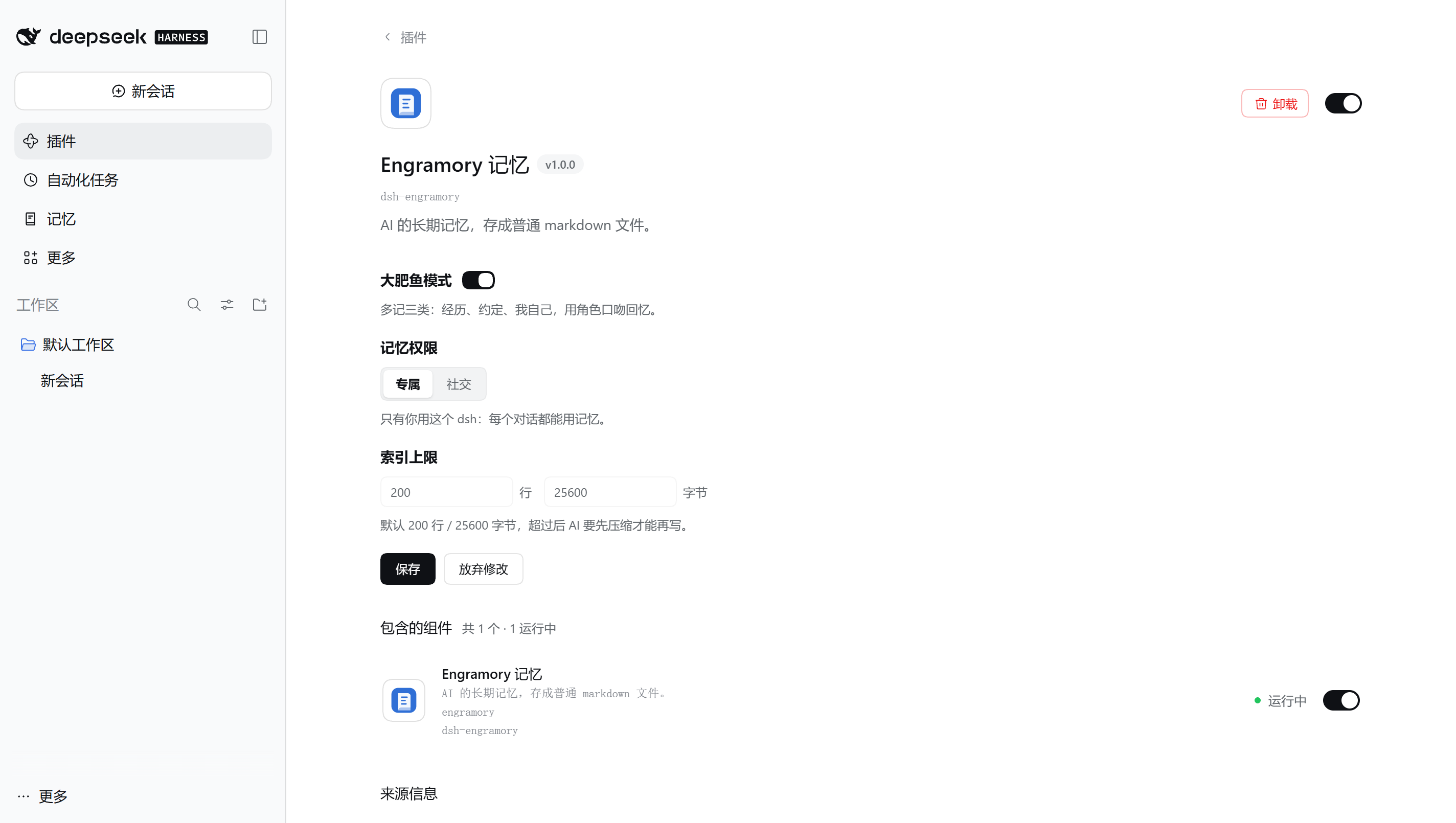
- **设置页**:dsh 的「插件」页里点开「Engramory 记忆」,能改大肥鱼模式、记忆权限和索引上限。保存走 dsh 自己的配置服务,写进你 profile 的 `cordis.patch.yml` 并重新加载插件。这个接口只有登录了的你能调,AI 没法调用它关掉社交模式。
|
|
84
|
-
- **记忆页**:左侧栏「记忆」。最上面一条横幅:标题旁是插件版本;列出了多少笔记、几个记忆库、多少归档,什么时候读的,还有两个开关(大肥鱼模式,打开后还有记忆权限),拨了就保存。下面按笔记类型分标签、可按名字筛选,列出全局库和各工作区的项目库(设了绝对路径的 `indexPath` 时只列那一个,相对路径则列不出)。每条笔记一行:类型图标、名字、类型和大小;约定那一行标出日期和还有几天(日期已过的写「待确认」,只是提醒,不会自动归档),超过 12 KB
|
|
84
|
+
- **记忆页**:左侧栏「记忆」。最上面一条横幅:标题旁是插件版本;列出了多少笔记、几个记忆库、多少归档,什么时候读的,还有两个开关(大肥鱼模式,打开后还有记忆权限),拨了就保存。下面按笔记类型分标签、可按名字筛选,列出全局库和各工作区的项目库(设了绝对路径的 `indexPath` 时只列那一个,相对路径则列不出)。每条笔记一行:类型图标、名字、类型和大小;约定那一行标出日期和还有几天(日期已过的写「待确认」,只是提醒,不会自动归档),超过 12 KB 的标「偏大,建议拆分」,不在索引里的也会标出。每个库名旁边是索引用量(进度条按两项上限里离得近的那个画)和「打开文件夹」,全局库还有「更换存储地址」(见[更换存储地址](#更换存储地址))。体检发现的问题集中列在库下面:索引里指向不存在的文件、不在索引里的笔记(AI 回忆从索引开始,除非别的笔记链到它们,否则通常找不到)、没写类型的笔记、超过 12 KB 的笔记、索引超上限;旁边的「复制整理指令」复制一段给 AI 的整理要求,粘贴进对话即可,插件本身不改任何文件。体检只按文件名和索引里的链接判断,不顺着符号链接走;索引超上限、要核对的太多或有文件读不了时不做,完整检查仍用 `engramory_doctor.py`。列表被截断或有库读不了时会注明,不把没列到的算成零。只读,不显示正文;点名字、「打开文件夹」都在运行 dsh 的那台机器上打开;没有桌面的机器(无界面服务器、SSH 连过去的)不显示这些按钮。下面有一段「怎么用」,还没有记忆时自动展开。页底是插件版本和「检查更新」:点了才向 npm(连不上再试 npmmirror)查最新版本号,请求里不带记忆内容;有新版就列出写上版本号的升级步骤。插件别的时候不访问外网。再下面是反馈入口:到 GitHub 提 issue(正文预先写好插件版本和系统类型,不带路径和笔记),或发邮件,地址可以一键复制。
|
|
85
|
+
|
|
86
|
+
## 更换存储地址
|
|
87
|
+
|
|
88
|
+
记忆页「全局记忆」右上角的「更换存储地址」能把全局库换到别的文件夹,比如网盘里,或者一个私有的 git 仓库(还没有记忆时,按钮在「还没有记忆」那行旁边)。点「选文件夹…」用系统自带的窗口选,或者直接填路径,再点「搬过去」:
|
|
89
|
+
|
|
90
|
+
- **选文件夹**用的是 dsh 自己的选择窗口,弹在 dsh 运行的那台电脑的屏幕上。dsh 认为你不在那台电脑前时(比如它跑在远程服务器上)没有这个按钮,填路径即可;在本机启动 dsh、再经 ssh 端口转发从别的电脑打开时,dsh 仍当你在本机,窗口会弹在本机屏幕上。选的文件夹里已经有东西时(比如直接选了网盘根目录),会在里面新建一个 `Engramory` 文件夹放记忆。选完只是填进路径,点「搬过去」才搬。
|
|
91
|
+
|
|
92
|
+
- **整个搬过去,旧位置自动清理。** 先复制到新位置、逐个文件核对,没问题才切换;再把旧位置改名挪开,和新位置逐个比对后删掉。搬的那几秒里后写进旧位置的,会补进新位置;同一个文件两边都改过的,旧位置那份存成新位置里名字带 `.old-<编号>` 的文件,索引末尾加一行指向它,不会覆盖新位置的内容。
|
|
93
|
+
- **中途被打断也不丢。** 每一步都先记下来:还没切换时 dsh 被关了,下次打开就撤销,记忆还在原处;切换之后被打断,下次打开接着做完。
|
|
94
|
+
- **这台电脑上的 dsh 一起换。** 位置记在 dsh 主目录的 `.engramory-memory.json` 里,桌面版、命令行和 `dsh web` 都按它走(插件配置各是各的,全局库是共用的)。别删这个文件:删了就回到默认位置,搬走的记忆就找不到了。
|
|
95
|
+
- **搬的那几秒 AI 存不了记忆**,会被告知过一会儿再存;搬完以后它要是还往旧位置写,会被拦下并告诉它新位置。
|
|
96
|
+
- **不能搬到**:网络路径、整个盘、用户主目录或 dsh 主目录(以及它们的上级)、dsh 主目录里别的地方、名叫 `.engramory-memory` 的文件夹(会被当成项目库)、记忆库自己里面。库里有目录链接或特殊文件时不搬,要手动处理。设了 `indexPath` 时不能搬。
|
|
97
|
+
- **装了只读者的**(`claude-reader`、`codex-reader` 等,见上面的单写者、多读者),换位置后用新位置重装一次,它们才读得到。
|
|
98
|
+
- **只协调 dsh 自己的写入。** 搬的那几秒里,shell、编辑器或别的 AI 工具正好在写记忆库,插件管不到,那次写入可能被漏掉。映射成盘符的网络盘插件认不出来,放在那里 dsh 可能卡顿。只复制文件内容:NTFS 的备用数据流不会带过去,硬链接会变成各自独立的文件。
|
|
85
99
|
|
|
86
100
|
## 配置
|
|
87
101
|
|
|
@@ -97,7 +111,7 @@ agent.followup(createUserMessage({
|
|
|
97
111
|
|
|
98
112
|
| 字段 | 默认值 | 含义 |
|
|
99
113
|
|---|---|---|
|
|
100
|
-
| `indexName` | `MEMORY.md` | 哪个文件名算索引。卡上限时不分大小写;带上索引时,在区分大小写的系统(如 Linux
|
|
114
|
+
| `indexName` | `MEMORY.md` | 哪个文件名算索引。卡上限时不分大小写;带上索引时,在区分大小写的系统(如 Linux)上要和文件名完全一致。 |
|
|
101
115
|
| `maxLines` | `200` | 索引行数上限。 |
|
|
102
116
|
| `maxBytes` | `25600` | 索引字节上限(25 KB)。 |
|
|
103
117
|
| `indexPath` | 不设 | 只认这一个索引:绝对路径,或相对会话目录。不设时,任何项目里叫 `MEMORY.md` 的文件都按索引卡上限;记忆库不在默认位置时也要设它,否则不会自动带上。 |
|
|
@@ -127,10 +141,10 @@ agent.followup(createUserMessage({
|
|
|
127
141
|
## 已知限制
|
|
128
142
|
|
|
129
143
|
- **只拦 dsh 的文件工具**:`write`、`edit`,以及有的版本和预设带的 `str_replace_editor`;别的插件提供的同名工具也照样判。shell、MCP 文件工具和外部编辑器写入都绕过上限;改完索引跑 `engramory_check.py`,定期跑 `engramory_doctor.py`。
|
|
130
|
-
-
|
|
144
|
+
- **全局库要用记忆页「更换存储地址」搬过去才找得到。** 自己挪到别处的不会自动找到(挪回来再用记忆页搬,或者设 `indexPath`);项目库是指向项目外的链接时要设 `indexPath`;项目根只按 `.git` 认;会话中途新建的项目库最多十秒后才出现。
|
|
131
145
|
- **社交模式靠 dsh 窗口发来的信息认你。** 除了接入插件标明的主人消息,只有 dsh 自己窗口里打的字算你的;浏览器读不出时区时也认不出。dsh 以后新加的消息种类,插件认识之前都算别人的:你的会话可能拿不到记忆,但不会把记忆漏给别人。
|
|
132
146
|
- **记忆页打开文件前按路径检查。** dsh 的打开功能拿到路径后还会再解析一次,如果恰好在这一刻有程序改动记忆库里的文件,桌面最终打开的可能是别的东西(dsh 自己打开工作区文件也是这样)。
|
|
133
|
-
-
|
|
147
|
+
- **实验性功能**:大肥鱼模式、社交模式、设置页、记忆页和更换存储地址在小版本里也可能改。
|
|
134
148
|
|
|
135
149
|
## 反馈
|
|
136
150
|
|