dsh-dbhub-live 5.2.0 → 6.0.0-rc.2
This diff represents the content of publicly available package versions that have been released to one of the supported registries. The information contained in this diff is provided for informational purposes only and reflects changes between package versions as they appear in their respective public registries.
- package/README.en.md +90 -23
- package/README.md +90 -23
- package/lib/adhoc.mjs +108 -12
- package/lib/capability.mjs +97 -13
- package/lib/client.js +1511 -334
- package/lib/collect.mjs +100 -2
- package/lib/config.mjs +1289 -126
- package/lib/export.mjs +318 -0
- package/lib/i18n.mjs +150 -2
- package/lib/index.mjs +547 -276
- package/lib/mcp.mjs +292 -54
- package/lib/meta.mjs +25 -17
- package/lib/options.mjs +11 -33
- package/lib/policy.mjs +47 -4
- package/lib/runtime.mjs +80 -11
- package/lib/state.mjs +112 -117
- package/lib/toml.mjs +10 -0
- package/lib/tools.mjs +832 -53
- package/lib/update.mjs +12 -2
- package/package.json +5 -21
- package/AGENTS.md +0 -116
- package/doc/ARCHITECTURE.md +0 -108
- package/doc/CLIENT.md +0 -124
- package/doc/DESENSITIZE.md +0 -56
- package/doc/DEVELOPMENT.md +0 -139
- package/doc/IMPACT-MATRIX.md +0 -36
- package/doc/RELEASE.md +0 -93
- package/doc/REQUIREMENTS.md +0 -177
- package/doc/images/chat-query.png +0 -0
- package/doc/images/row-editor.png +0 -0
- package/doc/images/settings-page.png +0 -0
- package/scripts/desensitize-check.mjs +0 -331
- package/scripts/desensitize.config.mjs +0 -255
- package/scripts/docs-check.mjs +0 -214
- package/scripts/release-preflight.mjs +0 -180
- package/scripts/render-check.mjs +0 -1366
- package/test/adhoc-toml.test.mjs +0 -365
- package/test/auto-dsn.test.mjs +0 -126
- package/test/bridge.test.mjs +0 -227
- package/test/capability.test.mjs +0 -231
- package/test/client-format.test.mjs +0 -515
- package/test/configure-options.test.mjs +0 -244
- package/test/configure-ssh.test.mjs +0 -232
- package/test/copy-from.test.mjs +0 -155
- package/test/env-options.test.mjs +0 -456
- package/test/i18n.test.mjs +0 -37
- package/test/init.test.mjs +0 -163
- package/test/meta.test.mjs +0 -234
- package/test/options.test.mjs +0 -160
- package/test/policy.test.mjs +0 -132
- package/test/resolve-source.test.mjs +0 -82
- package/test/resolve-workspace.test.mjs +0 -115
- package/test/row-cache.test.mjs +0 -237
- package/test/ssh-probe.test.mjs +0 -834
- package/test/state.test.mjs +0 -85
- package/test/test-op-fastpath.test.mjs +0 -208
- package/test/toml.test.mjs +0 -352
- package/test/update.test.mjs +0 -270
- package/test/util.test.mjs +0 -275
- package/test/zero-knowledge.test.mjs +0 -121
package/README.en.md
CHANGED
|
@@ -15,7 +15,8 @@ Install it and you can simply tell the AI "show me the last 10 rows of the order
|
|
|
15
15
|
<details>
|
|
16
16
|
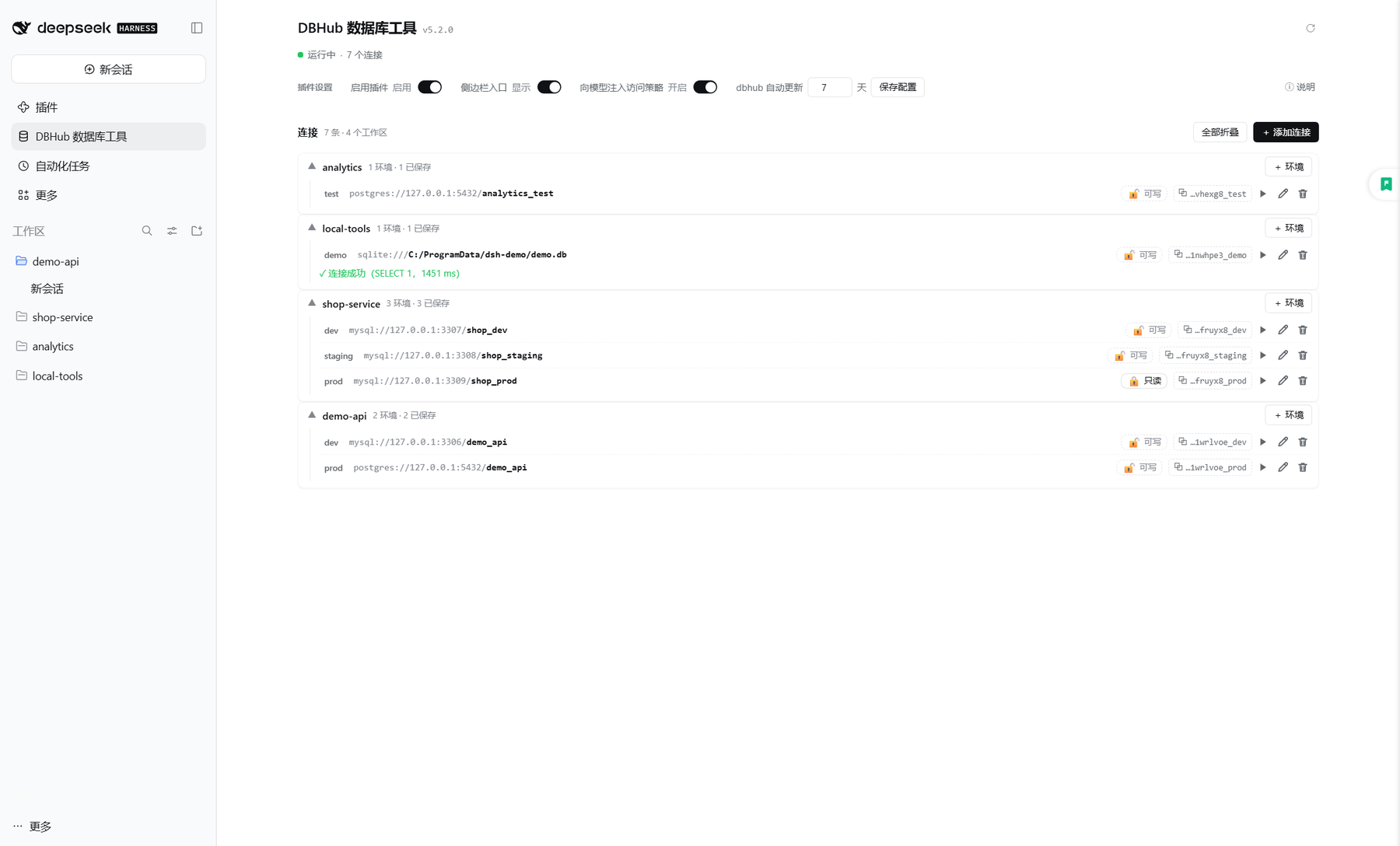
<summary>📷 Preview: Settings → DBHub Database Tools</summary>
|
|
17
17
|
|
|
18
|
-
|
|
19
|
+
|
|
19
20
|
|
|
20
21
|
</details>
|
|
21
22
|
|
|
@@ -28,7 +29,9 @@ Install it and you can simply tell the AI "show me the last 10 rows of the order
|
|
|
28
29
|
| 🧮 **Always 4 tools** | However many environments you add, the model context never grows |
|
|
29
30
|
| 🗂 **Per workspace × environment** | One workspace can hold `default` / `prod` / `dev`… (environment names may be Chinese), told apart by their `source` — never the wrong database |
|
|
30
31
|
| 🛡 **Per-environment read-only** | Writes are refused natively by dbhub; **the model can switch it on but never off** (only you can switch it off on the configure page) |
|
|
32
|
+
| 🚦 **Honours the session permission** | With "Read Only" selected in the composer, write statements are refused outright; with "Workspace Write" every write asks you first |
|
|
31
33
|
| 🔐 **Manual SSH tunnel** | Databases behind a bastion are reachable too; the SSH password / key passphrase is typed in the UI only |
|
|
34
|
+
| 🔗 **Pick sources with `@` in the composer** | Type `@` in the message box and pick a connection; **one message may reference several**, each on its own database |
|
|
32
35
|
| 📦 **Works out of the box** | If dbhub is missing it is installed for you, then kept up to date at your interval |
|
|
33
36
|
|
|
34
37
|
Supports **MySQL · PostgreSQL · MariaDB · SQLite · SQL Server**.
|
|
@@ -36,23 +39,21 @@ Supports **MySQL · PostgreSQL · MariaDB · SQLite · SQL Server**.
|
|
|
36
39
|
<!-- release-test:versions:begin -->
|
|
37
40
|
## Supported version range
|
|
38
41
|
|
|
39
|
-
**From DSH 0.1
|
|
42
|
+
**From DSH 0.2.1 (lines 0.2.1 / 0.2.2, prereleases included)** — 4 declared versions verified (last verified 2026-11-12).
|
|
40
43
|
|
|
41
44
|
<details>
|
|
42
45
|
<summary>Per-version verification details (expand)</summary>
|
|
43
46
|
|
|
44
47
|
| DSH version | UI | Boot | Hard checks | Result | Last verified |
|
|
45
48
|
| --- | --- | --- | --- | --- | --- |
|
|
46
|
-
| `0.1
|
|
47
|
-
| `0.1
|
|
48
|
-
| `0.
|
|
49
|
-
| `0.2.
|
|
50
|
-
| `0.2.1-alpha.1` | modern | 15.2s | 20 | ⚠️ pass with notes · manual | 2026-10-24 · 91642fa2 |
|
|
51
|
-
| `0.2.1-rc.2` | modern | 16.9s | 20 | ⚠️ pass with notes · manual | 2026-10-24 · 91642fa2 |
|
|
49
|
+
| `0.2.1-rc.2` | modern | 5.7s | 21 | ✅ pass | 2026-11-12 · 42462db5 |
|
|
50
|
+
| `0.2.1-rc.5` | modern | 21.1s | 21 | ✅ pass | 2026-11-12 · 42462db5 |
|
|
51
|
+
| `0.2.2-rc.1` | modern | 5.5s | 21 | ✅ pass | 2026-11-12 · 42462db5 |
|
|
52
|
+
| `0.2.2-rc.2` | modern | 5.5s | 21 | ✅ pass | 2026-11-12 · 42462db5 |
|
|
52
53
|
|
|
53
54
|
</details>
|
|
54
55
|
|
|
55
|
-
Full evidence, review rules and known drift live in [doc/SUPPORT-MATRIX.md](doc/SUPPORT-MATRIX.md).
|
|
56
|
+
Full evidence, review rules and known drift live in [doc/SUPPORT-MATRIX.md](https://github.com/mr-mihu/dsh-dbhub-live/blob/dev/doc/SUPPORT-MATRIX.md).
|
|
56
57
|
<!-- release-test:versions:end -->
|
|
57
58
|
|
|
58
59
|
## Installation
|
|
@@ -73,7 +74,7 @@ On desktop you can also **install entirely through the UI**: **left menu → Plu
|
|
|
73
74
|
|
|
74
75
|
Once installed, **restart `dsh web`** and open **Settings → DBHub Database Tools** to see the configure page (there is also a sidebar shortcut, and the Configure control on the plugin's row on the Plugins page — all three entries lead to the same page).
|
|
75
76
|
|
|
76
|
-
> Requirements:
|
|
77
|
+
> Requirements: **DSH 0.2.1 or later** (0.2.1 prereleases included; **0.1.x and 0.2.0 are no longer supported**). On an older host the plugin does not go blank: the configure page shows one bilingual notice naming the required and the running version, and every tool, connection and setting keeps working — but upgrade DSH soon. Node.js ≥ 18 is recommended locally (it is used to install dbhub automatically). **Read-only mode and SSH tunnels need dbhub 1.4.0+** — the plugin detects this and gives you upgrade guidance. Per-version verification results live in [doc/SUPPORT-MATRIX.md](https://github.com/mr-mihu/dsh-dbhub-live/blob/dev/doc/SUPPORT-MATRIX.md) (generated by the release test, which must pass before every release).
|
|
77
78
|
|
|
78
79
|
## Updating
|
|
79
80
|
|
|
@@ -89,7 +90,7 @@ Then **restart `dsh web`**.
|
|
|
89
90
|
|
|
90
91
|
**No need to remember version numbers**: the configure page header shows the plugin name and the current version; when a newer version exists a quiet "**↑ Upgrade to <latest>**" text link appears and **clicking it opens a panel where you copy** `dsh-dbhub-live@<latest>`; the "Check for updates" button next to it checks on demand. Opening the page also triggers one automatic check (throttled, so it does not hit the network on every open). Checks use the **npm registry first, with GitHub Releases as the fallback**; release notes live in [GitHub Releases](https://github.com/mr-mihu/dsh-dbhub-live/releases).
|
|
91
92
|
|
|
92
|
-
> The version/update hint
|
|
93
|
+
> The version/update hint needs plugin 5.2.0+ and DSH 0.2.1+ (see "Configure Page").
|
|
93
94
|
|
|
94
95
|
## Quick Start
|
|
95
96
|
|
|
@@ -105,7 +106,7 @@ AI: … (query results)
|
|
|
105
106
|
<details>
|
|
106
107
|
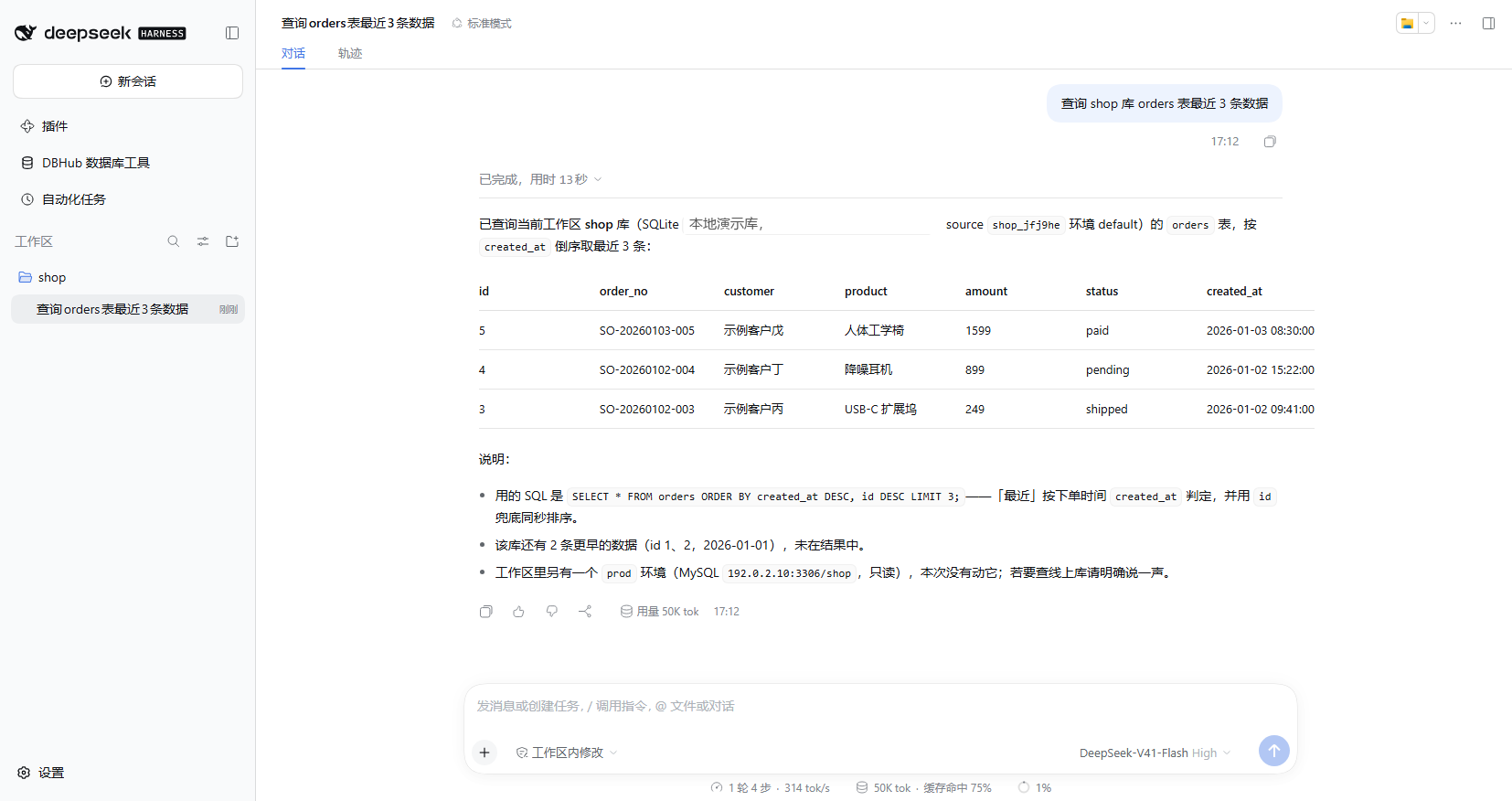
<summary>📷 In action: ask the AI, get the query results</summary>
|
|
107
108
|
|
|
108
|
-

|
|
109
|
+
|
|
109
110
|
|
|
110
111
|
</details>
|
|
111
112
|
|
|
@@ -115,13 +116,26 @@ The password is only ever typed into the box in front of you. If you give only p
|
|
|
115
116
|
|
|
116
117
|
When the workspace already has `mise env` or a `.env` (`DSN` / `DB_*`), the plugin discovers it automatically — no manual configuration needed.
|
|
117
118
|
|
|
119
|
+
## Reference sources with `@` in the composer (several per message)
|
|
120
|
+
|
|
121
|
+
Type **`@`** in the message box and the menu gains a **DBHub** group: one row per configured connection — "alias · workspace · type/host/port/database", with a **read-only** marker when it applies. Picking one inserts a **reference chip** just like `@file`; **one message may carry several of them**:
|
|
122
|
+
|
|
123
|
+
```text
|
|
124
|
+
You: in @app_prod look up the tables referencing orders, then match them against @billing_prod
|
|
125
|
+
```
|
|
126
|
+
|
|
127
|
+
- **Each chip serializes on its own**: on submit every reference becomes a model-readable `@db:<source handle>`, and the model maps each marker, in order, to its own database. The policy section also carries a compact "alias → handle" catalog (aliases and handles only), so the model never has to guess.
|
|
128
|
+
- **Aliases** are computed by the plugin over the **whole connection set**: the environment name itself when it is unique across all workspaces (`@prod`), otherwise `<workspace>_<env>` (`@app_prod` / `@billing_prod`), and only then a `-2` / `-3` suffix. An alias is display/typing sugar — identity is the immutable `source` handle, so renaming or adding connections never invalidates a chip already in the draft.
|
|
129
|
+
- The menu carries **the alias, the workspace title, connection metadata (type, host, port, database) and the read-only marker** only — **never a DSN, account or password**. A disabled plugin, an unresolved state or a failed read yields an empty group (no invented data), and a hand-typed `@alias` is recognised as a reference too.
|
|
130
|
+
- Requires a host that provides the composer `@` trigger service; on a deployment without it the group simply does not appear and everything else keeps working.
|
|
131
|
+
|
|
118
132
|
## Tools
|
|
119
133
|
|
|
120
134
|
| Tool | Description |
|
|
121
135
|
| --- | --- |
|
|
122
136
|
| `dbhub_configure(...)` | Configure / change a workspace connection. **It does not accept a `dsn` argument** — the password and connection string are always typed in the UI; `type`/`host`/`port`/`database`/`user` may be passed as non-sensitive prefills. Supports renaming with `env=<new name>` + `renameFrom=<old name>`, cross-workspace copying with `copyFrom=<another workspace's source>`, `readOnly:true` (`readOnly:false` is refused) and the tunnel options `sshHost`/`sshPort`/`sshUser`/`sshAuthKind`/`sshKeyPath`/`sshProxyJump` (**the SSH password and passphrase can only be typed by you in the dialog**). |
|
|
123
137
|
| `dbhub_list_sources()` | List every connection source, **grouped by workspace** and marking the **[CURRENT WORKSPACE]**; metadata and the **source value** only. |
|
|
124
|
-
| `dbhub_execute_sql(source, sql)` | Execute SQL on the given source; `source` comes from `dbhub_list_sources`. Every call is an independent one-shot connection; separate multiple statements with `;`. |
|
|
138
|
+
| `dbhub_execute_sql(source, sql, maxRows?, export?)` | Execute SQL on the given source; `source` comes from `dbhub_list_sources`. Every call is an independent one-shot connection; separate multiple statements with `;`. The optional `maxRows` overrides that environment's "max rows returned": a positive integer = at most that many rows per statement for this call, `0` = no limit for this call, omitted = use the environment setting (see "Result row limit" below). The optional `export` (`csv` / `json`) writes the result rows into host-local files and returns a summary plus absolute paths (see "Result export" below). |
|
|
125
139
|
| `dbhub_search_objects(source, object_type, ...)` | Search database objects (tables / views / columns / indexes, etc.). |
|
|
126
140
|
|
|
127
141
|
> **Every source belongs to exactly one workspace**: to reuse a connection from another workspace, copy it over with `dbhub_configure`'s `copyFrom` — do not query another workspace's source directly.
|
|
@@ -129,7 +143,7 @@ When the workspace already has `mise env` or a `.env` (`DSN` / `DB_*`), the plug
|
|
|
129
143
|
|
|
130
144
|
## Model-facing database access policy
|
|
131
145
|
|
|
132
|
-
While the plugin is enabled it contributes a **system-prompt section** (about
|
|
146
|
+
While the plugin is enabled it contributes a **system-prompt section** (about 600 characters, plus a compact "alias → handle" catalog once connections exist) that keeps database access on this plugin and states how it coexists with **other database plugins**:
|
|
133
147
|
|
|
134
148
|
- **One authorized route — scoped to this plugin's own connections**: every database listed by `dbhub_list_sources` goes through the `dbhub_*` tools; no `psql` / `mysql` / `sqlite3` / `sqlcmd` / `pg_dump` command-line client, throwaway script, driver, other MCP, or **other database plugin** is used to reach them, and the agent does not go looking for such an executable on the host.
|
|
135
149
|
- **A workspace "recipe" is not authorization**: direct-connection instructions found in project docs, scripts, or `AGENTS.md` (for example a psql recipe an earlier session wrote itself) are never followed — the system prompt outranks workspace instructions.
|
|
@@ -147,13 +161,14 @@ While the plugin is enabled it contributes a **system-prompt section** (about 40
|
|
|
147
161
|
## Configure Page
|
|
148
162
|
|
|
149
163
|
<details>
|
|
150
|
-
<summary>📷
|
|
164
|
+
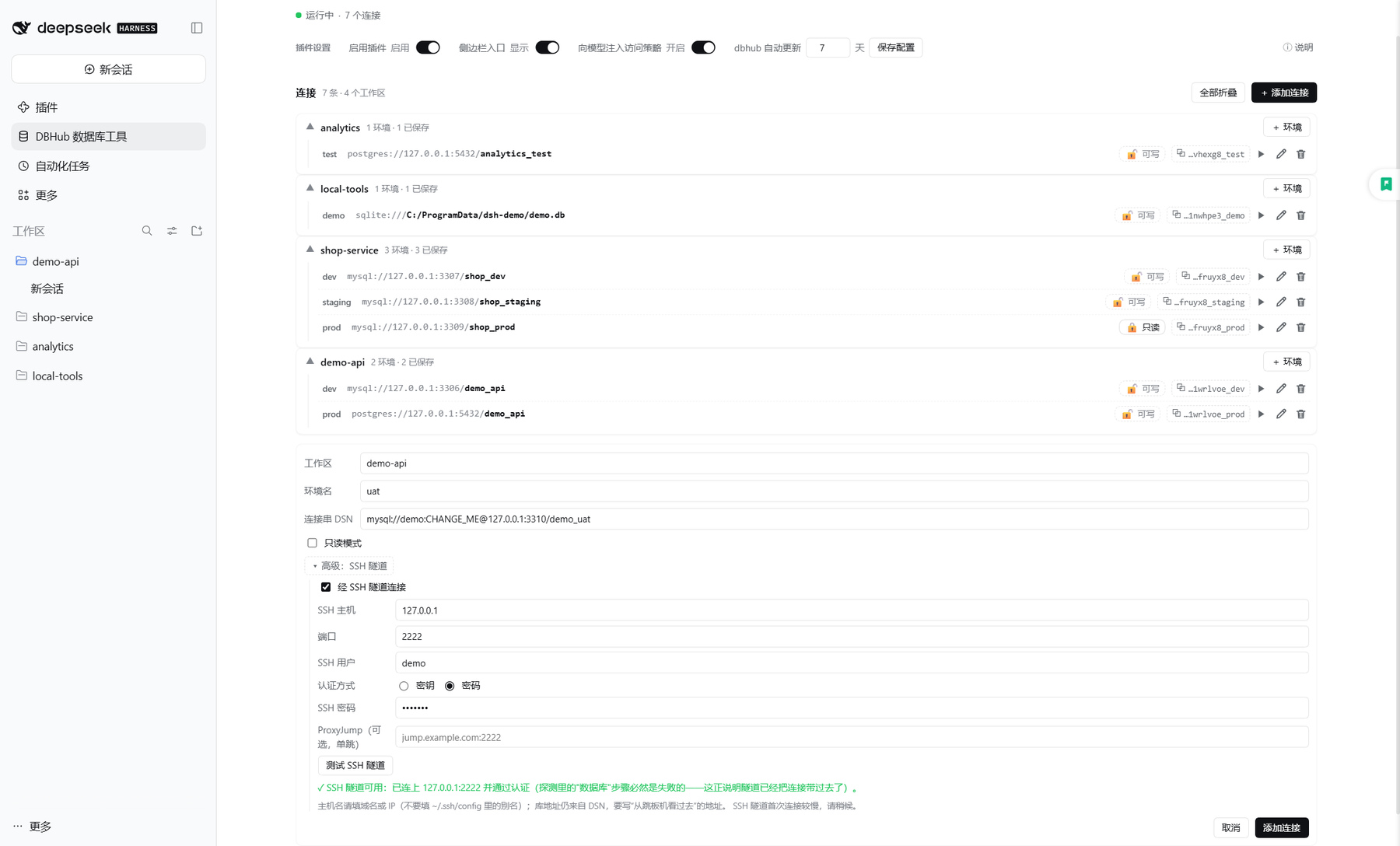
<summary>📷 Add connection: read-only mode and SSH tunnel</summary>
|
|
165
|
+
|
|
166
|
+
|
|
151
167
|
|
|
152
|
-

|
|
153
168
|
|
|
154
169
|
</details>
|
|
155
170
|
|
|
156
|
-
The same component offers **three layouts**, picked automatically from the host surface and the window width (
|
|
171
|
+
The same component offers **three layouts**, picked automatically from the host surface and the window width (needs plugin 5.2.0+ and **DSH 0.2.1+**, see the end of this section):
|
|
157
172
|
|
|
158
173
|
| Layout | How to reach it | Shape |
|
|
159
174
|
| --- | --- | --- |
|
|
@@ -164,15 +179,16 @@ The same component offers **three layouts**, picked automatically from the host
|
|
|
164
179
|
**Header: version and upgrade entry**: the title is the plugin name with the current version (small, muted) right next to it; when a newer version exists a quiet "**↑ Upgrade to <latest>**" text link appears on the right, and **clicking it expands** the update notes — the `dsh-dbhub-live@<latest>` spec (click to copy), the update command / steps for this deployment, and a link to the release notes; the "↻" button checks on demand. Opening the page also triggers an automatic check (throttled). Checks use the npm registry first, with GitHub Releases as the fallback. **An update is neutral news, never styled as an error.**
|
|
165
180
|
|
|
166
181
|
- **Status line**: it shows only "running / disabled · N connections". Implementation facts — tool count, one-shot execution mode, dbhub version — live in the collapsed "ⓘ Details" block below the status line.
|
|
167
|
-
- **Connection list**: organised by workspace. When every workspace has a single environment the rows render as flat cards; as soon as one workspace owns several environments they fold into per-workspace groups (click a group head to expand; the most recently used one is open by default). Each connection takes one line: environment name · type / host / port / **database** · **read-only switch** · the `source` handle (click it to copy) · test / edit / delete. In a narrow window the host and port are truncated first, while **the database name always stays visible**.
|
|
182
|
+
- **Connection list**: organised by workspace. When every workspace has a single environment the rows render as flat cards; as soon as one workspace owns several environments they fold into per-workspace groups (click a group head to expand; the most recently used one is open by default). Each connection takes one line: environment name · type / host / port / **database** · **read-only switch** · the `source` handle (click it to copy) · test / edit / delete. In a narrow window the host and port are truncated first, while **the database name always stays visible**. Above the list sit the **search box, the sort switch and "Test all"** (see "Connection search, sort and batch test" below).
|
|
168
183
|
- **Settings (DSH-native style, deliberately quiet)**: on the wide page the four controls collapse into **one compact settings line** — `Plugin settings · Enable plugin [enabled] · Sidebar entry [shown] · Access policy [on] · Auto-update [7] days [save] · ⓘ details`; the modal and the phone use compact stacked rows. Fonts and switches are kept small so the **connection list** stays the main content. The controls are DSH's own switches (theme/skin aware, with state words); every explanatory paragraph lives in "ⓘ Details & diagnostics".
|
|
169
184
|
- **Read-only switch (outside the edit form in all three layouts)**: right next to the datasource on every connection row there is a small "RO" toggle — one click flips it (open lock + "Writable" = writable; closed lock + "RO" = read-only) without opening the edit form; the modal and the phone layout have it too. The tick-box in the edit form stays as well; both are the same state. **The connection string itself no longer carries a lock icon** — it used to read like "this row needs a password" and clashed with the read-only lock.
|
|
170
|
-
- **Add / edit / delete**: use ✏ on a row to change the connection string or the environment name; "+ Add connection" accepts Chinese environment names. **Saving onto an environment name that already exists asks "overwrite?" first** — cancel and not a single byte is written.
|
|
171
|
-
- **
|
|
185
|
+
- **Add / edit / delete**: use ✏ on a row to change the connection string or the environment name; "+ Add connection" accepts Chinese environment names. **Saving onto an environment name that already exists asks "overwrite?" first** — cancel and not a single byte is written. **Deleting asks first too** (it cannot be undone; cancelling writes nothing either).
|
|
186
|
+
- **A failed write is always visible**: when a save / switch / delete is refused (401, offline, a Host refusal) the page shows an error line and **never** claims "Saved ✓"; fixing it and clicking again is the retry. A failed plugin-state read shows its own error line plus "Retry" instead of silently turning into "no connections". "Auto-update interval" only accepts a whole number of days from 0 to 365 — an empty box or a fraction is rejected on the spot and no request is sent.
|
|
187
|
+
- **Connection test**: runs `SELECT 1` over **the effective connection that environment will really use** (read-only / tunnel included) and shows the elapsed time while it runs. The result is one-shot feedback: nothing is persisted and no connection state changes. When the command never reaches the Host (bridge 401 / offline) it says "the test command never reached the host" immediately instead of reporting a timeout 30 seconds later.
|
|
172
188
|
|
|
173
189
|
**"Show the sidebar entry" is not disabling the plugin**: switching it off merely hides the sidebar shortcut — the plugin keeps working and the model can still query; use "Disable" to stop the plugin as a whole (a disabled plugin always hides the entry). In either state, **the settings page and the Plugins row's Configure control always stay reachable**, so the change can be undone at any time.
|
|
174
190
|
|
|
175
|
-
**
|
|
191
|
+
**When DSH is too old**: the configure page gains one warning at the top (naming "DSH 0.2.1 or later" and the running version); the page, connections, read-only switches and tools all keep working — the plugin is not broken, the host just needs an upgrade.
|
|
176
192
|
|
|
177
193
|
## 🔒 Read-only Mode and SSH Tunnels
|
|
178
194
|
|
|
@@ -180,6 +196,17 @@ Both are **per-environment** connection options executed by dbhub's native featu
|
|
|
180
196
|
|
|
181
197
|
**Read-only mode**: in all three layouts the connection row carries a small "RO" switch next to the datasource — one click flips it (you can also click ✏ and tick it in the edit form; the model can enable it for an environment too). dbhub then lets read statements through only (measured on MySQL: `select/with/explain/show/describe/desc`), and writes come straight back as `READONLY_VIOLATION`; object search keeps working. **Turning read-only off is something only you can do on the configure page** — an attempt by the model is refused. A read-only environment's name gains a small "RO" badge.
|
|
182
198
|
|
|
199
|
+
**The session permission is a second gate**: the mode you pick in the composer ("Read Only" / "Workspace Write" / "Full access") gates write statements **independently of the per-environment read-only switch**; both apply:
|
|
200
|
+
|
|
201
|
+
| Env read-only | Session permission | Write statement | Read statement |
|
|
202
|
+
| --- | --- | --- | --- |
|
|
203
|
+
| on | any | unchanged: dbhub refuses it (`READONLY_VIOLATION`) | runs |
|
|
204
|
+
| off | Full access | runs directly | runs |
|
|
205
|
+
| off | Workspace Write | **asks you for confirmation** (once per write; a refusal means it does not run) | runs |
|
|
206
|
+
| off | Read Only | **refused outright** (dbhub is not even started) | runs |
|
|
207
|
+
|
|
208
|
+
Only the statement's **first keyword** matters: `SELECT` / `SHOW` / `DESCRIBE` / `DESC` / `EXPLAIN` / `VALUES` / `TABLE` / `PRAGMA`, and `WITH … SELECT`, count as reads; everything else counts as a write. It is deliberately **conservative**: one write anywhere in a multi-statement text makes the whole call a write (`SELECT 1; DROP TABLE t`). A refusal states the reason and the next step (and explicitly forbids falling back to a command-line client, a throwaway script, or another plugin). Where the runtime has no session-permission layer (headless / automated calls), this gate is not installed and behaviour is exactly as before.
|
|
209
|
+
|
|
183
210
|
**SSH tunnel** (configured by hand, for databases sitting behind a bastion):
|
|
184
211
|
|
|
185
212
|
| Field | Description |
|
|
@@ -191,6 +218,8 @@ Both are **per-environment** connection options executed by dbhub's native featu
|
|
|
191
218
|
| ProxyJump | Optional, **one hop only**, format `[user@]host[:port]` |
|
|
192
219
|
| Key passphrase / SSH password | **Typed in the UI only**, never echoed back; when editing, **blank = keep the stored value** |
|
|
193
220
|
|
|
221
|
+
The password/passphrase is stored in the **DSH credential store** (by default `~/.dsh/.credentials.yaml`); the plugin's own connection file keeps only a reference name, so no plaintext secret appears there (connections created before the credential service was available keep plaintext and log a one-time notice). **The database password works the same way**: the stored DSN is stripped of its password and the value goes into the same credential store, then the plugin joins it back for every connection (when a shape cannot be split safely, the DSN is left as-is and a one-time notice is logged).
|
|
222
|
+
|
|
194
223
|
"Advanced: SSH tunnel" holds **two** test buttons:
|
|
195
224
|
|
|
196
225
|
- **"Test SSH tunnel"** validates the tunnel layer alone: it first probes TCP reachability of `ssh_host:ssh_port` (about 5 seconds; a failure carries a code such as `ENOTFOUND` / `ECONNREFUSED` / `ETIMEDOUT`), with key auth it checks that the private key file exists and is readable, and finally it **deliberately** asks dbhub to open a tunnel to an address that cannot possibly be listening — then decides from the evidence: an error carrying **SSH signatures** (handshake / authentication / private key) means the tunnel is down; one carrying a **database-layer signature** (`PROTOCOL_CONNECTION_LOST`, `Connection lost`, `Access denied`, `Unknown database`, `ER_*`, `ECONNREFUSED` and the like) means the connection **already got past the tunnel**, so the verdict is "SSH tunnel works"; only when neither is present does it honestly say "cannot be determined", with the tail of the output attached.
|
|
@@ -204,6 +233,34 @@ Order of checks: ① your machine can log in with `ssh user@bastion`; ② **the
|
|
|
204
233
|
|
|
205
234
|
**Prerequisites and limits**: dbhub **1.4.0+** is required (an older version fails with an explicit error rather than being silently ignored); multi-hop, `ProxyCommand` and ssh-agent are **not supported**, and the plugin does **not reuse** the SSH configuration of any other plugin (including DSH's own SSH tooling) — the tunnel information comes only from what you type in. Read-only and SSH are two independent switches; either can be used on its own.
|
|
206
235
|
|
|
236
|
+
## ✂️ Result row limit (per environment + per call)
|
|
237
|
+
|
|
238
|
+
Every connection can carry a **maximum rows returned**: `dbhub_execute_sql` returns at most that many rows per statement, so a single `select *` cannot pour a whole table into the model context. The default is **no limit**, and existing connections behave exactly as before.
|
|
239
|
+
|
|
240
|
+
- **Where to set it**: connection row ✏ → expand "Advanced: SSH tunnel"; the "Max rows" number input sits at the bottom (placeholder "0 or blank = unlimited"). A capped connection says "max N rows" in its environment-name tooltip. The cap is stored **per environment**, with that connection; a negative number, a fraction or non-numeric text is **refused on the spot without sending a request**.
|
|
241
|
+
- **Truncation is always visible**: the receipt's **first line** states the effective cap, the original row count of every truncated statement, and that `maxRows` can override it for this call. A truncated statement carries `truncated: true` and `shown: N`, while its original `count` is preserved.
|
|
242
|
+
- **Per-call override**: pass `maxRows` to `dbhub_execute_sql` — a positive integer caps each statement for this call, **`0` means no limit at all for this call**, and omitting it uses the environment setting. Priority is **call argument > environment setting**; it affects only that call, never changes the stored value, and is **never forwarded to dbhub**.
|
|
243
|
+
- **How and where it happens**: the plugin trims the result host-side (dbhub's `max_rows` is static configuration and cannot express a per-call limit); when the result is not the expected JSON or its shape differs, it is returned **verbatim** — trimming never turns a good result into a broken one. A hand-edited invalid environment value is treated as "unlimited", so it can neither shrink every query to one row nor make the environment fail.
|
|
244
|
+
|
|
245
|
+
## 📤 Result export (CSV / JSON)
|
|
246
|
+
|
|
247
|
+
When a result has a lot of rows, writing it to a local file is far more useful than pouring it into the conversation — that is what export is for:
|
|
248
|
+
|
|
249
|
+
- **How to ask for it**: just say "export the result as CSV / JSON" (or "export it to a file"). The AI then passes `export` (`csv` or `json`) to `dbhub_execute_sql`. The receipt it gets back is a **summary plus the absolute file path(s)** — the rows never enter the conversation, and the AI tells you where the file is and how many rows it holds.
|
|
250
|
+
- **Export ignores the "max rows returned" setting**: an export means "all of it", so the environment's row cap does **not** apply by default; only an explicit `maxRows` truncates (and then the receipt's first line still says the result was truncated).
|
|
251
|
+
- **Multiple statements**: `csv` writes one file per statement (`…-1.csv`, `…-2.csv`); `json` writes one file holding every statement (`{source, statements:[{sql, rows, count}], exportedAt}` — **no connection string**).
|
|
252
|
+
- **Where the files are**: `~/.dsh/storages/dsh-dbhub-live/exports/` (isolated per `DSH_HOME`). Names look like `<source handle>-<yyyymmdd-hhmmss>-<seq>.csv` (the timestamp is UTC); non-ASCII environment names (Chinese, emoji) are escaped to safe ASCII and can never land outside that directory. CSV is **UTF-8 without BOM, RFC 4180 (CRLF line endings)**, so Excel, pandas and database `import` read it directly.
|
|
253
|
+
- **How to clean up**: the plugin **never deletes** export files automatically (they share the data directory and lifecycle with your connections). Delete files under `exports/` when you no longer need them; deleting the whole `~/.dsh/storages/dsh-dbhub-live` clears everything.
|
|
254
|
+
- **A failed write never fails the query**: if the file cannot be written (permissions, disk full), the receipt falls back to the ordinary **inline result** and appends "export failed (<code>); the result is returned inline instead" — the query itself still succeeds. Export files stay on your machine; the summary carries only the source handle, row counts and paths — no connection string, account or password.
|
|
255
|
+
|
|
256
|
+
## 🔎 Connection search, sort and batch test
|
|
257
|
+
|
|
258
|
+
Once the list grows, it has to be filterable, orderable and verifiable in one go — all three live on **one line above the connection list**, in all three layouts (dialog / wide page / phone):
|
|
259
|
+
|
|
260
|
+
- **Search**: type into "Search connections…" and the list is filtered by a case-insensitive substring over the **workspace title / environment name / alias / connection metadata** (Chinese environment names work too, e.g. 线上). An "N / M" counter marks the filter as active and "Clear search" removes it; **no hit says "No matching connections"**, never "you have no connections configured". The filter **only changes what is displayed** — every save, test and delete still targets the row you clicked.
|
|
261
|
+
- **Sort**: `Name` (default: workspace title, then environment name) and `Recently updated` (the most recently touched workspace first, falling back to the name order on a tie). The GROUP order follows the sort too, so the list never reads half-sorted. The choice is remembered for this page only — nothing is persisted.
|
|
262
|
+
- **Batch test**: the button reads "**Test all (N)**" and **N is the number of rows you can see** (filter to 2 and only 2 run). At most **2** probes run at a time (each one spawns a whole dbhub process host-side); every row shows its own `waiting` / `testing…` / `passed ✓` / `failed ✗ · reason`, with a tally above: "x passed / y failed / z untested". While it runs the button becomes "**Stop**": rows that never started go back to untested and **requests already dispatched are allowed to finish** (the protocol has no cancellation, so the plugin does not pretend to cancel). Batch and single-row tests use the same `{op:'test'}` command and the same 30s / 60s watchdog; failure reasons come from the same localized copy. The batch adds **no interval** — it reads each `POST /op` answer and stops when the run is over.
|
|
263
|
+
|
|
207
264
|
## Data Location
|
|
208
265
|
|
|
209
266
|
All configuration and credentials live outside the module directory; delete that directory and everything is cleared:
|
|
@@ -214,6 +271,10 @@ All configuration and credentials live outside the module directory; delete that
|
|
|
214
271
|
|
|
215
272
|
Isolated per `DSH_HOME` and shared by multiple profiles of the same instance (the same convention as dsh's own `workspace.json`). Connections are stored per "workspace × environment"; old formats and leftovers from manual edits are cleaned up and migrated in one pass at startup, and the plugin does not crash if the runtime directory is deleted by accident or a write is blocked. **There is no resident process and no shared configuration file**, so several instances running at once on one machine never interfere. **Upgrading, reinstalling or uninstalling the plugin never touches this directory** — including the desktop upgrade path of "uninstall, then reinstall the latest": connections, read-only / tunnel settings and credentials are all preserved.
|
|
216
273
|
|
|
274
|
+
That connection file holds **no passwords**: the DSN is stored without its database password and the file keeps only reference names. **The SSH login password, the key passphrase and the database password are stored in the DSH credential store** (by default `~/.dsh/.credentials.yaml`, managed by DSH); at startup the plugin moves plaintext secrets that older builds wrote into the connection file into that store in one pass. When the move fails (credential service unavailable) or a connection's password cannot be split out safely, the connection stays as it is, one notice is logged, and it keeps working (the card marks that row's environment tooltip so the value is still in the local file).
|
|
275
|
+
|
|
276
|
+
The same data directory also holds `exports/`: **query-result exports** (CSV / JSON) are written there, the plugin **never cleans them up automatically**, and you can delete the files when you no longer need them (see "Result export").
|
|
277
|
+
|
|
217
278
|
## Uninstall
|
|
218
279
|
|
|
219
280
|
```bash
|
|
@@ -238,14 +299,20 @@ On desktop you can also uninstall directly on the **left menu → Plugins** page
|
|
|
238
299
|
| The read-only / SSH controls are greyed out, or dbhub is reported as too old | Both need dbhub 1.4.0+: upgrade dbhub, or delete `~/.dsh/storages/dsh-dbhub-live` so the plugin installs a version that satisfies it. |
|
|
239
300
|
| A connection test fails and you cannot tell why | Read the **end** of the message (the diagnostic is the tail of dbhub's output and marks the layer: [SSH layer] / [database layer] / [plugin layer]). **A [database layer] report means the tunnel is already up**; with a tunnel configured, press "Test SSH tunnel" first to verify the SSH layer on its own. |
|
|
240
301
|
| The configure page is not visible | Check the plugin is installed: restart `dsh web` on the web side; on desktop use the Configure control on the Plugins row or the DBHub entry in the left menu. The page only shows in the Web / desktop UI and does not affect tool usage in terminal environments. |
|
|
241
|
-
| The
|
|
302
|
+
| The configure page says the DSH version is too old | The plugin needs **DSH 0.2.1+** (prereleases included); upgrade dsh and restart. The tools and the page keep working until you do — the notice is only a reminder. |
|
|
242
303
|
| No "Upgrade to …" hint appears in the header | You may already be on the latest version, or this check could not reach the npm registry / GitHub Releases; press "Check for updates" to retry. A failed check is only a hint and does not affect plugin functionality. |
|
|
243
304
|
| How do I upgrade on desktop | Uninstall on the **left menu → Plugins** page, then reinstall the latest version; connections and credentials live in `~/.dsh/storages/dsh-dbhub-live` and are still there after the reinstall. |
|
|
244
|
-
| After a dsh upgrade the plugin is reported as incompatible |
|
|
305
|
+
| After a dsh upgrade the plugin is reported as incompatible | Check that dsh is 0.2.1 or later, then upgrade the plugin to the latest version; forcing it through with `allow-version` buys nothing. |
|
|
306
|
+
| The configure page keeps saying "the plugin state could not be read" | The panel cannot reach the Host half, usually because the **plugin is disabled** or the **Host half never loaded**: check under **Settings → Plugins** that the row is enabled, and restart DSH after a version change. Tool calls are unaffected — only this panel cannot read the state. |
|
|
307
|
+
| Connections fail to authenticate after downgrading below 6.1 | From 6.1 on, the database password is split out of the connection string into the DSH credential store, and older versions cannot read it (a URL DSN is treated as password-less; a property DSN sends the placeholder as the password). **Re-enter those DSNs once before downgrading** (the password then returns to the connection file), or stay on 6.1+. The password itself is not lost — it is still in the credential store. |
|
|
245
308
|
| Automatic dbhub updates are not wanted | Set "Auto-update interval (days)" to `0` on the configure page and save, or set `DSH_DBHUB_UPDATE_DAYS=0`. |
|
|
246
309
|
|
|
247
310
|
**Environment variables** (only these two, not exposed in the UI): `DSH_DBHUB_PACKAGE` (the package that gets auto-installed, default `@bytebase/dbhub`), `DSH_DBHUB_UPDATE_DAYS` (the seed for the auto-update interval, default `7`, overridden by the value saved on the configure page).
|
|
248
311
|
|
|
312
|
+
## Changelog
|
|
313
|
+
|
|
314
|
+
Highlights of every released version live in [doc/CHANGELOG.md](https://github.com/mr-mihu/dsh-dbhub-live/blob/dev/doc/CHANGELOG.md); per-release notes are on [GitHub Releases](https://github.com/mr-mihu/dsh-dbhub-live/releases).
|
|
315
|
+
|
|
249
316
|
## License
|
|
250
317
|
|
|
251
318
|
[MIT](./LICENSE)
|
package/README.md
CHANGED
|
@@ -15,7 +15,8 @@
|
|
|
15
15
|
<details>
|
|
16
16
|
<summary>📷 界面预览:设置 → DBHub 数据库工具</summary>
|
|
17
17
|
|
|
18
|
-

|
|
19
|
+
|
|
19
20
|
|
|
20
21
|
</details>
|
|
21
22
|
|
|
@@ -28,7 +29,9 @@
|
|
|
28
29
|
| 🧮 **工具恒定 4 个** | 环境再多也不膨胀模型上下文 |
|
|
29
30
|
| 🗂 **按工作区 × 环境管理** | 一个工作区可配 `default` / `prod` / `dev`…(环境名支持中文),用 `source` 区分,绝不串库 |
|
|
30
31
|
| 🛡 **环境级只读** | 写操作由 dbhub 原生拒绝;**模型只能开、不能关**(关闭只由你在配置页操作) |
|
|
32
|
+
| 🚦 **尊重会话权限** | 输入框选「仅可查看」时写语句被直接拒绝;「工作区内修改」时写入每次弹窗确认 |
|
|
31
33
|
| 🔐 **手动 SSH 隧道** | 跳板机后面的库也能连;SSH 密码 / 密钥口令只在界面输入 |
|
|
34
|
+
| 🔗 **对话里 `@` 选数据源** | 输入框里打 `@` 挑连接,**一条消息可以选多个**,各自落在自己的库上 |
|
|
32
35
|
| 📦 **开箱即用** | 没装 dbhub 就自动安装,之后按间隔自动更新 |
|
|
33
36
|
|
|
34
37
|
支持 **MySQL · PostgreSQL · MariaDB · SQLite · SQL Server**。
|
|
@@ -36,23 +39,21 @@
|
|
|
36
39
|
<!-- release-test:versions:begin -->
|
|
37
40
|
## 支持的版本范围
|
|
38
41
|
|
|
39
|
-
**DSH 0.1
|
|
42
|
+
**DSH 0.2.1 起(0.2.1 / 0.2.2 共 2 条版本线,含预发布)** — 4 个声明版本已实测通过(最近验证 2026-11-12)。
|
|
40
43
|
|
|
41
44
|
<details>
|
|
42
45
|
<summary>逐版本实测明细(点开查看)</summary>
|
|
43
46
|
|
|
44
47
|
| DSH 版本 | 界面 | 启动 | 硬检查 | 结论 | 最近验证 |
|
|
45
48
|
| --- | --- | --- | --- | --- | --- |
|
|
46
|
-
| `0.1
|
|
47
|
-
| `0.1
|
|
48
|
-
| `0.
|
|
49
|
-
| `0.2.
|
|
50
|
-
| `0.2.1-alpha.1` | 新版 | 15.2s | 20 | ⚠️ 通过(有告警) · 手工装配 | 2026-10-24 · 91642fa2 |
|
|
51
|
-
| `0.2.1-rc.2` | 新版 | 16.9s | 20 | ⚠️ 通过(有告警) · 手工装配 | 2026-10-24 · 91642fa2 |
|
|
49
|
+
| `0.2.1-rc.2` | 新版 | 5.7s | 21 | ✅ 通过 | 2026-11-12 · 42462db5 |
|
|
50
|
+
| `0.2.1-rc.5` | 新版 | 21.1s | 21 | ✅ 通过 | 2026-11-12 · 42462db5 |
|
|
51
|
+
| `0.2.2-rc.1` | 新版 | 5.5s | 21 | ✅ 通过 | 2026-11-12 · 42462db5 |
|
|
52
|
+
| `0.2.2-rc.2` | 新版 | 5.5s | 21 | ✅ 通过 | 2026-11-12 · 42462db5 |
|
|
52
53
|
|
|
53
54
|
</details>
|
|
54
55
|
|
|
55
|
-
完整证据、判定规则与已知偏差见 [doc/SUPPORT-MATRIX.md](doc/SUPPORT-MATRIX.md)。
|
|
56
|
+
完整证据、判定规则与已知偏差见 [doc/SUPPORT-MATRIX.md](https://github.com/mr-mihu/dsh-dbhub-live/blob/dev/doc/SUPPORT-MATRIX.md)。
|
|
56
57
|
<!-- release-test:versions:end -->
|
|
57
58
|
|
|
58
59
|
## 安装
|
|
@@ -73,7 +74,7 @@ npx @deepseek-ai/dsh plugin --profile desktop add dsh-dbhub-live
|
|
|
73
74
|
|
|
74
75
|
装完 web 端**重启 `dsh web`**,打开 **设置 → DBHub 数据库工具** 即可看到配置页(也有左侧栏快捷入口和插件页那行的「配置」,三个入口是同一个页面)。
|
|
75
76
|
|
|
76
|
-
>
|
|
77
|
+
> 环境要求:**DSH 0.2.1 或更高版本**(含 0.2.1 的预发布版;**0.1.x 与 0.2.0 不再支持**)。宿主版本过旧时插件不会变成空白:配置页顶部会显示一条中英双语提示(写明所需版本与当前版本),工具、连接与设置照常可用——但请尽快升级 DSH。建议本机有 Node.js ≥ 18(用于自动安装 dbhub)。**只读模式与 SSH 隧道需要 dbhub 1.4.0+**,插件会自动检测并给出升级指引。每个版本的实测记录见 [doc/SUPPORT-MATRIX.md](https://github.com/mr-mihu/dsh-dbhub-live/blob/dev/doc/SUPPORT-MATRIX.md)(由发布测试自动生成,发版前必跑)。
|
|
77
78
|
|
|
78
79
|
## 更新
|
|
79
80
|
|
|
@@ -89,7 +90,7 @@ dsh plugin --profile web up dsh-dbhub-live@<最新版本号>
|
|
|
89
90
|
|
|
90
91
|
**不用自己记版本号**:配置页页头显示插件名与当前版本,检测到更新时会出现一行低调的「**↑ 可升级到 <latest>**」文字链接,**点开后在面板里点一下即可复制** `dsh-dbhub-live@<latest>`;旁边的「检查更新」按钮可以随时手动检查。打开页面时也会自动检查一次(有节流,不会每次打开都打网络)。检查以 **npm registry 为主、GitHub Releases 为兜底**,发布说明见 [GitHub Releases](https://github.com/mr-mihu/dsh-dbhub-live/releases)。
|
|
91
92
|
|
|
92
|
-
>
|
|
93
|
+
> 版本与升级提示需要插件 5.2.0+ 且 DSH 0.2.1+(见「配置页」)。
|
|
93
94
|
|
|
94
95
|
## 快速开始
|
|
95
96
|
|
|
@@ -105,7 +106,7 @@ AI:…(返回查询结果)
|
|
|
105
106
|
<details>
|
|
106
107
|
<summary>📷 实际效果:向 AI 提问,直接拿到查询结果</summary>
|
|
107
108
|
|
|
108
|
-

|
|
109
|
+

|
|
109
110
|
|
|
110
111
|
</details>
|
|
111
112
|
|
|
@@ -115,13 +116,26 @@ AI:…(返回查询结果)
|
|
|
115
116
|
|
|
116
117
|
工作区里已有 `mise env` 或 `.env`(`DSN` / `DB_*`)时,插件会自动发现,无需手动配置。
|
|
117
118
|
|
|
119
|
+
## 在对话里用 `@` 选数据源(一条消息可以选多个)
|
|
120
|
+
|
|
121
|
+
在输入框里打 **`@`**,菜单里会多出一组 **DBHub** 连接:每个已配置的连接是一行「别名 · 工作区 · 类型/主机/端口/库名」,只读的连接带「只读」标记。选中后插入一个和 `@文件` 一样的**引用标记**;**同一条消息可以连续选多个**:
|
|
122
|
+
|
|
123
|
+
```text
|
|
124
|
+
你:帮我在这个库里 @app_prod 查下 orders 的关联表,在 @billing_prod 里对一下
|
|
125
|
+
```
|
|
126
|
+
|
|
127
|
+
- **每个标记各自序列化**:提交时每个引用单独变成模型可读的 `@db:<source 句柄>`,模型按出现顺序把它对应到各自的库;插件注入的策略段里还附了一份「别名 → 句柄」目录(只含别名与句柄),模型不必反查。
|
|
128
|
+
- **别名**由插件按**整个连接集合**统一生成:环境名在所有工作区里唯一时就用它(`@prod`);否则「工作区_环境」(`@app_prod` / `@billing_prod`);仍然撞名才追加 `-2`、`-3`。别名只是显示与手打用的短名——真正的身份是不可变的 `source` 句柄,所以改名/新增连接不会让已经插进草稿的标记失效。
|
|
129
|
+
- 菜单里只有**别名 / 工作区标题 / 连接元数据(类型、主机、端口、库名)/ 只读标记**,**不含 DSN、账号或密码**。插件停用、状态没读到或读失败时菜单为空(不显示假数据);手打 `@别名` 也会被识别成引用。
|
|
130
|
+
- 需要运行环境提供输入框 `@` 触发服务(DSH 的 composer 触发点);没有该服务的部署上这一组不出现,其它功能一切照常。
|
|
131
|
+
|
|
118
132
|
## 工具
|
|
119
133
|
|
|
120
134
|
| 工具 | 说明 |
|
|
121
135
|
| --- | --- |
|
|
122
136
|
| `dbhub_configure(...)` | 为工作区配置 / 修改连接。**不接受 `dsn` 参数**——密码与连接串一律在界面输入;`type`/`host`/`port`/`database`/`user` 可作为非敏感预填。支持 `env=新名` + `renameFrom=旧名` 改名、`copyFrom=其他工作区的 source` 跨工作区复制,以及 `readOnly:true`(`readOnly:false` 会被拒绝)与 `sshHost`/`sshPort`/`sshUser`/`sshAuthKind`/`sshKeyPath`/`sshProxyJump` 隧道选项(**SSH 密码与口令只能由你在弹窗输入**)。 |
|
|
123
137
|
| `dbhub_list_sources()` | 列出全部连接源,**按工作区分组**并标出【当前工作区】;只有元数据与 **source 值**。 |
|
|
124
|
-
| `dbhub_execute_sql(source, sql)` | 在指定数据源上执行 SQL;`source` 见 `dbhub_list_sources`。每次调用都是独立的一次性连接,多语句用 `;`
|
|
138
|
+
| `dbhub_execute_sql(source, sql, maxRows?, export?)` | 在指定数据源上执行 SQL;`source` 见 `dbhub_list_sources`。每次调用都是独立的一次性连接,多语句用 `;` 分隔。可选 `maxRows` 覆盖该环境的「最大返回行数」:正整数 = 本次每条语句最多几行,`0` = 本次完全不限,省略 = 用环境设置(见下文「结果行数上限」)。可选 `export`(`csv` / `json`)把结果行写成宿主机上的文件,回执只给摘要与绝对路径(见下文「结果导出」)。 |
|
|
125
139
|
| `dbhub_search_objects(source, object_type, ...)` | 搜索数据库对象(表 / 视图 / 列 / 索引等)。 |
|
|
126
140
|
|
|
127
141
|
> **每条 source 只属于一个工作区**:跨工作区复用连接请用 `dbhub_configure` 的 `copyFrom` 复制过来,不要直接拿别的工作区的 source 查询。
|
|
@@ -129,7 +143,7 @@ AI:…(返回查询结果)
|
|
|
129
143
|
|
|
130
144
|
## 模型侧数据库访问策略
|
|
131
145
|
|
|
132
|
-
插件启用期间会向模型注入一条**系统提示词**(约
|
|
146
|
+
插件启用期间会向模型注入一条**系统提示词**(约 600 字;配置了连接时还会附一份「别名 → 句柄」目录),把数据库访问收敛到本插件,并写清它与**其它数据库插件共存**时的边界:
|
|
133
147
|
|
|
134
148
|
- **唯一授权途径(只针对本插件已配置的连接)**:`dbhub_list_sources` 里出现的库一律走 `dbhub_*` 工具;不用 `psql` / `mysql` / `sqlite3` / `sqlcmd` / `pg_dump` 等命令行客户端、临时脚本、驱动、其它 MCP 或**其它数据库插件**去连这些库,也不去宿主机上寻找这类可执行文件。
|
|
135
149
|
- **工作区里的"配方"不构成授权**:项目文档、脚本或 `AGENTS.md` 中出现的直连数据库写法(例如某次会话自己写下的 psql 配方)一律不照做——系统提示词的效力高于工作区说明。
|
|
@@ -147,13 +161,14 @@ AI:…(返回查询结果)
|
|
|
147
161
|
## 配置页
|
|
148
162
|
|
|
149
163
|
<details>
|
|
150
|
-
<summary>📷
|
|
164
|
+
<summary>📷 添加连接:只读模式与 SSH 隧道</summary>
|
|
165
|
+
|
|
166
|
+

|
|
151
167
|
|
|
152
|
-

|
|
153
168
|
|
|
154
169
|
</details>
|
|
155
170
|
|
|
156
|
-
|
|
171
|
+
同一套组件提供**三种布局**,按承载位与窗口宽度自动切换(需要插件 5.2.0+ 且 **DSH 0.2.1+**,见本节末尾):
|
|
157
172
|
|
|
158
173
|
| 布局 | 进入方式 | 形态 |
|
|
159
174
|
| --- | --- | --- |
|
|
@@ -164,15 +179,16 @@ AI:…(返回查询结果)
|
|
|
164
179
|
**页头:版本与升级入口**:标题是插件名,紧跟当前版本(灰色小字);有更新时右侧出现一行低调的「**↑ 可升级到 <latest>**」文字链接,**点开才展开**更新说明——里面是 `dsh-dbhub-live@<latest>`(点击复制)、按部署方式给的更新命令 / 步骤,以及更新说明链接;「↻」按钮随时手动检查一次。打开页面时也会自动检查(有节流)。检查以 npm registry 为主、GitHub Releases 为兜底。**更新是中性提示,不会用报错红。**
|
|
165
180
|
|
|
166
181
|
- **状态行**:只显示「运行中 / 已禁用 · N 个连接」。工具数量、一次性执行模式、dbhub 版本这类实现细节收进状态行下方的「ⓘ 说明」折叠区,默认不展开。
|
|
167
|
-
- **连接列表**:按工作区组织。所有工作区都只有一个环境时用平铺卡片;任一工作区有多个环境时按工作区分组折叠(点组头展开,默认展开最近使用的那个)。每个连接只占一行:环境名 · 类型 / 主机 / 端口 / **库名** · **只读开关** · `source` 句柄(点它即复制) · 测试 / 修改 /
|
|
182
|
+
- **连接列表**:按工作区组织。所有工作区都只有一个环境时用平铺卡片;任一工作区有多个环境时按工作区分组折叠(点组头展开,默认展开最近使用的那个)。每个连接只占一行:环境名 · 类型 / 主机 / 端口 / **库名** · **只读开关** · `source` 句柄(点它即复制) · 测试 / 修改 / 删除。窄窗口下先截断主机端口,**库名始终可见**。列表上方还有**搜索、排序与「测试全部」**(见下文「连接搜索、排序与批量测试」)。
|
|
168
183
|
- **设置区(DSH 主体样式,刻意弱化)**:宽屏把四项收成**一行紧凑设置条**——`插件设置 · 启用插件[启用] · 侧边栏入口[显示] · 访问策略[开启] · 自动更新[7]天[保存] · ⓘ说明`;弹窗与手机是紧凑设置行。字号与开关都收小,让**连接列表**成为页面主体。控件用 DSH 自己的开关(跟随主题 / 皮肤,带汉字状态词);解释性长文字都在「ⓘ 说明」里。
|
|
169
184
|
- **只读开关(三种布局都在外面)**:每条连接行的数据源旁边就是该环境的「只读」小开关,点一下即改(开锁图标 + 「可写」= 可写;闭锁图标 + 「只读」= 已只读),不必打开编辑表单;弹窗 / 手机同样可用。编辑表单里的勾选也保留,两处是同一个状态。**连接串本身不再带锁形图标**——过去容易被误读成"需要密码",也和只读锁冲突。
|
|
170
|
-
- **增删改**:行内 ✏ 改连接串或环境名;「+
|
|
171
|
-
-
|
|
185
|
+
- **增删改**:行内 ✏ 改连接串或环境名;「+ 添加连接」支持中文环境名。**同名环境保存前会先问「是否覆盖」**,取消则一个字都不写。**删除也要先确认**(这条不可撤销,取消同样零写入)。
|
|
186
|
+
- **写失败一定看得见**:保存 / 开关 / 删除被拒(401、离线、宿主拒绝)时页面上会出现一行错误提示,**不会**再显示「已保存 ✓」,改好后再点一次就是重试;读取不到插件状态时也会给出错误行 + 「重试」,不会悄悄变成"没有连接"。「自动更新间隔」只接受 0–365 的整数天,留空或填小数会当场提示、不发请求。
|
|
187
|
+
- **连接测试**:按该环境**真正会被使用的有效连接**(含只读 / 隧道)执行 `SELECT 1`,测试中显示已耗时。结果是一次性反馈,不持久化、不改变连接状态。命令没能送到宿主(例如桥接 401 / 离线)时会立刻说「测试命令未能送达宿主」,而不是等 30 秒后报「测试超时」。
|
|
172
188
|
|
|
173
189
|
**「在侧边栏显示入口」不是禁用插件**:关掉它只是隐藏左侧栏的快捷入口,插件照常工作、模型照常可以查询;想整体停用才用「禁用」(禁用后入口一律隐藏)。无论哪种状态,**设置页与插件页那行的「配置」始终能进**,随时可以撤销。
|
|
174
190
|
|
|
175
|
-
**DSH
|
|
191
|
+
**DSH 版本过低时**:配置页顶部会多出一条警告(写明「需要 DSH 0.2.1 或更高版本」与本机版本),页面、连接、只读开关与工具全部照常工作——这不是"插件坏了",只需升级 DSH。
|
|
176
192
|
|
|
177
193
|
## 🔒 只读模式与 SSH 隧道
|
|
178
194
|
|
|
@@ -180,6 +196,17 @@ AI:…(返回查询结果)
|
|
|
180
196
|
|
|
181
197
|
**只读模式**:三种布局里,连接行数据源旁都有一个「只读」开关,点一下即改(也可以打开 ✏ 在编辑表单里勾选;模型也能为某环境开启)。开启后 dbhub 只放行只读语句(MySQL 实测为 `select/with/explain/show/describe/desc`),写操作直接返回 `READONLY_VIOLATION`;对象搜索照常可用。**关闭只读只能由你在配置页操作**——模型尝试关闭会被拒绝。只读环境的环境名后会多一个「只读」小标。
|
|
182
198
|
|
|
199
|
+
**会话权限模式也算一道闸门**:输入框里选的权限(「仅可查看」/「工作区内修改」/「完全权限」)是**第二道、独立于环境只读的写操作闸门**,两者并存:
|
|
200
|
+
|
|
201
|
+
| 环境只读 | 会话权限 | 写语句 | 读语句 |
|
|
202
|
+
| --- | --- | --- | --- |
|
|
203
|
+
| 开 | 任意 | 照旧:由 dbhub 硬拒绝(`READONLY_VIOLATION`) | 正常执行 |
|
|
204
|
+
| 关 | 完全权限 | 直接执行 | 正常执行 |
|
|
205
|
+
| 关 | 工作区内修改 | **弹窗请你确认**(每次写入一次;拒绝则本次不执行) | 正常执行 |
|
|
206
|
+
| 关 | 仅可查看 | **直接拒绝**(连 dbhub 都不会启动) | 正常执行 |
|
|
207
|
+
|
|
208
|
+
判断只看语句**开头**:`SELECT` / `SHOW` / `DESCRIBE` / `DESC` / `EXPLAIN` / `VALUES` / `TABLE` / `PRAGMA`,以及 `WITH … SELECT`,算读;其余一律算写。**宁可多问一次**:多语句里只要有一条是写,整次调用就按写处理(例如 `SELECT 1; DROP TABLE t`)。被拒时回执会写明原因与下一步(并明确禁止改用命令行 / 临时脚本 / 其它插件绕过)。运行环境没有「会话权限」这一层时(无头 / 自动化调用),这道闸门不启用,行为与之前完全一致。
|
|
209
|
+
|
|
183
210
|
**SSH 隧道**(手动配置,适用于库在跳板机后面的场景):
|
|
184
211
|
|
|
185
212
|
| 字段 | 说明 |
|
|
@@ -191,6 +218,8 @@ AI:…(返回查询结果)
|
|
|
191
218
|
| ProxyJump | 可选,**只支持一跳**,格式 `[user@]host[:port]` |
|
|
192
219
|
| 密钥口令 / SSH 密码 | **只能在界面输入**、不回显;编辑时**留空 = 保持原值** |
|
|
193
220
|
|
|
221
|
+
口令保存在 **DSH 凭据库**(默认 `~/.dsh/.credentials.yaml`),插件自己的连接文件只保存引用名——连接文件里看不到明文口令(凭据服务不可用的旧环境仍以明文保存,并会在日志里提示一次)。**数据库密码同理**:连接的 DSN 在连接文件里会被去掉密码、把密码值存进同一个凭据库,每次连接时再由插件拼回去(形态无法安全拆分时保持原样并提示一次)。
|
|
222
|
+
|
|
194
223
|
「高级:SSH 隧道」里有**两个**测试按钮:
|
|
195
224
|
|
|
196
225
|
- **「测试 SSH 隧道」**只验证隧道这一层:先做 `ssh_host:ssh_port` 的 TCP 可达性探测(约 5 秒,失败会带 `ENOTFOUND` / `ECONNREFUSED` / `ETIMEDOUT` 等错误码),密钥认证时检查私钥文件存在可读,最后**故意**让 dbhub 对一个不可能在监听的地址建隧道,再按证据判定:报错带 **SSH 自身特征**(握手 / 认证 / 私钥)就是隧道断;带 **数据库层特征**(`PROTOCOL_CONNECTION_LOST`、`Connection lost`、`Access denied`、`Unknown database`、`ER_*`、`ECONNREFUSED` 等)就说明连接**已经穿过隧道**,结论是「SSH 隧道可用」;都没有才如实说「无法判定」并附输出末尾。
|
|
@@ -204,6 +233,34 @@ AI:…(返回查询结果)
|
|
|
204
233
|
|
|
205
234
|
**前提与限制**:需要 dbhub **1.4.0+**(版本过旧会明确报错,不会静默忽略);**不支持**多跳、`ProxyCommand`、ssh-agent,也**不复用**任何其他插件(包括 DSH 自带的 SSH 工具)的 SSH 配置——隧道信息只来自你手动填写的内容。只读与 SSH 是两个独立开关,可以只开其中一个。
|
|
206
235
|
|
|
236
|
+
## ✂️ 结果行数上限(按环境 + 单次覆盖)
|
|
237
|
+
|
|
238
|
+
每条连接都可以设一个「**最大返回行数**」:`dbhub_execute_sql` 的每条语句最多返回这么多行,免得一次 `select *` 把整张表灌进模型上下文。**默认不限制**,存量连接的行为完全不变。
|
|
239
|
+
|
|
240
|
+
- **在哪设**:连接行 ✏ → 展开「高级:SSH 隧道」,最下面就是「最大返回行数」数字输入(占位提示「0 或留空 = 不限」)。已设上限的连接会在环境名悬浮提示里显示「最多 N 行」。上限**按环境**保存,跟着那条连接走;填负数、小数或非数字会**当场报错、不发请求**。
|
|
241
|
+
- **被截断时一定看得见**:回执**首行**会明确写出本次上限、每条被截断语句原本多少行,以及「本次可用 maxRows 覆盖」。被截断的语句带 `truncated: true` 与 `shown: N`,原始行数 `count` 保留。
|
|
242
|
+
- **本次执行可主动改**:在 `dbhub_execute_sql` 里传 `maxRows`——正整数 = 本次每条语句最多几行,**`0` = 本次完全不限**,省略 = 用环境设置。优先级是**调用参数 > 环境设置**;它只影响这一次调用,不改环境里保存的值,也**不会转给 dbhub**。
|
|
243
|
+
- **实现与边界**:裁剪由插件在宿主侧完成(dbhub 的 `max_rows` 是静态配置,表达不了单次上限);结果不是预期的 JSON 或结构不符时**原样返回**,绝不会因为裁剪把一条好结果弄坏。手工改坏的环境值按「不限」处理,不会让该环境的查询变成一行或直接失败。
|
|
244
|
+
|
|
245
|
+
## 📤 结果导出(CSV / JSON)
|
|
246
|
+
|
|
247
|
+
结果行多的时候,把它们写成本机文件比灌进对话有用得多——导出就是干这个的:
|
|
248
|
+
|
|
249
|
+
- **怎么让 AI 导出**:直接说「把结果导出成 CSV / JSON」或「导出到文件」。AI 会在 `dbhub_execute_sql` 里带上 `export`(`csv` 或 `json`)。命中时它收到的回执是**摘要 + 文件的绝对路径**,行数据不再进对话——它会告诉你文件在哪、一共多少行。
|
|
250
|
+
- **导出不受「最大返回行数」限制**:导出就是"我要全部",该环境的行数上限**默认不生效**;只有 AI 明确传了 `maxRows` 才按它截断(这时回执首行仍会写「结果已截断」)。
|
|
251
|
+
- **多语句**:`csv` 每条语句一个文件(`…-1.csv`、`…-2.csv`);`json` 一个文件装全部语句(`{source, statements:[{sql, rows, count}], exportedAt}`,**不含连接串**)。
|
|
252
|
+
- **文件在哪**:`~/.dsh/storages/dsh-dbhub-live/exports/`(按 `DSH_HOME` 实例隔离)。文件名形如 `<source 句柄>-<yyyymmdd-hhmmss>-<序号>.csv`(时间戳是 UTC);中文 / emoji 等非 ASCII 环境名会被转义成安全 ASCII,绝不跑到该目录之外。CSV 是 **UTF-8 无 BOM、RFC 4180(CRLF 行尾)**,Excel / pandas / 数据库 `import` 都能直接读。
|
|
253
|
+
- **怎么清理**:插件**不自动删除**导出文件(它们和连接数据在同一目录、同一生命周期)。不需要了直接删 `exports/` 里的文件;把整个 `~/.dsh/storages/dsh-dbhub-live` 删掉就是全部清空。
|
|
254
|
+
- **写不进去也不会让查询失败**:文件写失败(权限、磁盘满)时,回执退回普通的**内联结果**并追加一句「导出失败:<错误码>,已改为直接返回结果」,查询本身照常成功。导出文件只落本机;摘要里只有 source 句柄、行数与路径,没有连接串 / 账号 / 密码。
|
|
255
|
+
|
|
256
|
+
## 🔎 连接搜索、排序与批量测试
|
|
257
|
+
|
|
258
|
+
连接一多,列表就要能筛、能排、能一次验完——这三件事都在**连接列表上方那一行**,三种布局(弹窗 / 宽屏 / 手机)都有:
|
|
259
|
+
|
|
260
|
+
- **搜索**:输入「搜索连接…」,按**工作区标题 / 环境名 / 别名 / 连接元数据**做大小写不敏感的子串过滤(中文也可以,例如按环境名「线上」筛)。旁边显示「N / M」标出过滤正在生效,并给一个「清除搜索」;**没有匹配时说的是「没有匹配的连接」**,不会假装你一条连接都没配。过滤**只影响显示**——保存、测试、删除的目标永远是你点的那一行。
|
|
261
|
+
- **排序**:`名称`(默认,按工作区标题、再按环境名)与 `最近更新`(最近动过的工作区排在最前,相同时回到名称顺序)。分组顺序跟着一起排,不会出现"组头乱序、只有行内有序"。选择只在本次页面里记住,不写进任何配置。
|
|
262
|
+
- **批量测试**:按钮写的是「**测试全部(N)**」,**N 就是当前看得见的行数**(筛了 2 条就只跑 2 条)。同时最多跑 **2** 条(每条都要在宿主上起一个 dbhub 进程),每行自己显示 `等待` / `测试中…` / `通过 ✓` / `失败 ✗ · 原因`,上方一条汇总「x 通过 / y 失败 / z 未测」。运行中按钮变「**停止**」:**还没开始的回到「未测」,已经发出去的请求照常跑完**(协议里没有取消,插件不会假装取消)。单条测试与批量测试用的是同一个 `{op:'test'}` 命令与同一套 30s / 60s 看门狗,失败原因也走同一份本地化文案;批量**不做定时轮询**,只是读每次 `POST /op` 的响应,跑完就停。
|
|
263
|
+
|
|
207
264
|
## 数据位置
|
|
208
265
|
|
|
209
266
|
所有配置与凭据都在模块目录之外,删掉该目录即完整清空:
|
|
@@ -214,6 +271,10 @@ AI:…(返回查询结果)
|
|
|
214
271
|
|
|
215
272
|
按 `DSH_HOME` 实例隔离,同一实例的多个 profile 共享(与 dsh 自身 `workspace.json` 同一约定)。连接按「工作区 × 环境」存储;旧格式与手改遗留会在启动时自动清洗并一次性迁移,运行目录被误删或写入被拦截时不会崩溃。**没有常驻进程、没有共享配置文件**,同机多实例并发运行互不干扰。**升级、重装或卸载插件都不会动这里**——包括桌面端「卸载后重装最新版」的升级方式:连接、只读 / 隧道设置与凭据都原样保留。
|
|
216
273
|
|
|
274
|
+
上面这个连接文件里**没有密码**:连接串是去掉数据库密码的版本,文件只保存引用名。**SSH 登录密码、密钥口令与数据库密码的值都在 DSH 凭据库**(默认 `~/.dsh/.credentials.yaml`,由 DSH 管理),插件启动时会把旧版本写在连接文件里的明文口令一次性搬过去;搬不动(凭据服务不可用)或某条连接的密码形态无法安全拆分时,连接保持原样、日志里提示一次,连接照常可用(卡片在环境名悬浮提示里标出该行密码仍在本地文件)。
|
|
275
|
+
|
|
276
|
+
同一个数据目录下还有一个 `exports/`:**查询结果导出**(CSV / JSON)写在这里,插件**不自动清理**,不需要时手动删文件即可(见「结果导出」)。
|
|
277
|
+
|
|
217
278
|
## 卸载
|
|
218
279
|
|
|
219
280
|
```bash
|
|
@@ -238,14 +299,20 @@ dsh plugin --profile desktop remove dsh-dbhub-live
|
|
|
238
299
|
| 只读 / SSH 控件是灰的,或提示 dbhub 版本过旧 | 两项都需要 dbhub 1.4.0+:升级 dbhub,或删除 `~/.dsh/storages/dsh-dbhub-live` 让插件自动装一个满足要求的版本。 |
|
|
239
300
|
| 连接测试失败,看不出原因 | 读提示的**末尾**(诊断给的是 dbhub 输出的尾部,会标出【SSH 层】/【数据库层】/【插件层】)。**报【数据库层】就说明隧道已经通了**;有隧道时先点「测试 SSH 隧道」把 SSH 层单独验一遍。 |
|
|
240
301
|
| 看不到配置页 | 确认插件已安装:web 端重启过 `dsh web`;桌面端在「插件」页该行点「配置」,或从左侧菜单的 DBHub 入口进。配置页只在 Web / 桌面界面显示,终端环境下不影响工具使用。 |
|
|
241
|
-
|
|
|
302
|
+
| 配置页顶部提示「DSH 版本过旧」 | 插件最低支持 **DSH 0.2.1**(含其预发布版);升级 dsh 后重启即可。升级前工具与页面仍可用,提示只是提醒。 |
|
|
242
303
|
| 页头没有出现「升级到 …」提示 | 可能已是最新版本,或这次检查没连上 npm registry / GitHub Releases;点「检查更新」重试即可。检查失败只是提示,不影响插件功能。 |
|
|
243
304
|
| 桌面端怎么升级 | 在 **左侧菜单 → 插件** 页卸载后重装最新版本;连接与凭据在 `~/.dsh/storages/dsh-dbhub-live`,重装后仍在。 |
|
|
244
|
-
| 升级 dsh 后提示插件与本版不兼容 |
|
|
305
|
+
| 升级 dsh 后提示插件与本版不兼容 | 先确认 dsh ≥ 0.2.1,再把插件升级到最新版;用 `allow-version` 强行豁免没有意义。 |
|
|
306
|
+
| 配置页一直显示「读取不到插件状态」 | 面板本身读不到宿主半的状态,通常是**插件被禁用**或**宿主半没加载起来**:到 **设置 → 插件** 确认这一行是启用状态;刚升级过版本就重启一次 DSH。工具调用不受影响,只有这个面板读不到状态。 |
|
|
307
|
+
| 从新版回退到 6.1 之前的插件后,连接认证失败 | 6.1 起数据库口令从连接串里拆到了 DSH 凭据库,旧版本读不到它(URL 形态会被当成无口令连接,属性形态会把占位符当口令)。**回退前把这几条连接的 DSN 重新填一次**(口令会重新写回连接文件),或直接升回 6.1+。口令值本身没有丢,仍在凭据库里。 |
|
|
245
308
|
| 不希望自动更新 dbhub | 配置页「自动更新间隔(天)」填 `0` 保存,或设环境变量 `DSH_DBHUB_UPDATE_DAYS=0`。 |
|
|
246
309
|
|
|
247
310
|
**环境变量**(仅这两项,不在 UI 暴露):`DSH_DBHUB_PACKAGE`(自动安装的包名,默认 `@bytebase/dbhub`)、`DSH_DBHUB_UPDATE_DAYS`(自动更新间隔种子,默认 `7`,被配置页保存的值覆盖)。
|
|
248
311
|
|
|
312
|
+
## 版本历史
|
|
313
|
+
|
|
314
|
+
每个正式版本的变更摘要见 [doc/CHANGELOG.md](https://github.com/mr-mihu/dsh-dbhub-live/blob/dev/doc/CHANGELOG.md);逐版本的发布说明在 [GitHub Releases](https://github.com/mr-mihu/dsh-dbhub-live/releases)。
|
|
315
|
+
|
|
249
316
|
## 许可证
|
|
250
317
|
|
|
251
318
|
[MIT](./LICENSE)
|