dsh-context 0.76.0 → 0.78.0
This diff represents the content of publicly available package versions that have been released to one of the supported registries. The information contained in this diff is provided for informational purposes only and reflects changes between package versions as they appear in their respective public registries.
- package/README.md +16 -4
- package/lib/client.js +31 -19
- package/lib/index.d.ts +44 -12
- package/lib/index.js +7 -7
- package/package.json +15 -15
package/README.md
CHANGED
|
@@ -67,7 +67,7 @@ Click **Context Insights / 上下文洞察** in the sidebar's panel list — the
|
|
|
67
67
|
| **7-day usage chart** | When did I spend what — each of the last 7 days' billed tokens and estimated cost as a bar pair, folded per turn off the sessions' own request times (not the session's last-active day). |
|
|
68
68
|
| **Activity heatmap** | When do I actually work — the last 8 weeks of daily billed tokens; click a day to filter the sessions that were active on it. |
|
|
69
69
|
| **Settings entry** | One row under the heatmap — the same guarded jump to this plugin's preferences as the Context tab's Plugin Info card. |
|
|
70
|
-
| **Context Composition** | Where the picked range's billed tokens went, split by the
|
|
70
|
+
| **Context Composition** | Where the picked range's billed tokens went, split by the Token card's billed categories (Tool Calls, Reasoning, Answers, …). |
|
|
71
71
|
| **Session cards** | Each session's profile: composition ring, billed tokens, turns, cost, and its workspace-group / project breadcrumb — sorted by recency, tokens, or context size, searchable, grouped by workspace. A card click opens the session. |
|
|
72
72
|
|
|
73
73
|
|
|
@@ -80,7 +80,7 @@ Open any session and click the **Context / 上下文** tab:
|
|
|
80
80
|
| Card | The question it answers |
|
|
81
81
|
| --- | --- |
|
|
82
82
|
| **Context Stats** | Turns, steps, human inputs, live tool calls — plus a cost estimated from the models.dev list prices (hover the `?` for per-1M rates; only DeepSeek splits peak/off-peak: its listed rates are the off-peak tier, and peak windows bill at 2×). |
|
|
83
|
-
| **Token Stats** | Where the billed tokens went — the same total as the chat stats line under the composer, split
|
|
83
|
+
| **Token Stats** | Where the billed tokens went — the same total as the chat stats line under the composer, split into System Prompt, Tool Schemas, User Messages, Injected Context, Skill Injections, Tool Calls, Reasoning, and Answers. Tool Calls folds the tool-call names and arguments (replayed in the prompt plus generated in the output) together with the results those tools returned; Answers splits the model's reply prose out of the same assistant content and output; Reasoning splits its thinking the same way; the session's cache-hit rate sits in the corner. |
|
|
84
84
|
| **Timing Stats** | How active time split across model calls, tool runs, and overhead. |
|
|
85
85
|
| **Current Context** | What's in the window *right now*. |
|
|
86
86
|
| **Context Trend** | Every request's size — and its story. |
|
|
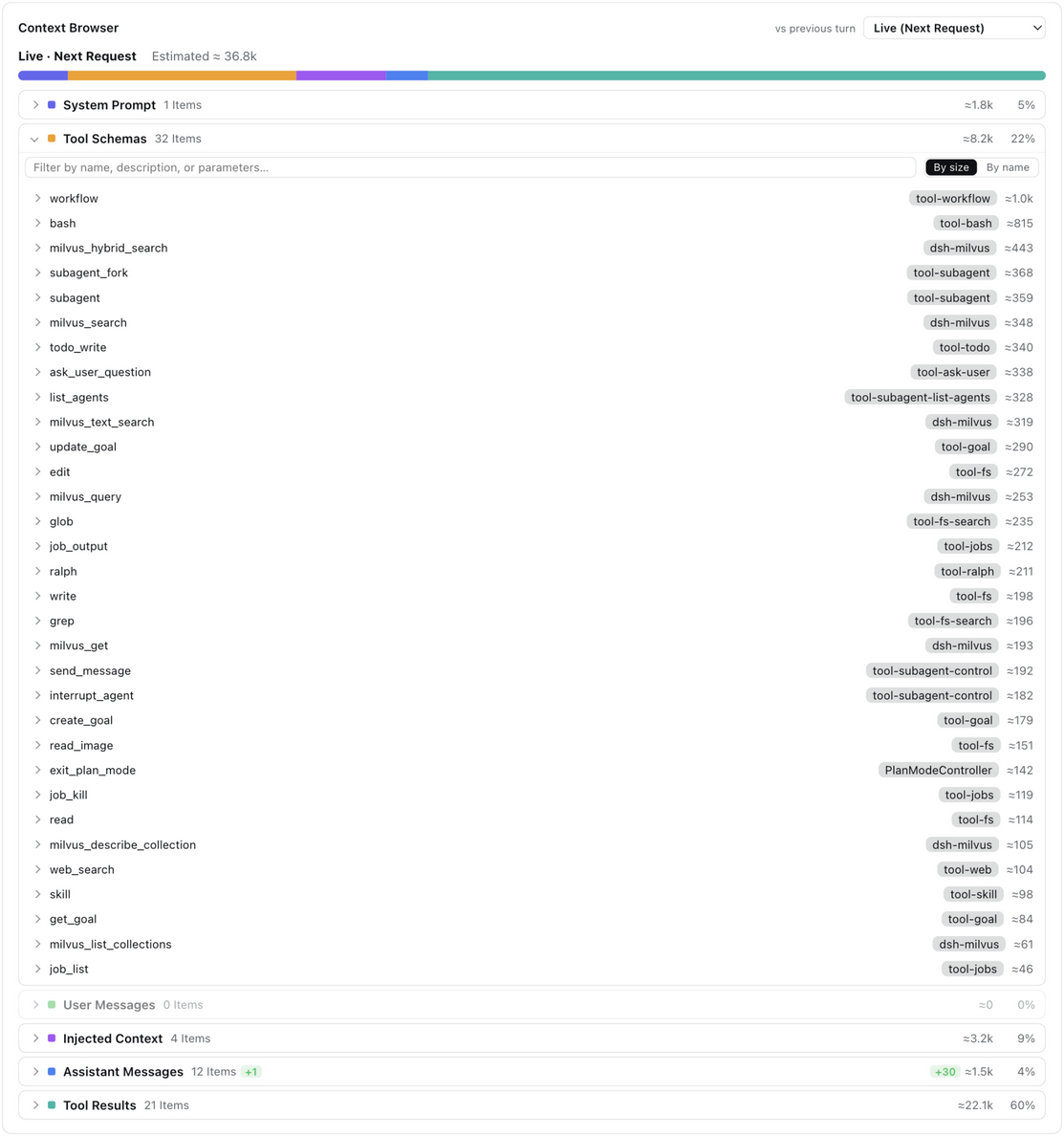
@@ -134,7 +134,7 @@ Pick **Live (next request)** or any retained step, and browse what that request
|
|
|
134
134
|
|
|
135
135
|
|
|
136
136
|
|
|
137
|
-
- **Filter assistant replies by kind** — the assistant category's search box carries **Thinking / Tools / Answer** chips, each
|
|
137
|
+
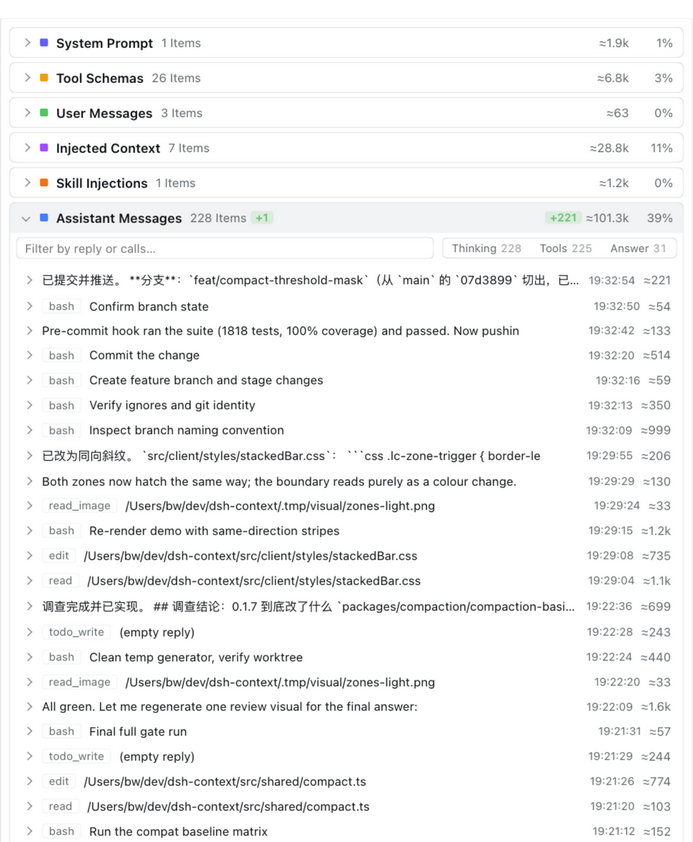
- **Filter assistant replies by kind** — the assistant category's search box carries **Thinking / Tools / Answer** chips, each counting the replies of that kind in the current search results (one reply can carry several); click one to keep only the matching replies, click again to clear:
|
|
138
138
|
|
|
139
139
|
|
|
140
140
|
|
|
@@ -179,12 +179,24 @@ Every shell and code run with its status, wall time, and step stamp, plus a sess
|
|
|
179
179
|
|
|
180
180
|
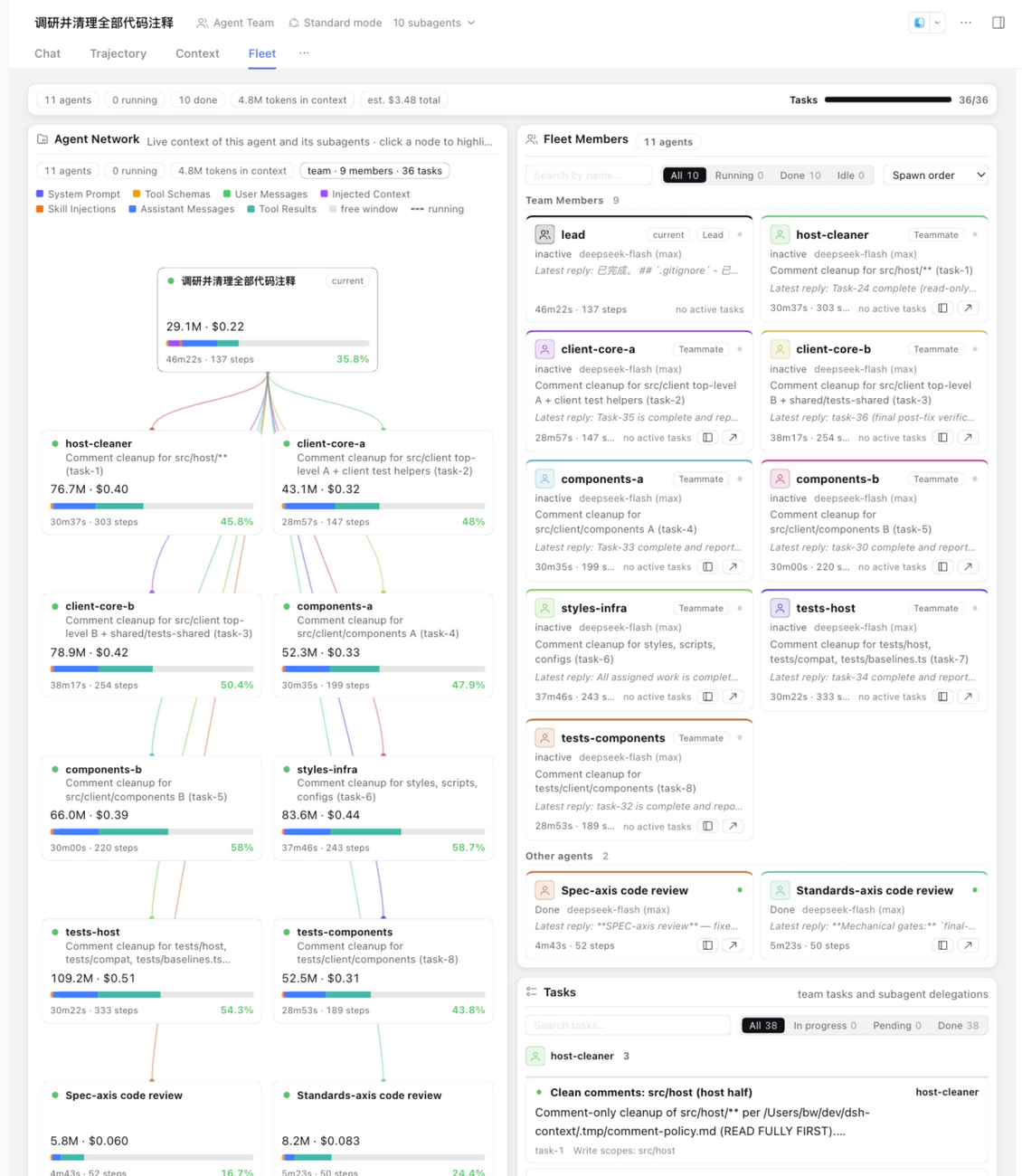
Open any session and click the **Fleet / 编队** tab (right of **Context**) — the agent family on a page of its own, with room for the collaboration surfaces that follow:
|
|
181
181
|
|
|
182
|
-
|
|
183
|
+
|
|
184
|
+
A one-line summary opens the page — agents and their status, live context, estimated cost, and task progress — then hands the same family to four linked surfaces: **Agent Network**, **Fleet Members**, **Tasks**, and **Agent Comms**. Picking an agent on the graph or the member board narrows the tasks and channels to that agent, so the page answers for one member at a time.
|
|
183
185
|
|
|
184
186
|
### 🕸 Agent Network — the family portrait
|
|
185
187
|
|
|
186
188
|
The current agent, its parents, and every subagent — one card per agent: its title, live context size and window occupancy, a composition bar, and how long it has run for and how many steps it has taken. Edges fan out from each parent in the lineage's color — hover a card to light its whole chain and read the full breakdown in the detail strip; click to jump into that session's own Context tab. Running agents breathe with a green pulse on their incoming edge and turn over the harness's own rolling spinner beside their title, which settles into the same green dot the header's subagent list uses once the work is done; narrow panes fold the family into tidy rows — never a horizontal scrollbar.
|
|
187
189
|
|
|
190
|
+
### 👥 Fleet Members & Tasks — who is doing what
|
|
191
|
+
|
|
192
|
+
Each roster member's card carries its role (lead or teammate), model, latest reply, run time and steps, and active task count; the family's other agents sit below in the same card shape. A card's buttons open that agent's chat in the sidebar or the whole view, search and the status chips narrow both sections, and the sort menu orders the other agents by spawn order, tokens, duration, steps, or recency. The **Tasks** board puts team tasks and subagent delegations in the same place — owner groups, status filters, and blocked-by links that light the whole prerequisite chain when you focus a task. Click a task to open its full description in place, raw or rendered, and the board scrolls it to the front under a sticky owner header.
|
|
193
|
+
|
|
194
|
+
### 📡 Agent Comms — who said what to whom
|
|
195
|
+
|
|
196
|
+
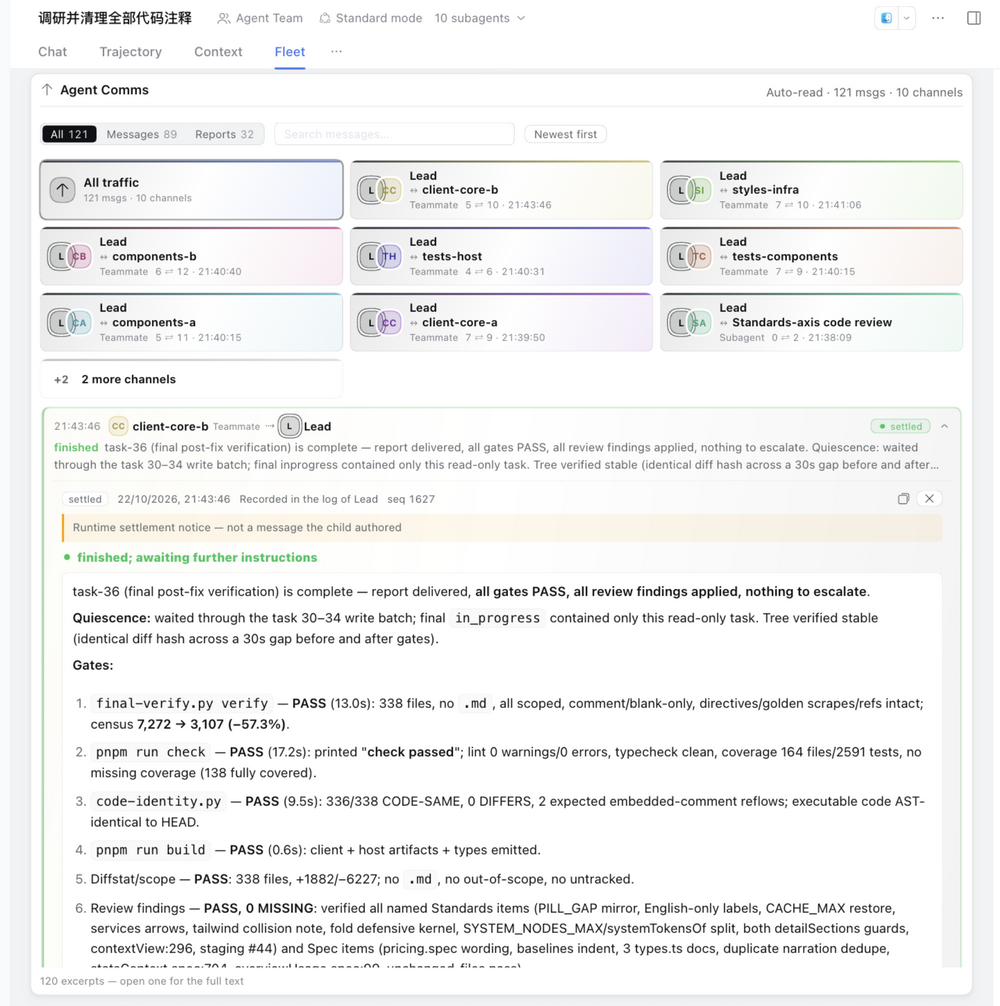
The comms card reads the family's session logs automatically — no scan step. Team relays, mailbox deliveries, and the runtime's settlement notices merge into channels: each card pairs the lead or current agent with one counterpart, labels both sides, and shows how many messages each side sent. The timeline names both parties and their roles. Clicking any message opens the full record inline below it — the session log it came from and its sequence, a notice when the runtime wrote the settlement rather than the child, the complete closing report (with its structured result or diagnostic), and participant cards that open that agent's chat in the sidebar or the whole view. Filter by message kind or text, flip the order, and the shared agent pick from the graph or member board narrows the whole hub; older history and clipped excerpts are disclosed instead of silently truncated.
|
|
197
|
+
|
|
198
|
+
|
|
199
|
+
|
|
188
200
|
The right Sidebar's **Context** panel keeps the same card inline, so the family stays one click away while you read the chat. Don't want the tab at all? Turn **Fleet tab** off in the preferences card — the card then lives on in that panel, and the Context tab's family cell opens it there whenever a Sidebar is served.
|
|
189
201
|
|
|
190
202
|
## ⌨️ `/context` command
|