dsh-context 0.75.1 → 0.76.0
This diff represents the content of publicly available package versions that have been released to one of the supported registries. The information contained in this diff is provided for informational purposes only and reflects changes between package versions as they appear in their respective public registries.
- package/README.md +14 -5
- package/lib/client.js +18 -17
- package/lib/index.js +5 -5
- package/package.json +1 -1
package/README.md
CHANGED
|
@@ -14,14 +14,14 @@
|
|
|
14
14
|
|
|
15
15
|
[`dsh-context`](https://www.npmjs.com/package/dsh-context) provides full context lifecycle management features.
|
|
16
16
|
- **Context Insights page** — the cross-session overview as a first-level sidebar panel (beside Plugins and Automation tasks): KPI band with a 7-day token/cost usage chart, activity heatmap, aggregate composition ring, and filterable session cards that jump straight into any session.
|
|
17
|
-
- **Context tab** —
|
|
17
|
+
- **Context tab** — a UI context dashboard for DeepSeek Harness's context stats, composition, trend, events, messages, and commands.
|
|
18
18
|
- **Fleet tab** — the agent family's own page: the current agent, its parents, and every subagent as one live card each.
|
|
19
19
|
- **Context panel** — the same dashboard as a right-sidebar tab: pick **Context** on the sidebar's guide page and the panel opens beside the chat, agent network included.
|
|
20
20
|
- **`/context` command** — the slash command shows the context model for current context composition and recent context evolution.
|
|
21
21
|
|
|
22
22
|
## Install / Update
|
|
23
23
|
|
|
24
|
-
### Install on
|
|
24
|
+
### Install on DeepSeek Harness web or desktop
|
|
25
25
|
|
|
26
26
|
Fill `dsh-context` in the **Add plugin** wizard's search box, and click **Install**:
|
|
27
27
|
|
|
@@ -50,10 +50,10 @@ Five surfaces, one story — what your agent is carrying, how it got there, and
|
|
|
50
50
|
| Where | What you get |
|
|
51
51
|
| --- | --- |
|
|
52
52
|
| **Context Insights page** | Every session at a glance: usage, cost, cache hit, daily activity, and per-session context profiles — filtered by range, day, group, or search, one click to jump in. |
|
|
53
|
-
| **Context tab** | The full dashboard: stats, composition, per-request trend, events,
|
|
53
|
+
| **Context tab** | The full dashboard: stats, composition, per-request trend, events, file activity, and command executions — in every session. |
|
|
54
54
|
| **Fleet tab** | The agent network: the current agent, its parents, and every subagent, live. |
|
|
55
55
|
| **`/context` command** | A centered modal with the same composition and context browser, without leaving the chat. |
|
|
56
|
-
| **Preferences card** | Per-user defaults: the
|
|
56
|
+
| **Preferences card** | Per-user defaults: the panel entry, Insights range, trend and sort defaults, and the system prompt prefix/suffix joined around every session. |
|
|
57
57
|
|
|
58
58
|
## 🗂️ The Context Insights page
|
|
59
59
|
|
|
@@ -87,6 +87,9 @@ Open any session and click the **Context / 上下文** tab:
|
|
|
87
87
|
| **Context Browser** | What any request was *actually* assembled from. |
|
|
88
88
|
| **Context Events** | When and why the window changed. |
|
|
89
89
|
| **File Activity** | What the agent *did* to your files. |
|
|
90
|
+
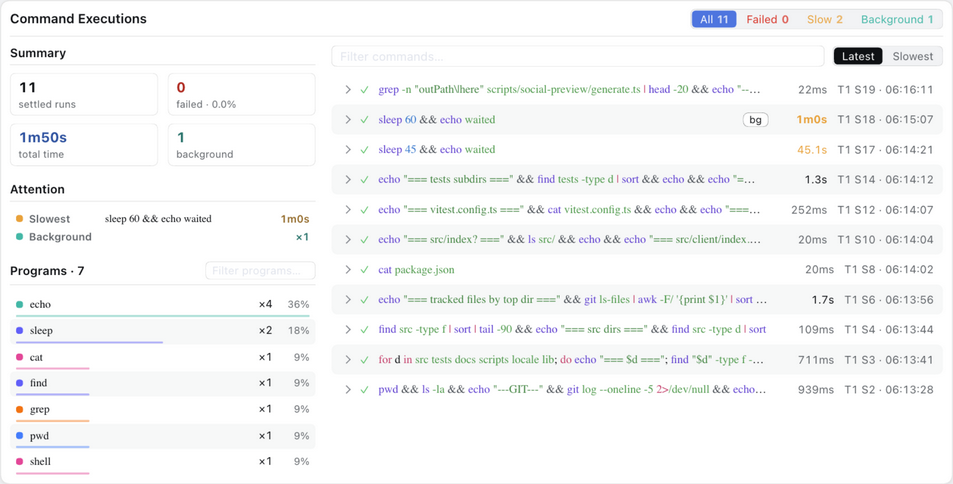
| **Command Executions** | What the agent ran, how each run ended, and which programs it leaned on. |
|
|
91
|
+
|
|
92
|
+
The cost estimate follows one documented rule set: [How model pricing is mapped](docs/model-pricing-mapping.md).
|
|
90
93
|
|
|
91
94
|
The headline occupancy and composition read the **same official token-meter projections as the chat composer's context ring** (`contextPressure` / `contextBreakdown`), so the figures always match what the ring tells you — the card's percentage is that same occupancy, printed with one decimal.
|
|
92
95
|
|
|
@@ -166,6 +169,12 @@ One row per touched file — read, written, or searched — aggregated up to whi
|
|
|
166
169
|
- **Click a row** to expand its full operation log — every op jumps straight to the exact tool result in the Context browser.
|
|
167
170
|
- **Click a file name** to open its preview in the right Sidebar, exactly as the built-in Files sidebar does — the same viewer, the same tab-per-file behavior. On a harness without that column the name opens on your system as before.
|
|
168
171
|
|
|
172
|
+
### 🖥️ Command Executions — what the agent ran
|
|
173
|
+
|
|
174
|
+
|
|
175
|
+
|
|
176
|
+
Every shell and code run with its status, wall time, and step stamp, plus a session summary, attention shortcuts, and a program ranking. The ranking stays global while the search and status chips narrow the list; clicking a program drills into it and marks the row — the ranking never collapses under its own filter.
|
|
177
|
+
|
|
169
178
|
## 🚢 The Fleet tab
|
|
170
179
|
|
|
171
180
|
Open any session and click the **Fleet / 编队** tab (right of **Context**) — the agent family on a page of its own, with room for the collaboration surfaces that follow:
|
|
@@ -190,7 +199,7 @@ A centered dialog opens with the **Current Composition** card and the **Context
|
|
|
190
199
|
|
|
191
200
|
## ⚙️ Settings
|
|
192
201
|
|
|
193
|
-
The **Context** preferences card holds this plugin's per-user settings — the **Context panel entry** (the **Context** conversation tab, the right Sidebar panel, both, or Hide for neither — the reply-row jump goes with it), the **Fleet** tab's own Show/Hide switch (the panel entry never gates it), the **Context Insights** default range (Today / Last 7 days / Last 30 days / All, Last 30 days unless changed; picking a preset on the page writes it back), trend granularity (Step/Turn), trend mode (Total/Delta), the trend duration curve (shown by default), tool and File Activity sort, and the Context Insights Show/Hide switch. It lives on the **Plugins** page: the sidebar **Plugins** entry → the **dsh-context** bundle's page → its **Configuration** section (the card is served by the entry's live Config form).
|
|
202
|
+
The **Context** preferences card holds this plugin's per-user settings — the **Context panel entry** (the **Context** conversation tab, the right Sidebar panel, both, or Hide for neither — the reply-row jump goes with it), the **Fleet** tab's own Show/Hide switch (the panel entry never gates it), the **Context Insights** default range (Today / Last 7 days / Last 30 days / All, Last 30 days unless changed; picking a preset on the page writes it back), trend granularity (Step/Turn), trend mode (Total/Delta), the trend duration curve (shown by default), the trend auto-overview step threshold, the Context Browser diff baseline, tool and File Activity sort, and the Context Insights Show/Hide switch. It lives on the **Plugins** page: the sidebar **Plugins** entry → the **dsh-context** bundle's page → its **Configuration** section (the card is served by the entry's live Config form).
|
|
194
203
|
|
|
195
204
|
The **System Prompt · Prefix / Suffix** rows hold free text joined at the very start / end of every session's system prompt, for all agents (subagents included) — a per-deployment persona or behavioral rule that rides the harness's own prompt assembly. Edits apply from the next turn; leave a row empty to disable it.
|
|
196
205
|
|