dsh-context 0.67.0 → 0.68.0
This diff represents the content of publicly available package versions that have been released to one of the supported registries. The information contained in this diff is provided for informational purposes only and reflects changes between package versions as they appear in their respective public registries.
- package/README.md +15 -6
- package/lib/client.js +9 -9
- package/lib/index.d.ts +5 -0
- package/lib/index.js +280 -47
- package/package.json +1 -1
package/README.md
CHANGED
|
@@ -13,7 +13,8 @@
|
|
|
13
13
|
[`dsh-context`](https://www.npmjs.com/package/dsh-context) provides full context lifecycle management features.
|
|
14
14
|
- **Context Insights page** — the cross-session overview as a first-level sidebar panel (beside Plugins and Automation tasks): KPI band with a 7-day token/cost usage chart, activity heatmap, aggregate composition ring, and filterable session cards that jump straight into any session.
|
|
15
15
|
- **Context tab** — an UI context dashboard for DeepSeek Harness's context stats, composition, trend, events, and messages.
|
|
16
|
-
- **
|
|
16
|
+
- **Fleet tab** — the agent family's own page: the current agent, its parents, and every subagent as one live card each.
|
|
17
|
+
- **Context panel** — the same dashboard as a right-sidebar tab: pick **Context** on the sidebar's guide page and the panel opens beside the chat, agent network included.
|
|
17
18
|
- **`/context` command** — the slash command shows the context model for current context composition and recent context evolution.
|
|
18
19
|
|
|
19
20
|
## Install / Update
|
|
@@ -42,12 +43,13 @@ Then start the web UI with `dsh web`. No build step, no restart.
|
|
|
42
43
|
|
|
43
44
|
## Use it
|
|
44
45
|
|
|
45
|
-
|
|
46
|
+
Five surfaces, one story — what your agent is carrying, how it got there, and what it did with it:
|
|
46
47
|
|
|
47
48
|
| Where | What you get |
|
|
48
49
|
| --- | --- |
|
|
49
50
|
| **Context Insights page** | Every session at a glance: usage, cost, cache hit, daily activity, and per-session context profiles — filtered by range, day, group, or search, one click to jump in. |
|
|
50
|
-
| **Context tab** | The full dashboard: stats, composition, per-request trend, events, file activity
|
|
51
|
+
| **Context tab** | The full dashboard: stats, composition, per-request trend, events, and file activity — in every session. |
|
|
52
|
+
| **Fleet tab** | The agent network: the current agent, its parents, and every subagent, live. |
|
|
51
53
|
| **`/context` command** | A centered modal with the same composition and context browser, without leaving the chat. |
|
|
52
54
|
| **Preferences card** | Per-user defaults: view placement, trend granularity & mode, File Activity sort, and more. |
|
|
53
55
|
|
|
@@ -83,10 +85,11 @@ Open any session and click the **Context / 上下文** tab:
|
|
|
83
85
|
| **Context Browser** | What any request was *actually* assembled from. |
|
|
84
86
|
| **Context Events** | When and why the window changed. |
|
|
85
87
|
| **File Activity** | What the agent *did* to your files. |
|
|
86
|
-
| **Agent Network** | The whole agent family, live. |
|
|
87
88
|
|
|
88
89
|
The headline occupancy and composition read the **same official token-meter projections as the chat composer's context ring** (`contextPressure` / `contextBreakdown`), so the figures always match what the ring tells you — the card's percentage is that same occupancy, printed with one decimal.
|
|
89
90
|
|
|
91
|
+
The **Context Stats** card's Agent Network cell (the billed tokens and estimated cost of the whole family) jumps to the **Fleet** tab.
|
|
92
|
+
|
|
90
93
|
### Context Stats
|
|
91
94
|
|
|
92
95
|
#### Token Stats and Timing Stats
|
|
@@ -158,12 +161,18 @@ One row per touched file — read, written, or searched — aggregated up to whi
|
|
|
158
161
|
- **Click a row** to expand its full operation log — every op jumps straight to the exact tool result in the Context browser.
|
|
159
162
|
- **Click a file name** to open its preview in the right Sidebar, exactly as the built-in Files sidebar does — the same viewer, the same tab-per-file behavior. On a harness without that column the name opens on your system as before.
|
|
160
163
|
|
|
161
|
-
|
|
164
|
+
## 🚢 The Fleet tab
|
|
165
|
+
|
|
166
|
+
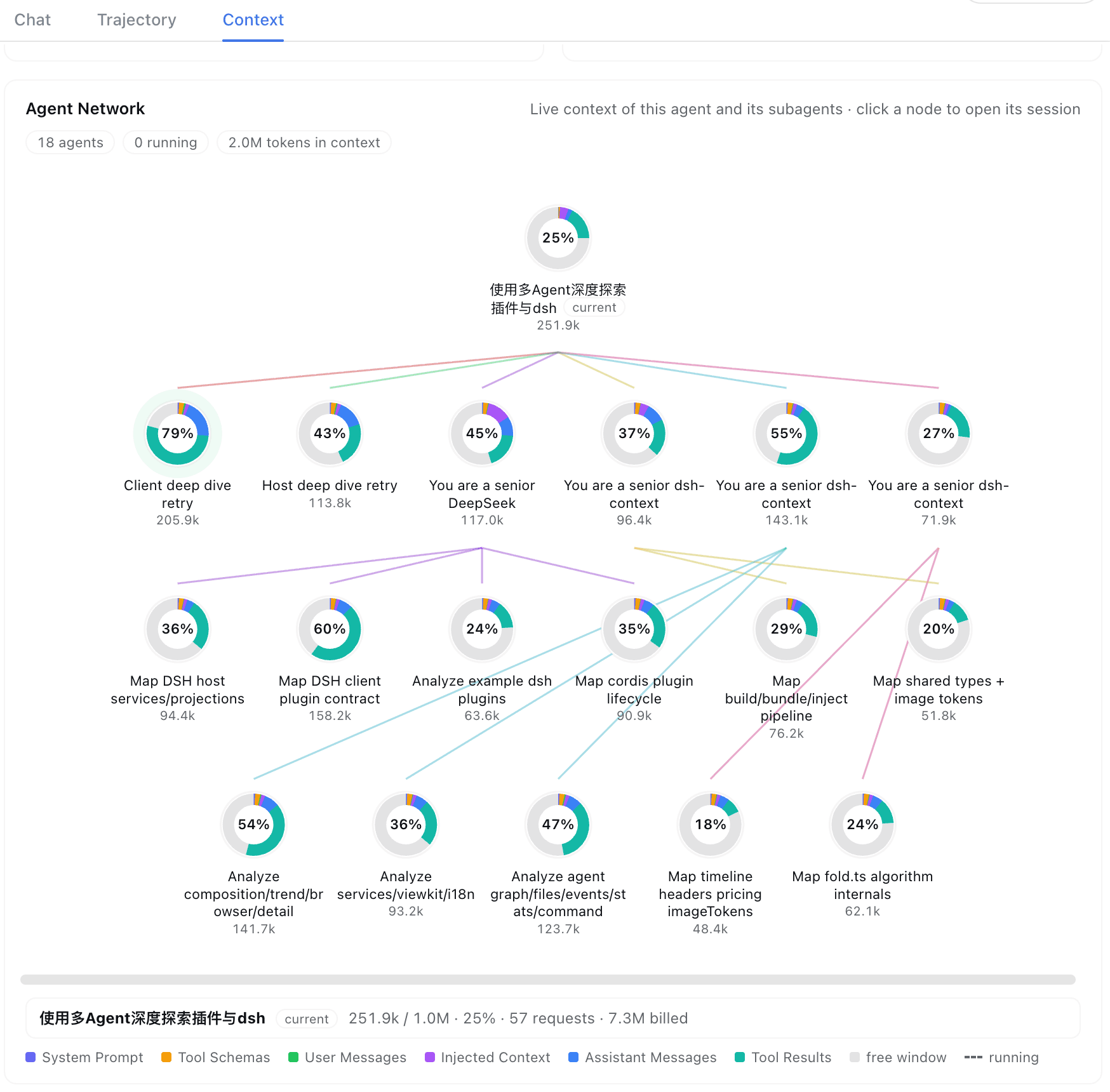
Open any session and click the **Fleet / 编队** tab (right of **Context**) — the agent family on a page of its own, with room for the collaboration surfaces that follow:
|
|
162
167
|
|
|
163
168
|
|
|
164
169
|
|
|
170
|
+
### 🕸 Agent Network — the family portrait
|
|
171
|
+
|
|
165
172
|
The current agent, its parents, and every subagent — one card per agent: its title, live context size and window occupancy, a composition bar, and how long it has run for and how many steps it has taken. Edges fan out from each parent in the lineage's color — hover a card to light its whole chain and read the full breakdown in the detail strip; click to jump into that session's own Context tab. Running agents breathe with a green pulse on their incoming edge and turn over the harness's own rolling spinner beside their title, which settles into the same green dot the header's subagent list uses once the work is done; narrow panes fold the family into tidy rows — never a horizontal scrollbar.
|
|
166
173
|
|
|
174
|
+
The right Sidebar's **Context** panel keeps the same card inline, so the family stays one click away while you read the chat. Don't want the tab at all? Turn **Fleet tab** off in the preferences card — the card then lives on in that panel, and the Context tab's family cell opens it there whenever a Sidebar is served.
|
|
175
|
+
|
|
167
176
|
## ⌨️ `/context` command
|
|
168
177
|
|
|
169
178
|
Type `/context` (or pick it from the `/` menu) and press Enter:
|
|
@@ -176,7 +185,7 @@ A centered dialog opens with the **Current Composition** card and the **Context
|
|
|
176
185
|
|
|
177
186
|
## ⚙️ Settings
|
|
178
187
|
|
|
179
|
-
The **Context** preferences card holds this plugin's per-user settings — default placement, trend granularity (Step/Turn), trend mode (Total/Delta), the trend duration curve (shown by default), tool and File Activity sort, and the sidebar insights entry. It lives on the **Plugins** page: the sidebar **Plugins** entry → the **dsh-context** bundle's page → its **Configuration** section (the card is served by the entry's live Config form).
|
|
188
|
+
The **Context** preferences card holds this plugin's per-user settings — default placement (the **Context** and **Fleet** conversation tabs, the right Sidebar panel, or both), the **Fleet** tab's own Show/Hide switch, trend granularity (Step/Turn), trend mode (Total/Delta), the trend duration curve (shown by default), tool and File Activity sort, and the sidebar insights entry. It lives on the **Plugins** page: the sidebar **Plugins** entry → the **dsh-context** bundle's page → its **Configuration** section (the card is served by the entry's live Config form).
|
|
180
189
|
|
|
181
190
|
In-chart and in-card toggles stay per-view and never overwrite the stored preference.
|
|
182
191
|
|