dsh-context 0.62.3 → 0.64.0
This diff represents the content of publicly available package versions that have been released to one of the supported registries. The information contained in this diff is provided for informational purposes only and reflects changes between package versions as they appear in their respective public registries.
- package/README.md +6 -6
- package/lib/client.js +689 -437
- package/lib/index.d.ts +48 -0
- package/lib/index.js +92 -19
- package/package.json +1 -1
package/README.md
CHANGED
|
@@ -9,7 +9,7 @@
|
|
|
9
9
|
**The best [DeepSeek Harness plugin](https://www.deepseek.com/harness/) for Agent's context insights and management.**
|
|
10
10
|
|
|
11
11
|
[`dsh-context`](https://www.npmjs.com/package/dsh-context) provides full context lifecycle management features.
|
|
12
|
-
- **Context
|
|
12
|
+
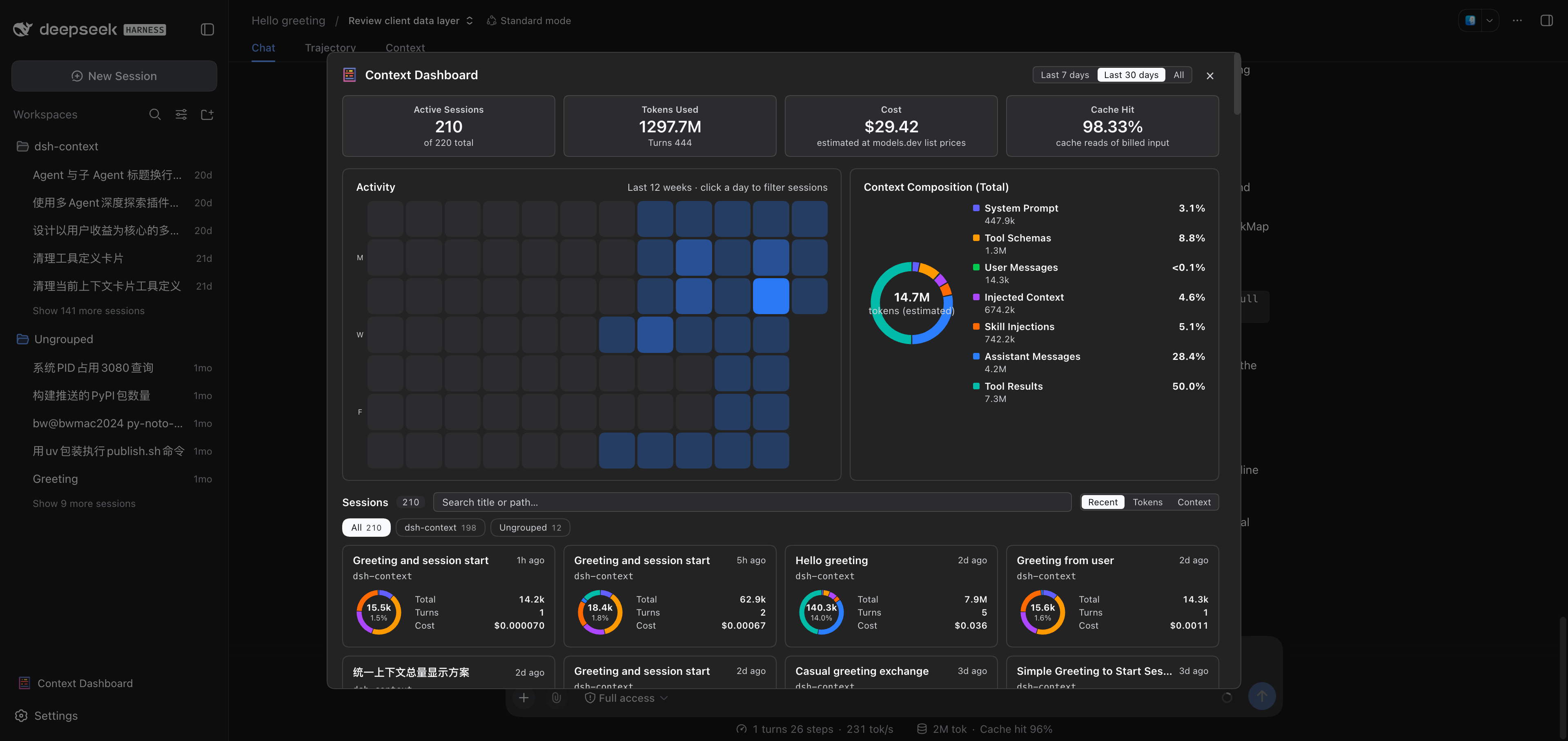
- **Context Insights page** — the cross-session overview as a first-level sidebar panel (beside Plugins and Automation tasks): KPI band with a 7-day token/cost usage chart, activity heatmap, aggregate composition ring, and filterable session cards that jump straight into any session.
|
|
13
13
|
- **Context tab** — an UI context dashboard for DeepSeek Harness's context stats, composition, trend, events, and messages.
|
|
14
14
|
- **Context panel** — the same dashboard as a right-sidebar tab (dsh 0.1.5-rc.1+): pick **Context** on the sidebar's guide page and the panel opens beside the chat.
|
|
15
15
|
- **`/context` command** — the slash command shows the context model for current context composition and recent context evolution.
|
|
@@ -44,16 +44,16 @@ Four surfaces, one story — what your agent is carrying, how it got there, and
|
|
|
44
44
|
|
|
45
45
|
| Where | What you get |
|
|
46
46
|
| --- | --- |
|
|
47
|
-
| **Context
|
|
47
|
+
| **Context Insights page** | Every session at a glance: usage, cost, cache hit, daily activity, and per-session context profiles — filtered by range, day, group, or search, one click to jump in. |
|
|
48
48
|
| **Context tab** | The full dashboard: stats, composition, per-request trend, events, file activity, and the agent network — in every session. |
|
|
49
49
|
| **`/context` command** | A centered modal with the same composition and context browser, without leaving the chat. |
|
|
50
50
|
| **Preferences card** | Per-user defaults: view placement, trend granularity & mode, File Activity sort, and more. |
|
|
51
51
|
|
|
52
|
-
## 🗂️ The Context
|
|
52
|
+
## 🗂️ The Context Insights page
|
|
53
53
|
|
|
54
|
-
Click **Context
|
|
54
|
+
Click **Context Insights / 上下文洞察** in the sidebar's panel list — the same row level as **Plugins** and **Automation tasks** — and the page opens as a full center-column panel:
|
|
55
55
|
|
|
56
|
-
|
|
57
57
|
|
|
58
58
|
| Section | The question it answers |
|
|
59
59
|
| --- | --- |
|
|
@@ -174,7 +174,7 @@ A centered dialog opens with the **Current Composition** card and the **Context
|
|
|
174
174
|
|
|
175
175
|
## ⚙️ Settings
|
|
176
176
|
|
|
177
|
-
The **Context** preferences card holds this plugin's per-user settings — default placement, trend granularity (Step/Turn), trend mode (Total/Delta), tool and File Activity sort, and the sidebar insights entry. Where it lives depends on your dsh release:
|
|
177
|
+
The **Context** preferences card holds this plugin's per-user settings — default placement, trend granularity (Step/Turn), trend mode (Total/Delta), the trend duration curve (shown by default), tool and File Activity sort, and the sidebar insights entry. Where it lives depends on your dsh release:
|
|
178
178
|
|
|
179
179
|
- **dsh 0.1.7+** — the sidebar **Plugins** entry → the **dsh-context** bundle's page → its **Configuration** section (the card is served by the entry's live Config form).
|
|
180
180
|
- **older releases** — **Settings → Plugins → Plugin configuration** → the **Context** card.
|