dsh-completion-guard 0.8.4 → 0.10.0
This diff represents the content of publicly available package versions that have been released to one of the supported registries. The information contained in this diff is provided for informational purposes only and reflects changes between package versions as they appear in their respective public registries.
- package/CHANGELOG.md +160 -129
- package/CHANGELOG.zh-CN.md +86 -51
- package/README.md +44 -83
- package/README.zh-CN.md +44 -83
- package/bin/dsh-completion-guard-activation.mjs +95 -0
- package/dist/domain/index.d.ts +2 -2
- package/dist/domain/index.js +2 -2
- package/dist/{domain-DZTbCIYn.js → domain-Dqw5NrT-.js} +20466 -17650
- package/dist/{index-BmTaAEkJ.d.ts → index-rCqdIg5B.d.ts} +258 -16
- package/dist/index.d.ts +5 -3
- package/dist/index.js +140 -751
- package/docs/ACTIVATION_MIGRATION.md +171 -0
- package/docs/ARCHITECTURE.md +33 -24
- package/docs/COMPATIBILITY.md +52 -6
- package/docs/GETTING_STARTED.md +110 -0
- package/docs/HISTORICAL_INCIDENT_COVERAGE.md +12 -4
- package/docs/HOST_LOCK_UPGRADE.md +28 -13
- package/docs/LOCAL_ACCEPTANCE.md +3 -3
- package/docs/PRIVACY.md +4 -0
- package/manifests/desktop-distribution.v1.json +124 -0
- package/manifests/rc021-rc2-byte-audit.json +989 -0
- package/manifests/supported-host.v1.json +103 -95
- package/package.json +40 -39
package/README.md
CHANGED
|
@@ -2,115 +2,77 @@
|
|
|
2
2
|
|
|
3
3
|
[简体中文](README.zh-CN.md)
|
|
4
4
|
|
|
5
|
-
|
|
5
|
+
DSH Completion Guard is a DeepSeek Harness plugin that keeps your task requirements and checks saved results before certifying completion. Use it when a long or resumed task must still account for requested edits, tests, prohibitions and later corrections.
|
|
6
6
|
|
|
7
|
-
|
|
7
|
+
**Opening or restoring a session with history can take time.** DSH loads the saved history and Guard rebuilds its state; you may see “载入历史” (loading history). Wait for loading to finish before continuing. `always` starts protection with the first real input in a new root session; it does not make history loading instant, and reopening a session can still require a wait.
|
|
8
8
|
|
|
9
|
-

|
|
10
10
|
|
|
11
|
-
##
|
|
11
|
+
## Install or upgrade
|
|
12
12
|
|
|
13
|
-
|
|
13
|
+
Requires DSH `>=0.2.1-rc.2`, Cordis `>=4.0.4`, Node.js `>=22` and pnpm `>=11`. Web, Headless and the official Desktop app have separate profiles. The reviewed host baseline is DSH `0.2.1-rc.2` / Cordis `4.0.5`; a later host must pass the same compatibility checks.
|
|
14
14
|
|
|
15
|
-
|
|
16
|
-
dsh plugin --profile web add dsh-completion-guard@0.8.4
|
|
17
|
-
```
|
|
15
|
+
Choose your path before replacing any package:
|
|
18
16
|
|
|
19
|
-
**
|
|
17
|
+
1. **First installation, no old Guard sessions:** stop the host, install Guard in the intended profile, then check and bind that installation before starting it.
|
|
18
|
+
2. **Upgrading with old sessions:** stop the relevant writers and preserve the old installed package and its effective mode sources. Prepare a frozen session inventory and migration receipt **before upgrading**. After installation, rebuild the host lock and complete mode `adopt` and `verify` while writers remain stopped. Do not start the upgraded host until those checks pass for the intended scope. Unknown old modes stay pending.
|
|
20
19
|
|
|
21
|
-
|
|
20
|
+
For Web, after the applicable preparation:
|
|
22
21
|
|
|
23
22
|
```sh
|
|
24
|
-
|
|
25
|
-
DSH_PROFILE_ROOT=/absolute/path/to/.dsh/profiles/web
|
|
26
|
-
GUARD_HOST_LOCK="$DSH_PROFILE_ROOT/node_modules/.bin/dsh-completion-guard-host-lock"
|
|
27
|
-
|
|
28
|
-
"$GUARD_HOST_LOCK" inspect --runtime-root "$DSH_RUNTIME_ROOT" --profile-root "$DSH_PROFILE_ROOT"
|
|
29
|
-
"$GUARD_HOST_LOCK" inject --runtime-root "$DSH_RUNTIME_ROOT" --profile-root "$DSH_PROFILE_ROOT"
|
|
30
|
-
dsh --profile web --dump-config | "$GUARD_HOST_LOCK" verify-dump --runtime-root "$DSH_RUNTIME_ROOT" --profile-root "$DSH_PROFILE_ROOT" --dump-config -
|
|
23
|
+
dsh plugin --profile web add dsh-completion-guard@0.10.0
|
|
31
24
|
```
|
|
32
25
|
|
|
33
|
-
|
|
26
|
+
Installation alone is not enough. The **host lock** records the actual packages and directories this profile loads; check it with `inspect`, write it with `inject`, then check the composed configuration with `verify-dump`. Back up `cordis.patch.yml` before injection. [Installation and first load](docs/GETTING_STARTED.md) provides the Web commands, Windows and Desktop routes, and the final checks before startup. [Old-session migration](docs/ACTIVATION_MIGRATION.md) provides the preparation, commands and copyable AI prompts for an upgrade.
|
|
34
27
|
|
|
35
|
-
|
|
28
|
+
## What to expect after startup
|
|
36
29
|
|
|
37
|
-
|
|
30
|
+
For an existing session, let history loading and state reconstruction finish. Then check:
|
|
38
31
|
|
|
39
32
|
```text
|
|
40
|
-
/context-guard on
|
|
41
33
|
/context-guard status
|
|
42
34
|
```
|
|
43
35
|
|
|
44
|
-
|
|
45
|
-
|
|
46
|
-
### Ordinary work
|
|
47
|
-
|
|
48
|
-
Ask DSH to edit a file or run a test as usual. The assistant performs that work with the DSH host tools. Guard records the request, observes the host's persisted call and result, and checks independent readback when the requested outcome needs it. For example, after a host edit changes a configuration file, a separate exact file read can establish the new bytes; a named test needs its own observed result. A successful tool return or the assistant's claim alone does not prove an unrelated condition or a forbidden-file constraint. `context_guard_prepare` explains what evidence is missing, and `context_guard_checkpoint` checks only the predicate that evidence establishes.
|
|
49
|
-
|
|
50
|
-
The ordinary `context_guard_action` and `context_guard_evidence` tools from 0.6.x no longer perform edits, tests, or Git effects; they return migration guidance. A new file still needs trustworthy evidence that it was absent before creation. A package-script readiness observation can identify an existing test or assessment input without forcing another edit, but it does not prove the script ran or certify arbitrary numeric output. A later request to observe long-term benefits remains future work until its own time or approval condition is met; a short “continue” advances only a concrete ready action.
|
|
51
|
-
|
|
52
|
-
## What it protects
|
|
53
|
-
|
|
54
|
-
- Saves requirements, acceptance checks, prohibitions, and later corrections without overwriting history.
|
|
55
|
-
- Uses only tool calls and results that DSH has saved, and stores a redacted summary rather than full output.
|
|
56
|
-
- Accepts evidence only when the action and result match the requested command, file, or other target.
|
|
57
|
-
- Rechecks completion after a session is rebuilt or resumed, and refuses to certify damaged state.
|
|
58
|
-
- Stops the Guard-owned Goal completion path when the current checklist has not passed. DSH internals can still bypass this path, so the plugin reports those cases rather than claiming to block every possible write.
|
|
59
|
-
|
|
60
|
-
## Status and compatibility
|
|
36
|
+
A **new empty root session**, with the default configuration, uses `always` and shows `armed`: Guard is ready, waiting for the first real message. It appends no Guard events before that message, so you can still choose the DSH session preset. DSH may write its own initialization events. The first real input starts protection in the same step, before its first file changes; an image or attachment counts too, while a blank message does not. An explicit `activation: opt-in` remains opt-in: run `/context-guard on` to begin protection.
|
|
61
37
|
|
|
62
|
-
|
|
38
|
+
An **old session** keeps its verified pre-upgrade mode, including an empty old session. The new default does not replace an old binding. A contradictory explicit `activation` setting reports `activation_mode_conflict`; follow the [configuration instructions](docs/GETTING_STARTED.md#choose-the-default-for-new-sessions) to use the new default while preserving old modes. Missing, damaged or conflicting bindings prevent certification; Guard reports the problem rather than guessing an identity or mode. Forks inherit their parent's bound initial mode.
|
|
63
39
|
|
|
64
|
-
|
|
40
|
+
Ask DSH to edit a file or run a test as usual. DSH executes the tools; Guard records the request and checks the saved result and any required readback. For example, “edit the configuration and make the tests pass” needs evidence of the changed file and a passing test, not just the assistant saying it is done. `context_guard_prepare` explains missing evidence; `context_guard_checkpoint` checks completion.
|
|
65
41
|
|
|
66
|
-
|
|
42
|
+
The default policy is still `standard`. Automatic protection grants no extra editing, execution or publication permission, and does not issue a certificate automatically.
|
|
67
43
|
|
|
68
|
-
|
|
44
|
+
## Mode and everyday commands
|
|
69
45
|
|
|
70
|
-
|
|
71
|
-
|
|
72
|
-
|
|
73
|
-
|
|
74
|
-
|
|
75
|
-
|
|
76
|
-
|
|
77
|
-
|
|
78
|
-
|
|
79
|
-
|
|
80
|
-
- `opt-in` (default): protection is off when a session starts. Run `/context-guard on` in that session to turn it on, and `/context-guard off` to turn it off again. This changes only the current session.
|
|
81
|
-
- `always`: DSH sessions are protected automatically from the first real message. A brand-new session stays completely empty — the Guard writes nothing into it — so you can still pick the DSH session mode (standard, minimal, or a custom preset) before sending anything. The moment your first real message enters a step, protection begins in that same step and ahead of your message: the first task, including its first file changes, is covered. A first message that only carries an image or an attachment starts protection too and leaves an unresolved asset item until its meaning is clarified; a blank message starts nothing. Running `/context-guard off` turns protection off for that session until you run `on` again.
|
|
46
|
+
| Command or mode | Result |
|
|
47
|
+
| --- | --- |
|
|
48
|
+
| `always` | New root sessions start protection with their first real input. |
|
|
49
|
+
| `opt-in` | Protection starts when you run `/context-guard on` in that session. |
|
|
50
|
+
| `/context-guard status` | Shows activation, remaining checks and reasons they remain open. |
|
|
51
|
+
| `/context-guard off` / `on` | Disables or enables protection for this session; saved history remains. |
|
|
52
|
+
| `/context-guard diagnose` | Explains a completion verdict. |
|
|
53
|
+
| `/context-guard clear` | Supersedes the current checklist while keeping prohibitions; it does not prove the work was done. |
|
|
54
|
+
| `/context-guard migration` | Shows the session's rules and upgrade/rollback implications. |
|
|
55
|
+
| `/context-guard release` | Shows an explicitly adopted release contract and remaining work. |
|
|
82
56
|
|
|
83
|
-
|
|
57
|
+
Guard activation is separate from DSH's standard/minimal/custom session preset. Saved `off` and `on` continue to apply. To change the initial default for future root sessions, see the [configuration instructions](docs/GETTING_STARTED.md#choose-the-default-for-new-sessions). Keep existing host-lock fields and session bindings.
|
|
84
58
|
|
|
85
|
-
|
|
59
|
+
## History loading and 0.9.0 caching
|
|
86
60
|
|
|
87
|
-
|
|
88
|
-
- id: context-guard
|
|
89
|
-
name: dsh-completion-guard
|
|
90
|
-
config:
|
|
91
|
-
activation: always
|
|
92
|
-
```
|
|
61
|
+
The first opening or restoration of an existing session loads its history and rebuilds Guard state. A later visit may also wait. This is different from a new empty session's `armed` state, which waits for your input.
|
|
93
62
|
|
|
94
|
-
|
|
63
|
+
0.9.0 reuses completed checks of old history only when it can verify that the history is unchanged and the results are safe to reuse. Within one Desktop installation check, it also reuses application files already read and verified. Each operation still checks the current mode and performs the required fresh checks of Goal state, private records and the host environment. **This release does not change the official host's history-view lifecycle or decode cache, and does not promise to remove all UI loading waits.** See the [performance scope](CHANGELOG.md#090) and [acceptance record](docs/LOCAL_ACCEPTANCE.md).
|
|
95
64
|
|
|
96
|
-
|
|
97
|
-
| --- | --- | --- |
|
|
98
|
-
| macOS / Linux | Web | `$HOME/.dsh/profiles/web/cordis.patch.yml` |
|
|
99
|
-
| macOS / Linux | Headless | `$HOME/.dsh/profiles/headless/cordis.patch.yml` |
|
|
100
|
-
| macOS | Desktop | `$HOME/.dsh/profiles/desktop/cordis.patch.yml` |
|
|
101
|
-
| Windows | Desktop | `%USERPROFILE%\.dsh\profiles\desktop\cordis.patch.yml` |
|
|
102
|
-
| Windows | Web | `%USERPROFILE%\.dsh\profiles\web\cordis.patch.yml` |
|
|
103
|
-
| Windows | Headless | `%USERPROFILE%\.dsh\profiles\headless\cordis.patch.yml` |
|
|
65
|
+
If the official reader refuses an old format, preserve the original log and old-mode source. You can explicitly migrate selected readable sessions using `inventory`, `select` and the same `--selection` on `inspect/adopt/verify`. Excluded sessions remain pending: `selected_complete` means only the chosen rows completed, not the whole inventory. Corruption, permission errors and other failures are not silently skipped. The [migration guide](docs/ACTIVATION_MIGRATION.md) includes commands, recovery and AI prompts.
|
|
104
66
|
|
|
105
|
-
|
|
67
|
+
## Limits and privacy
|
|
106
68
|
|
|
107
|
-
|
|
69
|
+
Guard saves requirements, checks matching persisted results and rechecks them on resume. It refuses to certify damaged or insufficient evidence. It can block the Goal completion path it guards, but does not control every internal DSH write or replace DSH permissions, tools, Goal or compaction. Ordinary investigations can end with an honest answer without a machine completion certificate.
|
|
108
70
|
|
|
109
|
-
|
|
71
|
+
Guard stores bounded, redacted evidence summaries rather than full prompts, stdout, files, credentials, images or raw transcripts. See [privacy](docs/PRIVACY.md). A package installed on disk does not prove a running process or UI loaded it; Guard's market restart adapter remains unavailable. [Compatibility](docs/COMPATIBILITY.md) documents supported commands and platform limits.
|
|
110
72
|
|
|
111
|
-
|
|
73
|
+
<details>
|
|
74
|
+
<summary>Advanced completion, recovery and upstream behavior</summary>
|
|
112
75
|
|
|
113
|
-
## How completion is checked
|
|
114
76
|
|
|
115
77
|
Once enabled, the Guard saves direct user requirements and acceptance checks. A saved tool result counts only when it matches the requested command, file, or other target. A machine-certified completion requires the Guard's checkpoint; missing, stale, or mismatched evidence leaves the task uncertified. Investigations and explanations outside the supported evidence rules can still end with an honest answer, without a completion certificate.
|
|
116
78
|
|
|
@@ -144,14 +106,10 @@ Three tiers change how much proof is required at completion. They are separate f
|
|
|
144
106
|
| `strict` | On top of standard, a visual or complete-scope verification you explicitly asked for must be discharged by a real readback fact, not by a tool that merely succeeded. |
|
|
145
107
|
| `release` | An explicitly adopted release contract checks the covered publication operation against an exact candidate and one-use reservation. The contract does not supply user authorization or host permission. |
|
|
146
108
|
|
|
147
|
-
|
|
109
|
+
To choose `strict`, back up `cordis.patch.yml`, then add or change only `policy` under the existing `context-guard` entry's `config`. Preserve its activation setting, injected host-lock fields and other settings. This field illustration is not a replacement entry:
|
|
148
110
|
|
|
149
111
|
```yaml
|
|
150
|
-
|
|
151
|
-
name: dsh-completion-guard
|
|
152
|
-
config:
|
|
153
|
-
activation: always
|
|
154
|
-
policy: strict
|
|
112
|
+
policy: strict
|
|
155
113
|
```
|
|
156
114
|
|
|
157
115
|
### Explicit release contracts
|
|
@@ -188,6 +146,8 @@ The two repositories serve different runtimes:
|
|
|
188
146
|
|
|
189
147
|
They do not share runtime state, installers, caches, or release histories. Fixes are contributed to the repository that owns the affected runtime and are ported deliberately when the same behavior belongs in both products. See [`docs/UPSTREAM_BASE.md`](docs/UPSTREAM_BASE.md) and [`docs/PORTING_NOTES.md`](docs/PORTING_NOTES.md) for the exact reused and replaced boundaries.
|
|
190
148
|
|
|
149
|
+
</details>
|
|
150
|
+
|
|
191
151
|
## npm download history
|
|
192
152
|
|
|
193
153
|
|
|
@@ -196,10 +156,11 @@ The cumulative chart keeps the old and new npm package totals visibly separate,
|
|
|
196
156
|
|
|
197
157
|
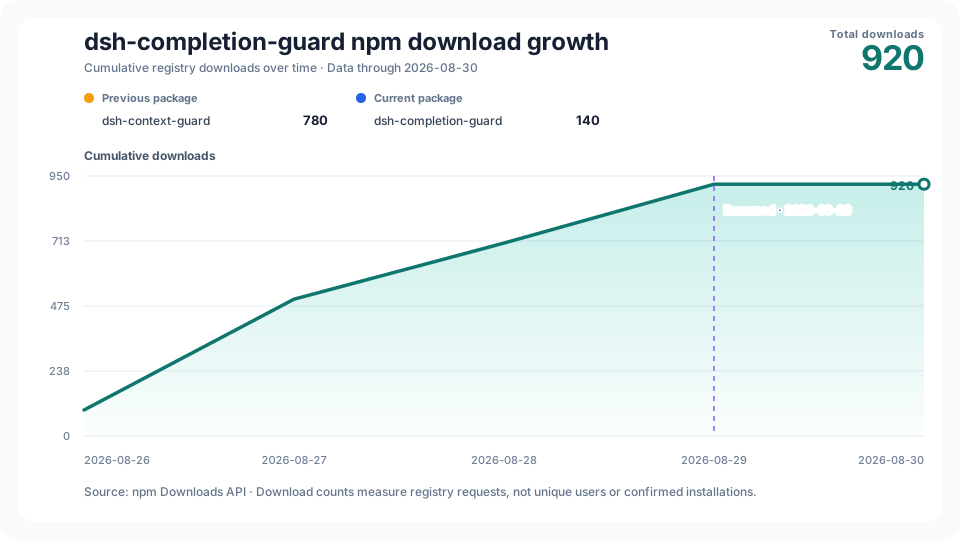
History starts on the first public npm release day, 2026-08-26; its real first-day count is retained even when nonzero. The vertical axis starts at zero. Date labels share one fixed day interval and centered anchors; the caption always gives the exact coverage end.
|
|
198
158
|
|
|
199
|
-
The daily
|
|
159
|
+
The workflow is scheduled to collect twice daily. It publishes through the last day whose counts are unchanged in checks at least 12 hours apart and at least two UTC calendar days old. The chart shows the history cutoff, API availability date and latest check time separately. When npm data is delayed or revised, the previously checked curve remains visible with a pending status; a collection failure leaves the last chart intact. This observation rule is not an npm guarantee that counts will never change. See the [source data](https://raw.githubusercontent.com/GreenLv/dsh-completion-guard/stats/npm-downloads.json) and [latest collection status](https://raw.githubusercontent.com/GreenLv/dsh-completion-guard/stats/refresh-status.json).
|
|
200
160
|
|
|
201
161
|
## Documentation
|
|
202
162
|
|
|
163
|
+
- [Installation and first load](docs/GETTING_STARTED.md) — safe setup, first loading wait and session modes.
|
|
203
164
|
- [`CHANGELOG.md`](CHANGELOG.md) — versioned user-visible changes.
|
|
204
165
|
- [`docs/ARCHITECTURE.md`](docs/ARCHITECTURE.md) — ownership, durable state, and certification pipeline.
|
|
205
166
|
- [`docs/COMPATIBILITY.md`](docs/COMPATIBILITY.md) — supported DSH versions and certifiable command subset.
|
package/README.zh-CN.md
CHANGED
|
@@ -2,115 +2,77 @@
|
|
|
2
2
|
|
|
3
3
|
[English](README.md)
|
|
4
4
|
|
|
5
|
-
|
|
5
|
+
DSH Completion Guard 是 DeepSeek Harness 插件,负责保存任务要求,并在认证完成前核对已保存的结果。长任务或恢复后的会话中,它帮助助手继续核对文件修改、测试、禁止事项和你后来补充的要求。
|
|
6
6
|
|
|
7
|
-
|
|
7
|
+
**首次打开或恢复已有历史的会话,需要等待载入。** DSH 载入历史,Guard 重建会话状态,界面可能显示“载入历史”;请等加载结束再继续。`always` 让新建根会话从首条真实输入开始受到保护,不会让历史载入立即完成;再次打开也不能保证没有等待。
|
|
8
8
|
|
|
9
|
-

|
|
10
10
|
|
|
11
|
-
##
|
|
11
|
+
## 安装或升级
|
|
12
12
|
|
|
13
|
-
|
|
13
|
+
需要 DSH `>=0.2.1-rc.2`、Cordis `>=4.0.4`、Node.js `>=22` 和 pnpm `>=11`。Web、Headless 和官方 Desktop 应用使用各自的配置目录。已审查的宿主基线是 DSH `0.2.1-rc.2` / Cordis `4.0.5`,更新版本仍须通过兼容性核验。
|
|
14
14
|
|
|
15
|
-
|
|
16
|
-
dsh plugin --profile web add dsh-completion-guard@0.8.4
|
|
17
|
-
```
|
|
15
|
+
先选好路径,再替换任何包:
|
|
18
16
|
|
|
19
|
-
|
|
17
|
+
1. **首次安装,没有旧 Guard 会话**:停止宿主,在使用的 profile 中安装 Guard,核验并绑定本次安装后再启动。
|
|
18
|
+
2. **已有旧会话,需要升级**:先停止相关写者,保留旧安装包及其有效模式来源。**升级前**冻结会话库存并准备迁移收据。安装后重建宿主锁,保持写者停止,完成旧模式的 `adopt` 和 `verify`;目标范围核验通过前不能启动升级后的宿主。无法核实的旧模式保持待处理。
|
|
20
19
|
|
|
21
|
-
|
|
20
|
+
Web 在完成相应准备后安装:
|
|
22
21
|
|
|
23
22
|
```sh
|
|
24
|
-
|
|
25
|
-
DSH_PROFILE_ROOT=/absolute/path/to/.dsh/profiles/web
|
|
26
|
-
GUARD_HOST_LOCK="$DSH_PROFILE_ROOT/node_modules/.bin/dsh-completion-guard-host-lock"
|
|
27
|
-
|
|
28
|
-
"$GUARD_HOST_LOCK" inspect --runtime-root "$DSH_RUNTIME_ROOT" --profile-root "$DSH_PROFILE_ROOT"
|
|
29
|
-
"$GUARD_HOST_LOCK" inject --runtime-root "$DSH_RUNTIME_ROOT" --profile-root "$DSH_PROFILE_ROOT"
|
|
30
|
-
dsh --profile web --dump-config | "$GUARD_HOST_LOCK" verify-dump --runtime-root "$DSH_RUNTIME_ROOT" --profile-root "$DSH_PROFILE_ROOT" --dump-config -
|
|
23
|
+
dsh plugin --profile web add dsh-completion-guard@0.10.0
|
|
31
24
|
```
|
|
32
25
|
|
|
33
|
-
|
|
26
|
+
装好插件还需核验环境。**宿主锁**记录这个 profile 实际加载的包和目录:先用 `inspect` 检查,再用 `inject` 写入,最后以 `verify-dump` 核对组合配置;注入前备份 `cordis.patch.yml`。[安装与首次载入](docs/GETTING_STARTED.md)给出 Web 命令、Windows 和 Desktop 路径及启动前的最后核验。[旧会话迁移指南](docs/ACTIVATION_MIGRATION.md)提供升级准备、完整命令和可复制的 AI 提示词。
|
|
34
27
|
|
|
35
|
-
|
|
28
|
+
## 启动后会看到什么
|
|
36
29
|
|
|
37
|
-
|
|
30
|
+
已有会话请先等历史载入和状态重建结束,再查看:
|
|
38
31
|
|
|
39
32
|
```text
|
|
40
|
-
/context-guard on
|
|
41
33
|
/context-guard status
|
|
42
34
|
```
|
|
43
35
|
|
|
44
|
-
|
|
45
|
-
|
|
46
|
-
### 普通工作
|
|
47
|
-
|
|
48
|
-
照常让 DSH 修改文件或运行测试,助手通过 DSH 宿主工具执行。Guard 保存要求,观察宿主已持久化的调用与结果;要求的结果需要独立核验时,再使用只读回读。例如,宿主修改配置文件后,另一次精确文件回读可证明新内容;具名测试需要自己的真实运行结果。工具返回成功或助手自述,不能证明无关条件,也不能抹去对禁改文件的真实修改。`context_guard_prepare` 说明缺少什么证据,`context_guard_checkpoint` 只核对证据实际证明的谓词。
|
|
49
|
-
|
|
50
|
-
0.6.x 的普通 `context_guard_action` 与 `context_guard_evidence` 不再执行编辑、测试或 Git 效果,而是返回迁移说明。新建文件还需可信的写入前不存在证据。包脚本就绪观察可以选择已有测试或评估输入,不强迫再次编辑,但它不证明脚本已经运行,也不认证任意数值输出。后续观察长期收益的要求,要到其时间或审批条件满足后才成为当前工作;简短“继续”只推进有来源且已就绪的具体动作。
|
|
51
|
-
|
|
52
|
-
## 它保护什么
|
|
53
|
-
|
|
54
|
-
- 保存需求、验收条件、禁止项和后续修正,不覆盖旧记录。
|
|
55
|
-
- 只使用 DSH 已保存的工具调用和结果,并保存脱敏摘要而不是完整输出。
|
|
56
|
-
- 只有动作和结果对应指定命令、文件或其他目标时,证据才有效。
|
|
57
|
-
- 会话重建或恢复后重新检查完成状态;记录损坏时拒绝签发证书。
|
|
58
|
-
- 当前检查表尚未通过时,阻止 Guard 自己守卫的 Goal 完成路径。DSH 内部仍可能绕过这条路径,因此插件会报告这些情况,不声称能阻止所有写入。
|
|
59
|
-
|
|
60
|
-
## 状态与兼容性
|
|
36
|
+
**使用默认配置的新建空根会话**采用 `always`,显示 `armed`,表示 Guard 已就绪、等待你的首条真实消息。此前 Guard 不追加会话事件,你仍可选择 DSH 会话 preset;DSH 可能记录自身的初始化事件。首条真实输入进入执行步骤时,保护就在同一步骤内开始,覆盖任务的第一次文件修改。图片或附件也能启动保护,纯空白消息不会。显式配置的 `activation: opt-in` 继续有效,需要执行 `/context-guard on` 才开始保护。
|
|
61
37
|
|
|
62
|
-
|
|
38
|
+
**旧会话**保留已核验的升级前模式,旧空会话也一样。新默认值不会覆盖旧绑定。显式 `activation` 与绑定矛盾时会报告 `activation_mode_conflict`;要采用新默认值并保留旧模式,请按[配置步骤](docs/GETTING_STARTED.md#新会话默认模式)操作。绑定缺失、损坏或冲突时,Guard 报告原因并拒绝认证,不猜测身份或模式。分叉会话继承父会话绑定的初始模式。
|
|
63
39
|
|
|
64
|
-
|
|
40
|
+
照常让 DSH 改文件、跑测试即可。DSH 执行工具,Guard 保存要求,并核对已记录的结果和必要的回读。例如,“修改配置并让测试通过”需要修改后的文件证据和通过的测试结果,助手说“已完成”还不够。`context_guard_prepare` 说明缺什么证据,`context_guard_checkpoint` 检查能否认证完成。
|
|
65
41
|
|
|
66
|
-
|
|
42
|
+
默认策略仍是 `standard`。自动参与保护不会增加修改、执行或发布权限,也不会自动签发完成证书。
|
|
67
43
|
|
|
68
|
-
|
|
44
|
+
## 模式和常用命令
|
|
69
45
|
|
|
70
|
-
|
|
71
|
-
|
|
72
|
-
|
|
73
|
-
|
|
74
|
-
|
|
75
|
-
|
|
76
|
-
|
|
77
|
-
|
|
78
|
-
|
|
79
|
-
|
|
80
|
-
- `opt-in`(默认):打开会话时不会自动保护。你需要在这个会话中执行 `/context-guard on` 才会启用;执行 `/context-guard off` 可以再次关闭。开关只影响当前会话。
|
|
81
|
-
- `always`:DSH 会话从第一条真实消息开始自动保护。全新会话保持完全空白——Guard 不写入任何内容——因此你仍然可以在发送任何内容之前选择 DSH 会话模式(standard、minimal 或自定义 preset)。第一条真实消息进入执行步骤的那一刻,保护在同一步骤内、且位于该消息之前开始:第一个任务连同它的第一次文件修改都在覆盖范围内。首条消息只有图片或附件时同样开始保护,并保留待解释的资产项;纯空白消息不启动任何内容。在某个会话中执行 `/context-guard off` 后,该会话关闭保护,直到再次执行 `on`。
|
|
46
|
+
| 命令或模式 | 作用 |
|
|
47
|
+
| --- | --- |
|
|
48
|
+
| `always` | 新建根会话从首条真实输入开始自动保护。 |
|
|
49
|
+
| `opt-in` | 在会话中执行 `/context-guard on` 后开始保护。 |
|
|
50
|
+
| `/context-guard status` | 查看启用状态、未完成检查及其原因。 |
|
|
51
|
+
| `/context-guard off` / `on` | 关闭或开启当前会话的保护,保留历史。 |
|
|
52
|
+
| `/context-guard diagnose` | 解释完成检查的结论。 |
|
|
53
|
+
| `/context-guard clear` | 撤下当前检查表,保留禁止项;不表示其中的工作已执行完成。 |
|
|
54
|
+
| `/context-guard migration` | 查看会话适用规则及升级、回退的影响。 |
|
|
55
|
+
| `/context-guard release` | 查看显式采用的发布合同及剩余工作。 |
|
|
82
56
|
|
|
83
|
-
|
|
57
|
+
Guard 启用模式与 DSH 的标准、极简或自定义会话 preset 分开。已保存的 `off`、`on` 继续有效。如需修改后续新根会话的初始默认值,按[配置步骤](docs/GETTING_STARTED.md#新会话默认模式)操作,保留已有宿主锁字段和旧会话绑定。
|
|
84
58
|
|
|
85
|
-
|
|
59
|
+
## 历史载入与 0.9.0 缓存
|
|
86
60
|
|
|
87
|
-
|
|
88
|
-
- id: context-guard
|
|
89
|
-
name: dsh-completion-guard
|
|
90
|
-
config:
|
|
91
|
-
activation: always
|
|
92
|
-
```
|
|
61
|
+
首次打开或恢复已有会话时,需要载入历史并重建 Guard 状态;再次进入也可能等待。这与新空会话的 `armed` 不同,后者是在等待你输入。
|
|
93
62
|
|
|
94
|
-
|
|
63
|
+
0.9.0 只在确认历史未变、检查结果可安全复用时,复用旧历史已经通过的检查。同一次 Desktop 安装检查中,也会复用已读取并核验的应用文件。每次操作仍核对当前模式,并按需要重新核验 Goal 状态、私有记录和宿主环境。**本版没有修改官方宿主的历史视图生命周期或解码缓存,不能保证消除所有界面载入等待**。详见[本版性能边界](CHANGELOG.zh-CN.md#090)和[验收记录](docs/LOCAL_ACCEPTANCE.md)。
|
|
95
64
|
|
|
96
|
-
|
|
97
|
-
| --- | --- | --- |
|
|
98
|
-
| macOS / Linux | Web | `$HOME/.dsh/profiles/web/cordis.patch.yml` |
|
|
99
|
-
| macOS / Linux | Headless | `$HOME/.dsh/profiles/headless/cordis.patch.yml` |
|
|
100
|
-
| macOS | Desktop | `$HOME/.dsh/profiles/desktop/cordis.patch.yml` |
|
|
101
|
-
| Windows | Desktop | `%USERPROFILE%\.dsh\profiles\desktop\cordis.patch.yml` |
|
|
102
|
-
| Windows | Web | `%USERPROFILE%\.dsh\profiles\web\cordis.patch.yml` |
|
|
103
|
-
| Windows | Headless | `%USERPROFILE%\.dsh\profiles\headless\cordis.patch.yml` |
|
|
65
|
+
官方读取器若拒绝旧格式,先保留原日志和旧模式来源。可以用 `inventory`、`select` 明确选择可读会话,并在 `inspect/adopt/verify` 三步使用同一 `--selection`。排除的会话继续待处理:`selected_complete` 只表示选中行完成,不等于整库完成。损坏、权限问题及其他异常不会自动跳过。[迁移指南](docs/ACTIVATION_MIGRATION.md)提供命令、恢复方案及 AI 提示词。
|
|
104
66
|
|
|
105
|
-
|
|
67
|
+
## 限制与隐私
|
|
106
68
|
|
|
107
|
-
|
|
69
|
+
Guard 保存要求、核对相符的已持久化结果,并在恢复时重新检查。证据不足或状态损坏时,它拒绝认证完成。它能守卫自身接入的 Goal 完成路径,不能控制 DSH 所有内部写入,也不替代 DSH 的权限、工具、Goal 或压缩机制。普通调查可以如实回答,并不总能获得机器完成证书。
|
|
108
70
|
|
|
109
|
-
|
|
71
|
+
Guard 保存有界、脱敏的证据摘要,不保存完整提示词、stdout、文件、凭据、图片或原始会话正文,详见[隐私说明](docs/PRIVACY.md)。磁盘安装不证明运行进程或界面已经加载;Guard 的市场重启适配器仍不可用。[兼容性说明](docs/COMPATIBILITY.md)列出可认证命令和平台边界。
|
|
110
72
|
|
|
111
|
-
|
|
73
|
+
<details>
|
|
74
|
+
<summary>高级完成检查、恢复行为与上游关系</summary>
|
|
112
75
|
|
|
113
|
-
## 如何检查完成状态
|
|
114
76
|
|
|
115
77
|
启用后,Guard 会保存用户直接给出的要求和验收条件。只有已保存的工具结果与指定命令、文件或其他目标一致时,才能作为证据。取得机器完成认证需要通过 Guard 检查;证据缺失、过期或对象不一致时,任务保持未认证。当前证据规则未覆盖的调查或解释仍可如实回答并结束,但不会取得完成证书。
|
|
116
78
|
|
|
@@ -144,14 +106,10 @@ Guard 按原始范围保留每项要求、禁止项和答复义务。宿主记
|
|
|
144
106
|
| `strict` | 在 standard 之上,你明确要求的视觉或完整范围验证必须由真实回读事实兑现,而不是一次"只是成功"的工具调用。 |
|
|
145
107
|
| `release` | 显式采用的发布契约按精确候选和一次性预约核验受覆盖的发布操作。契约本身不提供用户授权或宿主权限。 |
|
|
146
108
|
|
|
147
|
-
|
|
109
|
+
若要使用 `strict`,先备份 `cordis.patch.yml`,再仅修改或添加原 `context-guard` 条目 `config` 下的 `policy`。保留启用模式、注入的宿主锁字段和其他配置。下方只展示要改的字段,不能替换完整条目:
|
|
148
110
|
|
|
149
111
|
```yaml
|
|
150
|
-
|
|
151
|
-
name: dsh-completion-guard
|
|
152
|
-
config:
|
|
153
|
-
activation: always
|
|
154
|
-
policy: strict
|
|
112
|
+
policy: strict
|
|
155
113
|
```
|
|
156
114
|
|
|
157
115
|
### 显式发布契约
|
|
@@ -183,6 +141,8 @@ Context Guard 负责完成认证;Goal、Todo、Compaction、continuation、权
|
|
|
183
141
|
|
|
184
142
|
两个项目不共享运行时状态、安装器、缓存或发布历史。修复应先进入拥有对应运行时的仓库;只有同一行为确实适用于两侧时,才显式迁移。具体复用与替换边界见 [`docs/UPSTREAM_BASE.md`](docs/UPSTREAM_BASE.md) 和 [`docs/PORTING_NOTES.md`](docs/PORTING_NOTES.md)。
|
|
185
143
|
|
|
144
|
+
</details>
|
|
145
|
+
|
|
186
146
|
## npm 下载量历史
|
|
187
147
|
|
|
188
148
|
|
|
@@ -191,10 +151,11 @@ Context Guard 负责完成认证;Goal、Todo、Compaction、continuation、权
|
|
|
191
151
|
|
|
192
152
|
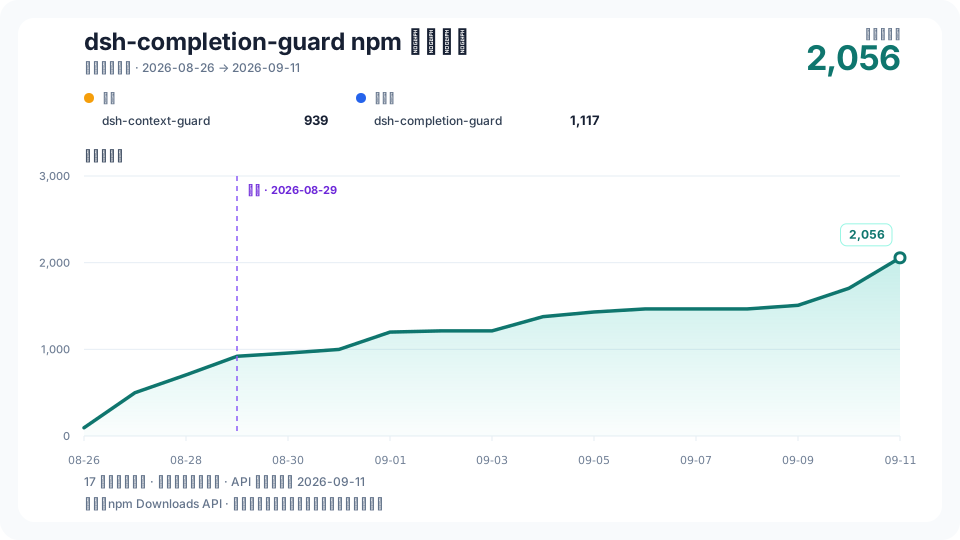
历史从首次公开发布 npm 的 2026-08-26 开始,保留首日真实下载数,不强行归零;纵轴从零起算。日期标签统一居中,按固定天数间隔显示,图注始终保留精确截止日。
|
|
193
153
|
|
|
194
|
-
|
|
154
|
+
工作流每天计划采集两次,仅发布至少相隔 12 小时复查一致、且距离当日已有两个 UTC 日历日的数据。图中分别显示历史截止日、API 数据可用日期和最近检查时间。npm 数据延迟或数值变化时,保留此前已复查的曲线,并显示等待复查;采集失败时保留上一份图。这是项目的观测规则,不代表 npm 保证数值永不修订。详见[源数据](https://raw.githubusercontent.com/GreenLv/dsh-completion-guard/stats/npm-downloads.json)和[最近采集状态](https://raw.githubusercontent.com/GreenLv/dsh-completion-guard/stats/refresh-status.json)。
|
|
195
155
|
|
|
196
156
|
## 文档
|
|
197
157
|
|
|
158
|
+
- [安装与首次载入](docs/GETTING_STARTED.md) — 安全安装、首次等待及会话模式。
|
|
198
159
|
- [`CHANGELOG.zh-CN.md`](CHANGELOG.zh-CN.md) — 面向使用者的版本变化。
|
|
199
160
|
- [`docs/ARCHITECTURE.md`](docs/ARCHITECTURE.md) — 所有权、持久状态和认证管线。
|
|
200
161
|
- [`docs/COMPATIBILITY.md`](docs/COMPATIBILITY.md) — 支持的 DSH 版本和可认证命令子集。
|
|
@@ -0,0 +1,95 @@
|
|
|
1
|
+
#!/usr/bin/env node
|
|
2
|
+
import { readFileSync, writeFileSync, realpathSync } from 'node:fs'
|
|
3
|
+
import { createRequire } from 'node:module'
|
|
4
|
+
import { pathToFileURL } from 'node:url'
|
|
5
|
+
import { resolve } from 'node:path'
|
|
6
|
+
import { homedir } from 'node:os'
|
|
7
|
+
import { activationJson, activationCanonical, inspectActivationInventory, prepareActivationMigration,
|
|
8
|
+
readActivationMigrationReceipt, verifyMigrationInventory, adoptActivationReceipt, resolveActivationBindingsRoot,
|
|
9
|
+
scanActivationInventory, createActivationSelection, validateActivationSelection, activationSelectionPending,
|
|
10
|
+
prepareSelectedActivationMigration, verifySelectedMigrationInventory, isSelectedActivationReceipt } from '../dist/domain/index.js'
|
|
11
|
+
|
|
12
|
+
const operation = process.argv[2]
|
|
13
|
+
const common = ['--runtime-anchor', '--persistence-root', '--compression']
|
|
14
|
+
const allowed = {
|
|
15
|
+
inventory: [...common, '--output'],
|
|
16
|
+
select: ['--inventory', '--include-file', '--output'],
|
|
17
|
+
inspect: [...common, '--prior-modes', '--output', '--selection'],
|
|
18
|
+
adopt: [...common, '--receipt', '--dsh-home', '--selection'],
|
|
19
|
+
verify: [...common, '--receipt', '--dsh-home', '--selection'],
|
|
20
|
+
}
|
|
21
|
+
const options = new Map()
|
|
22
|
+
function option(name, optional = false) {
|
|
23
|
+
if (!options.has(name) && !optional) throw new Error(`missing ${name}`)
|
|
24
|
+
return options.get(name)
|
|
25
|
+
}
|
|
26
|
+
const readJson = path => activationJson(readFileSync(resolve(path), 'utf8'))
|
|
27
|
+
function save(path, value) {
|
|
28
|
+
try { writeFileSync(resolve(path), activationCanonical(value) + '\n', { flag: 'wx', mode: 0o600 }) }
|
|
29
|
+
catch (error) { if (error?.code === 'EEXIST') throw new Error('activation_output_exists'); throw error }
|
|
30
|
+
}
|
|
31
|
+
const print = value => process.stdout.write(JSON.stringify(value) + '\n')
|
|
32
|
+
async function main() {
|
|
33
|
+
if (!Object.hasOwn(allowed, operation)) throw new Error('activation_cli_usage')
|
|
34
|
+
for (let i = 3; i < process.argv.length; i += 2) {
|
|
35
|
+
const key = process.argv[i], value = process.argv[i + 1]
|
|
36
|
+
if (!allowed[operation].includes(key) || options.has(key) || !value || value.startsWith('--')) throw new Error('activation_cli_options_invalid')
|
|
37
|
+
options.set(key, value)
|
|
38
|
+
}
|
|
39
|
+
if (operation === 'select') {
|
|
40
|
+
const selection = createActivationSelection(readJson(option('--inventory')), readJson(option('--include-file')))
|
|
41
|
+
save(option('--output'), selection)
|
|
42
|
+
print({ status: 'selection_ready', includedCount: selection.include.length, selectionSha256: selection.sha256 })
|
|
43
|
+
return
|
|
44
|
+
}
|
|
45
|
+
const selection = option('--selection', true) ? validateActivationSelection(readJson(option('--selection'))) : undefined
|
|
46
|
+
const receipt = ['adopt', 'verify'].includes(operation) ? readActivationMigrationReceipt(resolve(option('--receipt'))) : undefined
|
|
47
|
+
if (receipt && !selection && isSelectedActivationReceipt(receipt)) throw new Error('activation_selection_required')
|
|
48
|
+
const anchor = realpathSync(option('--runtime-anchor'))
|
|
49
|
+
const require = createRequire(anchor)
|
|
50
|
+
const { Context } = await import(pathToFileURL(require.resolve('@deepseek-ai/cordis')).href)
|
|
51
|
+
const backendPath = require.resolve('@deepseek-ai/dsh-session-persistence-jsonl')
|
|
52
|
+
const { default: Jsonl } = await import(pathToFileURL(backendPath).href)
|
|
53
|
+
// Resolve the same dependency instance used by this physical JSONL backend.
|
|
54
|
+
const { SessionFormatUnsupportedError } = await import(pathToFileURL(createRequire(backendPath).resolve('@deepseek-ai/dsh-session-persistence')).href)
|
|
55
|
+
const ctx = new Context()
|
|
56
|
+
const compression = option('--compression', true)
|
|
57
|
+
if (compression && !['none', 'zstd'].includes(compression)) throw new Error('invalid compression')
|
|
58
|
+
const backend = ctx.plugin(Jsonl, { root: resolve(option('--persistence-root')), ...(compression ? { compression } : {}) })
|
|
59
|
+
try {
|
|
60
|
+
await backend.await()
|
|
61
|
+
const snapshot = operation === 'inventory' || selection
|
|
62
|
+
? await scanActivationInventory(ctx.sessionPersistence, error => error instanceof SessionFormatUnsupportedError) : undefined
|
|
63
|
+
if (operation === 'inventory') {
|
|
64
|
+
save(option('--output'), snapshot)
|
|
65
|
+
print({ status: 'inventory_scanned', totalCount: snapshot.rows.length,
|
|
66
|
+
readableCount: snapshot.rows.filter(row => row.status === 'readable').length,
|
|
67
|
+
unsupportedCount: snapshot.rows.filter(row => row.status === 'unsupported').length, inventorySha256: snapshot.sha256 })
|
|
68
|
+
return
|
|
69
|
+
}
|
|
70
|
+
const inventory = selection ? undefined : await inspectActivationInventory(ctx.sessionPersistence)
|
|
71
|
+
const scope = selection ? { scope: 'receipt_selected', wholeInventoryStatus: 'not_claimed',
|
|
72
|
+
includedCount: selection.include.length, inventoryCount: snapshot.rows.length,
|
|
73
|
+
pending: activationSelectionPending(snapshot, selection) } : {}
|
|
74
|
+
if (operation === 'inspect') {
|
|
75
|
+
const prior = readJson(option('--prior-modes'))
|
|
76
|
+
const result = selection ? prepareSelectedActivationMigration(snapshot, selection, prior) : prepareActivationMigration(inventory, prior)
|
|
77
|
+
if (result.receipt) save(option('--output'), result.receipt)
|
|
78
|
+
print({ ...result, receipt: undefined, ...scope, count: selection ? selection.include.length : inventory.length,
|
|
79
|
+
...(result.receipt ? { receiptSha256: result.receipt.sha256 } : {}) })
|
|
80
|
+
if (result.status !== 'ready') process.exitCode = 2
|
|
81
|
+
} else {
|
|
82
|
+
if (selection) verifySelectedMigrationInventory(receipt, snapshot, selection)
|
|
83
|
+
else verifyMigrationInventory(receipt, inventory)
|
|
84
|
+
const root = resolveActivationBindingsRoot(option('--dsh-home', true) ?? process.env.DSH_HOME, homedir())
|
|
85
|
+
const result = adoptActivationReceipt(root, receipt, operation === 'verify')
|
|
86
|
+
print({ ...result, ...scope, status: selection ? (result.status === 'complete' ? 'selected_complete' : 'selected_partial') : result.status })
|
|
87
|
+
if (result.status !== 'complete') process.exitCode = 2
|
|
88
|
+
}
|
|
89
|
+
} finally { await ctx.fiber.dispose() }
|
|
90
|
+
}
|
|
91
|
+
main().catch(error => {
|
|
92
|
+
const message = error instanceof Error && /^(?:activation_[a-z_]+|missing --[a-z-]+|invalid compression)$/u.test(error.message)
|
|
93
|
+
? error.message : 'activation_cli_failed'
|
|
94
|
+
process.stderr.write(JSON.stringify({ status: 'unavailable', reason_code: message }) + '\n'); process.exitCode = 1
|
|
95
|
+
})
|