dsh-codex-subscription 2.1.0-beta.4 → 2.1.0
This diff represents the content of publicly available package versions that have been released to one of the supported registries. The information contained in this diff is provided for informational purposes only and reflects changes between package versions as they appear in their respective public registries.
- package/README.en.md +35 -5
- package/README.md +35 -5
- package/lib/client.js +623 -440
- package/lib/index.js +49 -16
- package/package.json +1 -1
package/README.en.md
CHANGED
|
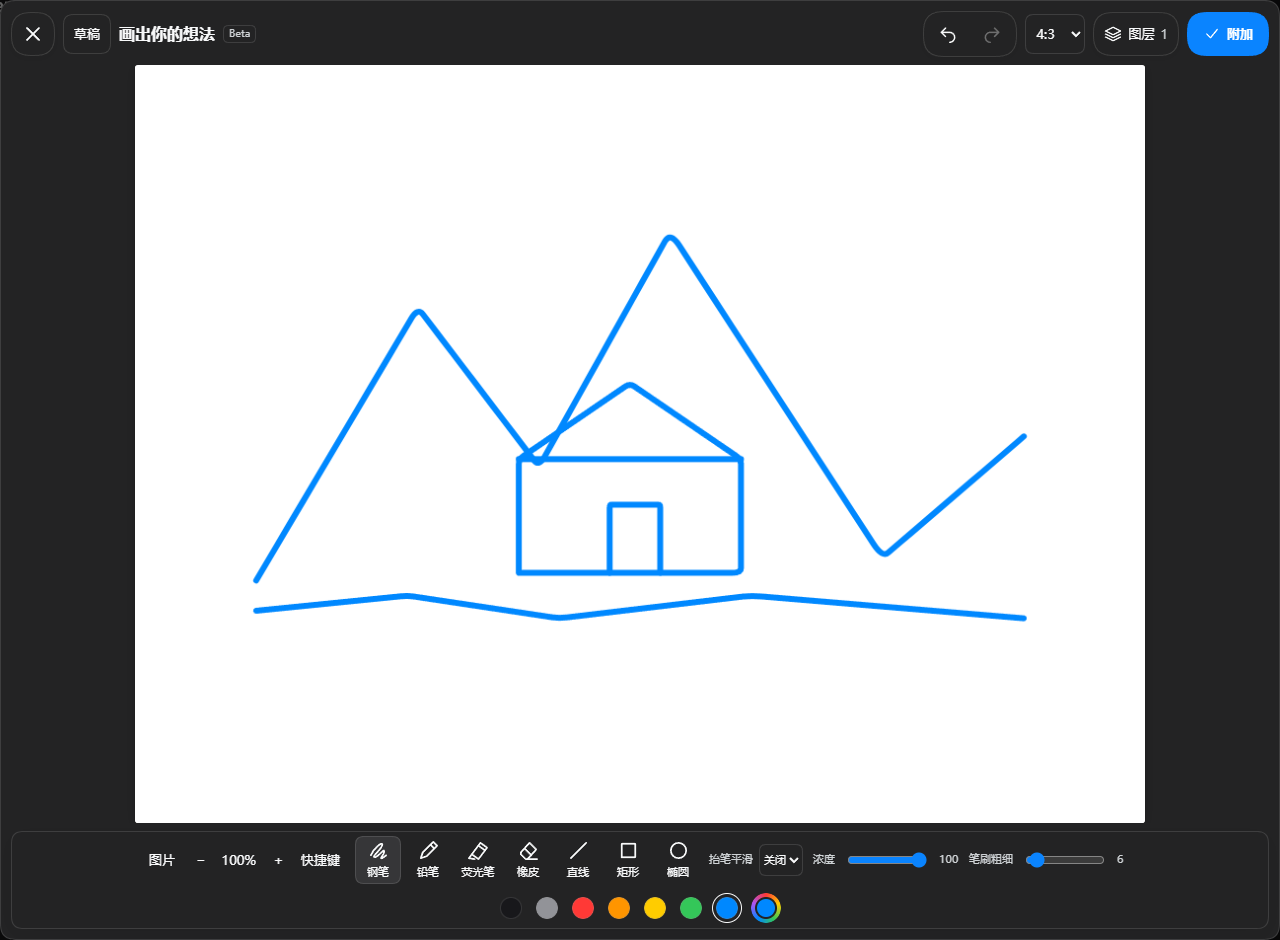
@@ -180,11 +180,11 @@ The screenshot above illustrates image viewing and on-image notes; available but
|
|
|
180
180
|
|
|
181
181
|
|
|
182
182
|
|
|
183
|
-
Use the composer pen button for manual drawing.
|
|
183
|
+
Use the composer pen button for manual drawing. Selecting `@sketch` only inserts the Agent entry into the composer; the Agent opens the board after you send your drawing request. You can also choose Open in sketch from an enhanced image preview. Attachment intake and removal use the native DSH component.
|
|
184
184
|
|
|
185
|
-
Sketch supports local drafts, image layers, aspect ratios, brushes, lines and shapes, two erasers, undo/redo, pan/zoom and configurable shortcuts. Smoothing processes a completed stroke only after release. Up to 20 drafts stay in the current browser; attaching a sketch never sends it automatically. Its image panel manages only the current sketch, not the conversation library.
|
|
185
|
+
Sketch supports local drafts, image layers, aspect ratios, three brushes (solid ink, grainy pencil and translucent highlighter), lines and shapes, two erasers, undo/redo, pan/zoom and configurable shortcuts. Smoothing processes a completed stroke only after release. Up to 20 drafts stay in the current browser; attaching a sketch never sends it automatically. Its image panel manages only the current sketch, not the conversation library.
|
|
186
186
|
|
|
187
|
-
|
|
187
|
+
The board supports editable shapes and text, native curves, and a side control for size/opacity. During Agent drawing, you can view, zoom, close the panel or stop drawing; manual edits unlock when it finishes. Automatic completion previews are off by default and can be enabled in Advanced settings. The document, history and run state are retained when switching away and back. Background drawing while viewing another session is not guaranteed. Save before a full-page reload or exit; unsaved recovery is not guaranteed.
|
|
188
188
|
|
|
189
189
|
**Sketch-to-image example**: draw, click Attach, describe the desired result in the composer, then send.
|
|
190
190
|
|
|
@@ -195,7 +195,9 @@ Beta.3 adds editable shapes and text, native curves, and a side control for size
|
|
|
195
195
|
The request preserves the mountain and cabin composition while creating a warm watercolor travel illustration with green peaks, an orange roof, a meadow stream and morning light, without the blue outlines. GPT-5.6-Luna made one image-tool call requesting low quality. Luna is the conversation model; the subscription backend determines the actual image model.
|
|
196
196
|
|
|
197
197
|
<details>
|
|
198
|
-
<summary>Advanced
|
|
198
|
+
<summary>Advanced examples</summary>
|
|
199
|
+
|
|
200
|
+
**Someone Behind the Canvas**
|
|
199
201
|
|
|
200
202
|
**Astra draws the sketch; GPT Image 2 generates the illustration.** Astra draws 427 strokes across six layers through the native `codex_sketch` interface; Luna then calls the subscription image tool. The request uses `gpt-image-2` at low quality; the server does not report the executing model. This Beta adds PNG export, layered PSD import/export and editable draft files. PSD retains pixel layers; native drafts retain strokes. Sketch canvas and Agent drawing are separate Beta options, both off by default in Advanced settings. Drawing tools are exposed only when Agent drawing is enabled; the agent then automatically opens the current session’s board.
|
|
201
203
|
|
|
@@ -203,7 +205,35 @@ The request preserves the mountain and cabin composition while creating a warm w
|
|
|
203
205
|
| --- | --- |
|
|
204
206
|
|  |  |
|
|
205
207
|
|
|
206
|
-
|
|
208
|
+
**Sketch reproduction prompt (reconstructed from the artwork, not the original conversation)**
|
|
209
|
+
|
|
210
|
+
Astra drew the original in stages. This Chinese prompt provides a starting point for the same concept, not a guarantee of an identical result.
|
|
211
|
+
|
|
212
|
+
```text
|
|
213
|
+
@sketch 用 4:3 横版画板绘制《画布背面有人》:中央偏上是一处撕开的纸洞,洞内是深蓝星空和一位拿颜料桶的小画师;蓝色颜料从桶中流出,形成 S 形河流,流向下方城市。左侧城市保持未上色线稿,右侧城市被暖色点亮,加入纸船与飞鸟。按纸面、洞内世界、颜料河流、城市、画师和细节分层绘制,保留原生可编辑笔画。
|
|
214
|
+
```
|
|
215
|
+
|
|
216
|
+
**Actual image-generation prompt (original Chinese)**
|
|
217
|
+
|
|
218
|
+
```text
|
|
219
|
+
请基于本条附加草图实际调用订阅图片工具一次,生成成品插画。quality=low,模型使用当前默认,不切换型号,不额外生成。主题《画布背面有人》:保留4:3横构图、中央偏上的撕纸洞口、洞内拿颜料桶的小画师、流出成为S形河流的蓝色颜料、下方左侧未上色城市与右侧被点亮城市、纸船飞鸟。精修为惊艳的立体纸艺与精细手绘结合的编辑插画,纸张纤维、真实撕边及柔和投影,深靛蓝洞内星月,丰富青蓝颜料层次和流动质感,赭橙画师与暖色建筑,微小清晰的叙事细节。不重构为风景,不添加文字水印。必须使用本条参考图片编辑,不能仅凭文字生成。生成后简短说明完成即可。
|
|
220
|
+
```
|
|
221
|
+
|
|
222
|
+
Original example released in: [Beta v2.1.0-beta.2](https://github.com/WSL043/dsh-codex-subscription/releases/tag/v2.1.0-beta.2)
|
|
223
|
+
|
|
224
|
+
**Mona Lisa: Astra sketch → GPT image generation**
|
|
225
|
+
|
|
226
|
+
Example version: [2.1.0-beta.5](https://github.com/WSL043/dsh-codex-subscription/releases/tag/v2.1.0-beta.5)
|
|
227
|
+
|
|
228
|
+
Actual results supplied by the user from another computer: Astra draws on a portrait canvas, then GPT image generation turns the sketch into an oil painting.
|
|
229
|
+
|
|
230
|
+
| Native Astra sketch | GPT-generated oil painting |
|
|
231
|
+
| --- | --- |
|
|
232
|
+
| 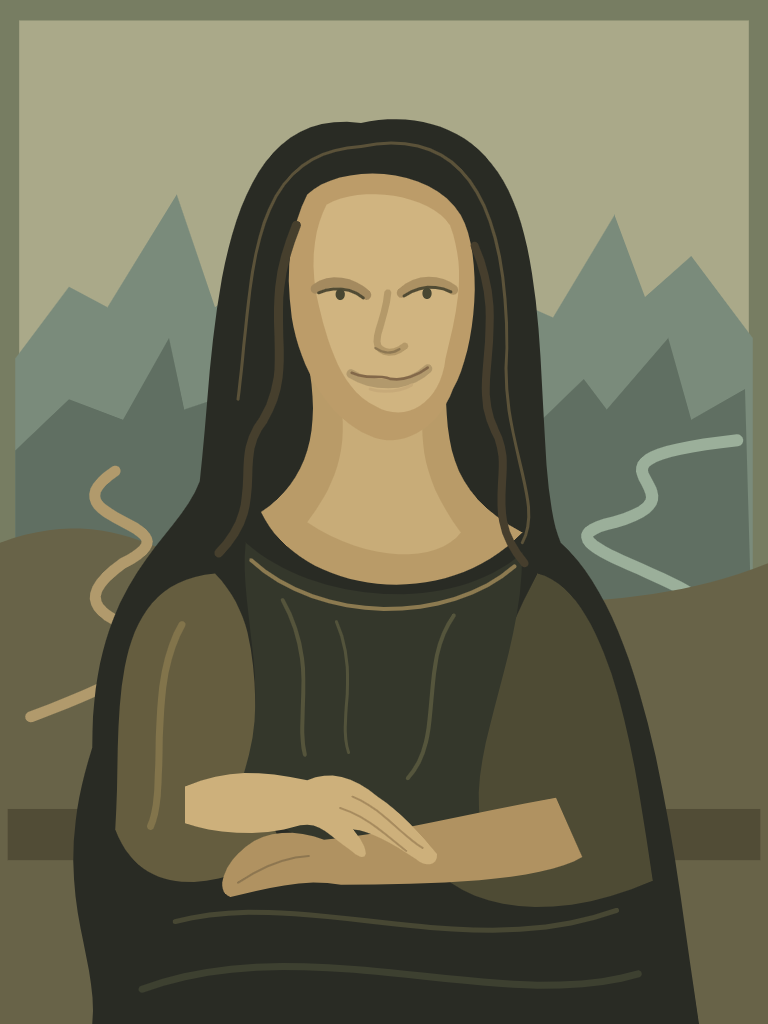 | 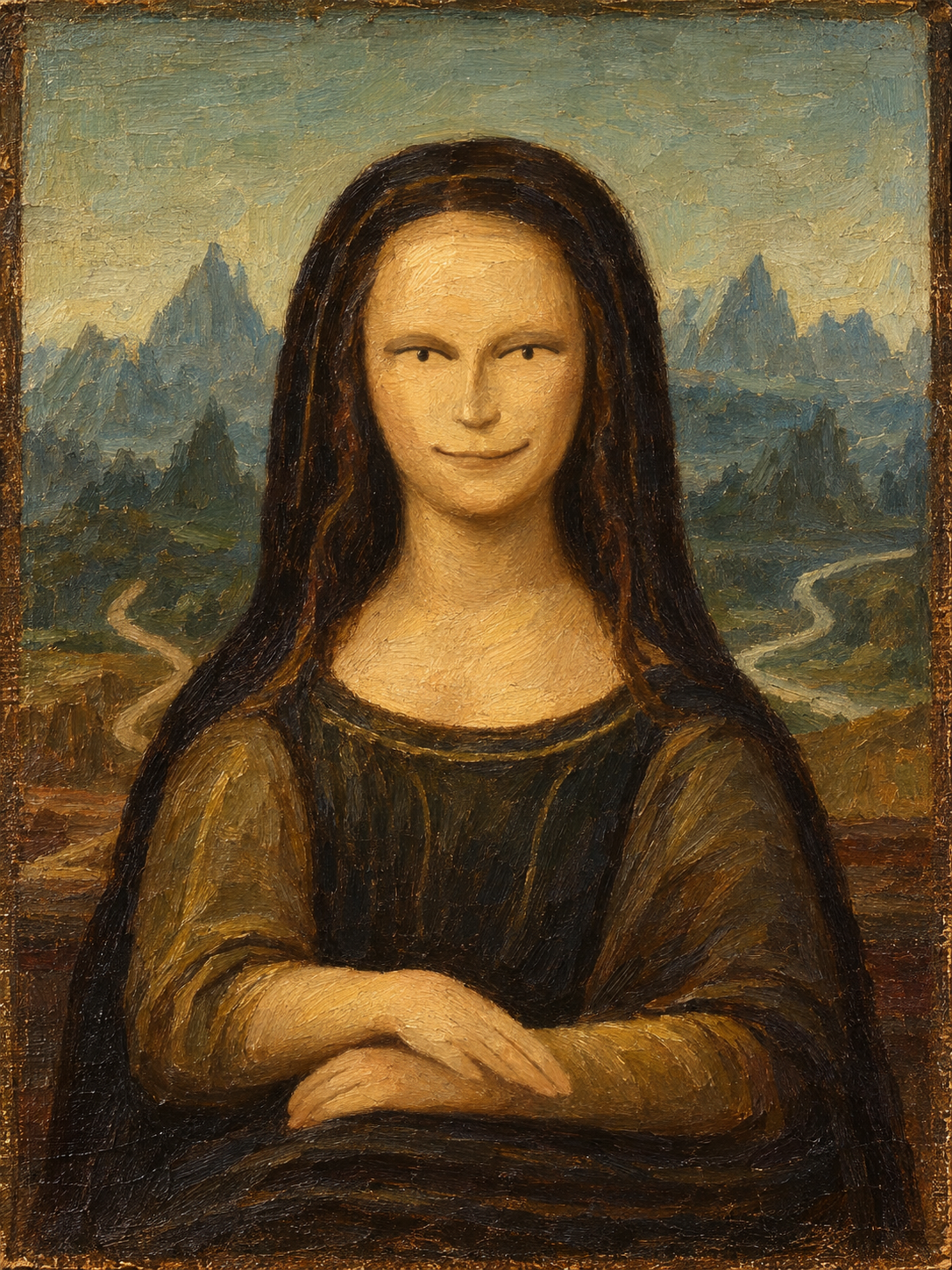 |
|
|
233
|
+
|
|
234
|
+
Original sketch prompt: `@sketch 用竖版画板画一幅《蒙娜丽莎》` (Draw the Mona Lisa on a portrait canvas.)
|
|
235
|
+
|
|
236
|
+
Original image prompt: `帮我变成油画` (Turn it into an oil painting.)
|
|
207
237
|
|
|
208
238
|
</details>
|
|
209
239
|
|
package/README.md
CHANGED
|
@@ -179,11 +179,11 @@ ChatGPT 返回可用重置卡时,设置页会把每张卡分别显示为紧凑
|
|
|
179
179
|
|
|
180
180
|

|
|
181
181
|
|
|
182
|
-
|
|
182
|
+
点击输入框的草图按钮手动画图。`@sketch` 是 Agent 绘图入口:选择时只填入输入框,发送绘图请求后才由 Agent 打开画板。图片预览中可选择“进入草图”;上传、粘贴和移除附件仍由 DSH 原生组件处理。
|
|
183
183
|
|
|
184
|
-
|
|
184
|
+
草图支持多份本地草稿、图片图层、画布比例、三种笔刷(实色钢笔、颗粒铅笔、半透明荧光笔)、直线和形状、两种橡皮、撤销重做、拖动缩放与可配置快捷键。平滑仅在抬笔后处理整笔路径,不拖慢绘画光标。草稿最多 20 份,仅保存在当前浏览器;附加草图不会自动发送。左侧图片面板只管理当前草图的图片,不是会话图片库。
|
|
185
185
|
|
|
186
|
-
|
|
186
|
+
支持可选中修改的形状与文字、原生曲线,以及侧边粗细/浓度控件。Agent 绘制时可查看、缩放和关闭面板,编辑暂时锁定;顶部可停止绘制,完成后恢复编辑。自动完成预览默认关闭,可在高级设置开启。切换会话后再返回会保留画板、历史和运行状态。切到其他会话期间不保证后台绘制;整页刷新或退出前请保存草稿,未保存内容不保证恢复。
|
|
187
187
|
|
|
188
188
|
**草图生成图片实测**:画好后点击“附加”,在输入框说明想要的效果,再发送。
|
|
189
189
|
|
|
@@ -194,7 +194,9 @@ Beta.3 增加可选中修改的形状与文字、原生曲线,以及侧边粗
|
|
|
194
194
|
示例要求:保留山峰与小屋的构图,生成温暖的水彩旅行插画,青绿山峰、橙色屋顶、草地小溪与柔和晨光,不保留蓝色线条。此例通过 GPT-5.6-Luna 发起一次图片工具调用,请求低质量;Luna 是对话模型,实际出图型号由订阅后端决定。
|
|
195
195
|
|
|
196
196
|
<details>
|
|
197
|
-
<summary
|
|
197
|
+
<summary>进阶展示</summary>
|
|
198
|
+
|
|
199
|
+
**《画布背面有人》**
|
|
198
200
|
|
|
199
201
|
**Astra 绘制草图,GPT Image 2 生成成图。** Astra 通过原生 `codex_sketch` 接口完成 6 层、427 笔绘制,再由 Luna 调用订阅生图工具精修。生图请求使用 `gpt-image-2`、低质量档;服务端未报告实际执行型号。Beta 新增 PNG 导出、分层 PSD 导入导出和可编辑草稿文件;PSD 保留像素图层,原生草稿保留笔画。草图画板与 Agent 绘图均默认关闭,可在高级设置中分别开启。仅开启 Agent 绘图后才向模型提供绘图工具。
|
|
200
202
|
|
|
@@ -202,7 +204,35 @@ Beta.3 增加可选中修改的形状与文字、原生曲线,以及侧边粗
|
|
|
202
204
|
| --- | --- |
|
|
203
205
|
|  |  |
|
|
204
206
|
|
|
205
|
-
|
|
207
|
+
**草图复现提示词(按原画面整理,非完整原始对话)**
|
|
208
|
+
|
|
209
|
+
原案例由 Astra 分阶段绘制,下面提供同主题的复现起点,不保证得到完全相同的画面。
|
|
210
|
+
|
|
211
|
+
```text
|
|
212
|
+
@sketch 用 4:3 横版画板绘制《画布背面有人》:中央偏上是一处撕开的纸洞,洞内是深蓝星空和一位拿颜料桶的小画师;蓝色颜料从桶中流出,形成 S 形河流,流向下方城市。左侧城市保持未上色线稿,右侧城市被暖色点亮,加入纸船与飞鸟。按纸面、洞内世界、颜料河流、城市、画师和细节分层绘制,保留原生可编辑笔画。
|
|
213
|
+
```
|
|
214
|
+
|
|
215
|
+
**实际生图提示词**
|
|
216
|
+
|
|
217
|
+
```text
|
|
218
|
+
请基于本条附加草图实际调用订阅图片工具一次,生成成品插画。quality=low,模型使用当前默认,不切换型号,不额外生成。主题《画布背面有人》:保留4:3横构图、中央偏上的撕纸洞口、洞内拿颜料桶的小画师、流出成为S形河流的蓝色颜料、下方左侧未上色城市与右侧被点亮城市、纸船飞鸟。精修为惊艳的立体纸艺与精细手绘结合的编辑插画,纸张纤维、真实撕边及柔和投影,深靛蓝洞内星月,丰富青蓝颜料层次和流动质感,赭橙画师与暖色建筑,微小清晰的叙事细节。不重构为风景,不添加文字水印。必须使用本条参考图片编辑,不能仅凭文字生成。生成后简短说明完成即可。
|
|
219
|
+
```
|
|
220
|
+
|
|
221
|
+
原案例首发:[Beta v2.1.0-beta.2](https://github.com/WSL043/dsh-codex-subscription/releases/tag/v2.1.0-beta.2)
|
|
222
|
+
|
|
223
|
+
**《蒙娜丽莎》:Astra 草图 → GPT 生图**
|
|
224
|
+
|
|
225
|
+
案例版本:[2.1.0-beta.5](https://github.com/WSL043/dsh-codex-subscription/releases/tag/v2.1.0-beta.5)
|
|
226
|
+
|
|
227
|
+
用户在另一台电脑上的实际效果:先让 Astra 在竖版画板上绘制,再通过 GPT 生图转成油画。
|
|
228
|
+
|
|
229
|
+
| Astra 原生草图 | GPT 生图:油画效果 |
|
|
230
|
+
| --- | --- |
|
|
231
|
+
|  |  |
|
|
232
|
+
|
|
233
|
+
草图提示词:`@sketch 用竖版画板画一幅《蒙娜丽莎》`
|
|
234
|
+
|
|
235
|
+
生图提示词:`帮我变成油画`
|
|
206
236
|
|
|
207
237
|
</details>
|
|
208
238
|
|