dsh-codex-subscription 1.2.2 → 1.4.0
This diff represents the content of publicly available package versions that have been released to one of the supported registries. The information contained in this diff is provided for informational purposes only and reflects changes between package versions as they appear in their respective public registries.
- package/AGENTS.md +5 -5
- package/README.md +99 -90
- package/README.zh-CN.md +220 -0
- package/docs/assets/composer-quota-en.png +0 -0
- package/docs/assets/settings-en.png +0 -0
- package/docs/assets/settings-focus-en.png +0 -0
- package/docs/assets/settings-focus.png +0 -0
- package/docs/assets/settings.png +0 -0
- package/lib/client.js +269 -31
- package/lib/index.js +262 -29
- package/package.json +5 -3
- package/README.en.md +0 -210
package/README.en.md
DELETED
|
@@ -1,210 +0,0 @@
|
|
|
1
|
-
<div align="center">
|
|
2
|
-
|
|
3
|
-
# DSH Codex Subscription
|
|
4
|
-
|
|
5
|
-
**Use your ChatGPT / Codex subscription directly in DeepSeek Harness**
|
|
6
|
-
|
|
7
|
-
No OpenAI API key or Codex CLI. Models, search, quota, and image generation stay inside DSH.
|
|
8
|
-
|
|
9
|
-
[](https://github.com/WSL043/dsh-codex-subscription/actions/workflows/ci.yml)
|
|
10
|
-
[](https://www.npmjs.com/package/dsh-codex-subscription)
|
|
11
|
-
[](https://www.npmjs.com/package/dsh-codex-subscription)
|
|
12
|
-
[](LICENSE)
|
|
13
|
-
[](https://github.com/WSL043/dsh-codex-subscription/stargazers)
|
|
14
|
-
|
|
15
|
-
[Three-step start](#three-step-start) · [Agent install](#let-an-agent-install-it-recommended) · [Update and uninstall](#update-and-uninstall) · [简体中文](https://github.com/WSL043/dsh-codex-subscription/blob/main/README.md)
|
|
16
|
-
|
|
17
|
-
</div>
|
|
18
|
-
|
|
19
|
-
<p align="center">
|
|
20
|
-
<img src="https://raw.githubusercontent.com/WSL043/dsh-codex-subscription/main/docs/assets/readme-hero-en.webp" width="900" alt="Your Codex subscription inside DSH: subscription models, web search, live quota, and image generation">
|
|
21
|
-
</p>
|
|
22
|
-
|
|
23
|
-
## Three-step start
|
|
24
|
-
|
|
25
|
-
1. **Install the plugin.** On Windows, open PowerShell and run the line below. Existing `dsh` and DSH-Portable users can use the standard command that follows.
|
|
26
|
-
|
|
27
|
-
```powershell
|
|
28
|
-
irm 'https://github.com/WSL043/dsh-codex-subscription/releases/latest/download/dsh-codex-setup.ps1' | iex
|
|
29
|
-
```
|
|
30
|
-
|
|
31
|
-
2. **Sign in.** Restart DSH yourself, open **Settings -> Codex**, and choose browser sign-in. No Codex CLI and no pasted token are required.
|
|
32
|
-
3. **Use Codex.** Select a Codex model. Quota, subscription search, image generation, and Fast mode remain inside DSH.
|
|
33
|
-
|
|
34
|
-
With an existing `dsh` command, install with:
|
|
35
|
-
|
|
36
|
-
```sh
|
|
37
|
-
dsh plugin --profile web add dsh-codex-subscription
|
|
38
|
-
```
|
|
39
|
-
|
|
40
|
-
From a DSH-Portable product folder, run `./dsh plugin ...` (`.\dsh.exe plugin ...` in Windows PowerShell). See below for the complete official npm, Agent, update, and uninstall routes.
|
|
41
|
-
|
|
42
|
-
## Why this plugin
|
|
43
|
-
|
|
44
|
-
| Capability | What you get |
|
|
45
|
-
| --- | --- |
|
|
46
|
-
| **Subscription models** | Sign in to ChatGPT and use Codex without an OpenAI API key or Codex CLI |
|
|
47
|
-
| **Recoverable and diagnosable** | Sign-in state reconciles automatically; Settings can create a support report without credentials or account identifiers |
|
|
48
|
-
| **Visible quota** | Keep backend-provided standard Codex, Spark, and other limits separate |
|
|
49
|
-
| **Subscription search** | Explicitly choose DSH default search or Codex subscription search |
|
|
50
|
-
| **Codex image generation** | Describe an image in a DSH conversation and view the generated result in that session |
|
|
51
|
-
| **Fast mode (Beta)** | Switch between Standard and Fast directly in the composer |
|
|
52
|
-
|
|
53
|
-
These capabilities reuse the same local ChatGPT sign-in. Subscription routing failures stay visible and never silently switch to another paid route.
|
|
54
|
-
|
|
55
|
-
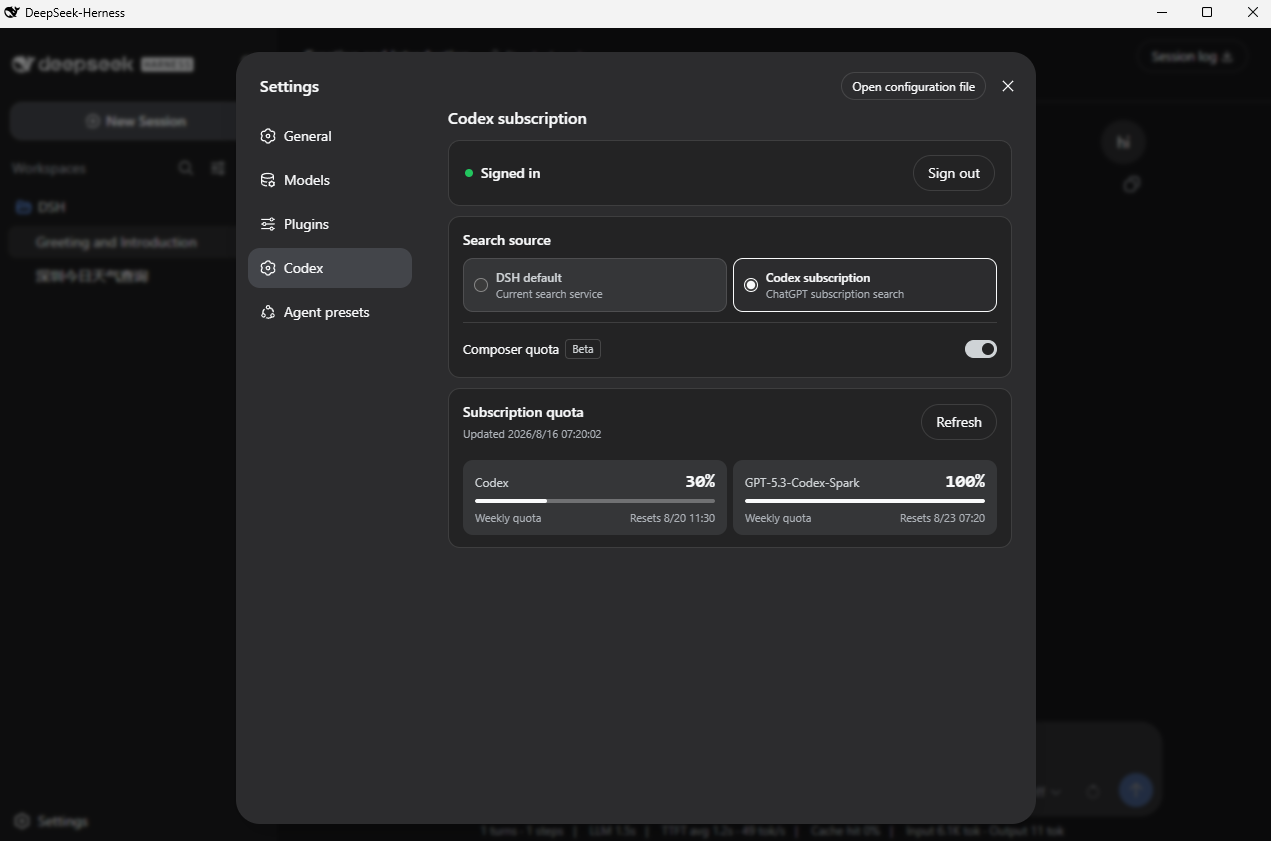
## Product screen
|
|
56
|
-
|
|
57
|
-
<p align="center">
|
|
58
|
-
<img src="https://raw.githubusercontent.com/WSL043/dsh-codex-subscription/main/docs/assets/settings-focus-en.png" width="820" alt="Codex subscription settings in DeepSeek Harness">
|
|
59
|
-
</p>
|
|
60
|
-
|
|
61
|
-
<details>
|
|
62
|
-
<summary>View the complete settings screen</summary>
|
|
63
|
-
|
|
64
|
-
|
|
65
|
-
|
|
66
|
-
</details>
|
|
67
|
-
|
|
68
|
-
## Prepare DSH
|
|
69
|
-
|
|
70
|
-
This plugin is currently compatible through DeepSeek Harness `0.1.1-rc.2` and requires a ChatGPT account that currently has Codex access.
|
|
71
|
-
|
|
72
|
-
- Do not want to configure Node.js? Use [DSH-Portable](https://github.com/WSL043/DSH-Portable), a community desktop distribution with portable and installed editions for Windows plus desktop packages for macOS and Linux.
|
|
73
|
-
- Prefer the official route? Follow the [DeepSeek Harness run guide](https://github.com/deepseek-ai/deepseek-harness#run).
|
|
74
|
-
|
|
75
|
-
## Install
|
|
76
|
-
|
|
77
|
-
### Let an Agent install it (recommended)
|
|
78
|
-
|
|
79
|
-
Send this link directly to your Agent:
|
|
80
|
-
|
|
81
|
-
**[Agent install, update, and uninstall guide](https://raw.githubusercontent.com/WSL043/dsh-codex-subscription/main/AGENTS.md)**
|
|
82
|
-
|
|
83
|
-
```text
|
|
84
|
-
https://raw.githubusercontent.com/WSL043/dsh-codex-subscription/main/AGENTS.md
|
|
85
|
-
```
|
|
86
|
-
|
|
87
|
-
The guide includes verification steps and tells the Agent to preserve the DSH profile, sign-in, and other plugins.
|
|
88
|
-
|
|
89
|
-
### Manual Windows install
|
|
90
|
-
|
|
91
|
-
Open PowerShell and paste this one line:
|
|
92
|
-
|
|
93
|
-
```powershell
|
|
94
|
-
irm 'https://github.com/WSL043/dsh-codex-subscription/releases/latest/download/dsh-codex-setup.ps1' | iex
|
|
95
|
-
```
|
|
96
|
-
|
|
97
|
-
The lightweight setup checks the current folder, the system command, common locations, and any running official DSH or
|
|
98
|
-
[DSH-Portable](https://github.com/WSL043/DSH-Portable), then invokes the official `plugin add`
|
|
99
|
-
operation once. It does not recursively scan disks, install pnpm, create a resident command, snapshot a
|
|
100
|
-
profile, or download the plugin twice. It needs no administrator access and never restarts DSH. Only
|
|
101
|
-
when no existing DSH is found does it use the official npm route pinned to `0.1.1-rc.2`; the setup warns
|
|
102
|
-
that first-time dependency resolution can take a while.
|
|
103
|
-
|
|
104
|
-
<details>
|
|
105
|
-
<summary>Official npm route (Node.js installed)</summary>
|
|
106
|
-
|
|
107
|
-
The official `npx @deepseek-ai/dsh web` command does not create a global `dsh` command. Keep the full `npx` prefix when installing the plugin:
|
|
108
|
-
|
|
109
|
-
```sh
|
|
110
|
-
npx -y @deepseek-ai/dsh@0.1.1-rc.2 plugin --profile web add dsh-codex-subscription
|
|
111
|
-
npx -y @deepseek-ai/dsh@0.1.1-rc.2 plugin --profile web list dsh-codex-subscription --depth 0
|
|
112
|
-
npx -y @deepseek-ai/dsh@0.1.1-rc.2 --profile web --dump-config
|
|
113
|
-
```
|
|
114
|
-
|
|
115
|
-
</details>
|
|
116
|
-
|
|
117
|
-
<details>
|
|
118
|
-
<summary>An existing <code>dsh</code> command or a DSH-Portable folder</summary>
|
|
119
|
-
|
|
120
|
-
```sh
|
|
121
|
-
dsh plugin --profile web add dsh-codex-subscription
|
|
122
|
-
dsh plugin --profile web list dsh-codex-subscription --depth 0
|
|
123
|
-
dsh --profile web --dump-config
|
|
124
|
-
```
|
|
125
|
-
|
|
126
|
-
For DSH-Portable, replace `dsh` with `./dsh` (`.\dsh.exe` in PowerShell). The plugin list should contain
|
|
127
|
-
one `dsh-codex-subscription`, and the config should contain one `codex-subscription` entry.
|
|
128
|
-
|
|
129
|
-
</details>
|
|
130
|
-
|
|
131
|
-
Restart DSH manually after installation, then:
|
|
132
|
-
|
|
133
|
-
1. Open **Settings -> Codex**.
|
|
134
|
-
2. Sign in with a ChatGPT account that has Codex access.
|
|
135
|
-
3. Choose a search source.
|
|
136
|
-
4. Select a Codex model.
|
|
137
|
-
|
|
138
|
-
## Features
|
|
139
|
-
|
|
140
|
-
- ChatGPT OAuth sign-in with credentials kept on the host;
|
|
141
|
-
- Codex models and image generation directly inside DSH conversations;
|
|
142
|
-
- A clear choice between DSH default search and Codex subscription search;
|
|
143
|
-
- Actual backend-provided quota, reset time, and freshness;
|
|
144
|
-
- Separate standard Codex, Codex-Spark, Credits, and other independent limits;
|
|
145
|
-
- Optional composer quota for the selected Codex model (Beta, off by default);
|
|
146
|
-
- Standard or Fast mode for supported Codex models directly in the composer (Beta);
|
|
147
|
-
- A copyable support report in Settings that excludes OAuth credentials, account identifiers, and authorization timestamps;
|
|
148
|
-
- Visible errors when subscription routing is unavailable, with no silent paid fallback.
|
|
149
|
-
|
|
150
|
-
### Composer quota
|
|
151
|
-
|
|
152
|
-
<p align="center">
|
|
153
|
-
<img src="https://raw.githubusercontent.com/WSL043/dsh-codex-subscription/main/docs/assets/composer-quota-en.png" width="800" alt="Codex quota inside the composer">
|
|
154
|
-
</p>
|
|
155
|
-
|
|
156
|
-
The compact percentage appears only for a selected Codex model. Standard Codex uses the lowest remaining
|
|
157
|
-
window returned by the service; Spark uses its independent quota. The plugin does not hard-code a
|
|
158
|
-
“5-hour + weekly” layout or invent Credits and spending caps that the service did not return.
|
|
159
|
-
|
|
160
|
-
### Composer speed (Beta)
|
|
161
|
-
|
|
162
|
-
With a supported Codex model selected, open the composer's model menu to choose Standard or Fast.
|
|
163
|
-
Standard adds no icon; only Fast shows a lightning icon before the model name. Spark does not show the speed entry. Fast mode increases speed and uses more Credits;
|
|
164
|
-
see the [OpenAI Codex Speed documentation](https://learn.chatgpt.com/docs/agent-configuration/speed) for the current rules.
|
|
165
|
-
|
|
166
|
-
## Update and uninstall
|
|
167
|
-
|
|
168
|
-
On Windows, rerun the one-line setup above to update. For the official npm route, use:
|
|
169
|
-
|
|
170
|
-
```sh
|
|
171
|
-
npx -y @deepseek-ai/dsh@0.1.1-rc.2 plugin --profile web update dsh-codex-subscription
|
|
172
|
-
npx -y @deepseek-ai/dsh@0.1.1-rc.2 plugin --profile web list dsh-codex-subscription --depth 0
|
|
173
|
-
npx -y @deepseek-ai/dsh@0.1.1-rc.2 --profile web --dump-config
|
|
174
|
-
npx -y @deepseek-ai/dsh@0.1.1-rc.2 plugin --profile web remove dsh-codex-subscription
|
|
175
|
-
```
|
|
176
|
-
|
|
177
|
-
These operations preserve the DSH profile, other plugins, and saved sign-in.
|
|
178
|
-
|
|
179
|
-
<details>
|
|
180
|
-
<summary>Update or uninstall with an existing <code>dsh</code> command</summary>
|
|
181
|
-
|
|
182
|
-
```sh
|
|
183
|
-
dsh plugin --profile web update dsh-codex-subscription
|
|
184
|
-
dsh plugin --profile web list dsh-codex-subscription --depth 0
|
|
185
|
-
dsh --profile web --dump-config
|
|
186
|
-
dsh plugin --profile web remove dsh-codex-subscription
|
|
187
|
-
```
|
|
188
|
-
|
|
189
|
-
</details>
|
|
190
|
-
|
|
191
|
-
From a DSH-Portable folder, replace `dsh` above with `.\dsh.exe`.
|
|
192
|
-
|
|
193
|
-
## Troubleshooting
|
|
194
|
-
|
|
195
|
-
- **`dsh` is not recognized:** the official npm route does not create a global `dsh` command; use the complete `npx -y @deepseek-ai/dsh@0.1.1-rc.2 ...` command above;
|
|
196
|
-
- **`dsh.exe` is not recognized:** that file is not in the current folder; enter the DSH-Portable folder first or use the one-line Windows setup;
|
|
197
|
-
- **DSH-Portable is not found:** enter its folder and rerun setup, or run `.\dsh.exe plugin --profile web add dsh-codex-subscription` directly;
|
|
198
|
-
- **More than one DSH exists:** the one-line setup combines running copies with Portable folders detected in common locations; enter its number. For an Agent, use the intended folder or pass `-DshPath` explicitly;
|
|
199
|
-
- **Setup still fails:** send the Agent guide above to an Agent. Do not delete the profile or change the system PATH to force an install.
|
|
200
|
-
- **Need to report a problem:** generate a **Support diagnostics** report at the bottom of Settings, then open the [bug report form](https://github.com/WSL043/dsh-codex-subscription/issues/new?template=install-problem.yml). The form collects exact DSH/plugin versions and reproduction steps. The generated report excludes credentials and account identifiers; still do not attach sign-in URLs, authorization codes, or browser callback addresses.
|
|
201
|
-
|
|
202
|
-
The ChatGPT Codex backend and DSH can change independently. This community project is not affiliated with or endorsed by DeepSeek or OpenAI.
|
|
203
|
-
|
|
204
|
-
Use the [bug report form](https://github.com/WSL043/dsh-codex-subscription/issues/new?template=install-problem.yml) for project feedback.
|
|
205
|
-
For DSH plugin discussion, visit [DeepSeek Harness Discussions](https://github.com/deepseek-ai/deepseek-harness/discussions).
|
|
206
|
-
Read [SECURITY.md](SECURITY.md) before reporting sensitive issues.
|
|
207
|
-
|
|
208
|
-
If this project is useful, the [Star button](https://github.com/WSL043/dsh-codex-subscription/stargazers) helps more DSH users find it.
|
|
209
|
-
|
|
210
|
-
[简体中文](README.md) · [MIT](LICENSE)
|