dsh-codex-subscription 1.2.1 → 1.3.0
This diff represents the content of publicly available package versions that have been released to one of the supported registries. The information contained in this diff is provided for informational purposes only and reflects changes between package versions as they appear in their respective public registries.
- package/AGENTS.md +5 -5
- package/README.md +98 -90
- package/README.zh-CN.md +219 -0
- package/docs/assets/settings-en.png +0 -0
- package/docs/assets/settings-focus-en.png +0 -0
- package/docs/assets/settings-focus.png +0 -0
- package/docs/assets/settings.png +0 -0
- package/lib/client.js +218 -1
- package/lib/index.js +246 -23
- package/package.json +5 -3
- package/README.en.md +0 -210
package/AGENTS.md
CHANGED
|
@@ -6,7 +6,7 @@ Use this guide when a user asks an Agent to install, update, verify, or remove
|
|
|
6
6
|
## Safety
|
|
7
7
|
|
|
8
8
|
- Confirm the target DSH installation and profile. Use `web` only when it is the user's target.
|
|
9
|
-
- Use the exact `1.
|
|
9
|
+
- Use the exact `1.3.0` package below; do not install a moving branch.
|
|
10
10
|
- Never print OAuth credentials, account IDs, authorization callbacks, or credential-store contents.
|
|
11
11
|
- Preserve the DSH profile, unrelated plugins, sessions, and saved sign-in.
|
|
12
12
|
- Do not start, stop, or restart DSH without explicit permission.
|
|
@@ -38,19 +38,19 @@ For an official DSH installation run through npm, keep the complete `npx` prefix
|
|
|
38
38
|
run command does not create a global `dsh` command:
|
|
39
39
|
|
|
40
40
|
```sh
|
|
41
|
-
npx -y @deepseek-ai/dsh@0.1.1-rc.2 plugin --profile web add dsh-codex-subscription@1.
|
|
41
|
+
npx -y @deepseek-ai/dsh@0.1.1-rc.2 plugin --profile web add dsh-codex-subscription@1.3.0
|
|
42
42
|
```
|
|
43
43
|
|
|
44
44
|
With an existing global `dsh` command:
|
|
45
45
|
|
|
46
46
|
```sh
|
|
47
|
-
dsh plugin --profile web add dsh-codex-subscription@1.
|
|
47
|
+
dsh plugin --profile web add dsh-codex-subscription@1.3.0
|
|
48
48
|
```
|
|
49
49
|
|
|
50
50
|
From a DSH-Portable folder:
|
|
51
51
|
|
|
52
52
|
```powershell
|
|
53
|
-
.\dsh.exe plugin --profile web add dsh-codex-subscription@1.
|
|
53
|
+
.\dsh.exe plugin --profile web add dsh-codex-subscription@1.3.0
|
|
54
54
|
```
|
|
55
55
|
|
|
56
56
|
Use the same `add` command to update or repair. This is the complete package-changing operation.
|
|
@@ -70,7 +70,7 @@ For DSH-Portable, replace `dsh` with `.\dsh.exe`. Static acceptance requires:
|
|
|
70
70
|
|
|
71
71
|
For the official npm route, run the same checks with `npx -y @deepseek-ai/dsh@0.1.1-rc.2` in place of `dsh`.
|
|
72
72
|
|
|
73
|
-
1. `dsh-codex-subscription` version `1.
|
|
73
|
+
1. `dsh-codex-subscription` version `1.3.0` appears exactly once.
|
|
74
74
|
2. `codex-subscription` appears exactly once in the composed config.
|
|
75
75
|
3. No unrelated plugin or profile was changed and DSH was not restarted.
|
|
76
76
|
|
package/README.md
CHANGED
|
@@ -1,11 +1,10 @@
|
|
|
1
|
-
# DSH Codex Subscription
|
|
2
|
-
|
|
3
1
|
<div align="center">
|
|
4
2
|
|
|
5
|
-
|
|
3
|
+
# DSH Codex Subscription
|
|
4
|
+
|
|
5
|
+
**Use your ChatGPT / Codex subscription directly in DeepSeek Harness**
|
|
6
6
|
|
|
7
|
-
|
|
8
|
-
模型、搜索、额度和图片生成都留在 DSH 里。
|
|
7
|
+
No OpenAI API key or Codex CLI. Models, search, quota, and image generation stay inside DSH.
|
|
9
8
|
|
|
10
9
|
[](https://github.com/WSL043/dsh-codex-subscription/actions/workflows/ci.yml)
|
|
11
10
|
[](https://www.npmjs.com/package/dsh-codex-subscription)
|
|
@@ -13,98 +12,100 @@
|
|
|
13
12
|
[](LICENSE)
|
|
14
13
|
[](https://github.com/WSL043/dsh-codex-subscription/stargazers)
|
|
15
14
|
|
|
16
|
-
[
|
|
15
|
+
[Three-step start](#three-step-start) · [Agent install](#let-an-agent-install-it-recommended) · [Update and uninstall](#update-and-uninstall) · [简体中文](https://github.com/WSL043/dsh-codex-subscription/blob/main/README.zh-CN.md)
|
|
17
16
|
|
|
18
17
|
</div>
|
|
19
18
|
|
|
20
19
|
<p align="center">
|
|
21
|
-
<img src="https://raw.githubusercontent.com/WSL043/dsh-codex-subscription/main/docs/assets/readme-hero.webp" width="900" alt="Codex
|
|
20
|
+
<img src="https://raw.githubusercontent.com/WSL043/dsh-codex-subscription/main/docs/assets/readme-hero-en.webp" width="900" alt="Your Codex subscription inside DSH: models, web search, quota and safe reset, image generation, and Fast mode">
|
|
22
21
|
</p>
|
|
23
22
|
|
|
24
|
-
##
|
|
23
|
+
## Three-step start
|
|
25
24
|
|
|
26
|
-
1.
|
|
25
|
+
1. **Install the plugin.** On Windows, open PowerShell and run the line below. Existing `dsh` and DSH-Portable users can use the standard command that follows.
|
|
27
26
|
|
|
28
27
|
```powershell
|
|
29
28
|
irm 'https://github.com/WSL043/dsh-codex-subscription/releases/latest/download/dsh-codex-setup.ps1' | iex
|
|
30
29
|
```
|
|
31
30
|
|
|
32
|
-
2.
|
|
33
|
-
3.
|
|
31
|
+
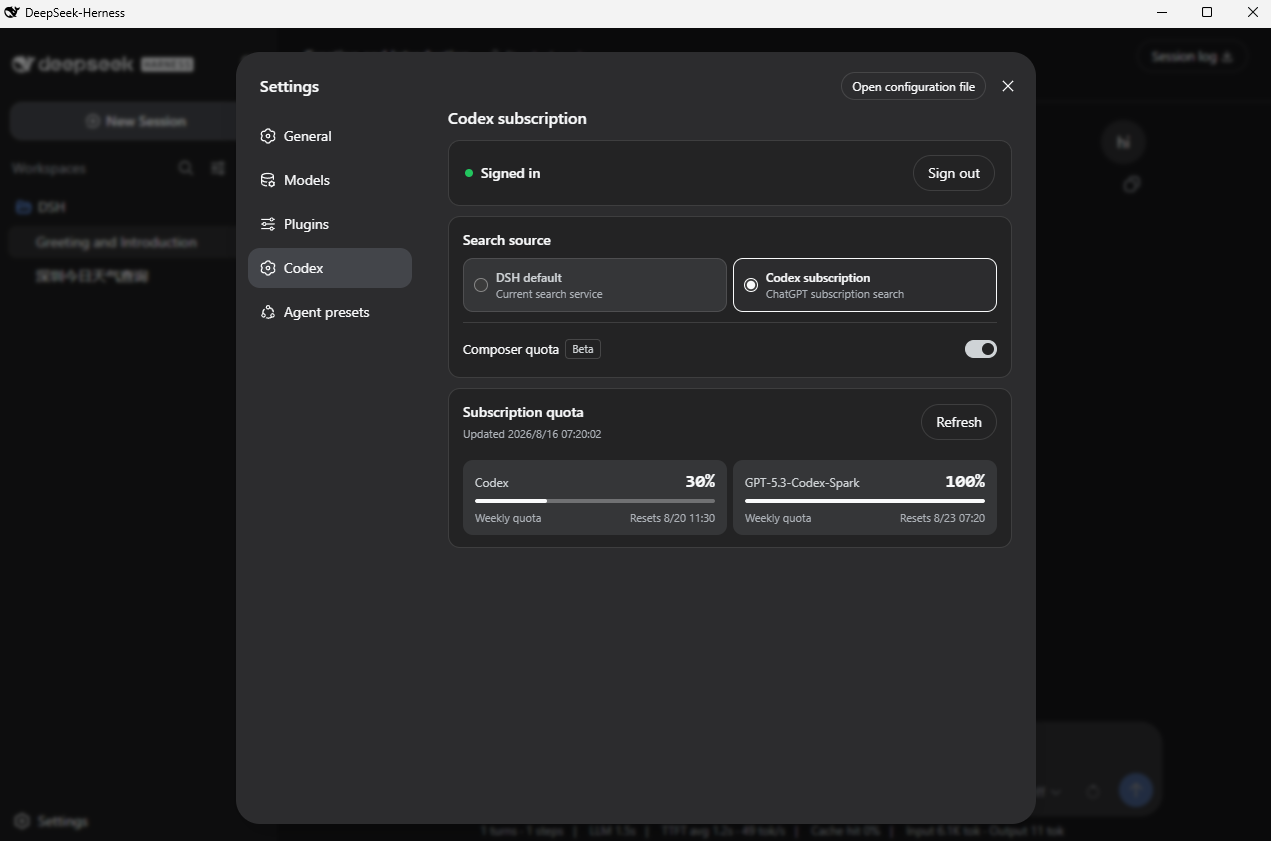
2. **Sign in.** Restart DSH yourself, open **Settings -> Codex**, and choose browser sign-in. No Codex CLI and no pasted token are required.
|
|
32
|
+
3. **Use Codex.** Select a Codex model. Quota, subscription search, image generation, and Fast mode remain inside DSH.
|
|
34
33
|
|
|
35
|
-
|
|
34
|
+
With an existing `dsh` command, install with:
|
|
36
35
|
|
|
37
36
|
```sh
|
|
38
37
|
dsh plugin --profile web add dsh-codex-subscription
|
|
39
38
|
```
|
|
40
39
|
|
|
41
|
-
DSH-Portable
|
|
40
|
+
From a DSH-Portable product folder, run `./dsh plugin ...` (`.\dsh.exe plugin ...` in Windows PowerShell). See below for the complete official npm, Agent, update, and uninstall routes.
|
|
42
41
|
|
|
43
|
-
##
|
|
42
|
+
## Why this plugin
|
|
44
43
|
|
|
45
|
-
|
|
|
44
|
+
| Capability | What you get |
|
|
46
45
|
| --- | --- |
|
|
47
|
-
|
|
|
48
|
-
|
|
|
49
|
-
|
|
|
50
|
-
|
|
|
51
|
-
| **
|
|
52
|
-
|
|
|
46
|
+
| **Subscription models** | Sign in to ChatGPT and use Codex without an OpenAI API key or Codex CLI |
|
|
47
|
+
| **Recoverable and diagnosable** | Sign-in state reconciles automatically; Settings can create a support report without credentials or account identifiers |
|
|
48
|
+
| **Visible quota** | Keep backend-provided standard Codex, Spark, and other limits separate |
|
|
49
|
+
| **Safe quota reset** | Use a reset only for an exhausted Codex quota, with a cooldown, checkbox, and typed confirmation |
|
|
50
|
+
| **Subscription search** | Explicitly choose DSH default search or Codex subscription search |
|
|
51
|
+
| **Codex image generation** | Describe an image in a DSH conversation and view the generated result in that session |
|
|
52
|
+
| **Fast mode (Beta)** | Switch between Standard and Fast directly in the composer |
|
|
53
53
|
|
|
54
|
-
|
|
54
|
+
These capabilities reuse the same local ChatGPT sign-in. Subscription routing failures stay visible and never silently switch to another paid route.
|
|
55
55
|
|
|
56
|
-
##
|
|
56
|
+
## Product screen
|
|
57
57
|
|
|
58
58
|
<p align="center">
|
|
59
|
-
<img src="https://raw.githubusercontent.com/WSL043/dsh-codex-subscription/main/docs/assets/settings-focus.png" width="820" alt="
|
|
59
|
+
<img src="https://raw.githubusercontent.com/WSL043/dsh-codex-subscription/main/docs/assets/settings-focus-en.png" width="820" alt="Codex subscription settings in DeepSeek Harness">
|
|
60
60
|
</p>
|
|
61
61
|
|
|
62
62
|
<details>
|
|
63
|
-
<summary
|
|
63
|
+
<summary>View the complete settings screen</summary>
|
|
64
64
|
|
|
65
|
-
|
|
66
66
|
|
|
67
67
|
</details>
|
|
68
68
|
|
|
69
|
-
##
|
|
69
|
+
## Prepare DSH
|
|
70
70
|
|
|
71
|
-
|
|
71
|
+
This plugin is currently compatible through DeepSeek Harness `0.1.1-rc.2` and requires a ChatGPT account that currently has Codex access.
|
|
72
72
|
|
|
73
|
-
-
|
|
74
|
-
-
|
|
73
|
+
- Do not want to configure Node.js? Use [DSH-Portable](https://github.com/WSL043/DSH-Portable), a community desktop distribution with portable and installed editions for Windows plus desktop packages for macOS and Linux.
|
|
74
|
+
- Prefer the official route? Follow the [DeepSeek Harness run guide](https://github.com/deepseek-ai/deepseek-harness#run).
|
|
75
75
|
|
|
76
|
-
##
|
|
76
|
+
## Install
|
|
77
77
|
|
|
78
|
-
###
|
|
78
|
+
### Let an Agent install it (recommended)
|
|
79
79
|
|
|
80
|
-
|
|
80
|
+
Send this link directly to your Agent:
|
|
81
81
|
|
|
82
|
-
**[Agent
|
|
82
|
+
**[Agent install, update, and uninstall guide](https://raw.githubusercontent.com/WSL043/dsh-codex-subscription/main/AGENTS.md)**
|
|
83
83
|
|
|
84
84
|
```text
|
|
85
85
|
https://raw.githubusercontent.com/WSL043/dsh-codex-subscription/main/AGENTS.md
|
|
86
86
|
```
|
|
87
87
|
|
|
88
|
-
Agent
|
|
88
|
+
The guide includes verification steps and tells the Agent to preserve the DSH profile, sign-in, and other plugins.
|
|
89
89
|
|
|
90
|
-
### Windows
|
|
90
|
+
### Manual Windows install
|
|
91
91
|
|
|
92
|
-
|
|
92
|
+
Open PowerShell and paste this one line:
|
|
93
93
|
|
|
94
94
|
```powershell
|
|
95
95
|
irm 'https://github.com/WSL043/dsh-codex-subscription/releases/latest/download/dsh-codex-setup.ps1' | iex
|
|
96
96
|
```
|
|
97
97
|
|
|
98
|
-
|
|
99
|
-
[DSH-Portable](https://github.com/WSL043/DSH-Portable)
|
|
100
|
-
|
|
101
|
-
|
|
102
|
-
|
|
98
|
+
The lightweight setup checks the current folder, the system command, common locations, and any running official DSH or
|
|
99
|
+
[DSH-Portable](https://github.com/WSL043/DSH-Portable), then invokes the official `plugin add`
|
|
100
|
+
operation once. It does not recursively scan disks, install pnpm, create a resident command, snapshot a
|
|
101
|
+
profile, or download the plugin twice. It needs no administrator access and never restarts DSH. Only
|
|
102
|
+
when no existing DSH is found does it use the official npm route pinned to `0.1.1-rc.2`; the setup warns
|
|
103
|
+
that first-time dependency resolution can take a while.
|
|
103
104
|
|
|
104
105
|
<details>
|
|
105
|
-
<summary
|
|
106
|
+
<summary>Official npm route (Node.js installed)</summary>
|
|
106
107
|
|
|
107
|
-
|
|
108
|
+
The official `npx @deepseek-ai/dsh web` command does not create a global `dsh` command. Keep the full `npx` prefix when installing the plugin:
|
|
108
109
|
|
|
109
110
|
```sh
|
|
110
111
|
npx -y @deepseek-ai/dsh@0.1.1-rc.2 plugin --profile web add dsh-codex-subscription
|
|
@@ -115,7 +116,7 @@ npx -y @deepseek-ai/dsh@0.1.1-rc.2 --profile web --dump-config
|
|
|
115
116
|
</details>
|
|
116
117
|
|
|
117
118
|
<details>
|
|
118
|
-
<summary
|
|
119
|
+
<summary>An existing <code>dsh</code> command or a DSH-Portable folder</summary>
|
|
119
120
|
|
|
120
121
|
```sh
|
|
121
122
|
dsh plugin --profile web add dsh-codex-subscription
|
|
@@ -123,48 +124,57 @@ dsh plugin --profile web list dsh-codex-subscription --depth 0
|
|
|
123
124
|
dsh --profile web --dump-config
|
|
124
125
|
```
|
|
125
126
|
|
|
126
|
-
DSH-Portable
|
|
127
|
-
`dsh-codex-subscription
|
|
127
|
+
For DSH-Portable, replace `dsh` with `./dsh` (`.\dsh.exe` in PowerShell). The plugin list should contain
|
|
128
|
+
one `dsh-codex-subscription`, and the config should contain one `codex-subscription` entry.
|
|
128
129
|
|
|
129
130
|
</details>
|
|
130
131
|
|
|
131
|
-
|
|
132
|
+
Restart DSH manually after installation, then:
|
|
132
133
|
|
|
133
|
-
1.
|
|
134
|
-
2.
|
|
135
|
-
3.
|
|
136
|
-
4.
|
|
134
|
+
1. Open **Settings -> Codex**.
|
|
135
|
+
2. Sign in with a ChatGPT account that has Codex access.
|
|
136
|
+
3. Choose a search source.
|
|
137
|
+
4. Select a Codex model.
|
|
137
138
|
|
|
138
|
-
##
|
|
139
|
+
## Features
|
|
139
140
|
|
|
140
|
-
- ChatGPT OAuth
|
|
141
|
-
- Codex
|
|
142
|
-
- DSH
|
|
143
|
-
-
|
|
144
|
-
-
|
|
145
|
-
-
|
|
146
|
-
-
|
|
147
|
-
-
|
|
148
|
-
-
|
|
141
|
+
- ChatGPT OAuth sign-in with credentials kept on the host;
|
|
142
|
+
- Codex models and image generation directly inside DSH conversations;
|
|
143
|
+
- A clear choice between DSH default search and Codex subscription search;
|
|
144
|
+
- Actual backend-provided quota, reset time, and freshness;
|
|
145
|
+
- Separate standard Codex, Codex-Spark, Credits, and other independent limits;
|
|
146
|
+
- Deliberate quota-reset redemption for exhausted Codex limits, with layered confirmation and no automatic retry;
|
|
147
|
+
- Optional composer quota for the selected Codex model (Beta, off by default);
|
|
148
|
+
- Standard or Fast mode for supported Codex models directly in the composer (Beta);
|
|
149
|
+
- A copyable support report in Settings that excludes OAuth credentials, account identifiers, and authorization timestamps;
|
|
150
|
+
- Visible errors when subscription routing is unavailable, with no silent paid fallback.
|
|
149
151
|
|
|
150
|
-
###
|
|
152
|
+
### Composer quota
|
|
151
153
|
|
|
152
154
|
<p align="center">
|
|
153
|
-
<img src="https://raw.githubusercontent.com/WSL043/dsh-codex-subscription/main/docs/assets/composer-quota-en.png" width="800" alt="
|
|
155
|
+
<img src="https://raw.githubusercontent.com/WSL043/dsh-codex-subscription/main/docs/assets/composer-quota-en.png" width="800" alt="Codex quota inside the composer">
|
|
154
156
|
</p>
|
|
155
157
|
|
|
156
|
-
|
|
157
|
-
Spark
|
|
158
|
+
The compact percentage appears only for a selected Codex model. Standard Codex uses the lowest remaining
|
|
159
|
+
window returned by the service; Spark uses its independent quota. The plugin does not hard-code a
|
|
160
|
+
“5-hour + weekly” layout or invent Credits and spending caps that the service did not return.
|
|
158
161
|
|
|
159
|
-
###
|
|
162
|
+
### Safe quota reset
|
|
160
163
|
|
|
161
|
-
|
|
162
|
-
|
|
163
|
-
|
|
164
|
+
If ChatGPT reports an available quota reset, Settings shows it in a compact row. Redemption stays disabled
|
|
165
|
+
until a Codex model quota is exhausted. Using one requires a five-second cooldown, an acknowledgement checkbox,
|
|
166
|
+
and the exact confirmation phrase. Cancel never consumes a reset, rapid repeated clicks are single-flight, and an
|
|
167
|
+
uncertain network result is never retried automatically.
|
|
164
168
|
|
|
165
|
-
|
|
169
|
+
### Composer speed (Beta)
|
|
166
170
|
|
|
167
|
-
|
|
171
|
+
With a supported Codex model selected, open the composer's model menu to choose Standard or Fast.
|
|
172
|
+
Standard adds no icon; only Fast shows a lightning icon before the model name. Spark does not show the speed entry. Fast mode increases speed and uses more Credits;
|
|
173
|
+
see the [OpenAI Codex Speed documentation](https://learn.chatgpt.com/docs/agent-configuration/speed) for the current rules.
|
|
174
|
+
|
|
175
|
+
## Update and uninstall
|
|
176
|
+
|
|
177
|
+
On Windows, rerun the one-line setup above to update. For the official npm route, use:
|
|
168
178
|
|
|
169
179
|
```sh
|
|
170
180
|
npx -y @deepseek-ai/dsh@0.1.1-rc.2 plugin --profile web update dsh-codex-subscription
|
|
@@ -173,10 +183,10 @@ npx -y @deepseek-ai/dsh@0.1.1-rc.2 --profile web --dump-config
|
|
|
173
183
|
npx -y @deepseek-ai/dsh@0.1.1-rc.2 plugin --profile web remove dsh-codex-subscription
|
|
174
184
|
```
|
|
175
185
|
|
|
176
|
-
|
|
186
|
+
These operations preserve the DSH profile, other plugins, and saved sign-in.
|
|
177
187
|
|
|
178
188
|
<details>
|
|
179
|
-
<summary
|
|
189
|
+
<summary>Update or uninstall with an existing <code>dsh</code> command</summary>
|
|
180
190
|
|
|
181
191
|
```sh
|
|
182
192
|
dsh plugin --profile web update dsh-codex-subscription
|
|
@@ -187,25 +197,23 @@ dsh plugin --profile web remove dsh-codex-subscription
|
|
|
187
197
|
|
|
188
198
|
</details>
|
|
189
199
|
|
|
190
|
-
DSH-Portable
|
|
191
|
-
|
|
192
|
-
## 常见问题
|
|
200
|
+
From a DSH-Portable folder, replace `dsh` above with `.\dsh.exe`.
|
|
193
201
|
|
|
194
|
-
|
|
195
|
-
- **`dsh.exe` 无法识别**:当前目录没有该文件。请先进入 DSH-Portable 目录,或使用 Windows 单行助手;
|
|
196
|
-
- **找不到 DSH-Portable**:进入它的目录后重新执行安装命令,或直接运行 `.\dsh.exe plugin --profile web add dsh-codex-subscription`;
|
|
197
|
-
- **电脑上有多个 DSH**:单行助手会合并正在运行的副本与常用目录内检测到的 Portable,输入对应编号即可;交给 Agent 时让它进入目标目录,或明确传入 `-DshPath`;
|
|
198
|
-
- **安装仍然失败**:把上面的 Agent 文档链接发给 Agent,不要删除 profile 或随意修改系统 PATH。
|
|
199
|
-
- **需要提交问题**:在设置页底部生成“支持诊断”,然后打开[使用问题表单](https://github.com/WSL043/dsh-codex-subscription/issues/new?template=install-problem.yml)。表单会收集准确的 DSH/插件版本和复现步骤;报告不含凭据和账号标识,仍不要附上登录链接、授权码或浏览器回调地址。
|
|
202
|
+
## Troubleshooting
|
|
200
203
|
|
|
201
|
-
|
|
204
|
+
- **`dsh` is not recognized:** the official npm route does not create a global `dsh` command; use the complete `npx -y @deepseek-ai/dsh@0.1.1-rc.2 ...` command above;
|
|
205
|
+
- **`dsh.exe` is not recognized:** that file is not in the current folder; enter the DSH-Portable folder first or use the one-line Windows setup;
|
|
206
|
+
- **DSH-Portable is not found:** enter its folder and rerun setup, or run `.\dsh.exe plugin --profile web add dsh-codex-subscription` directly;
|
|
207
|
+
- **More than one DSH exists:** the one-line setup combines running copies with Portable folders detected in common locations; enter its number. For an Agent, use the intended folder or pass `-DshPath` explicitly;
|
|
208
|
+
- **Setup still fails:** send the Agent guide above to an Agent. Do not delete the profile or change the system PATH to force an install.
|
|
209
|
+
- **Need to report a problem:** generate a **Support diagnostics** report at the bottom of Settings, then open the [bug report form](https://github.com/WSL043/dsh-codex-subscription/issues/new?template=install-problem.yml). The form collects exact DSH/plugin versions and reproduction steps. The generated report excludes credentials and account identifiers; still do not attach sign-in URLs, authorization codes, or browser callback addresses.
|
|
202
210
|
|
|
203
|
-
ChatGPT Codex
|
|
211
|
+
The ChatGPT Codex backend and DSH can change independently. This community project is not affiliated with or endorsed by DeepSeek or OpenAI.
|
|
204
212
|
|
|
205
|
-
|
|
206
|
-
DSH
|
|
207
|
-
|
|
213
|
+
Use the [bug report form](https://github.com/WSL043/dsh-codex-subscription/issues/new?template=install-problem.yml) for project feedback.
|
|
214
|
+
For DSH plugin discussion, visit [DeepSeek Harness Discussions](https://github.com/deepseek-ai/deepseek-harness/discussions).
|
|
215
|
+
Read [SECURITY.md](SECURITY.md) before reporting sensitive issues.
|
|
208
216
|
|
|
209
|
-
|
|
217
|
+
If this project is useful, the [Star button](https://github.com/WSL043/dsh-codex-subscription/stargazers) helps more DSH users find it.
|
|
210
218
|
|
|
211
|
-
[MIT](LICENSE)
|
|
219
|
+
[简体中文](README.md) · [MIT](LICENSE)
|
package/README.zh-CN.md
ADDED
|
@@ -0,0 +1,219 @@
|
|
|
1
|
+
# DSH Codex Subscription
|
|
2
|
+
|
|
3
|
+
<div align="center">
|
|
4
|
+
|
|
5
|
+
**把 ChatGPT / Codex 订阅直接接入 DeepSeek Harness**
|
|
6
|
+
|
|
7
|
+
在 DeepSeek Harness 中直接登录 ChatGPT 并使用 Codex 订阅。无需 OpenAI API Key,也不依赖 Codex CLI;
|
|
8
|
+
模型、搜索、额度和图片生成都留在 DSH 里。
|
|
9
|
+
|
|
10
|
+
[](https://github.com/WSL043/dsh-codex-subscription/actions/workflows/ci.yml)
|
|
11
|
+
[](https://www.npmjs.com/package/dsh-codex-subscription)
|
|
12
|
+
[](https://www.npmjs.com/package/dsh-codex-subscription)
|
|
13
|
+
[](LICENSE)
|
|
14
|
+
[](https://github.com/WSL043/dsh-codex-subscription/stargazers)
|
|
15
|
+
|
|
16
|
+
[三步开始](#三步开始) · [交给 Agent 安装](#交给-agent推荐) · [更新与卸载](#更新与卸载) · [English](https://github.com/WSL043/dsh-codex-subscription/blob/main/README.md)
|
|
17
|
+
|
|
18
|
+
</div>
|
|
19
|
+
|
|
20
|
+
<p align="center">
|
|
21
|
+
<img src="https://raw.githubusercontent.com/WSL043/dsh-codex-subscription/main/docs/assets/readme-hero.webp" width="900" alt="Codex 订阅直接用在 DSH:订阅模型、联网搜索、额度与安全重置、图片生成和高速模式">
|
|
22
|
+
</p>
|
|
23
|
+
|
|
24
|
+
## 三步开始
|
|
25
|
+
|
|
26
|
+
1. **安装插件**:Windows 打开 PowerShell,运行下面一行;已有 `dsh` 或 DSH-Portable 的用户也可使用后面的标准命令。
|
|
27
|
+
|
|
28
|
+
```powershell
|
|
29
|
+
irm 'https://github.com/WSL043/dsh-codex-subscription/releases/latest/download/dsh-codex-setup.ps1' | iex
|
|
30
|
+
```
|
|
31
|
+
|
|
32
|
+
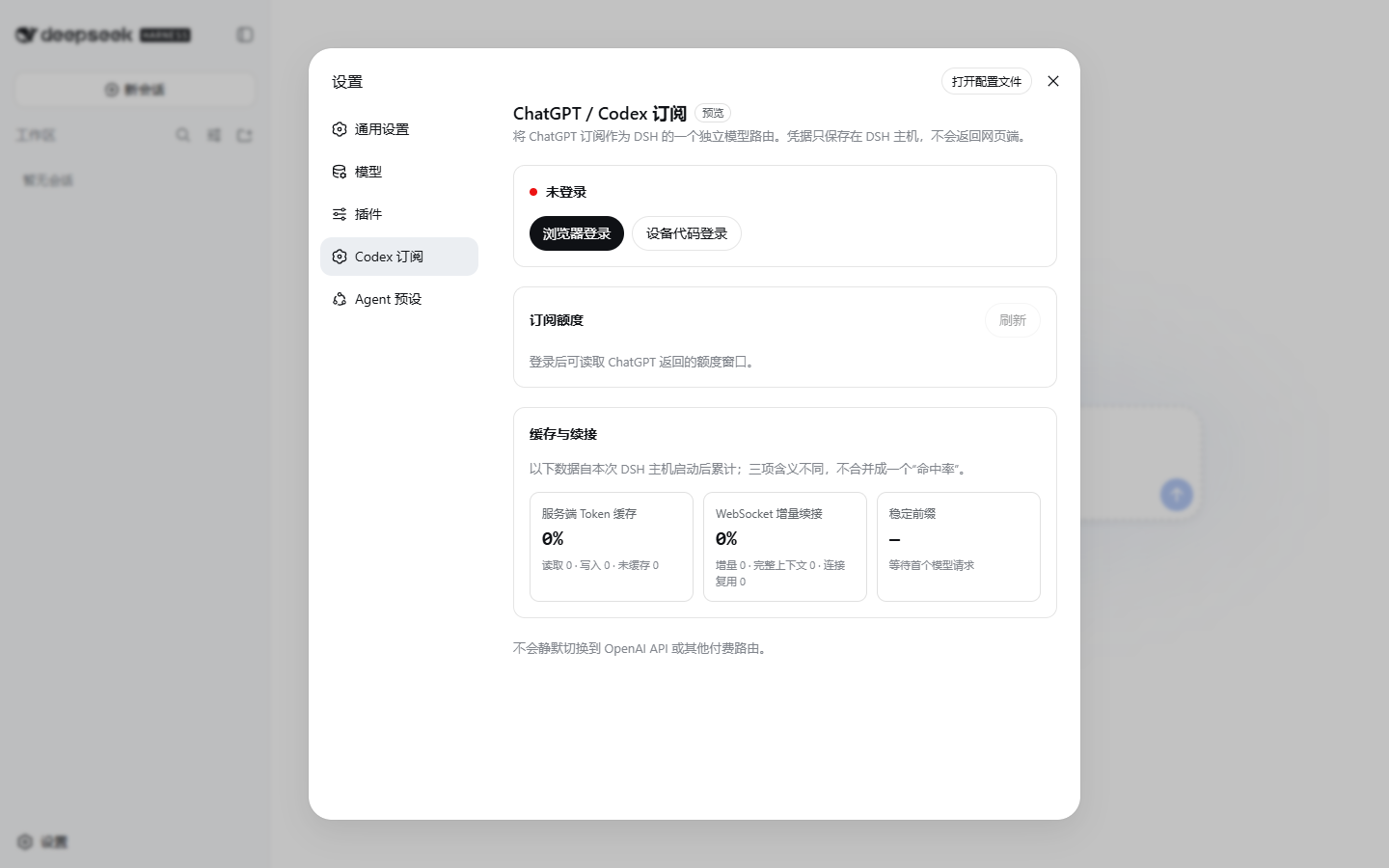
2. **登录订阅**:手动重启 DSH,打开 **设置 -> Codex 订阅**,点击浏览器登录。无需 Codex CLI,也不要粘贴 token。
|
|
33
|
+
3. **开始使用**:在模型选择器中选择 Codex;额度、订阅搜索、图片生成和高速模式都在 DSH 内使用。
|
|
34
|
+
|
|
35
|
+
已有 `dsh` 命令时,标准安装命令是:
|
|
36
|
+
|
|
37
|
+
```sh
|
|
38
|
+
dsh plugin --profile web add dsh-codex-subscription
|
|
39
|
+
```
|
|
40
|
+
|
|
41
|
+
DSH-Portable 用户在产品目录中运行 `./dsh plugin ...`,Windows PowerShell 使用 `.\dsh.exe plugin ...`。完整的官方 npm、Agent 安装、更新和卸载方式见下文。
|
|
42
|
+
|
|
43
|
+
## 核心优势
|
|
44
|
+
|
|
45
|
+
| 能力 | 用户得到什么 |
|
|
46
|
+
| --- | --- |
|
|
47
|
+
| **订阅模型直连** | 登录 ChatGPT 后直接使用 Codex,不需要 OpenAI API Key 或 Codex CLI |
|
|
48
|
+
| **可恢复、可诊断** | 登录状态会自动对账;设置页可生成不含凭据和账号标识的支持报告 |
|
|
49
|
+
| **额度可见** | 普通 Codex、Spark 等服务端实际返回的额度分开显示 |
|
|
50
|
+
| **安全额度重置** | 仅在 Codex 额度用尽后使用重置,并经过冷静期、勾选和输入确认 |
|
|
51
|
+
| **订阅搜索** | 可在 DSH 默认搜索与 Codex 订阅搜索之间明确切换 |
|
|
52
|
+
| **Codex 图片生成** | 在 DSH 对话里直接描述画面,生成结果会显示在当前会话中 |
|
|
53
|
+
| **高速模式(Beta)** | 直接在输入框切换标准或高速,无需离开当前会话 |
|
|
54
|
+
|
|
55
|
+
这些能力共用同一份本机 ChatGPT 登录。订阅路由失败时会明确报错,不会静默切换到其他付费路由。
|
|
56
|
+
|
|
57
|
+
## 实际界面
|
|
58
|
+
|
|
59
|
+
<p align="center">
|
|
60
|
+
<img src="https://raw.githubusercontent.com/WSL043/dsh-codex-subscription/main/docs/assets/settings-focus.png" width="820" alt="DeepSeek Harness 中的 Codex 订阅设置">
|
|
61
|
+
</p>
|
|
62
|
+
|
|
63
|
+
<details>
|
|
64
|
+
<summary>查看完整设置界面</summary>
|
|
65
|
+
|
|
66
|
+
|
|
67
|
+
|
|
68
|
+
</details>
|
|
69
|
+
|
|
70
|
+
## 准备 DSH
|
|
71
|
+
|
|
72
|
+
本插件当前适配到 DeepSeek Harness `0.1.1-rc.2`,并需要一个当前具有 Codex 使用资格的 ChatGPT 账户。
|
|
73
|
+
|
|
74
|
+
- 不想配置 Node.js:使用 [DSH-Portable](https://github.com/WSL043/DSH-Portable)。这是社区桌面分发,提供 Windows 便携版和安装版,以及 macOS、Linux 桌面包;
|
|
75
|
+
- 想按官方方式运行:查看 [DeepSeek Harness 官方说明](https://github.com/deepseek-ai/deepseek-harness#run)。
|
|
76
|
+
|
|
77
|
+
## 安装
|
|
78
|
+
|
|
79
|
+
### 交给 Agent(推荐)
|
|
80
|
+
|
|
81
|
+
把这个链接直接发给 Agent:
|
|
82
|
+
|
|
83
|
+
**[Agent 安装、更新与卸载文档](https://raw.githubusercontent.com/WSL043/dsh-codex-subscription/main/AGENTS.md)**
|
|
84
|
+
|
|
85
|
+
```text
|
|
86
|
+
https://raw.githubusercontent.com/WSL043/dsh-codex-subscription/main/AGENTS.md
|
|
87
|
+
```
|
|
88
|
+
|
|
89
|
+
Agent 文档包含安装、更新、卸载和验收步骤,并要求保留 DSH profile、登录信息和其他插件。
|
|
90
|
+
|
|
91
|
+
### Windows 手动安装
|
|
92
|
+
|
|
93
|
+
打开 PowerShell,只需要复制这一行:
|
|
94
|
+
|
|
95
|
+
```powershell
|
|
96
|
+
irm 'https://github.com/WSL043/dsh-codex-subscription/releases/latest/download/dsh-codex-setup.ps1' | iex
|
|
97
|
+
```
|
|
98
|
+
|
|
99
|
+
这个轻量助手会检查当前目录、系统命令、常见位置以及正在运行的官方 DSH 或
|
|
100
|
+
[DSH-Portable](https://github.com/WSL043/DSH-Portable),然后调用一次官方
|
|
101
|
+
`plugin add`。它不会递归扫盘、安装 pnpm、创建常驻命令、保存 profile 快照或重复下载插件。
|
|
102
|
+
无需管理员权限,也不会擅自重启 DSH。找不到现有 DSH 时才会使用固定为 `0.1.1-rc.2`
|
|
103
|
+
的官方 npm 运行方式;首次解析依赖可能较慢,安装器会先明确提示。
|
|
104
|
+
|
|
105
|
+
<details>
|
|
106
|
+
<summary>官方 npm 方式(已安装 Node.js)</summary>
|
|
107
|
+
|
|
108
|
+
官方的 `npx @deepseek-ai/dsh web` 不会创建全局 `dsh` 命令,因此安装插件时也要保留完整的 `npx` 前缀:
|
|
109
|
+
|
|
110
|
+
```sh
|
|
111
|
+
npx -y @deepseek-ai/dsh@0.1.1-rc.2 plugin --profile web add dsh-codex-subscription
|
|
112
|
+
npx -y @deepseek-ai/dsh@0.1.1-rc.2 plugin --profile web list dsh-codex-subscription --depth 0
|
|
113
|
+
npx -y @deepseek-ai/dsh@0.1.1-rc.2 --profile web --dump-config
|
|
114
|
+
```
|
|
115
|
+
|
|
116
|
+
</details>
|
|
117
|
+
|
|
118
|
+
<details>
|
|
119
|
+
<summary>已经能运行 <code>dsh</code>,或位于 DSH-Portable 目录</summary>
|
|
120
|
+
|
|
121
|
+
```sh
|
|
122
|
+
dsh plugin --profile web add dsh-codex-subscription
|
|
123
|
+
dsh plugin --profile web list dsh-codex-subscription --depth 0
|
|
124
|
+
dsh --profile web --dump-config
|
|
125
|
+
```
|
|
126
|
+
|
|
127
|
+
DSH-Portable 请把 `dsh` 换成 `./dsh`(PowerShell 使用 `.\dsh.exe`)。安装列表中应只有一个
|
|
128
|
+
`dsh-codex-subscription`,配置中应只有一个 `codex-subscription` 条目。
|
|
129
|
+
|
|
130
|
+
</details>
|
|
131
|
+
|
|
132
|
+
安装完成后手动重启 DSH,然后:
|
|
133
|
+
|
|
134
|
+
1. 打开 **设置 -> Codex 订阅**;
|
|
135
|
+
2. 登录具有 Codex 使用资格的 ChatGPT 账户;
|
|
136
|
+
3. 选择搜索来源;
|
|
137
|
+
4. 在模型选择器中选择 Codex 模型。
|
|
138
|
+
|
|
139
|
+
## 功能
|
|
140
|
+
|
|
141
|
+
- ChatGPT OAuth 登录,凭据保留在本机;
|
|
142
|
+
- Codex 模型和图片生成直接出现在 DSH 会话中;
|
|
143
|
+
- DSH 默认搜索与 Codex 订阅搜索可随时切换;
|
|
144
|
+
- 设置页显示服务端返回的额度、重置时间和更新时间;
|
|
145
|
+
- 普通 Codex、Codex-Spark、Credits 等独立额度分开显示;
|
|
146
|
+
- 已用尽的 Codex 额度可主动使用重置卡,并经过分层确认且不会自动重试;
|
|
147
|
+
- 输入框可显示当前 Codex 模型的剩余额度(Beta,默认关闭);
|
|
148
|
+
- 输入框可为支持的 Codex 模型切换标准或高速模式(Beta);
|
|
149
|
+
- 设置页可生成并复制无敏感信息的支持诊断,报告不包含 OAuth 凭据、账号标识或授权时间;
|
|
150
|
+
- 订阅路由不可用时明确报错,不会静默切换到其他付费路由。
|
|
151
|
+
|
|
152
|
+
### 输入框额度
|
|
153
|
+
|
|
154
|
+
<p align="center">
|
|
155
|
+
<img src="https://raw.githubusercontent.com/WSL043/dsh-codex-subscription/main/docs/assets/composer-quota-en.png" width="800" alt="输入框内的 Codex 剩余额度">
|
|
156
|
+
</p>
|
|
157
|
+
|
|
158
|
+
快捷百分比只在选择 Codex 模型时显示。普通 Codex 使用服务端返回窗口中剩余最少的一项,
|
|
159
|
+
Spark 使用独立额度。插件不会写死“5 小时 + 每周”,也不会虚构服务端没有返回的 Credits 或消费上限。
|
|
160
|
+
|
|
161
|
+
### 安全使用额度重置
|
|
162
|
+
|
|
163
|
+
ChatGPT 返回可用重置卡时,设置页会用紧凑的一行显示。只有至少一个 Codex 模型额度已用尽后才能使用;
|
|
164
|
+
最终操作还需要等待 5 秒、勾选知情确认,并输入完全一致的确认短语。取消不会消耗,快速连续点击只允许一次请求,
|
|
165
|
+
网络结果不确定时也不会自动重试。
|
|
166
|
+
|
|
167
|
+
### 输入框速度(Beta)
|
|
168
|
+
|
|
169
|
+
选择支持的 Codex 模型后,可在输入框的模型菜单中切换标准与高速。标准模式不增加图标,
|
|
170
|
+
只有高速模式会在模型名称左侧显示闪电;Spark 不显示速度入口。高速模式会提高速度,也会消耗更多 Credits;具体规则见
|
|
171
|
+
[OpenAI Codex Speed 文档](https://learn.chatgpt.com/docs/agent-configuration/speed)。
|
|
172
|
+
|
|
173
|
+
## 更新与卸载
|
|
174
|
+
|
|
175
|
+
Windows 用户重新运行上面的单行助手即可更新。官方 npm 用户使用:
|
|
176
|
+
|
|
177
|
+
```sh
|
|
178
|
+
npx -y @deepseek-ai/dsh@0.1.1-rc.2 plugin --profile web update dsh-codex-subscription
|
|
179
|
+
npx -y @deepseek-ai/dsh@0.1.1-rc.2 plugin --profile web list dsh-codex-subscription --depth 0
|
|
180
|
+
npx -y @deepseek-ai/dsh@0.1.1-rc.2 --profile web --dump-config
|
|
181
|
+
npx -y @deepseek-ai/dsh@0.1.1-rc.2 plugin --profile web remove dsh-codex-subscription
|
|
182
|
+
```
|
|
183
|
+
|
|
184
|
+
这些操作会保留 DSH profile、其他插件和登录信息。
|
|
185
|
+
|
|
186
|
+
<details>
|
|
187
|
+
<summary>使用现有 <code>dsh</code> 命令更新或卸载</summary>
|
|
188
|
+
|
|
189
|
+
```sh
|
|
190
|
+
dsh plugin --profile web update dsh-codex-subscription
|
|
191
|
+
dsh plugin --profile web list dsh-codex-subscription --depth 0
|
|
192
|
+
dsh --profile web --dump-config
|
|
193
|
+
dsh plugin --profile web remove dsh-codex-subscription
|
|
194
|
+
```
|
|
195
|
+
|
|
196
|
+
</details>
|
|
197
|
+
|
|
198
|
+
DSH-Portable 在其目录中把上述 `dsh` 换成 `.\dsh.exe`。
|
|
199
|
+
|
|
200
|
+
## 常见问题
|
|
201
|
+
|
|
202
|
+
- **`dsh` 无法识别**:官方 npm 方式本来就不会创建全局 `dsh` 命令,请使用上面的完整 `npx -y @deepseek-ai/dsh@0.1.1-rc.2 ...` 命令;
|
|
203
|
+
- **`dsh.exe` 无法识别**:当前目录没有该文件。请先进入 DSH-Portable 目录,或使用 Windows 单行助手;
|
|
204
|
+
- **找不到 DSH-Portable**:进入它的目录后重新执行安装命令,或直接运行 `.\dsh.exe plugin --profile web add dsh-codex-subscription`;
|
|
205
|
+
- **电脑上有多个 DSH**:单行助手会合并正在运行的副本与常用目录内检测到的 Portable,输入对应编号即可;交给 Agent 时让它进入目标目录,或明确传入 `-DshPath`;
|
|
206
|
+
- **安装仍然失败**:把上面的 Agent 文档链接发给 Agent,不要删除 profile 或随意修改系统 PATH。
|
|
207
|
+
- **需要提交问题**:在设置页底部生成“支持诊断”,然后打开[使用问题表单](https://github.com/WSL043/dsh-codex-subscription/issues/new?template=install-problem.yml)。表单会收集准确的 DSH/插件版本和复现步骤;报告不含凭据和账号标识,仍不要附上登录链接、授权码或浏览器回调地址。
|
|
208
|
+
|
|
209
|
+
## 边界与支持
|
|
210
|
+
|
|
211
|
+
ChatGPT Codex 后端和 DSH 可能独立变化;本项目为社区项目,与 DeepSeek、OpenAI 无隶属或背书关系。
|
|
212
|
+
|
|
213
|
+
本项目的问题反馈请使用[使用问题表单](https://github.com/WSL043/dsh-codex-subscription/issues/new?template=install-problem.yml);
|
|
214
|
+
DSH 插件交流可前往 [DeepSeek Harness Discussions](https://github.com/deepseek-ai/deepseek-harness/discussions)。
|
|
215
|
+
敏感问题请先阅读 [SECURITY.md](SECURITY.md)。
|
|
216
|
+
|
|
217
|
+
如果这个项目对你有帮助,[点一下 Star](https://github.com/WSL043/dsh-codex-subscription/stargazers) 可以让更多 DSH 用户发现它。
|
|
218
|
+
|
|
219
|
+
[MIT](LICENSE)
|
|
Binary file
|
|
Binary file
|
|
Binary file
|
package/docs/assets/settings.png
CHANGED
|
Binary file
|