dsh-codex-subscription 1.0.4 → 1.0.6
This diff represents the content of publicly available package versions that have been released to one of the supported registries. The information contained in this diff is provided for informational purposes only and reflects changes between package versions as they appear in their respective public registries.
- package/AGENTS.md +55 -110
- package/README.en.md +78 -124
- package/README.md +72 -127
- package/docs/assets/settings-focus-en.png +0 -0
- package/docs/assets/settings-focus.png +0 -0
- package/lib/index.js +1 -1
- package/package.json +1 -2
- package/dsh-codex.ps1 +0 -917
package/AGENTS.md
CHANGED
|
@@ -1,152 +1,97 @@
|
|
|
1
1
|
# Agent installation guide
|
|
2
2
|
|
|
3
3
|
Use this guide when a user asks an Agent to install, update, verify, or remove
|
|
4
|
-
`dsh-codex-subscription
|
|
4
|
+
`dsh-codex-subscription` in a selected DeepSeek Harness profile.
|
|
5
5
|
|
|
6
6
|
## Safety
|
|
7
7
|
|
|
8
|
-
- Confirm the target DSH profile
|
|
9
|
-
- Use the
|
|
10
|
-
- Never print OAuth credentials, account IDs, authorization callbacks, or
|
|
11
|
-
|
|
8
|
+
- Confirm the target DSH installation and profile. Use `web` only when it is the user's target.
|
|
9
|
+
- Use the exact `1.0.6` package below; do not install a moving branch.
|
|
10
|
+
- Never print OAuth credentials, account IDs, authorization callbacks, or credential-store contents.
|
|
11
|
+
- Preserve the DSH profile, unrelated plugins, sessions, and saved sign-in.
|
|
12
12
|
- Do not start, stop, or restart DSH without explicit permission.
|
|
13
|
-
-
|
|
14
|
-
Signing out requires explicit permission.
|
|
15
|
-
- Do not delete any DSH profile during install, update, verification, or uninstall.
|
|
13
|
+
- If more than one DSH installation exists, ask which one is the target before changing it.
|
|
16
14
|
|
|
17
|
-
##
|
|
15
|
+
## Locate DSH
|
|
18
16
|
|
|
19
|
-
On Windows,
|
|
20
|
-
When it exists, use `dsh-codex update` or `dsh-codex uninstall` instead of
|
|
21
|
-
downloading the manager again.
|
|
17
|
+
On Windows, check the command and common Portable entry points without recursively scanning disks:
|
|
22
18
|
|
|
23
|
-
|
|
24
|
-
|
|
25
|
-
|
|
26
|
-
Downloads
|
|
27
|
-
|
|
28
|
-
Do not require a DSH-Portable user to install system Node.js or pnpm. The manager
|
|
29
|
-
uses the portable runtime, sets its isolated `DSH_HOME`, and keeps its verified
|
|
30
|
-
pnpm tool and store inside the portable data directory. A successful first install
|
|
31
|
-
adds only the per-user `dsh-codex` command directory to PATH; it never modifies
|
|
32
|
-
the machine PATH.
|
|
33
|
-
|
|
34
|
-
If automatic discovery fails, locate the portable root with read-only checks and
|
|
35
|
-
pass it explicitly as `-PortableRoot`. A valid root contains both:
|
|
36
|
-
|
|
37
|
-
```text
|
|
38
|
-
runtime\node\node.exe
|
|
39
|
-
app\node_modules\@deepseek-ai\dsh\lib\bin.js
|
|
19
|
+
```powershell
|
|
20
|
+
Get-Command dsh -ErrorAction SilentlyContinue
|
|
21
|
+
Test-Path -LiteralPath '.\dsh.exe' -PathType Leaf
|
|
22
|
+
Test-Path -LiteralPath "$env:USERPROFILE\Downloads\DSH-Portable\dsh.exe" -PathType Leaf
|
|
40
23
|
```
|
|
41
24
|
|
|
42
|
-
|
|
43
|
-
|
|
44
|
-
|
|
45
|
-
Node.js or pnpm is normal for DSH-Portable and is not a reason to install either.
|
|
46
|
-
If more than one DSH installation is present, stop automatic discovery and ask
|
|
47
|
-
the user which installation is the target.
|
|
25
|
+
A current DSH-Portable includes `dsh.exe`. Missing system Node.js or pnpm is normal; do not install
|
|
26
|
+
either globally for this plugin. If the Portable copy does not contain `dsh.exe`, update DSH-Portable
|
|
27
|
+
instead of recreating its package-manager environment in this installer.
|
|
48
28
|
|
|
49
|
-
##
|
|
29
|
+
## Install or update
|
|
50
30
|
|
|
51
|
-
|
|
31
|
+
With an existing `dsh` command:
|
|
52
32
|
|
|
53
|
-
```
|
|
54
|
-
|
|
55
|
-
powershell.exe -NoProfile -ExecutionPolicy Bypass -File "$env:TEMP\dsh-codex.ps1" Install
|
|
33
|
+
```sh
|
|
34
|
+
dsh plugin --profile web add dsh-codex-subscription@1.0.6
|
|
56
35
|
```
|
|
57
36
|
|
|
58
|
-
|
|
59
|
-
remote text in memory:
|
|
37
|
+
From a DSH-Portable folder:
|
|
60
38
|
|
|
61
39
|
```powershell
|
|
62
|
-
|
|
63
|
-
powershell.exe -NoProfile -ExecutionPolicy Bypass -File "$env:TEMP\dsh-codex.ps1" Install
|
|
40
|
+
.\dsh.exe plugin --profile web add dsh-codex-subscription@1.0.6
|
|
64
41
|
```
|
|
65
42
|
|
|
66
|
-
|
|
67
|
-
|
|
43
|
+
Use the same `add` command to update or repair. This is the complete package-changing operation.
|
|
44
|
+
Do not download pnpm, create a second package store, save profile snapshots, add a resident manager,
|
|
45
|
+
or restart DSH automatically. The DSH CLI owns package resolution, locking, and profile composition.
|
|
68
46
|
|
|
69
|
-
For a
|
|
47
|
+
For a legacy installation, first add and verify the current package. Only then remove the old package:
|
|
70
48
|
|
|
71
|
-
```
|
|
72
|
-
|
|
73
|
-
```
|
|
74
|
-
|
|
75
|
-
After a successful first install, use these commands in a new PowerShell window:
|
|
76
|
-
|
|
77
|
-
```powershell
|
|
78
|
-
dsh-codex update
|
|
79
|
-
dsh-codex uninstall
|
|
49
|
+
```sh
|
|
50
|
+
dsh plugin --profile web remove @wsl043/dsh-codex-subscription
|
|
80
51
|
```
|
|
81
52
|
|
|
82
|
-
|
|
83
|
-
downloaded manager with its SHA-256 asset before running it. If `Get-Command
|
|
84
|
-
dsh-codex` does not find the command on an older installation, download the pinned
|
|
85
|
-
manager above and invoke `Update` once; that also installs the command. The manager
|
|
86
|
-
verifies the package list and composed config. It never restarts DSH and never
|
|
87
|
-
deletes a profile. Uninstall removes the manager command but preserves the DSH
|
|
88
|
-
profile and saved login.
|
|
89
|
-
|
|
90
|
-
## Existing DSH CLI
|
|
53
|
+
## Verify
|
|
91
54
|
|
|
92
|
-
|
|
93
|
-
package directly:
|
|
55
|
+
Use the same executable selected above:
|
|
94
56
|
|
|
95
57
|
```sh
|
|
96
|
-
dsh plugin --profile web
|
|
58
|
+
dsh plugin --profile web list dsh-codex-subscription --depth 0
|
|
59
|
+
dsh --profile web --dump-config
|
|
97
60
|
```
|
|
98
61
|
|
|
99
|
-
|
|
100
|
-
migrating from v0.2.1 by hand, remove `@wsl043/dsh-codex-subscription` only
|
|
101
|
-
after the new package passes verification. The Windows manager performs this
|
|
102
|
-
migration automatically and preserves the stored login. Uninstall the current
|
|
103
|
-
package with:
|
|
62
|
+
For DSH-Portable, replace `dsh` with `.\dsh.exe`. Static acceptance requires:
|
|
104
63
|
|
|
105
|
-
|
|
106
|
-
|
|
107
|
-
|
|
64
|
+
1. `dsh-codex-subscription` version `1.0.6` appears exactly once.
|
|
65
|
+
2. `codex-subscription` appears exactly once in the composed config.
|
|
66
|
+
3. The legacy package is absent after a migration.
|
|
67
|
+
4. No unrelated plugin or profile was changed and DSH was not restarted.
|
|
108
68
|
|
|
109
|
-
|
|
69
|
+
With permission to restart DSH, open **Settings -> Codex** and verify the settings page loads. Confirm
|
|
70
|
+
that search offers both **DSH default** and **Codex subscription**, the composer quota switch defaults
|
|
71
|
+
to off, and `codex_image_generate` is available. Do not consume quota merely to test installation unless
|
|
72
|
+
the user explicitly asks for a live model, search, or image-generation check.
|
|
110
73
|
|
|
111
|
-
|
|
74
|
+
## Uninstall
|
|
112
75
|
|
|
113
76
|
```sh
|
|
114
|
-
dsh plugin --profile web
|
|
115
|
-
dsh --profile web --dump-config
|
|
77
|
+
dsh plugin --profile web remove dsh-codex-subscription
|
|
116
78
|
```
|
|
117
79
|
|
|
118
|
-
|
|
80
|
+
For DSH-Portable:
|
|
119
81
|
|
|
120
|
-
|
|
121
|
-
|
|
122
|
-
|
|
123
|
-
3. No unrelated profile or plugin changed.
|
|
124
|
-
4. A running DSH process was not restarted by the operation.
|
|
82
|
+
```powershell
|
|
83
|
+
.\dsh.exe plugin --profile web remove dsh-codex-subscription
|
|
84
|
+
```
|
|
125
85
|
|
|
126
|
-
|
|
127
|
-
|
|
128
|
-
**Settings -> Codex**, and verify the page loads. Confirm that Web
|
|
129
|
-
search offers both **DSH default** and **Codex subscription**, and that the Beta
|
|
130
|
-
composer quota switch starts off. Weekly-only usage is valid; Spark remains a
|
|
131
|
-
separate bucket. Confirm that `codex_image_generate` is available. Only when the
|
|
132
|
-
user explicitly requests a quota-consuming live check, ask the Agent to generate
|
|
133
|
-
one simple image and confirm that it appears in the conversation.
|
|
86
|
+
Uninstall removes only this plugin. It must preserve the profile, sessions, other plugins, and saved
|
|
87
|
+
ChatGPT sign-in. Signing out is a separate action and requires explicit permission.
|
|
134
88
|
|
|
135
89
|
## Failure handling
|
|
136
90
|
|
|
137
|
-
|
|
138
|
-
|
|
139
|
-
|
|
140
|
-
|
|
141
|
-
|
|
142
|
-
is
|
|
143
|
-
|
|
144
|
-
If download fails, distinguish DNS, proxy, TLS/certificate, HTTP status, and
|
|
145
|
-
checksum failures. Never disable certificate validation or skip a checksum. If
|
|
146
|
-
`MachinePolicy` or `UserPolicy` blocks the child process, report the applicable
|
|
147
|
-
`Get-ExecutionPolicy -List` result and stop; do not change organization policy.
|
|
148
|
-
|
|
149
|
-
On any failure, report the sanitized command error, DSH version, selected
|
|
150
|
-
profile, requested release, installation mode, what changed, cleanup status, and
|
|
151
|
-
what remains unverified. Do not patch DSH, switch to another paid route, wipe
|
|
152
|
-
credentials, delete a profile, or claim success from a partial check.
|
|
91
|
+
Distinguish command discovery, network, HTTP/TLS, package-manager, profile-lock, version, and peer
|
|
92
|
+
dependency failures. Do not disable TLS validation, delete a lock owned by a live process, install a
|
|
93
|
+
second package manager, wipe a profile, expose credentials, or switch to another paid route.
|
|
94
|
+
|
|
95
|
+
On failure, report the sanitized command error, DSH version, selected profile, requested plugin version,
|
|
96
|
+
installation mode, what changed, and what remains unverified. A successful CLI exit is not live UI
|
|
97
|
+
acceptance.
|
package/README.en.md
CHANGED
|
@@ -1,106 +1,84 @@
|
|
|
1
|
+
<div align="center">
|
|
2
|
+
|
|
1
3
|
# DSH Codex Subscription
|
|
2
4
|
|
|
5
|
+
**Use your ChatGPT / Codex subscription directly in DeepSeek Harness**
|
|
6
|
+
|
|
7
|
+
No OpenAI API key or Codex CLI. Models, search, quota, and image generation stay inside DSH.
|
|
8
|
+
|
|
3
9
|
[](https://github.com/WSL043/dsh-codex-subscription/actions/workflows/ci.yml)
|
|
4
|
-
[](https://www.npmjs.com/package/dsh-codex-subscription)
|
|
11
|
+
[](LICENSE)
|
|
12
|
+
[](https://github.com/WSL043/dsh-codex-subscription/stargazers)
|
|
7
13
|
|
|
8
|
-
[简体中文](README.md)
|
|
14
|
+
[Agent install](#let-an-agent-install-it-recommended) · [Windows install](#manual-windows-install) · [Update and uninstall](#update-and-uninstall) · [简体中文](https://github.com/WSL043/dsh-codex-subscription/blob/main/README.md)
|
|
9
15
|
|
|
10
|
-
|
|
11
|
-
No OpenAI API key or Codex CLI installation is required. DSH conversations,
|
|
12
|
-
tools, permissions, image generation, search choice, and quota stay in one place.
|
|
16
|
+
</div>
|
|
13
17
|
|
|
14
|
-
|
|
18
|
+
<p align="center">
|
|
19
|
+
<img src="https://raw.githubusercontent.com/WSL043/dsh-codex-subscription/main/docs/assets/readme-hero-en.webp" width="900" alt="Your Codex subscription inside DSH: subscription models, web search, live quota, and image generation">
|
|
20
|
+
</p>
|
|
15
21
|
|
|
16
|
-
|
|
22
|
+
## Why this plugin
|
|
23
|
+
|
|
24
|
+
| Capability | What you get |
|
|
25
|
+
| --- | --- |
|
|
26
|
+
| **Codex image generation** | Describe an image in a DSH conversation and view the generated result in that session |
|
|
27
|
+
| **Subscription models** | Sign in to ChatGPT and use Codex without an OpenAI API key or Codex CLI |
|
|
28
|
+
| **Subscription search** | Explicitly choose DSH default search or Codex subscription search |
|
|
29
|
+
| **Visible quota** | Keep backend-provided standard Codex, Spark, and other limits separate |
|
|
17
30
|
|
|
18
|
-
|
|
19
|
-
quota returned by the service.
|
|
31
|
+
All four capabilities reuse the same local ChatGPT sign-in. Subscription routing failures stay visible and never silently switch to another paid route.
|
|
20
32
|
|
|
21
|
-
|
|
33
|
+
## Product screen
|
|
22
34
|
|
|
23
|
-
|
|
35
|
+
<p align="center">
|
|
36
|
+
<img src="https://raw.githubusercontent.com/WSL043/dsh-codex-subscription/main/docs/assets/settings-focus-en.png" width="820" alt="Codex subscription settings in DeepSeek Harness">
|
|
37
|
+
</p>
|
|
24
38
|
|
|
25
|
-
|
|
26
|
-
|
|
27
|
-
|
|
28
|
-
|
|
29
|
-
|
|
30
|
-
|
|
31
|
-
- Keeps Codex-Spark, Credits, and other independent limits separate;
|
|
32
|
-
- Fails visibly when subscription routing is unavailable instead of silently using another paid route.
|
|
39
|
+
<details>
|
|
40
|
+
<summary>View the complete settings screen</summary>
|
|
41
|
+
|
|
42
|
+
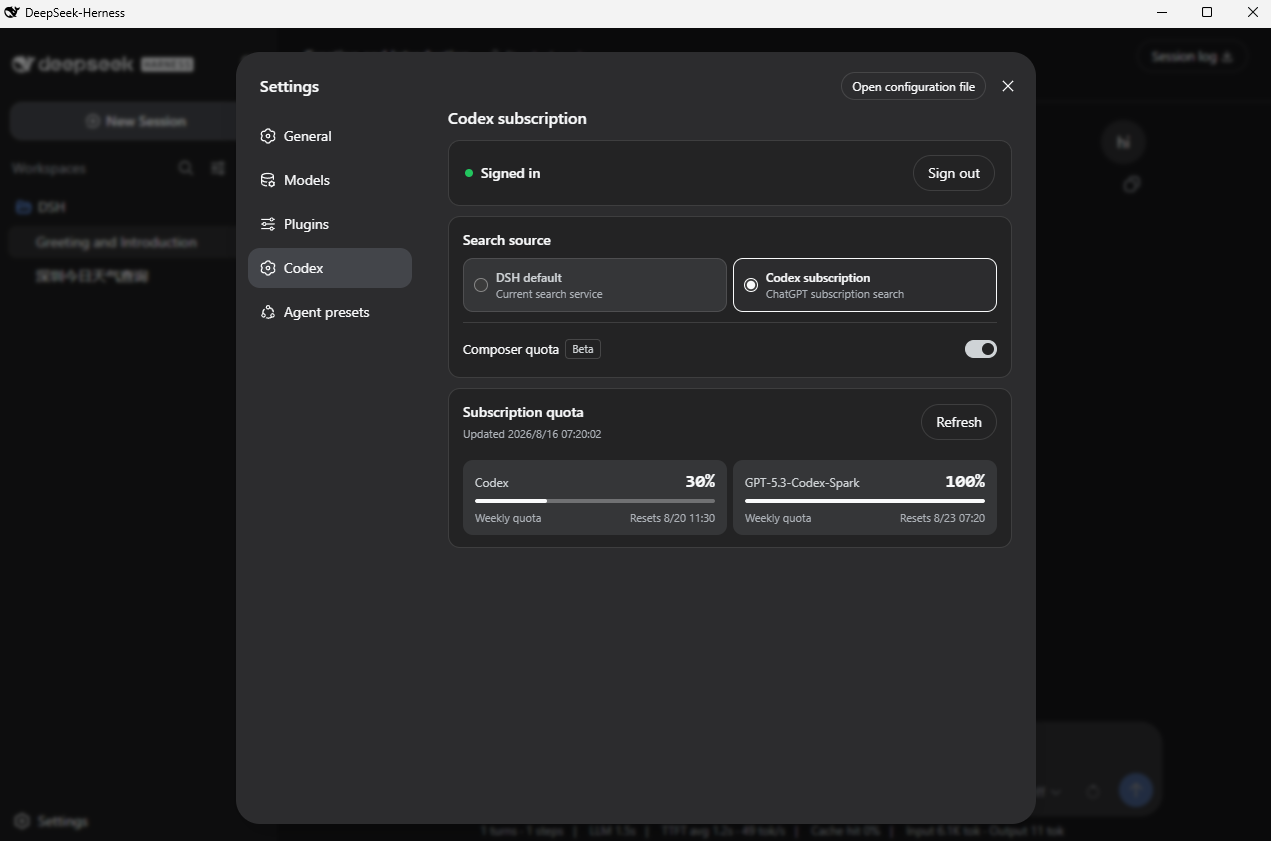
|
|
43
|
+
|
|
44
|
+
</details>
|
|
33
45
|
|
|
34
46
|
## Prepare DSH
|
|
35
47
|
|
|
36
|
-
This plugin supports DeepSeek Harness `0.1.0-rc.6`, `0.1.0-rc.7`, and `0.1.0-rc.8`, and requires a ChatGPT account
|
|
37
|
-
that currently has Codex access.
|
|
48
|
+
This plugin supports DeepSeek Harness `0.1.0-rc.6`, `0.1.0-rc.7`, and `0.1.0-rc.8`, and requires a ChatGPT account that currently has Codex access.
|
|
38
49
|
|
|
39
50
|
- Do not want to configure Node.js? Use the [community DSH-Portable package](https://github.com/WSL043/DSH-Portable).
|
|
40
51
|
- Prefer the official route? Follow the [DeepSeek Harness run guide](https://github.com/deepseek-ai/deepseek-harness#run).
|
|
41
52
|
|
|
42
|
-
If DSH already opens normally, continue with the plugin installation below.
|
|
43
|
-
|
|
44
53
|
## Install
|
|
45
54
|
|
|
46
55
|
### Let an Agent install it (recommended)
|
|
47
56
|
|
|
48
|
-
Send
|
|
49
|
-
update, uninstall, and verification steps. It preserves the DSH profile and
|
|
50
|
-
sign-in and never restarts DSH without permission:
|
|
57
|
+
Send this link directly to your Agent:
|
|
51
58
|
|
|
52
|
-
[
|
|
59
|
+
**[Agent install, update, and uninstall guide](https://raw.githubusercontent.com/WSL043/dsh-codex-subscription/main/AGENTS.md)**
|
|
53
60
|
|
|
54
61
|
```text
|
|
55
62
|
https://raw.githubusercontent.com/WSL043/dsh-codex-subscription/main/AGENTS.md
|
|
56
63
|
```
|
|
57
64
|
|
|
65
|
+
The guide includes verification steps and tells the Agent to preserve the DSH profile, sign-in, and other plugins.
|
|
66
|
+
|
|
58
67
|
### Manual Windows install
|
|
59
68
|
|
|
60
69
|
Open PowerShell and paste this one line:
|
|
61
70
|
|
|
62
71
|
```powershell
|
|
63
|
-
|
|
64
|
-
```
|
|
65
|
-
|
|
66
|
-
The setup asks you to choose **中文(简体)** or **English** first, then discovers DSH:
|
|
67
|
-
|
|
68
|
-
- one DSH installation: it shows the target and continues automatically;
|
|
69
|
-
- multiple DSH installations: it shows a numbered list with status and paths instead of throwing a PowerShell exception;
|
|
70
|
-
- no existing plugin: the operation is clearly shown as **Install**;
|
|
71
|
-
- an existing current or legacy plugin: the operation is clearly shown as **Update**, using the existing safe migration path;
|
|
72
|
-
- success: it shows the result and asks you to restart DSH manually; it never restarts DSH on its own.
|
|
73
|
-
|
|
74
|
-
`Bypass` applies only to this child process and does not change the system
|
|
75
|
-
PowerShell execution policy.
|
|
76
|
-
|
|
77
|
-
Both a normal DSH installation and DSH-Portable are supported. Portable users do
|
|
78
|
-
not need a system Node.js or pnpm, and administrator access is not required. The
|
|
79
|
-
friendly setup downloads the core manager, verifies its Release SHA-256, then
|
|
80
|
-
lets the existing manager perform installation, update, verification, and PATH
|
|
81
|
-
handling.
|
|
82
|
-
|
|
83
|
-
<details>
|
|
84
|
-
<summary>Non-interactive / compatibility install</summary>
|
|
85
|
-
|
|
86
|
-
For scripting, Agent workflows, or an explicit `Install` action, the original
|
|
87
|
-
core manager remains available:
|
|
88
|
-
|
|
89
|
-
```powershell
|
|
90
|
-
curl.exe -fL https://github.com/WSL043/dsh-codex-subscription/releases/latest/download/dsh-codex.ps1 -o "$env:TEMP\dsh-codex.ps1"
|
|
91
|
-
powershell.exe -NoProfile -ExecutionPolicy Bypass -File "$env:TEMP\dsh-codex.ps1" Install
|
|
72
|
+
irm 'https://github.com/WSL043/dsh-codex-subscription/releases/latest/download/dsh-codex-setup.ps1' | iex
|
|
92
73
|
```
|
|
93
74
|
|
|
94
|
-
|
|
95
|
-
|
|
96
|
-
|
|
97
|
-
|
|
98
|
-
|
|
99
|
-
If the portable folder was renamed or moved, start the intended DSH-Portable copy
|
|
100
|
-
once and install again. Restart DSH manually after installation.
|
|
75
|
+
The lightweight setup checks only the current folder, the system command, and common
|
|
76
|
+
[DSH-Portable](https://github.com/WSL043/DSH-Portable) locations, then invokes the official `plugin add`
|
|
77
|
+
operation once. It does not recursively scan disks, install pnpm, create a resident command, snapshot a
|
|
78
|
+
profile, or download the plugin twice. It needs no administrator access and never restarts DSH.
|
|
101
79
|
|
|
102
80
|
<details>
|
|
103
|
-
<summary>macOS, Linux, or an existing <code>dsh</code> command</summary>
|
|
81
|
+
<summary>macOS, Linux, or an existing <code>dsh</code> command (universal install)</summary>
|
|
104
82
|
|
|
105
83
|
```sh
|
|
106
84
|
dsh plugin --profile web add dsh-codex-subscription
|
|
@@ -108,74 +86,54 @@ dsh plugin --profile web list dsh-codex-subscription --depth 0
|
|
|
108
86
|
dsh --profile web --dump-config
|
|
109
87
|
```
|
|
110
88
|
|
|
111
|
-
The plugin list should contain one `dsh-codex-subscription`, and the config should
|
|
112
|
-
|
|
89
|
+
The plugin list should contain one `dsh-codex-subscription`, and the config should contain one
|
|
90
|
+
`codex-subscription` entry.
|
|
113
91
|
|
|
114
92
|
</details>
|
|
115
93
|
|
|
116
|
-
|
|
94
|
+
Restart DSH manually after installation, then:
|
|
117
95
|
|
|
118
|
-
1. Open **Settings -> Codex
|
|
96
|
+
1. Open **Settings -> Codex**.
|
|
119
97
|
2. Sign in with a ChatGPT account that has Codex access.
|
|
120
|
-
3. Choose
|
|
121
|
-
4.
|
|
98
|
+
3. Choose a search source.
|
|
99
|
+
4. Select a Codex model.
|
|
122
100
|
|
|
123
|
-
|
|
101
|
+
## Features
|
|
124
102
|
|
|
125
|
-
|
|
126
|
-
|
|
127
|
-
|
|
128
|
-
|
|
129
|
-
|
|
103
|
+
- ChatGPT OAuth sign-in with credentials kept on the host;
|
|
104
|
+
- Codex models and image generation directly inside DSH conversations;
|
|
105
|
+
- A clear choice between DSH default search and Codex subscription search;
|
|
106
|
+
- Actual backend-provided quota, reset time, and freshness;
|
|
107
|
+
- Separate standard Codex, Codex-Spark, Credits, and other independent limits;
|
|
108
|
+
- Optional composer quota for the selected Codex model (Beta, off by default);
|
|
109
|
+
- Visible errors when subscription routing is unavailable, with no silent paid fallback.
|
|
130
110
|
|
|
131
|
-
|
|
111
|
+
### Composer quota
|
|
132
112
|
|
|
133
|
-
|
|
113
|
+
<p align="center">
|
|
114
|
+
<img src="https://raw.githubusercontent.com/WSL043/dsh-codex-subscription/main/docs/assets/composer-quota-en.png" width="800" alt="Codex quota inside the composer">
|
|
115
|
+
</p>
|
|
134
116
|
|
|
135
|
-
|
|
136
|
-
|
|
137
|
-
-
|
|
138
|
-
- A selected Spark model uses the separate Spark quota returned by the backend;
|
|
139
|
-
- Only windows actually returned by the backend are shown; there is no hard-coded “5-hour + weekly” layout;
|
|
140
|
-
- If the account currently reports only weekly usage, no 5-hour window is invented; it appears automatically if the backend restores it;
|
|
141
|
-
- Independent Codex-Spark limits are not merged into standard Codex quota;
|
|
142
|
-
- Credits and monthly spending caps appear only when the account or workspace actually returns them;
|
|
143
|
-
- Percentages describe usage status, not billing amounts or billing guarantees.
|
|
117
|
+
The compact percentage appears only for a selected Codex model. Standard Codex uses the lowest remaining
|
|
118
|
+
window returned by the service; Spark uses its independent quota. The plugin does not hard-code a
|
|
119
|
+
“5-hour + weekly” layout or invent Credits and spending caps that the service did not return.
|
|
144
120
|
|
|
145
121
|
## Update and uninstall
|
|
146
122
|
|
|
147
|
-
Windows
|
|
148
|
-
|
|
149
|
-
| Action | PowerShell command |
|
|
150
|
-
| --- | --- |
|
|
151
|
-
| Update | `dsh-codex update` |
|
|
152
|
-
| Uninstall | `dsh-codex uninstall` |
|
|
153
|
-
|
|
154
|
-
Update verifies the latest Release manager script with SHA-256. Uninstall removes
|
|
155
|
-
the plugin and `dsh-codex` command while preserving the DSH profile, unrelated
|
|
156
|
-
plugins, and saved sign-in. If an older installation has no short command, run
|
|
157
|
-
the Windows setup line above once; the friendly setup detects the existing plugin
|
|
158
|
-
and automatically shows **Update**.
|
|
123
|
+
On Windows, rerun the one-line setup above to update. Use the official DSH command to uninstall. Both
|
|
124
|
+
operations preserve the DSH profile, other plugins, and saved sign-in.
|
|
159
125
|
|
|
160
126
|
<details>
|
|
161
127
|
<summary>Update or uninstall with an existing <code>dsh</code> command</summary>
|
|
162
128
|
|
|
163
|
-
Update and verify:
|
|
164
|
-
|
|
165
129
|
```sh
|
|
166
130
|
dsh plugin --profile web update dsh-codex-subscription
|
|
167
131
|
dsh plugin --profile web list dsh-codex-subscription --depth 0
|
|
168
132
|
dsh --profile web --dump-config
|
|
169
|
-
```
|
|
170
|
-
|
|
171
|
-
Uninstall:
|
|
172
|
-
|
|
173
|
-
```sh
|
|
174
133
|
dsh plugin --profile web remove dsh-codex-subscription
|
|
175
134
|
```
|
|
176
135
|
|
|
177
|
-
When
|
|
178
|
-
package installs successfully:
|
|
136
|
+
When migrating manually from v0.2.1, remove the old package only after the new one installs successfully:
|
|
179
137
|
|
|
180
138
|
```sh
|
|
181
139
|
dsh plugin --profile web remove @wsl043/dsh-codex-subscription
|
|
@@ -183,24 +141,20 @@ dsh plugin --profile web remove @wsl043/dsh-codex-subscription
|
|
|
183
141
|
|
|
184
142
|
</details>
|
|
185
143
|
|
|
186
|
-
|
|
144
|
+
From a DSH-Portable folder, replace `dsh` above with `.\dsh.exe`.
|
|
187
145
|
|
|
188
146
|
## Troubleshooting
|
|
189
147
|
|
|
190
|
-
-
|
|
191
|
-
-
|
|
192
|
-
-
|
|
193
|
-
- If `curl.exe` is missing or setup still fails, send the Agent guide URL above to an Agent. Do not change the machine PATH or execution policy, and do not delete a profile to force an install.
|
|
148
|
+
- **DSH-Portable is not found:** enter its folder and rerun setup, or run `.\dsh.exe plugin --profile web add dsh-codex-subscription` directly;
|
|
149
|
+
- **More than one DSH exists:** enter the intended DSH-Portable folder before running setup;
|
|
150
|
+
- **Setup still fails:** send the Agent guide above to an Agent. Do not delete the profile or change the system PATH to force an install.
|
|
194
151
|
|
|
195
|
-
|
|
152
|
+
The ChatGPT Codex backend and DSH can change independently. This community project is not affiliated with or endorsed by DeepSeek or OpenAI.
|
|
196
153
|
|
|
197
|
-
|
|
198
|
-
|
|
199
|
-
- This is a community project with no affiliation or endorsement from DeepSeek or OpenAI.
|
|
200
|
-
|
|
201
|
-
Use [GitHub Issues](https://github.com/WSL043/dsh-codex-subscription/issues) for
|
|
202
|
-
project feedback. For general DSH plugin discussion, visit
|
|
203
|
-
[DeepSeek Harness Discussions](https://github.com/deepseek-ai/deepseek-harness/discussions).
|
|
154
|
+
Use [GitHub Issues](https://github.com/WSL043/dsh-codex-subscription/issues) for project feedback.
|
|
155
|
+
For DSH plugin discussion, visit [DeepSeek Harness Discussions](https://github.com/deepseek-ai/deepseek-harness/discussions).
|
|
204
156
|
Read [SECURITY.md](SECURITY.md) before reporting sensitive issues.
|
|
205
157
|
|
|
206
|
-
[
|
|
158
|
+
If this project is useful, the [Star button](https://github.com/WSL043/dsh-codex-subscription/stargazers) helps more DSH users find it.
|
|
159
|
+
|
|
160
|
+
[简体中文](README.md) · [MIT](LICENSE)
|