dsh-codex-subscription 1.0.0 → 1.0.5
This diff represents the content of publicly available package versions that have been released to one of the supported registries. The information contained in this diff is provided for informational purposes only and reflects changes between package versions as they appear in their respective public registries.
- package/AGENTS.md +55 -110
- package/README.en.md +79 -103
- package/README.md +74 -105
- package/docs/assets/settings-focus-en.png +0 -0
- package/docs/assets/settings-focus.png +0 -0
- package/lib/client.js +87 -18
- package/lib/index.js +14 -6
- package/package.json +33 -36
- package/dsh-codex.ps1 +0 -777
package/README.md
CHANGED
|
@@ -1,73 +1,85 @@
|
|
|
1
1
|
# DSH Codex Subscription
|
|
2
2
|
|
|
3
|
+
<div align="center">
|
|
4
|
+
|
|
5
|
+
**把 ChatGPT / Codex 订阅直接接入 DeepSeek Harness**
|
|
6
|
+
|
|
7
|
+
在 DeepSeek Harness 中直接登录 ChatGPT 并使用 Codex 订阅。无需 OpenAI API Key,也不依赖 Codex CLI;
|
|
8
|
+
模型、搜索、额度和图片生成都留在 DSH 里。
|
|
9
|
+
|
|
3
10
|
[](https://github.com/WSL043/dsh-codex-subscription/actions/workflows/ci.yml)
|
|
4
|
-
[](https://www.npmjs.com/package/dsh-codex-subscription)
|
|
12
|
+
[](LICENSE)
|
|
13
|
+
[](https://github.com/WSL043/dsh-codex-subscription/stargazers)
|
|
14
|
+
|
|
15
|
+
[交给 Agent 安装](#交给-agent推荐) · [Windows 安装](#windows-手动安装) · [更新与卸载](#更新与卸载) · [English](https://github.com/WSL043/dsh-codex-subscription/blob/main/README.en.md)
|
|
7
16
|
|
|
8
|
-
|
|
9
|
-
也不依赖 Codex CLI。保留 DSH 原有的会话、工具和权限,还能生成图片、切换联网搜索来源并查看额度。
|
|
17
|
+
</div>
|
|
10
18
|
|
|
11
|
-
|
|
19
|
+
<p align="center">
|
|
20
|
+
<img src="https://raw.githubusercontent.com/WSL043/dsh-codex-subscription/main/docs/assets/readme-hero.webp" width="900" alt="Codex 订阅直接用在 DSH:订阅模型、联网搜索、实时额度和图片生成">
|
|
21
|
+
</p>
|
|
12
22
|
|
|
13
|
-
|
|
23
|
+
## 核心优势
|
|
14
24
|
|
|
15
|
-
|
|
25
|
+
| 能力 | 用户得到什么 |
|
|
26
|
+
| --- | --- |
|
|
27
|
+
| **Codex 图片生成** | 在 DSH 对话里直接描述画面,生成结果会显示在当前会话中 |
|
|
28
|
+
| **订阅模型直连** | 登录 ChatGPT 后直接使用 Codex,不需要 OpenAI API Key 或 Codex CLI |
|
|
29
|
+
| **订阅搜索** | 可在 DSH 默认搜索与 Codex 订阅搜索之间明确切换 |
|
|
30
|
+
| **额度可见** | 普通 Codex、Spark 等服务端实际返回的额度分开显示 |
|
|
16
31
|
|
|
17
|
-
|
|
32
|
+
这些能力共用同一份本机 ChatGPT 登录。订阅路由失败时会明确报错,不会静默切换到其他付费路由。
|
|
18
33
|
|
|
19
|
-
##
|
|
34
|
+
## 实际界面
|
|
20
35
|
|
|
21
|
-
|
|
22
|
-
-
|
|
23
|
-
|
|
24
|
-
|
|
25
|
-
|
|
26
|
-
|
|
27
|
-
|
|
28
|
-
-
|
|
36
|
+
<p align="center">
|
|
37
|
+
<img src="https://raw.githubusercontent.com/WSL043/dsh-codex-subscription/main/docs/assets/settings-focus.png" width="820" alt="DeepSeek Harness 中的 Codex 订阅设置">
|
|
38
|
+
</p>
|
|
39
|
+
|
|
40
|
+
<details>
|
|
41
|
+
<summary>查看完整设置界面</summary>
|
|
42
|
+
|
|
43
|
+
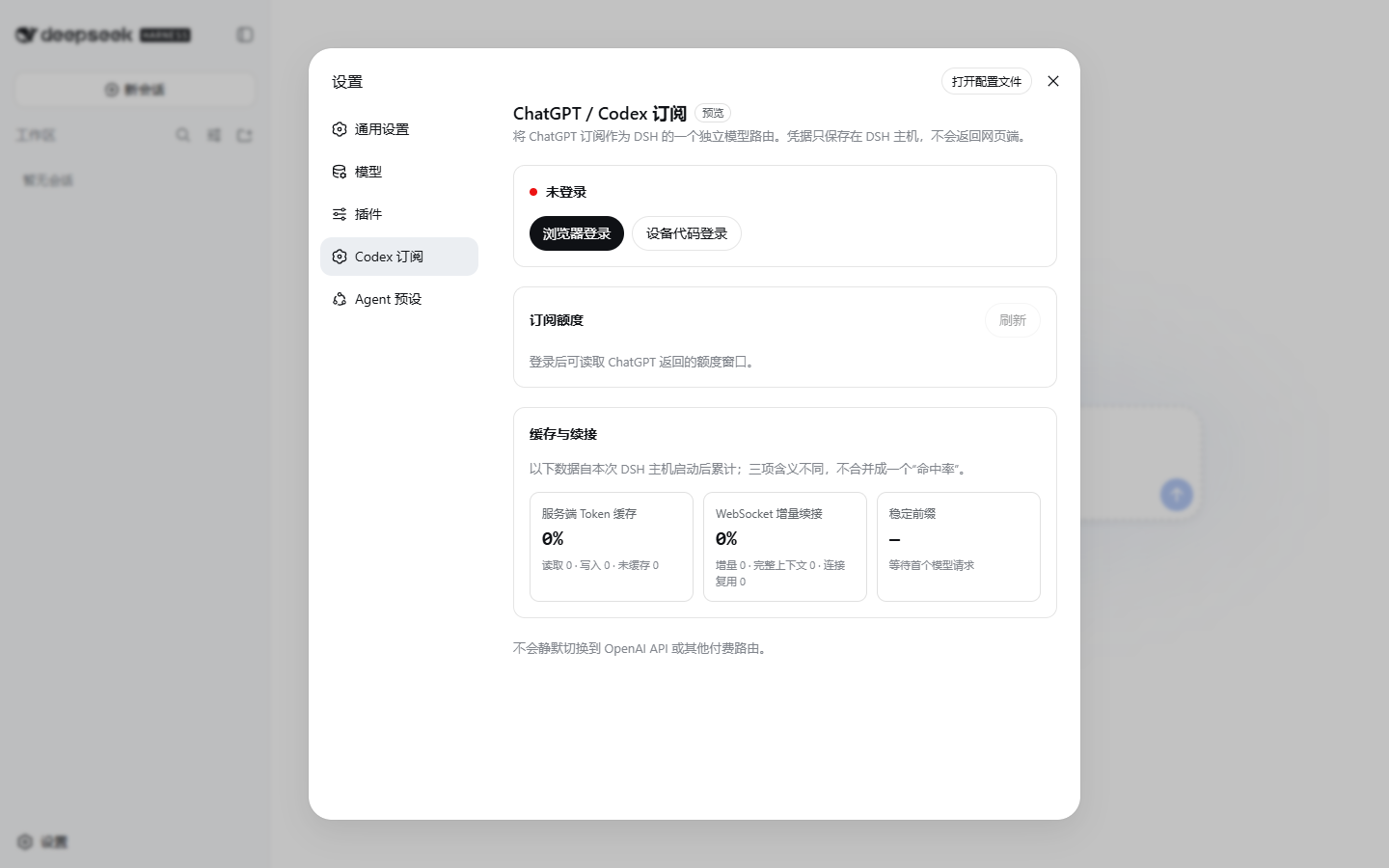
|
|
44
|
+
|
|
45
|
+
</details>
|
|
29
46
|
|
|
30
47
|
## 准备 DSH
|
|
31
48
|
|
|
32
|
-
本插件适配 DeepSeek Harness `0.1.0-rc.6` 与 `0.1.0-rc.
|
|
33
|
-
ChatGPT 账户。
|
|
49
|
+
本插件适配 DeepSeek Harness `0.1.0-rc.6`、`0.1.0-rc.7` 与 `0.1.0-rc.8`,并需要一个当前具有 Codex 使用资格的 ChatGPT 账户。
|
|
34
50
|
|
|
35
51
|
- 不想配置 Node.js:使用 [DSH-Portable(社区便携包)](https://github.com/WSL043/DSH-Portable);
|
|
36
52
|
- 想按官方方式运行:查看 [DeepSeek Harness 官方说明](https://github.com/deepseek-ai/deepseek-harness#run)。
|
|
37
53
|
|
|
38
|
-
已经能正常打开 DSH 的用户可以直接继续安装插件。
|
|
39
|
-
|
|
40
54
|
## 安装
|
|
41
55
|
|
|
42
56
|
### 交给 Agent(推荐)
|
|
43
57
|
|
|
44
|
-
|
|
45
|
-
DSH profile、登录信息或擅自重启 DSH。
|
|
58
|
+
把这个链接直接发给 Agent:
|
|
46
59
|
|
|
47
|
-
[
|
|
60
|
+
**[Agent 安装、更新与卸载文档](https://raw.githubusercontent.com/WSL043/dsh-codex-subscription/main/AGENTS.md)**
|
|
48
61
|
|
|
49
62
|
```text
|
|
50
63
|
https://raw.githubusercontent.com/WSL043/dsh-codex-subscription/main/AGENTS.md
|
|
51
64
|
```
|
|
52
65
|
|
|
66
|
+
Agent 文档包含安装、更新、卸载和验收步骤,并要求保留 DSH profile、登录信息和其他插件。
|
|
67
|
+
|
|
53
68
|
### Windows 手动安装
|
|
54
69
|
|
|
55
|
-
打开 PowerShell
|
|
70
|
+
打开 PowerShell,只需要复制这一行:
|
|
56
71
|
|
|
57
72
|
```powershell
|
|
58
|
-
|
|
59
|
-
powershell.exe -NoProfile -ExecutionPolicy Bypass -File "$env:TEMP\dsh-codex.ps1" Install
|
|
73
|
+
irm 'https://github.com/WSL043/dsh-codex-subscription/releases/latest/download/dsh-codex-setup.ps1' | iex
|
|
60
74
|
```
|
|
61
75
|
|
|
62
|
-
|
|
63
|
-
|
|
64
|
-
|
|
65
|
-
|
|
66
|
-
如果便携文件夹改过名字或位置,先启动一次正确的 DSH-Portable,再执行安装。完成后手动
|
|
67
|
-
重启 DSH,让插件生效。
|
|
76
|
+
这个轻量助手只在当前目录、系统命令和常见的
|
|
77
|
+
[DSH-Portable](https://github.com/WSL043/DSH-Portable) 位置查找 DSH,然后调用一次官方
|
|
78
|
+
`plugin add`。它不会递归扫盘、安装 pnpm、创建常驻命令、保存 profile 快照或重复下载插件。
|
|
79
|
+
无需管理员权限,也不会擅自重启 DSH。
|
|
68
80
|
|
|
69
81
|
<details>
|
|
70
|
-
<summary>macOS、Linux,或已有 <code>dsh</code>
|
|
82
|
+
<summary>macOS、Linux,或已有 <code>dsh</code> 命令(通用安装)</summary>
|
|
71
83
|
|
|
72
84
|
```sh
|
|
73
85
|
dsh plugin --profile web add dsh-codex-subscription
|
|
@@ -80,64 +92,48 @@ dsh --profile web --dump-config
|
|
|
80
92
|
|
|
81
93
|
</details>
|
|
82
94
|
|
|
83
|
-
|
|
95
|
+
安装完成后手动重启 DSH,然后:
|
|
84
96
|
|
|
85
|
-
1. 打开
|
|
97
|
+
1. 打开 **设置 -> Codex 订阅**;
|
|
86
98
|
2. 登录具有 Codex 使用资格的 ChatGPT 账户;
|
|
87
|
-
3.
|
|
99
|
+
3. 选择搜索来源;
|
|
88
100
|
4. 在模型选择器中选择 Codex 模型。
|
|
89
101
|
|
|
90
|
-
|
|
102
|
+
## 功能
|
|
91
103
|
|
|
92
|
-
|
|
93
|
-
|
|
94
|
-
|
|
104
|
+
- ChatGPT OAuth 登录,凭据保留在本机;
|
|
105
|
+
- Codex 模型和图片生成直接出现在 DSH 会话中;
|
|
106
|
+
- DSH 默认搜索与 Codex 订阅搜索可随时切换;
|
|
107
|
+
- 设置页显示服务端返回的额度、重置时间和更新时间;
|
|
108
|
+
- 普通 Codex、Codex-Spark、Credits 等独立额度分开显示;
|
|
109
|
+
- 输入框可显示当前 Codex 模型的剩余额度(Beta,默认关闭);
|
|
110
|
+
- 订阅路由不可用时明确报错,不会静默切换到其他付费路由。
|
|
95
111
|
|
|
96
|
-
|
|
112
|
+
### 输入框额度
|
|
97
113
|
|
|
98
|
-
|
|
114
|
+
<p align="center">
|
|
115
|
+
<img src="https://raw.githubusercontent.com/WSL043/dsh-codex-subscription/main/docs/assets/composer-quota-en.png" width="800" alt="输入框内的 Codex 剩余额度">
|
|
116
|
+
</p>
|
|
99
117
|
|
|
100
|
-
|
|
101
|
-
|
|
102
|
-
- 普通 Codex 模型取标准 Codex 窗口中剩余最少的一项,避免给出过于乐观的数字;
|
|
103
|
-
- 选择 Spark 模型时,快捷百分比使用服务端返回的 Spark 独立额度;
|
|
104
|
-
- 只显示服务端实际返回的窗口,不写死“5 小时 + 每周”;
|
|
105
|
-
- 当前只有每周额度时不虚构 5 小时窗口,以后服务端恢复时会自动显示;
|
|
106
|
-
- Codex-Spark 等独立额度不会与普通 Codex 额度合并;
|
|
107
|
-
- Credits 和月度消费上限仅在账户或工作区真实返回时显示;
|
|
108
|
-
- 百分比表示使用状态,不是账单金额或计费承诺。
|
|
118
|
+
快捷百分比只在选择 Codex 模型时显示。普通 Codex 使用服务端返回窗口中剩余最少的一项,
|
|
119
|
+
Spark 使用独立额度。插件不会写死“5 小时 + 每周”,也不会虚构服务端没有返回的 Credits 或消费上限。
|
|
109
120
|
|
|
110
121
|
## 更新与卸载
|
|
111
122
|
|
|
112
|
-
Windows
|
|
113
|
-
|
|
114
|
-
| 操作 | PowerShell 命令 |
|
|
115
|
-
| --- | --- |
|
|
116
|
-
| 更新 | `dsh-codex update` |
|
|
117
|
-
| 卸载 | `dsh-codex uninstall` |
|
|
118
|
-
|
|
119
|
-
更新会校验最新 Release 管理脚本的 SHA-256。卸载会移除插件和 `dsh-codex` 命令,但保留
|
|
120
|
-
DSH profile、其他插件和已保存的登录信息。旧版本如果还没有短命令,重新执行一次上面的
|
|
121
|
-
Windows 首次安装命令即可。
|
|
123
|
+
Windows 用户重新运行上面的单行助手即可更新。卸载使用 DSH 官方命令;两种操作都保留
|
|
124
|
+
DSH profile、其他插件和登录信息。
|
|
122
125
|
|
|
123
126
|
<details>
|
|
124
127
|
<summary>使用现有 <code>dsh</code> 命令更新或卸载</summary>
|
|
125
128
|
|
|
126
|
-
更新并检查:
|
|
127
|
-
|
|
128
129
|
```sh
|
|
129
130
|
dsh plugin --profile web update dsh-codex-subscription
|
|
130
131
|
dsh plugin --profile web list dsh-codex-subscription --depth 0
|
|
131
132
|
dsh --profile web --dump-config
|
|
132
|
-
```
|
|
133
|
-
|
|
134
|
-
卸载:
|
|
135
|
-
|
|
136
|
-
```sh
|
|
137
133
|
dsh plugin --profile web remove dsh-codex-subscription
|
|
138
134
|
```
|
|
139
135
|
|
|
140
|
-
从 v0.2.1
|
|
136
|
+
从 v0.2.1 手动迁移时,确认新包安装成功后再移除旧包名:
|
|
141
137
|
|
|
142
138
|
```sh
|
|
143
139
|
dsh plugin --profile web remove @wsl043/dsh-codex-subscription
|
|
@@ -145,49 +141,22 @@ dsh plugin --profile web remove @wsl043/dsh-codex-subscription
|
|
|
145
141
|
|
|
146
142
|
</details>
|
|
147
143
|
|
|
148
|
-
|
|
144
|
+
DSH-Portable 在其目录中把上述 `dsh` 换成 `.\dsh.exe`。
|
|
149
145
|
|
|
150
146
|
## 常见问题
|
|
151
147
|
|
|
152
|
-
-
|
|
153
|
-
-
|
|
154
|
-
-
|
|
155
|
-
不要自行修改系统 PATH、执行策略或删除 profile。
|
|
148
|
+
- **找不到 DSH-Portable**:进入它的目录后重新执行安装命令,或直接运行 `.\dsh.exe plugin --profile web add dsh-codex-subscription`;
|
|
149
|
+
- **电脑上有多个 DSH**:进入要使用的那个 DSH-Portable 目录再运行助手;
|
|
150
|
+
- **安装仍然失败**:把上面的 Agent 文档链接发给 Agent,不要删除 profile 或随意修改系统 PATH。
|
|
156
151
|
|
|
157
152
|
## 边界与支持
|
|
158
153
|
|
|
159
|
-
|
|
160
|
-
- ChatGPT Codex 后端和 DeepSeek Harness 都可能变化,兼容性以当前发布说明为准;
|
|
161
|
-
- 本项目为社区项目,与 DeepSeek、OpenAI 无隶属或背书关系。
|
|
154
|
+
ChatGPT Codex 后端和 DSH 可能独立变化;本项目为社区项目,与 DeepSeek、OpenAI 无隶属或背书关系。
|
|
162
155
|
|
|
163
156
|
本项目的问题反馈请使用 [GitHub Issues](https://github.com/WSL043/dsh-codex-subscription/issues);
|
|
164
|
-
DSH
|
|
165
|
-
[DeepSeek Harness Discussions](https://github.com/deepseek-ai/deepseek-harness/discussions)。
|
|
157
|
+
DSH 插件交流可前往 [DeepSeek Harness Discussions](https://github.com/deepseek-ai/deepseek-harness/discussions)。
|
|
166
158
|
敏感问题请先阅读 [SECURITY.md](SECURITY.md)。
|
|
167
159
|
|
|
168
|
-
|
|
169
|
-
|
|
170
|
-
Use your ChatGPT / Codex subscription directly in DeepSeek Harness without an
|
|
171
|
-
OpenAI API key or Codex CLI. The plugin supports Codex image generation, lets
|
|
172
|
-
you choose DSH or Codex subscription search, and shows the quota returned by the
|
|
173
|
-
service.
|
|
174
|
-
|
|
175
|
-
**Agent install:** send this
|
|
176
|
-
[installation guide](https://raw.githubusercontent.com/WSL043/dsh-codex-subscription/main/AGENTS.md)
|
|
177
|
-
to your Agent.
|
|
178
|
-
|
|
179
|
-
**Windows install:** open PowerShell and run these two lines:
|
|
180
|
-
|
|
181
|
-
```powershell
|
|
182
|
-
curl.exe -fL https://github.com/WSL043/dsh-codex-subscription/releases/latest/download/dsh-codex.ps1 -o "$env:TEMP\dsh-codex.ps1"
|
|
183
|
-
powershell.exe -NoProfile -ExecutionPolicy Bypass -File "$env:TEMP\dsh-codex.ps1" Install
|
|
184
|
-
```
|
|
185
|
-
|
|
186
|
-
DSH-Portable is supported without a separate Node.js or pnpm installation.
|
|
187
|
-
After the first install, use `dsh-codex update` to update and
|
|
188
|
-
`dsh-codex uninstall` to remove it. Open **Settings -> Codex**, sign in with a
|
|
189
|
-
ChatGPT account that has Codex access, choose a search source, and select a Codex
|
|
190
|
-
model. For full usage and troubleshooting, see the
|
|
191
|
-
[English documentation](https://github.com/WSL043/dsh-codex-subscription/blob/main/README.en.md).
|
|
160
|
+
如果这个项目对你有帮助,[点一下 Star](https://github.com/WSL043/dsh-codex-subscription/stargazers) 可以让更多 DSH 用户发现它。
|
|
192
161
|
|
|
193
162
|
[MIT](LICENSE)
|
|
Binary file
|
|
Binary file
|
package/lib/client.js
CHANGED
|
@@ -6,7 +6,6 @@ window.__ModuleLoader__.load({
|
|
|
6
6
|
Object.defineProperty(exports, Symbol.toStringTag, { value: "Module" });
|
|
7
7
|
let react = require("react");
|
|
8
8
|
let _deepseek_ai_dsh_client_ui_primitives = require("@deepseek-ai/dsh-client-ui-primitives");
|
|
9
|
-
let _deepseek_ai_dsh_client_ui_attachment = require("@deepseek-ai/dsh-client-ui-attachment");
|
|
10
9
|
let react_jsx_runtime = require("react/jsx-runtime");
|
|
11
10
|
//#region src/settings-contract.js
|
|
12
11
|
const SETTINGS_NAMESPACE = "codex-subscription";
|
|
@@ -203,7 +202,7 @@ window.__ModuleLoader__.load({
|
|
|
203
202
|
.codexSubscriptionCreditBalance{display:flex;flex-direction:column;gap:6px}.codexSubscriptionCreditBalance span,.codexSubscriptionCreditLabel{font-size:12px;line-height:18px;color:var(--dsw-alias-label-secondary)}.codexSubscriptionCreditBalance strong{font:600 18px/24px ui-monospace,SFMono-Regular,Consolas,monospace;font-variant-numeric:tabular-nums;overflow-wrap:anywhere}
|
|
204
203
|
.codexSubscriptionSpendLimit{display:flex;flex-direction:column;gap:8px}.codexSubscriptionSpendTop{display:flex;align-items:baseline;justify-content:space-between;gap:12px}.codexSubscriptionSpendTop strong{font:600 16px/22px ui-monospace,SFMono-Regular,Consolas,monospace;font-variant-numeric:tabular-nums}.codexSubscriptionSpendLimit progress{width:100%;height:6px;border:0;border-radius:999px;overflow:hidden;background:var(--dsw-alias-border-l3);accent-color:var(--dsw-alias-brand-primary,#3964fe);-webkit-appearance:none;appearance:none}.codexSubscriptionSpendLimit progress::-webkit-progress-bar{background:var(--dsw-alias-border-l3);border-radius:999px}.codexSubscriptionSpendLimit progress::-webkit-progress-value{background:var(--dsw-alias-brand-primary,#3964fe);border-radius:999px}.codexSubscriptionSpendLimit progress::-moz-progress-bar{background:var(--dsw-alias-brand-primary,#3964fe);border-radius:999px}
|
|
205
204
|
.codexComposerQuota{display:inline-flex;align-items:center;flex:0 0 auto;height:28px;box-sizing:border-box;margin-right:-4px;padding:0;color:var(--dsw-alias-label-secondary);font-family:inherit;font-size:12px;line-height:20px;font-weight:500;font-variant-numeric:tabular-nums;white-space:nowrap;user-select:none}
|
|
206
|
-
.codexImageTool{display:flex;flex-direction:column;gap:8px;margin:4px 0;color:var(--dsw-alias-label-primary)}.codexImageToolRow{display:flex;align-items:center;min-height:24px;gap:8px;font-size:13px;line-height:20px}.codexImageToolIcon{display:inline-flex;align-items:center;justify-content:center;width:16px;height:16px;color:var(--dsw-alias-label-secondary)}.codexImageToolIcon::before{content:'';width:8px;height:8px;border:1.5px solid currentColor;border-radius:3px}.codexImageTool[data-state=running] .codexImageToolIcon::before{border-radius:50%;border-right-color:transparent;animation:codexImageSpin 800ms linear infinite}.codexImageTool[data-state=error] .codexImageToolIcon::before{border-color:var(--dsw-alias-state-error-primary);background:var(--dsw-alias-state-error-primary)}.codexImageToolTitle{font-weight:500}.codexImageToolState{color:var(--dsw-alias-label-tertiary)}.codexImageToolError{margin:0 0 0 24px;font-size:12px;line-height:18px;color:var(--dsw-alias-state-error-primary)}.codexImageToolGallery{margin-left:24px}@keyframes codexImageSpin{to{transform:rotate(360deg)}}
|
|
205
|
+
.codexImageTool{display:flex;flex-direction:column;gap:8px;margin:4px 0;color:var(--dsw-alias-label-primary)}.codexImageToolRow{display:flex;align-items:center;min-height:24px;gap:8px;font-size:13px;line-height:20px}.codexImageToolIcon{display:inline-flex;align-items:center;justify-content:center;width:16px;height:16px;color:var(--dsw-alias-label-secondary)}.codexImageToolIcon::before{content:'';width:8px;height:8px;border:1.5px solid currentColor;border-radius:3px}.codexImageTool[data-state=running] .codexImageToolIcon::before{border-radius:50%;border-right-color:transparent;animation:codexImageSpin 800ms linear infinite}.codexImageTool[data-state=error] .codexImageToolIcon::before{border-color:var(--dsw-alias-state-error-primary);background:var(--dsw-alias-state-error-primary)}.codexImageToolTitle{font-weight:500}.codexImageToolState{color:var(--dsw-alias-label-tertiary)}.codexImageToolError{margin:0 0 0 24px;font-size:12px;line-height:18px;color:var(--dsw-alias-state-error-primary)}.codexImageToolGallery{margin-left:24px}.codexGeneratedImageFrame{display:flex;align-items:center;justify-content:center;width:min(240px,100%);min-height:120px;padding:0;overflow:hidden;border:1px solid var(--dsw-alias-border-l2);border-radius:10px;background:var(--dsw-alias-bg-module-platform);color:var(--dsw-alias-label-tertiary);cursor:pointer}.codexGeneratedImageFrame img{display:block;width:100%;max-height:240px;object-fit:contain}.codexGeneratedImageRetry{min-height:36px;padding:0 12px;border:1px solid var(--dsw-alias-border-l2);border-radius:8px;background:var(--dsw-alias-bg-module-platform);color:var(--dsw-alias-label-secondary);cursor:pointer}.codexGeneratedImageLightbox{position:fixed;inset:0;z-index:1000;display:flex;align-items:center;justify-content:center;padding:32px;border:0;background:rgba(0,0,0,.72)}.codexGeneratedImageLightbox img{display:block;max-width:min(1100px,calc(100vw - 64px));max-height:calc(100vh - 64px);object-fit:contain}.codexGeneratedImageClose{position:absolute;top:16px;right:16px;width:36px;height:36px;border:1px solid rgba(255,255,255,.35);border-radius:50%;background:rgba(0,0,0,.48);color:#fff;font-size:20px;line-height:1;cursor:pointer}@keyframes codexImageSpin{to{transform:rotate(360deg)}}
|
|
207
206
|
@container (max-width:560px){.codexSubscriptionCreditRows{grid-template-columns:1fr}}
|
|
208
207
|
@container (max-width:480px){.codexSubscriptionAccountRow,.codexSubscriptionSectionHead{align-items:flex-start;flex-direction:column}.codexSubscriptionActions{width:100%}.codexSubscriptionSearchChoices{grid-template-columns:1fr}}
|
|
209
208
|
@media(max-width:640px){.codexSubscriptionCard{padding:14px}}
|
|
@@ -228,17 +227,88 @@ window.__ModuleLoader__.load({
|
|
|
228
227
|
const date = new Date(value);
|
|
229
228
|
return Number.isFinite(date.getTime()) ? date : void 0;
|
|
230
229
|
};
|
|
231
|
-
|
|
232
|
-
|
|
233
|
-
|
|
234
|
-
|
|
235
|
-
|
|
236
|
-
|
|
237
|
-
|
|
238
|
-
|
|
239
|
-
|
|
240
|
-
|
|
241
|
-
|
|
230
|
+
function CodexGeneratedImage({ attachment, loadImage, t }) {
|
|
231
|
+
const [attempt, setAttempt] = (0, react.useState)(0);
|
|
232
|
+
const [error, setError] = (0, react.useState)(false);
|
|
233
|
+
const [open, setOpen] = (0, react.useState)(false);
|
|
234
|
+
const [src, setSrc] = (0, react.useState)();
|
|
235
|
+
const closeRef = (0, react.useRef)(null);
|
|
236
|
+
const triggerRef = (0, react.useRef)(null);
|
|
237
|
+
(0, react.useEffect)(() => {
|
|
238
|
+
let live = true;
|
|
239
|
+
setError(false);
|
|
240
|
+
setSrc(void 0);
|
|
241
|
+
loadImage(attachment).then((value) => {
|
|
242
|
+
if (live) setSrc(value);
|
|
243
|
+
}).catch(() => {
|
|
244
|
+
if (live) setError(true);
|
|
245
|
+
});
|
|
246
|
+
return () => {
|
|
247
|
+
live = false;
|
|
248
|
+
};
|
|
249
|
+
}, [
|
|
250
|
+
attachment,
|
|
251
|
+
loadImage,
|
|
252
|
+
attempt
|
|
253
|
+
]);
|
|
254
|
+
(0, react.useEffect)(() => {
|
|
255
|
+
if (!open) return void 0;
|
|
256
|
+
const handleKeyDown = (event) => {
|
|
257
|
+
if (event.key === "Escape") {
|
|
258
|
+
event.preventDefault();
|
|
259
|
+
setOpen(false);
|
|
260
|
+
} else if (event.key === "Tab") {
|
|
261
|
+
event.preventDefault();
|
|
262
|
+
closeRef.current?.focus();
|
|
263
|
+
}
|
|
264
|
+
};
|
|
265
|
+
document.addEventListener("keydown", handleKeyDown);
|
|
266
|
+
closeRef.current?.focus();
|
|
267
|
+
return () => {
|
|
268
|
+
document.removeEventListener("keydown", handleKeyDown);
|
|
269
|
+
triggerRef.current?.focus();
|
|
270
|
+
};
|
|
271
|
+
}, [open]);
|
|
272
|
+
const label = attachment.name ?? t("imageLabel");
|
|
273
|
+
if (error) return /* @__PURE__ */ (0, react_jsx_runtime.jsx)("button", {
|
|
274
|
+
type: "button",
|
|
275
|
+
className: "codexGeneratedImageRetry",
|
|
276
|
+
onClick: () => setAttempt((value) => value + 1),
|
|
277
|
+
children: t("imageLoadFailed")
|
|
278
|
+
});
|
|
279
|
+
return /* @__PURE__ */ (0, react_jsx_runtime.jsxs)(react_jsx_runtime.Fragment, { children: [/* @__PURE__ */ (0, react_jsx_runtime.jsx)("button", {
|
|
280
|
+
ref: triggerRef,
|
|
281
|
+
type: "button",
|
|
282
|
+
className: "codexGeneratedImageFrame",
|
|
283
|
+
title: t("imageOpen"),
|
|
284
|
+
"aria-label": fill(t("imageOpenNamed"), { value: label }),
|
|
285
|
+
onClick: () => {
|
|
286
|
+
if (src !== void 0) setOpen(true);
|
|
287
|
+
},
|
|
288
|
+
children: src === void 0 ? /* @__PURE__ */ (0, react_jsx_runtime.jsx)("span", { children: t("imageLoading") }) : /* @__PURE__ */ (0, react_jsx_runtime.jsx)("img", {
|
|
289
|
+
src,
|
|
290
|
+
alt: label
|
|
291
|
+
})
|
|
292
|
+
}), !open || src === void 0 ? null : /* @__PURE__ */ (0, react_jsx_runtime.jsxs)("div", {
|
|
293
|
+
className: "codexGeneratedImageLightbox",
|
|
294
|
+
role: "dialog",
|
|
295
|
+
"aria-modal": "true",
|
|
296
|
+
"aria-label": t("imagePreview"),
|
|
297
|
+
onClick: () => setOpen(false),
|
|
298
|
+
children: [/* @__PURE__ */ (0, react_jsx_runtime.jsx)("img", {
|
|
299
|
+
src,
|
|
300
|
+
alt: label,
|
|
301
|
+
onClick: (event) => event.stopPropagation()
|
|
302
|
+
}), /* @__PURE__ */ (0, react_jsx_runtime.jsx)("button", {
|
|
303
|
+
ref: closeRef,
|
|
304
|
+
type: "button",
|
|
305
|
+
className: "codexGeneratedImageClose",
|
|
306
|
+
"aria-label": t("imageClosePreview"),
|
|
307
|
+
onClick: () => setOpen(false),
|
|
308
|
+
children: "×"
|
|
309
|
+
})]
|
|
310
|
+
})] });
|
|
311
|
+
}
|
|
242
312
|
function CodexImageToolRow({ block, loadImage, t }) {
|
|
243
313
|
const settled = block?.kind === "tool-result";
|
|
244
314
|
const image = settled ? block.content.find((item) => item?.type === "image" && item.attachment !== void 0) : void 0;
|
|
@@ -269,11 +339,10 @@ window.__ModuleLoader__.load({
|
|
|
269
339
|
}),
|
|
270
340
|
image === void 0 ? null : /* @__PURE__ */ (0, react_jsx_runtime.jsx)("div", {
|
|
271
341
|
className: "codexImageToolGallery",
|
|
272
|
-
children: /* @__PURE__ */ (0, react_jsx_runtime.jsx)(
|
|
273
|
-
|
|
274
|
-
|
|
275
|
-
|
|
276
|
-
labels: imageGalleryLabels(t)
|
|
342
|
+
children: /* @__PURE__ */ (0, react_jsx_runtime.jsx)(CodexGeneratedImage, {
|
|
343
|
+
attachment: image.attachment,
|
|
344
|
+
loadImage,
|
|
345
|
+
t
|
|
277
346
|
})
|
|
278
347
|
}),
|
|
279
348
|
error === void 0 ? null : /* @__PURE__ */ (0, react_jsx_runtime.jsx)("p", {
|
package/lib/index.js
CHANGED
|
@@ -55,7 +55,7 @@ var DshOAuthCredentialStore = class {
|
|
|
55
55
|
});
|
|
56
56
|
return current;
|
|
57
57
|
}
|
|
58
|
-
async read(providerId, options) {
|
|
58
|
+
async #read(providerId, options) {
|
|
59
59
|
assertProvider(providerId);
|
|
60
60
|
abortIfNeeded(options);
|
|
61
61
|
let hit = await this.credentials.resolve(this.ref);
|
|
@@ -72,6 +72,9 @@ var DshOAuthCredentialStore = class {
|
|
|
72
72
|
if (hit?.value === void 0 || hit.value === "") return void 0;
|
|
73
73
|
return parseOAuthCredential(hit.value);
|
|
74
74
|
}
|
|
75
|
+
read(providerId, options) {
|
|
76
|
+
return this.#enqueue(providerId, () => this.#read(providerId, options), options);
|
|
77
|
+
}
|
|
75
78
|
async list(options) {
|
|
76
79
|
abortIfNeeded(options);
|
|
77
80
|
return await this.read(PROVIDER$1, options) === void 0 ? [] : [{
|
|
@@ -81,7 +84,7 @@ var DshOAuthCredentialStore = class {
|
|
|
81
84
|
}
|
|
82
85
|
modify(providerId, update, options) {
|
|
83
86
|
return this.#enqueue(providerId, async () => {
|
|
84
|
-
const current = await this
|
|
87
|
+
const current = await this.#read(providerId, options);
|
|
85
88
|
const next = await update(clone(current));
|
|
86
89
|
abortIfNeeded(options);
|
|
87
90
|
if (next === void 0) return current;
|
|
@@ -460,6 +463,7 @@ function openaiCodexSubscriptionProvider() {
|
|
|
460
463
|
})
|
|
461
464
|
});
|
|
462
465
|
}
|
|
466
|
+
const USER_AGENT = `dsh-codex-subscription/1.0.5`;
|
|
463
467
|
//#endregion
|
|
464
468
|
//#region src/codex-search.js
|
|
465
469
|
const CODEX_SEARCH_PROVIDER_ID = "codex-subscription";
|
|
@@ -540,7 +544,7 @@ function createCodexSearchProvider(options) {
|
|
|
540
544
|
accept: "application/json",
|
|
541
545
|
"content-type": "application/json",
|
|
542
546
|
originator: "pi",
|
|
543
|
-
"user-agent":
|
|
547
|
+
"user-agent": USER_AGENT
|
|
544
548
|
},
|
|
545
549
|
body: JSON.stringify({
|
|
546
550
|
id,
|
|
@@ -743,7 +747,7 @@ function createCodexImageTool(options) {
|
|
|
743
747
|
"content-type": "application/json",
|
|
744
748
|
originator: "pi",
|
|
745
749
|
"x-codex-image-turn-id": String(exec.callId),
|
|
746
|
-
"user-agent":
|
|
750
|
+
"user-agent": USER_AGENT
|
|
747
751
|
},
|
|
748
752
|
body: JSON.stringify({
|
|
749
753
|
prompt,
|
|
@@ -915,6 +919,7 @@ function createCodexUsageReader(options) {
|
|
|
915
919
|
const timeoutMs = options.timeoutMs ?? DEFAULT_TIMEOUT_MS;
|
|
916
920
|
let cached;
|
|
917
921
|
let inFlight;
|
|
922
|
+
let generation = 0;
|
|
918
923
|
const load = async (signal) => {
|
|
919
924
|
const auth = await getAuth({ signal });
|
|
920
925
|
const credential = await readCredential({ signal });
|
|
@@ -929,7 +934,7 @@ function createCodexUsageReader(options) {
|
|
|
929
934
|
"chatgpt-account-id": accountId,
|
|
930
935
|
accept: "application/json",
|
|
931
936
|
"cache-control": "no-store",
|
|
932
|
-
"user-agent":
|
|
937
|
+
"user-agent": USER_AGENT
|
|
933
938
|
},
|
|
934
939
|
signal: requestSignal(signal, timeoutMs)
|
|
935
940
|
});
|
|
@@ -949,8 +954,9 @@ function createCodexUsageReader(options) {
|
|
|
949
954
|
read({ force = false, signal } = {}) {
|
|
950
955
|
if (!force && cached !== void 0 && now() - cached.fetchedAt < ttlMs) return Promise.resolve(structuredClone(cached));
|
|
951
956
|
if (inFlight !== void 0) return inFlight.then(structuredClone);
|
|
957
|
+
const currentGeneration = generation;
|
|
952
958
|
const current = load(signal).then((value) => {
|
|
953
|
-
cached = structuredClone(value);
|
|
959
|
+
if (generation === currentGeneration) cached = structuredClone(value);
|
|
954
960
|
return structuredClone(value);
|
|
955
961
|
}).finally(() => {
|
|
956
962
|
if (inFlight === current) inFlight = void 0;
|
|
@@ -959,7 +965,9 @@ function createCodexUsageReader(options) {
|
|
|
959
965
|
return current;
|
|
960
966
|
},
|
|
961
967
|
clear() {
|
|
968
|
+
generation += 1;
|
|
962
969
|
cached = void 0;
|
|
970
|
+
inFlight = void 0;
|
|
963
971
|
}
|
|
964
972
|
});
|
|
965
973
|
}
|
package/package.json
CHANGED
|
@@ -1,6 +1,6 @@
|
|
|
1
1
|
{
|
|
2
2
|
"name": "dsh-codex-subscription",
|
|
3
|
-
"version": "1.0.
|
|
3
|
+
"version": "1.0.5",
|
|
4
4
|
"packageManager": "pnpm@11.19.0",
|
|
5
5
|
"description": "ChatGPT and Codex subscriptions for DeepSeek Harness with OAuth login, image generation, quota, and subscription web search",
|
|
6
6
|
"type": "module",
|
|
@@ -17,7 +17,6 @@
|
|
|
17
17
|
"README.md",
|
|
18
18
|
"README.en.md",
|
|
19
19
|
"AGENTS.md",
|
|
20
|
-
"dsh-codex.ps1",
|
|
21
20
|
"LICENSE",
|
|
22
21
|
"SECURITY.md",
|
|
23
22
|
"THIRD_PARTY_NOTICES.md",
|
|
@@ -80,46 +79,44 @@
|
|
|
80
79
|
},
|
|
81
80
|
"peerDependencies": {
|
|
82
81
|
"@deepseek-ai/cordis": "4.0.1",
|
|
83
|
-
"@deepseek-ai/dsh-api-remotes": "0.1.0-rc.6 || 0.1.0-rc.7",
|
|
84
|
-
"@deepseek-ai/dsh-client-connection": "0.1.0-rc.6 || 0.1.0-rc.7",
|
|
85
|
-
"@deepseek-ai/dsh-client-locale": "0.1.0-rc.6 || 0.1.0-rc.7",
|
|
86
|
-
"@deepseek-ai/dsh-client-runtime": "0.1.0-rc.6 || 0.1.0-rc.7",
|
|
87
|
-
"@deepseek-ai/dsh-client-ui-
|
|
88
|
-
"@deepseek-ai/dsh-client-ui-
|
|
89
|
-
"@deepseek-ai/dsh-client-ui-
|
|
90
|
-
"@deepseek-ai/dsh-client-ui-
|
|
91
|
-
"@deepseek-ai/dsh-client-ui-
|
|
92
|
-
"@deepseek-ai/dsh-client-ui-
|
|
93
|
-
"@deepseek-ai/dsh-
|
|
94
|
-
"@deepseek-ai/dsh-
|
|
95
|
-
"@deepseek-ai/dsh-llm": "0.1.0-rc.6 || 0.1.0-rc.7",
|
|
96
|
-
"@deepseek-ai/dsh-
|
|
97
|
-
"@deepseek-ai/dsh-
|
|
98
|
-
"@deepseek-ai/dsh-
|
|
99
|
-
"@deepseek-ai/dsh-web": "0.1.0-rc.6 || 0.1.0-rc.7",
|
|
82
|
+
"@deepseek-ai/dsh-api-remotes": "0.1.0-rc.6 || 0.1.0-rc.7 || 0.1.0-rc.8",
|
|
83
|
+
"@deepseek-ai/dsh-client-connection": "0.1.0-rc.6 || 0.1.0-rc.7 || 0.1.0-rc.8",
|
|
84
|
+
"@deepseek-ai/dsh-client-locale": "0.1.0-rc.6 || 0.1.0-rc.7 || 0.1.0-rc.8",
|
|
85
|
+
"@deepseek-ai/dsh-client-runtime": "0.1.0-rc.6 || 0.1.0-rc.7 || 0.1.0-rc.8",
|
|
86
|
+
"@deepseek-ai/dsh-client-ui-conversation": "0.1.0-rc.6 || 0.1.0-rc.7 || 0.1.0-rc.8",
|
|
87
|
+
"@deepseek-ai/dsh-client-ui-model-selection": "0.1.0-rc.6 || 0.1.0-rc.7 || 0.1.0-rc.8",
|
|
88
|
+
"@deepseek-ai/dsh-client-ui-primitives": "0.1.0-rc.6 || 0.1.0-rc.7 || 0.1.0-rc.8",
|
|
89
|
+
"@deepseek-ai/dsh-client-ui-settings": "0.1.0-rc.6 || 0.1.0-rc.7 || 0.1.0-rc.8",
|
|
90
|
+
"@deepseek-ai/dsh-client-ui-slots": "0.1.0-rc.6 || 0.1.0-rc.7 || 0.1.0-rc.8",
|
|
91
|
+
"@deepseek-ai/dsh-client-ui-tool": "0.1.0-rc.6 || 0.1.0-rc.7 || 0.1.0-rc.8",
|
|
92
|
+
"@deepseek-ai/dsh-credentials": "0.1.0-rc.6 || 0.1.0-rc.7 || 0.1.0-rc.8",
|
|
93
|
+
"@deepseek-ai/dsh-llm": "0.1.0-rc.6 || 0.1.0-rc.7 || 0.1.0-rc.8",
|
|
94
|
+
"@deepseek-ai/dsh-llm-pi-ai": "0.1.0-rc.6 || 0.1.0-rc.7 || 0.1.0-rc.8",
|
|
95
|
+
"@deepseek-ai/dsh-settings": "0.1.0-rc.6 || 0.1.0-rc.7 || 0.1.0-rc.8",
|
|
96
|
+
"@deepseek-ai/dsh-tools": "0.1.0-rc.6 || 0.1.0-rc.7 || 0.1.0-rc.8",
|
|
97
|
+
"@deepseek-ai/dsh-web": "0.1.0-rc.6 || 0.1.0-rc.7 || 0.1.0-rc.8",
|
|
100
98
|
"@deepseek-ai/schemastery": "3.18.1",
|
|
101
99
|
"@earendil-works/pi-ai": "0.82.1",
|
|
102
100
|
"react": "^18.2.0"
|
|
103
101
|
},
|
|
104
102
|
"devDependencies": {
|
|
105
103
|
"@deepseek-ai/cordis": "4.0.1",
|
|
106
|
-
"@deepseek-ai/dsh-api-remotes": "0.1.0-rc.
|
|
107
|
-
"@deepseek-ai/dsh-client-connection": "0.1.0-rc.
|
|
108
|
-
"@deepseek-ai/dsh-client-locale": "0.1.0-rc.
|
|
109
|
-
"@deepseek-ai/dsh-client-runtime": "0.1.0-rc.
|
|
110
|
-
"@deepseek-ai/dsh-client-ui-
|
|
111
|
-
"@deepseek-ai/dsh-client-ui-
|
|
112
|
-
"@deepseek-ai/dsh-client-ui-
|
|
113
|
-
"@deepseek-ai/dsh-client-ui-
|
|
114
|
-
"@deepseek-ai/dsh-client-ui-
|
|
115
|
-
"@deepseek-ai/dsh-client-ui-
|
|
116
|
-
"@deepseek-ai/dsh-
|
|
117
|
-
"@deepseek-ai/dsh-
|
|
118
|
-
"@deepseek-ai/dsh-llm": "0.1.0-rc.
|
|
119
|
-
"@deepseek-ai/dsh-
|
|
120
|
-
"@deepseek-ai/dsh-
|
|
121
|
-
"@deepseek-ai/dsh-
|
|
122
|
-
"@deepseek-ai/dsh-web": "0.1.0-rc.7",
|
|
104
|
+
"@deepseek-ai/dsh-api-remotes": "0.1.0-rc.8",
|
|
105
|
+
"@deepseek-ai/dsh-client-connection": "0.1.0-rc.8",
|
|
106
|
+
"@deepseek-ai/dsh-client-locale": "0.1.0-rc.8",
|
|
107
|
+
"@deepseek-ai/dsh-client-runtime": "0.1.0-rc.8",
|
|
108
|
+
"@deepseek-ai/dsh-client-ui-conversation": "0.1.0-rc.8",
|
|
109
|
+
"@deepseek-ai/dsh-client-ui-model-selection": "0.1.0-rc.8",
|
|
110
|
+
"@deepseek-ai/dsh-client-ui-primitives": "0.1.0-rc.8",
|
|
111
|
+
"@deepseek-ai/dsh-client-ui-settings": "0.1.0-rc.8",
|
|
112
|
+
"@deepseek-ai/dsh-client-ui-slots": "0.1.0-rc.8",
|
|
113
|
+
"@deepseek-ai/dsh-client-ui-tool": "0.1.0-rc.8",
|
|
114
|
+
"@deepseek-ai/dsh-credentials": "0.1.0-rc.8",
|
|
115
|
+
"@deepseek-ai/dsh-llm": "0.1.0-rc.8",
|
|
116
|
+
"@deepseek-ai/dsh-llm-pi-ai": "0.1.0-rc.8",
|
|
117
|
+
"@deepseek-ai/dsh-settings": "0.1.0-rc.8",
|
|
118
|
+
"@deepseek-ai/dsh-tools": "0.1.0-rc.8",
|
|
119
|
+
"@deepseek-ai/dsh-web": "0.1.0-rc.8",
|
|
123
120
|
"@deepseek-ai/schemastery": "3.18.1",
|
|
124
121
|
"@earendil-works/pi-ai": "0.82.1",
|
|
125
122
|
"react": "18.3.1",
|