dsh-cliproxyapi-pro 1.7.0 → 1.9.0
This diff represents the content of publicly available package versions that have been released to one of the supported registries. The information contained in this diff is provided for informational purposes only and reflects changes between package versions as they appear in their respective public registries.
- package/CHANGELOG.md +42 -0
- package/README.en.md +159 -17
- package/README.md +159 -17
- package/lib/client.js +3429 -888
- package/lib/index.js +2130 -34
- package/lib/media.js +2542 -0
- package/lib/quota.js +114 -12
- package/package.json +3 -2
package/CHANGELOG.md
CHANGED
|
@@ -4,6 +4,48 @@
|
|
|
4
4
|
|
|
5
5
|
本插件的所有重要变更。版本号遵循[语义化版本](https://semver.org/lang/zh-CN/)。
|
|
6
6
|
|
|
7
|
+
## 1.9.0 — 2026-10-25
|
|
8
|
+
|
|
9
|
+
### 新增
|
|
10
|
+
- **图片和视频生成的总开关。** 「生成」标签顶部新增「启用图片和视频生成」,对所有账号生效。关闭时输入框旁不显示生成按钮,`/cpa-image`、`/cpa-video`、`/cpa-video-edit`、`/cpa-video-extend`、`/cpa-video-status` 不注册,agent 生成工具 `generate_media` 也不注册,「生成」标签只显示这个开关;已提交的视频照常完成,聊天记录里已生成的结果仍可查看(不再提供编辑 / 延长按钮)。新安装默认关闭;已有 `media-settings.json`(字段缺失视为开启)或用过生成(存在 `media-sessions.json` / `media-jobs.json`)的配置保持开启。保存在 `media-settings.json` 的新字段 `enabled` 中。
|
|
11
|
+
|
|
12
|
+
### 变更
|
|
13
|
+
- **管理密钥被拒绝后最多自动重试 3 次。** 额度查询遇到 CPA 管理接口 401/403 时,按 5 分钟缓存周期在后台继续尝试,连续 3 次被拒绝后停止自动查询(CPA 对同一地址累计 5 次错误密钥会封禁 30 分钟)。失败次数保存在 `.dsh-cliproxyapi/quota-state.json`(不含密钥),重启 DSH 或重载插件后继续计数。保存新的管理密钥(包括在 DSH 凭证页修改)、清除密钥或一次成功的查询会清零;停止后手动刷新只再试一次,再被拒绝立即停止。额度页和输入框徽标显示「已连续被拒绝 n/3 次」或已停止的说明,`/cpa-status` 也会注明。之前的版本在第一次被拒绝后就暂停(仅在本次运行内有效)。
|
|
14
|
+
|
|
15
|
+
## 1.8.0 — 2026-10-22
|
|
16
|
+
|
|
17
|
+
### 新增
|
|
18
|
+
- **识别生图 / 生视频模型。** 按模型目录的 `type`(`openai-image`)、输出模态,以及 CPA 自己分流到图片 / 视频接口的模型族(`grok-imagine-image*`、`gpt-image-*`、`grok-imagine-video*`、`sora-2*`)识别生成模型;只出现在 `/v1/models` 普通列表里的生成模型也会收录。生成模型不再写入对话路由,也不参与首次推荐勾选;已保存的勾选保持不变。
|
|
19
|
+
- **账号页新增「生成」标签。** 分组列出生图 / 生视频模型,可以用开关决定是否提供给生成功能、手动修改类型(修改后立即重新同步路由)、标记漏识别的模型;`sora-2*` 标注为 Grok 视频模型的别名;底部可设置生成文件的保存位置和视频默认时长 / 分辨率。agent 工具默认关闭,需另行打开。
|
|
20
|
+
- **`/cpa-image` 生成图片。** 支持 `-m` 临时指定模型(完整 id 或能唯一匹配的片段)、`--aspect` 比例、`-n` 张数;附带图片时改用 `/v1/images/edits` 改图。图片保存到会话工作目录下的保存位置(默认 `generated`),同名不覆盖。只请求该模型所属账号的 CPA,结果是链接时只下载 `data:` / HTTPS 链接且不带 Key,最多等待 3 分钟。
|
|
21
|
+
- **输入框旁的生成模型按钮。** 在模型选择器左侧选择本会话的生图模型(按会话保存,并作为新会话的默认选择;刚启动时会先同步一次模型目录,不用等到第一次生图才出现);生成结果显示在对话里,图片接口只提供插件为该会话记录过的文件。新增 `media-sessions.json` 和接口 `/api/dsh-cliproxyapi/media/{session,session/save,file,command}`。
|
|
22
|
+
- **对话里以一问一答显示生图。** `/cpa-image` 在对话中的那一行改为自定义显示(DSH 的 `conversation.chat.commandview` 插槽):右侧气泡是提示词和选项,左侧回复显示模型、生成中的占位框和计时、完成后的图片(点击放大;右键列出能打开它的应用(默认应用在前)、在文件资源管理器 / 访达 / 文件管理器中显示、复制图片、复制文件路径)、耗时和保存目录(详情里的目录和文件名可点击打开),失败时显示原因。打开和显示文件夹通过 DSH 自己的会话接口完成。其他命令仍用 DSH 默认的样式。
|
|
23
|
+
- **生图在后台进行。** 命令检查完就返回,输入框立即清空;生成期间插件发送 DSH 的会话状态事件,工作区把会话显示为「进行中」,结束后恢复(在其他会话时会显示「已完成」)。生成无法中途停止;插件重载或 DSH 关闭会中断它,对应的行显示「已中断」。`media-sessions.json` 增加每次生成的记录(最近 48 次),`media/command` 返回 `{ run, files }`。
|
|
24
|
+
- **`/cpa-video` 生成视频。** 支持 `-m` 模型、`-s` 时长(1–15 秒)、`-r` 分辨率(480p / 720p)、`--aspect` 比例,可附带一张首帧图。通过 CPA 的原生接口 `POST /v1/videos/generations` 提交,在后台查询 `GET /v1/videos/{id}`(5 / 10 / 15 秒逐步放慢),完成后经 CPA 的 `/openai/v1/videos/{id}/content` 下载到保存位置(最大 200 MiB,同名不覆盖)。视频提交后无法取消。任务保存在新文件 `media-jobs.json`,重载插件或重启 DSH 后继续等待,超过 CPA 记录凭据的 3 小时后标记为过期。对话里 `/cpa-video` 的一行同样是一问一答,显示排队 / 进度 / 保存中,完成后可直接播放(`media/file` 支持 `Range`,可拖动进度)。`/cpa-video-status` 列出本会话的视频任务。输入框旁的按钮同时提供生视频模型选择。
|
|
25
|
+
- **更多视频方式。** 附带图片可作为参考图(`--ref`,2 张及以上默认;1.5 最多 14 张)、首尾帧(`--first-last`)或尾帧(`--last`),字段按 xAI 文档发送。新增 `/cpa-video-edit`、`/cpa-video-extend` 和视频行上的「编辑视频…」「延长视频…」按钮:可以编辑 / 延长任意 MP4:附带视频文件、`--video <路径>`、`--url <公开链接>`(由 xAI 下载)或 `--from <命令 id>`,不写时用本会话最新生成的视频。本地视频以 base64 随请求发送(CPA 没有文件上传接口;实测编辑接口能读 20 MiB 请求体,所以最大 14 MiB);插件生成的视频约 1 小时内直接用 xAI 结果自带的短期链接(只在内存中保留,不写入文件或日志),之后改为发送已保存的文件。发送前读取 MP4 的时长,超出 xAI 限制(编辑 ≤ 8.7 秒,延长 2–15 秒)时直接提示。上游没有某个接口(HTTP 405,例如延长)时显示明确原因,并在本次加载内不再向该账号发送同类请求。
|
|
26
|
+
- **agent 生成工具 `generate_media`(默认关闭)。** 在「生成」标签打开后,agent 可以生图、生视频、编辑或延长视频(参数结构化,提示词原样发送);生图时若当前模型能看图,会把生成的图片一并交给它。视频默认每次先问你(所属根会话输入框处的 DSH 原生提问,双语「Allow / 允许」「Decline / 拒绝」;仅缺少原生提问服务时使用所属根会话输入框旁的兼容确认区),不受执行审批权限或「完全访问」影响;图片默认直接生成,均可改;agent 视频按秒计入会话(子 agent 计入所属会话),默认每个会话 60 秒,只在直接生成时拦截超额,CPA 当场拒绝才退回秒数。确认方式和上限可在输入框旁的生成按钮里按会话单独设置,并显示已用秒数。工具最多等 10 分钟,超时或停止后在后台继续。对话里的工具调用显示成和斜杠命令一样的一问一答。关闭时不注册工具、不占上下文。`media-sessions.json` 增加会话的确认方式、上限和已用秒数。
|
|
27
|
+
- **用对话模型理解自然语言参数。** 每条 `/cpa-image`、`/cpa-video`、`/cpa-video-edit`、`/cpa-video-extend` 在后台先请当前会话的对话模型读出没写成选项的参数(时长、分辨率、比例、张数、附图用法、延长秒数),显式选项和可直接识别的词优先,所有值都按允许范围校验;提示词只允许删去参数说法,不能改写。回复里写明由哪个模型读出了哪些参数;失败时照常按原文生成。运行记录新增 `interpreted`。
|
|
28
|
+
- **参数可以直接写在提示词里。** `/cpa-video 10秒 480p 竖屏 …`、`/cpa-image 2张 16:9 …`:写在提示词开头或结尾、作为独立词的时长、分辨率、比例、张数会被识别,显式选项优先。
|
|
29
|
+
- **附带的大图片会先缩小。** 视频的首帧 / 尾帧 / 参考图合计按实测的 1 MiB 请求体上限分配(约 750 KB,扣除提示词),改图参考图合计约 1.4 MB;超出时 PNG 由插件转成 JPEG(透明处填白、长边 ≤ 1280,必要时更小),其他格式由 DSH 附件服务生成较小版本。超过上限的视频请求在插件内直接拒绝,上游返回「length limit exceeded」时提示请求过大。
|
|
30
|
+
- **只读诊断。** 只发送 GET 请求,读取两份模型目录中的生成模型字段,并在不带 Key 的情况下探测 CPA 的视频接口是否存在;不生成内容、不消耗额度、不返回 Key。
|
|
31
|
+
- 新接口 `/api/dsh-cliproxyapi/media/{status,save,diagnose}`;生成设置独立保存在 `.dsh-cliproxyapi/media-settings.json`,`state.json` 格式不变。`/cpa-status` 显示识别出的生成模型数量。
|
|
32
|
+
|
|
33
|
+
### 变更
|
|
34
|
+
- **生图、生视频模型分开选择。** 输入框旁改为两个按钮:生图按钮只打开生图模型,生视频按钮只打开生视频模型;agent 的确认方式 / 视频秒数上限收进模型菜单底部的「agent 生成设置」,点开是二级菜单,不再和模型列表混在一起。
|
|
35
|
+
- **agent 生成的进度、预览和确认与思考过程分开。** 客户端从已有的 `tool/call` / `tool/result` 记录构建独立生成行,明确放在 process 外,复用斜杠命令的图片 / 视频预览及文件操作;宿主不再追加伪造的 `command/run` / `command/done`,不新增 Session 事件类型。存在对应生成行时隐藏重复工具卡片和旧版镜像命令卡片,真正的斜杠命令仍保留。确认独立位于输入框处,不再放在生成行内;10 分钟未回答、停止、关闭工具、重载 / 卸载插件或原生提问出错都不放行,只有明确选择允许才提交。缺少原生提问服务时,兼容确认区每 2 秒读取本会话的 `pendingConfirmations`,通过 `media/confirm` 回答;不会因原生提问出错而改走备用确认。
|
|
36
|
+
- **输入框较窄时,生图 / 生视频按钮只显示图标。** 输入框宽度小于 640 px 时隐藏模型名(仍保留无障碍名称和点击菜单),变宽后自动恢复。
|
|
37
|
+
- **agent 不再把提示词扩写成大段场景描写。** `generate_media` 的工具说明和 `prompt` 参数说明现在明确要求使用用户自己的措辞和细节,不要扩写、翻译或添加用户没有要求的镜头、光线、风格、人物或环境细节;斜杠命令的提示词本来就直接使用原文。
|
|
38
|
+
|
|
39
|
+
### 修复
|
|
40
|
+
- **生图模型选择里偶尔整组消失。** 普通 `/v1/models` 列表和增强目录共用了同一个超时,目录稍慢时只出现在普通列表里的生图模型会整组读不到,输入框旁只剩生视频模型,直到下一次 5 分钟刷新。现在两份目录并行读取,普通列表有自己的超时并失败重试一次;仍读不到时会在同步后约 4 秒再试(最多两次),`media/session` 同时返回 `catalogIncomplete`,生成按钮据此继续刷新。
|
|
41
|
+
- **Responses 路由的 agent 生成反复报参数错误。** 可选参数支持 `null`,空模型名沿用用户的选择;兼容旧调用里的空字段、视频 `count: 1` 和无图片时的默认 `first-frame`,避免先后被「模型不能为空」「张数仅用于图片」挡住。仍拒绝多视频请求及真正不合法的帧数量、分辨率和时长,且不会自动重试生成。
|
|
42
|
+
- **编辑视频时把写在提示词里的视频路径当成了提示词。** `/cpa-video-edit D:\…\a.mp4 480p 换成雪夜` 会用本会话最新的视频作原视频,并把路径和 `480p` 一起发给 xAI。现在提示词开头或结尾的视频路径(可带引号或 `@`)就是原视频;编辑 / 延长用不上的 `480p`、`16:9`、`竖屏` 等词会去掉并标为「已忽略」。生成行的标签末尾新增「复制原始输入」,可复制当时输入的整条命令。
|
|
43
|
+
- **看不出附带的图片被当成首帧还是参考图。** 生成行的回复里新增一行,写明实际使用的模式(纯文字 / 首帧 / 参考图 ×N / 首尾帧 / 尾帧 / 编辑 / 延长 / 文生图 / 改图)及其含义;编辑 / 延长还写明原视频来源(上传的本地文件、公开链接、本会话生成的视频)。运行记录新增 `sourceKind`。
|
|
44
|
+
- **「测试连接」总是报错 `Failed to execute 'json' on 'Response': Unexpected end of JSON input`。** 设置页(添加账号表单和连接标签页)缺少测试连接接口的地址,请求发到了不存在的路径。现在会正确调用 `/api/dsh-cliproxyapi/accounts/test`;页面收到非 JSON 回复时改为显示 `HTTP <状态码>`。(1.7.0 起存在)
|
|
45
|
+
|
|
46
|
+
### 注意
|
|
47
|
+
- 新增了打包文件 `lib/media.js`。1.5.0–1.6.0 内置的离线更新仍使用旧的固定文件清单,会拒绝这个版本的离线包;这些版本的用户请先通过插件市场或 npm 升级一次(插件页和 `dsh plugin add` 不受影响)。
|
|
48
|
+
|
|
7
49
|
## 1.7.0 — 2026-10-21
|
|
8
50
|
|
|
9
51
|
### 变更
|
package/README.en.md
CHANGED
|
@@ -13,7 +13,7 @@ Enter a server URL and an API key, and the plugin reads the CPA model catalog an
|
|
|
13
13
|
- **Multiple accounts**: each account has its own URL, key, model selection and parameters, and can be switched off at any time.
|
|
14
14
|
- **Works out of the box**: on the first connection, the newest model of each family in that server's own catalog is checked (at most 12), so the picker isn't flooded with hundreds of models.
|
|
15
15
|
- **Native protocols**: Claude over Anthropic Messages, GPT / Codex / Grok over OpenAI Responses, everything else over OpenAI Chat — fewer protocol translations inside CPA.
|
|
16
|
-
- **Visual management**: check models and edit per-model parameters in the settings panel.
|
|
16
|
+
- **Visual management**: check models and edit per-model parameters in the settings panel. By default the plugin registers no agent tool, so it takes no model context (the optional generation tool `generate_media` is switched on in the Generation tab).
|
|
17
17
|
- **Plugin updates**: automatically check Stable / Beta / Dev channels and choose global / Mainland China sources. With the [DSH plugin market (dshmarket)](https://github.com/dsh-market/dsh-market) installed, new versions install in one click or automatically; otherwise download a verified offline package and upgrade with DSH closed.
|
|
18
18
|
- **Secure**: API keys live only in the DSH credentials service, never in configuration files.
|
|
19
19
|
- **Zero dependencies**: no npm dependencies and no build step; installs in seconds.
|
|
@@ -49,7 +49,7 @@ The plugin is published on npm as [`dsh-cliproxyapi-pro`](https://www.npmjs.com/
|
|
|
49
49
|
dsh-cliproxyapi-pro
|
|
50
50
|
```
|
|
51
51
|
|
|
52
|
-
To pin a version, write `dsh-cliproxyapi-pro@1.
|
|
52
|
+
To pin a version, write `dsh-cliproxyapi-pro@1.9.0`.
|
|
53
53
|
4. Click **Install**. When it finishes, the dialog offers to enable the plugin right away — accept it.
|
|
54
54
|
|
|
55
55
|
> If downloads are slow in mainland China, open **Registry** next to the input and choose **the mainland China mirror**.
|
|
@@ -78,7 +78,7 @@ In **Add plugin**, or as the `plugin_manager` `target`, you can also enter:
|
|
|
78
78
|
|
|
79
79
|
| Source | What to enter |
|
|
80
80
|
|---|---|
|
|
81
|
-
| A released version | `git+https://github.com/TinyBOOOOM/dsh-cliproxyapi-pro.git#v1.
|
|
81
|
+
| A released version | `git+https://github.com/TinyBOOOOM/dsh-cliproxyapi-pro.git#v1.9.0` |
|
|
82
82
|
| Latest development version | `git+https://github.com/TinyBOOOOM/dsh-cliproxyapi-pro.git#main` |
|
|
83
83
|
| Offline package | Download [`dsh-cliproxyapi-pro.tgz`](https://github.com/TinyBOOOOM/dsh-cliproxyapi-pro/releases/latest/download/dsh-cliproxyapi-pro.tgz) (always the latest release) and enter its absolute local path |
|
|
84
84
|
| Local source (development) | Absolute path of a cloned repository; installed as a link, so code changes go live when the plugin reloads |
|
|
@@ -96,29 +96,37 @@ If CPA runs on this machine on the default port `8317` without a key, there is n
|
|
|
96
96
|
|
|
97
97
|
## Screenshots
|
|
98
98
|
|
|
99
|
-
The panel follows the DSH display language; the screenshots show the Chinese UI. Images 1–
|
|
99
|
+
The panel follows the DSH display language; the screenshots show the Chinese UI. Images 1–7 are offline component renders: this plugin's real UI code with sample data (`example.com` addresses, fictional accounts) rendered in a browser, with colors approximating the DSH dark theme; the real colors follow your DSH theme. Image 8 is an actual capture of 1.6.0 in the DSH desktop app.
|
|
100
100
|
|
|
101
|
-
**1. Accounts and connection.** The **CLIProxyAPI** page in the Settings dialog's left navigation: one account bar for all tabs; under the account title are the connection state, address and model count, with the **Enabled** switch (applies at once) and the **⋯** menu (**Probe & Refresh**, **Delete Account**) on the right. The **Connection** tab has one row per setting, **Test Connection** next to the address (uses the values being edited, saves nothing), and secondary explanations in ⓘ tips.
|
|
101
|
+
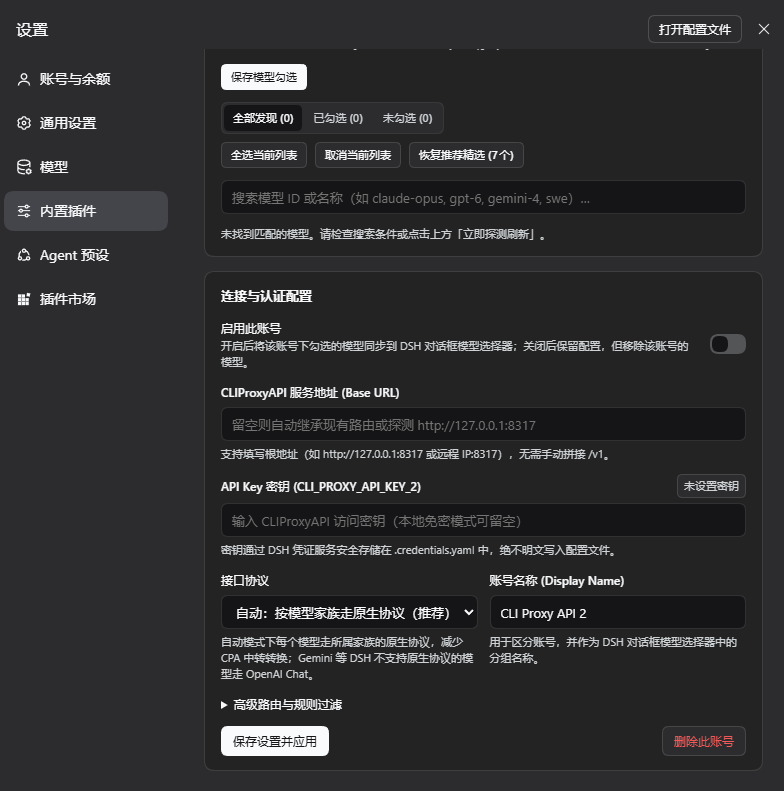
**1. Accounts and connection.** The **CLIProxyAPI** page in the Settings dialog's left navigation: one account bar for all four tabs (Connection / Models / Generation / Quota); under the account title are the connection state, address and model count, with the **Enabled** switch (applies at once) and the **⋯** menu (**Probe & Refresh**, **Delete Account**) on the right. The **Connection** tab has one row per setting, **Test Connection** next to the address (uses the values being edited, saves nothing), and secondary explanations in ⓘ tips.
|
|
102
102
|
|
|
103
103
|
|
|
104
104
|
|
|
105
|
-
**2. Models and one save bar.** The **Models** tab lists every model on that CPA: All / Checked / Unchecked, family filter, search, bulk actions and **Reset to Recommended**; checked models show the protocol they will use and can be edited with **Edit Parameters**. Connection and model edits are tracked together, and a bar at the bottom shows **Unsaved changes · Discard / Save & Apply**.
|
|
105
|
+
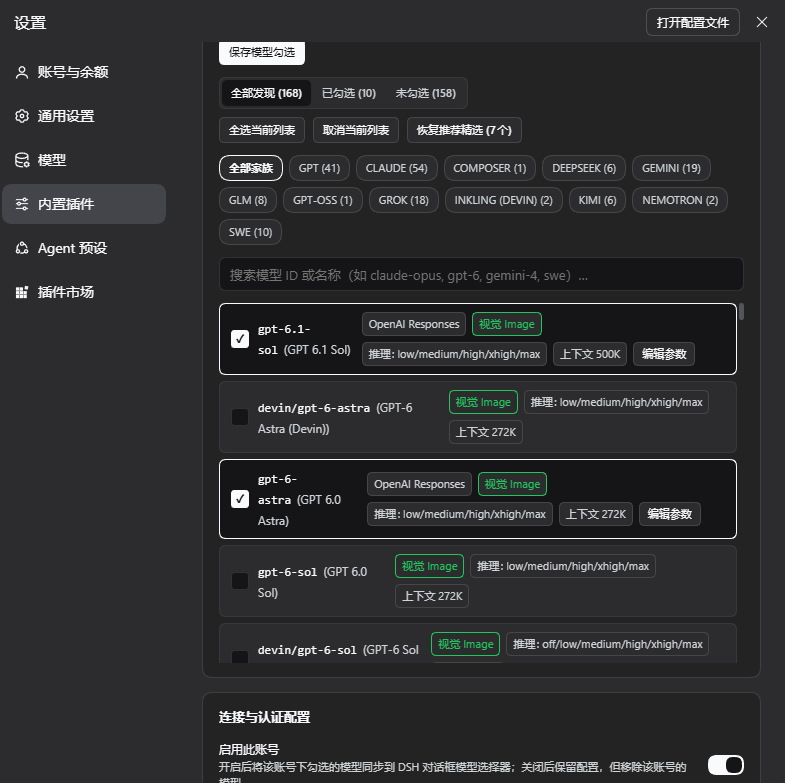
**2. Models and one save bar.** The **Models** tab lists every chat model on that CPA: All / Checked / Unchecked, family filter, search, bulk actions and **Reset to Recommended**; checked models show the protocol they will use and can be edited with **Edit Parameters**. Connection and model edits are tracked together, and a bar at the bottom shows **Unsaved changes · Discard / Save & Apply**.
|
|
106
106
|
|
|
107
107
|
|
|
108
108
|
|
|
109
|
-
**3.
|
|
109
|
+
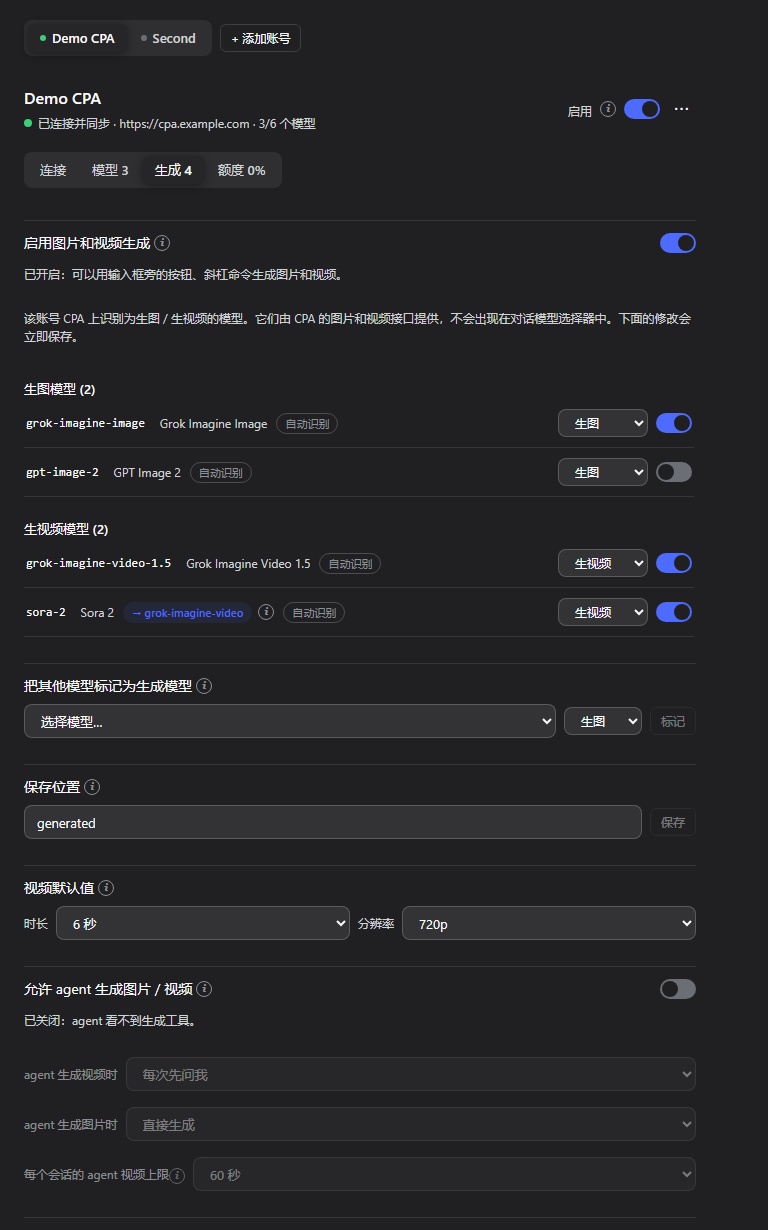
**3. Image and video generation.** The top of the **Generation** tab holds the master switch **Enable image and video generation** (for every account, off on a new installation; while off this page shows only the switch, and neither the composer's generation buttons nor the generation commands exist). Once on, it lists image and video models in groups, each with its own switch and kind; below are marking missed models, the save location, video defaults and the agent generation settings.
|
|
110
|
+
|
|
111
|
+
|
|
112
|
+
|
|
113
|
+
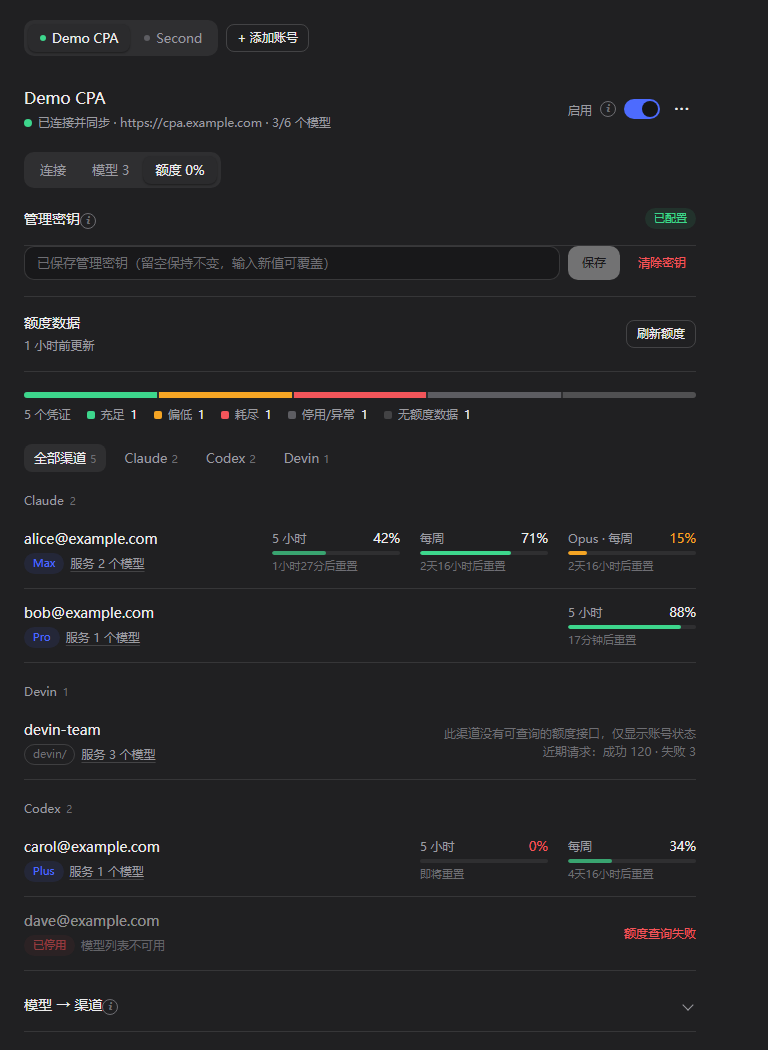
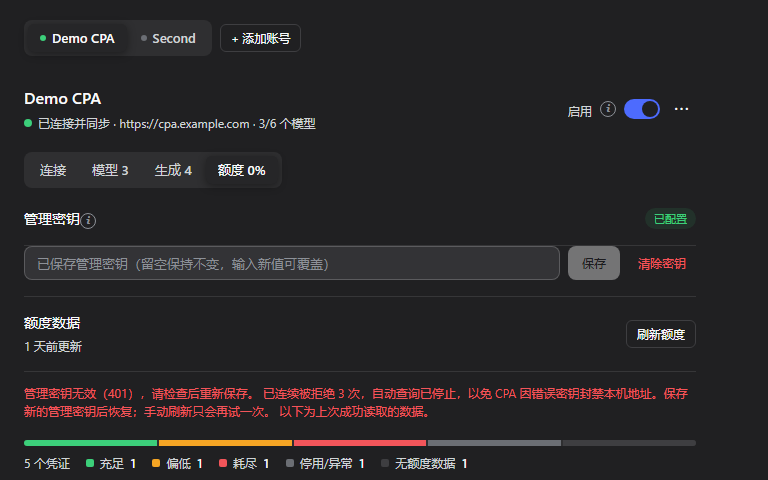
**4. Quota.** The **Quota** tab: management key, quota data and refresh, a distribution bar, credentials grouped by channel (plan, prefix, status, 5-hour / daily / weekly meters with reset times; Devin shows its daily / weekly quota, shared by every Devin model; channels without a quota endpoint show status and recent requests only), and an expandable "Model → Channel" table. The tab label shows the lowest remaining quota among the account's usable credentials.
|
|
110
114
|
|
|
111
115
|
|
|
112
116
|
|
|
113
|
-
**
|
|
117
|
+
**5. A rejected management key.** After CPA rejects the key 3 times in a row (401/403), automatic checks stop so CPA does not ban this address; the page explains why and keeps the last data it read. Saving a new management key resumes them; a manual **Refresh Quota** tries only once.
|
|
118
|
+
|
|
119
|
+
|
|
120
|
+
|
|
121
|
+
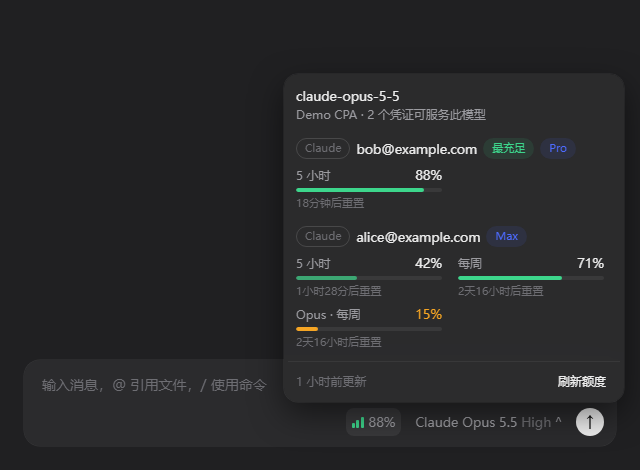
**6. Quota in the composer.** The badge left of the model selector shows the best remaining quota among the usable credentials serving the current model; clicking it lists every such credential with its quota windows. It appears only for models this plugin synchronizes whose account has a management key.
|
|
114
122
|
|
|
115
123
|
|
|
116
124
|
|
|
117
|
-
**
|
|
125
|
+
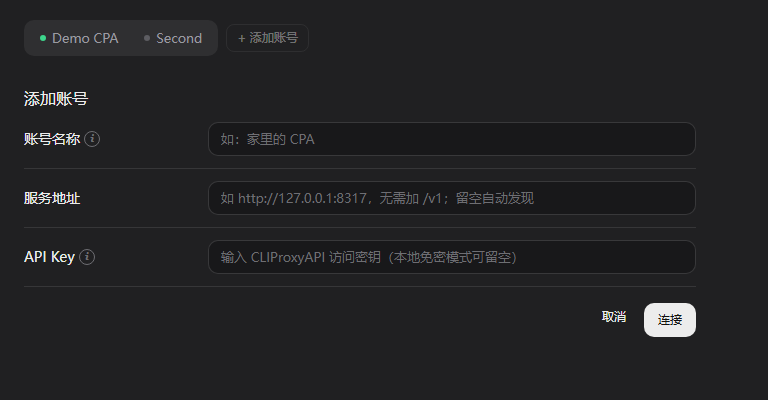
**7. Adding an account.** Enter a name, address and API key and click **Connect**: it tests first and creates an enabled account only when that works; on failure the reason is shown and **Add Anyway (Disabled)** is offered.
|
|
118
126
|
|
|
119
127
|
|
|
120
128
|
|
|
121
|
-
**
|
|
129
|
+
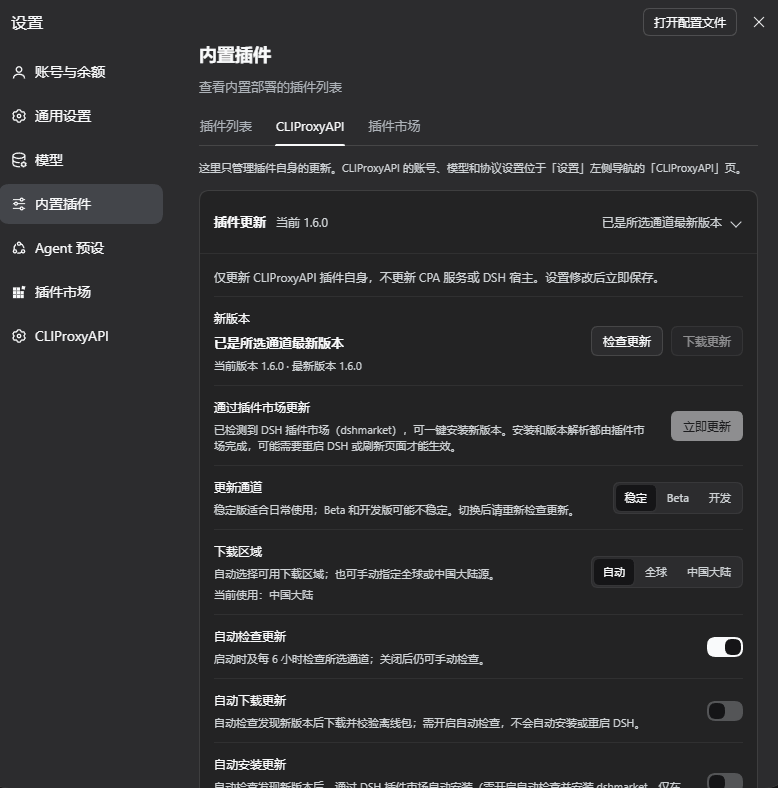
**8. The plugin update page under Built-in plugins** (actual 1.6.0 capture). **Settings** → **Built-in plugins** → the **CLIProxyAPI** tab holds only plugin updates: checking and offline download, **Update Now** once the DSH plugin market is detected, the update channel, the download region, and the automatic check / download / install switches. Here the plugin is already the latest Stable version, so **Update Now** is disabled.
|
|
122
130
|
|
|
123
131
|
|
|
124
132
|
|
|
@@ -128,7 +136,8 @@ The panel follows the DSH display language; the screenshots show the Chinese UI.
|
|
|
128
136
|
|
|
129
137
|
- The base URL can be local or remote; suffixes such as `/v1`, `/v1/chat/completions` and `/v1/messages` are stripped.
|
|
130
138
|
- With an empty URL, the plugin tries, in order: the existing route's URL, the `CLIPROXYAPI_BASE_URL` environment variable, and local `127.0.0.1:8317`.
|
|
131
|
-
- The enriched catalog comes from `/v1/models?client_version=pi` (standard OpenAI `data[]` catalogs work too); `owned_by` from `/v1/models` identifies each model's family.
|
|
139
|
+
- The enriched catalog comes from `/v1/models?client_version=pi` (standard OpenAI `data[]` catalogs work too); `owned_by` from `/v1/models` identifies each model's family and its `type` marks image models.
|
|
140
|
+
- Image and video models are never written to chat routes; see [Image and video models](#image-and-video-models-the-generation-tab).
|
|
132
141
|
- All accounts refresh on a shared interval (300 s by default); an unchanged catalog writes no settings.
|
|
133
142
|
|
|
134
143
|
### Model selection
|
|
@@ -146,7 +155,7 @@ The panel follows the DSH display language; the screenshots show the Chinese UI.
|
|
|
146
155
|
- Each account writes its own set of routes: the first account uses `cli-proxy` / `cli-proxy-responses` / `cli-proxy-messages`, later ones `cli-proxy-2*`, `cli-proxy-3*`, …; credential refs are `CLI_PROXY_API_KEY`, `CLI_PROXY_API_KEY_2`, …. The model picker groups models by account name.
|
|
147
156
|
- **Disabling** an account keeps its settings but removes its routes, so its models leave the picker; other accounts are unaffected.
|
|
148
157
|
- **New** accounts: **+ Add Account** first tests the entered URL and key and creates an enabled account only when that works; **Add Anyway (Disabled)** is also offered.
|
|
149
|
-
- Each account page has **Connection / Models / Quota** tabs under one shared account bar. The **Enabled** switch next to the account title applies at once; the **⋯** menu holds **Probe & Refresh** and **Delete Account**.
|
|
158
|
+
- Each account page has **Connection / Models / Generation / Quota** tabs under one shared account bar. The **Enabled** switch next to the account title applies at once; the **⋯** menu holds **Probe & Refresh** and **Delete Account**.
|
|
150
159
|
- Connection and model changes are tracked together; a bar at the bottom shows **Unsaved changes · Discard / Save & Apply**, and switching accounts asks before dropping unsaved changes. **Test Connection** probes the address and key being edited without saving anything.
|
|
151
160
|
- Secondary explanations live in ⓘ tips next to the labels (open on hover, keyboard focus or click).
|
|
152
161
|
- An account with a base URL **only connects to that URL** and reports an error when it is unreachable; it never silently falls back to local `:8317`, so two accounts cannot end up on the same server.
|
|
@@ -171,7 +180,7 @@ CPA serves every model on OpenAI Chat, OpenAI Responses and Anthropic Messages,
|
|
|
171
180
|
|
|
172
181
|
### Channel quota (the "Quota" tab and the composer badge)
|
|
173
182
|
|
|
174
|
-
Each account's **Quota** tab (next to **Connection** and **
|
|
183
|
+
Each account's **Quota** tab (next to **Connection**, **Models** and **Generation**) shows that account's channel quota; the tab label shows the lowest remaining quota among its usable credentials.
|
|
175
184
|
|
|
176
185
|
- **Management key**: on an account's Quota tab, enter its CPA management key (`remote-management.secret-key` in the CPA config; a remote CPA also needs `remote-management.allow-remote`). It is stored in the DSH credentials service under `CLI_PROXY_MANAGEMENT_KEY` for the first account and `CLI_PROXY_MANAGEMENT_KEY_<ACCOUNT_ID>` for the others (for example `CLI_PROXY_MANAGEMENT_KEY_ACCOUNT_2`); it is never written to `state.json`, settings or logs, and never sent back to the page.
|
|
177
186
|
- **Read by the Host**: the Host reads every credential on that CPA (`/v0/management/auth-files`), the models each credential serves, and the upstream quota through `/v0/management/api-call`: Codex, Claude, Antigravity, Gemini CLI, Kimi (including Kimi International, kimi.ai), xAI, Devin and Meta. Channels provided by CPA plugins (credentials marked `supports_quota`) use CPA's own `/v0/management/quota/fetch` instead. Devin's daily / weekly quota belongs to the whole account, so every `devin/…` model shows the same windows. Meta's quota endpoint needs the `dca_token` from the credential file; the Host reads it through the management API for each query, uses it for that one request only, and never stores or logs it. API-key channels (OpenAI-compatible, Gemini / Claude / Codex API keys) and Vertex have no quota endpoint (CPA's own panel shows none either) and show their status and recent request counts only; paid xAI accounts expose no quota counters either (CPA's panel probes them with a real chat request; this plugin does not, so background refreshes never cost money).
|
|
@@ -179,7 +188,103 @@ Each account's **Quota** tab (next to **Connection** and **Models**) shows that
|
|
|
179
188
|
- **Composer badge**: a small badge left of the model selector (signal bars + percentage) shows the best remaining quota among the usable credentials serving the selected model; click it for every credential's windows. It appears only for models this plugin synchronizes whose account has a management key; without a key there is no badge. On the New Session page (before the composer takes over the session) the badge sits at the right end of the workspace row above the input box.
|
|
180
189
|
- **Exact matching**: credentials are looked up only in the account the selected route belongs to (`cli-proxy*`, `cli-proxy-2*`, …); a prefixed model (such as `devin/claude-opus-5-5`) matches only credentials with that prefix; a bare id (such as `claude-opus-5-5`) prefers un-prefixed credentials, so the Claude and Devin channels never mix. Per-model-group windows (for example Antigravity) count only the group that fits the current model.
|
|
181
190
|
- **Troubleshooting**: `/cpa-status` includes a quota summary: each account's key state, quota state, credential count, and which credentials each picker model maps to with its remaining quota (never the key).
|
|
182
|
-
- **Refreshing**: results are cached on the Host for 5 minutes; stale accounts refresh in the background only while a page is asking, or on **Refresh Quota**.
|
|
191
|
+
- **Refreshing**: results are cached on the Host for 5 minutes; stale accounts refresh in the background only while a page is asking, or on **Refresh Quota**. When the management key is rejected (401/403), background checks continue at the 5-minute interval and stop for that account after 3 rejections in a row, so CPA's bad-key protection (a 30-minute ban after 5 bad keys from one address) is not triggered. The count is stored in `.dsh-cliproxyapi/quota-state.json` (never the key) and continues after a DSH restart; saving a new management key (also on the DSH credentials page), clearing the key or a successful check resets it. Once stopped, a manual refresh tries only once and stops again on another rejection. The Quota tab and the badge show how many times the key was rejected, or that checks have stopped.
|
|
192
|
+
|
|
193
|
+
### Image and video models (the "Generation" tab)
|
|
194
|
+
|
|
195
|
+
CPA serves image and video generators (such as Grok Imagine) through `/v1/images/*` and `/v1/videos/*`. They cannot chat, so the plugin recognizes them and keeps them out of the chat model picker.
|
|
196
|
+
|
|
197
|
+
- **Master switch**: **Enable image and video generation** at the top of the Generation tab applies to every account. While off, the composer shows no generation buttons, `/cpa-image`, `/cpa-video`, `/cpa-video-edit`, `/cpa-video-extend` and `/cpa-video-status` are not registered, the agent generation tool is not registered either, and the Generation tab shows only this switch; videos already submitted still finish, and past results in the chat stay viewable (without the edit / extend buttons). New installations start with it off; a profile that already has `media-settings.json` or has used generation keeps it on after the upgrade. Either way, media models never enter the chat model picker. Everything below needs it switched on.
|
|
198
|
+
- **Recognition**, in order: a kind you set on the Generation tab; the catalog's `type` (`openai-image` is an image model) or output modalities (image-only output is an image model, video output a video model); the model families CPA routes to its image / video handlers, matched by prefix: ids starting with `grok-imagine-image` or `gpt-image-` are image models, ids starting with `grok-imagine-video` and `sora-2*` are video models. Everything else is a chat model (for example `gemini-3.1-flash-image`: CPA serves it only through chat, and DSH cannot show images returned in a chat reply). A media model that only the plain `/v1/models` listing carries is included too. A catalog may list variants CPA's generation endpoints do not accept yet (for example `grok-imagine-video-1.5-lite`); they cannot chat either, so they count as media models, and generating with one shows CPA's error.
|
|
199
|
+
- **Not in the model picker**: media models are written to no chat route and take no part in the first-run recommendation; an older selection that names them does not synchronize them (the selection itself is kept). The Models tab lists chat models only.
|
|
200
|
+
- **The Generation tab** (next to Connection / Models / Quota) lists "Image models" and "Video models"; changes are saved at once. A switch decides whether each model is offered for generation (models that appear later start switched on), and a kind menu changes it to image / video / chat; a kind you set can be reset to the detected one. A model detection missed can be marked under "Mark another model as a media model". Changing a kind re-synchronizes that account's routes immediately. `sora-2*` is labelled "→ grok-imagine-video": CPA rewrites it to the Grok video model.
|
|
201
|
+
- **Read-only diagnostic**: **Run diagnostic** sends GET requests only: it reads both model catalogs with the account's key and lists media-looking entries with descriptive fields such as `type` and modalities, then probes `GET /v1/videos/{id}` and `GET /openai/v1/videos/{id}/content` **without the key** (a route that exists answers 401 at once; a missing one gets CPA's 404). It generates nothing and spends no quota; if CPA does not require a key, the probe looks up one nonexistent job id, which is still read-only. The result can be copied and never contains the key.
|
|
202
|
+
- **Save location**: the bottom of the Generation tab sets where generated files go (default `generated`); a relative path is resolved against the session's working directory, an absolute path also works. Shared by all accounts.
|
|
203
|
+
- **Agent generation**: the **Let the agent generate images / videos** switch (off by default), how agent videos / images are confirmed, and the per-session limit of agent video seconds; see "Letting the agent generate" below.
|
|
204
|
+
- **Video defaults**: when the account has video models, the Generation tab sets the default length (1–15 s, default 6 s) and resolution (480p / 720p, default 720p) of `/cpa-video`; shared by all accounts, saved at once.
|
|
205
|
+
|
|
206
|
+
#### Generating images (`/cpa-image`)
|
|
207
|
+
|
|
208
|
+
Type in the composer:
|
|
209
|
+
|
|
210
|
+
```text
|
|
211
|
+
/cpa-image a ginger cat on a neon street on a rainy night
|
|
212
|
+
/cpa-image -m quality --aspect 16:9 -n 2 a ginger cat on a neon street on a rainy night
|
|
213
|
+
```
|
|
214
|
+
|
|
215
|
+
- **Options** (before the prompt): `-m <model>` picks a model for this run — a full `accountId/modelId`, a model id, or a fragment that matches exactly one model (such as `quality`); several matches are an error that lists them, never a guess. `--aspect <ratio>` is one of `1:1`, `16:9`, `9:16`, `4:3`, `3:4`, `3:2`, `2:3`, `9:20`, `20:9`. `-n <1-4>` sets the number of images. They can also be written as separate words at the start or end of the prompt (split by spaces or commas): `16:9`, `portrait` / `竖屏` (9:16), `landscape` / `横屏` (16:9), `square` / `方形` (1:1), `2 images` / `2张`, e.g. `/cpa-image 2张 portrait a ginger cat`; an explicit option such as `-n` wins. Everything after `--` is prompt text.
|
|
216
|
+
- **Editing**: attach 1–4 images in the composer and run the command; it then uses CPA's `/v1/images/edits` with the images as references (about 1.4 MB in total). Only image attachments are accepted. Attached images travel base64-encoded inside the request, and upstreams cap the request size (about 2 MiB; xAI answers "Failed to read request body: length limit exceeded"), so an oversized image is shrunk first: the plugin re-encodes a PNG as JPEG itself (transparent parts on white, long edge at most 1280), and asks DSH's attachment service for a smaller version of other formats; if it still does not fit, the command fails right away.
|
|
217
|
+
- **Saving**: files are written to the save location under the session's working directory, named like `20261022-133000-grok-imagine-image-a-ginger-cat-on-a-neon-s.png` (the first 24 characters of the prompt); an existing file is never replaced, a number is appended instead. The working directory must be a local folder.
|
|
218
|
+
- **After you submit**: the command checks the options, model, save folder and references, then returns at once, so the composer clears right away; the generation continues in the background. Meanwhile the workspace session list shows the session as running, and as completed if it finishes while you are in another session. DSH itself counts only agent turns as running, so during a generation the plugin sends DSH's own session status event (`api-session/status`) and repeats it every 5 seconds. During a generation the composer shows a Stop button that cannot stop it (the upstream cannot cancel either); just keep sending messages, the agent answers as usual. Reloading the plugin or closing DSH interrupts a running generation.
|
|
219
|
+
- **Result**: the `/cpa-image` row in the conversation reads like an exchange: on the right, a bubble with your prompt (ratio, count and reference images noted below it); on the left, the reply: model and account, the status, placeholders in the requested ratio with a timer while generating, then the images (one image at its own ratio, several as square thumbnails); click one to enlarge it. Below are the time taken and the save folder (relative to the working directory, or the folder's name); **Details** expands the full folder path and the file names (click to open them with the system) and, when the upstream rewrote the prompt, the revised prompt; a failure shows its reason in red. Earlier runs show their images too, as long as the files exist and their records were not pushed out (the last 48 runs and 48 files per session are kept). The images are only shown on the page; they are never sent to the chat model.
|
|
220
|
+
- **Image actions**: right-click an image for a menu listing the applications on this computer that open it (the default application first and marked "(default)", like the Open menu of the document preview), then **Show in File Explorer** (**Show in Finder** on macOS, **Show in Files** on Linux), then **Copy image** and **Copy file path**. Under an enlarged image, buttons offer **Open with default app**, the file-manager item and both copy actions. Opening and showing the location go through DSH's own session interface (the same as the document preview; DSH re-verifies the path), and are hidden when DSH cannot open local paths; Copy image always puts a PNG on the clipboard (other formats are converted first).
|
|
221
|
+
- **Request details**: one `POST /v1/images/generations` (or `/edits`) to the CPA of the model's account, with only that account's address and key and no retry on another account; it asks for `b64_json`. When CPA returns a link instead, the plugin downloads it: only `data:` or HTTPS links, at most 32 MiB per image, and the download carries no key. It waits at most 3 minutes. Failures show a short CPA error summary (truncated, links removed). Generating images spends that account's upstream quota.
|
|
222
|
+
|
|
223
|
+
#### Generating videos (`/cpa-video`)
|
|
224
|
+
|
|
225
|
+
```text
|
|
226
|
+
/cpa-video waves rolling onto a beach at sunset
|
|
227
|
+
/cpa-video -s 8 -r 480p --aspect 9:16 a cat surfing
|
|
228
|
+
```
|
|
229
|
+
|
|
230
|
+
- **Options** (before the prompt): `-m <model>` picks a model for this run (same rules as `/cpa-image`); `-s <1-15>` sets the length in seconds; `-r <480p|720p>` the resolution; `--aspect <ratio>` is one of `1:1`, `16:9`, `9:16`, `4:3`, `3:4`, `3:2`, `2:3`; without it xAI decides (usually 16:9, or the first frame's ratio). These can also be written as separate words at the start or end of the prompt: `10s` / `10 seconds` / `10秒`, `480p` / `720p`, `16:9`, `portrait`, `landscape`, `square`, e.g. `/cpa-video 10s 480p this character dances`; a word counts only when a space, comma or the end follows it, so "3秒后爆炸" stays prompt text, and words in the middle of a sentence are never read as options. An explicit option such as `-s` wins. Without any, the Generation tab's video defaults apply. Everything after `--` is prompt text.
|
|
231
|
+
- **How attached images are used** (images only; oversized ones are shrunk as described under Editing; CPA's video generation route was measured to read only about 1 MiB of request body, so all attached images share about 750 KB and are shrunk beyond that):
|
|
232
|
+
- 1 image: the **first frame** by default (image to video); with `--ref` (or the word `reference`) a **reference**; with `--last` (or `last-frame`) the **last frame**, where the video ends.
|
|
233
|
+
- 2 images: **references** by default; with `--first-last` (or `first-last`) the first is the first frame and the second the last frame, and the model fills in between.
|
|
234
|
+
- 3 or more: **references**, up to 14 on `grok-imagine-video-1.5` and 7 on other video models. References bring in people, clothing or objects without locking the first frame; the prompt can name them in order as `<IMAGE_0>`, `<IMAGE_1>`, ….
|
|
235
|
+
- Pinned first / last frames need `grok-imagine-video-1.5`. The fields follow xAI's docs: `image`, `last_frame`, `reference_images`.
|
|
236
|
+
- **Cannot be cancelled**: once submitted, a video cannot be withdrawn (neither CPA nor xAI has a cancel route) and is billed as usual; the composer's Stop button does not stop it.
|
|
237
|
+
- **Request details**: one `POST /v1/videos/generations` to the CPA of the model's account (xAI's native format: `model`, `prompt`, `duration`, `resolution`, and optional `aspect_ratio` and `image.url`; `sora-2*` is rewritten to `grok-imagine-video` as CPA does), then `GET /v1/videos/{request id}`: every 5 s during the first minute, every 10 s up to 3 minutes, then every 15 s. The finished video is downloaded through CPA's `GET /openai/v1/videos/{request id}/content` (CPA fetches the file with the credential's own proxy; the plugin never contacts the upstream host), streamed into the save location, at most 200 MiB, MP4 / MOV / WebM only, never replacing a file.
|
|
238
|
+
- **Background and resuming**: once submitted, the job is stored in `media-jobs.json`. Reloading the plugin or restarting DSH only pauses the waiting; the next start keeps polling and saves the video. CPA remembers which credential made a video for 3 hours only, so a job still unfinished after 3 hours is marked expired and no longer polled. A run cut off by a reload before CPA returned a request id is marked interrupted (it may have been submitted; there is no way to tell). Meanwhile the session shows as running too.
|
|
239
|
+
- **Result**: the `/cpa-video` row reads like an exchange as well (**Copy original input** at the end of the tag line copies the command exactly as typed; a line under the model name in the reply states the mode actually used, e.g. "Mode: references ×3 — brings in the people, clothing and objects shown, without fixing the first frame" or "Mode: first frame — the attached image is the video's first frame", and for edits / extensions where the source came from: an uploaded local file, a public link or a video from this session): on the right the prompt with length, resolution, ratio and first-frame tags; on the left queued / generating progress (a percentage when CPA reports one) / saving with a timer, then the playable video (seeking works); buttons below and the right-click menu open it with another application, show it in File Explorer, or copy its path.
|
|
240
|
+
- `/cpa-video-status` lists this session's last 20 video jobs with their state and request id.
|
|
241
|
+
|
|
242
|
+
#### Editing and extending videos (`/cpa-video-edit`, `/cpa-video-extend`)
|
|
243
|
+
|
|
244
|
+
```text
|
|
245
|
+
/cpa-video-edit make the dress red, keep everything else
|
|
246
|
+
/cpa-video-extend 4s she turns and walks out of frame
|
|
247
|
+
/cpa-video-extend --from cmd-xxxx-3 -s 6 the camera slowly pulls back
|
|
248
|
+
/cpa-video-edit --video "D:\clips\street.mp4" make it a rainy night
|
|
249
|
+
/cpa-video-extend --url https://example.com/clip.mp4 -s 4 the camera pulls back
|
|
250
|
+
```
|
|
251
|
+
|
|
252
|
+
- When a video is done, **Edit video…** and **Extend video…** buttons appear below it; write one sentence and submit, and the result appears in a new row below. You can also type the command.
|
|
253
|
+
- **Source video** (one of): **attach an MP4 file** in the composer; `--video <path>` (relative to the session's working directory; quote a path with spaces); `--url <public link>` (http/https, downloaded by xAI itself, no size limit); `--from <command id>` (a video the plugin made in this session); without any, the session's newest generated video. A video path also works without `--video`, written at the start or end of the prompt (quoted or with `@` if you like, ending in `.mp4` / `.mov` / `.m4v`), e.g. `/cpa-video-edit D:\clips\a.mp4 make it a snowy night`. Edits and extensions keep the source's resolution and ratio (an edit also its length), so words like `480p`, `16:9`, `portrait` (and `4s` for an edit) at the start or end of the prompt are taken out, not sent to xAI, and shown as ignored in the chat row. `-m <model>` picks whose video model account to use (default: the session's video model; for a video the plugin made, the account that made it).
|
|
254
|
+
- **How it works**: xAI's edit (`/v1/videos/edits`) and extension (`/v1/videos/extensions`) take any MP4, as a public link or as base64 data. CPA has no route to xAI's file upload, so a local video travels base64-encoded inside the request (the edit route was measured to read a 20 MiB body, so local videos may be up to 14 MiB; compress or trim larger ones, or use `--url`). For about an hour, a video the plugin made goes by the short-lived link that came with xAI's own result (kept in memory only, never written to a file or log and never sent to the page); after that, or after a reload, the saved file is sent instead, so the buttons stay available while the file exists. Before sending, the plugin reads the length recorded in the MP4 and refuses a source outside the limits below without a request.
|
|
255
|
+
- **Limits** (xAI's docs): both use `grok-imagine-video`; an edit needs a source of at most 8.7 s and keeps its length, ratio and resolution (720p at most); an extension needs a 2–15 s source, `-s` sets the added 2–10 s (default 6, or write `4s`), and returns the source plus the new part.
|
|
256
|
+
- **When a server lacks a route**: some CPA servers' upstreams have no extension route (one answered HTTP 405 in testing). That run then reads "the upstream does not offer video extension (HTTP 405)", later extensions on the same account are refused without a request and the **Extend video…** button is hidden until the plugin reloads. After a 405, CPA pauses that credential for the model for about a minute.
|
|
257
|
+
- Edits and extensions likewise cannot be cancelled once submitted and are billed as usual; background waiting, resuming after a reload and the row's buttons work as for `/cpa-video`.
|
|
258
|
+
|
|
259
|
+
#### Reading plain-language parameters with the chat model
|
|
260
|
+
|
|
261
|
+
Each time `/cpa-image`, `/cpa-video`, `/cpa-video-edit` or `/cpa-video-extend` runs, the plugin hands the prompt (after the options) to **the chat model the session is using** and asks it for parameters that were not written as options, such as "make it a ten-second portrait video in HD", "use the second image as the ending", "three landscape ones" or "add five more seconds".
|
|
262
|
+
|
|
263
|
+
- **What it reads**: images — ratio and count; videos — length, resolution, ratio and how attached images are used (first frame / references / first & last frame / last frame); extensions — the added seconds; edits have no parameters to read, only the prompt is tidied.
|
|
264
|
+
- **Priority**: options written in the command (`-s`, `-r`, `--aspect`, `-n`, `--ref`, …) and words recognized at the start or end always win; the chat model only fills in what is missing, and every value it returns is checked against the allowed range (invalid ones are dropped).
|
|
265
|
+
- **The prompt only loses words**: the chat model returns the prompt without the words that stated parameters; the plugin accepts it only if it is the original with some characters deleted (no rewriting, translating or expanding, and not most of it removed), otherwise the original is sent.
|
|
266
|
+
- **Model and cost**: the model of the session's latest request (else the agent's setting or the default model), a few hundred tokens and 2–5 extra seconds each time (30 s at most); only the prompt text and the number of attached images are sent, never the images. It runs in the background, so the composer still clears at once and the row shows "Reading parameters".
|
|
267
|
+
- **Visible result**: the reply says "Parameters <model> read from the prompt: 10s · 9:16 · first-last", and notes when words were taken out of the prompt; if the chat model is unavailable or its answer cannot be read, it says "Reading parameters failed" and the request is sent with the command's options and the prompt as written.
|
|
268
|
+
|
|
269
|
+
#### Letting the agent generate (`generate_media` tool, off by default)
|
|
270
|
+
|
|
271
|
+
With **Let the agent generate images / videos** switched on in the Generation tab, the chat agent can call the `generate_media` tool to generate images and videos, or to edit and extend videos. While off (the default) the tool is not registered and takes no model context; when on, it is registered only while the **Enable image and video generation** master switch is on and at least one generation model is enabled. Its definition is compact and lists no models.
|
|
272
|
+
|
|
273
|
+
- **What it does**: parameters `kind` (image / video) and `prompt`, optionally `mode` (generate / edit / extend), `model`, `images` (local image paths: for images, to edit or combine; for videos, 1 is the first frame and 2 or more are references), `frames` (first frame / references / first & last frame / last frame), `video` (the source of an edit / extension: a local MP4 path or a public link; without it, this session's newest generated video), `aspect`, `seconds`, `resolution`, `count`. Optional fields may be omitted or set to `null` (including on Responses strict-schema routes); video `count` should be `null`, as each call generates one video. An omitted, `null` or empty `model` uses this session's pick in the composer button (a sub-agent uses the pick of the session it belongs to). It works like the matching slash command, except that the prompt is **sent as written**: words like "10s" or "portrait" in it are not read as options and the chat model is not asked to interpret parameters. The tool description also tells the agent to use the user's own wording and level of detail, never expanding it into a longer scene description or adding camera, lighting, style, character or environment details the user did not ask for.
|
|
274
|
+
- **Result**: files go to the save location; the tool returns their paths, the model and the actual parameters. For images, when the current chat model can see images, the generated images (downscaled by DSH) are handed to it as well. The chat renders one **independent generation row** from the recorded tool lifecycle, outside the thinking process, using the slash command's exchange layout (progress, images / a playable video, open / show in folder / copy, and **Edit video… / Extend video…** under a video). There is no need to expand thinking, no extra user command is fabricated, and tool cards or legacy mirrored command cards with a matching generation row do not repeat the result.
|
|
275
|
+
- **Confirmation**: videos **ask you each time** by default; images are generated directly by default and can be set to ask too. Confirmation appears independently at the owning root session's composer through DSH's native question interface, naming the account, model, length, resolution / ratio, the start of the prompt, attached images, "cannot be cancelled once submitted" and the seconds used in this session. The choices are bilingual: **Allow / 允许** and **Decline / 拒绝**. This is consent to generation costs, independent of DSH's execution-approval permissions; "full access" does not bypass it. Only an explicit Allow choice submits the request, and declining tells the agent not to retry. No answer within 10 minutes, stopping the wait, disabling the tool or reloading / unloading the plugin refuses consent; a native-question error never grants it either. Only when DSH lacks the native question service does a compatibility confirmation area appear beside the owning root session's composer; generation rows themselves contain no confirmation buttons.
|
|
276
|
+
- **Seconds limit**: videos the agent submits are counted in seconds per session (a sub-agent counts against the session it belongs to), 60 s per session by default; choose 30 s to 1 hour or no limit. Videos over the limit are refused only when generating directly; when asking, they are only counted. An edit counts the source's length, an extension the added seconds. Seconds come back when CPA refuses a video at once (no job was created), not when the upstream generation fails. Changing the limit, or switching from asking to direct generation, starts the count again. Your own `/cpa-video` and other commands are neither counted nor confirmed.
|
|
277
|
+
- **Per session**: while the tool is on, **Agent generation settings** at the bottom of either model menu opens a secondary menu: video / image confirmation and the video limit can follow the global setting or be set for this session, with "Agent videos in this session: X of N s".
|
|
278
|
+
- **Waiting**: the tool waits up to 10 minutes. On timeout, or when you stop the turn, the video keeps generating in the background (and is billed); it is saved to the save location and shown in the call's row, and the agent is told it is still running.
|
|
279
|
+
|
|
280
|
+
#### The generation-model button next to the composer
|
|
281
|
+
|
|
282
|
+
When an image or video model is available, two generation-model buttons appear in the composer left of the model selector, showing the model used for images (picture icon) and for videos (camera icon).
|
|
283
|
+
|
|
284
|
+
- The image button opens only image models and the video button only video models; each menu lists every enabled model of that kind by account, and one click switches it. **Agent generation settings** at the bottom of either menu opens a secondary menu with this session's agent confirmations and video seconds limit. **The pick is saved per session** and also becomes your "last pick": a session without a pick of its own (including a new session) uses the last pick.
|
|
285
|
+
- `/cpa-image` / `/cpa-video` choose their model in this order: the `-m` model → this session's pick → the last pick → the only available model; with several models and no pick, the command fails and asks you to pick one.
|
|
286
|
+
- Both buttons read their data on load, on a session switch and each time a menu opens; they do not poll in the background. When no generation model is available yet while an enabled account has not read its catalog (for example right after DSH starts), or an account's last read missed the plain model listing (which carries some image models), the plugin syncs once during that read; if the catalog is still incomplete, it retries after 3 and 10 seconds, then every 30 seconds until it is complete.
|
|
287
|
+
- When `/cpa-image` finds no image model while an enabled account has not read its catalog yet, it syncs once before deciding; if there is still none, the error lists each account's state and model counts.
|
|
183
288
|
|
|
184
289
|
## Updating this plugin
|
|
185
290
|
|
|
@@ -229,12 +334,18 @@ Use this without the plugin market or for offline upgrades:
|
|
|
229
334
|
|
|
230
335
|
## Slash commands and HTTP routes
|
|
231
336
|
|
|
232
|
-
|
|
337
|
+
Apart from the generation tool `generate_media` (off by default, see above), this plugin registers no agent tool and adds nothing to model context. Accounts and models are managed on the **CLIProxyAPI** page in Settings; the slash commands below show and refresh their state.
|
|
233
338
|
|
|
234
339
|
### Slash commands
|
|
235
340
|
|
|
236
|
-
- `/cpa-status` — show every account's status.
|
|
341
|
+
- `/cpa-status` — show every account's status (including how many image / video models were recognized).
|
|
237
342
|
- `/cpa-refresh` — refresh every account now, including a catalog probe of disabled ones.
|
|
343
|
+
- `/cpa-image [-m model] [--aspect ratio] [-n 1-4] prompt` — generate images; with attached images, edit them. See [Generating images](#generating-images-cpa-image).
|
|
344
|
+
- `/cpa-video [-m model] [--aspect ratio] [-s 1-15] [-r 480p|720p] prompt` — generate a video; attach one image as the first frame. A submitted video cannot be cancelled. See [Generating videos](#generating-videos-cpa-video).
|
|
345
|
+
- `/cpa-video-status` — list this session's video jobs.
|
|
346
|
+
- `/cpa-video-edit [--video path | --url link | --from command-id] [-m model] change` / `/cpa-video-extend [same] [-s 2-10] what happens next` — edit / extend any MP4 (an attached video file works too). See [Editing and extending videos](#editing-and-extending-videos-cpa-video-edit-cpa-video-extend).
|
|
347
|
+
|
|
348
|
+
`/cpa-image` and `/cpa-video*` exist only while **Enable image and video generation** is on in the Generation tab.
|
|
238
349
|
|
|
239
350
|
### HTTP API
|
|
240
351
|
|
|
@@ -255,6 +366,14 @@ Used by the settings panel. Requires the DSH Web session's authentication; POST
|
|
|
255
366
|
| GET | `/api/dsh-cliproxyapi/quota/status` | — | `{ ok, quota }`: the cached quota snapshot; stale accounts refresh in the background |
|
|
256
367
|
| POST | `/api/dsh-cliproxyapi/quota/refresh` | `{ accountId? }` | Start refreshing the quota of one or every account and return at once (`refreshing` is set in the snapshot) |
|
|
257
368
|
| POST | `/api/dsh-cliproxyapi/quota/save` | `{ accountId, managementKey?, clear? }` | Store or clear the account's management key and start refreshing its quota; the response never contains the key |
|
|
369
|
+
| GET | `/api/dsh-cliproxyapi/media/status` | — | `{ ok, media }`: generation settings and each account's recognized image / video models; no network access |
|
|
370
|
+
| POST | `/api/dsh-cliproxyapi/media/save` | `{ enabled? }`, global fields (such as `agentTool`, `outputDir`), or `{ account: { accountId, disabledModels?, kindOverrides? } }` | `enabled` switches generation on / off (registering or removing the generation commands and the agent tool at once); save an account's switched-off media models (replaces the list) or kind overrides (merged per model; `null` restores detection); a kind change re-synchronizes that account and adds `status` to the response. Invalid values return 400 with a code such as `invalid-enabled`, `invalid-account` or `invalid-kind` |
|
|
371
|
+
| POST | `/api/dsh-cliproxyapi/media/diagnose` | `{ accountId }` | Read-only diagnostic (see above); returns `{ ok, diagnostic }` without the key |
|
|
372
|
+
| GET | `/api/dsh-cliproxyapi/media/session?sessionId=` | — | `{ ok, session }`: the image / video models to choose from, the current pick and where it comes from (`session` / `last` / `only`), and this session's recent files (names and ids only, no paths); `pendingConfirmations` lists only compatibility requests owned by this exact session when the native question service is absent, as `{ commandId, kind, en, zh, expiresAt }`; native questions never appear in that list; no network access |
|
|
373
|
+
| POST | `/api/dsh-cliproxyapi/media/session/save` | `{ sessionId?, kind: "image" \| "video", ref }` | Pick a session's model (`ref` is `accountId/modelId`; `null` clears the session's pick) and remember it as the last pick; a model that is not offered returns 400 `invalid-model`. Alternatively `{ sessionId, videoConfirm?, imageConfirm?, videoBudget? }` (`ask` / `auto` / `inherit`; the limit is `{ mode: "limited", seconds }` / `{ mode: "unlimited" }` / `inherit`) sets this session's agent-generation rules |
|
|
374
|
+
| POST | `/api/dsh-cliproxyapi/media/confirm` | `{ sessionId, commandId, allow }` | Answer only a compatibility `generate_media` confirmation beside the composer when the native question service is absent (reads `media/session` every 2 s); not used for native questions and independent of execution-approval permissions. Only the confirmation's exact owning root session can answer; an answered or expired request returns 400 `confirm-expired` |
|
|
375
|
+
| GET | `/api/dsh-cliproxyapi/media/file?sessionId=&id=` | — | Serves a generated file the plugin recorded for that session; anything else, or another session, gets 404. Videos are streamed with single `Range` support (206) so players can seek |
|
|
376
|
+
| GET | `/api/dsh-cliproxyapi/media/command?sessionId=&commandId=` | — | `{ ok, run, files }`: one command run's record in that session (status `running` / `done` / `error`, model, prompt, ratio, count, number of references, start and end times, a display name for the save folder, error code and summary) and the files it produced (id, name and full path, plus the save folder `folderPath` and the Host's file manager kind `desktop`: `explorer` / `finder` / `filemanager`), so its row in the conversation can show and open them; video records also carry length, resolution, request id, the `mode` (`text` / `first-frame` / `reference` / `first-last` / `last-frame` / `edit` / `extend`) and the source command id, plus `actions: { edit, extend, expiresAt }` (never the link) while it can still be edited or extended; and while running the `phase` (`submitting` / `queued` / `running` / `downloading`) and CPA's `progress`; a run recorded as running that no background job owns (after a reload or crash) is reported as `interrupted` |
|
|
258
377
|
|
|
259
378
|
Update operation responses use `{ ok, update }`. State includes `currentVersion`, `latestVersion`, `available`, `channel`, `region`, `effectiveRegion`, `autoCheck`, `autoDownload`, `autoInstall`, `checking`, `downloading`, `lastCheckedAt`, `error` / `errorCode`, `blockedReason`, `downloadedVersion`, `downloadPath` and `upgradeCommand`. Fields without a check or download result are `null`. `channel` is `stable` / `beta` / `dev`; `region` is `auto` / `global` / `cn`; `effectiveRegion` is the `global` / `cn` source used by the last successful check (`null` before one).
|
|
260
379
|
|
|
@@ -296,6 +415,29 @@ Failures use a top-level `errorCode` or `update.errorCode`; HTTP status or `ok`
|
|
|
296
415
|
```
|
|
297
416
|
|
|
298
417
|
Panel saves take effect immediately. After editing this file manually, reload the plugin or restart DSH to re-read it. Corrupt, structurally invalid, invalid-field or unreadable files use safe defaults with automatic network checks disabled. Check results, the candidate version, download notices and commands are in-memory only and reset on plugin reload; downloaded packages remain in the separate `updates` subdirectory for you to clean up when needed.
|
|
418
|
+
- **Generation settings**: stored separately at `<profile dir>/.dsh-cliproxyapi/media-settings.json`; `state.json` is not changed. Without this file the defaults apply (`enabled: false`, generation off; but on when `media-sessions.json` or `media-jobs.json` exists); a file without the `enabled` field (written before the master switch existed) reads as on. A damaged file also falls back to the defaults with a log warning, and the next save first keeps the damaged file as `media-settings.corrupt-<time>.json`. The fields: `enabled` (master switch), `agentTool` (agent generation tool), `outputDir` (save location), `defaultVideoSeconds` / `defaultVideoResolution` (video defaults), `imageConfirm` / `videoConfirm` / `videoBudget` (agent confirmation and seconds limit), `lastSelection` (the last picked models), and each account's `disabledModels` (switched-off media models) and `kindOverrides` (kinds you set):
|
|
419
|
+
|
|
420
|
+
```json
|
|
421
|
+
{
|
|
422
|
+
"version": 1,
|
|
423
|
+
"enabled": true,
|
|
424
|
+
"agentTool": false,
|
|
425
|
+
"outputDir": "generated",
|
|
426
|
+
"defaultVideoSeconds": 6,
|
|
427
|
+
"defaultVideoResolution": "720p",
|
|
428
|
+
"imageConfirm": "auto",
|
|
429
|
+
"videoConfirm": "ask",
|
|
430
|
+
"videoBudget": { "mode": "limited", "seconds": 60 },
|
|
431
|
+
"lastSelection": {},
|
|
432
|
+
"accounts": {
|
|
433
|
+
"default": { "disabledModels": [], "kindOverrides": { "my-painter": "image" } }
|
|
434
|
+
}
|
|
435
|
+
}
|
|
436
|
+
```
|
|
437
|
+
|
|
438
|
+
- **Per-session generation records**: `<profile dir>/.dsh-cliproxyapi/media-sessions.json` keeps each session's picked generation models, records of its last 48 runs (status, model, prompt, options, start and end times, a display name for the save folder, error summary), and the paths of its last 48 generated files with the command id that produced them (for the command rows in the conversation), for the 500 most recently updated sessions. Deleting it only clears those picks and records, never generated files. A damaged file is treated as empty and kept as `media-sessions.corrupt-<time>.json` before the next write.
|
|
439
|
+
- **Video jobs**: `<profile dir>/.dsh-cliproxyapi/media-jobs.json` keeps submitted video jobs (CPA request id, account, model, session and command id, working directory and save location, prompt, length, submission time, state) so a reload or restart can keep waiting; at most 200, finished ones kept 7 days. No keys and no video URLs. A damaged file is treated as empty and kept as `media-jobs.corrupt-<time>.json` before the next write.
|
|
440
|
+
- **Management key failures**: `<profile dir>/.dsh-cliproxyapi/quota-state.json` records, per account, how many times in a row the CPA management API rejected the key (401/403), the last error code and time, so automatic checks stop after 3; it never holds the key. Deleting it only resets the counts.
|
|
299
441
|
- **Keys**: stored and resolved by ref through the DSH `credentials` service, falling back to an environment variable of the same name.
|
|
300
442
|
- **Environment**: `CLIPROXYAPI_BASE_URL` is used only for auto-discovery of accounts without a base URL.
|
|
301
443
|
- **Plugin row config**: the plugin row's `config` in `cordis.patch.yml` is overlaid on the state file at startup: `accounts` replaces the account list, other fields apply to the first account. Normally keep it `{}` and configure through the Settings panel.
|
|
@@ -339,7 +481,7 @@ Downloading and verification do not install anything. Exit DSH, run the card's u
|
|
|
339
481
|
> **For the AI agent in DeepSeek Harness**: when the user asks you to install or configure this plugin, follow these steps. The package has no npm dependencies and no build scripts.
|
|
340
482
|
|
|
341
483
|
1. **Install**: call `plugin_manager` with `{"action": "install_bundle", "target": "dsh-cliproxyapi-pro", "enabled": true}`. Read `application` and `warnings` in the result; `restart-required` means DSH must restart before the new code runs.
|
|
342
|
-
2. **Configure**: this plugin
|
|
484
|
+
2. **Configure**: the user configures accounts in the UI (this plugin has no agent tool for account management). A local CPA on `http://127.0.0.1:8317` without auth needs nothing — it is discovered automatically once the plugin runs. Otherwise ask the user to open the **CLIProxyAPI** page in the Settings dialog's left navigation, click **+ Add Account**, enter the server URL and API key, then check the wanted models on the **Models** tab.
|
|
343
485
|
3. **Verify**: ask the user to run `/cpa-status`; each enabled account should be `connected` with more than 0 models. Tell the user the models are in the DSH model picker under the account's name.
|
|
344
486
|
|
|
345
487
|
Never ask the user for an API key or write it into files; keys are entered only on the Settings page.
|