dsh-cliproxyapi-pro 1.6.0 → 1.8.0
This diff represents the content of publicly available package versions that have been released to one of the supported registries. The information contained in this diff is provided for informational purposes only and reflects changes between package versions as they appear in their respective public registries.
- package/CHANGELOG.md +123 -59
- package/README.en.md +183 -70
- package/README.md +184 -69
- package/lib/client.js +5196 -618
- package/lib/index.js +2186 -204
- package/lib/media.js +2528 -0
- package/lib/quota.js +1646 -0
- package/lib/updater.js +84 -20
- package/locale/en.json +2 -2
- package/locale/zh.json +2 -2
- package/package.json +10 -4
package/README.en.md
CHANGED
|
@@ -13,7 +13,7 @@ Enter a server URL and an API key, and the plugin reads the CPA model catalog an
|
|
|
13
13
|
- **Multiple accounts**: each account has its own URL, key, model selection and parameters, and can be switched off at any time.
|
|
14
14
|
- **Works out of the box**: on the first connection, the newest model of each family in that server's own catalog is checked (at most 12), so the picker isn't flooded with hundreds of models.
|
|
15
15
|
- **Native protocols**: Claude over Anthropic Messages, GPT / Codex / Grok over OpenAI Responses, everything else over OpenAI Chat — fewer protocol translations inside CPA.
|
|
16
|
-
- **Visual management**: check models and edit per-model parameters in the settings panel
|
|
16
|
+
- **Visual management**: check models and edit per-model parameters in the settings panel. By default the plugin registers no agent tool, so it takes no model context (the optional generation tool `generate_media` is switched on in the Generation tab).
|
|
17
17
|
- **Plugin updates**: automatically check Stable / Beta / Dev channels and choose global / Mainland China sources. With the [DSH plugin market (dshmarket)](https://github.com/dsh-market/dsh-market) installed, new versions install in one click or automatically; otherwise download a verified offline package and upgrade with DSH closed.
|
|
18
18
|
- **Secure**: API keys live only in the DSH credentials service, never in configuration files.
|
|
19
19
|
- **Zero dependencies**: no npm dependencies and no build step; installs in seconds.
|
|
@@ -27,7 +27,7 @@ Works with DSH `0.2.0-rc.1` and later (desktop and web).
|
|
|
27
27
|
- [Screenshots](#screenshots)
|
|
28
28
|
- [Features in detail](#features-in-detail)
|
|
29
29
|
- [Updating this plugin](#updating-this-plugin)
|
|
30
|
-
- [
|
|
30
|
+
- [Slash commands and HTTP routes](#slash-commands-and-http-routes)
|
|
31
31
|
- [Storage and configuration](#storage-and-configuration)
|
|
32
32
|
- [Upgrading and uninstalling](#upgrading-and-uninstalling)
|
|
33
33
|
- [FAQ](#faq)
|
|
@@ -49,7 +49,7 @@ The plugin is published on npm as [`dsh-cliproxyapi-pro`](https://www.npmjs.com/
|
|
|
49
49
|
dsh-cliproxyapi-pro
|
|
50
50
|
```
|
|
51
51
|
|
|
52
|
-
To pin a version, write `dsh-cliproxyapi-pro@1.
|
|
52
|
+
To pin a version, write `dsh-cliproxyapi-pro@1.8.0`.
|
|
53
53
|
4. Click **Install**. When it finishes, the dialog offers to enable the plugin right away — accept it.
|
|
54
54
|
|
|
55
55
|
> If downloads are slow in mainland China, open **Registry** next to the input and choose **the mainland China mirror**.
|
|
@@ -78,7 +78,7 @@ In **Add plugin**, or as the `plugin_manager` `target`, you can also enter:
|
|
|
78
78
|
|
|
79
79
|
| Source | What to enter |
|
|
80
80
|
|---|---|
|
|
81
|
-
| A released version | `git+https://github.com/TinyBOOOOM/dsh-cliproxyapi-pro.git#v1.
|
|
81
|
+
| A released version | `git+https://github.com/TinyBOOOOM/dsh-cliproxyapi-pro.git#v1.8.0` |
|
|
82
82
|
| Latest development version | `git+https://github.com/TinyBOOOOM/dsh-cliproxyapi-pro.git#main` |
|
|
83
83
|
| Offline package | Download [`dsh-cliproxyapi-pro.tgz`](https://github.com/TinyBOOOOM/dsh-cliproxyapi-pro/releases/latest/download/dsh-cliproxyapi-pro.tgz) (always the latest release) and enter its absolute local path |
|
|
84
84
|
| Local source (development) | Absolute path of a cloned repository; installed as a link, so code changes go live when the plugin reloads |
|
|
@@ -88,33 +88,39 @@ All versions are listed under [Releases](https://github.com/TinyBOOOOM/dsh-clipr
|
|
|
88
88
|
## Getting started
|
|
89
89
|
|
|
90
90
|
1. **Open the settings panel**: **Settings** → the **CLIProxyAPI** page in the left navigation (accounts, models and protocols live there). The plugin's own updates are on sidebar **Plugins** → **CLIProxyAPI** and on **Settings** → **Built-in plugins** → the **CLIProxyAPI** tab; those two places contain only update features.
|
|
91
|
-
2. **
|
|
92
|
-
3. **Choose models**:
|
|
91
|
+
2. **Add an account**: click **+ Add Account**, enter an account name, the **Base URL** (e.g. `http://127.0.0.1:8317`, without `/v1`) and the **API Key** (leave it empty for a local CPA without authentication), then click **Connect**. A successful connection creates and enables the account; on failure the reason is shown so you can fix it, or choose **Add Anyway (Disabled)**.
|
|
92
|
+
3. **Choose models**: the account's **Models** tab lists every model on the server, with the newest model of each family already checked. Adjust the selection and click **Save & Apply** at the bottom.
|
|
93
93
|
4. **Use them**: open the model picker in a conversation; the models appear in a group named after the account.
|
|
94
94
|
|
|
95
95
|
If CPA runs on this machine on the default port `8317` without a key, there is nothing to fill in: the plugin finds it automatically.
|
|
96
96
|
|
|
97
97
|
## Screenshots
|
|
98
98
|
|
|
99
|
-
The panel follows the DSH display language; the screenshots show the Chinese UI.
|
|
99
|
+
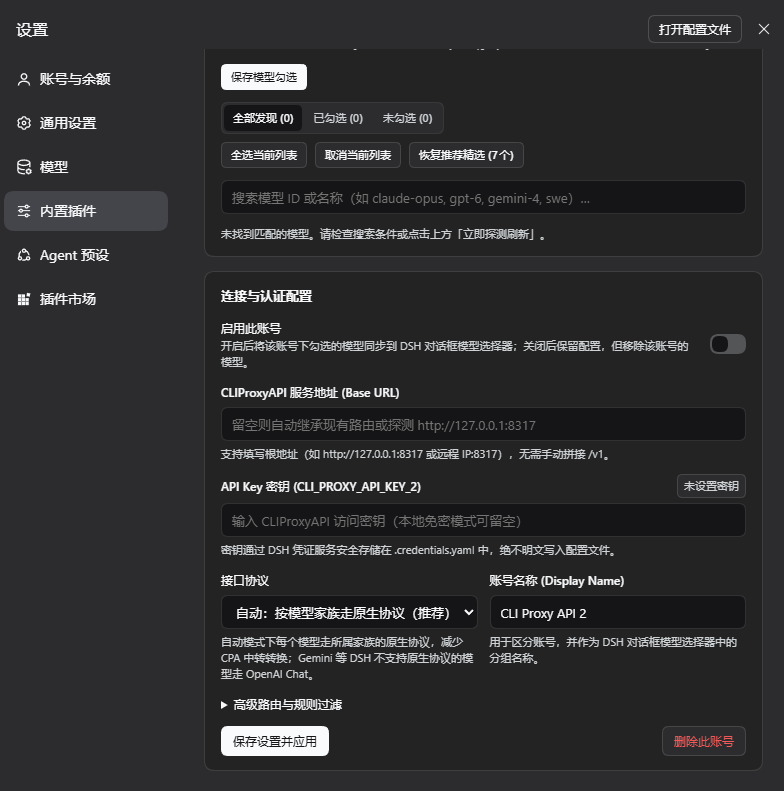
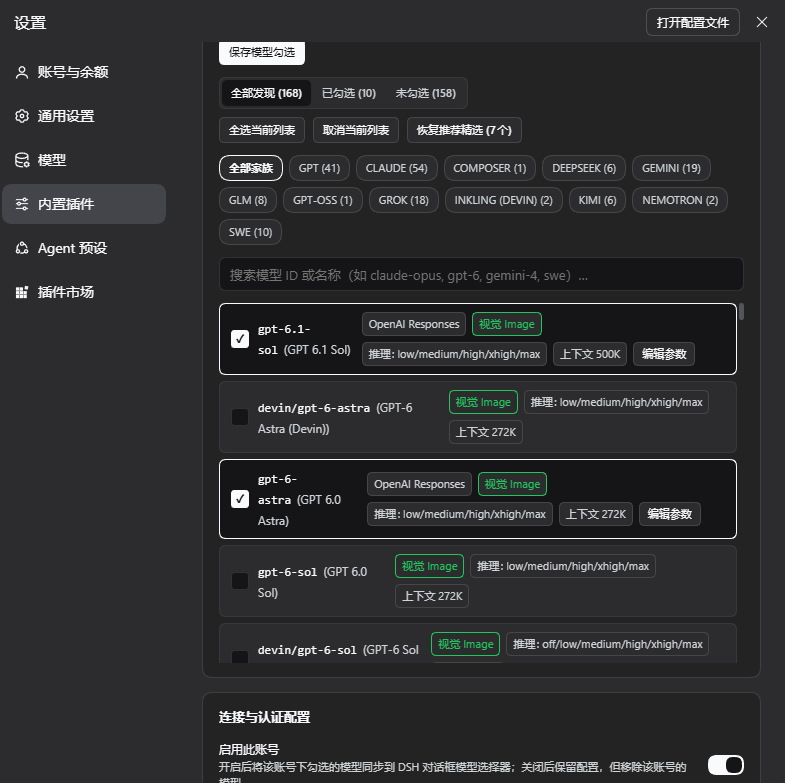
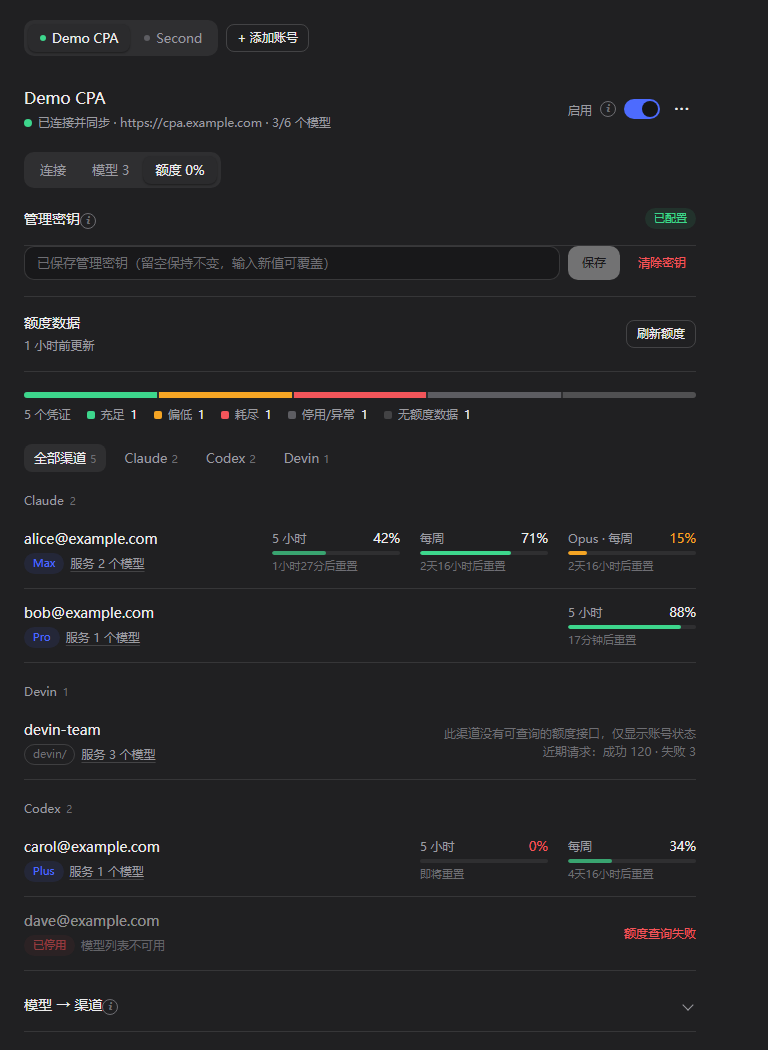
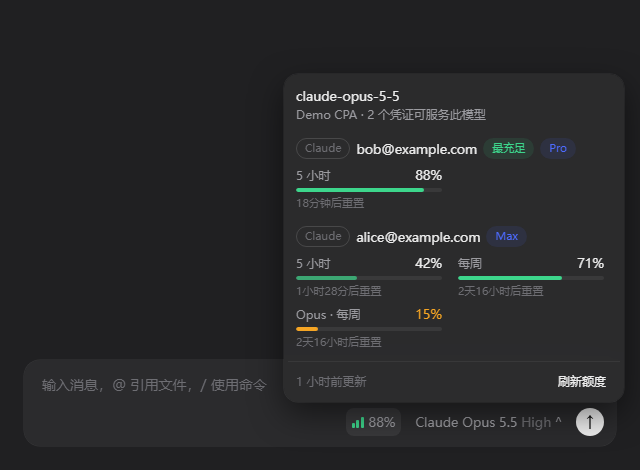
The panel follows the DSH display language; the screenshots show the Chinese UI. Images 1–5 are offline component renders: this plugin's real UI code with sample data (`example.com` addresses, fictional accounts) rendered in a browser, with colors approximating the DSH dark theme; the real colors follow your DSH theme. Image 6 is an actual capture of 1.6.0 in the DSH desktop app.
|
|
100
100
|
|
|
101
|
-
**1.
|
|
101
|
+
**1. Accounts and connection.** The **CLIProxyAPI** page in the Settings dialog's left navigation: one account bar for all tabs; under the account title are the connection state, address and model count, with the **Enabled** switch (applies at once) and the **⋯** menu (**Probe & Refresh**, **Delete Account**) on the right. The **Connection** tab has one row per setting, **Test Connection** next to the address (uses the values being edited, saves nothing), and secondary explanations in ⓘ tips.
|
|
102
102
|
|
|
103
|
-
|
|
104
104
|
|
|
105
|
-
**2.
|
|
105
|
+
**2. Models and one save bar.** The **Models** tab lists every model on that CPA: All / Checked / Unchecked, family filter, search, bulk actions and **Reset to Recommended**; checked models show the protocol they will use and can be edited with **Edit Parameters**. Connection and model edits are tracked together, and a bar at the bottom shows **Unsaved changes · Discard / Save & Apply**.
|
|
106
106
|
|
|
107
|
-
|
|
108
108
|
|
|
109
|
-
**3.
|
|
109
|
+
**3. Quota.** The **Quota** tab: management key, quota data and refresh, a distribution bar, credentials grouped by channel (plan, prefix, status, 5-hour / daily / weekly meters with reset times; Devin shows its daily / weekly quota, shared by every Devin model; channels without a quota endpoint show status and recent requests only), and an expandable "Model → Channel" table. The tab label shows the lowest remaining quota among the account's usable credentials.
|
|
110
110
|
|
|
111
|
-
|
|
112
112
|
|
|
113
|
-
**4.
|
|
113
|
+
**4. Quota in the composer.** The badge left of the model selector shows the best remaining quota among the usable credentials serving the current model; clicking it lists every such credential with its quota windows. It appears only for models this plugin synchronizes whose account has a management key.
|
|
114
114
|
|
|
115
|
-
|
|
116
116
|
|
|
117
|
-
|
|
117
|
+
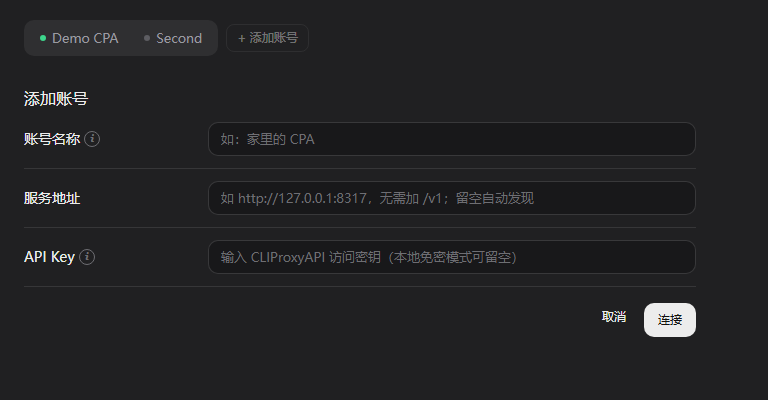
**5. Adding an account.** Enter a name, address and API key and click **Connect**: it tests first and creates an enabled account only when that works; on failure the reason is shown and **Add Anyway (Disabled)** is offered.
|
|
118
|
+
|
|
119
|
+
|
|
120
|
+
|
|
121
|
+
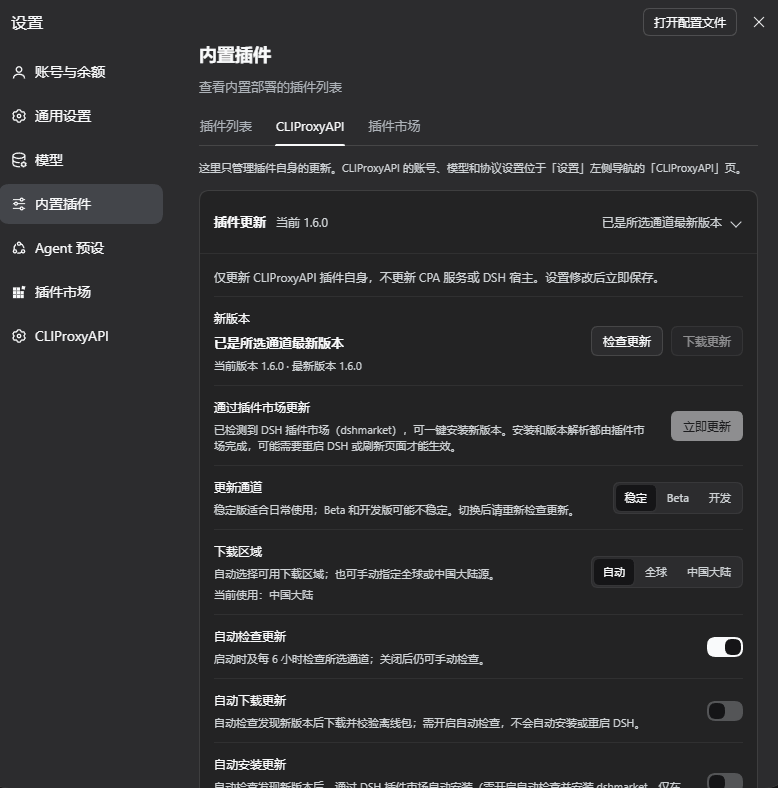
**6. The plugin update page under Built-in plugins** (actual 1.6.0 capture). **Settings** → **Built-in plugins** → the **CLIProxyAPI** tab holds only plugin updates: checking and offline download, **Update Now** once the DSH plugin market is detected, the update channel, the download region, and the automatic check / download / install switches. Here the plugin is already the latest Stable version, so **Update Now** is disabled.
|
|
122
|
+
|
|
123
|
+
|
|
118
124
|
|
|
119
125
|
## Features in detail
|
|
120
126
|
|
|
@@ -122,7 +128,8 @@ The panel follows the DSH display language; the screenshots show the Chinese UI.
|
|
|
122
128
|
|
|
123
129
|
- The base URL can be local or remote; suffixes such as `/v1`, `/v1/chat/completions` and `/v1/messages` are stripped.
|
|
124
130
|
- With an empty URL, the plugin tries, in order: the existing route's URL, the `CLIPROXYAPI_BASE_URL` environment variable, and local `127.0.0.1:8317`.
|
|
125
|
-
- The enriched catalog comes from `/v1/models?client_version=pi` (standard OpenAI `data[]` catalogs work too); `owned_by` from `/v1/models` identifies each model's family.
|
|
131
|
+
- The enriched catalog comes from `/v1/models?client_version=pi` (standard OpenAI `data[]` catalogs work too); `owned_by` from `/v1/models` identifies each model's family and its `type` marks image models.
|
|
132
|
+
- Image and video models are never written to chat routes; see [Image and video models](#image-and-video-models-the-generation-tab).
|
|
126
133
|
- All accounts refresh on a shared interval (300 s by default); an unchanged catalog writes no settings.
|
|
127
134
|
|
|
128
135
|
### Model selection
|
|
@@ -139,7 +146,10 @@ The panel follows the DSH display language; the screenshots show the Chinese UI.
|
|
|
139
146
|
|
|
140
147
|
- Each account writes its own set of routes: the first account uses `cli-proxy` / `cli-proxy-responses` / `cli-proxy-messages`, later ones `cli-proxy-2*`, `cli-proxy-3*`, …; credential refs are `CLI_PROXY_API_KEY`, `CLI_PROXY_API_KEY_2`, …. The model picker groups models by account name.
|
|
141
148
|
- **Disabling** an account keeps its settings but removes its routes, so its models leave the picker; other accounts are unaffected.
|
|
142
|
-
- **New** accounts
|
|
149
|
+
- **New** accounts: **+ Add Account** first tests the entered URL and key and creates an enabled account only when that works; **Add Anyway (Disabled)** is also offered.
|
|
150
|
+
- Each account page has **Connection / Models / Generation / Quota** tabs under one shared account bar. The **Enabled** switch next to the account title applies at once; the **⋯** menu holds **Probe & Refresh** and **Delete Account**.
|
|
151
|
+
- Connection and model changes are tracked together; a bar at the bottom shows **Unsaved changes · Discard / Save & Apply**, and switching accounts asks before dropping unsaved changes. **Test Connection** probes the address and key being edited without saving anything.
|
|
152
|
+
- Secondary explanations live in ⓘ tips next to the labels (open on hover, keyboard focus or click).
|
|
143
153
|
- An account with a base URL **only connects to that URL** and reports an error when it is unreachable; it never silently falls back to local `:8317`, so two accounts cannot end up on the same server.
|
|
144
154
|
- Provider route IDs of different accounts must not overlap; conflicting changes are rejected.
|
|
145
155
|
- **Deleting** an account removes its routes but keeps its key in the credentials service.
|
|
@@ -160,6 +170,113 @@ CPA serves every model on OpenAI Chat, OpenAI Responses and Anthropic Messages,
|
|
|
160
170
|
- Switch to one protocol for every model, or set a protocol per model under **Edit Parameters**.
|
|
161
171
|
- Other fields you add to a managed route by hand (such as `retryPolicy`) are kept.
|
|
162
172
|
|
|
173
|
+
### Channel quota (the "Quota" tab and the composer badge)
|
|
174
|
+
|
|
175
|
+
Each account's **Quota** tab (next to **Connection**, **Models** and **Generation**) shows that account's channel quota; the tab label shows the lowest remaining quota among its usable credentials.
|
|
176
|
+
|
|
177
|
+
- **Management key**: on an account's Quota tab, enter its CPA management key (`remote-management.secret-key` in the CPA config; a remote CPA also needs `remote-management.allow-remote`). It is stored in the DSH credentials service under `CLI_PROXY_MANAGEMENT_KEY` for the first account and `CLI_PROXY_MANAGEMENT_KEY_<ACCOUNT_ID>` for the others (for example `CLI_PROXY_MANAGEMENT_KEY_ACCOUNT_2`); it is never written to `state.json`, settings or logs, and never sent back to the page.
|
|
178
|
+
- **Read by the Host**: the Host reads every credential on that CPA (`/v0/management/auth-files`), the models each credential serves, and the upstream quota through `/v0/management/api-call`: Codex, Claude, Antigravity, Gemini CLI, Kimi (including Kimi International, kimi.ai), xAI, Devin and Meta. Channels provided by CPA plugins (credentials marked `supports_quota`) use CPA's own `/v0/management/quota/fetch` instead. Devin's daily / weekly quota belongs to the whole account, so every `devin/…` model shows the same windows. Meta's quota endpoint needs the `dca_token` from the credential file; the Host reads it through the management API for each query, uses it for that one request only, and never stores or logs it. API-key channels (OpenAI-compatible, Gemini / Claude / Codex API keys) and Vertex have no quota endpoint (CPA's own panel shows none either) and show their status and recent request counts only; paid xAI accounts expose no quota counters either (CPA's panel probes them with a real chat request; this plugin does not, so background refreshes never cost money).
|
|
179
|
+
- **Quota tab**: laid out as flat rows like the native DSH settings pages: management key, quota data and refresh, a distribution bar (healthy / low / exhausted / off or failing), credentials grouped by channel (plan, prefix, status, 5-hour / weekly / monthly / daily meters with reset times; problems and the least remaining first), channel filter (search when there are many credentials), and an expandable "Model → Channel" table showing which credentials each picker model is matched to.
|
|
180
|
+
- **Composer badge**: a small badge left of the model selector (signal bars + percentage) shows the best remaining quota among the usable credentials serving the selected model; click it for every credential's windows. It appears only for models this plugin synchronizes whose account has a management key; without a key there is no badge. On the New Session page (before the composer takes over the session) the badge sits at the right end of the workspace row above the input box.
|
|
181
|
+
- **Exact matching**: credentials are looked up only in the account the selected route belongs to (`cli-proxy*`, `cli-proxy-2*`, …); a prefixed model (such as `devin/claude-opus-5-5`) matches only credentials with that prefix; a bare id (such as `claude-opus-5-5`) prefers un-prefixed credentials, so the Claude and Devin channels never mix. Per-model-group windows (for example Antigravity) count only the group that fits the current model.
|
|
182
|
+
- **Troubleshooting**: `/cpa-status` includes a quota summary: each account's key state, quota state, credential count, and which credentials each picker model maps to with its remaining quota (never the key).
|
|
183
|
+
- **Refreshing**: results are cached on the Host for 5 minutes; stale accounts refresh in the background only while a page is asking, or on **Refresh Quota**. A rejected management key (401/403) pauses that account's automatic refresh until the key changes or you refresh manually, so CPA's bad-key protection is not triggered.
|
|
184
|
+
|
|
185
|
+
### Image and video models (the "Generation" tab)
|
|
186
|
+
|
|
187
|
+
CPA serves image and video generators (such as Grok Imagine) through `/v1/images/*` and `/v1/videos/*`. They cannot chat, so the plugin recognizes them and keeps them out of the chat model picker.
|
|
188
|
+
|
|
189
|
+
- **Recognition**, in order: a kind you set on the Generation tab; the catalog's `type` (`openai-image` is an image model) or output modalities (image-only output is an image model, video output a video model); the model families CPA routes to its image / video handlers, matched by prefix: ids starting with `grok-imagine-image` or `gpt-image-` are image models, ids starting with `grok-imagine-video` and `sora-2*` are video models. Everything else is a chat model (for example `gemini-3.1-flash-image`: CPA serves it only through chat, and DSH cannot show images returned in a chat reply). A media model that only the plain `/v1/models` listing carries is included too. A catalog may list variants CPA's generation endpoints do not accept yet (for example `grok-imagine-video-1.5-lite`); they cannot chat either, so they count as media models, and generating with one shows CPA's error.
|
|
190
|
+
- **Not in the model picker**: media models are written to no chat route and take no part in the first-run recommendation; an older selection that names them does not synchronize them (the selection itself is kept). The Models tab lists chat models only.
|
|
191
|
+
- **The Generation tab** (next to Connection / Models / Quota) lists "Image models" and "Video models"; changes are saved at once. A switch decides whether each model is offered for generation (models that appear later start switched on), and a kind menu changes it to image / video / chat; a kind you set can be reset to the detected one. A model detection missed can be marked under "Mark another model as a media model". Changing a kind re-synchronizes that account's routes immediately. `sora-2*` is labelled "→ grok-imagine-video": CPA rewrites it to the Grok video model.
|
|
192
|
+
- **Read-only diagnostic**: **Run diagnostic** sends GET requests only: it reads both model catalogs with the account's key and lists media-looking entries with descriptive fields such as `type` and modalities, then probes `GET /v1/videos/{id}` and `GET /openai/v1/videos/{id}/content` **without the key** (a route that exists answers 401 at once; a missing one gets CPA's 404). It generates nothing and spends no quota; if CPA does not require a key, the probe looks up one nonexistent job id, which is still read-only. The result can be copied and never contains the key.
|
|
193
|
+
- **Save location**: the bottom of the Generation tab sets where generated files go (default `generated`); a relative path is resolved against the session's working directory, an absolute path also works. Shared by all accounts.
|
|
194
|
+
- **Agent generation**: the **Let the agent generate images / videos** switch (off by default), how agent videos / images are confirmed, and the per-session limit of agent video seconds; see "Letting the agent generate" below.
|
|
195
|
+
- **Video defaults**: when the account has video models, the Generation tab sets the default length (1–15 s, default 6 s) and resolution (480p / 720p, default 720p) of `/cpa-video`; shared by all accounts, saved at once.
|
|
196
|
+
|
|
197
|
+
#### Generating images (`/cpa-image`)
|
|
198
|
+
|
|
199
|
+
Type in the composer:
|
|
200
|
+
|
|
201
|
+
```text
|
|
202
|
+
/cpa-image a ginger cat on a neon street on a rainy night
|
|
203
|
+
/cpa-image -m quality --aspect 16:9 -n 2 a ginger cat on a neon street on a rainy night
|
|
204
|
+
```
|
|
205
|
+
|
|
206
|
+
- **Options** (before the prompt): `-m <model>` picks a model for this run — a full `accountId/modelId`, a model id, or a fragment that matches exactly one model (such as `quality`); several matches are an error that lists them, never a guess. `--aspect <ratio>` is one of `1:1`, `16:9`, `9:16`, `4:3`, `3:4`, `3:2`, `2:3`, `9:20`, `20:9`. `-n <1-4>` sets the number of images. They can also be written as separate words at the start or end of the prompt (split by spaces or commas): `16:9`, `portrait` / `竖屏` (9:16), `landscape` / `横屏` (16:9), `square` / `方形` (1:1), `2 images` / `2张`, e.g. `/cpa-image 2张 portrait a ginger cat`; an explicit option such as `-n` wins. Everything after `--` is prompt text.
|
|
207
|
+
- **Editing**: attach 1–4 images in the composer and run the command; it then uses CPA's `/v1/images/edits` with the images as references (about 1.4 MB in total). Only image attachments are accepted. Attached images travel base64-encoded inside the request, and upstreams cap the request size (about 2 MiB; xAI answers "Failed to read request body: length limit exceeded"), so an oversized image is shrunk first: the plugin re-encodes a PNG as JPEG itself (transparent parts on white, long edge at most 1280), and asks DSH's attachment service for a smaller version of other formats; if it still does not fit, the command fails right away.
|
|
208
|
+
- **Saving**: files are written to the save location under the session's working directory, named like `20261022-133000-grok-imagine-image-a-ginger-cat-on-a-neon-s.png` (the first 24 characters of the prompt); an existing file is never replaced, a number is appended instead. The working directory must be a local folder.
|
|
209
|
+
- **After you submit**: the command checks the options, model, save folder and references, then returns at once, so the composer clears right away; the generation continues in the background. Meanwhile the workspace session list shows the session as running, and as completed if it finishes while you are in another session. DSH itself counts only agent turns as running, so during a generation the plugin sends DSH's own session status event (`api-session/status`) and repeats it every 5 seconds. During a generation the composer shows a Stop button that cannot stop it (the upstream cannot cancel either); just keep sending messages, the agent answers as usual. Reloading the plugin or closing DSH interrupts a running generation.
|
|
210
|
+
- **Result**: the `/cpa-image` row in the conversation reads like an exchange: on the right, a bubble with your prompt (ratio, count and reference images noted below it); on the left, the reply: model and account, the status, placeholders in the requested ratio with a timer while generating, then the images (one image at its own ratio, several as square thumbnails); click one to enlarge it. Below are the time taken and the save folder (relative to the working directory, or the folder's name); **Details** expands the full folder path and the file names (click to open them with the system) and, when the upstream rewrote the prompt, the revised prompt; a failure shows its reason in red. Earlier runs show their images too, as long as the files exist and their records were not pushed out (the last 48 runs and 48 files per session are kept). The images are only shown on the page; they are never sent to the chat model.
|
|
211
|
+
- **Image actions**: right-click an image for a menu listing the applications on this computer that open it (the default application first and marked "(default)", like the Open menu of the document preview), then **Show in File Explorer** (**Show in Finder** on macOS, **Show in Files** on Linux), then **Copy image** and **Copy file path**. Under an enlarged image, buttons offer **Open with default app**, the file-manager item and both copy actions. Opening and showing the location go through DSH's own session interface (the same as the document preview; DSH re-verifies the path), and are hidden when DSH cannot open local paths; Copy image always puts a PNG on the clipboard (other formats are converted first).
|
|
212
|
+
- **Request details**: one `POST /v1/images/generations` (or `/edits`) to the CPA of the model's account, with only that account's address and key and no retry on another account; it asks for `b64_json`. When CPA returns a link instead, the plugin downloads it: only `data:` or HTTPS links, at most 32 MiB per image, and the download carries no key. It waits at most 3 minutes. Failures show a short CPA error summary (truncated, links removed). Generating images spends that account's upstream quota.
|
|
213
|
+
|
|
214
|
+
#### Generating videos (`/cpa-video`)
|
|
215
|
+
|
|
216
|
+
```text
|
|
217
|
+
/cpa-video waves rolling onto a beach at sunset
|
|
218
|
+
/cpa-video -s 8 -r 480p --aspect 9:16 a cat surfing
|
|
219
|
+
```
|
|
220
|
+
|
|
221
|
+
- **Options** (before the prompt): `-m <model>` picks a model for this run (same rules as `/cpa-image`); `-s <1-15>` sets the length in seconds; `-r <480p|720p>` the resolution; `--aspect <ratio>` is one of `1:1`, `16:9`, `9:16`, `4:3`, `3:4`, `3:2`, `2:3`; without it xAI decides (usually 16:9, or the first frame's ratio). These can also be written as separate words at the start or end of the prompt: `10s` / `10 seconds` / `10秒`, `480p` / `720p`, `16:9`, `portrait`, `landscape`, `square`, e.g. `/cpa-video 10s 480p this character dances`; a word counts only when a space, comma or the end follows it, so "3秒后爆炸" stays prompt text, and words in the middle of a sentence are never read as options. An explicit option such as `-s` wins. Without any, the Generation tab's video defaults apply. Everything after `--` is prompt text.
|
|
222
|
+
- **How attached images are used** (images only; oversized ones are shrunk as described under Editing; CPA's video generation route was measured to read only about 1 MiB of request body, so all attached images share about 750 KB and are shrunk beyond that):
|
|
223
|
+
- 1 image: the **first frame** by default (image to video); with `--ref` (or the word `reference`) a **reference**; with `--last` (or `last-frame`) the **last frame**, where the video ends.
|
|
224
|
+
- 2 images: **references** by default; with `--first-last` (or `first-last`) the first is the first frame and the second the last frame, and the model fills in between.
|
|
225
|
+
- 3 or more: **references**, up to 14 on `grok-imagine-video-1.5` and 7 on other video models. References bring in people, clothing or objects without locking the first frame; the prompt can name them in order as `<IMAGE_0>`, `<IMAGE_1>`, ….
|
|
226
|
+
- Pinned first / last frames need `grok-imagine-video-1.5`. The fields follow xAI's docs: `image`, `last_frame`, `reference_images`.
|
|
227
|
+
- **Cannot be cancelled**: once submitted, a video cannot be withdrawn (neither CPA nor xAI has a cancel route) and is billed as usual; the composer's Stop button does not stop it.
|
|
228
|
+
- **Request details**: one `POST /v1/videos/generations` to the CPA of the model's account (xAI's native format: `model`, `prompt`, `duration`, `resolution`, and optional `aspect_ratio` and `image.url`; `sora-2*` is rewritten to `grok-imagine-video` as CPA does), then `GET /v1/videos/{request id}`: every 5 s during the first minute, every 10 s up to 3 minutes, then every 15 s. The finished video is downloaded through CPA's `GET /openai/v1/videos/{request id}/content` (CPA fetches the file with the credential's own proxy; the plugin never contacts the upstream host), streamed into the save location, at most 200 MiB, MP4 / MOV / WebM only, never replacing a file.
|
|
229
|
+
- **Background and resuming**: once submitted, the job is stored in `media-jobs.json`. Reloading the plugin or restarting DSH only pauses the waiting; the next start keeps polling and saves the video. CPA remembers which credential made a video for 3 hours only, so a job still unfinished after 3 hours is marked expired and no longer polled. A run cut off by a reload before CPA returned a request id is marked interrupted (it may have been submitted; there is no way to tell). Meanwhile the session shows as running too.
|
|
230
|
+
- **Result**: the `/cpa-video` row reads like an exchange as well (**Copy original input** at the end of the tag line copies the command exactly as typed; a line under the model name in the reply states the mode actually used, e.g. "Mode: references ×3 — brings in the people, clothing and objects shown, without fixing the first frame" or "Mode: first frame — the attached image is the video's first frame", and for edits / extensions where the source came from: an uploaded local file, a public link or a video from this session): on the right the prompt with length, resolution, ratio and first-frame tags; on the left queued / generating progress (a percentage when CPA reports one) / saving with a timer, then the playable video (seeking works); buttons below and the right-click menu open it with another application, show it in File Explorer, or copy its path.
|
|
231
|
+
- `/cpa-video-status` lists this session's last 20 video jobs with their state and request id.
|
|
232
|
+
|
|
233
|
+
#### Editing and extending videos (`/cpa-video-edit`, `/cpa-video-extend`)
|
|
234
|
+
|
|
235
|
+
```text
|
|
236
|
+
/cpa-video-edit make the dress red, keep everything else
|
|
237
|
+
/cpa-video-extend 4s she turns and walks out of frame
|
|
238
|
+
/cpa-video-extend --from cmd-xxxx-3 -s 6 the camera slowly pulls back
|
|
239
|
+
/cpa-video-edit --video "D:\clips\street.mp4" make it a rainy night
|
|
240
|
+
/cpa-video-extend --url https://example.com/clip.mp4 -s 4 the camera pulls back
|
|
241
|
+
```
|
|
242
|
+
|
|
243
|
+
- When a video is done, **Edit video…** and **Extend video…** buttons appear below it; write one sentence and submit, and the result appears in a new row below. You can also type the command.
|
|
244
|
+
- **Source video** (one of): **attach an MP4 file** in the composer; `--video <path>` (relative to the session's working directory; quote a path with spaces); `--url <public link>` (http/https, downloaded by xAI itself, no size limit); `--from <command id>` (a video the plugin made in this session); without any, the session's newest generated video. A video path also works without `--video`, written at the start or end of the prompt (quoted or with `@` if you like, ending in `.mp4` / `.mov` / `.m4v`), e.g. `/cpa-video-edit D:\clips\a.mp4 make it a snowy night`. Edits and extensions keep the source's resolution and ratio (an edit also its length), so words like `480p`, `16:9`, `portrait` (and `4s` for an edit) at the start or end of the prompt are taken out, not sent to xAI, and shown as ignored in the chat row. `-m <model>` picks whose video model account to use (default: the session's video model; for a video the plugin made, the account that made it).
|
|
245
|
+
- **How it works**: xAI's edit (`/v1/videos/edits`) and extension (`/v1/videos/extensions`) take any MP4, as a public link or as base64 data. CPA has no route to xAI's file upload, so a local video travels base64-encoded inside the request (the edit route was measured to read a 20 MiB body, so local videos may be up to 14 MiB; compress or trim larger ones, or use `--url`). For about an hour, a video the plugin made goes by the short-lived link that came with xAI's own result (kept in memory only, never written to a file or log and never sent to the page); after that, or after a reload, the saved file is sent instead, so the buttons stay available while the file exists. Before sending, the plugin reads the length recorded in the MP4 and refuses a source outside the limits below without a request.
|
|
246
|
+
- **Limits** (xAI's docs): both use `grok-imagine-video`; an edit needs a source of at most 8.7 s and keeps its length, ratio and resolution (720p at most); an extension needs a 2–15 s source, `-s` sets the added 2–10 s (default 6, or write `4s`), and returns the source plus the new part.
|
|
247
|
+
- **When a server lacks a route**: some CPA servers' upstreams have no extension route (one answered HTTP 405 in testing). That run then reads "the upstream does not offer video extension (HTTP 405)", later extensions on the same account are refused without a request and the **Extend video…** button is hidden until the plugin reloads. After a 405, CPA pauses that credential for the model for about a minute.
|
|
248
|
+
- Edits and extensions likewise cannot be cancelled once submitted and are billed as usual; background waiting, resuming after a reload and the row's buttons work as for `/cpa-video`.
|
|
249
|
+
|
|
250
|
+
#### Reading plain-language parameters with the chat model
|
|
251
|
+
|
|
252
|
+
Each time `/cpa-image`, `/cpa-video`, `/cpa-video-edit` or `/cpa-video-extend` runs, the plugin hands the prompt (after the options) to **the chat model the session is using** and asks it for parameters that were not written as options, such as "make it a ten-second portrait video in HD", "use the second image as the ending", "three landscape ones" or "add five more seconds".
|
|
253
|
+
|
|
254
|
+
- **What it reads**: images — ratio and count; videos — length, resolution, ratio and how attached images are used (first frame / references / first & last frame / last frame); extensions — the added seconds; edits have no parameters to read, only the prompt is tidied.
|
|
255
|
+
- **Priority**: options written in the command (`-s`, `-r`, `--aspect`, `-n`, `--ref`, …) and words recognized at the start or end always win; the chat model only fills in what is missing, and every value it returns is checked against the allowed range (invalid ones are dropped).
|
|
256
|
+
- **The prompt only loses words**: the chat model returns the prompt without the words that stated parameters; the plugin accepts it only if it is the original with some characters deleted (no rewriting, translating or expanding, and not most of it removed), otherwise the original is sent.
|
|
257
|
+
- **Model and cost**: the model of the session's latest request (else the agent's setting or the default model), a few hundred tokens and 2–5 extra seconds each time (30 s at most); only the prompt text and the number of attached images are sent, never the images. It runs in the background, so the composer still clears at once and the row shows "Reading parameters".
|
|
258
|
+
- **Visible result**: the reply says "Parameters <model> read from the prompt: 10s · 9:16 · first-last", and notes when words were taken out of the prompt; if the chat model is unavailable or its answer cannot be read, it says "Reading parameters failed" and the request is sent with the command's options and the prompt as written.
|
|
259
|
+
|
|
260
|
+
#### Letting the agent generate (`generate_media` tool, off by default)
|
|
261
|
+
|
|
262
|
+
With **Let the agent generate images / videos** switched on in the Generation tab, the chat agent can call the `generate_media` tool to generate images and videos, or to edit and extend videos. While off (the default) the tool is not registered and takes no model context; when on, it is registered only while at least one generation model is enabled. Its definition is compact and lists no models.
|
|
263
|
+
|
|
264
|
+
- **What it does**: parameters `kind` (image / video) and `prompt`, optionally `mode` (generate / edit / extend), `model`, `images` (local image paths: for images, to edit or combine; for videos, 1 is the first frame and 2 or more are references), `frames` (first frame / references / first & last frame / last frame), `video` (the source of an edit / extension: a local MP4 path or a public link; without it, this session's newest generated video), `aspect`, `seconds`, `resolution`, `count`. Optional fields may be omitted or set to `null` (including on Responses strict-schema routes); video `count` should be `null`, as each call generates one video. An omitted, `null` or empty `model` uses this session's pick in the composer button (a sub-agent uses the pick of the session it belongs to). It works like the matching slash command, except that the prompt is **sent as written**: words like "10s" or "portrait" in it are not read as options and the chat model is not asked to interpret parameters. The tool description also tells the agent to use the user's own wording and level of detail, never expanding it into a longer scene description or adding camera, lighting, style, character or environment details the user did not ask for.
|
|
265
|
+
- **Result**: files go to the save location; the tool returns their paths, the model and the actual parameters. For images, when the current chat model can see images, the generated images (downscaled by DSH) are handed to it as well. The chat renders one **independent generation row** from the recorded tool lifecycle, outside the thinking process, using the slash command's exchange layout (progress, images / a playable video, open / show in folder / copy, and **Edit video… / Extend video…** under a video). There is no need to expand thinking, no extra user command is fabricated, and tool cards or legacy mirrored command cards with a matching generation row do not repeat the result.
|
|
266
|
+
- **Confirmation**: videos **ask you each time** by default; images are generated directly by default and can be set to ask too. Confirmation appears independently at the owning root session's composer through DSH's native question interface, naming the account, model, length, resolution / ratio, the start of the prompt, attached images, "cannot be cancelled once submitted" and the seconds used in this session. The choices are bilingual: **Allow / 允许** and **Decline / 拒绝**. This is consent to generation costs, independent of DSH's execution-approval permissions; "full access" does not bypass it. Only an explicit Allow choice submits the request, and declining tells the agent not to retry. No answer within 10 minutes, stopping the wait, disabling the tool or reloading / unloading the plugin refuses consent; a native-question error never grants it either. Only when DSH lacks the native question service does a compatibility confirmation area appear beside the owning root session's composer; generation rows themselves contain no confirmation buttons.
|
|
267
|
+
- **Seconds limit**: videos the agent submits are counted in seconds per session (a sub-agent counts against the session it belongs to), 60 s per session by default; choose 30 s to 1 hour or no limit. Videos over the limit are refused only when generating directly; when asking, they are only counted. An edit counts the source's length, an extension the added seconds. Seconds come back when CPA refuses a video at once (no job was created), not when the upstream generation fails. Changing the limit, or switching from asking to direct generation, starts the count again. Your own `/cpa-video` and other commands are neither counted nor confirmed.
|
|
268
|
+
- **Per session**: while the tool is on, **Agent generation settings** at the bottom of either model menu opens a secondary menu: video / image confirmation and the video limit can follow the global setting or be set for this session, with "Agent videos in this session: X of N s".
|
|
269
|
+
- **Waiting**: the tool waits up to 10 minutes. On timeout, or when you stop the turn, the video keeps generating in the background (and is billed); it is saved to the save location and shown in the call's row, and the agent is told it is still running.
|
|
270
|
+
|
|
271
|
+
#### The generation-model button next to the composer
|
|
272
|
+
|
|
273
|
+
When an image or video model is available, two generation-model buttons appear in the composer left of the model selector, showing the model used for images (picture icon) and for videos (camera icon).
|
|
274
|
+
|
|
275
|
+
- The image button opens only image models and the video button only video models; each menu lists every enabled model of that kind by account, and one click switches it. **Agent generation settings** at the bottom of either menu opens a secondary menu with this session's agent confirmations and video seconds limit. **The pick is saved per session** and also becomes your "last pick": a session without a pick of its own (including a new session) uses the last pick.
|
|
276
|
+
- `/cpa-image` / `/cpa-video` choose their model in this order: the `-m` model → this session's pick → the last pick → the only available model; with several models and no pick, the command fails and asks you to pick one.
|
|
277
|
+
- Both buttons read their data on load, on a session switch and each time a menu opens; they do not poll in the background. When no generation model is available yet while an enabled account has not read its catalog (for example right after DSH starts), or an account's last read missed the plain model listing (which carries some image models), the plugin syncs once during that read; if the catalog is still incomplete, it retries after 3 and 10 seconds, then every 30 seconds until it is complete.
|
|
278
|
+
- When `/cpa-image` finds no image model while an enabled account has not read its catalog yet, it syncs once before deciding; if there is still none, the error lists each account's state and model counts.
|
|
279
|
+
|
|
163
280
|
## Updating this plugin
|
|
164
281
|
|
|
165
282
|
**Plugin Updates** live on the plugin page (sidebar **Plugins** → **CLIProxyAPI**) and on **Settings** → **Built-in plugins** → the **CLIProxyAPI** tab; those places contain only update features, while accounts and models are on the **CLIProxyAPI** page in the Settings dialog's left navigation. On the plugin page the update card starts expanded, with a summary row showing the current version and update status, and can be collapsed at any time. Background checks still follow the saved switches, and polling never resets the expanded state. It manages only `dsh-cliproxyapi-pro`. It does not update the CPA server or DSH, or change CPA routes, accounts or model selections. Update settings save immediately; the card polls independently without reloading unsaved account forms.
|
|
@@ -194,7 +311,7 @@ CPA serves every model on OpenAI Chat, OpenAI Responses and Anthropic Messages,
|
|
|
194
311
|
Use this without the plugin market or for offline upgrades:
|
|
195
312
|
|
|
196
313
|
1. Click **Check for Updates**. If a newer version is available, click **Download Update** and confirm its version, or wait for enabled automatic checks and downloads.
|
|
197
|
-
2. The download must match the npm metadata's **SHA-512** integrity, then pass gzip / tar,
|
|
314
|
+
2. The download must match the npm metadata's **SHA-512** integrity, then pass gzip / tar, package name and version checks, and every file in it must be declared by that package's own `package.json` `files` (except files npm always packs, such as `package.json`, README and LICENSE). Path traversal, hidden files, `node_modules`, links and other special entries, dependencies and installation lifecycle scripts are rejected. When a download is rejected, the concrete reason is written to the DSH log. The package is saved without extracting into the installation directory or executing its code.
|
|
198
315
|
3. After verification, the card displays the absolute package path and an upgrade command when applicable. Packages are stored at `<profile dir>/.dsh-cliproxyapi/updates/dsh-cliproxyapi-pro-<version>.tgz`.
|
|
199
316
|
4. **Save your work and fully close DSH first**, then run the card's command in a terminal. This example is illustrative; use the actual profile name and absolute path from your card:
|
|
200
317
|
|
|
@@ -206,52 +323,18 @@ Use this without the plugin market or for offline upgrades:
|
|
|
206
323
|
|
|
207
324
|
**Linked local installations (`link:`)** can check and download packages, but do not receive an upgrade command and their source directories are never overwritten. To keep the development setup, manually update the Git source at an appropriate time, then restart DSH. Reinstalling from an offline package changes the plugin's installation source from the link to the package.
|
|
208
325
|
|
|
209
|
-
##
|
|
210
|
-
|
|
211
|
-
### The `cliproxyapi` tool
|
|
212
|
-
|
|
213
|
-
The DSH agent uses this tool to inspect and configure the plugin; just ask in plain language.
|
|
214
|
-
|
|
215
|
-
| `action` | Effect |
|
|
216
|
-
|---|---|
|
|
217
|
-
| `status` | Show every account (or only `account`) with its state and models |
|
|
218
|
-
| `refresh` | Probe and sync now; without `account`, all accounts |
|
|
219
|
-
| `configure` | Update one account (the first by default), then refresh it |
|
|
220
|
-
| `add_account` | Create an account; enabled when `baseURL` is given, otherwise disabled |
|
|
221
|
-
| `remove_account` | Delete the `account` and its routes |
|
|
222
|
-
|
|
223
|
-
Parameters (all optional except `action`):
|
|
224
|
-
|
|
225
|
-
| Parameter | Meaning |
|
|
226
|
-
|---|---|
|
|
227
|
-
| `account` | Account id (e.g. `default`, `account-2`), or its provider route ID or display name |
|
|
228
|
-
| `enabled` | Enable or disable the account |
|
|
229
|
-
| `baseURL` | CPA URL such as `http://127.0.0.1:8317`; an empty string means auto-discover |
|
|
230
|
-
| `apiKey` | Bearer key, stored under the account's `apiKeyEnv` ref |
|
|
231
|
-
| `apiKeyEnv` | Credential ref name (`[A-Za-z_][A-Za-z0-9_]*`) |
|
|
232
|
-
| `provider` | `llm-pi-ai` provider route ID, unique per account |
|
|
233
|
-
| `displayName` | Account name, also the group title in the model picker |
|
|
234
|
-
| `protocolMode` | `auto` (native protocol per family, default) or `fixed` |
|
|
235
|
-
| `protocol` | Protocol used in `fixed` mode: `openai-completions` / `openai-responses` / `anthropic-messages` |
|
|
236
|
-
| `selectedModels` | Model ids shown in the picker; `[]` shows all |
|
|
237
|
-
| `includePrefix` / `excludePrefix` | Comma-separated model id keywords |
|
|
238
|
-
| `modelOverrides` | `{ [modelId]: { contextWindow?, maxTokens?, image?, reasoningLevels?, protocol? } }`, replacing the whole map |
|
|
239
|
-
|
|
240
|
-
Examples:
|
|
241
|
-
|
|
242
|
-
```json
|
|
243
|
-
{ "action": "configure", "baseURL": "http://127.0.0.1:8317", "apiKey": "sk-...", "selectedModels": ["gpt-6.1-sol", "claude-opus-5-5"] }
|
|
244
|
-
{ "action": "add_account", "displayName": "Backup CPA", "baseURL": "https://other-cpa:8317", "apiKey": "sk-...", "selectedModels": ["gpt-6-astra"] }
|
|
245
|
-
{ "action": "configure", "account": "account-2", "enabled": false }
|
|
246
|
-
{ "action": "remove_account", "account": "account-2" }
|
|
247
|
-
```
|
|
326
|
+
## Slash commands and HTTP routes
|
|
248
327
|
|
|
249
|
-
|
|
328
|
+
Apart from the generation tool `generate_media` (off by default, see above), this plugin registers no agent tool and adds nothing to model context. Accounts and models are managed on the **CLIProxyAPI** page in Settings; the slash commands below show and refresh their state.
|
|
250
329
|
|
|
251
330
|
### Slash commands
|
|
252
331
|
|
|
253
|
-
- `/cpa-status` — show every account's status.
|
|
332
|
+
- `/cpa-status` — show every account's status (including how many image / video models were recognized).
|
|
254
333
|
- `/cpa-refresh` — refresh every account now, including a catalog probe of disabled ones.
|
|
334
|
+
- `/cpa-image [-m model] [--aspect ratio] [-n 1-4] prompt` — generate images; with attached images, edit them. See [Generating images](#generating-images-cpa-image).
|
|
335
|
+
- `/cpa-video [-m model] [--aspect ratio] [-s 1-15] [-r 480p|720p] prompt` — generate a video; attach one image as the first frame. A submitted video cannot be cancelled. See [Generating videos](#generating-videos-cpa-video).
|
|
336
|
+
- `/cpa-video-status` — list this session's video jobs.
|
|
337
|
+
- `/cpa-video-edit [--video path | --url link | --from command-id] [-m model] change` / `/cpa-video-extend [same] [-s 2-10] what happens next` — edit / extend any MP4 (an attached video file works too). See [Editing and extending videos](#editing-and-extending-videos-cpa-video-edit-cpa-video-extend).
|
|
255
338
|
|
|
256
339
|
### HTTP API
|
|
257
340
|
|
|
@@ -264,10 +347,22 @@ Used by the settings panel. Requires the DSH Web session's authentication; POST
|
|
|
264
347
|
| POST | `/api/dsh-cliproxyapi/save` | `{ accountId?, …account fields, apiKey?, clearApiKey?, refreshIntervalSeconds?, probeTimeoutMs? }` | Save an account (the first by default); a body with only global fields saves just the globals |
|
|
265
348
|
| POST | `/api/dsh-cliproxyapi/accounts/add` | Optional account fields | Create a disabled account; returns `createdId` |
|
|
266
349
|
| POST | `/api/dsh-cliproxyapi/accounts/remove` | `{ accountId }` | Delete an account and its routes |
|
|
350
|
+
| POST | `/api/dsh-cliproxyapi/accounts/test` | `{ accountId?, baseURL?, apiKey? }` | Test unsaved connection values without saving or writing routes; a blank `apiKey` uses the account's stored key; never returns the key |
|
|
267
351
|
| GET | `/api/dsh-cliproxyapi/updates/status` | — | Read update state without contacting a registry |
|
|
268
352
|
| POST | `/api/dsh-cliproxyapi/updates/check` | `{}` | Check the selected channel and region now; a manual check does not trigger automatic downloading |
|
|
269
353
|
| POST | `/api/dsh-cliproxyapi/updates/save` | `{ autoCheck?, autoDownload?, autoInstall?, channel?, region? }` | Save only these five update preferences, independently of accounts |
|
|
270
354
|
| POST | `/api/dsh-cliproxyapi/updates/download` | `{ version }` | Download the newer version confirmed by the latest check, verify it, and save an offline package without installing |
|
|
355
|
+
| GET | `/api/dsh-cliproxyapi/quota/status` | — | `{ ok, quota }`: the cached quota snapshot; stale accounts refresh in the background |
|
|
356
|
+
| POST | `/api/dsh-cliproxyapi/quota/refresh` | `{ accountId? }` | Start refreshing the quota of one or every account and return at once (`refreshing` is set in the snapshot) |
|
|
357
|
+
| POST | `/api/dsh-cliproxyapi/quota/save` | `{ accountId, managementKey?, clear? }` | Store or clear the account's management key and start refreshing its quota; the response never contains the key |
|
|
358
|
+
| GET | `/api/dsh-cliproxyapi/media/status` | — | `{ ok, media }`: generation settings and each account's recognized image / video models; no network access |
|
|
359
|
+
| POST | `/api/dsh-cliproxyapi/media/save` | `{ account: { accountId, disabledModels?, kindOverrides? } }` | Save an account's switched-off media models (replaces the list) or kind overrides (merged per model; `null` restores detection); a kind change re-synchronizes that account and adds `status` to the response. Invalid values return 400 with a code such as `invalid-account` or `invalid-kind` |
|
|
360
|
+
| POST | `/api/dsh-cliproxyapi/media/diagnose` | `{ accountId }` | Read-only diagnostic (see above); returns `{ ok, diagnostic }` without the key |
|
|
361
|
+
| GET | `/api/dsh-cliproxyapi/media/session?sessionId=` | — | `{ ok, session }`: the image / video models to choose from, the current pick and where it comes from (`session` / `last` / `only`), and this session's recent files (names and ids only, no paths); `pendingConfirmations` lists only compatibility requests owned by this exact session when the native question service is absent, as `{ commandId, kind, en, zh, expiresAt }`; native questions never appear in that list; no network access |
|
|
362
|
+
| POST | `/api/dsh-cliproxyapi/media/session/save` | `{ sessionId?, kind: "image" \| "video", ref }` | Pick a session's model (`ref` is `accountId/modelId`; `null` clears the session's pick) and remember it as the last pick; a model that is not offered returns 400 `invalid-model`. Alternatively `{ sessionId, videoConfirm?, imageConfirm?, videoBudget? }` (`ask` / `auto` / `inherit`; the limit is `{ mode: "limited", seconds }` / `{ mode: "unlimited" }` / `inherit`) sets this session's agent-generation rules |
|
|
363
|
+
| POST | `/api/dsh-cliproxyapi/media/confirm` | `{ sessionId, commandId, allow }` | Answer only a compatibility `generate_media` confirmation beside the composer when the native question service is absent (reads `media/session` every 2 s); not used for native questions and independent of execution-approval permissions. Only the confirmation's exact owning root session can answer; an answered or expired request returns 400 `confirm-expired` |
|
|
364
|
+
| GET | `/api/dsh-cliproxyapi/media/file?sessionId=&id=` | — | Serves a generated file the plugin recorded for that session; anything else, or another session, gets 404. Videos are streamed with single `Range` support (206) so players can seek |
|
|
365
|
+
| GET | `/api/dsh-cliproxyapi/media/command?sessionId=&commandId=` | — | `{ ok, run, files }`: one command run's record in that session (status `running` / `done` / `error`, model, prompt, ratio, count, number of references, start and end times, a display name for the save folder, error code and summary) and the files it produced (id, name and full path, plus the save folder `folderPath` and the Host's file manager kind `desktop`: `explorer` / `finder` / `filemanager`), so its row in the conversation can show and open them; video records also carry length, resolution, request id, the `mode` (`text` / `first-frame` / `reference` / `first-last` / `last-frame` / `edit` / `extend`) and the source command id, plus `actions: { edit, extend, expiresAt }` (never the link) while it can still be edited or extended; and while running the `phase` (`submitting` / `queued` / `running` / `downloading`) and CPA's `progress`; a run recorded as running that no background job owns (after a reload or crash) is reported as `interrupted` |
|
|
271
366
|
|
|
272
367
|
Update operation responses use `{ ok, update }`. State includes `currentVersion`, `latestVersion`, `available`, `channel`, `region`, `effectiveRegion`, `autoCheck`, `autoDownload`, `autoInstall`, `checking`, `downloading`, `lastCheckedAt`, `error` / `errorCode`, `blockedReason`, `downloadedVersion`, `downloadPath` and `upgradeCommand`. Fields without a check or download result are `null`. `channel` is `stable` / `beta` / `dev`; `region` is `auto` / `global` / `cn`; `effectiveRegion` is the `global` / `cn` source used by the last successful check (`null` before one).
|
|
273
368
|
|
|
@@ -293,7 +388,7 @@ Failures use a top-level `errorCode` or `update.errorCode`; HTTP status or `ok`
|
|
|
293
388
|
}
|
|
294
389
|
```
|
|
295
390
|
|
|
296
|
-
The file is re-read on every access; after a manual edit, click **Probe & Refresh
|
|
391
|
+
The file is re-read on every access; after a manual edit, click **Probe & Refresh** in the account's **⋯** menu. A single-account file from 1.3.x and earlier migrates automatically into account `default` with the same routes, key and selection, and the original is kept as `state.v1.json`.
|
|
297
392
|
|
|
298
393
|
- **Update settings**: stored separately at `<profile dir>/.dsh-cliproxyapi/update-settings.json`. They neither extend nor rewrite the account `state.json` v2 file, nor access credentials. When this file does not yet exist, defaults are:
|
|
299
394
|
|
|
@@ -309,9 +404,30 @@ Failures use a top-level `errorCode` or `update.errorCode`; HTTP status or `ok`
|
|
|
309
404
|
```
|
|
310
405
|
|
|
311
406
|
Panel saves take effect immediately. After editing this file manually, reload the plugin or restart DSH to re-read it. Corrupt, structurally invalid, invalid-field or unreadable files use safe defaults with automatic network checks disabled. Check results, the candidate version, download notices and commands are in-memory only and reset on plugin reload; downloaded packages remain in the separate `updates` subdirectory for you to clean up when needed.
|
|
407
|
+
- **Generation settings**: stored separately at `<profile dir>/.dsh-cliproxyapi/media-settings.json`; `state.json` is not changed. Without this file the defaults apply; a damaged file also falls back to the defaults with a log warning, and the next save first keeps the damaged file as `media-settings.corrupt-<time>.json`. Currently `outputDir` (save location), `lastSelection` (the last picked models) and each account's `disabledModels` (switched-off media models) and `kindOverrides` (kinds you set) take effect; the other fields are reserved for the generation features still to come and have no effect yet:
|
|
408
|
+
|
|
409
|
+
```json
|
|
410
|
+
{
|
|
411
|
+
"version": 1,
|
|
412
|
+
"agentTool": false,
|
|
413
|
+
"outputDir": "generated",
|
|
414
|
+
"defaultVideoSeconds": 6,
|
|
415
|
+
"defaultVideoResolution": "720p",
|
|
416
|
+
"imageConfirm": "auto",
|
|
417
|
+
"videoConfirm": "ask",
|
|
418
|
+
"videoBudget": { "mode": "limited", "seconds": 60 },
|
|
419
|
+
"lastSelection": {},
|
|
420
|
+
"accounts": {
|
|
421
|
+
"default": { "disabledModels": [], "kindOverrides": { "my-painter": "image" } }
|
|
422
|
+
}
|
|
423
|
+
}
|
|
424
|
+
```
|
|
425
|
+
|
|
426
|
+
- **Per-session generation records**: `<profile dir>/.dsh-cliproxyapi/media-sessions.json` keeps each session's picked generation models, records of its last 48 runs (status, model, prompt, options, start and end times, a display name for the save folder, error summary), and the paths of its last 48 generated files with the command id that produced them (for the command rows in the conversation), for the 500 most recently updated sessions. Deleting it only clears those picks and records, never generated files. A damaged file is treated as empty and kept as `media-sessions.corrupt-<time>.json` before the next write.
|
|
427
|
+
- **Video jobs**: `<profile dir>/.dsh-cliproxyapi/media-jobs.json` keeps submitted video jobs (CPA request id, account, model, session and command id, working directory and save location, prompt, length, submission time, state) so a reload or restart can keep waiting; at most 200, finished ones kept 7 days. No keys and no video URLs. A damaged file is treated as empty and kept as `media-jobs.corrupt-<time>.json` before the next write.
|
|
312
428
|
- **Keys**: stored and resolved by ref through the DSH `credentials` service, falling back to an environment variable of the same name.
|
|
313
429
|
- **Environment**: `CLIPROXYAPI_BASE_URL` is used only for auto-discovery of accounts without a base URL.
|
|
314
|
-
- **Plugin row config**: the plugin row's `config` in `cordis.patch.yml` is overlaid on the state file at startup: `accounts` replaces the account list, other fields apply to the first account. Normally keep it `{}` and configure through the panel
|
|
430
|
+
- **Plugin row config**: the plugin row's `config` in `cordis.patch.yml` is overlaid on the state file at startup: `accounts` replaces the account list, other fields apply to the first account. Normally keep it `{}` and configure through the Settings panel.
|
|
315
431
|
|
|
316
432
|
## Upgrading and uninstalling
|
|
317
433
|
|
|
@@ -321,7 +437,7 @@ Failures use a top-level `errorCode` or `update.errorCode`; HTTP status or `ok`
|
|
|
321
437
|
## FAQ
|
|
322
438
|
|
|
323
439
|
**No models in the model picker?**
|
|
324
|
-
Check that the
|
|
440
|
+
Check that the **Enabled** switch next to the account title is on and at least one model checked (or an empty selection, meaning all). Run `/cpa-status` to see every account's state.
|
|
325
441
|
|
|
326
442
|
**"none of the selected models matched"?**
|
|
327
443
|
None of the checked models exists on this server (typical after switching servers). The panel still lists the server's models — check new ones, or click **Reset to Recommended**, then save.
|
|
@@ -352,13 +468,10 @@ Downloading and verification do not install anything. Exit DSH, run the card's u
|
|
|
352
468
|
> **For the AI agent in DeepSeek Harness**: when the user asks you to install or configure this plugin, follow these steps. The package has no npm dependencies and no build scripts.
|
|
353
469
|
|
|
354
470
|
1. **Install**: call `plugin_manager` with `{"action": "install_bundle", "target": "dsh-cliproxyapi-pro", "enabled": true}`. Read `application` and `warnings` in the result; `restart-required` means DSH must restart before the new code runs.
|
|
355
|
-
2. **Configure
|
|
356
|
-
|
|
357
|
-
- Remote URL or key: `{"action": "configure", "baseURL": "...", "apiKey": "..."}` (first account), or `{"action": "add_account", ...}` for another account. Pass `"account": "<id>"` to target a specific account.
|
|
358
|
-
- Narrow the picker with `selectedModels` (exact ids from the `status` output).
|
|
359
|
-
3. **Verify**: `{"action": "status"}` shows `state: "connected"` and `modelCount > 0` for each enabled account. Tell the user the models are in the DSH model picker under the account's name, and that accounts are managed on the **CLIProxyAPI** page in the Settings dialog's left navigation.
|
|
471
|
+
2. **Configure**: the user configures accounts in the UI (this plugin has no agent tool for account management). A local CPA on `http://127.0.0.1:8317` without auth needs nothing — it is discovered automatically once the plugin runs. Otherwise ask the user to open the **CLIProxyAPI** page in the Settings dialog's left navigation, click **+ Add Account**, enter the server URL and API key, then check the wanted models on the **Models** tab.
|
|
472
|
+
3. **Verify**: ask the user to run `/cpa-status`; each enabled account should be `connected` with more than 0 models. Tell the user the models are in the DSH model picker under the account's name.
|
|
360
473
|
|
|
361
|
-
Never
|
|
474
|
+
Never ask the user for an API key or write it into files; keys are entered only on the Settings page.
|
|
362
475
|
|
|
363
476
|
## Development
|
|
364
477
|
|
|
@@ -386,7 +499,7 @@ npm run pack:check # list the files a packed bundle contains
|
|
|
386
499
|
|
|
387
500
|
Releasing is a pushed `v<version>` tag: GitHub Actions runs the tests, creates a GitHub Release with the package attached, and publishes to npm through npm trusted publishing (no token involved) with a provenance statement. Stable releases publish to npm `latest`; Beta / Dev prereleases publish to `beta` / `dev` and are marked as GitHub prereleases, without replacing the stable channel. The updater checks registry-provided SHA-512 integrity and package structure only; it does not verify publisher signatures or npm provenance.
|
|
388
501
|
|
|
389
|
-
Read [AGENTS.md](https://github.com/TinyBOOOOM/dsh-cliproxyapi-pro/blob/main/AGENTS.md) before changing code; see [CHANGELOG.md](https://github.com/TinyBOOOOM/dsh-cliproxyapi-pro/blob/main/CHANGELOG.md) for history. Issues and pull requests are welcome — when you change the documentation, update both the Chinese and the English README.
|
|
502
|
+
Read [AGENTS.md](https://github.com/TinyBOOOOM/dsh-cliproxyapi-pro/blob/main/AGENTS.md) before changing code; see [CHANGELOG.en.md](https://github.com/TinyBOOOOM/dsh-cliproxyapi-pro/blob/main/CHANGELOG.en.md) for history (Chinese: [CHANGELOG.md](https://github.com/TinyBOOOOM/dsh-cliproxyapi-pro/blob/main/CHANGELOG.md)). Issues and pull requests are welcome — when you change the documentation, update both the Chinese and the English README.
|
|
390
503
|
|
|
391
504
|
## License
|
|
392
505
|
|