dsh-cliproxyapi-pro 1.6.0 → 1.7.0
This diff represents the content of publicly available package versions that have been released to one of the supported registries. The information contained in this diff is provided for informational purposes only and reflects changes between package versions as they appear in their respective public registries.
- package/CHANGELOG.md +88 -58
- package/README.en.md +52 -68
- package/README.md +53 -67
- package/lib/client.js +2732 -618
- package/lib/index.js +146 -173
- package/lib/quota.js +1646 -0
- package/lib/updater.js +84 -20
- package/locale/en.json +2 -2
- package/locale/zh.json +2 -2
- package/package.json +9 -4
package/CHANGELOG.md
CHANGED
|
@@ -1,82 +1,112 @@
|
|
|
1
|
-
#
|
|
1
|
+
# 更新日志
|
|
2
2
|
|
|
3
|
-
|
|
3
|
+
中文 | [English](https://github.com/TinyBOOOOM/dsh-cliproxyapi-pro/blob/main/CHANGELOG.en.md)
|
|
4
|
+
|
|
5
|
+
本插件的所有重要变更。版本号遵循[语义化版本](https://semver.org/lang/zh-CN/)。
|
|
6
|
+
|
|
7
|
+
## 1.7.0 — 2026-10-21
|
|
8
|
+
|
|
9
|
+
### 变更
|
|
10
|
+
- 包描述、关键词(`cpa`、`cli-proxy-api`)以及中英文插件标题和简介中加入了常用简称 **CPA**,搜索 "CPA" 时可以找到本插件。
|
|
11
|
+
- **移除 `cliproxyapi` agent 工具。** 它的工具定义在每个会话中占用约 3K tokens 的模型上下文,而账号本来就在设置页管理。插件现在不注册任何 agent 工具;设置页、HTTP 接口以及 `/cpa-status` / `/cpa-refresh` 不变。两份 README 中的 AI 安装指引改为让用户在 设置 → CLIProxyAPI 中添加账号。
|
|
12
|
+
- **重做账号设置流程。** 所有标签页共用一个账号栏;每个账号分为 **连接 / 模型 / 额度** 三个标签页(额度页单独的账号切换器已移除)。账号标题旁的 **启用** 开关立即生效,只提交这一个字段;**立即探测刷新** 和 **删除此账号** 移入 **⋯** 菜单,与保存操作分开。连接和模型的修改共用一个"未保存"状态和一条吸底的 **有未保存的更改 · 放弃更改 / 保存并应用** 栏(原来的三个保存按钮已移除),切换账号前会确认是否放弃修改。**清除密钥** 只清除密钥。全局刷新间隔标注为所有账号共用。
|
|
13
|
+
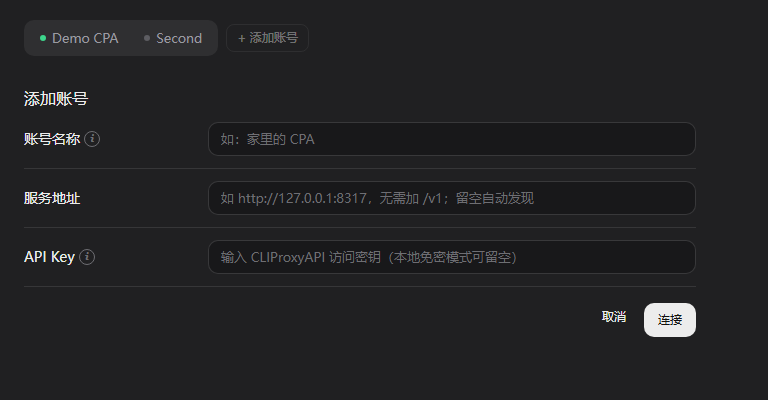
- **添加账号** 改为一个小表单(名称、地址、密钥):先测试连接,成功后才创建一个已启用的账号;测试失败时可用 **仍然添加(不启用)** 保留旧行为。只点击 **+ 添加账号** 不会再创建占位账号。
|
|
14
|
+
- 次要说明移入可访问的 ⓘ 提示(悬停、键盘聚焦或点击显示);去掉了页面副标题,输入时需要的提示改为输入框占位文字。标签文字更简短。
|
|
15
|
+
|
|
16
|
+
### 文档
|
|
17
|
+
- README 新增重做后的设置页、额度标签页、输入框额度标识和添加账号表单的截图(已标注为使用示例数据的离线组件渲染);移除 1.6.0 的账号栏截图,保留实机拍摄的更新页截图。
|
|
18
|
+
- 更新日志改为中文(`CHANGELOG.md`,默认),英文版见 `CHANGELOG.en.md`。
|
|
19
|
+
|
|
20
|
+
### 修复
|
|
21
|
+
- **离线更新下载会拒绝任何新增文件。** 更新器原来按写死的文件清单校验更新包,以后版本只要多带一个文件(比如英文更新日志、新的界面语言),内置的"下载"就会报"更新包无效"。现在改为:包内每个文件必须在该包自己的 `package.json` `files` 中声明(`package.json`、README、LICENSE 等 npm 总会打包的文件除外),路径穿越、隐藏文件、`node_modules`、链接/特殊条目、依赖和安装脚本仍然一律拒绝。被拒绝时,具体原因(例如哪个文件未声明)会写入 DSH 日志,页面仍只显示本地化的错误提示。已安装 1.5.0–1.6.0 的用户仍使用旧规则:如果以后某个版本新增了文件,请通过插件市场、插件页面或 `dsh plugin add` 升级一次。
|
|
22
|
+
- **输入框额度标识在某个会话中反复消失。** DSH 会按会话绑定缓存插槽条目 `inject()` 的结果,而额度标识在 `inject()` 中解析会话的模型目录。如果这一步发生在会话完成绑定之前(页面加载、DSH 重启、切换会话),这次失败会被缓存,该会话的额度标识就一直隐藏,而模型选择器本身已经恢复。现在改为在渲染时解析模型目录,并在其可用之前持续重试。
|
|
23
|
+
- **新对话页面没有额度标识。** DSH 只在会话绑定后才渲染输入框的 `conversation.input.right` 列表,而新会话页面已经显示了模型选择器。额度标识现在也注册到 `conversation.hero.options`(新会话页面输入框上方那一行),并且只在同一会话没有挂载输入框额度标识时显示,保证始终只出现一个。
|
|
24
|
+
- **插件重载后输入框额度标识(以及可能的其他插件条目)消失,直到刷新页面。** DSH 会拒绝在同一优先级下注册相同 id/key 的第二个列表或键控插槽条目,而热重载可能在旧实例销毁之前就启动新实例。现在条目会降低一个优先级重试(保留稳定的 id/key;渲染优先级最低的那个,旧实例销毁后由新条目接管)。每个实例也拥有自己的样式表,销毁旧实例不会再移除新实例的样式。
|
|
25
|
+
|
|
26
|
+
### 新增
|
|
27
|
+
- **支持 CPA 自带管理面板支持的所有渠道额度。** 对照 CLIProxyAPI 及其管理中心实现:**Meta**(Muse Code;套餐、滚动窗口和每周额度——其接口需要凭证的 `dca_token`,仅为这一次请求从 `/v0/management/auth-files/download` 读取,从不存储、记录或返回)、**Kimi 国际版**(`kimi-ai` 凭证查询 `api.kimi.ai`;被一个 Kimi 主机拒绝的令牌会在另一个主机上重试),以及 **CPA 插件渠道**:CPA 标记为 `supports_quota` 的其他凭证(额度插件或声明式 `quota_probe`)通过 CPA 统一的 `POST /v0/management/quota/fetch` 读取(套餐及分组额度窗口)。API Key 渠道和 Vertex 没有额度接口;付费 xAI 账号不会用真实的对话请求去探测。
|
|
28
|
+
- **Devin 额度。** Devin 凭证现在显示套餐以及每日 / 每周剩余额度和重置时间,通过 `/v0/management/api-call` 调用 Devin 的 `SeatManagementService/GetUserStatus` 读取(与 CPA 管理中心发出的请求相同;由 CPA 代入凭证的会话令牌)。该额度按账号统计,因此所有 `devin/…` 模型在额度标识和"模型 → 渠道"表中显示相同的窗口。响应中没有额度字段时报告为错误,而不是显示空数据。
|
|
29
|
+
- **测试连接**(`POST /api/dsh-cliproxyapi/accounts/test`)用尚未保存的地址/密钥进行探测,不保存也不写入路由;密钥留空时使用已存储的密钥,且从不返回密钥。
|
|
30
|
+
- **CLIProxyAPI 设置分区新增"额度"标签页。** 分区现在有 **设置**(原有的账号/模型页)和 **额度** 两个标签页。为每个账号填写 CPA 管理密钥(存放在 DSH 凭据服务中的 `CLI_PROXY_MANAGEMENT_KEY` / `CLI_PROXY_MANAGEMENT_KEY_<ACCOUNT_ID>` 下,从不写入状态文件或设置)后,Host 会读取该服务器的凭证(`/v0/management/auth-files`、各凭证的模型列表,以及通过 `/v0/management/api-call` 获取的上游额度)。该标签页沿用 DSH 原生设置页的平铺行布局:密钥行和刷新行、分布条、按渠道分组的所有凭证及其套餐、状态和额度窗口(5 小时 / 每周 / 每月 / 每日,以进度条显示并附重置时间)、渠道筛选,以及可展开的"模型 → 渠道"表,展示每个选择器模型对应到哪些凭证。没有已知额度接口的渠道只显示状态。
|
|
31
|
+
- **输入框额度标识**,位于模型选择器左侧(`conversation.input.right`):显示信号格和在当前所选模型所属账号中、可服务该模型的凭证里最高的剩余百分比;点击可在 DSH 菜单面板上查看每个凭证的详情。标识沿用模型选择器触发按钮的尺寸,没有管理密钥的账号不显示。匹配按账号、按渠道进行:模型 id 只匹配其路由所属账号的凭证,带前缀的 id(`devin/…`)只匹配带该前缀的凭证,不带前缀的 id 优先匹配不带前缀的凭证。
|
|
32
|
+
- `/cpa-status` 末尾追加每个账号的额度摘要(是否配置密钥、状态、凭证数量,以及每个选择器模型对应的凭证和其中最紧张的剩余百分比);不输出任何密钥。
|
|
33
|
+
- 额度 HTTP 接口 `/api/dsh-cliproxyapi/quota/{status,refresh,save}`;保存密钥和刷新会启动刷新并立即返回,页面在 `refreshing` 期间跟踪进度。Host 将结果缓存 5 分钟,且只在有页面请求时在后台刷新过期账号;管理密钥被拒绝(401/403)后,该账号暂停自动刷新,直到密钥变更或手动刷新,以免触发 CPA 的错误密钥保护。
|
|
4
34
|
|
|
5
35
|
## 1.6.0 — 2026-10-20
|
|
6
36
|
|
|
7
|
-
###
|
|
8
|
-
-
|
|
37
|
+
### 变更
|
|
38
|
+
- **账号和模型移到设置对话框的左侧导航。** 账号/模型页现在是独立的 `settings.section` 条目("CLIProxyAPI"),与 dshmarket 的"市场"分区一样。插件的捆绑包页面(侧边栏 → 插件)及其内置插件标签页现在只包含插件更新:一条指向新分区的提示和更新卡片,在这里默认展开。
|
|
9
39
|
|
|
10
|
-
###
|
|
11
|
-
- **
|
|
40
|
+
### 修复
|
|
41
|
+
- **DSH 桌面版上"检查更新"总是失败。** 桌面外壳在把页面请求转发给 Host 时会去掉 `Origin` 头,而更新 POST(`check`、`save`、`download`)要求带有完全匹配的 `Origin`,因此每次都以 `forbidden-origin` 被拒绝。更新 POST 现在遵循 Host 的连接防护规则:缺少 `Origin` 时依赖 Host 会话认证,而带有 `Origin` 时仍必须是本监听器自身的地址(按其自身的 `http(s)` 协议比较)。被拒绝的来源现在有单独的本地化提示。
|
|
12
42
|
|
|
13
|
-
###
|
|
14
|
-
-
|
|
15
|
-
-
|
|
43
|
+
### 新增
|
|
44
|
+
- **通过 DSH 插件市场一键更新。** 检测到 dshmarket 的公开 Update API v1(`GET /dsh-market/api/v1/capabilities`)时,更新卡片提供 **立即更新**:确认版本后将更新提交给市场,跟踪操作进度,报告市场实际安装的版本(低于检查到的目标版本时给出警告),并根据市场返回的结果给出重启/刷新指引,只有市场负责重启时才显示重启按钮。市场的失败代码均已本地化;只有在发布时间等待期或版本未解析时才提供 **仍然安装**。链接安装永远不会通过市场安装。本插件自身仍然从不运行包管理器。
|
|
45
|
+
- **自动安装(可选,`autoInstall`,默认关闭)。** 开启自动检查且存在 dshmarket 时,Host 自动检查发现的新版本会在 DSH 页面打开期间通过市场安装;每个版本每 6 小时最多尝试一次,安装成功后不再重试,自动模式从不强制安装。该选项作为 v1 `update-settings.json` 的可选字段存储;旧文件加载时视为关闭。
|
|
16
46
|
|
|
17
47
|
## 1.5.1 — 2026-10-19
|
|
18
48
|
|
|
19
|
-
###
|
|
20
|
-
-
|
|
49
|
+
### 修复
|
|
50
|
+
- 缺少更新接口(页面已更新但 DSH 仍在运行旧的 Host 代码)时,不再报告为"版本信息无效":404/405/501 响应现在对应一条单独的"更新服务不可用"提示,说明真实原因,并指出需要重启 DSH 而不只是刷新页面。
|
|
21
51
|
|
|
22
52
|
## 1.5.0 — 2026-10-19
|
|
23
53
|
|
|
24
|
-
###
|
|
25
|
-
-
|
|
26
|
-
-
|
|
27
|
-
-
|
|
28
|
-
-
|
|
29
|
-
-
|
|
30
|
-
-
|
|
31
|
-
-
|
|
32
|
-
-
|
|
33
|
-
-
|
|
34
|
-
|
|
35
|
-
###
|
|
36
|
-
-
|
|
37
|
-
-
|
|
54
|
+
### 新增
|
|
55
|
+
- **插件更新卡片**,独立于账号表单和草稿,提供中英文文案、本地化错误、当前/最新版本、稳定版 / Beta / Dev 渠道、自动 / 全球 / 中国大陆区域、自动检查和可选的自动下载。卡片默认折叠为一行(标题、当前版本、简短的更新状态),点击展开;轮询和保存不会重置展开状态。
|
|
56
|
+
- 自动检查默认开启:启动或修改计划设置约 3 秒后执行,之后每 6 小时一次;自动下载默认关闭,只在自动检查发现新版本后运行。不会自动安装、卸载、覆盖源码或重启。
|
|
57
|
+
- 严格的 SemVer 渠道检查,使用 npm `latest` / `beta` / `dev`;未发布的渠道明确报错,不会跨渠道回退或降级。自动区域同时请求 npmjs 和 npmmirror,取最先返回的有效元数据;指定区域只使用所选的源,且不影响 CPA 流量。
|
|
58
|
+
- 中国大陆下载按精确的主机/包名/版本白名单跟随 npmmirror 官方 CDN 重定向,最多 3 次 HTTPS 跳转,并保留原始元数据中的完整性校验值。拒绝外部、本地、跨区域和降级的重定向。
|
|
59
|
+
- 离线包校验:使用源提供的 SHA-512 完整性校验值,并检查 gzip/tar 大小上限、包名/版本和文件结构。拒绝路径穿越、链接/特殊条目、意外文件、依赖和安装生命周期脚本;从不解压或执行更新包。这些检查不是发布者签名或 npm 来源证明(provenance)验证。
|
|
60
|
+
- 更新包以原子方式保存到 profile 的 `.dsh-cliproxyapi/updates/` 目录,下载前需确认具体版本,并提供离线命令 `dsh plugin --profile 'name' add 'absolute.tgz'`,在关闭 DSH 后运行,然后重启。本地链接安装可以检查和下载,但不提供命令,以保护基于源码的安装。
|
|
61
|
+
- 独立的带版本号的 `update-settings.json` 偏好设置;文件无效或无法读取时关闭自动网络检查,文件缺失时使用首次运行的默认值。现有 v2 账号状态和凭据保持不变。检查结果和下载提示只保存在内存中;下载的文件由用户自行清理。
|
|
62
|
+
- 需要认证的更新 HTTP 接口:只读的 `GET /api/dsh-cliproxyapi/updates/status`,以及 `POST` 操作 `/check`、`/save`、`/download`。更新 POST 要求带有与实际连接协议和 Host 完全匹配的同源请求头,不信任转发的协议声明。
|
|
63
|
+
- 离线更新器、HTTP 以及无依赖的 VM/Hook 客户端测试;使用真实组件的离线预览(折叠和展开),并清楚标注示例版本。
|
|
64
|
+
|
|
65
|
+
### 变更
|
|
66
|
+
- 发布流程将稳定版发布到 npm `latest`,Beta / Dev 预发布版发布到 `beta` / `dev`,并将对应的 GitHub Release 标记为预发布,不会替换稳定版。
|
|
67
|
+
- 两份 README 和架构指南说明了下载与安装的区别、链接源码保护、存储位置、接口准入规则,以及关闭 DSH 后手动升级的流程。打包的零依赖插件现在包含内部模块 `lib/updater.js`。
|
|
38
68
|
|
|
39
69
|
## 1.4.1 — 2026-10-19
|
|
40
70
|
|
|
41
|
-
|
|
71
|
+
仅涉及文档和发布工具;插件代码与 1.4.0 相同。
|
|
42
72
|
|
|
43
|
-
###
|
|
44
|
-
- `README.md`
|
|
45
|
-
-
|
|
73
|
+
### 变更
|
|
74
|
+
- `README.md` 改为中文(GitHub 和 npm 上的默认版本),英文版见 `README.en.md`。两份文档都已重写:快速开始、四种经过验证的安装方式(DSH **插件** 页面、DSH agent、`dsh plugin add`、GitHub / 离线包)、升级和卸载,以及常见问题。图片和链接使用绝对地址,在 npmjs.com 上也能正常显示。
|
|
75
|
+
- 发布通过 npm 可信发布(GitHub Actions OIDC)推送到 npm,并自动附带来源证明;任何地方都不存储 npm 令牌。发布流程也可以针对已有标签手动运行,并跳过已完成的步骤。
|
|
46
76
|
|
|
47
77
|
## 1.4.0 — 2026-10-19
|
|
48
78
|
|
|
49
|
-
|
|
50
|
-
|
|
51
|
-
###
|
|
52
|
-
-
|
|
53
|
-
-
|
|
54
|
-
-
|
|
55
|
-
- `cliproxyapi`
|
|
56
|
-
- HTTP
|
|
57
|
-
-
|
|
58
|
-
- GitHub Actions
|
|
59
|
-
|
|
60
|
-
###
|
|
61
|
-
- `state.json`
|
|
62
|
-
-
|
|
63
|
-
-
|
|
64
|
-
-
|
|
65
|
-
- `/cpa-status`
|
|
66
|
-
-
|
|
67
|
-
- `engines.node`
|
|
68
|
-
|
|
69
|
-
###
|
|
70
|
-
-
|
|
71
|
-
-
|
|
72
|
-
-
|
|
73
|
-
-
|
|
79
|
+
首个公开版本。
|
|
80
|
+
|
|
81
|
+
### 新增
|
|
82
|
+
- **多个 CLIProxyAPI 账号。** 每个账号有独立的基础地址、API 密钥(独立的凭据引用)、提供方路由 ID、协议模式、模型选择和单模型覆盖设置,并同步到各自的 `llm-pi-ai` 路由(`cli-proxy-2`、`cli-proxy-2-responses`、`cli-proxy-2-messages` 等)。
|
|
83
|
+
- **单账号启用开关。** 停用的账号保留设置,但其路由会被移除,模型也随之从选择器中消失。新账号默认停用;手动刷新仍会探测它们,以便在启用前选好模型。
|
|
84
|
+
- 设置面板账号栏:切换账号、**+ 添加账号**、**删除此账号**、凭据引用字段。
|
|
85
|
+
- `cliproxyapi` 工具:新增 `add_account` 和 `remove_account` 操作,以及 `account`、`enabled` 和 `apiKeyEnv` 参数;输出列出所有账号。
|
|
86
|
+
- HTTP 接口 `POST /api/dsh-cliproxyapi/accounts/add` 和 `/accounts/remove`;`refresh` 和 `save` 支持 `accountId`。
|
|
87
|
+
- 英文 `README.md` 和中文 `README.zh.md`,附带说明的截图;供插件商店读取的 `screenshots.json`;`LICENSE`、`AGENTS.md`、`CHANGELOG.md`。
|
|
88
|
+
- GitHub Actions:CI(Ubuntu + Windows,Node 22 / 24),以及由标签触发的发布流程,附加打包好的插件并可选发布到 npm。
|
|
89
|
+
|
|
90
|
+
### 变更
|
|
91
|
+
- `state.json` 改为 `{ version: 2, refreshIntervalSeconds, probeTimeoutMs, accounts: [...] }`。v1 单账号文件会自动迁移为账号 `default`,保留相同的路由、密钥和模型选择;原文件保存为 `state.v1.json`。
|
|
92
|
+
- 设置了明确基础地址的账号只探测该地址,不再回退到本地 `:8317`、已有路由或 `CLIPROXYAPI_BASE_URL`。
|
|
93
|
+
- 保存时拒绝账号之间重叠的提供方路由 ID;手动编辑文件导致重叠的账号会报告错误,且从不写入或删除其他账号的路由。
|
|
94
|
+
- 多个账号并发同步时,设置写入按顺序执行。
|
|
95
|
+
- `/cpa-status` 和 `/cpa-refresh` 覆盖所有账号。
|
|
96
|
+
- DSH 版本要求移到顶层 `engines.dsh`,DSH 从这里读取;导出了 `./icon`。
|
|
97
|
+
- `engines.node` 改为 `>=22`(CI 测试的版本)。
|
|
98
|
+
|
|
99
|
+
### 修复
|
|
100
|
+
- **首次运行的模型选择不再使用写死的模型 id。** 没有保存过选择的账号会在首次成功探测时,从其服务器自己的模型目录中为每个系列选出最新的模型(最多 12 个),只做一次。之前全新安装会预选 7 个固定 id,而大多数服务器并不提供这些模型,导致选择器里什么都没有。
|
|
101
|
+
- **恢复推荐精选** 使用同样从模型目录推导出的列表(并显示数量),不再使用固定的 7 个。
|
|
102
|
+
- 在从未探测模型目录前保存新账号,不再存储一个空的模型选择。
|
|
103
|
+
- 保存的模型选择在服务器上一个都匹配不到时,错误信息会指出是哪个服务器,已发现的模型仍显示在面板中。
|
|
74
104
|
|
|
75
105
|
## 1.3.0
|
|
76
106
|
|
|
77
|
-
-
|
|
78
|
-
-
|
|
107
|
+
- 按模型使用原生协议路由(`protocolMode: "auto"`):Claude 走 Anthropic Messages,GPT/Codex/Grok 走 OpenAI Responses,其他走 OpenAI Chat,每种协议一条 `llm-pi-ai` 路由;默认模型跟随其路由。
|
|
108
|
+
- 单模型协议覆盖和固定协议模式。
|
|
79
109
|
|
|
80
|
-
## 1.2.0
|
|
110
|
+
## 1.2.0 及更早
|
|
81
111
|
|
|
82
|
-
-
|
|
112
|
+
- CLIProxyAPI 自动发现、模型选择过滤、单模型参数编辑器、基于凭据服务的密钥存储、`/cpa-status` 和 `/cpa-refresh`。
|
package/README.en.md
CHANGED
|
@@ -13,7 +13,7 @@ Enter a server URL and an API key, and the plugin reads the CPA model catalog an
|
|
|
13
13
|
- **Multiple accounts**: each account has its own URL, key, model selection and parameters, and can be switched off at any time.
|
|
14
14
|
- **Works out of the box**: on the first connection, the newest model of each family in that server's own catalog is checked (at most 12), so the picker isn't flooded with hundreds of models.
|
|
15
15
|
- **Native protocols**: Claude over Anthropic Messages, GPT / Codex / Grok over OpenAI Responses, everything else over OpenAI Chat — fewer protocol translations inside CPA.
|
|
16
|
-
- **Visual management**: check models and edit per-model parameters in the settings panel
|
|
16
|
+
- **Visual management**: check models and edit per-model parameters in the settings panel. The plugin registers no agent tool, so it takes no model context.
|
|
17
17
|
- **Plugin updates**: automatically check Stable / Beta / Dev channels and choose global / Mainland China sources. With the [DSH plugin market (dshmarket)](https://github.com/dsh-market/dsh-market) installed, new versions install in one click or automatically; otherwise download a verified offline package and upgrade with DSH closed.
|
|
18
18
|
- **Secure**: API keys live only in the DSH credentials service, never in configuration files.
|
|
19
19
|
- **Zero dependencies**: no npm dependencies and no build step; installs in seconds.
|
|
@@ -27,7 +27,7 @@ Works with DSH `0.2.0-rc.1` and later (desktop and web).
|
|
|
27
27
|
- [Screenshots](#screenshots)
|
|
28
28
|
- [Features in detail](#features-in-detail)
|
|
29
29
|
- [Updating this plugin](#updating-this-plugin)
|
|
30
|
-
- [
|
|
30
|
+
- [Slash commands and HTTP routes](#slash-commands-and-http-routes)
|
|
31
31
|
- [Storage and configuration](#storage-and-configuration)
|
|
32
32
|
- [Upgrading and uninstalling](#upgrading-and-uninstalling)
|
|
33
33
|
- [FAQ](#faq)
|
|
@@ -49,7 +49,7 @@ The plugin is published on npm as [`dsh-cliproxyapi-pro`](https://www.npmjs.com/
|
|
|
49
49
|
dsh-cliproxyapi-pro
|
|
50
50
|
```
|
|
51
51
|
|
|
52
|
-
To pin a version, write `dsh-cliproxyapi-pro@1.
|
|
52
|
+
To pin a version, write `dsh-cliproxyapi-pro@1.7.0`.
|
|
53
53
|
4. Click **Install**. When it finishes, the dialog offers to enable the plugin right away — accept it.
|
|
54
54
|
|
|
55
55
|
> If downloads are slow in mainland China, open **Registry** next to the input and choose **the mainland China mirror**.
|
|
@@ -78,7 +78,7 @@ In **Add plugin**, or as the `plugin_manager` `target`, you can also enter:
|
|
|
78
78
|
|
|
79
79
|
| Source | What to enter |
|
|
80
80
|
|---|---|
|
|
81
|
-
| A released version | `git+https://github.com/TinyBOOOOM/dsh-cliproxyapi-pro.git#v1.
|
|
81
|
+
| A released version | `git+https://github.com/TinyBOOOOM/dsh-cliproxyapi-pro.git#v1.7.0` |
|
|
82
82
|
| Latest development version | `git+https://github.com/TinyBOOOOM/dsh-cliproxyapi-pro.git#main` |
|
|
83
83
|
| Offline package | Download [`dsh-cliproxyapi-pro.tgz`](https://github.com/TinyBOOOOM/dsh-cliproxyapi-pro/releases/latest/download/dsh-cliproxyapi-pro.tgz) (always the latest release) and enter its absolute local path |
|
|
84
84
|
| Local source (development) | Absolute path of a cloned repository; installed as a link, so code changes go live when the plugin reloads |
|
|
@@ -88,33 +88,39 @@ All versions are listed under [Releases](https://github.com/TinyBOOOOM/dsh-clipr
|
|
|
88
88
|
## Getting started
|
|
89
89
|
|
|
90
90
|
1. **Open the settings panel**: **Settings** → the **CLIProxyAPI** page in the left navigation (accounts, models and protocols live there). The plugin's own updates are on sidebar **Plugins** → **CLIProxyAPI** and on **Settings** → **Built-in plugins** → the **CLIProxyAPI** tab; those two places contain only update features.
|
|
91
|
-
2. **
|
|
92
|
-
3. **Choose models**:
|
|
91
|
+
2. **Add an account**: click **+ Add Account**, enter an account name, the **Base URL** (e.g. `http://127.0.0.1:8317`, without `/v1`) and the **API Key** (leave it empty for a local CPA without authentication), then click **Connect**. A successful connection creates and enables the account; on failure the reason is shown so you can fix it, or choose **Add Anyway (Disabled)**.
|
|
92
|
+
3. **Choose models**: the account's **Models** tab lists every model on the server, with the newest model of each family already checked. Adjust the selection and click **Save & Apply** at the bottom.
|
|
93
93
|
4. **Use them**: open the model picker in a conversation; the models appear in a group named after the account.
|
|
94
94
|
|
|
95
95
|
If CPA runs on this machine on the default port `8317` without a key, there is nothing to fill in: the plugin finds it automatically.
|
|
96
96
|
|
|
97
97
|
## Screenshots
|
|
98
98
|
|
|
99
|
-
The panel follows the DSH display language; the screenshots show the Chinese UI.
|
|
99
|
+
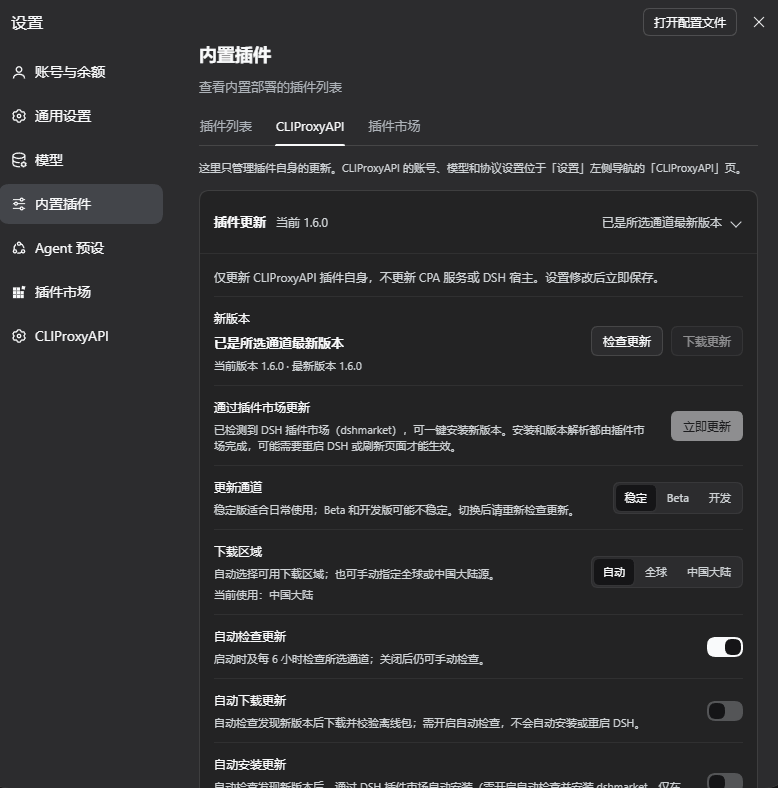
The panel follows the DSH display language; the screenshots show the Chinese UI. Images 1–5 are offline component renders: this plugin's real UI code with sample data (`example.com` addresses, fictional accounts) rendered in a browser, with colors approximating the DSH dark theme; the real colors follow your DSH theme. Image 6 is an actual capture of 1.6.0 in the DSH desktop app.
|
|
100
100
|
|
|
101
|
-
**1.
|
|
101
|
+
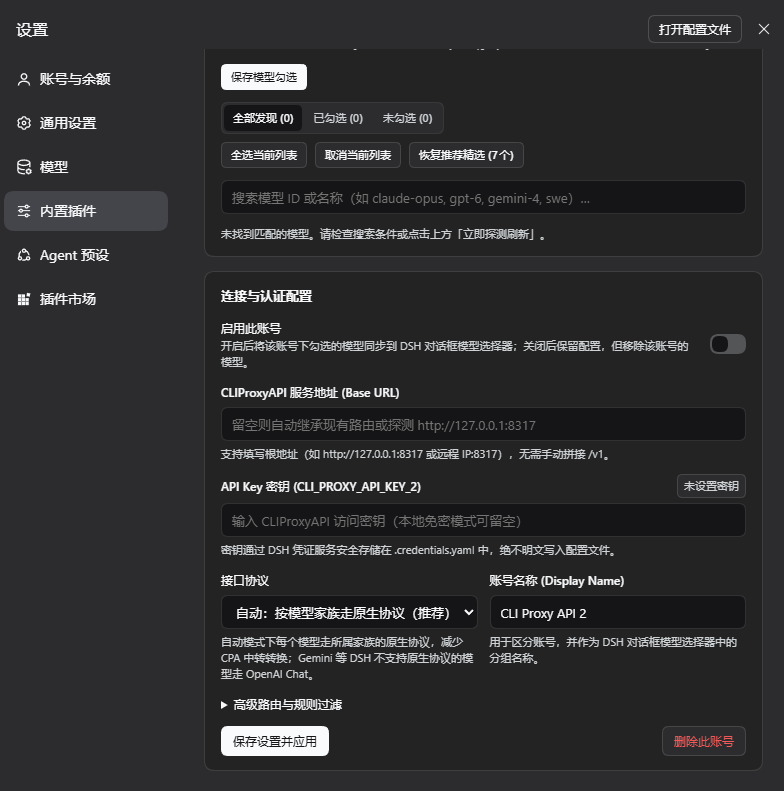
**1. Accounts and connection.** The **CLIProxyAPI** page in the Settings dialog's left navigation: one account bar for all tabs; under the account title are the connection state, address and model count, with the **Enabled** switch (applies at once) and the **⋯** menu (**Probe & Refresh**, **Delete Account**) on the right. The **Connection** tab has one row per setting, **Test Connection** next to the address (uses the values being edited, saves nothing), and secondary explanations in ⓘ tips.
|
|
102
102
|
|
|
103
|
-
|
|
104
104
|
|
|
105
|
-
**2.
|
|
105
|
+
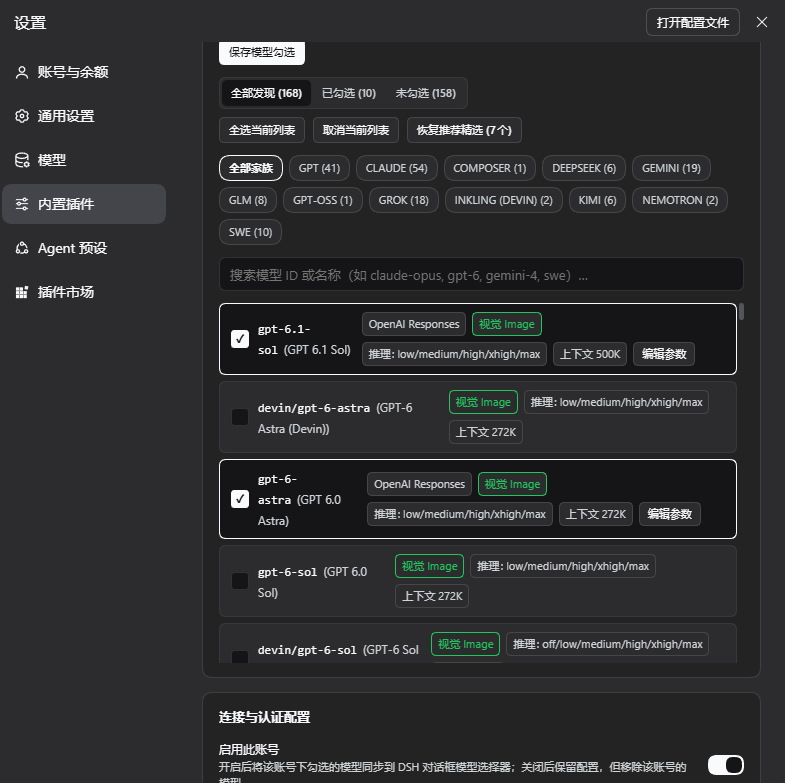
**2. Models and one save bar.** The **Models** tab lists every model on that CPA: All / Checked / Unchecked, family filter, search, bulk actions and **Reset to Recommended**; checked models show the protocol they will use and can be edited with **Edit Parameters**. Connection and model edits are tracked together, and a bar at the bottom shows **Unsaved changes · Discard / Save & Apply**.
|
|
106
106
|
|
|
107
|
-
|
|
108
108
|
|
|
109
|
-
**3.
|
|
109
|
+
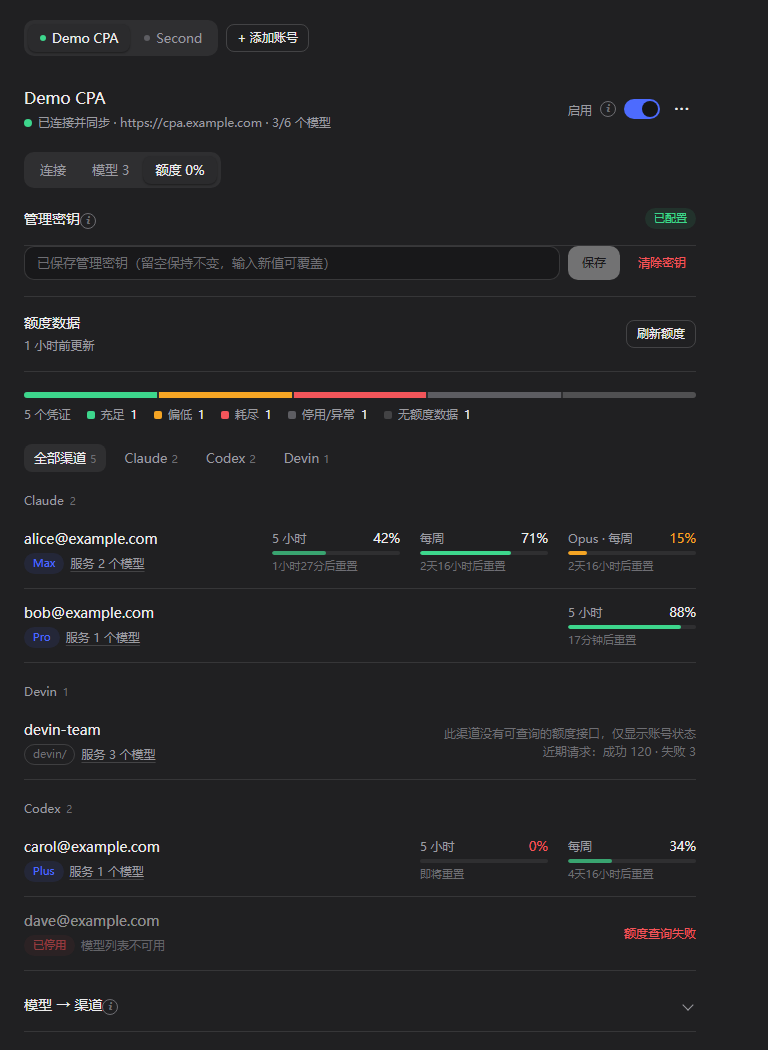
**3. Quota.** The **Quota** tab: management key, quota data and refresh, a distribution bar, credentials grouped by channel (plan, prefix, status, 5-hour / daily / weekly meters with reset times; Devin shows its daily / weekly quota, shared by every Devin model; channels without a quota endpoint show status and recent requests only), and an expandable "Model → Channel" table. The tab label shows the lowest remaining quota among the account's usable credentials.
|
|
110
110
|
|
|
111
|
-
|
|
112
112
|
|
|
113
|
-
**4.
|
|
113
|
+
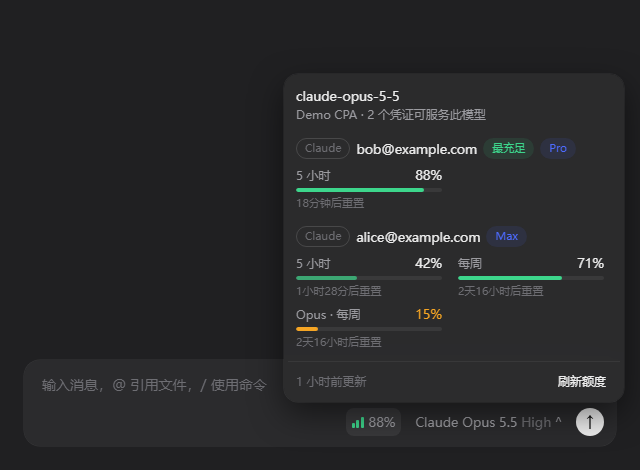
**4. Quota in the composer.** The badge left of the model selector shows the best remaining quota among the usable credentials serving the current model; clicking it lists every such credential with its quota windows. It appears only for models this plugin synchronizes whose account has a management key.
|
|
114
114
|
|
|
115
|
-
|
|
116
116
|
|
|
117
|
-
|
|
117
|
+
**5. Adding an account.** Enter a name, address and API key and click **Connect**: it tests first and creates an enabled account only when that works; on failure the reason is shown and **Add Anyway (Disabled)** is offered.
|
|
118
|
+
|
|
119
|
+
|
|
120
|
+
|
|
121
|
+
**6. The plugin update page under Built-in plugins** (actual 1.6.0 capture). **Settings** → **Built-in plugins** → the **CLIProxyAPI** tab holds only plugin updates: checking and offline download, **Update Now** once the DSH plugin market is detected, the update channel, the download region, and the automatic check / download / install switches. Here the plugin is already the latest Stable version, so **Update Now** is disabled.
|
|
122
|
+
|
|
123
|
+
|
|
118
124
|
|
|
119
125
|
## Features in detail
|
|
120
126
|
|
|
@@ -139,7 +145,10 @@ The panel follows the DSH display language; the screenshots show the Chinese UI.
|
|
|
139
145
|
|
|
140
146
|
- Each account writes its own set of routes: the first account uses `cli-proxy` / `cli-proxy-responses` / `cli-proxy-messages`, later ones `cli-proxy-2*`, `cli-proxy-3*`, …; credential refs are `CLI_PROXY_API_KEY`, `CLI_PROXY_API_KEY_2`, …. The model picker groups models by account name.
|
|
141
147
|
- **Disabling** an account keeps its settings but removes its routes, so its models leave the picker; other accounts are unaffected.
|
|
142
|
-
- **New** accounts
|
|
148
|
+
- **New** accounts: **+ Add Account** first tests the entered URL and key and creates an enabled account only when that works; **Add Anyway (Disabled)** is also offered.
|
|
149
|
+
- Each account page has **Connection / Models / Quota** tabs under one shared account bar. The **Enabled** switch next to the account title applies at once; the **⋯** menu holds **Probe & Refresh** and **Delete Account**.
|
|
150
|
+
- Connection and model changes are tracked together; a bar at the bottom shows **Unsaved changes · Discard / Save & Apply**, and switching accounts asks before dropping unsaved changes. **Test Connection** probes the address and key being edited without saving anything.
|
|
151
|
+
- Secondary explanations live in ⓘ tips next to the labels (open on hover, keyboard focus or click).
|
|
143
152
|
- An account with a base URL **only connects to that URL** and reports an error when it is unreachable; it never silently falls back to local `:8317`, so two accounts cannot end up on the same server.
|
|
144
153
|
- Provider route IDs of different accounts must not overlap; conflicting changes are rejected.
|
|
145
154
|
- **Deleting** an account removes its routes but keeps its key in the credentials service.
|
|
@@ -160,6 +169,18 @@ CPA serves every model on OpenAI Chat, OpenAI Responses and Anthropic Messages,
|
|
|
160
169
|
- Switch to one protocol for every model, or set a protocol per model under **Edit Parameters**.
|
|
161
170
|
- Other fields you add to a managed route by hand (such as `retryPolicy`) are kept.
|
|
162
171
|
|
|
172
|
+
### Channel quota (the "Quota" tab and the composer badge)
|
|
173
|
+
|
|
174
|
+
Each account's **Quota** tab (next to **Connection** and **Models**) shows that account's channel quota; the tab label shows the lowest remaining quota among its usable credentials.
|
|
175
|
+
|
|
176
|
+
- **Management key**: on an account's Quota tab, enter its CPA management key (`remote-management.secret-key` in the CPA config; a remote CPA also needs `remote-management.allow-remote`). It is stored in the DSH credentials service under `CLI_PROXY_MANAGEMENT_KEY` for the first account and `CLI_PROXY_MANAGEMENT_KEY_<ACCOUNT_ID>` for the others (for example `CLI_PROXY_MANAGEMENT_KEY_ACCOUNT_2`); it is never written to `state.json`, settings or logs, and never sent back to the page.
|
|
177
|
+
- **Read by the Host**: the Host reads every credential on that CPA (`/v0/management/auth-files`), the models each credential serves, and the upstream quota through `/v0/management/api-call`: Codex, Claude, Antigravity, Gemini CLI, Kimi (including Kimi International, kimi.ai), xAI, Devin and Meta. Channels provided by CPA plugins (credentials marked `supports_quota`) use CPA's own `/v0/management/quota/fetch` instead. Devin's daily / weekly quota belongs to the whole account, so every `devin/…` model shows the same windows. Meta's quota endpoint needs the `dca_token` from the credential file; the Host reads it through the management API for each query, uses it for that one request only, and never stores or logs it. API-key channels (OpenAI-compatible, Gemini / Claude / Codex API keys) and Vertex have no quota endpoint (CPA's own panel shows none either) and show their status and recent request counts only; paid xAI accounts expose no quota counters either (CPA's panel probes them with a real chat request; this plugin does not, so background refreshes never cost money).
|
|
178
|
+
- **Quota tab**: laid out as flat rows like the native DSH settings pages: management key, quota data and refresh, a distribution bar (healthy / low / exhausted / off or failing), credentials grouped by channel (plan, prefix, status, 5-hour / weekly / monthly / daily meters with reset times; problems and the least remaining first), channel filter (search when there are many credentials), and an expandable "Model → Channel" table showing which credentials each picker model is matched to.
|
|
179
|
+
- **Composer badge**: a small badge left of the model selector (signal bars + percentage) shows the best remaining quota among the usable credentials serving the selected model; click it for every credential's windows. It appears only for models this plugin synchronizes whose account has a management key; without a key there is no badge. On the New Session page (before the composer takes over the session) the badge sits at the right end of the workspace row above the input box.
|
|
180
|
+
- **Exact matching**: credentials are looked up only in the account the selected route belongs to (`cli-proxy*`, `cli-proxy-2*`, …); a prefixed model (such as `devin/claude-opus-5-5`) matches only credentials with that prefix; a bare id (such as `claude-opus-5-5`) prefers un-prefixed credentials, so the Claude and Devin channels never mix. Per-model-group windows (for example Antigravity) count only the group that fits the current model.
|
|
181
|
+
- **Troubleshooting**: `/cpa-status` includes a quota summary: each account's key state, quota state, credential count, and which credentials each picker model maps to with its remaining quota (never the key).
|
|
182
|
+
- **Refreshing**: results are cached on the Host for 5 minutes; stale accounts refresh in the background only while a page is asking, or on **Refresh Quota**. A rejected management key (401/403) pauses that account's automatic refresh until the key changes or you refresh manually, so CPA's bad-key protection is not triggered.
|
|
183
|
+
|
|
163
184
|
## Updating this plugin
|
|
164
185
|
|
|
165
186
|
**Plugin Updates** live on the plugin page (sidebar **Plugins** → **CLIProxyAPI**) and on **Settings** → **Built-in plugins** → the **CLIProxyAPI** tab; those places contain only update features, while accounts and models are on the **CLIProxyAPI** page in the Settings dialog's left navigation. On the plugin page the update card starts expanded, with a summary row showing the current version and update status, and can be collapsed at any time. Background checks still follow the saved switches, and polling never resets the expanded state. It manages only `dsh-cliproxyapi-pro`. It does not update the CPA server or DSH, or change CPA routes, accounts or model selections. Update settings save immediately; the card polls independently without reloading unsaved account forms.
|
|
@@ -194,7 +215,7 @@ CPA serves every model on OpenAI Chat, OpenAI Responses and Anthropic Messages,
|
|
|
194
215
|
Use this without the plugin market or for offline upgrades:
|
|
195
216
|
|
|
196
217
|
1. Click **Check for Updates**. If a newer version is available, click **Download Update** and confirm its version, or wait for enabled automatic checks and downloads.
|
|
197
|
-
2. The download must match the npm metadata's **SHA-512** integrity, then pass gzip / tar,
|
|
218
|
+
2. The download must match the npm metadata's **SHA-512** integrity, then pass gzip / tar, package name and version checks, and every file in it must be declared by that package's own `package.json` `files` (except files npm always packs, such as `package.json`, README and LICENSE). Path traversal, hidden files, `node_modules`, links and other special entries, dependencies and installation lifecycle scripts are rejected. When a download is rejected, the concrete reason is written to the DSH log. The package is saved without extracting into the installation directory or executing its code.
|
|
198
219
|
3. After verification, the card displays the absolute package path and an upgrade command when applicable. Packages are stored at `<profile dir>/.dsh-cliproxyapi/updates/dsh-cliproxyapi-pro-<version>.tgz`.
|
|
199
220
|
4. **Save your work and fully close DSH first**, then run the card's command in a terminal. This example is illustrative; use the actual profile name and absolute path from your card:
|
|
200
221
|
|
|
@@ -206,47 +227,9 @@ Use this without the plugin market or for offline upgrades:
|
|
|
206
227
|
|
|
207
228
|
**Linked local installations (`link:`)** can check and download packages, but do not receive an upgrade command and their source directories are never overwritten. To keep the development setup, manually update the Git source at an appropriate time, then restart DSH. Reinstalling from an offline package changes the plugin's installation source from the link to the package.
|
|
208
229
|
|
|
209
|
-
##
|
|
210
|
-
|
|
211
|
-
### The `cliproxyapi` tool
|
|
212
|
-
|
|
213
|
-
The DSH agent uses this tool to inspect and configure the plugin; just ask in plain language.
|
|
214
|
-
|
|
215
|
-
| `action` | Effect |
|
|
216
|
-
|---|---|
|
|
217
|
-
| `status` | Show every account (or only `account`) with its state and models |
|
|
218
|
-
| `refresh` | Probe and sync now; without `account`, all accounts |
|
|
219
|
-
| `configure` | Update one account (the first by default), then refresh it |
|
|
220
|
-
| `add_account` | Create an account; enabled when `baseURL` is given, otherwise disabled |
|
|
221
|
-
| `remove_account` | Delete the `account` and its routes |
|
|
222
|
-
|
|
223
|
-
Parameters (all optional except `action`):
|
|
224
|
-
|
|
225
|
-
| Parameter | Meaning |
|
|
226
|
-
|---|---|
|
|
227
|
-
| `account` | Account id (e.g. `default`, `account-2`), or its provider route ID or display name |
|
|
228
|
-
| `enabled` | Enable or disable the account |
|
|
229
|
-
| `baseURL` | CPA URL such as `http://127.0.0.1:8317`; an empty string means auto-discover |
|
|
230
|
-
| `apiKey` | Bearer key, stored under the account's `apiKeyEnv` ref |
|
|
231
|
-
| `apiKeyEnv` | Credential ref name (`[A-Za-z_][A-Za-z0-9_]*`) |
|
|
232
|
-
| `provider` | `llm-pi-ai` provider route ID, unique per account |
|
|
233
|
-
| `displayName` | Account name, also the group title in the model picker |
|
|
234
|
-
| `protocolMode` | `auto` (native protocol per family, default) or `fixed` |
|
|
235
|
-
| `protocol` | Protocol used in `fixed` mode: `openai-completions` / `openai-responses` / `anthropic-messages` |
|
|
236
|
-
| `selectedModels` | Model ids shown in the picker; `[]` shows all |
|
|
237
|
-
| `includePrefix` / `excludePrefix` | Comma-separated model id keywords |
|
|
238
|
-
| `modelOverrides` | `{ [modelId]: { contextWindow?, maxTokens?, image?, reasoningLevels?, protocol? } }`, replacing the whole map |
|
|
239
|
-
|
|
240
|
-
Examples:
|
|
241
|
-
|
|
242
|
-
```json
|
|
243
|
-
{ "action": "configure", "baseURL": "http://127.0.0.1:8317", "apiKey": "sk-...", "selectedModels": ["gpt-6.1-sol", "claude-opus-5-5"] }
|
|
244
|
-
{ "action": "add_account", "displayName": "Backup CPA", "baseURL": "https://other-cpa:8317", "apiKey": "sk-...", "selectedModels": ["gpt-6-astra"] }
|
|
245
|
-
{ "action": "configure", "account": "account-2", "enabled": false }
|
|
246
|
-
{ "action": "remove_account", "account": "account-2" }
|
|
247
|
-
```
|
|
230
|
+
## Slash commands and HTTP routes
|
|
248
231
|
|
|
249
|
-
|
|
232
|
+
This plugin registers no agent tool, so it adds nothing to model context. Accounts and models are managed on the **CLIProxyAPI** page in Settings; the slash commands below show and refresh their state.
|
|
250
233
|
|
|
251
234
|
### Slash commands
|
|
252
235
|
|
|
@@ -264,10 +247,14 @@ Used by the settings panel. Requires the DSH Web session's authentication; POST
|
|
|
264
247
|
| POST | `/api/dsh-cliproxyapi/save` | `{ accountId?, …account fields, apiKey?, clearApiKey?, refreshIntervalSeconds?, probeTimeoutMs? }` | Save an account (the first by default); a body with only global fields saves just the globals |
|
|
265
248
|
| POST | `/api/dsh-cliproxyapi/accounts/add` | Optional account fields | Create a disabled account; returns `createdId` |
|
|
266
249
|
| POST | `/api/dsh-cliproxyapi/accounts/remove` | `{ accountId }` | Delete an account and its routes |
|
|
250
|
+
| POST | `/api/dsh-cliproxyapi/accounts/test` | `{ accountId?, baseURL?, apiKey? }` | Test unsaved connection values without saving or writing routes; a blank `apiKey` uses the account's stored key; never returns the key |
|
|
267
251
|
| GET | `/api/dsh-cliproxyapi/updates/status` | — | Read update state without contacting a registry |
|
|
268
252
|
| POST | `/api/dsh-cliproxyapi/updates/check` | `{}` | Check the selected channel and region now; a manual check does not trigger automatic downloading |
|
|
269
253
|
| POST | `/api/dsh-cliproxyapi/updates/save` | `{ autoCheck?, autoDownload?, autoInstall?, channel?, region? }` | Save only these five update preferences, independently of accounts |
|
|
270
254
|
| POST | `/api/dsh-cliproxyapi/updates/download` | `{ version }` | Download the newer version confirmed by the latest check, verify it, and save an offline package without installing |
|
|
255
|
+
| GET | `/api/dsh-cliproxyapi/quota/status` | — | `{ ok, quota }`: the cached quota snapshot; stale accounts refresh in the background |
|
|
256
|
+
| POST | `/api/dsh-cliproxyapi/quota/refresh` | `{ accountId? }` | Start refreshing the quota of one or every account and return at once (`refreshing` is set in the snapshot) |
|
|
257
|
+
| POST | `/api/dsh-cliproxyapi/quota/save` | `{ accountId, managementKey?, clear? }` | Store or clear the account's management key and start refreshing its quota; the response never contains the key |
|
|
271
258
|
|
|
272
259
|
Update operation responses use `{ ok, update }`. State includes `currentVersion`, `latestVersion`, `available`, `channel`, `region`, `effectiveRegion`, `autoCheck`, `autoDownload`, `autoInstall`, `checking`, `downloading`, `lastCheckedAt`, `error` / `errorCode`, `blockedReason`, `downloadedVersion`, `downloadPath` and `upgradeCommand`. Fields without a check or download result are `null`. `channel` is `stable` / `beta` / `dev`; `region` is `auto` / `global` / `cn`; `effectiveRegion` is the `global` / `cn` source used by the last successful check (`null` before one).
|
|
273
260
|
|
|
@@ -293,7 +280,7 @@ Failures use a top-level `errorCode` or `update.errorCode`; HTTP status or `ok`
|
|
|
293
280
|
}
|
|
294
281
|
```
|
|
295
282
|
|
|
296
|
-
The file is re-read on every access; after a manual edit, click **Probe & Refresh
|
|
283
|
+
The file is re-read on every access; after a manual edit, click **Probe & Refresh** in the account's **⋯** menu. A single-account file from 1.3.x and earlier migrates automatically into account `default` with the same routes, key and selection, and the original is kept as `state.v1.json`.
|
|
297
284
|
|
|
298
285
|
- **Update settings**: stored separately at `<profile dir>/.dsh-cliproxyapi/update-settings.json`. They neither extend nor rewrite the account `state.json` v2 file, nor access credentials. When this file does not yet exist, defaults are:
|
|
299
286
|
|
|
@@ -311,7 +298,7 @@ Failures use a top-level `errorCode` or `update.errorCode`; HTTP status or `ok`
|
|
|
311
298
|
Panel saves take effect immediately. After editing this file manually, reload the plugin or restart DSH to re-read it. Corrupt, structurally invalid, invalid-field or unreadable files use safe defaults with automatic network checks disabled. Check results, the candidate version, download notices and commands are in-memory only and reset on plugin reload; downloaded packages remain in the separate `updates` subdirectory for you to clean up when needed.
|
|
312
299
|
- **Keys**: stored and resolved by ref through the DSH `credentials` service, falling back to an environment variable of the same name.
|
|
313
300
|
- **Environment**: `CLIPROXYAPI_BASE_URL` is used only for auto-discovery of accounts without a base URL.
|
|
314
|
-
- **Plugin row config**: the plugin row's `config` in `cordis.patch.yml` is overlaid on the state file at startup: `accounts` replaces the account list, other fields apply to the first account. Normally keep it `{}` and configure through the panel
|
|
301
|
+
- **Plugin row config**: the plugin row's `config` in `cordis.patch.yml` is overlaid on the state file at startup: `accounts` replaces the account list, other fields apply to the first account. Normally keep it `{}` and configure through the Settings panel.
|
|
315
302
|
|
|
316
303
|
## Upgrading and uninstalling
|
|
317
304
|
|
|
@@ -321,7 +308,7 @@ Failures use a top-level `errorCode` or `update.errorCode`; HTTP status or `ok`
|
|
|
321
308
|
## FAQ
|
|
322
309
|
|
|
323
310
|
**No models in the model picker?**
|
|
324
|
-
Check that the
|
|
311
|
+
Check that the **Enabled** switch next to the account title is on and at least one model checked (or an empty selection, meaning all). Run `/cpa-status` to see every account's state.
|
|
325
312
|
|
|
326
313
|
**"none of the selected models matched"?**
|
|
327
314
|
None of the checked models exists on this server (typical after switching servers). The panel still lists the server's models — check new ones, or click **Reset to Recommended**, then save.
|
|
@@ -352,13 +339,10 @@ Downloading and verification do not install anything. Exit DSH, run the card's u
|
|
|
352
339
|
> **For the AI agent in DeepSeek Harness**: when the user asks you to install or configure this plugin, follow these steps. The package has no npm dependencies and no build scripts.
|
|
353
340
|
|
|
354
341
|
1. **Install**: call `plugin_manager` with `{"action": "install_bundle", "target": "dsh-cliproxyapi-pro", "enabled": true}`. Read `application` and `warnings` in the result; `restart-required` means DSH must restart before the new code runs.
|
|
355
|
-
2. **Configure
|
|
356
|
-
|
|
357
|
-
- Remote URL or key: `{"action": "configure", "baseURL": "...", "apiKey": "..."}` (first account), or `{"action": "add_account", ...}` for another account. Pass `"account": "<id>"` to target a specific account.
|
|
358
|
-
- Narrow the picker with `selectedModels` (exact ids from the `status` output).
|
|
359
|
-
3. **Verify**: `{"action": "status"}` shows `state: "connected"` and `modelCount > 0` for each enabled account. Tell the user the models are in the DSH model picker under the account's name, and that accounts are managed on the **CLIProxyAPI** page in the Settings dialog's left navigation.
|
|
342
|
+
2. **Configure**: this plugin provides no agent tool; the user configures accounts in the UI. A local CPA on `http://127.0.0.1:8317` without auth needs nothing — it is discovered automatically once the plugin runs. Otherwise ask the user to open the **CLIProxyAPI** page in the Settings dialog's left navigation, click **+ Add Account**, enter the server URL and API key, then check the wanted models on the **Models** tab.
|
|
343
|
+
3. **Verify**: ask the user to run `/cpa-status`; each enabled account should be `connected` with more than 0 models. Tell the user the models are in the DSH model picker under the account's name.
|
|
360
344
|
|
|
361
|
-
Never
|
|
345
|
+
Never ask the user for an API key or write it into files; keys are entered only on the Settings page.
|
|
362
346
|
|
|
363
347
|
## Development
|
|
364
348
|
|
|
@@ -386,7 +370,7 @@ npm run pack:check # list the files a packed bundle contains
|
|
|
386
370
|
|
|
387
371
|
Releasing is a pushed `v<version>` tag: GitHub Actions runs the tests, creates a GitHub Release with the package attached, and publishes to npm through npm trusted publishing (no token involved) with a provenance statement. Stable releases publish to npm `latest`; Beta / Dev prereleases publish to `beta` / `dev` and are marked as GitHub prereleases, without replacing the stable channel. The updater checks registry-provided SHA-512 integrity and package structure only; it does not verify publisher signatures or npm provenance.
|
|
388
372
|
|
|
389
|
-
Read [AGENTS.md](https://github.com/TinyBOOOOM/dsh-cliproxyapi-pro/blob/main/AGENTS.md) before changing code; see [CHANGELOG.md](https://github.com/TinyBOOOOM/dsh-cliproxyapi-pro/blob/main/CHANGELOG.md) for history. Issues and pull requests are welcome — when you change the documentation, update both the Chinese and the English README.
|
|
373
|
+
Read [AGENTS.md](https://github.com/TinyBOOOOM/dsh-cliproxyapi-pro/blob/main/AGENTS.md) before changing code; see [CHANGELOG.en.md](https://github.com/TinyBOOOOM/dsh-cliproxyapi-pro/blob/main/CHANGELOG.en.md) for history (Chinese: [CHANGELOG.md](https://github.com/TinyBOOOOM/dsh-cliproxyapi-pro/blob/main/CHANGELOG.md)). Issues and pull requests are welcome — when you change the documentation, update both the Chinese and the English README.
|
|
390
374
|
|
|
391
375
|
## License
|
|
392
376
|
|