dsh-cliproxyapi-pro 1.5.0 → 1.6.0
This diff represents the content of publicly available package versions that have been released to one of the supported registries. The information contained in this diff is provided for informational purposes only and reflects changes between package versions as they appear in their respective public registries.
- package/CHANGELOG.md +17 -0
- package/README.en.md +32 -17
- package/README.md +32 -17
- package/lib/client.js +634 -22
- package/lib/index.js +24 -9
- package/lib/updater.js +6 -3
- package/package.json +1 -1
package/CHANGELOG.md
CHANGED
|
@@ -2,6 +2,23 @@
|
|
|
2
2
|
|
|
3
3
|
All notable changes to this plugin. Versions follow [Semantic Versioning](https://semver.org/).
|
|
4
4
|
|
|
5
|
+
## 1.6.0 — 2026-10-20
|
|
6
|
+
|
|
7
|
+
### Changed
|
|
8
|
+
- **Accounts and models moved to the Settings dialog's left navigation.** The account/model page is now its own `settings.section` entry ("CLIProxyAPI"), like the dshmarket "Market" section. The plugin's bundle page (Sidebar → Plugins) and its Built-in plugins tab now contain only plugin updates: a pointer to the new section plus the update card, expanded by default there.
|
|
9
|
+
|
|
10
|
+
### Fixed
|
|
11
|
+
- **"Check for Updates" always failed on the DSH desktop app.** The desktop shell strips the `Origin` header when it forwards page requests to the Host, and update POSTs (`check`, `save`, `download`) required an explicit exact `Origin`, so every one was refused with `forbidden-origin`. Update POSTs now follow the host connection fence: a missing `Origin` relies on the host session authentication, while a present `Origin` must still be this listener's own authority (compared under its own `http(s)` scheme). A refused origin now has its own localized message.
|
|
12
|
+
|
|
13
|
+
### Added
|
|
14
|
+
- **One-click updates through the DSH plugin market.** When dshmarket's public Update API v1 is detected (`GET /dsh-market/api/v1/capabilities`), the update card offers **Update Now**: after a version confirmation it submits the update to the market, follows the operation's progress, reports the version actually installed (and warns when it is below the checked target), and shows restart/refresh guidance from the market's outcome, with a restart button only when the market owns restarts. Market failure codes are localized; **Install Anyway** is offered only after a release-age wait or unresolved version. Linked installs are never installed through the market. This plugin still never runs a package manager itself.
|
|
15
|
+
- **Automatic installation (opt-in, `autoInstall`, default off).** With automatic checks on and dshmarket present, a version found by the Host's automatic check is installed through the market while a DSH page is open; each version is tried at most once every 6 hours and never again once installed, and automatic mode never forces. Stored as an optional field of the v1 `update-settings.json`; older files load as off.
|
|
16
|
+
|
|
17
|
+
## 1.5.1 — 2026-10-19
|
|
18
|
+
|
|
19
|
+
### Fixed
|
|
20
|
+
- A missing update endpoint (page updated but DSH still running the previous host code) is no longer reported as "invalid version information": 404/405/501 answers now map to a dedicated "update service unavailable" message that names the real cause and says DSH must be restarted, not merely refreshed.
|
|
21
|
+
|
|
5
22
|
## 1.5.0 — 2026-10-19
|
|
6
23
|
|
|
7
24
|
### Added
|
package/README.en.md
CHANGED
|
@@ -14,7 +14,7 @@ Enter a server URL and an API key, and the plugin reads the CPA model catalog an
|
|
|
14
14
|
- **Works out of the box**: on the first connection, the newest model of each family in that server's own catalog is checked (at most 12), so the picker isn't flooded with hundreds of models.
|
|
15
15
|
- **Native protocols**: Claude over Anthropic Messages, GPT / Codex / Grok over OpenAI Responses, everything else over OpenAI Chat — fewer protocol translations inside CPA.
|
|
16
16
|
- **Visual management**: check models and edit per-model parameters in the settings panel, or let the DSH agent configure things for you through the `cliproxyapi` tool.
|
|
17
|
-
- **Plugin updates**: automatically check Stable / Beta / Dev channels
|
|
17
|
+
- **Plugin updates**: automatically check Stable / Beta / Dev channels and choose global / Mainland China sources. With the [DSH plugin market (dshmarket)](https://github.com/dsh-market/dsh-market) installed, new versions install in one click or automatically; otherwise download a verified offline package and upgrade with DSH closed.
|
|
18
18
|
- **Secure**: API keys live only in the DSH credentials service, never in configuration files.
|
|
19
19
|
- **Zero dependencies**: no npm dependencies and no build step; installs in seconds.
|
|
20
20
|
|
|
@@ -49,7 +49,7 @@ The plugin is published on npm as [`dsh-cliproxyapi-pro`](https://www.npmjs.com/
|
|
|
49
49
|
dsh-cliproxyapi-pro
|
|
50
50
|
```
|
|
51
51
|
|
|
52
|
-
To pin a version, write `dsh-cliproxyapi-pro@1.
|
|
52
|
+
To pin a version, write `dsh-cliproxyapi-pro@1.6.0`.
|
|
53
53
|
4. Click **Install**. When it finishes, the dialog offers to enable the plugin right away — accept it.
|
|
54
54
|
|
|
55
55
|
> If downloads are slow in mainland China, open **Registry** next to the input and choose **the mainland China mirror**.
|
|
@@ -78,7 +78,7 @@ In **Add plugin**, or as the `plugin_manager` `target`, you can also enter:
|
|
|
78
78
|
|
|
79
79
|
| Source | What to enter |
|
|
80
80
|
|---|---|
|
|
81
|
-
| A released version | `git+https://github.com/TinyBOOOOM/dsh-cliproxyapi-pro.git#v1.
|
|
81
|
+
| A released version | `git+https://github.com/TinyBOOOOM/dsh-cliproxyapi-pro.git#v1.6.0` |
|
|
82
82
|
| Latest development version | `git+https://github.com/TinyBOOOOM/dsh-cliproxyapi-pro.git#main` |
|
|
83
83
|
| Offline package | Download [`dsh-cliproxyapi-pro.tgz`](https://github.com/TinyBOOOOM/dsh-cliproxyapi-pro/releases/latest/download/dsh-cliproxyapi-pro.tgz) (always the latest release) and enter its absolute local path |
|
|
84
84
|
| Local source (development) | Absolute path of a cloned repository; installed as a link, so code changes go live when the plugin reloads |
|
|
@@ -87,7 +87,7 @@ All versions are listed under [Releases](https://github.com/TinyBOOOOM/dsh-clipr
|
|
|
87
87
|
|
|
88
88
|
## Getting started
|
|
89
89
|
|
|
90
|
-
1. **Open the settings panel**: sidebar **Plugins** → **CLIProxyAPI
|
|
90
|
+
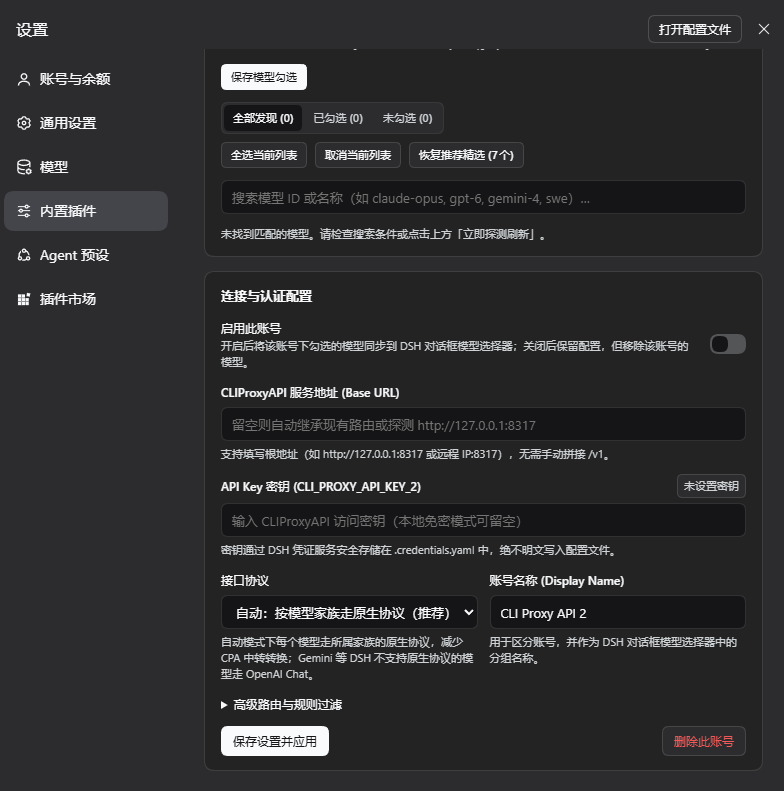
1. **Open the settings panel**: **Settings** → the **CLIProxyAPI** page in the left navigation (accounts, models and protocols live there). The plugin's own updates are on sidebar **Plugins** → **CLIProxyAPI** and on **Settings** → **Built-in plugins** → the **CLIProxyAPI** tab; those two places contain only update features.
|
|
91
91
|
2. **Enter the connection**: under **Connection & Authentication**, fill in the **CLIProxyAPI Base URL** (e.g. `http://127.0.0.1:8317`, without `/v1`) and the **API Key** (leave it empty for a local CPA without authentication), then click **Save & Apply**.
|
|
92
92
|
3. **Choose models**: once connected, **Model Picker Filter** lists every model on the server, with the newest model of each family already checked. Adjust the selection and click **Apply Selected Models**.
|
|
93
93
|
4. **Use them**: open the model picker in a conversation; the models appear in a group named after the account.
|
|
@@ -110,7 +110,7 @@ The panel follows the DSH display language; the screenshots show the Chinese UI.
|
|
|
110
110
|
|
|
111
111
|
|
|
112
112
|
|
|
113
|
-
**4. Plugin update card
|
|
113
|
+
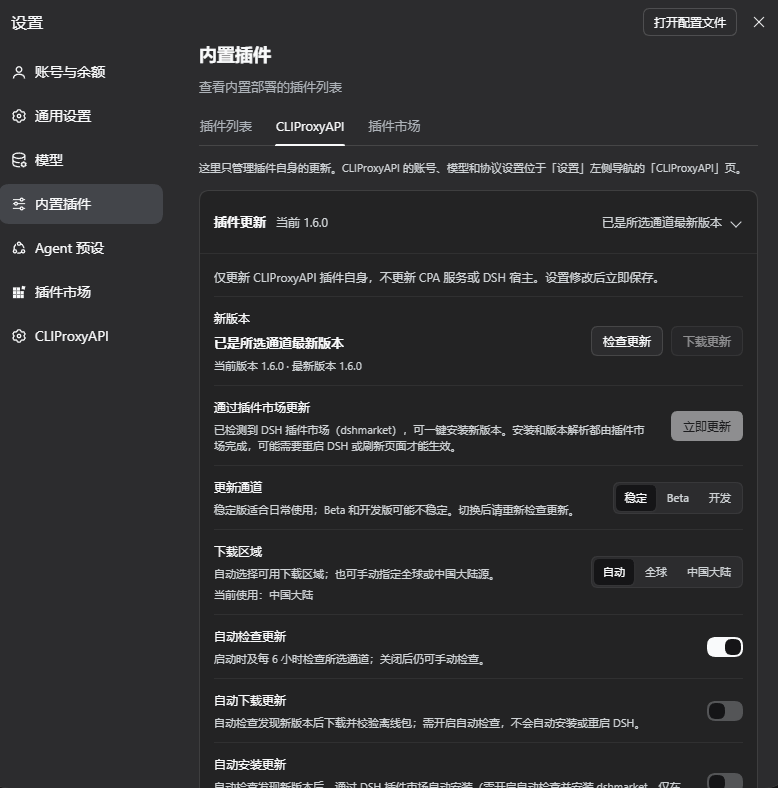
**4. Plugin update card.** The real component is rendered offline with fictional update state (captured when the card still sat collapsed at the top of the account page): a single row shows the current version and update status, and expanding it reveals channels, download regions and automatic-update switches. It now lives alone on the plugin page and starts expanded there. This is not a live GUI screenshot and does not indicate an actual published version.
|
|
114
114
|
|
|
115
115
|
|
|
116
116
|
|
|
@@ -162,9 +162,9 @@ CPA serves every model on OpenAI Chat, OpenAI Responses and Anthropic Messages,
|
|
|
162
162
|
|
|
163
163
|
## Updating this plugin
|
|
164
164
|
|
|
165
|
-
|
|
165
|
+
**Plugin Updates** live on the plugin page (sidebar **Plugins** → **CLIProxyAPI**) and on **Settings** → **Built-in plugins** → the **CLIProxyAPI** tab; those places contain only update features, while accounts and models are on the **CLIProxyAPI** page in the Settings dialog's left navigation. On the plugin page the update card starts expanded, with a summary row showing the current version and update status, and can be collapsed at any time. Background checks still follow the saved switches, and polling never resets the expanded state. It manages only `dsh-cliproxyapi-pro`. It does not update the CPA server or DSH, or change CPA routes, accounts or model selections. Update settings save immediately; the card polls independently without reloading unsaved account forms.
|
|
166
166
|
|
|
167
|
-
> **
|
|
167
|
+
> **Installation is handed to the plugin market.** This plugin itself never runs a package manager, uninstalls, overwrites source code, or restarts DSH. With the [DSH plugin market (dshmarket)](https://github.com/dsh-market/dsh-market) installed, the card installs new versions in one click or automatically through the market's public Update API v1. Without the market it can only download and verify an offline package for a manual upgrade with DSH closed.
|
|
168
168
|
|
|
169
169
|
### Channels, regions and automatic controls
|
|
170
170
|
|
|
@@ -173,15 +173,26 @@ The **Plugin Updates** card near the top of the settings panel is collapsed to o
|
|
|
173
173
|
| Update channel | Stable (`stable`) | Stable / Beta / Dev read the npm `latest` / `beta` / `dev` dist-tags respectively. An unpublished Beta / Dev channel reports an error rather than silently falling back to Stable. |
|
|
174
174
|
| Download region | Auto (`auto`) | Auto races global npmjs and Mainland China npmmirror, selecting the first source with **valid version metadata**. Global (`global`) uses only `https://registry.npmjs.org`; Mainland China (`cn`) uses `https://registry.npmmirror.com` and its official `cdn.npmmirror.com` package host. The offline package uses the selected source, with at most 3 HTTPS redirects validated against the host allowlist and exact package/version path; it never falls back across regions. |
|
|
175
175
|
| Automatically check for updates | On | Check about 3 seconds after plugin startup or rescheduling update settings, then every 6 hours. **Check for Updates** remains available when disabled. |
|
|
176
|
-
| Automatically download updates | Off | Download and verify an offline package only when an **automatic check** finds a newer version.
|
|
176
|
+
| Automatically download updates | Off | Download and verify an offline package only when an **automatic check** finds a newer version. Downloading itself never installs or restarts. Enabling this while automatic checks are off does not trigger background downloads. |
|
|
177
|
+
| Automatically install updates | Off | Requires automatic checks and dshmarket (cannot be enabled while the market is not detected). When an **automatic check** finds a newer version, an open DSH page asks the plugin market to install it; each version is tried at most once every 6 hours and never again once installed. Market rules such as its release-age wait still apply, and automatic mode never forces an install. A DSH restart or page refresh may be needed for it to take effect. |
|
|
177
178
|
|
|
178
179
|
- Strict SemVer comparison offers downloads only when the selected channel is newer than the running version; there is no automatic downgrade. Automatic region selection never falls back across channels.
|
|
179
180
|
- The region affects only this plugin's update metadata and package downloads, **not CPA connections, model requests, or other plugins' installation sources**.
|
|
180
181
|
- Check again after switching channel or region. Opening the card, polling, or reloading status only reads in-memory state and does not itself contact an update source; background checks follow the controls above.
|
|
181
182
|
- Errors are localized, including unpublished channels, network failures, package integrity failures and storage failures, without exposing backend stack traces.
|
|
182
183
|
|
|
184
|
+
### One-click and automatic updates through the plugin market
|
|
185
|
+
|
|
186
|
+
1. The card only reads the market's local `GET /dsh-market/api/v1/capabilities` when it opens and never contacts a registry for it; once detected it shows **Update Now**.
|
|
187
|
+
2. After a check finds a newer version, click **Update Now** and confirm the version. The card submits `POST /dsh-market/api/v1/updates { "packageName": "dsh-cliproxyapi-pro" }` to the market, then polls that operation's progress and result. Version resolution, download, installation, version verification and recovery are all done by the market.
|
|
188
|
+
3. When it finishes, the card shows the version actually installed and, following the market's result, asks you to **Restart DSH** (a button appears only when the market says it owns restarts; quit and reopen the desktop app completely) or **Refresh Page**. If the market, using its own channel, installed an older version than this card found, the card says so.
|
|
189
|
+
4. During the market's release-age wait (`RELEASE_TOO_FRESH`) or before its mirror catches up (`VERSION_UNCHANGED`) you can choose **Install Anyway**; other failures show only a localized reason, never backend text.
|
|
190
|
+
5. Linked local installations (`link:`) are not installed through the market, so their source link is never replaced.
|
|
191
|
+
|
|
183
192
|
### Download, verification and offline upgrade
|
|
184
193
|
|
|
194
|
+
Use this without the plugin market or for offline upgrades:
|
|
195
|
+
|
|
185
196
|
1. Click **Check for Updates**. If a newer version is available, click **Download Update** and confirm its version, or wait for enabled automatic checks and downloads.
|
|
186
197
|
2. The download must match the npm metadata's **SHA-512** integrity, then pass gzip / tar, expected file and directory, package name and version checks. Path traversal, links and other special entries, dependencies and installation lifecycle scripts are rejected. The package is saved without extracting into the installation directory or executing its code.
|
|
187
198
|
3. After verification, the card displays the absolute package path and an upgrade command when applicable. Packages are stored at `<profile dir>/.dsh-cliproxyapi/updates/dsh-cliproxyapi-pro-<version>.tgz`.
|
|
@@ -255,12 +266,12 @@ Used by the settings panel. Requires the DSH Web session's authentication; POST
|
|
|
255
266
|
| POST | `/api/dsh-cliproxyapi/accounts/remove` | `{ accountId }` | Delete an account and its routes |
|
|
256
267
|
| GET | `/api/dsh-cliproxyapi/updates/status` | — | Read update state without contacting a registry |
|
|
257
268
|
| POST | `/api/dsh-cliproxyapi/updates/check` | `{}` | Check the selected channel and region now; a manual check does not trigger automatic downloading |
|
|
258
|
-
| POST | `/api/dsh-cliproxyapi/updates/save` | `{ autoCheck?, autoDownload?, channel?, region? }` | Save only these
|
|
269
|
+
| POST | `/api/dsh-cliproxyapi/updates/save` | `{ autoCheck?, autoDownload?, autoInstall?, channel?, region? }` | Save only these five update preferences, independently of accounts |
|
|
259
270
|
| POST | `/api/dsh-cliproxyapi/updates/download` | `{ version }` | Download the newer version confirmed by the latest check, verify it, and save an offline package without installing |
|
|
260
271
|
|
|
261
|
-
Update operation responses use `{ ok, update }`. State includes `currentVersion`, `latestVersion`, `available`, `channel`, `region`, `effectiveRegion`, `autoCheck`, `autoDownload`, `checking`, `downloading`, `lastCheckedAt`, `error` / `errorCode`, `blockedReason`, `downloadedVersion`, `downloadPath` and `upgradeCommand`. Fields without a check or download result are `null`. `channel` is `stable` / `beta` / `dev`; `region` is `auto` / `global` / `cn`; `effectiveRegion` is the `global` / `cn` source used by the last successful check (`null` before one).
|
|
272
|
+
Update operation responses use `{ ok, update }`. State includes `currentVersion`, `latestVersion`, `available`, `channel`, `region`, `effectiveRegion`, `autoCheck`, `autoDownload`, `autoInstall`, `checking`, `downloading`, `lastCheckedAt`, `error` / `errorCode`, `blockedReason`, `downloadedVersion`, `downloadPath` and `upgradeCommand`. Fields without a check or download result are `null`. `channel` is `stable` / `beta` / `dev`; `region` is `auto` / `global` / `cn`; `effectiveRegion` is the `global` / `cn` source used by the last successful check (`null` before one).
|
|
262
273
|
|
|
263
|
-
Failures use a top-level `errorCode` or `update.errorCode`; HTTP status or `ok` alone does not establish success. Common codes include `network-error`, `invalid-metadata`, `channel-unavailable`, `integrity-error`, `invalid-package`, `storage-error`, `busy`, `stale-version` and `disposed`.
|
|
274
|
+
Failures use a top-level `errorCode` or `update.errorCode`; HTTP status or `ok` alone does not establish success. Common codes include `network-error`, `invalid-metadata`, `channel-unavailable`, `integrity-error`, `invalid-package`, `storage-error`, `busy`, `stale-version`, `service-unavailable`, `forbidden-origin` and `disposed`. Update POSTs still rely on the host's session authentication and trusted-host policy: when a request carries `Origin`, it must belong to the same authority as this listener (host and port compared under the Origin's own scheme, matching the host's own rule), otherwise the response is `forbidden-origin`. The desktop carrier may proxy API calls without an `Origin`; such a request is allowed once the host session authenticates it, while unauthenticated callers are still rejected before reaching the route. Plain unauthenticated `curl` cannot call these endpoints.
|
|
264
275
|
|
|
265
276
|
## Storage and configuration
|
|
266
277
|
|
|
@@ -291,6 +302,7 @@ Failures use a top-level `errorCode` or `update.errorCode`; HTTP status or `ok`
|
|
|
291
302
|
"version": 1,
|
|
292
303
|
"autoCheck": true,
|
|
293
304
|
"autoDownload": false,
|
|
305
|
+
"autoInstall": false,
|
|
294
306
|
"channel": "stable",
|
|
295
307
|
"region": "auto"
|
|
296
308
|
}
|
|
@@ -303,7 +315,7 @@ Failures use a top-level `errorCode` or `update.errorCode`; HTTP status or `ok`
|
|
|
303
315
|
|
|
304
316
|
## Upgrading and uninstalling
|
|
305
317
|
|
|
306
|
-
- **Upgrade**:
|
|
318
|
+
- **Upgrade**: with dshmarket installed, click **Update Now** on the plugin update card (or enable automatic installation), then restart DSH or refresh the page as prompted. Without the market, download a verified offline package through the card, save your work and close DSH, run the displayed `dsh plugin --profile 'name' add 'absolute-package-path'` command, then restart. There is no need to uninstall first. Alternatively, with DSH closed, run `dsh plugin --profile <profile name> add dsh-cliproxyapi-pro@latest` to upgrade from npm. Accounts, selections and parameters remain in the profile directory, and keys in the credentials service; the updater never rewrites them. To preserve a linked source installation, update its source yourself rather than reinstalling from an offline package.
|
|
307
319
|
- **Uninstall**: uninstall on the **Plugins** page. The synchronized model routes are stored in DSH settings and are not removed with the plugin; to remove those models from the picker too, disable or delete every account before uninstalling.
|
|
308
320
|
|
|
309
321
|
## FAQ
|
|
@@ -320,14 +332,17 @@ Make sure the base URL is reachable from the machine running DSH and the API key
|
|
|
320
332
|
**A just-published version won't install?**
|
|
321
333
|
The pnpm used by DSH may enforce a waiting period for new releases (`minimumReleaseAge`); the install screen shows which version it actually installed. Try again later or name the version explicitly.
|
|
322
334
|
|
|
323
|
-
**
|
|
324
|
-
|
|
335
|
+
**How do I install updates automatically?**
|
|
336
|
+
Install and enable the [DSH plugin market (dshmarket)](https://github.com/dsh-market/dsh-market), then turn on **Automatically Check for Updates** and **Automatically Install Updates** on the plugin update card. The market performs the installation (package manager, version verification and recovery); this plugin itself never runs a package manager, overwrites files or restarts DSH. Without the market it can only prepare an offline package for an upgrade with DSH closed.
|
|
337
|
+
|
|
338
|
+
**"Check for Updates" fails immediately (especially on the desktop app)?**
|
|
339
|
+
Versions 1.5.1 and earlier required an `Origin` header on update POSTs, but the DSH desktop app strips that header when it forwards page requests, so checks, update-setting saves and downloads were all refused. Since 1.6.0 the plugin follows the host's own rule: without `Origin` the host session authentication decides; with `Origin` it must still be same-origin. Upgrade older versions through the plugin market, the plugin manager or the offline path.
|
|
325
340
|
|
|
326
341
|
**No release available on Beta / Dev?**
|
|
327
342
|
A channel is usable only after the maintainer publishes its npm dist-tag. Stable is never presented as an unpublished Beta / Dev build. A channel version no newer than the running version does not offer a downgrade download either.
|
|
328
343
|
|
|
329
344
|
**The update card says "update service unavailable" or "network error"?**
|
|
330
|
-
The collapsed row names the actual cause. **Update service unavailable** means the page runs newer client code than the host plugin
|
|
345
|
+
The collapsed row names the actual cause. **Update service unavailable** means the page runs newer client code than the running host plugin: after installing or upgrading, **restart DSH** (refreshing the page or reloading the plugin is not enough). **Network error** means requests to npmjs or the Mainland China mirror failed; switch the download region and check proxies/firewalls. **Channel unpublished** means that channel has no matching release yet. Expand the card for the matching explanation.
|
|
331
346
|
|
|
332
347
|
**Downloaded the update and restarted, but the version did not change?**
|
|
333
348
|
Downloading and verification do not install anything. Exit DSH, run the card's upgrade command, then start it again. Linked installations do not receive that command; update their source manually to keep the link. If a plugin reload clears the download notice, the offline file remains in the profile's `updates` directory.
|
|
@@ -341,7 +356,7 @@ Downloading and verification do not install anything. Exit DSH, run the card's u
|
|
|
341
356
|
- Local CPA on `http://127.0.0.1:8317` without auth: nothing to configure; call `{"action": "refresh"}`.
|
|
342
357
|
- Remote URL or key: `{"action": "configure", "baseURL": "...", "apiKey": "..."}` (first account), or `{"action": "add_account", ...}` for another account. Pass `"account": "<id>"` to target a specific account.
|
|
343
358
|
- Narrow the picker with `selectedModels` (exact ids from the `status` output).
|
|
344
|
-
3. **Verify**: `{"action": "status"}` shows `state: "connected"` and `modelCount > 0` for each enabled account. Tell the user the models are in the DSH model picker under the account's name, and that accounts are managed
|
|
359
|
+
3. **Verify**: `{"action": "status"}` shows `state: "connected"` and `modelCount > 0` for each enabled account. Tell the user the models are in the DSH model picker under the account's name, and that accounts are managed on the **CLIProxyAPI** page in the Settings dialog's left navigation.
|
|
345
360
|
|
|
346
361
|
Never echo API keys back to the user or write them into files.
|
|
347
362
|
|
|
@@ -349,7 +364,7 @@ Never echo API keys back to the user or write them into files.
|
|
|
349
364
|
|
|
350
365
|
```text
|
|
351
366
|
lib/index.js Host plugin (discovery, sync, multi-account controller, tool, commands, HTTP API)
|
|
352
|
-
lib/client.js Web
|
|
367
|
+
lib/client.js Web UI (ModuleLoader: account page in Settings, update card on the plugin pages, no build)
|
|
353
368
|
lib/updater.js Update settings, SemVer/channels, region race, SHA-512/package checks, offline storage
|
|
354
369
|
locale/*.json Title and description shown by the plugin manager
|
|
355
370
|
cordis.patch.yml Bundle patch inserting the dsh-cliproxyapi-pro row
|
package/README.md
CHANGED
|
@@ -14,7 +14,7 @@
|
|
|
14
14
|
- **开箱即用**:首次连接时按该服务自己的模型目录,为每个模型家族勾选最新的一个(最多 12 个),模型选择器不会被上百个模型淹没。
|
|
15
15
|
- **原生协议**:Claude 走 Anthropic Messages,GPT / Codex / Grok 走 OpenAI Responses,其余走 OpenAI Chat,减少 CPA 的协议转换。
|
|
16
16
|
- **可视化管理**:设置面板里勾选模型、编辑单个模型的参数;也可以让 DSH 的 Agent 通过 `cliproxyapi` 工具帮你配置。
|
|
17
|
-
- **插件更新**:自动检查稳定 / Beta / 开发通道,可选择全球 /
|
|
17
|
+
- **插件更新**:自动检查稳定 / Beta / 开发通道,可选择全球 / 中国大陆下载源;装有 [DSH 插件市场(dshmarket)](https://github.com/dsh-market/dsh-market) 时可一键或自动安装新版本,否则下载校验离线包,在关闭 DSH 后手动升级。
|
|
18
18
|
- **安全**:API Key 只保存在 DSH 凭证服务里,不写入任何配置文件。
|
|
19
19
|
- **零依赖**:不依赖任何 npm 包,无需构建,安装几秒完成。
|
|
20
20
|
|
|
@@ -49,7 +49,7 @@
|
|
|
49
49
|
dsh-cliproxyapi-pro
|
|
50
50
|
```
|
|
51
51
|
|
|
52
|
-
需要固定版本时可以写成 `dsh-cliproxyapi-pro@1.
|
|
52
|
+
需要固定版本时可以写成 `dsh-cliproxyapi-pro@1.6.0`。
|
|
53
53
|
4. 点击 **安装**,完成后点击 **立即启用**。
|
|
54
54
|
|
|
55
55
|
> 在中国大陆下载慢,可以点输入框旁的 **安装源**,切换到 **中国大陆镜像源**。
|
|
@@ -78,7 +78,7 @@ dsh plugin --profile <profile 名称> add dsh-cliproxyapi-pro
|
|
|
78
78
|
|
|
79
79
|
| 来源 | 填写内容 |
|
|
80
80
|
|---|---|
|
|
81
|
-
| 某个发布版本 | `git+https://github.com/TinyBOOOOM/dsh-cliproxyapi-pro.git#v1.
|
|
81
|
+
| 某个发布版本 | `git+https://github.com/TinyBOOOOM/dsh-cliproxyapi-pro.git#v1.6.0` |
|
|
82
82
|
| 最新开发版 | `git+https://github.com/TinyBOOOOM/dsh-cliproxyapi-pro.git#main` |
|
|
83
83
|
| 离线安装包 | 下载 [`dsh-cliproxyapi-pro.tgz`](https://github.com/TinyBOOOOM/dsh-cliproxyapi-pro/releases/latest/download/dsh-cliproxyapi-pro.tgz)(始终是最新版),填写它的本地绝对路径 |
|
|
84
84
|
| 本地源码(开发用) | 克隆后的仓库目录绝对路径;以链接方式安装,改代码后重载插件即生效 |
|
|
@@ -87,7 +87,7 @@ dsh plugin --profile <profile 名称> add dsh-cliproxyapi-pro
|
|
|
87
87
|
|
|
88
88
|
## 快速上手
|
|
89
89
|
|
|
90
|
-
1.
|
|
90
|
+
1. **打开设置面板**:**设置** → 左侧导航的 **CLIProxyAPI** 页(账号、模型与协议都在这里)。插件自身的更新在左侧栏 **插件** → **CLIProxyAPI**,或 **设置** → **内置插件** → **CLIProxyAPI** 标签页,这两处只有更新功能。
|
|
91
91
|
2. **填写连接信息**:在「连接与认证配置」里填 **CLIProxyAPI 服务地址**(如 `http://127.0.0.1:8317`,不用加 `/v1`)和 **API Key**(本地免密的 CPA 可留空),点 **保存设置并应用**。
|
|
92
92
|
3. **选择模型**:连接成功后,「模型显示筛选」会列出 CPA 上的全部模型,并已为每个家族勾好最新的一个。按需增减后点 **保存模型勾选**。
|
|
93
93
|
4. **开始使用**:回到对话框,打开模型选择器,就能在以账号名称命名的分组里看到这些模型。
|
|
@@ -108,7 +108,7 @@ CPA 就在本机默认端口 `8317` 且没有设置密钥时,什么都不用
|
|
|
108
108
|
|
|
109
109
|

|
|
110
110
|
|
|
111
|
-
**4.
|
|
111
|
+
**4. 插件更新卡片。** 使用真实组件与虚构的更新状态离线渲染(拍摄于更新卡片仍位于账号页顶部、默认收起的版本):一行显示当前版本与更新状态,展开后是通道、下载区域和自动更新开关。现在它单独位于插件页,并默认展开。不是正在运行的 GUI 截图,也不代表实际发布版本。
|
|
112
112
|
|
|
113
113
|

|
|
114
114
|
|
|
@@ -160,9 +160,9 @@ CPA 对每个模型同时提供 OpenAI Chat、OpenAI Responses、Anthropic Messa
|
|
|
160
160
|
|
|
161
161
|
## 插件自身更新
|
|
162
162
|
|
|
163
|
-
|
|
163
|
+
**插件更新** 位于左侧栏 **插件** → **CLIProxyAPI** 的插件页,以及 **设置** → **内置插件** → **CLIProxyAPI** 标签页;这两处只有更新功能,账号与模型设置在 **设置** 左侧导航的 **CLIProxyAPI** 页。更新卡片在插件页默认展开,摘要行显示当前版本和更新状态,可随时收起;后台检查仍按保存的开关运行,展开状态不会被轮询重置。它只管理 `dsh-cliproxyapi-pro` 自身,不会更新 CPA 服务或 DSH 宿主,也不改变 CPA 请求的路由、账号或模型勾选。更新设置修改后立即保存;卡片独立轮询状态,不会重载未保存的账号表单。
|
|
164
164
|
|
|
165
|
-
>
|
|
165
|
+
> **安装交给插件市场。** 本插件自身从不运行包管理器、卸载插件、覆盖源码或重启 DSH。装有 [DSH 插件市场(dshmarket)](https://github.com/dsh-market/dsh-market) 时,卡片通过它公开的 Update API v1 一键或自动安装新版本;没有插件市场时,只能下载并校验离线包,在关闭 DSH 后手动升级。
|
|
166
166
|
|
|
167
167
|
### 通道、区域与自动开关
|
|
168
168
|
|
|
@@ -171,15 +171,26 @@ CPA 对每个模型同时提供 OpenAI Chat、OpenAI Responses、Anthropic Messa
|
|
|
171
171
|
| 更新通道 | 稳定(`stable`) | 稳定 / Beta / 开发分别读取 npm 的 `latest` / `beta` / `dev` dist-tag。Beta / 开发通道尚未发布时明确报错,不悄悄回退稳定版。 |
|
|
172
172
|
| 下载区域 | 自动(`auto`) | 自动模式同时请求全球 npmjs 与中国大陆 npmmirror,选择最先返回**有效版本元数据**的源;全球(`global`)只使用 `https://registry.npmjs.org`,中国大陆(`cn`)使用 `https://registry.npmmirror.com` 及其官方 `cdn.npmmirror.com` 包下载域名。离线包从本次检查选中的源下载,至多跟随 3 次经过白名单与精确包名/版本路径校验的 HTTPS 跳转,不跨区域回退。 |
|
|
173
173
|
| 自动检查更新 | 开启 | 插件启动或更新设置重新调度后约 3 秒检查,之后每 6 小时检查所选通道;关闭后仍可手动点 **检查更新**。 |
|
|
174
|
-
| 自动下载更新 | 关闭 |
|
|
174
|
+
| 自动下载更新 | 关闭 | 仅在**自动检查**发现新版本时,自动下载并校验离线包;下载本身不安装、不重启。仅开启此项而关闭自动检查,不会触发后台下载。 |
|
|
175
|
+
| 自动安装更新 | 关闭 | 需要开启自动检查并装有 dshmarket(未检测到插件市场时无法开启)。**自动检查**发现新版本后,由打开着的 DSH 页面调用插件市场安装;同一版本 6 小时内最多尝试一次,安装成功的版本不再重试。插件市场的发布冷却期等限制照常生效,自动模式从不强制安装。生效可能需要重启 DSH 或刷新页面。 |
|
|
175
176
|
|
|
176
177
|
- 检查使用严格 SemVer 比较:只有所选通道版本高于当前运行版本时才提供下载,不自动降级。自动区域选择也不会跨通道回退。
|
|
177
178
|
- 区域只影响本插件的更新元数据与安装包下载,**不影响 CPA 的连接、模型请求或其他插件的安装源**。
|
|
178
179
|
- 切换通道或区域后,请重新检查更新。打开卡片、轮询或重新读取状态本身只读取内存状态,不主动访问更新源;后台自动检查由上述开关控制。
|
|
179
180
|
- 失败时卡片显示本地化提示,例如通道未发布、网络异常、包完整性校验失败或磁盘写入失败,不显示后端堆栈。
|
|
180
181
|
|
|
182
|
+
### 通过插件市场一键更新 / 自动更新
|
|
183
|
+
|
|
184
|
+
1. 卡片打开时只读取插件市场本地的 `GET /dsh-market/api/v1/capabilities`,不访问任何更新源;检测到后显示 **立即更新**。
|
|
185
|
+
2. 检查到新版本后点 **立即更新** 并确认版本号;卡片向插件市场提交 `POST /dsh-market/api/v1/updates { "packageName": "dsh-cliproxyapi-pro" }`,再轮询该任务的进度与结果。版本解析、下载、安装、版本核对与恢复都由插件市场完成。
|
|
186
|
+
3. 完成后卡片显示实际装上的版本,并按插件市场的结果提示 **重启 DSH**(仅插件市场声明可以重启时显示按钮;桌面版需完全退出后重新打开)或 **刷新页面**。若插件市场按其自身通道装上的版本低于本卡片检查到的版本,会明确提示。
|
|
187
|
+
4. 遇到发布冷却期(`RELEASE_TOO_FRESH`)或镜像未同步(`VERSION_UNCHANGED`)时可手动选择 **仍然安装**;其他失败只显示本地化原因,不显示后端信息。
|
|
188
|
+
5. 本地链接安装(`link:`)不提供插件市场安装,以免替换源码链接。
|
|
189
|
+
|
|
181
190
|
### 下载、校验与离线升级
|
|
182
191
|
|
|
192
|
+
没有插件市场或需要离线升级时使用:
|
|
193
|
+
|
|
183
194
|
1. 点击 **检查更新**;有更高版本时,点 **下载更新** 并确认版本号,或等待已启用的自动检查 / 自动下载。
|
|
184
195
|
2. 下载先通过 npm 元数据中的 **SHA-512** 完整性校验,再验证 gzip / tar、预期文件与目录、包名和版本;拒绝路径穿越、链接等特殊条目、依赖和安装生命周期脚本。只保存离线包,不解压到安装目录,也不执行包内代码。
|
|
185
196
|
3. 校验成功后,卡片显示安装包的绝对路径与适用的升级命令。包保存在 `<Profile 目录>/.dsh-cliproxyapi/updates/dsh-cliproxyapi-pro-<version>.tgz`。
|
|
@@ -253,12 +264,12 @@ DSH 的 Agent 可以用这个工具查看和配置插件,你只需用自然语
|
|
|
253
264
|
| POST | `/api/dsh-cliproxyapi/accounts/remove` | `{ accountId }` | 删除账号及其路由 |
|
|
254
265
|
| GET | `/api/dsh-cliproxyapi/updates/status` | — | 只读更新状态,不主动联网检查 |
|
|
255
266
|
| POST | `/api/dsh-cliproxyapi/updates/check` | `{}` | 主动检查所选通道与区域;手动检查不触发自动下载 |
|
|
256
|
-
| POST | `/api/dsh-cliproxyapi/updates/save` | `{ autoCheck?, autoDownload?, channel?, region? }` |
|
|
267
|
+
| POST | `/api/dsh-cliproxyapi/updates/save` | `{ autoCheck?, autoDownload?, autoInstall?, channel?, region? }` | 只保存这五项更新设置,与账号配置独立 |
|
|
257
268
|
| POST | `/api/dsh-cliproxyapi/updates/download` | `{ version }` | 下载最近一次检查确认的新版本,完成校验后保存离线包;不安装 |
|
|
258
269
|
|
|
259
|
-
更新接口的操作响应采用 `{ ok, update }`,状态包含 `currentVersion`、`latestVersion`、`available`、`channel`、`region`、`effectiveRegion`、`autoCheck`、`autoDownload`、`checking`、`downloading`、`lastCheckedAt`、`error` / `errorCode`、`blockedReason`、`downloadedVersion`、`downloadPath` 与 `upgradeCommand`。未检查或未下载的相关字段为 `null`。`channel` 为 `stable` / `beta` / `dev`,`region` 为 `auto` / `global` / `cn`;`effectiveRegion` 为本次成功检查使用的 `global` / `cn`(此前为 `null`)。
|
|
270
|
+
更新接口的操作响应采用 `{ ok, update }`,状态包含 `currentVersion`、`latestVersion`、`available`、`channel`、`region`、`effectiveRegion`、`autoCheck`、`autoDownload`、`autoInstall`、`checking`、`downloading`、`lastCheckedAt`、`error` / `errorCode`、`blockedReason`、`downloadedVersion`、`downloadPath` 与 `upgradeCommand`。未检查或未下载的相关字段为 `null`。`channel` 为 `stable` / `beta` / `dev`,`region` 为 `auto` / `global` / `cn`;`effectiveRegion` 为本次成功检查使用的 `global` / `cn`(此前为 `null`)。
|
|
260
271
|
|
|
261
|
-
失败用顶层 `errorCode` 或 `update.errorCode` 表达,不能只凭 HTTP 状态或 `ok` 判断操作成功;常见值包括 `network-error`、`invalid-metadata`、`channel-unavailable`、`integrity-error`、`invalid-package`、`storage-error`、`busy`、`stale-version` 与 `disposed`。更新 POST
|
|
272
|
+
失败用顶层 `errorCode` 或 `update.errorCode` 表达,不能只凭 HTTP 状态或 `ok` 判断操作成功;常见值包括 `network-error`、`invalid-metadata`、`channel-unavailable`、`integrity-error`、`invalid-package`、`storage-error`、`busy`、`stale-version`、`service-unavailable`、`forbidden-origin` 与 `disposed`。更新 POST 仍然依赖宿主的会话鉴权与可信主机策略:请求带 `Origin` 时必须属于当前监听的同一 authority(按 `Origin` 自身协议比较主机与端口,与宿主规则一致),否则返回 `forbidden-origin`;桌面端桥接请求可能不带 `Origin`,此时只要通过宿主会话鉴权即可执行,未认证请求仍会在到达路由前被拒绝。普通未认证 `curl` 不能调用这些接口。
|
|
262
273
|
|
|
263
274
|
## 存储与配置
|
|
264
275
|
|
|
@@ -289,6 +300,7 @@ DSH 的 Agent 可以用这个工具查看和配置插件,你只需用自然语
|
|
|
289
300
|
"version": 1,
|
|
290
301
|
"autoCheck": true,
|
|
291
302
|
"autoDownload": false,
|
|
303
|
+
"autoInstall": false,
|
|
292
304
|
"channel": "stable",
|
|
293
305
|
"region": "auto"
|
|
294
306
|
}
|
|
@@ -301,7 +313,7 @@ DSH 的 Agent 可以用这个工具查看和配置插件,你只需用自然语
|
|
|
301
313
|
|
|
302
314
|
## 升级与卸载
|
|
303
315
|
|
|
304
|
-
-
|
|
316
|
+
- **升级**:装有 dshmarket 时,直接在插件更新卡片点 **立即更新**(或开启自动安装),完成后按提示重启 DSH 或刷新页面。没有插件市场时,使用卡片下载校验后的离线包,保存工作并关闭 DSH,再执行卡片的 `dsh plugin --profile '名称' add '离线包绝对路径'` 命令,最后重新启动;无需先卸载。也可在关闭 DSH 后运行 `dsh plugin --profile <profile 名称> add dsh-cliproxyapi-pro@latest` 从 npm 升级。账号、勾选和参数仍保存在原 profile 目录里,密钥仍在凭证服务里;更新下载功能不会改写这些数据。本地链接安装要保留源码方式时应自行更新源码,而不是从离线包重装。
|
|
305
317
|
- **卸载**:在 **插件** 页卸载。已同步的模型路由保存在 DSH 设置里,卸载插件不会自动删除它们;想让这些模型一并从选择器消失,请在卸载前把各账号停用或删除。
|
|
306
318
|
|
|
307
319
|
## 常见问题
|
|
@@ -318,14 +330,17 @@ DSH 的 Agent 可以用这个工具查看和配置插件,你只需用自然语
|
|
|
318
330
|
**刚发布的新版本装不上?**
|
|
319
331
|
DSH 使用的 pnpm 可能设置了新版本发布后的等待期(`minimumReleaseAge`),安装界面会说明实际装到的版本。稍后再装,或明确写出版本号。
|
|
320
332
|
|
|
321
|
-
|
|
322
|
-
|
|
333
|
+
**怎样自动安装更新?**
|
|
334
|
+
安装并启用 [DSH 插件市场(dshmarket)](https://github.com/dsh-market/dsh-market),在插件更新卡片打开 **自动检查更新** 和 **自动安装更新**。安装由插件市场完成(它负责包管理器、版本核对与恢复),本插件自身不会运行包管理器、覆盖文件或重启。没有插件市场时只能准备离线包,在关闭 DSH 后升级。
|
|
335
|
+
|
|
336
|
+
**点「检查更新」就报错(尤其是桌面版)?**
|
|
337
|
+
1.5.1 及以前的版本要求更新 POST 必须带 `Origin`,而 DSH 桌面版转发页面请求时会去掉这个请求头,所以检查、保存更新设置和下载都会被拒绝。1.6.0 起已与宿主规则一致:缺少 `Origin` 时依靠宿主会话鉴权,带 `Origin` 时仍须同源。旧版本请通过插件市场、插件管理器或离线方式升级到新版本。
|
|
323
338
|
|
|
324
339
|
**Beta / 开发通道提示暂无版本?**
|
|
325
340
|
只有维护者发布对应 npm dist-tag 后才可使用;插件不会把稳定版伪装成 Beta / 开发版。若通道版本不高于当前版本,也不会提供降级下载。
|
|
326
341
|
|
|
327
342
|
**更新卡片显示「更新服务未就绪」或「网络异常」?**
|
|
328
|
-
收起状态会直接给出原因:**更新服务未就绪**
|
|
343
|
+
收起状态会直接给出原因:**更新服务未就绪** 表示页面已是新版,但运行中的插件宿主代码仍是旧版——安装或升级后必须**重启 DSH**(只刷新页面或重载插件不够);**网络异常** 表示本机到 npm 官方源或国内镜像的请求失败,可切换下载区域、检查代理/防火墙后重试;**通道未发布** 则表示该通道还没有对应版本。展开卡片可看到对应说明。
|
|
329
344
|
|
|
330
345
|
**已经下载,重启后为什么版本没变?**
|
|
331
346
|
下载和校验并不安装。应先退出 DSH、执行卡片提供的升级命令,再启动;本地链接安装不提供该命令,保留链接方式需手动更新源码。若重载插件后下载提示消失,离线包仍在 profile 的 `updates` 目录里。
|
|
@@ -339,7 +354,7 @@ DSH 使用的 pnpm 可能设置了新版本发布后的等待期(`minimumRelea
|
|
|
339
354
|
- CPA 在本机 `http://127.0.0.1:8317` 且无鉴权:无需配置,调用 `{"action": "refresh"}`。
|
|
340
355
|
- 远程地址或有密钥:`{"action": "configure", "baseURL": "...", "apiKey": "..."}`(作用于第一个账号);额外的账号用 `{"action": "add_account", ...}`;指定账号时传 `"account": "<id>"`。
|
|
341
356
|
- 用 `selectedModels`(取自 `status` 输出中的精确 id)精简模型选择器。
|
|
342
|
-
3. **验证**:`{"action": "status"}` 中每个启用的账号 `state` 为 `connected` 且 `modelCount > 0`。告诉用户模型已出现在 DSH 模型选择器中(按账号名称分组),可在
|
|
357
|
+
3. **验证**:`{"action": "status"}` 中每个启用的账号 `state` 为 `connected` 且 `modelCount > 0`。告诉用户模型已出现在 DSH 模型选择器中(按账号名称分组),可在 **设置** 左侧导航的 **CLIProxyAPI** 页管理账号。
|
|
343
358
|
|
|
344
359
|
不要把 API Key 回显给用户,也不要写入任何文件。
|
|
345
360
|
|
|
@@ -347,7 +362,7 @@ DSH 使用的 pnpm 可能设置了新版本发布后的等待期(`minimumRelea
|
|
|
347
362
|
|
|
348
363
|
```text
|
|
349
364
|
lib/index.js Host 插件(发现、同步、多账号控制器、工具、命令、HTTP 接口)
|
|
350
|
-
lib/client.js Web
|
|
365
|
+
lib/client.js Web 界面(ModuleLoader 格式:设置左侧的账号页、插件页的更新卡片,无需构建)
|
|
351
366
|
lib/updater.js 更新设置、SemVer/通道、区域竞速、SHA-512/包结构检查与离线包存储
|
|
352
367
|
locale/*.json 插件管理器中显示的标题与描述
|
|
353
368
|
cordis.patch.yml Bundle patch,插入 dsh-cliproxyapi-pro 行
|