dsh-cliproxyapi-pro 1.4.0 → 1.5.0
This diff represents the content of publicly available package versions that have been released to one of the supported registries. The information contained in this diff is provided for informational purposes only and reflects changes between package versions as they appear in their respective public registries.
- package/CHANGELOG.md +25 -0
- package/README.en.md +378 -0
- package/README.md +286 -147
- package/lib/client.js +640 -2
- package/lib/index.js +90 -0
- package/lib/updater.js +376 -0
- package/package.json +4 -3
- package/README.zh.md +0 -237
package/README.md
CHANGED
|
@@ -1,132 +1,230 @@
|
|
|
1
|
-
# dsh-cliproxyapi-pro
|
|
1
|
+
# dsh-cliproxyapi-pro
|
|
2
2
|
|
|
3
|
-
|
|
3
|
+
中文 | [English](https://github.com/TinyBOOOOM/dsh-cliproxyapi-pro/blob/main/README.en.md)
|
|
4
4
|
|
|
5
|
+
[](https://www.npmjs.com/package/dsh-cliproxyapi-pro)
|
|
5
6
|
[](https://github.com/TinyBOOOOM/dsh-cliproxyapi-pro/actions/workflows/ci.yml)
|
|
6
|
-
[](LICENSE)
|
|
7
|
+
[](https://github.com/TinyBOOOOM/dsh-cliproxyapi-pro/blob/main/LICENSE)
|
|
7
8
|
|
|
8
|
-
|
|
9
|
+
**把 [CLIProxyAPI](https://github.com/router-for-me/CLIProxyAPI)(CPA)里的模型,一键接进 [DeepSeek Harness](https://github.com/deepseek-ai/deepseek-harness)(DSH)的模型选择器。**
|
|
9
10
|
|
|
10
|
-
|
|
11
|
-
- API keys are stored only in the DSH credentials service, never in configuration files.
|
|
11
|
+
填好服务地址和 API Key,插件会自动读取 CPA 的模型目录,把你勾选的模型连同上下文长度、图片输入、推理档位一起同步到 DSH;每个模型自动走它最合适的协议。可以同时接入多个 CPA 账号,每个账号单独启用或停用。
|
|
12
12
|
|
|
13
|
-
|
|
13
|
+
- **多账号**:每个账号独立的地址、密钥、模型勾选和参数,互不影响,可随时停用。
|
|
14
|
+
- **开箱即用**:首次连接时按该服务自己的模型目录,为每个模型家族勾选最新的一个(最多 12 个),模型选择器不会被上百个模型淹没。
|
|
15
|
+
- **原生协议**:Claude 走 Anthropic Messages,GPT / Codex / Grok 走 OpenAI Responses,其余走 OpenAI Chat,减少 CPA 的协议转换。
|
|
16
|
+
- **可视化管理**:设置面板里勾选模型、编辑单个模型的参数;也可以让 DSH 的 Agent 通过 `cliproxyapi` 工具帮你配置。
|
|
17
|
+
- **插件更新**:自动检查稳定 / Beta / 开发通道,可选择全球 / 中国大陆下载源并自动下载校验离线包;关闭 DSH 后手动升级,不会自动安装或重启。
|
|
18
|
+
- **安全**:API Key 只保存在 DSH 凭证服务里,不写入任何配置文件。
|
|
19
|
+
- **零依赖**:不依赖任何 npm 包,无需构建,安装几秒完成。
|
|
14
20
|
|
|
15
|
-
-
|
|
16
|
-
- [Screenshots](#screenshots)
|
|
17
|
-
- [Installation](#installation)
|
|
18
|
-
- [Usage](#usage)
|
|
19
|
-
- [Settings panel](#settings-panel)
|
|
20
|
-
- [Multiple accounts](#multiple-accounts)
|
|
21
|
-
- [Agent tool `cliproxyapi`](#agent-tool-cliproxyapi)
|
|
22
|
-
- [Slash commands](#slash-commands)
|
|
23
|
-
- [HTTP API](#http-api)
|
|
24
|
-
- [Protocol routing](#protocol-routing)
|
|
25
|
-
- [Storage and configuration](#storage-and-configuration)
|
|
26
|
-
- [AI installation protocol](#ai-installation-protocol)
|
|
27
|
-
- [Development](#development)
|
|
28
|
-
- [License](#license)
|
|
21
|
+
适用于 DSH `0.2.0-rc.1` 及以上版本(含桌面版与 Web 版)。
|
|
29
22
|
|
|
30
|
-
##
|
|
23
|
+
## 目录
|
|
31
24
|
|
|
32
|
-
|
|
33
|
-
|
|
34
|
-
|
|
35
|
-
|
|
36
|
-
|
|
37
|
-
|
|
25
|
+
- [安装](#安装)
|
|
26
|
+
- [快速上手](#快速上手)
|
|
27
|
+
- [截图](#截图)
|
|
28
|
+
- [功能详解](#功能详解)
|
|
29
|
+
- [插件自身更新](#插件自身更新)
|
|
30
|
+
- [Agent 工具与斜杠命令](#agent-工具与斜杠命令)
|
|
31
|
+
- [存储与配置](#存储与配置)
|
|
32
|
+
- [升级与卸载](#升级与卸载)
|
|
33
|
+
- [常见问题](#常见问题)
|
|
34
|
+
- [给 AI Agent 的安装指南](#给-ai-agent-的安装指南)
|
|
35
|
+
- [开发](#开发)
|
|
36
|
+
- [许可证](#许可证)
|
|
38
37
|
|
|
39
|
-
##
|
|
38
|
+
## 安装
|
|
40
39
|
|
|
41
|
-
|
|
40
|
+
插件已发布到 npm:[`dsh-cliproxyapi-pro`](https://www.npmjs.com/package/dsh-cliproxyapi-pro),中国大陆镜像(npmmirror)同步可用。任选一种方式安装即可。
|
|
42
41
|
|
|
43
|
-
|
|
42
|
+
### 方式一:在 DSH 插件页安装(推荐)
|
|
44
43
|
|
|
45
|
-
|
|
44
|
+
1. 打开 DSH,点击左侧栏的 **插件**。
|
|
45
|
+
2. 点击页面顶部的 **添加插件**。
|
|
46
|
+
3. 在输入框中填写包名:
|
|
46
47
|
|
|
47
|
-
|
|
48
|
+
```text
|
|
49
|
+
dsh-cliproxyapi-pro
|
|
50
|
+
```
|
|
48
51
|
|
|
49
|
-
|
|
52
|
+
需要固定版本时可以写成 `dsh-cliproxyapi-pro@1.5.0`。
|
|
53
|
+
4. 点击 **安装**,完成后点击 **立即启用**。
|
|
50
54
|
|
|
51
|
-
|
|
55
|
+
> 在中国大陆下载慢,可以点输入框旁的 **安装源**,切换到 **中国大陆镜像源**。
|
|
52
56
|
|
|
53
|
-
|
|
57
|
+
### 方式二:让 DSH 里的 Agent 帮你装
|
|
54
58
|
|
|
55
|
-
|
|
59
|
+
在 DSH 对话框里直接说:
|
|
56
60
|
|
|
57
|
-
|
|
61
|
+
```text
|
|
62
|
+
帮我安装 DSH 插件 dsh-cliproxyapi-pro
|
|
63
|
+
```
|
|
58
64
|
|
|
59
|
-
|
|
60
|
-
|---|---|
|
|
61
|
-
| GitHub, latest `main` | `git+https://github.com/TinyBOOOOM/dsh-cliproxyapi-pro.git#main` |
|
|
62
|
-
| GitHub, a release tag | `git+https://github.com/TinyBOOOOM/dsh-cliproxyapi-pro.git#v1.4.0` (see [Releases](https://github.com/TinyBOOOOM/dsh-cliproxyapi-pro/releases)) |
|
|
63
|
-
| GitHub Release `.tgz` | Download [`dsh-cliproxyapi-pro.tgz`](https://github.com/TinyBOOOOM/dsh-cliproxyapi-pro/releases/latest/download/dsh-cliproxyapi-pro.tgz) (always the latest release) and pass its absolute path |
|
|
64
|
-
| Local checkout (development, linked) | Absolute path of the cloned repository |
|
|
65
|
-
| npm (once published) | `dsh-cliproxyapi-pro` |
|
|
65
|
+
Agent 会调用 `plugin_manager` 完成安装和启用(视权限设置,可能需要你批准)。装好后可以接着让它配置,例如「把 CLIProxyAPI 地址设为 http://127.0.0.1:8317,密钥是 sk-…」。
|
|
66
66
|
|
|
67
|
-
|
|
68
|
-
|
|
67
|
+
### 方式三:命令行
|
|
68
|
+
|
|
69
|
+
```bash
|
|
70
|
+
dsh plugin --profile <profile 名称> add dsh-cliproxyapi-pro
|
|
69
71
|
```
|
|
70
72
|
|
|
71
|
-
|
|
72
|
-
|
|
73
|
-
|
|
73
|
+
这条命令从 npm 下载插件,并把它加入该 profile 已启用的插件列表,一步完成。DSH 桌面版的 profile 通常叫 `desktop`;如果 DSH 正在运行,重启后生效。
|
|
74
|
+
|
|
75
|
+
### 方式四:从 GitHub 安装(不经过 npm)
|
|
74
76
|
|
|
75
|
-
|
|
77
|
+
在插件页的 **添加插件** 中,或作为 `plugin_manager` 的 `target`,也可以填写:
|
|
76
78
|
|
|
77
|
-
|
|
78
|
-
|
|
79
|
+
| 来源 | 填写内容 |
|
|
80
|
+
|---|---|
|
|
81
|
+
| 某个发布版本 | `git+https://github.com/TinyBOOOOM/dsh-cliproxyapi-pro.git#v1.5.0` |
|
|
82
|
+
| 最新开发版 | `git+https://github.com/TinyBOOOOM/dsh-cliproxyapi-pro.git#main` |
|
|
83
|
+
| 离线安装包 | 下载 [`dsh-cliproxyapi-pro.tgz`](https://github.com/TinyBOOOOM/dsh-cliproxyapi-pro/releases/latest/download/dsh-cliproxyapi-pro.tgz)(始终是最新版),填写它的本地绝对路径 |
|
|
84
|
+
| 本地源码(开发用) | 克隆后的仓库目录绝对路径;以链接方式安装,改代码后重载插件即生效 |
|
|
79
85
|
|
|
80
|
-
|
|
86
|
+
所有版本见 [Releases](https://github.com/TinyBOOOOM/dsh-cliproxyapi-pro/releases)。
|
|
81
87
|
|
|
82
|
-
|
|
88
|
+
## 快速上手
|
|
83
89
|
|
|
84
|
-
|
|
90
|
+
1. **打开设置面板**:左侧栏 **插件** → **CLIProxyAPI**,或 **设置** → **内置插件** → **CLIProxyAPI** 标签页。
|
|
91
|
+
2. **填写连接信息**:在「连接与认证配置」里填 **CLIProxyAPI 服务地址**(如 `http://127.0.0.1:8317`,不用加 `/v1`)和 **API Key**(本地免密的 CPA 可留空),点 **保存设置并应用**。
|
|
92
|
+
3. **选择模型**:连接成功后,「模型显示筛选」会列出 CPA 上的全部模型,并已为每个家族勾好最新的一个。按需增减后点 **保存模型勾选**。
|
|
93
|
+
4. **开始使用**:回到对话框,打开模型选择器,就能在以账号名称命名的分组里看到这些模型。
|
|
85
94
|
|
|
86
|
-
|
|
87
|
-
|
|
88
|
-
|
|
89
|
-
|
|
90
|
-
|
|
91
|
-
|
|
95
|
+
CPA 就在本机默认端口 `8317` 且没有设置密钥时,什么都不用填,插件会自动发现它。
|
|
96
|
+
|
|
97
|
+
## 截图
|
|
98
|
+
|
|
99
|
+
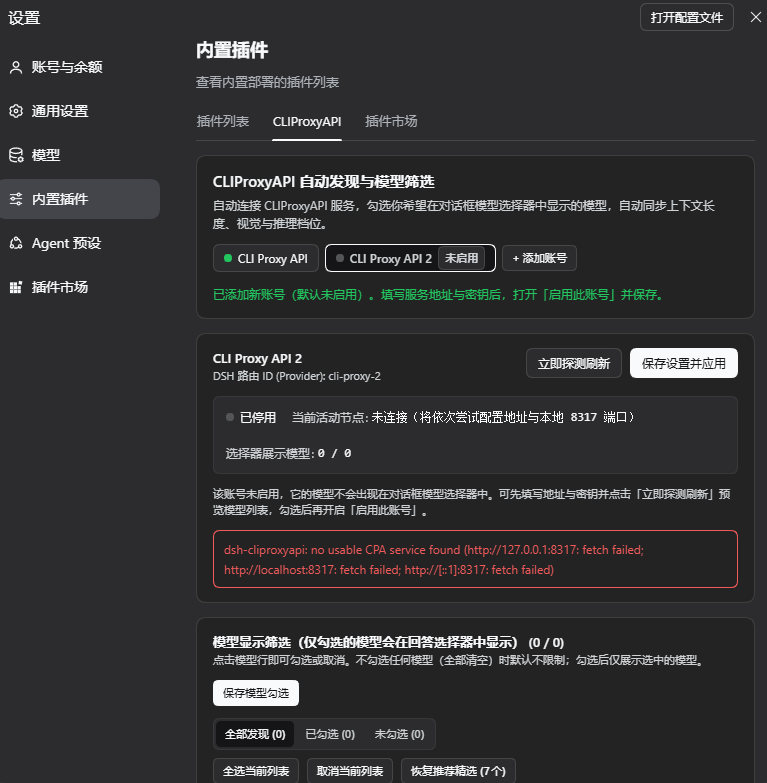
**1. 账号栏与账号状态。** 顶部账号栏列出所有账号:绿点表示已连接,灰点加「未启用」标记表示已停用。图中刚用「+ 添加账号」新增了第二个账号「CLI Proxy API 2」:它默认停用,拥有独立的路由 `cli-proxy-2`;由于还没填写服务地址,探测提示本地没有找到 CPA 服务。
|
|
100
|
+
|
|
101
|
+
|
|
102
|
+
|
|
103
|
+
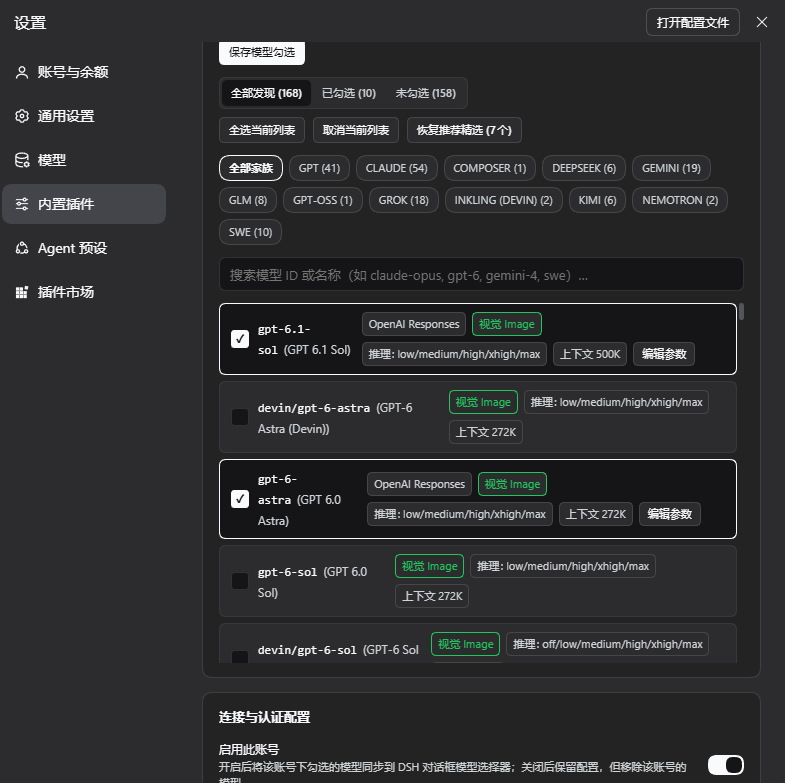
**2. 模型显示筛选。** 从 CPA 服务发现的全部 168 个模型,支持全部发现 / 已勾选 / 未勾选切换、家族标签(GPT、CLAUDE、GEMINI、GROK……)、搜索与批量操作。只有勾选的模型会同步到 DSH 模型选择器;每个模型显示将使用的协议(图中为 OpenAI Responses)、图片输入、推理档位与上下文长度,「编辑参数」可打开单模型参数覆盖。
|
|
104
|
+
|
|
105
|
+
|
|
106
|
+
|
|
107
|
+
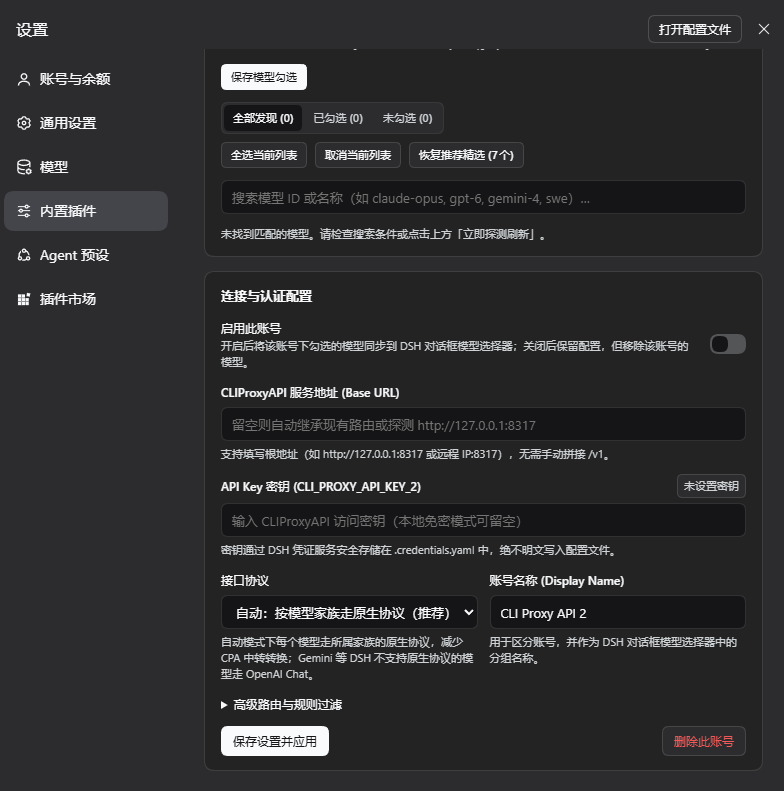
**3. 连接与认证配置。** 每个账号独立的设置:「启用此账号」开关、服务地址、保存在该账号独立引用名(`CLI_PROXY_API_KEY_2`)下的 API Key、接口协议、账号名称、可折叠的高级设置,以及「保存设置并应用」与「删除此账号」。
|
|
108
|
+
|
|
109
|
+
|
|
110
|
+
|
|
111
|
+
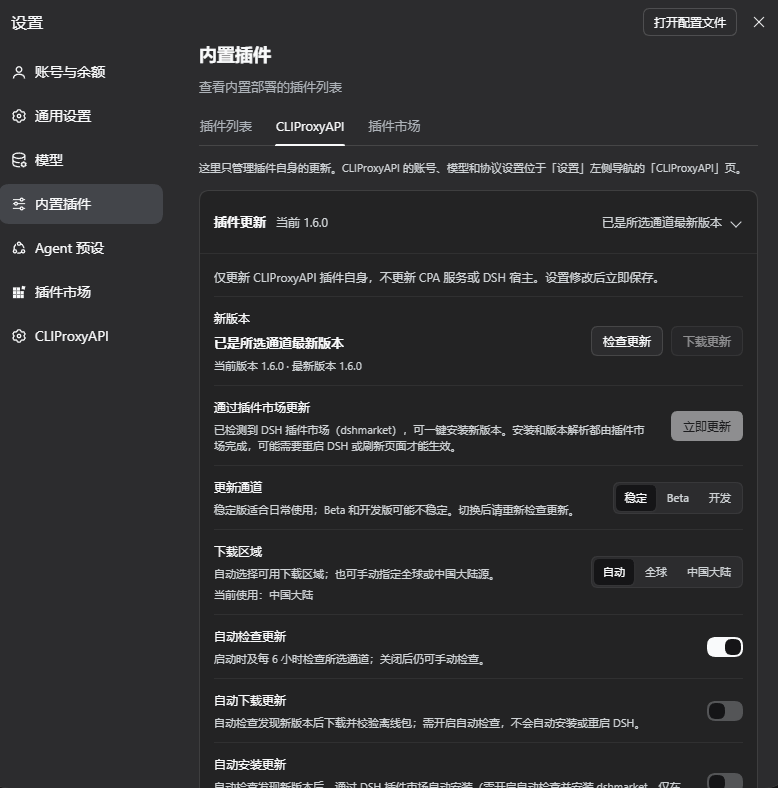
**4. 插件更新卡片(默认收起)。** 使用真实组件与虚构的更新状态离线渲染:默认只占一行,显示当前版本与更新状态;点击后展开通道、下载区域和自动更新开关。不是正在运行的 GUI 截图,也不代表实际发布版本。
|
|
112
|
+
|
|
113
|
+
|
|
114
|
+
|
|
115
|
+

|
|
116
|
+
|
|
117
|
+
## 功能详解
|
|
118
|
+
|
|
119
|
+
### 自动发现与同步
|
|
120
|
+
|
|
121
|
+
- 服务地址可以是本地或远程,`/v1`、`/v1/chat/completions`、`/v1/messages` 等后缀会自动去掉。
|
|
122
|
+
- 地址留空时,依次尝试:已有路由的地址、环境变量 `CLIPROXYAPI_BASE_URL`、本机 `127.0.0.1:8317`。
|
|
123
|
+
- 读取 `/v1/models?client_version=pi` 的富元数据目录(也兼容标准 OpenAI `data[]` 格式),并用 `/v1/models` 的 `owned_by` 判断模型家族。
|
|
124
|
+
- 所有账号按统一间隔自动刷新(默认 300 秒);模型目录没有变化时不写入任何设置。
|
|
125
|
+
|
|
126
|
+
### 模型勾选
|
|
127
|
+
|
|
128
|
+
- 搜索、家族标签、全部 / 已勾选 / 未勾选切换、批量勾选。**只有勾选的模型会出现在模型选择器中**;勾选为空表示全部显示。
|
|
129
|
+
- 还可以用「包含 / 排除关键词」规则进一步过滤。
|
|
130
|
+
- 从未保存过勾选的账号,首次探测成功后自动为每个模型家族勾选最新的一个(最多 12 个),按该服务自己的模型目录计算;**恢复推荐精选** 可随时恢复这组勾选。
|
|
131
|
+
|
|
132
|
+
### 单模型参数覆盖
|
|
133
|
+
|
|
134
|
+
已勾选模型的 **编辑参数** 可以单独设置:上下文窗口、最大输出、图片输入、思考等级(`off`、`minimal`、`low`、`medium`、`high`、`xhigh`、`max`)和请求协议,也可一键恢复自动探测值。
|
|
135
|
+
|
|
136
|
+
### 多账号
|
|
137
|
+
|
|
138
|
+
- 每个账号写入自己的一组路由:第一个账号为 `cli-proxy` / `cli-proxy-responses` / `cli-proxy-messages`,之后依次为 `cli-proxy-2*`、`cli-proxy-3*`……;密钥引用名依次为 `CLI_PROXY_API_KEY`、`CLI_PROXY_API_KEY_2`……。模型选择器按账号名称分组。
|
|
139
|
+
- **停用**账号:保留全部配置,但移除它的路由,模型从选择器中消失;其他账号不受影响。
|
|
140
|
+
- **新增**账号默认停用。可先填好地址和密钥,点「立即探测刷新」预览模型并勾选,再打开「启用此账号」保存。
|
|
141
|
+
- 填写了服务地址的账号**只连接该地址**,连不上就报错,不会悄悄改连本地 `:8317`,避免两个账号指向同一个服务。
|
|
142
|
+
- 不同账号的路由 ID 不能重叠,冲突的修改会被拒绝。
|
|
143
|
+
- **删除**账号会移除它的路由,但保留凭证服务里的密钥。
|
|
144
|
+
|
|
145
|
+
### 协议路由
|
|
146
|
+
|
|
147
|
+
CPA 对每个模型同时提供 OpenAI Chat、OpenAI Responses、Anthropic Messages 三种入口,入口协议和上游不一致时需要转换。默认的自动模式让每个模型直接使用上游协议:
|
|
148
|
+
|
|
149
|
+
| 模型家族(依据 `owned_by` 与模型 id) | 协议 | 路由(以 `cli-proxy` 为例) |
|
|
150
|
+
|---|---|---|
|
|
151
|
+
| Claude(含 `devin/claude-*`、Antigravity Claude) | Anthropic Messages `/v1/messages` | `cli-proxy-messages` |
|
|
152
|
+
| OpenAI / Codex / GPT、xAI Grok | OpenAI Responses `/v1/responses` | `cli-proxy-responses` |
|
|
153
|
+
| Gemini、DeepSeek、Kimi、GLM、SWE、gpt-oss 等 | OpenAI Chat `/v1/chat/completions` | `cli-proxy` |
|
|
154
|
+
|
|
155
|
+
- DSH 自定义路由不支持 Gemini 原生 `generateContent`,所以 Gemini 走 OpenAI Chat。
|
|
156
|
+
- DSH 每条路由只能有一种协议,模型按协议分到三条路由;没有模型的路由会自动移除。默认模型因此换了路由时,`agent-default-model` 会自动跟随。
|
|
157
|
+
- Claude 4.6+ / 5.x / Fable 使用自适应思考(`effort`),更早的 Claude 使用 token 预算。
|
|
158
|
+
- 可以改为「统一使用」某一种协议,或在单个模型的「编辑参数」里指定。
|
|
159
|
+
- 你在路由上手动加的其他字段(如 `retryPolicy`)会被保留。
|
|
160
|
+
|
|
161
|
+
## 插件自身更新
|
|
92
162
|
|
|
93
|
-
|
|
163
|
+
设置面板顶部的 **插件更新** 卡片默认收起为一行,只显示当前版本和更新状态,点击才会展开通道、下载区域与自动更新设置;后台检查仍按保存的开关运行,展开状态不会被轮询重置。它只管理 `dsh-cliproxyapi-pro` 自身,不会更新 CPA 服务或 DSH 宿主,也不改变 CPA 请求的路由、账号或模型勾选。更新设置修改后立即保存;卡片独立轮询状态,不会重载未保存的账号表单。
|
|
94
164
|
|
|
95
|
-
|
|
96
|
-
- **Provider route IDs must not overlap** (for example, another account cannot use `cli-proxy-messages`); saving such a change is rejected.
|
|
97
|
-
- **Disabling** an account keeps its settings but removes its routes, so its models leave the picker; other accounts are unaffected.
|
|
98
|
-
- **New** accounts start disabled. Fill in the URL and key, click **Probe & Refresh** to preview and check models, then turn on **Enable This Account** and save.
|
|
99
|
-
- An account with a base URL **only probes that URL** and reports an error when it is unreachable; it never falls back to local `:8317`, so two accounts cannot silently point at the same server.
|
|
100
|
-
- **Deleting** an account removes its routes but keeps its key in the credentials service.
|
|
165
|
+
> **下载不等于安装。** 当前 DSH 不允许在运行中替换已安装的插件。本插件只检查版本、下载并校验离线包:不会自动安装、卸载插件、覆盖源码或重启 DSH。升级须在关闭 DSH 后手动执行,再启动生效。
|
|
101
166
|
|
|
102
|
-
###
|
|
167
|
+
### 通道、区域与自动开关
|
|
103
168
|
|
|
104
|
-
|
|
|
169
|
+
| 设置 | 默认值 | 行为 |
|
|
170
|
+
|---|---|---|
|
|
171
|
+
| 更新通道 | 稳定(`stable`) | 稳定 / Beta / 开发分别读取 npm 的 `latest` / `beta` / `dev` dist-tag。Beta / 开发通道尚未发布时明确报错,不悄悄回退稳定版。 |
|
|
172
|
+
| 下载区域 | 自动(`auto`) | 自动模式同时请求全球 npmjs 与中国大陆 npmmirror,选择最先返回**有效版本元数据**的源;全球(`global`)只使用 `https://registry.npmjs.org`,中国大陆(`cn`)使用 `https://registry.npmmirror.com` 及其官方 `cdn.npmmirror.com` 包下载域名。离线包从本次检查选中的源下载,至多跟随 3 次经过白名单与精确包名/版本路径校验的 HTTPS 跳转,不跨区域回退。 |
|
|
173
|
+
| 自动检查更新 | 开启 | 插件启动或更新设置重新调度后约 3 秒检查,之后每 6 小时检查所选通道;关闭后仍可手动点 **检查更新**。 |
|
|
174
|
+
| 自动下载更新 | 关闭 | 仅在**自动检查**发现新版本时,自动下载并校验离线包;不会自动安装或重启。仅开启此项而关闭自动检查,不会触发后台下载。 |
|
|
175
|
+
|
|
176
|
+
- 检查使用严格 SemVer 比较:只有所选通道版本高于当前运行版本时才提供下载,不自动降级。自动区域选择也不会跨通道回退。
|
|
177
|
+
- 区域只影响本插件的更新元数据与安装包下载,**不影响 CPA 的连接、模型请求或其他插件的安装源**。
|
|
178
|
+
- 切换通道或区域后,请重新检查更新。打开卡片、轮询或重新读取状态本身只读取内存状态,不主动访问更新源;后台自动检查由上述开关控制。
|
|
179
|
+
- 失败时卡片显示本地化提示,例如通道未发布、网络异常、包完整性校验失败或磁盘写入失败,不显示后端堆栈。
|
|
180
|
+
|
|
181
|
+
### 下载、校验与离线升级
|
|
182
|
+
|
|
183
|
+
1. 点击 **检查更新**;有更高版本时,点 **下载更新** 并确认版本号,或等待已启用的自动检查 / 自动下载。
|
|
184
|
+
2. 下载先通过 npm 元数据中的 **SHA-512** 完整性校验,再验证 gzip / tar、预期文件与目录、包名和版本;拒绝路径穿越、链接等特殊条目、依赖和安装生命周期脚本。只保存离线包,不解压到安装目录,也不执行包内代码。
|
|
185
|
+
3. 校验成功后,卡片显示安装包的绝对路径与适用的升级命令。包保存在 `<Profile 目录>/.dsh-cliproxyapi/updates/dsh-cliproxyapi-pro-<version>.tgz`。
|
|
186
|
+
4. **先保存工作并完全关闭 DSH**,再在终端执行卡片提供的命令。示意如下,以卡片里的实际 profile 名称和绝对路径为准:
|
|
187
|
+
|
|
188
|
+
```bash
|
|
189
|
+
dsh plugin --profile 'desktop' add '/absolute/path/dsh-cliproxyapi-pro-<version>.tgz'
|
|
190
|
+
```
|
|
191
|
+
|
|
192
|
+
5. 重新启动 DSH 后新版本生效。检查结果和已下载提示不跨插件重载持久化;离线包仍保留在磁盘,可按需要自行清理,插件不会自动删除历史下载。
|
|
193
|
+
|
|
194
|
+
**本地链接安装(`link:`)** 可以检查并下载包,但不会提供升级命令,也不会覆盖链接的源码目录。若要保留源码开发方式,请在合适时机手动更新 Git 源码,再重启 DSH;通过离线包重新安装会将插件的安装来源从链接切换到离线包。
|
|
195
|
+
|
|
196
|
+
## Agent 工具与斜杠命令
|
|
197
|
+
|
|
198
|
+
### `cliproxyapi` 工具
|
|
199
|
+
|
|
200
|
+
DSH 的 Agent 可以用这个工具查看和配置插件,你只需用自然语言提要求。
|
|
201
|
+
|
|
202
|
+
| `action` | 作用 |
|
|
105
203
|
|---|---|
|
|
106
|
-
| `status` |
|
|
107
|
-
| `refresh` |
|
|
108
|
-
| `configure` |
|
|
109
|
-
| `add_account` |
|
|
110
|
-
| `remove_account` |
|
|
204
|
+
| `status` | 查看所有账号(或 `account` 指定的账号)的状态与模型 |
|
|
205
|
+
| `refresh` | 立即探测并同步;不带 `account` 时刷新全部账号 |
|
|
206
|
+
| `configure` | 修改一个账号(默认第一个),保存后立即刷新 |
|
|
207
|
+
| `add_account` | 新增账号;给了 `baseURL` 时默认启用,否则停用 |
|
|
208
|
+
| `remove_account` | 删除 `account` 指定的账号及其路由 |
|
|
111
209
|
|
|
112
|
-
|
|
210
|
+
参数(除 `action` 外都可选):
|
|
113
211
|
|
|
114
|
-
|
|
|
212
|
+
| 参数 | 说明 |
|
|
115
213
|
|---|---|
|
|
116
|
-
| `account` |
|
|
117
|
-
| `enabled` |
|
|
118
|
-
| `baseURL` | CPA
|
|
119
|
-
| `apiKey` | Bearer
|
|
120
|
-
| `apiKeyEnv` |
|
|
121
|
-
| `provider` | `llm-pi-ai`
|
|
122
|
-
| `displayName` |
|
|
123
|
-
| `protocolMode` | `auto
|
|
124
|
-
| `protocol` |
|
|
125
|
-
| `selectedModels` |
|
|
126
|
-
| `includePrefix` / `excludePrefix` |
|
|
127
|
-
| `modelOverrides` | `{ [modelId]: { contextWindow?, maxTokens?, image?, reasoningLevels?, protocol? } }
|
|
128
|
-
|
|
129
|
-
|
|
214
|
+
| `account` | 账号 id(如 `default`、`account-2`),也可用路由 ID 或账号名称 |
|
|
215
|
+
| `enabled` | 启用 / 停用该账号 |
|
|
216
|
+
| `baseURL` | CPA 地址,如 `http://127.0.0.1:8317`;空字符串表示自动发现 |
|
|
217
|
+
| `apiKey` | Bearer 密钥,保存到该账号的 `apiKeyEnv` 引用名下 |
|
|
218
|
+
| `apiKeyEnv` | 密钥引用名(`[A-Za-z_][A-Za-z0-9_]*`) |
|
|
219
|
+
| `provider` | `llm-pi-ai` 路由 ID,每个账号唯一 |
|
|
220
|
+
| `displayName` | 账号名称,也是模型选择器中的分组名 |
|
|
221
|
+
| `protocolMode` | `auto`(按家族走原生协议,默认)或 `fixed` |
|
|
222
|
+
| `protocol` | `fixed` 时使用的协议:`openai-completions` / `openai-responses` / `anthropic-messages` |
|
|
223
|
+
| `selectedModels` | 显示在选择器中的模型 id 列表;`[]` 表示全部 |
|
|
224
|
+
| `includePrefix` / `excludePrefix` | 逗号分隔的模型 id 关键词 |
|
|
225
|
+
| `modelOverrides` | `{ [modelId]: { contextWindow?, maxTokens?, image?, reasoningLevels?, protocol? } }`,整体替换 |
|
|
226
|
+
|
|
227
|
+
示例:
|
|
130
228
|
|
|
131
229
|
```json
|
|
132
230
|
{ "action": "configure", "baseURL": "http://127.0.0.1:8317", "apiKey": "sk-...", "selectedModels": ["gpt-6.1-sol", "claude-opus-5-5"] }
|
|
@@ -135,44 +233,36 @@ Examples:
|
|
|
135
233
|
{ "action": "remove_account", "account": "account-2" }
|
|
136
234
|
```
|
|
137
235
|
|
|
138
|
-
|
|
236
|
+
输出包含 `accounts[]`(每个账号的 `id`、`displayName`、`provider`、`enabled`、`state`、`endpoint`、`modelCount`、`totalDiscovered`、`error`)和文字摘要 `summary`。`state` 取值:`idle`、`probing`、`connected`、`disabled`、`error`。
|
|
139
237
|
|
|
140
|
-
###
|
|
238
|
+
### 斜杠命令
|
|
141
239
|
|
|
142
|
-
- `/cpa-status
|
|
143
|
-
- `/cpa-refresh
|
|
240
|
+
- `/cpa-status`:显示所有账号的状态。
|
|
241
|
+
- `/cpa-refresh`:立即刷新所有账号(也会探测停用账号的模型列表)。
|
|
144
242
|
|
|
145
|
-
### HTTP
|
|
243
|
+
### HTTP 接口
|
|
146
244
|
|
|
147
|
-
|
|
245
|
+
供设置面板使用,需要 DSH Web 会话的认证;POST 只接受来自本机或受信任主机的同源请求。
|
|
148
246
|
|
|
149
|
-
|
|
|
247
|
+
| 方法 | 路径 | 请求体 | 说明 |
|
|
150
248
|
|---|---|---|---|
|
|
151
249
|
| GET | `/api/dsh-cliproxyapi/status` | — | `{ ok, global, accounts[] }` |
|
|
152
|
-
| POST | `/api/dsh-cliproxyapi/refresh` | `{ accountId? }` |
|
|
153
|
-
| POST | `/api/dsh-cliproxyapi/save` | `{ accountId?,
|
|
154
|
-
| POST | `/api/dsh-cliproxyapi/accounts/add` |
|
|
155
|
-
| POST | `/api/dsh-cliproxyapi/accounts/remove` | `{ accountId }` |
|
|
156
|
-
|
|
157
|
-
|
|
158
|
-
|
|
159
|
-
|
|
250
|
+
| POST | `/api/dsh-cliproxyapi/refresh` | `{ accountId? }` | 刷新一个或全部账号 |
|
|
251
|
+
| POST | `/api/dsh-cliproxyapi/save` | `{ accountId?, …账号字段, apiKey?, clearApiKey?, refreshIntervalSeconds?, probeTimeoutMs? }` | 保存账号(缺省为第一个);只有全局字段时只保存全局设置 |
|
|
252
|
+
| POST | `/api/dsh-cliproxyapi/accounts/add` | 账号字段(可选) | 新增账号,默认停用;返回 `createdId` |
|
|
253
|
+
| POST | `/api/dsh-cliproxyapi/accounts/remove` | `{ accountId }` | 删除账号及其路由 |
|
|
254
|
+
| GET | `/api/dsh-cliproxyapi/updates/status` | — | 只读更新状态,不主动联网检查 |
|
|
255
|
+
| POST | `/api/dsh-cliproxyapi/updates/check` | `{}` | 主动检查所选通道与区域;手动检查不触发自动下载 |
|
|
256
|
+
| POST | `/api/dsh-cliproxyapi/updates/save` | `{ autoCheck?, autoDownload?, channel?, region? }` | 只保存四项更新设置,与账号配置独立 |
|
|
257
|
+
| POST | `/api/dsh-cliproxyapi/updates/download` | `{ version }` | 下载最近一次检查确认的新版本,完成校验后保存离线包;不安装 |
|
|
160
258
|
|
|
161
|
-
|
|
162
|
-
|---|---|---|
|
|
163
|
-
| Claude (including `devin/claude-*`, Antigravity Claude) | Anthropic Messages `/v1/messages` | `cli-proxy-messages` |
|
|
164
|
-
| OpenAI / Codex / GPT, xAI Grok | OpenAI Responses `/v1/responses` | `cli-proxy-responses` |
|
|
165
|
-
| Gemini, DeepSeek, Kimi, GLM, SWE, gpt-oss, … | OpenAI Chat `/v1/chat/completions` | `cli-proxy` |
|
|
259
|
+
更新接口的操作响应采用 `{ ok, update }`,状态包含 `currentVersion`、`latestVersion`、`available`、`channel`、`region`、`effectiveRegion`、`autoCheck`、`autoDownload`、`checking`、`downloading`、`lastCheckedAt`、`error` / `errorCode`、`blockedReason`、`downloadedVersion`、`downloadPath` 与 `upgradeCommand`。未检查或未下载的相关字段为 `null`。`channel` 为 `stable` / `beta` / `dev`,`region` 为 `auto` / `global` / `cn`;`effectiveRegion` 为本次成功检查使用的 `global` / `cn`(此前为 `null`)。
|
|
166
260
|
|
|
167
|
-
-
|
|
168
|
-
- A DSH route has a single protocol, so models are split across the three routes; a route left without models is removed. When the default model moves to another route, `agent-default-model` follows it.
|
|
169
|
-
- Claude 4.6+ / 5.x / Fable use adaptive thinking (`effort`); older Claude models use a token budget.
|
|
170
|
-
- Switch to one protocol for every model (`fixed`), or set a protocol per model under **Edit Parameters**.
|
|
171
|
-
- Other fields you add to a managed route by hand (such as `retryPolicy`) are kept.
|
|
261
|
+
失败用顶层 `errorCode` 或 `update.errorCode` 表达,不能只凭 HTTP 状态或 `ok` 判断操作成功;常见值包括 `network-error`、`invalid-metadata`、`channel-unavailable`、`integrity-error`、`invalid-package`、`storage-error`、`busy`、`stale-version` 与 `disposed`。更新 POST 在宿主鉴权和可信主机策略之外,**必须带与当前连接协议和 Host 完全匹配的显式 `Origin`**;缺失或不匹配会拒绝,不沿用账号接口对缺省 `Origin` 的兼容行为。普通未认证 `curl` 不能调用这些接口。协议判断使用实际连接,不信任任意 `Forwarded` / `X-Forwarded-*` 声明;需要端到端一致的 `Origin`。若反向代理在 HTTPS 终止后以 HTTP 连接 DSH,更新 POST 会被拒绝,请先从运行 DSH 机器上的本机 DSH 页面操作,不要假定所有反代部署都兼容。
|
|
172
262
|
|
|
173
|
-
##
|
|
263
|
+
## 存储与配置
|
|
174
264
|
|
|
175
|
-
-
|
|
265
|
+
- **状态文件**:`<Profile 目录>/.dsh-cliproxyapi/state.json`,保存账号、勾选和参数覆盖(不含密钥)。
|
|
176
266
|
|
|
177
267
|
```json
|
|
178
268
|
{
|
|
@@ -190,48 +280,97 @@ CLIProxyAPI serves every model on OpenAI Chat, OpenAI Responses and Anthropic Me
|
|
|
190
280
|
}
|
|
191
281
|
```
|
|
192
282
|
|
|
193
|
-
|
|
283
|
+
文件每次读取都会重新加载,手动修改后点「立即探测刷新」即可生效。旧版(1.3.x 及以前)的单账号文件会自动迁移为 id 为 `default` 的账号,路由、密钥和勾选保持不变,原文件备份为 `state.v1.json`。
|
|
194
284
|
|
|
195
|
-
-
|
|
196
|
-
- **Environment**: `CLIPROXYAPI_BASE_URL` is used only for auto-discovery of accounts without a base URL.
|
|
197
|
-
- **Bundle row config**: the plugin row's `config` in `cordis.patch.yml` is overlaid on the state file at startup: `accounts` replaces the account list, flat fields apply to the first account. Normally keep it `{}` and configure through the panel or the tool.
|
|
285
|
+
- **更新设置**:独立保存在 `<Profile 目录>/.dsh-cliproxyapi/update-settings.json`,不扩展或改写账号的 `state.json` v2,也不接触凭证。首次没有此文件时采用下列默认值:
|
|
198
286
|
|
|
199
|
-
|
|
287
|
+
```json
|
|
288
|
+
{
|
|
289
|
+
"version": 1,
|
|
290
|
+
"autoCheck": true,
|
|
291
|
+
"autoDownload": false,
|
|
292
|
+
"channel": "stable",
|
|
293
|
+
"region": "auto"
|
|
294
|
+
}
|
|
295
|
+
```
|
|
296
|
+
|
|
297
|
+
设置通过面板保存后立即应用。手动编辑此文件后需重载插件或重启 DSH 才会重新读取;文件损坏、结构 / 字段无效或无法读取时采用关闭自动联网检查的安全默认值。版本检查结果、候选版本、下载完成提示与命令只在内存中,插件重载后重新检查;下载包仍位于独立的 `updates` 子目录,由用户按需清理。
|
|
298
|
+
- **密钥**:通过 DSH 的 `credentials` 服务按引用名存取;凭证服务里没有时,回退读取同名环境变量。
|
|
299
|
+
- **环境变量**:`CLIPROXYAPI_BASE_URL` 只用于服务地址留空的账号的自动发现。
|
|
300
|
+
- **插件行配置**:`cordis.patch.yml` 中本插件行的 `config` 会在启动时叠加到状态文件上:包含 `accounts` 时替换账号列表,否则其中的字段作用于第一个账号。一般保持 `{}`,用面板或工具配置即可。
|
|
301
|
+
|
|
302
|
+
## 升级与卸载
|
|
303
|
+
|
|
304
|
+
- **升级**:优先使用上方插件更新卡片下载校验后的离线包,保存工作并关闭 DSH,再执行卡片的 `dsh plugin --profile '名称' add '离线包绝对路径'` 命令,最后重新启动;无需先卸载。也可在关闭 DSH 后运行 `dsh plugin --profile <profile 名称> add dsh-cliproxyapi-pro@latest` 从 npm 升级。账号、勾选和参数仍保存在原 profile 目录里,密钥仍在凭证服务里;更新下载功能不会改写这些数据。本地链接安装要保留源码方式时应自行更新源码,而不是从离线包重装。
|
|
305
|
+
- **卸载**:在 **插件** 页卸载。已同步的模型路由保存在 DSH 设置里,卸载插件不会自动删除它们;想让这些模型一并从选择器消失,请在卸载前把各账号停用或删除。
|
|
306
|
+
|
|
307
|
+
## 常见问题
|
|
308
|
+
|
|
309
|
+
**模型选择器里看不到模型?**
|
|
310
|
+
确认账号已打开「启用此账号」,并且至少勾选了一个模型(或勾选为空,表示全部)。可以运行 `/cpa-status` 查看每个账号的状态。
|
|
311
|
+
|
|
312
|
+
**提示「none of the selected models matched」?**
|
|
313
|
+
已勾选的模型在这台服务器上都不存在(常见于换了服务器)。面板里仍会列出该服务器的模型,重新勾选,或点「恢复推荐精选」后保存。
|
|
314
|
+
|
|
315
|
+
**连接失败 / no usable CPA service found?**
|
|
316
|
+
检查服务地址是否能从运行 DSH 的机器访问、API Key 是否正确。填写了地址的账号不会改连其他地址,报错里会列出尝试过的地址和原因。
|
|
200
317
|
|
|
201
|
-
|
|
318
|
+
**刚发布的新版本装不上?**
|
|
319
|
+
DSH 使用的 pnpm 可能设置了新版本发布后的等待期(`minimumReleaseAge`),安装界面会说明实际装到的版本。稍后再装,或明确写出版本号。
|
|
202
320
|
|
|
203
|
-
|
|
204
|
-
|
|
205
|
-
- Local CPA on `http://127.0.0.1:8317` without auth: nothing to configure; call `{"action": "refresh"}`.
|
|
206
|
-
- Remote URL or key: `{"action": "configure", "baseURL": "...", "apiKey": "..."}` (first account), or `{"action": "add_account", ...}` for another account. Pass `"account": "<id>"` to target a specific account.
|
|
207
|
-
- Narrow the picker with `selectedModels` (exact ids from the `status` output).
|
|
208
|
-
3. **Verify**: `{"action": "status"}` shows `state: "connected"` and `modelCount > 0` for each enabled account. Tell the user the models are in the DSH model picker under the account's name, and that accounts are managed in **Sidebar → Plugins → CLIProxyAPI** or **Settings → Built-in plugins → CLIProxyAPI**.
|
|
321
|
+
**为什么只有自动下载,没有自动安装?**
|
|
322
|
+
当前 DSH 不允许覆盖运行中的已装插件。为避免中断正在使用本插件路由的会话,更新器不会尝试卸载、覆盖文件或重启,只准备离线包供关闭 DSH 后升级。
|
|
209
323
|
|
|
210
|
-
|
|
324
|
+
**Beta / 开发通道提示暂无版本?**
|
|
325
|
+
只有维护者发布对应 npm dist-tag 后才可使用;插件不会把稳定版伪装成 Beta / 开发版。若通道版本不高于当前版本,也不会提供降级下载。
|
|
211
326
|
|
|
212
|
-
|
|
327
|
+
**更新卡片显示「更新服务未就绪」或「网络异常」?**
|
|
328
|
+
收起状态会直接给出原因:**更新服务未就绪** 表示页面是新版但宿主插件代码尚未重载(升级或修改后需在插件页停用再启用本插件,然后刷新页面);**网络异常** 表示本机到 npm 官方源或国内镜像的请求失败,可切换下载区域、检查代理/防火墙后重试;**通道未发布** 则表示该通道还没有对应版本。展开卡片可看到对应说明。
|
|
329
|
+
|
|
330
|
+
**已经下载,重启后为什么版本没变?**
|
|
331
|
+
下载和校验并不安装。应先退出 DSH、执行卡片提供的升级命令,再启动;本地链接安装不提供该命令,保留链接方式需手动更新源码。若重载插件后下载提示消失,离线包仍在 profile 的 `updates` 目录里。
|
|
332
|
+
|
|
333
|
+
## 给 AI Agent 的安装指南
|
|
334
|
+
|
|
335
|
+
> 给 DeepSeek Harness 中的 AI Agent:用户要求安装或配置本插件时按以下步骤执行。本包没有 npm 依赖,也没有构建脚本。
|
|
336
|
+
|
|
337
|
+
1. **安装**:调用 `plugin_manager`:`{"action": "install_bundle", "target": "dsh-cliproxyapi-pro", "enabled": true}`。查看结果中的 `application` 与 `warnings`;`restart-required` 表示需要重启 DSH 后新代码才会运行。
|
|
338
|
+
2. **配置**:使用 `cliproxyapi` 工具。
|
|
339
|
+
- CPA 在本机 `http://127.0.0.1:8317` 且无鉴权:无需配置,调用 `{"action": "refresh"}`。
|
|
340
|
+
- 远程地址或有密钥:`{"action": "configure", "baseURL": "...", "apiKey": "..."}`(作用于第一个账号);额外的账号用 `{"action": "add_account", ...}`;指定账号时传 `"account": "<id>"`。
|
|
341
|
+
- 用 `selectedModels`(取自 `status` 输出中的精确 id)精简模型选择器。
|
|
342
|
+
3. **验证**:`{"action": "status"}` 中每个启用的账号 `state` 为 `connected` 且 `modelCount > 0`。告诉用户模型已出现在 DSH 模型选择器中(按账号名称分组),可在 **左侧栏 → 插件 → CLIProxyAPI** 或 **设置 → 内置插件 → CLIProxyAPI** 管理账号。
|
|
343
|
+
|
|
344
|
+
不要把 API Key 回显给用户,也不要写入任何文件。
|
|
345
|
+
|
|
346
|
+
## 开发
|
|
213
347
|
|
|
214
348
|
```text
|
|
215
|
-
lib/index.js Host
|
|
216
|
-
lib/client.js Web
|
|
217
|
-
|
|
218
|
-
|
|
219
|
-
|
|
220
|
-
|
|
221
|
-
|
|
222
|
-
|
|
349
|
+
lib/index.js Host 插件(发现、同步、多账号控制器、工具、命令、HTTP 接口)
|
|
350
|
+
lib/client.js Web 设置面板(ModuleLoader 格式,独立更新卡片与账号表单,无需构建)
|
|
351
|
+
lib/updater.js 更新设置、SemVer/通道、区域竞速、SHA-512/包结构检查与离线包存储
|
|
352
|
+
locale/*.json 插件管理器中显示的标题与描述
|
|
353
|
+
cordis.patch.yml Bundle patch,插入 dsh-cliproxyapi-pro 行
|
|
354
|
+
tests/ node:test 单元与集成测试
|
|
355
|
+
.github/workflows/ CI(测试)与发版(GitHub Release + npm 受信任发布)
|
|
356
|
+
assets/screenshots/ README 截图(同时登记在 screenshots.json 中供插件市场展示)
|
|
357
|
+
AGENTS.md 给编码 Agent 的开发约定、架构与不变量
|
|
223
358
|
```
|
|
224
359
|
|
|
225
360
|
```bash
|
|
226
361
|
git clone https://github.com/TinyBOOOOM/dsh-cliproxyapi-pro.git
|
|
227
362
|
cd dsh-cliproxyapi-pro
|
|
228
|
-
npm test #
|
|
229
|
-
npm run check #
|
|
230
|
-
npm run pack:check #
|
|
363
|
+
npm test # 运行测试
|
|
364
|
+
npm run check # 语法检查 + 测试
|
|
365
|
+
npm run pack:check # 查看打包文件列表
|
|
231
366
|
```
|
|
232
367
|
|
|
233
|
-
|
|
368
|
+
`npm run check` 会语法检查三个 `lib/*.js` 模块并运行全部测试。更新相关离线测试为 `tests/updater.test.mjs`(设置、SemVer、区域、下载完整性与包结构)、`tests/update-routes.test.mjs`(HTTP 鉴权与同源)和 `tests/client.test.mjs`(更新卡片与请求生命周期);它们不访问真实网络或真实 profile。`npm run pack:check` 的文件列表应包含 `lib/updater.js`,且仍不包含测试或截图,无需安装任何运行时依赖。
|
|
369
|
+
|
|
370
|
+
发版只需推送 `v<版本号>` 标签:GitHub Actions 会运行测试、创建 GitHub Release 并附上安装包,再通过 npm 受信任发布(不使用任何 token)上传到 npm,并附带来源证明。稳定版本发布到 npm `latest`;Beta / 开发预发布分别进入 `beta` / `dev`,对应 GitHub Release 标记为预发布,不覆盖稳定通道。更新器只核对 registry 提供的 SHA-512 完整性与包结构,不验证发行者签名或 npm provenance。
|
|
371
|
+
|
|
372
|
+
修改代码前请阅读 [AGENTS.md](https://github.com/TinyBOOOOM/dsh-cliproxyapi-pro/blob/main/AGENTS.md);变更记录见 [CHANGELOG.md](https://github.com/TinyBOOOOM/dsh-cliproxyapi-pro/blob/main/CHANGELOG.md)。欢迎提交 Issue 和 Pull Request,修改说明文档时请同时更新中英文两份。
|
|
234
373
|
|
|
235
|
-
##
|
|
374
|
+
## 许可证
|
|
236
375
|
|
|
237
|
-
[MIT](LICENSE)
|
|
376
|
+
[MIT](https://github.com/TinyBOOOOM/dsh-cliproxyapi-pro/blob/main/LICENSE)
|