dsh-cline-pass 0.2.7 → 0.2.9
This diff represents the content of publicly available package versions that have been released to one of the supported registries. The information contained in this diff is provided for informational purposes only and reflects changes between package versions as they appear in their respective public registries.
- package/README.en.md +38 -86
- package/README.md +35 -87
- package/lib/accounts.js +31 -0
- package/lib/adapter.js +7 -3
- package/lib/catalog.js +28 -1
- package/lib/client.js +24 -22
- package/lib/cline.js +93 -2
- package/lib/compat.js +28 -1
- package/lib/engine.js +22 -14
- package/lib/index.js +27 -24
- package/lib/panel.js +12 -15
- package/lib/protocol.js +17 -9
- package/lib/store.js +9 -3
- package/lib/tools.js +21 -19
- package/package.json +2 -2
package/README.en.md
CHANGED
|
@@ -1,61 +1,41 @@
|
|
|
1
1
|
# dsh-cline-pass
|
|
2
2
|
|
|
3
|
-
|
|
3
|
+
[](https://www.npmjs.com/package/dsh-cline-pass)
|
|
4
|
+
[](LICENSE)
|
|
4
5
|
|
|
5
|
-
|
|
6
|
-
|
|
7
|
-
- Use Cline Pass subscription models from dsh
|
|
8
|
-
- Streaming, tool calls, image input, and reasoning
|
|
9
|
-
- Multiple accounts with optional round-robin rotation
|
|
10
|
-
- Probe, test, pin, or exclude upstream channels
|
|
11
|
-
- Automatic failover before the first token
|
|
12
|
-
- Web settings panel and `cline_pass_*` tools
|
|
6
|
+
[中文](README.md) | English
|
|
13
7
|
|
|
14
|
-
|
|
8
|
+
Use [Cline Pass](https://cline.bot/cline-pass) subscription models directly in [DeepSeek Harness (dsh)](https://github.com/deepseek-ai), without running a separate proxy service.
|
|
15
9
|
|
|
16
|
-
|
|
17
|
-
- Node.js `>= 20.3`
|
|
18
|
-
- A Cline Pass API key
|
|
10
|
+
## Features
|
|
19
11
|
|
|
20
|
-
|
|
12
|
+
- Streaming, tool calls, image input, and reasoning, depending on the model.
|
|
13
|
+
- Multiple accounts with single-account and round-robin modes.
|
|
14
|
+
- Discover, validate, pin, or exclude upstream channels, with failover before the first token.
|
|
15
|
+
- Web settings panel and optional `cline_pass_*` management tools.
|
|
21
16
|
|
|
22
|
-
|
|
23
|
-
dsh plugin --profile web add dsh-cline-pass
|
|
24
|
-
```
|
|
17
|
+
## Quick start
|
|
25
18
|
|
|
26
|
-
|
|
19
|
+
Requires Node.js `>= 20.3.0`, dsh `>= 0.1.2-alpha.3 < 0.3.0`, and a valid Cline Pass API key.
|
|
27
20
|
|
|
28
21
|
```bash
|
|
29
|
-
dsh plugin --profile web add
|
|
30
|
-
dsh plugin --profile web add ./dsh-cline-pass-<version>.tgz
|
|
22
|
+
dsh plugin --profile web add dsh-cline-pass
|
|
31
23
|
```
|
|
32
24
|
|
|
33
|
-
Restart dsh
|
|
34
|
-
|
|
35
|
-
## Configure
|
|
25
|
+
Restart dsh, open **Settings → Built-in Plugins → Cline Pass** to save and test your API key, then select a Cline Pass model in the model picker. Keys are stored in the dsh credential store and displayed only in masked form.
|
|
36
26
|
|
|
37
|
-
|
|
38
|
-
|
|
39
|
-
You can also set an environment variable before starting dsh:
|
|
27
|
+
Alternatively, configure the key through an environment variable:
|
|
40
28
|
|
|
41
29
|
```bash
|
|
42
|
-
export CLINE_PASS_API_KEY=
|
|
30
|
+
export CLINE_PASS_API_KEY="your-cline-pass-api-key"
|
|
43
31
|
dsh --profile web
|
|
44
32
|
```
|
|
45
33
|
|
|
46
|
-
|
|
47
|
-
|
|
48
|
-
Add accounts in the settings panel and select single-account or round-robin mode. You can also use the tool interface:
|
|
49
|
-
|
|
50
|
-
```text
|
|
51
|
-
cline_pass_accounts action=add name=main key=sk_xxx
|
|
52
|
-
cline_pass_accounts action=add name=backup key=sk_yyy
|
|
53
|
-
cline_pass_accounts action=mode mode=roundrobin
|
|
54
|
-
```
|
|
34
|
+
These commands use the `web` profile; replace the name if you use another profile.
|
|
55
35
|
|
|
56
|
-
|
|
36
|
+
## Configuration
|
|
57
37
|
|
|
58
|
-
|
|
38
|
+
Use the Web panel for everyday configuration. For file-based configuration, edit your profile's `$DSH_HOME/profiles/<name>/cordis.patch.yml`, for example:
|
|
59
39
|
|
|
60
40
|
```yaml
|
|
61
41
|
- id: cline-pass
|
|
@@ -66,77 +46,49 @@ To override defaults, add a `cline-pass` section to your profile's `$DSH_HOME/pr
|
|
|
66
46
|
apiKeyEnv: CLINE_PASS_MAIN_KEY
|
|
67
47
|
backup:
|
|
68
48
|
apiKeyEnv: CLINE_PASS_BACKUP_KEY
|
|
49
|
+
exposeTools: false
|
|
69
50
|
```
|
|
70
51
|
|
|
71
|
-
|
|
72
|
-
|
|
73
|
-
### Management tools
|
|
74
|
-
|
|
75
|
-
The `cline_pass_*` tools are **not registered by default**. Their eight definitions total roughly 5.5k characters of schema and description that ride in every request's tool list, and managing the route is an occasional need, so the default keeps that cost out of every conversation.
|
|
76
|
-
|
|
77
|
-
Turn them on with **Expose the tools (takes effect after a restart)** in **Settings → Cline Pass**, or in the profile configuration:
|
|
78
|
-
|
|
79
|
-
```yaml
|
|
80
|
-
- id: cline-pass
|
|
81
|
-
config:
|
|
82
|
-
exposeTools: true
|
|
83
|
-
```
|
|
84
|
-
|
|
85
|
-
**The value is read when the plugin activates, so a change needs a dsh restart** — a tool already registered cannot be pulled back out of a conversation in progress.
|
|
86
|
-
|
|
87
|
-
The provider route and the setup panel are unaffected — the panel is a browser page rather than a tool, and it stays available with the tools off.
|
|
52
|
+
Each `apiKeyEnv` refers to a credential name or environment variable; configure a key for each account. Management tools are disabled by default. Set `exposeTools` to `true` and restart dsh to enable them.
|
|
88
53
|
|
|
89
|
-
|
|
54
|
+
The default gateway is `https://api.cline.bot/api/v1`. Each account allows up to `16` concurrent requests (`maxConcurrentRequests`; `0` removes the limit). See [`lib/index.js`](lib/index.js) for more options and [`lib/tools.js`](lib/tools.js) for management tools.
|
|
90
55
|
|
|
91
56
|
## Upstream channels
|
|
92
57
|
|
|
93
|
-
|
|
94
|
-
|
|
95
|
-
You can also run the tools in this order:
|
|
96
|
-
|
|
97
|
-
```text
|
|
98
|
-
cline_pass_probe model=cline-pass/glm-5.2
|
|
99
|
-
cline_pass_validate model=cline-pass/glm-5.2
|
|
100
|
-
cline_pass_pin model=cline-pass/glm-5.2 upstreams=["alibaba","baseten"] pinMode=preferred
|
|
101
|
-
```
|
|
58
|
+
Expand a model row in the settings panel, click **Probe → Validate**, save your channel order or exclusions, then click **Test** to verify.
|
|
102
59
|
|
|
103
|
-
|
|
60
|
+
- `strict`: Restrict each attempt to its specified candidate channel.
|
|
61
|
+
- `preferred`: Send a preferred channel order to the gateway and try subsequent candidates when needed.
|
|
104
62
|
|
|
105
|
-
|
|
63
|
+
Validation sends real requests to each channel without changing saved rules. Failover for retryable errors takes place before the first output token.
|
|
106
64
|
|
|
107
|
-
|
|
108
|
-
| --- | --- |
|
|
109
|
-
| `cline_pass_status` | Show route and account status |
|
|
110
|
-
| `cline_pass_models` | List models and channels |
|
|
111
|
-
| `cline_pass_probe` | Probe channels |
|
|
112
|
-
| `cline_pass_validate` | Test each channel |
|
|
113
|
-
| `cline_pass_test` | Verify the current settings |
|
|
114
|
-
| `cline_pass_pin` | Save channel settings |
|
|
115
|
-
| `cline_pass_accounts` | Manage accounts |
|
|
116
|
-
| `cline_pass_history` | Read request history |
|
|
65
|
+
## Development and contributing
|
|
117
66
|
|
|
118
|
-
|
|
67
|
+
The project uses JavaScript ES Modules with no build step. Install dependencies and run:
|
|
119
68
|
|
|
120
69
|
```bash
|
|
70
|
+
npm install
|
|
121
71
|
npm test
|
|
122
72
|
npm run test:client
|
|
123
73
|
npm run test:mount
|
|
124
74
|
```
|
|
125
75
|
|
|
126
|
-
|
|
127
|
-
|
|
128
|
-
```bash
|
|
129
|
-
npm run test:live
|
|
130
|
-
npm run test:live:image
|
|
131
|
-
npm run test:live:reasoning
|
|
132
|
-
```
|
|
76
|
+
Tests require compatible dsh packages; the mount test also requires a complete dsh installation. `npm run test:live`, `npm run test:live:image`, and `npm run test:live:reasoning` access the live gateway, require a valid key, and consume quota or incur charges.
|
|
133
77
|
|
|
134
|
-
|
|
78
|
+
[Issues](https://github.com/yhshzh/dsh-cline-pass/issues) and Pull Requests are welcome. Include versions, reproduction steps, and sanitized logs in bug reports, and run relevant tests before submitting code.
|
|
135
79
|
|
|
136
80
|
## Acknowledgements
|
|
137
81
|
|
|
138
82
|
Upstream channel and failover behavior was informed by the MIT-licensed [`cline-pass-switcher`](https://github.com/munmunjaklin458-afk/cline-pass-switcher).
|
|
139
83
|
|
|
84
|
+
## Community links
|
|
85
|
+
|
|
86
|
+
[LinuxDo](https://linux.do/) — A community for open source and technology, built on sincerity, kindness, unity, and professionalism.
|
|
87
|
+
|
|
88
|
+
## Star History
|
|
89
|
+
|
|
90
|
+
[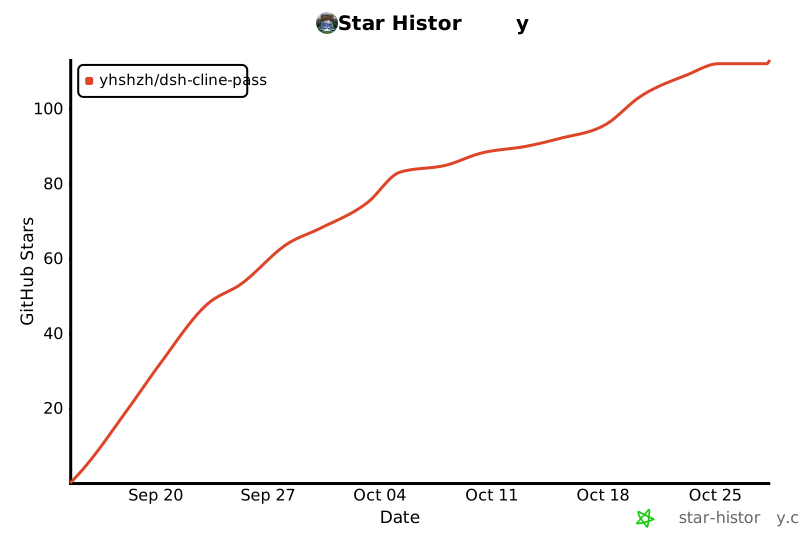](https://www.star-history.com/#yhshzh/dsh-cline-pass&Date)
|
|
91
|
+
|
|
140
92
|
## License
|
|
141
93
|
|
|
142
94
|
[MIT](LICENSE)
|
package/README.md
CHANGED
|
@@ -1,61 +1,41 @@
|
|
|
1
1
|
# dsh-cline-pass
|
|
2
2
|
|
|
3
|
-
|
|
3
|
+
[](https://www.npmjs.com/package/dsh-cline-pass)
|
|
4
|
+
[](LICENSE)
|
|
4
5
|
|
|
5
|
-
|
|
6
|
-
|
|
7
|
-
- 使用 Cline Pass 订阅模型
|
|
8
|
-
- 支持流式输出、工具调用、图片和 reasoning
|
|
9
|
-
- 管理多个账号并轮询使用
|
|
10
|
-
- 探测、测试、钉住或排除上游渠道
|
|
11
|
-
- 在首个 token 前自动故障转移
|
|
12
|
-
- 提供 Web 设置面板和 `cline_pass_*` 工具
|
|
6
|
+
中文 | [English](README.en.md)
|
|
13
7
|
|
|
14
|
-
|
|
8
|
+
将 [Cline Pass](https://cline.bot/cline-pass) 订阅模型接入 [DeepSeek Harness(dsh)](https://github.com/deepseek-ai),直接在模型列表中使用,无需部署代理服务。
|
|
15
9
|
|
|
16
|
-
|
|
17
|
-
- Node.js `>= 20.3`
|
|
18
|
-
- Cline Pass API Key
|
|
10
|
+
## 功能
|
|
19
11
|
|
|
20
|
-
|
|
12
|
+
- 支持流式输出、工具调用、图片输入和推理,具体能力取决于模型。
|
|
13
|
+
- 多账号管理,支持单账号与轮询模式。
|
|
14
|
+
- 探测、校验、指定或排除上游渠道,支持首个 token 前的故障转移。
|
|
15
|
+
- 提供 Web 设置面板和可选的 `cline_pass_*` 管理工具。
|
|
21
16
|
|
|
22
|
-
|
|
23
|
-
dsh plugin --profile web add dsh-cline-pass
|
|
24
|
-
```
|
|
17
|
+
## 快速开始
|
|
25
18
|
|
|
26
|
-
|
|
19
|
+
需要 Node.js `>= 20.3.0`、dsh `>= 0.1.2-alpha.3 < 0.3.0` 和有效的 Cline Pass API Key。
|
|
27
20
|
|
|
28
21
|
```bash
|
|
29
|
-
dsh plugin --profile web add
|
|
30
|
-
dsh plugin --profile web add ./dsh-cline-pass-<version>.tgz
|
|
22
|
+
dsh plugin --profile web add dsh-cline-pass
|
|
31
23
|
```
|
|
32
24
|
|
|
33
|
-
安装后重启 dsh
|
|
34
|
-
|
|
35
|
-
## 配置
|
|
36
|
-
|
|
37
|
-
Web profile 可以在 **设置 → Cline Pass** 中保存和测试 Key。Key 会存入 dsh 凭据库,界面只显示掩码。
|
|
25
|
+
安装后重启 dsh,在 **设置 → 内置插件 → Cline Pass** 中保存并测试 API Key,然后在模型选择器中选择 Cline Pass 模型。Key 存入 dsh 凭据库,界面仅显示掩码。
|
|
38
26
|
|
|
39
|
-
|
|
27
|
+
也可以通过环境变量配置:
|
|
40
28
|
|
|
41
29
|
```bash
|
|
42
|
-
export CLINE_PASS_API_KEY=
|
|
30
|
+
export CLINE_PASS_API_KEY="your-cline-pass-api-key"
|
|
43
31
|
dsh --profile web
|
|
44
32
|
```
|
|
45
33
|
|
|
46
|
-
|
|
47
|
-
|
|
48
|
-
在设置面板中添加账号,并选择单账号或轮询模式。也可以调用工具:
|
|
49
|
-
|
|
50
|
-
```text
|
|
51
|
-
cline_pass_accounts action=add name=main key=sk_xxx
|
|
52
|
-
cline_pass_accounts action=add name=backup key=sk_yyy
|
|
53
|
-
cline_pass_accounts action=mode mode=roundrobin
|
|
54
|
-
```
|
|
34
|
+
以上使用 `web` profile,如需使用其他 profile,请替换对应名称。
|
|
55
35
|
|
|
56
|
-
|
|
36
|
+
## 配置
|
|
57
37
|
|
|
58
|
-
|
|
38
|
+
日常配置可在 Web 面板完成。通过文件配置时,修改对应 profile 的 `$DSH_HOME/profiles/<name>/cordis.patch.yml`,例如:
|
|
59
39
|
|
|
60
40
|
```yaml
|
|
61
41
|
- id: cline-pass
|
|
@@ -66,72 +46,36 @@ cline_pass_accounts action=mode mode=roundrobin
|
|
|
66
46
|
apiKeyEnv: CLINE_PASS_MAIN_KEY
|
|
67
47
|
backup:
|
|
68
48
|
apiKeyEnv: CLINE_PASS_BACKUP_KEY
|
|
49
|
+
exposeTools: false
|
|
69
50
|
```
|
|
70
51
|
|
|
71
|
-
|
|
72
|
-
|
|
73
|
-
`cline_pass_*` 工具**默认不注册**。8 个工具定义合计约 5.5k 字符,会出现在每次请求的工具列表里,而管理路由只是偶尔需要,所以默认让所有对话都不必付这份开销。
|
|
74
|
-
|
|
75
|
-
需要时在**设置 → Cline Pass** 中勾选「开启工具注入(重启后生效)」,或在 profile 配置里打开:
|
|
76
|
-
|
|
77
|
-
```yaml
|
|
78
|
-
- id: cline-pass
|
|
79
|
-
config:
|
|
80
|
-
exposeTools: true
|
|
81
|
-
```
|
|
82
|
-
|
|
83
|
-
**该值在插件激活时读取,改动后需重启 dsh 才生效** —— 已经注册的工具无法从进行中的对话里撤回。
|
|
84
|
-
|
|
85
|
-
提供商路由和设置面板不受影响 —— 面板是浏览器页面而非工具,工具关闭时仍然可用。
|
|
86
|
-
|
|
87
|
-
> 从 0.2.1 及更早版本升级的 profile 里没有 `exposeTools` 键,因此会采用新的默认值 `false`:升级后 `cline_pass_*` 工具将不再注册。面板会提示,勾选该复选框并在重启后恢复。
|
|
52
|
+
`apiKeyEnv` 指向凭据名称或环境变量,请分别配置两个账号的 Key。管理工具默认关闭,需要时将 `exposeTools` 设为 `true`,并重启 dsh。
|
|
88
53
|
|
|
89
|
-
|
|
54
|
+
默认网关为 `https://api.cline.bot/api/v1`,每个账号的并发请求上限为 `16`(`maxConcurrentRequests`,`0` 表示不限)。更多选项见 [`lib/index.js`](lib/index.js),管理工具见 [`lib/tools.js`](lib/tools.js)。
|
|
90
55
|
|
|
91
56
|
## 上游渠道
|
|
92
57
|
|
|
93
|
-
|
|
58
|
+
在设置面板中展开模型行,依次点击 **探测 → 校验**,保存渠道顺序或排除列表后,点击 **测试** 验证。
|
|
94
59
|
|
|
95
|
-
|
|
60
|
+
- `strict`:每次尝试限制到指定的候选渠道。
|
|
61
|
+
- `preferred`:向网关传递渠道偏好顺序,必要时尝试后续候选渠道。
|
|
96
62
|
|
|
97
|
-
|
|
98
|
-
cline_pass_probe model=cline-pass/glm-5.2
|
|
99
|
-
cline_pass_validate model=cline-pass/glm-5.2
|
|
100
|
-
cline_pass_pin model=cline-pass/glm-5.2 upstreams=["alibaba","baseten"] pinMode=preferred
|
|
101
|
-
```
|
|
102
|
-
|
|
103
|
-
`pinMode` 支持 `strict` 和 `preferred`。`preferred` 会按顺序尝试渠道,并在首个 token 前失败时自动切换。`exclude` 可排除指定渠道。
|
|
63
|
+
校验会向每个渠道发送真实请求,不会修改已保存的规则;可重试的故障转移发生在首个 token 输出前。
|
|
104
64
|
|
|
105
|
-
##
|
|
65
|
+
## 开发与贡献
|
|
106
66
|
|
|
107
|
-
|
|
108
|
-
| --- | --- |
|
|
109
|
-
| `cline_pass_status` | 查看路由和账号状态 |
|
|
110
|
-
| `cline_pass_models` | 查看模型和渠道 |
|
|
111
|
-
| `cline_pass_probe` | 探测渠道 |
|
|
112
|
-
| `cline_pass_validate` | 测试每个渠道 |
|
|
113
|
-
| `cline_pass_test` | 验证当前设置 |
|
|
114
|
-
| `cline_pass_pin` | 保存渠道设置 |
|
|
115
|
-
| `cline_pass_accounts` | 管理账号 |
|
|
116
|
-
| `cline_pass_history` | 查看请求历史 |
|
|
117
|
-
|
|
118
|
-
## 开发
|
|
67
|
+
项目使用 JavaScript ES Modules,无需编译。安装依赖后运行:
|
|
119
68
|
|
|
120
69
|
```bash
|
|
70
|
+
npm install
|
|
121
71
|
npm test
|
|
122
72
|
npm run test:client
|
|
123
73
|
npm run test:mount
|
|
124
74
|
```
|
|
125
75
|
|
|
126
|
-
|
|
127
|
-
|
|
128
|
-
```bash
|
|
129
|
-
npm run test:live
|
|
130
|
-
npm run test:live:image
|
|
131
|
-
npm run test:live:reasoning
|
|
132
|
-
```
|
|
76
|
+
测试需要兼容版本的 dsh 相关包,挂载测试还需要完整的 dsh 安装。`npm run test:live`、`npm run test:live:image` 和 `npm run test:live:reasoning` 会访问真实网关,需要有效 Key 并消耗额度或产生费用。
|
|
133
77
|
|
|
134
|
-
|
|
78
|
+
欢迎提交 [Issue](https://github.com/yhshzh/dsh-cline-pass/issues) 或 Pull Request。报告问题时请附版本、复现步骤及脱敏日志;提交代码前请运行相关测试。
|
|
135
79
|
|
|
136
80
|
## 致谢
|
|
137
81
|
|
|
@@ -141,6 +85,10 @@ npm run test:live:reasoning
|
|
|
141
85
|
|
|
142
86
|
[LinuxDo](https://linux.do/) — 真诚、友善、团结、专业,你的品质开源与技术社区
|
|
143
87
|
|
|
144
|
-
##
|
|
88
|
+
## Star History
|
|
89
|
+
|
|
90
|
+
[](https://www.star-history.com/#yhshzh/dsh-cline-pass&Date)
|
|
91
|
+
|
|
92
|
+
## 许可证
|
|
145
93
|
|
|
146
94
|
[MIT](LICENSE)
|
package/lib/accounts.js
ADDED
|
@@ -0,0 +1,31 @@
|
|
|
1
|
+
/** Account edits shared by the panel and management tools. */
|
|
2
|
+
|
|
3
|
+
/** Allocate a stable reference without folding distinct account names together. */
|
|
4
|
+
function credentialName(name, accounts) {
|
|
5
|
+
const stem = name.toUpperCase().replace(/[^A-Z0-9]+/g, '_')
|
|
6
|
+
const base = `CLINE_PASS_${stem}_KEY`
|
|
7
|
+
const used = new Set(Object.entries(accounts).filter(([key]) => key !== name).map(([, entry]) => String(entry?.apiKeyEnv ?? '')))
|
|
8
|
+
// Keep the familiar name for simple lowercase ids. Other ids carry their
|
|
9
|
+
// exact bytes, so case and punctuation remain distinct even on concurrent adds.
|
|
10
|
+
const encoded = `${base}__${Buffer.from(name).toString('hex').toUpperCase()}`
|
|
11
|
+
let ref = /^[a-z0-9_]+$/.test(name) && !used.has(base) ? base : encoded
|
|
12
|
+
for (let suffix = 2; used.has(ref); suffix += 1) ref = `${encoded}_${suffix}`
|
|
13
|
+
return ref
|
|
14
|
+
}
|
|
15
|
+
|
|
16
|
+
/** Apply only supplied fields when updating; allocate defaults on creation. */
|
|
17
|
+
export function accountProfileFor(name, changes, accounts, defaultRef = '') {
|
|
18
|
+
if (!/^[A-Za-z0-9._-]+$/.test(name) || name === '__proto__') {
|
|
19
|
+
throw new Error('the account name may use letters, digits, dot, dash and underscore only (except __proto__)')
|
|
20
|
+
}
|
|
21
|
+
const existing = Object.hasOwn(accounts, name) ? accounts[name] : undefined
|
|
22
|
+
const previous = existing ?? {}
|
|
23
|
+
const suppliedRef = String(changes?.apiKeyEnv ?? '').trim()
|
|
24
|
+
const priorRef = String(previous.apiKeyEnv ?? '').trim() || (existing === undefined ? '' : String(defaultRef))
|
|
25
|
+
return {
|
|
26
|
+
displayName: changes?.displayName === undefined ? (String(previous.displayName ?? '') || name) : (String(changes.displayName).trim() || name),
|
|
27
|
+
apiKeyEnv: suppliedRef || priorRef || credentialName(name, accounts),
|
|
28
|
+
enabled: changes?.enabled === undefined ? previous.enabled !== false : changes.enabled !== false,
|
|
29
|
+
baseURL: changes?.baseURL === undefined ? String(previous.baseURL ?? '') : String(changes.baseURL ?? '').trim(),
|
|
30
|
+
}
|
|
31
|
+
}
|
package/lib/adapter.js
CHANGED
|
@@ -29,6 +29,7 @@ import {
|
|
|
29
29
|
classifyUpstreamError,
|
|
30
30
|
errorText,
|
|
31
31
|
injectPrefs,
|
|
32
|
+
isAuthenticationError,
|
|
32
33
|
parseRouting,
|
|
33
34
|
pinAdherence,
|
|
34
35
|
pinWarnings,
|
|
@@ -480,7 +481,7 @@ export function streamErrorCode(message, status) {
|
|
|
480
481
|
const windowDetail = detail.replace(/[_-]/g, ' ')
|
|
481
482
|
const spentWindow = /\b(?:weekly|monthly|daily|(?:five|5)\s*hour|plan)\b[\s\S]{0,80}?\b(?:exceed\w*|exhaust\w*|reach\w*|used\s+up|out\s+of|deplet\w*|spent)\b|\b(?:exceed\w*|exhaust\w*|reach\w*|used\s+up|out\s+of|deplet\w*)\b[\s\S]{0,80}?\b(?:weekly|monthly|daily|(?:five|5)\s*hour|plan)\b[\s\S]{0,40}?\b(?:limit|cap|quota|credits|budget|allowance)\b/i.test(windowDetail)
|
|
482
483
|
if (status === 402 || isQuotaExceededError(detail) || spentWindow) return QUOTA_EXCEEDED_CODE
|
|
483
|
-
if (
|
|
484
|
+
if (isAuthenticationError(detail, status)) return 'AUTH'
|
|
484
485
|
if (status === 429 || /429|rate limit|rate-?limited/i.test(detail)) return 'RATE_LIMIT'
|
|
485
486
|
if (isContextWindowExceededError(detail)) return CONTEXT_WINDOW_EXCEEDED_CODE
|
|
486
487
|
if (status === 400) return 'INVALID_REQUEST'
|
|
@@ -909,11 +910,13 @@ export class ClinePassAdapter extends LlmAdapter {
|
|
|
909
910
|
* cannot see, because this gateway does not stream it.
|
|
910
911
|
*/
|
|
911
912
|
let usage = null
|
|
913
|
+
let finishFailure = null
|
|
912
914
|
try {
|
|
913
915
|
for (;;) {
|
|
914
916
|
const next = await watchdog.next(iterator)
|
|
915
917
|
if (next.done === true) break
|
|
916
918
|
if (next.value?.type === 'usage') usage = next.value.usage
|
|
919
|
+
if (next.value?.type === 'finish' && next.value.reason?.kind === 'error') finishFailure = next.value.reason.failure
|
|
917
920
|
if (firstChunkMs === 0) firstChunkMs = Date.now() - startedAt
|
|
918
921
|
yielded = true
|
|
919
922
|
yield next.value
|
|
@@ -996,7 +999,8 @@ export class ClinePassAdapter extends LlmAdapter {
|
|
|
996
999
|
ttfb: firstByteMs,
|
|
997
1000
|
ttft: firstChunkMs,
|
|
998
1001
|
stream: true,
|
|
999
|
-
error: null,
|
|
1002
|
+
error: finishFailure?.message ?? null,
|
|
1003
|
+
code: finishFailure?.code ?? '',
|
|
1000
1004
|
account: account.name,
|
|
1001
1005
|
adherence,
|
|
1002
1006
|
warnings,
|
|
@@ -1009,7 +1013,7 @@ export class ClinePassAdapter extends LlmAdapter {
|
|
|
1009
1013
|
// Marking it usable no matter who answered is how a false "available"
|
|
1010
1014
|
// reached the verdict map the exclusion allow-list is built from — the
|
|
1011
1015
|
// map then vouched for the very channels it was meant to exclude.
|
|
1012
|
-
if (attempt.upstream !== null && adherence === 'adopted') this.config.learnUpstream(options.model, attempt.upstream, 'ok', '', Date.now() - attemptStarted)
|
|
1016
|
+
if (finishFailure === null && attempt.upstream !== null && adherence === 'adopted') this.config.learnUpstream(options.model, attempt.upstream, 'ok', '', Date.now() - attemptStarted)
|
|
1013
1017
|
return
|
|
1014
1018
|
} finally {
|
|
1015
1019
|
// Held until the attempt ends, response body included, so the slot
|
package/lib/catalog.js
CHANGED
|
@@ -36,6 +36,7 @@ export const MODEL_CATALOG = {
|
|
|
36
36
|
contextWindow: 1000000,
|
|
37
37
|
maxTokens: 384000,
|
|
38
38
|
reasoning: true,
|
|
39
|
+
efforts: ['none', 'low', 'high', 'max'],
|
|
39
40
|
input: ['text', 'image'],
|
|
40
41
|
},
|
|
41
42
|
'cline-pass/deepseek-v4-flash': {
|
|
@@ -43,6 +44,7 @@ export const MODEL_CATALOG = {
|
|
|
43
44
|
contextWindow: 1000000,
|
|
44
45
|
maxTokens: 384000,
|
|
45
46
|
reasoning: true,
|
|
47
|
+
efforts: ['none', 'low', 'medium', 'high'],
|
|
46
48
|
input: ['text'],
|
|
47
49
|
},
|
|
48
50
|
'cline-pass/deepseek-v4-pro': {
|
|
@@ -50,6 +52,7 @@ export const MODEL_CATALOG = {
|
|
|
50
52
|
contextWindow: 1000000,
|
|
51
53
|
maxTokens: 384000,
|
|
52
54
|
reasoning: true,
|
|
55
|
+
efforts: ['none', 'low', 'high', 'max'],
|
|
53
56
|
input: ['text'],
|
|
54
57
|
},
|
|
55
58
|
'cline-pass/glm-5.3': {
|
|
@@ -57,6 +60,7 @@ export const MODEL_CATALOG = {
|
|
|
57
60
|
contextWindow: 1000000,
|
|
58
61
|
maxTokens: 131072,
|
|
59
62
|
reasoning: true,
|
|
63
|
+
efforts: ['low', 'high', 'max'],
|
|
60
64
|
input: ['text'],
|
|
61
65
|
},
|
|
62
66
|
'cline-pass/glm-5.3-flash': {
|
|
@@ -64,6 +68,7 @@ export const MODEL_CATALOG = {
|
|
|
64
68
|
contextWindow: 1000000,
|
|
65
69
|
maxTokens: 131072,
|
|
66
70
|
reasoning: true,
|
|
71
|
+
efforts: ['low', 'high', 'max'],
|
|
67
72
|
input: ['text', 'image'],
|
|
68
73
|
},
|
|
69
74
|
'cline-pass/glm-5.2': {
|
|
@@ -71,6 +76,7 @@ export const MODEL_CATALOG = {
|
|
|
71
76
|
contextWindow: 1000000,
|
|
72
77
|
maxTokens: 131072,
|
|
73
78
|
reasoning: true,
|
|
79
|
+
efforts: ['none', 'high', 'max'],
|
|
74
80
|
input: ['text'],
|
|
75
81
|
},
|
|
76
82
|
'cline-pass/kimi-k3': {
|
|
@@ -78,6 +84,7 @@ export const MODEL_CATALOG = {
|
|
|
78
84
|
contextWindow: 1048576,
|
|
79
85
|
maxTokens: 131072,
|
|
80
86
|
reasoning: true,
|
|
87
|
+
efforts: ['low', 'high', 'max'],
|
|
81
88
|
input: ['text', 'image'],
|
|
82
89
|
},
|
|
83
90
|
'cline-pass/kimi-k2.7-code': {
|
|
@@ -85,6 +92,7 @@ export const MODEL_CATALOG = {
|
|
|
85
92
|
contextWindow: 262144,
|
|
86
93
|
maxTokens: 262144,
|
|
87
94
|
reasoning: true,
|
|
95
|
+
efforts: ['none', 'low', 'medium', 'high'],
|
|
88
96
|
input: ['text', 'image'],
|
|
89
97
|
},
|
|
90
98
|
'cline-pass/kimi-k2.6': {
|
|
@@ -106,6 +114,7 @@ export const MODEL_CATALOG = {
|
|
|
106
114
|
contextWindow: 1000000,
|
|
107
115
|
maxTokens: 131072,
|
|
108
116
|
reasoning: true,
|
|
117
|
+
efforts: ['none', 'low', 'medium', 'xhigh'],
|
|
109
118
|
input: ['text', 'image'],
|
|
110
119
|
},
|
|
111
120
|
'cline-pass/qwen3.7-max': {
|
|
@@ -165,6 +174,24 @@ function pick(configured, published, fallback) {
|
|
|
165
174
|
*/
|
|
166
175
|
const SEAM_MODALITIES = new Set(['text', 'image'])
|
|
167
176
|
|
|
177
|
+
/**
|
|
178
|
+
* The reasoning levels one model actually offers, as the seam wants them.
|
|
179
|
+
*
|
|
180
|
+
* Every reasoning model used to advertise the whole vocabulary, which the picker
|
|
181
|
+
* then showed — seven levels for a model that answers to four. The levels are a
|
|
182
|
+
* per-model fact, and the gateway publishes them (see `cline.js`), so an entry
|
|
183
|
+
* carries the list it was published with.
|
|
184
|
+
*
|
|
185
|
+
* An absent or empty list keeps the whole vocabulary, which is the honest answer
|
|
186
|
+
* for the sources that name none: a model published with only an on/off toggle, or
|
|
187
|
+
* with only a token budget, has no levels to narrow to.
|
|
188
|
+
*/
|
|
189
|
+
function reasonEfforts(ids) {
|
|
190
|
+
if (!Array.isArray(ids) || ids.length === 0) return REASONING_EFFORTS
|
|
191
|
+
const byId = new Map(REASONING_EFFORTS.map((effort) => [effort.id, effort]))
|
|
192
|
+
return ids.map((id) => byId.get(id) ?? { id, name: id, description: '' })
|
|
193
|
+
}
|
|
194
|
+
|
|
168
195
|
/**
|
|
169
196
|
* The output budget to advertise for one model.
|
|
170
197
|
*
|
|
@@ -233,6 +260,6 @@ export function resolveModelMetadata(provider, model, override, fallback, discov
|
|
|
233
260
|
inputModalities: offered.length > 0 ? offered : ['text'],
|
|
234
261
|
context: { contextWindow },
|
|
235
262
|
defaultMaxTokens: maxTokens,
|
|
236
|
-
...(reasoning === true ? { reasoning: { efforts:
|
|
263
|
+
...(reasoning === true ? { reasoning: { efforts: reasonEfforts(published.efforts) } } : {}),
|
|
237
264
|
}
|
|
238
265
|
}
|