dsh-cad-studio 0.4.0 → 0.4.1
This diff represents the content of publicly available package versions that have been released to one of the supported registries. The information contained in this diff is provided for informational purposes only and reflects changes between package versions as they appear in their respective public registries.
- package/README.md +50 -7
- package/client.js +4 -1
- package/index.js +3 -0
- package/package.json +1 -1
package/README.md
CHANGED
|
@@ -2,9 +2,9 @@
|
|
|
2
2
|
|
|
3
3
|
DeepSeek Harness 的 CAD 插件:**把 FreeCAD 桥接成给 AI 用的工具**,并在 Web 右栏提供一个只读+轻交互的 3D 面板。
|
|
4
4
|
|
|
5
|
-
|
|
6
6
|
|
|
7
|
-
- Host 侧(`index.js`):
|
|
7
|
+
- Host 侧(`index.js`):16 个工具 + `/cad-studio/*` HTTP 路由 + `freecadcmd` 子进程桥
|
|
8
8
|
- 客户端侧(`client.js`):右栏页签「CAD 工作室」,three.js 视口 + 图标条浮层(零件 / 特征 / 选中项 / 运动 / 视图 / 模型 / 信息)
|
|
9
9
|
- 数据:`<modelsDir>/<名字>.json` 存模型工程(脚本或声明式特征 + 参数 + 20 条历史);场景网格落 `$TMPDIR/dsh-cad-studio/{state.json,scenes/*.json}`
|
|
10
10
|
|
|
@@ -14,7 +14,7 @@ DeepSeek Harness 的 CAD 插件:**把 FreeCAD 桥接成给 AI 用的工具**
|
|
|
14
14
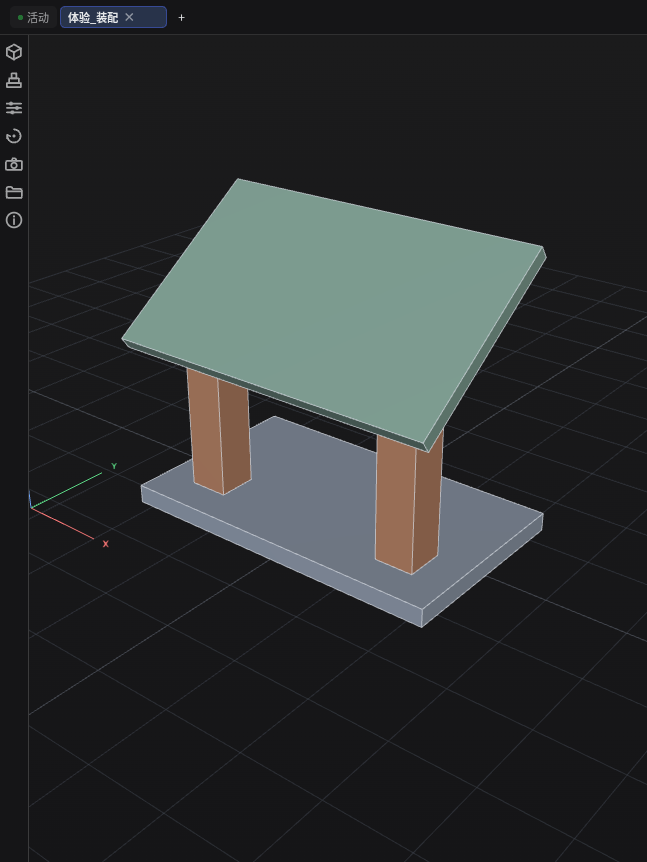
|
|---|---|
|
|
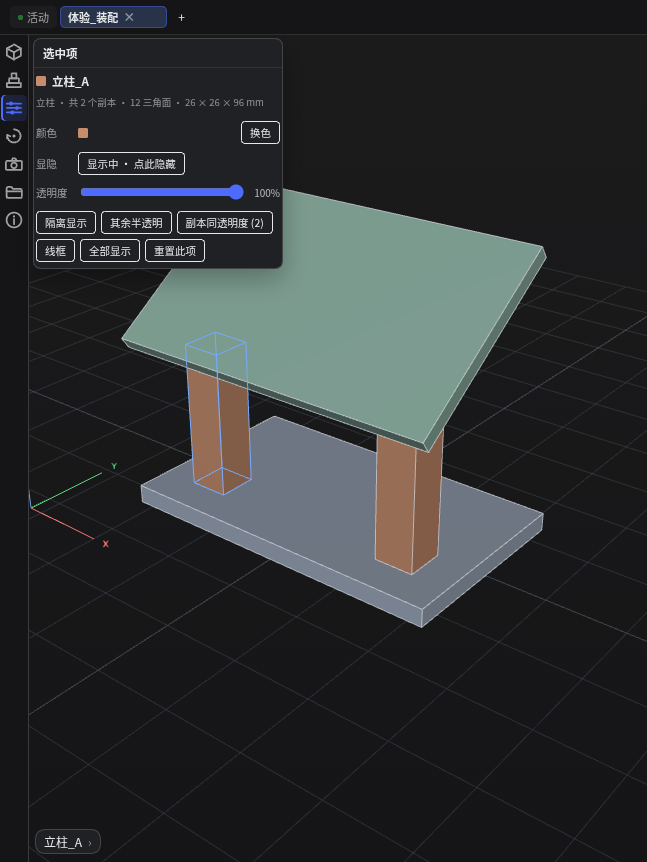
15
15
|
| 建模 | `cad_studio_feature` 声明式特征(box/cylinder/sphere/cone/torus/extrude/revolve/fuse/cut/common/fillet/chamfer/shell/pattern/translate/rotate/mirror);`cad_studio_run` 跑任意 FreeCAD Python |
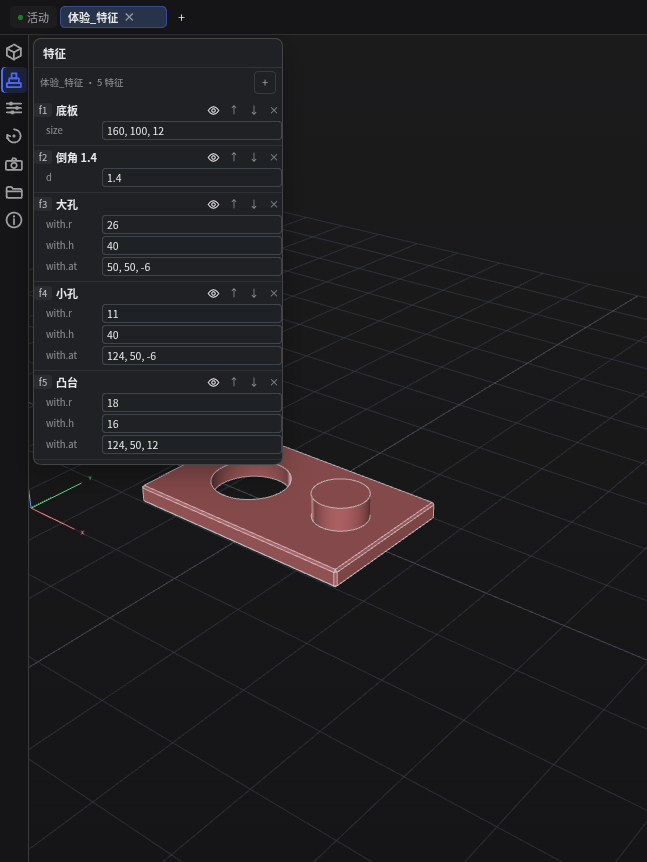
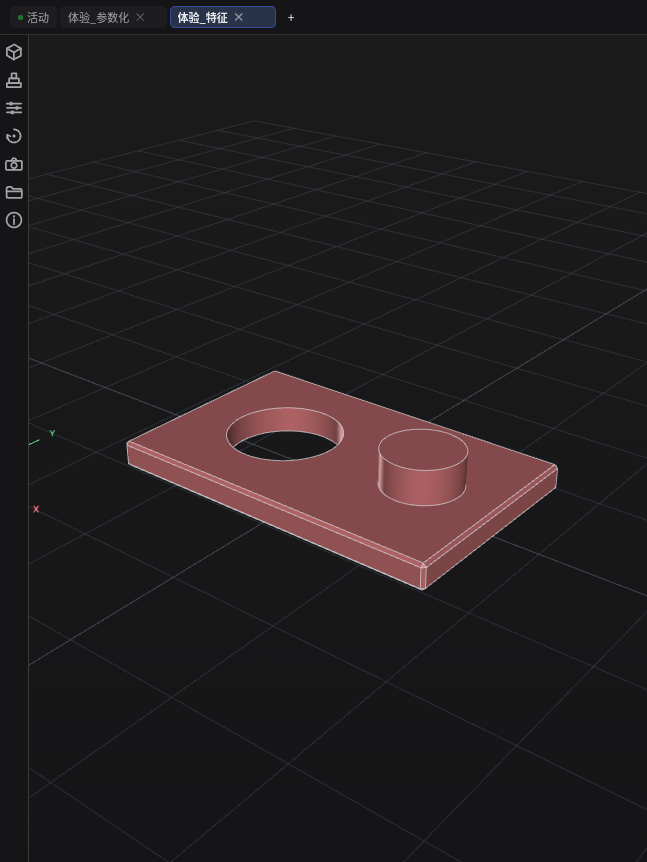
|
|
16
16
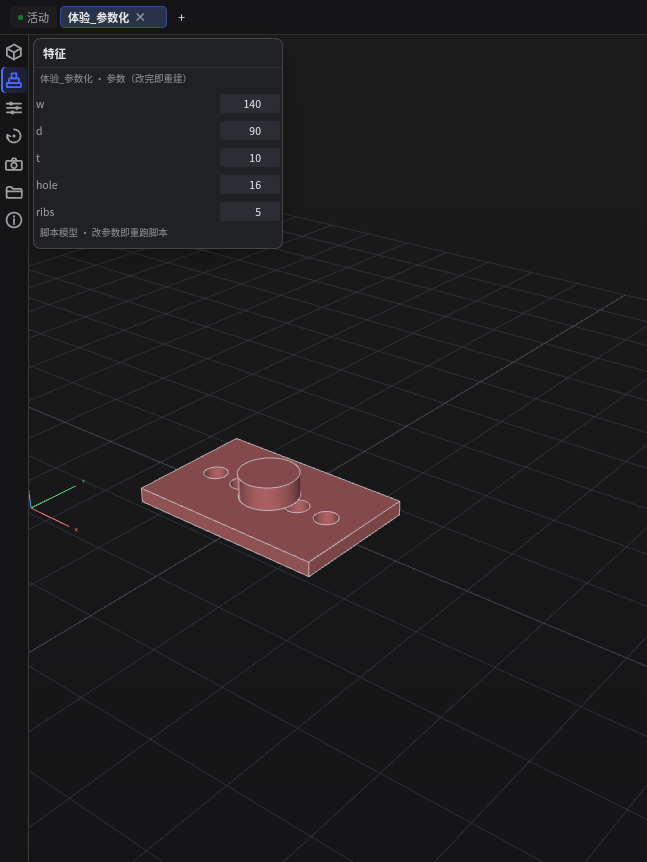
|
| 工程文件 | `cad_studio_doc` 存 `script` 或 `features` 两种模型;`cad_studio_features` 改一条特征→整表重算(0.2–0.6 s),失败整表回滚 |
|
|
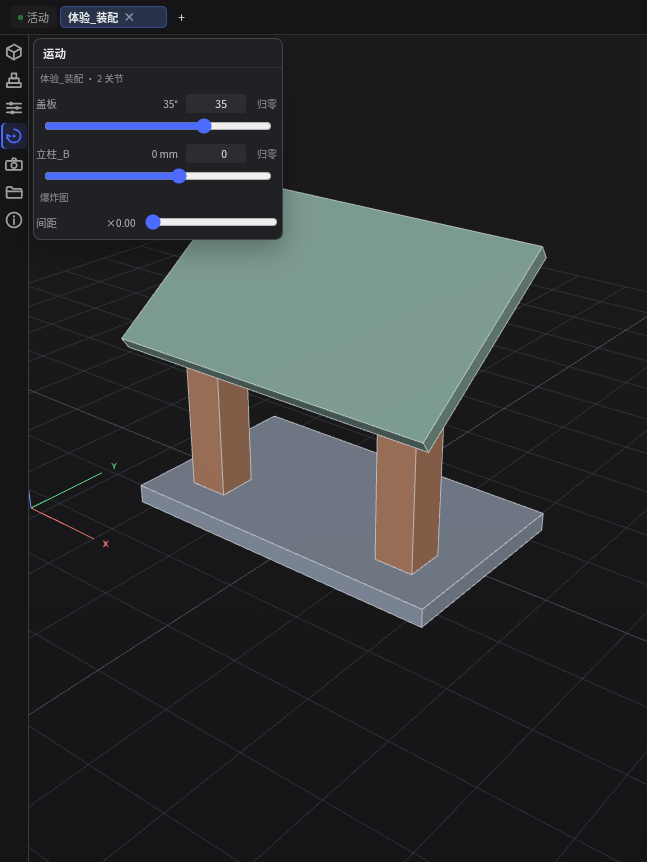
17
|
-
| 装配 | `cad_studio_assembly` 读 manifest,`App::Link` 语义的实例位姿;零件是 STEP
|
|
17
|
+
| 装配 | `cad_studio_assembly` 读 manifest,`App::Link` 语义的实例位姿;零件是 STEP 文件级引用(改零件重开即跟随);`measure:true` 回每实例体积/包围盒,`interference:true` 回真正重叠的实例对 |
|
|
18
18
|
| 运动 | `cad_studio_joint`(revolute/linear)+ `cad_studio_drive` + `cad_studio_explode`,面板拖滑杆看运动 |
|
|
19
19
|
| 出图 | `cad_studio_drawing` HLR → SVG(主/俯/左/等轴) |
|
|
20
20
|
| 其它 | `cad_studio_open`(STEP/STL/BREP/IGES 进来看)、`cad_studio_export`、`cad_studio_measure`、`cad_studio_env` |
|
|
@@ -56,7 +56,7 @@ npm 包:<https://www.npmjs.com/package/dsh-cad-studio>(`dsh plugin` / DSH
|
|
|
56
56
|
|
|
57
57
|
`autoOpen: 'session'` 的判据是宿主侧的两个信号:这个会话最近一次发布过场景(`lastSession`),或它拥有更早发布过的场景。也就是说——只有真正在这里建过模的对话,右栏才会自动让出位置;别的对话不受打扰。
|
|
58
58
|
|
|
59
|
-
##
|
|
59
|
+
## 接口约定与踩过的坑
|
|
60
60
|
|
|
61
61
|
- **导出只走 `cad_studio_export`**。在 `cad_studio_run` 里直接 `Part.export([compound], path)` 会写出一个 1.6 KB 的 STEP 壳子,读回来是空形状,而脚本本身不报错。要么用 `cad_studio_export`,要么给 `cad_studio_run` 传 `check: ["/path/out.step"]`——它会在跑完后把这个文件读回来,回报 `{bytes, solids, volume, valid}`,壳子会显示 `valid:false`。
|
|
62
62
|
- **探查脚本别发布场景**。`cad_studio_run` 默认会把绑定的 `scene` 发布成面板里的一行;只是量体积/查干涉的脚本传 `publish: false`,否则模型列表会被探针卡片塞满(实测一次会话攒到 28 行)。已经混进去的用 `cad_studio_scene {action:"delete", id:"scene-12"}` 清。
|
|
@@ -67,6 +67,38 @@ npm 包:<https://www.npmjs.com/package/dsh-cad-studio>(`dsh plugin` / DSH
|
|
|
67
67
|
- 特征参数在 `normalizeFeature` 阶段就校验,报错带行号与名字:`特征 f10(倒角_左后) cut:需要 with 子图元(…)`——不会再从 FreeCAD 里冒出一句 `第 10 步(cut)失败:'with'`。
|
|
68
68
|
- 删掉的面板行不会被下一次发布「复活」:`persist()` 会跟磁盘对账,只保留磁盘上还有的、或本进程发布过的行。
|
|
69
69
|
|
|
70
|
+
## 截图
|
|
71
|
+
|
|
72
|
+
都来自一个**测试实例**(合成的 `体验_特征 / 体验_参数化 / 体验_装配` 三个演示模型),并且**只截取面板元素**——图里没有真实工作区、会话或文件路径。
|
|
73
|
+
|
|
74
|
+
**装配 + 视口**:零件按实例配色,左侧图标条、页签、坐标轴、网格、等轴视图。
|
|
75
|
+
|
|
76
|
+

|
|
77
|
+
|
|
78
|
+
**选中项**:视口点选 ↔ 列表联动;改色、显隐、透明度、隔离、线框、副本同透明度、重置。
|
|
79
|
+
|
|
80
|
+
|
|
81
|
+
|
|
82
|
+
**声明式特征**:一条特征一行,改数值即整表重算;眼睛跳过该步,↑↓ 调顺序,× 删除。
|
|
83
|
+
|
|
84
|
+
|
|
85
|
+
|
|
86
|
+
**参数化脚本**:改 `params` 就重跑脚本,原地更新同一个场景(不新增模型行)。
|
|
87
|
+
|
|
88
|
+
|
|
89
|
+
|
|
90
|
+
**关节与爆炸**:每个关节都有数值框(可精确输入 0°)、归零按钮和滑杆;爆炸图一个滑杆。
|
|
91
|
+
|
|
92
|
+
|
|
93
|
+
|
|
94
|
+
**多页签**:最多 5 个模型页签,各自记住相机与配色;`+` 新增页签,文件夹图标切换当前页签。
|
|
95
|
+
|
|
96
|
+
|
|
97
|
+
|
|
98
|
+
图标条(4× 放大):立方体=零件、台阶=特征、滑杆=选中项、环形箭头=运动、相机=视图、文件夹=模型、ⓘ=信息。
|
|
99
|
+
|
|
100
|
+
<img src="https://raw.githubusercontent.com/STofone/dsh-cad-studio/main/docs/rail.png" width="58" alt="图标条">
|
|
101
|
+
|
|
70
102
|
## 场景 JSON 协议
|
|
71
103
|
|
|
72
104
|
```jsonc
|
|
@@ -84,11 +116,22 @@ npm 包:<https://www.npmjs.com/package/dsh-cad-studio>(`dsh plugin` / DSH
|
|
|
84
116
|
## 开发
|
|
85
117
|
|
|
86
118
|
```bash
|
|
87
|
-
|
|
88
|
-
|
|
119
|
+
# 165 条回归:无浏览器,stub cordis ctx 直接调工具
|
|
120
|
+
rm -rf /tmp/cad-h && mkdir -p /tmp/cad-h && TMPDIR=/tmp/cad-h node test/harness.mjs
|
|
121
|
+
node test/stale-bridge.mjs # 热重载后旧 bridge 实例自愈
|
|
122
|
+
|
|
123
|
+
# 在一台测试实例上造三个"什么都能试"的模型(体验_特征 / 体验_参数化 / 体验_装配)
|
|
124
|
+
node scripts/dev-playground.mjs
|
|
125
|
+
# 把这条实例的模型列表收敛回这几个演示模型(探针跑多了会攒出几十行)
|
|
126
|
+
node scripts/dev-keep-demos.mjs --dry # 先看要删哪些
|
|
127
|
+
node scripts/dev-keep-demos.mjs
|
|
128
|
+
# 重截 README 的截图(只截 [data-cad-panel-root],需要能访问测试实例)
|
|
129
|
+
node scripts/shots.mjs --url http://127.0.0.1:3201 --token-file /tmp/dev-token.txt
|
|
89
130
|
```
|
|
90
131
|
|
|
91
|
-
`
|
|
132
|
+
> `TMPDIR` 必须指到临时目录:harness 会清空 `$TMPDIR/dsh-cad-studio`,指到默认位置就会把线上实例的场景缓存一起删掉。
|
|
133
|
+
|
|
134
|
+
`test/replicate.mjs`、`scripts/*.mjs` 是造场景/验证用的夹具,按需改路径。截图脚本用 `window.__cadStudioAutoOpen.open()` 打开面板——宿主的页签启动器在不同版本里位置会变,这个钩子稳定些。
|
|
92
135
|
|
|
93
136
|
## 已知限制
|
|
94
137
|
|
package/client.js
CHANGED
|
@@ -2668,7 +2668,10 @@ const FILE_EXTS = ['step', 'stp', 'iges', 'igs', 'brep', 'stl']
|
|
|
2668
2668
|
try {
|
|
2669
2669
|
Object.defineProperty(window, '__cadStudioAutoOpen', {
|
|
2670
2670
|
configurable: true,
|
|
2671
|
-
|
|
2671
|
+
// `open()` is for tooling: it is how a screenshot script (or a user
|
|
2672
|
+
// who closed the pane) brings the tab back without hunting for the
|
|
2673
|
+
// host's own launcher.
|
|
2674
|
+
get: () => ({ ...autoOpenTrace, mode: cadAutoOpen, session: panelSession, open: () => openPane(0) }),
|
|
2672
2675
|
})
|
|
2673
2676
|
} catch (err) { /* a stale definition from a previous apply is fine */ }
|
|
2674
2677
|
|
package/index.js
CHANGED
|
@@ -1215,6 +1215,9 @@ __out = {
|
|
|
1215
1215
|
},
|
|
1216
1216
|
execute: async ({ action, id, title }) => {
|
|
1217
1217
|
const kind = String(action ?? 'list')
|
|
1218
|
+
// A fresh process starts with an empty in-memory list; the rows live in
|
|
1219
|
+
// state.json until the next publish hydrates them.
|
|
1220
|
+
await bridge.hydrateHistory()
|
|
1218
1221
|
if (kind === 'list') {
|
|
1219
1222
|
const rows = bridge.listSceneRows()
|
|
1220
1223
|
return { ok: true, scenes: rows.length, latest: bridge.latest ? bridge.latest.id : '', items: rows }
|