dsh-botgroup 0.6.7 → 0.7.0
This diff represents the content of publicly available package versions that have been released to one of the supported registries. The information contained in this diff is provided for informational purposes only and reflects changes between package versions as they appear in their respective public registries.
- package/README.en.md +60 -122
- package/README.md +59 -121
- package/lib/client.js +9117 -5624
- package/lib/client.js.map +4 -4
- package/lib/host/activity/first-user.js +1 -1
- package/lib/host/activity/preview.js +1 -1
- package/lib/host/activity/remote.js +1 -1
- package/lib/host/activity/tracker.js +1 -1
- package/lib/host/automation/coordinator.js +1 -1
- package/lib/host/automation/delivery.js +1 -1
- package/lib/host/automation/errors.js +1 -1
- package/lib/host/automation/index.js +1 -1
- package/lib/host/automation/remote.js +1 -1
- package/lib/host/automation/store.js +1 -1
- package/lib/host/bot-context.js +42 -14
- package/lib/host/bot-context.js.map +1 -1
- package/lib/host/capabilities/platform.js +1 -1
- package/lib/host/capabilities/remote.js +1 -1
- package/lib/host/capabilities/service.js +1 -1
- package/lib/host/collaboration/remote.js +1 -1
- package/lib/host/collaboration/service.js +1 -1
- package/lib/host/common/integration-stores.js +1 -1
- package/lib/host/common/native-ambient-source.d.ts +7 -0
- package/lib/host/common/native-ambient-source.js +15 -0
- package/lib/host/common/native-ambient-source.js.map +1 -0
- package/lib/host/common/operations.js +1 -1
- package/lib/host/common/subagent-activation.d.ts +7 -0
- package/lib/host/common/subagent-activation.js +10 -0
- package/lib/host/common/subagent-activation.js.map +1 -0
- package/lib/host/composer.js +1 -1
- package/lib/host/connectors/remote.js +1 -1
- package/lib/host/connectors/service.js +1 -1
- package/lib/host/data-flow/agent-binding.js +1 -1
- package/lib/host/data-flow/connector-boundary.js +1 -1
- package/lib/host/data-flow/delegation.js +4 -3
- package/lib/host/data-flow/delegation.js.map +1 -1
- package/lib/host/data-flow/egress.js +1 -1
- package/lib/host/data-flow/grants.js +1 -1
- package/lib/host/data-flow/graph-capability.js +1 -1
- package/lib/host/data-flow/labels.js +1 -1
- package/lib/host/data-flow/lineage.js +1 -1
- package/lib/host/data-flow/managed-copies.d.ts +11 -3
- package/lib/host/data-flow/managed-copies.js +1 -1
- package/lib/host/data-flow/native-policy.js +1 -1
- package/lib/host/data-flow/outlets.js +1 -1
- package/lib/host/data-flow/tool-guard.js +12 -3
- package/lib/host/data-flow/tool-guard.js.map +1 -1
- package/lib/host/delegate/continuation.js +1 -1
- package/lib/host/delegate/guard.js +9 -5
- package/lib/host/delegate/guard.js.map +1 -1
- package/lib/host/delegate/tool.js +29 -2
- package/lib/host/delegate/tool.js.map +1 -1
- package/lib/host/errors.js +1 -1
- package/lib/host/groups/concurrent.js +12 -7
- package/lib/host/groups/concurrent.js.map +1 -1
- package/lib/host/groups/data-flow.js +10 -5
- package/lib/host/groups/data-flow.js.map +1 -1
- package/lib/host/groups/failure.js +1 -1
- package/lib/host/groups/members.d.ts +69 -2
- package/lib/host/groups/members.js +41 -3
- package/lib/host/groups/members.js.map +1 -1
- package/lib/host/groups/messages.d.ts +54 -0
- package/lib/host/groups/messages.js +5 -2
- package/lib/host/groups/messages.js.map +1 -1
- package/lib/host/groups/model-selection.js +1 -1
- package/lib/host/groups/model.d.ts +65 -0
- package/lib/host/groups/model.js +6 -2
- package/lib/host/groups/model.js.map +1 -1
- package/lib/host/groups/owner-follow-up.js +1 -1
- package/lib/host/groups/recall-sessions.js +1 -1
- package/lib/host/groups/recall-tool.js +1 -1
- package/lib/host/groups/recall.d.ts +2 -2
- package/lib/host/groups/recall.js +1 -1
- package/lib/host/groups/remote.d.ts +317 -0
- package/lib/host/groups/remote.js +32 -1
- package/lib/host/groups/remote.js.map +1 -1
- package/lib/host/groups/root-guard.js +1 -1
- package/lib/host/groups/roots.js +1 -1
- package/lib/host/groups/round-robin.js +1 -1
- package/lib/host/groups/routing.d.ts +28 -1
- package/lib/host/groups/routing.js +33 -3
- package/lib/host/groups/routing.js.map +1 -1
- package/lib/host/groups/service.d.ts +502 -2
- package/lib/host/groups/service.js +43 -5
- package/lib/host/groups/service.js.map +1 -1
- package/lib/host/groups/state.d.ts +158 -1
- package/lib/host/groups/state.js +4 -2
- package/lib/host/groups/state.js.map +1 -1
- package/lib/host/groups/supergroup-admission.d.ts +87 -0
- package/lib/host/groups/supergroup-admission.js +99 -0
- package/lib/host/groups/supergroup-admission.js.map +1 -0
- package/lib/host/groups/team-recipes.d.ts +113 -0
- package/lib/host/groups/team-recipes.js +92 -0
- package/lib/host/groups/team-recipes.js.map +1 -0
- package/lib/host/groups/turn-runner.d.ts +3 -0
- package/lib/host/groups/turn-runner.js +43 -8
- package/lib/host/groups/turn-runner.js.map +1 -1
- package/lib/host/groups/turns.d.ts +84 -1
- package/lib/host/groups/turns.js +44 -11
- package/lib/host/groups/turns.js.map +1 -1
- package/lib/host/groups/worker-tool.d.ts +8 -1
- package/lib/host/groups/worker-tool.js +80 -9
- package/lib/host/groups/worker-tool.js.map +1 -1
- package/lib/host/home.js +1 -1
- package/lib/host/im/service.js +1 -1
- package/lib/host/index.d.ts +2 -1
- package/lib/host/index.js +30 -2
- package/lib/host/index.js.map +1 -1
- package/lib/host/live-persona.js +1 -1
- package/lib/host/main-session.js +1 -1
- package/lib/host/memory/admission.js +1 -1
- package/lib/host/memory/auto-share.js +1 -1
- package/lib/host/memory/confirmation.d.ts +4 -4
- package/lib/host/memory/confirmation.js +1 -1
- package/lib/host/memory/conflicts.js +1 -1
- package/lib/host/memory/context.js +1 -1
- package/lib/host/memory/domain-v2.d.ts +8 -8
- package/lib/host/memory/domain-v2.js +1 -1
- package/lib/host/memory/facade.d.ts +131 -3
- package/lib/host/memory/facade.js +101 -2
- package/lib/host/memory/facade.js.map +1 -1
- package/lib/host/memory/forget-preview.js +1 -1
- package/lib/host/memory/forget-runner.js +1 -1
- package/lib/host/memory/forget-service.js +1 -1
- package/lib/host/memory/history-proof.js +1 -1
- package/lib/host/memory/history.js +1 -1
- package/lib/host/memory/layout-upgrade.js +1 -1
- package/lib/host/memory/migration.js +1 -1
- package/lib/host/memory/op-log.js +1 -1
- package/lib/host/memory/open-v2.js +1 -1
- package/lib/host/memory/owner-lease.js +1 -1
- package/lib/host/memory/persistent-map.js +1 -1
- package/lib/host/memory/port.js +1 -1
- package/lib/host/memory/preserve-inbox.js +1 -1
- package/lib/host/memory/projection.js +1 -1
- package/lib/host/memory/prompt.js +1 -1
- package/lib/host/memory/query.js +1 -1
- package/lib/host/memory/quota-replay.js +1 -1
- package/lib/host/memory/quota.d.ts +4 -4
- package/lib/host/memory/quota.js +1 -1
- package/lib/host/memory/remote.d.ts +124 -0
- package/lib/host/memory/remote.js +12 -1
- package/lib/host/memory/remote.js.map +1 -1
- package/lib/host/memory/retrieval-config.js +1 -1
- package/lib/host/memory/retrieval-rank.js +1 -1
- package/lib/host/memory/retrieval-text.js +1 -1
- package/lib/host/memory/root-instructions.js +1 -1
- package/lib/host/memory/secrets.js +1 -1
- package/lib/host/memory/service.js +1 -1
- package/lib/host/memory/shards.js +1 -1
- package/lib/host/memory/store-v2.js +1 -1
- package/lib/host/memory/temporal.js +1 -1
- package/lib/host/memory/tool-guidance.js +1 -1
- package/lib/host/memory/tools.js +1 -1
- package/lib/host/memory/trusted-ingress.js +1 -1
- package/lib/host/memory/version.d.ts +4 -4
- package/lib/host/memory/version.js +1 -1
- package/lib/host/messaging/config.js +1 -1
- package/lib/host/messaging/core.d.ts +11 -3
- package/lib/host/messaging/core.js +4 -3
- package/lib/host/messaging/core.js.map +1 -1
- package/lib/host/messaging/delivery.js +3 -1
- package/lib/host/messaging/delivery.js.map +1 -1
- package/lib/host/messaging/evidence.js +1 -1
- package/lib/host/messaging/interrupt.js +1 -1
- package/lib/host/messaging/recovery.js +1 -1
- package/lib/host/messaging/remote.d.ts +1 -1
- package/lib/host/messaging/remote.js +1 -1
- package/lib/host/messaging/reply-routing.js +1 -1
- package/lib/host/messaging/safety.js +8 -3
- package/lib/host/messaging/safety.js.map +1 -1
- package/lib/host/messaging/scoped-projection.d.ts +43 -0
- package/lib/host/messaging/scoped-projection.js +136 -0
- package/lib/host/messaging/scoped-projection.js.map +1 -0
- package/lib/host/messaging/service.d.ts +5 -2
- package/lib/host/messaging/service.js +16 -6
- package/lib/host/messaging/service.js.map +1 -1
- package/lib/host/messaging/store.d.ts +45 -13
- package/lib/host/messaging/store.js +4 -3
- package/lib/host/messaging/store.js.map +1 -1
- package/lib/host/messaging/tool.js +24 -5
- package/lib/host/messaging/tool.js.map +1 -1
- package/lib/host/messaging/wake.js +3 -3
- package/lib/host/messaging/wake.js.map +1 -1
- package/lib/host/native-schedule/outcomes.js +1 -1
- package/lib/host/native-schedule/service.js +1 -1
- package/lib/host/notifications/data-flow.js +1 -1
- package/lib/host/notifications/remote.js +1 -1
- package/lib/host/notifications/service.js +1 -1
- package/lib/host/notifications/time.js +1 -1
- package/lib/host/notifications/tool.js +1 -1
- package/lib/host/onboarding/coordinator.js +1 -1
- package/lib/host/onboarding/guard.js +1 -1
- package/lib/host/proactive/auto-admission.js +1 -1
- package/lib/host/proactive/config.js +1 -1
- package/lib/host/proactive/coordinator-client.js +1 -1
- package/lib/host/proactive/deferred-notices.js +1 -1
- package/lib/host/proactive/execution-prompt.js +1 -1
- package/lib/host/proactive/execution.js +1 -1
- package/lib/host/proactive/executors/command.js +1 -1
- package/lib/host/proactive/executors/json-command-bridge-entry.js +1 -1
- package/lib/host/proactive/executors/json-command-bridge.js +1 -1
- package/lib/host/proactive/executors/loopback.js +1 -1
- package/lib/host/proactive/feedback-workflow.js +1 -1
- package/lib/host/proactive/feedback.js +1 -1
- package/lib/host/proactive/follow-up-events.d.ts +2 -0
- package/lib/host/proactive/follow-up-events.js +63 -4
- package/lib/host/proactive/follow-up-events.js.map +1 -1
- package/lib/host/proactive/follow-up-facts.js +1 -1
- package/lib/host/proactive/follow-up-tool.js +3 -3
- package/lib/host/proactive/follow-up-tool.js.map +1 -1
- package/lib/host/proactive/governance-artifacts.js +1 -1
- package/lib/host/proactive/governance-service.js +1 -1
- package/lib/host/proactive/group-budget.js +1 -1
- package/lib/host/proactive/group-follow-up.js +1 -1
- package/lib/host/proactive/group-repair.js +1 -1
- package/lib/host/proactive/index.js +1 -1
- package/lib/host/proactive/lifecycle.js +1 -1
- package/lib/host/proactive/method-evaluation.js +1 -1
- package/lib/host/proactive/method-package.js +1 -1
- package/lib/host/proactive/method-skill.js +1 -1
- package/lib/host/proactive/model-budget.js +1 -1
- package/lib/host/proactive/notice-pump.js +1 -1
- package/lib/host/proactive/notification-bridge.js +1 -1
- package/lib/host/proactive/read-query.js +1 -1
- package/lib/host/proactive/remote.d.ts +166 -0
- package/lib/host/proactive/remote.js +1 -1
- package/lib/host/proactive/repair.js +1 -1
- package/lib/host/proactive/result-journal.js +1 -1
- package/lib/host/proactive/service.d.ts +1711 -51
- package/lib/host/proactive/service.js +1 -1
- package/lib/host/proactive/setup.js +1 -1
- package/lib/host/proactive/sources/ci-feed.js +1 -1
- package/lib/host/proactive/sources/ci.js +1 -1
- package/lib/host/proactive/sources/github-ci.js +1 -1
- package/lib/host/proactive/task-cost.js +1 -1
- package/lib/host/proactive/wire.js +1 -1
- package/lib/host/proactive/work-continuation.js +1 -1
- package/lib/host/proactive/workspace-process.js +1 -1
- package/lib/host/proactive/workspace-repair.js +1 -1
- package/lib/host/reference-memory/backend.js +1 -1
- package/lib/host/reference-memory/cleanup-files.js +1 -1
- package/lib/host/reference-memory/copies.js +1 -1
- package/lib/host/reference-memory/files.js +1 -1
- package/lib/host/reference-memory/model.js +1 -1
- package/lib/host/reference-memory/service.js +1 -1
- package/lib/host/reference-memory/writer.js +1 -1
- package/lib/host/registry/identity.js +1 -1
- package/lib/host/registry/lifecycle.d.ts +2 -1
- package/lib/host/registry/lifecycle.js +1 -1
- package/lib/host/registry/mutations.js +1 -1
- package/lib/host/registry/presets.js +1 -1
- package/lib/host/registry/types.js +1 -1
- package/lib/host/registry-config.d.ts +4 -1
- package/lib/host/registry-config.js +3 -1
- package/lib/host/registry-config.js.map +1 -1
- package/lib/host/registry.d.ts +3 -0
- package/lib/host/registry.js +2 -1
- package/lib/host/registry.js.map +1 -1
- package/lib/host/shadow/budget.js +1 -1
- package/lib/host/shadow/config.js +1 -1
- package/lib/host/shadow/notification-adapter.js +1 -1
- package/lib/host/shadow/planner.js +1 -1
- package/lib/host/shadow/schedule-adapter.js +1 -1
- package/lib/host/shadow/service.js +1 -1
- package/lib/host/store.js +1 -1
- package/lib/host/stores/activity.js +1 -1
- package/lib/host/stores/bots.js +1 -1
- package/lib/host/stores/domain.js +1 -1
- package/lib/host/stores/memory.js +1 -1
- package/lib/host/supergroup/collaboration.d.ts +99 -0
- package/lib/host/supergroup/collaboration.js +361 -0
- package/lib/host/supergroup/collaboration.js.map +1 -0
- package/lib/host/supergroup/config.d.ts +15 -0
- package/lib/host/supergroup/config.js +33 -0
- package/lib/host/supergroup/config.js.map +1 -0
- package/lib/host/supergroup/input-capability.d.ts +4 -0
- package/lib/host/supergroup/input-capability.js +21 -0
- package/lib/host/supergroup/input-capability.js.map +1 -0
- package/lib/host/supergroup/remote.d.ts +1944 -0
- package/lib/host/supergroup/remote.js +123 -0
- package/lib/host/supergroup/remote.js.map +1 -0
- package/lib/host/supergroup/service.d.ts +935 -0
- package/lib/host/supergroup/service.js +921 -0
- package/lib/host/supergroup/service.js.map +1 -0
- package/lib/host/supergroup/task-support.d.ts +245 -0
- package/lib/host/supergroup/task-support.js +310 -0
- package/lib/host/supergroup/task-support.js.map +1 -0
- package/lib/host/supergroup/tool.d.ts +4 -0
- package/lib/host/supergroup/tool.js +74 -0
- package/lib/host/supergroup/tool.js.map +1 -0
- package/lib/host/tools/bot-manage.js +7 -3
- package/lib/host/tools/bot-manage.js.map +1 -1
- package/lib/host/workspace/remote.js +1 -1
- package/lib/host/workspace/service.js +1 -1
- package/lib/index.d.ts +1 -1
- package/lib/index.js +1 -1
- package/lib/module-manifest.json +274 -258
- package/lib/proactive-coordinator/main.mjs +176 -9
- package/lib/proactive-coordinator/provenance.json +1 -1
- package/lib/shared/activity-preview.js +1 -1
- package/lib/shared/activity.js +1 -1
- package/lib/shared/automation-contract.js +1 -1
- package/lib/shared/automation.js +1 -1
- package/lib/shared/bot-brand.js +1 -1
- package/lib/shared/capabilities-contract.js +1 -1
- package/lib/shared/collaboration-contract.js +1 -1
- package/lib/shared/collaboration.js +1 -1
- package/lib/shared/connectors.js +1 -1
- package/lib/shared/data-flow.js +1 -1
- package/lib/shared/eval-budget.js +1 -1
- package/lib/shared/group-recall-reads.js +1 -1
- package/lib/shared/group-recall.js +1 -1
- package/lib/shared/groups-contract.d.ts +1777 -0
- package/lib/shared/groups-contract.js +9 -1
- package/lib/shared/groups-contract.js.map +1 -1
- package/lib/shared/groups.d.ts +161 -0
- package/lib/shared/groups.js +18 -1
- package/lib/shared/groups.js.map +1 -1
- package/lib/shared/identity.js +1 -1
- package/lib/shared/ids.js +1 -1
- package/lib/shared/integrations-contract.js +1 -1
- package/lib/shared/integrations.js +1 -1
- package/lib/shared/managed-flow.js +1 -1
- package/lib/shared/memory-forget.js +1 -1
- package/lib/shared/memory-management.d.ts +426 -0
- package/lib/shared/memory-management.js +9 -1
- package/lib/shared/memory-management.js.map +1 -1
- package/lib/shared/memory-ops.js +1 -1
- package/lib/shared/memory-tool-names.js +1 -1
- package/lib/shared/memory-v2.js +1 -1
- package/lib/shared/messaging-contract.d.ts +1 -1
- package/lib/shared/messaging-contract.js +1 -1
- package/lib/shared/messaging.d.ts +21 -10
- package/lib/shared/messaging.js +3 -1
- package/lib/shared/messaging.js.map +1 -1
- package/lib/shared/native-schedule.js +1 -1
- package/lib/shared/notifications.js +1 -1
- package/lib/shared/onboarding-source.js +1 -1
- package/lib/shared/onboarding.js +1 -1
- package/lib/shared/operation-errors.d.ts +3 -0
- package/lib/shared/operation-errors.js +4 -1
- package/lib/shared/operation-errors.js.map +1 -1
- package/lib/shared/proactive/activity.js +1 -1
- package/lib/shared/proactive/document.js +1 -1
- package/lib/shared/proactive/feedback.js +1 -1
- package/lib/shared/proactive/follow-up.d.ts +460 -0
- package/lib/shared/proactive/follow-up.js +15 -1
- package/lib/shared/proactive/follow-up.js.map +1 -1
- package/lib/shared/proactive/governance.js +1 -1
- package/lib/shared/proactive/group-follow-up.js +1 -1
- package/lib/shared/proactive/group-repair.js +1 -1
- package/lib/shared/proactive/handoff.js +1 -1
- package/lib/shared/proactive/method-evaluation.js +1 -1
- package/lib/shared/proactive/method-package.js +1 -1
- package/lib/shared/proactive/notices.js +1 -1
- package/lib/shared/proactive/outcomes.js +1 -1
- package/lib/shared/proactive/protocol.d.ts +627 -0
- package/lib/shared/proactive/protocol.js +1 -1
- package/lib/shared/proactive/remote-contract.d.ts +792 -0
- package/lib/shared/proactive/remote-contract.js +1 -1
- package/lib/shared/proactive/repair.js +1 -1
- package/lib/shared/proactive/responsibility.js +1 -1
- package/lib/shared/proactive/setup.d.ts +83 -0
- package/lib/shared/proactive/setup.js +1 -1
- package/lib/shared/proactive/work-progress.js +1 -1
- package/lib/shared/proactive/work.js +1 -1
- package/lib/shared/proactive/workspace-repair.js +1 -1
- package/lib/shared/reference-memory.js +1 -1
- package/lib/shared/remote-contract.d.ts +531 -8
- package/lib/shared/remote-contract.js +10 -2
- package/lib/shared/remote-contract.js.map +1 -1
- package/lib/shared/routine-outcomes.js +1 -1
- package/lib/shared/schema.js +1 -1
- package/lib/shared/secrets.js +1 -1
- package/lib/shared/shadow.js +1 -1
- package/lib/shared/supergroup-contract.d.ts +7119 -0
- package/lib/shared/supergroup-contract.js +26 -0
- package/lib/shared/supergroup-contract.js.map +1 -0
- package/lib/shared/supergroup.d.ts +1441 -0
- package/lib/shared/supergroup.js +56 -0
- package/lib/shared/supergroup.js.map +1 -0
- package/lib/shared/task-materials.d.ts +166 -0
- package/lib/shared/task-materials.js +40 -0
- package/lib/shared/task-materials.js.map +1 -0
- package/lib/shared/team-recipes.d.ts +109 -0
- package/lib/shared/team-recipes.js +25 -0
- package/lib/shared/team-recipes.js.map +1 -0
- package/lib/shared/version.d.ts +1 -1
- package/lib/shared/version.js +2 -2
- package/lib/shared/workspace-contract.js +1 -1
- package/lib/shared/workspace.js +1 -1
- package/lib/typert.host.js +1 -1
- package/lib/typert.remote-client.js +1 -1
- package/locale/en.json +239 -7
- package/locale/zh.json +239 -7
- package/package.json +2 -1
package/README.en.md
CHANGED
|
@@ -6,175 +6,113 @@
|
|
|
6
6
|
|
|
7
7
|
English · [中文](README.md)
|
|
8
8
|
|
|
9
|
-
**Your personal agent workspace.** Create Bots with their own roles and
|
|
9
|
+
**Your personal agent workspace.** Create Bots with their own roles, memory and tools in DeepSeek Harness. Keep working in ongoing conversations, collaborate, and receive results in the original chat.
|
|
10
10
|
|
|
11
|
-
|
|
11
|
+
**Current source: 0.7.0 release candidate, not published (npm package: `dsh-botgroup`).** This page describes the candidate's Bot mode, Supergroup and simpler workflows. For the published **[stable 0.6.7](https://github.com/MJ-CJM/DSH-Bot/releases/tag/v0.6.7)**, use its own release notes and assets. [Changelog](https://github.com/MJ-CJM/DSH-Bot/blob/main/CHANGELOG.md).
|
|
12
12
|
|
|
13
|
-
|
|
14
14
|
|
|
15
|
-
|
|
15
|
+
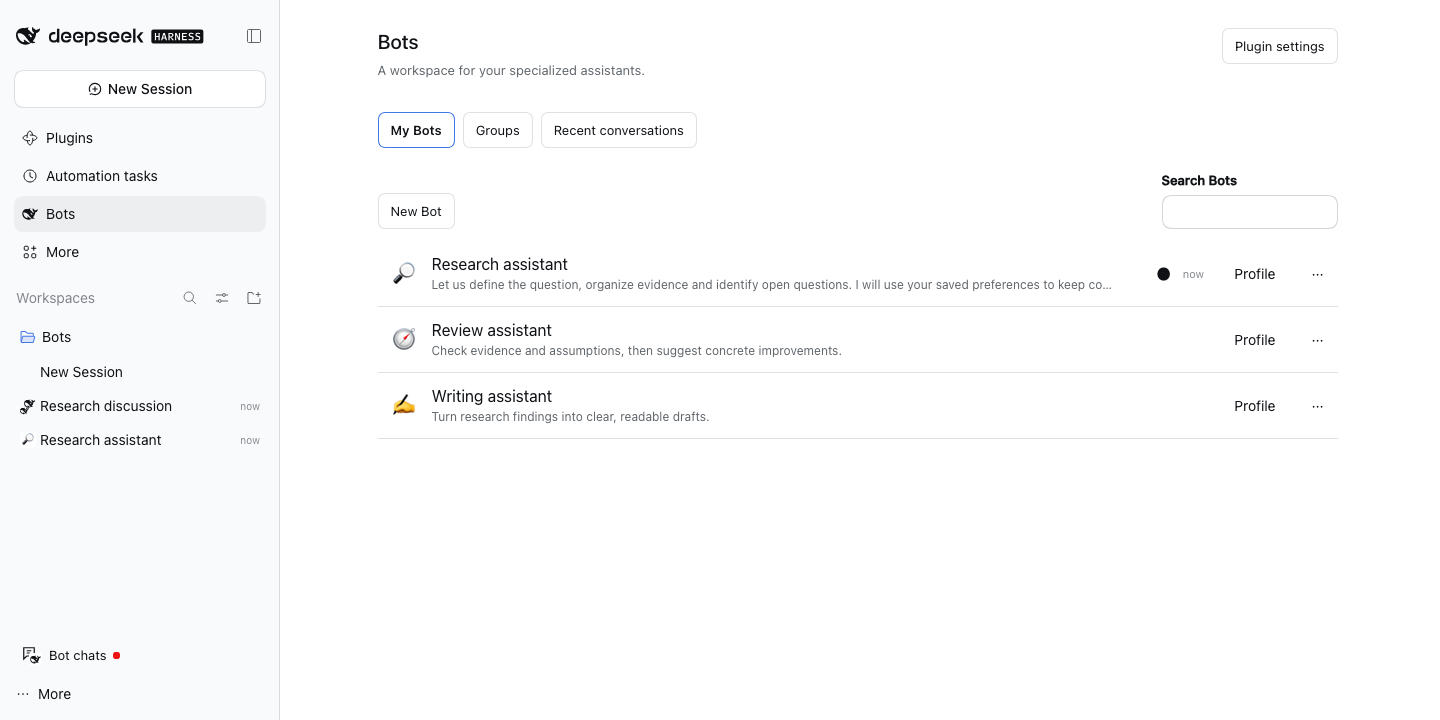
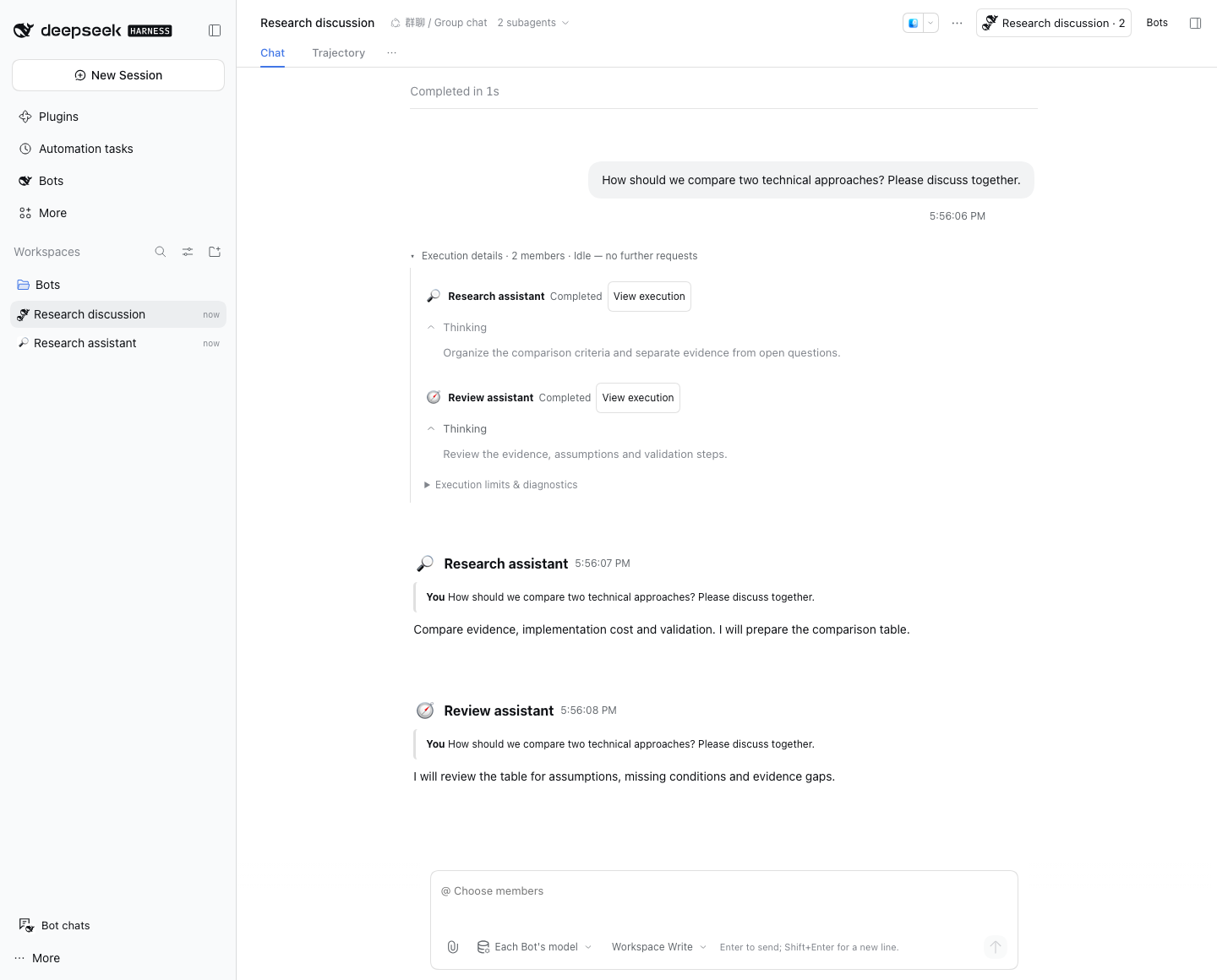
Screenshots show basic workflows from an earlier version in a real, isolated DSH environment, with fictional data and scripted replies. Current candidate entry points are described below. Screenshots do not establish real-model task quality.
|
|
16
16
|
|
|
17
|
-
##
|
|
17
|
+
## Start with one Bot
|
|
18
18
|
|
|
19
|
-
|
|
20
|
-
| --- | --- |
|
|
21
|
-
| Personal Bots | Give research, review and writing assistants their own roles, models, tools, skills and persistent main conversations. |
|
|
22
|
-
| Memory and group-work recall | Manage private memories and find group work the Bot participated in and can still access. Open the source or draft a saved conclusion. Sharing requires explicit user publication. |
|
|
23
|
-
| Multi-Bot groups | Mention a member or let members discuss concurrently. Inspect their execution, add input, or stop one member. |
|
|
24
|
-
| Background work and result review | Delegate native subtasks, inspect evidence and usage, and review, supplement or rework supported tasks. Ordinary schedules use DSH's native facilities. |
|
|
25
|
-
| Proactive follow-up | Enable it separately for a Bot or group to track pending reviews, failures, explicit input requests and registered commitments. No GitHub account or external credentials are required. |
|
|
26
|
-
| Documents and working methods | Analyze document text and acceptance criteria you provide. Evaluate method candidates in Feedback and improvements and explicitly adopt them after review. |
|
|
27
|
-
|
|
28
|
-
### Follow local work and explicit commitments
|
|
29
|
-
|
|
30
|
-
Personal Bots and groups have separate switches. You do not need to connect GitHub or configure an additional global switch first.
|
|
31
|
-
|
|
32
|
-
| Scope | Where to enable it |
|
|
33
|
-
| --- | --- |
|
|
34
|
-
| Personal Bot | Tasks in the Bot profile, or Tasks & messages in full settings → Turn on follow-up |
|
|
35
|
-
| One group | Open the group chat → Manage group → Activity → Turn on follow-up |
|
|
36
|
-
|
|
37
|
-
Enabling applies only to that Bot or group. Viewing and refreshing makes no model requests. Use Open original task to review a result, supply missing information or continue processing. For an eligible failed group item, continue with one selected member using that member's effective group model and the group budget.
|
|
38
|
-
|
|
39
|
-
To track a commitment, choose Add a watch item and specify what to track and what counts as completion. You can also say, “Track this proposal until I confirm that it meets the acceptance criteria.” Personal registration uses native tool approval. Group chat creates a proposal that takes effect only after Confirm watch item in Activity. Registration itself does not start work or send a message. You can stop an item or pause its scope.
|
|
40
|
-
|
|
41
|
-
**Proactive follow-up in 0.6.6 does not include timed reminders.** Ordinary DSH schedules remain available; local follow-up requires a running DSH Host.
|
|
42
|
-
|
|
43
|
-
### Continue group work in a direct chat
|
|
19
|
+
Once installed in an environment **with the matching host adapters**, everyday use does not require creating a project or assembling a team first:
|
|
44
20
|
|
|
45
|
-
|
|
21
|
+
1. Choose **Bot mode** from the mode menu at the bottom left, select or create a Bot, and describe your task. For example: “Compare these two proposals. Ask the researcher and reviewer to help if needed.”
|
|
22
|
+
2. The Bot can ask teammates, delegate or form a team for the current task, inviting existing experts when needed. You can inspect collaboration, while the initiating Bot delivers the result in the **original conversation**.
|
|
23
|
+
3. To add a file, open **Materials and details → Materials** at the top right, choose a text file for this task, and continue the original work. Add requirements or stop through the existing work controls.
|
|
24
|
+
4. Open **Work & manage** at the bottom left for the Bot/group directory and tasks needing your attention. You can reach these without switching to Standard mode.
|
|
46
25
|
|
|
47
|
-
|
|
26
|
+
Bot mode enables collaboration within tasks. Switching to Standard mode stops collaboration and keeps records; the mode applies across all windows. File permissions, tool approvals and model configuration remain those of the host. Chat requires an available DSH model, and model services may charge for usage.
|
|
48
27
|
|
|
49
|
-
|
|
28
|
+
## Find everyday features
|
|
50
29
|
|
|
51
|
-
|
|
52
|
-
|
|
53
|
-
|
|
54
|
-
|
|
55
|
-
|
|
30
|
+
| What you want to do | Where and what happens |
|
|
31
|
+
| --- | --- |
|
|
32
|
+
| View tasks and follow-up | Bot or group conversation → Materials and details → Tasks. Explicitly enable follow-up for that Bot/group. |
|
|
33
|
+
| Add materials and continue | Materials and details → Materials. Select the exact task and text file; the original question is kept by default, with optional additional requirements. |
|
|
34
|
+
| Find pending work | Work & manage → Tasks needing your attention. Return to the original conversation to provide input, verify results or use native questions/approvals. |
|
|
35
|
+
| Manage roles and memory | Bot → Materials and details → Details, then full settings or Manage saved memories. |
|
|
36
|
+
| Change group preferences and reuse teams | Group → Materials and details → Settings, including Team recipes. |
|
|
37
|
+
| Configure optional services | Advanced settings in Work & manage. Continue everyday tasks in the Bot/group conversation. |
|
|
56
38
|
|
|
57
|
-
###
|
|
39
|
+
### Automatic collaboration, results in the original chat
|
|
58
40
|
|
|
59
|
-
|
|
41
|
+
Supergroup reuses DSH's native subtasks, models, tools and approvals. Existing Bots can form a team for the task and request support from other existing experts during collaboration. You do not need to select every member in advance. Inspect real members, execution, usage and public results in the group, add task input or stop collaboration.
|
|
60
42
|
|
|
61
|
-
|
|
43
|
+
Shared inputs are the current task text, explicitly selected materials and authorized results. Private chats and private memories are not automatically handed to teammates in full. A working directory is not a file sandbox. Actual answers and delegation depend on the model, tools, permissions and task materials.
|
|
62
44
|
|
|
63
|
-
|
|
45
|
+
### Add missing materials or connections, then continue the same work
|
|
64
46
|
|
|
65
|
-
|
|
47
|
+
The Materials page shows the original task and authorized readers, and lets you select bounded text files directly. When a connection blocks a task, open its connection and credential settings from that work. **A ready connection still requires an explicit continuation**; saving configuration does not automatically replay the task.
|
|
66
48
|
|
|
67
|
-
|
|
49
|
+
The work directory collects items needing input or review, unknown outcomes and available native question/approval entry points. Opening or reading an item does not resolve it. Approvals remain in native controls. If execution or delivery is uncertain, verify the existing operation before continuing; it is not automatically rerun.
|
|
68
50
|
|
|
69
|
-
|
|
51
|
+
### Optional, unscheduled follow-up
|
|
70
52
|
|
|
71
|
-
|
|
53
|
+
Use **Materials and details → Tasks → Turn on follow-up** for the current Bot or group. Viewing and refreshing locally makes no model requests and requires no GitHub account or external credentials. Following and executing work are separately authorized.
|
|
72
54
|
|
|
73
|
-
|
|
55
|
+
Supported task cards offer **Follow this task**, prefilling the name, available condition and an editable deadline. Observe completion of a native subtask or the next GitHub CI result from an already configured source, or register an item with a manual completion condition. **Edit or cancel before saving; opening the form creates no watch.** A matching result becomes a review card without automatically starting a model or repeating the task.
|
|
74
56
|
|
|
75
|
-
|
|
57
|
+
Registration through a personal Bot chat uses native tool approval. A group-chat proposal takes effect only after explicit confirmation. Stop an item or pause observation for its Bot/group. This feature **does not provide timed reminders** and needs a running local DSH Host. Ordinary schedules continue to use native DSH facilities.
|
|
76
58
|
|
|
77
|
-
|
|
59
|
+
### Trace and review memory changes
|
|
78
60
|
|
|
79
|
-
|
|
61
|
+
Each Bot has independent memory. Open **Recent memory changes** in its memory page to inspect sources, timestamps and before/after differences. For an eligible historical version, explicitly choose **Restore as new revision**. This cannot revive forgotten, revoked or currently inaccessible content.
|
|
80
62
|
|
|
81
|
-
|
|
63
|
+
With the Bot's memory enabled, use **Memory → Group work this Bot joined** to find work it actually participated in and can still access, and open its source. **Ask in direct chat** in a group member's menu prepares a referenced draft for you to send. Finding group work does not automatically save it as long-term memory, and private memories are not automatically shared.
|
|
82
64
|
|
|
83
|
-
|
|
65
|
+
### Save team preferences and use ordinary groups on demand
|
|
84
66
|
|
|
85
|
-
|
|
67
|
+
**Team recipes** in group settings previews the current team automatically and lets you save it directly. Import and JSON editing are under advanced controls; export remains available in the preview. Preview role mappings and explicitly confirm membership changes before applying. Recipes contain team preferences without chats, memories, credentials or execution authorization. **New members can read that group's shared history.**
|
|
86
68
|
|
|
87
|
-
|
|
69
|
+
New manually created ordinary groups select relevant speakers locally for each question by default; turn this off in settings if preferred. Explicit mentions, replies and rounds take priority. Unmatched questions use the existing route. Selection makes no decider-model call; member answers still use models. Existing groups keep their preferences. Automatic Supergroup teams collaborate around the task without ordinary-group routing configuration.
|
|
88
70
|
|
|
89
|
-
|
|
90
|
-
dsh plugin --profile web add dsh-botgroup@0.6.7
|
|
91
|
-
```
|
|
71
|
+
|
|
92
72
|
|
|
93
|
-
|
|
73
|
+
Native background tasks, result review, ordinary schedules, Bot messages, and optional document-snapshot analysis and working-method evaluation remain available through task/management entry points. Configure advanced execution and external connections when needed; neither is required to start a Bot conversation.
|
|
94
74
|
|
|
95
|
-
|
|
75
|
+
## Installation and compatibility
|
|
96
76
|
|
|
97
|
-
|
|
98
|
-
|
|
99
|
-
|
|
77
|
+
| Scope | Current status |
|
|
78
|
+
| --- | --- |
|
|
79
|
+
| Published stable release | [0.6.7 Release](https://github.com/MJ-CJM/DSH-Bot/releases/tag/v0.6.7). Do not assume this page's candidate features are included in that package. |
|
|
80
|
+
| Current candidate | 0.7.0, not publicly released. Product archive: `dsh-botgroup-0.7.0.tgz`. Use the prepared, verified candidate package with its matching compatibility artifacts. |
|
|
81
|
+
| Full Bot mode | Requires command routing, chat-action and blank-session preset adapters. The verified official desktop combination is **macOS arm64 DSH 0.2.2-rc.3 + its independent dsh-bot-web-app adapter + DSH-Bot**. |
|
|
82
|
+
| Other hosts | Declared range: `>=0.2.1-rc.2 <0.3.0`; development dependencies are pinned to `0.2.1-rc.2`. This does not establish testing on every version/platform. A stock host missing the required capabilities rejects full Bot mode. |
|
|
100
83
|
|
|
101
|
-
|
|
102
|
-
https://cdn.jsdelivr.net/npm/dsh-plugin-catalog/index.json
|
|
103
|
-
```
|
|
84
|
+
**Installing the DSH-Bot tgz alone does not supply the host adapters.** Cross-version automatic fallback is not implemented. Check and migrate the compatibility composition when upgrading DSH. Compatibility artifacts target an exact host version; do not reuse the rc.3 composition on another version. Modifying the official application signature is not required.
|
|
104
85
|
|
|
105
|
-
|
|
86
|
+
### Published releases
|
|
106
87
|
|
|
107
|
-
|
|
88
|
+
The public npm package is **[dsh-botgroup](https://www.npmjs.com/package/dsh-botgroup)**. The DSH-Bot product brand, plugin ID and data directory remain DSH-Bot/`dsh-bot`. The stable versioned archive is `dsh-botgroup-0.6.7.tgz`; the fixed download name `dsh-bot.tgz` is an alias for the same package.
|
|
108
89
|
|
|
109
|
-
|
|
110
|
-
2. Verify in the download directory with the command below on macOS, or `sha256sum -c dsh-bot.tgz.sha256` on Linux.
|
|
111
|
-
3. In DSH, open **Plugins → Add plugin → Install third-party plugin**, select the downloaded `.tgz`, install and enable it.
|
|
112
|
-
4. Fully quit and reopen DSH, then open **Bots** from the sidebar.
|
|
90
|
+
Open the relevant [Release](https://github.com/MJ-CJM/DSH-Bot/releases), read its compatibility notes, and download the plugin tgz and checksum file from that same release. On macOS, for example:
|
|
113
91
|
|
|
114
92
|
```sh
|
|
115
93
|
shasum -a 256 -c dsh-bot.tgz.sha256
|
|
116
94
|
```
|
|
117
95
|
|
|
118
|
-
|
|
119
|
-
|
|
120
|
-
### Option 3: Install in a Web profile
|
|
121
|
-
|
|
122
|
-
This command targets an instance running in the `web` profile. It does not install into Desktop's profile. Substitute your actual profile name for a custom instance.
|
|
123
|
-
|
|
124
|
-
```sh
|
|
125
|
-
dsh plugin --profile web add "https://github.com/MJ-CJM/DSH-Bot/releases/latest/download/dsh-bot.tgz"
|
|
126
|
-
```
|
|
127
|
-
|
|
128
|
-
Follow your Host's restart instructions. Use the prebuilt release package; the source-install command automatically generated by the community website is not a verified installation route for this project.
|
|
129
|
-
|
|
130
|
-
## Your first session
|
|
131
|
-
|
|
132
|
-
1. **Create a Bot:** open Bots in the sidebar, choose New, name it “Research assistant”, and start chatting.
|
|
133
|
-
2. **Define its role:** try “Help me research technical topics over time. Separate conclusions, evidence and open questions.” Confirm lasting role changes through native approval.
|
|
134
|
-
3. **Manage memory:** open Memory in the Bot's profile and add a preference such as “Compare implementation cost and validation methods.” Confirm that it appears in the list.
|
|
135
|
-
4. **Create a group:** add a “Review assistant”, select both members for a new group, and ask “How should we compare two technical approaches? Please discuss together.”
|
|
136
|
-
5. **Inspect and direct the work:** expand execution below the question. Use a member's menu to inspect details, add input or stop that member.
|
|
137
|
-
|
|
138
|
-
When you need ongoing follow-up, enable it for that Bot or group using the paths above. You can continue discussing past group work in a member's personal main conversation. Actual responses depend on your model, tools, permissions and supplied evidence.
|
|
139
|
-
|
|
140
|
-
## FAQ
|
|
141
|
-
|
|
142
|
-
**Do I need a separate DSH-Bot model account?**
|
|
143
|
-
|
|
144
|
-
No. The plugin uses DSH's model configuration and supports per-Bot and per-member model selection. Chat and model execution require an available model in the Host. Enabling, viewing and refreshing local follow-up makes no model requests; model services may charge for actual execution.
|
|
145
|
-
|
|
146
|
-
**Are group memories automatically copied to every Bot?**
|
|
147
|
-
|
|
148
|
-
No. 0.6.6 can recall work the Bot actually participated in and can still access, with source references, without copying the whole group conversation into each Bot's long-term memory. Saving a conclusion uses the existing memory and approval flow. Private memories are not automatically shared between Bots either.
|
|
149
|
-
|
|
150
|
-
**Is proactive follow-up limited to GitHub CI?**
|
|
151
|
-
|
|
152
|
-
No. Both personal Bots and groups can follow local work and explicit commitments without a GitHub account or token. Environments with an existing GitHub CI configuration can continue using that source; personal and group local follow-up does not depend on it.
|
|
153
|
-
|
|
154
|
-
**Will a group discuss forever?**
|
|
155
|
-
|
|
156
|
-
No. It becomes idle when no work remains. Defaults allow four concurrent members per group and 32 automatic follow-ups. These are configurable; you can stop a member or the whole task. Native model and tool deadlines still apply.
|
|
157
|
-
|
|
158
|
-
**How do I upgrade and retain data?**
|
|
96
|
+
In DSH, use **Plugins → Add plugin → Install third-party plugin**, select the tgz, enable it as instructed, then fully quit and reopen DSH. Source-code archives are not prebuilt plugins. Community markets or `latest` URLs may still point to the stable release; they do not provide an unpublished candidate or prove Bot-mode compatibility.
|
|
159
97
|
|
|
160
|
-
|
|
98
|
+
### Current candidate
|
|
161
99
|
|
|
162
|
-
|
|
100
|
+
Maintainers should prepare, verify and install the candidate into the matching environment using the [candidate delivery notes](https://github.com/MJ-CJM/DSH-Bot/blob/main/docs/releases/v0.7.0.md). A stable download URL does not mean the candidate is live. Verification and deployment of full Bot mode must check the product package, adapter and exact host version together.
|
|
163
101
|
|
|
164
|
-
|
|
102
|
+
To migrate from the old `dsh-bot` package, stop the Host and back up the complete profile and data. Remove the old package through native plugin management, then install `dsh-botgroup`. Before restarting, inspect the profile's `cordis.patch.yml`: if the original `id: dsh-bot` override has `name: dsh-bot`, change only that name to `dsh-botgroup`. Keep its ID, config and dataDir; do not add a name where none exists. Keep only one package dependency/bundle selected, and review old references in custom includes/templates separately. See the [migration notes](https://github.com/MJ-CJM/DSH-Bot/releases/tag/v0.6.7).
|
|
165
103
|
|
|
166
|
-
|
|
104
|
+
Before upgrading, back up the original profile and complete data and keep the storage location. Do not delete Bots or reset data as an upgrade step. Rolling back migrated data requires the pre-upgrade backup. Upgrading does not automatically authorize external connections, paid execution or sharing.
|
|
167
105
|
|
|
168
|
-
|
|
106
|
+
## Validation and limits
|
|
169
107
|
|
|
170
|
-
|
|
108
|
+
Candidate features have been tested with real Hosts, persistence and browsers, including light Chinese, dark English, narrow layouts, delivery to the original chat and data preservation, using deterministic local model fixtures. Local development packages previously labeled 0.6.6 were the inputs to those historical checks; **they are not validation receipts for this 0.7.0 release package**. See the [candidate delivery notes](https://github.com/MJ-CJM/DSH-Bot/blob/main/docs/releases/v0.7.0.md) for the exact current artifact and checks. Feature workflows and historical evidence are recorded in [simpler workflows](https://github.com/MJ-CJM/DSH-Bot/blob/main/docs/verification/simple-bot-workflow.md), [incremental acceptance](https://github.com/MJ-CJM/DSH-Bot/blob/main/docs/verification/openmaus-improvements.md), and [host composition verification](https://github.com/MJ-CJM/DSH-Bot/blob/main/docs/verification/official-signed-desktop-update.md).
|
|
171
109
|
|
|
172
|
-
|
|
110
|
+
These checks do not establish real paid-model quality, external account authentication, external IM messaging or automatic compatibility with future hosts. Tasks need a running local Host. Cloud hosting, execution after system exit, and system/mobile push are not provided. Uncertain execution outcomes are not automatically replayed.
|
|
173
111
|
|
|
174
112
|
## Updates and feedback
|
|
175
113
|
|
|
176
|
-
[
|
|
114
|
+
[Releases](https://github.com/MJ-CJM/DSH-Bot/releases) · [Report an issue](https://github.com/MJ-CJM/DSH-Bot/issues) · [Security feedback](https://github.com/MJ-CJM/DSH-Bot/blob/main/SECURITY.md)
|
|
177
115
|
|
|
178
|
-
Include
|
|
116
|
+
Include DSH/plugin versions, reproduction steps and redacted screenshots or errors. Do not post keys, private conversations or full profiles.
|
|
179
117
|
|
|
180
|
-
MIT · Copyright © 2026 MJ-CJM. Third-party notices
|
|
118
|
+
MIT · Copyright © 2026 MJ-CJM. Third-party notices ship with the package.
|
package/README.md
CHANGED
|
@@ -6,175 +6,113 @@
|
|
|
6
6
|
|
|
7
7
|
[English](README.en.md) · 中文
|
|
8
8
|
|
|
9
|
-
**你的个人智能体工作区。** 在 DeepSeek Harness
|
|
9
|
+
**你的个人智能体工作区。** 在 DeepSeek Harness 中创建各有职责、记忆与工具的 Bot,持续对话、分工协作,并在原对话中拿到结果。
|
|
10
10
|
|
|
11
|
-
|
|
11
|
+
**当前源码:0.7.0 待发布候选(npm 包名 `dsh-botgroup`)。** 本页介绍候选中的 Bot 模式、Supergroup 和简化工作流程;不表示已经公开发布。[公开稳定版 0.6.7](https://github.com/MJ-CJM/DSH-Bot/releases/tag/v0.6.7) 的内容与安装包以该 Release 为准。[更新记录](https://github.com/MJ-CJM/DSH-Bot/blob/main/CHANGELOG.md)。
|
|
12
12
|
|
|
13
|
-
|
|
14
14
|
|
|
15
|
-
|
|
15
|
+
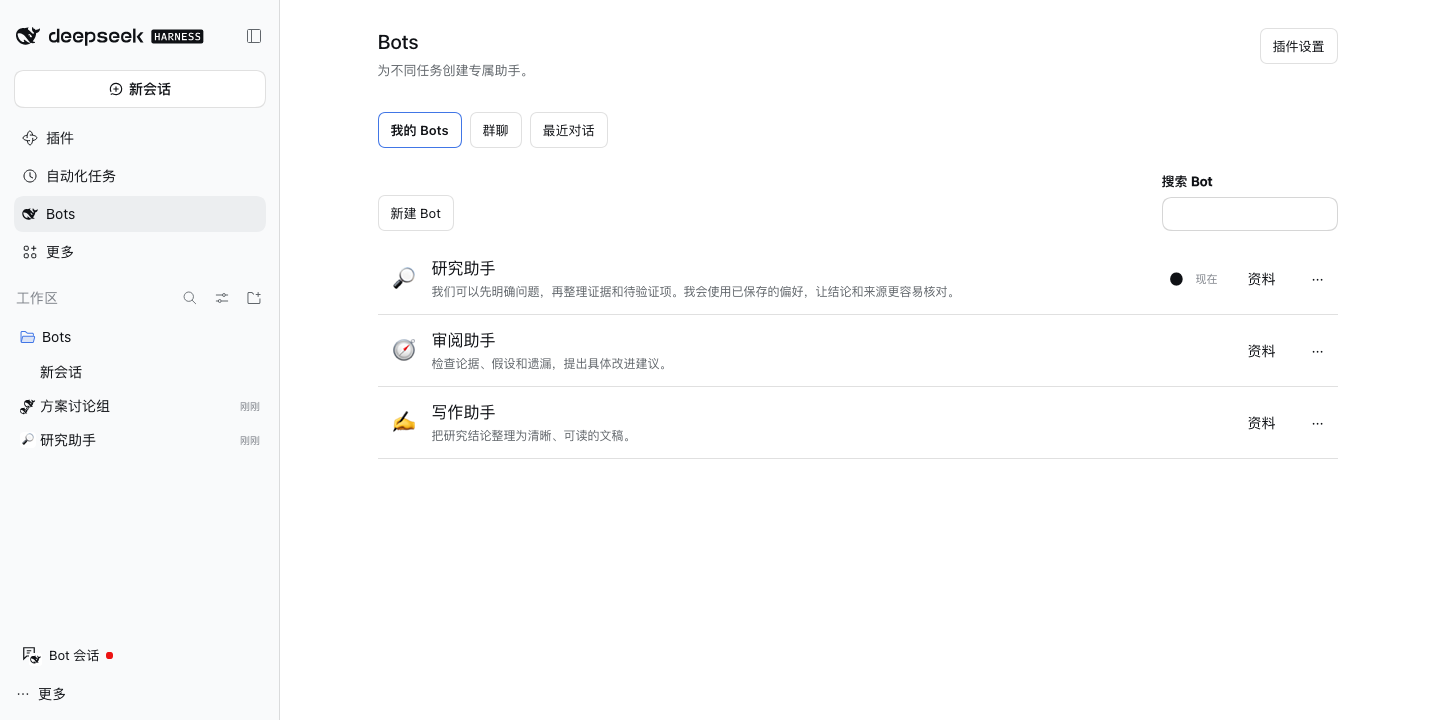
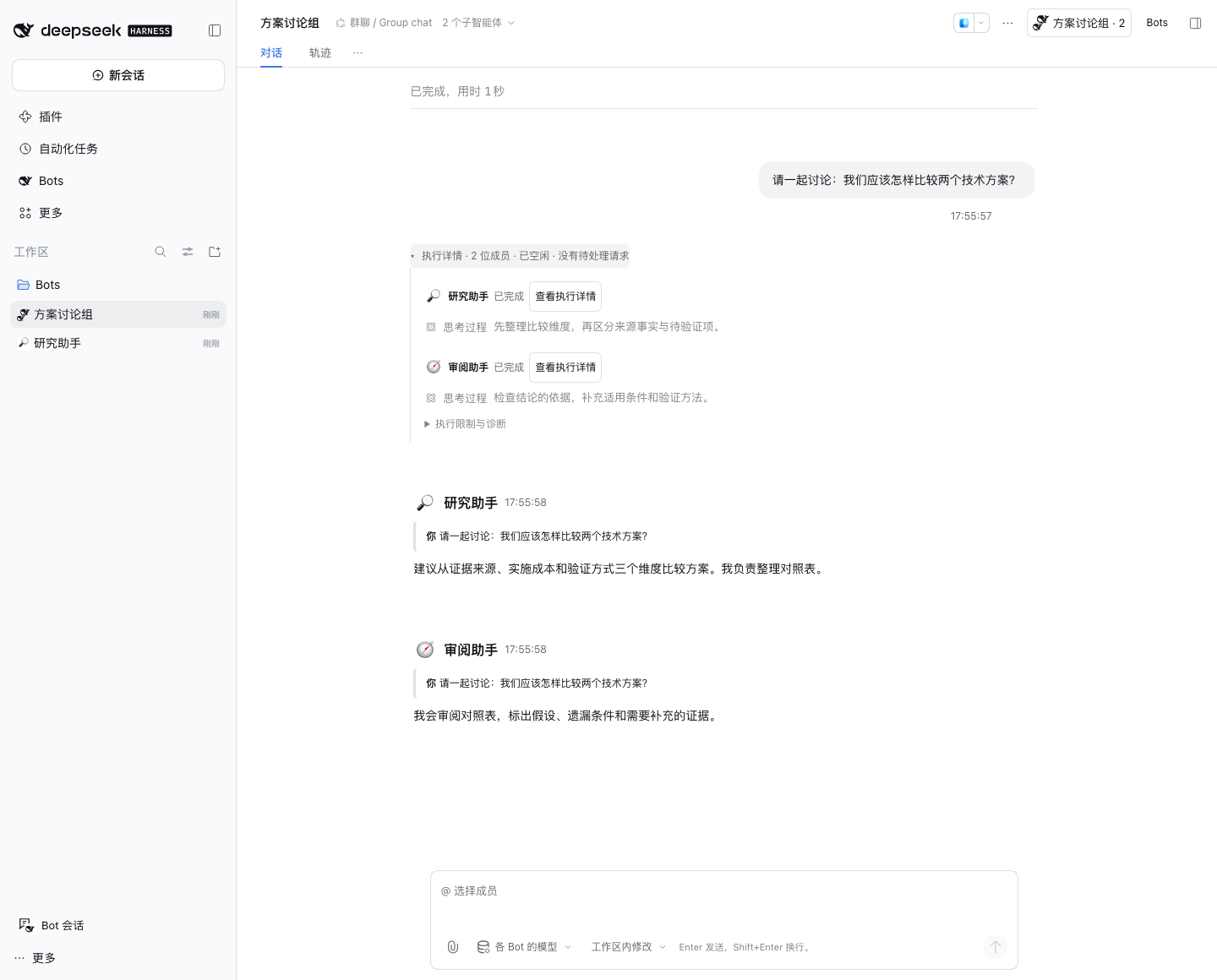
截图来自此前版本的真实隔离 DSH,使用虚构资料与脚本化回复,展示基础功能;当前候选入口以下文为准。截图不代表真实模型的任务质量。
|
|
16
16
|
|
|
17
|
-
##
|
|
17
|
+
## 从一个 Bot 开始
|
|
18
18
|
|
|
19
|
-
|
|
20
|
-
| --- | --- |
|
|
21
|
-
| 个人 Bot | 为研究、审阅、写作等工作分别设置职责、模型、工具与技能,保留各自的主会话。 |
|
|
22
|
-
| 持久记忆与群工作召回 | 管理 Bot 的私有记忆;按需查找本人参与且仍可访问的群工作,打开原文或起草保存结论。共享内容由用户明确发布。 |
|
|
23
|
-
| 多 Bot 群聊 | 用 @ 指定成员,或让多个成员并发讨论;查看各自的执行过程,补充或停止单个成员。 |
|
|
24
|
-
| 后台任务与结果验收 | 通过原生子任务委派工作,查看证据和用量,对支持的任务验收、补充或返工;普通日程沿用 DSH 原生能力。 |
|
|
25
|
-
| 主动跟进 | 为个人 Bot 或群独立开启,查看待验收、失败、明确等待及手工登记的事项;无需 GitHub 或外部凭据。 |
|
|
26
|
-
| 文档与工作方法 | 分析你提交的文档正文及验收要求;在“反馈与改进”中评估方法候选,由你审阅后明确采用。 |
|
|
27
|
-
|
|
28
|
-
### 主动跟进本地任务和明确事项
|
|
29
|
-
|
|
30
|
-
个人 Bot 和群各有自己的开关,不需要先连接 GitHub,也不需要另外配置全局开关。
|
|
31
|
-
|
|
32
|
-
| 要跟进的范围 | 开启入口 |
|
|
33
|
-
| --- | --- |
|
|
34
|
-
| 个人 Bot | Bot 资料的“任务”页;完整设置中为“任务与消息” → “开启主动跟进” |
|
|
35
|
-
| 一个群 | 打开群聊 → “管理群聊” → “活动” → “开启主动跟进” |
|
|
36
|
-
|
|
37
|
-
开启只作用于所选 Bot 或群。查看和刷新不调用模型;卡片上的“查看原任务”可带你回去验收结果、补充信息或继续处理。对可续办的群失败事项,可“选择一位成员继续”,沿用这位成员在群内的有效模型和群预算。
|
|
38
|
-
|
|
39
|
-
需要持续关注一件事时,可以点击“添加关注事项”,填清要关注什么、怎样算完成。也可以在正常聊天中说:“帮我跟进这份方案,等我确认验收后再标记完成。”个人登记按原生工具审批确认;群聊天先形成提案,在活动页“确认关注”后才生效。登记本身不会启动任务或发送消息;可随时停止单项或暂停该范围。
|
|
40
|
-
|
|
41
|
-
**0.6.6 的主动跟进不包含定时提醒。** 原生普通日程仍可使用;本地跟进依赖 DSH Host 运行。
|
|
42
|
-
|
|
43
|
-
### 在单聊中接着讨论群里的工作
|
|
19
|
+
安装到**具有对应宿主适配的环境**后,日常使用无需先建项目或手动组队:
|
|
44
20
|
|
|
45
|
-
|
|
21
|
+
1. 在左下模式菜单选择 **Bot 模式**,选择或新建一个 Bot,直接描述任务。例如:“比较这两份方案,需要时请研究员和审阅助手一起检查。”
|
|
22
|
+
2. Bot 可围绕当前任务互问、委派或自动组队,需要时邀请已有专家。你可以查看协作过程,结果仍由发起 Bot 在**原对话**交付。
|
|
23
|
+
3. 要补充文件,打开右上 **资料与详情 → 资料**,选择本次任务要用的文本文件,再继续原任务。需要调整要求或停止时,在原工作上操作。
|
|
24
|
+
4. 左下 **工作与管理** 打开 Bot/群目录及需要本人处理的事项;无需切回标准模式找功能。
|
|
46
25
|
|
|
47
|
-
Bot
|
|
26
|
+
Bot 模式会开启任务内自动协作;切回标准模式会停止协作并保留记录,模式选择对所有窗口生效。文件权限、工具审批与模型配置沿用宿主。聊天需要 DSH 中可用的模型,模型服务可能产生费用。
|
|
48
27
|
|
|
49
|
-
|
|
28
|
+
## 常用功能在哪里
|
|
50
29
|
|
|
51
|
-
|
|
52
|
-
|
|
53
|
-
|
|
54
|
-
|
|
55
|
-
|
|
30
|
+
| 想做什么 | 入口与行为 |
|
|
31
|
+
| --- | --- |
|
|
32
|
+
| 看任务和主动跟进 | Bot 或群对话 → 资料与详情 → 任务。跟进需要为该 Bot/群明确开启。 |
|
|
33
|
+
| 补充资料并继续 | 资料与详情 → 资料。选择准确任务和文本文件,原问题默认保留;附加要求可选填。 |
|
|
34
|
+
| 看待处理事项 | 工作与管理 → 需要本人处理的任务。回到原对话补充信息、核对结果或使用原生提问/审批入口。 |
|
|
35
|
+
| 管理职责与记忆 | Bot 的资料与详情 → 详情,进入完整设置或管理已保存的记忆。 |
|
|
36
|
+
| 调整群与复用团队 | 群的资料与详情 → 设置,查看群偏好及团队配方。 |
|
|
37
|
+
| 配置可选服务 | 工作与管理中的高级设置;日常任务继续在 Bot/群对话中处理。 |
|
|
56
38
|
|
|
57
|
-
###
|
|
39
|
+
### 自动协作,结果回到原对话
|
|
58
40
|
|
|
59
|
-
|
|
41
|
+
Supergroup 复用 DSH 原生子任务、模型、工具和审批能力。已有 Bot 可根据任务自动组队,并在协作中请求其他已有专家支持;不必预先选齐成员。群里可查看真实成员、过程、用量与公开成果,也可补充任务或停止协作。
|
|
60
42
|
|
|
61
|
-
|
|
43
|
+
共享范围是当前任务文字、明确选择的资料及已授权成果。私人聊天与私有记忆不会自动整份交给队友;工作目录也不构成文件沙箱。具体回答和分工取决于模型、工具、权限和任务资料。
|
|
62
44
|
|
|
63
|
-
|
|
45
|
+
### 缺少资料或连接时,继续同一项工作
|
|
64
46
|
|
|
65
|
-
|
|
47
|
+
资料页显示当前原任务与获准读者,可直接选择有限文本文件;连接问题出现时,从原工作进入连接与凭据设置。**连接就绪后仍需明确继续原任务**,不会因为配置完成而自动重放。
|
|
66
48
|
|
|
67
|
-
|
|
49
|
+
工作目录汇总待补充、待核对、结果未知及可用的原生提问/审批入口。打开或阅读不会解决事项;审批仍在原生控件处理。交付或执行结果未知时,先核对已有操作,不自动重新执行。
|
|
68
50
|
|
|
69
|
-
|
|
51
|
+
### 可选的非定时跟进
|
|
70
52
|
|
|
71
|
-
|
|
53
|
+
在 **资料与详情 → 任务 → 开启主动跟进** 为当前 Bot 或群开启。本地查看与刷新不调用模型,不需要 GitHub 账号或外部凭据;跟进与实际执行分别授权。
|
|
72
54
|
|
|
73
|
-
|
|
55
|
+
已有支持的任务卡提供 **关注此任务**,自动填入任务名称、可用条件和可修改的截止时间。你可以观察原生子任务完成,或已配置来源的下一个 GitHub CI 结果;也可手工登记事项和完成条件。**保存前可以修改或取消,打开表单不会建立关注。** 条件满足后进入待核对,不自动启动模型或重做任务。
|
|
74
56
|
|
|
75
|
-
|
|
57
|
+
个人 Bot 聊天中的登记沿用原生工具审批;群聊提案需要明确“确认关注”才生效。可停止单项或暂停该 Bot/群的观察。此功能**不是定时提醒**,依赖本地 DSH Host 运行;普通日程继续使用 DSH 原生能力。
|
|
76
58
|
|
|
77
|
-
|
|
59
|
+
### 记忆有来源,也能核对变更
|
|
78
60
|
|
|
79
|
-
|
|
61
|
+
每个 Bot 有独立记忆。在记忆页查看 **最近记忆变更** 的来源、时间和前后差异;对允许恢复的历史版本,可明确选择 **恢复为新修订**。已遗忘、已撤销或当前无权读取的内容不会因此复活。
|
|
80
62
|
|
|
81
|
-
|
|
63
|
+
开启 Bot 记忆后,可在 **记忆 → 参与的群工作** 搜索本人实际参与且仍可访问的群记录,并打开原文。在群成员菜单选择“在单聊中追问”会准备带引用的草稿,发送仍由你决定。查到群记录不会自动存成长期记忆,私有记忆也不会自动共享。
|
|
82
64
|
|
|
83
|
-
|
|
65
|
+
### 保存团队偏好,按需使用普通群
|
|
84
66
|
|
|
85
|
-
|
|
67
|
+
群设置中的 **团队配方** 自动预览当前团队,可以直接保存;导入与 JSON 编辑收在高级入口,导出按钮保留在预览区。应用前预览角色映射,并明确确认成员变化。配方只含团队偏好,不含聊天、记忆、凭据或执行授权;**新加入成员可以查看该群共享历史**。
|
|
86
68
|
|
|
87
|
-
|
|
69
|
+
手动创建的普通群默认按问题在本地选择相关发言者,可在设置中关闭。明确 @、回复和轮次优先;无匹配时沿用原路由,选择过程不调用决策模型,成员回答仍会调用模型。已有群保留原偏好。Supergroup 自动团队围绕任务协作,无需配置普通群的发言方式。
|
|
88
70
|
|
|
89
|
-
|
|
90
|
-
dsh plugin --profile web add dsh-botgroup@0.6.7
|
|
91
|
-
```
|
|
71
|
+
|
|
92
72
|
|
|
93
|
-
|
|
73
|
+
原生后台任务、结果验收、普通日程、Bot 消息以及可选的文档快照分析与工作方法评估仍保留在任务/管理入口。高级执行和外部连接按需配置,不是开始 Bot 对话的前置步骤。
|
|
94
74
|
|
|
95
|
-
|
|
75
|
+
## 安装与兼容性
|
|
96
76
|
|
|
97
|
-
|
|
98
|
-
|
|
99
|
-
|
|
77
|
+
| 范围 | 当前说明 |
|
|
78
|
+
| --- | --- |
|
|
79
|
+
| 公开稳定版 | [0.6.7 Release](https://github.com/MJ-CJM/DSH-Bot/releases/tag/v0.6.7),不要把本页候选功能当作稳定包已经包含的功能。 |
|
|
80
|
+
| 当前候选 | 0.7.0,尚未公开发布;产品包为 `dsh-botgroup-0.7.0.tgz`,使用本轮准备并校验的候选包及配套兼容产物。 |
|
|
81
|
+
| 完整 Bot 模式 | 需要命令路由、聊天动作和空白会话预设适配。已验证的官方桌面组合为 **macOS arm64 DSH 0.2.2-rc.3 + 对应的独立 dsh-bot-web-app 适配包 + DSH-Bot**。 |
|
|
82
|
+
| 其他宿主 | 声明范围为 `>=0.2.1-rc.2 <0.3.0`,开发依赖锁定 `0.2.1-rc.2`。范围不代表所有版本或平台实测;原版宿主缺少能力时会拒绝开启完整 Bot 模式。 |
|
|
100
83
|
|
|
101
|
-
|
|
102
|
-
https://cdn.jsdelivr.net/npm/dsh-plugin-catalog/index.json
|
|
103
|
-
```
|
|
84
|
+
**只安装 DSH-Bot tgz 不会自动补齐宿主适配。** 当前没有跨版本自动 fallback;升级 DSH 前需同步核对并迁移兼容组合。兼容产物与宿主精确版本绑定,不能把 rc.3 组合直接用于其他版本,也不需要修改官方应用签名。
|
|
104
85
|
|
|
105
|
-
|
|
86
|
+
### 已发布版本
|
|
106
87
|
|
|
107
|
-
|
|
88
|
+
公开 npm 包名为 **[dsh-botgroup](https://www.npmjs.com/package/dsh-botgroup)**;产品品牌、插件 ID 与数据目录仍为 DSH-Bot/`dsh-bot`。稳定版版本包为 `dsh-botgroup-0.6.7.tgz`,固定下载名 `dsh-bot.tgz` 是同包别名。
|
|
108
89
|
|
|
109
|
-
|
|
110
|
-
2. 在下载目录校验文件:macOS 用下面的命令,Linux 用 `sha256sum -c dsh-bot.tgz.sha256`。
|
|
111
|
-
3. 在 DSH 打开 **插件 → 添加插件 → 安装第三方插件**,选择下载的 `.tgz` 文件,安装并启用。
|
|
112
|
-
4. 完全退出并重新打开 DSH,在侧栏进入 **Bots**。
|
|
90
|
+
打开对应 [Release](https://github.com/MJ-CJM/DSH-Bot/releases),阅读它自己的兼容说明,下载插件 tgz 和同一 Release 的校验文件。macOS 校验示例:
|
|
113
91
|
|
|
114
92
|
```sh
|
|
115
93
|
shasum -a 256 -c dsh-bot.tgz.sha256
|
|
116
94
|
```
|
|
117
95
|
|
|
118
|
-
|
|
119
|
-
|
|
120
|
-
### 方式三:Web 版命令行
|
|
121
|
-
|
|
122
|
-
下面只适用于运行在 `web` profile 的实例;不会把插件装入桌面版使用的 profile。自定义实例请改用自己的 profile 名称。
|
|
123
|
-
|
|
124
|
-
```sh
|
|
125
|
-
dsh plugin --profile web add "https://github.com/MJ-CJM/DSH-Bot/releases/latest/download/dsh-bot.tgz"
|
|
126
|
-
```
|
|
127
|
-
|
|
128
|
-
安装后按宿主提示重启。当前推荐预构建 Release 包;社区页面自动生成的 GitHub 源码安装命令不是本项目已验证的安装路线。
|
|
129
|
-
|
|
130
|
-
## 第一次使用
|
|
131
|
-
|
|
132
|
-
1. **创建一个 Bot**:侧栏打开 Bots,点击新建,输入“研究助手”,开始对话。
|
|
133
|
-
2. **说明职责**:例如“请长期帮助我整理技术资料,回答时区分结论、依据和待验证项。”长期职责修改按原生审批确认。
|
|
134
|
-
3. **管理记忆**:在 Bot 资料的“记忆”页添加一条偏好,例如“比较方案时关注实施成本和验证方法”,确认它出现在列表中。
|
|
135
|
-
4. **组成群聊**:再创建“审阅助手”,选两个成员新建群聊,发送“请一起讨论:我们应该怎样比较两个技术方案?”
|
|
136
|
-
5. **查看并控制过程**:展开问题下的执行入口;用成员菜单查看详情、补充任务或停止某个成员。
|
|
137
|
-
|
|
138
|
-
需要持续关注时,按上面的入口为该 Bot 或群开启主动跟进;群里做过的工作,可在成员的个人主会话中继续追问。实际回答取决于所选模型、工具、权限和提供的资料。
|
|
139
|
-
|
|
140
|
-
## 常见问题
|
|
141
|
-
|
|
142
|
-
**需要另外申请 DSH-Bot 的模型账号吗?**
|
|
143
|
-
|
|
144
|
-
不需要。插件沿用 DSH 的模型配置,也支持每个 Bot 和群成员选择模型。聊天和模型执行需要宿主中已有可用模型;启用、查看和刷新本地跟进不调用模型。模型服务可能产生费用。
|
|
145
|
-
|
|
146
|
-
**群里的记忆会自动同步给每个 Bot 吗?**
|
|
147
|
-
|
|
148
|
-
不会复制整段群聊到各 Bot 的长期记忆。0.6.6 支持按需召回该 Bot 实际参与且仍有权限的群工作,并保留原文引用;长期保存仍需按原有记忆与审批流程确认。Bot 之间的私有记忆也不会自动共享。
|
|
149
|
-
|
|
150
|
-
**主动跟进只能监控 GitHub CI 吗?**
|
|
151
|
-
|
|
152
|
-
不是。个人 Bot 和群都能跟进本地任务与明确事项,不需要 GitHub 账号或令牌。已有 GitHub CI 配置的环境可继续使用该来源;个人与群的本地跟进不依赖它。
|
|
153
|
-
|
|
154
|
-
**多人讨论会一直运行吗?**
|
|
155
|
-
|
|
156
|
-
没有待处理工作时会停止。默认同群最多并发 4 个成员,自动后续执行额度为 32 次;可配置,并可停止成员或整项任务。原生模型和工具的时限仍适用。
|
|
157
|
-
|
|
158
|
-
**怎么升级,会丢数据吗?**
|
|
96
|
+
在 DSH 中通过 **插件 → 添加插件 → 安装第三方插件** 选择 tgz,按宿主提示启用并完全退出重开。源码压缩包不是预构建插件。社区市场或 `latest` 地址可能仍指向稳定版,不能据此获取未发布候选或证明 Bot 模式兼容。
|
|
159
97
|
|
|
160
|
-
|
|
98
|
+
### 当前候选
|
|
161
99
|
|
|
162
|
-
|
|
100
|
+
候选应由维护者按[候选交付说明](https://github.com/MJ-CJM/DSH-Bot/blob/main/docs/releases/v0.7.0.md)准备、校验并安装到对应兼容环境;不要从稳定版下载地址推断候选已上线。完整 Bot 模式的验证与部署必须同时核对产品包、适配包和宿主版本。
|
|
163
101
|
|
|
164
|
-
|
|
102
|
+
从旧 `dsh-bot` 包迁移时,先停止 Host 并备份完整 profile 和数据,通过原生插件管理移除旧包,再安装 `dsh-botgroup`。启动前检查 profile 的 `cordis.patch.yml`:原 `id: dsh-bot` 覆盖行若带 `name: dsh-bot`,仅改成 `name: dsh-botgroup`,保留 id、config 与 dataDir;没有 name 的行无需新增。不要同时保留两个包依赖或 bundle;自定义包含层/模板中的旧包引用需另行核对。[迁移说明](https://github.com/MJ-CJM/DSH-Bot/releases/tag/v0.6.7)。
|
|
165
103
|
|
|
166
|
-
|
|
104
|
+
升级前备份原 profile 和完整数据,保留原存储位置;不要通过删除 Bot 或重置数据升级。数据迁移后回退需要升级前备份。外部连接、付费执行和共享权限不会因升级自动获得授权。
|
|
167
105
|
|
|
168
|
-
|
|
106
|
+
## 验证与边界
|
|
169
107
|
|
|
170
|
-
|
|
108
|
+
候选功能已有真实 Host、持久化和浏览器验证,包括亮色中文、暗色英文、窄屏、原对话交付与数据保留;模型使用确定性本地模拟。原先标为 0.6.6 的本地开发包是这些历史验收的输入,**不是本次 0.7.0 发布包的验证收据**。本次候选的精确包与检查结果见[候选交付说明](https://github.com/MJ-CJM/DSH-Bot/blob/main/docs/releases/v0.7.0.md);功能路径与历史证据见[低配置体验](https://github.com/MJ-CJM/DSH-Bot/blob/main/docs/verification/simple-bot-workflow.md)、[增量验收](https://github.com/MJ-CJM/DSH-Bot/blob/main/docs/verification/openmaus-improvements.md)和[宿主组合验证](https://github.com/MJ-CJM/DSH-Bot/blob/main/docs/verification/official-signed-desktop-update.md)。
|
|
171
109
|
|
|
172
|
-
|
|
110
|
+
真实付费模型的专业质量、外部账号认证、外部 IM 收发及未来宿主自动适配未由这些检查证明。任务依赖本地 Host 运行;当前不提供云端常驻、系统退出后的持续执行或系统/手机推送。不确定的执行结果不会自动重放。
|
|
173
111
|
|
|
174
112
|
## 更新与反馈
|
|
175
113
|
|
|
176
|
-
[
|
|
114
|
+
[版本与更新记录](https://github.com/MJ-CJM/DSH-Bot/releases) · [问题反馈](https://github.com/MJ-CJM/DSH-Bot/issues) · [安全反馈](https://github.com/MJ-CJM/DSH-Bot/blob/main/SECURITY.md)
|
|
177
115
|
|
|
178
|
-
|
|
116
|
+
反馈请提供 DSH/插件版本、操作步骤和脱敏截图或错误。不要公开密钥、私人会话或完整 profile。
|
|
179
117
|
|
|
180
118
|
MIT · Copyright © 2026 MJ-CJM。第三方告知随安装包提供。
|