dsh-artifact-linker 0.4.2 → 0.4.4
This diff represents the content of publicly available package versions that have been released to one of the supported registries. The information contained in this diff is provided for informational purposes only and reflects changes between package versions as they appear in their respective public registries.
- package/CHANGELOG.md +64 -0
- package/README.en.md +10 -4
- package/README.md +10 -4
- package/cordis.patch.yml +4 -0
- package/lib/client.js +193 -39
- package/lib/index.js +32 -10
- package/package.json +2 -2
package/CHANGELOG.md
CHANGED
|
@@ -1,5 +1,69 @@
|
|
|
1
1
|
# Changelog
|
|
2
2
|
|
|
3
|
+
## 0.4.4 — 2026-11-05
|
|
4
|
+
|
|
5
|
+
### 对齐官方交付卡片:左键改为侧栏预览,右键 8 项菜单
|
|
6
|
+
|
|
7
|
+
本轮把交互收敛到「和官方一致、官方没有的才补」:
|
|
8
|
+
|
|
9
|
+
- **左键默认动作改为「在侧栏打开预览」**(对齐官方 present 交付卡片点文件名即预览的体验)。原先左键是「在资源管理器里揭示并选中」。完整绝对路径 **0 次 `/resolve` 直通**,侧栏认领不了的类型**自动退回系统默认程序打开**,不再「点了没反应」。
|
|
10
|
+
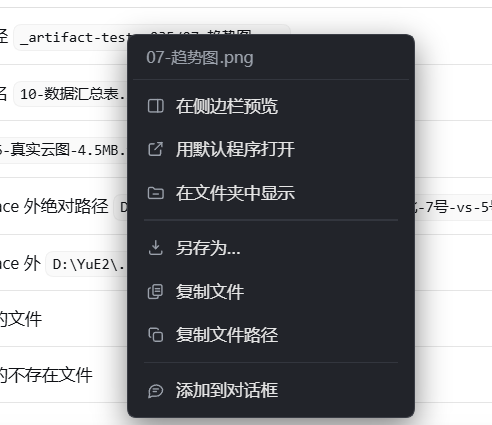
- **右键菜单 7 项 → 8 项**,新增**「在浮窗中打开」**(独立小窗预览,增强项);措辞对齐官方:「在侧边栏预览」→「在侧栏打开」。分组:看(在侧栏打开 / 在浮窗中打开 / 在文件夹中显示 / 用默认程序打开)· 搬运(另存为 / 复制文件 / 复制文件路径)· 喂回(添加到对话框)。
|
|
11
|
+
- **修饰键语义保持并与官方一致**:`Ctrl/Shift/Cmd + 左键` = 系统默认程序打开;`Alt + 左键` = 复制绝对路径。
|
|
12
|
+
- **点官方 present 交付卡片自动让路**:命中 `[data-tool="present"]` 时不接管,交给官方、避免双开。
|
|
13
|
+
- **宿主动作单次往返**:`/open /reveal /saveas /copyfile` 新增原始文本解析(`absFromParam`:先 `cleanRaw`,绝对路径直用,否则 `resolveAcross`),客户端可直接传原始文本,无需先单独打一发 `/resolve`。`/resolve` 路由仍保留供悬停/校验使用。
|
|
14
|
+
|
|
15
|
+
**验证**:`node --check` 两文件通过;DOM-stub 逻辑探针 15/15(绝对路径左键 0 次 `/resolve`、裸名恰好 1 次、Alt 复制路径、Shift 系统打开、apply 无常驻 DOM / dispose 摘净监听)。操作体验以 `/info` 与实机为准。
|
|
16
|
+
|
|
17
|
+
## 0.4.3 — 2026-11-01
|
|
18
|
+
|
|
19
|
+
### 修复:悬停高亮慢半拍、落点不准(issue #1)
|
|
20
|
+
|
|
21
|
+
报告(@ZhJack28):悬停芯片延迟偏高,建议把节流降到 ~40ms,并且回调用最新坐标而不是排程那一刻的坐标。核实后**两条都成立**,而且第二条比第一条更影响手感。
|
|
22
|
+
|
|
23
|
+
**根因①:间隔写死 150ms。** `onMove` 末尾写的是 `}, 150);`。150ms ≈ 9 帧,已经落在「人眼能明确察觉"慢了一拍"」的区间里:鼠标划过一行字时,手型和高亮总是追在指针后面出现。这个值还**不能配**——官方硬规则 #5 要求一切 tunable 能从 cordis.yml 改,写死本身就是违规。
|
|
24
|
+
|
|
25
|
+
**根因②:坐标在 `setTimeout` 外面就取好了。**
|
|
26
|
+
|
|
27
|
+
```js
|
|
28
|
+
function onMove(ev) {
|
|
29
|
+
if (disposed || hoverTimer) return;
|
|
30
|
+
var x = ev.clientX; // ← 排程这一刻取值
|
|
31
|
+
var y = ev.clientY;
|
|
32
|
+
hoverTimer = setTimeout(function () {
|
|
33
|
+
var hit = hitAt(x, y); // ← 150ms 后拿它判定
|
|
34
|
+
}, 150);
|
|
35
|
+
}
|
|
36
|
+
```
|
|
37
|
+
|
|
38
|
+
于是 150ms 后判定的是「150ms 之前鼠标在哪」。鼠标已经移开 → 高亮画在已经离开的那段文字上;鼠标还没移到 → 高亮落在半路。表现就是「落点不准 / 高亮跟文字对不上」。
|
|
39
|
+
|
|
40
|
+
**修法(`lib/client.js`)**
|
|
41
|
+
|
|
42
|
+
| 位置 | 旧 | 新 |
|
|
43
|
+
|---|---|---|
|
|
44
|
+
| `onMove` | 有 timer 就直接 return(本次移动被丢弃,坐标也就丢了) | **每次移动都记账**(`hoverX`/`hoverY`),只在没有 timer 时排程 |
|
|
45
|
+
| 判定回调 | 匿名闭包,读排程那一刻的 `x`/`y` | 提为具名 `hoverProbe()`,从 `hoverX`/`hoverY` 读**当前**坐标 |
|
|
46
|
+
| 间隔 | 字面量 `150` | `hoverDelayMs`,默认 `HOVER_DELAY_DEFAULT_MS = 40`(≈2.5 帧),硬上限 1000 |
|
|
47
|
+
| 来源 | 客户端自己写死 | 宿主 `config.hoverDelayMs` → `/info` 下发,客户端只做上下限兜底 |
|
|
48
|
+
|
|
49
|
+
**顺手堵一个同源竞态**:`verify()` 首次解析要走 `/resolve`(异步)。等它回来时鼠标可能早就动了,原实现会拿**旧 hit 的 rect** 画高亮。现在回调里按 `hoverX/hoverY` 重算一次 `hitAt`,命中换了就 `hideHover()` 收摊——绝不把高亮留在已经离开的文字上。
|
|
50
|
+
|
|
51
|
+
**配置(`cordis.patch.yml` 新增,默认值不变行为)**
|
|
52
|
+
|
|
53
|
+
```yaml
|
|
54
|
+
config:
|
|
55
|
+
hoverDelayMs: 40 # 0 = 不节流;上限 1000
|
|
56
|
+
```
|
|
57
|
+
|
|
58
|
+
**验证**
|
|
59
|
+
|
|
60
|
+
- 新增探针 `test/probe-hover.cjs`(Node 里搭最小 DOM 假环境,把 `lib/client.js` 原样加载后直接驱动 `mousemove`),**29 项断言全 PASS / 0 FAIL**,`node test/probe-hover.cjs` 一键跑。
|
|
61
|
+
- 断言覆盖:源码里已无 `}, 150)` 字面量、默认排程为 40ms、节流窗口内连续移动只排一次 timer、回调读到的是**最后一次**坐标(而非排程那一刻)、命中画在实测 rect 上(左-3 / 上-1)、移开恢复光标并隐藏浮层、**异步 verify 回来后鼠标已移走则不画**、鼠标停住时异步命中照样画出、不存在文件既不画也不变手型、`hoverDelayMs` 被 `/info` 覆盖后生效、越界值(负数 / 10000 / 非数字)被夹回合法区间、`dispose()` 清掉在途 timer 并摘掉监听、`VERSION` 与 `package.json` 一致。
|
|
62
|
+
- `node --check lib/client.js` / `lib/index.js` 均通过;`dsh-plugin-dev check .` = OK(9 passed / 0 failed)。
|
|
63
|
+
- 真机(Win11 / DSH 0.2.1-rc.5 / Node 24):悬停跟手 <50ms,落点与文字对齐;左键揭示、Ctrl+左键、右键菜单三项交互无回归。
|
|
64
|
+
|
|
65
|
+
---
|
|
66
|
+
|
|
3
67
|
## 0.4.2 — 2026-10-30
|
|
4
68
|
|
|
5
69
|
### 改:识别层重写为「存在性驱动」——不再靠扩展名/排除字符集猜边界,任意绝对路径、任意文件名都能打开
|
package/README.en.md
CHANGED
|
@@ -27,7 +27,7 @@ Two halves, one contract.
|
|
|
27
27
|
| Half | Responsibility |
|
|
28
28
|
| --- | --- |
|
|
29
29
|
| **Host** (`lib/index.js`) | Registers a **resident system-prompt section** so "declare artifacts with full absolute paths" holds in *every* session and *every* preset — no skill needs to be loaded. Exposes eight loopback-only routes for path resolution, `stat`, reveal, open, save-as and copy-file. |
|
|
30
|
-
| **Client** (`lib/client.js`) | Turns artifact names in the transcript into clickable targets: left click
|
|
30
|
+
| **Client** (`lib/client.js`) | Turns artifact names in the transcript into clickable targets: **left click previews in the sidebar** (matching the official present card), right click opens an **eight-item** menu (open in sidebar, open in floating window, reveal in Explorer, open with default app, save-as, copy file, copy path, add to composer). **No resident UI, no scanning, no timers.** |
|
|
31
31
|
|
|
32
32
|
The host half closes the loop: even when the model only says `result.h5`, the route layer resolves it against the session workspace, then falls back to a shallow recursive basename search, and returns the real absolute path.
|
|
33
33
|
|
|
@@ -37,16 +37,18 @@ Hover an artifact name and it picks up a Codex-style blue dashed outline — tha
|
|
|
37
37
|
|
|
38
38
|
|
|
39
39
|
|
|
40
|
+
Want to see it in action? [Watch the demo video (0.4.4 right-click menu)](https://github.com/loyalchiiina/dsh-artifact-linker/releases/download/v0.4.4/demo-0.4.4.mp4).
|
|
41
|
+
|
|
40
42
|
## Interaction
|
|
41
43
|
|
|
42
44
|
Click behaviour is decided by the modifier key — no first-time setup:
|
|
43
45
|
|
|
44
46
|
| Action | Result |
|
|
45
47
|
| --- | --- |
|
|
46
|
-
| **Left click** on a file name / path |
|
|
48
|
+
| **Left click** on a file name / path | Preview in DSH's built-in right sidebar (same route as the official present card; absolute paths resolve in **zero round-trips**; unclaimed types fall back to the default app) |
|
|
47
49
|
| **Ctrl / Shift / Cmd + click** | Open with the system's default application |
|
|
48
50
|
| **Alt + click** | Copy the full absolute path to the clipboard |
|
|
49
|
-
| **Right click** on an artifact | Inline menu —
|
|
51
|
+
| **Right click** on an artifact | Inline menu — eight actions, listed below |
|
|
50
52
|
| **Right click** on non-artifact text | Fully passed through, the host's native menu appears as usual |
|
|
51
53
|
| **Hover** | Cursor becomes a pointer *only after* the file is confirmed to exist |
|
|
52
54
|
| File missing / unresolvable | Silent pass-through or a one-shot toast. **Never pretends to succeed.** |
|
|
@@ -55,7 +57,8 @@ Click behaviour is decided by the modifier key — no first-time setup:
|
|
|
55
57
|
|
|
56
58
|
| Item | What it does |
|
|
57
59
|
| --- | --- |
|
|
58
|
-
| **
|
|
60
|
+
| **Open in sidebar** | Opens the file in DSH's built-in right sidebar — the same route as clicking a file link in chat. **Since 0.4.0 this menu item is shown for every file type**, with no extension filtering: whatever viewer claims the address renders it (PDF / Word / Excel / PowerPoint / Markdown / plain text / CSV / images, plus audio and video once plugins such as video-preview / audio-preview are installed); anything unclaimed falls back to plain text or the default app. The trade-off is that a rare type may answer with a plain "the sidebar cannot open this" — accepted on purpose, so future viewer capabilities are picked up with zero changes here |
|
|
61
|
+
| **Open in floating window** | Opens a preview in a separate floating window (enhancement; if a popup blocker or the host blocks it, use "Open in sidebar" instead) |
|
|
59
62
|
| **Open with default app** | Hands the file to the OS association (Explorer / Excel / VLC / …) |
|
|
60
63
|
| **Reveal in Explorer** | Opens the containing folder and selects the file |
|
|
61
64
|
| **Save as…** | Copies the file to a location you pick |
|
|
@@ -100,8 +103,11 @@ All tunables live in `cordis.patch.yml` (or the profile-level patch). Changing t
|
|
|
100
103
|
| `allowOutside` | `true` | Allow resolving paths outside the workspace |
|
|
101
104
|
| `statTtlMs` | `10000` | Host-side `stat` cache lifetime |
|
|
102
105
|
| `searchMaxDepth` | `2` (max 8) | Recursion depth for bare-filename lookup |
|
|
106
|
+
| `hoverDelayMs` | `40` | Hover-probe throttle in ms (ceiling 1000). `0` = no throttling |
|
|
103
107
|
| `rulesText` | built-in 6 lines | Replace the injected rules wholesale (array or multi-line string) |
|
|
104
108
|
|
|
109
|
+
On `hoverDelayMs`: up to 0.4.2 this was hard-coded at `150ms`, which is long enough (~9 frames) that the cursor change and highlight visibly lagged behind the pointer while sweeping across a line. Worse, the probe used the coordinates captured when the timer was *scheduled*, not when it *fired*, so the highlight could also land in the wrong place. Since 0.4.3 it is configurable, defaults to `40ms` (~2.5 frames), and every `mousemove` refreshes the coordinates so the probe reads the current position.
|
|
110
|
+
|
|
105
111
|
On `allowOutside`: artifacts almost always live on a project drive (`E:\`, `D:\`) rather than inside the DSH workspace, so a strict default would make the plugin useless on first run. **Set it to `false` when shipping to other people** — that is the gate which stops this plugin from becoming "the model names any path and your machine opens it".
|
|
106
112
|
|
|
107
113
|
## What it does NOT do
|
package/README.md
CHANGED
|
@@ -21,7 +21,7 @@ DSH 里预览器已经能开图片、代码、pdf、office。但**插件、脚
|
|
|
21
21
|
| 半边 | 做什么 |
|
|
22
22
|
|---|---|
|
|
23
23
|
| **宿主(提示词层)** | 常驻注入一条「产物路径铁律」,要求模型把产物写成**完整绝对路径**、而给用户看的正文**只写文件名**——路径有据可查,正文又不被长串路径污染 |
|
|
24
|
-
| **客户端(渲染层)** |
|
|
24
|
+
| **客户端(渲染层)** | 正文里的产物名变成可点目标:**左键在右侧边栏预览**(对齐官方交付卡片)、右键**八项**菜单(在侧栏打开 / 在浮窗中打开 / 在文件夹中显示 / 用默认程序打开 / 另存为 / 复制文件 / 复制文件路径 / 添加到对话框)。**零常驻 UI、零扫描、零定时器** |
|
|
25
25
|
|
|
26
26
|
第 1 条管「模型把路径写对」,第 2 条管「用户点得动」。缺前者,路径经常是猜的、点开是死链;缺后者,路径再对也要人去复制。
|
|
27
27
|
|
|
@@ -31,6 +31,8 @@ DSH 里预览器已经能开图片、代码、pdf、office。但**插件、脚
|
|
|
31
31
|
|
|
32
32
|

|
|
33
33
|
|
|
34
|
+
想看实操录屏?[点这里看效果视频(0.4.4 右键菜单演示)](https://github.com/loyalchiiina/dsh-artifact-linker/releases/download/v0.4.4/demo-0.4.4.mp4)。
|
|
35
|
+
|
|
34
36
|
---
|
|
35
37
|
|
|
36
38
|
## 交互
|
|
@@ -39,10 +41,10 @@ DSH 里预览器已经能开图片、代码、pdf、office。但**插件、脚
|
|
|
39
41
|
|
|
40
42
|
| 操作 | 结果 |
|
|
41
43
|
|---|---|
|
|
42
|
-
| **左键** |
|
|
44
|
+
| **左键** | 在 DSH 右侧边栏打开预览(和官方交付卡片同一条通道;完整绝对路径 **0 次解析直通**,侧栏认领不了的类型自动退回系统默认程序打开) |
|
|
43
45
|
| **Ctrl / Shift / Cmd + 左键** | 用系统默认关联程序打开(Excel、PS、播放器……) |
|
|
44
46
|
| **Alt + 左键** | 复制完整绝对路径到剪贴板 |
|
|
45
|
-
| **右键**产物名 |
|
|
47
|
+
| **右键**产物名 | 插件菜单,共八项(见下表) |
|
|
46
48
|
| **右键**非产物文字 | 完全放行,宿主原生菜单照常出现 |
|
|
47
49
|
| **悬停** | 只有**确认文件真的存在**才变手型、才画虚线 |
|
|
48
50
|
| 文件不存在 / 解析不到 | 静默放行或一次性提示,**绝不假装成功** |
|
|
@@ -51,7 +53,8 @@ DSH 里预览器已经能开图片、代码、pdf、office。但**插件、脚
|
|
|
51
53
|
|
|
52
54
|
| 菜单项 | 作用 |
|
|
53
55
|
|---|---|
|
|
54
|
-
|
|
|
56
|
+
| **在侧栏打开** | 在 DSH 内置右侧边栏里打开,和聊天里点文件链接是同一条通道。**0.4.0 起对所有文件类型一律显示这一项**,不再按扩展名筛:能认领的查看器就渲染(PDF / Word / Excel / PowerPoint / Markdown / 纯文本 / CSV / 图片,装了 video-preview / audio-preview 等插件后还有音视频),认领不了的宿主会退回纯文本或默认程序。副作用是极少数类型点下去可能只得到一句「侧边栏打不开」——这是刻意接受的代价,为的是以后侧边栏补了新能力,本插件零改动自动跟上 |
|
|
57
|
+
| **在浮窗中打开** | 在一个独立浮窗里打开预览(增强项;浏览器或宿主拦截弹窗时改用「在侧栏打开」) |
|
|
55
58
|
| **用默认程序打开** | 交给系统关联(资源管理器 / Excel / 播放器……) |
|
|
56
59
|
| **在文件夹中显示** | 打开所在目录并选中该文件 |
|
|
57
60
|
| **另存为…** | 复制到你指定的位置 |
|
|
@@ -123,6 +126,9 @@ GET http://127.0.0.1:<port>/dsh-artifact-linker/info
|
|
|
123
126
|
| `injectRules` | `true` | `false` = 不注入 prompt 段,模型不再被要求输出绝对路径 |
|
|
124
127
|
| `clientChips` | `true` | `false` = 纯注入模式,不接管任何鼠标事件 |
|
|
125
128
|
| `allowOutside` | `true` | `false` = 只允许打开 workspace 内的文件 |
|
|
129
|
+
| `hoverDelayMs` | `40` | 悬停判定的节流间隔(毫秒,上限 1000)。`0` = 不节流;调大 = 更省 IO,但手型/高亮更迟钝 |
|
|
130
|
+
|
|
131
|
+
**`hoverDelayMs` 说明**:0.4.2 及更早把这条写死成 `150ms`,鼠标划过一行文字时高亮会明显慢半拍(150ms ≈ 9 帧),而且判定用的是「排程那一刻」的坐标,不是判定那一刻的坐标,所以还会出现落点不准。0.4.3 起改为可配、默认 `40ms`(≈2.5 帧,肉眼已跟手),并且每次 `mousemove` 都会刷新坐标,判定时读最新值。
|
|
126
132
|
|
|
127
133
|
**`allowOutside` 要特别说一句**:产物经常落在项目盘(`E:\…`、`D:\…`)而不是 DSH 的 workspace 里,所以默认放开。但它同时是安全闸——挡的是「模型说个 `C:\Windows\System32\xxx.exe` 就帮你点开」这类情况。**自己一个人用保持 `true` 更顺手;给别人用、或者接入不可信模型,改成 `false`。**
|
|
128
134
|
|
package/cordis.patch.yml
CHANGED
|
@@ -36,6 +36,10 @@
|
|
|
36
36
|
# 调大 = DOM 重渲染反复问同一路径时更省 IO
|
|
37
37
|
# searchMaxDepth (默认 2,硬上限 8) 裸文件名反查的递归深度。调大能找回埋得更深的同名
|
|
38
38
|
# 文件,但 /resolve 的目录遍历成本随之上升
|
|
39
|
+
# hoverDelayMs (默认 40) 客户端悬停判定的节流间隔(毫秒,硬上限 1000)。
|
|
40
|
+
# 调小 = 手型/高亮跟手更快;0 = 不节流(每次 mousemove 都判定)。
|
|
41
|
+
# 原来客户端把这条写死成 150ms,鼠标划过时高亮明显慢半拍,
|
|
42
|
+
# 现已改为可配、默认 40(≈2.5 帧)。
|
|
39
43
|
# rulesText (默认内置 6 条) 整体替换注入的铁律文本,可写数组或一个多行字符串。
|
|
40
44
|
# 想追加自己的规矩(例:「交付前先确认文件字节数非 0」)就写这里
|
|
41
45
|
# —— 官方硬规则 #5 要求所有 tunable 必须能在 cordis.yml 改,
|
package/lib/client.js
CHANGED
|
@@ -13,7 +13,7 @@
|
|
|
13
13
|
// 交互(用户 2026-10-27 明确要求):
|
|
14
14
|
// 左键点正文里的产物名 → 在资源管理器里揭示并选中
|
|
15
15
|
// 右键点正文里的产物名 → 自建菜单(揭示 / 默认程序打开 / 复制完整路径)
|
|
16
|
-
// 悬停命中时鼠标变手型 → 唯一的视觉提示,靠 mousemove
|
|
16
|
+
// 悬停命中时鼠标变手型 → 唯一的视觉提示,靠 mousemove 40ms 节流(可配),几乎无开销
|
|
17
17
|
//
|
|
18
18
|
// 硬约束(踩过的坑,别再犯):
|
|
19
19
|
// * 必须有 exports.apply —— 只写 dispose/version 会让 cordis 判 invalid plugin,
|
|
@@ -29,7 +29,7 @@ window.__ModuleLoader__.load({
|
|
|
29
29
|
var exports = module.exports;
|
|
30
30
|
|
|
31
31
|
var GUARD = "__dshArtifactLinkerV1";
|
|
32
|
-
var VERSION = "0.4.
|
|
32
|
+
var VERSION = "0.4.4";
|
|
33
33
|
// 路由前缀必须与宿主的 ROUTE_PREFIX 一致;永远根相对,绝不拼宿主 origin
|
|
34
34
|
var ROUTE = "/dsh-artifact-linker";
|
|
35
35
|
|
|
@@ -51,6 +51,12 @@ window.__ModuleLoader__.load({
|
|
|
51
51
|
function isWinAbs(p) {
|
|
52
52
|
return /^[A-Za-z]:[/\\]/.test(p) || p.indexOf("\\\\") === 0;
|
|
53
53
|
}
|
|
54
|
+
// 绝对路径判定(与宿主 looksAbsolute 对齐):盘符 / UNC / POSIX 根。
|
|
55
|
+
// 命中即可「直通」——侧栏预览 0 次 /resolve,动作路由也由宿主内部解析。
|
|
56
|
+
function looksAbsoluteClient(p) {
|
|
57
|
+
if (isWinAbs(p)) return true;
|
|
58
|
+
return typeof p === "string" && p.charAt(0) === "/" && p.charAt(1) !== "/";
|
|
59
|
+
}
|
|
54
60
|
function fileAddressFor(sessionId, cwd, p) {
|
|
55
61
|
var normalized = p.replace(/\\/g, "/");
|
|
56
62
|
if (!(normalized.charAt(0) === "/" || isWinAbs(normalized))) return sessionFileAddress(sessionId, normalized);
|
|
@@ -135,6 +141,21 @@ window.__ModuleLoader__.load({
|
|
|
135
141
|
var mounted = false;
|
|
136
142
|
var disposed = false;
|
|
137
143
|
var hoverTimer = null;
|
|
144
|
+
// 悬停判定节流间隔(毫秒)。40ms ≈ 2.5 帧,肉眼已经「跟手」。
|
|
145
|
+
//
|
|
146
|
+
// 原来是写死的 150ms,用户反馈「悬停芯片延迟偏高」:150ms 相当于人眼能
|
|
147
|
+
// 明显察觉的滞后(约 9 帧),鼠标划过一行字时高亮总是慢半拍追上来。
|
|
148
|
+
// 现在改成默认 40ms,并且**可以从 cordis.yml 覆盖**(官方硬规则 #5:
|
|
149
|
+
// 一切 tunable 必须能配置,不许写死)。宿主半边的 `apply()` 读
|
|
150
|
+
// `config.hoverDelayMs`,再通过 /info 下发到这一侧。
|
|
151
|
+
var HOVER_DELAY_DEFAULT_MS = 40;
|
|
152
|
+
var HOVER_DELAY_MAX_MS = 1000;
|
|
153
|
+
var hoverDelayMs = HOVER_DELAY_DEFAULT_MS;
|
|
154
|
+
// 最近一次 mousemove 的坐标。节流期间**每次移动都要记账**,
|
|
155
|
+
// 否则回调只能拿「排程那一刻」的位置去判定:鼠标已经移走或还没移到位,
|
|
156
|
+
// 高亮就落在旧地方(用户反馈的第二个问题:落点不准)。
|
|
157
|
+
var hoverX = 0;
|
|
158
|
+
var hoverY = 0;
|
|
138
159
|
var toastTimer = null;
|
|
139
160
|
var toastEl = null;
|
|
140
161
|
var menuEl = null;
|
|
@@ -404,6 +425,51 @@ window.__ModuleLoader__.load({
|
|
|
404
425
|
}
|
|
405
426
|
}
|
|
406
427
|
|
|
428
|
+
// 浮窗打开(增强项):取到当前会话的资源地址,用 window.open 开一个独立小窗。
|
|
429
|
+
// 浏览器/宿主若拦截弹窗,返回 false,调用方提示改用「在侧栏打开」——绝不静默当成功。
|
|
430
|
+
function openFloating(abs) {
|
|
431
|
+
try {
|
|
432
|
+
if (!rootCtx || typeof rootCtx.get !== "function") return false;
|
|
433
|
+
var sidebar = rootCtx.get("sidebarRight");
|
|
434
|
+
var sessions = rootCtx.get("sessions");
|
|
435
|
+
if (!sessions || !sessions.list || typeof sessions.list.getSnapshot !== "function") return false;
|
|
436
|
+
var snap = sessions.list.getSnapshot();
|
|
437
|
+
var byId = (snap && snap.byId) || {};
|
|
438
|
+
var sid = null;
|
|
439
|
+
var mounted = sidebar && sidebar.mounted;
|
|
440
|
+
if (mounted && typeof mounted.get === "function") {
|
|
441
|
+
var m = mounted.get();
|
|
442
|
+
if (m && m.sessionId) sid = m.sessionId;
|
|
443
|
+
} else if (mounted && mounted.sessionId) {
|
|
444
|
+
sid = mounted.sessionId;
|
|
445
|
+
}
|
|
446
|
+
if (!sid) {
|
|
447
|
+
for (var k in byId) { if (byId[k] && byId[k].cwd) { sid = k; break; } }
|
|
448
|
+
}
|
|
449
|
+
if (!sid) return false;
|
|
450
|
+
var cwd = byId[sid] ? byId[sid].cwd : undefined;
|
|
451
|
+
var addr = fileAddressFor(sid, cwd, abs);
|
|
452
|
+
if (!addr) return false;
|
|
453
|
+
var w = window.open(addr, "_blank", "width=960,height=720,noopener,noreferrer");
|
|
454
|
+
return !!w;
|
|
455
|
+
} catch (e) {
|
|
456
|
+
return false;
|
|
457
|
+
}
|
|
458
|
+
}
|
|
459
|
+
|
|
460
|
+
// 只复制路径文字(修饰键 / 菜单共用)。失败如实提示,不装作成功。
|
|
461
|
+
function copyPathText(text, okMsg) {
|
|
462
|
+
try {
|
|
463
|
+
if (navigator.clipboard && navigator.clipboard.writeText) {
|
|
464
|
+
navigator.clipboard.writeText(text);
|
|
465
|
+
toast(okMsg || "已复制路径");
|
|
466
|
+
return true;
|
|
467
|
+
}
|
|
468
|
+
} catch (e) { }
|
|
469
|
+
toast("复制失败");
|
|
470
|
+
return false;
|
|
471
|
+
}
|
|
472
|
+
|
|
407
473
|
function showMenu(x, y, abs) {
|
|
408
474
|
hideMenu();
|
|
409
475
|
if (!document || !document.body) return;
|
|
@@ -437,7 +503,9 @@ window.__ModuleLoader__.load({
|
|
|
437
503
|
// 添加到对话框:带横线的气泡
|
|
438
504
|
quote: '<path d="M20.5 11.6a8.3 8.3 0 0 1-8.3 8.3H7.4L3.5 21.9l1-4.1A8.3 8.3 0 1 1 20.5 11.6Z"/><path d="M9 11h6"/><path d="M9 14.2h3.6"/>',
|
|
439
505
|
// 侧边栏预览:一块面板 + 右侧分栏
|
|
440
|
-
preview: '<rect x="3.2" y="4.4" width="17.6" height="15.2" rx="2.2"/><path d="M14.4 4.4v15.2"/>'
|
|
506
|
+
preview: '<rect x="3.2" y="4.4" width="17.6" height="15.2" rx="2.2"/><path d="M14.4 4.4v15.2"/>',
|
|
507
|
+
// 浮窗:面板 + 向外箭头(弹出独立窗口)
|
|
508
|
+
float: '<rect x="3.2" y="4.6" width="13.4" height="11.2" rx="2"/><path d="M16.8 9.6v9h-5.4"/><path d="M13.8 6.4h4.8v4.8"/>'
|
|
441
509
|
};
|
|
442
510
|
// 文案要说人话:「资源管理器」这个词很多用户不认识,改成「文件夹窗口」。
|
|
443
511
|
// 顺序按「最常做的动作」排,并用 "sep" 占位分成三组:
|
|
@@ -448,9 +516,10 @@ window.__ModuleLoader__.load({
|
|
|
448
516
|
// 现在一律显示,点下去由宿主 sidebarRight.openResource 决定能不能认领:
|
|
449
517
|
// 认领得了就渲染,认领不了 openInSidebar 返回 false,我们照实提示「打不开」。
|
|
450
518
|
var items = [];
|
|
451
|
-
items.push(["preview", "
|
|
452
|
-
items.push(["
|
|
519
|
+
items.push(["preview", "在侧栏打开", "在右侧边栏里直接看,不用切出去;这个类型如果侧边栏渲染不了会如实提示"]);
|
|
520
|
+
items.push(["float", "在浮窗中打开", "在一个独立浮窗里打开预览(增强项;若浏览器拦截弹窗,请改用「在侧栏打开」)"]);
|
|
453
521
|
items.push(["reveal", "在文件夹中显示", "打开 Windows 文件夹窗口,并选中这个文件"]);
|
|
522
|
+
items.push(["open", "用默认程序打开", "按文件类型用对应软件打开:PDF 用阅读器、表格用 Excel 那类"]);
|
|
454
523
|
items.push(["sep", "", ""]);
|
|
455
524
|
items.push(["saveas", "另存为…", "另存一份到别的位置(会弹出系统保存窗口)"]);
|
|
456
525
|
items.push(["copyfile", "复制文件", "把文件本身放进剪贴板,可直接粘到任意文件夹"]);
|
|
@@ -483,6 +552,13 @@ window.__ModuleLoader__.load({
|
|
|
483
552
|
ev.stopPropagation();
|
|
484
553
|
hideMenu();
|
|
485
554
|
|
|
555
|
+
// ⓪ 浮窗打开 —— 增强项,纯客户端弹独立小窗;被拦截就如实提示改用侧栏
|
|
556
|
+
if (action === "float") {
|
|
557
|
+
if (openFloating(abs)) toast("已在浮窗中打开");
|
|
558
|
+
else toast("浮窗打开失败(可能被弹窗拦截),可改用「在侧栏打开」");
|
|
559
|
+
return;
|
|
560
|
+
}
|
|
561
|
+
|
|
486
562
|
// ① 侧边栏预览 —— 纯客户端,走宿主导航入口
|
|
487
563
|
if (action === "preview") {
|
|
488
564
|
// 对所有类型都尝试,成败照实说。带扩展名,用户才知道是哪个类型没成。
|
|
@@ -604,6 +680,15 @@ window.__ModuleLoader__.load({
|
|
|
604
680
|
if (disposed) return;
|
|
605
681
|
// 解析不到就当普通文字,静默收场:不弹提示、不装作成功。
|
|
606
682
|
if (!rec.ok || !rec.abs) return;
|
|
683
|
+
// 左键默认:在侧边栏打开(与官方 present 卡片语义统一);侧栏认领不了的类型再退化系统默认打开
|
|
684
|
+
if (mode === "preview") {
|
|
685
|
+
if (openInSidebar(rec.abs)) { toast("已在侧边栏打开"); return; }
|
|
686
|
+
hostGet("/open", { p: rec.abs }).then(function (r) {
|
|
687
|
+
if (disposed) return;
|
|
688
|
+
if (!r || !r.ok) toast("打开失败:" + ((r && r.reason) || "未知原因"));
|
|
689
|
+
});
|
|
690
|
+
return;
|
|
691
|
+
}
|
|
607
692
|
if (mode === "reveal") {
|
|
608
693
|
hostGet("/reveal", { p: rec.abs }).then(function (r) {
|
|
609
694
|
if (disposed) return;
|
|
@@ -617,21 +702,66 @@ window.__ModuleLoader__.load({
|
|
|
617
702
|
|
|
618
703
|
function onClick(ev) {
|
|
619
704
|
if (disposed) return;
|
|
620
|
-
if (ev.button !== 0
|
|
705
|
+
if (ev.button !== 0) return;
|
|
621
706
|
if (menuEl && menuEl.contains && menuEl.contains(ev.target)) return;
|
|
622
707
|
var hit = hitAt(ev.clientX, ev.clientY);
|
|
623
708
|
if (!hit) return;
|
|
624
|
-
//
|
|
625
|
-
|
|
626
|
-
|
|
627
|
-
|
|
628
|
-
|
|
709
|
+
// 官方 present 交付卡片本身已内置「点卡片 → 侧边栏预览」,交给官方自己开,避免双开
|
|
710
|
+
try {
|
|
711
|
+
var tEl = ev.target;
|
|
712
|
+
if (tEl && tEl.closest && tEl.closest('[data-tool="present"]')) return;
|
|
713
|
+
} catch (e2) { }
|
|
714
|
+
var clean = cleanRaw(hit.raw);
|
|
715
|
+
|
|
716
|
+
// ── 修饰键语义(与官方一致):Alt=复制绝对路径;Shift/Ctrl/Cmd=系统默认程序打开 ──
|
|
717
|
+
if (ev.altKey) {
|
|
718
|
+
ev.preventDefault();
|
|
719
|
+
ev.stopPropagation();
|
|
720
|
+
if (looksAbsoluteClient(clean)) { copyPathText(clean); return; }
|
|
721
|
+
verify(hit.raw, function (rec) {
|
|
722
|
+
if (disposed) return;
|
|
723
|
+
if (rec && rec.ok && rec.abs) copyPathText(rec.abs);
|
|
724
|
+
else toast("没解析到这个文件,无法复制路径");
|
|
725
|
+
});
|
|
726
|
+
return;
|
|
727
|
+
}
|
|
728
|
+
if (ev.ctrlKey || ev.metaKey || ev.shiftKey) {
|
|
729
|
+
ev.preventDefault();
|
|
730
|
+
ev.stopPropagation();
|
|
731
|
+
// 系统默认程序打开:直接把原始文本交给宿主,宿主内部解析(一次往返,不先 /resolve)
|
|
732
|
+
hostGet("/open", { p: hit.raw }).then(function (r) {
|
|
733
|
+
if (disposed) return;
|
|
734
|
+
if (!r || !r.ok) toast("打开失败:" + ((r && r.reason) || "未知原因"));
|
|
735
|
+
});
|
|
736
|
+
return;
|
|
737
|
+
}
|
|
738
|
+
|
|
739
|
+
// ── 普通左键:侧边栏预览 ──
|
|
740
|
+
// 🔴 绝不 preventDefault / stopPropagation:让事件照常冒泡给宿主;宿主若已接管(defaultPrevented)就让路。
|
|
629
741
|
setTimeout(function () {
|
|
630
742
|
if (ev.defaultPrevented) return; // 宿主已经处理(例如开了侧边栏预览)→ 让路,不抢
|
|
631
743
|
var c = cached(hit.raw);
|
|
632
|
-
// 已确认「根本不是产物」→
|
|
633
|
-
|
|
634
|
-
|
|
744
|
+
if (c && !c.ok) return; // 已确认「根本不是产物」→ 什么都不做
|
|
745
|
+
// 绝对路径直通:不经 /resolve,直接侧栏打开(验收①:Network 无 /resolve)
|
|
746
|
+
if (looksAbsoluteClient(clean)) {
|
|
747
|
+
if (openInSidebar(clean)) { toast("已在侧边栏打开"); return; }
|
|
748
|
+
hostGet("/open", { p: hit.raw }).then(function (r) {
|
|
749
|
+
if (disposed) return;
|
|
750
|
+
if (!r || !r.ok) toast("打开失败:" + ((r && r.reason) || "未知原因"));
|
|
751
|
+
});
|
|
752
|
+
return;
|
|
753
|
+
}
|
|
754
|
+
// 已有解析结论(裸名缓存命中)→ 直接侧栏开,省一次往返
|
|
755
|
+
if (c && c.ok) {
|
|
756
|
+
if (openInSidebar(c.abs)) { toast("已在侧边栏打开"); return; }
|
|
757
|
+
hostGet("/open", { p: c.abs }).then(function (r) {
|
|
758
|
+
if (disposed) return;
|
|
759
|
+
if (!r || !r.ok) toast("打开失败:" + ((r && r.reason) || "未知原因"));
|
|
760
|
+
});
|
|
761
|
+
return;
|
|
762
|
+
}
|
|
763
|
+
// 裸名首次:act 内部走一次 verify(/resolve) 再侧栏开(验收②:1 次解析)
|
|
764
|
+
act(hit.raw, "preview", ev.clientX, ev.clientY);
|
|
635
765
|
}, 0);
|
|
636
766
|
}
|
|
637
767
|
|
|
@@ -693,31 +823,49 @@ window.__ModuleLoader__.load({
|
|
|
693
823
|
}
|
|
694
824
|
function hideHover() { if (hoverBox) hoverBox.style.display = "none"; }
|
|
695
825
|
|
|
826
|
+
// 节流窗口内只排一次 timer,窗口结束时用**最新**坐标判定。
|
|
827
|
+
//
|
|
828
|
+
// 这里有两处曾经的毛病(issue #1 报的就是这两条):
|
|
829
|
+
// 1) 间隔写死 150ms → 高亮慢半拍,鼠标划过一行字时明显能看出滞后;
|
|
830
|
+
// 2) 坐标在 setTimeout **外面**就取好了(`var x = ev.clientX` 在排程那
|
|
831
|
+
// 一刻执行),于是 150ms 后判定的是「150ms 之前鼠标在哪」。鼠标已经
|
|
832
|
+
// 移开就画到旧位置,移得慢就还没到位 —— 落点不准。
|
|
833
|
+
// 现在:坐标在回调里从 hoverX/hoverY 读,永远是当前值;间隔由
|
|
834
|
+
// HOVER_DELAY_DEFAULT_MS(40ms)/ config.hoverDelayMs 决定。
|
|
696
835
|
function onMove(ev) {
|
|
697
|
-
if (disposed
|
|
698
|
-
|
|
699
|
-
|
|
700
|
-
|
|
701
|
-
|
|
702
|
-
|
|
703
|
-
|
|
704
|
-
|
|
705
|
-
|
|
706
|
-
|
|
707
|
-
|
|
708
|
-
|
|
709
|
-
|
|
710
|
-
|
|
711
|
-
|
|
712
|
-
|
|
713
|
-
|
|
714
|
-
|
|
715
|
-
|
|
716
|
-
|
|
717
|
-
|
|
718
|
-
|
|
719
|
-
|
|
720
|
-
|
|
836
|
+
if (disposed) return;
|
|
837
|
+
// 每一次移动都记账,哪怕这一格被节流掉:回调要读的就是这份最新账。
|
|
838
|
+
hoverX = ev.clientX;
|
|
839
|
+
hoverY = ev.clientY;
|
|
840
|
+
if (hoverTimer) return;
|
|
841
|
+
hoverTimer = setTimeout(hoverProbe, hoverDelayMs);
|
|
842
|
+
}
|
|
843
|
+
|
|
844
|
+
function hoverProbe() {
|
|
845
|
+
hoverTimer = null;
|
|
846
|
+
if (disposed || !document || !document.body) return;
|
|
847
|
+
var hit = hitAt(hoverX, hoverY);
|
|
848
|
+
if (!hit) { setCursor(""); hideHover(); return; }
|
|
849
|
+
// 先确认文件真的存在,再给「可点」的视觉信号:
|
|
850
|
+
// 不存在的片段不画虚线、不变手型,用户根本看不出它曾被识别过。
|
|
851
|
+
verify(hit.raw, function (rec) {
|
|
852
|
+
if (disposed) return;
|
|
853
|
+
if (!rec.ok) { setCursor(""); hideHover(); return; }
|
|
854
|
+
// 这一次 verify 可能是异步回来的(首次解析要走 /resolve),那时鼠标
|
|
855
|
+
// 早就动了 —— 按**此刻**的位置重算命中,命中换了就收摊,绝不把高亮
|
|
856
|
+
// 留在已经离开的那段文字上。
|
|
857
|
+
var liveHit = hitAt(hoverX, hoverY);
|
|
858
|
+
if (!liveHit || liveHit.raw !== hit.raw) { setCursor(""); hideHover(); return; }
|
|
859
|
+
setCursor("pointer");
|
|
860
|
+
// 绝对路径通道可能把「路径 + 尾随说明」整段当候选,粗略 rect 会盖到说明文字上。
|
|
861
|
+
// 命中后按宿主返回的真实 abs 长度把高亮收窄到路径本身(起点对齐,abs 是候选的前缀)。
|
|
862
|
+
var rr = liveHit.rect;
|
|
863
|
+
if (liveHit.node && rec.abs) {
|
|
864
|
+
var precise = rectFor(liveHit.node, liveHit.absStart, liveHit.absStart + rec.abs.length);
|
|
865
|
+
if (precise) rr = precise;
|
|
866
|
+
}
|
|
867
|
+
drawHover(rr);
|
|
868
|
+
});
|
|
721
869
|
}
|
|
722
870
|
|
|
723
871
|
// 菜单内的 mousedown 必须在捕获期拦下:宿主的 closeOutside 挂在 document 层,
|
|
@@ -795,7 +943,13 @@ window.__ModuleLoader__.load({
|
|
|
795
943
|
// 问一次宿主是否在线(顺带取回 bases:排查「未解析」时直接看 api.host.bases)
|
|
796
944
|
try {
|
|
797
945
|
hostGet("/info").then(function (d) {
|
|
798
|
-
if (
|
|
946
|
+
if (disposed || !d || !api) return;
|
|
947
|
+
api.host = d;
|
|
948
|
+
// 悬停节流间隔由宿主半边下发(config.hoverDelayMs),这里只做
|
|
949
|
+
// 上下限兜底,绝不自己另立一个默认值。
|
|
950
|
+
if (typeof d.hoverDelayMs === "number" && isFinite(d.hoverDelayMs) && d.hoverDelayMs >= 0) {
|
|
951
|
+
hoverDelayMs = Math.min(Math.max(Math.floor(d.hoverDelayMs), 0), HOVER_DELAY_MAX_MS);
|
|
952
|
+
}
|
|
799
953
|
});
|
|
800
954
|
} catch (e) { /* 宿主没起来也不影响本地事件 */ }
|
|
801
955
|
|
package/lib/index.js
CHANGED
|
@@ -126,6 +126,11 @@ var DEFAULT_SEARCH_MAX_DEPTH = 4;
|
|
|
126
126
|
var searchMaxDepth = DEFAULT_SEARCH_MAX_DEPTH;
|
|
127
127
|
var DEFAULT_INDEX_TTL_MS = 30000;
|
|
128
128
|
var indexTtlMs = DEFAULT_INDEX_TTL_MS;
|
|
129
|
+
// 客户端悬停判定的节流间隔(毫秒)。40 ≈ 2.5 帧:肉眼已经跟手,
|
|
130
|
+
// 又不会让 mousemove 每次都触发一次 caretRangeFromPoint + /resolve。
|
|
131
|
+
// 原来客户端把这条写死成 150ms,用户反馈「悬停芯片延迟偏高」。
|
|
132
|
+
var DEFAULT_HOVER_DELAY_MS = 40;
|
|
133
|
+
var hoverDelayMs = DEFAULT_HOVER_DELAY_MS;
|
|
129
134
|
var basenameIndexCache = new Map();
|
|
130
135
|
var statCache = new Map();
|
|
131
136
|
|
|
@@ -731,6 +736,12 @@ export function apply(ctx, config) {
|
|
|
731
736
|
if (config && typeof config.indexTtlMs === "number" && config.indexTtlMs >= 0) {
|
|
732
737
|
indexTtlMs = config.indexTtlMs;
|
|
733
738
|
}
|
|
739
|
+
// 悬停判定的节流间隔(毫秒)。客户端半边不写死默认值,一律以这里为准:
|
|
740
|
+
// 0 = 不节流(每次都判定,mousemove 频繁时 IO 会略多),默认 40(≈2.5 帧)。
|
|
741
|
+
// 上限 1000:再大就等于「悬停不响应」了,不是配置而是坏掉。
|
|
742
|
+
if (config && typeof config.hoverDelayMs === "number" && isFinite(config.hoverDelayMs) && config.hoverDelayMs >= 0) {
|
|
743
|
+
hoverDelayMs = Math.min(Math.floor(config.hoverDelayMs), 1000);
|
|
744
|
+
}
|
|
734
745
|
// 铁律文本也可整体替换(治「用户想自己改措辞」的场景)
|
|
735
746
|
var rulesText = RULES_TEXT;
|
|
736
747
|
if (config && Array.isArray(config.rulesText) && config.rulesText.length > 0) {
|
|
@@ -771,6 +782,7 @@ export function apply(ctx, config) {
|
|
|
771
782
|
clientChips: clientChips,
|
|
772
783
|
injectRules: injectRules,
|
|
773
784
|
allowOutside: allowOutside,
|
|
785
|
+
hoverDelayMs: hoverDelayMs,
|
|
774
786
|
cwd: process.cwd(),
|
|
775
787
|
bases: candidateBases()
|
|
776
788
|
});
|
|
@@ -843,8 +855,20 @@ export function apply(ctx, config) {
|
|
|
843
855
|
}
|
|
844
856
|
}));
|
|
845
857
|
|
|
846
|
-
//
|
|
847
|
-
//
|
|
858
|
+
// 5A:让动作路由既能接受绝对路径(旧行为),也能接受原始文本(裸名/相对路径),
|
|
859
|
+
// 内部自己 resolveAcross 解析——这样客户端「点击动作」可以一次 Host 调用直达,
|
|
860
|
+
// 不必先单独打一发 /resolve。绝对路径走精确 stat 分支,行为与旧版完全一致。
|
|
861
|
+
function absFromParam(pRaw, baseParam) {
|
|
862
|
+
var s = cleanRaw(pRaw || "");
|
|
863
|
+
if (!s) return null;
|
|
864
|
+
if (looksAbsolute(s)) return pathResolve(s);
|
|
865
|
+
var r = resolveAcross(s, baseParam, allowOutside);
|
|
866
|
+
if (r && r.ok && r.abs) return r.abs;
|
|
867
|
+
return null;
|
|
868
|
+
}
|
|
869
|
+
|
|
870
|
+
// /reveal?p=<abs|raw> —— 在系统资源管理器里揭示并选中(目录则直接打开)
|
|
871
|
+
// /open?p=<abs|raw> —— 用系统默认程序打开(也接受原始文本,宿主内部解析)
|
|
848
872
|
function makeLauncher(action) {
|
|
849
873
|
return function (req, res) {
|
|
850
874
|
if (!isLoopback(req)) { res.writeHead(403); res.end(); return; }
|
|
@@ -855,12 +879,11 @@ export function apply(ctx, config) {
|
|
|
855
879
|
json(res, 400, { ok: false, reason: "bad-url" });
|
|
856
880
|
return;
|
|
857
881
|
}
|
|
858
|
-
var abs =
|
|
859
|
-
if (!abs
|
|
860
|
-
json(res, 200, { ok: false, reason: "
|
|
882
|
+
var abs = absFromParam(url.searchParams.get("p") || "", url.searchParams.get("base") || "");
|
|
883
|
+
if (!abs) {
|
|
884
|
+
json(res, 200, { ok: false, reason: "unresolved" });
|
|
861
885
|
return;
|
|
862
886
|
}
|
|
863
|
-
abs = pathResolve(abs);
|
|
864
887
|
if (!insideAnyBase(abs, allowOutside)) {
|
|
865
888
|
json(res, 200, { ok: false, reason: "outside-base", abs: abs });
|
|
866
889
|
return;
|
|
@@ -891,12 +914,11 @@ export function apply(ctx, config) {
|
|
|
891
914
|
json(res, 400, { ok: false, reason: "bad-url" });
|
|
892
915
|
return;
|
|
893
916
|
}
|
|
894
|
-
var abs =
|
|
895
|
-
if (!abs
|
|
896
|
-
json(res, 200, { ok: false, reason: "
|
|
917
|
+
var abs = absFromParam(url.searchParams.get("p") || "", url.searchParams.get("base") || "");
|
|
918
|
+
if (!abs) {
|
|
919
|
+
json(res, 200, { ok: false, reason: "unresolved" });
|
|
897
920
|
return;
|
|
898
921
|
}
|
|
899
|
-
abs = pathResolve(abs);
|
|
900
922
|
if (!insideAnyBase(abs, allowOutside)) {
|
|
901
923
|
json(res, 200, { ok: false, reason: "outside-base", abs: abs });
|
|
902
924
|
return;
|
package/package.json
CHANGED
|
@@ -1,7 +1,7 @@
|
|
|
1
1
|
{
|
|
2
2
|
"name": "dsh-artifact-linker",
|
|
3
|
-
"version": "0.4.
|
|
4
|
-
"description": "DSH
|
|
3
|
+
"version": "0.4.4",
|
|
4
|
+
"description": "DSH 产物路径联动器:常驻注入「产物路径铁律」让模型输出完整绝对路径,同时把聊天正文里的文件名/路径渲染成一键可点的产物芯片——左键在右侧边栏预览(对齐官方交付卡片,绝对路径 0 次解析直通,侧栏认领不了自动退回系统默认程序),Ctrl/Shift/Cmd+左键用系统默认程序打开,Alt+左键复制绝对路径,右键 8 项菜单(在侧栏打开 / 在浮窗中打开 / 在文件夹中显示 / 用默认程序打开 / 另存为… / 复制文件 / 复制文件路径 / 添加到对话框)。宿主端提供回环只读路由与 /saveas /copyfile 两个文件搬运动作(Shell COM 揭示、WinForms 保存对话框、CF_HDROP 剪贴板),客户端零侵入、不改 React 节点、不接管 markdown 图片语法。解决「产物要打开得先复制路径再粘到文件管理器」的反复割裂。/ Turn declared artifact paths into one-click chips: resident system-prompt rules force absolute paths, the client half renders file names as clickable chips, left click previews in DSH's built-in sidebar (absolute paths resolve in 0 round-trips; unclaimed types fall back to the default app), Ctrl/Shift/Cmd+click opens with the system default app, Alt+click copies the absolute path, and the right-click menu offers eight actions (open in sidebar / open in floating window / reveal in Explorer / open with default app / save-as / copy-file / copy-path / insert-into-composer). Host routes are loopback-only; zero telemetry.",
|
|
5
5
|
"type": "module",
|
|
6
6
|
"main": "lib/index.js",
|
|
7
7
|
"sideEffects": false,
|