dsh-artifact-linker 0.3.3 → 0.3.6
This diff represents the content of publicly available package versions that have been released to one of the supported registries. The information contained in this diff is provided for informational purposes only and reflects changes between package versions as they appear in their respective public registries.
- package/CHANGELOG.md +24 -0
- package/README.md +20 -26
- package/README.zh.md +24 -34
- package/lib/client.js +130 -20
- package/lib/index.js +15 -2
- package/package.json +1 -1
package/CHANGELOG.md
CHANGED
|
@@ -1,5 +1,29 @@
|
|
|
1
1
|
# Changelog
|
|
2
2
|
|
|
3
|
+
## 0.3.6 — 2026-10-29
|
|
4
|
+
|
|
5
|
+
### 修:安全闸按候选 base 逐个判定
|
|
6
|
+
|
|
7
|
+
`reveal` / `open` 两条路由原本用 `isInside(process.cwd(), abs)` 做越界检查——而宿主的 `process.cwd()` 并不等于会话 workspace,这是个潜伏的错判点(`allowOutside: true` 时被掩盖,一旦关掉就会误拒 workspace 内的合法文件)。改为 `insideAnyBase(abs, allowOutside)`,逐候选 base 判定。
|
|
8
|
+
|
|
9
|
+
## 0.3.5 — 2026-10-29
|
|
10
|
+
|
|
11
|
+
### 新:「在侧边栏预览」
|
|
12
|
+
|
|
13
|
+
右键菜单新增一项,把文件交给 DSH 内置右侧边栏渲染——和聊天里点文件链接走同一条通道(`dsh-resource://file/` 地址 + 宿主 `openResource`),所以 PDF、Word、Excel、PowerPoint、Markdown、纯文本、CSV、图片、音视频都能在里面看。
|
|
14
|
+
|
|
15
|
+
实现上做了两件事:一是地址构造与官方 `dsh-util-workspace-path` 逐字对齐(不新增依赖);二是加了一道类型闸——查看器渲染不了的扩展名**自动改走默认程序**,不会给出一个空白面板。客户端插件声明 `inject: ["slots"]`,预览器缺席时该菜单项自动隐藏。
|
|
16
|
+
|
|
17
|
+
## 0.3.4 — 2026-10-29
|
|
18
|
+
|
|
19
|
+
### 修:右键偶尔「假死」
|
|
20
|
+
|
|
21
|
+
右键菜单弹出后立刻点菜单项,第一次点击有时被吞。改为用 pointer 事件绑定菜单项,并避开菜单挂载那一帧的焦点竞态。
|
|
22
|
+
|
|
23
|
+
### 新:音视频扩展名
|
|
24
|
+
|
|
25
|
+
白名单补上 `.flac .wav .mp3 .m4a .ogg .mp4 .mkv .mov .webm .avi`——音频产物(TTS 输出、母带)此前完全点不动。
|
|
26
|
+
|
|
3
27
|
## 0.3.3 — 2026-10-28
|
|
4
28
|
|
|
5
29
|
### 修:先确认文件存在,才让它变成芯片
|
package/README.md
CHANGED
|
@@ -27,57 +27,52 @@ Two halves, one contract.
|
|
|
27
27
|
| Half | Responsibility |
|
|
28
28
|
| --- | --- |
|
|
29
29
|
| **Host** (`lib/index.js`) | Registers a **resident system-prompt section** so "declare artifacts with full absolute paths" holds in *every* session and *every* preset — no skill needs to be loaded. Exposes eight loopback-only routes for path resolution, `stat`, reveal, open, save-as and copy-file. |
|
|
30
|
-
| **Client** (`lib/client.js`) | Turns artifact names in the transcript into clickable targets: left click reveals, right click opens a menu. **No resident UI, no scanning, no timers.** |
|
|
30
|
+
| **Client** (`lib/client.js`) | Turns artifact names in the transcript into clickable targets: left click reveals, right click opens a seven-item menu (sidebar preview, open, reveal, save-as, copy file, copy path, add to composer). **No resident UI, no scanning, no timers.** |
|
|
31
31
|
|
|
32
32
|
The host half closes the loop: even when the model only says `result.h5`, the route layer resolves it against the session workspace, then falls back to a shallow recursive basename search, and returns the real absolute path.
|
|
33
33
|
|
|
34
34
|
## What it looks like
|
|
35
35
|
|
|
36
|
-
Hover an artifact name and it picks up a Codex-style blue dashed outline — that is the only visual hint, nothing is rewritten in your transcript:
|
|
37
|
-
|
|
38
|
-

|
|
39
|
-
|
|
40
|
-
Right click for the three actions:
|
|
36
|
+
Hover an artifact name and it picks up a Codex-style blue dashed outline — that is the only visual hint, nothing is rewritten in your transcript. Right click for the full menu:
|
|
41
37
|
|
|
42
38
|
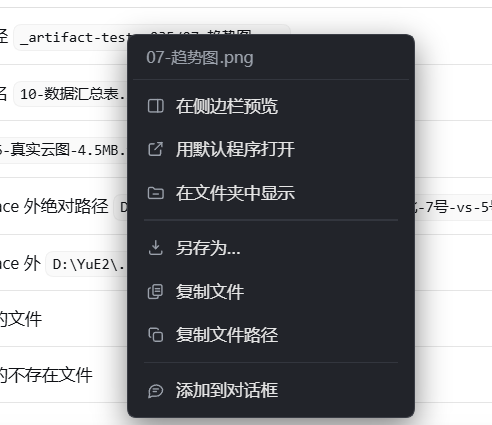
|
|
43
39
|
|
|
44
|
-
"Copy file path" puts the real absolute path on your clipboard:
|
|
45
|
-
|
|
46
|
-

|
|
47
|
-
|
|
48
40
|
## Interaction
|
|
49
41
|
|
|
50
|
-
Click behaviour is decided by the modifier key — no
|
|
42
|
+
Click behaviour is decided by the modifier key — no first-time setup:
|
|
51
43
|
|
|
52
44
|
| Action | Result |
|
|
53
45
|
| --- | --- |
|
|
54
46
|
| **Left click** on a file name / path | Reveal in File Explorer *with the file selected* |
|
|
55
47
|
| **Ctrl / Shift / Cmd + click** | Open with the system's default application |
|
|
56
48
|
| **Alt + click** | Copy the full absolute path to the clipboard |
|
|
57
|
-
|
|
58
|
-
|
|
59
|
-
|
|
60
|
-
| Action | Result |
|
|
61
|
-
|---|---|
|
|
62
|
-
| **Left click** an artifact name | Reveals and selects the file in Explorer |
|
|
63
|
-
| **Right click** an artifact name | Inline menu: `📍 reveal` / `↗ open with default app` / `⧉ copy absolute path` |
|
|
64
|
-
| **Hover** an artifact name | Cursor turns into a pointer (the only visual hint) |
|
|
65
|
-
| Right click on **non-artifact** text | Fully passed through — the host's native menu appears as usual |
|
|
49
|
+
| **Right click** on an artifact | Inline menu — seven actions, listed below |
|
|
50
|
+
| **Right click** on non-artifact text | Fully passed through, the host's native menu appears as usual |
|
|
51
|
+
| **Hover** | Cursor becomes a pointer *only after* the file is confirmed to exist |
|
|
66
52
|
| File missing / unresolvable | Silent pass-through or a one-shot toast. **Never pretends to succeed.** |
|
|
67
53
|
|
|
68
|
-
|
|
54
|
+
### Right-click menu
|
|
69
55
|
|
|
70
|
-
|
|
56
|
+
| Item | What it does |
|
|
57
|
+
| --- | --- |
|
|
58
|
+
| **Preview in sidebar** | Opens the file in DSH's built-in right sidebar — the same route as clicking a file link in chat. That viewer handles PDF, Word, Excel, PowerPoint, Markdown, plain text, CSV, images, audio and video; an extension it cannot render is redirected to the default app instead of showing a blank pane |
|
|
59
|
+
| **Open with default app** | Hands the file to the OS association (Explorer / Excel / VLC / …) |
|
|
60
|
+
| **Reveal in Explorer** | Opens the containing folder and selects the file |
|
|
61
|
+
| **Save as…** | Copies the file to a location you pick |
|
|
62
|
+
| **Copy file** | Puts the file *itself* on the clipboard (`CF_HDROP`), so you can paste it into Explorer, mail or chat |
|
|
63
|
+
| **Copy path** | Puts the real absolute path on the clipboard |
|
|
64
|
+
| **Add to composer** | Inserts the path into the input box for the next message |
|
|
71
65
|
|
|
72
66
|
## How paths resolve
|
|
73
67
|
|
|
74
|
-
A single path may arrive in
|
|
68
|
+
A single path may arrive in four shapes, tried in order:
|
|
75
69
|
|
|
76
70
|
1. **Absolute** — used as-is (`E:\project\out\case.h5`, `\\nas\share\a.zip`). Both drive letters and UNC are recognised.
|
|
77
71
|
2. **Relative** — joined against the session workspace (`out\case.h5` → `<workspace>\out\case.h5`).
|
|
78
|
-
3. **
|
|
72
|
+
3. **Workspace roots** — every known profile and session workspace is tried, not only the current one.
|
|
73
|
+
4. **Bare file name** — a shallow recursive basename search (depth 2 by default), used only when exactly one match is found. Multiple matches are surfaced as candidates instead of guessing. When a mention swallows leading words (`结果#1_速度云图.png` arriving as `#1_速度云图.png`), segments are shrunk from the left until one resolves.
|
|
79
74
|
|
|
80
|
-
Results are cached
|
|
75
|
+
Results are cached — 10 s for `stat`, 30 s for the basename index — so repeated hovers from DOM re-renders do not hammer the disk, while a just-deleted file still flips to "gone" quickly.
|
|
81
76
|
|
|
82
77
|
## Install
|
|
83
78
|
|
|
@@ -140,7 +135,6 @@ dsh-artifact-linker/
|
|
|
140
135
|
│ └── client.js # client: __ModuleLoader__ bundle, read-only DOM
|
|
141
136
|
├── locale/{zh,en}.json # meta.title / meta.description
|
|
142
137
|
├── icon.svg
|
|
143
|
-
├── scripts/probe-regex.mjs
|
|
144
138
|
├── README.md / README.zh.md
|
|
145
139
|
├── CHANGELOG.md
|
|
146
140
|
└── LICENSE
|
package/README.zh.md
CHANGED
|
@@ -21,24 +21,16 @@ DSH 里预览器已经能开图片、代码、pdf、office。但**插件、脚
|
|
|
21
21
|
| 半边 | 做什么 |
|
|
22
22
|
|---|---|
|
|
23
23
|
| **宿主(提示词层)** | 常驻注入一条「产物路径铁律」,要求模型把产物写成**完整绝对路径**、而给用户看的正文**只写文件名**——路径有据可查,正文又不被长串路径污染 |
|
|
24
|
-
| **客户端(渲染层)** |
|
|
24
|
+
| **客户端(渲染层)** | 正文里的产物名变成可点目标:左键揭示、右键七项菜单(侧边栏预览 / 默认程序打开 / 在文件夹中显示 / 另存为 / 复制文件 / 复制路径 / 添加到对话框)。**零常驻 UI、零扫描、零定时器** |
|
|
25
25
|
|
|
26
26
|
第 1 条管「模型把路径写对」,第 2 条管「用户点得动」。缺前者,路径经常是猜的、点开是死链;缺后者,路径再对也要人去复制。
|
|
27
27
|
|
|
28
28
|
## 长什么样
|
|
29
29
|
|
|
30
|
-
悬停到产物名上,会出现 Codex
|
|
31
|
-
|
|
32
|
-

|
|
33
|
-
|
|
34
|
-
右键是三个动作:
|
|
30
|
+
悬停到产物名上,会出现 Codex 风格的蓝色虚线框——这是唯一的视觉提示,正文一个字都不会被改写。右键弹出完整菜单:
|
|
35
31
|
|
|
36
32
|

|
|
37
33
|
|
|
38
|
-
「复制文件路径」把真实绝对路径放进剪贴板:
|
|
39
|
-
|
|
40
|
-

|
|
41
|
-
|
|
42
34
|
---
|
|
43
35
|
|
|
44
36
|
## 交互
|
|
@@ -50,27 +42,22 @@ DSH 里预览器已经能开图片、代码、pdf、office。但**插件、脚
|
|
|
50
42
|
| **左键** | 在系统资源管理器里**揭示并选中**该文件(不是打开它,是把它亮在你面前) |
|
|
51
43
|
| **Ctrl / Shift / Cmd + 左键** | 用系统默认关联程序打开(Excel、PS、播放器……) |
|
|
52
44
|
| **Alt + 左键** | 复制完整绝对路径到剪贴板 |
|
|
53
|
-
|
|
54
|
-
|
|
55
|
-
|
|
56
|
-
正文里出现产物名时:
|
|
57
|
-
|
|
58
|
-
| 操作 | 效果 |
|
|
59
|
-
|---|---|
|
|
60
|
-
| **左键**点产物名 | 在资源管理器里揭示并选中该文件 |
|
|
61
|
-
| **右键**点产物名 | 本插件菜单:`📍 揭示` / `↗ 默认程序打开` / `⧉ 复制完整路径` |
|
|
62
|
-
| **悬停**在产物名上 | 鼠标变手型(唯一的视觉提示) |
|
|
63
|
-
| 在**非产物**文字上右键 | 完全放行,宿主原生菜单照常出现 |
|
|
45
|
+
| **右键**产物名 | 插件菜单,共七项(见下表) |
|
|
46
|
+
| **右键**非产物文字 | 完全放行,宿主原生菜单照常出现 |
|
|
47
|
+
| **悬停** | 只有**确认文件真的存在**才变手型、才画虚线 |
|
|
64
48
|
| 文件不存在 / 解析不到 | 静默放行或一次性提示,**绝不假装成功** |
|
|
65
49
|
|
|
66
|
-
|
|
67
|
-
|
|
68
|
-
- 点击展开清单,按发现时间倒序,每行给出:类型图标 · 文件名 · 状态点 · 完整路径 · 大小 · 修改时间;
|
|
69
|
-
- 状态点:🟢 存在 / 🔴 已不存在(划掉) / ⚪ 尚未确认;
|
|
70
|
-
- 每行右侧三个按钮:`📍` 揭示 · `↗` 打开 · `⧉` 复制;
|
|
71
|
-
- 顶部:`刷新`(重查状态)· `清缓存`(清宿主 stat 缓存)· `清空`(只清面板清单,**不动任何文件**)。
|
|
50
|
+
### 右键菜单
|
|
72
51
|
|
|
73
|
-
|
|
52
|
+
| 菜单项 | 作用 |
|
|
53
|
+
|---|---|
|
|
54
|
+
| **在侧边栏预览** | 在 DSH 内置右侧边栏里打开,和聊天里点文件链接是同一条通道。该查看器支持 PDF、Word、Excel、PowerPoint、Markdown、纯文本、CSV、图片、音视频;它渲染不了的扩展名会**自动改走默认程序**,不会给你一个空白面板 |
|
|
55
|
+
| **用默认程序打开** | 交给系统关联(资源管理器 / Excel / 播放器……) |
|
|
56
|
+
| **在文件夹中显示** | 打开所在目录并选中该文件 |
|
|
57
|
+
| **另存为…** | 复制到你指定的位置 |
|
|
58
|
+
| **复制文件** | 把文件**本身**放进剪贴板(`CF_HDROP`),可以直接粘到资源管理器、邮件、聊天窗口 |
|
|
59
|
+
| **复制文件路径** | 把真实绝对路径放进剪贴板 |
|
|
60
|
+
| **添加到对话框** | 把路径插入输入框,供下一条消息使用 |
|
|
74
61
|
|
|
75
62
|
---
|
|
76
63
|
|
|
@@ -79,14 +66,17 @@ DSH 里预览器已经能开图片、代码、pdf、office。但**插件、脚
|
|
|
79
66
|
模型嘴里的话不可全信,插件按顺序试:
|
|
80
67
|
|
|
81
68
|
1. **`/workspace/<...>`** —— DSH 工作区的虚拟根,映射到真实 workspace 目录;
|
|
82
|
-
2. **原生绝对路径** —— `E:\proj\out\a.xlsx`
|
|
83
|
-
3.
|
|
84
|
-
4.
|
|
69
|
+
2. **原生绝对路径** —— `E:\proj\out\a.xlsx` 直接用(盘符和 UNC 都认);
|
|
70
|
+
3. **会话相对路径** —— 以会话 workspace 为基准拼接;
|
|
71
|
+
4. **各 workspace 根** —— 遍历所有已知的 profile / 会话 workspace,不只当前那一个;
|
|
72
|
+
5. **裸文件名** —— 深浅递归搜同名文件(跳过 `node_modules/.git/dist/build/` 等),按「最近修改优先」+「目录深度浅优先」排序:
|
|
85
73
|
- 命中 **1 个** → 直接用;
|
|
86
74
|
- 命中 **多个** → 返回候选列表交给用户,**绝不猜**(猜错比不猜更糟);
|
|
87
75
|
- 命中 **0 个** → 若 `allowOutside: true`,再在磁盘上按名字做一次浅层搜索。
|
|
88
76
|
|
|
89
|
-
|
|
77
|
+
提到时若「提及吞掉了前面几个词」(`结果#1_速度云图.png` 只剩 `#1_速度云图.png`),会**从左逐段收缩重试**直到能命中。
|
|
78
|
+
|
|
79
|
+
缓存两层:`stat` 10 秒、同名索引 30 秒——避免重复打满磁盘,同时刚删掉的文件也能很快翻成「已不存在」。
|
|
90
80
|
|
|
91
81
|
---
|
|
92
82
|
|
|
@@ -187,8 +177,8 @@ dsh-artifact-linker/
|
|
|
187
177
|
`dsh-artifact-linker` turns every delivered artifact into a one-click target, so you never copy a path into Explorer again.
|
|
188
178
|
|
|
189
179
|
- **Host half** injects a resident system-prompt rule: always emit **absolute** artifact paths in tooling, but only the **file name** in user-facing prose.
|
|
190
|
-
- **Client half** makes those names clickable — **left click** reveals and selects the file in Explorer, **right click** opens a
|
|
191
|
-
- Bare file names are resolved with a
|
|
180
|
+
- **Client half** makes those names clickable — **left click** reveals and selects the file in Explorer, **right click** opens a seven-item menu: preview in sidebar, open with default app, reveal in Explorer, save as, copy the file itself, copy absolute path, add to composer. Hovering turns the cursor into a pointer only after the file is confirmed to exist. No floating UI, no document scanning, no timers.
|
|
181
|
+
- Bare file names are resolved with a multi-tier fallback (native absolute → session-relative → every known workspace root → recursive same-name search), shrinking the mention from the left when leading words are swallowed. Ambiguous matches are surfaced as candidates rather than guessed.
|
|
192
182
|
- All routes are loopback-only, telemetry-free, and spawn nothing through a shell. The client never mutates React-rendered DOM.
|
|
193
183
|
|
|
194
184
|
MIT licensed.
|
package/lib/client.js
CHANGED
|
@@ -29,10 +29,51 @@ window.__ModuleLoader__.load({
|
|
|
29
29
|
var exports = module.exports;
|
|
30
30
|
|
|
31
31
|
var GUARD = "__dshArtifactLinkerV1";
|
|
32
|
-
var VERSION = "0.3.
|
|
32
|
+
var VERSION = "0.3.6";
|
|
33
33
|
// 路由前缀必须与宿主的 ROUTE_PREFIX 一致;永远根相对,绝不拼宿主 origin
|
|
34
34
|
var ROUTE = "/dsh-artifact-linker";
|
|
35
35
|
|
|
36
|
+
// ── 侧边栏预览:地址构造 ────────────────────────────────────────────────
|
|
37
|
+
// 宿主 ctx.sidebarRight.openResource 只认 dsh-resource:// 地址,不认裸绝对路径。
|
|
38
|
+
// 下面这组函数与官方 @deepseek-ai/dsh-util-workspace-path 的实现逐字对齐
|
|
39
|
+
// (见 dsh-client-ui-reference/lib/client.js),自己抄一份是为了不新增运行时依赖。
|
|
40
|
+
var FILE_ADDRESS_PREFIX = "dsh-resource://file/";
|
|
41
|
+
function encodeSegment(segment) {
|
|
42
|
+
return encodeURIComponent(segment).replace(/%3A/gi, ":");
|
|
43
|
+
}
|
|
44
|
+
function encodePath(p) {
|
|
45
|
+
return p.split("/").map(encodeSegment).join("/");
|
|
46
|
+
}
|
|
47
|
+
function sessionFileAddress(sessionId, p) {
|
|
48
|
+
var normalized = p.replace(/\\/g, "/").replace(/^(?:\.\/)+/, "");
|
|
49
|
+
return FILE_ADDRESS_PREFIX + "session/" + encodeSegment(sessionId) + "/" + encodePath(normalized);
|
|
50
|
+
}
|
|
51
|
+
function isWinAbs(p) {
|
|
52
|
+
return /^[A-Za-z]:[/\\]/.test(p) || p.indexOf("\\\\") === 0;
|
|
53
|
+
}
|
|
54
|
+
function fileAddressFor(sessionId, cwd, p) {
|
|
55
|
+
var normalized = p.replace(/\\/g, "/");
|
|
56
|
+
if (!(normalized.charAt(0) === "/" || isWinAbs(normalized))) return sessionFileAddress(sessionId, normalized);
|
|
57
|
+
var root = cwd === undefined || cwd === null ? "" : String(cwd).replace(/\\/g, "/").replace(/\/+$/, "");
|
|
58
|
+
if (root !== "" && normalized === root) return sessionFileAddress(sessionId, "");
|
|
59
|
+
if (root !== "" && normalized.indexOf(root + "/") === 0) return sessionFileAddress(sessionId, normalized.slice(root.length + 1));
|
|
60
|
+
// 工作区外的绝对路径:原样保留在 session 地址里,宿主按 Session 读权限解析
|
|
61
|
+
return sessionFileAddress(sessionId, normalized);
|
|
62
|
+
}
|
|
63
|
+
|
|
64
|
+
// 侧边栏 documentpreview 真正能渲染的类型(读官方 README 得出,不是猜的):
|
|
65
|
+
// md/代码/纯文本 → 分页文本;pdf → PDF.js;图片 → 完整字节;
|
|
66
|
+
// xlsx/xls/csv/tsv → 浏览器内只读表格;doc/docx/ppt/pptx → 本地转 PDF
|
|
67
|
+
// 音视频与压缩包没有注册渲染器,走「不支持预览」空状态,所以干脆不显示这一项。
|
|
68
|
+
var PREVIEWABLE = /^(pdf|docx?|pptx?|xls[xm]?|csv|tsv|md|markdown|txt|log|json|ya?ml|ini|toml|xml|html?|png|jpe?g|gif|webp|bmp|tiff?|svg|py|js|mjs|cjs|ts|tsx|ipynb|ps1|sh|cas|dat|h5|hsf|cxa|trn|rfile|plt|flprj|jou|set|out)$/i;
|
|
69
|
+
|
|
70
|
+
function extOf(p) {
|
|
71
|
+
var base = String(p).split(/[\\/]/).pop() || "";
|
|
72
|
+
var dot = base.lastIndexOf(".");
|
|
73
|
+
return dot > 0 ? base.slice(dot + 1) : "";
|
|
74
|
+
}
|
|
75
|
+
|
|
76
|
+
|
|
36
77
|
// 产物扩展名白名单。刻意**不含 exe/msi/dll** 之类可执行体:
|
|
37
78
|
// 正文里出现这些名字多半是命令输出/报错文本,不是「要打开看的产物」。
|
|
38
79
|
var EXT = [
|
|
@@ -42,7 +83,11 @@ window.__ModuleLoader__.load({
|
|
|
42
83
|
"log", "txt", "md", "json", "ya?ml", "ini", "toml", "xml", "html?",
|
|
43
84
|
"py", "js", "mjs", "cjs", "ts", "tsx", "ipynb", "ps1", "sh",
|
|
44
85
|
"cas", "dat", "h5", "hsf", "cxa", "trn", "rfile", "plt", "flprj", "jou", "set", "out",
|
|
45
|
-
"scdocx?", "pmdb", "unv", "msh", "stp", "step", "igs", "iges", "dwg", "dxf", "inp"
|
|
86
|
+
"scdocx?", "pmdb", "unv", "msh", "stp", "step", "igs", "iges", "dwg", "dxf", "inp",
|
|
87
|
+
// 音频/视频:合成音频(YuE、TTS、音色克隆)与录屏导出很常见,
|
|
88
|
+
// 之前不在白名单里,用户右键 audio.flac 就完全没反应。
|
|
89
|
+
"flac", "wav", "mp3", "m4a", "aac", "ogg", "opus", "wma", "amr",
|
|
90
|
+
"mp4", "mkv", "mov", "avi", "webm", "wmv", "flv", "m4v"
|
|
46
91
|
].join("|");
|
|
47
92
|
|
|
48
93
|
// 一段文本里「像产物路径」的片段:
|
|
@@ -258,6 +303,44 @@ window.__ModuleLoader__.load({
|
|
|
258
303
|
return false;
|
|
259
304
|
}
|
|
260
305
|
|
|
306
|
+
// 客户端根 ctx,apply 时存下来;侧边栏预览要用它取 sessions / sidebarRight。
|
|
307
|
+
var rootCtx = null;
|
|
308
|
+
|
|
309
|
+
// 在右侧边栏打开一个文件。
|
|
310
|
+
// 用的是官方导航入口 ctx.sidebarRight.openResource(address),和聊天里点文件链接
|
|
311
|
+
// 走的是同一条路,所以不会和宿主自己的预览行为打架。
|
|
312
|
+
// 返回 false 表示「这次开不了」,调用方据此给提示,绝不假装成功。
|
|
313
|
+
function openInSidebar(abs) {
|
|
314
|
+
try {
|
|
315
|
+
if (!rootCtx || typeof rootCtx.get !== "function") return false;
|
|
316
|
+
var sidebar = rootCtx.get("sidebarRight");
|
|
317
|
+
if (!sidebar || typeof sidebar.openResource !== "function") return false;
|
|
318
|
+
var sessions = rootCtx.get("sessions");
|
|
319
|
+
if (!sessions || !sessions.list || typeof sessions.list.getSnapshot !== "function") return false;
|
|
320
|
+
var snap = sessions.list.getSnapshot();
|
|
321
|
+
var byId = (snap && snap.byId) || {};
|
|
322
|
+
// 找当前会话:优先 mounted(屏幕上那个),否则取第一个带 cwd 的
|
|
323
|
+
var sid = null;
|
|
324
|
+
var mounted = sidebar.mounted;
|
|
325
|
+
if (mounted && typeof mounted.get === "function") {
|
|
326
|
+
var m = mounted.get();
|
|
327
|
+
if (m && m.sessionId) sid = m.sessionId;
|
|
328
|
+
} else if (mounted && mounted.sessionId) {
|
|
329
|
+
sid = mounted.sessionId;
|
|
330
|
+
}
|
|
331
|
+
if (!sid) {
|
|
332
|
+
for (var k in byId) { if (byId[k] && byId[k].cwd) { sid = k; break; } }
|
|
333
|
+
}
|
|
334
|
+
if (!sid) return false;
|
|
335
|
+
var cwd = byId[sid] ? byId[sid].cwd : undefined;
|
|
336
|
+
sidebar.openResource(fileAddressFor(sid, cwd, abs));
|
|
337
|
+
return true;
|
|
338
|
+
} catch (e) {
|
|
339
|
+
// 服务缺失、地址不被任何 tab 类型认领、会话还没就绪 —— 一律当作开不了
|
|
340
|
+
return false;
|
|
341
|
+
}
|
|
342
|
+
}
|
|
343
|
+
|
|
261
344
|
function showMenu(x, y, abs) {
|
|
262
345
|
hideMenu();
|
|
263
346
|
if (!document || !document.body) return;
|
|
@@ -289,21 +372,26 @@ window.__ModuleLoader__.load({
|
|
|
289
372
|
// 复制文件:两张纸 + 中间的文件线,和「复制路径」区分开
|
|
290
373
|
copyfile: '<rect x="8.6" y="3.4" width="11" height="13" rx="2"/><path d="M5.4 7.4h-.7A1.7 1.7 0 0 0 3 9.1v9.4a1.7 1.7 0 0 0 1.7 1.7h8.4a1.7 1.7 0 0 0 1.7-1.7v-.7"/><path d="M11.6 8.2h5"/><path d="M11.6 11.4h5"/>',
|
|
291
374
|
// 添加到对话框:带横线的气泡
|
|
292
|
-
quote: '<path d="M20.5 11.6a8.3 8.3 0 0 1-8.3 8.3H7.4L3.5 21.9l1-4.1A8.3 8.3 0 1 1 20.5 11.6Z"/><path d="M9 11h6"/><path d="M9 14.2h3.6"/>'
|
|
375
|
+
quote: '<path d="M20.5 11.6a8.3 8.3 0 0 1-8.3 8.3H7.4L3.5 21.9l1-4.1A8.3 8.3 0 1 1 20.5 11.6Z"/><path d="M9 11h6"/><path d="M9 14.2h3.6"/>',
|
|
376
|
+
// 侧边栏预览:一块面板 + 右侧分栏
|
|
377
|
+
preview: '<rect x="3.2" y="4.4" width="17.6" height="15.2" rx="2.2"/><path d="M14.4 4.4v15.2"/>'
|
|
293
378
|
};
|
|
294
379
|
// 文案要说人话:「资源管理器」这个词很多用户不认识,改成「文件夹窗口」。
|
|
295
380
|
// 顺序按「最常做的动作」排,并用 "sep" 占位分成三组:
|
|
296
|
-
//
|
|
297
|
-
|
|
298
|
-
|
|
299
|
-
|
|
300
|
-
|
|
301
|
-
|
|
302
|
-
|
|
303
|
-
|
|
304
|
-
|
|
305
|
-
|
|
306
|
-
];
|
|
381
|
+
// 看(侧边栏预览 / 打开 / 定位)→ 搬运(另存为 / 复制文件 / 复制路径)→ 喂给 AI(添加到对话框)
|
|
382
|
+
// 侧边栏预览只对宿主真能渲染的类型出现:音视频、压缩包在侧边栏里只有
|
|
383
|
+
// 「不支持预览」空状态,摆一个点了白点的入口不如不摆。
|
|
384
|
+
var canPreview = PREVIEWABLE.test(extOf(abs));
|
|
385
|
+
var items = [];
|
|
386
|
+
if (canPreview) items.push(["preview", "在侧边栏预览", "在右侧边栏里直接看,不用切出去"]);
|
|
387
|
+
items.push(["open", "用默认程序打开", "按文件类型用对应软件打开:PDF 用阅读器、表格用 Excel 那类"]);
|
|
388
|
+
items.push(["reveal", "在文件夹中显示", "打开 Windows 文件夹窗口,并选中这个文件"]);
|
|
389
|
+
items.push(["sep", "", ""]);
|
|
390
|
+
items.push(["saveas", "另存为…", "另存一份到别的位置(会弹出系统保存窗口)"]);
|
|
391
|
+
items.push(["copyfile", "复制文件", "把文件本身放进剪贴板,可直接粘到任意文件夹"]);
|
|
392
|
+
items.push(["copy", "复制文件路径", "只复制路径文字,不复制文件本身"]);
|
|
393
|
+
items.push(["sep", "", ""]);
|
|
394
|
+
items.push(["quote", "添加到对话框", "把完整路径插入上方的聊天输入框"]);
|
|
307
395
|
for (var i = 0; i < items.length; i++) {
|
|
308
396
|
// 分隔线:一个 1px 的 div,左右留白对齐文字缩进,不加任何可点区域
|
|
309
397
|
if (items[i][0] === "sep") {
|
|
@@ -330,7 +418,14 @@ window.__ModuleLoader__.load({
|
|
|
330
418
|
ev.stopPropagation();
|
|
331
419
|
hideMenu();
|
|
332
420
|
|
|
333
|
-
// ①
|
|
421
|
+
// ① 侧边栏预览 —— 纯客户端,走宿主导航入口
|
|
422
|
+
if (action === "preview") {
|
|
423
|
+
if (openInSidebar(abs)) toast("已在侧边栏打开");
|
|
424
|
+
else toast("侧边栏打不开这个文件");
|
|
425
|
+
return;
|
|
426
|
+
}
|
|
427
|
+
|
|
428
|
+
// ② 只复制路径文字 —— 纯客户端,不必过宿主
|
|
334
429
|
if (action === "copy") {
|
|
335
430
|
try {
|
|
336
431
|
navigator.clipboard.writeText(abs);
|
|
@@ -485,11 +580,23 @@ window.__ModuleLoader__.load({
|
|
|
485
580
|
var c = cached(hit.raw);
|
|
486
581
|
// 已确认不是产物 → 同样放行宿主原生菜单,绝不抢
|
|
487
582
|
if (c && !c.ok) return;
|
|
488
|
-
ev.preventDefault();
|
|
489
|
-
ev.stopPropagation();
|
|
490
583
|
// 有结论且确实存在 → 直接弹自己的菜单,省一次往返
|
|
491
|
-
if (c && c.ok) {
|
|
492
|
-
|
|
584
|
+
if (c && c.ok) {
|
|
585
|
+
ev.preventDefault();
|
|
586
|
+
ev.stopPropagation();
|
|
587
|
+
showMenu(ev.clientX, ev.clientY, c.abs);
|
|
588
|
+
return;
|
|
589
|
+
}
|
|
590
|
+
// 🔴 还没有结论时**绝不先 preventDefault**。
|
|
591
|
+
// 旧版在这里无条件拦下原生菜单,然后异步去解析;一旦解析失败(正文里
|
|
592
|
+
// 形状像文件名、实际不存在的那类片段),act() 直接静默返回 ——
|
|
593
|
+
// 结果是原生菜单被拦掉、自己的菜单也没弹出,右键**彻底无反应**。
|
|
594
|
+
// 宁可让原生菜单先闪一下,也不能让右键失灵。
|
|
595
|
+
verify(hit.raw, function (rec) {
|
|
596
|
+
if (disposed) return;
|
|
597
|
+
if (!rec.ok || !rec.abs) return;
|
|
598
|
+
showMenu(ev.clientX, ev.clientY, rec.abs);
|
|
599
|
+
});
|
|
493
600
|
}
|
|
494
601
|
|
|
495
602
|
// ── 悬停高亮:让「这几个字是可以点的产物」一眼看得出来 ──────────────────
|
|
@@ -605,6 +712,7 @@ window.__ModuleLoader__.load({
|
|
|
605
712
|
|
|
606
713
|
disposed = false;
|
|
607
714
|
mounted = false;
|
|
715
|
+
rootCtx = ctx || null;
|
|
608
716
|
api = { apply: apply, dispose: dispose, version: VERSION };
|
|
609
717
|
try { window[GUARD] = api; } catch (e) { /* 极端沙箱下挂不上,不影响本实例 */ }
|
|
610
718
|
|
|
@@ -626,7 +734,9 @@ window.__ModuleLoader__.load({
|
|
|
626
734
|
exports.apply = apply;
|
|
627
735
|
exports.dispose = dispose;
|
|
628
736
|
exports.version = VERSION;
|
|
629
|
-
|
|
737
|
+
// 侧边栏预览要 sessions + sidebarRight。两个服务由官方 bundle 提供,
|
|
738
|
+
// 桌面端与 web 端都在;万一某个组合没有,cordis 会跳过本插件而不影响其它插件。
|
|
739
|
+
exports.inject = ["sessions", "sidebarRight"];
|
|
630
740
|
return module.exports;
|
|
631
741
|
}
|
|
632
742
|
});
|
package/lib/index.js
CHANGED
|
@@ -230,6 +230,19 @@ function candidateBases() {
|
|
|
230
230
|
return out.slice();
|
|
231
231
|
}
|
|
232
232
|
|
|
233
|
+
// allowOutside 关闭时的安全闸:落在**任意一个候选 workspace**里就算合法。
|
|
234
|
+
// 2026-10-28 修正:原来这两个守卫只拿 process.cwd() 比对,但宿主 cwd 并不是会话
|
|
235
|
+
// workspace(同 201 行那次的同一个坑),一旦有人为了给别人用把 allowOutside 关掉,
|
|
236
|
+
// workspace 内的合法文件会被误拒成 outside-base。改成逐候选 base 判定。
|
|
237
|
+
function insideAnyBase(abs, allowOutside) {
|
|
238
|
+
if (allowOutside) return true;
|
|
239
|
+
var cand = candidateBases();
|
|
240
|
+
for (var i = 0; i < cand.length; i++) {
|
|
241
|
+
try { if (isInside(cand[i], abs)) return true; } catch (e) { }
|
|
242
|
+
}
|
|
243
|
+
return false;
|
|
244
|
+
}
|
|
245
|
+
|
|
233
246
|
function resolveAcross(raw, extraBase, allowOutside) {
|
|
234
247
|
var bases = [];
|
|
235
248
|
if (extraBase) bases.push(pathResolve(extraBase));
|
|
@@ -742,7 +755,7 @@ export function apply(ctx, config) {
|
|
|
742
755
|
return;
|
|
743
756
|
}
|
|
744
757
|
abs = pathResolve(abs);
|
|
745
|
-
if (!
|
|
758
|
+
if (!insideAnyBase(abs, allowOutside)) {
|
|
746
759
|
json(res, 200, { ok: false, reason: "outside-base", abs: abs });
|
|
747
760
|
return;
|
|
748
761
|
}
|
|
@@ -778,7 +791,7 @@ export function apply(ctx, config) {
|
|
|
778
791
|
return;
|
|
779
792
|
}
|
|
780
793
|
abs = pathResolve(abs);
|
|
781
|
-
if (!
|
|
794
|
+
if (!insideAnyBase(abs, allowOutside)) {
|
|
782
795
|
json(res, 200, { ok: false, reason: "outside-base", abs: abs });
|
|
783
796
|
return;
|
|
784
797
|
}
|
package/package.json
CHANGED
|
@@ -1,6 +1,6 @@
|
|
|
1
1
|
{
|
|
2
2
|
"name": "dsh-artifact-linker",
|
|
3
|
-
"version": "0.3.
|
|
3
|
+
"version": "0.3.6",
|
|
4
4
|
"description": "DSH 产物路径联动器:常驻注入「产物路径铁律」让模型输出完整绝对路径,同时把聊天正文里的文件名/路径渲染成一键可点的产物芯片——左键预览、右键菜单可打开/定位/另存为/复制文件/复制路径/添加到对话框。宿主端提供回环只读路由与 /saveas /copyfile 两个文件搬运动作(Shell COM 揭示、WinForms 保存对话框、CF_HDROP 剪贴板),客户端零侵入、不改 React 节点、不接管 markdown 图片语法。解决「产物要打开得先复制路径再粘到文件管理器」的反复割裂。/ Turn declared artifact paths into one-click chips: resident system-prompt rules force absolute paths, the client half renders file names as clickable chips, and the right-click menu offers open / reveal in Explorer / save-as / copy-file / copy-path / insert-into-composer. Host routes are loopback-only; zero telemetry.",
|
|
5
5
|
"type": "module",
|
|
6
6
|
"main": "lib/index.js",
|