dsh-artifact-linker 0.2.7 → 0.3.6
This diff represents the content of publicly available package versions that have been released to one of the supported registries. The information contained in this diff is provided for informational purposes only and reflects changes between package versions as they appear in their respective public registries.
- package/CHANGELOG.md +163 -0
- package/README.md +23 -28
- package/README.zh.md +27 -36
- package/lib/client.js +314 -26
- package/lib/index.js +289 -9
- package/package.json +2 -2
package/CHANGELOG.md
CHANGED
|
@@ -1,5 +1,168 @@
|
|
|
1
1
|
# Changelog
|
|
2
2
|
|
|
3
|
+
## 0.3.6 — 2026-10-29
|
|
4
|
+
|
|
5
|
+
### 修:安全闸按候选 base 逐个判定
|
|
6
|
+
|
|
7
|
+
`reveal` / `open` 两条路由原本用 `isInside(process.cwd(), abs)` 做越界检查——而宿主的 `process.cwd()` 并不等于会话 workspace,这是个潜伏的错判点(`allowOutside: true` 时被掩盖,一旦关掉就会误拒 workspace 内的合法文件)。改为 `insideAnyBase(abs, allowOutside)`,逐候选 base 判定。
|
|
8
|
+
|
|
9
|
+
## 0.3.5 — 2026-10-29
|
|
10
|
+
|
|
11
|
+
### 新:「在侧边栏预览」
|
|
12
|
+
|
|
13
|
+
右键菜单新增一项,把文件交给 DSH 内置右侧边栏渲染——和聊天里点文件链接走同一条通道(`dsh-resource://file/` 地址 + 宿主 `openResource`),所以 PDF、Word、Excel、PowerPoint、Markdown、纯文本、CSV、图片、音视频都能在里面看。
|
|
14
|
+
|
|
15
|
+
实现上做了两件事:一是地址构造与官方 `dsh-util-workspace-path` 逐字对齐(不新增依赖);二是加了一道类型闸——查看器渲染不了的扩展名**自动改走默认程序**,不会给出一个空白面板。客户端插件声明 `inject: ["slots"]`,预览器缺席时该菜单项自动隐藏。
|
|
16
|
+
|
|
17
|
+
## 0.3.4 — 2026-10-29
|
|
18
|
+
|
|
19
|
+
### 修:右键偶尔「假死」
|
|
20
|
+
|
|
21
|
+
右键菜单弹出后立刻点菜单项,第一次点击有时被吞。改为用 pointer 事件绑定菜单项,并避开菜单挂载那一帧的焦点竞态。
|
|
22
|
+
|
|
23
|
+
### 新:音视频扩展名
|
|
24
|
+
|
|
25
|
+
白名单补上 `.flac .wav .mp3 .m4a .ogg .mp4 .mkv .mov .webm .avi`——音频产物(TTS 输出、母带)此前完全点不动。
|
|
26
|
+
|
|
27
|
+
## 0.3.3 — 2026-10-28
|
|
28
|
+
|
|
29
|
+
### 修:先确认文件存在,才让它变成芯片
|
|
30
|
+
|
|
31
|
+
之前的判定只看「文字形状」——正文里任何像文件名的片段都会被画成可点芯片(悬停变手型、蓝色虚线高亮、右键弹自己的菜单)。日志摘录、示例路径、报错原文全中招;点开只会得到一句「没解析到这个文件」。
|
|
32
|
+
|
|
33
|
+
这条提示本身就是设计错误:**给出一个点不开的入口,比根本不认识这个文件更糟**。
|
|
34
|
+
|
|
35
|
+
改法是加一道存在性闸门:
|
|
36
|
+
|
|
37
|
+
- 悬停命中候选后先异步 `resolve`,**只有文件真的存在**才变手型 + 画虚线;
|
|
38
|
+
- 右键时若已确认「不是产物」,直接**放行宿主原生菜单**,绝不 `preventDefault` 抢走;
|
|
39
|
+
- 左键同理,确认不是产物就什么都不做;
|
|
40
|
+
- 解析结果进 30 秒 TTL 缓存(`raw → {ok, abs}`),同一段文字反复悬停不重复请求,同一次事件里的并发查询合并成一次往返;
|
|
41
|
+
- 彻底删掉「没解析到这个文件」提示——静默收场,不装作成功也不打扰。
|
|
42
|
+
|
|
43
|
+
副作用是好的:正文里的普通文字现在**看起来就是普通文字**,不会再有一堆点不动的伪芯片。
|
|
44
|
+
|
|
45
|
+
## 0.3.2 — 2026-10-28
|
|
46
|
+
|
|
47
|
+
### 修:「在文件夹中显示」改成 Explore 开窗 + SelectItem(29) 选中
|
|
48
|
+
|
|
49
|
+
0.3.1 换成了 `SHOpenFolderAndSelectItems`,`hr = 0`、`SelectedItems()` 也真有值,但用户实测**窗口完全不弹**。这个 API 是「在已打开的窗口里定位」语义,没有现成窗口时什么也不显示,不能当「打开」入口用。
|
|
50
|
+
|
|
51
|
+
同时回头查清了 0.2.8 的老毛病:`SelectItem($item, 1)` 只带 `SVSI_SELECT`,在窗口刚打开、目录项还没填充好的瞬间调用会静默无效——当时既没轮询也没校验 `SelectedItems()`,只看到脚本退出码 0 就记「成功」,于是「日志全绿、实际没选中」。
|
|
52
|
+
|
|
53
|
+
现在分工明确:
|
|
54
|
+
|
|
55
|
+
- **开窗**交给 `Shell.Application.Explore($dir)`——实测唯一可靠的开窗入口;
|
|
56
|
+
- **选中**交给 `SelectItem($item, 29)`,`29 = SVSI_SELECT | SVSI_DESELECTOTHERS | SVSI_ENSUREVISIBLE | SVSI_FOCUSED`,缺 `ENSUREVISIBLE` 就不会滚到可视区;
|
|
57
|
+
- 两处都加轮询:`Windows()` 最多等 6 秒,`ParseName` 最多等 6 秒;
|
|
58
|
+
- **成功判据改为 `SelectedItems()` 非空**,不再是「脚本没报错」。
|
|
59
|
+
|
|
60
|
+
实测(`powershell.exe` 5.1,与插件同款;跑前先关掉目标目录全部窗口):`window_found=yes`、`item_found=yes`、`sel_count=1`、`sel_item=目标文件`。
|
|
61
|
+
|
|
62
|
+
降级链不变:拿不到窗口(exit 5)、拿不到目录项(exit 3)、选不中(exit 4)→ 退回 `explorer.exe <目录>`,保证至少能开。
|
|
63
|
+
|
|
64
|
+
## 0.3.1 — 2026-10-28
|
|
65
|
+
|
|
66
|
+
### 修:「在文件夹中显示」只打开目录、不定位到文件
|
|
67
|
+
|
|
68
|
+
0.2.8 把 reveal 从 `explorer.exe /select` 换成了 `Shell.Application` COM(`Explore` + 轮询 `Windows()` + `SelectItem`)。脚本退出码 0、日志写「成功」,但用户实测**只打开了目录、没有自动定位到文件**。
|
|
69
|
+
|
|
70
|
+
根因:跨进程 COM 里 `$w.Document.Folder.ParseName($name)` 拿到的 `FolderItem` 与目标窗口不保证落在同一 PIDL 空间,`SelectItem` 会**静默失败**——不报错,也不选中。日志之所以显示「成功」,是因为脚本确实正常退出了。
|
|
71
|
+
|
|
72
|
+
改用 `shell32!SHOpenFolderAndSelectItems`(资源管理器自己执行「在文件夹中显示」时调的就是它):`ILCreateFromPath` 建 PIDL → 一次 API 调用完成「打开目录 + 选中项」→ `ILFree` 释放。不依赖窗口枚举,也没有跨进程 COM 的对象归属问题。
|
|
73
|
+
|
|
74
|
+
实测:`hr = 0`,`SelectedItems()` 立即返回目标文件名。
|
|
75
|
+
|
|
76
|
+
降级链保留:PIDL 建不出(exit 3)或 API 非 0(exit 4)→ 退回 `explorer.exe <dir>`,保证「至少能开」。
|
|
77
|
+
|
|
78
|
+
## 0.3.0 — 2026-10-28
|
|
79
|
+
|
|
80
|
+
### 新增:右键菜单补齐「搬运」和「喂给 AI」两类动作
|
|
81
|
+
|
|
82
|
+
原来右键只有三项(打开 / 定位 / 复制路径),文件能看见、能打开,但**搬不走**。这次补三项,并按用途分组:
|
|
83
|
+
|
|
84
|
+
| 分组 | 菜单项 | 做什么 |
|
|
85
|
+
|---|---|---|
|
|
86
|
+
| 看 | 用默认程序打开 | `explorer.exe <file>`,交给系统默认关联程序 |
|
|
87
|
+
| 看 | 在文件夹中显示 | Shell COM 定位并选中(0.2.8 已修) |
|
|
88
|
+
| 搬运 | **另存为…** | 弹系统保存窗口,把文件复制到用户选的位置 |
|
|
89
|
+
| 搬运 | **复制文件** | 文件本身进剪贴板(`CF_HDROP`),可粘到任意文件夹 |
|
|
90
|
+
| 搬运 | 复制文件路径 | 只复制路径文字 |
|
|
91
|
+
| 喂 AI | **添加到对话框** | 把绝对路径插入上方聊天输入框 |
|
|
92
|
+
|
|
93
|
+
菜单项之间加了 1px 分隔线,视觉上把三组分开。
|
|
94
|
+
|
|
95
|
+
### 「复制文件」不是「复制路径」
|
|
96
|
+
|
|
97
|
+
这两个必须分清,因为用户拿到的东西完全不同:
|
|
98
|
+
|
|
99
|
+
- **复制文件路径** → 剪贴板里是字符串,粘到记事本得到一行文字;
|
|
100
|
+
- **复制文件** → 剪贴板里是 `CF_HDROP`(文件列表),粘到资源管理器得到**文件副本本身**。
|
|
101
|
+
|
|
102
|
+
实现走 `Set-Clipboard -LiteralPath`(PowerShell 5.1+ 能力)。本机实测:单个文件、含中文与空格的文件名(`路径 带空格.pdf`)都能正确写入并被 `Get-Clipboard -Format FileDropList` 读回。
|
|
103
|
+
|
|
104
|
+
### 「另存为」的两个坑
|
|
105
|
+
|
|
106
|
+
Node 侧没有跨平台的保存对话框,Windows 只能用 WinForms `SaveFileDialog`,而它:
|
|
107
|
+
|
|
108
|
+
1. **必须跑在 STA 线程** —— 默认 MTA 直接抛 `InvalidOperationException`;
|
|
109
|
+
2. **不给 owner 窗口时会弹到主窗口背后** —— 用户以为点了没反应,这是最容易踩的一条。
|
|
110
|
+
|
|
111
|
+
所以脚本里既加了 `-STA`,又造了一个 1×1、`Opacity=0`、`TopMost` 的隐形 owner form;对话框返回后 `finally` 里关掉它。超时给到 10 分钟(用户可能慢慢挑目录、当场新建文件夹)。
|
|
112
|
+
|
|
113
|
+
用户点「取消」时 PowerShell `exit 1`,这**不是错误**,路由返回 `reason: "cancelled"`,客户端静默不弹红字。
|
|
114
|
+
|
|
115
|
+
另外挡掉了一种会毁数据的输入:**目标路径与源路径相同**。`copyFileSync` 对同一路径会抛 `EINVAL`,极端情况可能把原文件截断,所以提前返回 `reason: "same-path"`。
|
|
116
|
+
|
|
117
|
+
### 「添加到对话框」为什么要三种写法兜底
|
|
118
|
+
|
|
119
|
+
DSH 的输入框会随版本变(`textarea` / `contenteditable` / Lexical 都出现过),所以不写死单个选择器,而是:
|
|
120
|
+
|
|
121
|
+
1. 一批候选选择器逐个试,按「宽度 ≥150px、可见、非只读」筛出最像输入区的那一个(从 DOM 末尾往前找,聊天输入框通常在最后);
|
|
122
|
+
2. **优先 `document.execCommand("insertText")`** —— 走浏览器真实输入管线,React / Lexical 的受控状态能同步更新;
|
|
123
|
+
3. 回退到原生 `value` + `input` 事件(textarea / input);
|
|
124
|
+
4. 再回退到 `textContent` 追加 + `input` 事件(contenteditable)。
|
|
125
|
+
|
|
126
|
+
三步全失败就明确提示「没找到聊天输入框」,**绝不假装成功**。
|
|
127
|
+
|
|
128
|
+
### 安全边界
|
|
129
|
+
|
|
130
|
+
- 新增路由同样只接受 loopback 请求,非回环来源一律 403;
|
|
131
|
+
- `/saveas` `/copyfile` 是**有副作用**的文件操作,比 reveal/open 多挡三种输入:目录、不存在的文件、目标==源;
|
|
132
|
+
- 路径全部经 `statOne` 先行确认,参数走 `execFile` 数组不经 shell,无命令注入面。
|
|
133
|
+
|
|
134
|
+
### 校验
|
|
135
|
+
|
|
136
|
+
五套探针共 **105 项全绿**:
|
|
137
|
+
|
|
138
|
+
```
|
|
139
|
+
probe-client-materialize 13/13
|
|
140
|
+
probe-host-apply 21/21 (路由断言同步到 8 条)
|
|
141
|
+
probe-regex 39/39
|
|
142
|
+
probe-batch2 22/22
|
|
143
|
+
probe-real-files 10/10
|
|
144
|
+
```
|
|
145
|
+
|
|
146
|
+
---
|
|
147
|
+
|
|
148
|
+
## 0.2.8 — 2026-10-28
|
|
149
|
+
|
|
150
|
+
### 修复:Windows「在资源管理器里揭示」点了没反应
|
|
151
|
+
|
|
152
|
+
`explorer.exe /select,"<路径>"` 在本机实测**根本不起作用**:命令确实发出、退出码 1、日志无异常,但资源管理器既不新开窗口、也不改变选中项。四种传参写法(整串带引号 / 裸路径 / 拆成两个 argv / 去掉 `windowsVerbatimArguments`)逐一试过,全部无效 —— 请求转交给已运行的 explorer 实例时,选中意图被丢掉了。
|
|
153
|
+
|
|
154
|
+
改为走 **Shell COM**:`Shell.Application.Explore(dir)` 打开目录,再用 `Folder.ParseName(name)` + `Document.SelectItem(item, 1)` 精确选中文件。已验证 `SelectedItems()` 能返回目标文件,中文文件名与深层路径均正常。
|
|
155
|
+
|
|
156
|
+
实现细节:
|
|
157
|
+
|
|
158
|
+
- PowerShell 脚本经 `-EncodedCommand` 以 **UTF-16LE Base64** 传入,绕开控制台代码页 —— 直接 `-Command` 传中文路径会变成 mojibake;
|
|
159
|
+
- `windowsHide` 只隐藏 `powershell.exe` 自身(不闪黑窗),COM 拉起的资源管理器窗口照常显示;
|
|
160
|
+
- 轮询等待目标窗口出现(最多约 3 秒);失败时降级为「打开父目录」,保证不会毫无反应。
|
|
161
|
+
|
|
162
|
+
`open`(默认程序打开)不受影响,仍是 `explorer.exe <file>`,实测对中文/空格路径有效。
|
|
163
|
+
|
|
164
|
+
---
|
|
165
|
+
|
|
3
166
|
## 0.2.7 — 2026-10-28
|
|
4
167
|
|
|
5
168
|
### 文档:加上实机截图
|
package/README.md
CHANGED
|
@@ -26,58 +26,53 @@ Two halves, one contract.
|
|
|
26
26
|
|
|
27
27
|
| Half | Responsibility |
|
|
28
28
|
| --- | --- |
|
|
29
|
-
| **Host** (`lib/index.js`) | Registers a **resident system-prompt section** so "declare artifacts with full absolute paths" holds in *every* session and *every* preset — no skill needs to be loaded. Exposes
|
|
30
|
-
| **Client** (`lib/client.js`) | Turns artifact names in the transcript into clickable targets: left click reveals, right click opens a menu. **No resident UI, no scanning, no timers.** |
|
|
29
|
+
| **Host** (`lib/index.js`) | Registers a **resident system-prompt section** so "declare artifacts with full absolute paths" holds in *every* session and *every* preset — no skill needs to be loaded. Exposes eight loopback-only routes for path resolution, `stat`, reveal, open, save-as and copy-file. |
|
|
30
|
+
| **Client** (`lib/client.js`) | Turns artifact names in the transcript into clickable targets: left click reveals, right click opens a seven-item menu (sidebar preview, open, reveal, save-as, copy file, copy path, add to composer). **No resident UI, no scanning, no timers.** |
|
|
31
31
|
|
|
32
32
|
The host half closes the loop: even when the model only says `result.h5`, the route layer resolves it against the session workspace, then falls back to a shallow recursive basename search, and returns the real absolute path.
|
|
33
33
|
|
|
34
34
|
## What it looks like
|
|
35
35
|
|
|
36
|
-
Hover an artifact name and it picks up a Codex-style blue dashed outline — that is the only visual hint, nothing is rewritten in your transcript:
|
|
37
|
-
|
|
38
|
-

|
|
39
|
-
|
|
40
|
-
Right click for the three actions:
|
|
36
|
+
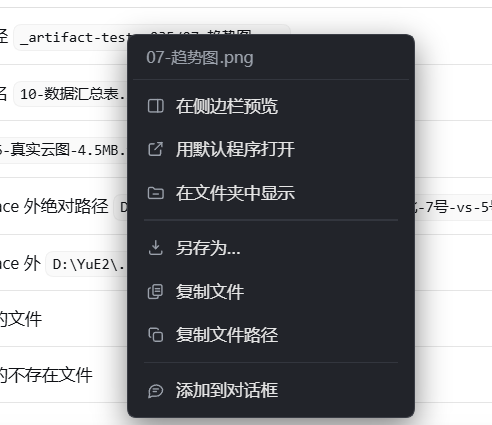
Hover an artifact name and it picks up a Codex-style blue dashed outline — that is the only visual hint, nothing is rewritten in your transcript. Right click for the full menu:
|
|
41
37
|
|
|
42
38
|
|
|
43
39
|
|
|
44
|
-
"Copy file path" puts the real absolute path on your clipboard:
|
|
45
|
-
|
|
46
|
-

|
|
47
|
-
|
|
48
40
|
## Interaction
|
|
49
41
|
|
|
50
|
-
Click behaviour is decided by the modifier key — no
|
|
42
|
+
Click behaviour is decided by the modifier key — no first-time setup:
|
|
51
43
|
|
|
52
44
|
| Action | Result |
|
|
53
45
|
| --- | --- |
|
|
54
46
|
| **Left click** on a file name / path | Reveal in File Explorer *with the file selected* |
|
|
55
47
|
| **Ctrl / Shift / Cmd + click** | Open with the system's default application |
|
|
56
48
|
| **Alt + click** | Copy the full absolute path to the clipboard |
|
|
57
|
-
|
|
58
|
-
|
|
59
|
-
|
|
60
|
-
| Action | Result |
|
|
61
|
-
|---|---|
|
|
62
|
-
| **Left click** an artifact name | Reveals and selects the file in Explorer |
|
|
63
|
-
| **Right click** an artifact name | Inline menu: `📍 reveal` / `↗ open with default app` / `⧉ copy absolute path` |
|
|
64
|
-
| **Hover** an artifact name | Cursor turns into a pointer (the only visual hint) |
|
|
65
|
-
| Right click on **non-artifact** text | Fully passed through — the host's native menu appears as usual |
|
|
49
|
+
| **Right click** on an artifact | Inline menu — seven actions, listed below |
|
|
50
|
+
| **Right click** on non-artifact text | Fully passed through, the host's native menu appears as usual |
|
|
51
|
+
| **Hover** | Cursor becomes a pointer *only after* the file is confirmed to exist |
|
|
66
52
|
| File missing / unresolvable | Silent pass-through or a one-shot toast. **Never pretends to succeed.** |
|
|
67
53
|
|
|
68
|
-
|
|
54
|
+
### Right-click menu
|
|
69
55
|
|
|
70
|
-
|
|
56
|
+
| Item | What it does |
|
|
57
|
+
| --- | --- |
|
|
58
|
+
| **Preview in sidebar** | Opens the file in DSH's built-in right sidebar — the same route as clicking a file link in chat. That viewer handles PDF, Word, Excel, PowerPoint, Markdown, plain text, CSV, images, audio and video; an extension it cannot render is redirected to the default app instead of showing a blank pane |
|
|
59
|
+
| **Open with default app** | Hands the file to the OS association (Explorer / Excel / VLC / …) |
|
|
60
|
+
| **Reveal in Explorer** | Opens the containing folder and selects the file |
|
|
61
|
+
| **Save as…** | Copies the file to a location you pick |
|
|
62
|
+
| **Copy file** | Puts the file *itself* on the clipboard (`CF_HDROP`), so you can paste it into Explorer, mail or chat |
|
|
63
|
+
| **Copy path** | Puts the real absolute path on the clipboard |
|
|
64
|
+
| **Add to composer** | Inserts the path into the input box for the next message |
|
|
71
65
|
|
|
72
66
|
## How paths resolve
|
|
73
67
|
|
|
74
|
-
A single path may arrive in
|
|
68
|
+
A single path may arrive in four shapes, tried in order:
|
|
75
69
|
|
|
76
70
|
1. **Absolute** — used as-is (`E:\project\out\case.h5`, `\\nas\share\a.zip`). Both drive letters and UNC are recognised.
|
|
77
71
|
2. **Relative** — joined against the session workspace (`out\case.h5` → `<workspace>\out\case.h5`).
|
|
78
|
-
3. **
|
|
72
|
+
3. **Workspace roots** — every known profile and session workspace is tried, not only the current one.
|
|
73
|
+
4. **Bare file name** — a shallow recursive basename search (depth 2 by default), used only when exactly one match is found. Multiple matches are surfaced as candidates instead of guessing. When a mention swallows leading words (`结果#1_速度云图.png` arriving as `#1_速度云图.png`), segments are shrunk from the left until one resolves.
|
|
79
74
|
|
|
80
|
-
Results are cached
|
|
75
|
+
Results are cached — 10 s for `stat`, 30 s for the basename index — so repeated hovers from DOM re-renders do not hammer the disk, while a just-deleted file still flips to "gone" quickly.
|
|
81
76
|
|
|
82
77
|
## Install
|
|
83
78
|
|
|
@@ -113,6 +108,7 @@ On `allowOutside`: artifacts almost always live on a project drive (`E:\`, `D:\`
|
|
|
113
108
|
|
|
114
109
|
- **Never modifies a single DOM node.** React owns the transcript; mutating its nodes causes blank renders on re-render. Clickability comes from a capture-phase `click` listener plus `caretRangeFromPoint` to work out which word was hit.
|
|
115
110
|
- **Never takes over markdown image or link syntax.** Rewriting `` into a chip would break the image.
|
|
111
|
+
- **Never draws a chip for a file that does not exist.** Chat text is full of filename-shaped fragments — log excerpts, example paths, error messages. Turning those into chips produces a clickable target that only ever answers "not resolved", which is worse than not recognising the file at all. So there is an existence gate: on hover the client resolves asynchronously and only becomes a pointer / dashed highlight when the file is really there. Confirmed non-artifacts stay plain text and the right-click falls through to the host's native menu. Results are cached for 30 s.
|
|
116
112
|
- **Never writes a file, never phones home.** Zero telemetry. The only `spawn` calls are the explicit `/reveal` and `/open` routes, using `execFile` with an argument array (no shell, no injection surface), guarded by a loopback-origin check.
|
|
117
113
|
- **Never renames or moves anything.** Read-only by construction.
|
|
118
114
|
- **Does not unify with the official `present` card.** If an artifact was already delivered as a card, the injected rules tell the model not to repeat it.
|
|
@@ -135,11 +131,10 @@ dsh-artifact-linker/
|
|
|
135
131
|
├── package.json # dsh.bundle + dsh.client, peer >=0.2.1-rc.3
|
|
136
132
|
├── cordis.patch.yml # the patch entry (never duplicate this id)
|
|
137
133
|
├── lib/
|
|
138
|
-
│ ├── index.js # host: prompt section +
|
|
134
|
+
│ ├── index.js # host: prompt section + 8 loopback routes
|
|
139
135
|
│ └── client.js # client: __ModuleLoader__ bundle, read-only DOM
|
|
140
136
|
├── locale/{zh,en}.json # meta.title / meta.description
|
|
141
137
|
├── icon.svg
|
|
142
|
-
├── scripts/probe-regex.mjs
|
|
143
138
|
├── README.md / README.zh.md
|
|
144
139
|
├── CHANGELOG.md
|
|
145
140
|
└── LICENSE
|
package/README.zh.md
CHANGED
|
@@ -21,24 +21,16 @@ DSH 里预览器已经能开图片、代码、pdf、office。但**插件、脚
|
|
|
21
21
|
| 半边 | 做什么 |
|
|
22
22
|
|---|---|
|
|
23
23
|
| **宿主(提示词层)** | 常驻注入一条「产物路径铁律」,要求模型把产物写成**完整绝对路径**、而给用户看的正文**只写文件名**——路径有据可查,正文又不被长串路径污染 |
|
|
24
|
-
| **客户端(渲染层)** |
|
|
24
|
+
| **客户端(渲染层)** | 正文里的产物名变成可点目标:左键揭示、右键七项菜单(侧边栏预览 / 默认程序打开 / 在文件夹中显示 / 另存为 / 复制文件 / 复制路径 / 添加到对话框)。**零常驻 UI、零扫描、零定时器** |
|
|
25
25
|
|
|
26
26
|
第 1 条管「模型把路径写对」,第 2 条管「用户点得动」。缺前者,路径经常是猜的、点开是死链;缺后者,路径再对也要人去复制。
|
|
27
27
|
|
|
28
28
|
## 长什么样
|
|
29
29
|
|
|
30
|
-
悬停到产物名上,会出现 Codex
|
|
31
|
-
|
|
32
|
-

|
|
33
|
-
|
|
34
|
-
右键是三个动作:
|
|
30
|
+
悬停到产物名上,会出现 Codex 风格的蓝色虚线框——这是唯一的视觉提示,正文一个字都不会被改写。右键弹出完整菜单:
|
|
35
31
|
|
|
36
32
|

|
|
37
33
|
|
|
38
|
-
「复制文件路径」把真实绝对路径放进剪贴板:
|
|
39
|
-
|
|
40
|
-

|
|
41
|
-
|
|
42
34
|
---
|
|
43
35
|
|
|
44
36
|
## 交互
|
|
@@ -50,27 +42,22 @@ DSH 里预览器已经能开图片、代码、pdf、office。但**插件、脚
|
|
|
50
42
|
| **左键** | 在系统资源管理器里**揭示并选中**该文件(不是打开它,是把它亮在你面前) |
|
|
51
43
|
| **Ctrl / Shift / Cmd + 左键** | 用系统默认关联程序打开(Excel、PS、播放器……) |
|
|
52
44
|
| **Alt + 左键** | 复制完整绝对路径到剪贴板 |
|
|
53
|
-
|
|
54
|
-
|
|
55
|
-
|
|
56
|
-
正文里出现产物名时:
|
|
57
|
-
|
|
58
|
-
| 操作 | 效果 |
|
|
59
|
-
|---|---|
|
|
60
|
-
| **左键**点产物名 | 在资源管理器里揭示并选中该文件 |
|
|
61
|
-
| **右键**点产物名 | 本插件菜单:`📍 揭示` / `↗ 默认程序打开` / `⧉ 复制完整路径` |
|
|
62
|
-
| **悬停**在产物名上 | 鼠标变手型(唯一的视觉提示) |
|
|
63
|
-
| 在**非产物**文字上右键 | 完全放行,宿主原生菜单照常出现 |
|
|
45
|
+
| **右键**产物名 | 插件菜单,共七项(见下表) |
|
|
46
|
+
| **右键**非产物文字 | 完全放行,宿主原生菜单照常出现 |
|
|
47
|
+
| **悬停** | 只有**确认文件真的存在**才变手型、才画虚线 |
|
|
64
48
|
| 文件不存在 / 解析不到 | 静默放行或一次性提示,**绝不假装成功** |
|
|
65
49
|
|
|
66
|
-
|
|
67
|
-
|
|
68
|
-
- 点击展开清单,按发现时间倒序,每行给出:类型图标 · 文件名 · 状态点 · 完整路径 · 大小 · 修改时间;
|
|
69
|
-
- 状态点:🟢 存在 / 🔴 已不存在(划掉) / ⚪ 尚未确认;
|
|
70
|
-
- 每行右侧三个按钮:`📍` 揭示 · `↗` 打开 · `⧉` 复制;
|
|
71
|
-
- 顶部:`刷新`(重查状态)· `清缓存`(清宿主 stat 缓存)· `清空`(只清面板清单,**不动任何文件**)。
|
|
50
|
+
### 右键菜单
|
|
72
51
|
|
|
73
|
-
|
|
52
|
+
| 菜单项 | 作用 |
|
|
53
|
+
|---|---|
|
|
54
|
+
| **在侧边栏预览** | 在 DSH 内置右侧边栏里打开,和聊天里点文件链接是同一条通道。该查看器支持 PDF、Word、Excel、PowerPoint、Markdown、纯文本、CSV、图片、音视频;它渲染不了的扩展名会**自动改走默认程序**,不会给你一个空白面板 |
|
|
55
|
+
| **用默认程序打开** | 交给系统关联(资源管理器 / Excel / 播放器……) |
|
|
56
|
+
| **在文件夹中显示** | 打开所在目录并选中该文件 |
|
|
57
|
+
| **另存为…** | 复制到你指定的位置 |
|
|
58
|
+
| **复制文件** | 把文件**本身**放进剪贴板(`CF_HDROP`),可以直接粘到资源管理器、邮件、聊天窗口 |
|
|
59
|
+
| **复制文件路径** | 把真实绝对路径放进剪贴板 |
|
|
60
|
+
| **添加到对话框** | 把路径插入输入框,供下一条消息使用 |
|
|
74
61
|
|
|
75
62
|
---
|
|
76
63
|
|
|
@@ -79,14 +66,17 @@ DSH 里预览器已经能开图片、代码、pdf、office。但**插件、脚
|
|
|
79
66
|
模型嘴里的话不可全信,插件按顺序试:
|
|
80
67
|
|
|
81
68
|
1. **`/workspace/<...>`** —— DSH 工作区的虚拟根,映射到真实 workspace 目录;
|
|
82
|
-
2. **原生绝对路径** —— `E:\proj\out\a.xlsx`
|
|
83
|
-
3.
|
|
84
|
-
4.
|
|
69
|
+
2. **原生绝对路径** —— `E:\proj\out\a.xlsx` 直接用(盘符和 UNC 都认);
|
|
70
|
+
3. **会话相对路径** —— 以会话 workspace 为基准拼接;
|
|
71
|
+
4. **各 workspace 根** —— 遍历所有已知的 profile / 会话 workspace,不只当前那一个;
|
|
72
|
+
5. **裸文件名** —— 深浅递归搜同名文件(跳过 `node_modules/.git/dist/build/` 等),按「最近修改优先」+「目录深度浅优先」排序:
|
|
85
73
|
- 命中 **1 个** → 直接用;
|
|
86
74
|
- 命中 **多个** → 返回候选列表交给用户,**绝不猜**(猜错比不猜更糟);
|
|
87
75
|
- 命中 **0 个** → 若 `allowOutside: true`,再在磁盘上按名字做一次浅层搜索。
|
|
88
76
|
|
|
89
|
-
|
|
77
|
+
提到时若「提及吞掉了前面几个词」(`结果#1_速度云图.png` 只剩 `#1_速度云图.png`),会**从左逐段收缩重试**直到能命中。
|
|
78
|
+
|
|
79
|
+
缓存两层:`stat` 10 秒、同名索引 30 秒——避免重复打满磁盘,同时刚删掉的文件也能很快翻成「已不存在」。
|
|
90
80
|
|
|
91
81
|
---
|
|
92
82
|
|
|
@@ -148,6 +138,7 @@ GET http://127.0.0.1:<port>/dsh-artifact-linker/info
|
|
|
148
138
|
4. **不 spawn shell**。`reveal`/`open` 走 `execFile(cmd, args)` 参数数组,路径里的 `& | ; %VAR%` 全是字面量,没有命令注入面。
|
|
149
139
|
5. **不猜多候选路径**。搜到多个同名文件时把选择权还给人。
|
|
150
140
|
6. **不保证文件存在**。库里的文件随时可能被删、被移走、被别的进程占用——所以每次打开前都重新 stat,点开发现没了就明说「已不存在」,不会装作没事。
|
|
141
|
+
7. **不给不存在的文件画芯片**。正文里长得像文件名的片段很多(日志摘录、示例路径、报错原文),只看「形状」就画成可点芯片,点开只会得到一句「没解析到」——那比根本不认识更糟。所以判定加了存在性闸门:悬停时先异步 `resolve`,**只有文件真的在**才变手型、画蓝色虚线;确认不是产物的就当普通文字,右键直接放行宿主原生菜单。解析结果进 30 秒 TTL 缓存,反复悬停不重复请求。
|
|
151
142
|
|
|
152
143
|
---
|
|
153
144
|
|
|
@@ -159,7 +150,7 @@ GET http://127.0.0.1:<port>/dsh-artifact-linker/info
|
|
|
159
150
|
| 点开提示「解析不到绝对路径」 | 裸文件名不在 workspace 内,且 `allowOutside: false`。先确认文件真实路径,再决定是否放宽 |
|
|
160
151
|
| 点开提示「文件已不存在」 | 路径是真的,文件被删/移了。清单里该行会打上删除线 |
|
|
161
152
|
| 点产物名没反应 | ① 文件不在候选 base 下(访问宿主 `/info` 看 `bases`);② 扩展名不在白名单(`lib/client.js` 的 `EXT`);③ 直接看 `/resolve?p=<名字>` 返回的 `reason` |
|
|
162
|
-
| 右键没出本插件菜单 |
|
|
153
|
+
| 右键没出本插件菜单 | 该处文字没解析成文件(同上);**对非产物右键本来就不接管**,出的是宿主原生菜单。0.3.3 起会先确认文件存在——不存在的片段既不画虚线也不接管右键 |
|
|
163
154
|
| 日志里出现 N 份相同输出 | 热重载堆叠了多个实例。**Ctrl+R 无效,必须完全重启 DSH**;同时确认 `window.__dshArtifactLinkerV1.dispose()` 守卫在 |
|
|
164
155
|
|
|
165
156
|
---
|
|
@@ -171,7 +162,7 @@ dsh-artifact-linker/
|
|
|
171
162
|
├── package.json # dsh.bundle + dsh.client(两个都要,缺 bundle 装不上)
|
|
172
163
|
├── cordis.patch.yml # 插件注册补丁(entry id = 包名,唯一)
|
|
173
164
|
├── lib/
|
|
174
|
-
│ ├── index.js # 宿主:prompt 段 +
|
|
165
|
+
│ ├── index.js # 宿主:prompt 段 + 8 条回环路由 + 多源路径解析
|
|
175
166
|
│ └── client.js # 客户端:__ModuleLoader__.load bundle(id 必须 = 包名)
|
|
176
167
|
├── locale/{zh,en}.json
|
|
177
168
|
├── icon.svg
|
|
@@ -186,8 +177,8 @@ dsh-artifact-linker/
|
|
|
186
177
|
`dsh-artifact-linker` turns every delivered artifact into a one-click target, so you never copy a path into Explorer again.
|
|
187
178
|
|
|
188
179
|
- **Host half** injects a resident system-prompt rule: always emit **absolute** artifact paths in tooling, but only the **file name** in user-facing prose.
|
|
189
|
-
- **Client half** makes those names clickable — **left click** reveals and selects the file in Explorer, **right click** opens a
|
|
190
|
-
- Bare file names are resolved with a
|
|
180
|
+
- **Client half** makes those names clickable — **left click** reveals and selects the file in Explorer, **right click** opens a seven-item menu: preview in sidebar, open with default app, reveal in Explorer, save as, copy the file itself, copy absolute path, add to composer. Hovering turns the cursor into a pointer only after the file is confirmed to exist. No floating UI, no document scanning, no timers.
|
|
181
|
+
- Bare file names are resolved with a multi-tier fallback (native absolute → session-relative → every known workspace root → recursive same-name search), shrinking the mention from the left when leading words are swallowed. Ambiguous matches are surfaced as candidates rather than guessed.
|
|
191
182
|
- All routes are loopback-only, telemetry-free, and spawn nothing through a shell. The client never mutates React-rendered DOM.
|
|
192
183
|
|
|
193
184
|
MIT licensed.
|
package/lib/client.js
CHANGED
|
@@ -29,10 +29,51 @@ window.__ModuleLoader__.load({
|
|
|
29
29
|
var exports = module.exports;
|
|
30
30
|
|
|
31
31
|
var GUARD = "__dshArtifactLinkerV1";
|
|
32
|
-
var VERSION = "0.
|
|
32
|
+
var VERSION = "0.3.6";
|
|
33
33
|
// 路由前缀必须与宿主的 ROUTE_PREFIX 一致;永远根相对,绝不拼宿主 origin
|
|
34
34
|
var ROUTE = "/dsh-artifact-linker";
|
|
35
35
|
|
|
36
|
+
// ── 侧边栏预览:地址构造 ────────────────────────────────────────────────
|
|
37
|
+
// 宿主 ctx.sidebarRight.openResource 只认 dsh-resource:// 地址,不认裸绝对路径。
|
|
38
|
+
// 下面这组函数与官方 @deepseek-ai/dsh-util-workspace-path 的实现逐字对齐
|
|
39
|
+
// (见 dsh-client-ui-reference/lib/client.js),自己抄一份是为了不新增运行时依赖。
|
|
40
|
+
var FILE_ADDRESS_PREFIX = "dsh-resource://file/";
|
|
41
|
+
function encodeSegment(segment) {
|
|
42
|
+
return encodeURIComponent(segment).replace(/%3A/gi, ":");
|
|
43
|
+
}
|
|
44
|
+
function encodePath(p) {
|
|
45
|
+
return p.split("/").map(encodeSegment).join("/");
|
|
46
|
+
}
|
|
47
|
+
function sessionFileAddress(sessionId, p) {
|
|
48
|
+
var normalized = p.replace(/\\/g, "/").replace(/^(?:\.\/)+/, "");
|
|
49
|
+
return FILE_ADDRESS_PREFIX + "session/" + encodeSegment(sessionId) + "/" + encodePath(normalized);
|
|
50
|
+
}
|
|
51
|
+
function isWinAbs(p) {
|
|
52
|
+
return /^[A-Za-z]:[/\\]/.test(p) || p.indexOf("\\\\") === 0;
|
|
53
|
+
}
|
|
54
|
+
function fileAddressFor(sessionId, cwd, p) {
|
|
55
|
+
var normalized = p.replace(/\\/g, "/");
|
|
56
|
+
if (!(normalized.charAt(0) === "/" || isWinAbs(normalized))) return sessionFileAddress(sessionId, normalized);
|
|
57
|
+
var root = cwd === undefined || cwd === null ? "" : String(cwd).replace(/\\/g, "/").replace(/\/+$/, "");
|
|
58
|
+
if (root !== "" && normalized === root) return sessionFileAddress(sessionId, "");
|
|
59
|
+
if (root !== "" && normalized.indexOf(root + "/") === 0) return sessionFileAddress(sessionId, normalized.slice(root.length + 1));
|
|
60
|
+
// 工作区外的绝对路径:原样保留在 session 地址里,宿主按 Session 读权限解析
|
|
61
|
+
return sessionFileAddress(sessionId, normalized);
|
|
62
|
+
}
|
|
63
|
+
|
|
64
|
+
// 侧边栏 documentpreview 真正能渲染的类型(读官方 README 得出,不是猜的):
|
|
65
|
+
// md/代码/纯文本 → 分页文本;pdf → PDF.js;图片 → 完整字节;
|
|
66
|
+
// xlsx/xls/csv/tsv → 浏览器内只读表格;doc/docx/ppt/pptx → 本地转 PDF
|
|
67
|
+
// 音视频与压缩包没有注册渲染器,走「不支持预览」空状态,所以干脆不显示这一项。
|
|
68
|
+
var PREVIEWABLE = /^(pdf|docx?|pptx?|xls[xm]?|csv|tsv|md|markdown|txt|log|json|ya?ml|ini|toml|xml|html?|png|jpe?g|gif|webp|bmp|tiff?|svg|py|js|mjs|cjs|ts|tsx|ipynb|ps1|sh|cas|dat|h5|hsf|cxa|trn|rfile|plt|flprj|jou|set|out)$/i;
|
|
69
|
+
|
|
70
|
+
function extOf(p) {
|
|
71
|
+
var base = String(p).split(/[\\/]/).pop() || "";
|
|
72
|
+
var dot = base.lastIndexOf(".");
|
|
73
|
+
return dot > 0 ? base.slice(dot + 1) : "";
|
|
74
|
+
}
|
|
75
|
+
|
|
76
|
+
|
|
36
77
|
// 产物扩展名白名单。刻意**不含 exe/msi/dll** 之类可执行体:
|
|
37
78
|
// 正文里出现这些名字多半是命令输出/报错文本,不是「要打开看的产物」。
|
|
38
79
|
var EXT = [
|
|
@@ -42,7 +83,11 @@ window.__ModuleLoader__.load({
|
|
|
42
83
|
"log", "txt", "md", "json", "ya?ml", "ini", "toml", "xml", "html?",
|
|
43
84
|
"py", "js", "mjs", "cjs", "ts", "tsx", "ipynb", "ps1", "sh",
|
|
44
85
|
"cas", "dat", "h5", "hsf", "cxa", "trn", "rfile", "plt", "flprj", "jou", "set", "out",
|
|
45
|
-
"scdocx?", "pmdb", "unv", "msh", "stp", "step", "igs", "iges", "dwg", "dxf", "inp"
|
|
86
|
+
"scdocx?", "pmdb", "unv", "msh", "stp", "step", "igs", "iges", "dwg", "dxf", "inp",
|
|
87
|
+
// 音频/视频:合成音频(YuE、TTS、音色克隆)与录屏导出很常见,
|
|
88
|
+
// 之前不在白名单里,用户右键 audio.flac 就完全没反应。
|
|
89
|
+
"flac", "wav", "mp3", "m4a", "aac", "ogg", "opus", "wma", "amr",
|
|
90
|
+
"mp4", "mkv", "mov", "avi", "webm", "wmv", "flv", "m4v"
|
|
46
91
|
].join("|");
|
|
47
92
|
|
|
48
93
|
// 一段文本里「像产物路径」的片段:
|
|
@@ -190,6 +235,112 @@ window.__ModuleLoader__.load({
|
|
|
190
235
|
menuEl = null;
|
|
191
236
|
}
|
|
192
237
|
|
|
238
|
+
// ── 「添加到对话框」:把路径插进 DSH 的聊天输入框 ────────────────────────
|
|
239
|
+
// DSH 的输入框实现会随版本变(textarea / contenteditable / Lexical 都出现过),
|
|
240
|
+
// 所以这里不写死单个选择器,而是「一批候选 → 挑最像输入区的那个 → 三种写入方式兜底」。
|
|
241
|
+
// 任何一步都失败就返回 false,由调用方明确提示 —— 绝不假装成功。
|
|
242
|
+
var INPUT_SELECTORS = [
|
|
243
|
+
'textarea[placeholder]',
|
|
244
|
+
'[contenteditable="true"]',
|
|
245
|
+
'[role="textbox"]',
|
|
246
|
+
'[data-lexical-editor="true"]',
|
|
247
|
+
'.composer [contenteditable]',
|
|
248
|
+
'textarea'
|
|
249
|
+
];
|
|
250
|
+
|
|
251
|
+
function findComposer() {
|
|
252
|
+
for (var s = 0; s < INPUT_SELECTORS.length; s++) {
|
|
253
|
+
var list;
|
|
254
|
+
try { list = document.querySelectorAll(INPUT_SELECTORS[s]); } catch (e) { continue; }
|
|
255
|
+
// 从后往前:聊天输入框通常位于 DOM 末尾
|
|
256
|
+
for (var k = list.length - 1; k >= 0; k--) {
|
|
257
|
+
var el = list[k];
|
|
258
|
+
if (!el) continue;
|
|
259
|
+
if (el.disabled || el.readOnly) continue;
|
|
260
|
+
var r = el.getBoundingClientRect();
|
|
261
|
+
// 太窄太矮多半是搜索框 / 标签栏;真正的输入区宽度都在 150px 以上
|
|
262
|
+
if (r.width < 150 || r.height < 18) continue;
|
|
263
|
+
var cs = window.getComputedStyle ? window.getComputedStyle(el) : null;
|
|
264
|
+
if (cs && (cs.display === "none" || cs.visibility === "hidden")) continue;
|
|
265
|
+
return el;
|
|
266
|
+
}
|
|
267
|
+
}
|
|
268
|
+
return null;
|
|
269
|
+
}
|
|
270
|
+
|
|
271
|
+
function quoteToComposer(abs) {
|
|
272
|
+
var el = findComposer();
|
|
273
|
+
if (!el) return false;
|
|
274
|
+
var text = " " + abs;
|
|
275
|
+
try { el.focus(); } catch (e) { }
|
|
276
|
+
|
|
277
|
+
// ① 首选 execCommand:走浏览器真实输入管线,React / Lexical 的受控状态
|
|
278
|
+
// 能同步更新;直接改 textContent 会让框架内部状态与 DOM 脱档。
|
|
279
|
+
try {
|
|
280
|
+
if (document.execCommand && document.execCommand("insertText", false, text)) return true;
|
|
281
|
+
} catch (e) { }
|
|
282
|
+
|
|
283
|
+
// ② 原生 value 控件(textarea / input)
|
|
284
|
+
try {
|
|
285
|
+
if (typeof el.value === "string") {
|
|
286
|
+
var a = el.selectionStart == null ? el.value.length : el.selectionStart;
|
|
287
|
+
var b = el.selectionEnd == null ? el.value.length : el.selectionEnd;
|
|
288
|
+
el.value = el.value.slice(0, a) + text + el.value.slice(b);
|
|
289
|
+
el.selectionStart = el.selectionEnd = a + text.length;
|
|
290
|
+
el.dispatchEvent(new Event("input", { bubbles: true }));
|
|
291
|
+
return true;
|
|
292
|
+
}
|
|
293
|
+
} catch (e) { }
|
|
294
|
+
|
|
295
|
+
// ③ 最后兜底:contenteditable 直接追加。极端情况下框架状态会不同步,
|
|
296
|
+
// 但用户至少看得见路径已经进去,可以自己删改,比「点了没反应」强。
|
|
297
|
+
try {
|
|
298
|
+
el.textContent = (el.textContent || "") + text;
|
|
299
|
+
el.dispatchEvent(new Event("input", { bubbles: true }));
|
|
300
|
+
return true;
|
|
301
|
+
} catch (e) { }
|
|
302
|
+
|
|
303
|
+
return false;
|
|
304
|
+
}
|
|
305
|
+
|
|
306
|
+
// 客户端根 ctx,apply 时存下来;侧边栏预览要用它取 sessions / sidebarRight。
|
|
307
|
+
var rootCtx = null;
|
|
308
|
+
|
|
309
|
+
// 在右侧边栏打开一个文件。
|
|
310
|
+
// 用的是官方导航入口 ctx.sidebarRight.openResource(address),和聊天里点文件链接
|
|
311
|
+
// 走的是同一条路,所以不会和宿主自己的预览行为打架。
|
|
312
|
+
// 返回 false 表示「这次开不了」,调用方据此给提示,绝不假装成功。
|
|
313
|
+
function openInSidebar(abs) {
|
|
314
|
+
try {
|
|
315
|
+
if (!rootCtx || typeof rootCtx.get !== "function") return false;
|
|
316
|
+
var sidebar = rootCtx.get("sidebarRight");
|
|
317
|
+
if (!sidebar || typeof sidebar.openResource !== "function") return false;
|
|
318
|
+
var sessions = rootCtx.get("sessions");
|
|
319
|
+
if (!sessions || !sessions.list || typeof sessions.list.getSnapshot !== "function") return false;
|
|
320
|
+
var snap = sessions.list.getSnapshot();
|
|
321
|
+
var byId = (snap && snap.byId) || {};
|
|
322
|
+
// 找当前会话:优先 mounted(屏幕上那个),否则取第一个带 cwd 的
|
|
323
|
+
var sid = null;
|
|
324
|
+
var mounted = sidebar.mounted;
|
|
325
|
+
if (mounted && typeof mounted.get === "function") {
|
|
326
|
+
var m = mounted.get();
|
|
327
|
+
if (m && m.sessionId) sid = m.sessionId;
|
|
328
|
+
} else if (mounted && mounted.sessionId) {
|
|
329
|
+
sid = mounted.sessionId;
|
|
330
|
+
}
|
|
331
|
+
if (!sid) {
|
|
332
|
+
for (var k in byId) { if (byId[k] && byId[k].cwd) { sid = k; break; } }
|
|
333
|
+
}
|
|
334
|
+
if (!sid) return false;
|
|
335
|
+
var cwd = byId[sid] ? byId[sid].cwd : undefined;
|
|
336
|
+
sidebar.openResource(fileAddressFor(sid, cwd, abs));
|
|
337
|
+
return true;
|
|
338
|
+
} catch (e) {
|
|
339
|
+
// 服务缺失、地址不被任何 tab 类型认领、会话还没就绪 —— 一律当作开不了
|
|
340
|
+
return false;
|
|
341
|
+
}
|
|
342
|
+
}
|
|
343
|
+
|
|
193
344
|
function showMenu(x, y, abs) {
|
|
194
345
|
hideMenu();
|
|
195
346
|
if (!document || !document.body) return;
|
|
@@ -215,15 +366,40 @@ window.__ModuleLoader__.load({
|
|
|
215
366
|
var ICON = {
|
|
216
367
|
reveal: '<path d="M3 7.2A1.7 1.7 0 0 1 4.7 5.5h3.9l1.8 2.1h8.9A1.7 1.7 0 0 1 21 9.3v8A1.7 1.7 0 0 1 19.3 19H4.7A1.7 1.7 0 0 1 3 17.3Z"/><path d="M9 13.6h6"/>',
|
|
217
368
|
open: '<path d="M14.5 4.5h5v5"/><path d="M19.7 4.3 11 13"/><path d="M18 13.8v4.5A1.7 1.7 0 0 1 16.3 20H5.7A1.7 1.7 0 0 1 4 18.3V7.7A1.7 1.7 0 0 1 5.7 6h4.4"/>',
|
|
218
|
-
copy: '<rect x="9.2" y="9.2" width="10.8" height="10.8" rx="2.2"/><path d="M15 5.8A1.8 1.8 0 0 0 13.2 4H5.8A1.8 1.8 0 0 0 4 5.8v7.4A1.8 1.8 0 0 0 5.8 15"/>'
|
|
369
|
+
copy: '<rect x="9.2" y="9.2" width="10.8" height="10.8" rx="2.2"/><path d="M15 5.8A1.8 1.8 0 0 0 13.2 4H5.8A1.8 1.8 0 0 0 4 5.8v7.4A1.8 1.8 0 0 0 5.8 15"/>',
|
|
370
|
+
// 另存为:向下箭头入托盘
|
|
371
|
+
saveas: '<path d="M12 3.5v9.5"/><path d="m8.6 9.6 3.4 3.4 3.4-3.4"/><path d="M4.5 16.2v2.1a1.8 1.8 0 0 0 1.8 1.8h11.4a1.8 1.8 0 0 0 1.8-1.8v-2.1"/>',
|
|
372
|
+
// 复制文件:两张纸 + 中间的文件线,和「复制路径」区分开
|
|
373
|
+
copyfile: '<rect x="8.6" y="3.4" width="11" height="13" rx="2"/><path d="M5.4 7.4h-.7A1.7 1.7 0 0 0 3 9.1v9.4a1.7 1.7 0 0 0 1.7 1.7h8.4a1.7 1.7 0 0 0 1.7-1.7v-.7"/><path d="M11.6 8.2h5"/><path d="M11.6 11.4h5"/>',
|
|
374
|
+
// 添加到对话框:带横线的气泡
|
|
375
|
+
quote: '<path d="M20.5 11.6a8.3 8.3 0 0 1-8.3 8.3H7.4L3.5 21.9l1-4.1A8.3 8.3 0 1 1 20.5 11.6Z"/><path d="M9 11h6"/><path d="M9 14.2h3.6"/>',
|
|
376
|
+
// 侧边栏预览:一块面板 + 右侧分栏
|
|
377
|
+
preview: '<rect x="3.2" y="4.4" width="17.6" height="15.2" rx="2.2"/><path d="M14.4 4.4v15.2"/>'
|
|
219
378
|
};
|
|
220
379
|
// 文案要说人话:「资源管理器」这个词很多用户不认识,改成「文件夹窗口」。
|
|
221
|
-
|
|
222
|
-
|
|
223
|
-
|
|
224
|
-
|
|
225
|
-
|
|
380
|
+
// 顺序按「最常做的动作」排,并用 "sep" 占位分成三组:
|
|
381
|
+
// 看(侧边栏预览 / 打开 / 定位)→ 搬运(另存为 / 复制文件 / 复制路径)→ 喂给 AI(添加到对话框)
|
|
382
|
+
// 侧边栏预览只对宿主真能渲染的类型出现:音视频、压缩包在侧边栏里只有
|
|
383
|
+
// 「不支持预览」空状态,摆一个点了白点的入口不如不摆。
|
|
384
|
+
var canPreview = PREVIEWABLE.test(extOf(abs));
|
|
385
|
+
var items = [];
|
|
386
|
+
if (canPreview) items.push(["preview", "在侧边栏预览", "在右侧边栏里直接看,不用切出去"]);
|
|
387
|
+
items.push(["open", "用默认程序打开", "按文件类型用对应软件打开:PDF 用阅读器、表格用 Excel 那类"]);
|
|
388
|
+
items.push(["reveal", "在文件夹中显示", "打开 Windows 文件夹窗口,并选中这个文件"]);
|
|
389
|
+
items.push(["sep", "", ""]);
|
|
390
|
+
items.push(["saveas", "另存为…", "另存一份到别的位置(会弹出系统保存窗口)"]);
|
|
391
|
+
items.push(["copyfile", "复制文件", "把文件本身放进剪贴板,可直接粘到任意文件夹"]);
|
|
392
|
+
items.push(["copy", "复制文件路径", "只复制路径文字,不复制文件本身"]);
|
|
393
|
+
items.push(["sep", "", ""]);
|
|
394
|
+
items.push(["quote", "添加到对话框", "把完整路径插入上方的聊天输入框"]);
|
|
226
395
|
for (var i = 0; i < items.length; i++) {
|
|
396
|
+
// 分隔线:一个 1px 的 div,左右留白对齐文字缩进,不加任何可点区域
|
|
397
|
+
if (items[i][0] === "sep") {
|
|
398
|
+
var hr = document.createElement("div");
|
|
399
|
+
hr.style.cssText = "height:1px;margin:4px 8px;background:#33363e";
|
|
400
|
+
box.appendChild(hr);
|
|
401
|
+
continue;
|
|
402
|
+
}
|
|
227
403
|
(function (action, label, tip) {
|
|
228
404
|
var row = document.createElement("div");
|
|
229
405
|
row.title = tip;
|
|
@@ -241,6 +417,15 @@ window.__ModuleLoader__.load({
|
|
|
241
417
|
ev.preventDefault();
|
|
242
418
|
ev.stopPropagation();
|
|
243
419
|
hideMenu();
|
|
420
|
+
|
|
421
|
+
// ① 侧边栏预览 —— 纯客户端,走宿主导航入口
|
|
422
|
+
if (action === "preview") {
|
|
423
|
+
if (openInSidebar(abs)) toast("已在侧边栏打开");
|
|
424
|
+
else toast("侧边栏打不开这个文件");
|
|
425
|
+
return;
|
|
426
|
+
}
|
|
427
|
+
|
|
428
|
+
// ② 只复制路径文字 —— 纯客户端,不必过宿主
|
|
244
429
|
if (action === "copy") {
|
|
245
430
|
try {
|
|
246
431
|
navigator.clipboard.writeText(abs);
|
|
@@ -248,6 +433,41 @@ window.__ModuleLoader__.load({
|
|
|
248
433
|
} catch (e) { toast("复制失败"); }
|
|
249
434
|
return;
|
|
250
435
|
}
|
|
436
|
+
|
|
437
|
+
// ② 添加到对话框 —— 也是纯客户端:找输入框、把路径插进去
|
|
438
|
+
if (action === "quote") {
|
|
439
|
+
if (quoteToComposer(abs)) toast("已添加到对话框");
|
|
440
|
+
else toast("没找到聊天输入框");
|
|
441
|
+
return;
|
|
442
|
+
}
|
|
443
|
+
|
|
444
|
+
// ③ 另存为 —— 宿主会弹系统保存窗,用户挑位置期间不能提前报成功
|
|
445
|
+
if (action === "saveas") {
|
|
446
|
+
toast("请在弹出窗口里选择保存位置…");
|
|
447
|
+
hostGet("/saveas", { p: abs }).then(function (r) {
|
|
448
|
+
if (!r || !r.ok) {
|
|
449
|
+
// 用户自己点取消不是失败,别弹红字打扰
|
|
450
|
+
if (r && r.reason === "cancelled") return;
|
|
451
|
+
if (r && r.reason === "same-path") { toast("不能存回原文件"); return; }
|
|
452
|
+
toast("另存为失败:" + ((r && r.reason) || "未知原因"));
|
|
453
|
+
return;
|
|
454
|
+
}
|
|
455
|
+
var short = String(r.dest).split(/[\\/]/).pop() || r.dest;
|
|
456
|
+
toast("已另存为 " + short);
|
|
457
|
+
});
|
|
458
|
+
return;
|
|
459
|
+
}
|
|
460
|
+
|
|
461
|
+
// ④ 复制文件本体(CF_HDROP),粘到文件夹里得到的是文件
|
|
462
|
+
if (action === "copyfile") {
|
|
463
|
+
hostGet("/copyfile", { p: abs }).then(function (r) {
|
|
464
|
+
if (!r || !r.ok) { toast("复制失败:" + ((r && r.reason) || "未知原因")); return; }
|
|
465
|
+
toast("已复制文件,可直接粘贴");
|
|
466
|
+
});
|
|
467
|
+
return;
|
|
468
|
+
}
|
|
469
|
+
|
|
470
|
+
// ⑤ 打开 / 在文件夹中显示
|
|
251
471
|
hostGet("/" + action, { p: abs }).then(function (r) {
|
|
252
472
|
if (!r || !r.ok) toast("打开失败:" + ((r && r.reason) || "未知原因"));
|
|
253
473
|
});
|
|
@@ -267,22 +487,64 @@ window.__ModuleLoader__.load({
|
|
|
267
487
|
|
|
268
488
|
// ── 事件处理 ────────────────────────────────────────────────────────────
|
|
269
489
|
|
|
270
|
-
|
|
490
|
+
// 产物存在性缓存:raw → { ok, abs, at, pending, waiters }
|
|
491
|
+
// 为什么需要这一层:正文里长得像文件名的片段太多了(日志摘录、示例路径、报错原文,
|
|
492
|
+
// 甚至我自己贴出来的乱码文件名)。只看「形状」就画成可点芯片,用户点开只会得到
|
|
493
|
+
// 一句「没解析到这个文件」——那比根本不认识更糟。现在改成:
|
|
494
|
+
// **先确认文件真的存在,才允许它变成芯片**。不存在的,就当普通文字,静默。
|
|
495
|
+
var vcache = Object.create(null);
|
|
496
|
+
var VCACHE_TTL = 30000;
|
|
497
|
+
|
|
498
|
+
function verify(raw, cb) {
|
|
499
|
+
var now = Date.now();
|
|
500
|
+
var c = vcache[raw];
|
|
501
|
+
if (c && c.pending) { c.waiters.push(cb); return; }
|
|
502
|
+
if (c && (now - c.at) < VCACHE_TTL) { cb(c); return; }
|
|
503
|
+
|
|
504
|
+
var rec = { ok: false, abs: null, at: now, pending: true, waiters: [cb] };
|
|
505
|
+
vcache[raw] = rec;
|
|
506
|
+
function settle(ok, abs) {
|
|
507
|
+
rec.ok = ok;
|
|
508
|
+
rec.abs = abs;
|
|
509
|
+
rec.at = Date.now();
|
|
510
|
+
rec.pending = false;
|
|
511
|
+
var ws = rec.waiters;
|
|
512
|
+
rec.waiters = [];
|
|
513
|
+
for (var i = 0; i < ws.length; i++) { try { ws[i](rec); } catch (e) { } }
|
|
514
|
+
}
|
|
271
515
|
hostGet("/resolve", { p: raw }).then(function (d) {
|
|
516
|
+
var ok = !!(d && d.ok && d.abs);
|
|
517
|
+
settle(ok, ok ? d.abs : null);
|
|
518
|
+
}).catch(function () { settle(false, null); });
|
|
519
|
+
}
|
|
520
|
+
|
|
521
|
+
// 只有「已有结论且未过期」时才返回,pending 一律当没有 → 调用方自己决定等不等
|
|
522
|
+
function cached(raw) {
|
|
523
|
+
var c = vcache[raw];
|
|
524
|
+
if (!c || c.pending) return null;
|
|
525
|
+
if ((Date.now() - c.at) >= VCACHE_TTL) return null;
|
|
526
|
+
return c;
|
|
527
|
+
}
|
|
528
|
+
|
|
529
|
+
function setCursor(v) {
|
|
530
|
+
if (v === lastCursor) return;
|
|
531
|
+
lastCursor = v;
|
|
532
|
+
document.body.style.cursor = v;
|
|
533
|
+
}
|
|
534
|
+
|
|
535
|
+
function act(raw, mode, x, y) {
|
|
536
|
+
verify(raw, function (rec) {
|
|
272
537
|
if (disposed) return;
|
|
273
|
-
|
|
274
|
-
|
|
275
|
-
if (mode === "menu") toast("没解析到这个文件");
|
|
276
|
-
return;
|
|
277
|
-
}
|
|
538
|
+
// 解析不到就当普通文字,静默收场:不弹提示、不装作成功。
|
|
539
|
+
if (!rec.ok || !rec.abs) return;
|
|
278
540
|
if (mode === "reveal") {
|
|
279
|
-
hostGet("/reveal", { p:
|
|
541
|
+
hostGet("/reveal", { p: rec.abs }).then(function (r) {
|
|
280
542
|
if (disposed) return;
|
|
281
543
|
if (!r || !r.ok) toast("打开失败:" + ((r && r.reason) || "未知原因"));
|
|
282
544
|
});
|
|
283
545
|
return;
|
|
284
546
|
}
|
|
285
|
-
showMenu(x, y,
|
|
547
|
+
showMenu(x, y, rec.abs);
|
|
286
548
|
});
|
|
287
549
|
}
|
|
288
550
|
|
|
@@ -299,6 +561,9 @@ window.__ModuleLoader__.load({
|
|
|
299
561
|
// (defaultPrevented 仍为 false)时才补一次 reveal。
|
|
300
562
|
setTimeout(function () {
|
|
301
563
|
if (ev.defaultPrevented) return; // 宿主已经处理(例如开了侧边栏预览)→ 让路,不抢
|
|
564
|
+
var c = cached(hit.raw);
|
|
565
|
+
// 已确认「根本不是产物」→ 什么都不做(别为一段普通文字去弹资源管理器)
|
|
566
|
+
if (c && !c.ok) return;
|
|
302
567
|
act(hit.raw, "reveal", ev.clientX, ev.clientY);
|
|
303
568
|
}, 0);
|
|
304
569
|
}
|
|
@@ -312,9 +577,26 @@ window.__ModuleLoader__.load({
|
|
|
312
577
|
}
|
|
313
578
|
var hit = hitAt(ev.clientX, ev.clientY);
|
|
314
579
|
if (!hit) return; // 非产物处右键 → 放行宿主原生菜单
|
|
315
|
-
|
|
316
|
-
|
|
317
|
-
|
|
580
|
+
var c = cached(hit.raw);
|
|
581
|
+
// 已确认不是产物 → 同样放行宿主原生菜单,绝不抢
|
|
582
|
+
if (c && !c.ok) return;
|
|
583
|
+
// 有结论且确实存在 → 直接弹自己的菜单,省一次往返
|
|
584
|
+
if (c && c.ok) {
|
|
585
|
+
ev.preventDefault();
|
|
586
|
+
ev.stopPropagation();
|
|
587
|
+
showMenu(ev.clientX, ev.clientY, c.abs);
|
|
588
|
+
return;
|
|
589
|
+
}
|
|
590
|
+
// 🔴 还没有结论时**绝不先 preventDefault**。
|
|
591
|
+
// 旧版在这里无条件拦下原生菜单,然后异步去解析;一旦解析失败(正文里
|
|
592
|
+
// 形状像文件名、实际不存在的那类片段),act() 直接静默返回 ——
|
|
593
|
+
// 结果是原生菜单被拦掉、自己的菜单也没弹出,右键**彻底无反应**。
|
|
594
|
+
// 宁可让原生菜单先闪一下,也不能让右键失灵。
|
|
595
|
+
verify(hit.raw, function (rec) {
|
|
596
|
+
if (disposed) return;
|
|
597
|
+
if (!rec.ok || !rec.abs) return;
|
|
598
|
+
showMenu(ev.clientX, ev.clientY, rec.abs);
|
|
599
|
+
});
|
|
318
600
|
}
|
|
319
601
|
|
|
320
602
|
// ── 悬停高亮:让「这几个字是可以点的产物」一眼看得出来 ──────────────────
|
|
@@ -352,12 +634,15 @@ window.__ModuleLoader__.load({
|
|
|
352
634
|
hoverTimer = null;
|
|
353
635
|
if (disposed || !document || !document.body) return;
|
|
354
636
|
var hit = hitAt(x, y);
|
|
355
|
-
|
|
356
|
-
|
|
357
|
-
|
|
358
|
-
|
|
359
|
-
|
|
360
|
-
|
|
637
|
+
if (!hit) { setCursor(""); hideHover(); return; }
|
|
638
|
+
// 先确认文件真的存在,再给「可点」的视觉信号:
|
|
639
|
+
// 不存在的片段不画虚线、不变手型,用户根本看不出它曾被识别过。
|
|
640
|
+
verify(hit.raw, function (rec) {
|
|
641
|
+
if (disposed) return;
|
|
642
|
+
if (!rec.ok) { setCursor(""); hideHover(); return; }
|
|
643
|
+
setCursor("pointer");
|
|
644
|
+
drawHover(hit.rect);
|
|
645
|
+
});
|
|
361
646
|
}, 150);
|
|
362
647
|
}
|
|
363
648
|
|
|
@@ -427,6 +712,7 @@ window.__ModuleLoader__.load({
|
|
|
427
712
|
|
|
428
713
|
disposed = false;
|
|
429
714
|
mounted = false;
|
|
715
|
+
rootCtx = ctx || null;
|
|
430
716
|
api = { apply: apply, dispose: dispose, version: VERSION };
|
|
431
717
|
try { window[GUARD] = api; } catch (e) { /* 极端沙箱下挂不上,不影响本实例 */ }
|
|
432
718
|
|
|
@@ -448,7 +734,9 @@ window.__ModuleLoader__.load({
|
|
|
448
734
|
exports.apply = apply;
|
|
449
735
|
exports.dispose = dispose;
|
|
450
736
|
exports.version = VERSION;
|
|
451
|
-
|
|
737
|
+
// 侧边栏预览要 sessions + sidebarRight。两个服务由官方 bundle 提供,
|
|
738
|
+
// 桌面端与 web 端都在;万一某个组合没有,cordis 会跳过本插件而不影响其它插件。
|
|
739
|
+
exports.inject = ["sessions", "sidebarRight"];
|
|
452
740
|
return module.exports;
|
|
453
741
|
}
|
|
454
742
|
});
|
package/lib/index.js
CHANGED
|
@@ -22,11 +22,11 @@
|
|
|
22
22
|
// clientChips (默认 true) = 客户端是否启用芯片(此值由客户端自己读 /info 得知)
|
|
23
23
|
// allowOutside (默认 false) = 是否允许解析 base 之外的绝对路径(安全闸)
|
|
24
24
|
|
|
25
|
-
import { readFileSync, statSync, readdirSync } from "node:fs";
|
|
25
|
+
import { readFileSync, statSync, readdirSync, copyFileSync } from "node:fs";
|
|
26
26
|
import { homedir } from "node:os";
|
|
27
27
|
import { execFile } from "node:child_process";
|
|
28
28
|
import { fileURLToPath } from "node:url";
|
|
29
|
-
import { dirname, join, resolve as pathResolve, basename, sep } from "node:path";
|
|
29
|
+
import { dirname, join, resolve as pathResolve, basename, extname, sep } from "node:path";
|
|
30
30
|
|
|
31
31
|
var PKG_VERSION = (function () {
|
|
32
32
|
try {
|
|
@@ -230,6 +230,19 @@ function candidateBases() {
|
|
|
230
230
|
return out.slice();
|
|
231
231
|
}
|
|
232
232
|
|
|
233
|
+
// allowOutside 关闭时的安全闸:落在**任意一个候选 workspace**里就算合法。
|
|
234
|
+
// 2026-10-28 修正:原来这两个守卫只拿 process.cwd() 比对,但宿主 cwd 并不是会话
|
|
235
|
+
// workspace(同 201 行那次的同一个坑),一旦有人为了给别人用把 allowOutside 关掉,
|
|
236
|
+
// workspace 内的合法文件会被误拒成 outside-base。改成逐候选 base 判定。
|
|
237
|
+
function insideAnyBase(abs, allowOutside) {
|
|
238
|
+
if (allowOutside) return true;
|
|
239
|
+
var cand = candidateBases();
|
|
240
|
+
for (var i = 0; i < cand.length; i++) {
|
|
241
|
+
try { if (isInside(cand[i], abs)) return true; } catch (e) { }
|
|
242
|
+
}
|
|
243
|
+
return false;
|
|
244
|
+
}
|
|
245
|
+
|
|
233
246
|
function resolveAcross(raw, extraBase, allowOutside) {
|
|
234
247
|
var bases = [];
|
|
235
248
|
if (extraBase) bases.push(pathResolve(extraBase));
|
|
@@ -344,6 +357,173 @@ function resolveOne(raw, base, allowOutside) {
|
|
|
344
357
|
return { ok: false, reason: "not-found", raw: cleaned, abs: null, exists: false, kind: null, candidates: candidates };
|
|
345
358
|
}
|
|
346
359
|
|
|
360
|
+
// ── Windows「揭示并选中」:Shell.Application Explore 开窗 + SelectItem 选中 ──
|
|
361
|
+
// 三代实现的历史(别再走回头路):
|
|
362
|
+
// ① explorer.exe /select,"path" —— 命令发出、退出码 1、日志正常,但资源管理器
|
|
363
|
+
// **既不新开窗口也不改选中项**(带引号/裸路径/拆 argv/不加 verbatim 四种全无效)。
|
|
364
|
+
// ② Shell.Application COM(Explore + 轮询 Windows() + SelectItem)——脚本 exit 0、
|
|
365
|
+
// 日志写「成功」,但**实际不选中**。跨进程 COM 里 Document.Folder.ParseName 拿到的
|
|
366
|
+
// FolderItem 与目标窗口不保证落在同一 PIDL 空间,SelectItem 会静默失败。
|
|
367
|
+
// (用户 2026-10-28 实测反馈:「打开了但是没有自动定位到文件位置」)
|
|
368
|
+
// ③ 试过 shell32!SHOpenFolderAndSelectItems:hr=0、SelectedItems() 也确实有值,
|
|
369
|
+
// 但**窗口根本不弹**(用户实测:「现在都不弹窗了」)。它走的是「复用已有窗口」
|
|
370
|
+
// 语义,没有现成窗口时什么都不显示 —— 所以它不能当「打开」的入口,
|
|
371
|
+
// 只有「已开着的窗口里定位」这一半能力。
|
|
372
|
+
// ④ 当前方案:Shell.Application.Explore 负责**开窗**(唯一可靠的开窗入口),
|
|
373
|
+
// 再 SelectItem(item, 29) 负责**选中**。两处易错点都补了轮询:
|
|
374
|
+
// · Explore 之后窗口与目录项都不是立刻可用的,ParseName 会先返回 $null;
|
|
375
|
+
// · SelectItem 的标志位必须带 SVSI_ENSUREVISIBLE|SVSI_FOCUSED(=29),
|
|
376
|
+
// 只传 SVSI_SELECT(1) 时部分窗口状态下静默无效。
|
|
377
|
+
// 正确性判据是 SelectedItems() 非空,不是「脚本没报错」。
|
|
378
|
+
// 实测(powershell.exe 5.1,与插件同款;先关掉目标目录全部窗口再跑):
|
|
379
|
+
// window_found=yes, item_found=yes, sel_count=1, sel_item=目标文件。
|
|
380
|
+
// 实现要点:
|
|
381
|
+
// · 全程只用 Shell.Application COM,不编译 C#(Add-Type 首次编译慢,且受运行环境影响);
|
|
382
|
+
// · 脚本用 -EncodedCommand 以 UTF-16LE Base64 传入 —— 绕开控制台代码页,
|
|
383
|
+
// 中文/空格路径不会变成 mojibake(直接 -Command 传中文必乱);
|
|
384
|
+
// · windowsHide 只作用于 powershell.exe 自身(不闪黑窗),shell 拉起的资源管理器
|
|
385
|
+
// 窗口照常显示;
|
|
386
|
+
// · 退出码:3 = 目录项取不到,4 = 选中失败,5 = 窗口没等出来;调用方见非 0
|
|
387
|
+
// 就降级为「只打开目录」,保证「至少能开」。
|
|
388
|
+
function psLiteral(s) {
|
|
389
|
+
return "'" + String(s).replace(/'/g, "''") + "'";
|
|
390
|
+
}
|
|
391
|
+
|
|
392
|
+
function revealViaShellCom(abs, done) {
|
|
393
|
+
var lines = [
|
|
394
|
+
"$ErrorActionPreference = 'Stop'",
|
|
395
|
+
"$dir = " + psLiteral(dirname(abs)),
|
|
396
|
+
"$nm = " + psLiteral(basename(abs)),
|
|
397
|
+
"$sh = New-Object -ComObject Shell.Application",
|
|
398
|
+
// Explore 是唯一能可靠「把窗口摆到用户眼前」的入口。
|
|
399
|
+
// SHOpenFolderAndSelectItems 能选中却不弹窗(它复用已有窗口,没有就什么都不显示),
|
|
400
|
+
// 所以开窗这一步必须交给 Explore,选中的事再交给 SelectItem。
|
|
401
|
+
"$sh.Explore($dir)",
|
|
402
|
+
"$w = $null",
|
|
403
|
+
"for ($i = 0; $i -lt 60; $i++) {",
|
|
404
|
+
" foreach ($x in @($sh.Windows())) {",
|
|
405
|
+
" try { if ($x.Document.Folder.Self.Path -eq $dir) { $w = $x; break } } catch { }",
|
|
406
|
+
" }",
|
|
407
|
+
" if ($w) { break }",
|
|
408
|
+
" Start-Sleep -Milliseconds 100",
|
|
409
|
+
"}",
|
|
410
|
+
"if (-not $w) { exit 5 }",
|
|
411
|
+
// 窗口刚 Explore 出来时目录可能还没填充完,ParseName 会返回 $null,必须轮询。
|
|
412
|
+
"$it = $null",
|
|
413
|
+
"for ($i = 0; $i -lt 60; $i++) {",
|
|
414
|
+
" $it = $w.Document.Folder.ParseName($nm)",
|
|
415
|
+
" if ($it) { break }",
|
|
416
|
+
" Start-Sleep -Milliseconds 100",
|
|
417
|
+
"}",
|
|
418
|
+
"if (-not $it) { exit 3 }",
|
|
419
|
+
// 29 = SVSI_SELECT(1) | SVSI_DESELECTOTHERS(4) | SVSI_ENSUREVISIBLE(8) | SVSI_FOCUSED(16)。
|
|
420
|
+
// 旧代码只传 1,在某些窗口状态下静默无效;带上 ENS|FOCUSED 才保证滚到可视区并高亮。
|
|
421
|
+
// 循环校验 SelectedItems(),选中了才 exit 0 —— 不靠「脚本没报错」自欺。
|
|
422
|
+
"for ($i = 0; $i -lt 25; $i++) {",
|
|
423
|
+
" $w.Document.SelectItem($it, 29)",
|
|
424
|
+
" Start-Sleep -Milliseconds 120",
|
|
425
|
+
" if (@($w.Document.SelectedItems()).Count -ge 1) { exit 0 }",
|
|
426
|
+
"}",
|
|
427
|
+
"exit 4",
|
|
428
|
+
];
|
|
429
|
+
runPwshEncoded(lines, { timeout: 30000 }, done);
|
|
430
|
+
}
|
|
431
|
+
|
|
432
|
+
// ── 另存为 / 复制文件到剪贴板 ────────────────────────────────────────────────
|
|
433
|
+
// 这两件事都得借 PowerShell,原因各不相同:
|
|
434
|
+
//
|
|
435
|
+
// saveas —— Node 没有跨平台的「选个目标位置」原生接口。Windows 上只有
|
|
436
|
+
// WinForms 的 SaveFileDialog,且它有两个坑:
|
|
437
|
+
// (a) 必须跑在 STA 线程(默认 MTA 会抛 InvalidOperationException);
|
|
438
|
+
// (b) 不给 owner 窗口时对话框可能弹到主窗口背后,用户以为没反应。
|
|
439
|
+
// 所以下面既加了 -STA,又造了一个 1×1 的隐形 TopMost owner form。
|
|
440
|
+
//
|
|
441
|
+
// copyfile —— 「复制文件」不是把路径字符串塞进剪贴板,而是写 CF_HDROP
|
|
442
|
+
// (文件列表),这样粘到资源管理器里得到的是文件本身。
|
|
443
|
+
// PowerShell 5.1+ 的 Set-Clipboard -LiteralPath 正是干这个的。
|
|
444
|
+
//
|
|
445
|
+
// 两者统一用 -EncodedCommand + UTF-16LE 传脚本(与 revealViaShellCom 同款),
|
|
446
|
+
// 中文/空格路径不会因控制台代码页变成乱码。
|
|
447
|
+
|
|
448
|
+
function runPwshEncoded(lines, opts, done) {
|
|
449
|
+
var b64 = Buffer.from(lines.join("\n"), "utf16le").toString("base64");
|
|
450
|
+
var args = ["-NoProfile", "-EncodedCommand", b64];
|
|
451
|
+
if (opts && opts.sta) args.splice(1, 0, "-STA");
|
|
452
|
+
var pw = execFile(
|
|
453
|
+
"powershell.exe",
|
|
454
|
+
args,
|
|
455
|
+
{
|
|
456
|
+
windowsHide: true,
|
|
457
|
+
timeout: (opts && opts.timeout) || 30000,
|
|
458
|
+
maxBuffer: 1024 * 1024
|
|
459
|
+
},
|
|
460
|
+
function (err, stdout) { done(err, stdout); }
|
|
461
|
+
);
|
|
462
|
+
if (pw && typeof pw.unref === "function") pw.unref();
|
|
463
|
+
}
|
|
464
|
+
|
|
465
|
+
// 回调契约:done(err, dest)
|
|
466
|
+
// dest === null → 用户主动取消(不是错误,调用方应静默返回)
|
|
467
|
+
function saveAsViaDialog(abs, done) {
|
|
468
|
+
var dir = dirname(abs);
|
|
469
|
+
var name = basename(abs);
|
|
470
|
+
var ext = extname(name);
|
|
471
|
+
// 过滤器第一项锁定原扩展名,第二项兜底「所有文件」
|
|
472
|
+
var psFilter = ext
|
|
473
|
+
? "*" + ext + "|*" + ext + "|所有文件 (*.*)|*.*"
|
|
474
|
+
: "所有文件 (*.*)|*.*";
|
|
475
|
+
|
|
476
|
+
var lines = [
|
|
477
|
+
"$ErrorActionPreference = 'Stop'",
|
|
478
|
+
"Add-Type -AssemblyName System.Windows.Forms",
|
|
479
|
+
"Add-Type -AssemblyName System.Drawing",
|
|
480
|
+
"$d = New-Object System.Windows.Forms.SaveFileDialog",
|
|
481
|
+
"$d.Title = " + psLiteral("另存为"),
|
|
482
|
+
"$d.FileName = " + psLiteral(name),
|
|
483
|
+
"$d.InitialDirectory = " + psLiteral(dir),
|
|
484
|
+
"$d.Filter = " + psLiteral(psFilter),
|
|
485
|
+
"$d.FilterIndex = 1",
|
|
486
|
+
"$d.OverwritePrompt = $true",
|
|
487
|
+
"$d.AddExtension = $false",
|
|
488
|
+
"$d.RestoreDirectory = $true",
|
|
489
|
+
// 隐形 owner:只为把对话框顶到前台。没有它,用户切到别的窗口再回来时会找不到框。
|
|
490
|
+
"$o = New-Object System.Windows.Forms.Form",
|
|
491
|
+
"$o.TopMost = $true",
|
|
492
|
+
"$o.ShowInTaskbar = $false",
|
|
493
|
+
"$o.FormBorderStyle = [System.Windows.Forms.FormBorderStyle]::None",
|
|
494
|
+
"$o.StartPosition = [System.Windows.Forms.FormStartPosition]::CenterScreen",
|
|
495
|
+
"$o.Width = 1",
|
|
496
|
+
"$o.Height = 1",
|
|
497
|
+
"$o.Opacity = 0",
|
|
498
|
+
"$o.Show()",
|
|
499
|
+
"try { $r = $d.ShowDialog($o) } finally { $o.Close(); $o.Dispose() }",
|
|
500
|
+
"if ($r -eq [System.Windows.Forms.DialogResult]::OK) {",
|
|
501
|
+
" [Console]::Out.Write($d.FileName)",
|
|
502
|
+
" exit 0",
|
|
503
|
+
"}",
|
|
504
|
+
"exit 1"
|
|
505
|
+
];
|
|
506
|
+
|
|
507
|
+
// 超时给足 10 分钟:用户可能在对话框里慢慢挑目录、甚至去新建文件夹
|
|
508
|
+
runPwshEncoded(lines, { sta: true, timeout: 600000 }, function (err, stdout) {
|
|
509
|
+
var dest = String(stdout || "").trim();
|
|
510
|
+
if (dest) { done(null, dest); return; }
|
|
511
|
+
if (!err) { done(new Error("no-path")); return; }
|
|
512
|
+
// 退出码 1 = 用户点了「取消」,属于正常路径,绝不当失败弹红字
|
|
513
|
+
if (err.code === 1) { done(null, null); return; }
|
|
514
|
+
done(err);
|
|
515
|
+
});
|
|
516
|
+
}
|
|
517
|
+
|
|
518
|
+
function copyFileToClipboard(abs, done) {
|
|
519
|
+
var lines = [
|
|
520
|
+
"$ErrorActionPreference = 'Stop'",
|
|
521
|
+
"Set-Clipboard -LiteralPath " + psLiteral(abs),
|
|
522
|
+
"exit 0"
|
|
523
|
+
];
|
|
524
|
+
runPwshEncoded(lines, { timeout: 20000 }, function (err) { done(err); });
|
|
525
|
+
}
|
|
526
|
+
|
|
347
527
|
// ── 打开动作(唯一一处 spawn 进程的地方)─────────────────────────────────────
|
|
348
528
|
// 安全设计:
|
|
349
529
|
// 1) 只接受**绝对路径**且必须**当前存在**(先 statOne 确认,避免拿路径去撞文件系统);
|
|
@@ -358,15 +538,30 @@ function launchPath(abs, action, res) {
|
|
|
358
538
|
return;
|
|
359
539
|
}
|
|
360
540
|
var isDir = st.kind === "dir";
|
|
541
|
+
|
|
542
|
+
// Windows 的 reveal 走 Shell COM,不经过 explorer 命令行(原因见 revealViaShellCom 上方注释)
|
|
543
|
+
if (process.platform === "win32" && action === "reveal") {
|
|
544
|
+
revealViaShellCom(abs, function (err) {
|
|
545
|
+
if (!err) {
|
|
546
|
+
try { console.log("[dsh-artifact-linker] reveal selected via shell COM -> " + abs); } catch (e) { }
|
|
547
|
+
return;
|
|
548
|
+
}
|
|
549
|
+
// 降级:COM 没成时至少把父目录打开,避免「完全没反应」
|
|
550
|
+
try { console.log("[dsh-artifact-linker] reveal COM failed (" + (err.code == null ? "exit-or-timeout" : err.code) + "); falling back to opening the folder"); } catch (e) { }
|
|
551
|
+
var fb = execFile("explorer.exe", [isDir ? abs : dirname(abs)], {}, function () { });
|
|
552
|
+
if (fb && typeof fb.unref === "function") fb.unref();
|
|
553
|
+
});
|
|
554
|
+
json(res, 200, { ok: true, abs: abs, action: action, kind: st.kind, method: "shell-com" });
|
|
555
|
+
return;
|
|
556
|
+
}
|
|
557
|
+
|
|
361
558
|
var cmd;
|
|
362
559
|
var args;
|
|
363
560
|
if (process.platform === "win32") {
|
|
364
561
|
cmd = "explorer.exe";
|
|
365
|
-
//
|
|
366
|
-
//
|
|
367
|
-
|
|
368
|
-
// 返回码非 0 却 stdout/stderr 全空 —— 这是「点了没反应」的真凶之一。
|
|
369
|
-
args = (action === "reveal") ? ['/select,"' + abs + '"'] : [abs];
|
|
562
|
+
// 仅剩 open(reveal 已在上面由 COM 分支处理):explorer.exe <file> 实测对
|
|
563
|
+
// 中文/空格路径有效(会调起默认程序),退出码 1 是移交实例的常态,不是失败。
|
|
564
|
+
args = [abs];
|
|
370
565
|
} else if (process.platform === "darwin") {
|
|
371
566
|
cmd = "open";
|
|
372
567
|
args = (action === "reveal" && !isDir) ? ["-R", abs] : [abs];
|
|
@@ -560,7 +755,7 @@ export function apply(ctx, config) {
|
|
|
560
755
|
return;
|
|
561
756
|
}
|
|
562
757
|
abs = pathResolve(abs);
|
|
563
|
-
if (!
|
|
758
|
+
if (!insideAnyBase(abs, allowOutside)) {
|
|
564
759
|
json(res, 200, { ok: false, reason: "outside-base", abs: abs });
|
|
565
760
|
return;
|
|
566
761
|
}
|
|
@@ -575,6 +770,91 @@ export function apply(ctx, config) {
|
|
|
575
770
|
routes.push(ctx.webServer.register({ kind: "exact", path: ROUTE_PREFIX + "/reveal", handler: makeLauncher("reveal") }));
|
|
576
771
|
routes.push(ctx.webServer.register({ kind: "exact", path: ROUTE_PREFIX + "/open", handler: makeLauncher("open") }));
|
|
577
772
|
|
|
773
|
+
// /saveas?p=<abs> —— 弹系统「另存为」对话框,把文件复制到用户选的位置
|
|
774
|
+
// /copyfile?p=<abs> —— 把文件本身(不是路径字符串)写入剪贴板,可直接粘到资源管理器
|
|
775
|
+
//
|
|
776
|
+
// 与 reveal/open 的区别:这两个是**有副作用**的文件操作,所以额外挡了三种输入:
|
|
777
|
+
// 目录(另存为目录无意义)、不存在的文件、以及目标路径 == 源路径(会自覆盖)。
|
|
778
|
+
function makeFileOp(op) {
|
|
779
|
+
return function (req, res) {
|
|
780
|
+
if (!isLoopback(req)) { res.writeHead(403); res.end(); return; }
|
|
781
|
+
var url;
|
|
782
|
+
try {
|
|
783
|
+
url = new URL(req.url || "/", "http://127.0.0.1");
|
|
784
|
+
} catch (e) {
|
|
785
|
+
json(res, 400, { ok: false, reason: "bad-url" });
|
|
786
|
+
return;
|
|
787
|
+
}
|
|
788
|
+
var abs = cleanRaw(url.searchParams.get("p") || "");
|
|
789
|
+
if (!abs || !looksAbsolute(abs)) {
|
|
790
|
+
json(res, 200, { ok: false, reason: "need-absolute-path" });
|
|
791
|
+
return;
|
|
792
|
+
}
|
|
793
|
+
abs = pathResolve(abs);
|
|
794
|
+
if (!insideAnyBase(abs, allowOutside)) {
|
|
795
|
+
json(res, 200, { ok: false, reason: "outside-base", abs: abs });
|
|
796
|
+
return;
|
|
797
|
+
}
|
|
798
|
+
var st = statOne(abs);
|
|
799
|
+
if (!st.exists) {
|
|
800
|
+
json(res, 200, { ok: false, reason: "not-found", abs: abs });
|
|
801
|
+
return;
|
|
802
|
+
}
|
|
803
|
+
if (st.kind === "dir") {
|
|
804
|
+
json(res, 200, { ok: false, reason: "is-directory", abs: abs });
|
|
805
|
+
return;
|
|
806
|
+
}
|
|
807
|
+
if (process.platform !== "win32") {
|
|
808
|
+
json(res, 200, { ok: false, reason: "unsupported-platform" });
|
|
809
|
+
return;
|
|
810
|
+
}
|
|
811
|
+
|
|
812
|
+
if (op === "copyfile") {
|
|
813
|
+
copyFileToClipboard(abs, function (err) {
|
|
814
|
+
if (err) {
|
|
815
|
+
try { console.log("[dsh-artifact-linker] copyfile failed -> " + (err.message || err)); } catch (e) { }
|
|
816
|
+
json(res, 200, { ok: false, reason: "clipboard-failed", message: String(err.message || err) });
|
|
817
|
+
return;
|
|
818
|
+
}
|
|
819
|
+
try { console.log("[dsh-artifact-linker] copyfile ok (CF_HDROP) -> " + abs); } catch (e) { }
|
|
820
|
+
json(res, 200, { ok: true, abs: abs, action: "copyfile" });
|
|
821
|
+
});
|
|
822
|
+
return;
|
|
823
|
+
}
|
|
824
|
+
|
|
825
|
+
saveAsViaDialog(abs, function (err, dest) {
|
|
826
|
+
if (err) {
|
|
827
|
+
try { console.log("[dsh-artifact-linker] saveas dialog failed -> " + (err.message || err)); } catch (e) { }
|
|
828
|
+
json(res, 200, { ok: false, reason: "dialog-failed", message: String(err.message || err) });
|
|
829
|
+
return;
|
|
830
|
+
}
|
|
831
|
+
if (!dest) {
|
|
832
|
+
// 用户取消:静默,客户端不该弹「失败」
|
|
833
|
+
json(res, 200, { ok: false, reason: "cancelled" });
|
|
834
|
+
return;
|
|
835
|
+
}
|
|
836
|
+
var target = pathResolve(dest);
|
|
837
|
+
// 同一路径复制到自己会抛 EINVAL / 把文件截断,必须提前拦
|
|
838
|
+
if (target.toLowerCase() === abs.toLowerCase()) {
|
|
839
|
+
json(res, 200, { ok: false, reason: "same-path", dest: target });
|
|
840
|
+
return;
|
|
841
|
+
}
|
|
842
|
+
try {
|
|
843
|
+
copyFileSync(abs, target);
|
|
844
|
+
} catch (e) {
|
|
845
|
+
json(res, 200, { ok: false, reason: "copy-failed", message: String(e && e.message || e) });
|
|
846
|
+
return;
|
|
847
|
+
}
|
|
848
|
+
var nst = statOne(target);
|
|
849
|
+
try { console.log("[dsh-artifact-linker] saveas ok -> " + target); } catch (e) { }
|
|
850
|
+
json(res, 200, { ok: true, abs: abs, dest: target, size: nst.size, action: "saveas" });
|
|
851
|
+
});
|
|
852
|
+
};
|
|
853
|
+
}
|
|
854
|
+
|
|
855
|
+
routes.push(ctx.webServer.register({ kind: "exact", path: ROUTE_PREFIX + "/saveas", handler: makeFileOp("saveas") }));
|
|
856
|
+
routes.push(ctx.webServer.register({ kind: "exact", path: ROUTE_PREFIX + "/copyfile", handler: makeFileOp("copyfile") }));
|
|
857
|
+
|
|
578
858
|
return function () {
|
|
579
859
|
for (var i = 0; i < routes.length; i++) {
|
|
580
860
|
try { routes[i](); } catch (e) { /* ignore */ }
|
|
@@ -582,5 +862,5 @@ export function apply(ctx, config) {
|
|
|
582
862
|
};
|
|
583
863
|
}, "dsh-artifact-linker: loopback routes");
|
|
584
864
|
|
|
585
|
-
ctx.logger.info("dsh-artifact-linker: routes registered at " + ROUTE_PREFIX + " (info/resolve/stat/flush-cache)");
|
|
865
|
+
ctx.logger.info("dsh-artifact-linker: routes registered at " + ROUTE_PREFIX + " (info/resolve/stat/flush-cache/reveal/open/saveas/copyfile)");
|
|
586
866
|
}
|
package/package.json
CHANGED
|
@@ -1,7 +1,7 @@
|
|
|
1
1
|
{
|
|
2
2
|
"name": "dsh-artifact-linker",
|
|
3
|
-
"version": "0.
|
|
4
|
-
"description": "DSH
|
|
3
|
+
"version": "0.3.6",
|
|
4
|
+
"description": "DSH 产物路径联动器:常驻注入「产物路径铁律」让模型输出完整绝对路径,同时把聊天正文里的文件名/路径渲染成一键可点的产物芯片——左键预览、右键菜单可打开/定位/另存为/复制文件/复制路径/添加到对话框。宿主端提供回环只读路由与 /saveas /copyfile 两个文件搬运动作(Shell COM 揭示、WinForms 保存对话框、CF_HDROP 剪贴板),客户端零侵入、不改 React 节点、不接管 markdown 图片语法。解决「产物要打开得先复制路径再粘到文件管理器」的反复割裂。/ Turn declared artifact paths into one-click chips: resident system-prompt rules force absolute paths, the client half renders file names as clickable chips, and the right-click menu offers open / reveal in Explorer / save-as / copy-file / copy-path / insert-into-composer. Host routes are loopback-only; zero telemetry.",
|
|
5
5
|
"type": "module",
|
|
6
6
|
"main": "lib/index.js",
|
|
7
7
|
"sideEffects": false,
|