dsh-any-background 0.2.3 → 0.2.5
This diff represents the content of publicly available package versions that have been released to one of the supported registries. The information contained in this diff is provided for informational purposes only and reflects changes between package versions as they appear in their respective public registries.
- package/README.md +150 -142
- package/README.zh.md +150 -142
- package/lib/client.js +1508 -76
- package/lib/client.js.map +1 -1
- package/lib/index.js +455 -54
- package/package.json +10 -12
package/README.md
CHANGED
|
@@ -1,142 +1,150 @@
|
|
|
1
|
-
# dsh-any-background
|
|
2
|
-
|
|
3
|
-
<
|
|
4
|
-
<img src="https://img.shields.io/github/stars/Tkingxiao/dsh-any-background?style=social" alt="GitHub stars"
|
|
5
|
-
|
|
6
|
-
|
|
7
|
-
|
|
8
|
-
|
|
9
|
-
|
|
10
|
-
|
|
11
|
-
|
|
12
|
-
|
|
13
|
-
|
|
14
|
-
|
|
15
|
-
|
|
16
|
-
|
|
17
|
-
<
|
|
18
|
-
<
|
|
19
|
-
</
|
|
20
|
-
|
|
21
|
-
|
|
22
|
-
|
|
23
|
-
<
|
|
24
|
-
<
|
|
25
|
-
</
|
|
26
|
-
|
|
27
|
-
|
|
28
|
-
|
|
29
|
-
<
|
|
30
|
-
<
|
|
31
|
-
</
|
|
32
|
-
|
|
33
|
-
|
|
34
|
-
|
|
35
|
-
<
|
|
36
|
-
<
|
|
37
|
-
</
|
|
38
|
-
|
|
39
|
-
|
|
40
|
-
|
|
41
|
-
<
|
|
42
|
-
<
|
|
43
|
-
</
|
|
44
|
-
|
|
45
|
-
|
|
46
|
-
|
|
47
|
-
<
|
|
48
|
-
<
|
|
49
|
-
</
|
|
50
|
-
|
|
51
|
-
|
|
52
|
-
|
|
53
|
-
<
|
|
54
|
-
<
|
|
55
|
-
</
|
|
56
|
-
|
|
57
|
-
|
|
58
|
-
|
|
59
|
-
|
|
60
|
-
- **
|
|
61
|
-
- **
|
|
62
|
-
- **
|
|
63
|
-
- **
|
|
64
|
-
- **
|
|
65
|
-
- **
|
|
66
|
-
- **
|
|
67
|
-
- **
|
|
68
|
-
- **
|
|
69
|
-
- **Per-part Interface
|
|
70
|
-
- **
|
|
71
|
-
- **
|
|
72
|
-
- **
|
|
73
|
-
- **
|
|
74
|
-
- **
|
|
75
|
-
|
|
76
|
-
|
|
77
|
-
|
|
78
|
-
|
|
79
|
-
|
|
80
|
-
- **
|
|
81
|
-
|
|
82
|
-
|
|
83
|
-
|
|
84
|
-
|
|
85
|
-
|
|
86
|
-
|
|
87
|
-
- **
|
|
88
|
-
- **
|
|
89
|
-
- **
|
|
90
|
-
- **
|
|
91
|
-
- **
|
|
92
|
-
|
|
93
|
-
|
|
94
|
-
|
|
95
|
-
|
|
96
|
-
|
|
97
|
-
|
|
98
|
-
|
|
99
|
-
|
|
100
|
-
|
|
101
|
-
|
|
102
|
-
|
|
103
|
-
|
|
104
|
-
|
|
105
|
-
```sh
|
|
106
|
-
dsh web
|
|
107
|
-
|
|
108
|
-
|
|
109
|
-
|
|
110
|
-
|
|
111
|
-
|
|
112
|
-
|
|
113
|
-
```sh
|
|
114
|
-
|
|
115
|
-
|
|
116
|
-
|
|
117
|
-
|
|
118
|
-
|
|
119
|
-
|
|
120
|
-
|
|
121
|
-
|
|
122
|
-
|
|
123
|
-
|
|
124
|
-
|
|
125
|
-
|
|
126
|
-
|
|
127
|
-
|
|
128
|
-
|
|
129
|
-
|
|
130
|
-
|
|
131
|
-
|
|
132
|
-
|
|
133
|
-
|
|
134
|
-
|
|
135
|
-
|
|
136
|
-
|
|
137
|
-
|
|
138
|
-
|
|
139
|
-
|
|
140
|
-
|
|
141
|
-
|
|
142
|
-
|
|
1
|
+
# dsh-any-background
|
|
2
|
+
|
|
3
|
+
<p align="center">
|
|
4
|
+
<a href="https://github.com/Tkingxiao/dsh-any-background"><img src="https://img.shields.io/github/stars/Tkingxiao/dsh-any-background?style=social" alt="GitHub stars"></a>
|
|
5
|
+
<a href="https://dsh.directory/plugins/tkingxiao/dsh-any-background"><img src="https://dsh.directory/badges/listed.svg" alt="dsh.directory listed"></a>
|
|
6
|
+
</p>
|
|
7
|
+
|
|
8
|
+
English | [中文](README.zh.md)
|
|
9
|
+
|
|
10
|
+
A **DeepSeek Harness** appearance plugin that lets you fully customize the Web UI — custom theme color, background wallpaper, and fine-grained per-part opacity & blur controls.
|
|
11
|
+
|
|
12
|
+
---
|
|
13
|
+
|
|
14
|
+
## Screenshots
|
|
15
|
+
|
|
16
|
+
<p align="center">
|
|
17
|
+
<img src="example_img/image.png" alt="Custom homepage" width="720">
|
|
18
|
+
<br/>
|
|
19
|
+
<em>Custom homepage · wallpaper + theme color applied</em>
|
|
20
|
+
</p>
|
|
21
|
+
|
|
22
|
+
<p align="center">
|
|
23
|
+
<img src="example_img/image-2.png" alt="Theme color picker" width="720">
|
|
24
|
+
<br/>
|
|
25
|
+
<em>Theme color picker · PS-style wheel + precise HSL/RGB inputs</em>
|
|
26
|
+
</p>
|
|
27
|
+
|
|
28
|
+
<p align="center">
|
|
29
|
+
<img src="example_img/image-3.png" alt="Per-part opacity and blur" width="720">
|
|
30
|
+
<br/>
|
|
31
|
+
<em>Per-part opacity and blur · main background, sidebar, cards, settings</em>
|
|
32
|
+
</p>
|
|
33
|
+
|
|
34
|
+
<p align="center">
|
|
35
|
+
<img src="example_img/image-4.png" alt="Background editor" width="720">
|
|
36
|
+
<br/>
|
|
37
|
+
<em>Background editor · image/video wallpapers support drag-to-pan and scroll-to-zoom</em>
|
|
38
|
+
</p>
|
|
39
|
+
|
|
40
|
+
<p align="center">
|
|
41
|
+
<img src="example_img/image-6.png" alt="Generated dynamic background" width="720">
|
|
42
|
+
<br/>
|
|
43
|
+
<em>Generated dynamic background · mesh gradient / Shader / geometric presets</em>
|
|
44
|
+
</p>
|
|
45
|
+
|
|
46
|
+
<p align="center">
|
|
47
|
+
<img src="example_img/image-9.png" alt="Geometric background, low-poly mode" width="720">
|
|
48
|
+
<br/>
|
|
49
|
+
<em>Generated dynamic background · geometric low-poly mode preview</em>
|
|
50
|
+
</p>
|
|
51
|
+
|
|
52
|
+
<p align="center">
|
|
53
|
+
<img src="example_img/image-10.png" alt="Config export and import" width="720">
|
|
54
|
+
<br/>
|
|
55
|
+
<em>Export and import configs to share</em>
|
|
56
|
+
</p>
|
|
57
|
+
|
|
58
|
+
## Features
|
|
59
|
+
|
|
60
|
+
- **PS-style Color Wheel** — Pick hue on the ring, adjust saturation & lightness in the inscribed square. Generates 30+ CSS design tokens in real time.
|
|
61
|
+
- **Precise HSL / RGB Input** — Enter exact color values numerically with instant bidirectional sync to the wheel.
|
|
62
|
+
- **Smart Color Extraction** — One click derives a theme color from your wallpaper by sampling the visible region, quantizing, and filtering out gray / near-black / near-white pixels. Video wallpapers contribute via an auto-captured frame. Fully client-side.
|
|
63
|
+
- **Eyedropper** — Hover the wallpaper to preview a color and click to pick it as the theme color.
|
|
64
|
+
- **Background Wallpaper** — Upload any image as your wallpaper. Drag to pan and scroll to zoom inside a viewport-proportional editor.
|
|
65
|
+
- **Video Wallpaper** — Use a video as a live wallpaper: muted looping playback that survives refreshes (file persistence + HTTP streaming with Range seek), with an auto-captured frame powering the preview, theme-color extraction, and the position editor.
|
|
66
|
+
- **Position Editor** — One shared editor for images and videos: drag to pan, scroll to zoom, one-click reset. Image and video placements are stored separately and never overwrite each other.
|
|
67
|
+
- **Layout Modes** — Fit / Fill / Stretch / Tile / Center for both images and videos; in Fit mode the editor-committed framing stays consistent across window resizes and cross-monitor moves.
|
|
68
|
+
- **Generated Dynamic Backgrounds** — Choose mesh gradient, Shader, or geometric patterns with adjustable spread, intensity, and seed locking.
|
|
69
|
+
- **Per-part Interface Opacity** — Independent sliders for the main background, sidebar, cards & panels (including the dropdowns and menus around the dialog), the input & controls (composer box, Cordis panel), plus the settings panel and wallpaper.
|
|
70
|
+
- **Per-part Interface Blur** — Frosted-glass `backdrop-filter` blur (0–60 px) for each interface part, including a real backdrop on the composer and Cordis panel via stable host selectors.
|
|
71
|
+
- **Conversation View Cards** — The message list is wrapped in a translucent card automatically, and the trajectory page gets whole-page opacity & blur controls, letting the wallpaper shine through the content.
|
|
72
|
+
- **Theme Export / Import** — One-click export to a self-contained `dsh-any-theme.json` (config + wallpaper, video embedded as a data URL) and import to restore it anywhere.
|
|
73
|
+
- **Appearance Presets & Profiles** — Six one-click presets (Default / Frosted glass / Minimal / Midnight / Cyber / Warm daylight) plus named profiles: save the current look and re-apply it anytime. A two-step confirm guards deletion.
|
|
74
|
+
- **Wallpaper Rotation** — Add images to a rotation pool (thumbnail picker included) and let the wallpaper change by shuffle or order on every refresh, daily, or weekly. Advancing copies the chosen image into the active wallpaper slot, so export/import and color extraction keep working unchanged.
|
|
75
|
+
- **Day/Night Auto Switch** — Assign a day profile and a night profile; the plugin switches automatically at fixed clock times or by following the OS dark mode.
|
|
76
|
+
- **Forced Interface Scheme** — Force light or dark token palettes regardless of the accent color's lightness; in `Auto` both the surface and font directions follow the accent's lightness (dark pick → light fonts, light pick → dark fonts), falling back to the wallpaper's perceived brightness when no color is picked.
|
|
77
|
+
- **Scheme detection fix** — The scheme is now derived from the wallpaper's actual brightness (analyzed once per wallpaper frame) even when no theme color is picked, fixing light wallpapers showing with the host's dark-theme white fonts; forcing light/dark without a picked color now builds a neutral palette instead of doing nothing.
|
|
78
|
+
- **File-based Persistence** — All settings are stored on the filesystem under `~/.dsh/.dsh-any-background-data/`, not `localStorage`.
|
|
79
|
+
- **Bilingual** — Full Chinese / English UI with automatic locale detection.
|
|
80
|
+
- **Theme Watchdog** — Re-asserts the custom theme if the host resets it.
|
|
81
|
+
|
|
82
|
+
## Recent Optimizations
|
|
83
|
+
|
|
84
|
+
### v0.2.5
|
|
85
|
+
|
|
86
|
+
- **Wallpaper MIME fixed — GIF/APNG wallpapers now work** — `readWallpaper` unconditionally re-declared every stored image as `image/jpeg`, even though URL-fetched PNG/WebP/GIF bytes are written under the same file. The real format is now sniffed from the magic bytes on every read, so animated GIF wallpapers (and PNG/WebP color profiles) survive refreshes correctly.
|
|
87
|
+
- **Appearance presets** — Six built-in one-click looks (Default, Frosted glass, Minimal, Midnight, Cyber, Warm daylight) on the Profile page, each bundling the theme color, per-part opacities, blurs and tints — never touching your wallpaper.
|
|
88
|
+
- **Saved profiles** — Save the current appearance as a named profile, apply/delete with a two-step confirm, and let the day/night schedule (below) swap between them.
|
|
89
|
+
- **Wallpaper rotation** — A rotation pool on the Background page: add images (thumbnail strip), choose shuffle/in-order and every-refresh/daily/weekly cadence, or hit "Switch now". The chosen image is copied into the active wallpaper slot server-side, so all existing pipelines (boot restore, export, color extraction) work unchanged.
|
|
90
|
+
- **Day/night auto switch** — Pick a day and a night profile and a trigger — fixed clock times or the OS `prefers-color-scheme` — and the plugin applies the matching profile automatically (checked every 30 s; appearance only, wallpaper untouched).
|
|
91
|
+
- **Forced interface scheme** — A Light/Dark/Auto segmented control on the Color page regenerates the whole token palette in the forced direction instead of deriving it from the accent lightness.
|
|
92
|
+
|
|
93
|
+
### v0.2.5 fixes & polish
|
|
94
|
+
|
|
95
|
+
- **Forced light/dark now actually differ — truthiness bug in the scheme check** — `buildTokens` derived the direction with `scheme ?? lit < 0.55`; a `scheme='light'` string is truthy, so both forced directions rendered the dark branch. The comparison is now explicit and the two token sets (78 of 79 entries) differ correctly.
|
|
96
|
+
- **Accent lightness remapping under a forced scheme** — When the forced direction contradicts the pick's band (a light accent under forced dark), the lightness is mirrored into the target band (dark 0.14–0.44 / light 0.6–0.88) before building tokens; hue and saturation carry over and the stored pick itself is untouched.
|
|
97
|
+
- **Auto-mode light/dark rules rebuilt** — With a picked color, the font and surface directions both follow the accent lightness (very dark → white fonts, very light → black fonts; no more fighting the wallpaper verdict). Without a pick, the font direction follows the wallpaper's perceived (Rec.709) brightness, and the global scheme flag (native controls, `color-scheme`) stays aligned with the palette direction.
|
|
98
|
+
- **Auto color-extraction pipeline completed** — A wallpaper-extracted theme color used to land in the in-memory config only: the host skin was never re-registered (and never would be again), the pick was never persisted, and the editor wheel never synced. The auto path now performs the full adaptation, and extraction measures brightness with the same Rec.709 luma as the wallpaper verdict so both always agree on one image.
|
|
99
|
+
- **Flash-free wallpaper rotation** — A due rotation now advances server-side during the refresh itself (the `read` handler advances the pool before returning the wallpaper), so the first paint already shows the new picture — no more "old wallpaper flashes, then suddenly switches". The client re-extracts the theme color from the new picture and persists it; the client-side advance remains as a fallback.
|
|
100
|
+
|
|
101
|
+
## Installation
|
|
102
|
+
|
|
103
|
+
### Method 1: npm install (Recommended)
|
|
104
|
+
|
|
105
|
+
```sh
|
|
106
|
+
dsh plugin --profile web add github:Tkingxiao/dsh-any-background
|
|
107
|
+
# or, if published to the registry:
|
|
108
|
+
dsh plugin --profile web add dsh-any-background
|
|
109
|
+
```
|
|
110
|
+
|
|
111
|
+
Then launch:
|
|
112
|
+
|
|
113
|
+
```sh
|
|
114
|
+
dsh web
|
|
115
|
+
```
|
|
116
|
+
|
|
117
|
+
The plugin appears as a **"Theme"** section in Settings.
|
|
118
|
+
|
|
119
|
+
### Method 2: npx (No Global Install)
|
|
120
|
+
|
|
121
|
+
```sh
|
|
122
|
+
npx @deepseek-ai/dsh plugin --profile web add github:Tkingxiao/dsh-any-background
|
|
123
|
+
npx @deepseek-ai/dsh web
|
|
124
|
+
```
|
|
125
|
+
|
|
126
|
+
### Method 3: Local Build (Development)
|
|
127
|
+
|
|
128
|
+
The `lib/` directory is committed, so installs need no build step. To rebuild after editing `src/`:
|
|
129
|
+
|
|
130
|
+
```sh
|
|
131
|
+
git clone https://github.com/Tkingxiao/dsh-any-background.git
|
|
132
|
+
cd dsh-any-background
|
|
133
|
+
pnpm install
|
|
134
|
+
pnpm run bundle
|
|
135
|
+
pnpm dsh plugin --profile web add "dsh-any-background"
|
|
136
|
+
pnpm dsh web
|
|
137
|
+
```
|
|
138
|
+
|
|
139
|
+
## Compatibility
|
|
140
|
+
|
|
141
|
+
- **[`dsh web`](https://github.com/deepseek-ai/deepseek-harness)** — Full support on both the npm release and the new source build. The plugin auto-detects which client-module table the host ships (the new `@deepseek-ai/dsh-client-store` or the legacy `@deepseek-ai/dsh-client-runtime`) and resolves `defineStore` accordingly at runtime.
|
|
142
|
+
- **[deepseek-harness-desktop](https://github.com/anywhere-labs/deepseek-harness-desktop)** — Supported
|
|
143
|
+
|
|
144
|
+
## Star History
|
|
145
|
+
|
|
146
|
+
[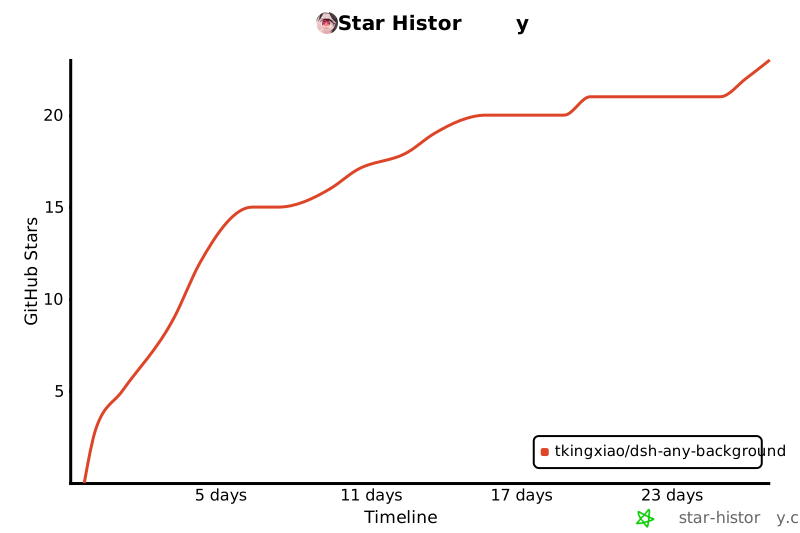](https://www.star-history.com/?repos=Tkingxiao%2Fdsh-any-background&type=timeline&legend=bottom-right)
|
|
147
|
+
|
|
148
|
+
## License
|
|
149
|
+
|
|
150
|
+
MIT
|