dsh-any-background 0.1.6 → 0.1.8
This diff represents the content of publicly available package versions that have been released to one of the supported registries. The information contained in this diff is provided for informational purposes only and reflects changes between package versions as they appear in their respective public registries.
- package/LICENSE +21 -21
- package/README.md +129 -274
- package/README.zh.md +125 -269
- package/cordis.patch.yml +8 -8
- package/lib/client.js +3669 -642
- package/lib/client.js.map +1 -1
- package/lib/index.js +72 -4
- package/package.json +106 -106
package/LICENSE
CHANGED
|
@@ -1,21 +1,21 @@
|
|
|
1
|
-
MIT License
|
|
2
|
-
|
|
3
|
-
Copyright (c) 2026 Tkingxiao
|
|
4
|
-
|
|
5
|
-
Permission is hereby granted, free of charge, to any person obtaining a copy
|
|
6
|
-
of this software and associated documentation files (the "Software"), to deal
|
|
7
|
-
in the Software without restriction, including without limitation the rights
|
|
8
|
-
to use, copy, modify, merge, publish, distribute, sublicense, and/or sell
|
|
9
|
-
copies of the Software, and to permit persons to whom the Software is
|
|
10
|
-
furnished to do so, subject to the following conditions:
|
|
11
|
-
|
|
12
|
-
The above copyright notice and this permission notice shall be included in all
|
|
13
|
-
copies or substantial portions of the Software.
|
|
14
|
-
|
|
15
|
-
THE SOFTWARE IS PROVIDED "AS IS", WITHOUT WARRANTY OF ANY KIND, EXPRESS OR
|
|
16
|
-
IMPLIED, INCLUDING BUT NOT LIMITED TO THE WARRANTIES OF MERCHANTABILITY,
|
|
17
|
-
FITNESS FOR A PARTICULAR PURPOSE AND NONINFRINGEMENT. IN NO EVENT SHALL THE
|
|
18
|
-
AUTHORS OR COPYRIGHT HOLDERS BE LIABLE FOR ANY CLAIM, DAMAGES OR OTHER
|
|
19
|
-
LIABILITY, WHETHER IN AN ACTION OF CONTRACT, TORT OR OTHERWISE, ARISING FROM,
|
|
20
|
-
OUT OF OR IN CONNECTION WITH THE SOFTWARE OR THE USE OR OTHER DEALINGS IN THE
|
|
21
|
-
SOFTWARE.
|
|
1
|
+
MIT License
|
|
2
|
+
|
|
3
|
+
Copyright (c) 2026 Tkingxiao
|
|
4
|
+
|
|
5
|
+
Permission is hereby granted, free of charge, to any person obtaining a copy
|
|
6
|
+
of this software and associated documentation files (the "Software"), to deal
|
|
7
|
+
in the Software without restriction, including without limitation the rights
|
|
8
|
+
to use, copy, modify, merge, publish, distribute, sublicense, and/or sell
|
|
9
|
+
copies of the Software, and to permit persons to whom the Software is
|
|
10
|
+
furnished to do so, subject to the following conditions:
|
|
11
|
+
|
|
12
|
+
The above copyright notice and this permission notice shall be included in all
|
|
13
|
+
copies or substantial portions of the Software.
|
|
14
|
+
|
|
15
|
+
THE SOFTWARE IS PROVIDED "AS IS", WITHOUT WARRANTY OF ANY KIND, EXPRESS OR
|
|
16
|
+
IMPLIED, INCLUDING BUT NOT LIMITED TO THE WARRANTIES OF MERCHANTABILITY,
|
|
17
|
+
FITNESS FOR A PARTICULAR PURPOSE AND NONINFRINGEMENT. IN NO EVENT SHALL THE
|
|
18
|
+
AUTHORS OR COPYRIGHT HOLDERS BE LIABLE FOR ANY CLAIM, DAMAGES OR OTHER
|
|
19
|
+
LIABILITY, WHETHER IN AN ACTION OF CONTRACT, TORT OR OTHERWISE, ARISING FROM,
|
|
20
|
+
OUT OF OR IN CONNECTION WITH THE SOFTWARE OR THE USE OR OTHER DEALINGS IN THE
|
|
21
|
+
SOFTWARE.
|
package/README.md
CHANGED
|
@@ -1,274 +1,129 @@
|
|
|
1
|
-
# dsh-any-background
|
|
2
|
-
|
|
3
|
-
<a href="https://github.com/Tkingxiao/dsh-any-background" target="_blank">
|
|
4
|
-
<img src="https://img.shields.io/github/stars/Tkingxiao/dsh-any-background?style=social" alt="GitHub stars" />
|
|
5
|
-
</a>
|
|
6
|
-
|
|
7
|
-
English | [中文](README.zh.md)
|
|
8
|
-
|
|
9
|
-
A **DeepSeek Harness** appearance plugin that lets you fully customize the Web UI
|
|
10
|
-
|
|
11
|
-
---
|
|
12
|
-
|
|
13
|
-
##
|
|
14
|
-
|
|
15
|
-
|
|
16
|
-
|
|
17
|
-
|
|
18
|
-
|
|
19
|
-
|
|
20
|
-
|
|
21
|
-
|
|
22
|
-
|
|
23
|
-
|
|
24
|
-
|
|
25
|
-
|
|
26
|
-
|
|
27
|
-
|
|
28
|
-
|
|
29
|
-
|
|
30
|
-
|
|
31
|
-
|
|
32
|
-
|
|
33
|
-
|
|
34
|
-
|
|
35
|
-
|
|
36
|
-
|
|
37
|
-
|
|
38
|
-
|
|
39
|
-
|
|
40
|
-
|
|
41
|
-
|
|
42
|
-
|
|
43
|
-
|
|
44
|
-
|
|
45
|
-
|
|
46
|
-
|
|
47
|
-
|
|
48
|
-
|
|
49
|
-
|
|
50
|
-
|
|
51
|
-
|
|
52
|
-
|
|
53
|
-
|
|
54
|
-
|
|
55
|
-
|
|
56
|
-
|
|
57
|
-
|
|
58
|
-
|
|
59
|
-
|
|
60
|
-
|
|
61
|
-
|
|
62
|
-
|
|
63
|
-
-
|
|
64
|
-
-
|
|
65
|
-
-
|
|
66
|
-
|
|
67
|
-
|
|
68
|
-
|
|
69
|
-
|
|
70
|
-
|
|
71
|
-
|
|
72
|
-
|
|
73
|
-
|
|
74
|
-
|
|
75
|
-
|
|
76
|
-
|
|
77
|
-
|
|
78
|
-
|
|
79
|
-
|
|
80
|
-
|
|
81
|
-
|
|
82
|
-
|
|
83
|
-
|
|
84
|
-
|
|
85
|
-
|
|
86
|
-
|
|
87
|
-
|
|
88
|
-
|
|
89
|
-
|
|
90
|
-
|
|
91
|
-
|
|
92
|
-
|
|
93
|
-
|
|
94
|
-
|
|
95
|
-
|
|
96
|
-
|
|
97
|
-
|
|
98
|
-
|
|
99
|
-
|
|
100
|
-
|
|
101
|
-
|
|
102
|
-
|
|
103
|
-
|
|
104
|
-
|
|
105
|
-
|
|
106
|
-
|
|
107
|
-
|
|
108
|
-
|
|
109
|
-
|
|
110
|
-
|
|
111
|
-
|
|
112
|
-
|
|
113
|
-
|
|
114
|
-
|
|
115
|
-
|
|
116
|
-
|
|
117
|
-
|
|
118
|
-
|
|
119
|
-
|
|
120
|
-
|
|
121
|
-
|
|
122
|
-
|
|
123
|
-
|
|
124
|
-
|
|
125
|
-
|
|
126
|
-
|
|
127
|
-
|
|
128
|
-
|
|
129
|
-
|
|
130
|
-
<img src="example_img/image-4.png" alt="Background mapping" width="400">
|
|
131
|
-
<br/>
|
|
132
|
-
<em>Editor adjustment · Background mapping</em>
|
|
133
|
-
</p>
|
|
134
|
-
|
|
135
|
-
### Opacity System
|
|
136
|
-
|
|
137
|
-
Three independent opacity layers, each with its own slider and a persisted config field:
|
|
138
|
-
|
|
139
|
-
| Layer | Config field | Default | Mechanism |
|
|
140
|
-
|-------|--------------|---------|-----------|
|
|
141
|
-
| Main interface | `opacity` | 85% | Inline CSS variable on `<body>` |
|
|
142
|
-
| Settings panel | `settingsOpacity` | 100% | CSS variable on `<html>` via `[aria-modal]` selector |
|
|
143
|
-
| Wallpaper | `wallpaperOpacity` | 100% | Direct `style.opacity` on wallpaper `<div>` |
|
|
144
|
-
|
|
145
|
-
#### Settings Opacity
|
|
146
|
-
|
|
147
|
-
<p align="center">
|
|
148
|
-
<img src="example_img/image-5.png" alt="Settings opacity 100%" width="400">
|
|
149
|
-
<img src="example_img/image-6.png" alt="Settings opacity 49%" width="400">
|
|
150
|
-
<br/>
|
|
151
|
-
<em>Settings opacity 100% · Settings opacity 49%</em>
|
|
152
|
-
</p>
|
|
153
|
-
|
|
154
|
-
#### Main Interface Opacity
|
|
155
|
-
|
|
156
|
-
<p align="center">
|
|
157
|
-
<img src="example_img/image-6.png" alt="Main interface opacity 100%" width="400">
|
|
158
|
-
<img src="example_img/image-7.png" alt="Main interface opacity 0%" width="400">
|
|
159
|
-
<br/>
|
|
160
|
-
<em>Main interface opacity 100% · Main interface opacity 0%</em>
|
|
161
|
-
</p>
|
|
162
|
-
|
|
163
|
-
#### Wallpaper Opacity
|
|
164
|
-
|
|
165
|
-
<p align="center">
|
|
166
|
-
<img src="example_img/image-8.png" alt="Wallpaper opacity 100%" width="400">
|
|
167
|
-
<img src="example_img/image-9.png" alt="Wallpaper opacity 50%" width="400">
|
|
168
|
-
<br/>
|
|
169
|
-
<em>Wallpaper opacity 0% · Wallpaper opacity 100%</em>
|
|
170
|
-
</p>
|
|
171
|
-
|
|
172
|
-
#### Wallpaper Blur
|
|
173
|
-
|
|
174
|
-
<p align="center">
|
|
175
|
-
<img src="example_img/image-10.png" alt="Wallpaper blur 50%" width="400">
|
|
176
|
-
<img src="example_img/image-11.png" alt="Wallpaper blur 0%" width="400">
|
|
177
|
-
<br/>
|
|
178
|
-
<em>Wallpaper blur 50% · Wallpaper blur 0%</em>
|
|
179
|
-
</p>
|
|
180
|
-
|
|
181
|
-
## Installation
|
|
182
|
-
|
|
183
|
-
### Method 1: npm install (Recommended)
|
|
184
|
-
|
|
185
|
-
Install the plugin directly from GitHub into your Web profile:
|
|
186
|
-
|
|
187
|
-
```sh
|
|
188
|
-
dsh plugin --profile web add github:Tkingxiao/dsh-any-background
|
|
189
|
-
```
|
|
190
|
-
```sh
|
|
191
|
-
dsh plugin --profile web add dsh-any-background
|
|
192
|
-
```
|
|
193
|
-
Then launch the Web UI:
|
|
194
|
-
|
|
195
|
-
```sh
|
|
196
|
-
dsh web
|
|
197
|
-
```
|
|
198
|
-
|
|
199
|
-
The plugin will appear as a **"Theme"** section in the Settings panel.
|
|
200
|
-
|
|
201
|
-
### Method 2: npx (No Global Install)
|
|
202
|
-
|
|
203
|
-
If you don't have `dsh` installed globally, use `npx`:
|
|
204
|
-
|
|
205
|
-
```sh
|
|
206
|
-
npx @deepseek-ai/dsh plugin --profile web add github:Tkingxiao/dsh-any-background
|
|
207
|
-
```
|
|
208
|
-
```sh
|
|
209
|
-
npx @deepseek-ai/dsh plugin --profile web add dsh-any-background
|
|
210
|
-
```
|
|
211
|
-
|
|
212
|
-
Then launch:
|
|
213
|
-
|
|
214
|
-
```sh
|
|
215
|
-
npx @deepseek-ai/dsh web
|
|
216
|
-
```
|
|
217
|
-
|
|
218
|
-
### Method 3: Local Build (Development)
|
|
219
|
-
|
|
220
|
-
The `lib/` directory is committed, so installs need no build step. To rebuild after
|
|
221
|
-
editing `src/`, run the bundle script (needs Node + pnpm):
|
|
222
|
-
|
|
223
|
-
```sh
|
|
224
|
-
# 1. Clone this repo
|
|
225
|
-
git clone https://github.com/Tkingxiao/dsh-any-background.git
|
|
226
|
-
cd dsh-any-background
|
|
227
|
-
|
|
228
|
-
# 2. Install the build tool (also pulls the @deepseek-ai/dsh-home-paths runtime dep)
|
|
229
|
-
pnpm install
|
|
230
|
-
|
|
231
|
-
# 3. Rebuild lib/
|
|
232
|
-
pnpm run bundle
|
|
233
|
-
|
|
234
|
-
# 4. Install the plugin into the web profile from the local checkout
|
|
235
|
-
# (`dsh plugin add` wraps `pnpm add <dir>`, so point it at this directory)
|
|
236
|
-
cd .
|
|
237
|
-
pnpm dsh plugin --profile web add “dsh-any-background”
|
|
238
|
-
|
|
239
|
-
# 5. Launch
|
|
240
|
-
pnpm dsh web
|
|
241
|
-
```
|
|
242
|
-
|
|
243
|
-
## Compatibility
|
|
244
|
-
|
|
245
|
-
The plugin works on both the **Web UI** and the **desktop client**:
|
|
246
|
-
|
|
247
|
-
- **[`dsh web`](https://github.com/deepseek-ai/deepseek-harness)** — Web profile, full support.
|
|
248
|
-
- **[deepseek-harness-desktop](https://github.com/anywhere-labs/deepseek-harness-desktop)** — supported, but there is a known Electron packaging issue: the **left sidebar and the center area opacity are inverted** (the sidebar looks more transparent than the center and vice versa). This is a client-side packaging bug, not a plugin bug — we are waiting for the desktop client to be updated to fix it.
|
|
249
|
-
|
|
250
|
-
## Dependencies
|
|
251
|
-
|
|
252
|
-
| Package | Purpose |
|
|
253
|
-
|---------|---------|
|
|
254
|
-
| `@deepseek-ai/cordis` | Plugin framework (Cordis) |
|
|
255
|
-
| `@deepseek-ai/dsh-home-paths` | Resolve the DSH data home for the persistence store |
|
|
256
|
-
| `@deepseek-ai/dsh-client-runtime` | Client runtime + `defineStore` |
|
|
257
|
-
| `@deepseek-ai/dsh-client-locale` | i18n (Chinese/English) |
|
|
258
|
-
| `@deepseek-ai/dsh-client-ui-theme` | Theme service (register/setTheme/overrideTokens) |
|
|
259
|
-
| `@deepseek-ai/dsh-invariants` | Package invariant companion |
|
|
260
|
-
| `react` ^18.2.0 | UI rendering |
|
|
261
|
-
|
|
262
|
-
## Star History
|
|
263
|
-
|
|
264
|
-
<a href="https://www.star-history.com/?repos=Tkingxiao%2Fdsh-any-background&type=timeline&legend=bottom-right">
|
|
265
|
-
<picture>
|
|
266
|
-
<source media="(prefers-color-scheme: dark)" srcset="https://api.star-history.com/chart?repos=Tkingxiao/dsh-any-background&type=timeline&theme=dark&legend=bottom-right&sealed_token=eWfGjN-Qq27TMTaT_VVvuRZMI72MUHAVfaHws-WOwQE7ld9defq7Bn7Xsgmlg-7iFSCeNoOIhgxFfZM3jazeXnLzldBkMCN3jm4CMxvn6Em0EBEZWWK5pA" />
|
|
267
|
-
<source media="(prefers-color-scheme: light)" srcset="https://api.star-history.com/chart?repos=Tkingxiao/dsh-any-background&type=timeline&legend=bottom-right&sealed_token=eWfGjN-Qq27TMTaT_VVvuRZMI72MUHAVfaHws-WOwQE7ld9defq7Bn7Xsgmlg-7iFSCeNoOIhgxFfZM3jazeXnLzldBkMCN3jm4CMxvn6Em0EBEZWWK5pA" />
|
|
268
|
-
<img alt="Star History Chart" src="https://api.star-history.com/chart?repos=Tkingxiao/dsh-any-background&type=timeline&legend=bottom-right&sealed_token=eWfGjN-Qq27TMTaT_VVvuRZMI72MUHAVfaHws-WOwQE7ld9defq7Bn7Xsgmlg-7iFSCeNoOIhgxFfZM3jazeXnLzldBkMCN3jm4CMxvn6Em0EBEZWWK5pA" />
|
|
269
|
-
</picture>
|
|
270
|
-
</a>
|
|
271
|
-
|
|
272
|
-
## License
|
|
273
|
-
|
|
274
|
-
MIT
|
|
1
|
+
# dsh-any-background
|
|
2
|
+
|
|
3
|
+
<a href="https://github.com/Tkingxiao/dsh-any-background" target="_blank">
|
|
4
|
+
<img src="https://img.shields.io/github/stars/Tkingxiao/dsh-any-background?style=social" alt="GitHub stars" />
|
|
5
|
+
</a>
|
|
6
|
+
|
|
7
|
+
English | [中文](README.zh.md)
|
|
8
|
+
|
|
9
|
+
A **DeepSeek Harness** appearance plugin that lets you fully customize the Web UI — custom theme color, background wallpaper, and fine-grained per-part opacity & blur controls.
|
|
10
|
+
|
|
11
|
+
---
|
|
12
|
+
|
|
13
|
+
## Screenshots
|
|
14
|
+
|
|
15
|
+
<p align="center">
|
|
16
|
+
<img src="example_img/image.png" alt="Custom homepage" width="720">
|
|
17
|
+
<br/>
|
|
18
|
+
<em>Custom homepage · wallpaper + theme color applied</em>
|
|
19
|
+
</p>
|
|
20
|
+
|
|
21
|
+
<p align="center">
|
|
22
|
+
<img src="example_img/image-2.png" alt="Theme color picker" width="720">
|
|
23
|
+
<br/>
|
|
24
|
+
<em>Theme color picker · PS-style wheel + precise HSL/RGB inputs</em>
|
|
25
|
+
</p>
|
|
26
|
+
|
|
27
|
+
<p align="center">
|
|
28
|
+
<img src="example_img/image-3.png" alt="Per-part opacity and blur" width="720">
|
|
29
|
+
<br/>
|
|
30
|
+
<em>Per-part opacity and blur · main background, sidebar, cards, settings</em>
|
|
31
|
+
</p>
|
|
32
|
+
|
|
33
|
+
<p align="center">
|
|
34
|
+
<img src="example_img/image-4.png" alt="Background editor" width="720">
|
|
35
|
+
<br/>
|
|
36
|
+
<em>Background editor · image wallpapers support drag-to-pan and scroll-to-zoom</em>
|
|
37
|
+
</p>
|
|
38
|
+
|
|
39
|
+
<p align="center">
|
|
40
|
+
<img src="example_img/image-6.png" alt="Generated dynamic background" width="720">
|
|
41
|
+
<br/>
|
|
42
|
+
<em>Generated dynamic background · mesh gradient / Shader / geometric presets</em>
|
|
43
|
+
</p>
|
|
44
|
+
|
|
45
|
+
<p align="center">
|
|
46
|
+
<img src="example_img/image-9.png" alt="Geometric background, low-poly mode" width="720">
|
|
47
|
+
<br/>
|
|
48
|
+
<em>Generated dynamic background · geometric low-poly mode preview</em>
|
|
49
|
+
</p>
|
|
50
|
+
|
|
51
|
+
<p align="center">
|
|
52
|
+
<img src="example_img/image-10.png" alt="Config export and import" width="720">
|
|
53
|
+
<br/>
|
|
54
|
+
<em>Export and import configs to share</em>
|
|
55
|
+
</p>
|
|
56
|
+
|
|
57
|
+
## Features
|
|
58
|
+
|
|
59
|
+
- **PS-style Color Wheel** — Pick hue on the ring, adjust saturation & lightness in the inscribed square. Generates 30+ CSS design tokens in real time.
|
|
60
|
+
- **Precise HSL / RGB Input** — Enter exact color values numerically with instant bidirectional sync to the wheel.
|
|
61
|
+
- **Smart Color Extraction** — One click derives a theme color from your wallpaper by sampling the visible region, quantizing, and filtering out gray / near-black / near-white pixels. Fully client-side.
|
|
62
|
+
- **Eyedropper** — Hover the wallpaper to preview a color and click to pick it as the theme color.
|
|
63
|
+
- **Background Wallpaper** — Upload any image as your wallpaper. Drag to pan and scroll to zoom inside a viewport-proportional editor.
|
|
64
|
+
- **Generated Dynamic Backgrounds** — Choose mesh gradient, Shader, or geometric patterns with adjustable spread, intensity, and seed locking.
|
|
65
|
+
- **Per-part Interface Opacity** — Independent sliders for main background, sidebar, cards & panels, plus the settings panel and wallpaper.
|
|
66
|
+
- **Per-part Interface Blur** — Frosted-glass `backdrop-filter` blur (0–60 px) for each interface part.
|
|
67
|
+
- **Theme Export / Import** — One-click export to a self-contained `dsh-any-theme.json` (config + wallpaper) and import to restore it anywhere.
|
|
68
|
+
- **File-based Persistence** — All settings are stored on the filesystem under `~/.dsh/.dsh-any-background-data/`, not `localStorage`.
|
|
69
|
+
- **Bilingual** — Full Chinese / English UI with automatic locale detection.
|
|
70
|
+
- **Theme Watchdog** — Re-asserts the custom theme if the host resets it.
|
|
71
|
+
|
|
72
|
+
## Recent Optimizations
|
|
73
|
+
|
|
74
|
+
- **Boot flicker eliminated** — Theme tokens are injected through a dedicated `!important` stylesheet instead of inline `body` styles, surviving host theme service resets.
|
|
75
|
+
- **Color wheel overlap fixed** — The hue ring is drawn on top of the saturation/lightness square so the square corners no longer cover the ring.
|
|
76
|
+
- **Inspiration palette selection cleared** — Picking a theme color from the wheel deselects any previously selected inspiration swatch.
|
|
77
|
+
- **Debug telemetry removed** — Temporary boot-time logging and `MutationObserver` instrumentation have been cleaned out.
|
|
78
|
+
- **Per-part blur isolated** — Blur is applied on `::before` underlays so it never traps the host's fixed-position settings dialog.
|
|
79
|
+
|
|
80
|
+
## Installation
|
|
81
|
+
|
|
82
|
+
### Method 1: npm install (Recommended)
|
|
83
|
+
|
|
84
|
+
```sh
|
|
85
|
+
dsh plugin --profile web add github:Tkingxiao/dsh-any-background
|
|
86
|
+
# or, if published to the registry:
|
|
87
|
+
dsh plugin --profile web add dsh-any-background
|
|
88
|
+
```
|
|
89
|
+
|
|
90
|
+
Then launch:
|
|
91
|
+
|
|
92
|
+
```sh
|
|
93
|
+
dsh web
|
|
94
|
+
```
|
|
95
|
+
|
|
96
|
+
The plugin appears as a **"Theme"** section in Settings.
|
|
97
|
+
|
|
98
|
+
### Method 2: npx (No Global Install)
|
|
99
|
+
|
|
100
|
+
```sh
|
|
101
|
+
npx @deepseek-ai/dsh plugin --profile web add github:Tkingxiao/dsh-any-background
|
|
102
|
+
npx @deepseek-ai/dsh web
|
|
103
|
+
```
|
|
104
|
+
|
|
105
|
+
### Method 3: Local Build (Development)
|
|
106
|
+
|
|
107
|
+
The `lib/` directory is committed, so installs need no build step. To rebuild after editing `src/`:
|
|
108
|
+
|
|
109
|
+
```sh
|
|
110
|
+
git clone https://github.com/Tkingxiao/dsh-any-background.git
|
|
111
|
+
cd dsh-any-background
|
|
112
|
+
pnpm install
|
|
113
|
+
pnpm run bundle
|
|
114
|
+
pnpm dsh plugin --profile web add "dsh-any-background"
|
|
115
|
+
pnpm dsh web
|
|
116
|
+
```
|
|
117
|
+
|
|
118
|
+
## Compatibility
|
|
119
|
+
|
|
120
|
+
- **[`dsh web`](https://github.com/deepseek-ai/deepseek-harness)** — Full support.
|
|
121
|
+
- **[deepseek-harness-desktop](https://github.com/anywhere-labs/deepseek-harness-desktop)** — Supported; a known Electron packaging issue makes the left sidebar and center area opacity appear inverted — awaiting a desktop-client update to fix it.
|
|
122
|
+
|
|
123
|
+
## Star History
|
|
124
|
+
|
|
125
|
+
[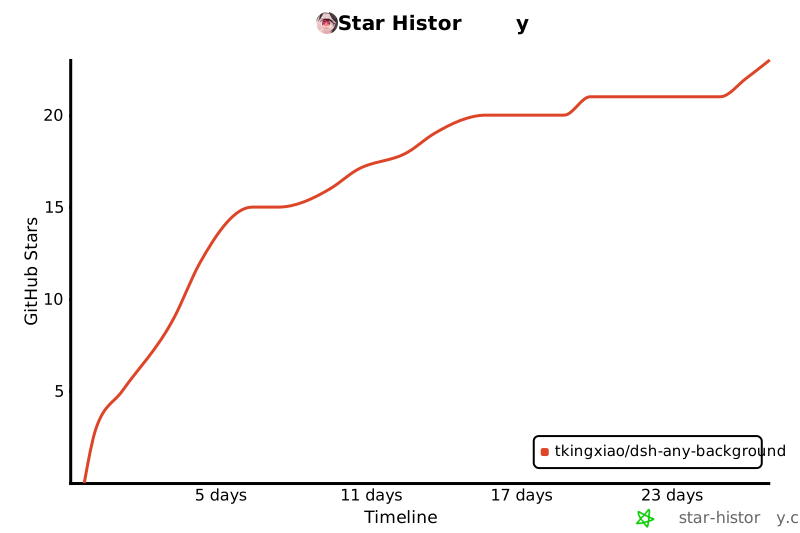](https://www.star-history.com/?repos=Tkingxiao%2Fdsh-any-background&type=timeline&legend=bottom-right)
|
|
126
|
+
|
|
127
|
+
## License
|
|
128
|
+
|
|
129
|
+
MIT
|