dsh-any-background 0.1.5 → 0.1.7
This diff represents the content of publicly available package versions that have been released to one of the supported registries. The information contained in this diff is provided for informational purposes only and reflects changes between package versions as they appear in their respective public registries.
- package/README.md +284 -254
- package/README.zh.md +283 -253
- package/lib/client.js +2420 -1290
- package/lib/client.js.map +1 -1
- package/lib/index.js +200 -176
- package/package.json +106 -106
package/README.md
CHANGED
|
@@ -1,54 +1,76 @@
|
|
|
1
|
-
# dsh-any-background
|
|
2
|
-
|
|
3
|
-
<a href="https://github.com/Tkingxiao/dsh-any-background" target="_blank">
|
|
4
|
-
<img src="https://img.shields.io/github/stars/Tkingxiao/dsh-any-background?style=social" alt="GitHub stars" />
|
|
5
|
-
</a>
|
|
6
|
-
|
|
7
|
-
English | [中文](README.zh.md)
|
|
8
|
-
|
|
9
|
-
A **DeepSeek Harness** appearance plugin that lets you fully customize the Web UI
|
|
10
|
-
|
|
11
|
-
---
|
|
12
|
-
|
|
13
|
-
## Features
|
|
14
|
-
|
|
15
|
-
- **PS-style Color Wheel** — Pick hue on the ring, adjust saturation & lightness in the inscribed square. Generates
|
|
16
|
-
- **
|
|
17
|
-
- **
|
|
18
|
-
- **
|
|
19
|
-
- **
|
|
20
|
-
- **
|
|
21
|
-
- **
|
|
22
|
-
|
|
23
|
-
|
|
24
|
-
|
|
25
|
-
|
|
26
|
-
|
|
27
|
-
|
|
28
|
-
|
|
29
|
-
|
|
30
|
-
|
|
31
|
-
├──
|
|
32
|
-
|
|
33
|
-
|
|
34
|
-
|
|
35
|
-
|
|
36
|
-
├──
|
|
37
|
-
│ ├──
|
|
38
|
-
│
|
|
39
|
-
│
|
|
40
|
-
│
|
|
41
|
-
├──
|
|
42
|
-
├──
|
|
43
|
-
|
|
44
|
-
|
|
45
|
-
|
|
46
|
-
|
|
47
|
-
|
|
1
|
+
# dsh-any-background
|
|
2
|
+
|
|
3
|
+
<a href="https://github.com/Tkingxiao/dsh-any-background" target="_blank">
|
|
4
|
+
<img src="https://img.shields.io/github/stars/Tkingxiao/dsh-any-background?style=social" alt="GitHub stars" />
|
|
5
|
+
</a>
|
|
6
|
+
|
|
7
|
+
English | [中文](README.zh.md)
|
|
8
|
+
|
|
9
|
+
A **DeepSeek Harness** appearance plugin that lets you fully customize the Web UI — custom theme color, background wallpaper, and fine-grained per-part opacity & blur controls.
|
|
10
|
+
|
|
11
|
+
---
|
|
12
|
+
|
|
13
|
+
## Features
|
|
14
|
+
|
|
15
|
+
- **PS-style Color Wheel** — Pick hue on the ring, adjust saturation & lightness in the inscribed square. Generates 30+ CSS design tokens in real time and applies them instantly.
|
|
16
|
+
- **Precise HSL / RGB Input** — Enter exact color values numerically (HSL or RGB tabs) with instant bidirectional sync to the wheel.
|
|
17
|
+
- **Smart Color Extraction** — One click derives a theme color from your wallpaper: the framed (visible) region is sampled, quantized, filtered of gray/near-black/near-white pixels, and the most dominant vivid hue becomes the theme color. Runs fully client-side with a 64×64 sample — no RPC traffic.
|
|
18
|
+
- **Eyedropper** — Hover the wallpaper to preview a color and click to pick it as the theme color.
|
|
19
|
+
- **Background Wallpaper** — Choose any image as your wallpaper. Drag to pan, scroll to zoom (anchored at the view center) inside a viewport-proportional editor. What you see is what you get.
|
|
20
|
+
- **Per-part Interface Opacity** — Independent sliders for main background, sidebar, cards & panels, plus the settings panel and wallpaper.
|
|
21
|
+
- **Per-part Interface Blur** — Frosted-glass `backdrop-filter` blur (0–60 px) for each interface part, independently adjustable.
|
|
22
|
+
- **Theme Export / Import** — One-click export to a self-contained `dsh-any-theme.json` (config + wallpaper) and import to restore it anywhere.
|
|
23
|
+
- **File-based Persistence** — All settings (color, opacities, blurs, wallpaper, editor position) are stored on the **filesystem** under `~/.dsh/.dsh-any-background-data/` via the node half, and restored on next launch. No more `localStorage` quota worries.
|
|
24
|
+
- **Bilingual** — Full Chinese / English UI with automatic locale detection.
|
|
25
|
+
- **Theme Watchdog** — A background watchdog re-asserts the custom theme if the host resets it, so your pick never silently disappears.
|
|
26
|
+
|
|
27
|
+
## Project Structure
|
|
28
|
+
|
|
29
|
+
```
|
|
30
|
+
dsh-any-background/
|
|
31
|
+
├── package.json # Package metadata, dsh.client declaration, dependencies
|
|
32
|
+
├── cordis.patch.yml # Bundle patch layer (inserted into profile composition)
|
|
33
|
+
├── cordis.yml # Patch overlay for dev usage (pnpm dsh web --patch)
|
|
34
|
+
├── tsdown.config.ts # Build config: node-half (ESM) + client-half (CJS browser bundle)
|
|
35
|
+
├── src/
|
|
36
|
+
│ ├── index.ts # Node half — file-backed persistence (RPC file store)
|
|
37
|
+
│ ├── invariant.ts # Invariant companion (registers package ownership)
|
|
38
|
+
│ └── client/ # Browser half — modularized by concern
|
|
39
|
+
│ ├── index.tsx # Lifecycle wiring (theme, wallpaper, i18n, section, watchdog)
|
|
40
|
+
│ ├── types.ts # Shared type definitions
|
|
41
|
+
│ ├── state.ts # In-memory config mirror + getters
|
|
42
|
+
│ ├── rpc.ts # File-backed persistence RPC client
|
|
43
|
+
│ ├── wallpaper.ts # Wallpaper DOM layer + per-part opacity/blur application
|
|
44
|
+
│ ├── i18n.ts # zh/en dictionaries
|
|
45
|
+
│ ├── styles.ts # Shared inline styles
|
|
46
|
+
│ ├── utils/
|
|
47
|
+
│ │ ├── color.ts # Color math, token generation, wallpaper color extraction
|
|
48
|
+
│ │ └── image.ts # Wallpaper file reading (as-is data URL)
|
|
49
|
+
│ └── components/
|
|
50
|
+
│ ├── ThemeSection.tsx # Settings panel section (all controls)
|
|
51
|
+
│ ├── ColorWheel.tsx # Hue ring + SL square canvas
|
|
52
|
+
│ ├── ColorInputs.tsx # Precise HSL/RGB entry
|
|
53
|
+
│ ├── ColorPicker.tsx # Eyedropper modal
|
|
54
|
+
│ ├── BgEditor.tsx # Wallpaper position/size editor
|
|
55
|
+
│ ├── LiveSlider.tsx # Throttled live slider
|
|
56
|
+
│ ├── ErrorBoundary.tsx # Crash fallback for the panel
|
|
57
|
+
│ └── icons.tsx # Migrated nav glyphs (sun icon)
|
|
58
|
+
├── lib/ # Built output, committed so installs need no build step
|
|
59
|
+
│ ├── index.js # Node entry
|
|
60
|
+
│ ├── invariant.js # Invariant entry
|
|
61
|
+
│ ├── client.js # Browser bundle (wrapped for __ModuleLoader__)
|
|
62
|
+
│ └── client.js.map # Source map
|
|
63
|
+
├── example_img/ # Example screenshots
|
|
64
|
+
├── README.md # This file (English)
|
|
65
|
+
└── README.zh.md # 中文版
|
|
66
|
+
```
|
|
67
|
+
|
|
68
|
+
## Implementation
|
|
69
|
+
|
|
48
70
|
The plugin is a Cordis plugin split into two halves:
|
|
49
71
|
|
|
50
|
-
- **Node half** (`src/index.ts`) — owns file-backed persistence. It manages the `.dsh-any-background-data/` store under the DSH data home (`~/.dsh/`) and exposes a small RPC surface over the
|
|
51
|
-
- **Browser half** (`src/client
|
|
72
|
+
- **Node half** (`src/index.ts`) — owns file-backed persistence. It manages the `.dsh-any-background-data/` store under the DSH data home (`~/.dsh/`) and exposes a small RPC surface over the dedicated `/dsh-any-background` channel.
|
|
73
|
+
- **Browser half** (`src/client/`) — all UI logic lives here. The browser cannot touch the filesystem, so it reads/writes the store through the node half's RPC endpoints.
|
|
52
74
|
|
|
53
75
|
### Persistence
|
|
54
76
|
|
|
@@ -56,213 +78,221 @@ Since the plugin surfaces in the browser, persisted data is stored on disk by th
|
|
|
56
78
|
|
|
57
79
|
```
|
|
58
80
|
~/.dsh/.dsh-any-background-data/
|
|
59
|
-
├── theme-config.json # color,
|
|
81
|
+
├── theme-config.json # color, per-part opacities & blurs, settings/wallpaper opacity, blur, bg edit state
|
|
60
82
|
└── wallpaper.jpg # the chosen background image (deleted when removed)
|
|
61
83
|
```
|
|
62
84
|
|
|
63
85
|
- On startup the client calls `read`, which returns the config and (if present) the wallpaper as a data URL.
|
|
64
86
|
- Every setting change is written back synchronously to `theme-config.json`; changing the wallpaper writes `wallpaper.jpg`, removing it deletes the file.
|
|
65
|
-
- The store is created automatically if missing; a missing or malformed config falls back to defaults (with a warning), and all writes are error-guarded to avoid data loss.
|
|
66
|
-
|
|
67
|
-
|
|
68
|
-
|
|
69
|
-
|
|
70
|
-
|
|
71
|
-
|
|
72
|
-
|
|
73
|
-
|
|
74
|
-
│
|
|
75
|
-
│
|
|
76
|
-
│
|
|
77
|
-
│
|
|
78
|
-
│
|
|
79
|
-
│
|
|
80
|
-
│
|
|
81
|
-
│
|
|
82
|
-
│
|
|
83
|
-
│
|
|
84
|
-
│
|
|
85
|
-
|
|
86
|
-
|
|
87
|
-
|
|
88
|
-
|
|
89
|
-
|
|
90
|
-
|
|
91
|
-
|
|
92
|
-
-
|
|
93
|
-
- `
|
|
94
|
-
-
|
|
95
|
-
|
|
96
|
-
|
|
97
|
-
|
|
98
|
-
|
|
99
|
-
|
|
100
|
-
|
|
101
|
-
|
|
102
|
-
|
|
103
|
-
|
|
104
|
-
<
|
|
105
|
-
|
|
106
|
-
|
|
107
|
-
|
|
108
|
-
|
|
109
|
-
|
|
110
|
-
|
|
111
|
-
|
|
112
|
-
|
|
113
|
-
|
|
114
|
-
|
|
115
|
-
-
|
|
116
|
-
-
|
|
117
|
-
|
|
118
|
-
|
|
119
|
-
|
|
120
|
-
|
|
121
|
-
|
|
122
|
-
|
|
123
|
-
|
|
124
|
-
|
|
125
|
-
|
|
126
|
-
|
|
127
|
-
|
|
128
|
-
|
|
129
|
-
|
|
130
|
-
|
|
131
|
-
|
|
132
|
-
<
|
|
133
|
-
|
|
134
|
-
|
|
135
|
-
|
|
136
|
-
|
|
137
|
-
|
|
138
|
-
|
|
139
|
-
|
|
140
|
-
|
|
141
|
-
|
|
142
|
-
|
|
|
143
|
-
|
|
144
|
-
|
|
145
|
-
|
|
146
|
-
|
|
147
|
-
|
|
148
|
-
|
|
149
|
-
|
|
150
|
-
|
|
151
|
-
|
|
152
|
-
|
|
153
|
-
|
|
154
|
-
|
|
155
|
-
|
|
156
|
-
<
|
|
157
|
-
|
|
158
|
-
|
|
159
|
-
|
|
160
|
-
|
|
161
|
-
|
|
162
|
-
|
|
163
|
-
|
|
164
|
-
|
|
165
|
-
<
|
|
166
|
-
|
|
167
|
-
|
|
168
|
-
|
|
169
|
-
|
|
170
|
-
|
|
171
|
-
|
|
172
|
-
|
|
173
|
-
|
|
174
|
-
<
|
|
175
|
-
|
|
176
|
-
|
|
177
|
-
|
|
178
|
-
|
|
179
|
-
|
|
180
|
-
|
|
181
|
-
|
|
182
|
-
|
|
183
|
-
|
|
184
|
-
|
|
185
|
-
|
|
186
|
-
|
|
187
|
-
|
|
188
|
-
|
|
189
|
-
|
|
190
|
-
|
|
191
|
-
|
|
192
|
-
|
|
193
|
-
|
|
194
|
-
|
|
195
|
-
|
|
196
|
-
|
|
197
|
-
|
|
198
|
-
|
|
199
|
-
|
|
200
|
-
|
|
201
|
-
|
|
202
|
-
|
|
203
|
-
|
|
204
|
-
|
|
205
|
-
```
|
|
206
|
-
|
|
207
|
-
|
|
208
|
-
|
|
209
|
-
|
|
210
|
-
|
|
211
|
-
|
|
212
|
-
|
|
213
|
-
|
|
214
|
-
|
|
215
|
-
|
|
216
|
-
|
|
217
|
-
|
|
218
|
-
|
|
219
|
-
|
|
220
|
-
|
|
221
|
-
|
|
222
|
-
|
|
223
|
-
|
|
224
|
-
|
|
225
|
-
|
|
226
|
-
|
|
227
|
-
|
|
228
|
-
|
|
229
|
-
|
|
230
|
-
|
|
231
|
-
|
|
232
|
-
|
|
233
|
-
#
|
|
234
|
-
dsh
|
|
235
|
-
|
|
236
|
-
|
|
237
|
-
|
|
238
|
-
|
|
239
|
-
|
|
240
|
-
|
|
241
|
-
|
|
242
|
-
|
|
243
|
-
|
|
244
|
-
|
|
245
|
-
|
|
246
|
-
|
|
247
|
-
|
|
248
|
-
|
|
249
|
-
|
|
250
|
-
|
|
251
|
-
|
|
252
|
-
|
|
253
|
-
|
|
254
|
-
|
|
255
|
-
|
|
256
|
-
|
|
257
|
-
|
|
258
|
-
|
|
259
|
-
|
|
260
|
-
|
|
261
|
-
|
|
262
|
-
|
|
263
|
-
|
|
264
|
-
|
|
265
|
-
|
|
266
|
-
|
|
267
|
-
|
|
268
|
-
|
|
87
|
+
- The store is created automatically if missing; a missing or malformed config falls back to defaults (with a warning), and all writes are error-guarded to avoid data loss.
|
|
88
|
+
- Older configs (single `opacity` field, no per-part fields) migrate automatically to the per-part structure on load.
|
|
89
|
+
|
|
90
|
+
### Architecture
|
|
91
|
+
|
|
92
|
+
```
|
|
93
|
+
┌─────────────────────────────────────────────────────────┐
|
|
94
|
+
│ apply(ctx) — Plugin entry point │
|
|
95
|
+
├─────────────────────────────────────────────────────────┤
|
|
96
|
+
│ │
|
|
97
|
+
│ 1. Restore saved color → registerCustom() → setTheme │
|
|
98
|
+
│ 2. Inject gradient <style> into <head> │
|
|
99
|
+
│ 3. Create state store (defineStore) │
|
|
100
|
+
│ 4. applyWp() → wallpaper + per-part opacity/blur │
|
|
101
|
+
│ 5. Listen theme/change → re-apply │
|
|
102
|
+
│ 6. ResizeObserver → viewport-aware re-positioning │
|
|
103
|
+
│ 7. Locale registration (zh/en) │
|
|
104
|
+
│ 8. Settings section injection (ThemeSection) │
|
|
105
|
+
│ 9. Settings-nav icon patch (sun glyph) │
|
|
106
|
+
│ 10. Deferred boot restore (300ms, 1500ms) │
|
|
107
|
+
│ 11. Theme watchdog (1s interval) │
|
|
108
|
+
│ │
|
|
109
|
+
└─────────────────────────────────────────────────────────┘
|
|
110
|
+
```
|
|
111
|
+
|
|
112
|
+
### Color Wheel
|
|
113
|
+
|
|
114
|
+
- Single `<canvas>` element: hue ring (360° segments) + inscribed SL square (HSV S-V plane).
|
|
115
|
+
- `hitTest()` determines whether a click lands on the ring (hue) or square (saturation/lightness).
|
|
116
|
+
- HSV values from the canvas are converted to HSL via `hsvToHsl()` before passing to `genTokens()`.
|
|
117
|
+
- `genTokens()` generates 30+ CSS custom properties (`--dsw-alias-*`) for the picked color, choosing dark or light scheme based on lightness.
|
|
118
|
+
- The full token set is written as inline styles on `<body>`, so the theme color never depends on the theme service's timing.
|
|
119
|
+
- A **precise input panel** (HSL / RGB tabs) sits next to the wheel — numeric entry syncs both ways with the canvas in real time.
|
|
120
|
+
|
|
121
|
+
#### Theme Color Adjustment
|
|
122
|
+
|
|
123
|
+
<p align="center">
|
|
124
|
+
<img src="example_img/image.png" alt="Blue theme" width="600">
|
|
125
|
+
<br/>
|
|
126
|
+
<em>Blue theme · Light · Default dark font</em>
|
|
127
|
+
</p>
|
|
128
|
+
|
|
129
|
+
<p align="center">
|
|
130
|
+
<img src="example_img/image-1.png" alt="Pink theme" width="600">
|
|
131
|
+
<br/>
|
|
132
|
+
<em>Pink theme · Dark · Default light font</em>
|
|
133
|
+
</p>
|
|
134
|
+
|
|
135
|
+
### Background Wallpaper
|
|
136
|
+
|
|
137
|
+
- A `<div>` with `position:fixed; z-index:-1` is prepended to `<body>`.
|
|
138
|
+
- The chosen image is stored **as-is** (original data URL, no re-encoding), so the wallpaper keeps full fidelity; the node half writes it to `~/.dsh/.dsh-any-background-data/wallpaper.jpg`, and the client keeps the data URL in memory for display.
|
|
139
|
+
- The editor modal shows a viewport-proportional rectangle; drag to pan, scroll to zoom (0.1×–10×) anchored at the view center.
|
|
140
|
+
- Committed position is stored as fractional center coordinates + natural image size, so the layout survives viewport changes.
|
|
141
|
+
- Wallpaper opacity is applied directly to the `<div>` element; wallpaper blur via `filter: blur()`.
|
|
142
|
+
|
|
143
|
+
#### Wallpaper Preview
|
|
144
|
+
|
|
145
|
+
<p align="center">
|
|
146
|
+
<img src="example_img/image-2.png" alt="Wallpaper opacity and blur adjustment" width="600">
|
|
147
|
+
<br/>
|
|
148
|
+
<em>Wallpaper opacity and blur adjustment</em>
|
|
149
|
+
</p>
|
|
150
|
+
|
|
151
|
+
#### Editor Adjustment
|
|
152
|
+
|
|
153
|
+
<p align="center">
|
|
154
|
+
<img src="example_img/image-3.png" alt="Editor adjustment" width="400">
|
|
155
|
+
<img src="example_img/image-4.png" alt="Background mapping" width="400">
|
|
156
|
+
<br/>
|
|
157
|
+
<em>Editor adjustment · Background mapping</em>
|
|
158
|
+
</p>
|
|
159
|
+
|
|
160
|
+
### Interface Opacity & Blur
|
|
161
|
+
|
|
162
|
+
Each interface part has its own **opacity** and **blur** slider. Opacity is applied by re-emitting the theme's surface tokens at the part's alpha; blur is applied via `backdrop-filter: blur()` on the AppFrame columns (the settings panel via a CSS variable).
|
|
163
|
+
|
|
164
|
+
| Part | Opacity field | Blur field | Default opacity | Mechanism |
|
|
165
|
+
|------|---------------|------------|-----------------|-----------|
|
|
166
|
+
| Main background | `opacities.bg` | `blurs.bg` | 85% | Inline token override on `<body>` |
|
|
167
|
+
| Sidebar | `opacities.sidebar` | `blurs.sidebar` | 93% | Inline token override on `<body>` |
|
|
168
|
+
| Cards & panels | `opacities.card` | `blurs.card` | 100% | Inline token override on `<body>` |
|
|
169
|
+
| Settings panel | `settingsOpacity` | `blurs.settings` | 100% | CSS variable via `[aria-modal]` selector |
|
|
170
|
+
| Wallpaper | `wallpaperOpacity` | — | 100% | `style.opacity` on the wallpaper `<div>` |
|
|
171
|
+
|
|
172
|
+
#### Settings Opacity
|
|
173
|
+
|
|
174
|
+
<p align="center">
|
|
175
|
+
<img src="example_img/image-5.png" alt="Settings opacity 100%" width="400">
|
|
176
|
+
<img src="example_img/image-6.png" alt="Settings opacity 49%" width="400">
|
|
177
|
+
<br/>
|
|
178
|
+
<em>Settings opacity 100% · Settings opacity 49%</em>
|
|
179
|
+
</p>
|
|
180
|
+
|
|
181
|
+
#### Main Interface Opacity
|
|
182
|
+
|
|
183
|
+
<p align="center">
|
|
184
|
+
<img src="example_img/image-6.png" alt="Main interface opacity 100%" width="400">
|
|
185
|
+
<img src="example_img/image-7.png" alt="Main interface opacity 0%" width="400">
|
|
186
|
+
<br/>
|
|
187
|
+
<em>Main interface opacity 100% · Main interface opacity 0%</em>
|
|
188
|
+
</p>
|
|
189
|
+
|
|
190
|
+
#### Wallpaper Opacity
|
|
191
|
+
|
|
192
|
+
<p align="center">
|
|
193
|
+
<img src="example_img/image-8.png" alt="Wallpaper opacity 100%" width="400">
|
|
194
|
+
<img src="example_img/image-9.png" alt="Wallpaper opacity 50%" width="400">
|
|
195
|
+
<br/>
|
|
196
|
+
<em>Wallpaper opacity 0% · Wallpaper opacity 100%</em>
|
|
197
|
+
</p>
|
|
198
|
+
|
|
199
|
+
#### Wallpaper Blur
|
|
200
|
+
|
|
201
|
+
<p align="center">
|
|
202
|
+
<img src="example_img/image-10.png" alt="Wallpaper blur 50%" width="400">
|
|
203
|
+
<img src="example_img/image-11.png" alt="Wallpaper blur 0%" width="400">
|
|
204
|
+
<br/>
|
|
205
|
+
<em>Wallpaper blur 50% · Wallpaper blur 0%</em>
|
|
206
|
+
</p>
|
|
207
|
+
|
|
208
|
+
### Theme Export / Import
|
|
209
|
+
|
|
210
|
+
- **Export** — Downloads a self-contained `dsh-any-theme.json`: the full config (color, per-part opacities & blurs, wallpaper settings) plus the wallpaper as its original data URL, so the file is portable on its own.
|
|
211
|
+
- **Import** — Applies the config and wallpaper from a theme file, then persists both through the normal paths (config → `theme-config.json`, wallpaper → `wallpaper.jpg`). Old-format files without the newer fields migrate to defaults automatically.
|
|
212
|
+
|
|
213
|
+
## Installation
|
|
214
|
+
|
|
215
|
+
### Method 1: npm install (Recommended)
|
|
216
|
+
|
|
217
|
+
Install the plugin directly from GitHub into your Web profile:
|
|
218
|
+
|
|
219
|
+
```sh
|
|
220
|
+
dsh plugin --profile web add github:Tkingxiao/dsh-any-background
|
|
221
|
+
# or, if already published to the registry:
|
|
222
|
+
dsh plugin --profile web add dsh-any-background
|
|
223
|
+
```
|
|
224
|
+
|
|
225
|
+
Then launch the Web UI:
|
|
226
|
+
|
|
227
|
+
```sh
|
|
228
|
+
dsh web
|
|
229
|
+
```
|
|
230
|
+
|
|
231
|
+
The plugin will appear as a **"Theme"** section in the Settings panel.
|
|
232
|
+
|
|
233
|
+
### Method 2: npx (No Global Install)
|
|
234
|
+
|
|
235
|
+
If you don't have `dsh` installed globally, use `npx`:
|
|
236
|
+
|
|
237
|
+
```sh
|
|
238
|
+
npx @deepseek-ai/dsh plugin --profile web add github:Tkingxiao/dsh-any-background
|
|
239
|
+
# or:
|
|
240
|
+
npx @deepseek-ai/dsh plugin --profile web add dsh-any-background
|
|
241
|
+
```
|
|
242
|
+
|
|
243
|
+
Then launch:
|
|
244
|
+
|
|
245
|
+
```sh
|
|
246
|
+
npx @deepseek-ai/dsh web
|
|
247
|
+
```
|
|
248
|
+
|
|
249
|
+
### Method 3: Local Build (Development)
|
|
250
|
+
|
|
251
|
+
The `lib/` directory is committed, so installs need no build step. To rebuild after
|
|
252
|
+
editing `src/`, run the bundle script (needs Node + pnpm):
|
|
253
|
+
|
|
254
|
+
```sh
|
|
255
|
+
# 1. Clone this repo
|
|
256
|
+
git clone https://github.com/Tkingxiao/dsh-any-background.git
|
|
257
|
+
cd dsh-any-background
|
|
258
|
+
|
|
259
|
+
# 2. Install the build tool (also pulls the @deepseek-ai/dsh-home-paths runtime dep)
|
|
260
|
+
pnpm install
|
|
261
|
+
|
|
262
|
+
# 3. Rebuild lib/
|
|
263
|
+
pnpm run bundle
|
|
264
|
+
|
|
265
|
+
# 4. Install the plugin into the web profile from the local checkout
|
|
266
|
+
# (`dsh plugin add` wraps `pnpm add <dir>`, so point it at this directory)
|
|
267
|
+
pnpm dsh plugin --profile web add "dsh-any-background"
|
|
268
|
+
|
|
269
|
+
# 5. Launch
|
|
270
|
+
pnpm dsh web
|
|
271
|
+
```
|
|
272
|
+
|
|
273
|
+
## Compatibility
|
|
274
|
+
|
|
275
|
+
The plugin works on both the **Web UI** and the **desktop client**:
|
|
276
|
+
|
|
277
|
+
- **[`dsh web`](https://github.com/deepseek-ai/deepseek-harness)** — Web profile, full support.
|
|
278
|
+
- **[deepseek-harness-desktop](https://github.com/anywhere-labs/deepseek-harness-desktop)** — supported, but there is a known Electron packaging issue: the **left sidebar and the center area opacity are inverted** (the sidebar looks more transparent than the center and vice versa). This is a client-side packaging bug, not a plugin bug — we are waiting for the desktop client to be updated to fix it.
|
|
279
|
+
|
|
280
|
+
## Dependencies
|
|
281
|
+
|
|
282
|
+
| Package | Purpose |
|
|
283
|
+
|---------|---------|
|
|
284
|
+
| `@deepseek-ai/cordis` | Plugin framework (Cordis) |
|
|
285
|
+
| `@deepseek-ai/dsh-home-paths` | Resolve the DSH data home for the persistence store |
|
|
286
|
+
| `@deepseek-ai/dsh-client-runtime` | Client runtime + `defineStore` |
|
|
287
|
+
| `@deepseek-ai/dsh-client-locale` | i18n (Chinese/English) |
|
|
288
|
+
| `@deepseek-ai/dsh-client-ui-theme` | Theme service (register/setTheme/overrideTokens) |
|
|
289
|
+
| `@deepseek-ai/dsh-invariants` | Package invariant companion |
|
|
290
|
+
| `react` ^18.2.0 | UI rendering |
|
|
291
|
+
|
|
292
|
+
## Star History
|
|
293
|
+
|
|
294
|
+
[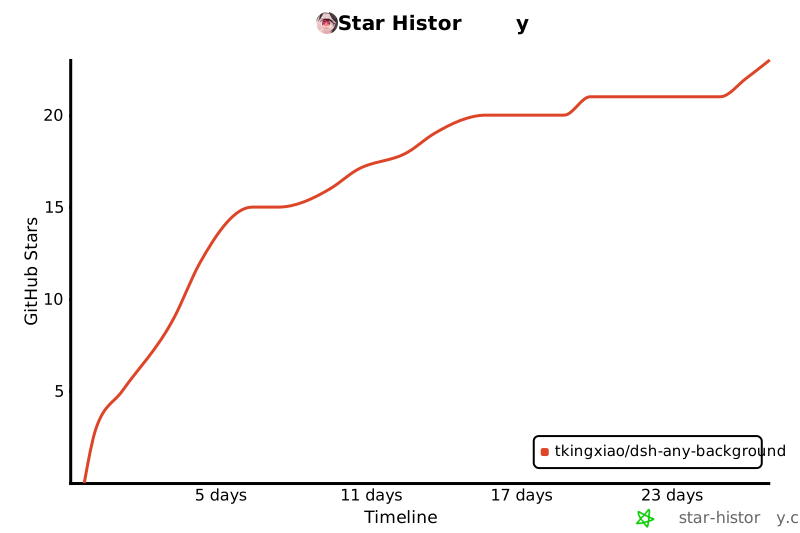](https://www.star-history.com/?repos=Tkingxiao%2Fdsh-any-background&type=timeline&legend=bottom-right)
|
|
295
|
+
|
|
296
|
+
## License
|
|
297
|
+
|
|
298
|
+
MIT
|