dsh-agent-skills 0.1.6 → 0.1.7
This diff represents the content of publicly available package versions that have been released to one of the supported registries. The information contained in this diff is provided for informational purposes only and reflects changes between package versions as they appear in their respective public registries.
- package/README.md +34 -66
- package/package.json +1 -1
package/README.md
CHANGED
|
@@ -4,80 +4,52 @@
|
|
|
4
4
|
[](./LICENSE)
|
|
5
5
|
[](https://github.com/deepseek-ai/deepseek-harness)
|
|
6
6
|
|
|
7
|
-
|
|
7
|
+
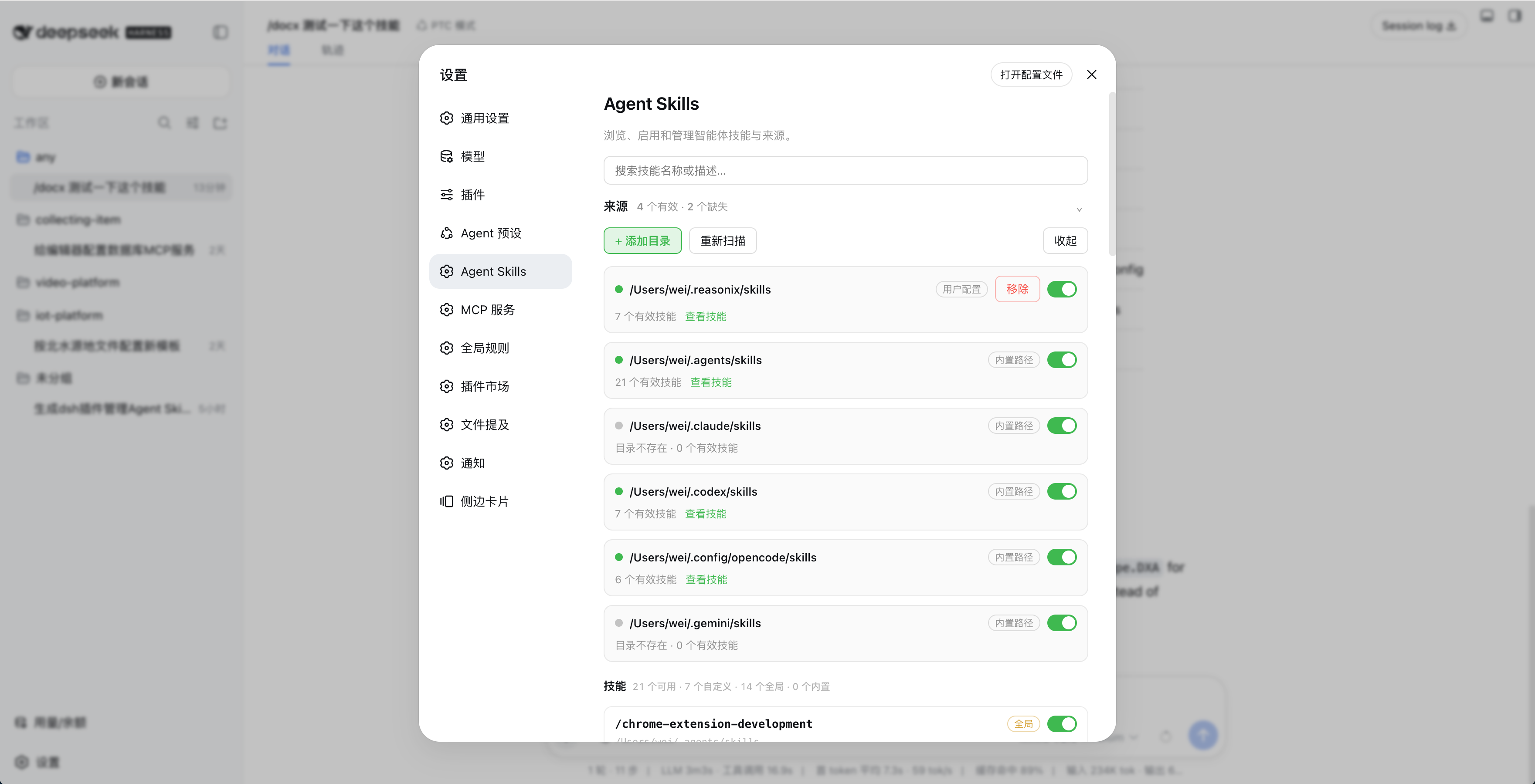
在 DeepSeek Harness 的设置页中查看、启停和管理本地 Agent Skills。
|
|
8
8
|
|
|
9
9
|
|
|
10
10
|
|
|
11
|
-
##
|
|
11
|
+
## 功能
|
|
12
12
|
|
|
13
|
-
|
|
14
|
-
|
|
15
|
-
-
|
|
16
|
-
-
|
|
17
|
-
-
|
|
18
|
-
- 可按目录或单个技能启停;变更会持久化,页面会提示刷新后生效。
|
|
19
|
-
- 监听技能文件变化,也可随时手动重新扫描。
|
|
20
|
-
- 不修改原始 `SKILL.md` 文件。
|
|
13
|
+
- 自动扫描 `~/.agents/skills`、`~/.claude/skills`、`~/.codex/skills`、`~/.config/opencode/skills` 和 `~/.gemini/skills`
|
|
14
|
+
- 支持自定义技能目录
|
|
15
|
+
- 按目录或单个技能启停
|
|
16
|
+
- 搜索、查看描述并监听技能文件变化
|
|
17
|
+
- 不修改原始 `SKILL.md`
|
|
21
18
|
|
|
22
19
|
## 安装
|
|
23
20
|
|
|
24
|
-
###
|
|
25
|
-
|
|
26
|
-
通过 [DSH 插件市场](https://github.com/dsh-market/dsh-market) 安装,或打开 DSH 的「设置 → 插件市场」,搜索 **Agent Skills**,点击安装。市场会优先使用 npm 包,安装速度快,也不需要在本机重新构建。
|
|
27
|
-
|
|
28
|
-
安装后继续完成下面的「开启接管 DSH 技能」步骤,页面会直接提供重启按钮。
|
|
29
|
-
|
|
30
|
-
### 方式二:从 npm 安装
|
|
21
|
+
### npm(推荐)
|
|
31
22
|
|
|
32
23
|
```bash
|
|
33
24
|
dsh plugin --profile web add dsh-agent-skills
|
|
34
25
|
```
|
|
35
26
|
|
|
36
|
-
|
|
37
|
-
|
|
38
|
-
```bash
|
|
39
|
-
dsh plugin --profile web add github:minivv/dsh-agent-skills
|
|
40
|
-
```
|
|
41
|
-
|
|
42
|
-
仓库包含 `prepare: npm run build`,因此 pnpm 会在 Git 安装时自动构建。DSH/pnpm 可能会要求你授权构建脚本;不想授权构建时请使用 npm 或插件市场版本,npm 包已经包含构建好的 `lib/`。
|
|
43
|
-
|
|
44
|
-
### 开启接管 DSH 技能
|
|
45
|
-
|
|
46
|
-
完成任一种安装方式后:
|
|
27
|
+
安装后打开「设置 → Agent Skills」,点击「开启接管 DSH 技能」,再点击「重启 DSH」。
|
|
47
28
|
|
|
48
|
-
|
|
49
|
-
2. 点击 **开启接管 DSH 技能**。
|
|
50
|
-
3. 点击页面出现的 **重启 DSH**,等待服务恢复并自动刷新页面。
|
|
29
|
+
### DSH 插件市场
|
|
51
30
|
|
|
52
|
-
|
|
31
|
+
在「设置 → 插件市场」中搜索 **Agent Skills**,或查看 [DSH 插件市场](https://github.com/dsh-market/dsh-market)。
|
|
53
32
|
|
|
54
|
-
|
|
55
|
-
|
|
56
|
-
如果页面无法定位 DSH 安装位置,可以使用备用命令:
|
|
33
|
+
### GitHub
|
|
57
34
|
|
|
58
35
|
```bash
|
|
59
|
-
|
|
60
|
-
node ~/.dsh/profiles/web/node_modules/dsh-agent-skills/scripts/install-preset.mjs
|
|
36
|
+
dsh plugin --profile web add github:minivv/dsh-agent-skills
|
|
61
37
|
```
|
|
62
38
|
|
|
63
|
-
|
|
39
|
+
Git 安装可能需要授权 pnpm 执行构建脚本。
|
|
64
40
|
|
|
65
41
|
## 使用
|
|
66
42
|
|
|
67
|
-
1.
|
|
68
|
-
2.
|
|
69
|
-
3.
|
|
70
|
-
4.
|
|
71
|
-
5. 技能区出现“n 个技能变更需刷新页面生效”后,点击「刷新页面」。
|
|
72
|
-
6. 修改磁盘上的技能后,点击「重新扫描」或等待自动刷新。
|
|
43
|
+
1. 在「设置 → Agent Skills」中检查自动发现的目录,或点击「+ 添加目录」。
|
|
44
|
+
2. 使用目录和技能开关控制可用技能。
|
|
45
|
+
3. 出现技能变更提示后,点击「刷新页面」。
|
|
46
|
+
4. 修改技能文件后,点击「重新扫描」或等待自动刷新。
|
|
73
47
|
|
|
74
|
-
|
|
48
|
+
点击「取消接管」并重启 DSH,可恢复 DSH 原来的技能来源。
|
|
75
49
|
|
|
76
|
-
|
|
77
|
-
$DSH_HOME/agent-skills/state.json
|
|
78
|
-
```
|
|
50
|
+
设置保存在 `$DSH_HOME/agent-skills/state.json`。
|
|
79
51
|
|
|
80
|
-
|
|
52
|
+
## 技能格式
|
|
81
53
|
|
|
82
54
|
```text
|
|
83
55
|
skills/
|
|
@@ -86,7 +58,7 @@ skills/
|
|
|
86
58
|
└── another-skill.md
|
|
87
59
|
```
|
|
88
60
|
|
|
89
|
-
`SKILL.md` 需要 YAML frontmatter,`name`
|
|
61
|
+
`SKILL.md` 需要 YAML frontmatter,`name` 使用小写 kebab-case:
|
|
90
62
|
|
|
91
63
|
```markdown
|
|
92
64
|
---
|
|
@@ -99,9 +71,13 @@ description: Explain when this skill should be used.
|
|
|
99
71
|
|
|
100
72
|
## 卸载
|
|
101
73
|
|
|
102
|
-
|
|
74
|
+
先在设置页点击「取消接管」和「重启 DSH」,再运行:
|
|
103
75
|
|
|
104
|
-
|
|
76
|
+
```bash
|
|
77
|
+
dsh plugin --profile web remove dsh-agent-skills
|
|
78
|
+
```
|
|
79
|
+
|
|
80
|
+
如果设置页无法打开,先恢复 DSH 技能来源:
|
|
105
81
|
|
|
106
82
|
```bash
|
|
107
83
|
DSH_INSTALL_ROOT="$(npm root -g)/@deepseek-ai/dsh" \
|
|
@@ -110,8 +86,6 @@ DSH_INSTALL_ROOT="$(npm root -g)/@deepseek-ai/dsh" \
|
|
|
110
86
|
dsh plugin --profile web remove dsh-agent-skills
|
|
111
87
|
```
|
|
112
88
|
|
|
113
|
-
最后重启 DSH Web。插件不会自动删除 `$DSH_HOME/agent-skills/state.json`,方便以后重装时保留设置。
|
|
114
|
-
|
|
115
89
|
## 开发
|
|
116
90
|
|
|
117
91
|
要求 Node.js 20+。
|
|
@@ -120,27 +94,21 @@ dsh plugin --profile web remove dsh-agent-skills
|
|
|
120
94
|
npm install
|
|
121
95
|
npm run typecheck
|
|
122
96
|
npm run build
|
|
97
|
+
npm test
|
|
123
98
|
npm pack --dry-run
|
|
124
99
|
```
|
|
125
100
|
|
|
126
|
-
|
|
127
|
-
- `src/preset.ts`:preset-only 入口,只注册 scoped provider。
|
|
128
|
-
- `src/client/`:设置页 UI。
|
|
129
|
-
- `src/scan.ts`:技能目录扫描和 frontmatter 解析。
|
|
130
|
-
- `lib/`:已提交的构建产物,供 npm 和免构建安装使用。
|
|
131
|
-
|
|
132
|
-
## 已知约束
|
|
101
|
+
## 注意
|
|
133
102
|
|
|
134
|
-
-
|
|
135
|
-
-
|
|
136
|
-
- DSH 升级可能覆盖其内置 preset 文件;如开关不再生效,在设置页重新点击「开启接管 DSH 技能」。
|
|
103
|
+
- 技能名必须匹配 `[a-z0-9]+(?:-[a-z0-9]+)*`
|
|
104
|
+
- DSH 升级后如果开关失效,重新开启接管并重启 DSH
|
|
137
105
|
|
|
138
|
-
##
|
|
106
|
+
## 链接
|
|
139
107
|
|
|
140
108
|
- [GitHub](https://github.com/minivv/dsh-agent-skills)
|
|
141
109
|
- [npm](https://www.npmjs.com/package/dsh-agent-skills)
|
|
142
110
|
- [DSH 插件市场](https://github.com/dsh-market/dsh-market)
|
|
143
|
-
- [WeiSpot
|
|
111
|
+
- [WeiSpot](https://weispot.vercel.app/projects/dsh-agent-skills)
|
|
144
112
|
|
|
145
113
|
## License
|
|
146
114
|
|
package/package.json
CHANGED
|
@@ -1,6 +1,6 @@
|
|
|
1
1
|
{
|
|
2
2
|
"name": "dsh-agent-skills",
|
|
3
|
-
"version": "0.1.
|
|
3
|
+
"version": "0.1.7",
|
|
4
4
|
"author": "Wei <minivv@users.noreply.github.com>",
|
|
5
5
|
"description": "Discover and manage Claude Code, Codex, Gemini CLI, and other Agent Skills inside DeepSeek Harness.",
|
|
6
6
|
"type": "module",
|