dphelper 1.9.84 → 1.9.86
This diff represents the content of publicly available package versions that have been released to one of the supported registries. The information contained in this diff is provided for informational purposes only and reflects changes between package versions as they appear in their respective public registries.
- package/docs/_config.yml +1 -0
- package/docs/index.md +374 -0
- package/documents/OBSERVER.md +67 -0
- package/documents/SESSION.md +58 -0
- package/documents/STATE.md +69 -0
- package/documents/STORE.md +80 -0
- package/documents/TOOLS.md +1284 -0
- package/documents/USEOBSERVER.md +30 -0
- package/index.d.ts +22 -0
- package/index.js +1 -0
- package/index.umd.cjs +1 -0
- package/package.json +5 -15
- package/types/cache.d.ts +27 -0
- package/types/dphelper.d.ts +572 -0
- package/types/idb.d.ts +21 -0
- package/types/jquery.d.ts +20 -0
- package/types/memorio.d.ts +21 -0
- package/types/observer.d.ts +47 -0
- package/types/session.d.ts +67 -0
- package/types/state.d.ts +71 -0
- package/types/store.d.ts +91 -0
- package/types/useobserver.d.ts +28 -0
package/docs/_config.yml
ADDED
|
@@ -0,0 +1 @@
|
|
|
1
|
+
theme: jekyll-theme-modernist
|
package/docs/index.md
ADDED
|
@@ -0,0 +1,374 @@
|
|
|
1
|
+
# [dphelper](https://npmjs.com/package/dphelper)
|
|
2
|
+
|
|
3
|
+

|
|
4
|
+
|
|
5
|
+
**Manager | DevTools** by [Dario Passariello](https://dario.passariello.ca) (c)
|
|
6
|
+
|
|
7
|
+
[](https://npmjs.org/package/dphelper)
|
|
8
|
+
[](https://npmjs.org/package/dphelper)
|
|
9
|
+
|
|
10
|
+

|
|
11
|
+

|
|
12
|
+

|
|
13
|
+

|
|
14
|
+
|
|
15
|
+

|
|
16
|
+

|
|
17
|
+

|
|
18
|
+

|
|
19
|
+
|
|
20
|
+

|
|
21
|
+
|
|
22
|
+
[](https://a51.gitbook.io/dphelper)
|
|
23
|
+
|
|
24
|
+
[](https://www.npmjs.com/package/dphelper?activeTab=readme)
|
|
25
|
+
|
|
26
|
+
## Table of Contents
|
|
27
|
+
|
|
28
|
+
1. [About](#about)
|
|
29
|
+
2. [Installation](#install)
|
|
30
|
+
3. [Live Demo](#live-demo)
|
|
31
|
+
4. [Documentation](#documentation)
|
|
32
|
+
1. [State](#state)
|
|
33
|
+
2. [Store](#store)
|
|
34
|
+
3. [Session](#session)
|
|
35
|
+
4. [Observer](#observer)
|
|
36
|
+
5. [useObserver](#useobserver)
|
|
37
|
+
5. [Extension](#extension)
|
|
38
|
+
6. [Security](#security)
|
|
39
|
+
7. [License](#license)
|
|
40
|
+
|
|
41
|
+
## About
|
|
42
|
+
|
|
43
|
+
dpHelper is a precise and complete collection of 190+ tools ready to use in all web/SaaS applications. State and Store Management are now easy, accessible everywhere in your application, including Ajax or React apps, without the need for extra files.
|
|
44
|
+
|
|
45
|
+
1. **Single Source of Truth**: The application's entire state is held within a single object in one store, ensuring consistent and accessible state management throughout the app.
|
|
46
|
+
|
|
47
|
+
2. **State is flexible**: State changes are facilitated exclusively through actions. These actions, which are straightforward JavaScript objects, delineate what has occurred. This methodology ensures that state changes remain predictable.
|
|
48
|
+
|
|
49
|
+
3. **Changes are made with proxy handle function**: To define state changes, dpHelper employs pure functions as intermediaries. These functions accept the current state as input and produce a new state as output, ensuring predictability and ease of testing in the system.
|
|
50
|
+
|
|
51
|
+
4. **Based on [Memorio](https://www.npmjs.com/package/memorio) by Dario Passariello** to manage STATE, STORE, SESSION and OBSERVER. You can use Memorio is you need only state management. DpHelper is indicate when you use a complete suite of tools.
|
|
52
|
+
|
|
53
|
+
### 1. Example in React
|
|
54
|
+
|
|
55
|
+
```js
|
|
56
|
+
import { useEffect } from 'react';
|
|
57
|
+
import 'dphelper';
|
|
58
|
+
|
|
59
|
+
function App() {
|
|
60
|
+
// Store a value in the state
|
|
61
|
+
state.test = 'Hello, World!';
|
|
62
|
+
|
|
63
|
+
// Use the stored value in a React component
|
|
64
|
+
useEffect(() => {
|
|
65
|
+
console.log("You can recall from all pages: " + state.test); // Output: "Hello, World!"
|
|
66
|
+
}, []);
|
|
67
|
+
|
|
68
|
+
return (
|
|
69
|
+
<div>
|
|
70
|
+
<h1>{state.test}</h1>
|
|
71
|
+
</div>
|
|
72
|
+
);
|
|
73
|
+
}
|
|
74
|
+
|
|
75
|
+
export default App;
|
|
76
|
+
```
|
|
77
|
+
|
|
78
|
+
## Install
|
|
79
|
+
|
|
80
|
+
Install dpHelper.
|
|
81
|
+
|
|
82
|
+
```shell
|
|
83
|
+
npm i dphelper --save-dev
|
|
84
|
+
```
|
|
85
|
+
|
|
86
|
+
or update:
|
|
87
|
+
|
|
88
|
+
```shell
|
|
89
|
+
npm i dphelper@latest --save-dev
|
|
90
|
+
```
|
|
91
|
+
|
|
92
|
+
Use it in the main root file (and only there):
|
|
93
|
+
|
|
94
|
+
```js
|
|
95
|
+
import "dphelper";
|
|
96
|
+
```
|
|
97
|
+
|
|
98
|
+
or
|
|
99
|
+
|
|
100
|
+
```js
|
|
101
|
+
require("dphelper");
|
|
102
|
+
```
|
|
103
|
+
|
|
104
|
+
## Install for EJS or Other Types of Projects (like HTML)
|
|
105
|
+
|
|
106
|
+
Note: You don't need to use npm install in this case, or you will get an error.
|
|
107
|
+
|
|
108
|
+
```html
|
|
109
|
+
<script src="https://cdn.jsdelivr.net/npm/dphelper"></script>
|
|
110
|
+
```
|
|
111
|
+
|
|
112
|
+
## Live Demo
|
|
113
|
+
|
|
114
|
+
[https://tests.a51.dev/](https://tests.a51.dev/)
|
|
115
|
+
|
|
116
|
+
You can see an HTML version where dpHelper and LayerPro work together seamlessly. dpHelper is compatible with a variety of frontend libraries, including:
|
|
117
|
+
|
|
118
|
+
* HTML
|
|
119
|
+
* React
|
|
120
|
+
* Vue
|
|
121
|
+
* And any other frontend library
|
|
122
|
+
|
|
123
|
+
## Documentation
|
|
124
|
+
|
|
125
|
+
You can see:
|
|
126
|
+
|
|
127
|
+
* [State](https://a51.gitbook.io/dphelper/general/state)
|
|
128
|
+
* [Store](https://a51.gitbook.io/dphelper/general/store)
|
|
129
|
+
* [Observer](https://a51.gitbook.io/dphelper/general/observer)
|
|
130
|
+
* [useObserver](https://a51.gitbook.io/dphelper/general/useobserver)
|
|
131
|
+
* [List of functions](https://a51.gitbook.io/dphelper/general/tools)
|
|
132
|
+
|
|
133
|
+
You can see more tutorials, information, and examples about **dpHelper** [clicking here](https://a51.gitbook.io/dphelper).
|
|
134
|
+
|
|
135
|
+
## State
|
|
136
|
+
|
|
137
|
+
### Using the "state" Function
|
|
138
|
+
|
|
139
|
+
You can use the state function to store and reuse data throughout your application. Similar to other state managers, you can save state information in JSON format and access it easily in various contexts, including React useEffect and/or dispatch.
|
|
140
|
+
|
|
141
|
+
For example, you can store a value like this: _state.test = 'I am ready'_ and then retrieve it later using state.test.
|
|
142
|
+
|
|
143
|
+
_example:_
|
|
144
|
+
|
|
145
|
+
You can use the browser's devtools console and type " **state.test = 'I am ready'** ". Every time you want to use '**test**' values, you need just recall **state.test**.
|
|
146
|
+
|
|
147
|
+
```js
|
|
148
|
+
// Set a state
|
|
149
|
+
state.test = "I am ready" *
|
|
150
|
+
|
|
151
|
+
// Get the state
|
|
152
|
+
state.test *
|
|
153
|
+
|
|
154
|
+
// List all states
|
|
155
|
+
state.list // or just "state" to see the proxy
|
|
156
|
+
|
|
157
|
+
// Lock a state from edit (Only for Objects or Array)
|
|
158
|
+
state.test.lock() *
|
|
159
|
+
|
|
160
|
+
// Remove a state
|
|
161
|
+
state.remove("test")
|
|
162
|
+
|
|
163
|
+
// Remove all states
|
|
164
|
+
state.removeAll()
|
|
165
|
+
|
|
166
|
+
*["test" is only an example]
|
|
167
|
+
|
|
168
|
+
```
|
|
169
|
+
|
|
170
|
+
### Observer
|
|
171
|
+
|
|
172
|
+
**Note**: _Observer works only with states. Stores are excluded at the moment._
|
|
173
|
+
|
|
174
|
+
If you want to run a function every time a state changes, you can use:
|
|
175
|
+
|
|
176
|
+
```js
|
|
177
|
+
/**
|
|
178
|
+
* Observer is a non-cumulative listener,
|
|
179
|
+
* triggered from customEvent / dispatch from state
|
|
180
|
+
* @parameters
|
|
181
|
+
* [ state | store, function ]
|
|
182
|
+
*/
|
|
183
|
+
observer( "state.test", () => alert("Test Changes to: " + state.test) )
|
|
184
|
+
|__________| |___________________________________________|
|
|
185
|
+
State: string Function
|
|
186
|
+
|
|
187
|
+
PS: you need to use the name of state | store as string
|
|
188
|
+
```
|
|
189
|
+
|
|
190
|
+
You can use it everywhere. Works like "useState" in React but with more flexibility (use one observer for each state!).
|
|
191
|
+
|
|
192
|
+
### Example
|
|
193
|
+
|
|
194
|
+
```js
|
|
195
|
+
import 'dphelper';
|
|
196
|
+
|
|
197
|
+
// Use the observer to log the changing state value
|
|
198
|
+
observer(
|
|
199
|
+
'state.count',
|
|
200
|
+
() => console.log("State changed: ", state.count)
|
|
201
|
+
);
|
|
202
|
+
|
|
203
|
+
// Store a value in the state that changes every 5 seconds
|
|
204
|
+
setInterval(() => state.count = Date.now(), 5000);
|
|
205
|
+
```
|
|
206
|
+
|
|
207
|
+
> NOTE: In some cases you need to wrap inside and useEffect in React to avoid multiple observers
|
|
208
|
+
|
|
209
|
+
#### Another Simple Example
|
|
210
|
+
|
|
211
|
+
```js
|
|
212
|
+
import 'dphelper';
|
|
213
|
+
|
|
214
|
+
// Set a state
|
|
215
|
+
state.myData = 'Hello, world!';
|
|
216
|
+
|
|
217
|
+
// Retrieve the state
|
|
218
|
+
console.log(state.myData); // Output: Hello, world!
|
|
219
|
+
|
|
220
|
+
// Observe state changes
|
|
221
|
+
observer('myData', () => {
|
|
222
|
+
console.log('myData has changed to:', state.myData);
|
|
223
|
+
});
|
|
224
|
+
|
|
225
|
+
// Change the state
|
|
226
|
+
state.myData = 'New value';
|
|
227
|
+
```
|
|
228
|
+
|
|
229
|
+
## useObserver
|
|
230
|
+
|
|
231
|
+
```js
|
|
232
|
+
import 'dphelper';
|
|
233
|
+
|
|
234
|
+
// Use the useObserver to log the changing state value
|
|
235
|
+
useObserver(
|
|
236
|
+
() => console.log("State changed: ", state.count)
|
|
237
|
+
, 'state.count'
|
|
238
|
+
);
|
|
239
|
+
|
|
240
|
+
// Store a value in the state that changes every 5 seconds
|
|
241
|
+
setInterval(() => state.count = Date.now(), 5000);
|
|
242
|
+
```
|
|
243
|
+
|
|
244
|
+
## Store
|
|
245
|
+
|
|
246
|
+
### Persistent Storage with dpHelper
|
|
247
|
+
|
|
248
|
+
When using dpHelper for permanent storage, you should use the **store**, which stores data persistently across sessions.
|
|
249
|
+
|
|
250
|
+
#### Important Security Note
|
|
251
|
+
|
|
252
|
+
1. **Use store for persistent storage:** If you want to store data permanently, use store to ensure it is saved in localStorage.
|
|
253
|
+
|
|
254
|
+
2. **Remove data when necessary:** To maintain security, remove stored data when it is no longer needed, such as during logout.
|
|
255
|
+
|
|
256
|
+
3. **Remove all stored data:** Use store.removeAll() to securely remove all stored data from your application.
|
|
257
|
+
|
|
258
|
+
```js
|
|
259
|
+
// Set a store:
|
|
260
|
+
store.set("test", { test: "test" })
|
|
261
|
+
|
|
262
|
+
// Get a store:
|
|
263
|
+
store.get("test") // Output: { test: "test" }
|
|
264
|
+
|
|
265
|
+
// Remove a store:
|
|
266
|
+
store.remove("test") // Output: "ok"
|
|
267
|
+
|
|
268
|
+
// Remove all stores:
|
|
269
|
+
store.removeAll() // Output: "ok"
|
|
270
|
+
```
|
|
271
|
+
|
|
272
|
+
### 2. Example in React
|
|
273
|
+
|
|
274
|
+
```js
|
|
275
|
+
import { useEffect } from 'react';
|
|
276
|
+
import 'dphelper';
|
|
277
|
+
|
|
278
|
+
function App() {
|
|
279
|
+
|
|
280
|
+
// Store a value in the store (persistent storage)
|
|
281
|
+
store.set(
|
|
282
|
+
'user',
|
|
283
|
+
{
|
|
284
|
+
name: 'John Doe',
|
|
285
|
+
age: 30
|
|
286
|
+
}
|
|
287
|
+
);
|
|
288
|
+
|
|
289
|
+
// Use the stored value in a React component
|
|
290
|
+
useEffect(
|
|
291
|
+
() => {
|
|
292
|
+
console.log(store.get("user")); // Output: { name: "John Doe", age: 30 }
|
|
293
|
+
$("#name").text(store.get("user").name)
|
|
294
|
+
}, []
|
|
295
|
+
);
|
|
296
|
+
|
|
297
|
+
// Remove all stored data if necessary
|
|
298
|
+
// store.removeAll();
|
|
299
|
+
|
|
300
|
+
return (
|
|
301
|
+
<div>
|
|
302
|
+
<h1 id="name">...</h1>
|
|
303
|
+
</div>
|
|
304
|
+
);
|
|
305
|
+
}
|
|
306
|
+
|
|
307
|
+
export default App;
|
|
308
|
+
```
|
|
309
|
+
|
|
310
|
+
## session
|
|
311
|
+
|
|
312
|
+
Similar to store but it's removed when you close the browser.
|
|
313
|
+
For more performance it's better to use state over session. State is global and access to data is more faster and not require the time to resolve promises.
|
|
314
|
+
|
|
315
|
+
```js
|
|
316
|
+
// Set a store:
|
|
317
|
+
store.set("test", { test: "test" })
|
|
318
|
+
|
|
319
|
+
// Get a store:
|
|
320
|
+
store.get("test") // Output: { test: "test" }
|
|
321
|
+
|
|
322
|
+
// Remove a store:
|
|
323
|
+
store.remove("test") // Output: "ok"
|
|
324
|
+
|
|
325
|
+
// Remove all stores:
|
|
326
|
+
store.removeAll() // Output: "ok"
|
|
327
|
+
```
|
|
328
|
+
|
|
329
|
+
## Extension
|
|
330
|
+
|
|
331
|
+
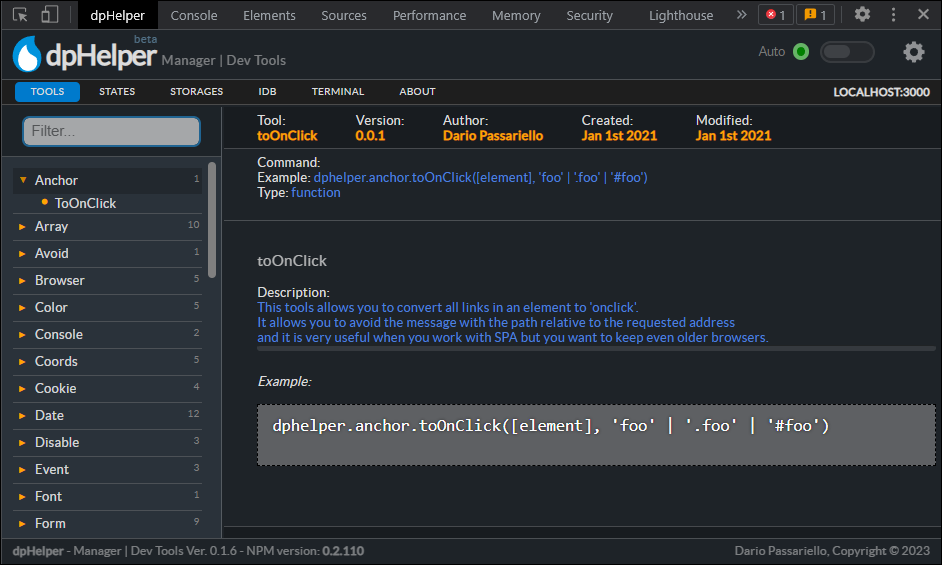
Type **dphelper** in the devtool console of your browser to have a look at all available tools that you can use! You can call these from everywhere without import (just one time in the main/root page).
|
|
332
|
+
|
|
333
|
+
## Browser Extension (Chrome/Edge) ♥️
|
|
334
|
+
|
|
335
|
+

|
|
336
|
+
|
|
337
|
+

|
|
338
|
+
|
|
339
|
+
|
|
340
|
+
|
|
341
|
+
Chrome: [Download from Google Web Store](https://chrome.google.com/webstore/detail/dphelper-manager-dev-tool/oppppldaoknfddeikfloonnialijngbk)
|
|
342
|
+
|
|
343
|
+
Edge: [Download from Microsoft Addons](https://microsoftedge.microsoft.com/addons/detail/dphelper-manager-dev-to/kphabkbdpaljlfagldhojilhfammepnk)
|
|
344
|
+
|
|
345
|
+
PS: **dpHelper** is compatible with all Chromium-based browsers like **Edge or Brave**!
|
|
346
|
+
|
|
347
|
+
## dpHelper Browser Extension
|
|
348
|
+
|
|
349
|
+
The dpHelper browser extension allows you to manage your application's dpHelper NPM. Key features include:
|
|
350
|
+
|
|
351
|
+
1. Simplified API operations: Easily manage and manipulate data with dpHelper's collection of scripts.
|
|
352
|
+
2. Real-time monitoring: Track memory usage and localStorage to optimize your application's performance.
|
|
353
|
+
3. Stay up-to-date: Receive updates and tips to improve your daily workflow.
|
|
354
|
+
4. Easy installation: Simply import 'dphelper' in your project index to get started.
|
|
355
|
+
5. Global accessibility: All scripts are available globally and can be accessed from anywhere in your application.
|
|
356
|
+
|
|
357
|
+
## Security
|
|
358
|
+
|
|
359
|
+
[Socket.dev](https://socket.dev/npm/package/dphelper)
|
|
360
|
+
|
|
361
|
+
[Snyk.io](https://security.snyk.io/package/npm/dphelper)
|
|
362
|
+
|
|
363
|
+
## License
|
|
364
|
+
|
|
365
|
+
[MIT - https://en.wikipedia.org/wiki/MIT_License](https://en.wikipedia.org/wiki/MIT_License)
|
|
366
|
+
|
|
367
|
+
* [LICENSE](https://a51.gitbook.io/dphelper/documents/license)
|
|
368
|
+
* [CODE OF CONDUCT](https://a51.gitbook.io/dphelper/documents/code_of_conduct)
|
|
369
|
+
* [SECURITY](https://a51.gitbook.io/dphelper/documents/security)
|
|
370
|
+
* [CONTRIBUTING](https://a51.gitbook.io/dphelper/documents/contributing)
|
|
371
|
+
|
|
372
|
+
---
|
|
373
|
+
|
|
374
|
+
Dario Passariello - <dariopassariello@gmail.com>, All rights reserved - Copyright (c) 2019 - 2025
|
|
@@ -0,0 +1,67 @@
|
|
|
1
|
+
# Observer
|
|
2
|
+
|
|
3
|
+
## Overview
|
|
4
|
+
|
|
5
|
+
This document provides a comprehensive list of all available observer functions in the `dphelper` library along with their descriptions and examples.
|
|
6
|
+
|
|
7
|
+
## Functions
|
|
8
|
+
|
|
9
|
+
### observer([state.name], [function])
|
|
10
|
+
|
|
11
|
+
- **Description:** Sets up an observer to monitor state changes and trigger a callback.
|
|
12
|
+
- **Parameters:**
|
|
13
|
+
- `stateName` (string): The name of the state to monitor.
|
|
14
|
+
- `callBack` (Function): The callback function to run when the state changes.
|
|
15
|
+
- `option` (object): Additional options for the observer.
|
|
16
|
+
- **Example:**
|
|
17
|
+
|
|
18
|
+
```javascript
|
|
19
|
+
observer('state.test', (newValue) => {
|
|
20
|
+
console.log('State changed:', newValue);
|
|
21
|
+
});
|
|
22
|
+
```
|
|
23
|
+
|
|
24
|
+
### observer([state.name])
|
|
25
|
+
|
|
26
|
+
- **Description:** Recall the observer previously generated.
|
|
27
|
+
- **Returns:** Console log with a note
|
|
28
|
+
- **Example:**
|
|
29
|
+
|
|
30
|
+
```javascript
|
|
31
|
+
observer('state.test');
|
|
32
|
+
```
|
|
33
|
+
|
|
34
|
+
### observer.list
|
|
35
|
+
|
|
36
|
+
- **Description:** See the list of all your observer (eventListener) actually installed.
|
|
37
|
+
- **Returns:** The list of all installed observers.
|
|
38
|
+
- **Example:**
|
|
39
|
+
|
|
40
|
+
```javascript
|
|
41
|
+
observer.list;
|
|
42
|
+
```
|
|
43
|
+
|
|
44
|
+
### remove
|
|
45
|
+
|
|
46
|
+
- **Description:** Remove an observer.
|
|
47
|
+
- **Parameters:**
|
|
48
|
+
- `name` (string): The name of the observer to remove.
|
|
49
|
+
- **Example:**
|
|
50
|
+
|
|
51
|
+
```javascript
|
|
52
|
+
observer.remove('state.test');
|
|
53
|
+
```
|
|
54
|
+
|
|
55
|
+
### removeAll
|
|
56
|
+
|
|
57
|
+
- **Description:** Remove all observers.
|
|
58
|
+
- **Returns:** void
|
|
59
|
+
- **Example:**
|
|
60
|
+
|
|
61
|
+
```javascript
|
|
62
|
+
observer.removeAll();
|
|
63
|
+
```
|
|
64
|
+
|
|
65
|
+
## License
|
|
66
|
+
|
|
67
|
+
This project is licensed under the MIT License.
|
|
@@ -0,0 +1,58 @@
|
|
|
1
|
+
# dpHelper Session
|
|
2
|
+
|
|
3
|
+
## Overview
|
|
4
|
+
|
|
5
|
+
This document provides a comprehensive list of all available session functions in the `dphelper` library along with their descriptions and examples.
|
|
6
|
+
|
|
7
|
+
**Based on [Memorio](https://www.npmjs.com/package/memorio) by Dario Passariello** to manage STATE, STORE, SESSION and OBSERVER. You can use Memorio is you need only state management. DpHelper is indicate when you use a complete suite of tools.
|
|
8
|
+
|
|
9
|
+
## Functions
|
|
10
|
+
|
|
11
|
+
### session.get([session.name])
|
|
12
|
+
|
|
13
|
+
- **Description:** Retrieve an item from session storage.
|
|
14
|
+
- **Parameters:**
|
|
15
|
+
- `name` (string): The name of the item to retrieve.
|
|
16
|
+
- **Example:**
|
|
17
|
+
|
|
18
|
+
```javascript
|
|
19
|
+
const value = session.get('itemName');
|
|
20
|
+
console.log(value);
|
|
21
|
+
```
|
|
22
|
+
|
|
23
|
+
### session.set([name, value])
|
|
24
|
+
|
|
25
|
+
- **Description:** Set an item in session storage.
|
|
26
|
+
- **Parameters:**
|
|
27
|
+
- `name` (string): The name of the item to set.
|
|
28
|
+
- `value` (any): The value of the item to set.
|
|
29
|
+
- **Example:**
|
|
30
|
+
|
|
31
|
+
```javascript
|
|
32
|
+
session.set('itemName', value);
|
|
33
|
+
```
|
|
34
|
+
|
|
35
|
+
### session.remove([session.name])
|
|
36
|
+
|
|
37
|
+
- **Description:** Delete an item from session storage.
|
|
38
|
+
- **Parameters:**
|
|
39
|
+
- `name` (string): The name of the item to delete.
|
|
40
|
+
- **Example:**
|
|
41
|
+
|
|
42
|
+
```javascript
|
|
43
|
+
session.remove('itemName');
|
|
44
|
+
```
|
|
45
|
+
|
|
46
|
+
### session.removeAll()
|
|
47
|
+
|
|
48
|
+
- **Description:** Remove all items from session storage.
|
|
49
|
+
- **Parameters:** None
|
|
50
|
+
- **Example:**
|
|
51
|
+
|
|
52
|
+
```javascript
|
|
53
|
+
session.removeAll();
|
|
54
|
+
```
|
|
55
|
+
|
|
56
|
+
## License
|
|
57
|
+
|
|
58
|
+
This project is licensed under the MIT License.
|
|
@@ -0,0 +1,69 @@
|
|
|
1
|
+
# dpHelper State
|
|
2
|
+
|
|
3
|
+
## Overview
|
|
4
|
+
|
|
5
|
+
This document provides a comprehensive list of all available state functions in the `dphelper` library along with their descriptions and examples.
|
|
6
|
+
|
|
7
|
+
**Based on [Memorio](https://www.npmjs.com/package/memorio) by Dario Passariello** to manage STATE, STORE, SESSION and OBSERVER. You can use Memorio is you need only state management. DpHelper is indicate when you use a complete suite of tools.
|
|
8
|
+
|
|
9
|
+
## Functions
|
|
10
|
+
|
|
11
|
+
### state.[state.name] ex: _state.test_
|
|
12
|
+
|
|
13
|
+
- **Description:** Set and get state values.
|
|
14
|
+
- **Example:**
|
|
15
|
+
|
|
16
|
+
```javascript
|
|
17
|
+
// To set a state value
|
|
18
|
+
state.name = 'value';
|
|
19
|
+
|
|
20
|
+
// To get a state value
|
|
21
|
+
const value = state.name;
|
|
22
|
+
```
|
|
23
|
+
|
|
24
|
+
### state.list
|
|
25
|
+
|
|
26
|
+
- **Description:** Show all states out of proxy.
|
|
27
|
+
- **Example:**
|
|
28
|
+
|
|
29
|
+
```javascript
|
|
30
|
+
state.list;
|
|
31
|
+
```
|
|
32
|
+
|
|
33
|
+
### state.remove([state.name])
|
|
34
|
+
|
|
35
|
+
- **Description:** Remove a state.
|
|
36
|
+
- **Parameters:**
|
|
37
|
+
- `name` (string): The name of the state to remove.
|
|
38
|
+
- **Example:**
|
|
39
|
+
|
|
40
|
+
```javascript
|
|
41
|
+
state.remove('stateName');
|
|
42
|
+
```
|
|
43
|
+
|
|
44
|
+
### state.name.lock()
|
|
45
|
+
|
|
46
|
+
- **Description:** Lock a state (only for types: Array, Object).
|
|
47
|
+
- **Example:**
|
|
48
|
+
|
|
49
|
+
```javascript
|
|
50
|
+
state.name = {test:"test"}
|
|
51
|
+
state.name.lock();
|
|
52
|
+
"Now you can't add more data or remove it"
|
|
53
|
+
```
|
|
54
|
+
|
|
55
|
+
### state.removeAll()
|
|
56
|
+
|
|
57
|
+
- **Description:** Remove all states.
|
|
58
|
+
- **Example:**
|
|
59
|
+
|
|
60
|
+
```javascript
|
|
61
|
+
state.name = {test:"test"}
|
|
62
|
+
state.removeAll();
|
|
63
|
+
"Now you can't see state.name (all states are removed)"
|
|
64
|
+
"Use for Log-out / Sign-out operation"
|
|
65
|
+
```
|
|
66
|
+
|
|
67
|
+
## License
|
|
68
|
+
|
|
69
|
+
This project is licensed under the MIT License.
|
|
@@ -0,0 +1,80 @@
|
|
|
1
|
+
# dpHelper Store
|
|
2
|
+
|
|
3
|
+
## Overview
|
|
4
|
+
|
|
5
|
+
This document provides a comprehensive list of all available store functions in the `dphelper` library along with their descriptions and examples.
|
|
6
|
+
|
|
7
|
+
**Based on [Memorio](https://www.npmjs.com/package/memorio) by Dario Passariello** to manage STATE, STORE, SESSION and OBSERVER. You can use Memorio is you need only state management. DpHelper is indicate when you use a complete suite of tools.
|
|
8
|
+
|
|
9
|
+
## Functions
|
|
10
|
+
|
|
11
|
+
### store.get([store.name])
|
|
12
|
+
|
|
13
|
+
- **Description:** Retrieve an item from local storage.
|
|
14
|
+
- **Parameters:**
|
|
15
|
+
- `name` (string): The name of the item to retrieve.
|
|
16
|
+
- **Example:**
|
|
17
|
+
|
|
18
|
+
```javascript
|
|
19
|
+
const value = store.get('itemName');
|
|
20
|
+
console.log(value);
|
|
21
|
+
```
|
|
22
|
+
|
|
23
|
+
### store.set([name, value])
|
|
24
|
+
|
|
25
|
+
- **Description:** Set an item in local storage.
|
|
26
|
+
- **Parameters:**
|
|
27
|
+
- `name` (string): The name of the item to set.
|
|
28
|
+
- `value` (any): The value of the item to set.
|
|
29
|
+
- **Example:**
|
|
30
|
+
|
|
31
|
+
```javascript
|
|
32
|
+
store.set('itemName', value);
|
|
33
|
+
```
|
|
34
|
+
|
|
35
|
+
### store.remove([store.name])
|
|
36
|
+
|
|
37
|
+
- **Description:** Delete an item from local storage.
|
|
38
|
+
- **Parameters:**
|
|
39
|
+
- `name` (string): The name of the item to delete.
|
|
40
|
+
- **Example:**
|
|
41
|
+
|
|
42
|
+
```javascript
|
|
43
|
+
store.remove('itemName');
|
|
44
|
+
```
|
|
45
|
+
|
|
46
|
+
### store.removeAll()
|
|
47
|
+
|
|
48
|
+
- **Description:** Remove all items from local storage.
|
|
49
|
+
- **Parameters:** None
|
|
50
|
+
- **Example:**
|
|
51
|
+
|
|
52
|
+
```javascript
|
|
53
|
+
store.removeAll();
|
|
54
|
+
```
|
|
55
|
+
|
|
56
|
+
### store.quota()
|
|
57
|
+
|
|
58
|
+
- **Description:** Estimate the storage quota and usage.
|
|
59
|
+
- **Parameters:** None
|
|
60
|
+
- **Example:**
|
|
61
|
+
|
|
62
|
+
```javascript
|
|
63
|
+
const quota = store.quota();
|
|
64
|
+
console.log(quota);
|
|
65
|
+
```
|
|
66
|
+
|
|
67
|
+
### store.size()
|
|
68
|
+
|
|
69
|
+
- **Description:** Calculate the total size of all items in local storage.
|
|
70
|
+
- **Parameters:** None
|
|
71
|
+
- **Example:**
|
|
72
|
+
|
|
73
|
+
```javascript
|
|
74
|
+
const totalSize = store.size();
|
|
75
|
+
console.log(totalSize);
|
|
76
|
+
```
|
|
77
|
+
|
|
78
|
+
## License
|
|
79
|
+
|
|
80
|
+
This project is licensed under the MIT License.
|