dompdf.js 1.1.0 → 1.2.0
This diff represents the content of publicly available package versions that have been released to one of the supported registries. The information contained in this diff is provided for informational purposes only and reflects changes between package versions as they appear in their respective public registries.
- package/.versionrc +8 -0
- package/CHANGELOG.md +32 -543
- package/README.md +201 -155
- package/README_CN.md +233 -238
- package/dist/dompdf.esm.js +26010 -14837
- package/dist/dompdf.esm.js.map +1 -1
- package/dist/dompdf.js +40542 -29369
- package/dist/dompdf.js.map +1 -1
- package/dist/dompdf.min.js +67 -0
- package/dist/index.d.ts +7 -6
- package/dist/lib/dom/node-parser.js +0 -62
- package/dist/lib/dom/node-parser.js.map +1 -1
- package/dist/lib/index.js +41 -34
- package/dist/lib/index.js.map +1 -1
- package/dist/lib/render/canvas/pdf-renderer.js +358 -228
- package/dist/lib/render/canvas/pdf-renderer.js.map +1 -1
- package/dist/lib/render/paginate copy 2.js +178 -0
- package/dist/lib/render/paginate copy 2.js.map +1 -0
- package/dist/lib/render/paginate.js +68 -29
- package/dist/lib/render/paginate.js.map +1 -1
- package/dist/lib/utils/css-utils.js +19 -0
- package/dist/lib/utils/css-utils.js.map +1 -0
- package/dist/lib/utils/element-utils.js +25 -0
- package/dist/lib/utils/element-utils.js.map +1 -0
- package/dist/lib/utils/font-utils.js +70 -0
- package/dist/lib/utils/font-utils.js.map +1 -0
- package/dist/lib/utils/index.js +22 -0
- package/dist/lib/utils/index.js.map +1 -0
- package/dist/lib/utils/type-utils.js +40 -0
- package/dist/lib/utils/type-utils.js.map +1 -0
- package/dist/lib/utils/url-path.js +22 -0
- package/dist/lib/utils/url-path.js.map +1 -0
- package/dist/render/canvas/pdf-renderer.d.ts +29 -24
- package/dist/render/paginate copy 2.d.ts +3 -0
- package/dist/render/paginate.d.ts +1 -1
- package/dist/types/index.d.ts +7 -6
- package/dist/types/render/canvas/pdf-renderer.d.ts +29 -24
- package/dist/types/render/paginate copy 2.d.ts +3 -0
- package/dist/types/render/paginate.d.ts +1 -1
- package/dist/types/utils/css-utils.d.ts +2 -0
- package/dist/types/utils/element-utils.d.ts +7 -0
- package/dist/types/utils/font-utils.d.ts +9 -0
- package/dist/types/utils/index.d.ts +5 -0
- package/dist/types/utils/type-utils.d.ts +4 -0
- package/dist/types/utils/url-path.d.ts +7 -0
- package/dist/utils/css-utils.d.ts +2 -0
- package/dist/utils/element-utils.d.ts +7 -0
- package/dist/utils/font-utils.d.ts +9 -0
- package/dist/utils/index.d.ts +5 -0
- package/dist/utils/type-utils.d.ts +4 -0
- package/dist/utils/url-path.d.ts +7 -0
- package/fontconverter/FileSaver.js +2 -0
- package/fontconverter/filereader.js +432 -0
- package/fontconverter/fontconverter.html +66 -0
- package/fontconverter/pure-min.css +11 -0
- package/package.json +135 -135
- package/page_sizes.md +50 -0
- package/.vscode/settings.json +0 -5
- package/html2pdf-userscript.js +0 -936
package/README.md
CHANGED
|
@@ -1,191 +1,236 @@
|
|
|
1
|
-
# dompdf
|
|
1
|
+
# dompdf.js
|
|
2
2
|
|
|
3
|
-
|
|
3
|
+
[English](./README.md) | [中文](./README_CN.md)
|
|
4
|
+
|
|
5
|
+
<!-- [Home](https://html2canvas.hertzen.com) | [Downloads](https://github.com/niklasvh/html2canvas/releases) | [Questions](https://github.com/niklasvh/html2canvas/discussions/categories/q-a)
|
|
4
6
|
|
|
5
7
|
[](https://gitter.im/niklasvh/html2canvas?utm_source=badge&utm_medium=badge&utm_campaign=pr-badge)
|
|
6
8
|

|
|
7
9
|
[](https://www.npmjs.org/package/html2canvas)
|
|
8
10
|
[](https://www.npmjs.org/package/html2canvas) -->
|
|
9
11
|
|
|
10
|
-
|
|
11
|
-
|
|
12
|
-
在线体验:[在线体验](https://dompdfjs.lisky.com.cn)
|
|
12
|
+
This script allows you to generate editable, non-image, printable vector PDFs directly on the user's browser from web pages or parts of web pages. It supports pagination and can generate PDF files with thousands of pages. Since the generation is based on the DOM, the result may not be 100% consistent with the actual appearance. It is not recommended for complex PDF generation requirements.
|
|
13
13
|
|
|
14
|
-
|
|
14
|
+
Live Demo: [Online Demo](https://dompdfjs.lisky.com.cn)
|
|
15
15
|
|
|
16
|
-
|
|
16
|
+
### PDF Generation Example
|
|
17
17
|
|
|
18
|
-
|
|
18
|
+

|
|
19
19
|
|
|
20
|
-
|
|
21
|
-
所以他有以下优势:
|
|
20
|
+
### 🛠️ How it works
|
|
22
21
|
|
|
23
|
-
|
|
24
|
-
|
|
25
|
-
3. 更小的 pdf 文件体积。
|
|
26
|
-
4. 不受 canvas 渲染高度限制,可以生成数千页的 pdf 文件。
|
|
22
|
+
This script is based on [html2canvas](https://github.com/niklasvh/html2canvas) and [jspdf](https://github.com/MrRio/jsPDF). Unlike traditional methods that render HTML pages to images via html2canvas and then generate PDF files from images via jspdf, this script modifies the canvas-renderer file of html2canvas by reading the DOM and styles applied to elements, and calls jspdf methods to generate PDF files.
|
|
23
|
+
Therefore, it has the following advantages:
|
|
27
24
|
|
|
28
|
-
|
|
25
|
+
1. No server-side rendering is required because the entire PDF is created on the **client-side browser**.
|
|
26
|
+
2. It generates real PDF files, not image-based ones, so the quality of the generated PDF is higher, and you can edit and print the generated PDF files.
|
|
27
|
+
3. Smaller PDF file size.
|
|
28
|
+
4. Not limited by canvas rendering height, allowing for the generation of PDF files with thousands of pages.
|
|
29
29
|
|
|
30
|
-
|
|
31
|
-
2. 有的 css 属性还没有被支持,查看[支持的 css 属性](https://www.html2canvas.cn/html2canvas-features.html)。
|
|
30
|
+
Of course, it also has some disadvantages:
|
|
32
31
|
|
|
33
|
-
|
|
32
|
+
1. Since it is based on the DOM, it may not be 100% consistent with the actual appearance.
|
|
33
|
+
2. Some CSS properties are not yet supported. See [Supported CSS Properties](https://www.html2canvas.cn/html2canvas-features.html).
|
|
34
34
|
|
|
35
|
-
|
|
36
|
-
| -------- | ---- | --------------------------------------------------------------------------------------------------------- |
|
|
37
|
-
| 分页 | ✅ | 支持 PDF 分页渲染,可生成数千页的 PDF 文件 |
|
|
38
|
-
| 文本渲染 | ✅ | 支持基础文本内容渲染,font-family,font-size,font-style,font-variant,color 等,支持文字描边,不支持文字阴影 |
|
|
39
|
-
| 图片渲染 | ✅ | 支持网络图片,base64 图片,svg 图片 |
|
|
40
|
-
| 边框 | ✅ | 支持 border-width,border-color,border-style,border-radius,暂时只实现了实线边框 |
|
|
41
|
-
| 背景 | ✅ | 支持背景颜色,背景图片,背景渐变 |
|
|
42
|
-
| canvas | ✅ | 支持渲染 canvas |
|
|
43
|
-
| svg | ✅ | 支持渲染 svg |
|
|
44
|
-
| 阴影渲染 | ✅ | 使用 foreignObjectRendering,支持边框阴影渲染 |
|
|
45
|
-
| 渐变渲染 | ✅ | 使用 foreignObjectRendering,支持背景渐变渲染 |
|
|
46
|
-
| iframe | ❌ | 暂不支持渲染 iframe |
|
|
35
|
+
### Implemented Features
|
|
47
36
|
|
|
37
|
+
| Feature | Status | Description |
|
|
38
|
+
| :----------------- | :----- | :------------------------------------------------------------------------------------------------------------------------------------------------------- |
|
|
39
|
+
| Pagination | ✅ | Supports PDF pagination rendering, capable of generating PDF files with thousands of pages |
|
|
40
|
+
| Text Rendering | ✅ | Supports basic text content rendering, font-family, font-size, font-style, font-variant, color, etc., supports text stroke, does not support text shadow |
|
|
41
|
+
| Image Rendering | ✅ | Supports web images, base64 images, svg images |
|
|
42
|
+
| Borders | ✅ | Supports border-width, border-color, border-style, border-radius, currently only solid borders are implemented |
|
|
43
|
+
| Background | ✅ | Supports background color, background image, background gradient |
|
|
44
|
+
| Canvas | ✅ | Supports rendering canvas |
|
|
45
|
+
| SVG | ✅ | Supports rendering svg |
|
|
46
|
+
| Shadow Rendering | ✅ | Uses foreignObjectRendering, supports border shadow rendering |
|
|
47
|
+
| Gradient Rendering | ✅ | Uses foreignObjectRendering, supports background gradient rendering |
|
|
48
|
+
| Iframe | ❌ | Does not support rendering iframe yet |
|
|
48
49
|
|
|
50
|
+
### Usage
|
|
49
51
|
|
|
50
|
-
|
|
52
|
+
The dompdf library uses `Promise` and expects them to be available in the global context. If you wish to support [older browsers](http://caniuse.com/#search=promise) that do not natively support `Promise`, please include a polyfill, such as [es6-promise](https://github.com/jakearchibald/es6-promise), before importing `dompdf`.
|
|
51
53
|
|
|
52
|
-
|
|
53
|
-
|
|
54
|
-
安装:
|
|
54
|
+
Installation:
|
|
55
55
|
|
|
56
56
|
npm install dompdf.js --save
|
|
57
57
|
|
|
58
|
-
CDN
|
|
58
|
+
CDN Import:
|
|
59
59
|
|
|
60
60
|
```html
|
|
61
61
|
<script src="https://cdn.jsdelivr.net/npm/dompdf.js@latest/dist/dompdf.js"></script>
|
|
62
62
|
```
|
|
63
63
|
|
|
64
|
-
####
|
|
64
|
+
#### Basic Usage
|
|
65
65
|
|
|
66
66
|
```js
|
|
67
|
-
import dompdf from
|
|
68
|
-
|
|
69
|
-
dompdf(document.querySelector(
|
|
70
|
-
|
|
71
|
-
|
|
72
|
-
|
|
73
|
-
|
|
74
|
-
|
|
75
|
-
|
|
76
|
-
|
|
77
|
-
|
|
78
|
-
|
|
79
|
-
|
|
80
|
-
|
|
67
|
+
import dompdf from 'dompdf.js';
|
|
68
|
+
|
|
69
|
+
dompdf(document.querySelector('#capture'), options)
|
|
70
|
+
.then((blob) => {
|
|
71
|
+
const url = URL.createObjectURL(blob);
|
|
72
|
+
const a = document.createElement('a');
|
|
73
|
+
a.href = url;
|
|
74
|
+
a.download = 'example.pdf';
|
|
75
|
+
document.body.appendChild(a);
|
|
76
|
+
a.click();
|
|
77
|
+
})
|
|
78
|
+
.catch((err) => {
|
|
79
|
+
console.error(err);
|
|
80
|
+
});
|
|
81
81
|
```
|
|
82
82
|
|
|
83
|
+
#### PDF Pagination Rendering
|
|
83
84
|
|
|
84
|
-
|
|
85
|
+
By default, dompdf renders the entire document onto a single page.
|
|
85
86
|
|
|
86
|
-
|
|
87
|
+
You can enable pagination rendering by setting the `pagination` option to `true`. Customize header and footer size, content, font color/size, position, etc., via the pageConfig field.
|
|
87
88
|
|
|
88
|
-
|
|
89
|
+
**_ Note: Please ensure that the DOM node to be generated as PDF is set to the corresponding page width (px). For example, set the width to 794px for A4. Here is the page size reference table: [page_sizes.md](./page_sizes.md) _**
|
|
89
90
|
|
|
90
91
|
```js
|
|
91
|
-
import dompdf from
|
|
92
|
-
|
|
93
|
-
dompdf(document.querySelector(
|
|
94
|
-
|
|
95
|
-
|
|
96
|
-
|
|
97
|
-
|
|
98
|
-
|
|
99
|
-
|
|
100
|
-
|
|
101
|
-
|
|
102
|
-
|
|
103
|
-
|
|
104
|
-
|
|
105
|
-
|
|
106
|
-
|
|
107
|
-
|
|
108
|
-
|
|
109
|
-
|
|
110
|
-
|
|
111
|
-
|
|
112
|
-
|
|
113
|
-
|
|
92
|
+
import dompdf from 'dompdf.js';
|
|
93
|
+
|
|
94
|
+
dompdf(document.querySelector('#capture'), {
|
|
95
|
+
pagination: true,
|
|
96
|
+
format: 'a4',
|
|
97
|
+
pageConfig: {
|
|
98
|
+
header: {
|
|
99
|
+
content: 'This is the header',
|
|
100
|
+
height: 50,
|
|
101
|
+
contentColor: '#333333',
|
|
102
|
+
contentFontSize: 12,
|
|
103
|
+
contentPosition: 'center',
|
|
104
|
+
padding: [0, 0, 0, 0]
|
|
105
|
+
},
|
|
106
|
+
footer: {
|
|
107
|
+
content: 'Page ${currentPage} of ${totalPages}',
|
|
108
|
+
height: 50,
|
|
109
|
+
contentColor: '#333333',
|
|
110
|
+
contentFontSize: 12,
|
|
111
|
+
contentPosition: 'center',
|
|
112
|
+
padding: [0, 0, 0, 0]
|
|
113
|
+
}
|
|
114
|
+
}
|
|
114
115
|
})
|
|
115
|
-
|
|
116
|
-
|
|
117
|
-
|
|
118
|
-
|
|
119
|
-
|
|
120
|
-
|
|
121
|
-
|
|
122
|
-
|
|
123
|
-
|
|
124
|
-
|
|
125
|
-
|
|
116
|
+
.then((blob) => {
|
|
117
|
+
const url = URL.createObjectURL(blob);
|
|
118
|
+
const a = document.createElement('a');
|
|
119
|
+
a.href = url;
|
|
120
|
+
a.download = 'example.pdf';
|
|
121
|
+
document.body.appendChild(a);
|
|
122
|
+
a.click();
|
|
123
|
+
})
|
|
124
|
+
.catch((err) => {
|
|
125
|
+
console.error(err);
|
|
126
|
+
});
|
|
126
127
|
```
|
|
127
|
-
##### 更精准的分页控制-`divisionDisable` 属性
|
|
128
|
-
|
|
129
|
-
如果您不希望某个容器在分页时被拆分时,为该元素添加 `divisionDisable` 属性,跨页时它会整体移至下一页。
|
|
130
128
|
|
|
129
|
+
##### Precise Pagination Control - `divisionDisable` Attribute
|
|
131
130
|
|
|
132
|
-
|
|
131
|
+
If you do not want a container to be split during pagination, add the `divisionDisable` attribute to that element, and it will be moved to the next page entirely when crossing pages.
|
|
133
132
|
|
|
134
|
-
|
|
135
|
-
| ------------------ | ---- | ------------- | ------------------- | -------------------------------------------------------------- |
|
|
136
|
-
| `useCORS` | 否 | `false` | `boolean` | 允许跨域资源(需服务端 CORS 配置) |
|
|
137
|
-
| `backgroundColor` | 否 | 自动解析/白色 | `string \| null` | 覆盖页面背景色;传 `null` 生成透明背景 |
|
|
138
|
-
| `fontConfig` | 否 | - | `object` | 非英文字体配置,见下表 |
|
|
139
|
-
| `encryption` | 否 | 空配置 | `object` | PDF 加密配置,属性`userPassword` 用于给定权限列表下用户的密码;属性`ownerPassword` 需要设置userPassword和ownerPassword以进行正确的身份验证;属性`userPermissions` 用于指定用户权限,可选值为 `['print', 'modify', 'copy', 'annot-forms']` |
|
|
140
|
-
| `precision` | 否 | `16` | `number` | 元素位置的精度 |
|
|
141
|
-
| `compress` | 否 | `false` | `boolean` | 是否压缩PDF |
|
|
142
|
-
| `putOnlyUsedFonts` | 否 | `false` | `boolean` | 仅将实际使用的字体嵌入 PDF |
|
|
143
|
-
| `pagination` | 否 | `false` | `boolean` | 开启分页渲染 |
|
|
144
|
-
| `format` | 否 | `'a4'` | `string` | 页面规格,支持 `a0–a10`、`b0–b10`、`c0–c10`、`letter` 等 |
|
|
145
|
-
| `pageConfig` | 否 | 见下表 | `object` | 页眉页脚配置 |
|
|
133
|
+
#### ⚙️ options Parameters
|
|
146
134
|
|
|
135
|
+
| Parameter | Required | Default | Type | Description |
|
|
136
|
+
| :----------------- | :------- | :--------- | :----------------------- | :-------------------------------------------------------------------------------------------------------------------------------------------------------------------------------------------------------------------------------------------------------------------------------------------------------------------------------------------------------- |
|
|
137
|
+
| `useCORS` | No | `false` | `boolean` | Allow cross-origin resources (requires server-side CORS configuration) |
|
|
138
|
+
| `backgroundColor` | No | Auto/White | `string \| null` | Override page background color; pass `null` to generate transparent background |
|
|
139
|
+
| `fontConfig` | No | - | `object \| Array` | Non-English font configuration, see table below |
|
|
140
|
+
| `encryption` | No | Empty | `object` | PDF encryption configuration. Property `userPassword` is used for the user password under the given permission list; property `ownerPassword` needs userPassword and ownerPassword to be set for correct authentication; property `userPermissions` is used to specify user permissions, optional values are `['print', 'modify', 'copy', 'annot-forms']` |
|
|
141
|
+
| `precision` | No | `16` | `number` | Element position precision |
|
|
142
|
+
| `compress` | No | `false` | `boolean` | Whether to compress PDF |
|
|
143
|
+
| `putOnlyUsedFonts` | No | `false` | `boolean` | Embed only actually used fonts into PDF |
|
|
144
|
+
| `pagination` | No | `false` | `boolean` | Enable pagination rendering |
|
|
145
|
+
| `format` | No | `'a4'` | `string` | Page size, supports `a0–a10`, `b0–b10`, `c0–c10`, `letter`, etc. |
|
|
146
|
+
| `pageConfig` | No | See below | `object` | Header and footer configuration |
|
|
147
|
+
| `onJspdfReady` | No | `` | `Function(jspdf: jsPDF)` | jspdf instance initialization |
|
|
148
|
+
| `onJspdfFinish` | No | `` | `Function(jspdf: jsPDF)` | jspdf instance finished drawing PDF |
|
|
147
149
|
|
|
148
|
-
##### `pageConfig
|
|
150
|
+
##### `pageConfig` Fields:
|
|
149
151
|
|
|
150
|
-
|
|
|
151
|
-
|
|
|
152
|
-
| `header`
|
|
153
|
-
| `footer`
|
|
152
|
+
| Parameter | Default | Type | Description |
|
|
153
|
+
| :-------- | :-------------------------- | :----- | :-------------- |
|
|
154
|
+
| `header` | See pageConfigOptions below | object | Header settings |
|
|
155
|
+
| `footer` | See pageConfigOptions below | object | Footer settings |
|
|
154
156
|
|
|
157
|
+
##### `pageConfigOptions` Fields:
|
|
155
158
|
|
|
156
|
-
|
|
159
|
+
| Parameter | Default | Type | Description |
|
|
160
|
+
| :---------------- | :------------------------------------------------------------------------ | :--------------------------------- | :--------------------------------------------------------------------------------------------------------------------------------------------------------------- |
|
|
161
|
+
| `content` | Header default is empty, footer default is `${currentPage}/${totalPages}` | `string` | Text content, supports `${currentPage}`, `${totalPages}`, `${currentPage}` is current page number, `${totalPages}` is total page number |
|
|
162
|
+
| `height` | `50` | `number` | Area height (px) |
|
|
163
|
+
| `contentPosition` | `'center'` | `string \| [number, number]` | Text position enum `center`, `centerLeft`, `centerRight`, `centerTop`, `centerBottom`, `leftTop`, `leftBottom`, `rightTop`, `rightBottom` or coordinates `[x,y]` |
|
|
164
|
+
| `contentColor` | `'#333333'` | `string` | Text color |
|
|
165
|
+
| `contentFontSize` | `16` | `number` | Text font size (px) |
|
|
166
|
+
| `padding` | `[0,24,0,24]` | `[number, number, number, number]` | Top/Right/Bottom/Left padding (px) |
|
|
157
167
|
|
|
158
|
-
|
|
159
|
-
| ----------------- | --------------------------------------------------------- | ---------------------------- | ----------------------------------------------------------------------------------------------------- |
|
|
160
|
-
| `content` | 页眉默认值为空,页脚默认值为`${currentPage}/${totalPages}` | `string` | 文本内容,支持 `${currentPage}`、`${totalPages}`,`${currentPage}`为当前页码,`${totalPages}`为总页码 |
|
|
161
|
-
| `height` | `50` | `number` | 区域高度(px) |
|
|
162
|
-
| `contentPosition` | `'center'` | `string \| [number, number]` | 文本位置枚举 `center`、`centerLeft` 、 `centerRight`、`centerTop`、 `centerBottom`、`leftTop`、 `leftBottom`、`rightTop`、`rightBottom`或坐标 `[x,y]` |
|
|
163
|
-
| `contentColor` | `'#333333'` | `string` | 文本颜色 |
|
|
164
|
-
| `contentFontSize` | `16` | `number` | 文本字号(px) |
|
|
165
|
-
| `padding` | `[0,24,0,24]` | `[number, number, number, number]` | 上/右/下/左内边距(px) |
|
|
168
|
+
##### Font Configuration (`fontConfig`) Fields:
|
|
166
169
|
|
|
170
|
+
| Field | Required | Default | Type | Description |
|
|
171
|
+
| :----------- | :-------------------------------- | :------ | :------- | :----------------------------------------- |
|
|
172
|
+
| `fontFamily` | Yes (when using custom font) | `''` | `string` | Font family name (same as injected `.ttf`) |
|
|
173
|
+
| `fontBase64` | Yes (when using custom font) | `''` | `string` | Base64 string content of `.ttf` |
|
|
174
|
+
| `fontStyle` | Yes (when using custom font) | `''` | `string` | `normal \| italic` |
|
|
175
|
+
| `fontWeight` | Yes (when using custom font bold) | `''` | `number` | `400 \| 700` |
|
|
176
|
+
| `iconFont` | No | `false` | `boolean`| `false \| true` |
|
|
167
177
|
|
|
168
|
-
|
|
178
|
+
#### 🔣 Garbled Characters - Font Import Support
|
|
169
179
|
|
|
170
|
-
|
|
171
|
-
|
|
172
|
-
| `fontFamily` | 是(启用自定义字体时) | `''` | `string` | 字体家族名(与注入的 `.ttf` 同名) |
|
|
173
|
-
| `fontBase64` | 是(启用自定义字体时) | `''` | `string` | `.ttf` 的 Base64 字符串内容 |
|
|
180
|
+
Since jspdf only supports English, other languages will appear as garbled characters, requiring the import of corresponding font files to resolve. If you need custom fonts, convert the font tff file to a base64 format js file [here](https://github.com/lmn1919/dompdf.js/tree/main/fontconverter). For Chinese fonts, [Source Han Sans](https://github.com/lmn1919/dompdf.js/blob/main/examples/SourceHanSansSC-Normal-Min-normal.js) is recommended due to its smaller size.
|
|
181
|
+
Import the file in the code.
|
|
174
182
|
|
|
175
|
-
|
|
176
|
-
|
|
177
|
-
由于 jspdf 只支持英文,所以其他语言会出现乱码的问题,需要导入对应的字体文件来解决,如果需要自定义字体,在[这里](https://rawgit.com/MrRio/jsPDF/master/fontconverter/fontconverter.html)将字体 tff 文件转化成 base64 格式的 js 文件,中文字体推荐使用[思源黑体](https://github.com/lmn1919/dompdf.js/blob/main/examples/SourceHanSansSC-Normal-Min-normal.js),体积较小。
|
|
178
|
-
在代码中引入该文件即可。
|
|
183
|
+
> **Note: Importing fonts will increase the final PDF file size. If there are requirements for the final PDF size, it is recommended to streamline the font, you can remove unnecessary fonts. Or use tools like `Fontmin` to slim down the font.**
|
|
179
184
|
|
|
180
185
|
```js
|
|
181
186
|
<script type="text/javascript" src="./SourceHanSansSC-Normal-Min-normal.js"></script>
|
|
187
|
+
<script type="text/javascript" src="./SourceHanSansCNBold-bold.js"></script>
|
|
188
|
+
<script type="text/javascript" src="./SourceHanSansCNNormal-normal.js"></script>
|
|
189
|
+
<script type="text/javascript" src="./SourceHanSansCNRegularItalic-normal.js"></script>
|
|
190
|
+
<script type="text/javascript" src="./iconfont-ttf.js"></script>
|
|
182
191
|
<script>
|
|
192
|
+
/* Import fonts */
|
|
183
193
|
dompdf(document.querySelector('#capture'), {
|
|
184
194
|
useCORS: true,
|
|
185
|
-
|
|
195
|
+
/* Single font import */
|
|
196
|
+
/* fontConfig: {
|
|
186
197
|
fontFamily: 'SourceHanSansSC-Normal-Min',
|
|
187
|
-
fontBase64: window.fontBase64
|
|
188
|
-
|
|
198
|
+
fontBase64: window.fontBase64,
|
|
199
|
+
fontStyle: 'normal',
|
|
200
|
+
fontWeight: 400,
|
|
201
|
+
}, */
|
|
202
|
+
/* Import and register multiple fonts, import corresponding fonts for required languages and styles */
|
|
203
|
+
fontConfig: [
|
|
204
|
+
{
|
|
205
|
+
fontFamily: 'iconfont',
|
|
206
|
+
fontBase64: window.iconfont,
|
|
207
|
+
fontUrl: '',
|
|
208
|
+
fontWeight: 400,
|
|
209
|
+
fontStyle: 'normal',
|
|
210
|
+
iconFont: true
|
|
211
|
+
},
|
|
212
|
+
{
|
|
213
|
+
fontFamily: 'SourceHanSansCNRegularItalic',
|
|
214
|
+
fontBase64: window.SourceHanSansCNRegularItalic,
|
|
215
|
+
fontUrl: '',
|
|
216
|
+
fontWeight: 400,
|
|
217
|
+
fontStyle: 'italic' // Italic
|
|
218
|
+
},
|
|
219
|
+
{
|
|
220
|
+
fontFamily: 'SourceHanSansCNBold',
|
|
221
|
+
fontBase64: window.SourceHanSansCNBold,
|
|
222
|
+
fontUrl: '',
|
|
223
|
+
fontWeight: 700, // Bold
|
|
224
|
+
fontStyle: 'normal'
|
|
225
|
+
},
|
|
226
|
+
{
|
|
227
|
+
fontFamily: 'SourceHanSansCNNormal',
|
|
228
|
+
fontBase64: window.SourceHanSansCNNormal,
|
|
229
|
+
fontUrl: '',
|
|
230
|
+
fontWeight: 400,
|
|
231
|
+
fontStyle: 'normal'
|
|
232
|
+
},
|
|
233
|
+
],
|
|
189
234
|
})
|
|
190
235
|
.then(function (blob) {
|
|
191
236
|
const url = URL.createObjectURL(blob);
|
|
@@ -201,54 +246,55 @@ dompdf(document.querySelector("#capture"), {
|
|
|
201
246
|
</script>
|
|
202
247
|
```
|
|
203
248
|
|
|
204
|
-
####
|
|
249
|
+
#### 🎨 Rendering Complex Styles like Gradients, Shadows - Using foreignObjectRendering
|
|
205
250
|
|
|
206
|
-
|
|
207
|
-
|
|
251
|
+
In cases where the DOM is very complex or the PDF cannot be drawn (e.g., complex tables, border shadows, gradients, etc.), consider using foreignObjectRendering.
|
|
252
|
+
Add the foreignObjectRendering attribute to the element to be rendered, and it will be rendered as a background image inserted into the PDF file via svg's foreignObject.
|
|
208
253
|
|
|
209
|
-
|
|
210
|
-
|
|
254
|
+
However, since the rendering of foreignObject elements depends on the browser's implementation, it may behave differently in different browsers.
|
|
255
|
+
Therefore, when using foreignObjectRendering, please note the following:
|
|
211
256
|
|
|
212
|
-
1. foreignObject
|
|
213
|
-
2. IE
|
|
214
|
-
3.
|
|
257
|
+
1. The rendering of foreignObject elements depends on the browser's implementation, so it may behave differently in different browsers.
|
|
258
|
+
2. IE browser does not support it at all, recommended to use in Chrome, Firefox, Edge.
|
|
259
|
+
3. The generated image will increase the PDF file size.
|
|
215
260
|
|
|
216
|
-
|
|
261
|
+
Example
|
|
217
262
|
|
|
218
263
|
```html
|
|
219
264
|
<div style="width: 100px;height: 100px;" foreignObjectRendering>
|
|
220
|
-
|
|
221
|
-
|
|
222
|
-
|
|
223
|
-
|
|
224
|
-
|
|
265
|
+
<div
|
|
266
|
+
style="width: 50px;height: 50px;border: 1px solid #000;box-shadow: 2px 2px 5px rgba(0,0,0,0.3);background: linear-gradient(45deg, #ff6b6b, #4ecdc4);"
|
|
267
|
+
>
|
|
268
|
+
This is a div element
|
|
269
|
+
</div>
|
|
225
270
|
</div>
|
|
226
271
|
```
|
|
227
272
|
|
|
228
|
-
###
|
|
273
|
+
### 🌐 Browser Compatibility
|
|
229
274
|
|
|
230
|
-
|
|
275
|
+
The library should work properly on the following browsers (requires `Promise` polyfill):
|
|
231
276
|
|
|
232
|
-
-
|
|
233
|
-
-
|
|
234
|
-
-
|
|
235
|
-
-
|
|
236
|
-
-
|
|
277
|
+
- Firefox 3.5+
|
|
278
|
+
- Google Chrome
|
|
279
|
+
- Opera 12+
|
|
280
|
+
- IE9+
|
|
281
|
+
- Safari 6+
|
|
237
282
|
|
|
238
|
-
###
|
|
283
|
+
### 🏗️ Build
|
|
239
284
|
|
|
240
|
-
|
|
285
|
+
Clone git repository:
|
|
241
286
|
|
|
242
287
|
$ git clone git@github.com:lmn1919/dompdf.js.git
|
|
243
288
|
|
|
244
|
-
|
|
289
|
+
Install dependencies:
|
|
245
290
|
|
|
246
291
|
$ npm install
|
|
247
292
|
|
|
248
|
-
|
|
293
|
+
Build browser package:
|
|
249
294
|
|
|
250
295
|
$ npm run build
|
|
251
296
|
|
|
252
|
-
## Star History
|
|
297
|
+
## 📈 Star History
|
|
253
298
|
|
|
254
299
|
[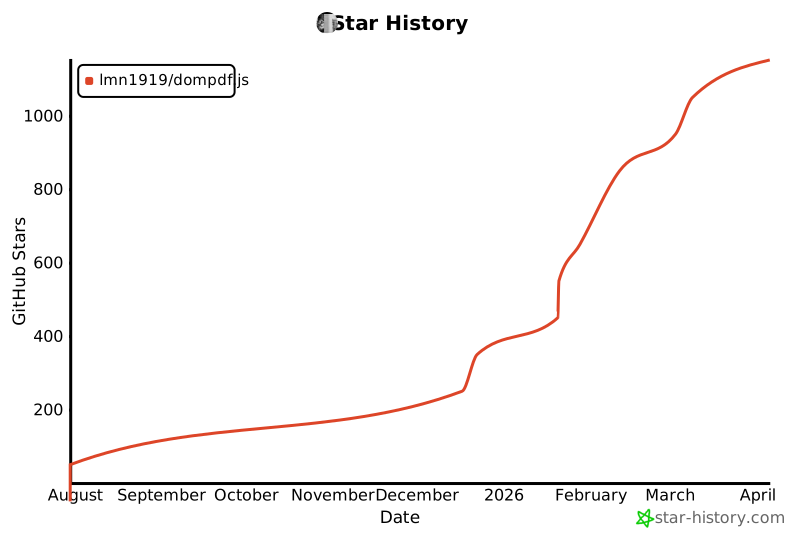](https://www.star-history.com/#lmn1919/dompdf.js&Date)
|
|
300
|
+
|