docxkeun 0.1.3 → 0.3.0
This diff represents the content of publicly available package versions that have been released to one of the supported registries. The information contained in this diff is provided for informational purposes only and reflects changes between package versions as they appear in their respective public registries.
- package/CHANGELOG.md +74 -0
- package/README.md +166 -16
- package/dist/api/editor.d.ts +231 -7
- package/dist/api/editor.js +1125 -26
- package/dist/api/headers.d.ts +51 -0
- package/dist/api/headers.js +133 -0
- package/dist/api/index.d.ts +6 -1
- package/dist/api/index.js +4 -1
- package/dist/api/lists.d.ts +37 -0
- package/dist/api/lists.js +132 -0
- package/dist/api/parts.js +1 -0
- package/dist/api/positions.js +1 -0
- package/dist/api/revisions.d.ts +61 -0
- package/dist/api/revisions.js +401 -0
- package/dist/api/selection.d.ts +57 -0
- package/dist/api/selection.js +91 -0
- package/dist/api/tables.d.ts +60 -0
- package/dist/api/tables.js +138 -0
- package/dist/charts/color.d.ts +45 -0
- package/dist/charts/color.js +322 -0
- package/dist/charts/format.d.ts +12 -0
- package/dist/charts/format.js +459 -0
- package/dist/charts/index.d.ts +11 -0
- package/dist/charts/index.js +8 -0
- package/dist/charts/model.d.ts +225 -0
- package/dist/charts/model.js +758 -0
- package/dist/charts/outline.d.ts +17 -0
- package/dist/charts/outline.js +214 -0
- package/dist/charts/render.d.ts +20 -0
- package/dist/charts/render.js +1772 -0
- package/dist/drawing/arrows.d.ts +37 -0
- package/dist/drawing/arrows.js +99 -0
- package/dist/drawing/formula.d.ts +40 -0
- package/dist/drawing/formula.js +159 -0
- package/dist/drawing/geometry.d.ts +61 -0
- package/dist/drawing/geometry.js +286 -0
- package/dist/drawing/index.d.ts +12 -0
- package/dist/drawing/index.js +8 -0
- package/dist/drawing/presets.d.ts +72 -0
- package/dist/drawing/presets.js +2874 -0
- package/dist/fonts/shaping/apply.d.ts +94 -0
- package/dist/fonts/shaping/apply.js +349 -0
- package/dist/fonts/shaping/arabic.d.ts +28 -0
- package/dist/fonts/shaping/arabic.js +235 -0
- package/dist/fonts/shaping/buffer.d.ts +53 -0
- package/dist/fonts/shaping/buffer.js +95 -0
- package/dist/fonts/shaping/gdef.d.ts +30 -0
- package/dist/fonts/shaping/gdef.js +66 -0
- package/dist/fonts/shaping/gpos.d.ts +86 -0
- package/dist/fonts/shaping/gpos.js +428 -0
- package/dist/fonts/shaping/gsub.d.ts +65 -0
- package/dist/fonts/shaping/gsub.js +313 -0
- package/dist/fonts/shaping/index.d.ts +32 -0
- package/dist/fonts/shaping/index.js +402 -0
- package/dist/fonts/shaping/indic.d.ts +6 -0
- package/dist/fonts/shaping/indic.js +805 -0
- package/dist/fonts/shaping/layout-common.d.ts +124 -0
- package/dist/fonts/shaping/layout-common.js +349 -0
- package/dist/fonts/shaping/plan.d.ts +87 -0
- package/dist/fonts/shaping/plan.js +152 -0
- package/dist/fonts/shaping/scripts.d.ts +26 -0
- package/dist/fonts/shaping/scripts.js +160 -0
- package/dist/fonts/shaping/shaper.d.ts +23 -0
- package/dist/fonts/shaping/shaper.js +5 -0
- package/dist/fonts/shaping/unicode.d.ts +34 -0
- package/dist/fonts/shaping/unicode.js +138 -0
- package/dist/images/bmp.d.ts +9 -0
- package/dist/images/bmp.js +234 -0
- package/dist/images/gif.d.ts +9 -0
- package/dist/images/gif.js +215 -0
- package/dist/images/index.d.ts +18 -0
- package/dist/images/index.js +63 -0
- package/dist/images/png-encode.d.ts +4 -0
- package/dist/images/png-encode.js +73 -0
- package/dist/images/size.d.ts +10 -0
- package/dist/images/size.js +83 -0
- package/dist/images/tiff.d.ts +14 -0
- package/dist/images/tiff.js +407 -0
- package/dist/index.d.ts +7 -2
- package/dist/index.js +5 -0
- package/dist/layout/bidi.d.ts +18 -0
- package/dist/layout/bidi.js +71 -0
- package/dist/layout/blocks.d.ts +20 -3
- package/dist/layout/blocks.js +88 -58
- package/dist/layout/cache.d.ts +31 -0
- package/dist/layout/cache.js +38 -0
- package/dist/layout/drawing.d.ts +30 -0
- package/dist/layout/drawing.js +120 -0
- package/dist/layout/engine.d.ts +3 -0
- package/dist/layout/engine.js +218 -11
- package/dist/layout/index.d.ts +1 -0
- package/dist/layout/index.js +1 -0
- package/dist/layout/lines.d.ts +63 -5
- package/dist/layout/lines.js +245 -20
- package/dist/layout/paint.d.ts +25 -3
- package/dist/layout/paint.js +26 -10
- package/dist/layout/shapes.d.ts +7 -0
- package/dist/layout/shapes.js +338 -0
- package/dist/layout/style.d.ts +4 -0
- package/dist/layout/style.js +2 -0
- package/dist/layout/types.d.ts +89 -2
- package/dist/math/boxes.d.ts +88 -0
- package/dist/math/boxes.js +166 -0
- package/dist/math/index.d.ts +29 -0
- package/dist/math/index.js +44 -0
- package/dist/math/layout.d.ts +13 -0
- package/dist/math/layout.js +771 -0
- package/dist/math/linear.d.ts +3 -0
- package/dist/math/linear.js +152 -0
- package/dist/math/omml.d.ts +15 -0
- package/dist/math/omml.js +57 -0
- package/dist/math/paths.d.ts +61 -0
- package/dist/math/paths.js +450 -0
- package/dist/math/symbols.d.ts +49 -0
- package/dist/math/symbols.js +269 -0
- package/dist/math/text.d.ts +53 -0
- package/dist/math/text.js +316 -0
- package/dist/metafile/canvas.d.ts +80 -0
- package/dist/metafile/canvas.js +515 -0
- package/dist/metafile/dib.d.ts +27 -0
- package/dist/metafile/dib.js +300 -0
- package/dist/metafile/emf.d.ts +31 -0
- package/dist/metafile/emf.js +591 -0
- package/dist/metafile/geometry.d.ts +49 -0
- package/dist/metafile/geometry.js +85 -0
- package/dist/metafile/index.d.ts +27 -0
- package/dist/metafile/index.js +34 -0
- package/dist/metafile/reader.d.ts +28 -0
- package/dist/metafile/reader.js +59 -0
- package/dist/metafile/state.d.ts +118 -0
- package/dist/metafile/state.js +172 -0
- package/dist/metafile/text.d.ts +17 -0
- package/dist/metafile/text.js +130 -0
- package/dist/metafile/wmf.d.ts +33 -0
- package/dist/metafile/wmf.js +395 -0
- package/dist/model/content.d.ts +92 -7
- package/dist/model/content.js +251 -17
- package/dist/model/document.d.ts +34 -1
- package/dist/model/document.js +80 -1
- package/dist/model/fields.d.ts +4 -0
- package/dist/model/fields.js +10 -0
- package/dist/model/numbering.d.ts +2 -0
- package/dist/model/numbering.js +22 -0
- package/dist/model/props.d.ts +2 -0
- package/dist/model/props.js +3 -0
- package/dist/opc/index.d.ts +1 -1
- package/dist/opc/package.d.ts +34 -0
- package/dist/opc/package.js +58 -4
- package/dist/pdf/export.js +97 -6
- package/dist/pdf/images.d.ts +7 -0
- package/dist/pdf/images.js +39 -2
- package/dist/render/activity.d.ts +179 -0
- package/dist/render/activity.js +1003 -0
- package/dist/render/clipboard.d.ts +29 -0
- package/dist/render/clipboard.js +401 -0
- package/dist/render/comments.d.ts +166 -0
- package/dist/render/comments.js +779 -0
- package/dist/render/context-menu.d.ts +124 -0
- package/dist/render/context-menu.js +525 -0
- package/dist/render/editing.d.ts +146 -5
- package/dist/render/editing.js +678 -53
- package/dist/render/index.d.ts +12 -0
- package/dist/render/index.js +11 -0
- package/dist/render/navigation-panel.d.ts +76 -0
- package/dist/render/navigation-panel.js +431 -0
- package/dist/render/selection.js +5 -0
- package/dist/render/svg.d.ts +4 -6
- package/dist/render/svg.js +69 -7
- package/dist/render/toolbar.d.ts +83 -0
- package/dist/render/toolbar.js +505 -0
- package/dist/render/ui/comment-layout.d.ts +39 -0
- package/dist/render/ui/comment-layout.js +79 -0
- package/dist/render/ui/icons.d.ts +6 -0
- package/dist/render/ui/icons.js +38 -0
- package/dist/render/ui/menu.d.ts +38 -0
- package/dist/render/ui/menu.js +274 -0
- package/dist/render/ui/nav-model.d.ts +11 -0
- package/dist/render/ui/nav-model.js +34 -0
- package/dist/render/ui/overflow.d.ts +5 -0
- package/dist/render/ui/overflow.js +18 -0
- package/dist/render/ui/popover.d.ts +18 -0
- package/dist/render/ui/popover.js +109 -0
- package/dist/render/ui/theme.d.ts +2 -0
- package/dist/render/ui/theme.js +29 -0
- package/dist/render/undo.d.ts +76 -0
- package/dist/render/undo.js +144 -0
- package/dist/render/viewer.d.ts +100 -7
- package/dist/render/viewer.js +304 -92
- package/dist/security/policy.d.ts +3 -0
- package/dist/security/policy.js +6 -2
- package/dist/security/protection.d.ts +1 -0
- package/dist/security/protection.js +1 -1
- package/dist/text/bidi-data.d.ts +53 -0
- package/dist/text/bidi-data.js +318 -0
- package/dist/text/bidi.d.ts +37 -0
- package/dist/text/bidi.js +508 -0
- package/dist/xml/ns.d.ts +5 -0
- package/dist/xml/ns.js +7 -0
- package/package.json +9 -2
package/CHANGELOG.md
CHANGED
|
@@ -2,6 +2,80 @@
|
|
|
2
2
|
|
|
3
3
|
All notable changes to docxkeun and docxkeun-fonts. Versions follow [semantic versioning](https://semver.org); while the version is 0.x, minor versions may contain breaking changes.
|
|
4
4
|
|
|
5
|
+
## 0.3.0 (2026-11-23)
|
|
6
|
+
|
|
7
|
+
### docxkeun
|
|
8
|
+
|
|
9
|
+
- **AI effect styles:** `aiActivity: { style }` and `viewer.activity.style` pick how the paragraph the AI is changing looks: `highlight` (the band, as before), `words` (the letters themselves shimmer), `underline`, `edge`, `spotlight`, `quiet` or `sparkles`. `ACTIVITY_STYLES` lists them with labels for a picker. The mark that stays after a change follows the style: a soft tint on the paragraph (`highlight`), glowing changed words (`words`), underlined changed words (`underline`), or the ✦ margin bar (the others); `marks: false` / `viewer.activity.marksShown` turn the marks off. Every style has a still form for `animate: false` and `prefers-reduced-motion`.
|
|
10
|
+
- The AI's marks now build up over a run of changes instead of showing only the latest one: each follows its paragraph as others are added or removed, a paragraph changed twice is marked against its text before the first change, and `clearMarks()` starts over. `ParagraphChange.from` gives a changed paragraph's index in the old text.
|
|
11
|
+
- The AI's marks and effects now follow zoom changes and the comment column's width (they kept their old positions before), and the change map's ticks show the text from before.
|
|
12
|
+
- **Tables:** `DocxEditor.insertTable()` adds a table that spans the text width, with an optional bold header row that repeats on each page, relative column widths and alignment. It uses Word's "Table Grid" style when the document has it, or plain borders. `insertTableRows()` adds rows formatted like the row they copy, `deleteTableRows()` and `deleteTable()` remove them, and `tableOf()` finds the table a cell paragraph is in. All of them record tracked changes when Track Changes is on, and rejecting an inserted table removes it whole.
|
|
13
|
+
- **Copying content:** `DocxEditor.copyBlocks()` copies paragraphs and tables with their formatting, lists and pictures, optionally starting on a new page. Lists in the copy start again at 1 (or continue with `restartLists: false`). Bookmarks, comment anchors and note references are left out and counted, and ids that must be unique are renewed.
|
|
14
|
+
- `DocxEditor.replaceRange()` also takes pieces of text, each formatted like a run you point to (`{ text, like, format }`), so rewritten text can keep which words were bold, underlined or coloured.
|
|
15
|
+
- `setList` with `sameListAs` now accepts the joined list's own `format`, and its errors say what to do instead: join a paragraph that is not in a list yet by making it one first; use `start` without `sameListAs` to number from a given value.
|
|
16
|
+
|
|
17
|
+
### docxkeun chat
|
|
18
|
+
|
|
19
|
+
- "Appearance" also picks the effect style and whether marks stay after each change, with a live sample. A reply's marks cover all its changes; opening a document or undoing a reply clears them.
|
|
20
|
+
- Claude now sees which words are bold, italic, underlined, struck through, superscript or subscript, and keeps them when it rewrites or translates text (it used to flatten a rewritten paragraph to one formatting).
|
|
21
|
+
- Claude can now copy content with its formatting and make and change tables, so "translate this document onto a new page" keeps the tables and lists instead of retyping them as plain text.
|
|
22
|
+
|
|
23
|
+
### docxkeun-mcp 0.2.0
|
|
24
|
+
|
|
25
|
+
- The live preview's header has a **Style** list and a **Marks** switch next to "AI effects", remembered in the browser. Marks build up while the AI works on a document and start over when you open another one.
|
|
26
|
+
- New tools: `copy_paragraphs` copies paragraphs and tables with their formatting and lists (for example onto a new page, to translate a document), `insert_table` makes a table, and `edit_table` adds or deletes rows or deletes a table.
|
|
27
|
+
- `set_list` explains how to join paragraphs that are not next to each other into one list, and accepts the list's own format with `sameListAs`.
|
|
28
|
+
- **Text formatting is visible and kept.** `read_document` tags text formatted differently from the rest of its paragraph (`<b>`, `<i>`, `<u>`, `<s>`, `<sup>`, `<sub>`) and names a paragraph's alignment and whole-paragraph formatting in its description, e.g. `[1] (centered; bold, underlined) AGREEMENT`. `edit_paragraph`, `insert_paragraphs`, `create_document` and `replace_text` take the same tags. When `edit_paragraph` rewrites a paragraph, each tagged part copies the formatting (font, size and colour too) of the matching phrase in the original, in order. Before, rewriting a paragraph gave all of it the first run's formatting, so bold names and amounts were lost in translations and small edits alike.
|
|
29
|
+
- New tool `copy_document` copies a document to a new file exactly as it is (an encrypted one stays encrypted), so "make a copy" or "translate it into a new file" keeps every bit of formatting. Before, the AI could only retype the text into `create_document`, which made a blank document and lost the text and paragraph formatting, lists and tables. `create_document`'s description now sends copies to `copy_document`.
|
|
30
|
+
|
|
31
|
+
## 0.2.0 (2026-11-22)
|
|
32
|
+
|
|
33
|
+
### docxkeun
|
|
34
|
+
|
|
35
|
+
- List editing: `DocxEditor.listItems()` returns each list paragraph's label as Word shows it (`"1."`, `"b)"`, `"•"`), and `DocxEditor.setList()` switches paragraphs between bullets, numbers, letters and roman numerals, restarts numbering, changes the list level, joins an existing list or removes a list. A changed list keeps the indentation and label formatting of the list it came from. `numbering.xml` is created when a document has none.
|
|
36
|
+
- **Tracked changes:** `new DocxEditor(doc, guard, { trackChanges: true, author })` records edits as Word revisions (insertions, deletions, formatting and paragraph changes, paragraph marks), signed and dated. Typing inside your own insertion extends it; deleting it removes it. `revisions()`, `acceptRevisions()` and `rejectRevisions()` (all, by id or by author) review them, including moves made in Word, and `setTrackChangesSetting()` turns Word's own Track Changes on or off. Edits follow the document's setting by default. Documents protected for tracked changes now accept edits (recorded) and refuse review. With `showDeletions`, insertions are underlined and deletions struck through in an author colour.
|
|
37
|
+
- **Drawings:** DrawingML shapes (153 preset shapes and custom geometry, theme fills and outlines, arrowheads, rotation and flips), text boxes (laid out as Word paragraphs, old VML ones too), groups and drawing canvases, charts (column, bar, line, area, pie, doughnut, scatter, bubble, radar, combinations, with axes, legends, data labels and number formats) and SmartArt (from Word's saved drawing) are drawn on screen and in PDFs.
|
|
38
|
+
- **Pictures:** GIF, BMP and TIFF are decoded (TIFF is shown in the browser as PNG; all three are embedded in PDFs), and EMF/WMF pictures are drawn as vectors. Pictures can be rotated and flipped. `DocxEditor.insertImage()` adds a picture at its natural size or a given one.
|
|
39
|
+
- **Equations:** Office Math is typeset: fractions, scripts, radicals, big operators with limits, delimiters that grow, matrices, accents, equation arrays and more, inline or on their own line. Text extraction gives Office's linear format (`x=(-b±√(b^2-4ac))/(2a)`).
|
|
40
|
+
- **Text wrapping:** text flows around floating pictures, shapes and text boxes (square, tight, through, top and bottom), on the paragraphs they meet.
|
|
41
|
+
- **Columns:** a multi-column section that ends with a continuous section break is balanced, as in Word.
|
|
42
|
+
- **Right-to-left text:** the Unicode bidi algorithm orders mixed Arabic, Hebrew and Latin text; right-to-left paragraphs (`w:bidi`) are laid out from the right margin with their indents and alignment mirrored. `DocxEditor.formatParagraph()` sets alignment, direction, indents, spacing and keep rules.
|
|
43
|
+
- **Headers, footers and notes:** `DocxDocument.storyParts()` lists header, footer and note parts, and `new DocxEditor(doc, guard, { part })` edits one. `DocxEditor.addFootnote()` adds a footnote (and the footnotes part when there is none).
|
|
44
|
+
- **In-page editing:** double-click a header or footer, or click a footnote or text box, to type in it. A formatting toolbar (`toolbar: true`), rich copy and paste (HTML from Word, Google Docs and web pages), Cmd/Ctrl+E/L/R/J alignment, Track Changes while typing, and a caret that steps over pictures. Layout re-uses the lines of unchanged paragraphs (`LayoutCache`, used by the viewer), so typing in long documents is several times faster.
|
|
45
|
+
- **AI assistants:** `viewer.selectionInfo()` and the `selectioninfo` event describe what the user selected (or where the caret is) with read_document's paragraph numbers, offsets, pages and text; `describeSelection()` turns it into a prompt line. `viewer.activity` shows an AI at work: a shimmer over the paragraphs it is changing and its own named caret, a scan line while it reads, then the change inked in with a fading glow, removed paragraphs floating away, change bars with ✦ in the margin and a change map on the right edge (`work`, `snapshot`, `reveal`, `idle`, `clearMarks`; follows `prefers-reduced-motion`). Optional: `aiActivity: false`, or `{ animate: false }` for highlights without motion and `{ marks: false }` without change bars; `viewer.activity.enabled` / `.animate` / `.marksShown` at run time. `{ name, color }` (and `viewer.activity.name` / `.color`) set the name on the caret and the colours, one CSS colour or two for a gradient; from CSS, `--docxkeun-ai-color-1` / `-2`. The caret's label turns dark on light colours.
|
|
46
|
+
- **Adding headers and footers:** `DocxEditor.setHeader()` / `setFooter()` create or replace them, for every section or one, on every page, the first page (w:titlePg) or even pages (Word's even/odd setting). Tabs split a line into left, centre and right parts, and `{PAGE}`, `{NUMPAGES}`, `{SECTIONPAGES}` become page number fields. A part shared with other sections is not overwritten, Track Changes records the text changes, and `removeHeader()` / `removeFooter()` delete parts nothing uses any more. `headersAndFooters()` lists them with their sections and text.
|
|
47
|
+
- New exports: `describeChart`, `readChart`, `renderChart`, `mathToText`, `layoutMath`, `renderMetafile`, `sniffImage`, `decodeRaster`, `imageInfo`, `LayoutCache`, `FormatToolbar`, `htmlToParagraphs`.
|
|
48
|
+
- **Viewer UI:** one shared look and frame for four optional parts. `toolbar` (fold to a "Show toolbar" strip, overflow menu), `navigation` (240px panel: back/forward, Outline, Bookmarks and Links tabs, search, per-tab previous/next, folds to a 36px rail), `comments` (one column of compact cards, margin bubbles on narrow viewers with `mode: 'auto'`, Reply/Resolve/Delete, "Show resolved") and `contextMenu` (right-click menu that follows what was clicked; Shift+right-click shows the browser's). Each has a controller on the viewer (`viewer.toolbar`, `.navigation`, `.comments`, `.contextMenu`), the `chromechange` event reports changes and nothing is stored. Theme with `--docxkeun-ui-bg`, `-fg`, `-muted`, `-line`, `-hover`, `-accent`, `-accent-soft`, `-radius`, `-shadow`, `-font` (the `--docxkeun-toolbar-*` variables still work). `scrollToComment(id)` now opens the thread, and `viewer.comments.width` is what fit-to-window apps subtract.
|
|
49
|
+
- **Undo for everything:** `viewer.editing.transaction(label, fn)` makes an action that touches several parts (comments, relationships, headers, numbering, styles) one undo step; a failure restores the document and emits `editerror`. Inside `fn`, changes go through the `editor` it receives; edits requested meanwhile wait their turn. `DocxDocument.checkpoint()` / `restore()` back it. Fixes ⌘Z after adding a comment or link leaving markers half-removed. Undo keeps 200 steps.
|
|
50
|
+
- **Editor:** `setImageAlt()`, `setHyperlinkTarget()` (URL or bookmark, same scheme rules as `addHyperlink`) and `clearFormatting()`.
|
|
51
|
+
- **Breaking (0.x):** `DocxEditor.removeHyperlink()` is now `async`; call it with `await`. It also drops the link's relationship when nothing else uses it, and a guard refusal rejects the promise instead of throwing.
|
|
52
|
+
- New exports (`docxkeun/viewer`): `NavigationController`, `NavTab`, `NavigationOptions`, `CommentsController`, `CommentThread`, `CommentsMode`, `CommentsOptions`, `relativeTime`, `filterTargets`, `currentHeading`, `ToolbarController`, `ContextMenuController`, `hitTarget`, `defaultItems`, `parseLinkTarget`, `MenuItem`, `MenuHandle`, `MenuContext`, `MenuTarget`, `MenuTargetKind`, `MenuEnv`, `MenuActions`, `ContextMenuOptions`, `ToolbarOptions`, `FormatChoice`, `ParagraphChoice`, `openMenu`, `promptPopover`.
|
|
53
|
+
- `viewer.navigation` is now a class instance (`NavigationController`). `const { headings, bookmarks, links } = viewer.navigation` works as before, but its lists are getters, so `{ ...viewer.navigation }` and `JSON.stringify(viewer.navigation)` no longer include them.
|
|
54
|
+
|
|
55
|
+
### docxkeun chat (new app, not published)
|
|
56
|
+
|
|
57
|
+
- A web app in `packages/chat`: open a `.docx`, chat with Claude about it with your own API key, and watch the changes appear live in the docxkeun viewer. Undo per reply, selection as context, download and PDF export.
|
|
58
|
+
- The viewer shimmers the paragraphs Claude is about to change while it is still writing the tool call (from the streamed tool input), then animates the change. The selection (or the caret's paragraph) goes with the next message, with paragraph numbers and page.
|
|
59
|
+
- The document has the viewer's navigation rail and comment cards, and the right-click menu has "Ask Claude about this", which puts the selection into the message box.
|
|
60
|
+
- "Appearance" sets the name on Claude's caret and its colours, remembered in the browser.
|
|
61
|
+
- The Claude calls go through a small relay on your computer (`pnpm dev:chat`, or `pnpm start:chat` for the build), which keeps the key in memory: it works for organizations that block browser calls to the API, and the browser never stores the key. The relay answers only its own page and forwards only Messages and Models calls.
|
|
62
|
+
|
|
63
|
+
### docxkeun-mcp 0.1.0 (new package)
|
|
64
|
+
|
|
65
|
+
- An MCP server for Word documents, so Claude Code, Claude Desktop and other MCP clients can work with `.docx` files through docxkeun.
|
|
66
|
+
- Tools to list, read, search and inspect documents; find and replace; fill templates; edit, insert and delete paragraphs; format text; change lists (bullets, numbers, letters, levels); add links and bookmarks; add, reply to, resolve and delete comments; create documents; lock regions; set protection and open passwords; and export PDFs.
|
|
67
|
+
- Only files inside the folders given on the command line can be read or written (symlinks and `..` cannot escape them). Writes go through a temporary file.
|
|
68
|
+
- `--preview` runs a live preview on 127.0.0.1: docxkeun's viewer redraws a document whenever a tool or anything else changes it, with a note of what changed. Read-only, local only, and it checks the Host header against DNS rebinding. `--preview-only` runs just the preview, to watch a folder.
|
|
69
|
+
- `--role viewer|commenter|editor|owner` decides which tools the AI gets, and docxkeun's `AccessPolicy` enforces it together with the document's protection and locked regions.
|
|
70
|
+
- The document operations behind the tools are exported (`OPERATIONS`, `operationsFor`, `contextFor`) for building other front ends, such as docxkeun chat.
|
|
71
|
+
- Tools for tracked changes (`list_revisions`, `accept_revisions`, `reject_revisions`, `set_track_changes`), headers, footers, notes and text boxes (`read_headers_footers`, `replace_story_text`), pictures (`insert_image`, `list_objects`), footnotes (`add_footnote`) and paragraph formatting (`format_paragraph`, including right-to-left). `read_document` shows pictures, charts (with their data), shapes, equations, text direction and tracked changes. Edits are signed with `--author` when Track Changes is on, and documents protected for tracked changes can now be edited.
|
|
72
|
+
- `set_header_footer` and `remove_header_footer`: headers and footers with page numbers, left / centre / right parts, first-page and even-page versions, per section. `read_headers_footers` shows page fields as `{PAGE}` and which pages and sections each one is for.
|
|
73
|
+
- The live preview's "AI effects" menu: animated, still or off. The AI's caret carries the `--author` name, and `--ai-color` sets its colours (one CSS colour, or two for a gradient).
|
|
74
|
+
- `get_selection` (and the resource `docxkeun://selection`): what the user selected in the live preview, so "this" and "here" mean something. The preview's header shows what is shared. Pages report positions only, with a per-server token; the text comes from the file.
|
|
75
|
+
- The live preview shows where the AI works while a tool runs (shimmer and caret, or a scan line for reads) and animates each change when it lands.
|
|
76
|
+
- The live preview has the navigation rail and comment cards (margin bubbles in a narrow pane), and a read-only right-click menu with Copy, Copy link address and Open link.
|
|
77
|
+
- It needs docxkeun 0.2.0.
|
|
78
|
+
|
|
5
79
|
## 0.1.3 (2026-11-02)
|
|
6
80
|
|
|
7
81
|
Documentation only. No code changes.
|
package/README.md
CHANGED
|
@@ -6,7 +6,7 @@
|
|
|
6
6
|
|
|
7
7
|
A DOCX viewer, editor and DOCX-to-PDF converter for JavaScript and TypeScript. Read, render, edit and convert `.docx` files in the browser (and Node), with **zero runtime dependencies**. Everything is implemented in this package: zip, XML, the document model, a page layout engine, an SVG viewer, a PDF writer, and the cryptography for password-protected files.
|
|
8
8
|
|
|
9
|
-
**[Live demo](https://kevinkjs.github.io/docxkeun/)**: open a `.docx`, type on the page,
|
|
9
|
+
**[Live demo](https://kevinkjs.github.io/docxkeun/)**: open a `.docx`, type on the page, right-click to comment or link, track changes, undo anything, export a PDF.
|
|
10
10
|
|
|
11
11
|
[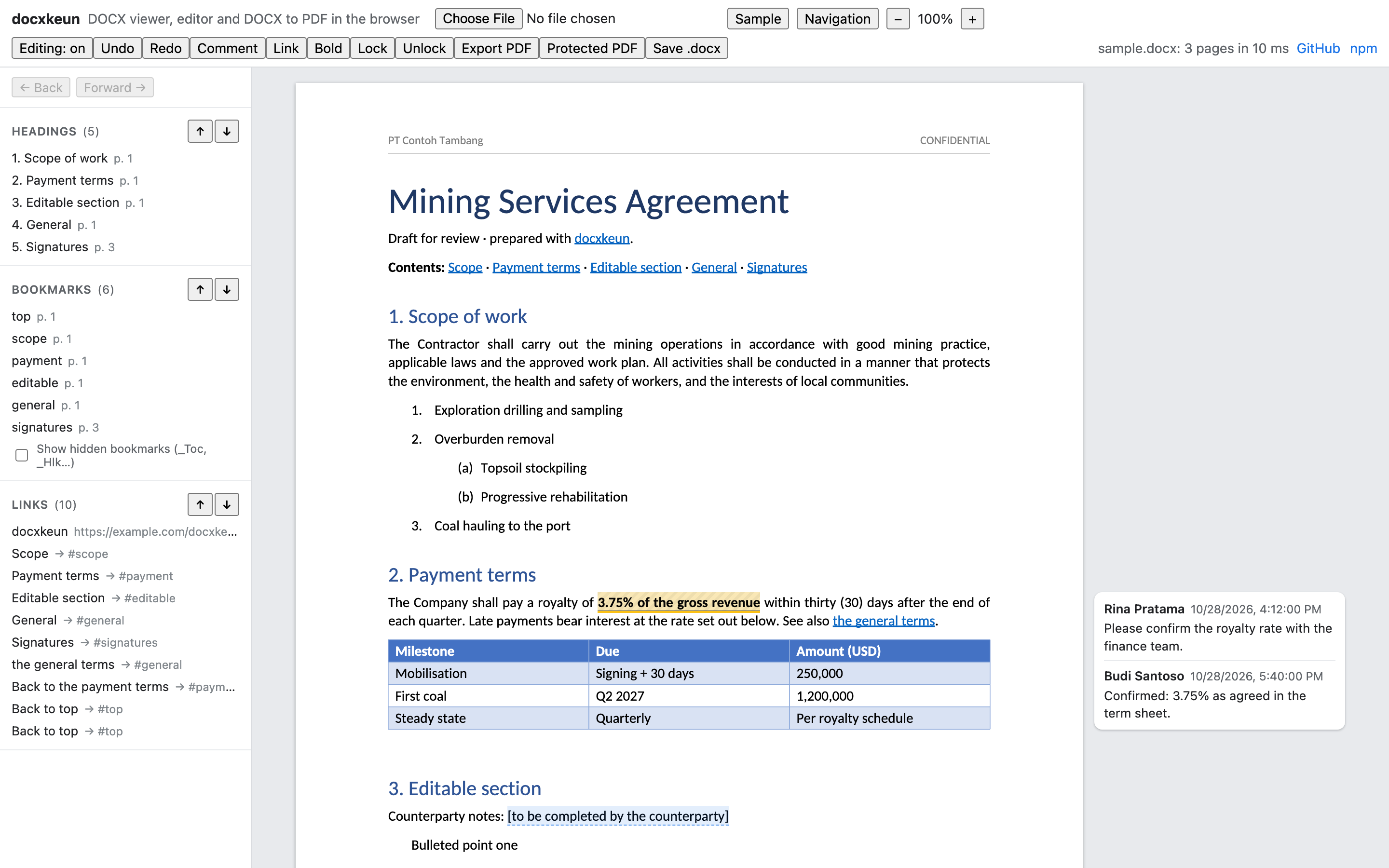](https://kevinkjs.github.io/docxkeun/)
|
|
12
12
|
|
|
@@ -14,11 +14,12 @@ A DOCX viewer, editor and DOCX-to-PDF converter for JavaScript and TypeScript. R
|
|
|
14
14
|
|
|
15
15
|
| Area | What you get |
|
|
16
16
|
|---|---|
|
|
17
|
-
| Read / write | Open `.docx` (also `.dotx`/`.docm`), edit through a code API, save. Parts you did not touch are written back byte-for-byte; unknown markup is preserved. |
|
|
18
|
-
| Render | Paginated, Word-like layout: styles, lists, tabs, tables, sections, columns, headers/footers, footnotes, page numbers,
|
|
17
|
+
| Read / write | Open `.docx` (also `.dotx`/`.docm`), edit through a code API, save. Parts you did not touch are written back byte-for-byte; unknown markup is preserved. Record, accept and reject tracked changes. |
|
|
18
|
+
| Render | Paginated, Word-like layout: styles, lists, tabs, tables, sections, balanced columns, headers/footers, footnotes, page numbers. Pictures (PNG, JPEG, GIF, BMP, TIFF, EMF, WMF), shapes and text boxes, charts, SmartArt and equations, with text wrapping around floating objects. Right-to-left text (Arabic, Hebrew) and complex scripts. One SVG per page with real, selectable text. |
|
|
19
19
|
| PDF | Native PDF from the same layout: embedded font subsets, searchable text, links, bookmarks as named destinations, an outline from headings, comments as annotations. |
|
|
20
20
|
| Permissions | Word protection (read-only / comments / tracked changes / forms) with editable ranges, an app-level `AccessPolicy`, password-to-open `.docx` encryption, PDF passwords and permission flags. |
|
|
21
21
|
| Comments, anchors, links | Threaded comments (all five Word comment parts), bookmarks, internal and external hyperlinks, field-code links. |
|
|
22
|
+
| AI assistants | [`docxkeun-mcp`](packages/mcp#readme): an MCP server that lets Claude and other AI assistants read, edit, comment on, protect and export your `.docx` files. |
|
|
22
23
|
|
|
23
24
|
## Install
|
|
24
25
|
|
|
@@ -73,18 +74,103 @@ viewer.on('navigate', ({ target, location }) => highlightInMyPanel(target));
|
|
|
73
74
|
- Bookmarks whose names start with `_` (`_Toc…`, `_Hlk…`, `_GoBack`) are marked `hidden`, as Word hides them. `next`/`previous` skip them unless you pass `{ includeHidden: true }`.
|
|
74
75
|
- `collectNavTargets(layout)` from `docxkeun/viewer` gives the same lists without a viewer (e.g. in Node).
|
|
75
76
|
|
|
76
|
-
The
|
|
77
|
+
The `navigation` option adds a ready-made panel for these lists (see [Viewer UI](#viewer-ui)); the playground uses it with Alt+←/→ for back and forward.
|
|
77
78
|
|
|
78
79
|
### Typing on the page
|
|
79
80
|
|
|
80
81
|
```ts
|
|
81
|
-
const viewer = new DocxViewer(el, { fonts, editable: true });
|
|
82
|
+
const viewer = new DocxViewer(el, { fonts, editable: true, toolbar: true }); // or { editable: { guard: policy, trackChanges: true, author: 'Rina' } }
|
|
82
83
|
viewer.on('editerror', ({ error }) => toast(error.message)); // e.g. PermissionError under read-only protection
|
|
84
|
+
viewer.on('storychange', ({ story }) => console.log(story.kind)); // 'body', 'header', 'footer', 'footnote', 'endnote' or 'textbox'
|
|
83
85
|
viewer.editing!.undo();
|
|
84
86
|
viewer.setEditable(false); // back to view-only
|
|
85
87
|
```
|
|
86
88
|
|
|
87
|
-
Click to place the caret and type. Supported: text and IME input, Backspace/Delete (Alt/Ctrl for words), Enter (new paragraph, following the style's "next" style), Shift+Enter (line break), Tab, arrow keys, Home/End, Shift to select, double-click a word, drag to select, Cmd/Ctrl+A,
|
|
89
|
+
Click to place the caret and type. Supported: text and IME input, Backspace/Delete (Alt/Ctrl for words), Enter (new paragraph, following the style's "next" style), Shift+Enter (line break), Tab, arrow keys, Home/End, Shift to select, double-click a word, drag to select, Cmd/Ctrl+A, Cmd/Ctrl+B/I/U, Cmd/Ctrl+E/L/R/J for alignment, Cmd/Ctrl+Z / Shift+Z / Y for undo and redo, and Cmd/Ctrl-click to follow a link. Every change goes through `DocxEditor`, so the same access guard applies and everything the editor does not understand stays in the file.
|
|
90
|
+
|
|
91
|
+
- **Headers, footers, notes and text boxes:** double-click a header or footer to type in it (as in Word), click a footnote, endnote or text box to edit it, and click the body to go back.
|
|
92
|
+
- **Toolbar:** `toolbar: true` adds a formatting bar above the pages (paragraph style, size, bold/italic/underline/strikethrough, colour, highlight, alignment, lists, indents, text direction, undo/redo, Track Changes). It follows the formatting at the caret through the `caretchange` event, so you can also build your own: `viewer.editing.format({ bold: true })`, `formatParagraphs({ align: 'center' })`, `setStyle('Heading1')`, `setList('bullet')`, `indent(1)`, `trackChanges = true`.
|
|
93
|
+
- **Copy and paste keep formatting:** HTML from Word, Google Docs and web pages comes in with bold, italic, underline, colours, sizes, links, headings and lists; copying puts HTML and plain text on the clipboard.
|
|
94
|
+
- **Pictures** count as one character: the caret steps over them, and Backspace/Delete removes them.
|
|
95
|
+
- **Track Changes:** with Word's Track Changes on (or `trackChanges: true`), typing is recorded as tracked insertions and deletions.
|
|
96
|
+
- **Speed:** layout keeps the measured lines of unchanged paragraphs, so a keystroke re-measures only the paragraph you type in (a 90-page document re-lays out in about 45 ms).
|
|
97
|
+
|
|
98
|
+
### AI assistants on the page
|
|
99
|
+
|
|
100
|
+
Two pieces for apps that let an AI edit the document (the [chat app](packages/chat#readme) and the MCP [live preview](packages/mcp#live-preview) use both):
|
|
101
|
+
|
|
102
|
+
```ts
|
|
103
|
+
import { describeSelection } from 'docxkeun/editor';
|
|
104
|
+
|
|
105
|
+
// What the user selected, like the "selected lines" an editor shares with a coding agent.
|
|
106
|
+
viewer.on('selectioninfo', ({ selection }) => {
|
|
107
|
+
// { story: 'body', start: { paragraph: 4, offset: 22 }, end: …, text: '30 days', pages: [2], paragraphs: [...] }
|
|
108
|
+
if (selection) prompt.context = describeSelection(selection, { document: 'contract.docx' });
|
|
109
|
+
// "Selected in contract.docx: paragraph 4, page 2, 7 characters.
|
|
110
|
+
// [4] Payment is due within «30 days» of the invoice date."
|
|
111
|
+
});
|
|
112
|
+
viewer.selectionInfo(); // the same, on demand (the caret when typing is on, else the text selection)
|
|
113
|
+
|
|
114
|
+
// Show the AI at work, then what it changed.
|
|
115
|
+
viewer.activity.work([4, 5], { label: 'editing' }); // shimmer over paragraphs 4–5, and "Claude is editing…" on its own caret
|
|
116
|
+
const before = viewer.activity.snapshot();
|
|
117
|
+
editor.replaceRange(editor.find('30 days')[0], '45 days');
|
|
118
|
+
await viewer.activity.reveal(before); // new text inks in, removed text floats away, change bars and a change map stay
|
|
119
|
+
viewer.activity.clearMarks();
|
|
120
|
+
```
|
|
121
|
+
|
|
122
|
+
Paragraph numbers are the ones docxkeun-mcp's `read_document` uses (table cells included), so a selection can go straight into a tool call.
|
|
123
|
+
|
|
124
|
+
The effects are optional: `new DocxViewer(el, { aiActivity: false })` turns them off (calls become no-ops; `reveal` still returns the diff), or `aiActivity: { animate: false }` keeps the highlights without motion and `marks: false` leaves out the change bars. At run time: `viewer.activity.enabled`, `.animate` and `.marksShown`. They also follow `prefers-reduced-motion`.
|
|
125
|
+
|
|
126
|
+
Name and colours: `aiActivity: { name: 'Aria', color: ['#0b57d0', '#1e8e3e'] }` puts "Aria is editing…" on the caret and draws the caret, shimmer, glow and change marks from blue to green; one colour (`color: '#0b57d0'`) is used for both ends. Change them at run time with `viewer.activity.name` and `viewer.activity.color` (`undefined` goes back to the default purple to orange), or from CSS with `--docxkeun-ai-color-1` and `--docxkeun-ai-color-2` (any CSS colour). The caret's label turns dark when white text would be hard to read on the colours you pick.
|
|
127
|
+
|
|
128
|
+
Effect styles: `aiActivity: { style: 'words' }` (or `viewer.activity.style = 'words'` at run time) picks how the paragraph being changed looks, and so which mark stays after the change. `ACTIVITY_STYLES` lists them with a label and a line for a picker:
|
|
129
|
+
|
|
130
|
+
| Style | While the AI works | After the change |
|
|
131
|
+
|---|---|---|
|
|
132
|
+
| `highlight` (default) | a tinted band sweeps over the lines | the paragraph keeps a soft tint |
|
|
133
|
+
| `words` | the letters themselves shimmer | the changed words glow |
|
|
134
|
+
| `underline` | a streak runs under each line | the changed words stay underlined |
|
|
135
|
+
| `edge` | a soft glow breathes around the paragraph | the ✦ bar in the margin |
|
|
136
|
+
| `spotlight` | the rest of the page dims | the ✦ bar in the margin |
|
|
137
|
+
| `quiet` | only the caret and a pulsing margin bar | the ✦ bar in the margin |
|
|
138
|
+
| `sparkles` | small ✦ drift over the paragraph | the ✦ bar in the margin |
|
|
139
|
+
|
|
140
|
+
Marks build up over a run of changes, each following its paragraph as others are added or removed (a paragraph changed twice is marked against its text before the first change), until `viewer.activity.clearMarks()`: the chat app clears them when you send a new message, the live preview when you open another document. `marks: false` (or `viewer.activity.marksShown = false`) leaves nothing behind. The change map on the right edge jumps to each change, and its ticks show the text from before.
|
|
141
|
+
|
|
142
|
+
### Viewer UI
|
|
143
|
+
|
|
144
|
+
Four optional parts share one look and one frame: a toolbar, a navigation panel, a comment column and a right-click menu. With none enabled the viewer's DOM is unchanged.
|
|
145
|
+
|
|
146
|
+
```ts
|
|
147
|
+
const viewer = new DocxViewer(el, {
|
|
148
|
+
fonts, editable: true,
|
|
149
|
+
toolbar: { collapsed: false }, // true | HTMLElement | { container?, collapsed?, styles? }
|
|
150
|
+
navigation: { tab: 'outline' }, // true | { tab?: 'outline' | 'bookmarks' | 'links', collapsed? }
|
|
151
|
+
comments: { mode: 'auto', showResolved: false }, // 'auto' | 'cards' | 'bubbles'
|
|
152
|
+
contextMenu: { // true | { items?(at, defaults) }
|
|
153
|
+
items: (at, defaults) => [...defaults, '-', { label: 'Ask Claude', run: () => ask(at.selection) }],
|
|
154
|
+
},
|
|
155
|
+
});
|
|
156
|
+
viewer.toolbar.hide(); viewer.toolbar.collapsed = true; // show(), hide(), visible, collapsed
|
|
157
|
+
viewer.navigation.show('links'); viewer.navigation.refresh(); // show(tab) unfolds onto that tab; hide(), collapsed, tab; headings, bookmarks, links as before
|
|
158
|
+
viewer.comments.open(id); viewer.comments.compose(); // close(), mode, effectiveMode, showResolved, width
|
|
159
|
+
viewer.contextMenu.open(x, y); // enable(), disable(), close(), enabled
|
|
160
|
+
viewer.on('chromechange', ({ part, visible, collapsed }) => remember(part, visible, collapsed));
|
|
161
|
+
|
|
162
|
+
// One undo step for an action that touches several parts (comment parts, relationships, headers, numbering, styles).
|
|
163
|
+
await viewer.editing!.transaction('Add note', async (editor) => { /* several editor calls */ });
|
|
164
|
+
```
|
|
165
|
+
|
|
166
|
+
- **Toolbar:** a fold button hides the bar to a thin "Show toolbar" strip; groups that do not fit move into a "⋯" menu. Arrow keys move between buttons.
|
|
167
|
+
- **Navigation panel:** 240px beside the pages, with back/forward, Outline, Bookmarks and Links tabs, search, previous/next per tab and "Show hidden bookmarks". It folds to a 36px rail (with a Comments button when the document has comments) and starts folded when the frame is narrower than 720px, unless `collapsed` is given.
|
|
168
|
+
- **Comments:** one column for the whole document with compact cards. Opening a thread lines the card up with its text; when editing is allowed it has Reply, Resolve and Delete, and resolved threads sit behind "Show resolved (N)". `auto` switches to margin bubbles when the viewer is narrower than 0.75 × the widest page + 300px; `showComments: false` still hides everything. An app that fits the page to the window should subtract `viewer.comments.width`. `commentclick` fires when a thread opens, and `scrollToComment(id)` opens it too.
|
|
169
|
+
- **Right-click menu:** off by default. Items change with what was clicked (text, link, comment, picture, header or footer), and ones the access guard refuses are greyed with the reason as a tooltip. Shift+right-click shows the browser's own menu, and right-clicks outside the pages are left alone. A read-only viewer drops Cut and Paste, and Paste shows "Paste (⌘V)" where the async clipboard is missing.
|
|
170
|
+
- **Theming:** set `--docxkeun-ui-bg`, `-fg`, `-muted`, `-line`, `-hover`, `-accent`, `-accent-soft`, `-radius`, `-shadow` and `-font` on the container or `:root` (light by default; set them for a dark theme). The older `--docxkeun-toolbar-*` variables still work. The library stores nothing: use `chromechange` to remember what the user folded.
|
|
171
|
+
- **Undo:** `transaction()` makes everything an action changed one undo step, and a failure restores the document, emits `editerror` and rethrows. Inside the function, change the document through the `editor` it receives; edits requested elsewhere meanwhile wait their turn and are undo steps of their own. Typing waits for a pending transaction: keys pressed while one runs are ignored, as are undo and redo. Undo keeps 200 steps. Adding a comment or link now undoes completely.
|
|
172
|
+
|
|
173
|
+
The playground uses all four; `docxkeun/viewer` exports the controllers (`NavigationController`, `CommentsController`, `ContextMenuController`, `ToolbarController`) and the pieces for custom menus (`openMenu`, `promptPopover`).
|
|
88
174
|
|
|
89
175
|
### Editing from code
|
|
90
176
|
|
|
@@ -109,7 +195,59 @@ await editor.resolveComment(id);
|
|
|
109
195
|
const bytes = await viewer.document!.save();
|
|
110
196
|
```
|
|
111
197
|
|
|
112
|
-
Also available: `insertText`, `appendText`, `replaceRange
|
|
198
|
+
Also available: `insertText`, `appendText`, `replaceRange` (text, or pieces each formatted like a given run: `[{ text, like: boldRun }, { text, like: plainRun }]`), `replaceAll`, `deleteRange` (across paragraphs), `insertParagraph`, `deleteParagraph`, `setParagraphStyle`, `formatParagraph` (alignment, right-to-left, indents, spacing, keep rules), `insertImage`, `addFootnote`, `setHeader` / `setFooter` / `removeHeader` / `removeFooter` / `headersAndFooters()`, `await removeHyperlink` (async since it also drops the link's relationship when unused), `setHyperlinkTarget`, `setImageAlt`, `clearFormatting`, `hyperlinks()`, `bookmarks()`, `removeBookmark`, `editComment`, `deleteComment`, `addEditableRange`, `removeEditableRange`.
|
|
199
|
+
|
|
200
|
+
```ts
|
|
201
|
+
// Tracked changes: record edits as Word revisions, then review them.
|
|
202
|
+
const tracked = new DocxEditor(doc, policy, { trackChanges: true, author: 'Rina Pratama' });
|
|
203
|
+
tracked.replaceRange(tracked.find('30 days')[0], '45 days'); // a w:del and a w:ins, signed and dated
|
|
204
|
+
tracked.revisions(); // [{ id, kind: 'delete', author, date, text: '30 days' }, { kind: 'insert', … }]
|
|
205
|
+
tracked.acceptRevisions({ author: 'Rina Pratama' }); // or rejectRevisions({ ids: ['3'] }); no filter = all
|
|
206
|
+
await tracked.setTrackChangesSetting(true); // turn on Word's own Track Changes for the file
|
|
207
|
+
|
|
208
|
+
// Headers, footers and notes: an editor per part.
|
|
209
|
+
for (const story of doc.storyParts()) console.log(story.kind, story.part); // 'header' word/header1.xml …
|
|
210
|
+
const header = new DocxEditor(doc, policy, { part: 'word/header1.xml' });
|
|
211
|
+
header.replaceAll('Draft', 'Final');
|
|
212
|
+
|
|
213
|
+
// Headers and footers: tabs split left / centre / right, {PAGE} {NUMPAGES} {SECTIONPAGES} are page numbers.
|
|
214
|
+
await editor.setHeader('ACME Ltd.\tService Agreement\tConfidential');
|
|
215
|
+
await editor.setFooter('Page {PAGE} of {NUMPAGES}', { align: 'center' });
|
|
216
|
+
await editor.setFooter('', { type: 'first' }); // a blank footer on the first page; also 'even', and { section: 2 }
|
|
217
|
+
await editor.removeHeader({ section: 2 });
|
|
218
|
+
|
|
219
|
+
// Pictures and footnotes.
|
|
220
|
+
await editor.insertImage(editor.find('Site plan')[0].end, pngBytes, { width: 300, alt: 'Site plan' });
|
|
221
|
+
await editor.addFootnote(editor.find('royalty')[0].end, 'Calculated on gross revenue.');
|
|
222
|
+
editor.formatParagraph(editor.paragraphs()[3].el, { direction: 'rtl', align: 'right', spaceAfter: 6 });
|
|
223
|
+
```
|
|
224
|
+
|
|
225
|
+
Lists: `listItems()` gives every list paragraph's label as Word shows it (`"1."`, `"b)"`, `"•"`), and `setList` changes list formatting. A changed list keeps the indentation of the list it was in.
|
|
226
|
+
|
|
227
|
+
```ts
|
|
228
|
+
const items = [...editor.listItems().keys()]; // w:p elements, in document order
|
|
229
|
+
await editor.setList(items, { format: 'decimal' }); // a. b. → 1. 2. (also 'bullet', 'decimalParen', 'lowerLetter', 'upperLetter', 'lowerRoman', 'upperRoman')
|
|
230
|
+
await editor.setList(items, { start: 5 }); // restart the numbering, same format
|
|
231
|
+
await editor.setList([items[1]!], { level: 1 }); // indent one level
|
|
232
|
+
const extra = editor.insertParagraph({ after: items[1]! }, 'Admin fee');
|
|
233
|
+
await editor.setList([extra], { sameListAs: items[1]! }); // continue an existing list
|
|
234
|
+
await editor.setList(items, { format: 'none' }); // no longer a list
|
|
235
|
+
```
|
|
236
|
+
|
|
237
|
+
Tables and copies: `insertTable` builds a table that spans the text width (Word's "Table Grid" style when the document has it, otherwise plain borders), `insertTableRows` / `deleteTableRows` / `deleteTable` change one, and `tableOf(paragraph)` finds the table a cell paragraph is in. `copyBlocks` copies paragraphs and tables with their formatting, lists and pictures, for example to translate a document onto a new page. With Track Changes on, all of these are recorded as revisions.
|
|
238
|
+
|
|
239
|
+
```ts
|
|
240
|
+
const [first, last] = [editor.paragraphs()[0]!.el, editor.paragraphs().at(-1)!.el];
|
|
241
|
+
const { blocks, dropped } = await editor.copyBlocks(first, last, 'end', { pageBreak: true }); // lists in the copy start again at 1
|
|
242
|
+
// dropped: { comments, notes, bookmarks } left out of the copy, since they can exist only once
|
|
243
|
+
|
|
244
|
+
const table = editor.insertTable({ after: blocks.at(-1)! }, [
|
|
245
|
+
['No', 'Description', 'Total'],
|
|
246
|
+
['1', 'Land benefit value', 'Rp 201.801.600'],
|
|
247
|
+
], { header: true, widths: [1, 4, 2] }); // bold header row, repeated on each page
|
|
248
|
+
editor.insertTableRows(table, 2, [['2', 'Admin fee', 'Rp 500.000']]); // copies the formatting of the row above
|
|
249
|
+
editor.deleteTableRows(table, 2); // 0-based; deleting every row deletes the table
|
|
250
|
+
```
|
|
113
251
|
|
|
114
252
|
### PDF
|
|
115
253
|
|
|
@@ -189,6 +327,18 @@ const DocxView = createDocxViewerComponent(React); // no React dependency in do
|
|
|
189
327
|
<DocxView file={bytes} fonts={fonts} onReady={(viewer) => setViewer(viewer)} />
|
|
190
328
|
```
|
|
191
329
|
|
|
330
|
+
## AI assistants (MCP)
|
|
331
|
+
|
|
332
|
+
[`docxkeun-mcp`](packages/mcp#readme) is an [MCP](https://modelcontextprotocol.io) server built on docxkeun. It gives Claude Code, Claude Desktop and other MCP clients tools to read documents (including pictures, charts, equations, headers, footers and notes), find and replace text, fill templates, format paragraphs, insert pictures and footnotes, comment, record and review tracked changes, lock regions, set protection and passwords, and export PDFs, limited to the folders you choose and to a role (viewer, commenter, editor or owner).
|
|
333
|
+
|
|
334
|
+
```bash
|
|
335
|
+
claude mcp add docxkeun -- npx -y docxkeun-mcp ~/Documents/contracts
|
|
336
|
+
```
|
|
337
|
+
|
|
338
|
+
It is a separate package so that docxkeun itself keeps zero dependencies.
|
|
339
|
+
|
|
340
|
+
[`docxkeun chat`](packages/chat#readme) is a small web app built on the same tools: open a `.docx`, chat with Claude about it using your own API key, and watch the edits appear in the docxkeun viewer as they happen. Run it with `pnpm dev:chat`; a small local server makes the API calls and keeps the key in memory.
|
|
341
|
+
|
|
192
342
|
## Fonts
|
|
193
343
|
|
|
194
344
|
Word documents name fonts (Calibri, Times New Roman...) but rarely contain them, and browsers cannot read the system's font files. For exact layout and for PDF export, layout needs font files in a `FontRegistry`.
|
|
@@ -225,21 +375,21 @@ TrueType, OpenType (CFF) and `.ttc` collections are supported. PDF embedding res
|
|
|
225
375
|
|
|
226
376
|
## Status and limitations
|
|
227
377
|
|
|
228
|
-
Working and tested (
|
|
378
|
+
Working and tested (over 500 tests): zip/XML/OPC round-trips, styles and numbering, layout and pagination (text wrapping around floating objects, balanced columns, right-to-left text), shapes, charts, SmartArt, equations, GIF/BMP/TIFF/EMF/WMF pictures, OpenType shaping, the viewer and in-page editing, tracked changes, comments, links, bookmarks, PDF export, document protection, access policy, `.docx` encryption, PDF encryption.
|
|
229
379
|
|
|
230
380
|
Verified against independent implementations so far:
|
|
231
381
|
- Crypto primitives against FIPS/RFC test vectors and Node's crypto.
|
|
232
382
|
- PDF output and AES-256 PDF encryption opened by Chrome's PDF viewer (with and without an open password).
|
|
233
383
|
|
|
234
|
-
**Still to verify against files made by Microsoft Word:** layout fidelity (line and page breaks), the Word protection password hash (the Excel-compatible low half is confirmed),
|
|
384
|
+
**Still to verify against files made by Microsoft Word:** layout fidelity (line and page breaks), the Word protection password hash (the Excel-compatible low half is confirmed), opening docxkeun-encrypted files in Word / decrypting Word-encrypted files, and how closely shapes, charts and equations match Word's own drawing.
|
|
235
385
|
|
|
236
|
-
|
|
237
|
-
-
|
|
238
|
-
-
|
|
239
|
-
-
|
|
240
|
-
-
|
|
241
|
-
-
|
|
242
|
-
-
|
|
386
|
+
Known limits:
|
|
387
|
+
- **Drawings:** text in a rotated shape or text box stays upright, and vertical text is drawn horizontally. Gradient and pattern fills are drawn in one colour; picture fills, shadows, glow and 3-D effects are not drawn. SmartArt is drawn from the layout Word saves with the file; a diagram saved without it shows its text in a box.
|
|
388
|
+
- **Charts:** surface charts, trendlines, error bars, data tables and up/down bars are not drawn; 3-D charts are drawn flat; date axes are spaced like categories.
|
|
389
|
+
- **Pictures:** only the first frame of a GIF and the first page of a TIFF; JPEG-compressed and CMYK TIFFs are not decoded. EMF+-only pictures (some Office 2007+ charts pasted as pictures) and clipping inside metafiles are not supported.
|
|
390
|
+
- **Equations:** no line breaks inside an equation and no equation numbers. Math symbols missing from your fonts fall back to other fonts (the bundled fonts have no math font such as Cambria Math).
|
|
391
|
+
- **Right-to-left and complex scripts:** the bundled fonts have no Arabic or Indic letters; register a font that has them (for example Arial, Times New Roman or Noto) for PDF export. The viewer leaves shaping these scripts to the browser.
|
|
392
|
+
- **Editing:** creating or changing shapes, charts and equations, moving or resizing pictures, and changing a table's columns or merged cells are not supported. Rows can be added and deleted from code, not yet on the page. A keystroke still paginates the whole document, re-using the measured lines of unchanged paragraphs.
|
|
243
393
|
|
|
244
394
|
## Development
|
|
245
395
|
|