dlinkclaw-openclaw 2026.9.18 → 2026.10.15
This diff represents the content of publicly available package versions that have been released to one of the supported registries. The information contained in this diff is provided for informational purposes only and reflects changes between package versions as they appear in their respective public registries.
- package/README.md +79 -78
- package/dist/package.json +4 -3
- package/dist/src/services/index.js +14 -0
- package/dist/src/services/services.js +3 -1
- package/dist/src/services/ws-client.js +7 -0
- package/docs/screenshot.jpg +0 -0
- package/ext_capabilities/workrelay-speak/CLONE_GUIDE.md +129 -129
- package/ext_capabilities/workrelay-speak/HARDWARE.md +84 -84
- package/ext_capabilities/workrelay-speak/QWEN_GUIDE.md +151 -151
- package/ext_capabilities/workrelay-speak/README.md +79 -79
- package/ext_capabilities/workrelay-speak/install.sh +329 -329
- package/ext_capabilities/workrelay-speak/install.sh.bak-20260814 +376 -376
- package/ext_capabilities/workrelay-speak/manifest.json +63 -63
- package/ext_capabilities/workrelay-speak/patch-kokoro-en.py +85 -85
- package/ext_capabilities/workrelay-speak/status.sh +111 -111
- package/ext_capabilities/workrelay-speak/workrelay-tts.sh +118 -118
- package/ext_capabilities/workrelay-speak-luxtts/README.md +44 -44
- package/ext_capabilities/workrelay-speak-luxtts/install.sh +330 -330
- package/ext_capabilities/workrelay-speak-luxtts/manifest.json +63 -63
- package/ext_capabilities/workrelay-speak-luxtts/samples/reference_text.txt +4 -4
- package/ext_capabilities/workrelay-speak-luxtts/status.sh +115 -115
- package/ext_capabilities/workrelay-speak-luxtts/workrelay-tts.sh +98 -98
- package/ext_capabilities/workrelay-speak-qwen/README.md +62 -62
- package/ext_capabilities/workrelay-speak-qwen/install.sh +349 -349
- package/ext_capabilities/workrelay-speak-qwen/manifest.json +63 -63
- package/ext_capabilities/workrelay-speak-qwen/status.sh +106 -106
- package/ext_capabilities/workrelay-speak-qwen/workrelay-tts.sh +98 -98
- package/ext_capabilities/workrelay-transcribe/README.md +76 -76
- package/ext_capabilities/workrelay-transcribe/install.sh +227 -227
- package/ext_capabilities/workrelay-transcribe/manifest.json +42 -42
- package/ext_capabilities/workrelay-transcribe/status.sh +63 -63
- package/ext_capabilities/workrelay-transcribe/transcribe.py +56 -56
- package/ext_capabilities/workrelay-transcribe/transcribe_server.py +116 -116
- package/ext_capabilities/workrelay-transcribe/voicebox-transcribe.sh +88 -88
- package/package.json +95 -94
package/README.md
CHANGED
|
@@ -1,78 +1,79 @@
|
|
|
1
|
-
# dlinkclaw-openclaw
|
|
2
|
-
|
|
3
|
-
**DLinkClaw(朵联统一 AI 工作台)的 OpenClaw 接入通道插件**
|
|
4
|
-
|
|
5
|
-
DLinkClaw 朵联统一 AI 工作台是一款企业级即时通讯 + 多智能体协作客户端,支持机器人、群组、语音、文件等多形态消息互通。本插件作为 **OpenClaw 的 channel 中继**,将你的 OpenClaw 网关安全地接入 DLinkClaw —— 让部署在家或公司内网的 OpenClaw 通过朵联工作台随时随地使用,实现内外自由连接。
|
|
6
|
-
|
|
7
|
-
---
|
|
8
|
-
|
|
9
|
-
## 界面一览
|
|
10
|
-
|
|
11
|
-
的 OpenClaw 接入通道插件**
|
|
4
|
+
|
|
5
|
+
DLinkClaw 朵联统一 AI 工作台是一款企业级即时通讯 + 多智能体协作客户端,支持机器人、群组、语音、文件等多形态消息互通。本插件作为 **OpenClaw 的 channel 中继**,将你的 OpenClaw 网关安全地接入 DLinkClaw —— 让部署在家或公司内网的 OpenClaw 通过朵联工作台随时随地使用,实现内外自由连接。
|
|
6
|
+
|
|
7
|
+
---
|
|
8
|
+
|
|
9
|
+
## 界面一览
|
|
10
|
+
|
|
11
|
+
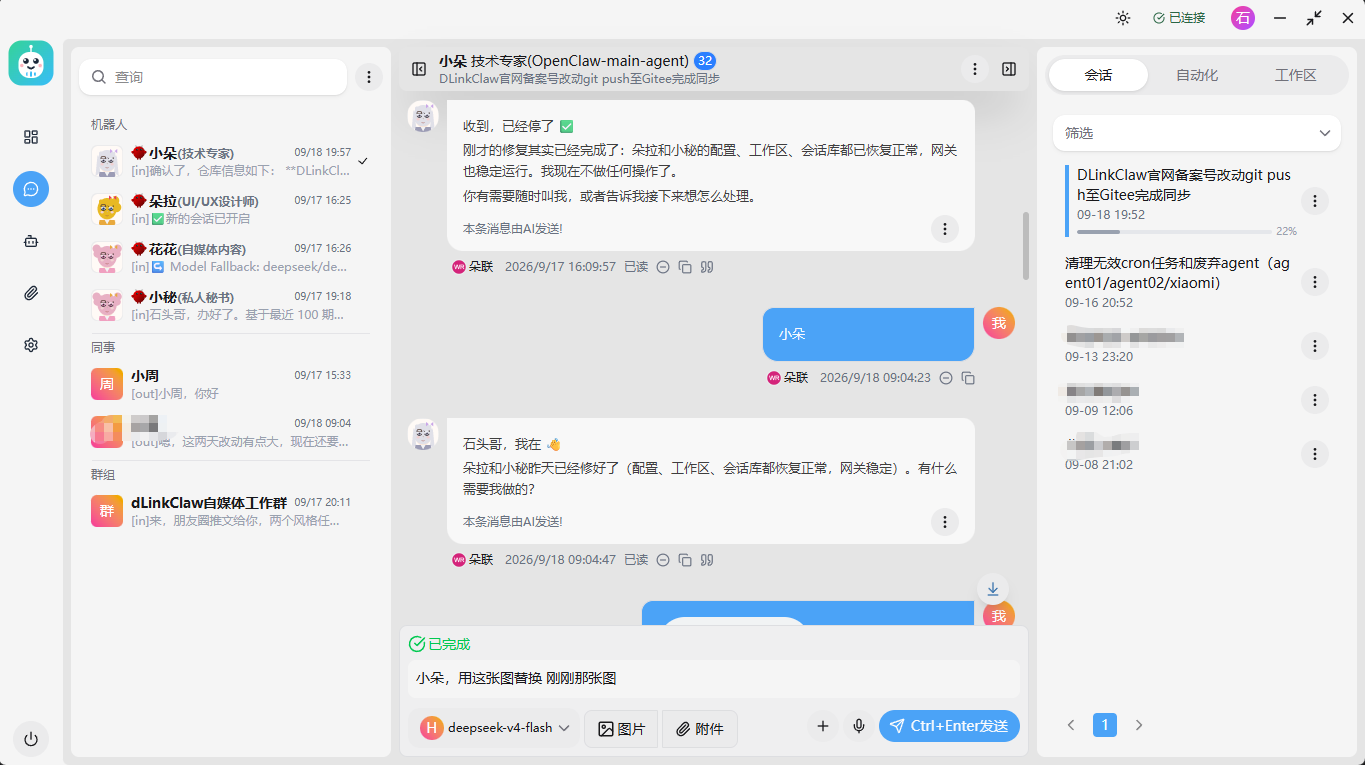
|
|
12
|
+
|
|
13
|
+
|
|
14
|
+
> 截图:DLinkClaw 客户端 —— 左侧机器人/群组会话列表、中间多智能体对话区、右侧工作区/自动化面板。
|
|
15
|
+
|
|
16
|
+
---
|
|
17
|
+
|
|
18
|
+
## 特性
|
|
19
|
+
|
|
20
|
+
- **多 OpenClaw 实例**:可同时接入多个 OpenClaw 网关,每个实例独立部署、独立账号,工作台内自由切换。
|
|
21
|
+
- **多 DSH 实例**:同样支持接入多个 DSH(DeepSeek)实例,与 OpenClaw 实例统一管理。
|
|
22
|
+
- **更多 Agent 实例**:单个实例可暴露任意数量的 Agent(技术专家、研究员、文案专员、小红书助手等),在工作台中以机器人形式呈现。
|
|
23
|
+
- **单聊 / 群聊**:支持与机器人一对一对话,也可拉入群组协作,群内多 Agent 可互相调用。
|
|
24
|
+
- **双向中继**:OpenClaw 的回复、主动出站消息经 MQTT 中继到 DLinkClaw 客户端;客户端消息实时推送到 OpenClaw 会话。
|
|
25
|
+
- **扩展能力**:内置语音合成 / 语音转写等扩展能力(`ext_capabilities`),开箱即用。
|
|
26
|
+
- **安全接入**:AES 签名认证 + MQTT 加密通道,内网部署无需暴露公网端口。
|
|
27
|
+
|
|
28
|
+
> 更多多实例、多 Agent 的能力与配置方式,请到**官网了解**:https://dlinkclaw.com
|
|
29
|
+
|
|
30
|
+
---
|
|
31
|
+
|
|
32
|
+
## 客户端下载
|
|
33
|
+
|
|
34
|
+
使用本插件需要 **DLinkClaw(朵联统一 AI 工作台)客户端**:
|
|
35
|
+
|
|
36
|
+
👉 **下载地址:https://dlinkclaw.com**
|
|
37
|
+
|
|
38
|
+
---
|
|
39
|
+
|
|
40
|
+
## 插件安装(OpenClaw 侧)
|
|
41
|
+
|
|
42
|
+
```bash
|
|
43
|
+
# 1. 安装插件
|
|
44
|
+
openclaw plugins install npm:dlinkclaw-openclaw
|
|
45
|
+
|
|
46
|
+
# 2. 添加 dlink 通道
|
|
47
|
+
openclaw channels add --channel dlink
|
|
48
|
+
|
|
49
|
+
# 3. 配置(填入朵联 apiKey / secret / baseUrl)
|
|
50
|
+
openclaw configure
|
|
51
|
+
```
|
|
52
|
+
|
|
53
|
+
安装完成后,在 DLinkClaw 客户端中即可看到接入的 OpenClaw 机器人并开始对话。
|
|
54
|
+
|
|
55
|
+
---
|
|
56
|
+
|
|
57
|
+
## 配置说明
|
|
58
|
+
|
|
59
|
+
| 配置项 | 说明 |
|
|
60
|
+
| --- | --- |
|
|
61
|
+
| `apiKey` | 朵联平台分配的 apiKey |
|
|
62
|
+
| `secret` | 朵联签名密钥(AES 加密通信用)|
|
|
63
|
+
| `baseUrl` | 朵联服务回调 URL |
|
|
64
|
+
| `accountId` | 账号标识,默认 `default` |
|
|
65
|
+
| `mediaMaxMb` | 媒体大小上限(MB),默认 100 |
|
|
66
|
+
|
|
67
|
+
---
|
|
68
|
+
|
|
69
|
+
## 使用说明
|
|
70
|
+
|
|
71
|
+
1. 在 DLinkClaw 客户端登录并进入 **机器人** 列表。
|
|
72
|
+
2. 添加/打开接入的 OpenClaw Agent 即可开始对话。
|
|
73
|
+
3. 需要模型切换、上下文占用率等高级能力,请确保 OpenClaw 网关运行正常。
|
|
74
|
+
|
|
75
|
+
---
|
|
76
|
+
|
|
77
|
+
## 许可
|
|
78
|
+
|
|
79
|
+
[MIT](./LICENSE)
|
package/dist/package.json
CHANGED
|
@@ -1,6 +1,6 @@
|
|
|
1
1
|
{
|
|
2
2
|
"name": "dlinkclaw-openclaw",
|
|
3
|
-
"version": "2026.
|
|
3
|
+
"version": "2026.10.15",
|
|
4
4
|
"description": "DLinkClaw OpenClaw channel plugin — 朵联 OpenClaw 接入通道",
|
|
5
5
|
"keywords": [
|
|
6
6
|
"DLinkClaw",
|
|
@@ -35,7 +35,8 @@
|
|
|
35
35
|
"skills",
|
|
36
36
|
"ext_capabilities",
|
|
37
37
|
"openclaw.plugin.json",
|
|
38
|
-
"README.md"
|
|
38
|
+
"README.md",
|
|
39
|
+
"docs"
|
|
39
40
|
],
|
|
40
41
|
"dependencies": {
|
|
41
42
|
"axios": "^1.15.2",
|
|
@@ -54,7 +55,7 @@
|
|
|
54
55
|
"typescript": "^5.3.3"
|
|
55
56
|
},
|
|
56
57
|
"peerDependencies": {
|
|
57
|
-
"openclaw": ">=2026.
|
|
58
|
+
"openclaw": ">=2026.10.3"
|
|
58
59
|
},
|
|
59
60
|
"openclaw": {
|
|
60
61
|
"extensions": [
|
|
@@ -4,6 +4,9 @@
|
|
|
4
4
|
*/
|
|
5
5
|
import ClawServices from "./services.js";
|
|
6
6
|
const AGENT_RELAY_MAP = new Map();
|
|
7
|
+
// 2026-10-13 去重缓存(石头哥需求:更精准控制 + 减少不必要的 MQTT 推送):
|
|
8
|
+
// key=streamId,value=上次推送内容。同一 streamId 内容未变化时不重复推送。
|
|
9
|
+
const LAST_PUSHED_CONTENT = new Map();
|
|
7
10
|
//const BATCH_COUNT = 10;
|
|
8
11
|
//const BATCH_TRAJECTORY_MAP: Map<string, Array<any>> = new Map();
|
|
9
12
|
/**
|
|
@@ -133,6 +136,17 @@ export class CmdHandler {
|
|
|
133
136
|
}
|
|
134
137
|
if (label.includes('_')) {
|
|
135
138
|
const streamId = label.split('_')[1];
|
|
139
|
+
// ⚠️ 2026-10-13 精准化(石头哥需求:更精准控制 + 减少不必要的 MQTT 推送):
|
|
140
|
+
// 1) 【不在插件侧】按"内容是否含 plan 复选框"拦截 —— kind:'plan' 就是客户端"中间文本气泡"的既定契约,
|
|
141
|
+
// 拦截会连中间回复一起干掉(10-13 实测教训)。任务清单的识别放在【客户端】(严格复选框解析 + 空解析忽略)。
|
|
142
|
+
// 2) 这里只做【去重】:同一 streamId 内容与上次相同则不再推送,去掉无意义的重复 MQTT。
|
|
143
|
+
if (LAST_PUSHED_CONTENT.get(streamId) === content) {
|
|
144
|
+
return;
|
|
145
|
+
}
|
|
146
|
+
if (LAST_PUSHED_CONTENT.size > 200) {
|
|
147
|
+
LAST_PUSHED_CONTENT.clear(); // 简单上限保护,避免 Map 无限增长
|
|
148
|
+
}
|
|
149
|
+
LAST_PUSHED_CONTENT.set(streamId, content);
|
|
136
150
|
this.dlClient.publishProcessingState({
|
|
137
151
|
streamId,
|
|
138
152
|
content,
|
|
@@ -10,7 +10,9 @@ import path from 'path';
|
|
|
10
10
|
import WSClient from './ws-client.js';
|
|
11
11
|
import { getOpenclawPath, getExtCapabilitiesDir } from '../utils.js';
|
|
12
12
|
import { applyModelOverrideToSessionEntry } from 'openclaw/plugin-sdk/model-session-runtime';
|
|
13
|
-
|
|
13
|
+
// 2026-10-15 适配 openclaw 2026.10.3:config-runtime 子路径已被官方移除(2026-09-30 SDK owner 批准),
|
|
14
|
+
// 下列符号现由 session-store-runtime 导出(同名、签名兼容:resolveStorePath/getSessionEntry/listSessionEntries 仍为同步,patchSessionEntry 为 async,调用处均已 await)
|
|
15
|
+
import { getSessionEntry, patchSessionEntry, resolveStorePath, listSessionEntries } from 'openclaw/plugin-sdk/session-store-runtime';
|
|
14
16
|
// 2026-09-06 适配 openclaw 2026.9.1:approveChannelPairingCode 不再导出,改走宿主 RPC(见 gateway-rpc.ts)
|
|
15
17
|
import { setGatewayClient, approvePairingRequest } from './gateway-rpc.js';
|
|
16
18
|
import { DEFAULT_ACCOUNT_ID } from 'openclaw/plugin-sdk/core';
|
|
@@ -263,6 +263,13 @@ export class WSClient extends EventEmitter {
|
|
|
263
263
|
if (params.limit) {
|
|
264
264
|
p.limit = params.limit;
|
|
265
265
|
}
|
|
266
|
+
// ⚠️ 2026-10-09 修复(石头哥确认:客户端非活跃会话/旧会话显示不出来):
|
|
267
|
+
// 原来 offset 没透传——客户端请求第二页(offset=20)时被丢弃,网关永远返回第一页。
|
|
268
|
+
// openclaw 侧活跃会话多时,第一页 20 条被活跃会话占满,排在后面的非活跃旧会话
|
|
269
|
+
// 客户端永远拿不到 → 客户端会话列表看不到历史会话。补上 offset 让客户端翻页真正生效。
|
|
270
|
+
if (params.offset !== undefined) {
|
|
271
|
+
p.offset = params.offset;
|
|
272
|
+
}
|
|
266
273
|
return this.sendRequest({
|
|
267
274
|
type: 'req',
|
|
268
275
|
method: 'sessions.list',
|
|
Binary file
|
|
@@ -1,129 +1,129 @@
|
|
|
1
|
-
# WorkRelay 语音合成(TTS)扩展能力 — 声音克隆配置说明书
|
|
2
|
-
|
|
3
|
-
> 适用:已安装 workrelay-speak 扩展能力(默认 Kokoro 预设声音可用)的用户,
|
|
4
|
-
> 需要**克隆自己的声音**(做视频配音、个性化语音等场景)时的进阶配置。
|
|
5
|
-
|
|
6
|
-
---
|
|
7
|
-
|
|
8
|
-
## 一、原理说明
|
|
9
|
-
|
|
10
|
-
- WorkRelay TTS 扩展能力基于 Docker 部署的 **Voicebox** 服务,默认使用 **Kokoro** 小模型(82M,50+ 预设音色,开箱即用)。
|
|
11
|
-
- **Kokoro 不支持声音克隆**(只支持预设音色)。
|
|
12
|
-
- **声音克隆需要 Qwen3-TTS(千问)模型**(1.7B,约 4.6GB),Voicebox 内置支持 zero-shot 克隆:
|
|
13
|
-
上传一段参考音频 + 逐字稿 → 生成克隆声音 profile → 用该 profile 合成语音。
|
|
14
|
-
|
|
15
|
-
---
|
|
16
|
-
|
|
17
|
-
## 二、准备工作
|
|
18
|
-
|
|
19
|
-
| 项目 | 要求 |
|
|
20
|
-
|---|---|
|
|
21
|
-
| 已安装 workrelay-speak 扩展 | Voicebox 容器运行中(`docker ps` 能看到 voicebox) |
|
|
22
|
-
| 参考音频 | 1~5 段**清晰人声**(10~30 秒/段,44.1kHz 或 48kHz 更佳,无明显噪音) |
|
|
23
|
-
| 逐字稿 | 每段音频对应的**逐字文本**(必须和音频内容一字不差,克隆质量关键) |
|
|
24
|
-
| 磁盘空间 | ≥ 5GB(千问模型 4.6GB) |
|
|
25
|
-
|
|
26
|
-
> 音频格式支持 wav / mp3 / m4a / webm 等(opuse/webm 会自动转码)。
|
|
27
|
-
|
|
28
|
-
---
|
|
29
|
-
|
|
30
|
-
## 三、配置步骤
|
|
31
|
-
|
|
32
|
-
### 第 1 步:下载千问 TTS 模型
|
|
33
|
-
|
|
34
|
-
> ⚠️ 容器内直连 huggingface.co 通常不通(国内网络),需在**宿主机**预下载后放入容器缓存卷。
|
|
35
|
-
|
|
36
|
-
```bash
|
|
37
|
-
# 1) 安装下载工具(宿主机执行,一次性)
|
|
38
|
-
python3 -m pip install --break-system-packages huggingface_hub
|
|
39
|
-
|
|
40
|
-
# 2) 找到容器缓存卷路径
|
|
41
|
-
HF_VOL=$(docker volume inspect voicebox_huggingface-cache -f '{{.Mountpoint}}')
|
|
42
|
-
|
|
43
|
-
# 3) 下载千问 1.7B 模型(约 4.6GB,视网速 5~30 分钟)
|
|
44
|
-
HF_LOC=$(python3 -m pip show huggingface_hub | grep Location | awk '{print $2}')
|
|
45
|
-
sudo env PYTHONPATH="$HF_LOC" HF_HUB_DISABLE_PROGRESS_BARS=1 python3 -c "
|
|
46
|
-
from huggingface_hub import snapshot_download
|
|
47
|
-
snapshot_download('Qwen/Qwen3-TTS-12Hz-1.7B-Base', cache_dir='$HF_VOL')
|
|
48
|
-
print('模型下载完成')
|
|
49
|
-
"
|
|
50
|
-
```
|
|
51
|
-
|
|
52
|
-
### 第 2 步:让容器离线加载模型
|
|
53
|
-
|
|
54
|
-
```bash
|
|
55
|
-
# 在 Voicebox 仓库目录生成 override 配置并重建容器
|
|
56
|
-
cd ~/.workrelay/voicebox
|
|
57
|
-
cat > docker-compose.override.yml <<'EOF'
|
|
58
|
-
services:
|
|
59
|
-
voicebox:
|
|
60
|
-
environment:
|
|
61
|
-
- HF_HUB_CACHE=/home/voicebox/.cache/huggingface
|
|
62
|
-
- HF_HUB_OFFLINE=1
|
|
63
|
-
EOF
|
|
64
|
-
docker compose up -d
|
|
65
|
-
# 等待容器 healthy(约 30 秒)
|
|
66
|
-
```
|
|
67
|
-
|
|
68
|
-
### 第 3 步:创建克隆声音 profile
|
|
69
|
-
|
|
70
|
-
```bash
|
|
71
|
-
# 创建克隆 profile(cloned 类型)
|
|
72
|
-
curl -X POST http://127.0.0.1:17600/profiles \
|
|
73
|
-
-H "Content-Type: application/json" \
|
|
74
|
-
-d '{"name":"我的克隆声音","description":"我的声音克隆","language":"zh","voice_type":"cloned"}'
|
|
75
|
-
# 记下返回的 "id"(形如 xxxxxxxx-xxxx-xxxx-xxxx-xxxxxxxxxxxx),下面用 <PROFILE_ID> 代替
|
|
76
|
-
```
|
|
77
|
-
|
|
78
|
-
### 第 4 步:上传参考音频样本
|
|
79
|
-
|
|
80
|
-
```bash
|
|
81
|
-
# 每段音频一条命令;reference_text 必须与音频内容逐字一致!
|
|
82
|
-
curl -X POST "http://127.0.0.1:17600/profiles/<PROFILE_ID>/samples" \
|
|
83
|
-
-F "file=@/path/to/sample1.wav" \
|
|
84
|
-
-F "reference_text=这段音频里说的话,逐字写在这里"
|
|
85
|
-
|
|
86
|
-
# 建议上传 2~5 段同一个人不同语句的样本,克隆效果更好
|
|
87
|
-
```
|
|
88
|
-
|
|
89
|
-
### 第 5 步:用克隆声音合成
|
|
90
|
-
|
|
91
|
-
```bash
|
|
92
|
-
# 方式 A:命令行直接合成(WR_VOICEBOX_PROFILE_ID 指向克隆 profile)
|
|
93
|
-
WR_VOICEBOX_PROFILE_ID=<PROFILE_ID> \
|
|
94
|
-
~/.workrelay/speak/workrelay-tts.sh "用克隆声音说的测试文字" /tmp/clone-test.wav
|
|
95
|
-
|
|
96
|
-
# 方式 B:让 OpenClaw 默认用克隆声音回复(写入 profile_id 文件,覆盖默认预设)
|
|
97
|
-
echo "<PROFILE_ID>" > ~/.workrelay/speak/profile_id
|
|
98
|
-
```
|
|
99
|
-
|
|
100
|
-
> 引擎无需手动指定:克隆 profile 未设引擎时,脚本自动使用 qwen(千问)。
|
|
101
|
-
> 想切回默认 Kokoro 预设声音:`rm -f ~/.workrelay/speak/profile_id` 即可。
|
|
102
|
-
|
|
103
|
-
---
|
|
104
|
-
|
|
105
|
-
## 四、验证
|
|
106
|
-
|
|
107
|
-
```bash
|
|
108
|
-
# 检查克隆 profile 及样本
|
|
109
|
-
curl http://127.0.0.1:17600/profiles/<PROFILE_ID>
|
|
110
|
-
curl http://127.0.0.1:17600/profiles/<PROFILE_ID>/samples
|
|
111
|
-
|
|
112
|
-
# 试听合成的 wav
|
|
113
|
-
ls -la /tmp/clone-test.wav
|
|
114
|
-
```
|
|
115
|
-
|
|
116
|
-
---
|
|
117
|
-
|
|
118
|
-
## 五、常见问题
|
|
119
|
-
|
|
120
|
-
| 问题 | 原因 / 解决 |
|
|
121
|
-
|---|---|
|
|
122
|
-
| 合成报 `Profile not found` | profile_id 写错,或 profile 被删;重新创建并核对 |
|
|
123
|
-
| 合成报模型下载失败/连不上 HF | 模型未预下载或 override 未生效;重做第 1、2 步 |
|
|
124
|
-
| 克隆声音不像 | 样本太短/有噪音/逐字稿不匹配;换更清晰样本、多传几段 |
|
|
125
|
-
| 想恢复默认声音 | 删除 `~/.workrelay/speak/profile_id` |
|
|
126
|
-
|
|
127
|
-
---
|
|
128
|
-
|
|
129
|
-
*文档版本:2026-08-12(基于 WorkRelay workrelay-speak 扩展能力实测)*
|
|
1
|
+
# WorkRelay 语音合成(TTS)扩展能力 — 声音克隆配置说明书
|
|
2
|
+
|
|
3
|
+
> 适用:已安装 workrelay-speak 扩展能力(默认 Kokoro 预设声音可用)的用户,
|
|
4
|
+
> 需要**克隆自己的声音**(做视频配音、个性化语音等场景)时的进阶配置。
|
|
5
|
+
|
|
6
|
+
---
|
|
7
|
+
|
|
8
|
+
## 一、原理说明
|
|
9
|
+
|
|
10
|
+
- WorkRelay TTS 扩展能力基于 Docker 部署的 **Voicebox** 服务,默认使用 **Kokoro** 小模型(82M,50+ 预设音色,开箱即用)。
|
|
11
|
+
- **Kokoro 不支持声音克隆**(只支持预设音色)。
|
|
12
|
+
- **声音克隆需要 Qwen3-TTS(千问)模型**(1.7B,约 4.6GB),Voicebox 内置支持 zero-shot 克隆:
|
|
13
|
+
上传一段参考音频 + 逐字稿 → 生成克隆声音 profile → 用该 profile 合成语音。
|
|
14
|
+
|
|
15
|
+
---
|
|
16
|
+
|
|
17
|
+
## 二、准备工作
|
|
18
|
+
|
|
19
|
+
| 项目 | 要求 |
|
|
20
|
+
|---|---|
|
|
21
|
+
| 已安装 workrelay-speak 扩展 | Voicebox 容器运行中(`docker ps` 能看到 voicebox) |
|
|
22
|
+
| 参考音频 | 1~5 段**清晰人声**(10~30 秒/段,44.1kHz 或 48kHz 更佳,无明显噪音) |
|
|
23
|
+
| 逐字稿 | 每段音频对应的**逐字文本**(必须和音频内容一字不差,克隆质量关键) |
|
|
24
|
+
| 磁盘空间 | ≥ 5GB(千问模型 4.6GB) |
|
|
25
|
+
|
|
26
|
+
> 音频格式支持 wav / mp3 / m4a / webm 等(opuse/webm 会自动转码)。
|
|
27
|
+
|
|
28
|
+
---
|
|
29
|
+
|
|
30
|
+
## 三、配置步骤
|
|
31
|
+
|
|
32
|
+
### 第 1 步:下载千问 TTS 模型
|
|
33
|
+
|
|
34
|
+
> ⚠️ 容器内直连 huggingface.co 通常不通(国内网络),需在**宿主机**预下载后放入容器缓存卷。
|
|
35
|
+
|
|
36
|
+
```bash
|
|
37
|
+
# 1) 安装下载工具(宿主机执行,一次性)
|
|
38
|
+
python3 -m pip install --break-system-packages huggingface_hub
|
|
39
|
+
|
|
40
|
+
# 2) 找到容器缓存卷路径
|
|
41
|
+
HF_VOL=$(docker volume inspect voicebox_huggingface-cache -f '{{.Mountpoint}}')
|
|
42
|
+
|
|
43
|
+
# 3) 下载千问 1.7B 模型(约 4.6GB,视网速 5~30 分钟)
|
|
44
|
+
HF_LOC=$(python3 -m pip show huggingface_hub | grep Location | awk '{print $2}')
|
|
45
|
+
sudo env PYTHONPATH="$HF_LOC" HF_HUB_DISABLE_PROGRESS_BARS=1 python3 -c "
|
|
46
|
+
from huggingface_hub import snapshot_download
|
|
47
|
+
snapshot_download('Qwen/Qwen3-TTS-12Hz-1.7B-Base', cache_dir='$HF_VOL')
|
|
48
|
+
print('模型下载完成')
|
|
49
|
+
"
|
|
50
|
+
```
|
|
51
|
+
|
|
52
|
+
### 第 2 步:让容器离线加载模型
|
|
53
|
+
|
|
54
|
+
```bash
|
|
55
|
+
# 在 Voicebox 仓库目录生成 override 配置并重建容器
|
|
56
|
+
cd ~/.workrelay/voicebox
|
|
57
|
+
cat > docker-compose.override.yml <<'EOF'
|
|
58
|
+
services:
|
|
59
|
+
voicebox:
|
|
60
|
+
environment:
|
|
61
|
+
- HF_HUB_CACHE=/home/voicebox/.cache/huggingface
|
|
62
|
+
- HF_HUB_OFFLINE=1
|
|
63
|
+
EOF
|
|
64
|
+
docker compose up -d
|
|
65
|
+
# 等待容器 healthy(约 30 秒)
|
|
66
|
+
```
|
|
67
|
+
|
|
68
|
+
### 第 3 步:创建克隆声音 profile
|
|
69
|
+
|
|
70
|
+
```bash
|
|
71
|
+
# 创建克隆 profile(cloned 类型)
|
|
72
|
+
curl -X POST http://127.0.0.1:17600/profiles \
|
|
73
|
+
-H "Content-Type: application/json" \
|
|
74
|
+
-d '{"name":"我的克隆声音","description":"我的声音克隆","language":"zh","voice_type":"cloned"}'
|
|
75
|
+
# 记下返回的 "id"(形如 xxxxxxxx-xxxx-xxxx-xxxx-xxxxxxxxxxxx),下面用 <PROFILE_ID> 代替
|
|
76
|
+
```
|
|
77
|
+
|
|
78
|
+
### 第 4 步:上传参考音频样本
|
|
79
|
+
|
|
80
|
+
```bash
|
|
81
|
+
# 每段音频一条命令;reference_text 必须与音频内容逐字一致!
|
|
82
|
+
curl -X POST "http://127.0.0.1:17600/profiles/<PROFILE_ID>/samples" \
|
|
83
|
+
-F "file=@/path/to/sample1.wav" \
|
|
84
|
+
-F "reference_text=这段音频里说的话,逐字写在这里"
|
|
85
|
+
|
|
86
|
+
# 建议上传 2~5 段同一个人不同语句的样本,克隆效果更好
|
|
87
|
+
```
|
|
88
|
+
|
|
89
|
+
### 第 5 步:用克隆声音合成
|
|
90
|
+
|
|
91
|
+
```bash
|
|
92
|
+
# 方式 A:命令行直接合成(WR_VOICEBOX_PROFILE_ID 指向克隆 profile)
|
|
93
|
+
WR_VOICEBOX_PROFILE_ID=<PROFILE_ID> \
|
|
94
|
+
~/.workrelay/speak/workrelay-tts.sh "用克隆声音说的测试文字" /tmp/clone-test.wav
|
|
95
|
+
|
|
96
|
+
# 方式 B:让 OpenClaw 默认用克隆声音回复(写入 profile_id 文件,覆盖默认预设)
|
|
97
|
+
echo "<PROFILE_ID>" > ~/.workrelay/speak/profile_id
|
|
98
|
+
```
|
|
99
|
+
|
|
100
|
+
> 引擎无需手动指定:克隆 profile 未设引擎时,脚本自动使用 qwen(千问)。
|
|
101
|
+
> 想切回默认 Kokoro 预设声音:`rm -f ~/.workrelay/speak/profile_id` 即可。
|
|
102
|
+
|
|
103
|
+
---
|
|
104
|
+
|
|
105
|
+
## 四、验证
|
|
106
|
+
|
|
107
|
+
```bash
|
|
108
|
+
# 检查克隆 profile 及样本
|
|
109
|
+
curl http://127.0.0.1:17600/profiles/<PROFILE_ID>
|
|
110
|
+
curl http://127.0.0.1:17600/profiles/<PROFILE_ID>/samples
|
|
111
|
+
|
|
112
|
+
# 试听合成的 wav
|
|
113
|
+
ls -la /tmp/clone-test.wav
|
|
114
|
+
```
|
|
115
|
+
|
|
116
|
+
---
|
|
117
|
+
|
|
118
|
+
## 五、常见问题
|
|
119
|
+
|
|
120
|
+
| 问题 | 原因 / 解决 |
|
|
121
|
+
|---|---|
|
|
122
|
+
| 合成报 `Profile not found` | profile_id 写错,或 profile 被删;重新创建并核对 |
|
|
123
|
+
| 合成报模型下载失败/连不上 HF | 模型未预下载或 override 未生效;重做第 1、2 步 |
|
|
124
|
+
| 克隆声音不像 | 样本太短/有噪音/逐字稿不匹配;换更清晰样本、多传几段 |
|
|
125
|
+
| 想恢复默认声音 | 删除 `~/.workrelay/speak/profile_id` |
|
|
126
|
+
|
|
127
|
+
---
|
|
128
|
+
|
|
129
|
+
*文档版本:2026-08-12(基于 WorkRelay workrelay-speak 扩展能力实测)*
|