directus-extension-super-table 0.2.8
This diff represents the content of publicly available package versions that have been released to one of the supported registries. The information contained in this diff is provided for informational purposes only and reflects changes between package versions as they appear in their respective public registries.
- package/LICENSE +21 -0
- package/README.md +377 -0
- package/index.js +9 -0
- package/package.json +86 -0
package/LICENSE
ADDED
|
@@ -0,0 +1,21 @@
|
|
|
1
|
+
MIT License
|
|
2
|
+
|
|
3
|
+
Copyright (c) 2024 smartlabs AT
|
|
4
|
+
|
|
5
|
+
Permission is hereby granted, free of charge, to any person obtaining a copy
|
|
6
|
+
of this software and associated documentation files (the "Software"), to deal
|
|
7
|
+
in the Software without restriction, including without limitation the rights
|
|
8
|
+
to use, copy, modify, merge, publish, distribute, sublicense, and/or sell
|
|
9
|
+
copies of the Software, and to permit persons to whom the Software is
|
|
10
|
+
furnished to do so, subject to the following conditions:
|
|
11
|
+
|
|
12
|
+
The above copyright notice and this permission notice shall be included in all
|
|
13
|
+
copies or substantial portions of the Software.
|
|
14
|
+
|
|
15
|
+
THE SOFTWARE IS PROVIDED "AS IS", WITHOUT WARRANTY OF ANY KIND, EXPRESS OR
|
|
16
|
+
IMPLIED, INCLUDING BUT NOT LIMITED TO THE WARRANTIES OF MERCHANTABILITY,
|
|
17
|
+
FITNESS FOR A PARTICULAR PURPOSE AND NONINFRINGEMENT. IN NO EVENT SHALL THE
|
|
18
|
+
AUTHORS OR COPYRIGHT HOLDERS BE LIABLE FOR ANY CLAIM, DAMAGES OR OTHER
|
|
19
|
+
LIABILITY, WHETHER IN AN ACTION OF CONTRACT, TORT OR OTHERWISE, ARISING FROM,
|
|
20
|
+
OUT OF OR IN CONNECTION WITH THE SOFTWARE OR THE USE OR OTHER DEALINGS IN THE
|
|
21
|
+
SOFTWARE.
|
package/README.md
ADDED
|
@@ -0,0 +1,377 @@
|
|
|
1
|
+
# Super Layout Table Extension for Directus
|
|
2
|
+
|
|
3
|
+

|
|
4
|
+

|
|
5
|
+

|
|
6
|
+

|
|
7
|
+

|
|
8
|
+
|
|
9
|
+
A powerful and feature-rich table layout extension for Directus 11+ that enhances the default table view with advanced functionality including inline editing, quick filters, bookmarks, and custom cell rendering.
|
|
10
|
+
|
|
11
|
+
|
|
12
|
+
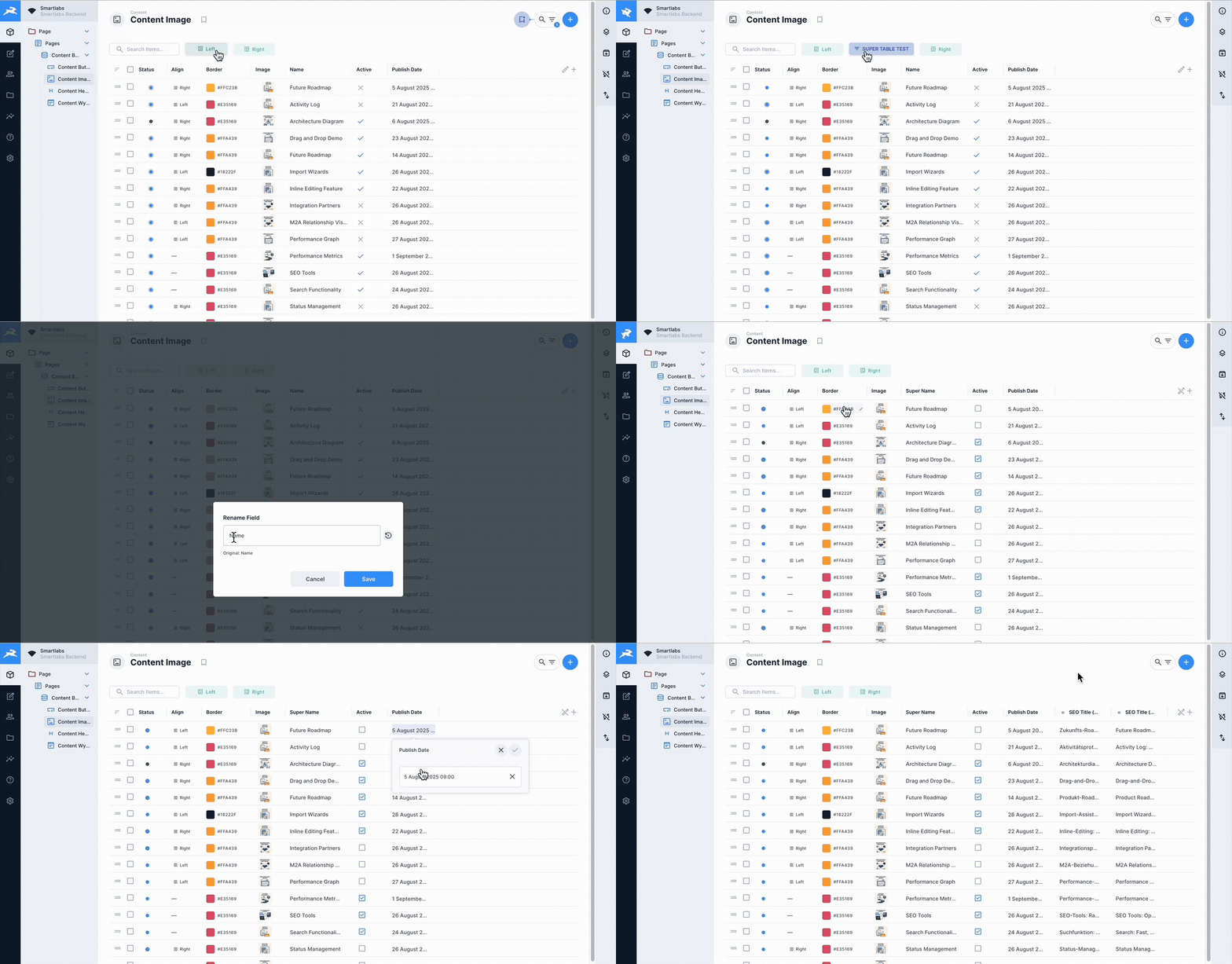
|
|
13
|
+
|
|
14
|
+
## Version
|
|
15
|
+
|
|
16
|
+
v0.2.7 - Stable release
|
|
17
|
+
|
|
18
|
+
## 🌟 Top Features
|
|
19
|
+
|
|
20
|
+
### 🌍 Multi-Language Translations
|
|
21
|
+
Display and edit translations in multiple languages simultaneously as separate columns. Perfect for managing multilingual content with ease.
|
|
22
|
+
|
|
23
|
+
### ✏️ Column Renaming
|
|
24
|
+
Rename table columns on-the-fly without changing the underlying field names. Create user-friendly labels for better readability.
|
|
25
|
+
|
|
26
|
+
### 🎨 Quick Filters with Colors & Icons
|
|
27
|
+
Create custom filter buttons with personalized colors and icons for instant data filtering. Visual organization at its best.
|
|
28
|
+
|
|
29
|
+
### 🔍 Global Table Search
|
|
30
|
+
Powerful search functionality across all table fields, including nested relations and translations. Find anything, anywhere in your data.
|
|
31
|
+
|
|
32
|
+
### 👁️ View & Edit Mode
|
|
33
|
+
Switch seamlessly between read-only view mode and interactive edit mode. Control when and how users can modify data.
|
|
34
|
+
|
|
35
|
+
### 🖼️ Advanced Image Display & Selection
|
|
36
|
+
Smart image handling with hover preview, proper aspect ratios, and built-in file browser for selecting media files directly from table cells.
|
|
37
|
+
|
|
38
|
+
### 🔄 Deep Duplication
|
|
39
|
+
Duplicate items with all their relationships and translations. Perfect for creating variations of complex data structures.
|
|
40
|
+
|
|
41
|
+
|
|
42
|
+
|
|
43
|
+
### Display Features
|
|
44
|
+
- **Custom Cell Rendering** - Specialized display for different field types
|
|
45
|
+
- **Relationship Support** - Handle M2O, O2M, M2M, M2A relationships with deep data access
|
|
46
|
+
- **Image Preview** - Inline image display with lightbox support and file browser
|
|
47
|
+
- **Status Indicators** - Visual representation of boolean and select fields
|
|
48
|
+
- **Translation Support** - Display multiple language translations as separate columns
|
|
49
|
+
- **Column Alignment** - Configurable text alignment per column (left, center, right)
|
|
50
|
+
|
|
51
|
+
### Performance
|
|
52
|
+
- **Optimized Loading** - Default 1000 rows with efficient pagination
|
|
53
|
+
- **Smart Caching** - Intelligent data caching for better performance
|
|
54
|
+
- **Lazy Loading** - Load data as needed for large datasets
|
|
55
|
+
|
|
56
|
+
|
|
57
|
+
## Installation
|
|
58
|
+
|
|
59
|
+
For detailed information about installing extensions in Directus, see the [official documentation](https://directus.io/docs/self-hosting/including-extensions).
|
|
60
|
+
|
|
61
|
+
### Via Package Manager (Recommended)
|
|
62
|
+
|
|
63
|
+
Install the extension using your preferred package manager:
|
|
64
|
+
|
|
65
|
+
```bash
|
|
66
|
+
# Using pnpm
|
|
67
|
+
pnpm add directus-extension-super-table
|
|
68
|
+
|
|
69
|
+
# Using npm
|
|
70
|
+
npm install directus-extension-super-table
|
|
71
|
+
|
|
72
|
+
# Using yarn
|
|
73
|
+
yarn add directus-extension-super-table
|
|
74
|
+
```
|
|
75
|
+
|
|
76
|
+
After installation, restart Directus to load the extension:
|
|
77
|
+
|
|
78
|
+
```bash
|
|
79
|
+
# If using Docker
|
|
80
|
+
docker-compose restart directus
|
|
81
|
+
|
|
82
|
+
# If running locally
|
|
83
|
+
npx directus start
|
|
84
|
+
```
|
|
85
|
+
|
|
86
|
+
### From Source
|
|
87
|
+
|
|
88
|
+
1. Clone or download the extension to your Directus extensions folder:
|
|
89
|
+
```bash
|
|
90
|
+
cd /path/to/directus/extensions
|
|
91
|
+
git clone https://github.com/yourusername/super-layout-table.git
|
|
92
|
+
```
|
|
93
|
+
|
|
94
|
+
2. Install dependencies:
|
|
95
|
+
```bash
|
|
96
|
+
cd super-layout-table
|
|
97
|
+
pnpm install # or npm install
|
|
98
|
+
```
|
|
99
|
+
|
|
100
|
+
3. Build the extension:
|
|
101
|
+
```bash
|
|
102
|
+
pnpm build # or npm run build
|
|
103
|
+
```
|
|
104
|
+
|
|
105
|
+
4. Restart Directus to load the extension
|
|
106
|
+
|
|
107
|
+
### Configuration
|
|
108
|
+
|
|
109
|
+
1. Navigate to your collection settings in Directus Admin Panel
|
|
110
|
+
2. Click on "Layout Options" in the collection settings
|
|
111
|
+
3. Select "Super Layout Table" from the layout dropdown
|
|
112
|
+
4. Configure the layout options according to your needs
|
|
113
|
+
5. Save your changes
|
|
114
|
+
|
|
115
|
+
## Usage Guide
|
|
116
|
+
|
|
117
|
+
### Quick Filters
|
|
118
|
+
Quick Filters provide fast access to frequently used filter combinations:
|
|
119
|
+
|
|
120
|
+
1. **Creating a Filter**: Click the "+" button in the Quick Filters section
|
|
121
|
+
2. **Configure Filter**: Set field, operator, and value
|
|
122
|
+
3. **Save Filter**: Give it a name and optional color
|
|
123
|
+
4. **Using Filters**: Click filter buttons to toggle them on/off
|
|
124
|
+
5. **Filter States**:
|
|
125
|
+
- Gray (OFF) - Filter not applied
|
|
126
|
+
- Blue (Active) - Filter applied with visual indicators
|
|
127
|
+
|
|
128
|
+
### Inline Editing
|
|
129
|
+
Edit data directly in the table without opening a separate form:
|
|
130
|
+
|
|
131
|
+
1. **Entering Edit Mode**: Click on any editable cell
|
|
132
|
+
2. **Editor Types**:
|
|
133
|
+
- Text fields: Simple input or WYSIWYG editor
|
|
134
|
+
- Boolean: Checkbox toggle
|
|
135
|
+
- Select: Dropdown menu
|
|
136
|
+
- Date/Time: Full date picker with calendar
|
|
137
|
+
- Color: Color picker with alignment support
|
|
138
|
+
- Image/File: Enhanced file browser with larger previews (✨ IMPROVED in v0.2.6)
|
|
139
|
+
3. **Unified Header Actions** (✨ NEW in v0.2.3):
|
|
140
|
+
- Save/Cancel buttons now in popover header for all field types
|
|
141
|
+
- Consistent UI across all editors
|
|
142
|
+
- Icon-only buttons matching native Directus style
|
|
143
|
+
4. **Saving**: Click save button (✓) or press Enter
|
|
144
|
+
5. **Canceling**: Click cancel button (✗) or press Escape
|
|
145
|
+
|
|
146
|
+
### Column Management
|
|
147
|
+
Customize which columns are displayed and how:
|
|
148
|
+
|
|
149
|
+
1. **Add Columns**: Click "+" button in the table header
|
|
150
|
+
2. **Remove Columns**: Use column selector to hide columns
|
|
151
|
+
3. **Rename Columns**: Right-click header and select "Rename"
|
|
152
|
+
4. **Reorder Columns**: Drag column headers to reorder
|
|
153
|
+
5. **Resize Columns**: Drag column borders to resize
|
|
154
|
+
|
|
155
|
+
### Bookmarks
|
|
156
|
+
Save table configurations for quick access:
|
|
157
|
+
|
|
158
|
+
1. **Save Bookmark**: Configure table, then click bookmark icon → "Save Current"
|
|
159
|
+
2. **Load Bookmark**: Select from bookmark dropdown
|
|
160
|
+
3. **Update Bookmark**: Load bookmark, make changes, save with same name
|
|
161
|
+
4. **Delete Bookmark**: Right-click bookmark and select delete
|
|
162
|
+
|
|
163
|
+
## Project Structure
|
|
164
|
+
|
|
165
|
+
```
|
|
166
|
+
super-layout-table/
|
|
167
|
+
├── src/
|
|
168
|
+
│ ├── index.ts # Extension entry point
|
|
169
|
+
│ ├── super-layout-table.vue # Main component
|
|
170
|
+
│ ├── actions.vue # Row/bulk actions component
|
|
171
|
+
│ ├── types.ts # TypeScript definitions
|
|
172
|
+
│ ├── constants.ts # Constants and defaults
|
|
173
|
+
│ └── components/
|
|
174
|
+
│ ├── InlineEditPopover.vue # Inline editor popover
|
|
175
|
+
│ ├── QuickFilters.vue # Quick filter management
|
|
176
|
+
│ └── CellRenderers/ # Custom cell renderers
|
|
177
|
+
│ ├── ImageCell.vue # Image display
|
|
178
|
+
│ ├── SelectCell.vue # Select/status display
|
|
179
|
+
│ └── BooleanCell.vue # Boolean checkbox
|
|
180
|
+
├── composables/
|
|
181
|
+
│ ├── api.ts # API operations
|
|
182
|
+
│ ├── useAliasFields.ts # Field aliasing logic
|
|
183
|
+
│ └── useLanguageSelector.ts # Translation language selection
|
|
184
|
+
├── utils/
|
|
185
|
+
│ ├── adjustFieldsForDisplays.ts # Display field adjustments
|
|
186
|
+
│ └── getDefaultDisplayForType.ts # Default display mapping
|
|
187
|
+
├── package.json # Package configuration
|
|
188
|
+
├── tsconfig.json # TypeScript configuration
|
|
189
|
+
└── README.md # This file
|
|
190
|
+
```
|
|
191
|
+
|
|
192
|
+
## Development
|
|
193
|
+
|
|
194
|
+
### Prerequisites
|
|
195
|
+
- Node.js 18+
|
|
196
|
+
- pnpm package manager
|
|
197
|
+
- Directus 11.0.0+
|
|
198
|
+
|
|
199
|
+
### Setup Development Environment
|
|
200
|
+
```bash
|
|
201
|
+
# Install dependencies
|
|
202
|
+
pnpm install
|
|
203
|
+
|
|
204
|
+
# Start development build with watch mode
|
|
205
|
+
pnpm dev
|
|
206
|
+
|
|
207
|
+
# Build for production
|
|
208
|
+
pnpm build
|
|
209
|
+
|
|
210
|
+
# Run linter
|
|
211
|
+
pnpm lint
|
|
212
|
+
|
|
213
|
+
# Type checking
|
|
214
|
+
pnpm type-check
|
|
215
|
+
|
|
216
|
+
# Run all quality checks
|
|
217
|
+
pnpm quality
|
|
218
|
+
|
|
219
|
+
# Fix linting issues
|
|
220
|
+
pnpm lint:fix
|
|
221
|
+
|
|
222
|
+
# Format code
|
|
223
|
+
pnpm format
|
|
224
|
+
```
|
|
225
|
+
|
|
226
|
+
## 🚀 GitHub Actions & CI/CD
|
|
227
|
+
|
|
228
|
+
This extension includes comprehensive GitHub Actions workflows for maintaining code quality:
|
|
229
|
+
|
|
230
|
+
### Automated Quality Checks
|
|
231
|
+
Every push and pull request triggers automated quality validation:
|
|
232
|
+
|
|
233
|
+
- **TypeScript Type Checking** - Ensures type safety across the codebase
|
|
234
|
+
- **ESLint** - Enforces code quality standards (0 errors, 0 warnings)
|
|
235
|
+
- **Prettier** - Validates consistent code formatting
|
|
236
|
+
- **Build Validation** - Confirms the extension builds successfully
|
|
237
|
+
|
|
238
|
+
### Workflow Files
|
|
239
|
+
|
|
240
|
+
```
|
|
241
|
+
.github/workflows/
|
|
242
|
+
├── quality-checks.yml # Main quality validation (runs on push/PR)
|
|
243
|
+
├── pr-checks.yml # PR-specific checks with auto-comments
|
|
244
|
+
├── release.yml # Automated release creation on tags
|
|
245
|
+
└── badges.yml # Status badge updates
|
|
246
|
+
```
|
|
247
|
+
|
|
248
|
+
### Running Locally
|
|
249
|
+
You can run the same checks locally before pushing:
|
|
250
|
+
|
|
251
|
+
```bash
|
|
252
|
+
# Run all quality checks at once
|
|
253
|
+
pnpm run quality
|
|
254
|
+
|
|
255
|
+
# Individual checks
|
|
256
|
+
pnpm run type-check # TypeScript validation
|
|
257
|
+
pnpm run lint # ESLint checks
|
|
258
|
+
pnpm run format:check # Prettier validation
|
|
259
|
+
pnpm run build # Build test
|
|
260
|
+
```
|
|
261
|
+
|
|
262
|
+
### Pull Request Workflow
|
|
263
|
+
1. Create your feature branch
|
|
264
|
+
2. Make your changes
|
|
265
|
+
3. Run `pnpm run quality` locally
|
|
266
|
+
4. Push to GitHub
|
|
267
|
+
5. GitHub Actions will automatically validate your code
|
|
268
|
+
6. PR will receive an automated quality report comment
|
|
269
|
+
|
|
270
|
+
### Extension Configuration
|
|
271
|
+
The extension can be configured through the Directus interface with these options:
|
|
272
|
+
|
|
273
|
+
```typescript
|
|
274
|
+
{
|
|
275
|
+
// Number of items to load initially
|
|
276
|
+
defaultRowCount: 1000,
|
|
277
|
+
|
|
278
|
+
// Row height: 'compact' | 'cozy' | 'comfortable'
|
|
279
|
+
rowHeight: 'comfortable',
|
|
280
|
+
|
|
281
|
+
// Selection mode: 'none' | 'single' | 'multiple'
|
|
282
|
+
showSelect: 'multiple',
|
|
283
|
+
|
|
284
|
+
// Enable fixed header
|
|
285
|
+
fixedHeader: true,
|
|
286
|
+
|
|
287
|
+
// Allow column resizing
|
|
288
|
+
showResize: true,
|
|
289
|
+
|
|
290
|
+
// Enable inline editing
|
|
291
|
+
allowInlineEdit: true,
|
|
292
|
+
|
|
293
|
+
// Enable bookmark system
|
|
294
|
+
allowBookmarks: true,
|
|
295
|
+
|
|
296
|
+
// Enable quick filters
|
|
297
|
+
allowQuickFilters: true
|
|
298
|
+
}
|
|
299
|
+
```
|
|
300
|
+
|
|
301
|
+
## API Reference
|
|
302
|
+
|
|
303
|
+
### Events
|
|
304
|
+
The extension emits the following events:
|
|
305
|
+
|
|
306
|
+
- `update:selection` - When item selection changes
|
|
307
|
+
- `update:filters` - When filters are modified
|
|
308
|
+
- `update:search` - When search query changes
|
|
309
|
+
- `update:limit` - When page size changes
|
|
310
|
+
- `update:page` - When current page changes
|
|
311
|
+
- `update:sort` - When sort order changes
|
|
312
|
+
- `update:fields` - When visible fields change
|
|
313
|
+
|
|
314
|
+
### Composables
|
|
315
|
+
Available composables for extension development:
|
|
316
|
+
|
|
317
|
+
- `useApi()` - API operations wrapper
|
|
318
|
+
- `useAliasFields()` - Field aliasing for complex queries
|
|
319
|
+
- `useLanguageSelector()` - Translation language management
|
|
320
|
+
|
|
321
|
+
## Browser Support
|
|
322
|
+
|
|
323
|
+
- Chrome 90+
|
|
324
|
+
- Firefox 88+
|
|
325
|
+
- Safari 14+
|
|
326
|
+
- Edge 90+
|
|
327
|
+
|
|
328
|
+
## Contributing
|
|
329
|
+
|
|
330
|
+
Contributions are welcome! Please follow these guidelines:
|
|
331
|
+
|
|
332
|
+
1. Fork the repository
|
|
333
|
+
2. Create a feature branch
|
|
334
|
+
3. Make your changes
|
|
335
|
+
4. Add/update tests as needed
|
|
336
|
+
5. Submit a pull request
|
|
337
|
+
|
|
338
|
+
### Code Style
|
|
339
|
+
- Use TypeScript with explicit types
|
|
340
|
+
- Follow Vue 3 Composition API patterns
|
|
341
|
+
- Maintain consistent code formatting
|
|
342
|
+
- Add JSDoc comments for public APIs
|
|
343
|
+
|
|
344
|
+
## Troubleshooting
|
|
345
|
+
|
|
346
|
+
### Extension not loading
|
|
347
|
+
- Ensure the extension is in the correct directory
|
|
348
|
+
- Check Directus logs for errors
|
|
349
|
+
- Verify all dependencies are installed
|
|
350
|
+
- Try clearing browser cache
|
|
351
|
+
|
|
352
|
+
### Inline editing not working
|
|
353
|
+
- Check field permissions in Directus
|
|
354
|
+
- Ensure fields are not read-only
|
|
355
|
+
- Verify field types are supported
|
|
356
|
+
|
|
357
|
+
### Performance issues
|
|
358
|
+
- Reduce default row count
|
|
359
|
+
- Enable pagination for large datasets
|
|
360
|
+
- Check browser console for errors
|
|
361
|
+
|
|
362
|
+
## Changelog
|
|
363
|
+
|
|
364
|
+
See [CHANGELOG.md](./CHANGELOG.md) for a detailed version history.
|
|
365
|
+
|
|
366
|
+
## License
|
|
367
|
+
|
|
368
|
+
MIT License - See LICENSE file for details
|
|
369
|
+
|
|
370
|
+
## Support
|
|
371
|
+
|
|
372
|
+
For issues, questions, or feature requests, please create an issue in the repository.
|
|
373
|
+
|
|
374
|
+
## Credits
|
|
375
|
+
|
|
376
|
+
Built for Directus 11+ by the community.
|
|
377
|
+
Special thanks to all contributors and testers.
|