directus-extension-storage-manager 1.4.4 → 1.5.0
This diff represents the content of publicly available package versions that have been released to one of the supported registries. The information contained in this diff is provided for informational purposes only and reflects changes between package versions as they appear in their respective public registries.
- package/README.md +27 -4
- package/dist/api.js +1 -1
- package/dist/app.js +2 -2
- package/package.json +9 -1
package/README.md
CHANGED
|
@@ -47,6 +47,8 @@ Storage Manager adds three interfaces for file fields. Each one works like the b
|
|
|
47
47
|
|
|
48
48
|
When you configure the field, set **Folder** and **Storage Location** (for example `local` or `s3`). Every upload from that field uses those settings. If **Mirror Directus Folders** is on for that storage, new files follow your Directus folder tree on disk.
|
|
49
49
|
|
|
50
|
+
You can also set **On Deselect** and **On Item Delete** on each field, or leave them on **Use File Interfaces default** so they follow the **File Interfaces** page (see below).
|
|
51
|
+
|
|
50
52
|
### Thumbnails
|
|
51
53
|
|
|
52
54
|
At the **top level** of a storage (not inside a subfolder), a **Thumbnails** panel appears in the right sidebar.
|
|
@@ -110,7 +112,25 @@ After a scan you get a short summary and a list of matches (same cards/table lay
|
|
|
110
112
|
- **Move to Storage Folder** — relocate them on disk / cloud storage
|
|
111
113
|
- **Delete** — remove them if they are still unused (each file is checked again before delete)
|
|
112
114
|
|
|
113
|
-
|
|
115
|
+
### File Interfaces
|
|
116
|
+
|
|
117
|
+
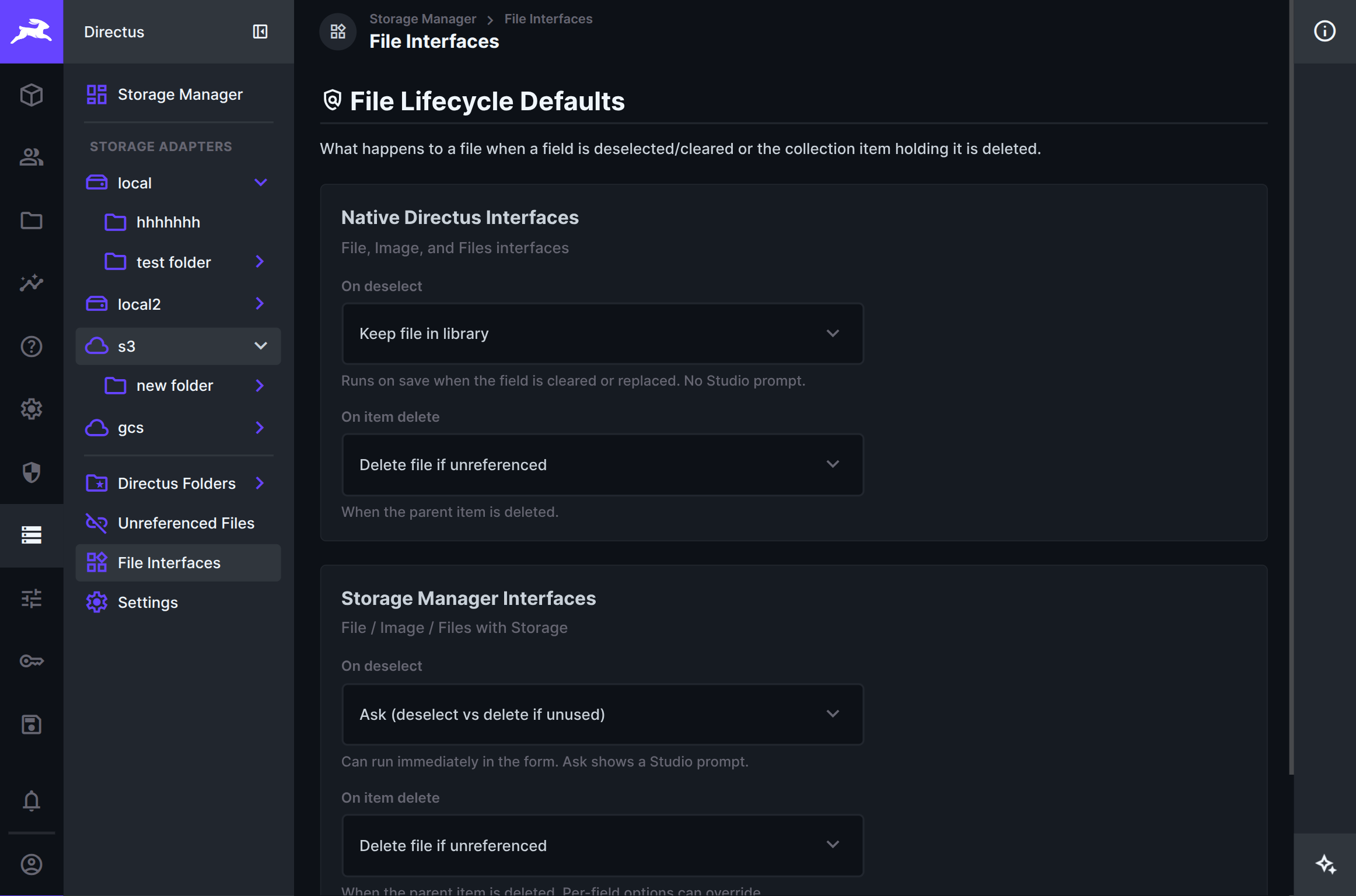
Open **File Interfaces** from the left sidebar to set what happens when a file field is cleared, or when the collection item that holds the file is deleted.
|
|
118
|
+
|
|
119
|
+
|
|
120
|
+
|
|
121
|
+
Defaults are split into two groups:
|
|
122
|
+
|
|
123
|
+
- **Native Directus Interfaces** — File / Image / Files. Cleanup runs on save (or when the item is deleted) via hooks. There is no Ask prompt in Studio for native fields.
|
|
124
|
+
- **Storage Manager Interfaces** — File / Image / Files with Storage. Deselect can run immediately in the form. **Ask** shows a Studio dialog so editors can choose deselect only, or delete the file if nothing else still uses it.
|
|
125
|
+
|
|
126
|
+
For each group you can choose:
|
|
127
|
+
|
|
128
|
+
| Setting | Options |
|
|
129
|
+
| ------- | ------- |
|
|
130
|
+
| **On deselect** | Keep file in library · Ask (Storage Manager only) · Delete file if unreferenced |
|
|
131
|
+
| **On item delete** | Keep file in library · Delete file if unreferenced |
|
|
132
|
+
|
|
133
|
+
Storage Manager fields can override these defaults per field in Data Model (including **Use File Interfaces default**). Delete only runs when nothing else still references the file.
|
|
114
134
|
|
|
115
135
|
### Settings
|
|
116
136
|
|
|
@@ -118,7 +138,9 @@ Check for updates, export or import your Mirror settings, or remove Storage Mana
|
|
|
118
138
|
|
|
119
139
|
### Flows
|
|
120
140
|
|
|
121
|
-
The **Storage Manager** Flow operation can move (or copy)
|
|
141
|
+
The **Storage Manager** Flow operation can move (or copy) **selected file IDs** in automations. Pick the target storage from a dropdown of configured locations, optionally assign files to a Directus File Library folder after a successful migrate, and pass an explicit `file_ids` array (for example from a trigger or previous step). It does not migrate an entire storage or folder at once. Copy leaves a leftover on the old storage — it will show up under Detect.
|
|
142
|
+
|
|
143
|
+
**Scan Unreferenced Files** is a separate Flow operation that runs the same dry-run scan as the module (optional storage filter, min age, text-field scan). It returns `file_ids` (capped list), `unreferenced_count`, `unreferenced_bytes`, and full `meta` so you can chain into migrate or your own follow-up steps. It does not delete anything.
|
|
122
144
|
|
|
123
145
|
## Getting started
|
|
124
146
|
|
|
@@ -129,8 +151,9 @@ The **Storage Manager** Flow operation can move (or copy) files in automations.
|
|
|
129
151
|
5. Browse a storage (or **Directus Folders**) and move or materialize as needed.
|
|
130
152
|
6. At a storage root, open **Thumbnails** in the sidebar if you need to inspect or clear generated image copies.
|
|
131
153
|
7. For collection fields that must land on a specific storage, use **File with Storage**, **Files with Storage**, or **Image with Storage** instead of the native file interfaces.
|
|
132
|
-
8. Use **
|
|
133
|
-
9. Use **
|
|
154
|
+
8. Use **File Interfaces** to set default cleanup behaviour when editors clear a file field or delete an item (works for native file fields too).
|
|
155
|
+
9. Use **Unreferenced Files** when you want to find leftover File Library entries, then move or delete them.
|
|
156
|
+
10. Use **Dry Run**, then **Move**.
|
|
134
157
|
|
|
135
158
|
## Installation
|
|
136
159
|
|