directus-extension-storage-manager 1.3.2 → 1.4.0
This diff represents the content of publicly available package versions that have been released to one of the supported registries. The information contained in this diff is provided for informational purposes only and reflects changes between package versions as they appear in their respective public registries.
- package/README.md +23 -2
- package/dist/api.js +1 -1
- package/dist/app.js +2 -2
- package/package.json +5 -3
package/README.md
CHANGED
|
@@ -8,7 +8,7 @@ Move files between your Directus storages — local disk, S3, Google Cloud, Azur
|
|
|
8
8
|
|
|
9
9
|
|
|
10
10
|
|
|
11
|
-
Directus can use several storages at once, but it will not move existing files for you. Storage Manager does: browse each storage, upload, find files that are on disk but not in Directus,
|
|
11
|
+
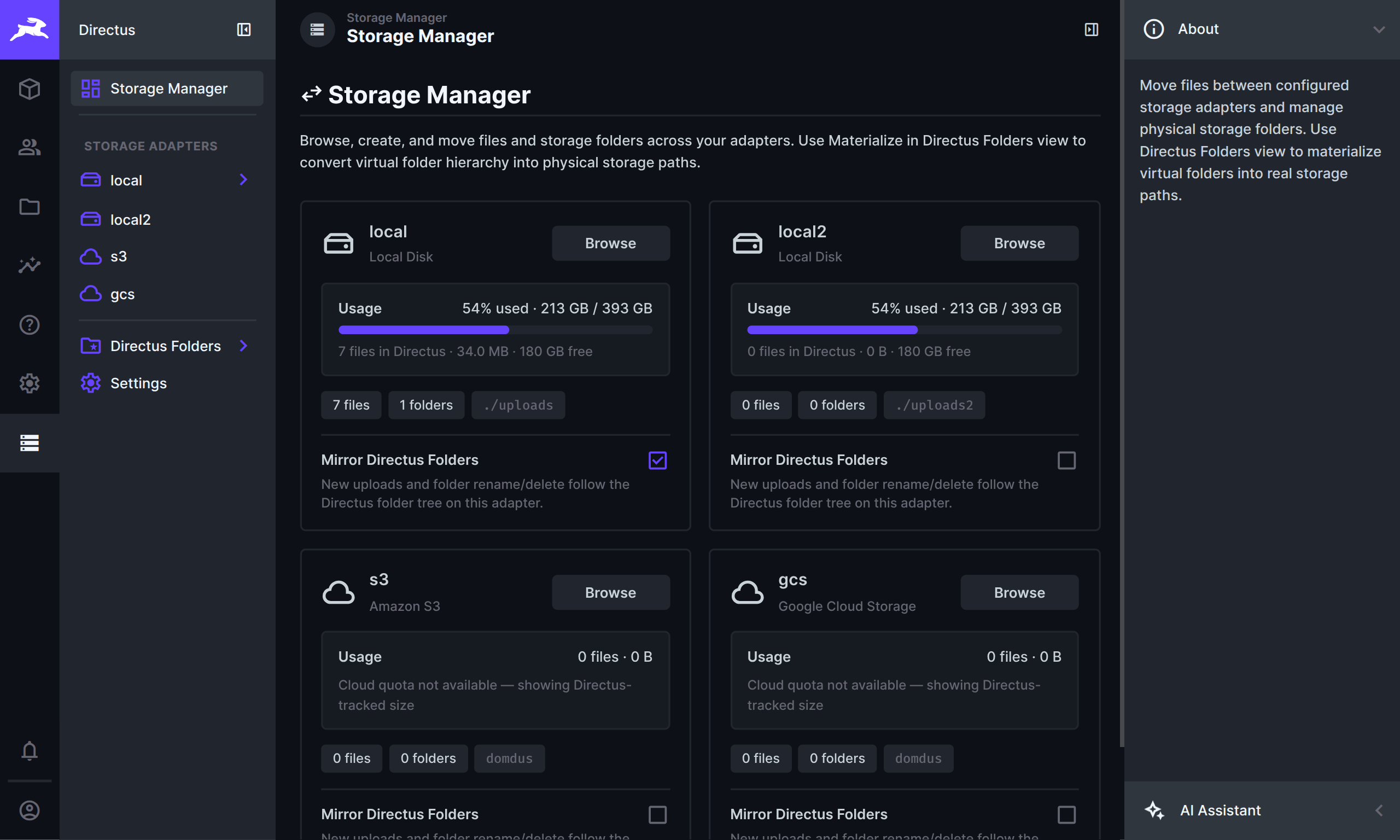
Directus can use several storages at once, but it will not move existing files for you. Storage Manager does: browse each storage, upload, find files that are on disk but not in Directus, move files or whole folders, and find File Library entries that nothing uses anymore.
|
|
12
12
|
|
|
13
13
|
When you open a storage from the overview, the left sidebar shows that storage’s folder tree. Folders load as you expand them, so large storages stay quick to navigate.
|
|
14
14
|
|
|
@@ -92,6 +92,26 @@ Find files that are on a storage but not yet in Directus.
|
|
|
92
92
|
|
|
93
93
|
Import adds them to Directus without moving the files. You can also delete leftover files that Directus does not know about. Generated resize/preview files are left alone (use **Thumbnails → Delete All Transforms** at the storage root if you want to clear those).
|
|
94
94
|
|
|
95
|
+
### Unreferenced Files
|
|
96
|
+
|
|
97
|
+
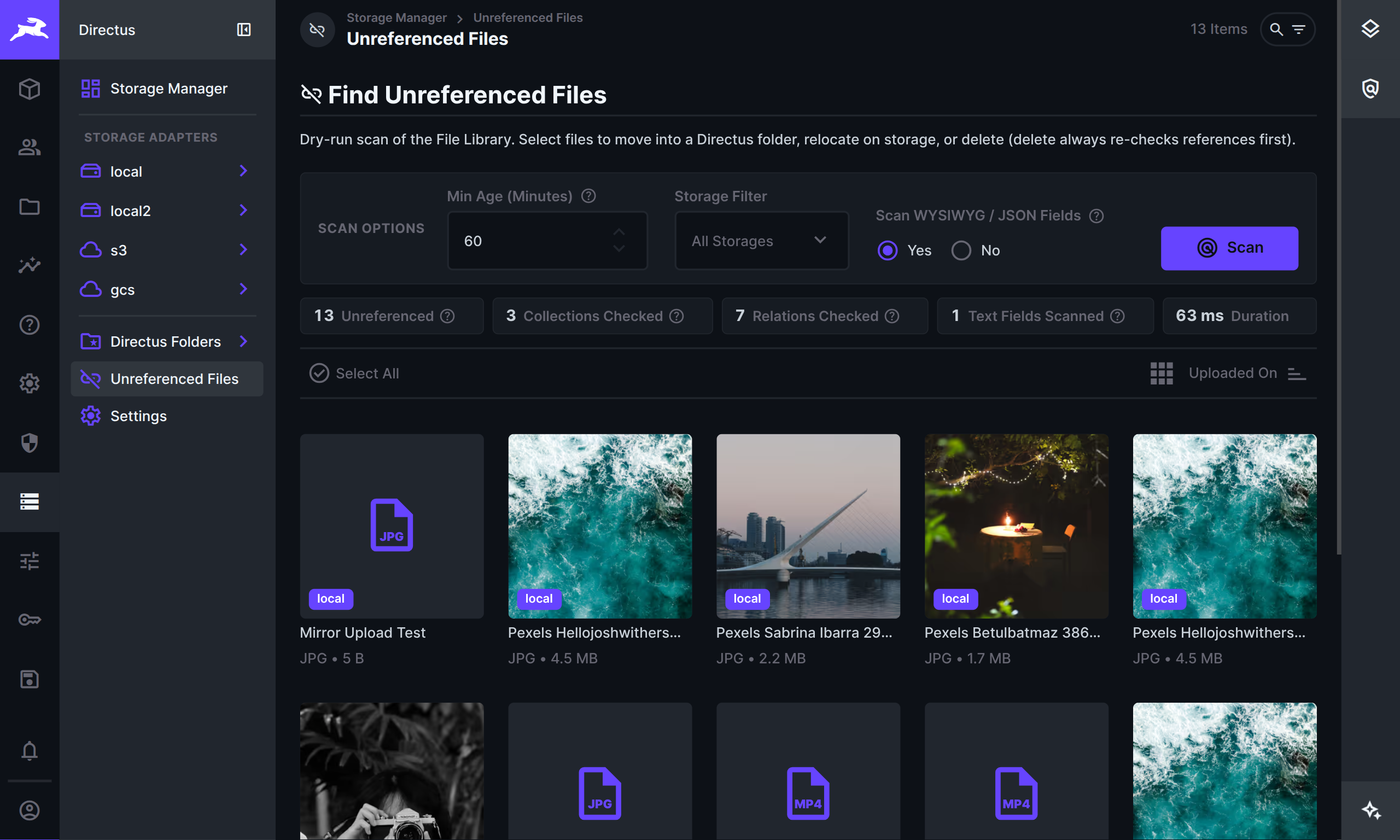
Open **Unreferenced Files** from the left sidebar to find File Library items that nothing in your project still uses — leftovers after content was deleted, images that were replaced, or uploads that never got attached.
|
|
98
|
+
|
|
99
|
+
|
|
100
|
+
|
|
101
|
+
Set your scan options, then click **Scan**:
|
|
102
|
+
|
|
103
|
+
- **Min Age** — skip files that were uploaded very recently (so mid-upload or draft files are not flagged yet)
|
|
104
|
+
- **Storage Filter** — limit the search to one storage, or check all
|
|
105
|
+
- **Scan WYSIWYG / JSON Fields** — also look inside rich text and similar content for file links. This can take longer on large sites; turn it off for a faster check of file/image fields only
|
|
106
|
+
|
|
107
|
+
After a scan you get a short summary and a list of matches (same cards/table layouts as elsewhere in Storage Manager). Select files and choose what to do:
|
|
108
|
+
|
|
109
|
+
- **Move to Directus Folder** — organize them in the File Library (virtual folders only)
|
|
110
|
+
- **Move to Storage Folder** — relocate them on disk / cloud storage
|
|
111
|
+
- **Delete** — remove them if they are still unused (each file is checked again before delete)
|
|
112
|
+
|
|
113
|
+
In the right sidebar, **File Lifecycle** sets defaults for the Storage Manager file field interfaces: what should happen when someone clears a file from a field, or when a whole item is deleted (`keep`, `ask`, or delete the file if nothing else uses it).
|
|
114
|
+
|
|
95
115
|
### Settings
|
|
96
116
|
|
|
97
117
|
Check for updates, export or import your Mirror settings, or remove Storage Manager’s saved settings if you uninstall.
|
|
@@ -109,7 +129,8 @@ The **Storage Manager** Flow operation can move (or copy) files in automations.
|
|
|
109
129
|
5. Browse a storage (or **Directus Folders**) and move or materialize as needed.
|
|
110
130
|
6. At a storage root, open **Thumbnails** in the sidebar if you need to inspect or clear generated image copies.
|
|
111
131
|
7. For collection fields that must land on a specific storage, use **File with Storage**, **Files with Storage**, or **Image with Storage** instead of the native file interfaces.
|
|
112
|
-
8. Use **
|
|
132
|
+
8. Use **Unreferenced Files** when you want to find leftover File Library entries, then move or delete them.
|
|
133
|
+
9. Use **Dry Run**, then **Move**.
|
|
113
134
|
|
|
114
135
|
## Installation
|
|
115
136
|
|