deepseek-harness-intelligent-ui 0.2.2 → 0.2.4
This diff represents the content of publicly available package versions that have been released to one of the supported registries. The information contained in this diff is provided for informational purposes only and reflects changes between package versions as they appear in their respective public registries.
- package/CHANGELOG.md +43 -1
- package/README.md +325 -110
- package/README.zh-CN.md +313 -100
- package/THIRD_PARTY_NOTICES.md +8 -0
- package/client/client.js +17 -17
- package/package.json +15 -7
- package/renderer/renderer.js +500 -0
- package/src/catalog/patch.js +283 -0
- package/src/compat.js +1 -1
- package/src/guidance.js +6 -1
- package/src/plugin.js +6 -2
- package/src/portable/artifacts.js +87 -0
- package/src/tools/patch.js +139 -0
- package/src/tools/render.js +4 -2
package/README.zh-CN.md
CHANGED
|
@@ -1,8 +1,19 @@
|
|
|
1
|
-
|
|
1
|
+
<div align="center">
|
|
2
2
|
|
|
3
|
-
|
|
3
|
+
<img src="https://raw.githubusercontent.com/dreamfarer-space/deepseek-harness-intelligent-ui/main/docs/assets/readme/hero.zh.svg" alt="DeepSeek Harness Intelligent UI:为 DeepSeek Harness 带来生成式、可交互的界面" width="100%">
|
|
4
4
|
|
|
5
|
-
[
|
|
5
|
+
[English](README.md) · **中文**
|
|
6
|
+
|
|
7
|
+
[](https://github.com/dreamfarer-space/deepseek-harness-intelligent-ui/actions/workflows/ci.yml)
|
|
8
|
+
[](https://www.npmjs.com/package/deepseek-harness-intelligent-ui)
|
|
9
|
+
[](https://github.com/dreamfarer-space/deepseek-harness-intelligent-ui/blob/main/docs/compatibility.md)
|
|
10
|
+
[](https://nodejs.org)
|
|
11
|
+
[](https://github.com/dreamfarer-space/deepseek-harness-intelligent-ui/blob/main/docs/compatibility.md)
|
|
12
|
+
[](LICENSE)
|
|
13
|
+
|
|
14
|
+
[演示](#-演示) · [质量](#-真实模型质量基线) · [快速开始](#-快速开始) · [如何选择](#-agent-如何选择呈现方式) · [沙箱组件](#-沙箱组件ui_render_widget) · [安全](#-安全模型) · [配置](#%EF%B8%8F-配置) · [开发](#-开发与验证)
|
|
15
|
+
|
|
16
|
+
</div>
|
|
6
17
|
|
|
7
18
|
为 [DeepSeek Harness](https://github.com/deepseek-ai/deepseek-harness)(DSH)提供**生成式、可交互的 UI**。用户用自然语言提问,Agent 自行决定怎样作答:
|
|
8
19
|
|
|
@@ -14,36 +25,160 @@
|
|
|
14
25
|
|
|
15
26
|
本插件把 CopilotKit [OpenIntelligentUI](https://github.com/CopilotKit/OpenIntelligentUI) 的思路(Open Generative UI + A2UI 风格声明式组件)移植到 DSH 自带的扩展点上,不依赖 CopilotKit、LangGraph 或外部路由服务。
|
|
16
27
|
|
|
17
|
-
##
|
|
28
|
+
## ✨ 亮点
|
|
18
29
|
|
|
19
|
-
|
|
30
|
+
<table>
|
|
31
|
+
<tr>
|
|
32
|
+
<td width="33%" valign="top">
|
|
20
33
|
|
|
21
|
-
|
|
34
|
+
### 🧠 自主决策
|
|
35
|
+
无需任何命令。每一轮由 Agent 依据系统提示,自行选择文本、原生组件或实时组件。
|
|
22
36
|
|
|
23
|
-
>
|
|
24
|
-
>
|
|
25
|
-
> **关于模型:** 背后的模型是 `scripts/e2e/` 中的**脚本化 mock**(当时没有 API Key),回答内容是预设的。画面中的流式渲染、交互、双向通信、持久化和隔离,都是插件在 DSH 中真实运行的结果。
|
|
26
|
-
>
|
|
27
|
-
> **在 GitHub 内联播放:** 把 `docs/assets/demo.mp4` 拖进 GitHub 的评论或 Release 编辑框,再把生成的 `https://github.com/user-attachments/assets/…` 链接单独一行粘贴到这里。GitHub 只对上传的附件内联播放视频,不支持仓库内的文件。
|
|
37
|
+
</td>
|
|
38
|
+
<td width="33%" valign="top">
|
|
28
39
|
|
|
29
|
-
|
|
30
|
-
|
|
31
|
-
|
|
32
|
-
|
|
40
|
+
### ⚡ 流式渐进
|
|
41
|
+
JSON 还在生成,组件就已出现。实时组件在**同一个** iframe 中 morph 并原地定稿,不重建、不闪烁。
|
|
42
|
+
|
|
43
|
+
</td>
|
|
44
|
+
<td width="33%" valign="top">
|
|
45
|
+
|
|
46
|
+
### 🖱️ 本地优先
|
|
47
|
+
滑块、旋转、缩放、排序、标签页、悬停提示都在浏览器内完成,不调用模型。
|
|
48
|
+
|
|
49
|
+
</td>
|
|
50
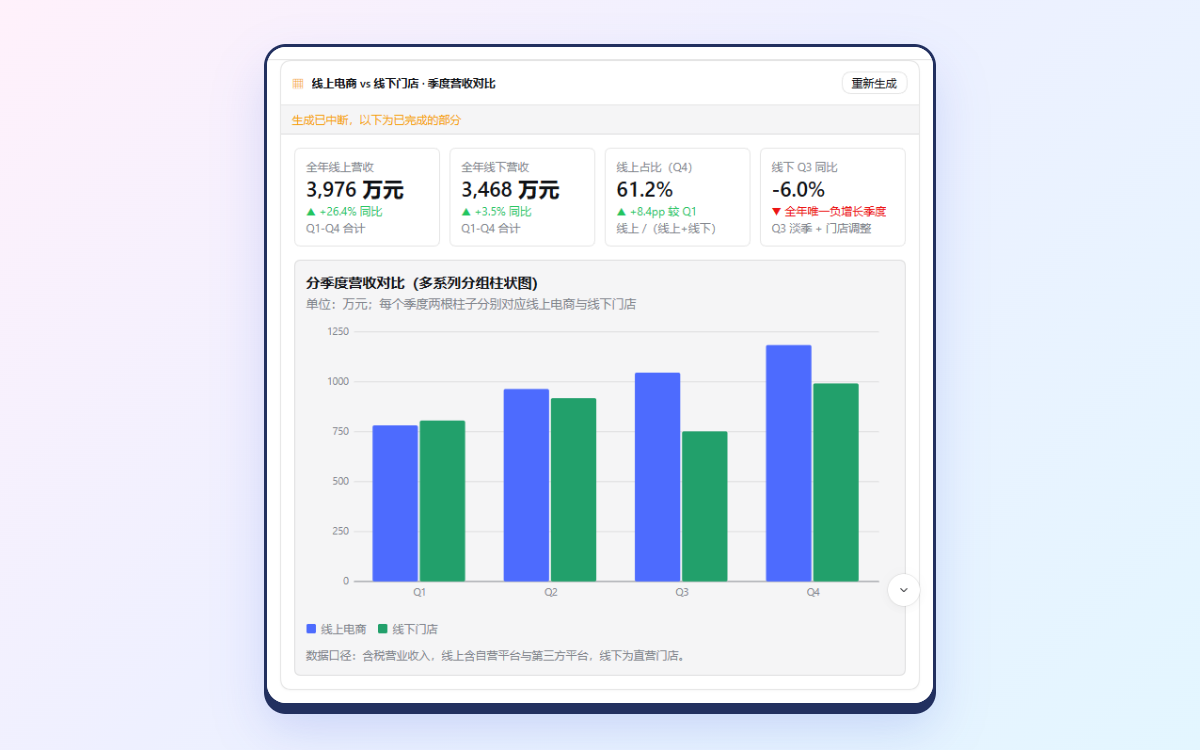
|
+
</tr>
|
|
51
|
+
<tr>
|
|
52
|
+
<td valign="top">
|
|
53
|
+
|
|
54
|
+
### 🧩 20 种组件
|
|
55
|
+
卡片、栅格、标签页、表格、图表、时间线、`Plot`、KaTeX `Math`、`Mermaid`、表单,渲染前先校验。
|
|
56
|
+
|
|
57
|
+
</td>
|
|
58
|
+
<td valign="top">
|
|
59
|
+
|
|
60
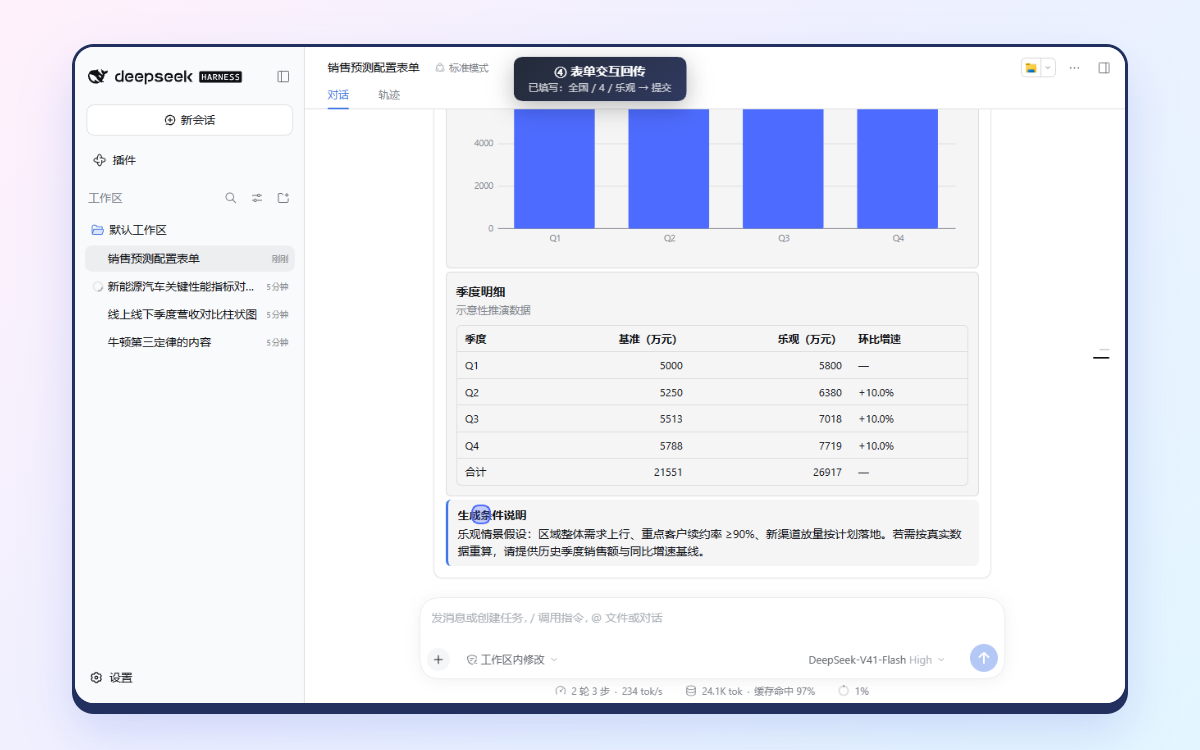
|
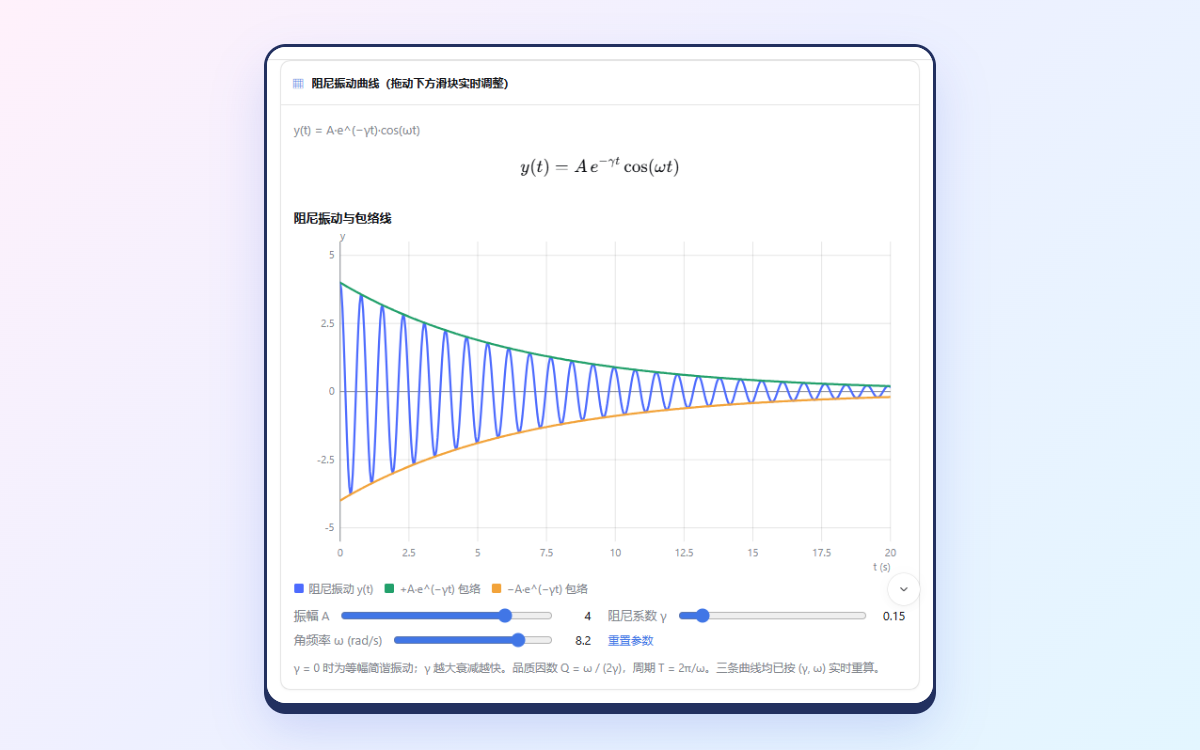
+
### 🔒 默认沙箱隔离
|
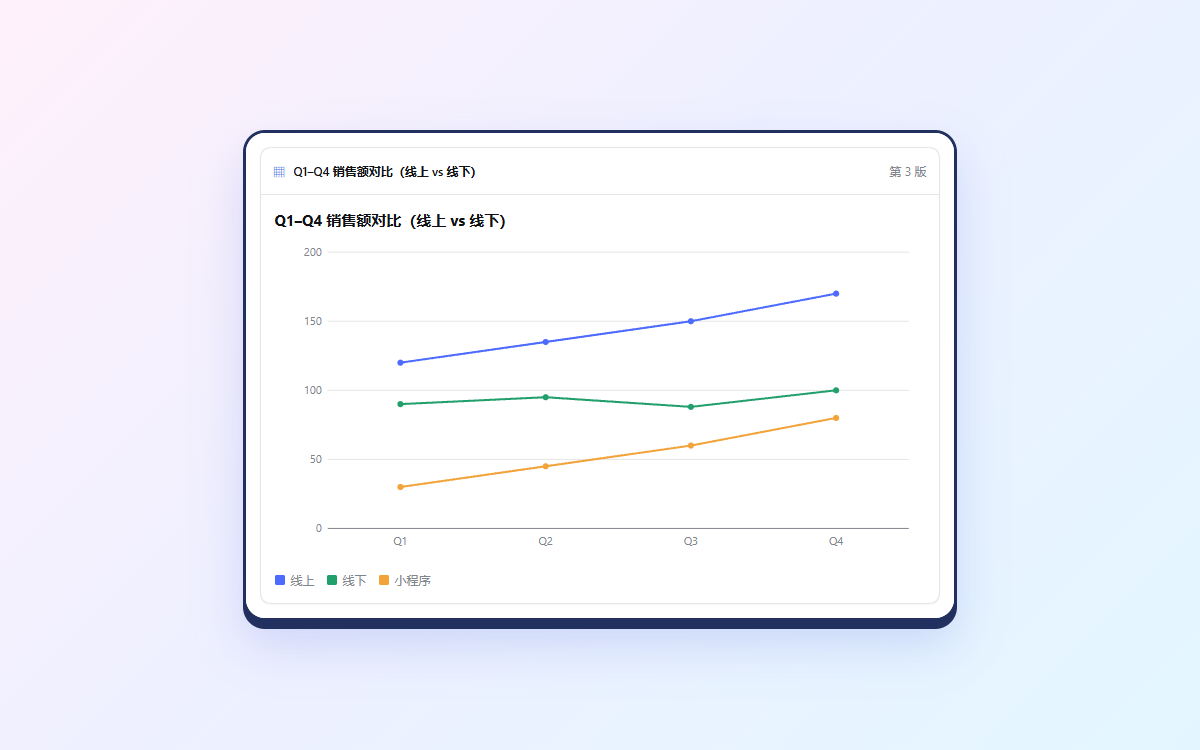
|
61
|
+
不透明源 iframe、严格 CSP、带 token 的消息校验、限流的 Bridge,全部在真实浏览器中实测。
|
|
62
|
+
|
|
63
|
+
</td>
|
|
64
|
+
<td valign="top">
|
|
65
|
+
|
|
66
|
+
### 💾 状态不丢失
|
|
67
|
+
标签页、排序、表单值、滑块和 `UI.state` 在回合折叠、页面刷新、中途停止后都能恢复。
|
|
33
68
|
|
|
34
|
-
|
|
69
|
+
</td>
|
|
70
|
+
</tr>
|
|
71
|
+
</table>
|
|
72
|
+
|
|
73
|
+
## 🎬 演示
|
|
74
|
+
|
|
75
|
+
### 真实 DeepSeek 模型,端到端
|
|
76
|
+
|
|
77
|
+
https://github.com/user-attachments/assets/e4eb0adc-659e-4c80-b473-449aa42ca00f
|
|
78
|
+
|
|
79
|
+
<details>
|
|
80
|
+
<summary><b>🎞️ GIF 精选片段</b>(适用于无法播放视频的页面,如 npm)</summary>
|
|
81
|
+
<br>
|
|
82
|
+
|
|
83
|
+
<p align="center">
|
|
84
|
+
<img src="https://raw.githubusercontent.com/dreamfarer-space/deepseek-harness-intelligent-ui/main/docs/assets/real-model/demo.gif" alt="真实 deepseek-flash 模型在 DSH Web 中的表现,由鲸鱼娘解说:表单回传、带滑块的阻尼振动 Plot、用 ui_patch 两轮原位修改图表" width="100%">
|
|
85
|
+
</p>
|
|
86
|
+
|
|
87
|
+
</details>
|
|
88
|
+
|
|
89
|
+
<img align="right" width="120" src="https://raw.githubusercontent.com/dreamfarer-space/deepseek-harness-intelligent-ui/main/scripts/eval/demo/assets/whale/greet.webp" alt="担任演示解说的 DeepSeek 鲸鱼娘">
|
|
90
|
+
|
|
91
|
+
🎥 **完整视频(H.264,2 分 27 秒,9.5 MB):** [docs/assets/real-model/demo.mp4](https://github.com/dreamfarer-space/deepseek-harness-intelligent-ui/blob/main/docs/assets/real-model/demo.mp4)。视频覆盖全部 11 个浏览器用例,每一章都停在真实结果上:纯文本、图表、数据表、表单回传、Plot、Three.js 与「让模型修复」、停止 → 重新生成、两轮原位修改、Fast 3G、CDN 不可达、手机宽度。由 DeepSeek 鲸鱼娘解说,立绘来自 [dsh-whale-musume](https://github.com/Sutera-Diffusus/dsh-whale-musume)(MIT,见[致谢](#致谢))。
|
|
92
|
+
|
|
93
|
+
> [!NOTE]
|
|
94
|
+
> 2026-10-16 由 `npm run eval:real -- --stage browser --record` 录制,`npm run eval:demo` 剪辑合成。每张卡片都是真实 **`deepseek-flash`** 模型在装有本插件的真实 **DSH Web 0.2.0-rc.1** 里当场生成的。没有任何脚本回放,**失败也原样保留**:每章标题卡都标出 ✓ 或 ✗,解说会说明哪里出了问题。模型生成期间视频加速播放,右下角秒表显示真实耗时。评测结果见[真实模型质量基线](#-真实模型质量基线)。
|
|
95
|
+
|
|
96
|
+
| 多系列柱状图:**✗**(调用中途被截断) | `ui_patch` 两轮原位修改:✓ |
|
|
35
97
|
|:---:|:---:|
|
|
36
|
-
|  |  |
|
|
99
|
+
| *图表内容正确,但卡片显示「生成已中断」:还有组件没生成完* | *「改成折线图」→「加上小程序 30/45/60/80」:同一张卡片,第 3 版,数值准确* |
|
|
100
|
+
| **提交表单 → 模型使用提交的值:✓** | **阻尼振动 `Plot`,滑块实时重绘:✓** |
|
|
101
|
+
|  |  |
|
|
102
|
+
| *提交的 全国 / 4 / 乐观 生成了季度预测* | *y = A·e^(−γt)·cos(ωt) 及包络线;拖动滑块不调用模型* |
|
|
103
|
+
| **Three.js:✗,再由「让模型修复」修好** | **中途停止 → 重新生成:✓** |
|
|
104
|
+
| 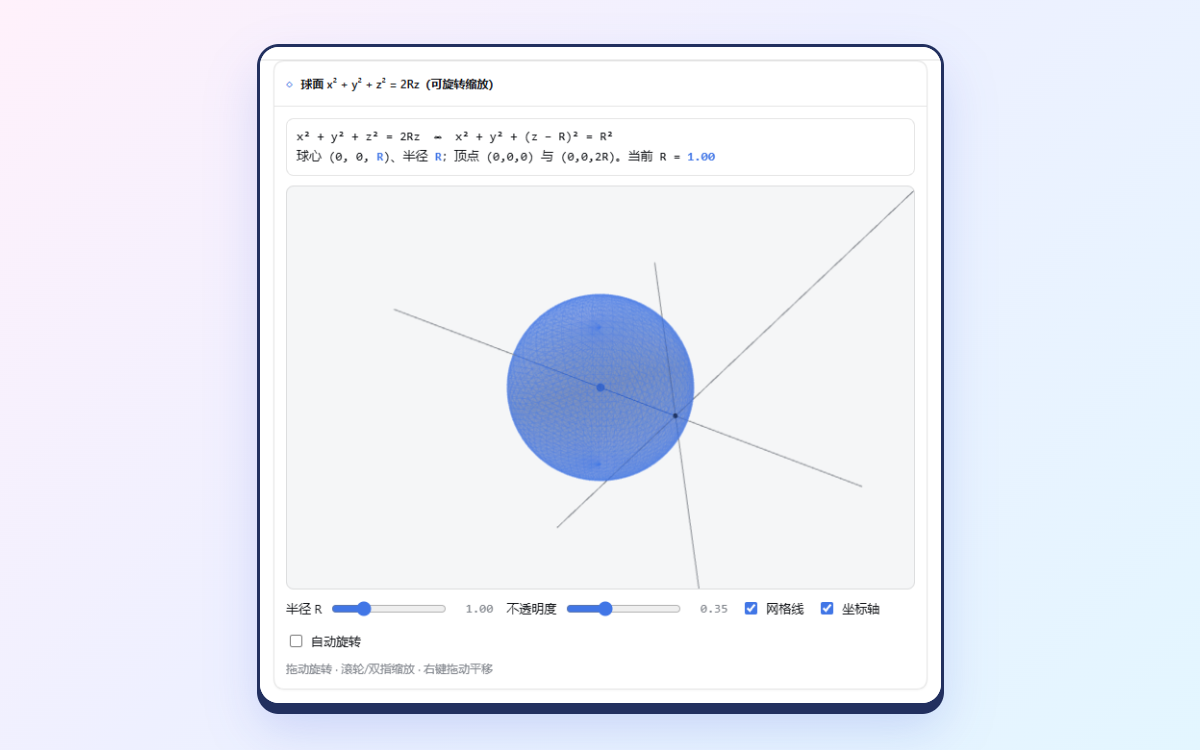 | 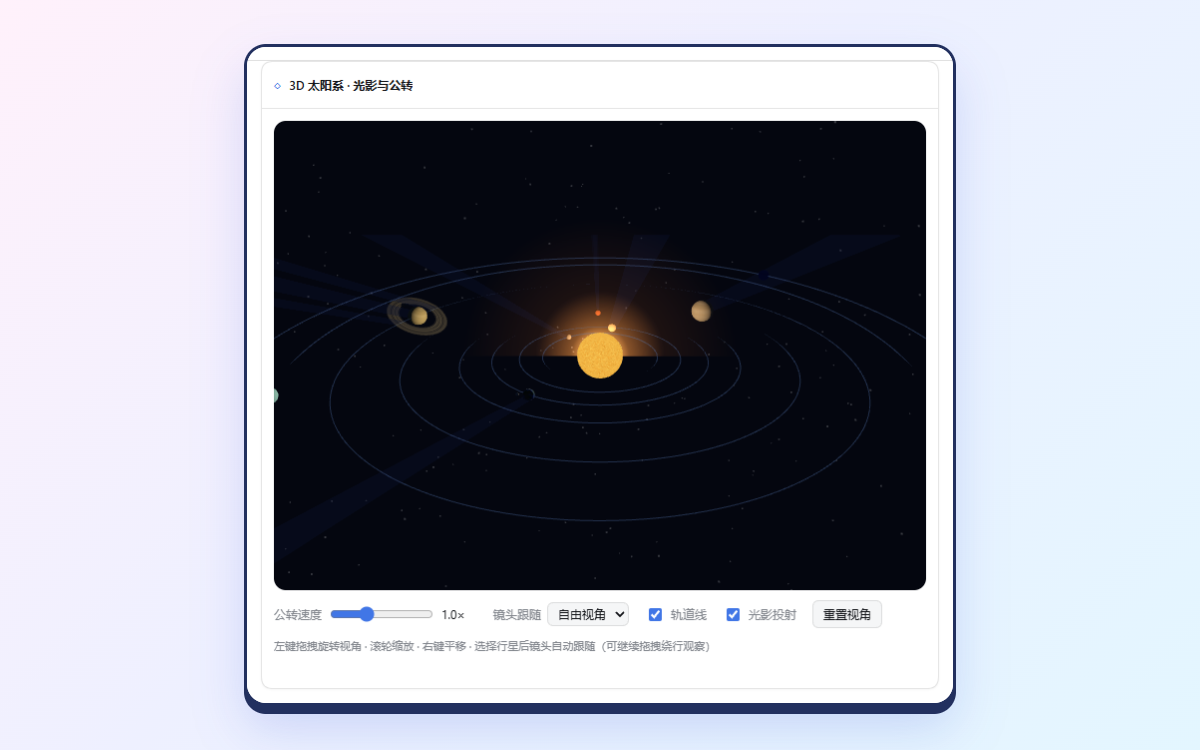 |
|
|
105
|
+
| *首次生成报错 `view is not defined`;修复后球心 (0,0,R),带坐标轴* | *中断的卡片保留静态预览,「重新生成」得到完整场景* |
|
|
106
|
+
| **Fast 3G、禁用缓存:✓** | **CDN 不可达:✓(按设计降级)** |
|
|
107
|
+
| 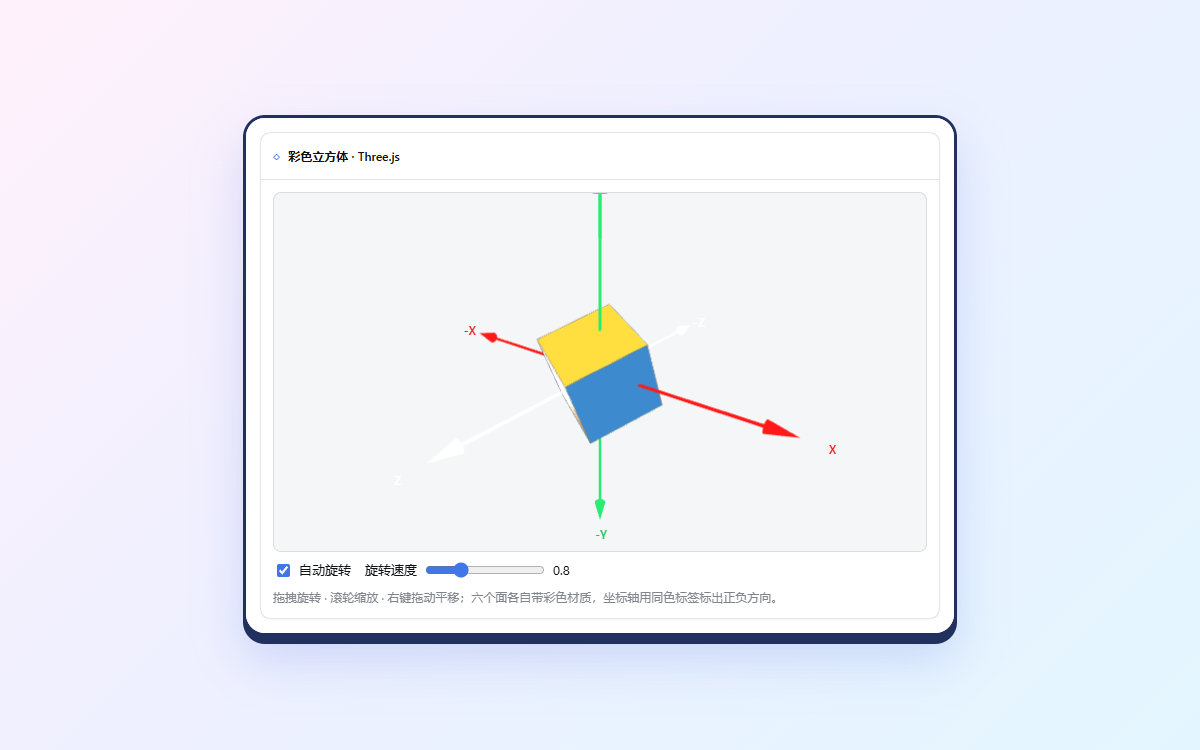 | 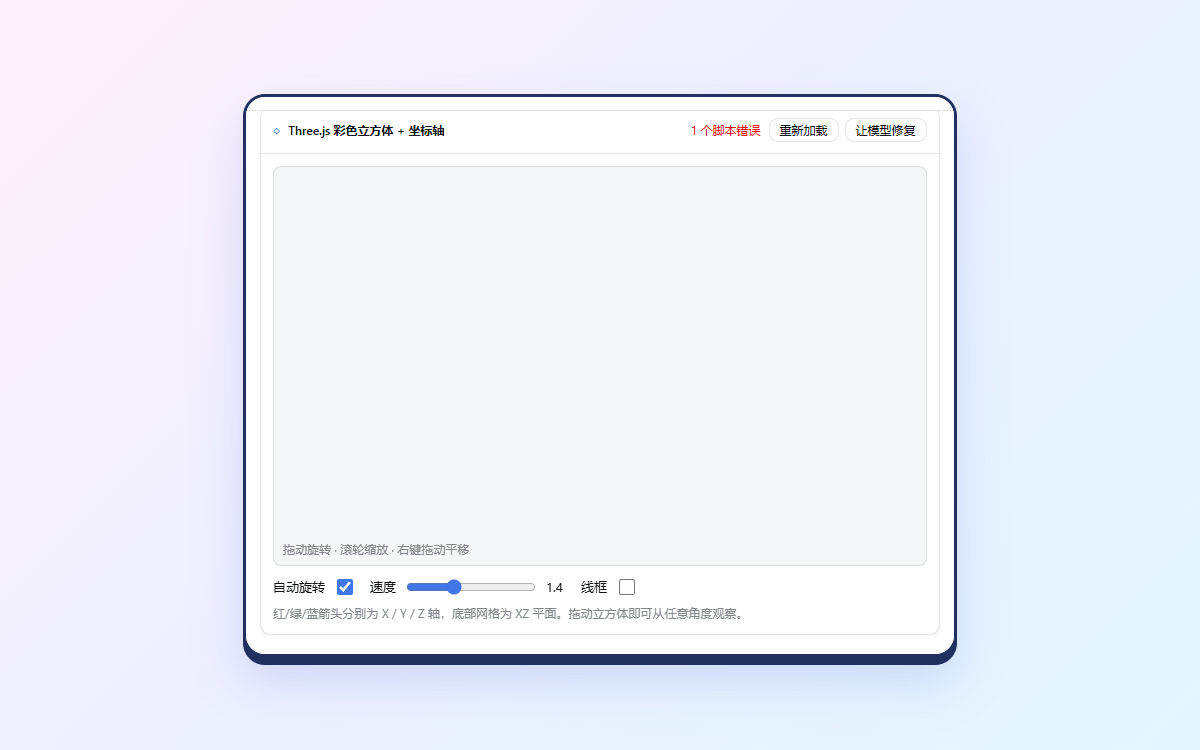 |
|
|
108
|
+
| *three.js 加载变慢,但仍正常渲染* | *失败直接显示在卡片上,对话不受影响* |
|
|
109
|
+
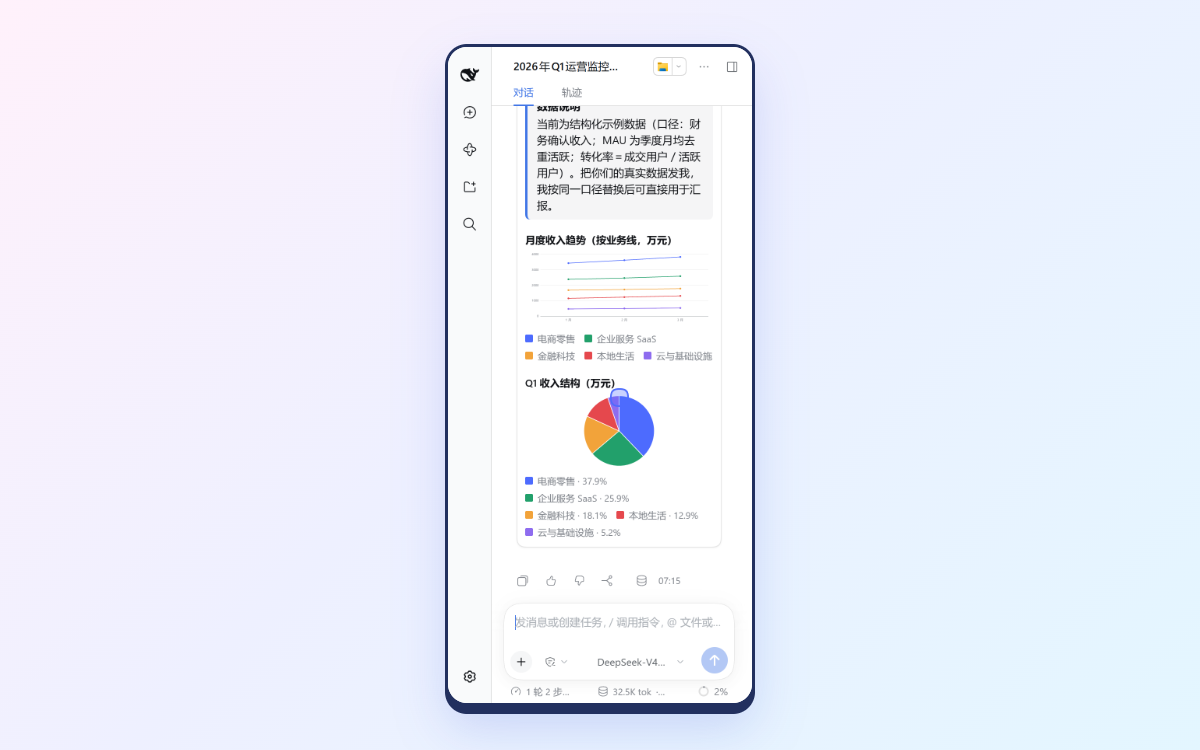
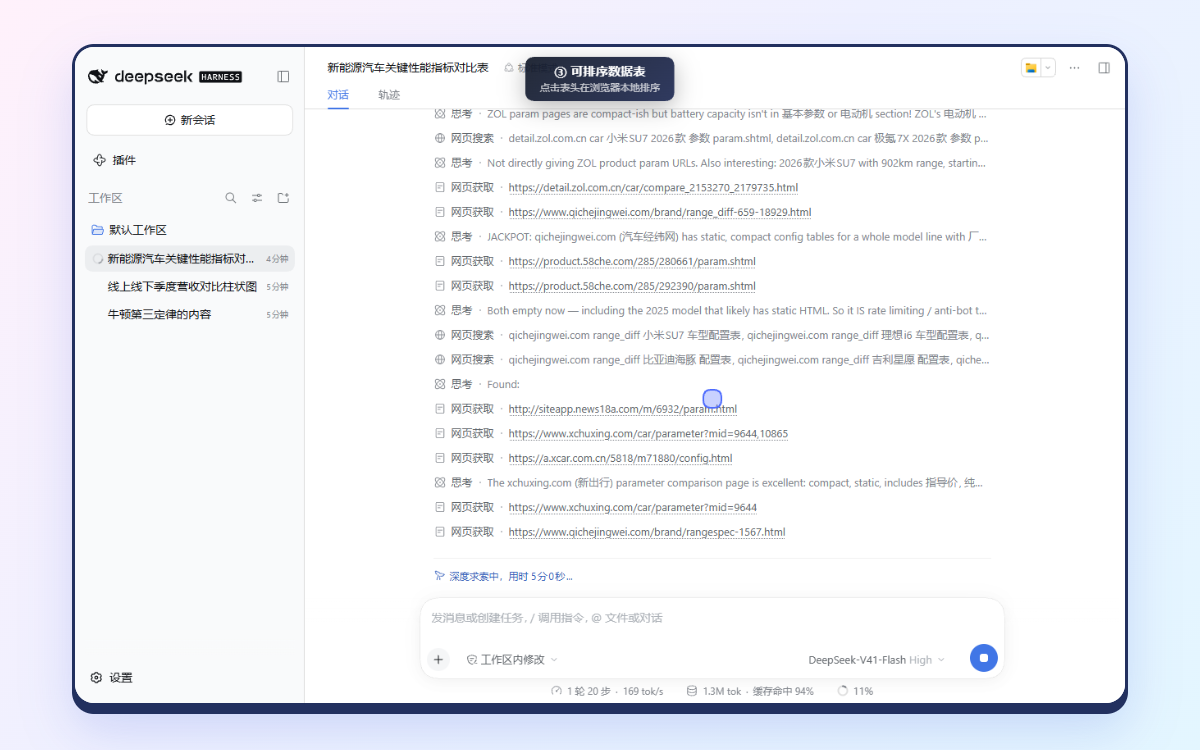
| **手机宽度(390 px):✓** | **可排序数据表:✗(5 分钟内没出表)** |
|
|
110
|
+
|  |  |
|
|
111
|
+
| *无溢出,指标与图表都能放下* | *Agent 把时间都花在上网查车型参数上* |
|
|
112
|
+
|
|
113
|
+
<details>
|
|
114
|
+
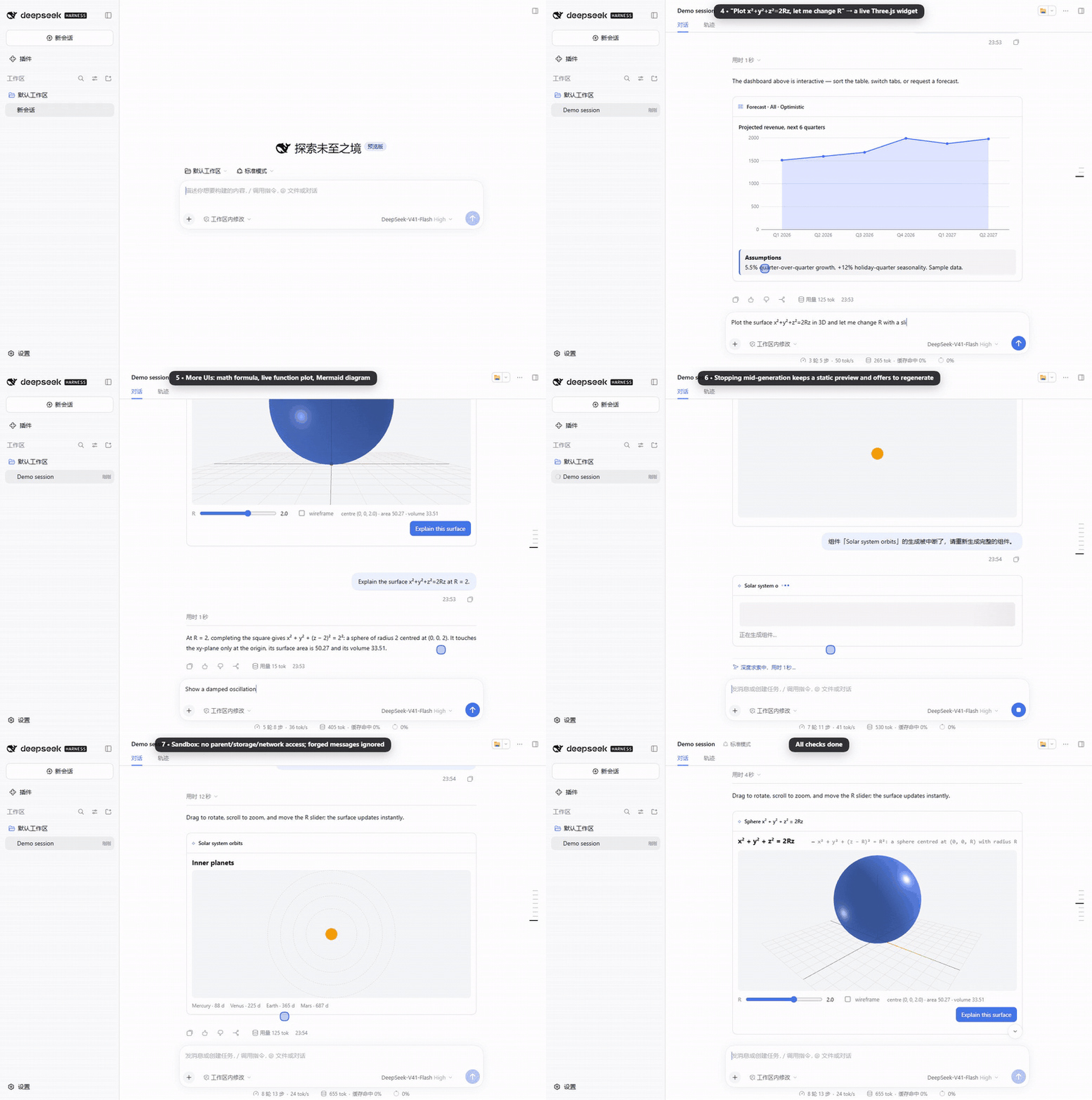
<summary><b>🧪 脚本化模型演示</b>(插件管线 E2E:深色主题、刷新恢复、沙箱隔离)</summary>
|
|
115
|
+
<br>
|
|
116
|
+
|
|
117
|
+
|
|
118
|
+
|
|
119
|
+
🎥 [docs/assets/demo.mp4](https://github.com/dreamfarer-space/deepseek-harness-intelligent-ui/blob/v0.2.1/docs/assets/demo.mp4)。由 `npm run e2e:all -- --record` 录制,背后是 `scripts/e2e/` 中的**脚本化 mock**,回答内容是预设的。它展示的是插件管线(流式、渲染、双向通信、持久化、隔离),不代表真实模型的表现。
|
|
37
120
|
|
|
38
|
-
|
|
|
121
|
+
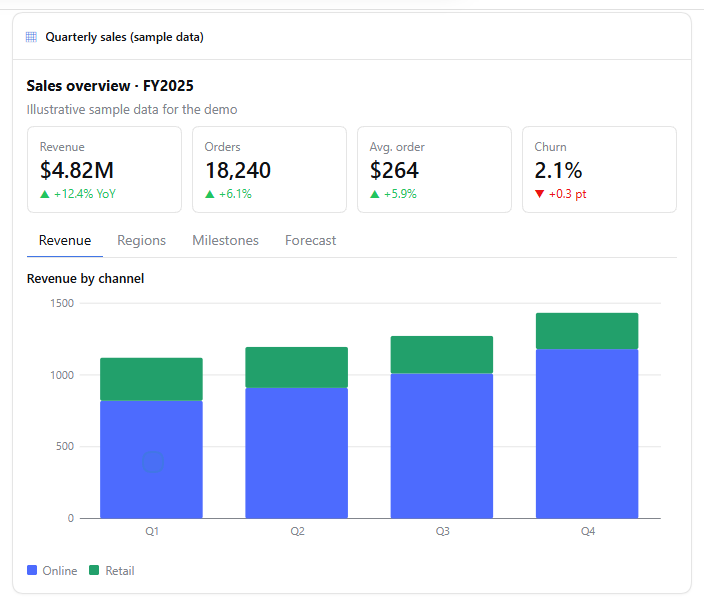
| 看板流式出现并定稿 | Three.js 组件:R 滑块、旋转、缩放 |
|
|
39
122
|
|:---:|:---:|
|
|
40
|
-
|  | 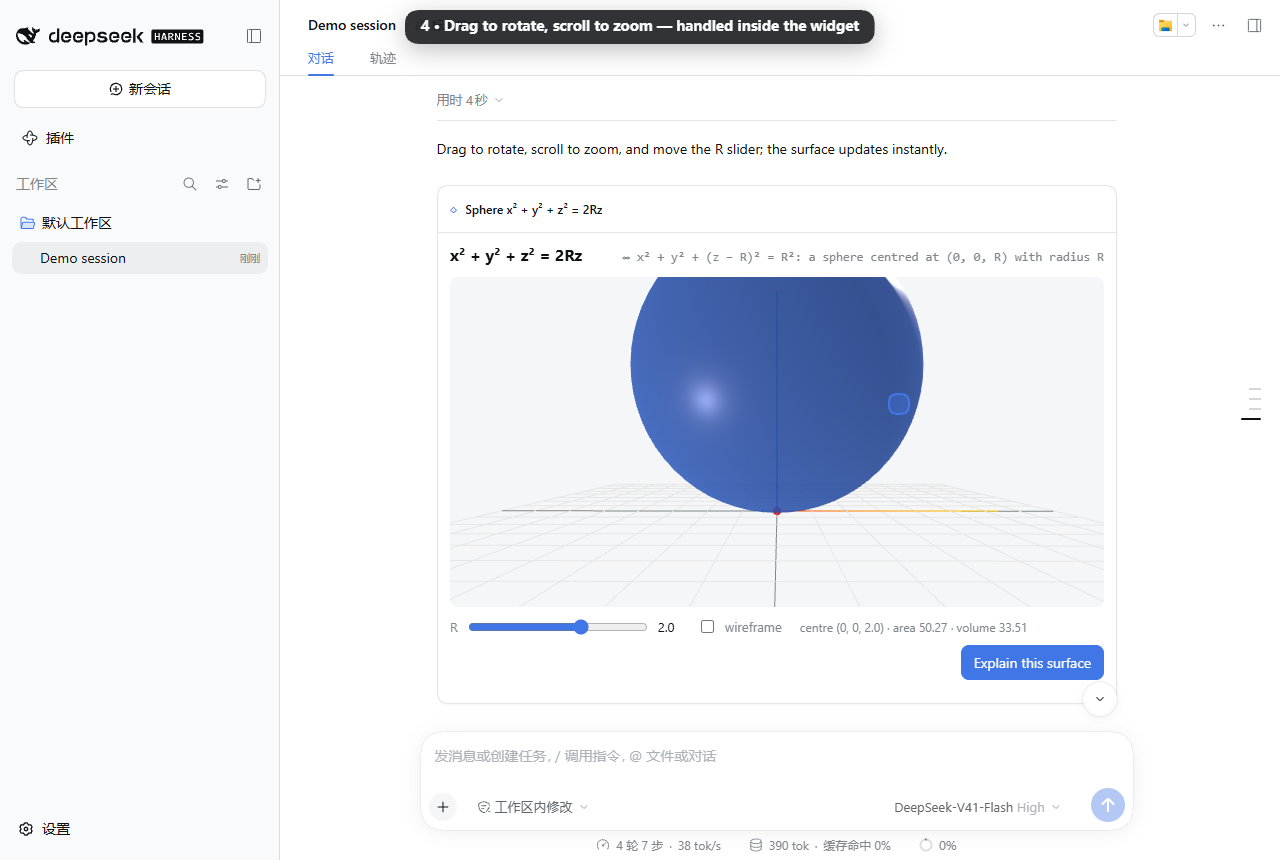 |
|
|
41
124
|
|
|
42
125
|
| 深色主题 | 手机宽度(深色) | 刷新后恢复 |
|
|
43
126
|
|:---:|:---:|:---:|
|
|
44
127
|
| 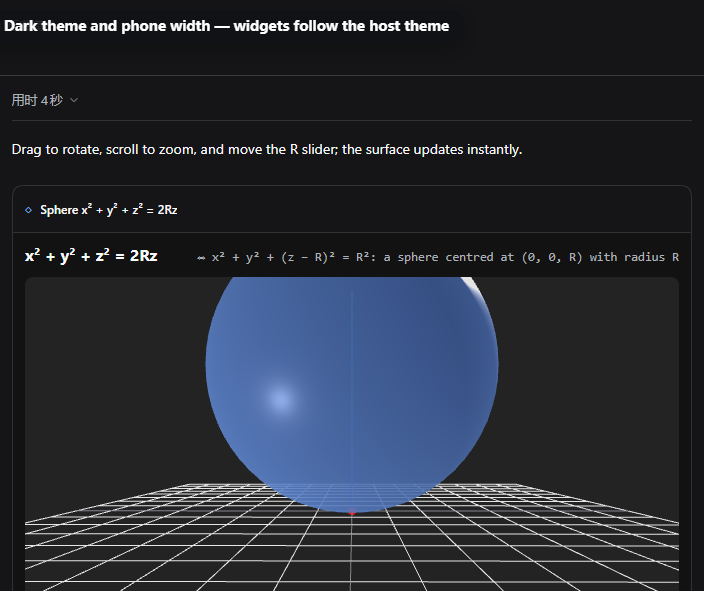 | 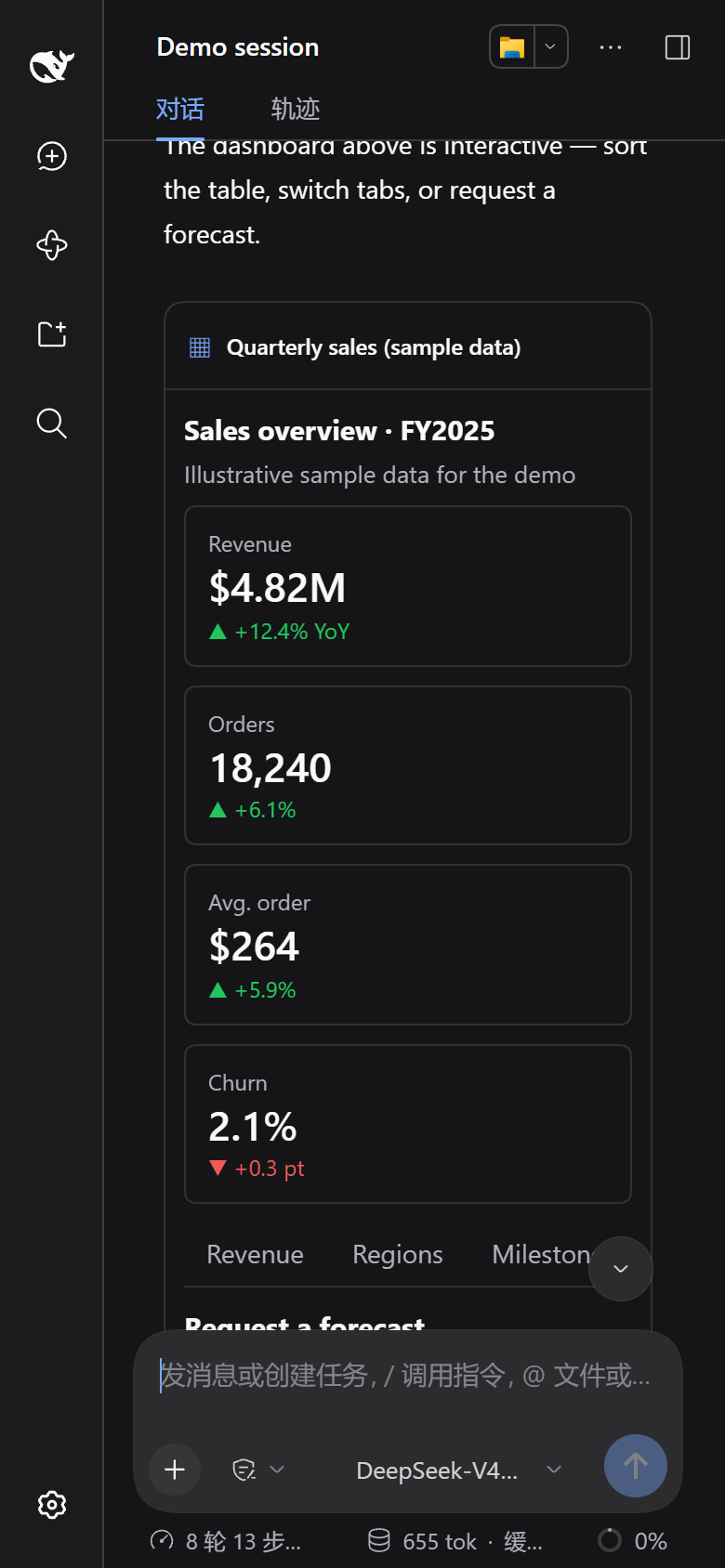 | 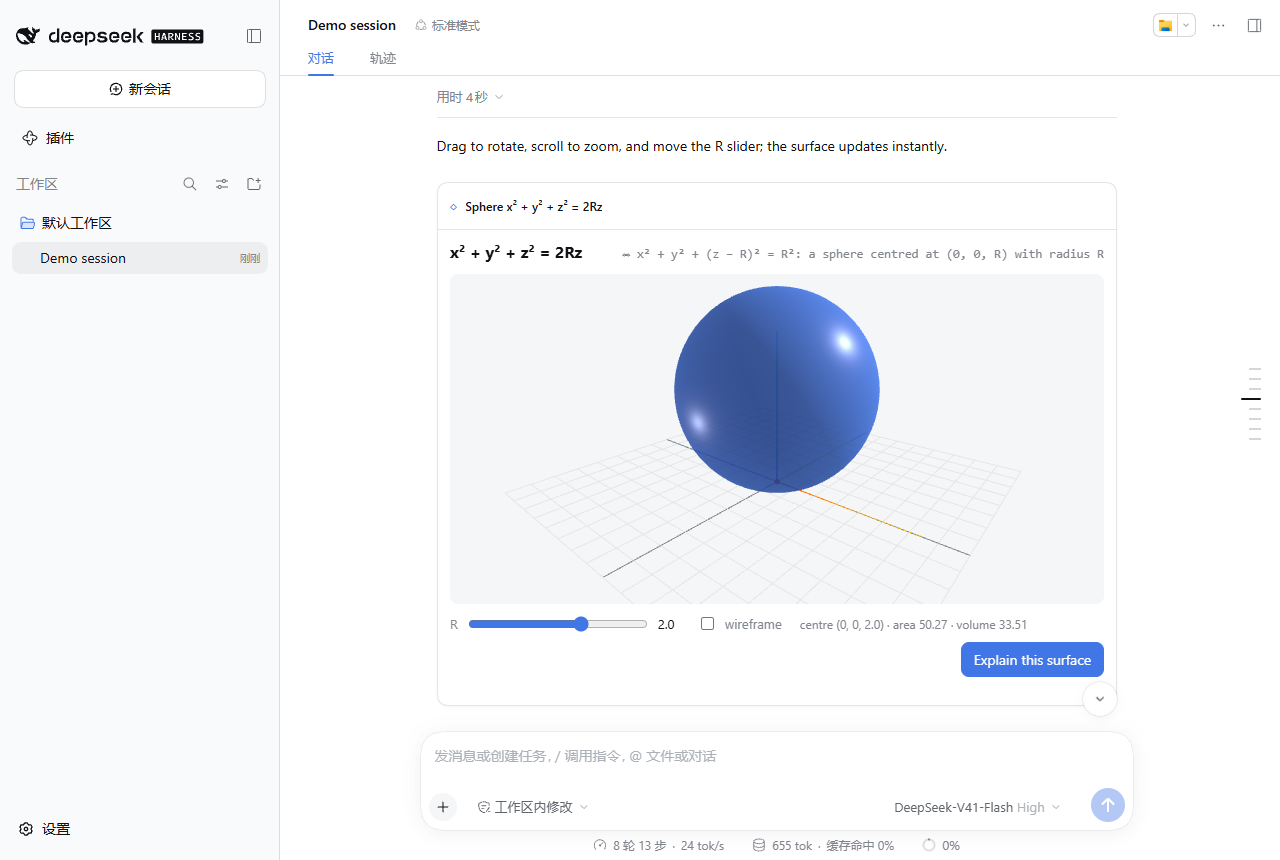 |
|
|
45
128
|
|
|
46
|
-
|
|
129
|
+
</details>
|
|
130
|
+
|
|
131
|
+
## 🚀 快速开始
|
|
132
|
+
|
|
133
|
+
需要 [DeepSeek Harness](https://github.com/deepseek-ai/deepseek-harness) **0.1.7 – 0.2.x**(`>=0.1.7-rc.1 <0.3.0`)和 Node.js ≥ 22.13,Windows、Linux、macOS 均可。安装过程不需要编译:npm 包自带预构建的浏览器端 bundle,也没有任何安装脚本。
|
|
134
|
+
|
|
135
|
+
```sh
|
|
136
|
+
dsh plugin --profile web add deepseek-harness-intelligent-ui
|
|
137
|
+
```
|
|
138
|
+
|
|
139
|
+
然后重启 DSH Web(`dsh web`),试着提一个需要可视化的问题,例如 *“按渠道对比 Q1–Q4 营收”* 或 *“让我在 3D 里探索 x²+y²+z²=2Rz”*。
|
|
140
|
+
|
|
141
|
+
也可以用引导式安装器。它会先检查 Node、`dsh` 版本、pnpm 和 profile,检查通过后执行同样的 `dsh plugin add`:
|
|
142
|
+
|
|
143
|
+
```sh
|
|
144
|
+
npx deepseek-harness-intelligent-ui install # 可选 --profile <名称>、--dsh <路径>、--dry-run
|
|
145
|
+
npx deepseek-harness-intelligent-ui doctor # 只诊断,不做修改
|
|
146
|
+
```
|
|
147
|
+
|
|
148
|
+
| 操作 | 命令 |
|
|
149
|
+
|---|---|
|
|
150
|
+
| 升级 | `dsh plugin --profile web add deepseek-harness-intelligent-ui@latest` |
|
|
151
|
+
| 试用预发布版(仅在存在 `next` 标签时) | `dsh plugin --profile web add deepseek-harness-intelligent-ui@next` |
|
|
152
|
+
| 固定版本 | `dsh plugin --profile web add deepseek-harness-intelligent-ui@0.2.4` |
|
|
153
|
+
| 卸载 | `dsh plugin --profile web remove deepseek-harness-intelligent-ui`(或 `npx deepseek-harness-intelligent-ui uninstall`) |
|
|
154
|
+
| 从源码目录安装 | `dsh plugin --profile web add file:/path/to/deepseek-harness-intelligent-ui` |
|
|
155
|
+
|
|
156
|
+
<details>
|
|
157
|
+
<summary><b>🩺 常见问题</b></summary>
|
|
158
|
+
<br>
|
|
159
|
+
|
|
160
|
+
- *提示 `pnpm was not found`*:DSH 用 pnpm 安装插件。运行 `corepack enable`(Node 自带)或 `npm i -g pnpm`。
|
|
161
|
+
- *提示 `… is incompatible with dsh X`*:当前 DSH 版本不在支持范围内。可以升级 DSH(`npm i -g @deepseek-ai/dsh@latest`),或在[兼容性文档](https://github.com/dreamfarer-space/deepseek-harness-intelligent-ui/blob/main/docs/compatibility.md)里找支持该版本的插件发行版。
|
|
162
|
+
- *从 0.1.x 升级(以前用 `file:` 安装的 `dsh-intelligent-ui`)*:先运行 `dsh plugin --profile web remove dsh-intelligent-ui`。新旧两个包会插入同一个 `intelligent-ui` 行,`doctor` 能检测到这种冲突。
|
|
163
|
+
- *界面没有出现*:安装后要重启 DSH Web,并确认启动的是安装插件时指定的 profile(`dsh web`)。
|
|
164
|
+
|
|
165
|
+
</details>
|
|
166
|
+
|
|
167
|
+
### 兼容性
|
|
168
|
+
|
|
169
|
+
| DeepSeek Harness | 安装冒烟测试 | 浏览器 E2E(24 项) |
|
|
170
|
+
|---|:---:|:---:|
|
|
171
|
+
| `0.1.7-rc.2` | ✅ | ✅ |
|
|
172
|
+
| `0.2.0-rc.1` | ✅ | ✅ |
|
|
173
|
+
| `0.2.0-rc.2`(`latest`) | ✅ | ✅ |
|
|
174
|
+
| `0.2.1-alpha.2` | ✅ | ✅ |
|
|
175
|
+
| `0.2.1-alpha.4`(`alpha`) | ✅ | ✅ |
|
|
176
|
+
|
|
177
|
+
CI 每天定时在 Windows、Linux、macOS 上跑完整矩阵,DSH 一发新版就能发现问题。详见 [docs/compatibility.md](https://github.com/dreamfarer-space/deepseek-harness-intelligent-ui/blob/main/docs/compatibility.md)。
|
|
178
|
+
|
|
179
|
+
## 🧠 Agent 如何选择呈现方式
|
|
180
|
+
|
|
181
|
+
<img src="https://raw.githubusercontent.com/dreamfarer-space/deepseek-harness-intelligent-ui/main/docs/assets/readme/routing.zh.svg" alt="Agent 把每次提问路由到纯文本、ui_render 或 ui_render_widget;本地交互不调用模型,显式操作才回到 Agent" width="100%">
|
|
47
182
|
|
|
48
183
|
插件注入一段系统提示(`src/guidance.js`),让模型每一轮自行选择,用户无需输入任何命令:
|
|
49
184
|
|
|
@@ -54,7 +189,13 @@
|
|
|
54
189
|
|
|
55
190
|
`/ui <需求>` 命令仍然保留,用于强制以 UI 作答。
|
|
56
191
|
|
|
57
|
-
|
|
192
|
+
| 工具 | 适用场景 | 渲染方式 |
|
|
193
|
+
|---|---|---|
|
|
194
|
+
| `ui_render` | 结构化回答 | 固定目录中的原生 React 组件,随 JSON 流式渐进渲染 |
|
|
195
|
+
| `ui_patch` | 修改之前显示的界面 | 对该界面做组件级操作,未改动的组件保留交互状态([详情](#-原位增量更新ui_patch)) |
|
|
196
|
+
| `ui_render_widget` | 自定义可视化、三维、模拟、小应用 | 不透明源沙箱 iframe 中的 HTML/CSS/JS:先 CSS,再实时 morph HTML,最后执行 JS,全程**一个** iframe |
|
|
197
|
+
|
|
198
|
+
## 🧩 组件目录(`ui_render`)
|
|
58
199
|
|
|
59
200
|
| 类别 | 组件 |
|
|
60
201
|
|---|---|
|
|
@@ -69,33 +210,43 @@
|
|
|
69
210
|
- **`Form`**:字段类型有文本、数字、**范围滑块**、下拉、勾选、日期、多行文本。
|
|
70
211
|
- **`Button` 与 `Form`**:点击或提交后,内容作为下一条用户消息发给 Agent。
|
|
71
212
|
|
|
72
|
-
**传输与校验:** DSH 的工具 schema 不支持递归,所以界面以**扁平节点列表加 id 引用**的形式传输。Host
|
|
213
|
+
**传输与校验:** DSH 的工具 schema 不支持递归,所以界面以**扁平节点列表加 id 引用**的形式传输。Host 先校验再确认,检查项包括未知类型或属性;id 悬空、重复或成环;一个节点有多个父节点;图表数据长度不一致;`Plot` 表达式无法编译、参数默认值越界等。发现问题时返回 `ok:false` 并附带出错路径,模型据此修正后重试。
|
|
73
214
|
|
|
74
|
-
|
|
75
|
-
- id 悬空、重复或成环;
|
|
76
|
-
- 一个节点有多个父节点;
|
|
77
|
-
- 图表数据长度不一致;
|
|
78
|
-
- `Plot` 表达式无法编译、参数默认值越界等。
|
|
215
|
+
**`Math` 与 `Mermaid` 的渲染:** 两者在与组件相同的沙箱中,从 CDN 白名单加载 KaTeX 或 Mermaid。第三方代码不在 DSH 页面中运行,宿主包体积保持在约 127 KB。CDN 不可用时,显示源码文本。
|
|
79
216
|
|
|
80
|
-
|
|
217
|
+
## 🔁 原位增量更新(`ui_patch`)
|
|
81
218
|
|
|
82
|
-
|
|
219
|
+
用户要求修改之前显示的界面时(例如“把柱状图换成折线图,其余不变”),Agent 按组件 id 打补丁,不必重新发送整棵组件树。
|
|
220
|
+
|
|
221
|
+
- **标识:** 每次 `ui_render` 的结果都会告诉模型该界面的 `uiId`(即其调用 id)和版本号 1。每次补丁被接受后,结果会给出新版本号和组件的 `id:类型` 概览。
|
|
222
|
+
- **操作:** `setProps`(合并属性,`unset` 删除属性)、`replaceNode`(保留 id,替换类型、属性或子节点)、`insertChild`(在容器下插入新组件)、`removeNode`。操作按顺序执行,**要么全部生效,要么全部不生效**。生成的新版本还要通过与全新 `ui_render` 相同的完整校验(类型、属性、引用、成环、深度、规模、Tabs 标签数)。
|
|
223
|
+
- **并发:** `baseVersion` 为必填项。基于旧版本的补丁会作为过期请求被拒绝,并告知当前版本,模型据此重新生成补丁后重试。补丁始终独占执行、不会并行,因此版本构成一条有序链。
|
|
224
|
+
- **作用范围:** Host 不保存任何状态,而是重放本会话自己的历史(先是被接受的 render,再是被接受的 patch)来重建当前版本,所以补丁只能作用于同一会话中的界面。未知 id、其他会话的界面,以及因上下文压缩而不可见的界面都会被拒绝,此时模型改用 `ui_render`。
|
|
225
|
+
- **交互状态:** 组件 id 在各版本间保持不变,交互状态按 `uiId` + 组件 id 保存。补丁未替换的组件都会保留表格排序、选中的标签页、表单输入、已提交锁定和 `Plot` 滑块位置。被 `replaceNode` 替换的组件状态重置;要重置任意组件,换一个新 id 即可。补丁新增的表单字段使用默认值。
|
|
226
|
+
- **显示:** 补丁在流式生成或执行时,卡片只显示一行“正在更新界面…”,上一版本保持可用,绝不会出现改了一半的界面。成功后,新版本显示在新回复下方,旧副本收起为“已更新为第 N 版”。被拒绝、失败或中断的补丁不会改动上一版本。完整快照保存在持久化的工具结果元数据中,刷新页面后显示的就是最新版本。
|
|
227
|
+
- **沙箱组件**(`ui_render_widget`)暂不支持打补丁:Agent 会重新渲染它,重新渲染时 `UI.state` 依然保留。
|
|
228
|
+
|
|
229
|
+
## 🪟 沙箱组件(`ui_render_widget`)
|
|
83
230
|
|
|
84
|
-
|
|
231
|
+
<img src="https://raw.githubusercontent.com/dreamfarer-space/deepseek-harness-intelligent-ui/main/docs/assets/readme/widget-streaming.zh.svg" alt="组件字段按顺序流式到达:先显示占位,再实时 morph 预览,最后在同一个 iframe 中定稿并执行代码" width="100%">
|
|
85
232
|
|
|
86
233
|
字段顺序固定:`title`、`initialHeight`、`placeholderMessages`、`css`、`html`、`jsFunctions`、`jsExpressions`。
|
|
87
234
|
|
|
88
235
|
- **流式过程:**
|
|
89
236
|
1. `css` 完成前,显示占位文字。
|
|
90
|
-
2. `css` 完成后打开预览 iframe,把清洗过的部分 HTML 实时 morph
|
|
237
|
+
2. `css` 完成后打开预览 iframe,把清洗过的部分 HTML 实时 morph 进去([idiomorph](https://github.com/bigskysoftware/idiomorph))。
|
|
91
238
|
3. 参数完整后,在**同一个 iframe 内原地定稿**:morph 最终 HTML,然后执行代码。iframe 不重建,没有白屏闪烁,高度也不跳动。
|
|
92
239
|
- **运行时辅助(全局 `UI`):**
|
|
93
|
-
|
|
94
|
-
|
|
95
|
-
|
|
96
|
-
|
|
97
|
-
|
|
98
|
-
|
|
240
|
+
|
|
241
|
+
| 辅助方法 | 作用 |
|
|
242
|
+
|---|---|
|
|
243
|
+
| `UI.three(el, opts)` | 返回 renderer、场景、灯光和 OrbitControls(拖动旋转,滚轮或双指缩放),按需渲染并自适应尺寸 |
|
|
244
|
+
| `UI.canvas(el, draw)` | 高清 2D 画布,尺寸或主题变化时自动重绘 |
|
|
245
|
+
| `UI.state` / `UI.setState()` | 持久化状态;带 `id` 的输入控件会自动保存并恢复 |
|
|
246
|
+
| `UI.color('accent')` / `UI.css()` | 不透明主题色(可直接用于 three.js 和 Canvas)/ 原始 CSS 值 |
|
|
247
|
+
| `UI.onTheme(cb)`、`UI.scheme`、`UI.reducedMotion` | 响应主题变化与减少动效偏好 |
|
|
248
|
+
| `.ui-row`、`.ui-control`、`.ui-card`、`.ui-stage` | 辅助样式类 |
|
|
249
|
+
|
|
99
250
|
- **Bridge:**
|
|
100
251
|
- `Bridge.sendPrompt({ text })`:在宿主应答前,自动禁用触发它的按钮,防止重复提交。
|
|
101
252
|
- `Bridge.openLink({ url })`:打开链接。
|
|
@@ -103,88 +254,72 @@
|
|
|
103
254
|
- **依赖库:** 通过 importmap 从 esm.sh 引入 `three`、`three/addons/…`、`d3`、`chart.js/auto`、`gsap`、`canvas-confetti`。
|
|
104
255
|
- **错误恢复:** 出现脚本错误时显示错误数量,并提供“重新加载”和“让模型修复”两个按钮。后者会把错误信息发给 Agent。
|
|
105
256
|
|
|
106
|
-
|
|
257
|
+
### 显示位置与状态保持
|
|
107
258
|
|
|
108
259
|
- **显示位置:**
|
|
109
260
|
- 回合进行中,UI 在工具调用处内联显示。从准备、执行到结果,始终是同一个组件实例,交互状态不会丢。
|
|
110
261
|
- 回合结束后,插件通过 `conversation.chat.turnTail` 把 UI **重新显示在回复下方**,内联处改为一行提示。
|
|
111
|
-
-
|
|
262
|
+
- **按界面保存的交互状态**(以工具调用为单位,打过补丁的各版本共用原 `ui_render` 调用的状态):当前标签页、表格排序、表单值、已提交锁定、Plot 滑块、组件控件值、`UI.state`、iframe 高度。这些状态保存在内存和 `localStorage` 中(有容量上限),移到回复下方或刷新页面后都会恢复。UI 本身则从持久化的会话日志重建。
|
|
112
263
|
- **中途停止:**
|
|
113
264
|
- 已进入会话日志的调用:保留已完成的部分(组件的静态预览,或已生成的组件),并显示提示和“重新生成”按钮。
|
|
114
265
|
- 参数仍在流式输出时就被停止的调用:DSH 会整体丢弃它。插件会暂存已生成的内容,同样在被停止的回合下方显示。
|
|
115
266
|
|
|
116
|
-
## 安全模型
|
|
117
|
-
|
|
118
|
-
- **隔离:**
|
|
119
|
-
- iframe 设置 `sandbox="allow-scripts allow-forms"` 并使用 `srcdoc`,**不加** `allow-same-origin`。
|
|
120
|
-
- E2E 在浏览器中实测:访问 `parent.document`、`localStorage`、`cookie` 均抛出 `SecurityError`,`fetch` 被拦截,`window.origin` 为 `"null"`。
|
|
121
|
-
- **CSP:**
|
|
122
|
-
- `default-src 'none'`;
|
|
123
|
-
- 脚本、样式、字体、图片只能来自 `cdnAllowlist`;
|
|
124
|
-
- 默认 `connect-src 'none'`;
|
|
125
|
-
- `form-action 'none'`、`base-uri 'none'`。
|
|
126
|
-
- **消息校验:**
|
|
127
|
-
- 宿主只接受来自该 iframe 的 `contentWindow`、带随机 token、且格式合法的消息。
|
|
128
|
-
- 持久化的组件状态是有大小上限的 JSON。
|
|
129
|
-
- E2E 实测,从页面或 iframe 伪造的消息都会被丢弃。
|
|
130
|
-
- **sendPrompt 限制:**
|
|
131
|
-
- 挂载后 1 秒内拒绝发送;
|
|
132
|
-
- 2 秒内最多发送一次;
|
|
133
|
-
- 长度受 `sendPromptMaxChars` 限制;
|
|
134
|
-
- 以普通的排队用户消息发送。
|
|
135
|
-
- **openLink:** 只允许 https,可用白名单进一步限制。
|
|
136
|
-
- **Plot 表达式:** 由分词器和解析器编译,只能调用固定的数学函数表,无法使用 `eval`、`Function` 或访问属性。
|
|
267
|
+
## 🔒 安全模型
|
|
137
268
|
|
|
138
|
-
|
|
269
|
+
<img src="https://raw.githubusercontent.com/dreamfarer-space/deepseek-harness-intelligent-ui/main/docs/assets/readme/security.zh.svg" alt="组件运行在不透明源沙箱 iframe 中并受严格 CSP 约束;访问宿主页面会被拦截,只有通过 token 校验的 postMessage 才能到达限流的 Bridge" width="100%">
|
|
139
270
|
|
|
140
|
-
|
|
271
|
+
- **隔离:** iframe 设置 `sandbox="allow-scripts allow-forms"` 并使用 `srcdoc`,**不加** `allow-same-origin`。E2E 在浏览器中实测:访问 `parent.document`、`localStorage`、`cookie` 均抛出 `SecurityError`,`fetch` 被拦截,`window.origin` 为 `"null"`。
|
|
272
|
+
- **CSP:** `default-src 'none'`;脚本、样式、字体、图片只能来自 `cdnAllowlist`;默认 `connect-src 'none'`;`form-action 'none'`、`base-uri 'none'`。
|
|
273
|
+
- **消息校验:** 宿主只接受来自该 iframe 的 `contentWindow`、带随机 token、且格式合法的消息。持久化的组件状态是有大小上限的 JSON。E2E 实测,从页面或 iframe 伪造的消息都会被丢弃。
|
|
274
|
+
- **sendPrompt 限制:** 挂载后 1 秒内拒绝发送;2 秒内最多发送一次;长度受 `sendPromptMaxChars` 限制;以普通的排队用户消息发送。
|
|
275
|
+
- **openLink:** 只允许 https,可用 `openLinkAllowedOrigins` 白名单进一步限制。
|
|
276
|
+
- **Plot 表达式:** 由分词器和解析器编译,只能调用固定的数学函数表,无法使用 `eval`、`Function` 或访问属性。
|
|
141
277
|
|
|
142
|
-
|
|
143
|
-
dsh plugin --profile web add deepseek-harness-intelligent-ui
|
|
144
|
-
```
|
|
278
|
+
## ⚙️ 配置
|
|
145
279
|
|
|
146
|
-
|
|
280
|
+
安装后 bundle patch 会自动插入 `intelligent-ui` 这一行。要修改配置,在 profile 的 `cordis.patch.yml` 中添加:
|
|
147
281
|
|
|
148
|
-
```
|
|
149
|
-
|
|
150
|
-
|
|
282
|
+
```yaml
|
|
283
|
+
- id: intelligent-ui
|
|
284
|
+
config:
|
|
285
|
+
allowNetwork: true
|
|
286
|
+
cdnAllowlist: [https://esm.sh, https://cdn.jsdelivr.net]
|
|
151
287
|
```
|
|
152
288
|
|
|
153
|
-
|
|
|
154
|
-
|
|
155
|
-
|
|
|
156
|
-
|
|
|
157
|
-
|
|
|
158
|
-
|
|
|
159
|
-
|
|
|
160
|
-
|
|
161
|
-
|
|
162
|
-
|
|
163
|
-
|
|
289
|
+
| 配置项 | 默认值 | 含义 |
|
|
290
|
+
|---|---|---|
|
|
291
|
+
| `enableCatalog` | `true` | 注册 `ui_render` 和 `ui_patch` |
|
|
292
|
+
| `enableWidget` | `true` | 注册 `ui_render_widget` |
|
|
293
|
+
| `injectGuidance` | `true` | 注入“何时使用 UI”的系统提示 |
|
|
294
|
+
| `cdnAllowlist` | esm.sh、jsdelivr、unpkg | 组件(以及 Math/Mermaid)可加载资源的来源 |
|
|
295
|
+
| `allowNetwork` | `false` | 允许组件对上述来源发起 `fetch` 和 WebSocket |
|
|
296
|
+
| `maxWidgetHeight` | `2400` | iframe 最大高度(px) |
|
|
297
|
+
| `maxWidgetBytes` | `400000` | 超过此大小的组件会被拒绝 |
|
|
298
|
+
| `sendPromptMaxChars` | `4000` | 组件、按钮、表单单条消息的最大长度 |
|
|
299
|
+
| `openLinkAllowedOrigins` | `[]` | 非空时,`openLink` 只能打开这些来源 |
|
|
164
300
|
|
|
165
|
-
|
|
166
|
-
- *提示 `… is incompatible with dsh X`*:当前 DSH 版本不在支持范围内。可以升级 DSH(`npm i -g @deepseek-ai/dsh@latest`),或在[兼容性文档](https://github.com/dreamfarer-space/deepseek-harness-intelligent-ui/blob/v0.2.2/docs/compatibility.md)里找支持该版本的插件发行版。
|
|
167
|
-
- *从 0.1.x 升级(以前用 `file:` 安装的 `dsh-intelligent-ui`)*:先运行 `dsh plugin --profile web remove dsh-intelligent-ui`。新旧两个包会插入同一个 `intelligent-ui` 行,`doctor` 能检测到这种冲突。
|
|
168
|
-
- *界面没有出现*:安装后要重启 DSH Web,并确认启动的是安装插件时指定的 profile(`dsh web`)。
|
|
169
|
-
|
|
170
|
-
## 开发与验证
|
|
301
|
+
## 🛠 开发与验证
|
|
171
302
|
|
|
172
303
|
```sh
|
|
173
304
|
npm install
|
|
174
305
|
npm run build
|
|
175
306
|
npm test # 单元/组件测试(含 DSH 兼容性检查与安装器 CLI)
|
|
176
307
|
npm run typecheck
|
|
177
|
-
npm run e2e:all # 构建 → 安装到临时 DSH 目录 → mock 模型 + 真实 DSH Web →
|
|
308
|
+
npm run e2e:all # 构建 → 安装到临时 DSH 目录 → mock 模型 + 真实 DSH Web → 30 项浏览器检查
|
|
178
309
|
npm run e2e:all -- --record # 同时重新录制 docs/assets/demo.mp4 / demo.gif(需要 ffmpeg)
|
|
179
310
|
npm run e2e:all -- --spec ./deepseek-harness-intelligent-ui-<版本>.tgz # 改为对 npm pack 打出的包做 E2E
|
|
180
311
|
npm run smoke -- --spec ./deepseek-harness-intelligent-ui-<版本>.tgz # 安装冒烟测试(不需要浏览器)
|
|
312
|
+
npm run docs:art # 重新生成 docs/assets/readme/ 下的 README 动画插图
|
|
313
|
+
npm run eval:real # 真实模型质量基线(需要 DEEPSEEK_API_KEY),见下文
|
|
181
314
|
```
|
|
182
315
|
|
|
183
316
|
E2E 可以在 Windows、Linux、macOS 上运行。它会按平台自动查找 Chrome(可用 `CHROME_PATH` 指定),`DSH_BIN` 可指定其他 `dsh` 可执行文件。检查项见 `scripts/e2e/browser.mjs`,最近一次报告在 [`docs/e2e-report.json`](https://github.com/dreamfarer-space/deepseek-harness-intelligent-ui/blob/v0.2.1/docs/e2e-report.json)。GitHub Actions 会在三个系统上,针对每个受支持的 DSH 版本跑完全部测试。
|
|
184
317
|
|
|
185
318
|
`client/client.js` 已提交到仓库并随包发布,所以 npm、`file:` 和 git 安装都不需要构建。不要添加 `prepare` 或 `postinstall` 脚本,因为 DSH 使用的 pnpm 会拦截插件的构建脚本。
|
|
186
319
|
|
|
187
|
-
|
|
320
|
+
<details>
|
|
321
|
+
<summary><b>📦 发布流程</b>(维护者)</summary>
|
|
322
|
+
<br>
|
|
188
323
|
|
|
189
324
|
发布安全与 OIDC 配置见[维护者说明](https://github.com/dreamfarer-space/deepseek-harness-intelligent-ui/blob/main/docs/releasing.md)。
|
|
190
325
|
|
|
@@ -197,27 +332,103 @@ E2E 可以在 Windows、Linux、macOS 上运行。它会按平台自动查找 Ch
|
|
|
197
332
|
- 用 CHANGELOG 的对应小节和 tarball 创建 GitHub Release。
|
|
198
333
|
4. 本地可以先运行 `npm run release:check` 做同样的预检。
|
|
199
334
|
|
|
200
|
-
|
|
335
|
+
</details>
|
|
336
|
+
|
|
337
|
+
## 📊 真实模型质量基线
|
|
338
|
+
|
|
339
|
+
工具调用的参数能解析,不等于用户真正拿到了可用、正确的界面。`npm run eval:real` 把三层结果**分开**统计,任何一层通过都不能代替另一层:
|
|
340
|
+
|
|
341
|
+
| 层 | 证明什么 | 最新 · 2026-10-16 · `deepseek-flash` |
|
|
342
|
+
| --- | --- | :---: |
|
|
343
|
+
| **Mock E2E** | 渲染、流式、交互、持久化与隔离(模型回答是**脚本化**的) | **30 / 30** |
|
|
344
|
+
| **真实模型 · API** | 模型选对工具、**首次**就给出合法参数、渲染出的界面包含所要求的组件和数据。模型看到的是插件真实的工具与引导,并执行工具自身的 `execute()`(含 `ui_patch`) | **30 / 32**(94%) |
|
|
345
|
+
| **真实模型 · 浏览器** | 模型生成的界面在真实 DSH Web + Chrome 中真正可用:能渲染、能交互、经得起停止/恢复和弱网,控制台无错误 | 自动化 **9 / 11**<br>人工复核后 **8 / 11** |
|
|
346
|
+
|
|
347
|
+
| 耗时(真实模型) | p50 | p95 |
|
|
348
|
+
| --- | ---: | ---: |
|
|
349
|
+
| 首次出现可见预览(浏览器) | 7.6 s | 70.2 s |
|
|
350
|
+
| 界面生成完成(浏览器) | 11.8 s | 73.4 s |
|
|
351
|
+
| 流结束后的浏览器端执行(组件代码、从 CDN 加载 three.js) | 26 ms | 2.9 s |
|
|
352
|
+
| 单次模型 API 调用 | 2.4 s | 75.7 s |
|
|
353
|
+
|
|
354
|
+
长尾来自体积较大的 Three.js 组件:模型要先写出 10–20 KB 代码,预览才会开始。
|
|
201
355
|
|
|
202
|
-
|
|
356
|
+
**本次评测发现的问题。** 以下都是模型与 Agent 的真实行为,不是评测噪声,每一条都对应[完整报告](https://github.com/dreamfarer-space/deepseek-harness-intelligent-ui/blob/main/docs/real-model-eval.md)中失败或被标注的用例:
|
|
203
357
|
|
|
204
|
-
|
|
358
|
+
- **工具调用中途被截断(R-chart):** 图表本身渲染正确,但这一轮在还有组件流式生成时就结束了。插件正确地把卡片降级为「生成已中断,以下为已完成的部分」,并提供「重新生成」。自动化内容检查通过了,但人工复核判为失败;现在新增的检查会让任何留下中断卡片的用例失败。
|
|
359
|
+
- **Agent 去查资料而不是出界面(R-table):** DSH 的 Agent 把 5 分钟预算全花在上网查车型参数上(20 步,约 130 万 token),始终没有渲染出表格。
|
|
360
|
+
- **Three.js 作用域错误:** 两次录制,出现同一类错误的两种形式:本次是 `view is not defined`,上次是 `THREE is not defined`,都是组件代码在作用域之外使用了变量。卡片上标出「1 个脚本错误」,两次都是用户点击 **「让模型修复」** 后得到了正常场景。
|
|
361
|
+
- **首次参数无效(API):** 嵌套 `props` 漏写右花括号(D2,两轮都出现),以及组件 id 重复(B1)。插件会拒绝这些调用,模型重试后能改对,但用户会短暂看到一张被拒绝的卡片,所以这些用例算作失败。
|
|
362
|
+
- **界面之外的 Agent 行为:** DSH 的 Agent 可能先搜索工作区、先反问用户,或派子智能体查资料。浏览器阶段会像真实用户一样回答反问(选推荐项),并等待界面本身出现,而不只是等这一轮结束。
|
|
205
363
|
|
|
206
|
-
|
|
364
|
+
<details>
|
|
365
|
+
<summary><b>▶️ 如何运行</b></summary>
|
|
366
|
+
<br>
|
|
207
367
|
|
|
208
|
-
|
|
368
|
+
把密钥放进环境变量。不会读取任何凭据文件;如果报告里仍含有密钥,运行会拒绝写出报告。
|
|
209
369
|
|
|
210
370
|
```sh
|
|
211
|
-
export DEEPSEEK_API_KEY='
|
|
212
|
-
|
|
371
|
+
export DEEPSEEK_API_KEY='<your-key>' # PowerShell:$env:DEEPSEEK_API_KEY = '<your-key>'
|
|
372
|
+
npm run eval:real # Mock E2E + API + 浏览器;任何失败都以退出码 1 结束
|
|
373
|
+
npm run eval:real -- --repeat 3 # 每个 API 用例跑 3 次 → 单用例成功率与 p50/p95
|
|
374
|
+
npm run eval:real -- --record && npm run eval:demo # 同时录制并剪辑演示视频
|
|
375
|
+
npm run eval:gallery # 把 README 截图统一排版为 1200×750
|
|
213
376
|
```
|
|
214
377
|
|
|
215
|
-
|
|
216
|
-
|
|
217
|
-
|
|
218
|
-
|
|
378
|
+
| 选项 | 作用 |
|
|
379
|
+
| --- | --- |
|
|
380
|
+
| `--stage mock,api,browser` | 只运行部分层(默认 `all`)。仍可用 `A`/`B`/`C`/`D` 选择 API 类别。 |
|
|
381
|
+
| `--only B3,R-chart` | 只运行这些用例。 |
|
|
382
|
+
| `--keep-other-layers` | 保留本次没有运行的层(配合 `--only` 时保留其他用例),各自保留原来的日期。 |
|
|
383
|
+
| `--append` | 配合 `--only`:把重跑结果作为额外样本加入,绝不用一次侥幸成功覆盖失败。 |
|
|
384
|
+
| `--rescore` | 用当前断言、基于已保存的对话记录重新判定上一次 API 运行,不调用模型。 |
|
|
385
|
+
| `DEEPSEEK_EVAL_MODEL` | 模型 id(默认 `deepseek-flash`)。 |
|
|
386
|
+
|
|
387
|
+
GitHub 上的 **Real-model eval** 工作流可按需手动触发,使用仓库密钥 `DEEPSEEK_API_KEY` 运行同一条命令,并上传报告和截图。用 `deepseek-flash` 完整跑一遍约花费 ¥1.5。
|
|
388
|
+
|
|
389
|
+
</details>
|
|
390
|
+
|
|
391
|
+
<details>
|
|
392
|
+
<summary><b>🔬 每个用例检查什么</b></summary>
|
|
393
|
+
<br>
|
|
394
|
+
|
|
395
|
+
**API 阶段**(`scripts/eval/api-stage.mjs`,16 个用例,断言 v3)。每条要求单独成为一项检查,报告会写明具体是*哪一条*失败:
|
|
396
|
+
|
|
397
|
+
- **纯文本(A1–A4):** 不调用任何界面工具,给出有内容的回答。
|
|
398
|
+
- **图表与数据表(B1–B3、B5):**
|
|
399
|
+
- 按含义识别的指标卡(收入、活跃用户(含月活/MAU)、转化率、客单价);
|
|
400
|
+
- 包含全部五个所需列的可排序表格;
|
|
401
|
+
- **含 Q1–Q4、且同时有线上与线下两个系列的柱状图**(2026-10-10 那份 B3 回答只有表单、没有图表,现作为测试夹具保留,必须判为失败);
|
|
402
|
+
- 至少 4 个里程碑的时间线(`Timeline`,或包含 4 个以上按序年份的 Mermaid 图)。
|
|
403
|
+
- **表单(B4、D1):** 包含滑块、复选框和下拉选择。D1 按浏览器的方式提交表单,并要求后续回答使用提交的区域、季度数和情景。
|
|
404
|
+
- **数学 Plot(C2):** 三个滑块,*每个滑块都出现在表达式中*,函数形状为 `exp(…)·sin/cos(…)`。
|
|
405
|
+
- **Three.js 与组件(C1、C3、C4):** 使用 `UI.three()`/`import("three")`,有动画、光照、启动/暂停和参数控件。
|
|
406
|
+
- **多轮修改:** D2 新增一列,每款机型的值都正确,旧值全部保留。D3 连续修改两次(柱状 → 折线,再按准确数值加入第三个系列,原系列不变)。是否用 `ui_patch` 原位修改也会记录。
|
|
407
|
+
|
|
408
|
+
每个用例都记录:工具选择、首次 Schema 是否有效与是否恢复、每次调用的 API 耗时、API 返回的模型 id 与 `system_fingerprint`,以及提示词哈希。
|
|
219
409
|
|
|
220
|
-
|
|
410
|
+
**浏览器阶段**(`scripts/eval/browser-stage.mjs`,11 个用例,每个都在新会话中运行):
|
|
411
|
+
|
|
412
|
+
- **纯文本:** 不创建任何卡片。
|
|
413
|
+
- **图表:** 有图例、Q1–Q4、至少 8 根柱子,本地悬停提示。
|
|
414
|
+
- **数据表:** 点击表头重新排序,不调用模型。
|
|
415
|
+
- **表单:** 用真实鼠标和键盘填写并提交;后续回答必须提到提交的值;表单随后锁定。
|
|
416
|
+
- **Plot:** 拖动滑块会重绘曲线。
|
|
417
|
+
- **Three.js:** 画布**确实绘制了内容而非空白**(像素统计),拖动会改变画面,且没有组件脚本错误。失败时会尝试「让模型修复」并报告结果。
|
|
418
|
+
- **停止/恢复:** 中途停止 → 静态预览、提示和「重新生成」→ 完整场景。
|
|
419
|
+
- **两轮原位修改:** 只有一张活跃卡片,第 3 版,折线图,第三个系列。
|
|
420
|
+
- **弱网络:** Fast 3G,禁用缓存。
|
|
421
|
+
- **无网络:** 屏蔽 CDN;失败必须显示在卡片上,DSH 页面不能有未捕获错误,对话必须能继续。
|
|
422
|
+
- **手机宽度(390 px):** 无溢出;指标网格最多 2 列。
|
|
423
|
+
|
|
424
|
+
每个用例还会记录控制台错误,并区分宿主页面和组件 iframe。额度用尽等 DSH 运行失败记为*基础设施*错误,不计入模型成功率。
|
|
425
|
+
|
|
426
|
+
自动化检查无法评判视觉质量,所以报告还附有对每张截图的**抽样人工复核**。
|
|
427
|
+
|
|
428
|
+
</details>
|
|
429
|
+
|
|
430
|
+
> [!IMPORTANT]
|
|
431
|
+
> [2026-10-10 的报告](https://github.com/dreamfarer-space/deepseek-harness-intelligent-ui/blob/main/docs/history/2026-10-10-real-model-eval-report.json)(15/15)只是**历史快照**,不是通过率。它出自一个只检查 API 的旧判分器:B3 没有渲染出图表却被判为通过,而且没有保存重新判分所需的参数。当前结果见 [`docs/real-model-eval.md`](https://github.com/dreamfarer-space/deepseek-harness-intelligent-ui/blob/main/docs/real-model-eval.md)(可读版)和 [`docs/real-model-eval-report.json`](https://github.com/dreamfarer-space/deepseek-harness-intelligent-ui/blob/main/docs/real-model-eval-report.json)。
|
|
221
432
|
|
|
222
433
|
## 已知限制
|
|
223
434
|
|
|
@@ -228,3 +439,5 @@ node scripts/run-real-model-suite.mjs all
|
|
|
228
439
|
## 致谢
|
|
229
440
|
|
|
230
441
|
概念、流式组件协议和部分提示词来自 [CopilotKit/OpenIntelligentUI](https://github.com/CopilotKit/OpenIntelligentUI)(MIT 许可)。本项目采用 MIT 许可。
|
|
442
|
+
|
|
443
|
+
**演示视频中的鲸鱼娘。** 担任视频解说的 DeepSeek 鲸鱼娘(共 26 个姿态)来自 [Sutera-Diffusus/dsh-whale-musume](https://github.com/Sutera-Diffusus/dsh-whale-musume)(MIT © Sutera-Diffusus,立绘作者 [@SuteraWu](https://github.com/SuteraWu))。原始文件及其许可证见 [`scripts/eval/demo/assets/whale/`](https://github.com/dreamfarer-space/deepseek-harness-intelligent-ui/tree/main/scripts/eval/demo/assets/whale),不包含在 npm 包中。
|
package/THIRD_PARTY_NOTICES.md
CHANGED
|
@@ -23,3 +23,11 @@ Copyright (c) Big Sky Software. Permission to use, copy, modify, and/or distribu
|
|
|
23
23
|
## React — MIT License
|
|
24
24
|
|
|
25
25
|
React is provided at runtime by the DSH Web shell. It is not bundled.
|
|
26
|
+
|
|
27
|
+
## dsh-whale-musume whale-girl illustrations (demo video only) — MIT License
|
|
28
|
+
|
|
29
|
+
https://github.com/Sutera-Diffusus/dsh-whale-musume
|
|
30
|
+
|
|
31
|
+
26 unmodified illustrations in `scripts/eval/demo/assets/whale/` narrate the demo video and GIF in `docs/assets/real-model/`. They are not included in the npm package. The full licence text is in `scripts/eval/demo/assets/whale/LICENSE`.
|
|
32
|
+
|
|
33
|
+
Copyright (c) 2026 Sutera-Diffusus. Permission is hereby granted, free of charge, to any person obtaining a copy of this software and associated documentation files (the "Software"), to deal in the Software without restriction, including without limitation the rights to use, copy, modify, merge, publish, distribute, sublicense, and/or sell copies of the Software, subject to the condition that the above copyright notice and this permission notice shall be included in all copies or substantial portions of the Software. THE SOFTWARE IS PROVIDED "AS IS", WITHOUT WARRANTY OF ANY KIND.
|