deepagents 1.4.0 → 1.4.2
This diff represents the content of publicly available package versions that have been released to one of the supported registries. The information contained in this diff is provided for informational purposes only and reflects changes between package versions as they appear in their respective public registries.
- package/README.md +660 -0
- package/dist/index.cjs +33 -16
- package/dist/index.cjs.map +1 -1
- package/dist/index.d.cts +285 -75
- package/dist/index.d.ts +255 -45
- package/dist/index.js +34 -17
- package/dist/index.js.map +1 -1
- package/package.json +2 -2
package/README.md
ADDED
|
@@ -0,0 +1,660 @@
|
|
|
1
|
+
# 🧠🤖 Deep Agents
|
|
2
|
+
|
|
3
|
+
Using an LLM to call tools in a loop is the simplest form of an agent.
|
|
4
|
+
This architecture, however, can yield agents that are "shallow" and fail to plan and act over longer, more complex tasks.
|
|
5
|
+
|
|
6
|
+
Applications like "Deep Research", "Manus", and "Claude Code" have gotten around this limitation by implementing a combination of four things:
|
|
7
|
+
a **planning tool**, **sub agents**, access to a **file system**, and a **detailed prompt**.
|
|
8
|
+
|
|
9
|
+
> 💡 **Tip:** Looking for the Python version of this package? See [langchain-ai/deepagents](https://github.com/langchain-ai/deepagents)
|
|
10
|
+
|
|
11
|
+
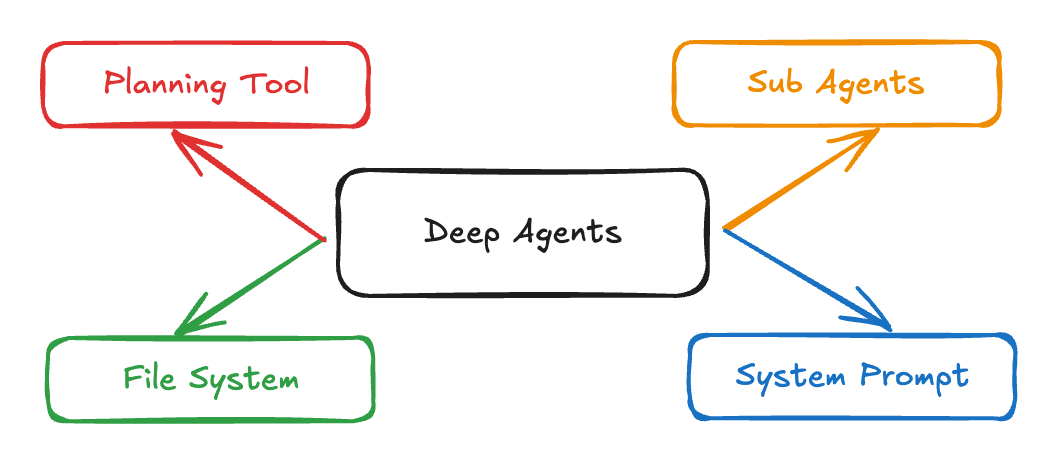
|
|
12
|
+
|
|
13
|
+
`deepagents` is a TypeScript package that implements these in a general purpose way so that you can easily create a Deep Agent for your application.
|
|
14
|
+
|
|
15
|
+
**Acknowledgements: This project was primarily inspired by Claude Code, and initially was largely an attempt to see what made Claude Code general purpose, and make it even more so.**
|
|
16
|
+
|
|
17
|
+
[](https://www.npmjs.com/package/deepagents)
|
|
18
|
+
[](https://opensource.org/licenses/MIT)
|
|
19
|
+
[](https://www.typescriptlang.org/)
|
|
20
|
+
|
|
21
|
+
[Documentation](https://docs.langchain.com/oss/javascript/deepagents/overview) | [Examples](./examples) | [Report Bug](https://github.com/langchain-ai/deepagentsjs/issues) | [Request Feature](https://github.com/langchain-ai/deepagentsjs/issues)
|
|
22
|
+
|
|
23
|
+
## 📖 Overview
|
|
24
|
+
|
|
25
|
+
Using an LLM to call tools in a loop is the simplest form of an agent. However, this architecture can yield agents that are "shallow" and fail to plan and act over longer, more complex tasks.
|
|
26
|
+
|
|
27
|
+
Applications like **Deep Research**, **Manus**, and **Claude Code** have overcome this limitation by implementing a combination of four key components:
|
|
28
|
+
|
|
29
|
+
1. **Planning Tool** - Strategic task decomposition
|
|
30
|
+
2. **Sub-Agents** - Specialized agents for subtasks
|
|
31
|
+
3. **File System Access** - Persistent state and memory
|
|
32
|
+
4. **Detailed Prompts** - Context-rich instructions
|
|
33
|
+
|
|
34
|
+
**Deep Agents** is a TypeScript package that implements these patterns in a general-purpose way, enabling you to easily create sophisticated agents for your applications.
|
|
35
|
+
|
|
36
|
+
## ✨ Features
|
|
37
|
+
|
|
38
|
+
- 🎯 **Task Planning & Decomposition** - Break complex tasks into manageable steps
|
|
39
|
+
- 🤖 **Sub-Agent Architecture** - Delegate specialized work to focused agents
|
|
40
|
+
- 💾 **File System Integration** - Persistent memory and state management
|
|
41
|
+
- 🌊 **Streaming Support** - Real-time updates, token streaming, and progress tracking
|
|
42
|
+
- 🔄 **LangGraph Powered** - Built on the robust LangGraph framework
|
|
43
|
+
- 📝 **TypeScript First** - Full type safety and IntelliSense support
|
|
44
|
+
- 🔌 **Extensible** - Easy to customize and extend for your use case
|
|
45
|
+
|
|
46
|
+
## Installation
|
|
47
|
+
|
|
48
|
+
```bash
|
|
49
|
+
# npm
|
|
50
|
+
npm install deepagents
|
|
51
|
+
|
|
52
|
+
# yarn
|
|
53
|
+
yarn add deepagents
|
|
54
|
+
|
|
55
|
+
# pnpm
|
|
56
|
+
pnpm add deepagents
|
|
57
|
+
```
|
|
58
|
+
|
|
59
|
+
## Usage
|
|
60
|
+
|
|
61
|
+
(To run the example below, you will need to `npm install @langchain/tavily`).
|
|
62
|
+
|
|
63
|
+
Make sure to set `TAVILY_API_KEY` in your environment. You can generate one [here](https://www.tavily.com/).
|
|
64
|
+
|
|
65
|
+
```typescript
|
|
66
|
+
import { tool } from "langchain";
|
|
67
|
+
import { TavilySearch } from "@langchain/tavily";
|
|
68
|
+
import { createDeepAgent } from "deepagents";
|
|
69
|
+
import { z } from "zod";
|
|
70
|
+
|
|
71
|
+
// Web search tool
|
|
72
|
+
const internetSearch = tool(
|
|
73
|
+
async ({
|
|
74
|
+
query,
|
|
75
|
+
maxResults = 5,
|
|
76
|
+
topic = "general",
|
|
77
|
+
includeRawContent = false,
|
|
78
|
+
}: {
|
|
79
|
+
query: string;
|
|
80
|
+
maxResults?: number;
|
|
81
|
+
topic?: "general" | "news" | "finance";
|
|
82
|
+
includeRawContent?: boolean;
|
|
83
|
+
}) => {
|
|
84
|
+
const tavilySearch = new TavilySearch({
|
|
85
|
+
maxResults,
|
|
86
|
+
tavilyApiKey: process.env.TAVILY_API_KEY,
|
|
87
|
+
includeRawContent,
|
|
88
|
+
topic,
|
|
89
|
+
});
|
|
90
|
+
return await tavilySearch._call({ query });
|
|
91
|
+
},
|
|
92
|
+
{
|
|
93
|
+
name: "internet_search",
|
|
94
|
+
description: "Run a web search",
|
|
95
|
+
schema: z.object({
|
|
96
|
+
query: z.string().describe("The search query"),
|
|
97
|
+
maxResults: z
|
|
98
|
+
.number()
|
|
99
|
+
.optional()
|
|
100
|
+
.default(5)
|
|
101
|
+
.describe("Maximum number of results to return"),
|
|
102
|
+
topic: z
|
|
103
|
+
.enum(["general", "news", "finance"])
|
|
104
|
+
.optional()
|
|
105
|
+
.default("general")
|
|
106
|
+
.describe("Search topic category"),
|
|
107
|
+
includeRawContent: z
|
|
108
|
+
.boolean()
|
|
109
|
+
.optional()
|
|
110
|
+
.default(false)
|
|
111
|
+
.describe("Whether to include raw content"),
|
|
112
|
+
}),
|
|
113
|
+
},
|
|
114
|
+
);
|
|
115
|
+
|
|
116
|
+
// System prompt to steer the agent to be an expert researcher
|
|
117
|
+
const researchInstructions = `You are an expert researcher. Your job is to conduct thorough research, and then write a polished report.
|
|
118
|
+
|
|
119
|
+
You have access to an internet search tool as your primary means of gathering information.
|
|
120
|
+
|
|
121
|
+
## \`internet_search\`
|
|
122
|
+
|
|
123
|
+
Use this to run an internet search for a given query. You can specify the max number of results to return, the topic, and whether raw content should be included.
|
|
124
|
+
`;
|
|
125
|
+
|
|
126
|
+
// Create the deep agent
|
|
127
|
+
const agent = createDeepAgent({
|
|
128
|
+
tools: [internetSearch],
|
|
129
|
+
systemPrompt: researchInstructions,
|
|
130
|
+
});
|
|
131
|
+
|
|
132
|
+
// Invoke the agent
|
|
133
|
+
const result = await agent.invoke({
|
|
134
|
+
messages: [{ role: "user", content: "What is langgraph?" }],
|
|
135
|
+
});
|
|
136
|
+
```
|
|
137
|
+
|
|
138
|
+
See [examples/research/research-agent.ts](examples/research/research-agent.ts) for a more complex example.
|
|
139
|
+
|
|
140
|
+
The agent created with `createDeepAgent` is just a LangGraph graph - so you can interact with it (streaming, human-in-the-loop, memory, studio)
|
|
141
|
+
in the same way you would any LangGraph agent.
|
|
142
|
+
|
|
143
|
+
## Core Capabilities
|
|
144
|
+
|
|
145
|
+
**Planning & Task Decomposition**
|
|
146
|
+
|
|
147
|
+
Deep Agents include a built-in `write_todos` tool that enables agents to break down complex tasks into discrete steps, track progress, and adapt plans as new information emerges.
|
|
148
|
+
|
|
149
|
+
**Context Management**
|
|
150
|
+
|
|
151
|
+
File system tools (`ls`, `read_file`, `write_file`, `edit_file`, `glob`, `grep`) allow agents to offload large context to memory, preventing context window overflow and enabling work with variable-length tool results.
|
|
152
|
+
|
|
153
|
+
**Subagent Spawning**
|
|
154
|
+
|
|
155
|
+
A built-in `task` tool enables agents to spawn specialized subagents for context isolation. This keeps the main agent's context clean while still going deep on specific subtasks.
|
|
156
|
+
|
|
157
|
+
**Long-term Memory**
|
|
158
|
+
|
|
159
|
+
Extend agents with persistent memory across threads using LangGraph's Store. Agents can save and retrieve information from previous conversations.
|
|
160
|
+
|
|
161
|
+
## Customizing Deep Agents
|
|
162
|
+
|
|
163
|
+
There are several parameters you can pass to `createDeepAgent` to create your own custom deep agent.
|
|
164
|
+
|
|
165
|
+
### `model`
|
|
166
|
+
|
|
167
|
+
By default, `deepagents` uses `"claude-sonnet-4-5-20250929"`. You can customize this by passing any [LangChain model object](https://js.langchain.com/docs/integrations/chat/).
|
|
168
|
+
|
|
169
|
+
```typescript
|
|
170
|
+
import { ChatAnthropic } from "@langchain/anthropic";
|
|
171
|
+
import { ChatOpenAI } from "@langchain/openai";
|
|
172
|
+
import { createDeepAgent } from "deepagents";
|
|
173
|
+
|
|
174
|
+
// Using Anthropic
|
|
175
|
+
const agent = createDeepAgent({
|
|
176
|
+
model: new ChatAnthropic({
|
|
177
|
+
model: "claude-sonnet-4-20250514",
|
|
178
|
+
temperature: 0,
|
|
179
|
+
}),
|
|
180
|
+
});
|
|
181
|
+
|
|
182
|
+
// Using OpenAI
|
|
183
|
+
const agent2 = createDeepAgent({
|
|
184
|
+
model: new ChatOpenAI({
|
|
185
|
+
model: "gpt-5",
|
|
186
|
+
temperature: 0,
|
|
187
|
+
}),
|
|
188
|
+
});
|
|
189
|
+
```
|
|
190
|
+
|
|
191
|
+
### `systemPrompt`
|
|
192
|
+
|
|
193
|
+
Deep Agents come with a built-in system prompt. This is relatively detailed prompt that is heavily based on and inspired by [attempts](https://github.com/kn1026/cc/blob/main/claudecode.md) to [replicate](https://github.com/asgeirtj/system_prompts_leaks/blob/main/Anthropic/claude-code.md)
|
|
194
|
+
Claude Code's system prompt. It was made more general purpose than Claude Code's system prompt. The default prompt contains detailed instructions for how to use the built-in planning tool, file system tools, and sub agents.
|
|
195
|
+
|
|
196
|
+
Each deep agent tailored to a use case should include a custom system prompt specific to that use case as well. The importance of prompting for creating a successful deep agent cannot be overstated.
|
|
197
|
+
|
|
198
|
+
```typescript
|
|
199
|
+
import { createDeepAgent } from "deepagents";
|
|
200
|
+
|
|
201
|
+
const researchInstructions = `You are an expert researcher. Your job is to conduct thorough research, and then write a polished report.`;
|
|
202
|
+
|
|
203
|
+
const agent = createDeepAgent({
|
|
204
|
+
systemPrompt: researchInstructions,
|
|
205
|
+
});
|
|
206
|
+
```
|
|
207
|
+
|
|
208
|
+
### `tools`
|
|
209
|
+
|
|
210
|
+
Just like with tool-calling agents, you can provide a deep agent with a set of tools that it has access to.
|
|
211
|
+
|
|
212
|
+
```typescript
|
|
213
|
+
import { tool } from "langchain";
|
|
214
|
+
import { TavilySearch } from "@langchain/tavily";
|
|
215
|
+
import { createDeepAgent } from "deepagents";
|
|
216
|
+
import { z } from "zod";
|
|
217
|
+
|
|
218
|
+
const internetSearch = tool(
|
|
219
|
+
async ({
|
|
220
|
+
query,
|
|
221
|
+
maxResults = 5,
|
|
222
|
+
topic = "general",
|
|
223
|
+
includeRawContent = false,
|
|
224
|
+
}: {
|
|
225
|
+
query: string;
|
|
226
|
+
maxResults?: number;
|
|
227
|
+
topic?: "general" | "news" | "finance";
|
|
228
|
+
includeRawContent?: boolean;
|
|
229
|
+
}) => {
|
|
230
|
+
const tavilySearch = new TavilySearch({
|
|
231
|
+
maxResults,
|
|
232
|
+
tavilyApiKey: process.env.TAVILY_API_KEY,
|
|
233
|
+
includeRawContent,
|
|
234
|
+
topic,
|
|
235
|
+
});
|
|
236
|
+
return await tavilySearch._call({ query });
|
|
237
|
+
},
|
|
238
|
+
{
|
|
239
|
+
name: "internet_search",
|
|
240
|
+
description: "Run a web search",
|
|
241
|
+
schema: z.object({
|
|
242
|
+
query: z.string().describe("The search query"),
|
|
243
|
+
maxResults: z.number().optional().default(5),
|
|
244
|
+
topic: z
|
|
245
|
+
.enum(["general", "news", "finance"])
|
|
246
|
+
.optional()
|
|
247
|
+
.default("general"),
|
|
248
|
+
includeRawContent: z.boolean().optional().default(false),
|
|
249
|
+
}),
|
|
250
|
+
},
|
|
251
|
+
);
|
|
252
|
+
|
|
253
|
+
const agent = createDeepAgent({
|
|
254
|
+
tools: [internetSearch],
|
|
255
|
+
});
|
|
256
|
+
```
|
|
257
|
+
|
|
258
|
+
### `middleware`
|
|
259
|
+
|
|
260
|
+
`createDeepAgent` is implemented with middleware that can be customized. You can provide additional middleware to extend functionality, add tools, or implement custom hooks.
|
|
261
|
+
|
|
262
|
+
```typescript
|
|
263
|
+
import { tool } from "langchain";
|
|
264
|
+
import { createDeepAgent } from "deepagents";
|
|
265
|
+
import type { AgentMiddleware } from "langchain";
|
|
266
|
+
import { z } from "zod";
|
|
267
|
+
|
|
268
|
+
const getWeather = tool(
|
|
269
|
+
async ({ city }: { city: string }) => {
|
|
270
|
+
return `The weather in ${city} is sunny.`;
|
|
271
|
+
},
|
|
272
|
+
{
|
|
273
|
+
name: "get_weather",
|
|
274
|
+
description: "Get the weather in a city.",
|
|
275
|
+
schema: z.object({
|
|
276
|
+
city: z.string().describe("The city to get weather for"),
|
|
277
|
+
}),
|
|
278
|
+
},
|
|
279
|
+
);
|
|
280
|
+
|
|
281
|
+
const getTemperature = tool(
|
|
282
|
+
async ({ city }: { city: string }) => {
|
|
283
|
+
return `The temperature in ${city} is 70 degrees Fahrenheit.`;
|
|
284
|
+
},
|
|
285
|
+
{
|
|
286
|
+
name: "get_temperature",
|
|
287
|
+
description: "Get the temperature in a city.",
|
|
288
|
+
schema: z.object({
|
|
289
|
+
city: z.string().describe("The city to get temperature for"),
|
|
290
|
+
}),
|
|
291
|
+
},
|
|
292
|
+
);
|
|
293
|
+
|
|
294
|
+
class WeatherMiddleware implements AgentMiddleware {
|
|
295
|
+
tools = [getWeather, getTemperature];
|
|
296
|
+
}
|
|
297
|
+
|
|
298
|
+
const agent = createDeepAgent({
|
|
299
|
+
model: "claude-sonnet-4-20250514",
|
|
300
|
+
middleware: [new WeatherMiddleware()],
|
|
301
|
+
});
|
|
302
|
+
```
|
|
303
|
+
|
|
304
|
+
### `subagents`
|
|
305
|
+
|
|
306
|
+
A main feature of Deep Agents is their ability to spawn subagents. You can specify custom subagents that your agent can hand off work to in the subagents parameter. Sub agents are useful for context quarantine (to help not pollute the overall context of the main agent) as well as custom instructions.
|
|
307
|
+
|
|
308
|
+
`subagents` should be a list of objects that follow the `SubAgent` interface:
|
|
309
|
+
|
|
310
|
+
```typescript
|
|
311
|
+
interface SubAgent {
|
|
312
|
+
name: string;
|
|
313
|
+
description: string;
|
|
314
|
+
systemPrompt: string;
|
|
315
|
+
tools?: StructuredTool[];
|
|
316
|
+
model?: LanguageModelLike | string;
|
|
317
|
+
middleware?: AgentMiddleware[];
|
|
318
|
+
interruptOn?: Record<string, boolean | InterruptOnConfig>;
|
|
319
|
+
}
|
|
320
|
+
```
|
|
321
|
+
|
|
322
|
+
**SubAgent fields:**
|
|
323
|
+
|
|
324
|
+
- **name**: This is the name of the subagent, and how the main agent will call the subagent
|
|
325
|
+
- **description**: This is the description of the subagent that is shown to the main agent
|
|
326
|
+
- **systemPrompt**: This is the prompt used for the subagent
|
|
327
|
+
- **tools**: This is the list of tools that the subagent has access to.
|
|
328
|
+
- **model**: Optional model name or model instance.
|
|
329
|
+
- **middleware**: Additional middleware to attach to the subagent. See [here](https://docs.langchain.com/oss/typescript/langchain/middleware) for an introduction into middleware and how it works with createAgent.
|
|
330
|
+
- **interruptOn**: A custom interrupt config that specifies human-in-the-loop interactions for your tools.
|
|
331
|
+
|
|
332
|
+
#### Using SubAgent
|
|
333
|
+
|
|
334
|
+
```typescript
|
|
335
|
+
import { tool } from "langchain";
|
|
336
|
+
import { TavilySearch } from "@langchain/tavily";
|
|
337
|
+
import { createDeepAgent, type SubAgent } from "deepagents";
|
|
338
|
+
import { z } from "zod";
|
|
339
|
+
|
|
340
|
+
const internetSearch = tool(
|
|
341
|
+
async ({
|
|
342
|
+
query,
|
|
343
|
+
maxResults = 5,
|
|
344
|
+
topic = "general",
|
|
345
|
+
includeRawContent = false,
|
|
346
|
+
}: {
|
|
347
|
+
query: string;
|
|
348
|
+
maxResults?: number;
|
|
349
|
+
topic?: "general" | "news" | "finance";
|
|
350
|
+
includeRawContent?: boolean;
|
|
351
|
+
}) => {
|
|
352
|
+
const tavilySearch = new TavilySearch({
|
|
353
|
+
maxResults,
|
|
354
|
+
tavilyApiKey: process.env.TAVILY_API_KEY,
|
|
355
|
+
includeRawContent,
|
|
356
|
+
topic,
|
|
357
|
+
});
|
|
358
|
+
return await tavilySearch._call({ query });
|
|
359
|
+
},
|
|
360
|
+
{
|
|
361
|
+
name: "internet_search",
|
|
362
|
+
description: "Run a web search",
|
|
363
|
+
schema: z.object({
|
|
364
|
+
query: z.string(),
|
|
365
|
+
maxResults: z.number().optional().default(5),
|
|
366
|
+
topic: z
|
|
367
|
+
.enum(["general", "news", "finance"])
|
|
368
|
+
.optional()
|
|
369
|
+
.default("general"),
|
|
370
|
+
includeRawContent: z.boolean().optional().default(false),
|
|
371
|
+
}),
|
|
372
|
+
},
|
|
373
|
+
);
|
|
374
|
+
|
|
375
|
+
const researchSubagent: SubAgent = {
|
|
376
|
+
name: "research-agent",
|
|
377
|
+
description: "Used to research more in depth questions",
|
|
378
|
+
systemPrompt: "You are a great researcher",
|
|
379
|
+
tools: [internetSearch],
|
|
380
|
+
model: "gpt-4o", // Optional override, defaults to main agent model
|
|
381
|
+
};
|
|
382
|
+
|
|
383
|
+
const subagents = [researchSubagent];
|
|
384
|
+
|
|
385
|
+
const agent = createDeepAgent({
|
|
386
|
+
model: "claude-sonnet-4-20250514",
|
|
387
|
+
subagents: subagents,
|
|
388
|
+
});
|
|
389
|
+
```
|
|
390
|
+
|
|
391
|
+
### `interruptOn`
|
|
392
|
+
|
|
393
|
+
A common reality for agents is that some tool operations may be sensitive and require human approval before execution. Deep Agents supports human-in-the-loop workflows through LangGraph's interrupt capabilities. You can configure which tools require approval using a checkpointer.
|
|
394
|
+
|
|
395
|
+
These tool configs are passed to our prebuilt [HITL middleware](https://docs.langchain.com/oss/typescript/langchain/middleware#human-in-the-loop) so that the agent pauses execution and waits for feedback from the user before executing configured tools.
|
|
396
|
+
|
|
397
|
+
```typescript
|
|
398
|
+
import { tool } from "langchain";
|
|
399
|
+
import { createDeepAgent } from "deepagents";
|
|
400
|
+
import { z } from "zod";
|
|
401
|
+
|
|
402
|
+
const getWeather = tool(
|
|
403
|
+
async ({ city }: { city: string }) => {
|
|
404
|
+
return `The weather in ${city} is sunny.`;
|
|
405
|
+
},
|
|
406
|
+
{
|
|
407
|
+
name: "get_weather",
|
|
408
|
+
description: "Get the weather in a city.",
|
|
409
|
+
schema: z.object({
|
|
410
|
+
city: z.string(),
|
|
411
|
+
}),
|
|
412
|
+
},
|
|
413
|
+
);
|
|
414
|
+
|
|
415
|
+
const agent = createDeepAgent({
|
|
416
|
+
model: "claude-sonnet-4-20250514",
|
|
417
|
+
tools: [getWeather],
|
|
418
|
+
interruptOn: {
|
|
419
|
+
get_weather: {
|
|
420
|
+
allowedDecisions: ["approve", "edit", "reject"],
|
|
421
|
+
},
|
|
422
|
+
},
|
|
423
|
+
});
|
|
424
|
+
```
|
|
425
|
+
|
|
426
|
+
### `backend`
|
|
427
|
+
|
|
428
|
+
Deep Agents use backends to manage file system operations and memory storage. You can configure different backends depending on your needs:
|
|
429
|
+
|
|
430
|
+
```typescript
|
|
431
|
+
import {
|
|
432
|
+
createDeepAgent,
|
|
433
|
+
StateBackend,
|
|
434
|
+
StoreBackend,
|
|
435
|
+
FilesystemBackend,
|
|
436
|
+
CompositeBackend,
|
|
437
|
+
} from "deepagents";
|
|
438
|
+
import { MemorySaver } from "@langchain/langgraph";
|
|
439
|
+
import { InMemoryStore } from "@langchain/langgraph-checkpoint";
|
|
440
|
+
|
|
441
|
+
// Default: StateBackend (in-memory, ephemeral)
|
|
442
|
+
const agent1 = createDeepAgent({
|
|
443
|
+
// No backend specified - uses StateBackend by default
|
|
444
|
+
});
|
|
445
|
+
|
|
446
|
+
// StoreBackend: Persistent storage using LangGraph Store
|
|
447
|
+
const agent2 = createDeepAgent({
|
|
448
|
+
backend: (config) => new StoreBackend(config),
|
|
449
|
+
store: new InMemoryStore(), // Provide a store
|
|
450
|
+
checkpointer: new MemorySaver(), // Optional: for conversation persistence
|
|
451
|
+
});
|
|
452
|
+
|
|
453
|
+
// FilesystemBackend: Store files on actual filesystem
|
|
454
|
+
const agent3 = createDeepAgent({
|
|
455
|
+
backend: (config) => new FilesystemBackend({ rootDir: "./agent-workspace" }),
|
|
456
|
+
});
|
|
457
|
+
|
|
458
|
+
// CompositeBackend: Combine multiple backends
|
|
459
|
+
const agent4 = createDeepAgent({
|
|
460
|
+
backend: (config) =>
|
|
461
|
+
new CompositeBackend({
|
|
462
|
+
state: new StateBackend(config),
|
|
463
|
+
store: config.store ? new StoreBackend(config) : undefined,
|
|
464
|
+
}),
|
|
465
|
+
store: new InMemoryStore(),
|
|
466
|
+
checkpointer: new MemorySaver(),
|
|
467
|
+
});
|
|
468
|
+
```
|
|
469
|
+
|
|
470
|
+
See [examples/backends/](examples/backends/) for detailed examples of each backend type.
|
|
471
|
+
|
|
472
|
+
### Sandbox Execution
|
|
473
|
+
|
|
474
|
+
For agents that need to run shell commands, you can create a sandbox backend by extending `BaseSandbox`. This enables the `execute` tool which allows agents to run arbitrary shell commands in an isolated environment.
|
|
475
|
+
|
|
476
|
+
```typescript
|
|
477
|
+
import {
|
|
478
|
+
createDeepAgent,
|
|
479
|
+
BaseSandbox,
|
|
480
|
+
type ExecuteResponse,
|
|
481
|
+
type FileUploadResponse,
|
|
482
|
+
type FileDownloadResponse,
|
|
483
|
+
} from "deepagents";
|
|
484
|
+
import { spawn } from "child_process";
|
|
485
|
+
|
|
486
|
+
// Create a concrete sandbox by extending BaseSandbox
|
|
487
|
+
class LocalShellSandbox extends BaseSandbox {
|
|
488
|
+
readonly id = "local-shell";
|
|
489
|
+
private readonly workingDirectory: string;
|
|
490
|
+
|
|
491
|
+
constructor(workingDirectory: string) {
|
|
492
|
+
super();
|
|
493
|
+
this.workingDirectory = workingDirectory;
|
|
494
|
+
}
|
|
495
|
+
|
|
496
|
+
// Only execute() is required - BaseSandbox implements all file operations
|
|
497
|
+
async execute(command: string): Promise<ExecuteResponse> {
|
|
498
|
+
return new Promise((resolve) => {
|
|
499
|
+
const child = spawn("/bin/bash", ["-c", command], {
|
|
500
|
+
cwd: this.workingDirectory,
|
|
501
|
+
});
|
|
502
|
+
|
|
503
|
+
const chunks: string[] = [];
|
|
504
|
+
child.stdout.on("data", (data) => chunks.push(data.toString()));
|
|
505
|
+
child.stderr.on("data", (data) => chunks.push(data.toString()));
|
|
506
|
+
|
|
507
|
+
child.on("close", (exitCode) => {
|
|
508
|
+
resolve({
|
|
509
|
+
output: chunks.join(""),
|
|
510
|
+
exitCode,
|
|
511
|
+
truncated: false,
|
|
512
|
+
});
|
|
513
|
+
});
|
|
514
|
+
});
|
|
515
|
+
}
|
|
516
|
+
|
|
517
|
+
async uploadFiles(
|
|
518
|
+
files: Array<[string, Uint8Array]>,
|
|
519
|
+
): Promise<FileUploadResponse[]> {
|
|
520
|
+
// Implement file upload logic
|
|
521
|
+
return files.map(([path]) => ({ path, error: null }));
|
|
522
|
+
}
|
|
523
|
+
|
|
524
|
+
async downloadFiles(paths: string[]): Promise<FileDownloadResponse[]> {
|
|
525
|
+
// Implement file download logic
|
|
526
|
+
return paths.map((path) => ({
|
|
527
|
+
path,
|
|
528
|
+
content: null,
|
|
529
|
+
error: "file_not_found",
|
|
530
|
+
}));
|
|
531
|
+
}
|
|
532
|
+
}
|
|
533
|
+
|
|
534
|
+
// Use the sandbox with your agent
|
|
535
|
+
const sandbox = new LocalShellSandbox("./workspace");
|
|
536
|
+
|
|
537
|
+
const agent = createDeepAgent({
|
|
538
|
+
backend: sandbox,
|
|
539
|
+
systemPrompt: "You can run shell commands using the execute tool.",
|
|
540
|
+
});
|
|
541
|
+
```
|
|
542
|
+
|
|
543
|
+
When using a sandbox backend, the agent gains access to an `execute` tool that can run shell commands. The tool automatically returns the command output, exit code, and whether the output was truncated.
|
|
544
|
+
|
|
545
|
+
See [examples/sandbox/local-sandbox.ts](examples/sandbox/local-sandbox.ts) for a complete implementation.
|
|
546
|
+
|
|
547
|
+
## Deep Agents Middleware
|
|
548
|
+
|
|
549
|
+
Deep Agents are built with a modular middleware architecture. As a reminder, Deep Agents have access to:
|
|
550
|
+
|
|
551
|
+
- A planning tool
|
|
552
|
+
- A filesystem for storing context and long-term memories
|
|
553
|
+
- The ability to spawn subagents
|
|
554
|
+
|
|
555
|
+
Each of these features is implemented as separate middleware. When you create a deep agent with `createDeepAgent`, we automatically attach **todoListMiddleware**, **FilesystemMiddleware** and **SubAgentMiddleware** to your agent.
|
|
556
|
+
|
|
557
|
+
Middleware is a composable concept, and you can choose to add as many or as few middleware to an agent depending on your use case. That means that you can also use any of the aforementioned middleware independently!
|
|
558
|
+
|
|
559
|
+
### TodoListMiddleware
|
|
560
|
+
|
|
561
|
+
Planning is integral to solving complex problems. If you've used claude code recently, you'll notice how it writes out a To-Do list before tackling complex, multi-part tasks. You'll also notice how it can adapt and update this To-Do list on the fly as more information comes in.
|
|
562
|
+
|
|
563
|
+
**todoListMiddleware** provides your agent with a tool specifically for updating this To-Do list. Before, and while it executes a multi-part task, the agent is prompted to use the write_todos tool to keep track of what its doing, and what still needs to be done.
|
|
564
|
+
|
|
565
|
+
```typescript
|
|
566
|
+
import { createAgent, todoListMiddleware } from "langchain";
|
|
567
|
+
|
|
568
|
+
// todoListMiddleware is included by default in createDeepAgent
|
|
569
|
+
// You can customize it if building a custom agent
|
|
570
|
+
const agent = createAgent({
|
|
571
|
+
model: "claude-sonnet-4-20250514",
|
|
572
|
+
middleware: [
|
|
573
|
+
todoListMiddleware({
|
|
574
|
+
// Optional: Custom addition to the system prompt
|
|
575
|
+
systemPrompt: "Use the write_todos tool to...",
|
|
576
|
+
}),
|
|
577
|
+
],
|
|
578
|
+
});
|
|
579
|
+
```
|
|
580
|
+
|
|
581
|
+
### FilesystemMiddleware
|
|
582
|
+
|
|
583
|
+
Context engineering is one of the main challenges in building effective agents. This can be particularly hard when using tools that can return variable length results (ex. web_search, rag), as long ToolResults can quickly fill up your context window.
|
|
584
|
+
|
|
585
|
+
**FilesystemMiddleware** provides tools to your agent to interact with both short-term and long-term memory:
|
|
586
|
+
|
|
587
|
+
- **ls**: List the files in your filesystem
|
|
588
|
+
- **read_file**: Read an entire file, or a certain number of lines from a file
|
|
589
|
+
- **write_file**: Write a new file to your filesystem
|
|
590
|
+
- **edit_file**: Edit an existing file in your filesystem
|
|
591
|
+
- **glob**: Find files matching a pattern
|
|
592
|
+
- **grep**: Search for text within files
|
|
593
|
+
- **execute**: Run shell commands (only available when using a `SandboxBackendProtocol`)
|
|
594
|
+
|
|
595
|
+
```typescript
|
|
596
|
+
import { createAgent } from "langchain";
|
|
597
|
+
import { createFilesystemMiddleware } from "deepagents";
|
|
598
|
+
|
|
599
|
+
// FilesystemMiddleware is included by default in createDeepAgent
|
|
600
|
+
// You can customize it if building a custom agent
|
|
601
|
+
const agent = createAgent({
|
|
602
|
+
model: "claude-sonnet-4-20250514",
|
|
603
|
+
middleware: [
|
|
604
|
+
createFilesystemMiddleware({
|
|
605
|
+
backend: ..., // Optional: customize storage backend
|
|
606
|
+
systemPrompt: "Write to the filesystem when...", // Optional custom system prompt override
|
|
607
|
+
customToolDescriptions: {
|
|
608
|
+
ls: "Use the ls tool when...",
|
|
609
|
+
read_file: "Use the read_file tool to...",
|
|
610
|
+
}, // Optional: Custom descriptions for filesystem tools
|
|
611
|
+
}),
|
|
612
|
+
],
|
|
613
|
+
});
|
|
614
|
+
```
|
|
615
|
+
|
|
616
|
+
### SubAgentMiddleware
|
|
617
|
+
|
|
618
|
+
Handing off tasks to subagents is a great way to isolate context, keeping the context window of the main (supervisor) agent clean while still going deep on a task. The subagents middleware allows you supply subagents through a task tool.
|
|
619
|
+
|
|
620
|
+
A subagent is defined with a name, description, system prompt, and tools. You can also provide a subagent with a custom model, or with additional middleware. This can be particularly useful when you want to give the subagent an additional state key to share with the main agent.
|
|
621
|
+
|
|
622
|
+
```typescript
|
|
623
|
+
import { tool } from "langchain";
|
|
624
|
+
import { createAgent } from "langchain";
|
|
625
|
+
import { createSubAgentMiddleware, type SubAgent } from "deepagents";
|
|
626
|
+
import { z } from "zod";
|
|
627
|
+
|
|
628
|
+
const getWeather = tool(
|
|
629
|
+
async ({ city }: { city: string }) => {
|
|
630
|
+
return `The weather in ${city} is sunny.`;
|
|
631
|
+
},
|
|
632
|
+
{
|
|
633
|
+
name: "get_weather",
|
|
634
|
+
description: "Get the weather in a city.",
|
|
635
|
+
schema: z.object({
|
|
636
|
+
city: z.string(),
|
|
637
|
+
}),
|
|
638
|
+
},
|
|
639
|
+
);
|
|
640
|
+
|
|
641
|
+
const weatherSubagent: SubAgent = {
|
|
642
|
+
name: "weather",
|
|
643
|
+
description: "This subagent can get weather in cities.",
|
|
644
|
+
systemPrompt: "Use the get_weather tool to get the weather in a city.",
|
|
645
|
+
tools: [getWeather],
|
|
646
|
+
model: "gpt-4o",
|
|
647
|
+
middleware: [],
|
|
648
|
+
};
|
|
649
|
+
|
|
650
|
+
const agent = createAgent({
|
|
651
|
+
model: "claude-sonnet-4-20250514",
|
|
652
|
+
middleware: [
|
|
653
|
+
createSubAgentMiddleware({
|
|
654
|
+
defaultModel: "claude-sonnet-4-20250514",
|
|
655
|
+
defaultTools: [],
|
|
656
|
+
subagents: [weatherSubagent],
|
|
657
|
+
}),
|
|
658
|
+
],
|
|
659
|
+
});
|
|
660
|
+
```
|