ddduck 0.1.0 → 0.2.0
This diff represents the content of publicly available package versions that have been released to one of the supported registries. The information contained in this diff is provided for informational purposes only and reflects changes between package versions as they appear in their respective public registries.
- package/README.md +11 -6
- package/docs/architecture.md +5 -2
- package/docs/cli.md +135 -53
- package/docs/definition-workflow.md +130 -0
- package/docs/getting-started.md +21 -48
- package/docs/model-reference.md +4 -0
- package/docs/model.md +1 -0
- package/docs/templates/change-brief.md +48 -0
- package/package.json +8 -5
- package/schemas/model-diff.schema.json +107 -0
- package/scripts/audit-fr-to-code.mjs +25 -0
- package/scripts/check-generated-docs.mjs +24 -5
- package/scripts/check-generated-graph-svg.mjs +26 -8
- package/scripts/check-generated-graph.mjs +25 -5
- package/scripts/check-model.mjs +95 -5
- package/scripts/ddduck.mjs +216 -22
- package/scripts/generate-agent-readiness-report.mjs +8 -0
- package/scripts/generate-docs.mjs +29 -3
- package/scripts/generate-graph-svg.mjs +53 -16
- package/scripts/generate-graph.mjs +26 -1
- package/scripts/lib/agent-readiness-evals.mjs +32 -0
- package/scripts/lib/agent-readiness-report.mjs +14 -0
- package/scripts/lib/cli-contract.mjs +65 -15
- package/scripts/lib/context-pack.mjs +49 -1
- package/scripts/lib/ddduck-config.mjs +31 -1
- package/scripts/lib/fr-to-code-audit.mjs +30 -0
- package/scripts/lib/product-authoring.mjs +52 -0
- package/scripts/lib/product-diff.mjs +155 -0
- package/scripts/lib/product-layout.mjs +42 -1
- package/scripts/lib/product-operation.mjs +140 -22
- package/scripts/lib/product-paths.mjs +16 -0
- package/scripts/lib/product-query.mjs +102 -20
- package/scripts/lib/product-root-resolver.mjs +40 -0
- package/scripts/lib/scan-ignore.mjs +14 -3
- package/scripts/lib/skill-installer.mjs +227 -39
- package/scripts/query-model.mjs +18 -7
- package/scripts/run-agent-readiness-evals.mjs +18 -2
- package/skills/update-ddduck-specs/SKILL.md +25 -83
- package/skills/update-ddduck-specs/references/authoring-and-verification.md +60 -0
- package/skills/update-ddduck-specs/references/modeling-and-evidence.md +56 -0
- package/skills/update-ddduck-specs/references/reviewing-changes.md +45 -0
package/README.md
CHANGED
|
@@ -4,6 +4,8 @@ ddduck defines a small, machine-readable product-spec format. The framework keep
|
|
|
4
4
|
schemas, validators, policies, and generators separate from each consumer product.
|
|
5
5
|
|
|
6
6
|
Start with [the getting-started guide](docs/getting-started.md) for a working first product.
|
|
7
|
+
For an unsettled product question or a proposed change, use the optional
|
|
8
|
+
[definition-to-planning workflow](docs/definition-workflow.md) and reuse your existing brief.
|
|
7
9
|
Then use [the model guide](docs/model.md), [the model reference](docs/model-reference.md),
|
|
8
10
|
[the CLI reference](docs/cli.md), and [the architecture guide](docs/architecture.md) as needed.
|
|
9
11
|
|
|
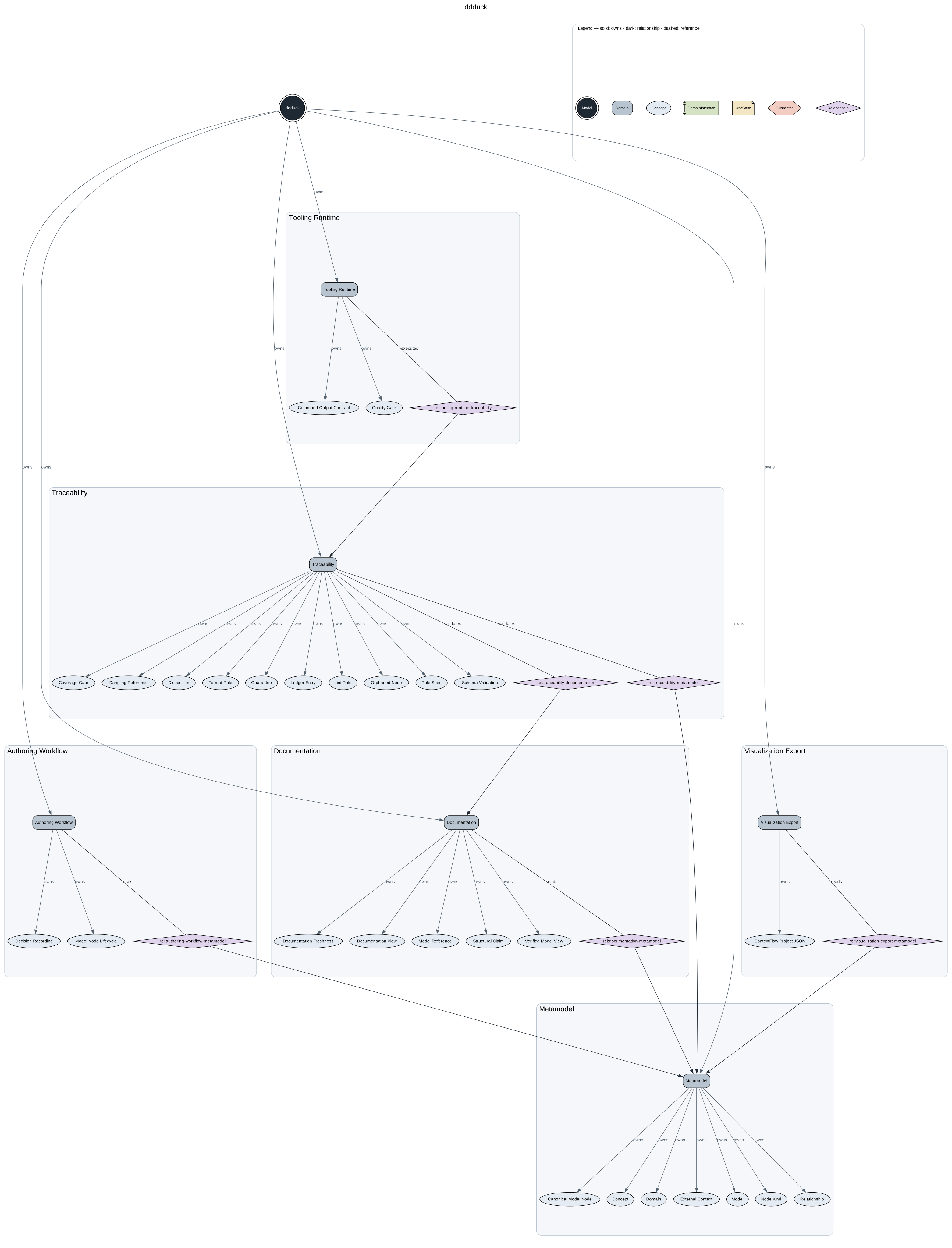
@@ -14,7 +16,7 @@ Every product renders to a verified graph of its model — the ownership spine
|
|
|
14
16
|
line styles. `ddduck generate` produces it as a deterministic SVG. This
|
|
15
17
|
framework's own model:
|
|
16
18
|
|
|
17
|
-
|
|
18
20
|
|
|
19
21
|
## Product layout
|
|
20
22
|
|
|
@@ -40,7 +42,9 @@ docs/ddd/
|
|
|
40
42
|
`product.yaml` and files under `model/` are canonical source. `generated/` is derived
|
|
41
43
|
output: never edit it by hand.
|
|
42
44
|
|
|
43
|
-
Repository-local ddduck tool metadata lives outside the product root in `.ddduck
|
|
45
|
+
Repository-local ddduck tool metadata lives outside the product root in `.ddduck/` at the
|
|
46
|
+
enclosing repository root; without one, `ddduck init` writes it inside the new product root
|
|
47
|
+
instead (see [the CLI reference](docs/cli.md#product-root-resolution)). For example,
|
|
44
48
|
this framework repository stores its own model in `docs/ddd/` and records that selection in:
|
|
45
49
|
|
|
46
50
|
```json
|
|
@@ -57,7 +61,7 @@ and fully editable (see [the CLI reference](docs/cli.md)).
|
|
|
57
61
|
|
|
58
62
|
## Authoring
|
|
59
63
|
|
|
60
|
-
Install the CLI from npm:
|
|
64
|
+
Install the CLI from npm (requires Node.js 22 or newer):
|
|
61
65
|
|
|
62
66
|
```bash
|
|
63
67
|
npm install -g ddduck
|
|
@@ -72,9 +76,10 @@ ddduck init ddd --id model:<product-id>
|
|
|
72
76
|
```
|
|
73
77
|
|
|
74
78
|
`--root <path>` is always the explicit override; without it, ddduck resolves the enclosing
|
|
75
|
-
product root, then `.ddduck/config.json`, then a unique repository candidate
|
|
76
|
-
|
|
77
|
-
|
|
79
|
+
product root, then `.ddduck/config.json`, then a unique repository candidate (see
|
|
80
|
+
[the CLI reference](docs/cli.md#product-root-resolution) for the full order, including the
|
|
81
|
+
example-candidate fallback), and fails with a diagnostic when the choice is ambiguous. The mutation surface is deliberately narrow —
|
|
82
|
+
`generate`, domain/concept/use-case creation, and the `create`/`move`/`split`/`retire` Guarantee lifecycle commands — and every
|
|
78
83
|
successful source mutation regenerates the derived views. The canonical resolution rules and
|
|
79
84
|
command contracts live in [the CLI reference](docs/cli.md#product-root-resolution).
|
|
80
85
|
|
package/docs/architecture.md
CHANGED
|
@@ -61,8 +61,11 @@ flowchart LR
|
|
|
61
61
|
|
|
62
62
|
## Query boundary
|
|
63
63
|
|
|
64
|
-
Queries are read-only and
|
|
65
|
-
|
|
64
|
+
Queries are read-only and always emit exactly one JSON document (`--json` is accepted as a
|
|
65
|
+
no-op). A context query returns selected canonical records,
|
|
66
|
+
direct touching edges, one-hop summaries for unselected neighbors, and a source digest. The
|
|
67
|
+
source digest covers the canonical node YAML sources only — `product.yaml` and the files under
|
|
68
|
+
`model/` — so decision records under `decisions/` are outside its scope. It does
|
|
66
69
|
not recursively expand context or write canonical or generated files.
|
|
67
70
|
|
|
68
71
|
```mermaid
|
package/docs/cli.md
CHANGED
|
@@ -7,7 +7,12 @@ with `--` must use the `--option=value` form. Every command rejects unknown opti
|
|
|
7
7
|
options, missing option values, and unexpected positional arguments. Expected failures write a
|
|
8
8
|
concise diagnostic (multi-error validation reports keep one line per error) plus a safe next
|
|
9
9
|
action to standard error and exit nonzero; errors without a specific next action fall back to a
|
|
10
|
-
command-specific hint. Help exits zero.
|
|
10
|
+
command-specific hint. Help exits zero. Exit codes are part of the contract: the one retryable
|
|
11
|
+
failure — a busy product root, whose operation lock is held by a running process — exits 2, so
|
|
12
|
+
retry logic never has to string-match standard error; every other failure exits 1.
|
|
13
|
+
|
|
14
|
+
This package is published to npm as `ddduck`; install the CLI globally with `npm install -g ddduck`
|
|
15
|
+
(see [the getting-started guide](getting-started.md#install-ddduck)).
|
|
11
16
|
|
|
12
17
|
## Product root resolution
|
|
13
18
|
|
|
@@ -44,51 +49,20 @@ Use `.ddduck/config.json` for a repository default:
|
|
|
44
49
|
every ddduck scanner skips, in addition to the always-skipped dot-directories
|
|
45
50
|
and `node_modules`. Omit the key to accept the defaults shown above; set it to
|
|
46
51
|
`[]` to skip nothing beyond the built-in defaults. `ddduck init` writes this
|
|
47
|
-
file pre-filled when it does not already exist
|
|
48
|
-
|
|
49
|
-
|
|
50
|
-
|
|
51
|
-
|
|
52
|
-
|
|
53
|
-
```
|
|
54
|
-
|
|
55
|
-
`--repo` defaults to the current directory. The installer chooses the least intrusive host
|
|
56
|
-
topology from the repository's existing directories:
|
|
57
|
-
|
|
58
|
-
```text
|
|
59
|
-
no .agents/ or .claude/ -> .agents/skills/update-ddduck-specs/SKILL.md
|
|
60
|
-
.agents/ only -> .agents/skills/update-ddduck-specs/SKILL.md
|
|
61
|
-
.claude/ only -> .claude/skills/update-ddduck-specs/SKILL.md
|
|
62
|
-
.agents/ and .claude/ -> .agents/skills/update-ddduck-specs/SKILL.md
|
|
63
|
-
.claude/skills/update-ddduck-specs -> ../../.agents/skills/update-ddduck-specs
|
|
64
|
-
```
|
|
65
|
-
|
|
66
|
-
The installer writes `.ddduck/agent-skills.lock.json` with the selected canonical path, host
|
|
67
|
-
adapters, package version, and installed `SKILL.md` SHA-256. It does not create a host directory
|
|
68
|
-
for a host that is absent from the repository, except for the `.agents/` fallback when no host
|
|
69
|
-
directory exists. On success it prints one result line naming the action (`created`, `upgraded`,
|
|
70
|
-
or `no-op`), the repository, the canonical skill path, and the lock path. It does not accept
|
|
71
|
-
`--json`.
|
|
72
|
-
|
|
73
|
-
Invoke the skill from the relevant host:
|
|
74
|
-
|
|
75
|
-
```text
|
|
76
|
-
Codex: $update-ddduck-specs
|
|
77
|
-
Claude: /update-ddduck-specs
|
|
78
|
-
```
|
|
79
|
-
|
|
80
|
-
The skill defaults to plan-only; changing a product model requires explicit apply authorization.
|
|
81
|
-
Its workflow behavior is defined by the installed `SKILL.md` (and its packaged
|
|
82
|
-
[canonical source](../skills/update-ddduck-specs/SKILL.md)).
|
|
83
|
-
|
|
84
|
-
This package is published to npm as `ddduck`; install the CLI globally with `npm install -g ddduck`
|
|
85
|
-
(see [the getting-started guide](getting-started.md#install-ddduck)).
|
|
52
|
+
file pre-filled when it does not already exist and reports the write in its result
|
|
53
|
+
(`config: <path> (created)` in text, `configPath` in `--json`; omitted when the file
|
|
54
|
+
pre-existed). The config is written at the enclosing repository root (the nearest ancestor
|
|
55
|
+
containing `.git`); without one, at the destination directory itself, so the file then lives
|
|
56
|
+
inside the new product root with `"productRoot": "."`. When the file already exists and selects a different product root, `init` prints a
|
|
57
|
+
standard-error note that the repository default still selects that other root.
|
|
86
58
|
|
|
87
59
|
## Common behavior
|
|
88
60
|
|
|
89
61
|
Product writes are `init`, `generate`, `create`, `move`, `split`, and `retire`; successful
|
|
90
|
-
mutations regenerate all required views. `check` and every `query` are read-only. A successful
|
|
91
|
-
`check`
|
|
62
|
+
mutations regenerate all required views. `check`, `diff`, and every `query` are read-only. A successful
|
|
63
|
+
`check` writes nothing to standard output; when `--root` was omitted, it prints one standard-error
|
|
64
|
+
note naming the validated root so an implicitly resolved (for example config-pinned) root is never
|
|
65
|
+
validated invisibly. Successful product mutations print one concise result line, or one JSON result
|
|
92
66
|
object when `--json` is available.
|
|
93
67
|
|
|
94
68
|
## `init`
|
|
@@ -103,8 +77,10 @@ ddduck init [destination] --id model:<product-id> [--json]
|
|
|
103
77
|
| `--id` | yes | none | Root Model ID, matching `model:<lowercase-slug>`. |
|
|
104
78
|
| `--json` | no | false | Emit one JSON result object instead of text. |
|
|
105
79
|
|
|
106
|
-
`init` writes the canonical directory layout, `product.yaml`, and fresh generated
|
|
107
|
-
|
|
80
|
+
`init` writes the canonical directory layout, `product.yaml`, and the four fresh generated views
|
|
81
|
+
(`generated/docs/model-overview.md`, `generated/graph/model-graph.json`,
|
|
82
|
+
`generated/graph/model-graph.ndjson`, and `generated/graph/model-graph.svg`). It refuses a
|
|
83
|
+
non-empty destination. On success it reports the Model ID, normalized root,
|
|
108
84
|
`product.yaml`, and all generated paths as one text line or, with `--json`, one object containing
|
|
109
85
|
`operation`, `root`, `affectedIds`, `canonicalPaths`, and `generatedPaths`. On failure it exits
|
|
110
86
|
nonzero without reporting success.
|
|
@@ -126,9 +102,12 @@ ddduck check [--root <product-root>] [--base <previous-product-root>] \
|
|
|
126
102
|
By default, `check` validates canonical source, then requires fresh generated Markdown and graph
|
|
127
103
|
views. Documentation references are validated only inside the product root; pass one or more
|
|
128
104
|
`--docs-root` directories to widen (and replace) that scope, mirroring the framework's own
|
|
129
|
-
repository-wide gate.
|
|
130
|
-
|
|
131
|
-
|
|
105
|
+
repository-wide gate. Documentation-reference scanning always skips the `docs/audits` and
|
|
106
|
+
`docs/superpowers` directories (paths relative to each scanned root). It writes nothing and keeps standard output empty on success; when `--root`
|
|
107
|
+
was omitted, one standard-error note names the validated root. It exits 2 for a busy root
|
|
108
|
+
(`.ddduck-operation.lock` held by a live ddduck operation — the retryable case), and 1 for
|
|
109
|
+
invalid source, stale views, invalid roots, invalid options, or leftover state from an
|
|
110
|
+
interrupted operation
|
|
132
111
|
(`.ddduck-operation.lock`, `.ddduck-operation.reclaim`, or `.ddduck-operation-stage-*` with no
|
|
133
112
|
live owning process); running any mutation, such as `ddduck generate`, reclaims that leftover
|
|
134
113
|
state.
|
|
@@ -145,10 +124,70 @@ ddduck generate [--root <product-root>] [--json]
|
|
|
145
124
|
| `--json` | false | Emit one JSON mutation-result object instead of the text result line. |
|
|
146
125
|
|
|
147
126
|
`generate` validates canonical source before writing `generated/docs/model-overview.md`,
|
|
148
|
-
`generated/graph/model-graph.json`,
|
|
127
|
+
`generated/graph/model-graph.json`, `generated/graph/model-graph.ndjson`, and
|
|
128
|
+
`generated/graph/model-graph.svg`. A successful text
|
|
149
129
|
result identifies the root, canonical paths (none for generate), and generated paths. It exits
|
|
150
130
|
nonzero without an intended product mutation if validation or contained-output checks fail.
|
|
151
131
|
|
|
132
|
+
## `diff`
|
|
133
|
+
|
|
134
|
+
```text
|
|
135
|
+
ddduck diff --base <previous-product-root> [--root <product-root>] [--json]
|
|
136
|
+
```
|
|
137
|
+
|
|
138
|
+
Compare two independently valid versions of the same Model by stable node ID. `--base` is
|
|
139
|
+
required and `--root` uses normal root resolution. Generated output may be absent or stale.
|
|
140
|
+
The command does not apply historical retention validation first: removing a Guarantee must
|
|
141
|
+
remain visible in the comparison even when a subsequent `check --base` rejects that removal.
|
|
142
|
+
|
|
143
|
+
The text report shows IDs, field changes, and path relocations. `--json` emits one
|
|
144
|
+
`ModelDiff` version `"1"` document conforming to `schemas/model-diff.schema.json`:
|
|
145
|
+
|
|
146
|
+
- `before` and `after` contain `modelId` and canonical `sourceDigest`.
|
|
147
|
+
- `added` and `removed` contain full records with their product-relative source paths.
|
|
148
|
+
- `changed` contains field changes keyed by escaped JSON Pointer paths. `beforePresent` and
|
|
149
|
+
`afterPresent` distinguish absent fields from explicit null values.
|
|
150
|
+
- `relocated` records path changes without treating the same ID as a new record.
|
|
151
|
+
- `scope` is `canonical-yaml-only`; `excludedScopes` names decision content, evidence content,
|
|
152
|
+
delivery artifacts, and runtime.
|
|
153
|
+
|
|
154
|
+
Object-key order, comments, and YAML formatting are not record differences. Array order is
|
|
155
|
+
preserved, so a reordered list is reported. Raw canonical-file changes still affect digests.
|
|
156
|
+
Neither the digests nor an empty comparison establish ADR/evidence freshness or semantic
|
|
157
|
+
equivalence. Source reads are not atomic snapshots; run comparisons while neither root is
|
|
158
|
+
being edited. Busy and interrupted roots are refused.
|
|
159
|
+
|
|
160
|
+
Exit 0 means comparison completed, including when changes exist; it is not an approval.
|
|
161
|
+
Exit 2 means busy, and exit 1 covers invalid or incompatible inputs. Use existing `impact`
|
|
162
|
+
and `neighbors` queries on both roots to inspect changed/removed context, then review meaning
|
|
163
|
+
and run historical retention checking separately.
|
|
164
|
+
|
|
165
|
+
## Creating domains, concepts, and use cases
|
|
166
|
+
|
|
167
|
+
```text
|
|
168
|
+
ddduck create domain --id domain:<slug> --name <text> --purpose <text> [--root <product-root>] [--json]
|
|
169
|
+
ddduck create concept --id concept:<slug> --owner domain:<slug> --name <text> --purpose <text> [--root <product-root>] [--json]
|
|
170
|
+
ddduck create use-case --file <yaml-file> [--root <product-root>] [--json]
|
|
171
|
+
```
|
|
172
|
+
|
|
173
|
+
Domain creation writes the node and adds its ID to the Model's `domains` list. Concept creation
|
|
174
|
+
writes the node and adds its ID to the owning Domain's `concepts` list. These forms require
|
|
175
|
+
every displayed field; they take model identity from the selected product.
|
|
176
|
+
|
|
177
|
+
Use-case creation reads a complete canonical `UseCase` YAML mapping. Its `model` must match
|
|
178
|
+
the selected product and all Guarantee/interface references must already resolve. It writes
|
|
179
|
+
the new node and adds its ID to the Model's `useCases` list without changing the input file.
|
|
180
|
+
An empty prerequisite or outcome list is allowed; the tool does not invent obligations.
|
|
181
|
+
|
|
182
|
+
All three forms derive the destination filename from the validated ID. Duplicate IDs,
|
|
183
|
+
occupied canonical paths, unknown fields, invalid references, or validation/generation
|
|
184
|
+
failures reject the operation without intended publication. Successful operations update
|
|
185
|
+
the owning collection and generate all views through the existing staged mutation runner.
|
|
186
|
+
There is no overwrite mode. Existing YAML comments and unrelated parent fields are retained.
|
|
187
|
+
The result has `operation`, `root`, `affectedIds` (new node and parent), `canonicalPaths`, and
|
|
188
|
+
`generatedPaths`; append `--json` for one JSON document. Publication has the filesystem
|
|
189
|
+
interruption limitations described in the [architecture guide](architecture.md#staged-lifecycle-mutation).
|
|
190
|
+
|
|
152
191
|
## Guarantee mutations
|
|
153
192
|
|
|
154
193
|
All mutation results identify the selected root, affected Guarantee IDs, canonical paths, and
|
|
@@ -205,13 +244,19 @@ staged validation exits nonzero without an intended mutation.
|
|
|
205
244
|
|
|
206
245
|
Every query emits exactly one JSON document and writes no source or generated output. While a
|
|
207
246
|
live ddduck mutation holds `.ddduck-operation.lock`, queries and `check` fail with a busy
|
|
208
|
-
diagnostic instead of reading a partially published snapshot.
|
|
247
|
+
diagnostic (exit code 2, the retryable case) instead of reading a partially published snapshot.
|
|
248
|
+
Queries also refuse leftover state from an interrupted operation — the same
|
|
249
|
+
`.ddduck-operation.lock`, `.ddduck-operation.reclaim`, or `.ddduck-operation-stage-*` entries
|
|
250
|
+
`check` reports — with exit code 1 and the reclaim next action (run any mutation, such as
|
|
251
|
+
`ddduck generate`, to reclaim), because the snapshot may be partially published. A read racing the very start of a
|
|
209
252
|
mutation, before the lock exists, may still observe a partial snapshot, so `sourceDigest` is
|
|
210
|
-
authoritative only for reads that did not race a mutation.
|
|
253
|
+
authoritative only for reads that did not race a mutation. `sourceDigest` covers the canonical
|
|
254
|
+
node YAML sources only — `product.yaml` and the files under `model/` — not decision records:
|
|
255
|
+
editing a file under `decisions/` does not change the digest. JSON is
|
|
211
256
|
the only output format, so `--json` is optional and accepted as a no-op for compatibility. The
|
|
212
257
|
document contains `schemaVersion`, `query`, `rootModelId`, `result`, and
|
|
213
|
-
`diagnostics`.
|
|
214
|
-
|
|
258
|
+
`diagnostics`. Every query root is resolved through the common product-root rules.
|
|
259
|
+
Non-context queries accept optional `--history`; without it, a split or retired
|
|
215
260
|
Guarantee resolves to its lifecycle redirect rather than its historical contract.
|
|
216
261
|
|
|
217
262
|
```mermaid
|
|
@@ -232,8 +277,45 @@ sequenceDiagram
|
|
|
232
277
|
| `ddduck query impact --id <id> [--root <root>] [--history] [--json]` | `--id` | Reverse impact closure over ownership and behavioral references. |
|
|
233
278
|
| `ddduck query anchors --id <id> [--root <root>] [--history] [--json]` | `--id` | Evidence, reachable decisions, policies, and view freshness. |
|
|
234
279
|
| `ddduck query spec [--id <model-id>] [--root <root>] [--history] [--json]` | none | Root, domains, view freshness, and verification commands. |
|
|
235
|
-
| `ddduck query context --id <id> [--id <id> ...] --root <root> [--json]`
|
|
280
|
+
| `ddduck query context --id <id> [--id <id> ...] [--root <root>] [--json]` | `--id` | Selected records, touching edges, one-hop summaries, and source digest. |
|
|
236
281
|
|
|
237
282
|
`context` accepts one or more distinct, repeatable `--id` options; it rejects `--history`.
|
|
238
283
|
Its selected records are complete, while unselected endpoints appear only as one-hop summaries.
|
|
239
284
|
The command does not recursively expand the perimeter.
|
|
285
|
+
|
|
286
|
+
## Install an agent skill
|
|
287
|
+
|
|
288
|
+
```text
|
|
289
|
+
ddduck install skill update-ddduck-specs [--repo <repository-root>]
|
|
290
|
+
```
|
|
291
|
+
|
|
292
|
+
`--repo` defaults to the current directory. The installer chooses the least intrusive host
|
|
293
|
+
topology from the repository's existing directories:
|
|
294
|
+
|
|
295
|
+
```text
|
|
296
|
+
no .agents/ or .claude/ -> .agents/skills/update-ddduck-specs/SKILL.md
|
|
297
|
+
.agents/ only -> .agents/skills/update-ddduck-specs/SKILL.md
|
|
298
|
+
.claude/ only -> .claude/skills/update-ddduck-specs/SKILL.md
|
|
299
|
+
.agents/ and .claude/ -> .agents/skills/update-ddduck-specs/SKILL.md
|
|
300
|
+
.claude/skills/update-ddduck-specs -> ../../.agents/skills/update-ddduck-specs
|
|
301
|
+
```
|
|
302
|
+
|
|
303
|
+
The installer writes `.ddduck/agent-skills.lock.json` with the selected canonical path, host
|
|
304
|
+
adapters, package version, installed file manifest, `SKILL.md` SHA-256, and whole-bundle SHA-256.
|
|
305
|
+
It installs `SKILL.md` and its bundled `references/` directory, refuses locally modified managed
|
|
306
|
+
files, and upgrades legacy single-file locks without overwriting extra local files. It does not
|
|
307
|
+
create a host directory for a host that is absent from the repository, except for the `.agents/`
|
|
308
|
+
fallback when no host directory exists. On success it prints one result line naming the action
|
|
309
|
+
(`created`, `upgraded`, or `no-op`), the repository, the canonical skill path, and the lock path. It does not accept
|
|
310
|
+
`--json`.
|
|
311
|
+
|
|
312
|
+
Invoke the skill from the relevant host:
|
|
313
|
+
|
|
314
|
+
```text
|
|
315
|
+
Codex: $update-ddduck-specs
|
|
316
|
+
Claude: /update-ddduck-specs
|
|
317
|
+
```
|
|
318
|
+
|
|
319
|
+
The skill defaults to plan-only; changing a product model requires explicit apply authorization.
|
|
320
|
+
Its workflow behavior is defined by the installed skill bundle (see its packaged
|
|
321
|
+
[canonical entrypoint](../skills/update-ddduck-specs/SKILL.md)).
|
|
@@ -0,0 +1,130 @@
|
|
|
1
|
+
# From a product question to a planning brief
|
|
2
|
+
|
|
3
|
+
Start with the question, not a YAML record. Reuse an existing proposal or design brief;
|
|
4
|
+
the [optional change brief](templates/change-brief.md) is a checklist for missing context,
|
|
5
|
+
not a required document. A short note can be enough.
|
|
6
|
+
|
|
7
|
+
## Explore, decide, then model
|
|
8
|
+
|
|
9
|
+
1. Identify the actor and problem with concrete success and refusal examples.
|
|
10
|
+
2. Separate observed evidence from accepted intent and open questions. Record alternatives
|
|
11
|
+
and contradictory evidence with provenance.
|
|
12
|
+
3. Make the semantic decision explicit. Record the decision and rationale in the brief;
|
|
13
|
+
create an ADR only for a consequential, durable choice that needs its own history.
|
|
14
|
+
4. Update canonical YAML only where accepted meaning changed. Preserve stable IDs and use
|
|
15
|
+
lifecycle commands for Guarantee transitions. A partial update can encode independent
|
|
16
|
+
accepted obligations while an unresolved question stays in prose. Zero model change is
|
|
17
|
+
correct when the existing model suffices, the change is implementation-only, or no
|
|
18
|
+
decision has been reached.
|
|
19
|
+
5. Validate structure and refresh derived views, then hand selected context to the planner
|
|
20
|
+
with delivery intent, scope, exclusions, dependencies, and acceptance examples.
|
|
21
|
+
|
|
22
|
+
**Observed** means evidence was inspected, not endorsed. **Open** means undecided.
|
|
23
|
+
**Accepted** means intended behavior, possibly not implemented. **Rejected** records an
|
|
24
|
+
alternative and rationale. These are prose labels, not new schema fields or Guarantee
|
|
25
|
+
statuses. A passing checker settles none of these semantic decisions.
|
|
26
|
+
|
|
27
|
+
For example, an admin capability need not be a member role. Existing code that grants one
|
|
28
|
+
from the other establishes observed behavior; whether that coupling is intended remains a
|
|
29
|
+
decision. Likewise, delivering a relay directive does not establish that the recipient
|
|
30
|
+
enacted it. Leave an unanswered question about who may authorize it open rather than
|
|
31
|
+
inventing an authority boundary.
|
|
32
|
+
|
|
33
|
+
## Model only what helps a decision
|
|
34
|
+
|
|
35
|
+
| Kind | Useful meaning | Counterexample to avoid |
|
|
36
|
+
| ------------ | -------------------------------------------------------------------------- | -------------------------------------------------- |
|
|
37
|
+
| Domain | A distinct product responsibility | A domain for each package or screen |
|
|
38
|
+
| Concept | Vocabulary needed to reason about behavior | A concept for every class, queue, or button |
|
|
39
|
+
| Guarantee | An observable obligation or invariant | “Best effort delivery” with no concrete commitment |
|
|
40
|
+
| Use case | An actor's goal and the obligations it requires, preserves, or establishes | An implementation task list |
|
|
41
|
+
| Relationship | A connection worth reviewing, with its meaning stated | Treating every connection as a causal dependency |
|
|
42
|
+
|
|
43
|
+
Interfaces are optional. A useful behavioral model can have none. Empty prerequisite lists
|
|
44
|
+
are not inherently wrong; add a reference when it expresses a real prerequisite, not to
|
|
45
|
+
make the diagram look complete.
|
|
46
|
+
|
|
47
|
+
For a small relay, introducing separate UI, transport, and receipt domains and
|
|
48
|
+
concepts would obscure the one responsibility under discussion. Three cohesive obligations
|
|
49
|
+
can distinguish authorization/refusal, the limit of delivery, and honest reporting. Do not
|
|
50
|
+
split every clause: split when meaning, change, or verification is independent. Remove an
|
|
51
|
+
extra Guarantee, domain, brief section, or review step when it answers no additional question.
|
|
52
|
+
Consumer practice is inspiration, not proof that its artifact count or boundaries are right.
|
|
53
|
+
|
|
54
|
+
The [relay walkthrough](https://github.com/diegomarino/ddduck/tree/main/examples/control-relay)
|
|
55
|
+
is a fictional educational scenario. The
|
|
56
|
+
[reminders scenario](https://github.com/diegomarino/ddduck/tree/main/examples/reminders)
|
|
57
|
+
illustrates refusal. Neither specifies a real product or runs an application.
|
|
58
|
+
|
|
59
|
+
## Author and review with existing tools
|
|
60
|
+
|
|
61
|
+
After hand edits, `generate` validates the staged source and generated outputs before
|
|
62
|
+
publishing derived views. It is the normal refresh action. Run operations serially against a root.
|
|
63
|
+
|
|
64
|
+
```bash
|
|
65
|
+
ddduck generate --root <root>
|
|
66
|
+
ddduck check --root <root>
|
|
67
|
+
```
|
|
68
|
+
|
|
69
|
+
An optional `ddduck check --root <root> --source-only` diagnoses canonical edits before
|
|
70
|
+
generation; `query spec` can inspect individual view freshness when needed.
|
|
71
|
+
`check` is read-only and suitable for CI/final readback. Fresh generated views establish
|
|
72
|
+
consistency with source, not product acceptance or runtime correctness.
|
|
73
|
+
|
|
74
|
+
For each selected ID, compose the existing reads:
|
|
75
|
+
|
|
76
|
+
```bash
|
|
77
|
+
ddduck query impact --id <id> --root <root> --json
|
|
78
|
+
ddduck query neighbors --id <id> --root <root> --json
|
|
79
|
+
ddduck query node --id <relationship-id> --root <root> --json
|
|
80
|
+
ddduck query context --id <id> --root <root> --json
|
|
81
|
+
```
|
|
82
|
+
|
|
83
|
+
Impact follows reverse owns/requires/preserves/establishes/uses/guarantees edges.
|
|
84
|
+
Neighbors exposes direct incoming/outgoing edges, including explicit relationships. Read
|
|
85
|
+
the relationship record for its type, description, and constraints when needed. These are
|
|
86
|
+
review candidates requiring judgment; an empty result does not establish absence of risk.
|
|
87
|
+
To select explicit relationships, filter both edge lists by `edge.kind === 'relationship'`
|
|
88
|
+
and deduplicate by `edge.id`; a self-relationship appears in both lists. If the changed ID
|
|
89
|
+
is itself a Relationship, query its record and inspect its `from` and `to` endpoints:
|
|
90
|
+
neighbors matches endpoint IDs, not the relationship record's ID.
|
|
91
|
+
There is no separate review query. Do not infer transitive effects from relationship names.
|
|
92
|
+
Separate query calls are not an atomic snapshot: keep the source stable during review and
|
|
93
|
+
re-read if it changes. A source digest identifies the read source only when it did not race
|
|
94
|
+
a mutation; it does not make multiple reads transactionally consistent.
|
|
95
|
+
|
|
96
|
+
Inspect before and after roots when something moves or disappears. In the fictional
|
|
97
|
+
ownership fixture, the same Guarantee moves from Members to Reminders within the small
|
|
98
|
+
reference corpus:
|
|
99
|
+
review its owner, both domains' lists, wording, and use-case references without inventing a
|
|
100
|
+
new ID. Read-only current-root queries alone cannot recover removed context. External feature
|
|
101
|
+
references remain the consumer bridge's responsibility.
|
|
102
|
+
|
|
103
|
+
The comparison command is:
|
|
104
|
+
|
|
105
|
+
```text
|
|
106
|
+
ddduck diff --base <root> [--root <root>] [--json]
|
|
107
|
+
```
|
|
108
|
+
|
|
109
|
+
Its scope is canonical YAML records by stable identity, not decision/evidence
|
|
110
|
+
content, delivery artifacts, or runtime. Keep semantic review separate from structural
|
|
111
|
+
comparison and historical retention checking.
|
|
112
|
+
|
|
113
|
+
Use the implemented [domain, concept, and use-case creation commands](cli.md#creating-domains-concepts-and-use-cases)
|
|
114
|
+
to create records and update their parent lists coherently. Use-case creation consumes a
|
|
115
|
+
complete canonical YAML mapping; it does not invent obligations or decisions. See that
|
|
116
|
+
reference for syntax and refusal behavior. Schema-guided hand edits remain useful for
|
|
117
|
+
changes outside these helpers; update ownership/reference lists together before generation.
|
|
118
|
+
|
|
119
|
+
## Hand off intent, not just a graph
|
|
120
|
+
|
|
121
|
+
Select canonical context explicitly and link it from the receiving plan. Add why the work
|
|
122
|
+
is needed, scope and non-goals, success/refusal examples, dependencies, exclusions, open
|
|
123
|
+
decisions, and the next verification required. Reuse the exploration brief if it already
|
|
124
|
+
answers those questions; do not maintain duplicate requirement prose or a second backlog.
|
|
125
|
+
|
|
126
|
+
State evidence levels precisely: inspected implementation, declared evidence anchors,
|
|
127
|
+
structural checks, tests actually executed, and observed runtime are different claims.
|
|
128
|
+
An audit verdict is a declared assessment whose anchor integrity is checked; readiness
|
|
129
|
+
roles and valid links do not prove behavioral coverage. Keep anchors inside the supported
|
|
130
|
+
product root, and never create fake executable evidence or bridge documents to fill gaps.
|
package/docs/getting-started.md
CHANGED
|
@@ -1,10 +1,12 @@
|
|
|
1
1
|
# Getting started
|
|
2
2
|
|
|
3
3
|
This executable journey creates a product with one Domain, one Concept, and one Guarantee.
|
|
4
|
+
For help deciding what belongs in that model, start with the
|
|
5
|
+
[definition workflow](definition-workflow.md).
|
|
4
6
|
|
|
5
7
|
## Install ddduck
|
|
6
8
|
|
|
7
|
-
Install the published CLI globally from npm:
|
|
9
|
+
Requires Node.js 22 or newer. Install the published CLI globally from npm:
|
|
8
10
|
|
|
9
11
|
```sh
|
|
10
12
|
npm install -g ddduck
|
|
@@ -15,7 +17,7 @@ To contribute or run an unreleased revision, work from a local checkout instead.
|
|
|
15
17
|
`ddduck` bin on `PATH` with `npm link`:
|
|
16
18
|
|
|
17
19
|
```sh
|
|
18
|
-
git clone
|
|
20
|
+
git clone https://github.com/diegomarino/ddduck.git ddduck
|
|
19
21
|
cd ddduck
|
|
20
22
|
npm install
|
|
21
23
|
npm link
|
|
@@ -30,13 +32,16 @@ node <checkout>/scripts/ddduck.mjs --help
|
|
|
30
32
|
|
|
31
33
|
## Create the first product
|
|
32
34
|
|
|
33
|
-
Run the complete Bash block from an empty working directory with `ddduck` on `PATH
|
|
35
|
+
Run the complete Bash block from an empty working directory with `ddduck` on `PATH`, normally
|
|
36
|
+
inside a Git repository: `init` records the repository default in `.ddduck/config.json` at the
|
|
37
|
+
repository root, and without one writes it inside the new product root instead (see
|
|
38
|
+
[the CLI reference](cli.md#product-root-resolution)).
|
|
34
39
|
|
|
35
40
|
```mermaid
|
|
36
41
|
flowchart LR
|
|
37
|
-
|
|
38
|
-
|
|
39
|
-
|
|
42
|
+
Create[ddduck create] --> FreshCheck[ddduck check]
|
|
43
|
+
Source[Manual canonical YAML edit] --> Generate[ddduck generate]
|
|
44
|
+
Generate -->|invalid source| Diagnostic[Actionable diagnostic]
|
|
40
45
|
Generate --> FreshCheck[ddduck check]
|
|
41
46
|
FreshCheck --> Docs[Generated Markdown is fresh]
|
|
42
47
|
FreshCheck --> Graph[Generated graph is fresh]
|
|
@@ -45,54 +50,22 @@ flowchart LR
|
|
|
45
50
|
```bash
|
|
46
51
|
ddduck init ddd --id model:library
|
|
47
52
|
|
|
48
|
-
|
|
49
|
-
|
|
50
|
-
|
|
51
|
-
|
|
52
|
-
model: model:library
|
|
53
|
-
name: Catalog
|
|
54
|
-
purpose: Organize the library catalog.
|
|
55
|
-
concepts:
|
|
56
|
-
- concept:book
|
|
57
|
-
interfaces: []
|
|
58
|
-
guarantees: []
|
|
59
|
-
YAML
|
|
60
|
-
|
|
61
|
-
cat > ddd/model/concepts/book.yaml <<'YAML'
|
|
62
|
-
schemaVersion: "1"
|
|
63
|
-
kind: Concept
|
|
64
|
-
id: concept:book
|
|
65
|
-
model: model:library
|
|
66
|
-
ownerDomain: domain:catalog
|
|
67
|
-
name: Book
|
|
68
|
-
purpose: Identify a catalogued book.
|
|
69
|
-
YAML
|
|
70
|
-
|
|
71
|
-
cat > ddd/product.yaml <<'YAML'
|
|
72
|
-
schemaVersion: "1"
|
|
73
|
-
kind: Model
|
|
74
|
-
id: model:library
|
|
75
|
-
name: library
|
|
76
|
-
purpose: Define the library product.
|
|
77
|
-
domains:
|
|
78
|
-
- domain:catalog
|
|
79
|
-
useCases: []
|
|
80
|
-
decisions: []
|
|
81
|
-
YAML
|
|
82
|
-
|
|
83
|
-
ddduck check --root ddd --source-only
|
|
84
|
-
ddduck generate --root ddd
|
|
85
|
-
ddduck check --root ddd
|
|
53
|
+
ddduck create domain --id domain:catalog --name Catalog \
|
|
54
|
+
--purpose "Organize the library catalog." --root ddd
|
|
55
|
+
ddduck create concept --id concept:book --owner domain:catalog --name Book \
|
|
56
|
+
--purpose "Identify a catalogued book." --root ddd
|
|
86
57
|
ddduck create guarantee --origin catalog --classification invariant \
|
|
87
58
|
--owner domain:catalog --statement "A Book has a stable catalog identity." --root ddd
|
|
59
|
+
ddduck check --root ddd
|
|
88
60
|
ddduck query spec --root ddd --json
|
|
89
61
|
```
|
|
90
62
|
|
|
91
63
|
Default `check` requires both valid canonical source and fresh generated views. After a manual
|
|
92
|
-
source edit,
|
|
93
|
-
`
|
|
64
|
+
source edit, `ddduck generate --root ddd` validates the source and refreshes the views;
|
|
65
|
+
use `ddduck check --root ddd` for final readback or CI. To diagnose source without writing
|
|
66
|
+
anything, run `ddduck check --root ddd --source-only`. Do not edit `generated/` by hand.
|
|
94
67
|
|
|
95
|
-
|
|
96
|
-
|
|
68
|
+
Each successful `create` updates the owning collection and refreshes all generated views.
|
|
69
|
+
Guarantee creation allocates the first catalog invariant serial. The final query emits one JSON document suitable for a tool or
|
|
97
70
|
agent. See the [model reference](model-reference.md) before adding other node kinds, and use the
|
|
98
71
|
[CLI reference](cli.md) for the complete command contracts.
|
package/docs/model-reference.md
CHANGED
|
@@ -11,6 +11,8 @@ The checker requires exactly one Model root.
|
|
|
11
11
|
`product.yaml` is the only `Model` node. Unlike every child node, it has no `model` field.
|
|
12
12
|
Required fields are `schemaVersion`, `kind`, `id`, `name`, `purpose`, and `domains`. Optional
|
|
13
13
|
top-level fields include `nameStatus`, `useCases`, `relationships`, `decisions`, and `notes`.
|
|
14
|
+
`nameStatus` is a free-form string describing how settled the model name is (for example
|
|
15
|
+
`stable` or `provisional`); generated views show it only when it is declared.
|
|
14
16
|
|
|
15
17
|
```yaml
|
|
16
18
|
schemaVersion: "1"
|
|
@@ -87,6 +89,8 @@ records former owning Domains. Evidence anchors are also supported.
|
|
|
87
89
|
|
|
88
90
|
Evidence anchors contain a product-relative `path`, `anchor`, and `role` (`source`, `decision`,
|
|
89
91
|
or `verification`). The path must resolve to a regular file inside the selected product root.
|
|
92
|
+
For Markdown (`.md`) paths the checker also verifies that the `anchor` string occurs in the
|
|
93
|
+
file content; for non-Markdown paths the anchor is a free-form label and is not content-checked.
|
|
90
94
|
|
|
91
95
|
For full schema constraints, inspect the shipped files under `schemas/product/`; use
|
|
92
96
|
[the getting-started guide](getting-started.md) for the minimal working path.
|
package/docs/model.md
CHANGED
|
@@ -0,0 +1,48 @@
|
|
|
1
|
+
# Optional change brief
|
|
2
|
+
|
|
3
|
+
Reuse an existing proposal, issue, or design brief first. Keep only sections that help a
|
|
4
|
+
decision; a few paragraphs may suffice. This file is not a canonical schema or a second backlog.
|
|
5
|
+
Use Observed, Open, Accepted, and Rejected as prose labels, never YAML lifecycle states.
|
|
6
|
+
|
|
7
|
+
## Problem and actor
|
|
8
|
+
|
|
9
|
+
Who needs what outcome, and why now?
|
|
10
|
+
|
|
11
|
+
## Examples and refusal cases
|
|
12
|
+
|
|
13
|
+
Describe concrete success, refusal, and uncertainty cases. Label expected behavior separately
|
|
14
|
+
from results actually observed.
|
|
15
|
+
|
|
16
|
+
## Observed evidence
|
|
17
|
+
|
|
18
|
+
Cite paths and headings, symbols, or tests; state provenance, inspected scope, and gaps.
|
|
19
|
+
Observed implementation may be a bug rather than intended behavior.
|
|
20
|
+
|
|
21
|
+
## Accepted constraints
|
|
22
|
+
|
|
23
|
+
Record accepted intent and its authority. Accepted does not mean implemented.
|
|
24
|
+
|
|
25
|
+
## Alternatives
|
|
26
|
+
|
|
27
|
+
Include doing nothing or reusing existing obligations, with tradeoffs and rejected choices.
|
|
28
|
+
|
|
29
|
+
## Open questions and conflicts
|
|
30
|
+
|
|
31
|
+
What still needs a decision? Which work depends on it? Keep unresolved assertions out of YAML.
|
|
32
|
+
|
|
33
|
+
## Affected canonical IDs
|
|
34
|
+
|
|
35
|
+
Select existing records explicitly; label proposed additions as proposals. Use fenced code
|
|
36
|
+
for IDs from another product when the repository scans documentation references.
|
|
37
|
+
Record partial or zero-model-change outcomes with a reason.
|
|
38
|
+
|
|
39
|
+
## Decision and rationale
|
|
40
|
+
|
|
41
|
+
Record who accepted what and why, plus what remains open. Link an ADR only if the durable
|
|
42
|
+
decision warrants a separate artifact.
|
|
43
|
+
|
|
44
|
+
## Planning handoff
|
|
45
|
+
|
|
46
|
+
Link the receiving plan and provide intent, scope, non-goals, acceptance/refusal examples,
|
|
47
|
+
dependencies, exclusions, unresolved decisions, and selected canonical context. State what
|
|
48
|
+
was verified, by which commands, and what has not been executed. A graph is not a delivery plan.
|