dbnexus 0.4.1 → 0.5.0
This diff represents the content of publicly available package versions that have been released to one of the supported registries. The information contained in this diff is provided for informational purposes only and reflects changes between package versions as they appear in their respective public registries.
- package/README.md +304 -88
- package/dist/api.js +1215 -728
- package/dist/cli.js +97 -19
- package/dist/web/assets/index-D36Et9tk.js +536 -0
- package/dist/web/index.html +1 -1
- package/package.json +1 -1
- package/dist/web/assets/index-Dc1NWltv.js +0 -517
package/README.md
CHANGED
|
@@ -1,38 +1,111 @@
|
|
|
1
1
|
# DB Nexus
|
|
2
2
|
|
|
3
|
-
>
|
|
3
|
+
> A **local-first database management tool** with a modern web UI, CLI, and production safety guardrails for PostgreSQL, MySQL, and SQLite.
|
|
4
4
|
|
|
5
5
|
[](https://www.npmjs.com/package/dbnexus)
|
|
6
|
-
[](LICENSE)
|
|
7
|
+
[](https://nodejs.org)
|
|
7
8
|
|
|
8
|
-
|
|
9
|
+
**[Documentation](https://akademskig.github.io/dbnexus/)** • **[Installation](#-quick-start)** • **[Features](#-features)** • **[CLI Usage](#-cli-usage)**
|
|
9
10
|
|
|
10
|
-
|
|
11
|
-
|
|
12
|
-
|
|
13
|
-
|
|
11
|
+
## 📸 Screenshots
|
|
12
|
+
|
|
13
|
+
<div align="center">
|
|
14
|
+
|
|
15
|
+
### Query Editor
|
|
16
|
+
|
|
17
|
+
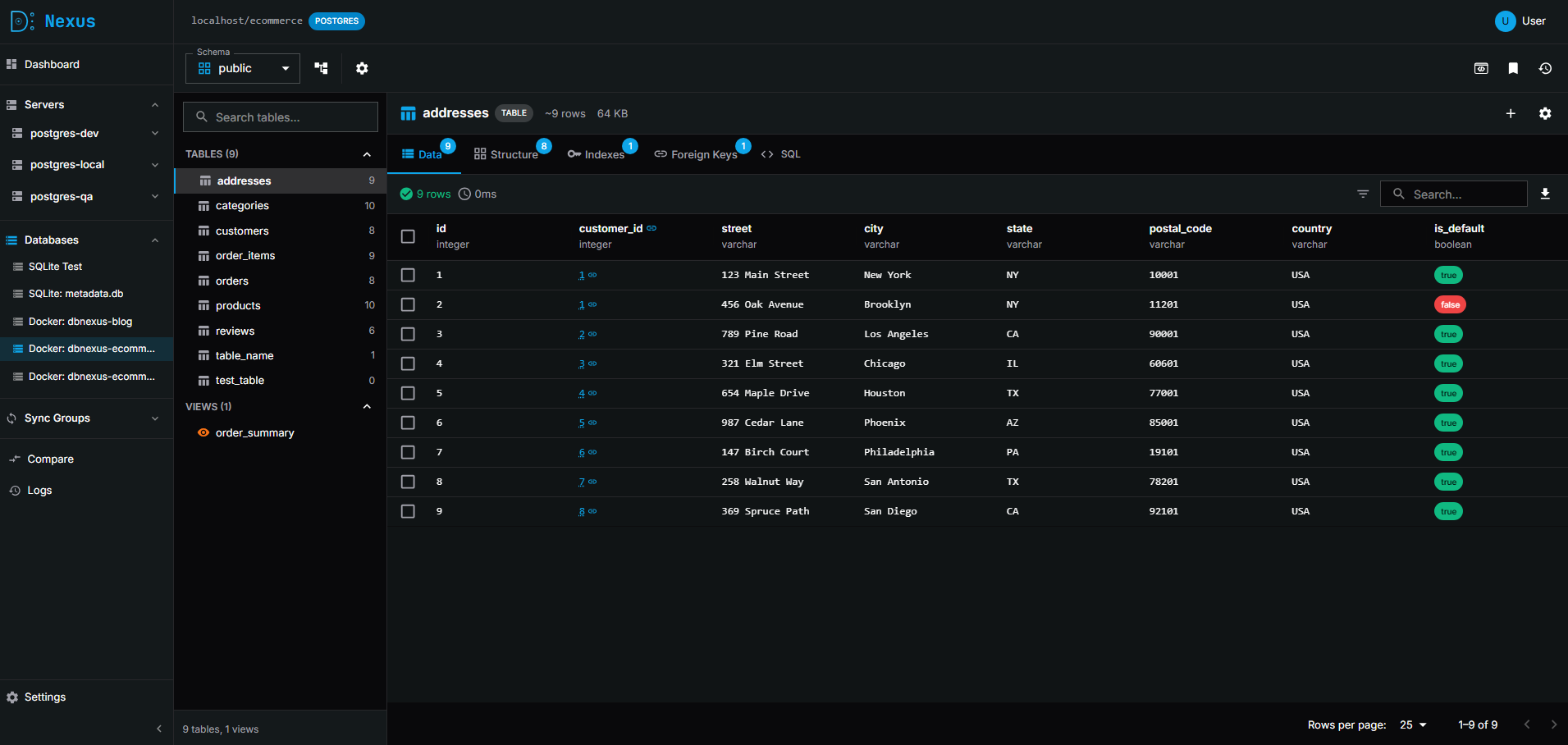
|
|
18
|
+
|
|
19
|
+
### Schema Diagram
|
|
20
|
+
|
|
21
|
+
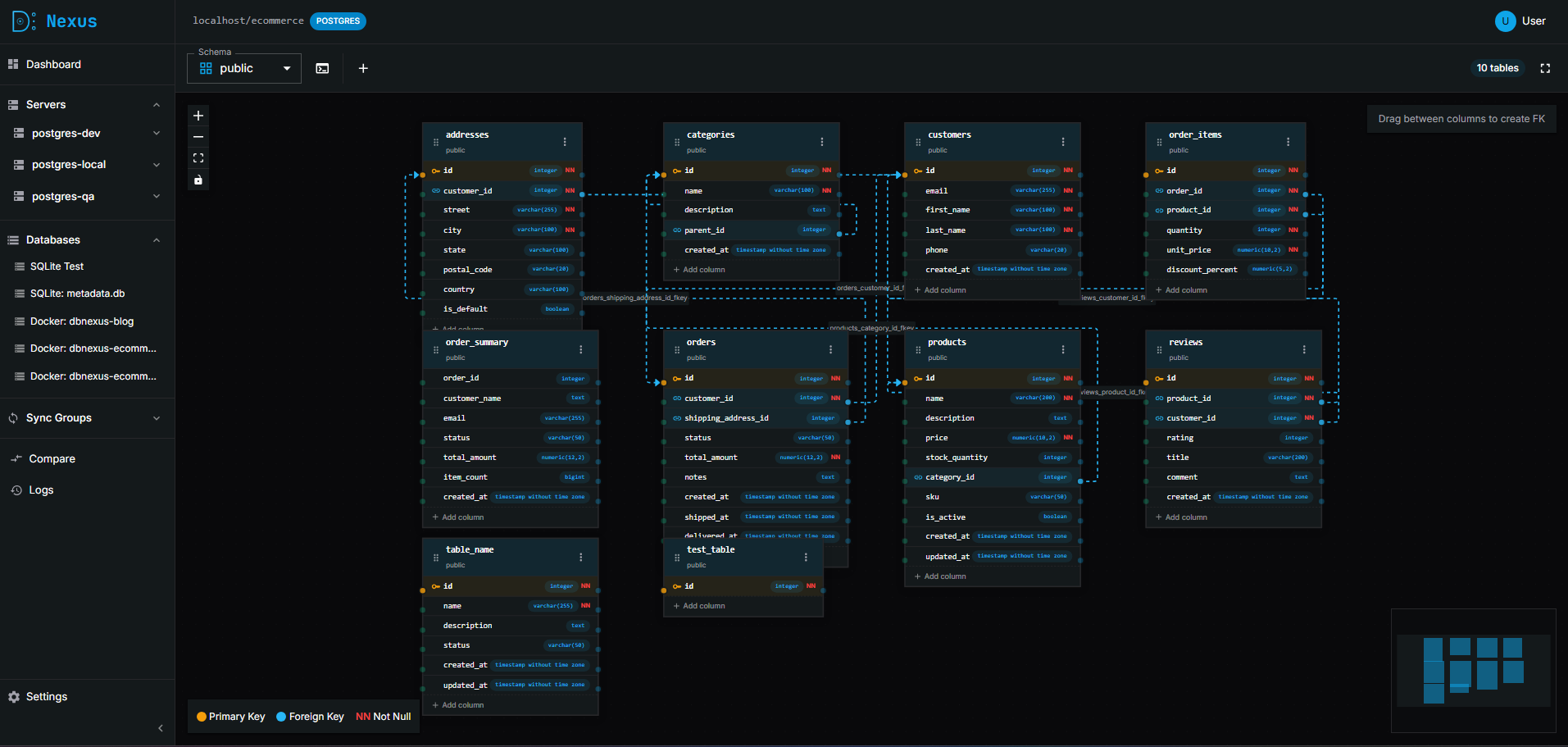
|
|
22
|
+
|
|
23
|
+
### Compare & Sync
|
|
24
|
+
|
|
25
|
+
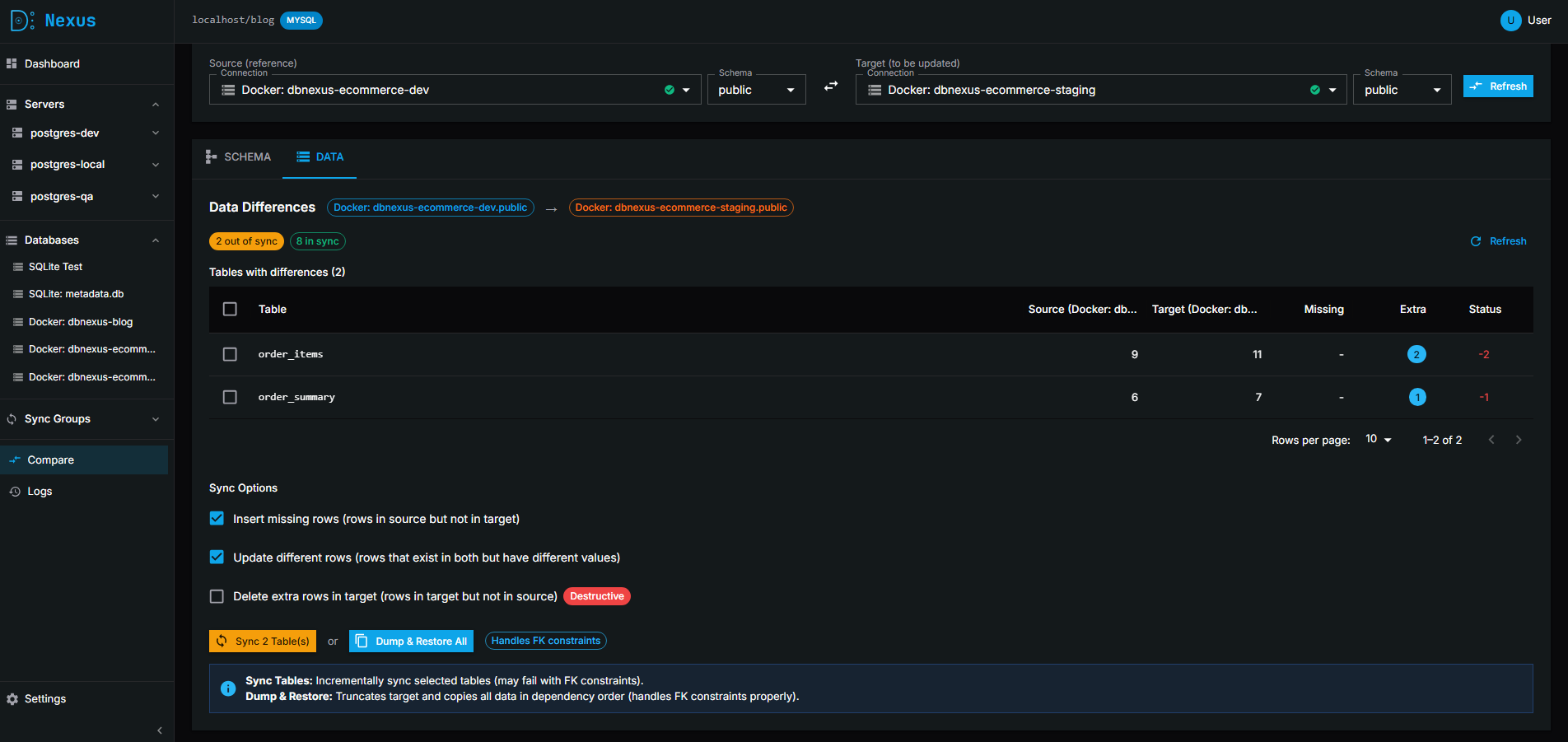
|
|
26
|
+
|
|
27
|
+
<details>
|
|
28
|
+
<summary>📷 More Screenshots</summary>
|
|
29
|
+
|
|
30
|
+
### Connection Management
|
|
31
|
+
|
|
32
|
+
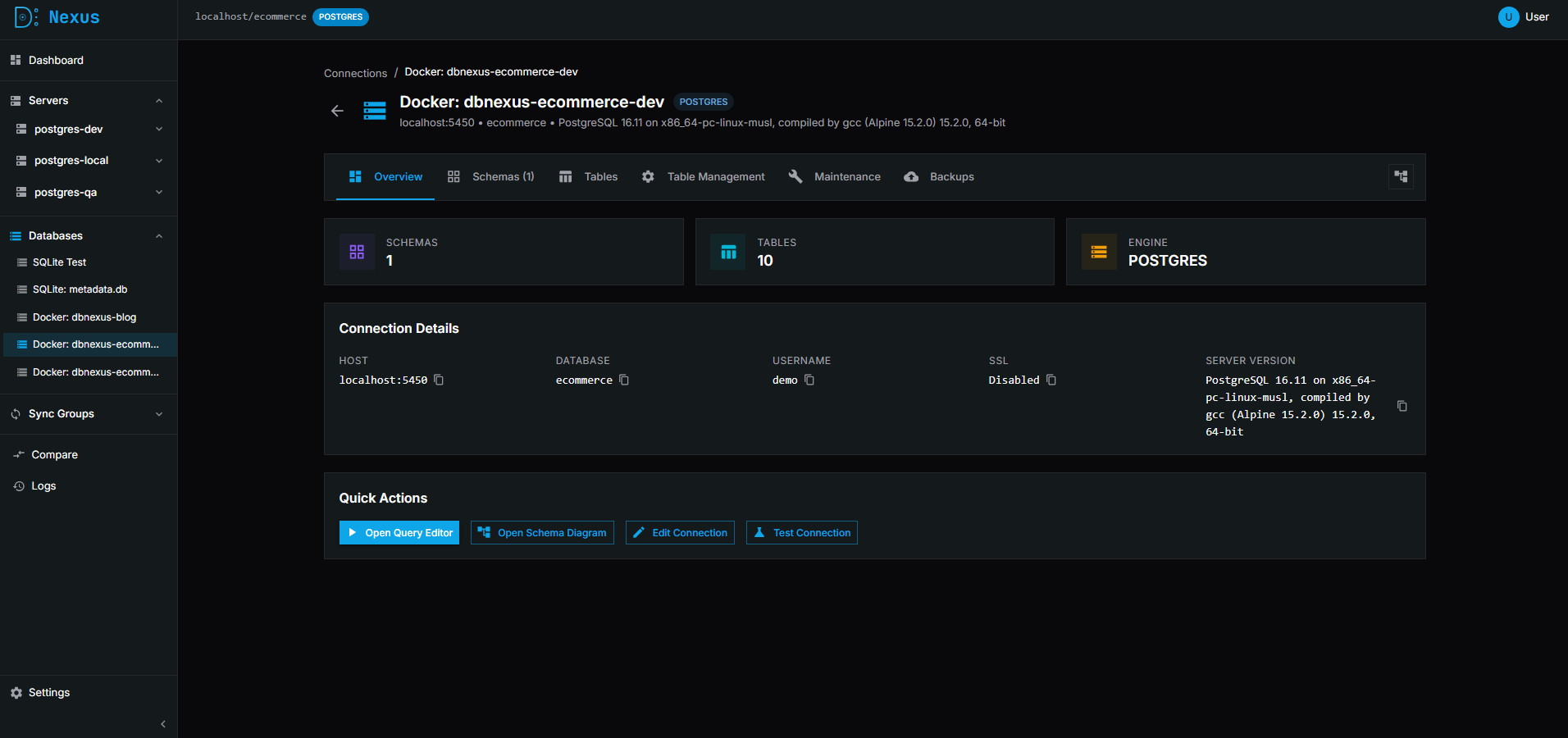
|
|
33
|
+
|
|
34
|
+
### Activity Logs
|
|
35
|
+
|
|
36
|
+
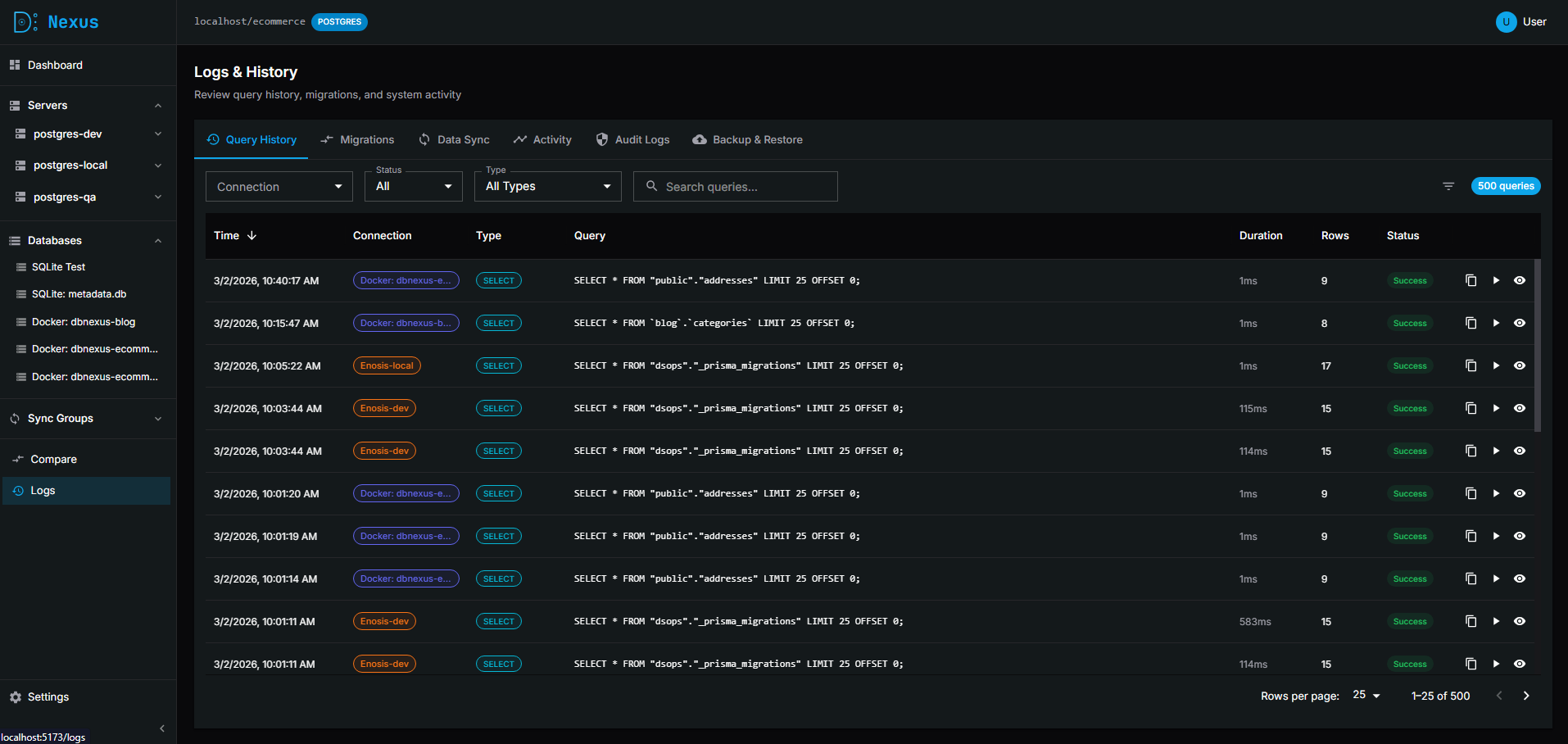
|
|
37
|
+
|
|
38
|
+
### Database Scanner
|
|
39
|
+
|
|
40
|
+
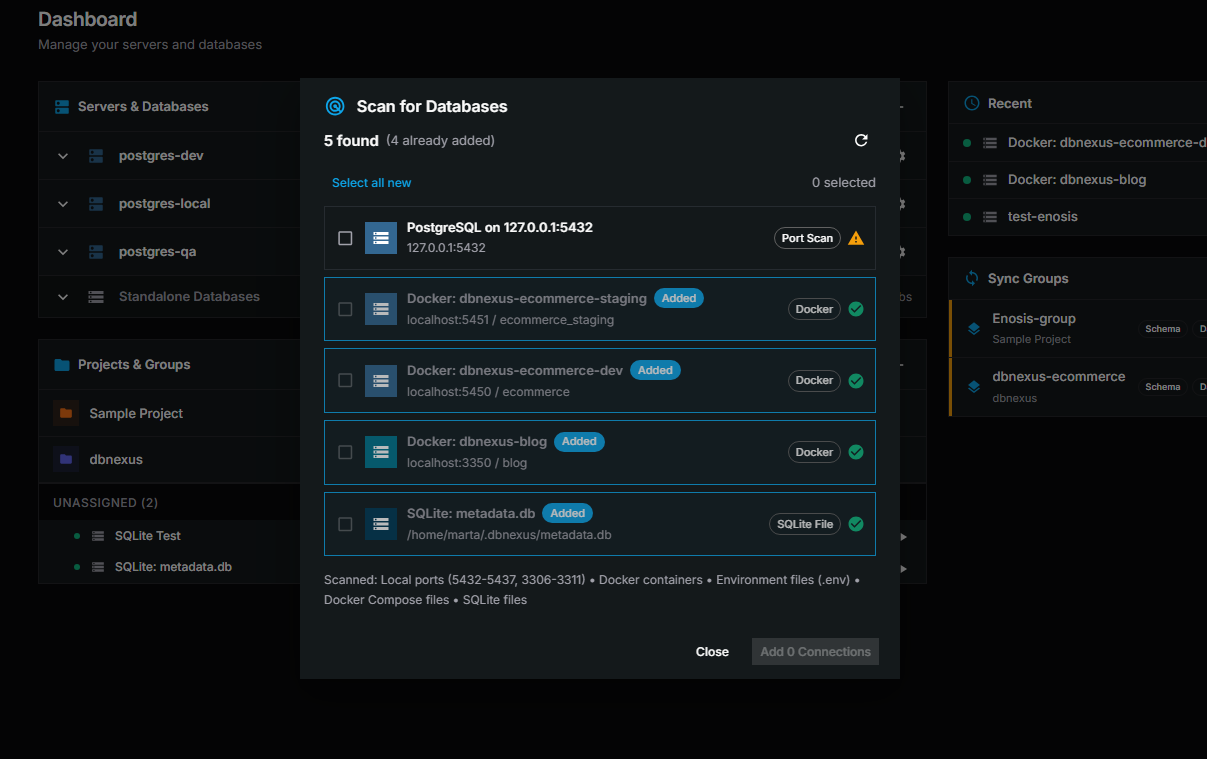
|
|
41
|
+
|
|
42
|
+
### Settings
|
|
43
|
+
|
|
44
|
+
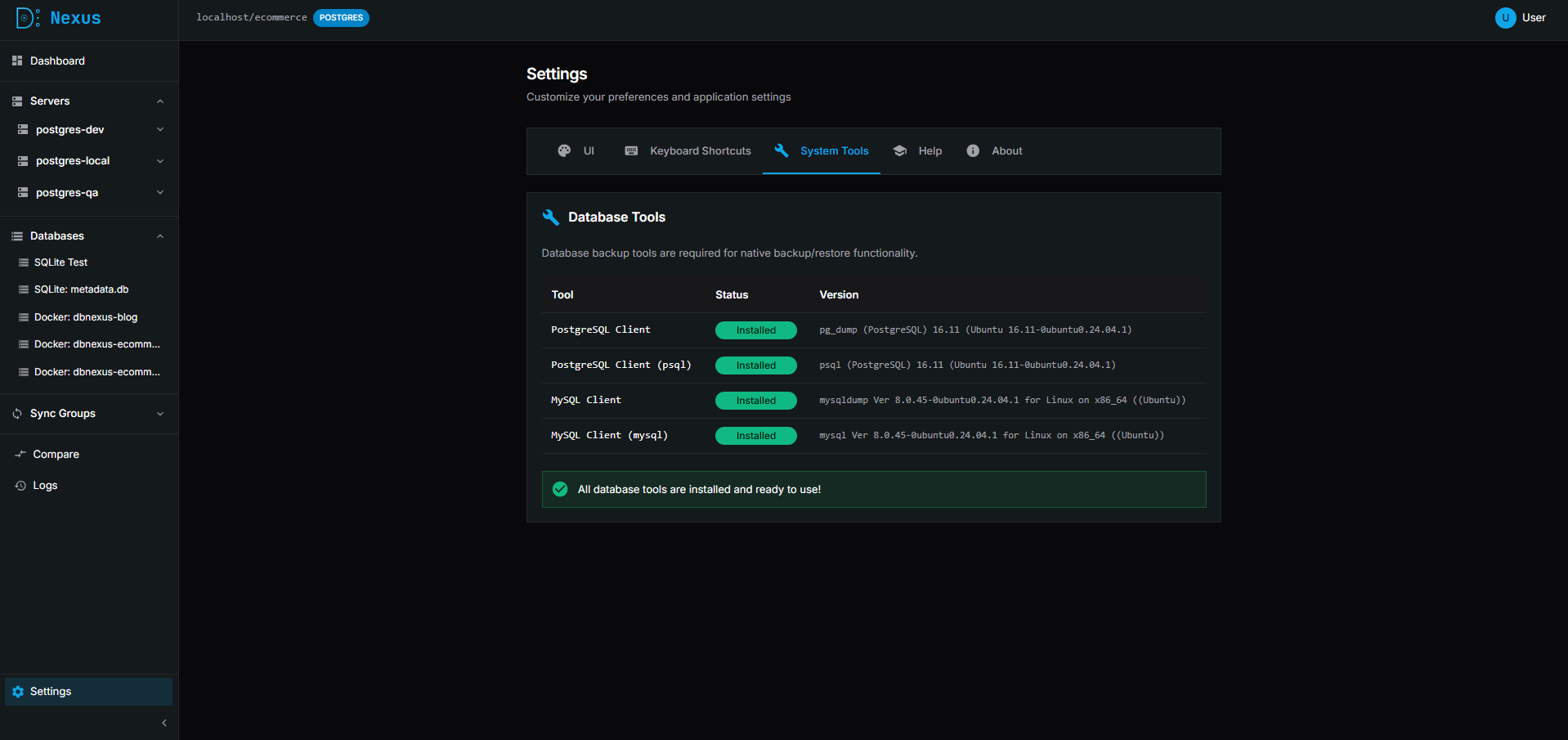
|
|
45
|
+
|
|
46
|
+
</details>
|
|
47
|
+
|
|
48
|
+
</div>
|
|
49
|
+
|
|
50
|
+
## ✨ Features
|
|
51
|
+
|
|
52
|
+
### Core
|
|
53
|
+
|
|
54
|
+
- 🖥️ **Modern Web UI** - Beautiful, dark-themed interface with glassmorphism design
|
|
55
|
+
- 🔌 **Multiple Connections** - Manage and switch between multiple database connections
|
|
56
|
+
- 🔒 **Encrypted Credentials** - Passwords stored securely with AES-256-GCM encryption
|
|
57
|
+
- 🛡️ **Safety Guardrails** - Blocks dangerous queries (UPDATE/DELETE without WHERE) on production databases
|
|
58
|
+
- 🔐 **Identity Verification** - Password confirmation required before viewing sensitive server credentials
|
|
59
|
+
|
|
60
|
+
### Query & Data
|
|
61
|
+
|
|
62
|
+
- ⚡ **Query Editor** - Execute SQL with syntax highlighting and results table
|
|
63
|
+
- 🔗 **Foreign Key Navigation** - Click FK values to instantly query referenced rows
|
|
64
|
+
- 📜 **Query History** - Track and replay previous queries
|
|
65
|
+
- ✏️ **Inline Editing** - Edit table data directly in the results grid
|
|
66
|
+
|
|
67
|
+
### Schema Tools
|
|
68
|
+
|
|
69
|
+
- 📊 **Schema Browser** - Explore tables, columns, indexes, and relationships
|
|
14
70
|
- 🗺️ **Schema Diagram** - Visual database schema editor with drag-and-drop
|
|
15
|
-
-
|
|
16
|
-
-
|
|
17
|
-
|
|
18
|
-
|
|
19
|
-
|
|
71
|
+
- 🔄 **Schema Sync** - Compare and sync database schemas between connections
|
|
72
|
+
- 🎯 **Per-Table Migration** - Apply schema changes table-by-table with copy/apply actions
|
|
73
|
+
|
|
74
|
+
### Data Management
|
|
75
|
+
|
|
76
|
+
- 📦 **Data Sync** - Sync table data between databases with conflict resolution
|
|
77
|
+
- 🔎 **Connection Scanning** - Auto-discover databases via ports, Docker, env files, and SQLite
|
|
78
|
+
- 💾 **Backup & Restore** - Full database backups with optional compression and restore capability
|
|
79
|
+
|
|
80
|
+
### Server Management
|
|
20
81
|
|
|
21
|
-
|
|
82
|
+
- 🖧 **Server Configuration** - Manage PostgreSQL and MySQL servers with admin credentials
|
|
83
|
+
- 📊 **Server Monitoring** - View server version, uptime, and active connections
|
|
84
|
+
- 🗄️ **Database Operations** - Create, drop, and import databases directly on servers
|
|
22
85
|
|
|
23
|
-
###
|
|
86
|
+
### Organization
|
|
87
|
+
|
|
88
|
+
- 🏷️ **Connection Tags** - Organize connections with customizable tags (dev, staging, prod)
|
|
89
|
+
- 📁 **Projects & Groups** - Group related connections together
|
|
90
|
+
- 🎨 **Customizable Theme** - Configure colors and styles in Settings
|
|
91
|
+
|
|
92
|
+
## 🚀 Quick Start
|
|
93
|
+
|
|
94
|
+
### Installation
|
|
95
|
+
|
|
96
|
+
Install DB Nexus globally using npm:
|
|
24
97
|
|
|
25
98
|
```bash
|
|
26
99
|
npm install -g dbnexus
|
|
27
100
|
```
|
|
28
101
|
|
|
29
|
-
|
|
102
|
+
Or run directly with npx (no installation required):
|
|
30
103
|
|
|
31
104
|
```bash
|
|
32
105
|
npx dbnexus
|
|
33
106
|
```
|
|
34
107
|
|
|
35
|
-
|
|
108
|
+
### Usage
|
|
36
109
|
|
|
37
110
|
Start DB Nexus:
|
|
38
111
|
|
|
@@ -40,123 +113,266 @@ Start DB Nexus:
|
|
|
40
113
|
dbnexus
|
|
41
114
|
```
|
|
42
115
|
|
|
43
|
-
This will
|
|
116
|
+
This will:
|
|
117
|
+
|
|
118
|
+
- Start the server on `http://localhost:3001`
|
|
119
|
+
- Automatically open your browser
|
|
120
|
+
- Store metadata in `~/.dbnexus/metadata.db`
|
|
44
121
|
|
|
45
|
-
|
|
122
|
+
#### Options
|
|
46
123
|
|
|
47
124
|
```bash
|
|
48
|
-
dbnexus --port 8080 #
|
|
49
|
-
dbnexus --data-dir /path #
|
|
50
|
-
dbnexus --no-open # Don't open browser
|
|
51
|
-
dbnexus --help # Show
|
|
125
|
+
dbnexus --port 8080 # Custom port
|
|
126
|
+
dbnexus --data-dir /path # Custom data directory
|
|
127
|
+
dbnexus --no-open # Don't open browser
|
|
128
|
+
dbnexus --help # Show all options
|
|
52
129
|
```
|
|
53
130
|
|
|
54
|
-
###
|
|
131
|
+
### Supported Databases
|
|
132
|
+
|
|
133
|
+
- PostgreSQL
|
|
134
|
+
- MySQL
|
|
135
|
+
- SQLite
|
|
136
|
+
|
|
137
|
+
---
|
|
138
|
+
|
|
139
|
+
## 🛠️ Development Setup
|
|
140
|
+
|
|
141
|
+
### Prerequisites
|
|
142
|
+
|
|
143
|
+
- Node.js 18+
|
|
144
|
+
- pnpm
|
|
145
|
+
- PostgreSQL/MySQL (for target databases)
|
|
146
|
+
|
|
147
|
+
### Installation
|
|
55
148
|
|
|
56
149
|
```bash
|
|
57
|
-
|
|
58
|
-
|
|
59
|
-
dbnexus
|
|
150
|
+
# Clone the repository
|
|
151
|
+
git clone https://github.com/akademskig/dbnexus.git
|
|
152
|
+
cd dbnexus
|
|
153
|
+
|
|
154
|
+
# Install dependencies
|
|
155
|
+
pnpm install
|
|
156
|
+
|
|
157
|
+
# Build all packages
|
|
158
|
+
pnpm build
|
|
60
159
|
```
|
|
61
160
|
|
|
62
|
-
|
|
161
|
+
### Running in Development
|
|
162
|
+
|
|
163
|
+
```bash
|
|
164
|
+
# Start development servers (API + Web UI)
|
|
165
|
+
pnpm dev
|
|
166
|
+
```
|
|
63
167
|
|
|
64
|
-
|
|
168
|
+
- **Web UI**: <http://localhost:5173>
|
|
169
|
+
- **API**: <http://localhost:3001>
|
|
65
170
|
|
|
66
|
-
|
|
67
|
-
- **Windows**: `%USERPROFILE%\.dbnexus\metadata.db`
|
|
171
|
+
## 💻 CLI Usage
|
|
68
172
|
|
|
69
|
-
|
|
173
|
+
### Start the UI (default command)
|
|
70
174
|
|
|
71
175
|
```bash
|
|
72
|
-
#
|
|
73
|
-
dbnexus
|
|
176
|
+
# Start DB Nexus (default)
|
|
177
|
+
dbnexus
|
|
74
178
|
|
|
75
|
-
#
|
|
76
|
-
|
|
77
|
-
|
|
179
|
+
# Custom port
|
|
180
|
+
dbnexus --port 4000
|
|
181
|
+
|
|
182
|
+
# Don't open browser
|
|
183
|
+
dbnexus --no-open
|
|
78
184
|
|
|
79
|
-
|
|
185
|
+
# Custom data directory
|
|
186
|
+
dbnexus --data-dir ~/my-data
|
|
187
|
+
```
|
|
80
188
|
|
|
81
189
|
### Connection Management
|
|
82
190
|
|
|
83
|
-
|
|
84
|
-
|
|
85
|
-
|
|
86
|
-
-
|
|
87
|
-
|
|
191
|
+
```bash
|
|
192
|
+
# Add a new connection
|
|
193
|
+
dbnexus connect add \
|
|
194
|
+
--name prod-db \
|
|
195
|
+
--host db.example.com \
|
|
196
|
+
--port 5432 \
|
|
197
|
+
--database myapp \
|
|
198
|
+
--user admin \
|
|
199
|
+
--password secret \
|
|
200
|
+
--ssl \
|
|
201
|
+
--tags prod,main
|
|
202
|
+
|
|
203
|
+
# List all connections
|
|
204
|
+
dbnexus connect list
|
|
205
|
+
|
|
206
|
+
# Test a connection
|
|
207
|
+
dbnexus connect test prod-db
|
|
208
|
+
|
|
209
|
+
# Remove a connection
|
|
210
|
+
dbnexus connect remove prod-db
|
|
211
|
+
```
|
|
88
212
|
|
|
89
|
-
### Query
|
|
213
|
+
### Query Execution
|
|
214
|
+
|
|
215
|
+
```bash
|
|
216
|
+
# Run a query
|
|
217
|
+
dbnexus query --conn prod-db --sql "SELECT * FROM users LIMIT 10"
|
|
218
|
+
|
|
219
|
+
# Execute from file
|
|
220
|
+
dbnexus query --conn prod-db --file ./query.sql
|
|
221
|
+
|
|
222
|
+
# Dangerous queries require --confirm
|
|
223
|
+
dbnexus query --conn prod-db --sql "DROP TABLE temp" --confirm
|
|
224
|
+
```
|
|
225
|
+
|
|
226
|
+
### Database Scanning
|
|
90
227
|
|
|
91
|
-
|
|
92
|
-
|
|
93
|
-
|
|
94
|
-
|
|
95
|
-
-
|
|
228
|
+
```bash
|
|
229
|
+
# Scan for databases (ports, Docker, .env files, SQLite)
|
|
230
|
+
dbnexus scan
|
|
231
|
+
|
|
232
|
+
# Auto-add discovered connections
|
|
233
|
+
dbnexus scan --add
|
|
234
|
+
|
|
235
|
+
# Scan specific directories for .env files
|
|
236
|
+
dbnexus scan --env-dirs ~/projects,/var/www
|
|
237
|
+
```
|
|
238
|
+
|
|
239
|
+
### Data Export
|
|
96
240
|
|
|
97
|
-
|
|
241
|
+
```bash
|
|
242
|
+
# Export table to CSV
|
|
243
|
+
dbnexus export --conn prod-db --table users --format csv --output users.csv
|
|
98
244
|
|
|
99
|
-
|
|
100
|
-
-
|
|
101
|
-
|
|
102
|
-
- Generate migration SQL
|
|
103
|
-
- Apply schema changes
|
|
245
|
+
# Export query results to JSON
|
|
246
|
+
dbnexus export --conn prod-db --sql "SELECT * FROM orders" --format json --output orders.json
|
|
247
|
+
```
|
|
104
248
|
|
|
105
|
-
###
|
|
249
|
+
### Schema Tools
|
|
106
250
|
|
|
107
|
-
|
|
108
|
-
|
|
109
|
-
|
|
110
|
-
- Dump and restore databases
|
|
251
|
+
```bash
|
|
252
|
+
# Show schema for a connection
|
|
253
|
+
dbnexus schema show --conn prod-db
|
|
111
254
|
|
|
112
|
-
|
|
255
|
+
# Show specific table schema
|
|
256
|
+
dbnexus schema show --conn prod-db --table users
|
|
113
257
|
|
|
114
|
-
|
|
115
|
-
|
|
258
|
+
# Compare schemas between connections
|
|
259
|
+
dbnexus schema compare --source dev-db --target prod-db
|
|
116
260
|
|
|
117
|
-
|
|
261
|
+
# Generate migration SQL
|
|
262
|
+
dbnexus schema diff --source dev-db --target prod-db --output migration.sql
|
|
263
|
+
```
|
|
118
264
|
|
|
119
|
-
|
|
120
|
-
- **MySQL** 5.7+
|
|
121
|
-
- **MariaDB** 10.2+
|
|
122
|
-
- **SQLite** 3.0+
|
|
265
|
+
## 🔧 Scripts
|
|
123
266
|
|
|
124
|
-
|
|
267
|
+
| Command | Description |
|
|
268
|
+
| ------------- | ------------------------------- |
|
|
269
|
+
| `pnpm dev` | Start development servers |
|
|
270
|
+
| `pnpm build` | Build all packages |
|
|
271
|
+
| `pnpm lint` | Run ESLint |
|
|
272
|
+
| `pnpm format` | Format code with Prettier |
|
|
273
|
+
| `pnpm check` | Run lint + format check + build |
|
|
125
274
|
|
|
126
|
-
|
|
275
|
+
## 📦 Distribution
|
|
127
276
|
|
|
128
|
-
|
|
129
|
-
- `PORT` - Server port (default: 3001)
|
|
130
|
-
- `NODE_ENV` - Environment (development/production)
|
|
277
|
+
### Docker
|
|
131
278
|
|
|
132
|
-
|
|
279
|
+
Build and run DB Nexus as a Docker container:
|
|
133
280
|
|
|
134
281
|
```bash
|
|
135
|
-
#
|
|
136
|
-
|
|
282
|
+
# Build the Docker image
|
|
283
|
+
pnpm docker:build
|
|
137
284
|
|
|
138
|
-
#
|
|
139
|
-
|
|
285
|
+
# Run with Docker
|
|
286
|
+
pnpm docker:run
|
|
287
|
+
|
|
288
|
+
# Or use Docker Compose for production
|
|
289
|
+
pnpm docker:compose
|
|
140
290
|
```
|
|
141
291
|
|
|
142
|
-
|
|
292
|
+
The application will be available at `http://localhost:3001`.
|
|
143
293
|
|
|
144
|
-
|
|
145
|
-
- [Issue Tracker](https://github.com/akademskig/dbnexus/issues)
|
|
294
|
+
### Desktop Application (Electron)
|
|
146
295
|
|
|
147
|
-
|
|
296
|
+
Build standalone desktop applications for Windows, macOS, and Linux:
|
|
148
297
|
|
|
149
|
-
|
|
298
|
+
```bash
|
|
299
|
+
# Build for all platforms
|
|
300
|
+
pnpm desktop:build
|
|
150
301
|
|
|
151
|
-
|
|
302
|
+
# Build for specific platforms
|
|
303
|
+
pnpm desktop:build:win # Windows (.exe, portable)
|
|
304
|
+
pnpm desktop:build:mac # macOS (.dmg, .zip)
|
|
305
|
+
pnpm desktop:build:linux # Linux (.AppImage, .deb, .rpm)
|
|
306
|
+
```
|
|
152
307
|
|
|
153
|
-
|
|
308
|
+
Built applications will be in `apps/desktop/out/`.
|
|
154
309
|
|
|
155
|
-
|
|
310
|
+
### Manual Installation
|
|
156
311
|
|
|
157
|
-
|
|
158
|
-
|
|
312
|
+
For manual deployment:
|
|
313
|
+
|
|
314
|
+
```bash
|
|
315
|
+
# Build all packages
|
|
316
|
+
pnpm build
|
|
317
|
+
|
|
318
|
+
# Start in production mode
|
|
319
|
+
NODE_ENV=production node apps/api/dist/main.js
|
|
320
|
+
```
|
|
321
|
+
|
|
322
|
+
## 🐳 Docker Compose (Development)
|
|
323
|
+
|
|
324
|
+
For testing with multiple database instances:
|
|
325
|
+
|
|
326
|
+
```bash
|
|
327
|
+
# Start test databases (PostgreSQL, MySQL)
|
|
328
|
+
docker-compose up -d
|
|
329
|
+
|
|
330
|
+
# Stop test databases
|
|
331
|
+
docker-compose down
|
|
332
|
+
```
|
|
333
|
+
|
|
334
|
+
## 📖 Documentation
|
|
335
|
+
|
|
336
|
+
- **[Full Documentation](https://akademskig.github.io/dbnexus/)** - Complete guide with screenshots and examples
|
|
337
|
+
- **[Architecture & Design](./DESIGN.md)** - Technical details and design decisions
|
|
338
|
+
- **[Installation Guide](./INSTALLATION.md)** - Detailed installation instructions
|
|
339
|
+
- **[Changelog](./CHANGELOG.md)** - Release notes and version history
|
|
340
|
+
|
|
341
|
+
## 🌟 Why DB Nexus?
|
|
342
|
+
|
|
343
|
+
- **🏠 Local-First** - Your data stays on your machine. No cloud dependencies.
|
|
344
|
+
- **🎨 Modern UI** - Beautiful, intuitive interface with dark mode and glassmorphism design
|
|
345
|
+
- **🛡️ Production Safe** - Built-in guardrails prevent accidental data loss
|
|
346
|
+
- **🔒 Secure** - AES-256-GCM encryption for stored credentials
|
|
347
|
+
- **⚡ Fast** - Native performance with direct database connections
|
|
348
|
+
- **🆓 Open Source** - AGPL-3.0 licensed, free forever
|
|
349
|
+
|
|
350
|
+
## 🤝 Contributing
|
|
351
|
+
|
|
352
|
+
Contributions are welcome! Please feel free to submit a Pull Request.
|
|
353
|
+
|
|
354
|
+
1. Fork the repository
|
|
355
|
+
2. Create your feature branch (`git checkout -b feature/amazing-feature`)
|
|
356
|
+
3. Commit your changes (`git commit -m 'Add some amazing feature'`)
|
|
357
|
+
4. Push to the branch (`git push origin feature/amazing-feature`)
|
|
358
|
+
5. Open a Pull Request
|
|
359
|
+
|
|
360
|
+
## 🐛 Bug Reports
|
|
361
|
+
|
|
362
|
+
Found a bug? Please [open an issue](https://github.com/akademskig/dbnexus/issues) with:
|
|
363
|
+
|
|
364
|
+
- Steps to reproduce
|
|
365
|
+
- Expected behavior
|
|
366
|
+
- Actual behavior
|
|
367
|
+
- Database type and version
|
|
368
|
+
- DB Nexus version (`dbnexus --version`)
|
|
369
|
+
|
|
370
|
+
## 📄 License
|
|
371
|
+
|
|
372
|
+
AGPL-3.0 - See [LICENSE](./LICENSE) for details.
|
|
159
373
|
|
|
160
374
|
---
|
|
161
375
|
|
|
162
|
-
**
|
|
376
|
+
**Made with ❤️ by the DB Nexus team**
|
|
377
|
+
|
|
378
|
+
[⭐ Star us on GitHub](https://github.com/akademskig/dbnexus) • [📖 Read the docs](https://akademskig.github.io/dbnexus/) • [🐛 Report a bug](https://github.com/akademskig/dbnexus/issues)
|