datocms-plugin-ai-translations 3.4.12 → 3.5.1
This diff represents the content of publicly available package versions that have been released to one of the supported registries. The information contained in this diff is provided for informational purposes only and reflects changes between package versions as they appear in their respective public registries.
package/README.md
CHANGED
|
@@ -62,7 +62,7 @@ You can also pull content from a different locale by choosing "Translate from" t
|
|
|
62
62
|
If enabled:
|
|
63
63
|
|
|
64
64
|
1. Open a record that has multiple locales.
|
|
65
|
-
2. The "
|
|
65
|
+
2. The "AI Translations" panel appears in the sidebar.
|
|
66
66
|
3. Select source and target locales, then click "Translate Entire Record."
|
|
67
67
|
4. All translatable fields get updated with AI translations.
|
|
68
68
|
|
|
@@ -72,9 +72,9 @@ Translate multiple records at once from any table view:
|
|
|
72
72
|
|
|
73
73
|
1. In the Content area, navigate to any model's table view
|
|
74
74
|
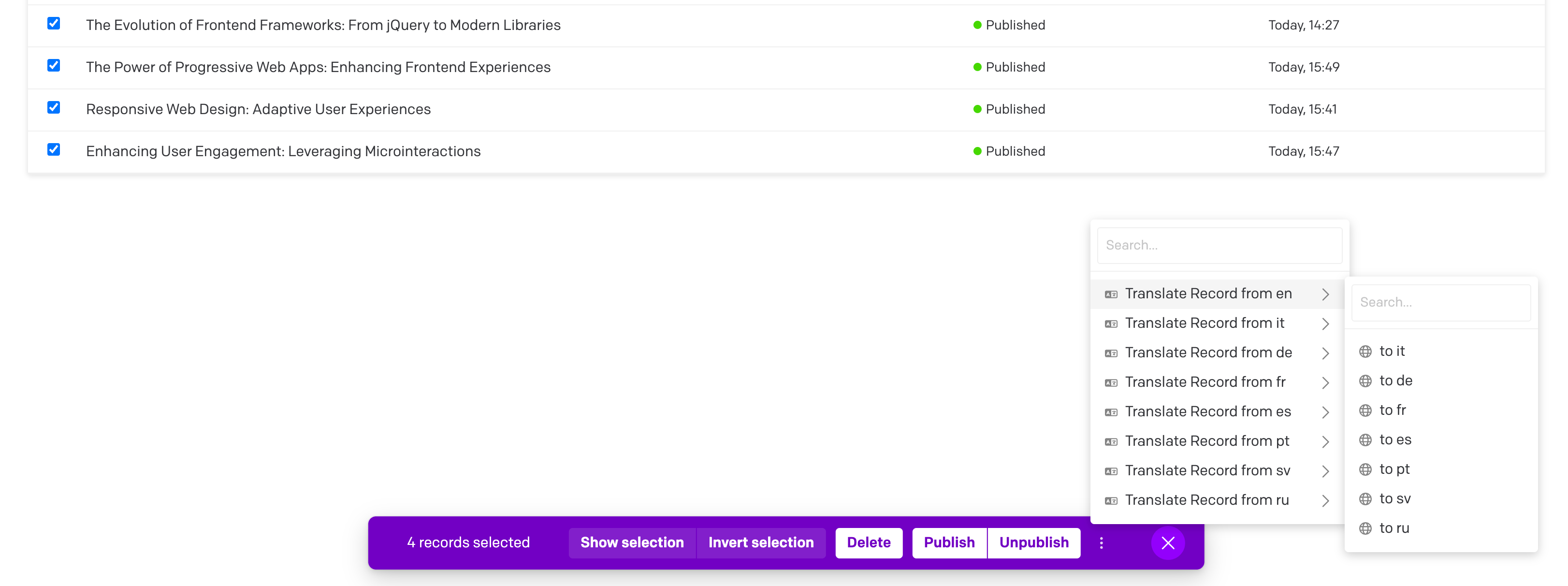
2. Select multiple records by checking the boxes on the left side
|
|
75
|
-
3. Click the three dots dropdown in the bar at the bottom (to the right of the bar)
|
|
76
|
-
4.
|
|
77
|
-
5.
|
|
75
|
+
3. Click the three dots dropdown in the bar at the bottom (to the right of the bar) and choose "AI Translate these records"
|
|
76
|
+
4. In the picker, choose your source and target languages (the target defaults to "All other locales") and, optionally, narrow which fields are translated per model
|
|
77
|
+
5. Review the confirmation summary, then watch the progress modal as all selected records are translated
|
|
78
78
|
|
|
79
79
|
|
|
80
80
|
|
|
@@ -83,11 +83,13 @@ Translate multiple records at once from any table view:
|
|
|
83
83
|
The plugin includes a dedicated page for translating multiple models at once:
|
|
84
84
|
|
|
85
85
|
1. Go to Settings → AI Bulk Translations (in the sidebar) — this entry only appears for users whose role can edit the schema.
|
|
86
|
-
2. Select your source and target languages
|
|
87
|
-
3. Choose one or more models to translate (block models are excluded)
|
|
88
|
-
4. Click "Start Bulk Translation"
|
|
86
|
+
2. Select your source and target languages (the target defaults to "All other locales")
|
|
87
|
+
3. Choose one or more models to translate (block models are excluded); each model appears as a card where you can refine which fields are translated
|
|
88
|
+
4. Click "Start Bulk Translation" and review the confirmation summary of locales, models, and fields
|
|
89
89
|
5. The modal will display progress as all records from the selected models are translated
|
|
90
90
|
|
|
91
|
+
If anything required is missing (for example a model with no fields selected, or no target locale), the page lists exactly what's left before the Start button enables.
|
|
92
|
+
|
|
91
93
|

|
|
92
94
|
|
|
93
95
|
## Contextual Translations
|
|
@@ -201,3 +203,7 @@ If DeepL returns a glossary mismatch (e.g., glossary languages don't match the c
|
|
|
201
203
|
## License
|
|
202
204
|
|
|
203
205
|
This project is licensed under the MIT License - see the [LICENSE](LICENSE) file for details.
|
|
206
|
+
|
|
207
|
+
## Changelog
|
|
208
|
+
|
|
209
|
+
See the [full changelog](https://github.com/datocms/plugins/blob/master/ai-translations/CHANGELOG.md) for the release history.
|