data-api-client 2.0.0-beta.0 → 2.0.0
This diff represents the content of publicly available package versions that have been released to one of the supported registries. The information contained in this diff is provided for informational purposes only and reflects changes between package versions as they appear in their respective public registries.
- package/README.md +403 -147
- package/dist/client.d.ts +3 -0
- package/dist/client.d.ts.map +1 -0
- package/dist/client.js +69 -0
- package/dist/index.d.ts +3 -0
- package/dist/index.d.ts.map +1 -0
- package/dist/index.js +3 -0
- package/dist/params.d.ts +19 -0
- package/dist/params.d.ts.map +1 -0
- package/dist/params.js +125 -0
- package/dist/query.d.ts +5 -0
- package/dist/query.d.ts.map +1 -0
- package/dist/query.js +38 -0
- package/dist/results.d.ts +12 -0
- package/dist/results.d.ts.map +1 -0
- package/dist/results.js +93 -0
- package/dist/transaction.d.ts +4 -0
- package/dist/transaction.d.ts.map +1 -0
- package/dist/transaction.js +57 -0
- package/dist/types.d.ts +90 -0
- package/dist/types.d.ts.map +1 -0
- package/dist/types.js +2 -0
- package/dist/utils.d.ts +19 -0
- package/dist/utils.d.ts.map +1 -0
- package/dist/utils.js +150 -0
- package/package.json +38 -9
- package/index.js +0 -642
package/README.md
CHANGED
|
@@ -1,25 +1,50 @@
|
|
|
1
1
|

|
|
2
2
|
|
|
3
|
-
[](https://travis-ci.org/jeremydaly/data-api-client)
|
|
4
3
|
[](https://www.npmjs.com/package/data-api-client)
|
|
5
4
|
[](https://www.npmjs.com/package/data-api-client)
|
|
6
5
|
|
|
7
|
-
|
|
6
|
+
> **Note:** Version 2.0.0 is currently in active development. We welcome your feedback and bug reports! Please [open an issue](https://github.com/jeremydaly/data-api-client/issues) if you encounter any problems or have suggestions for improvement.
|
|
7
|
+
>
|
|
8
|
+
> **Using v1.x?** See [README_v1.md](README_v1.md) for v1.x documentation.
|
|
8
9
|
|
|
9
|
-
The **Data API Client** is a lightweight wrapper that simplifies working with the Amazon Aurora Serverless Data API by abstracting away the notion of field values. This abstraction annotates native JavaScript types supplied as input parameters, as well as converts annotated response data to native JavaScript types. It's basically a [DocumentClient](https://docs.aws.amazon.com/AWSJavaScriptSDK/latest/AWS/DynamoDB/DocumentClient.html) for the Data API. It also
|
|
10
|
+
The **Data API Client** is a lightweight wrapper that simplifies working with the Amazon Aurora Serverless Data API by abstracting away the notion of field values. This abstraction annotates native JavaScript types supplied as input parameters, as well as converts annotated response data to native JavaScript types. It's basically a [DocumentClient](https://docs.aws.amazon.com/AWSJavaScriptSDK/latest/AWS/DynamoDB/DocumentClient.html) for the Data API. It also dramatically simplifies **transactions** and uses modern async/await patterns with AWS SDK v3.
|
|
11
|
+
|
|
12
|
+
**Version 2.0** introduces support for the new [RDS Data API for Aurora Serverless v2 and Aurora provisioned database instances](https://aws.amazon.com/about-aws/whats-new/2024/09/amazon-aurora-mysql-rds-data-api/), enhanced [Amazon Aurora PostgreSQL-Compatible Edition](https://aws.amazon.com/about-aws/whats-new/2023/12/amazon-aurora-postgresql-rds-data-api/) support, migration to AWS SDK v3, full TypeScript implementation, and comprehensive PostgreSQL data type coverage including **automatic array handling**.
|
|
10
13
|
|
|
11
14
|
For more information about the Aurora Serverless Data API, you can review the [official documentation](https://docs.aws.amazon.com/AmazonRDS/latest/AuroraUserGuide/data-api.html) or read [Aurora Serverless Data API: An (updated) First Look](https://www.jeremydaly.com/aurora-serverless-data-api-a-first-look/) for some more insights on performance.
|
|
12
15
|
|
|
16
|
+
## What's New in v2.0
|
|
17
|
+
|
|
18
|
+
- **AWS SDK v3**: Migrated from AWS SDK v2 to v3 for smaller bundle sizes and better tree-shaking
|
|
19
|
+
- **TypeScript**: Full TypeScript implementation with comprehensive type definitions
|
|
20
|
+
- **PostgreSQL Array Support**: Automatic conversion of PostgreSQL arrays to native JavaScript arrays in query results
|
|
21
|
+
- **Comprehensive Data Type Coverage**: Extensive support for PostgreSQL data types including:
|
|
22
|
+
- All numeric types (SMALLINT, INT, BIGINT, DECIMAL, NUMERIC, REAL, DOUBLE PRECISION)
|
|
23
|
+
- String types (CHAR, VARCHAR, TEXT)
|
|
24
|
+
- Boolean, Date/Time types (DATE, TIME, TIMESTAMP, TIMESTAMPTZ)
|
|
25
|
+
- Binary data (BYTEA)
|
|
26
|
+
- JSON and JSONB with nested structures
|
|
27
|
+
- UUID with type casting support
|
|
28
|
+
- Network types (INET, CIDR)
|
|
29
|
+
- Range types (INT4RANGE, NUMRANGE, TSTZRANGE)
|
|
30
|
+
- Arrays of all supported types
|
|
31
|
+
- **Modern Build System**: TypeScript compilation with ES6+ output
|
|
32
|
+
- **Enhanced Type Casting**: Improved support for PostgreSQL type casting with inline (`::type`) and parameter-based casting
|
|
33
|
+
- **Better Error Handling**: More informative error messages and validation
|
|
34
|
+
|
|
13
35
|
## Simple Examples
|
|
14
36
|
|
|
15
|
-
The **Data API Client** makes working with the Aurora Serverless Data API super simple.
|
|
37
|
+
The **Data API Client** makes working with the Aurora Serverless Data API super simple. Import and instantiate the library with basic configuration information, then use the `query()` method to manage your workflows. Below are some examples.
|
|
16
38
|
|
|
17
39
|
```javascript
|
|
18
|
-
//
|
|
19
|
-
|
|
40
|
+
// Import and instantiate data-api-client with secret and cluster
|
|
41
|
+
import dataApiClient from 'data-api-client'
|
|
42
|
+
|
|
43
|
+
const data = dataApiClient({
|
|
20
44
|
secretArn: 'arn:aws:secretsmanager:us-east-1:XXXXXXXXXXXX:secret:mySecret',
|
|
21
45
|
resourceArn: 'arn:aws:rds:us-east-1:XXXXXXXXXXXX:cluster:my-cluster-name',
|
|
22
|
-
database: 'myDatabase' // default database
|
|
46
|
+
database: 'myDatabase', // default database
|
|
47
|
+
engine: 'pg' // or 'mysql'
|
|
23
48
|
})
|
|
24
49
|
|
|
25
50
|
/*** Assuming we're in an async function ***/
|
|
@@ -35,31 +60,27 @@ let result = await data.query(`SELECT * FROM myTable`)
|
|
|
35
60
|
// }
|
|
36
61
|
|
|
37
62
|
// SELECT with named parameters
|
|
38
|
-
let resultParams = await data.query(`SELECT * FROM myTable WHERE id = :id`, {
|
|
39
|
-
id: 2
|
|
40
|
-
})
|
|
63
|
+
let resultParams = await data.query(`SELECT * FROM myTable WHERE id = :id`, { id: 2 })
|
|
41
64
|
// { records: [ { id: 2, name: 'Mike', age: 52 } ] }
|
|
42
65
|
|
|
43
|
-
// INSERT with named parameters
|
|
44
|
-
let insert = await data.query(`INSERT INTO myTable (name,age,has_curls) VALUES(:name
|
|
66
|
+
// INSERT with named parameters (PostgreSQL with RETURNING)
|
|
67
|
+
let insert = await data.query(`INSERT INTO myTable (name, age, has_curls) VALUES(:name, :age, :curls) RETURNING id`, {
|
|
45
68
|
name: 'Greg',
|
|
46
69
|
age: 18,
|
|
47
70
|
curls: false
|
|
48
71
|
})
|
|
49
72
|
|
|
50
73
|
// BATCH INSERT with named parameters
|
|
51
|
-
let batchInsert = await data.query(`INSERT INTO myTable (name,age,has_curls) VALUES(:name
|
|
74
|
+
let batchInsert = await data.query(`INSERT INTO myTable (name, age, has_curls) VALUES(:name, :age, :curls)`, [
|
|
52
75
|
[{ name: 'Marcia', age: 17, curls: false }],
|
|
53
76
|
[{ name: 'Peter', age: 15, curls: false }],
|
|
54
77
|
[{ name: 'Jan', age: 15, curls: false }],
|
|
55
78
|
[{ name: 'Cindy', age: 12, curls: true }],
|
|
56
79
|
[{ name: 'Bobby', age: 12, curls: false }]
|
|
57
80
|
])
|
|
81
|
+
|
|
58
82
|
// Update with named parameters
|
|
59
|
-
let update = await data.query(`UPDATE myTable SET age = :age WHERE id = :id`, {
|
|
60
|
-
age: 13,
|
|
61
|
-
id: 5
|
|
62
|
-
})
|
|
83
|
+
let update = await data.query(`UPDATE myTable SET age = :age WHERE id = :id`, { age: 13, id: 5 })
|
|
63
84
|
|
|
64
85
|
// Delete with named parameters
|
|
65
86
|
let remove = await data.query(
|
|
@@ -67,64 +88,77 @@ let remove = await data.query(
|
|
|
67
88
|
{ name: 'Jan' } // Sorry Jan :(
|
|
68
89
|
)
|
|
69
90
|
|
|
70
|
-
//
|
|
71
|
-
let
|
|
72
|
-
|
|
73
|
-
|
|
74
|
-
|
|
75
|
-
|
|
76
|
-
|
|
91
|
+
// PostgreSQL with type casting and JSONB
|
|
92
|
+
let pgExample = await data.query(`INSERT INTO users (id, email, metadata) VALUES(:id, :email, :metadata)`, [
|
|
93
|
+
{ name: 'id', value: '550e8400-e29b-41d4-a716-446655440000', cast: 'uuid' },
|
|
94
|
+
{ name: 'email', value: 'user@example.com' },
|
|
95
|
+
{ name: 'metadata', value: JSON.stringify({ role: 'admin' }), cast: 'jsonb' }
|
|
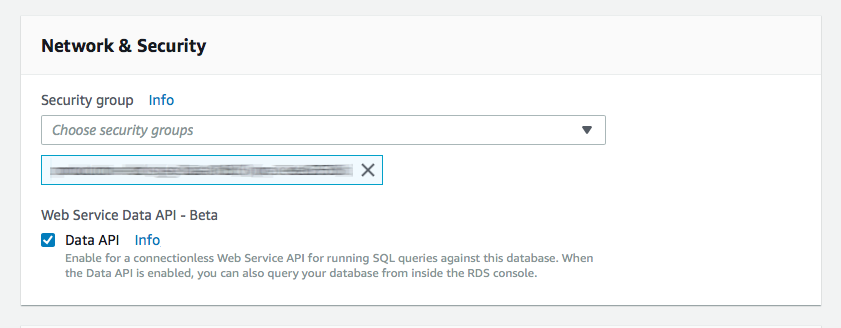
96
|
+
])
|
|
97
|
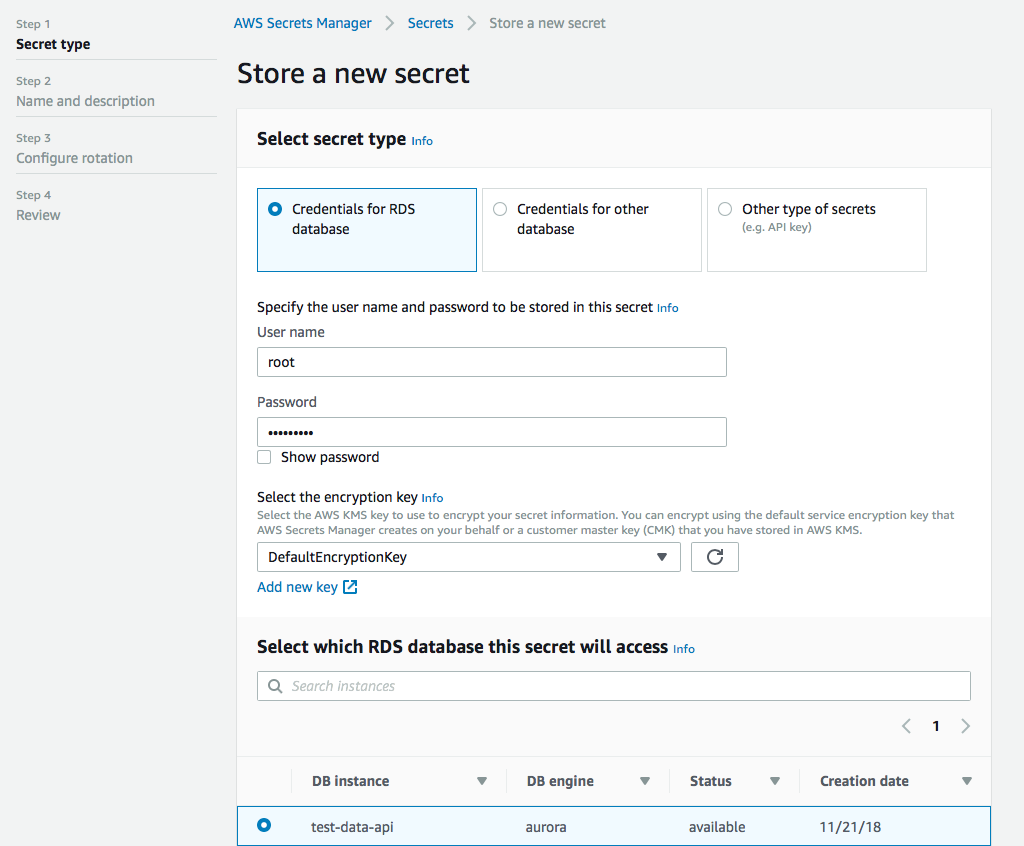
+
|
|
98
|
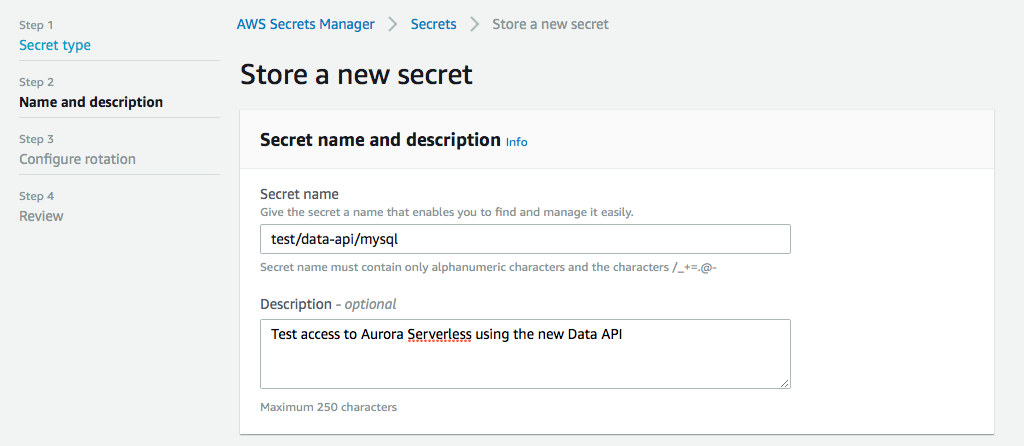
+
// PostgreSQL array result (automatically converted to native JavaScript array)
|
|
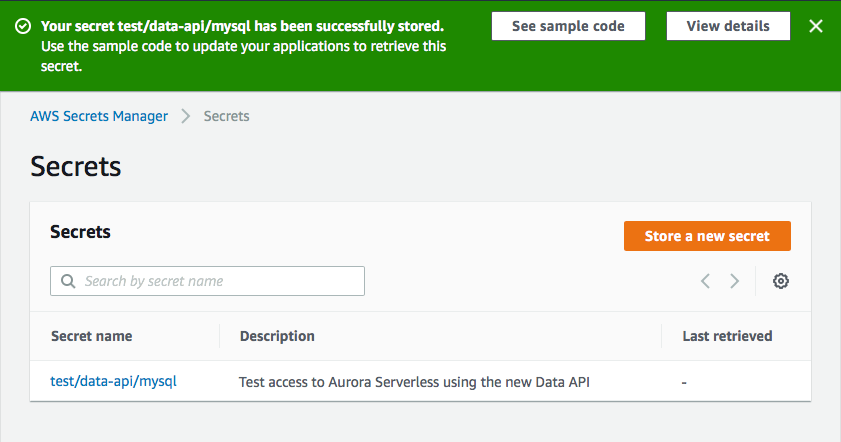
99
|
+
let arrayResult = await data.query(`SELECT tags FROM products WHERE id = :id`, { id: 123 })
|
|
100
|
+
// { records: [ { tags: ['new', 'featured', 'sale'] } ] }
|
|
77
101
|
```
|
|
78
102
|
|
|
79
103
|
## Why do I need this?
|
|
80
104
|
|
|
81
|
-
The [Data API](https://docs.aws.amazon.com/AmazonRDS/latest/AuroraUserGuide/data-api.html) requires you to specify data types when passing in parameters. The basic `INSERT` example above would look like this using the native
|
|
105
|
+
The [Data API](https://docs.aws.amazon.com/AmazonRDS/latest/AuroraUserGuide/data-api.html) requires you to specify data types when passing in parameters. The basic `INSERT` example above would look like this using the native AWS SDK v3:
|
|
82
106
|
|
|
83
107
|
```javascript
|
|
84
|
-
|
|
85
|
-
const client = new RDSDataClient(
|
|
108
|
+
import { RDSDataClient, ExecuteStatementCommand } from '@aws-sdk/client-rds-data'
|
|
109
|
+
const client = new RDSDataClient()
|
|
86
110
|
|
|
87
|
-
|
|
88
|
-
secretArn: 'arn:aws:secretsmanager:us-east-1:XXXXXXXXXXXX:secret:mySecret',
|
|
89
|
-
resourceArn: 'arn:aws:rds:us-east-1:XXXXXXXXXXXX:cluster:my-cluster-name',
|
|
90
|
-
database: 'myDatabase',
|
|
91
|
-
sql: 'INSERT INTO myTable (name,age,has_curls) VALUES(:name,:age,:curls)',
|
|
92
|
-
parameters: [
|
|
93
|
-
{ name: 'name', value: { stringValue: 'Cousin Oliver' } },
|
|
94
|
-
{ name: 'age', value: { longValue: 10 } },
|
|
95
|
-
{ name: 'curls', value: { booleanValue: false } }
|
|
96
|
-
]
|
|
97
|
-
}
|
|
98
|
-
|
|
99
|
-
const command = new ExecuteStatementCommand(params)
|
|
111
|
+
/*** Assuming we're in an async function ***/
|
|
100
112
|
|
|
101
|
-
//
|
|
102
|
-
|
|
103
|
-
|
|
104
|
-
|
|
105
|
-
|
|
106
|
-
|
|
107
|
-
|
|
113
|
+
// INSERT with named parameters
|
|
114
|
+
let insert = await client.send(
|
|
115
|
+
new ExecuteStatementCommand({
|
|
116
|
+
secretArn: 'arn:aws:secretsmanager:us-east-1:XXXXXXXXXXXX:secret:mySecret',
|
|
117
|
+
resourceArn: 'arn:aws:rds:us-east-1:XXXXXXXXXXXX:cluster:my-cluster-name',
|
|
118
|
+
database: 'myDatabase',
|
|
119
|
+
sql: 'INSERT INTO myTable (name, age, has_curls) VALUES(:name, :age, :curls)',
|
|
120
|
+
parameters: [
|
|
121
|
+
{ name: 'name', value: { stringValue: 'Cousin Oliver' } },
|
|
122
|
+
{ name: 'age', value: { longValue: 10 } },
|
|
123
|
+
{ name: 'curls', value: { booleanValue: false } }
|
|
124
|
+
]
|
|
125
|
+
})
|
|
126
|
+
)
|
|
108
127
|
```
|
|
109
128
|
|
|
110
|
-
Specifying all of those data types in the parameters
|
|
129
|
+
Specifying all of those data types in the parameters is a bit clunky. In addition to requiring types for parameters, it also returns each field as an object with its value assigned to a key that represents its data type, like this:
|
|
111
130
|
|
|
112
131
|
```javascript
|
|
113
|
-
{
|
|
114
|
-
|
|
132
|
+
{
|
|
133
|
+
// id field
|
|
134
|
+
longValue: 9
|
|
115
135
|
},
|
|
116
|
-
{
|
|
117
|
-
|
|
136
|
+
{
|
|
137
|
+
// name field
|
|
138
|
+
stringValue: 'Cousin Oliver'
|
|
118
139
|
},
|
|
119
|
-
{
|
|
120
|
-
|
|
140
|
+
{
|
|
141
|
+
// age field
|
|
142
|
+
longValue: 10
|
|
121
143
|
},
|
|
122
|
-
{
|
|
123
|
-
|
|
144
|
+
{
|
|
145
|
+
// has_curls field
|
|
146
|
+
booleanValue: false
|
|
147
|
+
}
|
|
148
|
+
```
|
|
149
|
+
|
|
150
|
+
Not only are there no column names, but you have to pull the value from the data type field. And if you're using PostgreSQL arrays, you get a complex nested structure:
|
|
151
|
+
|
|
152
|
+
```javascript
|
|
153
|
+
{
|
|
154
|
+
// tags field (PostgreSQL array)
|
|
155
|
+
arrayValue: {
|
|
156
|
+
stringValues: ['admin', 'editor', 'viewer']
|
|
157
|
+
}
|
|
124
158
|
}
|
|
125
159
|
```
|
|
126
160
|
|
|
127
|
-
|
|
161
|
+
Lots of extra work that the **Data API Client** handles automatically for you, converting arrays to native JavaScript arrays and providing clean, usable data. 😀
|
|
128
162
|
|
|
129
163
|
## Installation and Setup
|
|
130
164
|
|
|
@@ -132,40 +166,48 @@ Not only are there no column names, but you have to pull the value from the data
|
|
|
132
166
|
npm i data-api-client
|
|
133
167
|
```
|
|
134
168
|
|
|
169
|
+
The library has AWS SDK v3's `@aws-sdk/client-rds-data` as an optional peer dependency. In AWS Lambda, the SDK is provided by the runtime. For local development or other environments, install it separately:
|
|
170
|
+
|
|
171
|
+
```
|
|
172
|
+
npm i @aws-sdk/client-rds-data
|
|
173
|
+
```
|
|
174
|
+
|
|
135
175
|
For more information on enabling Data API, see [Enabling Data API](#enabling-data-api).
|
|
136
176
|
|
|
137
177
|
## Configuration Options
|
|
138
178
|
|
|
139
179
|
Below is a table containing all of the possible configuration options for the `data-api-client`. Additional details are provided throughout the documentation.
|
|
140
180
|
|
|
141
|
-
| Property | Type | Description
|
|
142
|
-
| ------------------ | --------------- |
|
|
143
|
-
|
|
|
144
|
-
|
|
|
145
|
-
|
|
|
146
|
-
|
|
|
147
|
-
|
|
|
148
|
-
|
|
|
149
|
-
|
|
|
150
|
-
|
|
|
181
|
+
| Property | Type | Description | Default |
|
|
182
|
+
| ------------------ | --------------- | --------------------------------------------------------------------------------------------------------------------------------------------------------------------------------------------------------------------------------------------------- | ------------------------------------------------ |
|
|
183
|
+
| client | `RDSDataClient` | A custom `@aws-sdk/client-rds-data` instance (for X-Ray tracing, custom config, etc.) | |
|
|
184
|
+
| resourceArn | `string` | The ARN of your Aurora Serverless Cluster. This value is _required_, but can be overridden when querying. | |
|
|
185
|
+
| secretArn | `string` | The ARN of the secret associated with your database credentials. This is _required_, but can be overridden when querying. | |
|
|
186
|
+
| database | `string` | _Optional_ default database to use with queries. Can be overridden when querying. | |
|
|
187
|
+
| engine | `mysql` or `pg` | The type of database engine you're connecting to (MySQL or Postgres). | `pg` |
|
|
188
|
+
| hydrateColumnNames | `boolean` | When `true`, results will be returned as objects with column names as keys. If `false`, results will be returned as an array of values. | `true` |
|
|
189
|
+
| options | `object` | An _optional_ configuration object that is passed directly into the RDSDataClient constructor. See [AWS SDK docs](https://docs.aws.amazon.com/AWSJavaScriptSDK/v3/latest/clients/client-rds-data/classes/rdsdataclient.html) for available options. | `{}` |
|
|
190
|
+
| formatOptions | `object` | Formatting options to auto parse dates and coerce native JavaScript date objects to supported date formats. Valid keys are `deserializeDate` and `treatAsLocalDate`. Both accept boolean values. | `deserializeDate: true, treatAsLocalDate: false` |
|
|
151
191
|
|
|
152
192
|
### Connection Reuse
|
|
153
193
|
|
|
154
|
-
It is recommended to enable connection reuse as this dramatically decreases the latency of subsequent calls to the AWS API. This can be done by setting an environment variable
|
|
155
|
-
`AWS_NODEJS_CONNECTION_REUSE_ENABLED=1`. For more information see the [AWS SDK documentation](https://docs.aws.amazon.com/sdk-for-javascript/v2/developer-guide/node-reusing-connections.html).
|
|
194
|
+
It is recommended to enable connection reuse as this dramatically decreases the latency of subsequent calls to the AWS API. This can be done by setting an environment variable `AWS_NODEJS_CONNECTION_REUSE_ENABLED=1`. For more information see the [AWS SDK documentation](https://docs.aws.amazon.com/sdk-for-javascript/v3/developer-guide/node-reusing-connections.html).
|
|
156
195
|
|
|
157
196
|
## How to use this module
|
|
158
197
|
|
|
159
|
-
The **Data API Client** wraps the
|
|
198
|
+
The **Data API Client** wraps the [RDSDataClient Class](https://docs.aws.amazon.com/AWSJavaScriptSDK/v3/latest/clients/client-rds-data/classes/rdsdataclient.html), providing you with a number of convenience features to make your workflow easier. The module also exposes all the standard `RDSDataClient` methods with your default configuration information already merged in. 😉
|
|
160
199
|
|
|
161
|
-
To use the Data API Client,
|
|
200
|
+
To use the Data API Client, import the module and instantiate it with your [Configuration options](#configuration-options). If you are using it with AWS Lambda, require it **OUTSIDE** your main handler function. This will allow you to reuse the initialized module on subsequent invocations.
|
|
162
201
|
|
|
163
202
|
```javascript
|
|
164
|
-
//
|
|
165
|
-
|
|
203
|
+
// Import and instantiate data-api-client with secret and cluster arns
|
|
204
|
+
import dataApiClient from 'data-api-client'
|
|
205
|
+
|
|
206
|
+
const data = dataApiClient({
|
|
166
207
|
secretArn: 'arn:aws:secretsmanager:us-east-1:XXXXXXXXXXXX:secret:mySecret',
|
|
167
208
|
resourceArn: 'arn:aws:rds:us-east-1:XXXXXXXXXXXX:cluster:my-cluster-name',
|
|
168
|
-
database: 'myDatabase' // set a default database
|
|
209
|
+
database: 'myDatabase', // set a default database
|
|
210
|
+
engine: 'pg' // specify 'pg' for PostgreSQL or 'mysql' for MySQL
|
|
169
211
|
})
|
|
170
212
|
```
|
|
171
213
|
|
|
@@ -187,7 +229,7 @@ By default, this will return your rows as an array of objects with column names
|
|
|
187
229
|
]
|
|
188
230
|
```
|
|
189
231
|
|
|
190
|
-
To query with parameters, you can use named parameters in your SQL, and then
|
|
232
|
+
To query with parameters, you can use named parameters in your SQL, and then provide an object containing your parameters as the second argument to the `query()` method:
|
|
191
233
|
|
|
192
234
|
```javascript
|
|
193
235
|
let result = await data.query(
|
|
@@ -197,14 +239,14 @@ let result = await data.query(
|
|
|
197
239
|
)
|
|
198
240
|
```
|
|
199
241
|
|
|
200
|
-
The Data API Client will automatically convert your parameters into the correct Data API parameter format using native JavaScript types. If you prefer
|
|
242
|
+
The Data API Client will automatically convert your parameters into the correct Data API parameter format using native JavaScript types. If you prefer more control over the data type, you can use the extended parameter format:
|
|
201
243
|
|
|
202
244
|
```javascript
|
|
203
245
|
let result = await data.query(`SELECT * FROM myTable WHERE id = :id AND created > :createDate`, [
|
|
204
246
|
// An array of objects is totally cool, too. We'll merge them for you.
|
|
205
247
|
{ id: 2 },
|
|
206
|
-
//
|
|
207
|
-
{ name: 'createDate', value:
|
|
248
|
+
// Extended format for more control
|
|
249
|
+
{ name: 'createDate', value: '2019-06-01' }
|
|
208
250
|
])
|
|
209
251
|
```
|
|
210
252
|
|
|
@@ -213,17 +255,16 @@ If you want even more control, you can pass in an `object` as the first paramete
|
|
|
213
255
|
```javascript
|
|
214
256
|
let result = await data.query({
|
|
215
257
|
sql: `SELECT * FROM myTable WHERE id = :id`,
|
|
216
|
-
parameters: [
|
|
258
|
+
parameters: [{ id: 2 }], // or just { id: 2 }
|
|
217
259
|
database: 'someOtherDatabase', // override default database
|
|
218
|
-
|
|
219
|
-
|
|
220
|
-
includeResultMetadata: true, // RDSDataClient config option (non-batch only)
|
|
260
|
+
continueAfterTimeout: true, // RDSDataService config option (non-batch only)
|
|
261
|
+
includeResultMetadata: true, // RDSDataService config option (non-batch only)
|
|
221
262
|
hydrateColumnNames: false, // Returns each record as an arrays of values
|
|
222
|
-
transactionId: 'AQC5SRDIm...ZHXP/WORU=' //
|
|
223
|
-
}
|
|
263
|
+
transactionId: 'AQC5SRDIm...ZHXP/WORU=' // RDSDataService config option
|
|
264
|
+
})
|
|
224
265
|
```
|
|
225
266
|
|
|
226
|
-
Sometimes you might want to have _dynamic identifiers_ in your SQL statements. Unfortunately, the
|
|
267
|
+
Sometimes you might want to have _dynamic identifiers_ in your SQL statements. Unfortunately, the native Data API doesn't support this, but the **Data API Client** does! Use a double colon (`::`) prefix to create _named identifiers_ and you can do cool things like this:
|
|
227
268
|
|
|
228
269
|
```javascript
|
|
229
270
|
let result = await data.query(`SELECT ::fields FROM ::table WHERE id > :id`, {
|
|
@@ -233,17 +274,35 @@ let result = await data.query(`SELECT ::fields FROM ::table WHERE id > :id`, {
|
|
|
233
274
|
})
|
|
234
275
|
```
|
|
235
276
|
|
|
236
|
-
Which will produce a query like this:
|
|
277
|
+
Which will produce a query like this for PostgreSQL:
|
|
278
|
+
|
|
279
|
+
```sql
|
|
280
|
+
SELECT "id", "name", "created" FROM "table_123abc" WHERE id > :id
|
|
281
|
+
```
|
|
282
|
+
|
|
283
|
+
Or for MySQL:
|
|
237
284
|
|
|
238
285
|
```sql
|
|
239
|
-
SELECT `id`, `name`, `created` FROM `table_123abc` WHERE id > :id
|
|
286
|
+
SELECT `id`, `name`, `created` FROM `table_123abc` WHERE id > :id
|
|
240
287
|
```
|
|
241
288
|
|
|
242
|
-
You'll notice that we leave the _named parameters_ alone. Anything that Data API and the
|
|
289
|
+
You'll notice that we leave the _named parameters_ alone. Anything that Data API and the native SDK currently handles, we defer to them.
|
|
243
290
|
|
|
244
291
|
### Type-Casting
|
|
245
292
|
|
|
246
|
-
The Aurora Data API can sometimes give you trouble with certain data types, such as uuid, unless you explicitly cast them. While you can certainly do this manually in your SQL string, the Data API Client offers
|
|
293
|
+
The Aurora Data API can sometimes give you trouble with certain data types, such as uuid or jsonb in PostgreSQL, unless you explicitly cast them. While you can certainly do this manually in your SQL string using PostgreSQL's `::` cast syntax, the Data API Client offers an easy way to handle this for you using the parameter `cast` property.
|
|
294
|
+
|
|
295
|
+
**PostgreSQL inline casting** (recommended):
|
|
296
|
+
|
|
297
|
+
```javascript
|
|
298
|
+
const result = await data.query('INSERT INTO users(id, email, metadata) VALUES(:id, :email, :metadata::jsonb)', {
|
|
299
|
+
id: newUserId, // will be cast as string by default
|
|
300
|
+
email: email,
|
|
301
|
+
metadata: JSON.stringify(userMetadata) // cast to jsonb via ::jsonb in SQL
|
|
302
|
+
})
|
|
303
|
+
```
|
|
304
|
+
|
|
305
|
+
**Parameter-based casting** (alternative approach):
|
|
247
306
|
|
|
248
307
|
```javascript
|
|
249
308
|
const result = await data.query(
|
|
@@ -271,9 +330,11 @@ const result = await data.query(
|
|
|
271
330
|
)
|
|
272
331
|
```
|
|
273
332
|
|
|
333
|
+
Both approaches produce the same result, but inline casting is generally cleaner for simple cases.
|
|
334
|
+
|
|
274
335
|
### Batch Queries
|
|
275
336
|
|
|
276
|
-
The
|
|
337
|
+
The Data API provides a `batchExecuteStatement` method that allows you to execute a prepared statement multiple times using different parameter sets. This is only allowed for `INSERT`, `UPDATE` and `DELETE` queries, but is much more efficient than issuing multiple `executeStatement` calls. The Data API Client handles the switching for you based on _how_ you send in your parameters.
|
|
277
338
|
|
|
278
339
|
To issue a batch query, use the `query()` method (either by passing an object or using the two arity form), and provide multiple parameter sets as nested arrays. For example, if you wanted to update multiple records at once, your query might look like this:
|
|
279
340
|
|
|
@@ -292,6 +353,16 @@ Whenever a batch query is executed, it returns an `updateResults` field. Other t
|
|
|
292
353
|
|
|
293
354
|
The Data API returns a `generatedFields` array that contains the value of auto-incrementing primary keys. If this value is returned, the Data API Client will parse this and return it as the `insertId`. This also works for batch queries as well.
|
|
294
355
|
|
|
356
|
+
For PostgreSQL, use the `RETURNING` clause to get generated values:
|
|
357
|
+
|
|
358
|
+
```javascript
|
|
359
|
+
let result = await data.query(`INSERT INTO users (name, email) VALUES (:name, :email) RETURNING id`, {
|
|
360
|
+
name: 'Alice',
|
|
361
|
+
email: 'alice@example.com'
|
|
362
|
+
})
|
|
363
|
+
// result.records[0].id contains the generated ID
|
|
364
|
+
```
|
|
365
|
+
|
|
295
366
|
## Transaction Support
|
|
296
367
|
|
|
297
368
|
Transaction support in the Data API Client has been dramatically simplified. Start a new transaction using the `transaction()` method, and then chain queries using the `query()` method. The `query()` method supports all standard query options. Alternatively, you can specify a function as the only argument in a `query()` method call and return the arguments as an array of values. The function receives two arguments, the result of the last query executed, and an array containing all the previous query results. This is useful if you need values from a previous query as part of your transaction.
|
|
@@ -299,20 +370,23 @@ Transaction support in the Data API Client has been dramatically simplified. Sta
|
|
|
299
370
|
You can specify an optional `rollback()` method in the chain. This will receive the `error` object and the `transactionStatus` object, allowing you to add additional logging or perform some other action. Call the `commit()` method when you are ready to execute the queries.
|
|
300
371
|
|
|
301
372
|
```javascript
|
|
302
|
-
let results = await
|
|
373
|
+
let results = await data
|
|
374
|
+
.transaction()
|
|
303
375
|
.query('INSERT INTO myTable (name) VALUES(:name)', { name: 'Tiger' })
|
|
304
|
-
.query('UPDATE myTable SET age = :age WHERE name = :name' { age: 4, name: 'Tiger' })
|
|
305
|
-
.rollback((e,status) => {
|
|
376
|
+
.query('UPDATE myTable SET age = :age WHERE name = :name', { age: 4, name: 'Tiger' })
|
|
377
|
+
.rollback((e, status) => {
|
|
378
|
+
/* do something with the error */
|
|
379
|
+
}) // optional
|
|
306
380
|
.commit() // execute the queries
|
|
307
381
|
```
|
|
308
382
|
|
|
309
383
|
With a function to get the `insertId` from the previous query:
|
|
310
384
|
|
|
311
385
|
```javascript
|
|
312
|
-
let results = await
|
|
386
|
+
let results = await data
|
|
313
387
|
.transaction()
|
|
314
|
-
.query('INSERT INTO myTable (name) VALUES(:name)', { name: 'Tiger' })
|
|
315
|
-
.query((r) => ['UPDATE myTable SET age = :age WHERE id = :id', { age: 4, id: r.
|
|
388
|
+
.query('INSERT INTO myTable (name) VALUES(:name) RETURNING id', { name: 'Tiger' })
|
|
389
|
+
.query((r) => ['UPDATE myTable SET age = :age WHERE id = :id', { age: 4, id: r.records[0].id }])
|
|
316
390
|
.rollback((e, status) => {
|
|
317
391
|
/* do something with the error */
|
|
318
392
|
}) // optional
|
|
@@ -325,7 +399,7 @@ By default, the `transaction()` method will use the `resourceArn`, `secretArn` a
|
|
|
325
399
|
|
|
326
400
|
### Using native methods directly
|
|
327
401
|
|
|
328
|
-
The Data API Client exposes
|
|
402
|
+
The Data API Client exposes the five RDSDataClient command methods. These are:
|
|
329
403
|
|
|
330
404
|
- `batchExecuteStatement`
|
|
331
405
|
- `beginTransaction`
|
|
@@ -338,87 +412,269 @@ The default configuration information (`resourceArn`, `secretArn`, and `database
|
|
|
338
412
|
```javascript
|
|
339
413
|
let result = await data.executeStatement({
|
|
340
414
|
sql: `SELECT * FROM myTable WHERE id = :id`,
|
|
341
|
-
parameters: [
|
|
342
|
-
{ name: 'id', value: { longValue: 1 } }
|
|
343
|
-
],
|
|
415
|
+
parameters: [{ name: 'id', value: { longValue: 1 } }],
|
|
344
416
|
transactionId: 'AQC5SRDIm...ZHXP/WORU='
|
|
345
|
-
)
|
|
417
|
+
})
|
|
346
418
|
```
|
|
347
419
|
|
|
348
|
-
## Custom SDK
|
|
420
|
+
## Custom AWS SDK Client
|
|
349
421
|
|
|
350
|
-
`data-api-client` allows
|
|
422
|
+
`data-api-client` allows for introducing a custom RDSDataClient instance as a parameter. This parameter is optional. If not present, `data-api-client` will create a default instance.
|
|
351
423
|
|
|
352
424
|
```javascript
|
|
353
|
-
|
|
354
|
-
|
|
425
|
+
import { RDSDataClient } from '@aws-sdk/client-rds-data'
|
|
426
|
+
import dataApiClient from 'data-api-client'
|
|
355
427
|
|
|
356
|
-
//
|
|
357
|
-
const
|
|
358
|
-
|
|
359
|
-
|
|
428
|
+
// Create a custom client instance
|
|
429
|
+
const rdsClient = new RDSDataClient({
|
|
430
|
+
region: 'us-east-1'
|
|
431
|
+
// other configuration options
|
|
432
|
+
})
|
|
433
|
+
|
|
434
|
+
// Instantiate data-api-client with the custom client
|
|
435
|
+
const data = dataApiClient({
|
|
436
|
+
client: rdsClient,
|
|
437
|
+
secretArn: 'arn:aws:secretsmanager:us-east-1:XXXXXXXXXXXX:secret:mySecret',
|
|
438
|
+
resourceArn: 'arn:aws:rds:us-east-1:XXXXXXXXXXXX:cluster:my-cluster-name'
|
|
360
439
|
})
|
|
361
440
|
```
|
|
362
441
|
|
|
363
|
-
|
|
442
|
+
Custom client parameter allows you to introduce X-Ray tracing:
|
|
443
|
+
|
|
444
|
+
```javascript
|
|
445
|
+
import { RDSDataClient } from '@aws-sdk/client-rds-data'
|
|
446
|
+
import { captureAWSv3Client } from 'aws-xray-sdk-core'
|
|
447
|
+
import dataApiClient from 'data-api-client'
|
|
448
|
+
|
|
449
|
+
const rdsClient = captureAWSv3Client(new RDSDataClient({ region: 'us-east-1' }))
|
|
450
|
+
|
|
451
|
+
const data = dataApiClient({
|
|
452
|
+
client: rdsClient,
|
|
453
|
+
secretArn: 'arn:aws:secretsmanager:us-east-1:XXXXXXXXXXXX:secret:mySecret',
|
|
454
|
+
resourceArn: 'arn:aws:rds:us-east-1:XXXXXXXXXXXX:cluster:my-cluster-name'
|
|
455
|
+
})
|
|
456
|
+
```
|
|
457
|
+
|
|
458
|
+
## PostgreSQL Array Support
|
|
364
459
|
|
|
365
|
-
|
|
460
|
+
One of the most powerful features in v2.0 is automatic PostgreSQL array handling. While the Data API has limitations with array _parameters_, array _results_ are fully supported and automatically converted to native JavaScript arrays.
|
|
366
461
|
|
|
367
|
-
###
|
|
462
|
+
### Array Results (Automatic Conversion)
|
|
368
463
|
|
|
369
|
-
|
|
464
|
+
When you query PostgreSQL arrays, the Data API Client automatically converts them to native JavaScript arrays:
|
|
370
465
|
|
|
371
466
|
```javascript
|
|
372
|
-
|
|
373
|
-
|
|
374
|
-
|
|
375
|
-
|
|
376
|
-
|
|
377
|
-
parameters: [
|
|
378
|
-
{ name: 'id', value: { blobValue: [1,2,3,4,5] } }
|
|
379
|
-
]
|
|
380
|
-
).promise()
|
|
467
|
+
// Query returns PostgreSQL array
|
|
468
|
+
let result = await data.query(`SELECT tags FROM products WHERE id = :id`, { id: 123 })
|
|
469
|
+
|
|
470
|
+
// Automatic conversion to JavaScript array
|
|
471
|
+
// result.records[0].tags = ['new', 'featured', 'sale']
|
|
381
472
|
```
|
|
382
473
|
|
|
383
|
-
|
|
474
|
+
**Supported Array Types:**
|
|
384
475
|
|
|
385
|
-
|
|
476
|
+
- Integer arrays: `INT[]`, `SMALLINT[]`, `BIGINT[]`
|
|
477
|
+
- Float arrays: `REAL[]`, `DOUBLE PRECISION[]`, `NUMERIC[]`
|
|
478
|
+
- String arrays: `TEXT[]`, `VARCHAR[]`
|
|
479
|
+
- Boolean arrays: `BOOL[]`
|
|
480
|
+
- Date/Time arrays: `DATE[]`, `TIMESTAMP[]`
|
|
481
|
+
- Other types: `UUID[]`, `JSON[]`, `JSONB[]`
|
|
386
482
|
|
|
387
|
-
|
|
483
|
+
### Array Parameters (Workarounds Required)
|
|
388
484
|
|
|
389
|
-
|
|
485
|
+
The RDS Data API does **not support binding array parameters** directly. You'll need to use one of these workarounds:
|
|
390
486
|
|
|
391
|
-
|
|
487
|
+
**1. CSV string with `string_to_array()` (for integer arrays):**
|
|
392
488
|
|
|
393
489
|
```javascript
|
|
394
|
-
|
|
395
|
-
|
|
396
|
-
|
|
397
|
-
database: 'myDatabase',
|
|
398
|
-
sql: 'SELECT ::fields FROM myTable WHERE id = :id',
|
|
399
|
-
parameters: [
|
|
400
|
-
// Note: 'arrayValues' is not a real thing
|
|
401
|
-
{ name: 'fields', value: { arrayValues: ['id','name','created'] } },
|
|
402
|
-
{ name: 'id', value: { longValue: 1 } }
|
|
403
|
-
]
|
|
404
|
-
).promise()
|
|
490
|
+
await data.query("INSERT INTO products (tags) VALUES (string_to_array(:csv, ',')::int[])", {
|
|
491
|
+
csv: '1,2,3'
|
|
492
|
+
})
|
|
405
493
|
```
|
|
406
494
|
|
|
407
|
-
|
|
495
|
+
**2. PostgreSQL array literal syntax:**
|
|
496
|
+
|
|
497
|
+
```javascript
|
|
498
|
+
await data.query('INSERT INTO products (tags) VALUES (:literal::text[])', {
|
|
499
|
+
literal: '{"admin","editor","viewer"}'
|
|
500
|
+
})
|
|
501
|
+
```
|
|
502
|
+
|
|
503
|
+
**3. ARRAY[] constructor with individual parameters:**
|
|
504
|
+
|
|
505
|
+
```javascript
|
|
506
|
+
await data.query('INSERT INTO products (tags) VALUES (ARRAY[:tag1, :tag2, :tag3])', {
|
|
507
|
+
tag1: 'blue',
|
|
508
|
+
tag2: 'sale',
|
|
509
|
+
tag3: 'featured'
|
|
510
|
+
})
|
|
511
|
+
```
|
|
512
|
+
|
|
513
|
+
Despite these input limitations, **all array results are automatically converted to native JavaScript arrays**, making it easy to work with PostgreSQL array data in your application.
|
|
514
|
+
|
|
515
|
+
## PostgreSQL Data Type Support
|
|
516
|
+
|
|
517
|
+
Version 2.0 provides comprehensive support for PostgreSQL data types:
|
|
518
|
+
|
|
519
|
+
### Numeric Types
|
|
520
|
+
|
|
521
|
+
- `SMALLINT`, `INT`, `BIGINT` - Integer types of various sizes
|
|
522
|
+
- `DECIMAL`, `NUMERIC` - Exact numeric types with precision
|
|
523
|
+
- `REAL`, `DOUBLE PRECISION` - Floating-point types
|
|
524
|
+
|
|
525
|
+
```javascript
|
|
526
|
+
await data.query('INSERT INTO products (price, quantity) VALUES (:price, :quantity)', {
|
|
527
|
+
price: 19.99,
|
|
528
|
+
quantity: 100
|
|
529
|
+
})
|
|
530
|
+
```
|
|
531
|
+
|
|
532
|
+
### String Types
|
|
533
|
+
|
|
534
|
+
- `CHAR`, `VARCHAR`, `TEXT` - Character types
|
|
535
|
+
- Full Unicode support
|
|
536
|
+
|
|
537
|
+
```javascript
|
|
538
|
+
await data.query('INSERT INTO posts (title, content) VALUES (:title, :content)', {
|
|
539
|
+
title: 'Hello 世界 🌍',
|
|
540
|
+
content: 'A very long text...'
|
|
541
|
+
})
|
|
542
|
+
```
|
|
543
|
+
|
|
544
|
+
### Boolean Type
|
|
545
|
+
|
|
546
|
+
```javascript
|
|
547
|
+
await data.query('INSERT INTO users (active) VALUES (:active)', { active: true })
|
|
548
|
+
```
|
|
549
|
+
|
|
550
|
+
### Date and Time Types
|
|
551
|
+
|
|
552
|
+
- `DATE` - Calendar date
|
|
553
|
+
- `TIME`, `TIME WITH TIME ZONE` - Time of day
|
|
554
|
+
- `TIMESTAMP`, `TIMESTAMP WITH TIME ZONE` - Date and time
|
|
555
|
+
|
|
556
|
+
```javascript
|
|
557
|
+
await data.query('INSERT INTO events (event_date, event_time) VALUES (:date, :time)', {
|
|
558
|
+
date: '2024-12-25',
|
|
559
|
+
time: new Date()
|
|
560
|
+
})
|
|
561
|
+
```
|
|
562
|
+
|
|
563
|
+
### Binary Data (BYTEA)
|
|
564
|
+
|
|
565
|
+
```javascript
|
|
566
|
+
const binaryData = Buffer.from('Binary content', 'utf-8')
|
|
567
|
+
await data.query('INSERT INTO files (content) VALUES (:content)', { content: binaryData })
|
|
568
|
+
```
|
|
569
|
+
|
|
570
|
+
### JSON and JSONB
|
|
571
|
+
|
|
572
|
+
```javascript
|
|
573
|
+
const metadata = { role: 'admin', permissions: ['read', 'write'] }
|
|
574
|
+
await data.query('INSERT INTO users (metadata) VALUES (:metadata::jsonb)', {
|
|
575
|
+
metadata: JSON.stringify(metadata)
|
|
576
|
+
})
|
|
577
|
+
|
|
578
|
+
// Query result
|
|
579
|
+
let result = await data.query('SELECT metadata FROM users WHERE id = :id', { id: 1 })
|
|
580
|
+
const parsed = JSON.parse(result.records[0].metadata)
|
|
581
|
+
```
|
|
582
|
+
|
|
583
|
+
### UUID
|
|
584
|
+
|
|
585
|
+
```javascript
|
|
586
|
+
await data.query('INSERT INTO sessions (session_id) VALUES (:id::uuid)', {
|
|
587
|
+
id: '550e8400-e29b-41d4-a716-446655440000'
|
|
588
|
+
})
|
|
589
|
+
|
|
590
|
+
// Or with explicit cast parameter
|
|
591
|
+
await data.query('INSERT INTO sessions (session_id) VALUES (:id)', [
|
|
592
|
+
{ name: 'id', value: '550e8400-e29b-41d4-a716-446655440000', cast: 'uuid' }
|
|
593
|
+
])
|
|
594
|
+
```
|
|
595
|
+
|
|
596
|
+
### Network Types
|
|
597
|
+
|
|
598
|
+
- `INET` - IPv4 or IPv6 host address
|
|
599
|
+
- `CIDR` - IPv4 or IPv6 network
|
|
600
|
+
|
|
601
|
+
```javascript
|
|
602
|
+
await data.query('INSERT INTO servers (ip_address, network) VALUES (:ip::inet, :net::cidr)', {
|
|
603
|
+
ip: '192.168.1.1',
|
|
604
|
+
net: '10.0.0.0/8'
|
|
605
|
+
})
|
|
606
|
+
```
|
|
607
|
+
|
|
608
|
+
### Range Types
|
|
609
|
+
|
|
610
|
+
- `INT4RANGE`, `NUMRANGE` - Numeric ranges
|
|
611
|
+
- `TSTZRANGE` - Timestamp ranges
|
|
612
|
+
|
|
613
|
+
```javascript
|
|
614
|
+
await data.query('INSERT INTO bookings (date_range) VALUES (:range::INT4RANGE)', {
|
|
615
|
+
range: '[1,10)'
|
|
616
|
+
})
|
|
617
|
+
```
|
|
618
|
+
|
|
619
|
+
## TypeScript Support
|
|
620
|
+
|
|
621
|
+
Version 2.0 is written in TypeScript and provides comprehensive type definitions:
|
|
622
|
+
|
|
623
|
+
```typescript
|
|
624
|
+
import dataApiClient from 'data-api-client'
|
|
625
|
+
import type { DataAPIClientConfig, QueryResult } from 'data-api-client/types'
|
|
626
|
+
|
|
627
|
+
const config: DataAPIClientConfig = {
|
|
628
|
+
secretArn: 'arn:...',
|
|
629
|
+
resourceArn: 'arn:...',
|
|
630
|
+
database: 'mydb',
|
|
631
|
+
engine: 'pg'
|
|
632
|
+
}
|
|
633
|
+
|
|
634
|
+
const client = dataApiClient(config)
|
|
635
|
+
|
|
636
|
+
interface User {
|
|
637
|
+
id: number
|
|
638
|
+
name: string
|
|
639
|
+
email: string
|
|
640
|
+
tags: string[]
|
|
641
|
+
}
|
|
642
|
+
|
|
643
|
+
const result: QueryResult<User> = await client.query<User>('SELECT * FROM users WHERE id = :id', { id: 123 })
|
|
644
|
+
```
|
|
645
|
+
|
|
646
|
+
## Data API Limitations / Wonkiness
|
|
647
|
+
|
|
648
|
+
While the Data API is powerful, there are some limitations to be aware of:
|
|
649
|
+
|
|
650
|
+
### Array Parameters Not Supported
|
|
651
|
+
|
|
652
|
+
The RDS Data API does **not support binding array parameters** directly. Attempts to use `arrayValue` parameters result in `ValidationException: Array parameters are not supported`. See [PostgreSQL Array Support](#postgresql-array-support) for workarounds.
|
|
653
|
+
|
|
654
|
+
### Array Results ARE Supported
|
|
655
|
+
|
|
656
|
+
Despite parameter limitations, array **results** work great! The Data API Client automatically converts PostgreSQL arrays in query results to native JavaScript arrays.
|
|
657
|
+
|
|
658
|
+
### Some Advanced Types Have Limitations
|
|
659
|
+
|
|
660
|
+
- **MACADDR**: Not supported by the Data API
|
|
661
|
+
- **Multidimensional Arrays**: Limited support for arrays with more than one dimension
|
|
662
|
+
- **NULL values in arrays**: May not work correctly in all cases
|
|
663
|
+
- **Some Range Types**: INT8RANGE, DATERANGE, TSRANGE have casting issues
|
|
408
664
|
|
|
409
|
-
### Batch
|
|
665
|
+
### Batch operations have limited feedback
|
|
410
666
|
|
|
411
|
-
|
|
667
|
+
Batch operations don't return `numberOfRecordsUpdated` for UPDATE/DELETE statements.
|
|
412
668
|
|
|
413
669
|
## Enabling Data API
|
|
414
670
|
|
|
415
|
-
In order to use the Data API, you must enable it on your Aurora Serverless Cluster and create a Secret. You also must grant your execution environment a number of
|
|
671
|
+
In order to use the Data API, you must enable it on your Aurora Serverless Cluster and create a Secret. You also must grant your execution environment a number of permissions as outlined in the following sections.
|
|
416
672
|
|
|
417
|
-
### Enable Data API on your Aurora
|
|
673
|
+
### Enable Data API on your Aurora Cluster
|
|
418
674
|
|
|
419
675
|
|
|
420
676
|
|
|
421
|
-
You need to modify your Aurora
|
|
677
|
+
You need to modify your Aurora cluster by clicking "ACTIONS" and then "Modify Cluster". Check the Data API box in the _Network & Security_ section and you're good to go. This works for Aurora Serverless v1, Aurora Serverless v2, and Aurora provisioned clusters.
|
|
422
678
|
|
|
423
679
|
### Set up a secret in the Secrets Manager
|
|
424
680
|
|
|
@@ -426,11 +682,11 @@ Next you need to set up a secret in the Secrets Manager. This is actually quite
|
|
|
426
682
|
|
|
427
683
|
|
|
428
684
|
|
|
429
|
-
Next we give it a name, this is important, because this will be part of the arn when we set up permissions later. You can give it a description as well so you don
|
|
685
|
+
Next we give it a name, this is important, because this will be part of the arn when we set up permissions later. You can give it a description as well so you don't forget what this secret is about when you look at it in a few weeks.
|
|
430
686
|
|
|
431
687
|
|
|
432
688
|
|
|
433
|
-
You can then configure your rotation settings, if you want, and then you review and create your secret. Then you can click on your newly created secret and grab the arn, we
|
|
689
|
+
You can then configure your rotation settings, if you want, and then you review and create your secret. Then you can click on your newly created secret and grab the arn, we're gonna need that next.
|
|
434
690
|
|
|
435
691
|
|
|
436
692
|
|
|
@@ -483,4 +739,4 @@ Statement:
|
|
|
483
739
|
|
|
484
740
|
## Contributions
|
|
485
741
|
|
|
486
|
-
Contributions, ideas and bug reports are welcome and greatly appreciated. Please add [issues](https://github.com/jeremydaly/data-api-client/issues) for suggestions and bug reports or create a pull request. You can also contact me on
|
|
742
|
+
Contributions, ideas and bug reports are welcome and greatly appreciated. Please add [issues](https://github.com/jeremydaly/data-api-client/issues) for suggestions and bug reports or create a pull request. You can also contact me on X: [@jeremy_daly](https://x.com/jeremy_daly) or LinkedIn: [https://www.linkedin.com/in/jeremydaly/](https://www.linkedin.com/in/jeremydaly/).
|