data-api-client 1.2.1 → 1.3.1
This diff represents the content of publicly available package versions that have been released to one of the supported registries. The information contained in this diff is provided for informational purposes only and reflects changes between package versions as they appear in their respective public registries.
- package/README.md +122 -93
- package/index.js +290 -271
- package/package.json +4 -2
package/README.md
CHANGED
|
@@ -1,9 +1,14 @@
|
|
|
1
1
|

|
|
2
2
|
|
|
3
|
-
[](https://travis-ci.org/jeremydaly/data-api-client)
|
|
4
3
|
[](https://www.npmjs.com/package/data-api-client)
|
|
5
4
|
[](https://www.npmjs.com/package/data-api-client)
|
|
6
5
|
|
|
6
|
+
> #### Project Update: October 7, 2024
|
|
7
|
+
>
|
|
8
|
+
> With the recent announcement that Amazon Aurora MySQL-Compatible Edition now supports a redesigned [RDS Data API for Aurora Serverless v2 and Aurora provisioned database instances](https://aws.amazon.com/about-aws/whats-new/2024/09/amazon-aurora-mysql-rds-data-api/), there have been several requests to add support to this project. The new RDS Data API also supports [Amazon Aurora PostgreSQL-Compatible Edition](https://aws.amazon.com/about-aws/whats-new/2023/12/amazon-aurora-postgresql-rds-data-api/) (more detail [here](https://aws.amazon.com/blogs/database/introducing-the-data-api-for-amazon-aurora-serverless-v2-and-amazon-aurora-provisioned-clusters/)).
|
|
9
|
+
>
|
|
10
|
+
> Star and watch the project for the 2.0 branch updates.
|
|
11
|
+
|
|
7
12
|
The **Data API Client** is a lightweight wrapper that simplifies working with the Amazon Aurora Serverless Data API by abstracting away the notion of field values. This abstraction annotates native JavaScript types supplied as input parameters, as well as converts annotated response data to native JavaScript types. It's basically a [DocumentClient](https://docs.aws.amazon.com/AWSJavaScriptSDK/latest/AWS/DynamoDB/DocumentClient.html) for the Data API. It also promisifies the `AWS.RDSDataService` client to make working with `async/await` or Promise chains easier AND dramatically simplifies **transactions**.
|
|
8
13
|
|
|
9
14
|
For more information about the Aurora Serverless Data API, you can review the [official documentation](https://docs.aws.amazon.com/AmazonRDS/latest/AuroraUserGuide/data-api.html) or read [Aurora Serverless Data API: An (updated) First Look](https://www.jeremydaly.com/aurora-serverless-data-api-a-first-look/) for some more insights on performance.
|
|
@@ -33,34 +38,26 @@ let result = await data.query(`SELECT * FROM myTable`)
|
|
|
33
38
|
// }
|
|
34
39
|
|
|
35
40
|
// SELECT with named parameters
|
|
36
|
-
let resultParams = await data.query(
|
|
37
|
-
`SELECT * FROM myTable WHERE id = :id`,
|
|
38
|
-
{ id: 2 }
|
|
39
|
-
)
|
|
41
|
+
let resultParams = await data.query(`SELECT * FROM myTable WHERE id = :id`, { id: 2 })
|
|
40
42
|
// { records: [ { id: 2, name: 'Mike', age: 52 } ] }
|
|
41
43
|
|
|
42
44
|
// INSERT with named parameters
|
|
43
|
-
let insert = await data.query(
|
|
44
|
-
|
|
45
|
-
|
|
46
|
-
|
|
45
|
+
let insert = await data.query(`INSERT INTO myTable (name,age,has_curls) VALUES(:name,:age,:curls)`, {
|
|
46
|
+
name: 'Greg',
|
|
47
|
+
age: 18,
|
|
48
|
+
curls: false
|
|
49
|
+
})
|
|
47
50
|
|
|
48
51
|
// BATCH INSERT with named parameters
|
|
49
|
-
let batchInsert = await data.query(
|
|
50
|
-
|
|
51
|
-
[
|
|
52
|
-
|
|
53
|
-
|
|
54
|
-
|
|
55
|
-
|
|
56
|
-
[{ name: 'Bobby', age: 12, curls: false }]
|
|
57
|
-
]
|
|
58
|
-
)
|
|
52
|
+
let batchInsert = await data.query(`INSERT INTO myTable (name,age,has_curls) VALUES(:name,:age,:curls)`, [
|
|
53
|
+
[{ name: 'Marcia', age: 17, curls: false }],
|
|
54
|
+
[{ name: 'Peter', age: 15, curls: false }],
|
|
55
|
+
[{ name: 'Jan', age: 15, curls: false }],
|
|
56
|
+
[{ name: 'Cindy', age: 12, curls: true }],
|
|
57
|
+
[{ name: 'Bobby', age: 12, curls: false }]
|
|
58
|
+
])
|
|
59
59
|
// Update with named parameters
|
|
60
|
-
let update = await data.query(
|
|
61
|
-
`UPDATE myTable SET age = :age WHERE id = :id`,
|
|
62
|
-
{ age: 13, id: 5 }
|
|
63
|
-
)
|
|
60
|
+
let update = await data.query(`UPDATE myTable SET age = :age WHERE id = :id`, { age: 13, id: 5 })
|
|
64
61
|
|
|
65
62
|
// Delete with named parameters
|
|
66
63
|
let remove = await data.query(
|
|
@@ -73,14 +70,12 @@ let custom = data.query({
|
|
|
73
70
|
sql: `SELECT * FROM myOtherTable WHERE id = :id AND active = :isActive`,
|
|
74
71
|
continueAfterTimeout: true,
|
|
75
72
|
database: 'myOtherDatabase',
|
|
76
|
-
parameters: [
|
|
77
|
-
{ id: 123},
|
|
78
|
-
{ name: 'isActive', value: { booleanValue: true } }
|
|
79
|
-
]
|
|
73
|
+
parameters: [{ id: 123 }, { name: 'isActive', value: { booleanValue: true } }]
|
|
80
74
|
})
|
|
81
75
|
```
|
|
82
76
|
|
|
83
77
|
## Why do I need this?
|
|
78
|
+
|
|
84
79
|
The [Data API](https://docs.aws.amazon.com/AmazonRDS/latest/AuroraUserGuide/data-api.html) requires you to specify data types when passing in parameters. The basic `INSERT` example above would look like this using the native `AWS.RDSDataService` class:
|
|
85
80
|
|
|
86
81
|
```javascript
|
|
@@ -119,9 +114,11 @@ Specifying all of those data types in the parameters is a bit clunky. In additio
|
|
|
119
114
|
"booleanValue": false
|
|
120
115
|
}
|
|
121
116
|
```
|
|
117
|
+
|
|
122
118
|
Not only are there no column names, but you have to pull the value from the data type field. Lots of extra work that the **Data API Client** handles automatically for you. 😀
|
|
123
119
|
|
|
124
120
|
## Installation and Setup
|
|
121
|
+
|
|
125
122
|
```
|
|
126
123
|
npm i data-api-client
|
|
127
124
|
```
|
|
@@ -132,20 +129,22 @@ For more information on enabling Data API, see [Enabling Data API](#enabling-dat
|
|
|
132
129
|
|
|
133
130
|
Below is a table containing all of the possible configuration options for the `data-api-client`. Additional details are provided throughout the documentation.
|
|
134
131
|
|
|
135
|
-
| Property
|
|
136
|
-
|
|
|
137
|
-
|
|
|
138
|
-
|
|
|
139
|
-
|
|
|
140
|
-
|
|
|
141
|
-
|
|
|
142
|
-
|
|
|
143
|
-
| ~~
|
|
144
|
-
|
|
|
145
|
-
|
|
|
146
|
-
|
|
|
132
|
+
| Property | Type | Description | Default |
|
|
133
|
+
| --------------------------- | --------------- | ----------------------------------------------------------------------------------------------------------------------------------------------------------------------------------------------------------------------------------- | ------------ |
|
|
134
|
+
| AWS | `AWS` | A custom `aws-sdk` instance | |
|
|
135
|
+
| resourceArn | `string` | The ARN of your Aurora Serverless Cluster. This value is _required_, but can be overridden when querying. | |
|
|
136
|
+
| secretArn | `string` | The ARN of the secret associated with your database credentials. This is _required_, but can be overridden when querying. | |
|
|
137
|
+
| database | `string` | _Optional_ default database to use with queries. Can be overridden when querying. | |
|
|
138
|
+
| engine | `mysql` or `pg` | The type of database engine you're connecting to (MySQL or Postgres). | `mysql` |
|
|
139
|
+
| hydrateColumnNames | `boolean` | When `true`, results will be returned as objects with column names as keys. If `false`, results will be returned as an array of values. | `true` |
|
|
140
|
+
| ~~keepAlive~~ (deprecated) | `boolean` | See [Connection Reuse](#connection-reuse) below. | |
|
|
141
|
+
| ~~sslEnabled~~ (deprecated) | `boolean` | Set this in the `options` | `true` |
|
|
142
|
+
| options | `object` | An _optional_ configuration object that is passed directly into the RDSDataService constructor. See [here](https://docs.aws.amazon.com/AWSJavaScriptSDK/latest/AWS/RDSDataService.html#constructor-property) for available options. | `{}` |
|
|
143
|
+
| ~~region~~ (deprecated) | `string` | Set this in the `options` | |
|
|
144
|
+
| formatOptions | `object` | Formatting options to auto parse dates and coerce native JavaScript date objects to MySQL supported date formats. Valid keys are `deserializeDate` and `treatAsLocalDate`. Both accept boolean values. | Both `false` |
|
|
147
145
|
|
|
148
146
|
### Connection Reuse
|
|
147
|
+
|
|
149
148
|
It is recommended to enable connection reuse as this dramatically decreases the latency of subsequent calls to the AWS API. This can be done by setting an environment variable
|
|
150
149
|
`AWS_NODEJS_CONNECTION_REUSE_ENABLED=1`. For more information see the [AWS SDK documentation](https://docs.aws.amazon.com/sdk-for-javascript/v2/developer-guide/node-reusing-connections.html).
|
|
151
150
|
|
|
@@ -165,6 +164,7 @@ const data = require('data-api-client')({
|
|
|
165
164
|
```
|
|
166
165
|
|
|
167
166
|
### Running a query
|
|
167
|
+
|
|
168
168
|
Once initialized, running a query is super simple. Use the `query()` method and pass in your SQL statement:
|
|
169
169
|
|
|
170
170
|
```javascript
|
|
@@ -172,8 +172,9 @@ let result = await data.query(`SELECT * FROM myTable`)
|
|
|
172
172
|
```
|
|
173
173
|
|
|
174
174
|
By default, this will return your rows as an array of objects with column names as property names:
|
|
175
|
+
|
|
175
176
|
```javascript
|
|
176
|
-
[
|
|
177
|
+
;[
|
|
177
178
|
{ id: 1, name: 'Alice', age: null },
|
|
178
179
|
{ id: 2, name: 'Mike', age: 52 },
|
|
179
180
|
{ id: 3, name: 'Carol', age: 50 }
|
|
@@ -183,7 +184,8 @@ By default, this will return your rows as an array of objects with column names
|
|
|
183
184
|
To query with parameters, you can use named parameters in your SQL, and then provider an object containing your parameters as the second argument to the `query()` method:
|
|
184
185
|
|
|
185
186
|
```javascript
|
|
186
|
-
let result = await data.query(
|
|
187
|
+
let result = await data.query(
|
|
188
|
+
`
|
|
187
189
|
SELECT * FROM myTable WHERE id = :id AND created > :createDate`,
|
|
188
190
|
{ id: 2, createDate: '2019-06-01' }
|
|
189
191
|
)
|
|
@@ -192,14 +194,12 @@ let result = await data.query(`
|
|
|
192
194
|
The Data API Client will automatically convert your parameters into the correct Data API parameter format using native JavaScript types. If you prefer to use the clunky format, or you need more control over the data type, you can just pass in the `RDSDataService` format:
|
|
193
195
|
|
|
194
196
|
```javascript
|
|
195
|
-
let result = await data.query(
|
|
196
|
-
|
|
197
|
-
|
|
198
|
-
|
|
199
|
-
|
|
200
|
-
|
|
201
|
-
]
|
|
202
|
-
)
|
|
197
|
+
let result = await data.query(`SELECT * FROM myTable WHERE id = :id AND created > :createDate`, [
|
|
198
|
+
// An array of objects is totally cool, too. We'll merge them for you.
|
|
199
|
+
{ id: 2 },
|
|
200
|
+
// Data API Client just passes this straight on through
|
|
201
|
+
{ name: 'createDate', value: { blobValue: new Buffer('2019-06-01') } }
|
|
202
|
+
])
|
|
203
203
|
```
|
|
204
204
|
|
|
205
205
|
If you want even more control, you can pass in an `object` as the first parameter. This will allow you to add additional configuration options and override defaults as well.
|
|
@@ -217,27 +217,26 @@ let result = await data.query({
|
|
|
217
217
|
}
|
|
218
218
|
```
|
|
219
219
|
|
|
220
|
-
Sometimes you might want to have
|
|
220
|
+
Sometimes you might want to have _dynamic identifiers_ in your SQL statements. Unfortunately, the `RDSDataService` doesn't do this, but the **Data API Client** does! We're using the [sqlstring](https://github.com/mysqljs/sqlstring) module under the hood, so as long as [NO_BACKSLASH_ESCAPES](https://dev.mysql.com/doc/refman/5.7/en/sql-mode.html#sqlmode_no_backslash_escapes) SQL mode is disabled (which is the default state for Aurora Serverless), you're good to go. Use a double colon (`::`) prefix to create _named identifiers_ and you can do cool things like this:
|
|
221
221
|
|
|
222
222
|
```javascript
|
|
223
|
-
let result = await data.query(
|
|
224
|
-
|
|
225
|
-
|
|
226
|
-
|
|
227
|
-
|
|
228
|
-
id: 1
|
|
229
|
-
}
|
|
230
|
-
)
|
|
223
|
+
let result = await data.query(`SELECT ::fields FROM ::table WHERE id > :id`, {
|
|
224
|
+
fields: ['id', 'name', 'created'],
|
|
225
|
+
table: 'table_' + someScaryUserInput, // someScaryUserInput = 123abc
|
|
226
|
+
id: 1
|
|
227
|
+
})
|
|
231
228
|
```
|
|
232
229
|
|
|
233
230
|
Which will produce a query like this:
|
|
231
|
+
|
|
234
232
|
```sql
|
|
235
233
|
SELECT `id`, `name`, `created` FROM `table_123abc` WHERE id > :id LIMIT 10
|
|
236
234
|
```
|
|
237
235
|
|
|
238
|
-
You'll notice that we leave the
|
|
236
|
+
You'll notice that we leave the _named parameters_ alone. Anything that Data API and the `RDSDataService` Class currently handles, we defer to them.
|
|
239
237
|
|
|
240
238
|
### Type-Casting
|
|
239
|
+
|
|
241
240
|
The Aurora Data API can sometimes give you trouble with certain data types, such as uuid, unless you explicitly cast them. While you can certainly do this manually in your SQL string, the Data API Client offers a really easy way to handle this for you.
|
|
242
241
|
|
|
243
242
|
```javascript
|
|
@@ -267,28 +266,28 @@ const result = await data.query(
|
|
|
267
266
|
```
|
|
268
267
|
|
|
269
268
|
### Batch Queries
|
|
270
|
-
|
|
269
|
+
|
|
270
|
+
The `RDSDataService` Class provides a `batchExecuteStatement` method that allows you to execute a prepared statement multiple times using different parameter sets. This is only allowed for `INSERT`, `UPDATE` and `DELETE` queries, but is much more efficient than issuing multiple `executeStatement` calls. The Data API Client handles the switching for you based on _how_ you send in your parameters.
|
|
271
271
|
|
|
272
272
|
To issue a batch query, use the `query()` method (either by passing an object or using the two arity form), and provide multiple parameter sets as nested arrays. For example, if you wanted to update multiple records at once, your query might look like this:
|
|
273
273
|
|
|
274
274
|
```javascript
|
|
275
|
-
let result = await data.query(
|
|
276
|
-
|
|
277
|
-
[
|
|
278
|
-
|
|
279
|
-
[ { id: 7, newName: 'Jan Glass' } ]
|
|
280
|
-
]
|
|
281
|
-
)
|
|
275
|
+
let result = await data.query(`UPDATE myTable SET name = :newName WHERE id = :id`, [
|
|
276
|
+
[{ id: 1, newName: 'Alice Franklin' }],
|
|
277
|
+
[{ id: 7, newName: 'Jan Glass' }]
|
|
278
|
+
])
|
|
282
279
|
```
|
|
283
280
|
|
|
284
|
-
You can also use
|
|
281
|
+
You can also use _named identifiers_ in batch queries, which will update and escape your SQL statement. **ONLY** parameters from the first parameter set will be used to update the query. Subsequent parameter sets will only update _named parameters_ supported by the Data API.
|
|
285
282
|
|
|
286
283
|
Whenever a batch query is executed, it returns an `updateResults` field. Other than for `INSERT` statements, however, there is no useful feedback provided by this field.
|
|
287
284
|
|
|
288
285
|
### Retrieving Insert IDs
|
|
286
|
+
|
|
289
287
|
The Data API returns a `generatedFields` array that contains the value of auto-incrementing primary keys. If this value is returned, the Data API Client will parse this and return it as the `insertId`. This also works for batch queries as well.
|
|
290
288
|
|
|
291
289
|
## Transaction Support
|
|
290
|
+
|
|
292
291
|
Transaction support in the Data API Client has been dramatically simplified. Start a new transaction using the `transaction()` method, and then chain queries using the `query()` method. The `query()` method supports all standard query options. Alternatively, you can specify a function as the only argument in a `query()` method call and return the arguments as an array of values. The function receives two arguments, the result of the last query executed, and an array containing all the previous query results. This is useful if you need values from a previous query as part of your transaction.
|
|
293
292
|
|
|
294
293
|
You can specify an optional `rollback()` method in the chain. This will receive the `error` object and the `transactionStatus` object, allowing you to add additional logging or perform some other action. Call the `commit()` method when you are ready to execute the queries.
|
|
@@ -304,10 +303,13 @@ let results = await mysql.transaction()
|
|
|
304
303
|
With a function to get the `insertId` from the previous query:
|
|
305
304
|
|
|
306
305
|
```javascript
|
|
307
|
-
let results = await mysql
|
|
306
|
+
let results = await mysql
|
|
307
|
+
.transaction()
|
|
308
308
|
.query('INSERT INTO myTable (name) VALUES(:name)', { name: 'Tiger' })
|
|
309
|
-
.query((r) => [
|
|
310
|
-
.rollback((e,status) => {
|
|
309
|
+
.query((r) => ['UPDATE myTable SET age = :age WHERE id = :id', { age: 4, id: r.insertId }])
|
|
310
|
+
.rollback((e, status) => {
|
|
311
|
+
/* do something with the error */
|
|
312
|
+
}) // optional
|
|
311
313
|
.commit() // execute the queries
|
|
312
314
|
```
|
|
313
315
|
|
|
@@ -317,7 +319,8 @@ By default, the `transaction()` method will use the `resourceArn`, `secretArn` a
|
|
|
317
319
|
|
|
318
320
|
### Using native methods directly
|
|
319
321
|
|
|
320
|
-
The Data API Client exposes
|
|
322
|
+
The Data API Client exposes _promisified_ versions of the five RDSDataService methods. These are:
|
|
323
|
+
|
|
321
324
|
- `batchExecuteStatement`
|
|
322
325
|
- `beginTransaction`
|
|
323
326
|
- `commitTransaction`
|
|
@@ -336,10 +339,36 @@ let result = await data.executeStatement({
|
|
|
336
339
|
)
|
|
337
340
|
```
|
|
338
341
|
|
|
342
|
+
## Custom AWS instance
|
|
343
|
+
|
|
344
|
+
`data-api-client` allows for introducing a custom `AWS` as a parameter. This parameter is optional. If not present - `data-api-client` will fall back to the default `AWS` instance that comes with the library.
|
|
345
|
+
|
|
346
|
+
```javascript
|
|
347
|
+
// Instantiate data-api-client with a custom AWS instance
|
|
348
|
+
const data = require('data-api-client')({
|
|
349
|
+
AWS: customAWS,
|
|
350
|
+
...
|
|
351
|
+
})
|
|
352
|
+
```
|
|
353
|
+
|
|
354
|
+
Custom AWS parameter allows to introduce, e.g. tracing Data API calls through X-Ray with:
|
|
355
|
+
|
|
356
|
+
```javascript
|
|
357
|
+
const AWSXRay = require('aws-xray-sdk')
|
|
358
|
+
const AWS = AWSXRay.captureAWS(require('aws-sdk'))
|
|
359
|
+
|
|
360
|
+
const data = require('data-api-client')({
|
|
361
|
+
AWS: AWS,
|
|
362
|
+
...
|
|
363
|
+
})
|
|
364
|
+
```
|
|
365
|
+
|
|
339
366
|
## Data API Limitations / Wonkiness
|
|
340
|
-
|
|
367
|
+
|
|
368
|
+
The first GA release of the Data API has _a lot_ of promise, unfortunately, there are still quite a few things that make it a bit wonky and may require you to implement some workarounds. I've outlined some of my findings below.
|
|
341
369
|
|
|
342
370
|
### You can't send in an array of values
|
|
371
|
+
|
|
343
372
|
The GitHub repo for RDSDataService mentions something about `arrayValues`, but I've been unable to get arrays (including TypedArrays and Buffers) to be used for parameters with `IN` clauses. For example, the following query will **NOT** work:
|
|
344
373
|
|
|
345
374
|
```javascript
|
|
@@ -357,9 +386,11 @@ let result = await data.executeStatement({
|
|
|
357
386
|
I'm using `blobValue` because it's the only generic value field. You could send it in as a string, but then it only uses the first value. Hopefully they will add an `arrayValues` or something similar to support this in the future.
|
|
358
387
|
|
|
359
388
|
### ~~Named parameters MUST be sent in order~~
|
|
360
|
-
|
|
389
|
+
|
|
390
|
+
~~Read that again if you need to. So parameters have to be **BOTH** named and _in order_, otherwise the query **may** fail. I stress **may**, because if you send in two fields of compatible type in the wrong order, the query will work, just with your values flipped. 🤦🏻♂️ Watch out for this one.~~ 👈This was fixed!
|
|
361
391
|
|
|
362
392
|
### You can't parameterize identifiers
|
|
393
|
+
|
|
363
394
|
If you want to use dynamic column or field names, there is no way to do it automatically with the Data API. The `mysql` package, for example, lets you use `??` to dynamically insert escaped identifiers. Something like the example below is currently not possible.
|
|
364
395
|
|
|
365
396
|
```javascript
|
|
@@ -378,18 +409,19 @@ let result = await data.executeStatement({
|
|
|
378
409
|
|
|
379
410
|
No worries! The Data API Client gives you the ability to parameterize identifiers and auto escape them. Just use a double colon (`::`) to prefix your named identifiers.
|
|
380
411
|
|
|
381
|
-
|
|
382
412
|
### Batch statements do not give you updated record counts
|
|
413
|
+
|
|
383
414
|
This one is a bit frustrating. If you execute a standard `executeStatement`, then it will return a `numberOfRecordsUpdated` field for `UPDATE` and `DELETE` queries. This is handy for knowing if your query succeeded. Unfortunately, a `batchExecuteStatement` does not return this field for you.
|
|
384
415
|
|
|
385
416
|
## Enabling Data API
|
|
417
|
+
|
|
386
418
|
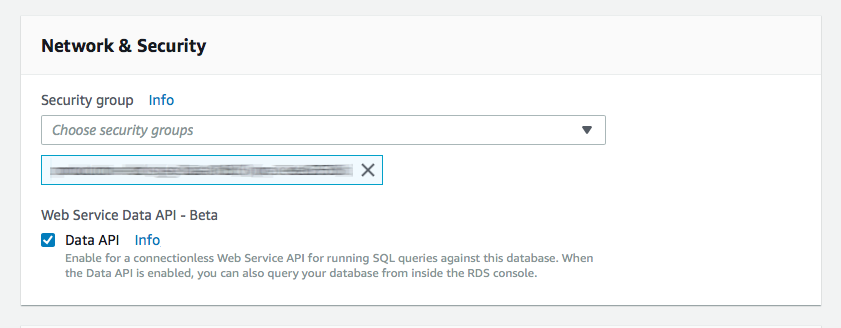
In order to use the Data API, you must enable it on your Aurora Serverless Cluster and create a Secret. You also must grant your execution environment a number of permission as outlined in the following sections.
|
|
387
419
|
|
|
388
420
|
### Enable Data API on your Aurora Serverless Cluster
|
|
389
421
|
|
|
390
422
|
|
|
391
423
|
|
|
392
|
-
You need to modify your Aurora Serverless cluster by clicking “ACTIONS” and then “Modify Cluster”. Just check the Data API box in the
|
|
424
|
+
You need to modify your Aurora Serverless cluster by clicking “ACTIONS” and then “Modify Cluster”. Just check the Data API box in the _Network & Security_ section and you’re good to go. Remember that your Aurora Serverless cluster still runs in a VPC, even though you don’t need to run your Lambdas in a VPC to access it via the Data API.
|
|
393
425
|
|
|
394
426
|
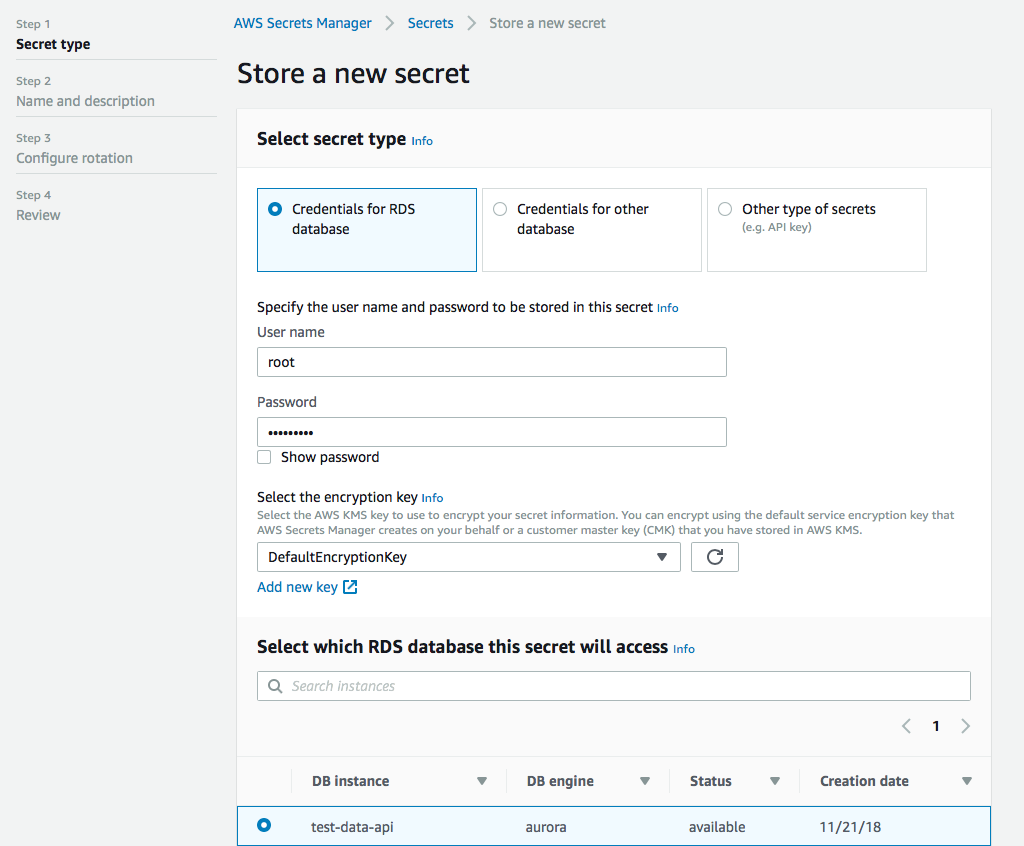
### Set up a secret in the Secrets Manager
|
|
395
427
|
|
|
@@ -397,7 +429,6 @@ Next you need to set up a secret in the Secrets Manager. This is actually quite
|
|
|
397
429
|
|
|
398
430
|
|
|
399
431
|
|
|
400
|
-
|
|
401
432
|
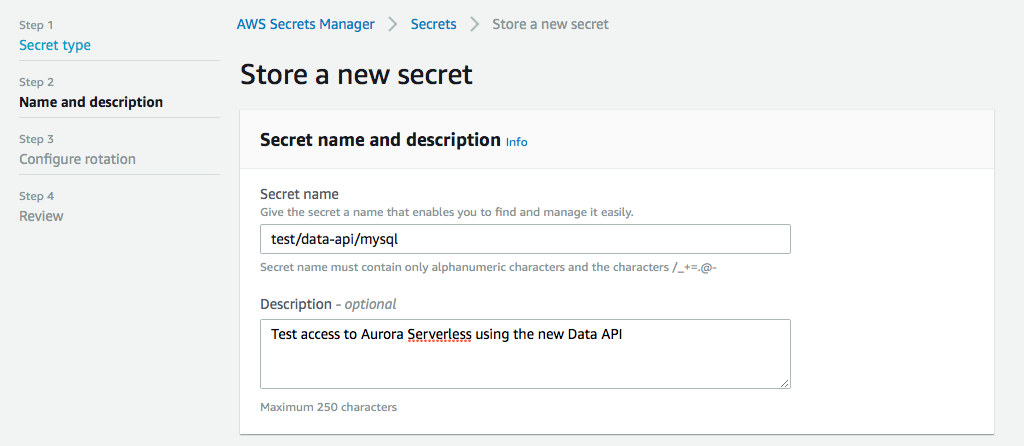
Next we give it a name, this is important, because this will be part of the arn when we set up permissions later. You can give it a description as well so you don’t forget what this secret is about when you look at it in a few weeks.
|
|
402
433
|
|
|
403
434
|
|
|
@@ -411,24 +442,26 @@ You can then configure your rotation settings, if you want, and then you review
|
|
|
411
442
|
In order to use the Data API, your execution environment requires several IAM permissions. Below are the minimum permissions required. **Please Note:** The `Resource: "*"` permission for `rds-data` is recommended by AWS (see [here](https://docs.aws.amazon.com/IAM/latest/UserGuide/list_amazonrdsdataapi.html#amazonrdsdataapi-resources-for-iam-policies)) because Amazon RDS Data API does not support specifying a resource ARN. The credentials specified in Secrets Manager can be used to restrict access to specific databases.
|
|
412
443
|
|
|
413
444
|
**YAML:**
|
|
445
|
+
|
|
414
446
|
```yaml
|
|
415
447
|
Statement:
|
|
416
|
-
- Effect:
|
|
448
|
+
- Effect: 'Allow'
|
|
417
449
|
Action:
|
|
418
|
-
-
|
|
419
|
-
-
|
|
420
|
-
-
|
|
421
|
-
-
|
|
422
|
-
-
|
|
423
|
-
-
|
|
424
|
-
Resource:
|
|
425
|
-
- Effect:
|
|
450
|
+
- 'rds-data:ExecuteSql'
|
|
451
|
+
- 'rds-data:ExecuteStatement'
|
|
452
|
+
- 'rds-data:BatchExecuteStatement'
|
|
453
|
+
- 'rds-data:BeginTransaction'
|
|
454
|
+
- 'rds-data:RollbackTransaction'
|
|
455
|
+
- 'rds-data:CommitTransaction'
|
|
456
|
+
Resource: '*'
|
|
457
|
+
- Effect: 'Allow'
|
|
426
458
|
Action:
|
|
427
|
-
-
|
|
428
|
-
Resource:
|
|
459
|
+
- 'secretsmanager:GetSecretValue'
|
|
460
|
+
Resource: 'arn:aws:secretsmanager:{REGION}:{ACCOUNT-ID}:secret:{PATH-TO-SECRET}/*'
|
|
429
461
|
```
|
|
430
462
|
|
|
431
463
|
**JSON:**
|
|
464
|
+
|
|
432
465
|
```javascript
|
|
433
466
|
"Statement" : [
|
|
434
467
|
{
|
|
@@ -451,10 +484,6 @@ Statement:
|
|
|
451
484
|
]
|
|
452
485
|
```
|
|
453
486
|
|
|
454
|
-
## Sponsors
|
|
455
|
-
|
|
456
|
-
[](https://ad.doubleclick.net/ddm/trackclk/N1116303.3950900PODSEARCH.COM/B24770737.285235234;dc_trk_aid=479074825;dc_trk_cid=139488579;dc_lat=;dc_rdid=;tag_for_child_directed_treatment=;tfua=;gdpr=${GDPR};gdpr_consent=${GDPR_CONSENT_755})
|
|
457
|
-
<IMG SRC="https://ad.doubleclick.net/ddm/trackimp/N1116303.3950900PODSEARCH.COM/B24770737.285235234;dc_trk_aid=479074825;dc_trk_cid=139488579;ord=[timestamp];dc_lat=;dc_rdid=;tag_for_child_directed_treatment=;tfua=;gdpr=${GDPR};gdpr_consent=${GDPR_CONSENT_755}?" BORDER="0" HEIGHT="1" WIDTH="1" ALT="Advertisement">
|
|
458
|
-
|
|
459
487
|
## Contributions
|
|
488
|
+
|
|
460
489
|
Contributions, ideas and bug reports are welcome and greatly appreciated. Please add [issues](https://github.com/jeremydaly/data-api-client/issues) for suggestions and bug reports or create a pull request. You can also contact me on Twitter: [@jeremy_daly](https://twitter.com/jeremy_daly).
|
package/index.js
CHANGED
|
@@ -36,103 +36,125 @@ const supportedTypes = [
|
|
|
36
36
|
/********************************************************************/
|
|
37
37
|
|
|
38
38
|
// Simple error function
|
|
39
|
-
const error = (...err) => {
|
|
39
|
+
const error = (...err) => {
|
|
40
|
+
throw Error(...err)
|
|
41
|
+
}
|
|
40
42
|
|
|
41
43
|
// Parse SQL statement from provided arguments
|
|
42
|
-
const parseSQL = args =>
|
|
43
|
-
typeof args[0] === 'string'
|
|
44
|
-
|
|
45
|
-
|
|
44
|
+
const parseSQL = (args) =>
|
|
45
|
+
typeof args[0] === 'string'
|
|
46
|
+
? args[0]
|
|
47
|
+
: typeof args[0] === 'object' && typeof args[0].sql === 'string'
|
|
48
|
+
? args[0].sql
|
|
49
|
+
: error(`No 'sql' statement provided.`)
|
|
46
50
|
|
|
47
51
|
// Parse the parameters from provided arguments
|
|
48
|
-
const parseParams = args =>
|
|
49
|
-
Array.isArray(args[0].parameters)
|
|
50
|
-
|
|
51
|
-
|
|
52
|
-
|
|
53
|
-
|
|
54
|
-
|
|
55
|
-
|
|
52
|
+
const parseParams = (args) =>
|
|
53
|
+
Array.isArray(args[0].parameters)
|
|
54
|
+
? args[0].parameters
|
|
55
|
+
: typeof args[0].parameters === 'object'
|
|
56
|
+
? [args[0].parameters]
|
|
57
|
+
: Array.isArray(args[1])
|
|
58
|
+
? args[1]
|
|
59
|
+
: typeof args[1] === 'object'
|
|
60
|
+
? [args[1]]
|
|
61
|
+
: args[0].parameters
|
|
62
|
+
? error(`'parameters' must be an object or array`)
|
|
63
|
+
: args[1]
|
|
64
|
+
? error('Parameters must be an object or array')
|
|
65
|
+
: []
|
|
56
66
|
|
|
57
67
|
// Parse the supplied database, or default to config
|
|
58
|
-
const parseDatabase = (config,args) =>
|
|
59
|
-
config.transactionId
|
|
60
|
-
|
|
61
|
-
|
|
62
|
-
|
|
63
|
-
|
|
68
|
+
const parseDatabase = (config, args) =>
|
|
69
|
+
config.transactionId
|
|
70
|
+
? config.database
|
|
71
|
+
: typeof args[0].database === 'string'
|
|
72
|
+
? args[0].database
|
|
73
|
+
: args[0].database
|
|
74
|
+
? error(`'database' must be a string.`)
|
|
75
|
+
: config.database
|
|
76
|
+
? config.database
|
|
77
|
+
: undefined // removed for #47 - error('No \'database\' provided.')
|
|
64
78
|
|
|
65
79
|
// Parse the supplied hydrateColumnNames command, or default to config
|
|
66
|
-
const parseHydrate = (config,args) =>
|
|
67
|
-
typeof args[0].hydrateColumnNames === 'boolean'
|
|
68
|
-
|
|
69
|
-
|
|
80
|
+
const parseHydrate = (config, args) =>
|
|
81
|
+
typeof args[0].hydrateColumnNames === 'boolean'
|
|
82
|
+
? args[0].hydrateColumnNames
|
|
83
|
+
: args[0].hydrateColumnNames
|
|
84
|
+
? error(`'hydrateColumnNames' must be a boolean.`)
|
|
85
|
+
: config.hydrateColumnNames
|
|
70
86
|
|
|
71
87
|
// Parse the supplied format options, or default to config
|
|
72
|
-
const parseFormatOptions = (config,args) =>
|
|
73
|
-
typeof args[0].formatOptions === 'object'
|
|
74
|
-
|
|
75
|
-
|
|
76
|
-
|
|
77
|
-
|
|
78
|
-
|
|
79
|
-
|
|
80
|
-
|
|
81
|
-
|
|
82
|
-
|
|
88
|
+
const parseFormatOptions = (config, args) =>
|
|
89
|
+
typeof args[0].formatOptions === 'object'
|
|
90
|
+
? {
|
|
91
|
+
deserializeDate:
|
|
92
|
+
typeof args[0].formatOptions.deserializeDate === 'boolean'
|
|
93
|
+
? args[0].formatOptions.deserializeDate
|
|
94
|
+
: args[0].formatOptions.deserializeDate
|
|
95
|
+
? error(`'formatOptions.deserializeDate' must be a boolean.`)
|
|
96
|
+
: config.formatOptions.deserializeDate,
|
|
97
|
+
treatAsLocalDate:
|
|
98
|
+
typeof args[0].formatOptions.treatAsLocalDate == 'boolean'
|
|
99
|
+
? args[0].formatOptions.treatAsLocalDate
|
|
100
|
+
: args[0].formatOptions.treatAsLocalDate
|
|
101
|
+
? error(`'formatOptions.treatAsLocalDate' must be a boolean.`)
|
|
102
|
+
: config.formatOptions.treatAsLocalDate
|
|
103
|
+
}
|
|
104
|
+
: args[0].formatOptions
|
|
105
|
+
? error(`'formatOptions' must be an object.`)
|
|
106
|
+
: config.formatOptions
|
|
83
107
|
|
|
84
108
|
// Prepare method params w/ supplied inputs if an object is passed
|
|
85
|
-
const prepareParams = ({ secretArn,resourceArn },args) => {
|
|
109
|
+
const prepareParams = ({ secretArn, resourceArn }, args) => {
|
|
86
110
|
return Object.assign(
|
|
87
|
-
{ secretArn,resourceArn }, // return Arns
|
|
88
|
-
typeof args[0] === 'object' ?
|
|
89
|
-
omit(args[0],['hydrateColumnNames','parameters']) : {} // merge any inputs
|
|
111
|
+
{ secretArn, resourceArn }, // return Arns
|
|
112
|
+
typeof args[0] === 'object' ? omit(args[0], ['hydrateColumnNames', 'parameters']) : {} // merge any inputs
|
|
90
113
|
)
|
|
91
114
|
}
|
|
92
115
|
|
|
93
116
|
// Utility function for removing certain keys from an object
|
|
94
|
-
const omit = (obj,values) =>
|
|
95
|
-
values.includes(x) ? acc : Object.assign(acc,{ [x]: obj[x] })
|
|
96
|
-
,{})
|
|
117
|
+
const omit = (obj, values) =>
|
|
118
|
+
Object.keys(obj).reduce((acc, x) => (values.includes(x) ? acc : Object.assign(acc, { [x]: obj[x] })), {})
|
|
97
119
|
|
|
98
120
|
// Utility function for picking certain keys from an object
|
|
99
|
-
const pick = (obj,values) =>
|
|
100
|
-
values.includes(x) ? Object.assign(acc,{ [x]: obj[x] }) : acc
|
|
101
|
-
,{})
|
|
121
|
+
const pick = (obj, values) =>
|
|
122
|
+
Object.keys(obj).reduce((acc, x) => (values.includes(x) ? Object.assign(acc, { [x]: obj[x] }) : acc), {})
|
|
102
123
|
|
|
103
124
|
// Utility function for flattening arrays
|
|
104
|
-
const flatten = arr => arr.reduce((acc,x) => acc.concat(x),[])
|
|
125
|
+
const flatten = (arr) => arr.reduce((acc, x) => acc.concat(x), [])
|
|
105
126
|
|
|
106
127
|
// Normize parameters so that they are all in standard format
|
|
107
|
-
const normalizeParams = params
|
|
108
|
-
|
|
109
|
-
|
|
110
|
-
|
|
111
|
-
|
|
112
|
-
|
|
113
|
-
|
|
114
|
-
|
|
128
|
+
const normalizeParams = (params) =>
|
|
129
|
+
params.reduce(
|
|
130
|
+
(acc, p) =>
|
|
131
|
+
Array.isArray(p)
|
|
132
|
+
? acc.concat([normalizeParams(p)])
|
|
133
|
+
: (Object.keys(p).length === 2 && p.name && typeof p.value !== 'undefined') ||
|
|
134
|
+
(Object.keys(p).length === 3 && p.name && typeof p.value !== 'undefined' && p.cast)
|
|
135
|
+
? acc.concat(p)
|
|
136
|
+
: acc.concat(splitParams(p)),
|
|
137
|
+
[]
|
|
138
|
+
) // end reduce
|
|
115
139
|
|
|
116
140
|
// Prepare parameters
|
|
117
|
-
const processParams = (engine,sql,sqlParams,params,formatOptions,row=0) => {
|
|
141
|
+
const processParams = (engine, sql, sqlParams, params, formatOptions, row = 0) => {
|
|
118
142
|
return {
|
|
119
|
-
processedParams: params.reduce((acc,p) => {
|
|
143
|
+
processedParams: params.reduce((acc, p) => {
|
|
120
144
|
if (Array.isArray(p)) {
|
|
121
|
-
const result = processParams(engine,sql,sqlParams,p,formatOptions,row)
|
|
122
|
-
if (row === 0) {
|
|
145
|
+
const result = processParams(engine, sql, sqlParams, p, formatOptions, row)
|
|
146
|
+
if (row === 0) {
|
|
147
|
+
sql = result.escapedSql
|
|
148
|
+
row++
|
|
149
|
+
}
|
|
123
150
|
return acc.concat([result.processedParams])
|
|
124
151
|
} else if (sqlParams[p.name]) {
|
|
125
152
|
if (sqlParams[p.name].type === 'n_ph') {
|
|
126
153
|
if (p.cast) {
|
|
127
154
|
const regex = new RegExp(':' + p.name + '\\b', 'g')
|
|
128
|
-
sql = sql.replace(
|
|
129
|
-
regex,
|
|
130
|
-
engine === 'pg'
|
|
131
|
-
? `:${p.name}::${p.cast}`
|
|
132
|
-
: `CAST(:${p.name} AS ${p.cast})`
|
|
133
|
-
)
|
|
155
|
+
sql = sql.replace(regex, engine === 'pg' ? `:${p.name}::${p.cast}` : `CAST(:${p.name} AS ${p.cast})`)
|
|
134
156
|
}
|
|
135
|
-
acc.push(formatParam(p.name,p.value,formatOptions))
|
|
157
|
+
acc.push(formatParam(p.name, p.value, formatOptions))
|
|
136
158
|
} else if (row === 0) {
|
|
137
159
|
const regex = new RegExp('::' + p.name + '\\b', 'g')
|
|
138
160
|
sql = sql.replace(regex, sqlString.escapeId(p.value))
|
|
@@ -141,84 +163,91 @@ const processParams = (engine,sql,sqlParams,params,formatOptions,row=0) => {
|
|
|
141
163
|
} else {
|
|
142
164
|
return acc
|
|
143
165
|
}
|
|
144
|
-
},[]),
|
|
166
|
+
}, []),
|
|
145
167
|
escapedSql: sql
|
|
146
168
|
}
|
|
147
169
|
}
|
|
148
170
|
|
|
149
171
|
// Converts parameter to the name/value format
|
|
150
|
-
const formatParam = (n,v,formatOptions) => formatType(n,v,getType(v),getTypeHint(v),formatOptions)
|
|
172
|
+
const formatParam = (n, v, formatOptions) => formatType(n, v, getType(v), getTypeHint(v), formatOptions)
|
|
151
173
|
|
|
152
174
|
// Converts object params into name/value format
|
|
153
|
-
const splitParams = p => Object.keys(p).reduce((arr,x) =>
|
|
154
|
-
arr.concat({ name: x, value: p[x] }),[])
|
|
175
|
+
const splitParams = (p) => Object.keys(p).reduce((arr, x) => arr.concat({ name: x, value: p[x] }), [])
|
|
155
176
|
|
|
156
177
|
// Get all the sql parameters and assign them types
|
|
157
|
-
const getSqlParams = sql => {
|
|
178
|
+
const getSqlParams = (sql) => {
|
|
158
179
|
// TODO: probably need to remove comments from the sql
|
|
159
180
|
// TODO: placeholders?
|
|
160
181
|
// sql.match(/\:{1,2}\w+|\?+/g).map((p,i) => {
|
|
161
|
-
return (sql.match(/:{1,2}\w+/g) || [])
|
|
162
|
-
|
|
163
|
-
|
|
164
|
-
|
|
165
|
-
|
|
166
|
-
|
|
167
|
-
|
|
168
|
-
|
|
169
|
-
|
|
182
|
+
return (sql.match(/:{1,2}\w+/g) || [])
|
|
183
|
+
.map((p) => {
|
|
184
|
+
// TODO: future support for placeholder parsing?
|
|
185
|
+
// return p === '??' ? { type: 'id' } // identifier
|
|
186
|
+
// : p === '?' ? { type: 'ph', label: '__d'+i } // placeholder
|
|
187
|
+
return p.startsWith('::')
|
|
188
|
+
? { type: 'n_id', label: p.substr(2) } // named id
|
|
189
|
+
: { type: 'n_ph', label: p.substr(1) } // named placeholder
|
|
190
|
+
})
|
|
191
|
+
.reduce((acc, x) => {
|
|
192
|
+
return Object.assign(acc, {
|
|
170
193
|
[x.label]: {
|
|
171
194
|
type: x.type
|
|
172
195
|
}
|
|
173
|
-
}
|
|
174
|
-
)
|
|
175
|
-
},{}) // end reduce
|
|
196
|
+
})
|
|
197
|
+
}, {}) // end reduce
|
|
176
198
|
}
|
|
177
199
|
|
|
178
200
|
// Gets the value type and returns the correct value field name
|
|
179
201
|
// TODO: Support more types as the are released
|
|
180
|
-
const getType = val =>
|
|
181
|
-
typeof val === 'string'
|
|
182
|
-
|
|
183
|
-
|
|
184
|
-
|
|
185
|
-
|
|
186
|
-
|
|
187
|
-
|
|
188
|
-
|
|
189
|
-
|
|
190
|
-
|
|
191
|
-
|
|
192
|
-
|
|
193
|
-
|
|
202
|
+
const getType = (val) =>
|
|
203
|
+
typeof val === 'string'
|
|
204
|
+
? 'stringValue'
|
|
205
|
+
: typeof val === 'boolean'
|
|
206
|
+
? 'booleanValue'
|
|
207
|
+
: typeof val === 'number' && parseInt(val) === val
|
|
208
|
+
? 'longValue'
|
|
209
|
+
: typeof val === 'number' && parseFloat(val) === val
|
|
210
|
+
? 'doubleValue'
|
|
211
|
+
: val === null
|
|
212
|
+
? 'isNull'
|
|
213
|
+
: isDate(val)
|
|
214
|
+
? 'stringValue'
|
|
215
|
+
: Buffer.isBuffer(val)
|
|
216
|
+
? 'blobValue'
|
|
217
|
+
: // : Array.isArray(val) ? 'arrayValue' This doesn't work yet
|
|
218
|
+
// TODO: there is a 'structValue' now for postgres
|
|
219
|
+
typeof val === 'object' && Object.keys(val).length === 1 && supportedTypes.includes(Object.keys(val)[0])
|
|
220
|
+
? null
|
|
221
|
+
: undefined
|
|
194
222
|
|
|
195
223
|
// Hint to specify the underlying object type for data type mapping
|
|
196
|
-
const getTypeHint = val =>
|
|
197
|
-
isDate(val) ? 'TIMESTAMP' : undefined
|
|
224
|
+
const getTypeHint = (val) => (isDate(val) ? 'TIMESTAMP' : undefined)
|
|
198
225
|
|
|
199
|
-
const isDate = val =>
|
|
200
|
-
val instanceof Date
|
|
226
|
+
const isDate = (val) => val instanceof Date
|
|
201
227
|
|
|
202
228
|
// Creates a standard Data API parameter using the supplied inputs
|
|
203
|
-
const formatType = (name,value,type,typeHint,formatOptions) => {
|
|
229
|
+
const formatType = (name, value, type, typeHint, formatOptions) => {
|
|
204
230
|
return Object.assign(
|
|
205
231
|
typeHint != null ? { name, typeHint } : { name },
|
|
206
|
-
type === null
|
|
207
|
-
|
|
208
|
-
|
|
209
|
-
|
|
210
|
-
|
|
211
|
-
|
|
212
|
-
|
|
213
|
-
|
|
214
|
-
|
|
232
|
+
type === null
|
|
233
|
+
? { value }
|
|
234
|
+
: {
|
|
235
|
+
value: {
|
|
236
|
+
[type ? type : error(`'${name}' is an invalid type`)]:
|
|
237
|
+
type === 'isNull'
|
|
238
|
+
? true
|
|
239
|
+
: isDate(value)
|
|
240
|
+
? formatToTimeStamp(value, formatOptions && formatOptions.treatAsLocalDate)
|
|
241
|
+
: value
|
|
242
|
+
}
|
|
243
|
+
}
|
|
215
244
|
)
|
|
216
245
|
} // end formatType
|
|
217
246
|
|
|
218
247
|
// Formats the (UTC) date to the AWS accepted YYYY-MM-DD HH:MM:SS[.FFF] format
|
|
219
248
|
// See https://docs.aws.amazon.com/rdsdataservice/latest/APIReference/API_SqlParameter.html
|
|
220
249
|
const formatToTimeStamp = (date, treatAsLocalDate) => {
|
|
221
|
-
const pad = (val,num=2) => '0'.repeat(num-(val + '').length) + val
|
|
250
|
+
const pad = (val, num = 2) => '0'.repeat(num - (val + '').length) + val
|
|
222
251
|
|
|
223
252
|
const year = treatAsLocalDate ? date.getFullYear() : date.getUTCFullYear()
|
|
224
253
|
const month = (treatAsLocalDate ? date.getMonth() : date.getUTCMonth()) + 1 // Convert to human month
|
|
@@ -229,7 +258,7 @@ const formatToTimeStamp = (date, treatAsLocalDate) => {
|
|
|
229
258
|
const seconds = treatAsLocalDate ? date.getSeconds() : date.getUTCSeconds()
|
|
230
259
|
const ms = treatAsLocalDate ? date.getMilliseconds() : date.getUTCMilliseconds()
|
|
231
260
|
|
|
232
|
-
const fraction = ms <= 0 ? '' : `.${pad(ms,3)}`
|
|
261
|
+
const fraction = ms <= 0 ? '' : `.${pad(ms, 3)}`
|
|
233
262
|
|
|
234
263
|
return `${year}-${pad(month)}-${pad(day)} ${pad(hours)}:${pad(minutes)}:${pad(seconds)}${fraction}`
|
|
235
264
|
}
|
|
@@ -237,14 +266,15 @@ const formatToTimeStamp = (date, treatAsLocalDate) => {
|
|
|
237
266
|
// Converts the string value to a Date object.
|
|
238
267
|
// If standard TIMESTAMP format (YYYY-MM-DD[ HH:MM:SS[.FFF]]) without TZ + treatAsLocalDate=false then assume UTC Date
|
|
239
268
|
// In all other cases convert value to datetime as-is (also values with TZ info)
|
|
240
|
-
const formatFromTimeStamp = (value,treatAsLocalDate) =>
|
|
241
|
-
!treatAsLocalDate && /^\d{4}-\d{2}-\d{2}(\s\d{2}:\d{2}:\d{2}(\.\d
|
|
242
|
-
new Date(value + 'Z')
|
|
243
|
-
new Date(value)
|
|
269
|
+
const formatFromTimeStamp = (value, treatAsLocalDate) =>
|
|
270
|
+
!treatAsLocalDate && /^\d{4}-\d{2}-\d{2}(\s\d{2}:\d{2}:\d{2}(\.\d+)?)?$/.test(value)
|
|
271
|
+
? new Date(value + 'Z')
|
|
272
|
+
: new Date(value)
|
|
244
273
|
|
|
245
274
|
// Formats the results of a query response
|
|
246
275
|
const formatResults = (
|
|
247
|
-
{
|
|
276
|
+
{
|
|
277
|
+
// destructure results
|
|
248
278
|
columnMetadata, // ONLY when hydrate or includeResultMetadata is true
|
|
249
279
|
numberOfRecordsUpdated, // ONLY for executeStatement method
|
|
250
280
|
records, // ONLY for executeStatement method
|
|
@@ -254,92 +284,104 @@ const formatResults = (
|
|
|
254
284
|
hydrate,
|
|
255
285
|
includeMeta,
|
|
256
286
|
formatOptions
|
|
257
|
-
) =>
|
|
258
|
-
|
|
259
|
-
|
|
260
|
-
|
|
261
|
-
records
|
|
262
|
-
|
|
263
|
-
|
|
264
|
-
|
|
265
|
-
|
|
266
|
-
)
|
|
287
|
+
) =>
|
|
288
|
+
Object.assign(
|
|
289
|
+
includeMeta ? { columnMetadata } : {},
|
|
290
|
+
numberOfRecordsUpdated !== undefined && !records ? { numberOfRecordsUpdated } : {},
|
|
291
|
+
records
|
|
292
|
+
? {
|
|
293
|
+
records: formatRecords(records, columnMetadata, hydrate, formatOptions)
|
|
294
|
+
}
|
|
295
|
+
: {},
|
|
296
|
+
updateResults ? { updateResults: formatUpdateResults(updateResults) } : {},
|
|
297
|
+
generatedFields && generatedFields.length > 0 ? { insertId: generatedFields[0].longValue } : {}
|
|
298
|
+
)
|
|
267
299
|
|
|
268
300
|
// Processes records and either extracts Typed Values into an array, or
|
|
269
301
|
// object with named column labels
|
|
270
|
-
const formatRecords = (recs,columns,hydrate,formatOptions) => {
|
|
271
|
-
|
|
302
|
+
const formatRecords = (recs, columns, hydrate, formatOptions) => {
|
|
272
303
|
// Create map for efficient value parsing
|
|
273
|
-
let fmap =
|
|
274
|
-
|
|
275
|
-
|
|
276
|
-
|
|
277
|
-
|
|
278
|
-
// Map over all the records (rows)
|
|
279
|
-
return recs ? recs.map(rec => {
|
|
280
|
-
|
|
281
|
-
// Reduce each field in the record (row)
|
|
282
|
-
return rec.reduce((acc,field,i) => {
|
|
283
|
-
|
|
284
|
-
// If the field is null, always return null
|
|
285
|
-
if (field.isNull === true) {
|
|
286
|
-
return hydrate ? // object if hydrate, else array
|
|
287
|
-
Object.assign(acc,{ [fmap[i].label]: null })
|
|
288
|
-
: acc.concat(null)
|
|
289
|
-
|
|
290
|
-
// If the field is mapped, return the mapped field
|
|
291
|
-
} else if (fmap[i] && fmap[i].field) {
|
|
292
|
-
const value = formatRecordValue(field[fmap[i].field],fmap[i].typeName,formatOptions)
|
|
293
|
-
return hydrate ? // object if hydrate, else array
|
|
294
|
-
Object.assign(acc,{ [fmap[i].label]: value })
|
|
295
|
-
: acc.concat(value)
|
|
296
|
-
|
|
297
|
-
// Else discover the field type
|
|
298
|
-
} else {
|
|
299
|
-
|
|
300
|
-
// Look for non-null fields
|
|
301
|
-
Object.keys(field).map(type => {
|
|
302
|
-
if (type !== 'isNull' && field[type] !== null) {
|
|
303
|
-
fmap[i]['field'] = type
|
|
304
|
-
}
|
|
304
|
+
let fmap =
|
|
305
|
+
recs && recs[0]
|
|
306
|
+
? recs[0].map((x, i) => {
|
|
307
|
+
return Object.assign({}, columns ? { label: columns[i].label, typeName: columns[i].typeName } : {}) // add column label and typeName
|
|
305
308
|
})
|
|
309
|
+
: {}
|
|
306
310
|
|
|
307
|
-
|
|
308
|
-
|
|
309
|
-
|
|
310
|
-
|
|
311
|
-
|
|
312
|
-
|
|
313
|
-
|
|
314
|
-
|
|
315
|
-
|
|
311
|
+
// Map over all the records (rows)
|
|
312
|
+
return recs
|
|
313
|
+
? recs.map((rec) => {
|
|
314
|
+
// Reduce each field in the record (row)
|
|
315
|
+
return rec.reduce(
|
|
316
|
+
(acc, field, i) => {
|
|
317
|
+
// If the field is null, always return null
|
|
318
|
+
if (field.isNull === true) {
|
|
319
|
+
return hydrate // object if hydrate, else array
|
|
320
|
+
? Object.assign(acc, { [fmap[i].label]: null })
|
|
321
|
+
: acc.concat(null)
|
|
322
|
+
|
|
323
|
+
// If the field is mapped, return the mapped field
|
|
324
|
+
} else if (fmap[i] && fmap[i].field) {
|
|
325
|
+
const value = formatRecordValue(field[fmap[i].field], fmap[i].typeName, formatOptions)
|
|
326
|
+
return hydrate // object if hydrate, else array
|
|
327
|
+
? Object.assign(acc, { [fmap[i].label]: value })
|
|
328
|
+
: acc.concat(value)
|
|
329
|
+
|
|
330
|
+
// Else discover the field type
|
|
331
|
+
} else {
|
|
332
|
+
// Look for non-null fields
|
|
333
|
+
Object.keys(field).map((type) => {
|
|
334
|
+
if (type !== 'isNull' && field[type] !== null) {
|
|
335
|
+
fmap[i]['field'] = type
|
|
336
|
+
}
|
|
337
|
+
})
|
|
338
|
+
|
|
339
|
+
// Return the mapped field (this should NEVER be null)
|
|
340
|
+
const value = formatRecordValue(field[fmap[i].field], fmap[i].typeName, formatOptions)
|
|
341
|
+
return hydrate // object if hydrate, else array
|
|
342
|
+
? Object.assign(acc, { [fmap[i].label]: value })
|
|
343
|
+
: acc.concat(value)
|
|
344
|
+
}
|
|
345
|
+
},
|
|
346
|
+
hydrate ? {} : []
|
|
347
|
+
) // init object if hydrate, else init array
|
|
348
|
+
})
|
|
349
|
+
: [] // empty record set returns an array
|
|
316
350
|
} // end formatRecords
|
|
317
351
|
|
|
318
352
|
// Format record value based on its value, the database column's typeName and the formatting options
|
|
319
|
-
const formatRecordValue = (value,typeName,formatOptions) =>
|
|
320
|
-
|
|
321
|
-
|
|
322
|
-
|
|
353
|
+
const formatRecordValue = (value, typeName, formatOptions) => {
|
|
354
|
+
if (
|
|
355
|
+
formatOptions &&
|
|
356
|
+
formatOptions.deserializeDate &&
|
|
357
|
+
['DATE', 'DATETIME', 'TIMESTAMP', 'TIMESTAMPTZ', 'TIMESTAMP WITH TIME ZONE'].includes(typeName.toUpperCase())
|
|
358
|
+
) {
|
|
359
|
+
return formatFromTimeStamp(
|
|
360
|
+
value,
|
|
361
|
+
(formatOptions && formatOptions.treatAsLocalDate) || typeName === 'TIMESTAMP WITH TIME ZONE'
|
|
362
|
+
)
|
|
363
|
+
} else if (typeName === 'JSON') {
|
|
364
|
+
return JSON.parse(value)
|
|
365
|
+
} else {
|
|
366
|
+
return value
|
|
367
|
+
}
|
|
368
|
+
}
|
|
323
369
|
|
|
324
370
|
// Format updateResults and extract insertIds
|
|
325
|
-
const formatUpdateResults = res =>
|
|
326
|
-
|
|
327
|
-
{ insertId: x.generatedFields[0].longValue } : {}
|
|
328
|
-
})
|
|
329
|
-
|
|
371
|
+
const formatUpdateResults = (res) =>
|
|
372
|
+
res.map((x) => {
|
|
373
|
+
return x.generatedFields && x.generatedFields.length > 0 ? { insertId: x.generatedFields[0].longValue } : {}
|
|
374
|
+
})
|
|
330
375
|
|
|
331
376
|
// Merge configuration data with supplied arguments
|
|
332
|
-
const mergeConfig = (initialConfig,args) =>
|
|
333
|
-
Object.assign(initialConfig,args)
|
|
334
|
-
|
|
335
|
-
|
|
377
|
+
const mergeConfig = (initialConfig, args) => Object.assign(initialConfig, args)
|
|
336
378
|
|
|
337
379
|
/********************************************************************/
|
|
338
380
|
/** QUERY MANAGEMENT **/
|
|
339
381
|
/********************************************************************/
|
|
340
382
|
|
|
341
383
|
// Query function (use standard form for `this` context)
|
|
342
|
-
const query = async function(config
|
|
384
|
+
const query = async function (config, ..._args) {
|
|
343
385
|
// Flatten array if nested arrays (fixes #30)
|
|
344
386
|
const args = Array.isArray(_args[0]) ? flatten(_args) : _args
|
|
345
387
|
|
|
@@ -348,92 +390,80 @@ const query = async function(config,..._args) {
|
|
|
348
390
|
const sqlParams = getSqlParams(sql)
|
|
349
391
|
|
|
350
392
|
// Parse hydration setting
|
|
351
|
-
const hydrateColumnNames = parseHydrate(config,args)
|
|
393
|
+
const hydrateColumnNames = parseHydrate(config, args)
|
|
352
394
|
|
|
353
395
|
// Parse data format settings
|
|
354
|
-
const formatOptions = parseFormatOptions(config,args)
|
|
396
|
+
const formatOptions = parseFormatOptions(config, args)
|
|
355
397
|
|
|
356
398
|
// Parse and normalize parameters
|
|
357
399
|
const parameters = normalizeParams(parseParams(args))
|
|
358
400
|
|
|
359
401
|
// Process parameters and escape necessary SQL
|
|
360
|
-
const { processedParams,escapedSql } = processParams(config.engine,sql,sqlParams,parameters,formatOptions)
|
|
402
|
+
const { processedParams, escapedSql } = processParams(config.engine, sql, sqlParams, parameters, formatOptions)
|
|
361
403
|
|
|
362
404
|
// Determine if this is a batch request
|
|
363
|
-
const isBatch = processedParams.length > 0
|
|
364
|
-
&& Array.isArray(processedParams[0])
|
|
405
|
+
const isBatch = processedParams.length > 0 && Array.isArray(processedParams[0])
|
|
365
406
|
|
|
366
407
|
// Create/format the parameters
|
|
367
408
|
const params = Object.assign(
|
|
368
|
-
prepareParams(config,args),
|
|
409
|
+
prepareParams(config, args),
|
|
369
410
|
{
|
|
370
|
-
database: parseDatabase(config,args), // add database
|
|
411
|
+
database: parseDatabase(config, args), // add database
|
|
371
412
|
sql: escapedSql // add escaped sql statement
|
|
372
413
|
},
|
|
373
414
|
// Only include parameters if they exist
|
|
374
|
-
processedParams.length > 0
|
|
375
|
-
// Batch statements require parameterSets instead of parameters
|
|
376
|
-
|
|
415
|
+
processedParams.length > 0
|
|
416
|
+
? // Batch statements require parameterSets instead of parameters
|
|
417
|
+
{ [isBatch ? 'parameterSets' : 'parameters']: processedParams }
|
|
418
|
+
: {},
|
|
377
419
|
// Force meta data if set and not a batch
|
|
378
420
|
hydrateColumnNames && !isBatch ? { includeResultMetadata: true } : {},
|
|
379
421
|
// If a transactionId is passed, overwrite any manual input
|
|
380
422
|
config.transactionId ? { transactionId: config.transactionId } : {}
|
|
381
423
|
) // end params
|
|
382
424
|
|
|
383
|
-
try {
|
|
425
|
+
try {
|
|
426
|
+
// attempt to run the query
|
|
384
427
|
|
|
385
428
|
// Capture the result for debugging
|
|
386
|
-
let result = await (isBatch
|
|
429
|
+
let result = await (isBatch
|
|
430
|
+
? config.RDS.batchExecuteStatement(params).promise()
|
|
387
431
|
: config.RDS.executeStatement(params).promise())
|
|
388
432
|
|
|
389
433
|
// Format and return the results
|
|
390
|
-
return formatResults(
|
|
391
|
-
|
|
392
|
-
hydrateColumnNames,
|
|
393
|
-
args[0].includeResultMetadata === true,
|
|
394
|
-
formatOptions
|
|
395
|
-
)
|
|
396
|
-
|
|
397
|
-
} catch(e) {
|
|
398
|
-
|
|
434
|
+
return formatResults(result, hydrateColumnNames, args[0].includeResultMetadata === true, formatOptions)
|
|
435
|
+
} catch (e) {
|
|
399
436
|
if (this && this.rollback) {
|
|
400
437
|
let rollback = await config.RDS.rollbackTransaction(
|
|
401
|
-
pick(params,['resourceArn','secretArn','transactionId'])
|
|
438
|
+
pick(params, ['resourceArn', 'secretArn', 'transactionId'])
|
|
402
439
|
).promise()
|
|
403
440
|
|
|
404
|
-
this.rollback(e,rollback)
|
|
441
|
+
this.rollback(e, rollback)
|
|
405
442
|
}
|
|
406
443
|
// Throw the error
|
|
407
444
|
throw e
|
|
408
445
|
}
|
|
409
|
-
|
|
410
446
|
} // end query
|
|
411
447
|
|
|
412
|
-
|
|
413
|
-
|
|
414
448
|
/********************************************************************/
|
|
415
449
|
/** TRANSACTION MANAGEMENT **/
|
|
416
450
|
/********************************************************************/
|
|
417
451
|
|
|
418
452
|
// Init a transaction object and return methods
|
|
419
|
-
const transaction = (config,_args) => {
|
|
420
|
-
|
|
453
|
+
const transaction = (config, _args) => {
|
|
421
454
|
let args = typeof _args === 'object' ? [_args] : [{}]
|
|
422
455
|
let queries = [] // keep track of queries
|
|
423
456
|
let rollback = () => {} // default rollback event
|
|
424
457
|
|
|
425
|
-
const txConfig = Object.assign(
|
|
426
|
-
|
|
427
|
-
|
|
428
|
-
|
|
429
|
-
|
|
430
|
-
|
|
431
|
-
RDS: config.RDS // reference the RDSDataService instance
|
|
432
|
-
}
|
|
433
|
-
)
|
|
458
|
+
const txConfig = Object.assign(prepareParams(config, args), {
|
|
459
|
+
database: parseDatabase(config, args), // add database
|
|
460
|
+
hydrateColumnNames: parseHydrate(config, args), // add hydrate
|
|
461
|
+
formatOptions: parseFormatOptions(config, args), // add formatOptions
|
|
462
|
+
RDS: config.RDS // reference the RDSDataService instance
|
|
463
|
+
})
|
|
434
464
|
|
|
435
465
|
return {
|
|
436
|
-
query: function(...args) {
|
|
466
|
+
query: function (...args) {
|
|
437
467
|
if (typeof args[0] === 'function') {
|
|
438
468
|
queries.push(args[0])
|
|
439
469
|
} else {
|
|
@@ -441,22 +471,25 @@ const transaction = (config,_args) => {
|
|
|
441
471
|
}
|
|
442
472
|
return this
|
|
443
473
|
},
|
|
444
|
-
rollback: function(fn) {
|
|
445
|
-
if (typeof fn === 'function') {
|
|
474
|
+
rollback: function (fn) {
|
|
475
|
+
if (typeof fn === 'function') {
|
|
476
|
+
rollback = fn
|
|
477
|
+
}
|
|
446
478
|
return this
|
|
447
479
|
},
|
|
448
|
-
commit: async function() {
|
|
480
|
+
commit: async function () {
|
|
481
|
+
return await commit(txConfig, queries, rollback)
|
|
482
|
+
}
|
|
449
483
|
}
|
|
450
484
|
}
|
|
451
485
|
|
|
452
486
|
// Commit transaction by running queries
|
|
453
|
-
const commit = async (config,queries,rollback) => {
|
|
454
|
-
|
|
487
|
+
const commit = async (config, queries, rollback) => {
|
|
455
488
|
let results = [] // keep track of results
|
|
456
489
|
|
|
457
490
|
// Start a transaction
|
|
458
491
|
const { transactionId } = await config.RDS.beginTransaction(
|
|
459
|
-
pick(config,['resourceArn','secretArn','database'])
|
|
492
|
+
pick(config, ['resourceArn', 'secretArn', 'database'])
|
|
460
493
|
).promise()
|
|
461
494
|
|
|
462
495
|
// Add transactionId to the config
|
|
@@ -465,18 +498,18 @@ const commit = async (config,queries,rollback) => {
|
|
|
465
498
|
// Loop through queries
|
|
466
499
|
for (let i = 0; i < queries.length; i++) {
|
|
467
500
|
// Execute the queries, pass the rollback as context
|
|
468
|
-
let result = await query.apply({rollback},[config,queries[i](results[results.length-1],results)])
|
|
501
|
+
let result = await query.apply({ rollback }, [config, queries[i](results[results.length - 1], results)])
|
|
469
502
|
// Add the result to the main results accumulator
|
|
470
503
|
results.push(result)
|
|
471
504
|
}
|
|
472
505
|
|
|
473
506
|
// Commit our transaction
|
|
474
507
|
const { transactionStatus } = await txConfig.RDS.commitTransaction(
|
|
475
|
-
pick(config,['resourceArn','secretArn','transactionId'])
|
|
508
|
+
pick(config, ['resourceArn', 'secretArn', 'transactionId'])
|
|
476
509
|
).promise()
|
|
477
510
|
|
|
478
511
|
// Add the transaction status to the results
|
|
479
|
-
results.push({transactionStatus})
|
|
512
|
+
results.push({ transactionStatus })
|
|
480
513
|
|
|
481
514
|
// Return the results
|
|
482
515
|
return results
|
|
@@ -507,12 +540,14 @@ const commit = async (config,queries,rollback) => {
|
|
|
507
540
|
* @param {string} [params.region] DEPRECATED
|
|
508
541
|
*
|
|
509
542
|
*/
|
|
510
|
-
const init = params => {
|
|
511
|
-
|
|
543
|
+
const init = (params) => {
|
|
512
544
|
// Set the options for the RDSDataService
|
|
513
|
-
const options =
|
|
514
|
-
|
|
515
|
-
|
|
545
|
+
const options =
|
|
546
|
+
typeof params.options === 'object'
|
|
547
|
+
? params.options
|
|
548
|
+
: params.options !== undefined
|
|
549
|
+
? error(`'options' must be an object`)
|
|
550
|
+
: {}
|
|
516
551
|
|
|
517
552
|
// Update the AWS http agent with the region
|
|
518
553
|
if (typeof params.region === 'string') {
|
|
@@ -527,25 +562,22 @@ const init = params => {
|
|
|
527
562
|
// Set the configuration for this instance
|
|
528
563
|
const config = {
|
|
529
564
|
// Require engine
|
|
530
|
-
engine: typeof params.engine === 'string' ?
|
|
531
|
-
params.engine
|
|
532
|
-
: 'mysql',
|
|
565
|
+
engine: typeof params.engine === 'string' ? params.engine : 'mysql',
|
|
533
566
|
|
|
534
567
|
// Require secretArn
|
|
535
|
-
secretArn: typeof params.secretArn === 'string' ?
|
|
536
|
-
params.secretArn
|
|
537
|
-
: error('\'secretArn\' string value required'),
|
|
568
|
+
secretArn: typeof params.secretArn === 'string' ? params.secretArn : error(`'secretArn' string value required`),
|
|
538
569
|
|
|
539
570
|
// Require resourceArn
|
|
540
|
-
resourceArn:
|
|
541
|
-
params.resourceArn
|
|
542
|
-
: error('\'resourceArn\' string value required'),
|
|
571
|
+
resourceArn:
|
|
572
|
+
typeof params.resourceArn === 'string' ? params.resourceArn : error(`'resourceArn' string value required`),
|
|
543
573
|
|
|
544
574
|
// Load optional database
|
|
545
|
-
database:
|
|
546
|
-
params.database
|
|
547
|
-
|
|
548
|
-
|
|
575
|
+
database:
|
|
576
|
+
typeof params.database === 'string'
|
|
577
|
+
? params.database
|
|
578
|
+
: params.database !== undefined
|
|
579
|
+
? error(`'database' must be a string`)
|
|
580
|
+
: undefined,
|
|
549
581
|
|
|
550
582
|
// Load optional schema DISABLED for now since this isn't used with MySQL
|
|
551
583
|
// schema: typeof params.schema === 'string' ? params.schema
|
|
@@ -553,54 +585,41 @@ const init = params => {
|
|
|
553
585
|
// : undefined,
|
|
554
586
|
|
|
555
587
|
// Set hydrateColumnNames (default to true)
|
|
556
|
-
hydrateColumnNames:
|
|
557
|
-
typeof params.hydrateColumnNames === 'boolean' ?
|
|
558
|
-
params.hydrateColumnNames : true,
|
|
588
|
+
hydrateColumnNames: typeof params.hydrateColumnNames === 'boolean' ? params.hydrateColumnNames : true,
|
|
559
589
|
|
|
560
590
|
// Value formatting options. For date the deserialization is enabled and (re)stored as UTC
|
|
561
591
|
formatOptions: {
|
|
562
592
|
deserializeDate:
|
|
563
593
|
typeof params.formatOptions === 'object' && params.formatOptions.deserializeDate === false ? false : true,
|
|
564
|
-
treatAsLocalDate:
|
|
565
|
-
typeof params.formatOptions === 'object' && params.formatOptions.treatAsLocalDate
|
|
594
|
+
treatAsLocalDate: typeof params.formatOptions === 'object' && params.formatOptions.treatAsLocalDate
|
|
566
595
|
},
|
|
567
596
|
|
|
568
597
|
// TODO: Put this in a separate module for testing?
|
|
569
598
|
// Create an instance of RDSDataService
|
|
570
|
-
RDS: new AWS.RDSDataService(options)
|
|
571
|
-
|
|
599
|
+
RDS: params.AWS ? new params.AWS.RDSDataService(options) : new AWS.RDSDataService(options)
|
|
572
600
|
} // end config
|
|
573
601
|
|
|
574
602
|
// Return public methods
|
|
575
603
|
return {
|
|
576
604
|
// Query method, pass config and parameters
|
|
577
|
-
query: (...x) => query(config
|
|
605
|
+
query: (...x) => query(config, ...x),
|
|
578
606
|
// Transaction method, pass config and parameters
|
|
579
|
-
transaction: (x) => transaction(config,x),
|
|
607
|
+
transaction: (x) => transaction(config, x),
|
|
580
608
|
|
|
581
609
|
// Export promisified versions of the RDSDataService methods
|
|
582
610
|
batchExecuteStatement: (args) =>
|
|
583
611
|
config.RDS.batchExecuteStatement(
|
|
584
|
-
mergeConfig(pick(config,['resourceArn','secretArn','database']),args)
|
|
612
|
+
mergeConfig(pick(config, ['resourceArn', 'secretArn', 'database']), args)
|
|
585
613
|
).promise(),
|
|
586
614
|
beginTransaction: (args) =>
|
|
587
|
-
config.RDS.beginTransaction(
|
|
588
|
-
mergeConfig(pick(config,['resourceArn','secretArn','database']),args)
|
|
589
|
-
).promise(),
|
|
615
|
+
config.RDS.beginTransaction(mergeConfig(pick(config, ['resourceArn', 'secretArn', 'database']), args)).promise(),
|
|
590
616
|
commitTransaction: (args) =>
|
|
591
|
-
config.RDS.commitTransaction(
|
|
592
|
-
mergeConfig(pick(config,['resourceArn','secretArn']),args)
|
|
593
|
-
).promise(),
|
|
617
|
+
config.RDS.commitTransaction(mergeConfig(pick(config, ['resourceArn', 'secretArn']), args)).promise(),
|
|
594
618
|
executeStatement: (args) =>
|
|
595
|
-
config.RDS.executeStatement(
|
|
596
|
-
mergeConfig(pick(config,['resourceArn','secretArn','database']),args)
|
|
597
|
-
).promise(),
|
|
619
|
+
config.RDS.executeStatement(mergeConfig(pick(config, ['resourceArn', 'secretArn', 'database']), args)).promise(),
|
|
598
620
|
rollbackTransaction: (args) =>
|
|
599
|
-
config.RDS.rollbackTransaction(
|
|
600
|
-
mergeConfig(pick(config,['resourceArn','secretArn']),args)
|
|
601
|
-
).promise()
|
|
621
|
+
config.RDS.rollbackTransaction(mergeConfig(pick(config, ['resourceArn', 'secretArn']), args)).promise()
|
|
602
622
|
}
|
|
603
|
-
|
|
604
623
|
} // end exports
|
|
605
624
|
|
|
606
625
|
module.exports = init
|
package/package.json
CHANGED
|
@@ -1,6 +1,6 @@
|
|
|
1
1
|
{
|
|
2
2
|
"name": "data-api-client",
|
|
3
|
-
"version": "1.
|
|
3
|
+
"version": "1.3.1",
|
|
4
4
|
"description": "A lightweight wrapper that simplifies working with the Amazon Aurora Serverless Data API",
|
|
5
5
|
"main": "index.js",
|
|
6
6
|
"scripts": {
|
|
@@ -26,8 +26,10 @@
|
|
|
26
26
|
"homepage": "https://github.com/jeremydaly/data-api-client#readme",
|
|
27
27
|
"devDependencies": {
|
|
28
28
|
"aws-sdk": "^2.811.0",
|
|
29
|
-
"eslint": "^
|
|
29
|
+
"eslint": "^8.12.0",
|
|
30
|
+
"eslint-config-prettier": "^8.5.0",
|
|
30
31
|
"jest": "^27.5.1",
|
|
32
|
+
"prettier": "^2.6.2",
|
|
31
33
|
"rewire": "^6.0.0"
|
|
32
34
|
},
|
|
33
35
|
"dependencies": {
|