danoniplus 29.2.0 → 29.3.1
This diff represents the content of publicly available package versions that have been released to one of the supported registries. The information contained in this diff is provided for informational purposes only and reflects changes between package versions as they appear in their respective public registries.
- package/README.md +41 -36
- package/js/danoni_main.js +95 -89
- package/js/lib/danoni_constants.js +15 -7
- package/js/lib/danoni_legacy_function.js +2 -2
- package/js/lib/danoni_localbinary.js +1 -1
- package/js/template/danoni_setting.js +1 -1
- package/package.json +1 -1
package/README.md
CHANGED
|
@@ -7,45 +7,50 @@
|
|
|
7
7
|
[](https://github.com/cwtickle/danoniplus/releases)
|
|
8
8
|
[](https://github.com/cwtickle/danoniplus/blob/develop/LICENSE)
|
|
9
9
|
|
|
10
|
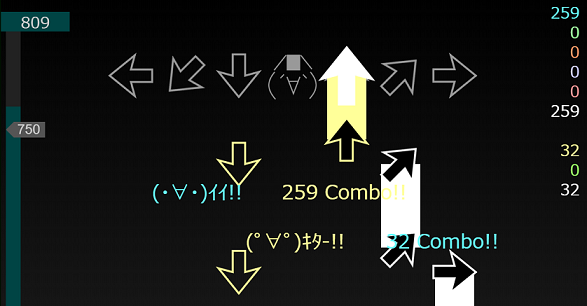
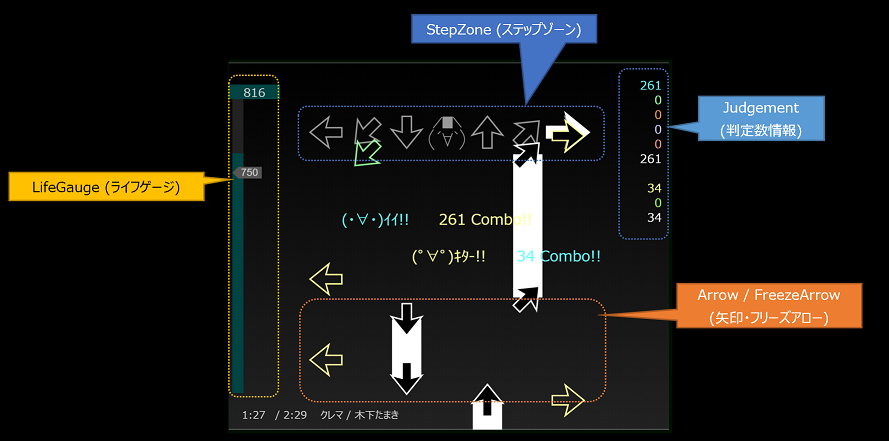
+
|
|
11
|
+
*Dancing Onigiri "CW Edition"* is a rhythm game.
|
|
12
|
+
You can create original game data by combining a set of published sources with music files and sequences (text file). See the [wiki](https://github.com/cwtickle/danoniplus-docs/wiki) for details.
|
|
13
|
+
|
|
14
|
+
The source released here is the **HTML5 (HTML Living Standard) version** of the rhythm game *"Dancing Onigiri"* that was previously released as Flash.
|
|
10
15
|
|
|
11
16
|
Dancing☆Onigiri (CW Edition)は、ブラウザで動作するキーボードを使ったリズムゲームです。
|
|
12
17
|
公開しているソース一式と、音楽ファイル・譜面データ(テキスト)を組み合わせることで
|
|
13
|
-
オリジナルのゲームデータを作ることができます。詳細は[Wiki](https://github.com/cwtickle/danoniplus/wiki)をご覧ください。
|
|
14
|
-
*Dancing Onigiri "CW Edition"* is a rhythm game.
|
|
15
|
-
You can create original game data by combining a set of published sources with music files and sequences (text file). See the [wiki](https://github.com/cwtickle/danoniplus/wiki/Sidebar-En) for details.
|
|
18
|
+
オリジナルのゲームデータを作ることができます。詳細は[Wiki](https://github.com/cwtickle/danoniplus/wiki)をご覧ください。
|
|
16
19
|
|
|
17
20
|
ここで公開しているソースは、以前Flashとして公開していたリズムゲーム
|
|
18
21
|
「Dancing☆Onigiri」の **HTML5 (HTML Living Standard)** 版です。
|
|
19
22
|
これまでのParaFla版に比べ、さまざまな機能強化を行っています。
|
|
20
|
-
The source released here is the **HTML5 (HTML Living Standard) version** of the rhythm game *"Dancing Onigiri"* that was previously released as Flash.
|
|
21
|
-
Compared to the previous ParaFla version, we have made various enhancements.
|
|
22
23
|
|
|
23
24
|
## Demo
|
|
24
|
-
- [Demo1](
|
|
25
|
-
- [Demo2](
|
|
26
|
-
- [Demo3](
|
|
25
|
+
- [Demo1](https://cw7.sakura.ne.jp/danoni/2013/0237_Cllema.html) クレマ / Kinoshita Tamaki
|
|
26
|
+
- [Demo2](https://cw7.sakura.ne.jp/danoni/2017/0305_ShiningStar.html) シャイニングスター / MaouDamashii
|
|
27
|
+
- [Demo3](https://cw7.sakura.ne.jp/danoni/2018/0315_PetitMagie.html) プチ・マギエ / Napi
|
|
27
28
|
|
|
28
29
|
## How to Play / 遊び方
|
|
30
|
+
This is a rhythm game, using Keyboard on the website.
|
|
31
|
+
There are many playstyles in the *Dancing Onigiri*. For example, 5keys, 7keys, 11keys, etc.
|
|
32
|
+
The details are as follows.
|
|
33
|
+
-> [How to Play](https://github.com/cwtickle/danoniplus-docs/wiki/AboutGameSystem)
|
|
34
|
+
|
|
29
35
|
リズムに合わせてやってくる矢印・フリーズアローを、ステップゾーン上で押すリズムゲームです。
|
|
30
36
|
キーボードを使って遊びます。
|
|
31
|
-
This is a rhythm game, using Keyboard on the website.
|
|
32
37
|
下記は7keyの例ですが、他にも5keyや11keyなど多様なプレイスタイルがあります。
|
|
33
|
-
There are many playstyles in the *Dancing Onigiri*. For example, 5keys, 7keys, 11keys, etc.
|
|
34
38
|
|
|
35
|
-
詳細は下記をご覧ください。
|
|
39
|
+
詳細は下記をご覧ください。
|
|
36
40
|
-> [How to Play](https://github.com/cwtickle/danoniplus/wiki/AboutGameSystem)
|
|
37
41
|
|
|
38
42
|
|
|
39
|
-
(画像は開発中のものです)
|
|
43
|
+
(The image is under development. / 画像は開発中のものです)
|
|
40
44
|
|
|
41
45
|
### Rule / ゲームのルール
|
|
42
|
-
タイミング良くキーボードを押すと(・∀・)イイ!!や(゚∀゚)キター!!となり、ライフが上がります。
|
|
43
|
-
一方、タイミングを外すと(´・ω・\`)ショボーン、(\`Д´)ウワァン、(・A・)イクナイとなり、ライフが下がります。
|
|
44
|
-
ゲーム終了までにライフゲージのライフが残っているか、ノルマ以上であればゲームクリアです。
|
|
45
46
|
When you press the keyboard with good timing *:D Perfect!!* *:) O.K.* and life will go up.
|
|
46
47
|
On the other hand, if you remove the timing *:( Bad*, *:_( Miss*, *:( N.G.* will be, life falls.
|
|
47
48
|
If the life of the life gauge remains by the end of the game or it is over the quota, the game is cleared.
|
|
48
49
|
|
|
50
|
+
タイミング良くキーボードを押すと(・∀・)イイ!!や(゚∀゚)キター!!となり、ライフが上がります。
|
|
51
|
+
一方、タイミングを外すと(´・ω・\`)ショボーン、(\`Д´)ウワァン、(・A・)イクナイとなり、ライフが下がります。
|
|
52
|
+
ゲーム終了までにライフゲージのライフが残っているか、ノルマ以上であればゲームクリアです。
|
|
53
|
+
|
|
49
54
|
## Works / 公開作品
|
|
50
55
|
- [Dancing☆Onigiri 難易度表 for.js](http://dodl4.g3.xrea.com/)
|
|
51
56
|
- [多鍵データベース](http://apoi108.sakura.ne.jp/danoni/ta/index.php)
|
|
@@ -53,43 +58,43 @@ If the life of the life gauge remains by the end of the game or it is over the q
|
|
|
53
58
|
- [Dancing☆Onigiri 作品一覧](https://cw7.sakura.ne.jp/lst/)
|
|
54
59
|
|
|
55
60
|
## How to Make / 作り方
|
|
56
|
-
- [譜面の作成概要](https://github.com/cwtickle/danoniplus/wiki/
|
|
57
|
-
- [ParaFla!ソース利用者向け移行方法](https://github.com/cwtickle/danoniplus/wiki/forParaFlaUser)
|
|
61
|
+
- [How to make chart overview](https://github.com/cwtickle/danoniplus-docs/wiki/HowtoMake) / [譜面の作成概要](https://github.com/cwtickle/danoniplus/wiki/HowtoMake)
|
|
62
|
+
- [ParaFla!ソース利用者向け移行方法 (Japanese Only)](https://github.com/cwtickle/danoniplus/wiki/forParaFlaUser)
|
|
58
63
|
|
|
59
64
|
### How to Install / 導入方法
|
|
60
|
-
-
|
|
61
|
-
-
|
|
65
|
+
- Download from [Changelog](https://github.com/cwtickle/danoniplus-docs/wiki/Changelog-latest). You can also install from npm.
|
|
66
|
+
- [Releases](https://github.com/cwtickle/danoniplus/releases)からダウンロードします。npmからの導入も可能です。
|
|
62
67
|
```
|
|
63
68
|
npm i danoniplus
|
|
64
69
|
```
|
|
65
|
-
-
|
|
66
|
-
|
|
70
|
+
- When directly specifying the version name, specify the version after @ as shown below.
|
|
71
|
+
- バージョン名を直接指定するときは下記のように @以降をバージョン指定します。
|
|
67
72
|
```
|
|
68
73
|
npm i danoniplus@26.1.2
|
|
69
74
|
```
|
|
70
75
|
|
|
71
76
|
## System requirements / 動作環境
|
|
72
|
-
|
|
73
|
-
- Google Chrome, Opera, Vivaldi (WebKit), Firefox (Gecko)
|
|
74
|
-
|
|
77
|
+
- Windows, Mac OS, Linux, Android, iPad OS
|
|
78
|
+
- Google Chrome, Microsoft Edge, Opera, Vivaldi, Safari (WebKit), Firefox (Gecko)
|
|
79
|
+
|
|
80
|
+
## Difference from Flash Version / Flash版との差異 (Japanese Only)
|
|
81
|
+
*Dancing Onigiri "CW Edition"* basically conforms to the specifications of *ParaFla!* Version, but the details are different from the conventional ones. See below for details.
|
|
75
82
|
|
|
76
|
-
## Difference from Flash Version / Flash版との差異について
|
|
77
83
|
Dancing☆Onigiri (CW Edition)では基本的にParaFla!版の仕様に準拠していますが、
|
|
78
84
|
細かい点が従来と異なります。詳細は下記をご覧ください。
|
|
79
|
-
|
|
80
|
-
but the details are different from the conventional ones. See below for details.
|
|
81
|
-
- [Flash版との差異](https://github.com/cwtickle/danoniplus/wiki/DifferenceFromFlashVer)
|
|
85
|
+
- [Difference from Flash Version / Flash版との差異 (Japanese)](https://github.com/cwtickle/danoniplus/wiki/DifferenceFromFlashVer)
|
|
82
86
|
|
|
83
|
-
## How to Contribute / 開発者の方へ
|
|
84
|
-
開発にご協力いただける方は、下記をご覧ください。GitHubアカウントの無い方でも協力できます!
|
|
87
|
+
## How to Contribute / 開発者の方へ
|
|
85
88
|
If you would like to cooperate with the development, please see below. Even if you don't have a GitHub account, you can cooperate!
|
|
86
|
-
|
|
87
|
-
|
|
88
|
-
- [
|
|
89
|
+
|
|
90
|
+
開発にご協力いただける方は、下記をご覧ください。GitHubアカウントの無い方でも協力できます!
|
|
91
|
+
- [How to Contribute / 貢献の仕方](https://github.com/cwtickle/danoniplus/blob/develop/.github/CONTRIBUTING.md)
|
|
92
|
+
- [Gitter for requests and bug reports / 要望・不具合報告(Gitter)](https://gitter.im/danonicw/community)
|
|
93
|
+
- [Contributors / コントリビューター](https://github.com/cwtickle/danoniplus/blob/develop/CONTRIBUTORS.md)
|
|
89
94
|
|
|
90
95
|
## Community / コミュニティ
|
|
91
|
-
- [Dancing☆Onigiri Discord
|
|
92
|
-
- [
|
|
96
|
+
- [Dancing☆Onigiri Discord server](https://discord.gg/TegbHFY7zg)
|
|
97
|
+
- [Gitter for score reporting / 得点報告(Gitter)](https://gitter.im/danonicw/freeboard)
|
|
93
98
|
- [Twitter #danoni](https://twitter.com/search?q=%23danoni&src=typed_query&f=live)
|
|
94
99
|
|
|
95
100
|
## Related Tools Repository / 関連リポジトリ・ツール
|
|
@@ -101,7 +106,7 @@ If you would like to cooperate with the development, please see below. Even if y
|
|
|
101
106
|
- [Dancing☆Onigiri Chart Converter](https://github.com/cwtickle/danoniplus-converter) @cwtickle
|
|
102
107
|
- [ダンおにゲージ計算機 (Gauge Calculator)](http://www.omission0.com/other/gauge_calculator/) @goe0
|
|
103
108
|
|
|
104
|
-
### キリズマ
|
|
109
|
+
### Kirizma / キリズマ
|
|
105
110
|
- [キリズマ譜面データ変換機](https://github.com/suzme/kirizma-converter) @suzme
|
|
106
111
|
- [キリズマ歌詞表示作成ツール](https://github.com/prlg25/kirizma_lyric) @prlg25
|
|
107
112
|
- [キリズマ難易度表](https://github.com/suzme/kirizma) @suzme
|
package/js/danoni_main.js
CHANGED
|
@@ -4,12 +4,12 @@
|
|
|
4
4
|
*
|
|
5
5
|
* Source by tickle
|
|
6
6
|
* Created : 2018/10/08
|
|
7
|
-
* Revised : 2022/
|
|
7
|
+
* Revised : 2022/12/09
|
|
8
8
|
*
|
|
9
9
|
* https://github.com/cwtickle/danoniplus
|
|
10
10
|
*/
|
|
11
|
-
const g_version = `Ver 29.
|
|
12
|
-
const g_revisedDate = `2022/
|
|
11
|
+
const g_version = `Ver 29.3.1`;
|
|
12
|
+
const g_revisedDate = `2022/12/09`;
|
|
13
13
|
const g_alphaVersion = ``;
|
|
14
14
|
|
|
15
15
|
// カスタム用バージョン (danoni_custom.js 等で指定可)
|
|
@@ -1509,7 +1509,7 @@ const drawBaseSpriteData = (_spriteData, _name, _condition = true) => {
|
|
|
1509
1509
|
baseSprite.innerHTML = _spriteData.htmlText;
|
|
1510
1510
|
}
|
|
1511
1511
|
}
|
|
1512
|
-
}
|
|
1512
|
+
};
|
|
1513
1513
|
|
|
1514
1514
|
/**
|
|
1515
1515
|
* 背景・マスクモーションの表示(タイトル・リザルト用)
|
|
@@ -2425,6 +2425,14 @@ const headerConvert = _dosObj => {
|
|
|
2425
2425
|
// ヘッダー群の格納先
|
|
2426
2426
|
const obj = {};
|
|
2427
2427
|
|
|
2428
|
+
/**
|
|
2429
|
+
* ロケールを含んだヘッダーの取得
|
|
2430
|
+
* @param {object} _obj
|
|
2431
|
+
* @param {string} _param
|
|
2432
|
+
* @returns
|
|
2433
|
+
*/
|
|
2434
|
+
const getHeader = (_obj, _param) => _obj[`${_param}${g_localeObj.val}`] ?? _obj[_param];
|
|
2435
|
+
|
|
2428
2436
|
// フォントの設定
|
|
2429
2437
|
obj.customFont = _dosObj.customFont ?? ``;
|
|
2430
2438
|
g_headerObj.customFont = obj.customFont;
|
|
@@ -2485,7 +2493,7 @@ const headerConvert = _dosObj => {
|
|
|
2485
2493
|
obj.artistNames = [];
|
|
2486
2494
|
obj.musicNos = [];
|
|
2487
2495
|
|
|
2488
|
-
const dosMusicTitle = _dosObj
|
|
2496
|
+
const dosMusicTitle = getHeader(_dosObj, `musicTitle`);
|
|
2489
2497
|
if (hasVal(dosMusicTitle)) {
|
|
2490
2498
|
const musicData = splitLF2(dosMusicTitle);
|
|
2491
2499
|
|
|
@@ -2543,13 +2551,13 @@ const headerConvert = _dosObj => {
|
|
|
2543
2551
|
obj.frzAttempt = setIntVal(_dosObj.frzAttempt, C_FRM_FRZATTEMPT);
|
|
2544
2552
|
|
|
2545
2553
|
// 製作者表示
|
|
2546
|
-
const dosTuning = _dosObj
|
|
2554
|
+
const dosTuning = getHeader(_dosObj, `tuning`);
|
|
2547
2555
|
if (hasVal(dosTuning)) {
|
|
2548
2556
|
const tunings = dosTuning.split(`,`);
|
|
2549
2557
|
obj.tuning = escapeHtmlForEnabledTag(tunings[0]);
|
|
2550
2558
|
obj.creatorUrl = (tunings.length > 1 ? tunings[1] : (g_presetObj.tuningUrl ?? ``));
|
|
2551
2559
|
} else {
|
|
2552
|
-
obj.tuning = escapeHtmlForEnabledTag(g_presetObj
|
|
2560
|
+
obj.tuning = escapeHtmlForEnabledTag(getHeader(g_presetObj, `tuning`) ?? `name`);
|
|
2553
2561
|
obj.creatorUrl = g_presetObj.tuningUrl ?? ``;
|
|
2554
2562
|
}
|
|
2555
2563
|
obj.tuningInit = obj.tuning;
|
|
@@ -2804,12 +2812,12 @@ const headerConvert = _dosObj => {
|
|
|
2804
2812
|
obj.readyHtml = _dosObj.readyHtml ?? ``;
|
|
2805
2813
|
|
|
2806
2814
|
// デフォルト曲名表示のフォントサイズ
|
|
2807
|
-
obj.titlesize = _dosObj
|
|
2815
|
+
obj.titlesize = getHeader(_dosObj, `titlesize`) ?? ``;
|
|
2808
2816
|
|
|
2809
2817
|
// デフォルト曲名表示のフォント名
|
|
2810
2818
|
// (使用例: |titlefont=Century,Meiryo UI|)
|
|
2811
2819
|
obj.titlefonts = g_titleLists.defaultFonts.concat();
|
|
2812
|
-
_dosObj
|
|
2820
|
+
getHeader(_dosObj, `titlefont`)?.split(`$`).forEach((font, j) => obj.titlefonts[j] = `'${(font.replaceAll(`,`, `', '`))}'`);
|
|
2813
2821
|
if (obj.titlefonts[1] === undefined) {
|
|
2814
2822
|
obj.titlefonts[1] = obj.titlefonts[0];
|
|
2815
2823
|
}
|
|
@@ -2826,7 +2834,7 @@ const headerConvert = _dosObj => {
|
|
|
2826
2834
|
|
|
2827
2835
|
// デフォルト曲名表示の表示位置調整
|
|
2828
2836
|
obj.titlepos = [[0, 0], [0, 0]];
|
|
2829
|
-
_dosObj
|
|
2837
|
+
getHeader(_dosObj, `titlepos`)?.split(`$`).forEach((pos, j) => obj.titlepos[j] = pos.split(`,`).map(x => parseFloat(x)));
|
|
2830
2838
|
|
|
2831
2839
|
// タイトル文字のアニメーション設定
|
|
2832
2840
|
obj.titleAnimationName = [`leftToRight`];
|
|
@@ -2856,7 +2864,7 @@ const headerConvert = _dosObj => {
|
|
|
2856
2864
|
}
|
|
2857
2865
|
|
|
2858
2866
|
// デフォルト曲名表示の複数行時の縦間隔
|
|
2859
|
-
obj.titlelineheight = setIntVal(_dosObj
|
|
2867
|
+
obj.titlelineheight = setIntVal(getHeader(_dosObj, `titlelineheight`), ``);
|
|
2860
2868
|
|
|
2861
2869
|
// フリーズアローの始点で通常矢印の判定を行うか(dotさんソース方式)
|
|
2862
2870
|
obj.frzStartjdgUse = setBoolVal(_dosObj.frzStartjdgUse ?? g_presetObj.frzStartjdgUse);
|
|
@@ -3329,7 +3337,7 @@ const getGaugeSetting = (_dosObj, _name, _difLength, { scoreId = 0 } = {}) => {
|
|
|
3329
3337
|
const gaugeDetails = [
|
|
3330
3338
|
g_presetObj.gaugeCustom[_name].Border, g_presetObj.gaugeCustom[_name].Recovery,
|
|
3331
3339
|
g_presetObj.gaugeCustom[_name].Damage, g_presetObj.gaugeCustom[_name].Init,
|
|
3332
|
-
]
|
|
3340
|
+
];
|
|
3333
3341
|
if (gaugeUpdateFlg) {
|
|
3334
3342
|
gaugeCreateFlg = setGaugeDetails(scoreId, gaugeDetails);
|
|
3335
3343
|
} else {
|
|
@@ -3813,7 +3821,7 @@ const titleInit = _ => {
|
|
|
3813
3821
|
// ヘルプ
|
|
3814
3822
|
createCss2Button(`btnHelp`, `?`, _ => true,
|
|
3815
3823
|
Object.assign(g_lblPosObj.btnHelp, {
|
|
3816
|
-
resetFunc: _ => openLink(
|
|
3824
|
+
resetFunc: _ => openLink(g_lblNameObj.helpUrl),
|
|
3817
3825
|
}), g_cssObj.button_Setting),
|
|
3818
3826
|
|
|
3819
3827
|
// 製作者表示
|
|
@@ -3832,7 +3840,7 @@ const titleInit = _ => {
|
|
|
3832
3840
|
// セキュリティリンク
|
|
3833
3841
|
createCss2Button(`lnkComparison`, `🛡`, _ => true,
|
|
3834
3842
|
Object.assign(g_lblPosObj.lnkComparison, {
|
|
3835
|
-
resetFunc: _ => openLink(
|
|
3843
|
+
resetFunc: _ => openLink(g_lblNameObj.securityUrl),
|
|
3836
3844
|
}), g_cssObj.button_Tweet),
|
|
3837
3845
|
);
|
|
3838
3846
|
|
|
@@ -3958,7 +3966,7 @@ const setWindowStyle = (_text, _bkColor, _textColor, _align = C_ALIGN_LEFT) => {
|
|
|
3958
3966
|
const tmplbl = createDivCss2Label(`lblTmpWarning`, _text, {
|
|
3959
3967
|
x: 0, y: 70, w: g_sWidth, h: 20, siz: C_SIZ_MAIN, lineHeight: `15px`, fontFamily: getBasicFont(),
|
|
3960
3968
|
whiteSpace: `normal`,
|
|
3961
|
-
})
|
|
3969
|
+
});
|
|
3962
3970
|
divRoot.appendChild(tmplbl);
|
|
3963
3971
|
const range = new Range();
|
|
3964
3972
|
range.selectNode(tmplbl);
|
|
@@ -4271,7 +4279,7 @@ const createOptionWindow = _sprite => {
|
|
|
4271
4279
|
lnkDifficulty,
|
|
4272
4280
|
makeMiniCssButton(`lnkDifficulty`, `R`, 0, _ => nextDifficulty(), { dy: -10, dh: 10 }),
|
|
4273
4281
|
makeMiniCssButton(`lnkDifficulty`, `L`, 0, _ => nextDifficulty(-1), { dy: -10, dh: 10 }),
|
|
4274
|
-
)
|
|
4282
|
+
);
|
|
4275
4283
|
createScText(spriteList.difficulty, `Difficulty`);
|
|
4276
4284
|
if (g_headerObj.difSelectorUse) {
|
|
4277
4285
|
createScText(spriteList.difficulty, `DifficultyList`, { x: 147, y: -10, targetLabel: `lnkDifficulty` });
|
|
@@ -4627,7 +4635,7 @@ const createOptionWindow = _sprite => {
|
|
|
4627
4635
|
`****** ${g_lblNameObj.s_printTitle} [${g_version}] ******\r\n\r\n`
|
|
4628
4636
|
+ `\t${g_lblNameObj.s_printHeader}\r\n\r\n${printData}`, g_msgInfoObj.I_0003
|
|
4629
4637
|
);
|
|
4630
|
-
}, g_lblPosObj.lnkDifInfo
|
|
4638
|
+
}, g_lblPosObj.lnkDifInfo),
|
|
4631
4639
|
);
|
|
4632
4640
|
createScText(lnkDifInfo, `DifInfo`, { targetLabel: `lnkDifInfo`, x: -10 });
|
|
4633
4641
|
};
|
|
@@ -4921,7 +4929,7 @@ const createOptionWindow = _sprite => {
|
|
|
4921
4929
|
createDivCss2Label(`lblFadeinBar`, `<input id="fadeinSlider" type="range" value="${g_stateObj.fadein}" min="0" max="99" step="1">`,
|
|
4922
4930
|
g_lblPosObj.lblFadeinBar),
|
|
4923
4931
|
|
|
4924
|
-
)
|
|
4932
|
+
);
|
|
4925
4933
|
|
|
4926
4934
|
const fadeinSlider = document.querySelector(`#fadeinSlider`);
|
|
4927
4935
|
fadeinSlider.addEventListener(`input`, _ =>
|
|
@@ -5160,7 +5168,7 @@ const createGeneralSetting = (_obj, _settingName, { unitName = ``,
|
|
|
5160
5168
|
setSetting(skipTerms[0] * (-1), _settingName, unitName, roundNum);
|
|
5161
5169
|
addLFunc();
|
|
5162
5170
|
}),
|
|
5163
|
-
)
|
|
5171
|
+
);
|
|
5164
5172
|
|
|
5165
5173
|
// 右回し・左回しボタン(内側)
|
|
5166
5174
|
if (skipTerms[1] > 1) {
|
|
@@ -5626,7 +5634,7 @@ const keyConfigInit = (_kcType = g_kcType) => {
|
|
|
5626
5634
|
createDescDiv(`kcDesc`, g_lblNameObj.kcDesc.split(`{0}`).join(g_kCd[C_KEY_RETRY])
|
|
5627
5635
|
.split(`{1}:`).join(g_isMac ? `` : `Delete:`)),
|
|
5628
5636
|
|
|
5629
|
-
createDescDiv(`kcShuffleDesc`, g_lblNameObj.kcShuffleDesc),
|
|
5637
|
+
createDescDiv(`kcShuffleDesc`, g_headerObj.shuffleUse ? g_lblNameObj.kcShuffleDesc : g_lblNameObj.kcNoShuffleDesc),
|
|
5630
5638
|
);
|
|
5631
5639
|
|
|
5632
5640
|
// キーの一覧を表示
|
|
@@ -5937,7 +5945,7 @@ const keyConfigInit = (_kcType = g_kcType) => {
|
|
|
5937
5945
|
}),
|
|
5938
5946
|
makeMiniKCButton(`lnkImgType`, `L`, _ => setImgType(-1), { x: imgBaseX - 10, y: imgBaseY }),
|
|
5939
5947
|
makeMiniKCButton(`lnkImgType`, `R`, _ => setImgType(), { x: imgBaseX + g_sWidth / 6, y: imgBaseY }),
|
|
5940
|
-
)
|
|
5948
|
+
);
|
|
5941
5949
|
}
|
|
5942
5950
|
|
|
5943
5951
|
// カラー/シャッフルグループ切替ボタン(カラー/シャッフルパターンが複数ある場合のみ)
|
|
@@ -7384,14 +7392,9 @@ const getBrakeTrace = _frms => {
|
|
|
7384
7392
|
const getFirstArrivalFrame = (_startFrame, _speedOnFrame, _motionOnFrame) => {
|
|
7385
7393
|
let startY = 0;
|
|
7386
7394
|
let frm = _startFrame;
|
|
7387
|
-
let motionFrm = C_MOTION_STD_POS;
|
|
7388
7395
|
|
|
7389
7396
|
while (g_posObj.distY - startY > 0) {
|
|
7390
7397
|
startY += _speedOnFrame[frm];
|
|
7391
|
-
|
|
7392
|
-
if (_speedOnFrame[frm] !== 0) {
|
|
7393
|
-
motionFrm++;
|
|
7394
|
-
}
|
|
7395
7398
|
frm++;
|
|
7396
7399
|
}
|
|
7397
7400
|
return frm;
|
|
@@ -7503,7 +7506,7 @@ const pushArrows = (_dataObj, _speedOnFrame, _motionOnFrame, _firstArrivalFrame)
|
|
|
7503
7506
|
} else {
|
|
7504
7507
|
|
|
7505
7508
|
// 速度変化が間に入るときは再計算
|
|
7506
|
-
|
|
7509
|
+
while (arrowArrivalFrm < spdPrev) {
|
|
7507
7510
|
spdk -= 2;
|
|
7508
7511
|
spdNext = spdPrev;
|
|
7509
7512
|
spdPrev = _dataObj.speedData[spdk];
|
|
@@ -7656,7 +7659,7 @@ const pushArrows = (_dataObj, _speedOnFrame, _motionOnFrame, _firstArrivalFrame)
|
|
|
7656
7659
|
}
|
|
7657
7660
|
|
|
7658
7661
|
// カットした箇所をリストから削除
|
|
7659
|
-
if (getLength(_data[startNum]
|
|
7662
|
+
if (getLength(_data[startNum]) > 0) {
|
|
7660
7663
|
_data[startNum] = _data[startNum].filter(list => getLength(list) > 0);
|
|
7661
7664
|
}
|
|
7662
7665
|
|
|
@@ -7706,9 +7709,9 @@ const getArrowStartFrame = (_frame, _speedOnFrame, _motionOnFrame) => {
|
|
|
7706
7709
|
};
|
|
7707
7710
|
|
|
7708
7711
|
while (g_posObj.distY - obj.startY > 0) {
|
|
7709
|
-
obj.startY += _speedOnFrame[obj.frm];
|
|
7712
|
+
obj.startY += _speedOnFrame[obj.frm - 1];
|
|
7710
7713
|
|
|
7711
|
-
if (_speedOnFrame[obj.frm] !== 0) {
|
|
7714
|
+
if (_speedOnFrame[obj.frm - 1] !== 0) {
|
|
7712
7715
|
obj.motionFrm++;
|
|
7713
7716
|
}
|
|
7714
7717
|
obj.frm--;
|
|
@@ -7770,7 +7773,7 @@ const convertReplaceNums = _ => {
|
|
|
7770
7773
|
const pushColors = (_header, _frame, _val, _colorCd, _allFlg) => {
|
|
7771
7774
|
|
|
7772
7775
|
const tkObj = getKeyInfo();
|
|
7773
|
-
const grdFlg = (g_colorType === `Type0` ? !g_headerObj.defaultColorgrd[0] : g_headerObj.defaultColorgrd[0])
|
|
7776
|
+
const grdFlg = (g_colorType === `Type0` ? !g_headerObj.defaultColorgrd[0] : g_headerObj.defaultColorgrd[0]);
|
|
7774
7777
|
const colorCd = makeColorGradation(_colorCd, { _defaultColorgrd: [grdFlg, g_headerObj.defaultColorgrd[1]] });
|
|
7775
7778
|
const addAll = Number(_allFlg) * 1000;
|
|
7776
7779
|
const allUseTypes = [];
|
|
@@ -8789,12 +8792,13 @@ const mainInit = _ => {
|
|
|
8789
8792
|
|
|
8790
8793
|
if (g_workObj.judgArrowCnt[_j] === _k - 1 && _cnt <= g_judgObj.arrowJ[g_judgPosObj.shakin]) {
|
|
8791
8794
|
const prevArrowName = `arrow${_j}_${g_workObj.judgArrowCnt[_j]}`;
|
|
8795
|
+
const prevArrow = g_attrObj[prevArrowName];
|
|
8792
8796
|
|
|
8793
|
-
if (
|
|
8797
|
+
if (prevArrow.cnt < (-1) * g_judgObj.arrowJ[g_judgPosObj.ii]) {
|
|
8794
8798
|
|
|
8795
8799
|
// 自身より前の矢印が未判定の場合、強制的に枠外判定を行い矢印を削除
|
|
8796
|
-
if (
|
|
8797
|
-
judgeUwan(
|
|
8800
|
+
if (prevArrow.cnt >= (-1) * g_judgObj.arrowJ[g_judgPosObj.uwan]) {
|
|
8801
|
+
judgeUwan(prevArrow.cnt);
|
|
8798
8802
|
judgeObjDelete.arrow(_j, prevArrowName);
|
|
8799
8803
|
}
|
|
8800
8804
|
}
|
|
@@ -8809,15 +8813,15 @@ const mainInit = _ => {
|
|
|
8809
8813
|
|
|
8810
8814
|
if (g_workObj.judgFrzCnt[_j] === _k - 1 && _cnt <= g_judgObj.frzJ[g_judgPosObj.sfsf]) {
|
|
8811
8815
|
const prevFrzName = `frz${_j}_${g_workObj.judgFrzCnt[_j]}`;
|
|
8816
|
+
const prevFrz = g_attrObj[prevFrzName];
|
|
8812
8817
|
|
|
8813
|
-
if (
|
|
8814
|
-
g_attrObj[prevFrzName].cnt < (-1) * g_judgObj.frzJ[g_judgPosObj.kita]) {
|
|
8818
|
+
if (prevFrz.isMoving && prevFrz.cnt < (-1) * g_judgObj.frzJ[g_judgPosObj.kita]) {
|
|
8815
8819
|
|
|
8816
8820
|
// 自身より前のフリーズアローが未判定の場合、強制的に枠外判定を行いフリーズアローを削除
|
|
8817
|
-
if (
|
|
8818
|
-
judgeIknai(
|
|
8821
|
+
if (prevFrz.cnt >= (-1) * g_judgObj.frzJ[g_judgPosObj.iknai]) {
|
|
8822
|
+
judgeIknai(prevFrz.cnt);
|
|
8819
8823
|
if (g_headerObj.frzStartjdgUse) {
|
|
8820
|
-
judgeUwan(
|
|
8824
|
+
judgeUwan(prevFrz.cnt);
|
|
8821
8825
|
}
|
|
8822
8826
|
}
|
|
8823
8827
|
judgeObjDelete.frz(_j, prevFrzName);
|
|
@@ -8921,20 +8925,21 @@ const mainInit = _ => {
|
|
|
8921
8925
|
*/
|
|
8922
8926
|
const movArrow = (_j, _k, _name) => {
|
|
8923
8927
|
const arrowName = `${_name}${_j}_${_k}`;
|
|
8928
|
+
const currentArrow = g_attrObj[arrowName];
|
|
8924
8929
|
|
|
8925
8930
|
// 全体色変化 (移動時)
|
|
8926
8931
|
changeColorFunc[_name](_j, _k);
|
|
8927
8932
|
|
|
8928
8933
|
// 移動
|
|
8929
8934
|
if (g_workObj.currentSpeed !== 0) {
|
|
8930
|
-
const boostCnt =
|
|
8931
|
-
|
|
8932
|
-
|
|
8933
|
-
document.getElementById(arrowName).style.top = `${
|
|
8934
|
-
|
|
8935
|
-
}
|
|
8936
|
-
judgeMotionFunc[`${_name}${g_stateObj.autoAll}`](_j, arrowName, --
|
|
8937
|
-
judgeNextFunc[`${_name}${g_stateObj.autoAll}`](_j, _k,
|
|
8935
|
+
const boostCnt = currentArrow.boostCnt;
|
|
8936
|
+
currentArrow.prevY = currentArrow.y;
|
|
8937
|
+
currentArrow.y -= (g_workObj.currentSpeed * currentArrow.boostSpd + g_workObj.motionOnFrames[boostCnt] * currentArrow.boostDir) * currentArrow.dir;
|
|
8938
|
+
document.getElementById(arrowName).style.top = `${currentArrow.y}px`;
|
|
8939
|
+
currentArrow.boostCnt--;
|
|
8940
|
+
}
|
|
8941
|
+
judgeMotionFunc[`${_name}${g_stateObj.autoAll}`](_j, arrowName, --currentArrow.cnt);
|
|
8942
|
+
judgeNextFunc[`${_name}${g_stateObj.autoAll}`](_j, _k, currentArrow.cnt);
|
|
8938
8943
|
};
|
|
8939
8944
|
|
|
8940
8945
|
/**
|
|
@@ -9022,24 +9027,25 @@ const mainInit = _ => {
|
|
|
9022
9027
|
const movFrzArrow = (_j, _k, _name) => {
|
|
9023
9028
|
const frzNo = `${_j}_${_k}`;
|
|
9024
9029
|
const frzName = `${_name}${frzNo}`;
|
|
9025
|
-
const
|
|
9030
|
+
const currentFrz = g_attrObj[frzName];
|
|
9031
|
+
const movY = g_workObj.currentSpeed * currentFrz.boostSpd * currentFrz.dir;
|
|
9026
9032
|
|
|
9027
|
-
if (!
|
|
9028
|
-
if (
|
|
9033
|
+
if (!currentFrz.judgEndFlg) {
|
|
9034
|
+
if (currentFrz.isMoving) {
|
|
9029
9035
|
|
|
9030
9036
|
// 全体色変化 (通常時)
|
|
9031
9037
|
changeColorFunc[_name](_j, _k, `Normal`);
|
|
9032
9038
|
|
|
9033
9039
|
// 移動
|
|
9034
9040
|
if (g_workObj.currentSpeed !== 0) {
|
|
9035
|
-
|
|
9036
|
-
document.getElementById(frzName).style.top = `${
|
|
9037
|
-
|
|
9041
|
+
currentFrz.y -= movY + g_workObj.motionOnFrames[currentFrz.boostCnt] * currentFrz.dir * currentFrz.boostDir;
|
|
9042
|
+
document.getElementById(frzName).style.top = `${currentFrz.y}px`;
|
|
9043
|
+
currentFrz.boostCnt--;
|
|
9038
9044
|
}
|
|
9039
|
-
|
|
9045
|
+
currentFrz.cnt--;
|
|
9040
9046
|
|
|
9041
9047
|
// 次フリーズアローへ判定を移すかチェック
|
|
9042
|
-
judgeNextFunc[`${_name}${g_stateObj.autoAll}`](_j, _k,
|
|
9048
|
+
judgeNextFunc[`${_name}${g_stateObj.autoAll}`](_j, _k, currentFrz.cnt);
|
|
9043
9049
|
|
|
9044
9050
|
} else {
|
|
9045
9051
|
|
|
@@ -9047,33 +9053,33 @@ const mainInit = _ => {
|
|
|
9047
9053
|
changeColorFunc[_name](_j, _k, `Hit`);
|
|
9048
9054
|
|
|
9049
9055
|
// フリーズアローがヒット中の処理
|
|
9050
|
-
if (
|
|
9056
|
+
if (currentFrz.frzBarLength > 0) {
|
|
9051
9057
|
|
|
9052
|
-
|
|
9053
|
-
|
|
9054
|
-
|
|
9058
|
+
currentFrz.frzBarLength -= movY * currentFrz.dir;
|
|
9059
|
+
currentFrz.barY -= movY * currentFrz.dividePos;
|
|
9060
|
+
currentFrz.btmY -= movY;
|
|
9055
9061
|
|
|
9056
|
-
$id(`${_name}Bar${frzNo}`).height = `${
|
|
9057
|
-
$id(`${_name}Bar${frzNo}`).top = `${
|
|
9058
|
-
$id(`${_name}Btm${frzNo}`).top = `${
|
|
9059
|
-
$id(`${_name}BtmShadow${frzNo}`).top = `${
|
|
9062
|
+
$id(`${_name}Bar${frzNo}`).height = `${currentFrz.frzBarLength}px`;
|
|
9063
|
+
$id(`${_name}Bar${frzNo}`).top = `${currentFrz.barY}px`;
|
|
9064
|
+
$id(`${_name}Btm${frzNo}`).top = `${currentFrz.btmY}px`;
|
|
9065
|
+
$id(`${_name}BtmShadow${frzNo}`).top = `${currentFrz.btmY}px`;
|
|
9060
9066
|
|
|
9061
9067
|
if (!checkKeyUpFunc[`${_name}${g_stateObj.autoAll}`](_j)) {
|
|
9062
|
-
|
|
9063
|
-
judgeMotionFunc[`${_name}KeyUp`](_j, _k, frzName,
|
|
9068
|
+
currentFrz.keyUpFrame++;
|
|
9069
|
+
judgeMotionFunc[`${_name}KeyUp`](_j, _k, frzName, currentFrz.cnt);
|
|
9064
9070
|
}
|
|
9065
9071
|
} else {
|
|
9066
|
-
judgeMotionFunc[`${_name}OK`](_j, _k, frzName,
|
|
9072
|
+
judgeMotionFunc[`${_name}OK`](_j, _k, frzName, currentFrz.cnt);
|
|
9067
9073
|
}
|
|
9068
9074
|
}
|
|
9069
9075
|
// フリーズアローが枠外に出たときの処理
|
|
9070
|
-
judgeMotionFunc[`${_name}NG`](_j, _k, frzName,
|
|
9076
|
+
judgeMotionFunc[`${_name}NG`](_j, _k, frzName, currentFrz.cnt);
|
|
9071
9077
|
|
|
9072
9078
|
} else {
|
|
9073
|
-
|
|
9074
|
-
if (
|
|
9075
|
-
|
|
9076
|
-
document.getElementById(frzName).style.top = `${
|
|
9079
|
+
currentFrz.frzBarLength -= g_workObj.currentSpeed;
|
|
9080
|
+
if (currentFrz.frzBarLength > 0) {
|
|
9081
|
+
currentFrz.y -= movY;
|
|
9082
|
+
document.getElementById(frzName).style.top = `${currentFrz.y}px`;
|
|
9077
9083
|
} else {
|
|
9078
9084
|
judgeObjDelete[_name](_j, frzName);
|
|
9079
9085
|
}
|
|
@@ -9442,8 +9448,9 @@ const changeCssMotions = (_header, _name, _frameNum) => {
|
|
|
9442
9448
|
const changeHitFrz = (_j, _k, _name) => {
|
|
9443
9449
|
const frzNo = `${_j}_${_k}`;
|
|
9444
9450
|
const frzName = `${_name}${frzNo}`;
|
|
9451
|
+
const currentFrz = g_attrObj[frzName];
|
|
9445
9452
|
|
|
9446
|
-
if (
|
|
9453
|
+
if (currentFrz.keyUpFrame !== 0) {
|
|
9447
9454
|
return;
|
|
9448
9455
|
}
|
|
9449
9456
|
|
|
@@ -9453,25 +9460,22 @@ const changeHitFrz = (_j, _k, _name) => {
|
|
|
9453
9460
|
const colorPos = g_keyObj[`color${g_keyObj.currentKey}_${g_keyObj.currentPtn}`][_j];
|
|
9454
9461
|
|
|
9455
9462
|
// フリーズアロー位置の修正(ステップゾーン上に来るように)
|
|
9456
|
-
const delFrzLength = parseFloat($id(`stepRoot${_j}`).top) -
|
|
9463
|
+
const delFrzLength = parseFloat($id(`stepRoot${_j}`).top) - currentFrz.y;
|
|
9457
9464
|
document.getElementById(frzName).style.top = $id(`stepRoot${_j}`).top;
|
|
9458
9465
|
|
|
9459
9466
|
// 早押ししたboostCnt分のフリーズアロー終端位置の修正
|
|
9460
|
-
|
|
9461
|
-
for (let i = 0; i < g_attrObj[frzName].cnt; i++) {
|
|
9462
|
-
delFrzMotionLength += g_workObj.motionOnFrames[g_attrObj[frzName].boostCnt - i];
|
|
9463
|
-
}
|
|
9467
|
+
const delFrzMotionLength = sumData(g_workObj.motionOnFrames.slice(0, currentFrz.boostCnt + 1));
|
|
9464
9468
|
|
|
9465
|
-
|
|
9466
|
-
|
|
9467
|
-
|
|
9468
|
-
|
|
9469
|
-
|
|
9469
|
+
currentFrz.frzBarLength -= (delFrzLength + delFrzMotionLength) * currentFrz.dir;
|
|
9470
|
+
currentFrz.barY -= (delFrzLength + delFrzMotionLength) * currentFrz.dividePos;
|
|
9471
|
+
currentFrz.btmY -= delFrzLength + delFrzMotionLength;
|
|
9472
|
+
currentFrz.y += delFrzLength;
|
|
9473
|
+
currentFrz.isMoving = false;
|
|
9470
9474
|
|
|
9471
|
-
styfrzBar.top = `${
|
|
9472
|
-
styfrzBar.height = `${
|
|
9475
|
+
styfrzBar.top = `${currentFrz.barY}px`;
|
|
9476
|
+
styfrzBar.height = `${currentFrz.frzBarLength}px`;
|
|
9473
9477
|
styfrzBar.background = g_workObj[`${_name}HitBarColors`][_j];
|
|
9474
|
-
styfrzBtm.top = `${
|
|
9478
|
+
styfrzBtm.top = `${currentFrz.btmY}px`;
|
|
9475
9479
|
styfrzBtm.background = g_workObj[`${_name}HitColors`][_j];
|
|
9476
9480
|
styfrzBtmShadow.top = styfrzBtm.top;
|
|
9477
9481
|
if (_name === `frz`) {
|
|
@@ -9522,10 +9526,12 @@ const judgeArrow = _j => {
|
|
|
9522
9526
|
|
|
9523
9527
|
const currentNo = g_workObj.judgArrowCnt[_j];
|
|
9524
9528
|
const arrowName = `arrow${_j}_${currentNo}`;
|
|
9529
|
+
const currentArrow = g_attrObj[arrowName];
|
|
9525
9530
|
const existJudgArrow = document.getElementById(arrowName) !== null;
|
|
9526
9531
|
|
|
9527
9532
|
const fcurrentNo = g_workObj.judgFrzCnt[_j];
|
|
9528
9533
|
const frzName = `frz${_j}_${fcurrentNo}`;
|
|
9534
|
+
const currentFrz = g_attrObj[frzName];
|
|
9529
9535
|
const existJudgFrz = document.getElementById(frzName) !== null;
|
|
9530
9536
|
|
|
9531
9537
|
const judgeTargetArrow = _difFrame => {
|
|
@@ -9536,7 +9542,7 @@ const judgeArrow = _j => {
|
|
|
9536
9542
|
displayDiff(_difFrame);
|
|
9537
9543
|
|
|
9538
9544
|
const stepDivHit = document.querySelector(`#stepHit${_j}`);
|
|
9539
|
-
stepDivHit.style.top = `${
|
|
9545
|
+
stepDivHit.style.top = `${currentArrow.prevY - parseFloat($id(`stepRoot${_j}`).top) - 15}px`;
|
|
9540
9546
|
stepDivHit.style.opacity = 0.75;
|
|
9541
9547
|
stepDivHit.classList.value = ``;
|
|
9542
9548
|
stepDivHit.classList.add(g_cssObj[`main_step${resultJdg}`]);
|
|
@@ -9551,7 +9557,7 @@ const judgeArrow = _j => {
|
|
|
9551
9557
|
|
|
9552
9558
|
const judgeTargetFrzArrow = _difFrame => {
|
|
9553
9559
|
const _difCnt = Math.abs(_difFrame);
|
|
9554
|
-
if (_difCnt <= g_judgObj.frzJ[g_judgPosObj.iknai] && !
|
|
9560
|
+
if (_difCnt <= g_judgObj.frzJ[g_judgPosObj.iknai] && !currentFrz.judgEndFlg
|
|
9555
9561
|
&& g_workObj.judgFrzHitCnt[_j] <= fcurrentNo) {
|
|
9556
9562
|
|
|
9557
9563
|
if (g_headerObj.frzStartjdgUse) {
|
|
@@ -9574,8 +9580,8 @@ const judgeArrow = _j => {
|
|
|
9574
9580
|
};
|
|
9575
9581
|
|
|
9576
9582
|
let judgeFlg = false;
|
|
9577
|
-
const difFrame = (existJudgArrow ?
|
|
9578
|
-
const frzDifFrame = (existJudgFrz ?
|
|
9583
|
+
const difFrame = (existJudgArrow ? currentArrow.cnt : Infinity);
|
|
9584
|
+
const frzDifFrame = (existJudgFrz ? currentFrz.cnt : Infinity);
|
|
9579
9585
|
if (difFrame < frzDifFrame) {
|
|
9580
9586
|
judgeFlg = judgeTargetArrow(difFrame);
|
|
9581
9587
|
} else if (difFrame > frzDifFrame) {
|
|
@@ -5,7 +5,7 @@
|
|
|
5
5
|
*
|
|
6
6
|
* Source by tickle
|
|
7
7
|
* Created : 2019/11/19
|
|
8
|
-
* Revised : 2022/
|
|
8
|
+
* Revised : 2022/12/09 (v29.3.1)
|
|
9
9
|
*
|
|
10
10
|
* https://github.com/cwtickle/danoniplus
|
|
11
11
|
*/
|
|
@@ -341,7 +341,7 @@ const g_windowAlign = {
|
|
|
341
341
|
$id(`canvas-frame`).marginLeft = `auto`;
|
|
342
342
|
$id(`canvas-frame`).marginRight = `0px`;
|
|
343
343
|
},
|
|
344
|
-
}
|
|
344
|
+
};
|
|
345
345
|
|
|
346
346
|
const g_imgObj = {};
|
|
347
347
|
|
|
@@ -422,7 +422,7 @@ const resetImgs = (_baseDir = ``, _exp = `svg`) => {
|
|
|
422
422
|
if (g_presetObj.customImageList !== undefined) {
|
|
423
423
|
g_presetObj.customImageList.forEach(image => reloadImgCustomObj(image, _baseDir, _exp));
|
|
424
424
|
}
|
|
425
|
-
}
|
|
425
|
+
};
|
|
426
426
|
|
|
427
427
|
const reloadImgObj = _ => {
|
|
428
428
|
g_imgObj.arrow = C_IMG_ARROW;
|
|
@@ -642,7 +642,7 @@ const g_pointAllocation = {
|
|
|
642
642
|
sfsf: 4,
|
|
643
643
|
maxCombo: 2,
|
|
644
644
|
fmaxCombo: 2,
|
|
645
|
-
}
|
|
645
|
+
};
|
|
646
646
|
|
|
647
647
|
let C_WOD_FRAME = 30;
|
|
648
648
|
|
|
@@ -904,7 +904,7 @@ const g_posObj = {
|
|
|
904
904
|
stepYR: 0,
|
|
905
905
|
stepDiffY: 0,
|
|
906
906
|
arrowHeight: 0,
|
|
907
|
-
}
|
|
907
|
+
};
|
|
908
908
|
|
|
909
909
|
const g_diffObj = {
|
|
910
910
|
arrowJdgY: 0,
|
|
@@ -2876,7 +2876,7 @@ const g_lang_msgInfoObj = {
|
|
|
2876
2876
|
I_0003: `Charts information is copied to the clipboard!`,
|
|
2877
2877
|
I_0004: `Play in silence mode because "musicUrl" is not set`,
|
|
2878
2878
|
},
|
|
2879
|
-
}
|
|
2879
|
+
};
|
|
2880
2880
|
|
|
2881
2881
|
/**
|
|
2882
2882
|
* ショートカット表示のデフォルト値設定
|
|
@@ -3086,6 +3086,7 @@ const g_lang_lblNameObj = {
|
|
|
3086
3086
|
Ja: {
|
|
3087
3087
|
kcDesc: `[{0}:スキップ / {1}:(代替キーのみ)キー無効化]`,
|
|
3088
3088
|
kcShuffleDesc: `番号をクリックでシャッフルグループ、矢印をクリックでカラーグループを変更`,
|
|
3089
|
+
kcNoShuffleDesc: `矢印をクリックでカラーグループを変更`,
|
|
3089
3090
|
sdDesc: `[クリックでON/OFFを切替、灰色でOFF]`,
|
|
3090
3091
|
kcShortcutDesc: `プレイ中ショートカット:「{0}」タイトルバック / 「{1}」リトライ`,
|
|
3091
3092
|
transKeyDesc: `別キーモードではハイスコア、キーコンフィグ等は保存されません`,
|
|
@@ -3110,10 +3111,14 @@ const g_lang_lblNameObj = {
|
|
|
3110
3111
|
j_iknai: "(・A・)イクナイ",
|
|
3111
3112
|
|
|
3112
3113
|
j_adj: `推定Adj`,
|
|
3114
|
+
|
|
3115
|
+
helpUrl: `https://github.com/cwtickle/danoniplus/wiki/AboutGameSystem`,
|
|
3116
|
+
securityUrl: `https://github.com/cwtickle/danoniplus/security/policy`,
|
|
3113
3117
|
},
|
|
3114
3118
|
En: {
|
|
3115
3119
|
kcDesc: `[{0}:Skip / {1}:Key invalidation (Alternate keys only)]`,
|
|
3116
3120
|
kcShuffleDesc: `Click the number to change the shuffle group, and click the arrow to change the color.`,
|
|
3121
|
+
kcNoShuffleDesc: `Click the arrow to change the color group.`,
|
|
3117
3122
|
sdDesc: `[Click to switch, gray to OFF]`,
|
|
3118
3123
|
kcShortcutDesc: `Shortcut during play: "{0}" Return to title / "{1}" Retry the game`,
|
|
3119
3124
|
transKeyDesc: `High score, key config, etc. are not saved in another key mode`,
|
|
@@ -3138,6 +3143,9 @@ const g_lang_lblNameObj = {
|
|
|
3138
3143
|
j_iknai: ":( N.G.",
|
|
3139
3144
|
|
|
3140
3145
|
j_adj: `Est-Adj.`,
|
|
3146
|
+
|
|
3147
|
+
helpUrl: `https://github.com/cwtickle/danoniplus-docs/wiki/AboutGameSystem`,
|
|
3148
|
+
securityUrl: `https://github.com/cwtickle/danoniplus-docs/wiki/SecurityPolicy`,
|
|
3141
3149
|
},
|
|
3142
3150
|
};
|
|
3143
3151
|
|
|
@@ -3610,4 +3618,4 @@ const loadLegacySettingFunc = _ => {
|
|
|
3610
3618
|
if (typeof g_presetKeysData === C_TYP_STRING) {
|
|
3611
3619
|
g_presetObj.keysData = g_presetKeysData;
|
|
3612
3620
|
}
|
|
3613
|
-
}
|
|
3621
|
+
};
|
|
@@ -291,7 +291,7 @@ function createButton(_obj, _func) {
|
|
|
291
291
|
div.onmouseover = _ => {
|
|
292
292
|
style.backgroundColor = _obj.hoverColor;
|
|
293
293
|
style.cursor = `pointer`;
|
|
294
|
-
}
|
|
294
|
+
};
|
|
295
295
|
const lsnrkeyTS = g_handler.addListener(div, `touchstart`, _ => {
|
|
296
296
|
style.backgroundColor = _obj.hoverColor;
|
|
297
297
|
style.cursor = `pointer`;
|
|
@@ -301,7 +301,7 @@ function createButton(_obj, _func) {
|
|
|
301
301
|
div.onmouseout = _ => {
|
|
302
302
|
style.backgroundColor = _obj.normalColor;
|
|
303
303
|
style.cursor = `default`;
|
|
304
|
-
}
|
|
304
|
+
};
|
|
305
305
|
const lsnrkeyTE = g_handler.addListener(div, `touchend`, _ => {
|
|
306
306
|
style.backgroundColor = _obj.normalColor;
|
|
307
307
|
style.cursor = `default`;
|
|
@@ -12,7 +12,7 @@
|
|
|
12
12
|
|
|
13
13
|
function loadBinary() {
|
|
14
14
|
if (location.href.match(`^file`)) {
|
|
15
|
-
C_IMG_ARROW = `data:image/svg+xml,${encodeURIComponent('<svg id="arrow" data-name="arrow" xmlns="http://www.w3.org/2000/svg" viewBox="0 0 500 500"><defs><style>.cls-1{fill:none;stroke:#000;stroke-miterlimit:10;stroke-width:20px;}</style></defs><polygon class="cls-1" points="288.91 42.76 32.94 249.83 288.91 456.9 249.87 314.02 466.8 314.02 466.8 187.71 249.87 187.71 288.91 42.76"/></svg>')}
|
|
15
|
+
C_IMG_ARROW = `data:image/svg+xml,${encodeURIComponent('<svg id="arrow" data-name="arrow" xmlns="http://www.w3.org/2000/svg" viewBox="0 0 500 500"><defs><style>.cls-1{fill:none;stroke:#000;stroke-miterlimit:10;stroke-width:20px;}</style></defs><polygon class="cls-1" points="288.91 42.76 32.94 249.83 288.91 456.9 249.87 314.02 466.8 314.02 466.8 187.71 249.87 187.71 288.91 42.76"/></svg>')}`;
|
|
16
16
|
C_IMG_ARROWSD = `data:image/svg+xml,${encodeURIComponent('<svg id="arrowShadow" data-name="arrowShadow" xmlns="http://www.w3.org/2000/svg" viewBox="0 0 500 500"><defs><style>.cls-1{stroke:#000;stroke-miterlimit:10;stroke-width:30px;}</style></defs><polygon class="cls-1" points="288.91 42.76 32.94 249.83 288.91 456.9 249.87 314.02 466.8 314.02 466.8 187.71 249.87 187.71 288.91 42.76"/></svg>')}`;
|
|
17
17
|
C_IMG_ONIGIRI = `data:image/svg+xml,${encodeURIComponent('<svg id="onigiri" data-name="onigiri" xmlns="http://www.w3.org/2000/svg" viewBox="0 0 500 500"><defs><style>.cls-1{fill:none;stroke-width:12px;}.cls-1,.cls-2{stroke:#000;stroke-miterlimit:10;}.cls-2{stroke-width:10px;}</style></defs><line class="cls-1" x1="160.22" y1="238.02" x2="124.03" y2="275.84"/><line class="cls-1" x1="354.94" y1="238.9" x2="391.19" y2="277"/><polyline class="cls-1" points="190.92 262 256.82 433 322.73 262"/><line class="cls-1" x1="205.47" y1="309" x2="308.18" y2="308"/><rect class="cls-2" x="192.63" y="42" width="128.39" height="150"/><line class="cls-1" x1="181.5" y1="42" x2="59.96" y2="195"/><line class="cls-1" x1="331.29" y1="42" x2="444.27" y2="183"/><path class="cls-1" d="M66,213c-81.9,97.55-79.69,176.84,7.71,277"/><path class="cls-1" d="M422,483.88c85.52-95,87.73-172.58,7.71-270.88"/></svg>')}`;
|
|
18
18
|
C_IMG_AASD = `data:image/svg+xml,${encodeURIComponent('<svg id="aaShadow" data-name="aaShadow" xmlns="http://www.w3.org/2000/svg" viewBox="0 0 500 500"><defs><style>.cls-1{stroke:#000;stroke-miterlimit:10;}</style></defs><polygon class="cls-1" points="177.5 25.5 49.5 180.5 6.5 274.5 -0.5 347.5 13.5 416.5 82 500 410.85 499 479.85 418 500 332 480 250 438 162 333 25 177.5 25.5"/></svg>')}`;
|