cube.gl 1.0.20 → 2.0.1
This diff represents the content of publicly available package versions that have been released to one of the supported registries. The information contained in this diff is provided for informational purposes only and reflects changes between package versions as they appear in their respective public registries.
- package/LICENSE +21 -21
- package/README.md +271 -271
- package/dist/basedecoder-B9XUu15s.js +65 -0
- package/dist/basedecoder-B9XUu15s.js.map +1 -0
- package/dist/cubegl.es.js +5 -0
- package/dist/cubegl.es.js.map +1 -0
- package/dist/cubegl.umd.js +4364 -0
- package/dist/cubegl.umd.js.map +1 -0
- package/dist/deflate-Iq6HsZmB.js +11 -0
- package/dist/deflate-Iq6HsZmB.js.map +1 -0
- package/dist/index-C2vPgZcF.js +32287 -0
- package/dist/index-C2vPgZcF.js.map +1 -0
- package/dist/jpeg-BX1FCF4W.js +518 -0
- package/dist/jpeg-BX1FCF4W.js.map +1 -0
- package/dist/lerc-CVqXqWev.js +1032 -0
- package/dist/lerc-CVqXqWev.js.map +1 -0
- package/dist/lzw-BLf4Plu7.js +85 -0
- package/dist/lzw-BLf4Plu7.js.map +1 -0
- package/dist/main-QapQAaGD.js +32 -0
- package/dist/main-QapQAaGD.js.map +1 -0
- package/dist/packbits-B542zsgY.js +25 -0
- package/dist/packbits-B542zsgY.js.map +1 -0
- package/dist/pako.esm-Bx5X36Wo.js +1075 -0
- package/dist/pako.esm-Bx5X36Wo.js.map +1 -0
- package/dist/raw-CzvpuhTi.js +10 -0
- package/dist/raw-CzvpuhTi.js.map +1 -0
- package/dist/webimage-DzzHs4ar.js +30 -0
- package/dist/webimage-DzzHs4ar.js.map +1 -0
- package/dist/zstd-Cdo1cxR9.js +63 -0
- package/dist/zstd-Cdo1cxR9.js.map +1 -0
- package/package.json +71 -66
- package/dist/cubegl.js +0 -215
- package/dist/cubegl.js.map +0 -1
package/LICENSE
CHANGED
|
@@ -1,21 +1,21 @@
|
|
|
1
|
-
MIT License
|
|
2
|
-
|
|
3
|
-
Copyright (c) 2020 JeffWu
|
|
4
|
-
|
|
5
|
-
Permission is hereby granted, free of charge, to any person obtaining a copy
|
|
6
|
-
of this software and associated documentation files (the "Software"), to deal
|
|
7
|
-
in the Software without restriction, including without limitation the rights
|
|
8
|
-
to use, copy, modify, merge, publish, distribute, sublicense, and/or sell
|
|
9
|
-
copies of the Software, and to permit persons to whom the Software is
|
|
10
|
-
furnished to do so, subject to the following conditions:
|
|
11
|
-
|
|
12
|
-
The above copyright notice and this permission notice shall be included in all
|
|
13
|
-
copies or substantial portions of the Software.
|
|
14
|
-
|
|
15
|
-
THE SOFTWARE IS PROVIDED "AS IS", WITHOUT WARRANTY OF ANY KIND, EXPRESS OR
|
|
16
|
-
IMPLIED, INCLUDING BUT NOT LIMITED TO THE WARRANTIES OF MERCHANTABILITY,
|
|
17
|
-
FITNESS FOR A PARTICULAR PURPOSE AND NONINFRINGEMENT. IN NO EVENT SHALL THE
|
|
18
|
-
AUTHORS OR COPYRIGHT HOLDERS BE LIABLE FOR ANY CLAIM, DAMAGES OR OTHER
|
|
19
|
-
LIABILITY, WHETHER IN AN ACTION OF CONTRACT, TORT OR OTHERWISE, ARISING FROM,
|
|
20
|
-
OUT OF OR IN CONNECTION WITH THE SOFTWARE OR THE USE OR OTHER DEALINGS IN THE
|
|
21
|
-
SOFTWARE.
|
|
1
|
+
MIT License
|
|
2
|
+
|
|
3
|
+
Copyright (c) 2020 JeffWu
|
|
4
|
+
|
|
5
|
+
Permission is hereby granted, free of charge, to any person obtaining a copy
|
|
6
|
+
of this software and associated documentation files (the "Software"), to deal
|
|
7
|
+
in the Software without restriction, including without limitation the rights
|
|
8
|
+
to use, copy, modify, merge, publish, distribute, sublicense, and/or sell
|
|
9
|
+
copies of the Software, and to permit persons to whom the Software is
|
|
10
|
+
furnished to do so, subject to the following conditions:
|
|
11
|
+
|
|
12
|
+
The above copyright notice and this permission notice shall be included in all
|
|
13
|
+
copies or substantial portions of the Software.
|
|
14
|
+
|
|
15
|
+
THE SOFTWARE IS PROVIDED "AS IS", WITHOUT WARRANTY OF ANY KIND, EXPRESS OR
|
|
16
|
+
IMPLIED, INCLUDING BUT NOT LIMITED TO THE WARRANTIES OF MERCHANTABILITY,
|
|
17
|
+
FITNESS FOR A PARTICULAR PURPOSE AND NONINFRINGEMENT. IN NO EVENT SHALL THE
|
|
18
|
+
AUTHORS OR COPYRIGHT HOLDERS BE LIABLE FOR ANY CLAIM, DAMAGES OR OTHER
|
|
19
|
+
LIABILITY, WHETHER IN AN ACTION OF CONTRACT, TORT OR OTHERWISE, ARISING FROM,
|
|
20
|
+
OUT OF OR IN CONNECTION WITH THE SOFTWARE OR THE USE OR OTHER DEALINGS IN THE
|
|
21
|
+
SOFTWARE.
|
package/README.md
CHANGED
|
@@ -1,272 +1,272 @@
|
|
|
1
|
-
# CUBE.gl
|
|
2
|
-
|
|
3
|
-
<img src="https://github.com/isjeffcom/CUBE.gl/raw/master/cover.png?raw=true">
|
|
4
|
-
|
|
5
|
-
|
|
6
|
-
CUBE.gl is a geospatial data visualization framework for visualizing large-scale geo-related datasets or create digital twin in a few line of code. The CUBE.gl is built upon the brilliant 3D library three.js by mrdoob, powered by Web-GL.
|
|
7
|
-
|
|
8
|
-
|
|
9
|
-
#### *Notice*
|
|
10
|
-
|
|
11
|
-
***This version is in publish for testing and in active development / update. It is not recommended to use this library in production enviornment. Please report Bugs and issues the Github issue page.***
|
|
12
|
-
|
|
13
|
-
|
|
14
|
-
|
|
15
|
-
[Full Documentation](https://cubegl.org)
|
|
16
|
-
|
|
17
|
-
|
|
18
|
-
## Features
|
|
19
|
-
|
|
20
|
-
- Visualize numeric data by cylinder, arc, text etc.
|
|
21
|
-
|
|
22
|
-
- Visualize datasets by point cloud and heatmap.
|
|
23
|
-
|
|
24
|
-
- Visualize geographic data by buildings, roads, terrain, tile map, administrative geojson and custom polygon.
|
|
25
|
-
|
|
26
|
-
- Load model and attach other object, eg. THREE.Light.
|
|
27
|
-
|
|
28
|
-
- Create animation by WGS84 coordinate path (eg. vehicle) or simply circular around something (eg. satellite).
|
|
29
|
-
|
|
30
|
-
- Attach shader to an object to create visual effects.
|
|
31
|
-
|
|
32
|
-
## Install
|
|
33
|
-
|
|
34
|
-
|
|
35
|
-
|
|
36
|
-
### by CDN
|
|
37
|
-
|
|
38
|
-
Simply add this line in your .HTML file.
|
|
39
|
-
|
|
40
|
-
```html
|
|
41
|
-
<script src="https://unpkg.com/cube.gl@latest/dist/cubegl.js"></script>
|
|
42
|
-
```
|
|
43
|
-
|
|
44
|
-
|
|
45
|
-
|
|
46
|
-
### by NPM
|
|
47
|
-
|
|
48
|
-
By importing the project from NPM module system, you need to install node.js. Open a terminal, direct to your project folder, execute following command:
|
|
49
|
-
|
|
50
|
-
`npm i cube.gl`
|
|
51
|
-
|
|
52
|
-
|
|
53
|
-
|
|
54
|
-
## Hello World
|
|
55
|
-
|
|
56
|
-
|
|
57
|
-
|
|
58
|
-
### Create first scene
|
|
59
|
-
|
|
60
|
-
|
|
61
|
-
|
|
62
|
-
1. Create a div block with id in HTML:
|
|
63
|
-
|
|
64
|
-
```html
|
|
65
|
-
<div id="container" style="position: absolute; width: 100%; height: 100%;"></div>
|
|
66
|
-
```
|
|
67
|
-
|
|
68
|
-
|
|
69
|
-
|
|
70
|
-
2. Write following code
|
|
71
|
-
|
|
72
|
-
```javascript
|
|
73
|
-
// Get target container
|
|
74
|
-
const container = document.getElementById('container')
|
|
75
|
-
|
|
76
|
-
// Init CUBE instance
|
|
77
|
-
const C = new CUBE.Space(container, {
|
|
78
|
-
background: "333333", // Set Background Color
|
|
79
|
-
center: {latitude: 34.710554, longitude: 103.699520}, // Set a geo location center
|
|
80
|
-
scale: .002, // Set a map scale
|
|
81
|
-
camera:{
|
|
82
|
-
position: {x: 5, y: 5, z: 5} // Set camera default position
|
|
83
|
-
}
|
|
84
|
-
})
|
|
85
|
-
|
|
86
|
-
// Add a basic box with wgs84 coordinate
|
|
87
|
-
const posi = new CUBE.Coordinate("GPS", {latitude: 34.710554, longitude: 103.699520}).ComputeWorldCoordinate()
|
|
88
|
-
const box = C.Add(new CUBE.Shapes("Box", posi.world).Box(1))
|
|
89
|
-
box.position.y = 1
|
|
90
|
-
|
|
91
|
-
// Animate scene every frame
|
|
92
|
-
Update()
|
|
93
|
-
function Update(){
|
|
94
|
-
requestAnimationFrame(Update)
|
|
95
|
-
C.Runtime()
|
|
96
|
-
}
|
|
97
|
-
```
|
|
98
|
-
|
|
99
|
-
*The scale is set to 0.002 because we are going to load a administrative map for an whole country in the next step, set it to 5-10 if you want to visualize in city / street level.*
|
|
100
|
-
|
|
101
|
-
|
|
102
|
-
|
|
103
|
-
Run your project, you will see a green cube placed in the middle of your screen as the coordinate is equal to the center coordinate.
|
|
104
|
-
|
|
105
|
-
|
|
106
|
-
|
|
107
|
-
|
|
108
|
-
|
|
109
|
-
|
|
110
|
-
|
|
111
|
-
3. Now let's explore more. Add the following line **before Update()**
|
|
112
|
-
|
|
113
|
-
```javascript
|
|
114
|
-
// Add Geojson Map Layer
|
|
115
|
-
const china = 'https://gistcdn.githack.com/isjeffcom/787220f51465c8365b4ccc7247a919e7/raw/1afd3f92f64d8dd01534b6831d65de395f07b43e/china.geojson'
|
|
116
|
-
fetch(china).then(async (res)=>{
|
|
117
|
-
C.Add(new CUBE.GeoLayer("china", await res.json()).AdministrativeMap({border: true, height: .5}))
|
|
118
|
-
})
|
|
119
|
-
|
|
120
|
-
// Add an cylinder bar at Shanghai City Center
|
|
121
|
-
const shanghai = {latitude: 31.230689, longitude: 121.473723}
|
|
122
|
-
const bar = new CUBE.Data("shanghai").Cylinder(shanghai, 150, 40, .5, 0xff6600)
|
|
123
|
-
C.Add(bar)
|
|
124
|
-
```
|
|
125
|
-
|
|
126
|
-
*If the .geojson file fail to request, download it from [here](https://gist.github.com/isjeffcom/787220f51465c8365b4ccc7247a919e7) *
|
|
127
|
-
|
|
128
|
-
|
|
129
|
-
|
|
130
|
-
Run your project, you will see an administrative map of China display in the center, with a cylinder bar and... Great. You have finished your first project.
|
|
131
|
-
|
|
132
|
-
|
|
133
|
-
|
|
134
|
-
|
|
135
|
-
|
|
136
|
-
|
|
137
|
-
|
|
138
|
-
### Use High-Level API
|
|
139
|
-
|
|
140
|
-
High-level API only contain City constructor for now. The City class enables the abilities to download data, and display any part of city (most of) in 3D around the world by CUBE.gl. You can create a Paris city center (Cathédrale Notre-Dame) in range 500 meters by
|
|
141
|
-
|
|
142
|
-
|
|
143
|
-
|
|
144
|
-
```javascript
|
|
145
|
-
Init()
|
|
146
|
-
Update()
|
|
147
|
-
|
|
148
|
-
// Get Container
|
|
149
|
-
const container = document.getElementById('cont')
|
|
150
|
-
|
|
151
|
-
// Ready for CUBE Instance
|
|
152
|
-
let C
|
|
153
|
-
|
|
154
|
-
async function Init(){
|
|
155
|
-
|
|
156
|
-
// Init CUBE Instance
|
|
157
|
-
C = new CUBE.Space(container, {
|
|
158
|
-
background: "333333",
|
|
159
|
-
center: {latitude: 48.851837, longitude: 2.356544},
|
|
160
|
-
scale: 10,
|
|
161
|
-
camera:{
|
|
162
|
-
position: {x: 6, y: 10, z: 6}
|
|
163
|
-
}
|
|
164
|
-
})
|
|
165
|
-
|
|
166
|
-
const cm = new CUBE.City(500) // range 500 meters
|
|
167
|
-
|
|
168
|
-
const building = await cm.buildings()
|
|
169
|
-
const roads = await cm.roads()
|
|
170
|
-
|
|
171
|
-
document.getElementById("loading").style.display = "none"
|
|
172
|
-
|
|
173
|
-
roads.position.y -= 1
|
|
174
|
-
C.Add(building)
|
|
175
|
-
C.Add(roads)
|
|
176
|
-
|
|
177
|
-
}
|
|
178
|
-
|
|
179
|
-
function Update(){
|
|
180
|
-
requestAnimationFrame(Update)
|
|
181
|
-
C.Runtime()
|
|
182
|
-
}
|
|
183
|
-
```
|
|
184
|
-
|
|
185
|
-
|
|
186
|
-
|
|
187
|
-
|
|
188
|
-
|
|
189
|
-
|
|
190
|
-
|
|
191
|
-
## Use with Threejs
|
|
192
|
-
|
|
193
|
-
The CUBE.gl is build upon three.js. You can access the built-in three.js by CUBE.Space.three or CUBE.Space.Three(). The current CUBE build is using three.js 0.119. You can also try to implement a different version.
|
|
194
|
-
|
|
195
|
-
|
|
196
|
-
|
|
197
|
-
More about three.js you can check [here](https://threejs.org)
|
|
198
|
-
|
|
199
|
-
|
|
200
|
-
|
|
201
|
-
## Use with MVVM Framework
|
|
202
|
-
|
|
203
|
-
The CUBE.gl has no limitation to use in any MVVM framework as long as you can access DOM element to rendering.
|
|
204
|
-
|
|
205
|
-
|
|
206
|
-
|
|
207
|
-
### Use with Vue.js
|
|
208
|
-
|
|
209
|
-
Here is an example how to use CUBE.gl in Vue.js with Vue-Cli.
|
|
210
|
-
|
|
211
|
-
|
|
212
|
-
|
|
213
|
-
```vue
|
|
214
|
-
<template>
|
|
215
|
-
<div id="app">
|
|
216
|
-
<div id="cont"></div>
|
|
217
|
-
</div>
|
|
218
|
-
</template>
|
|
219
|
-
|
|
220
|
-
<script>
|
|
221
|
-
|
|
222
|
-
import * as CUBE from 'cube.gl'
|
|
223
|
-
|
|
224
|
-
export default {
|
|
225
|
-
name: "app",
|
|
226
|
-
data(){
|
|
227
|
-
return{
|
|
228
|
-
C: null,
|
|
229
|
-
Center: {latitude: 41.157937, longitude: -8.629108}, // Porto
|
|
230
|
-
}
|
|
231
|
-
},
|
|
232
|
-
mounted(){
|
|
233
|
-
this.Init()
|
|
234
|
-
this.Update()
|
|
235
|
-
},
|
|
236
|
-
methods: {
|
|
237
|
-
Init(){
|
|
238
|
-
let container = document.getElementById('cont')
|
|
239
|
-
|
|
240
|
-
// Init CUBE Instance
|
|
241
|
-
this.C = new CUBE.Space(container, {
|
|
242
|
-
background: "333333",
|
|
243
|
-
center: this.Center,
|
|
244
|
-
scale: 10
|
|
245
|
-
})
|
|
246
|
-
|
|
247
|
-
//Add a basic box with wgs84 coordinate
|
|
248
|
-
let posi = new CUBE.Coordinate("GPS", {latitude: 41.157937, longitude: -8.629108}).ComputeWorldCoordinate()
|
|
249
|
-
this.C.Add(new CUBE.Shapes("Box", posi.world).Box(1))
|
|
250
|
-
|
|
251
|
-
// Add Sphere
|
|
252
|
-
this.C.Add(new CUBE.Shapes("Sphere", {x: 2, y: 0, z: 2}).Sphere(1, 0x00ffff))
|
|
253
|
-
this.C.Add(new CUBE.Shapes("Cylinder", {x: -2, y: 0, z: -2}).Cylinder(1, 0xff0000))
|
|
254
|
-
|
|
255
|
-
},
|
|
256
|
-
|
|
257
|
-
Update(){
|
|
258
|
-
requestAnimationFrame(this.Update)
|
|
259
|
-
this.C.Runtime()
|
|
260
|
-
}
|
|
261
|
-
}
|
|
262
|
-
}
|
|
263
|
-
</script>
|
|
264
|
-
```
|
|
265
|
-
|
|
266
|
-
|
|
267
|
-
|
|
268
|
-
|
|
269
|
-
|
|
270
|
-
|
|
271
|
-
|
|
1
|
+
# CUBE.gl
|
|
2
|
+
|
|
3
|
+
<img src="https://github.com/isjeffcom/CUBE.gl/raw/master/cover.png?raw=true">
|
|
4
|
+
|
|
5
|
+
|
|
6
|
+
CUBE.gl is a geospatial data visualization framework for visualizing large-scale geo-related datasets or create digital twin in a few line of code. The CUBE.gl is built upon the brilliant 3D library three.js by mrdoob, powered by Web-GL.
|
|
7
|
+
|
|
8
|
+
|
|
9
|
+
#### *Notice*
|
|
10
|
+
|
|
11
|
+
***This version is in publish for testing and in active development / update. It is not recommended to use this library in production enviornment. Please report Bugs and issues the Github issue page.***
|
|
12
|
+
|
|
13
|
+
|
|
14
|
+
|
|
15
|
+
[Full Documentation](https://cubegl.org)
|
|
16
|
+
|
|
17
|
+
|
|
18
|
+
## Features
|
|
19
|
+
|
|
20
|
+
- Visualize numeric data by cylinder, arc, text etc.
|
|
21
|
+
|
|
22
|
+
- Visualize datasets by point cloud and heatmap.
|
|
23
|
+
|
|
24
|
+
- Visualize geographic data by buildings, roads, terrain, tile map, administrative geojson and custom polygon.
|
|
25
|
+
|
|
26
|
+
- Load model and attach other object, eg. THREE.Light.
|
|
27
|
+
|
|
28
|
+
- Create animation by WGS84 coordinate path (eg. vehicle) or simply circular around something (eg. satellite).
|
|
29
|
+
|
|
30
|
+
- Attach shader to an object to create visual effects.
|
|
31
|
+
|
|
32
|
+
## Install
|
|
33
|
+
|
|
34
|
+
|
|
35
|
+
|
|
36
|
+
### by CDN
|
|
37
|
+
|
|
38
|
+
Simply add this line in your .HTML file.
|
|
39
|
+
|
|
40
|
+
```html
|
|
41
|
+
<script src="https://unpkg.com/cube.gl@latest/dist/cubegl.js"></script>
|
|
42
|
+
```
|
|
43
|
+
|
|
44
|
+
|
|
45
|
+
|
|
46
|
+
### by NPM
|
|
47
|
+
|
|
48
|
+
By importing the project from NPM module system, you need to install node.js. Open a terminal, direct to your project folder, execute following command:
|
|
49
|
+
|
|
50
|
+
`npm i cube.gl`
|
|
51
|
+
|
|
52
|
+
|
|
53
|
+
|
|
54
|
+
## Hello World
|
|
55
|
+
|
|
56
|
+
|
|
57
|
+
|
|
58
|
+
### Create first scene
|
|
59
|
+
|
|
60
|
+
|
|
61
|
+
|
|
62
|
+
1. Create a div block with id in HTML:
|
|
63
|
+
|
|
64
|
+
```html
|
|
65
|
+
<div id="container" style="position: absolute; width: 100%; height: 100%;"></div>
|
|
66
|
+
```
|
|
67
|
+
|
|
68
|
+
|
|
69
|
+
|
|
70
|
+
2. Write following code
|
|
71
|
+
|
|
72
|
+
```javascript
|
|
73
|
+
// Get target container
|
|
74
|
+
const container = document.getElementById('container')
|
|
75
|
+
|
|
76
|
+
// Init CUBE instance
|
|
77
|
+
const C = new CUBE.Space(container, {
|
|
78
|
+
background: "333333", // Set Background Color
|
|
79
|
+
center: {latitude: 34.710554, longitude: 103.699520}, // Set a geo location center
|
|
80
|
+
scale: .002, // Set a map scale
|
|
81
|
+
camera:{
|
|
82
|
+
position: {x: 5, y: 5, z: 5} // Set camera default position
|
|
83
|
+
}
|
|
84
|
+
})
|
|
85
|
+
|
|
86
|
+
// Add a basic box with wgs84 coordinate
|
|
87
|
+
const posi = new CUBE.Coordinate("GPS", {latitude: 34.710554, longitude: 103.699520}).ComputeWorldCoordinate()
|
|
88
|
+
const box = C.Add(new CUBE.Shapes("Box", posi.world).Box(1))
|
|
89
|
+
box.position.y = 1
|
|
90
|
+
|
|
91
|
+
// Animate scene every frame
|
|
92
|
+
Update()
|
|
93
|
+
function Update(){
|
|
94
|
+
requestAnimationFrame(Update)
|
|
95
|
+
C.Runtime()
|
|
96
|
+
}
|
|
97
|
+
```
|
|
98
|
+
|
|
99
|
+
*The scale is set to 0.002 because we are going to load a administrative map for an whole country in the next step, set it to 5-10 if you want to visualize in city / street level.*
|
|
100
|
+
|
|
101
|
+
|
|
102
|
+
|
|
103
|
+
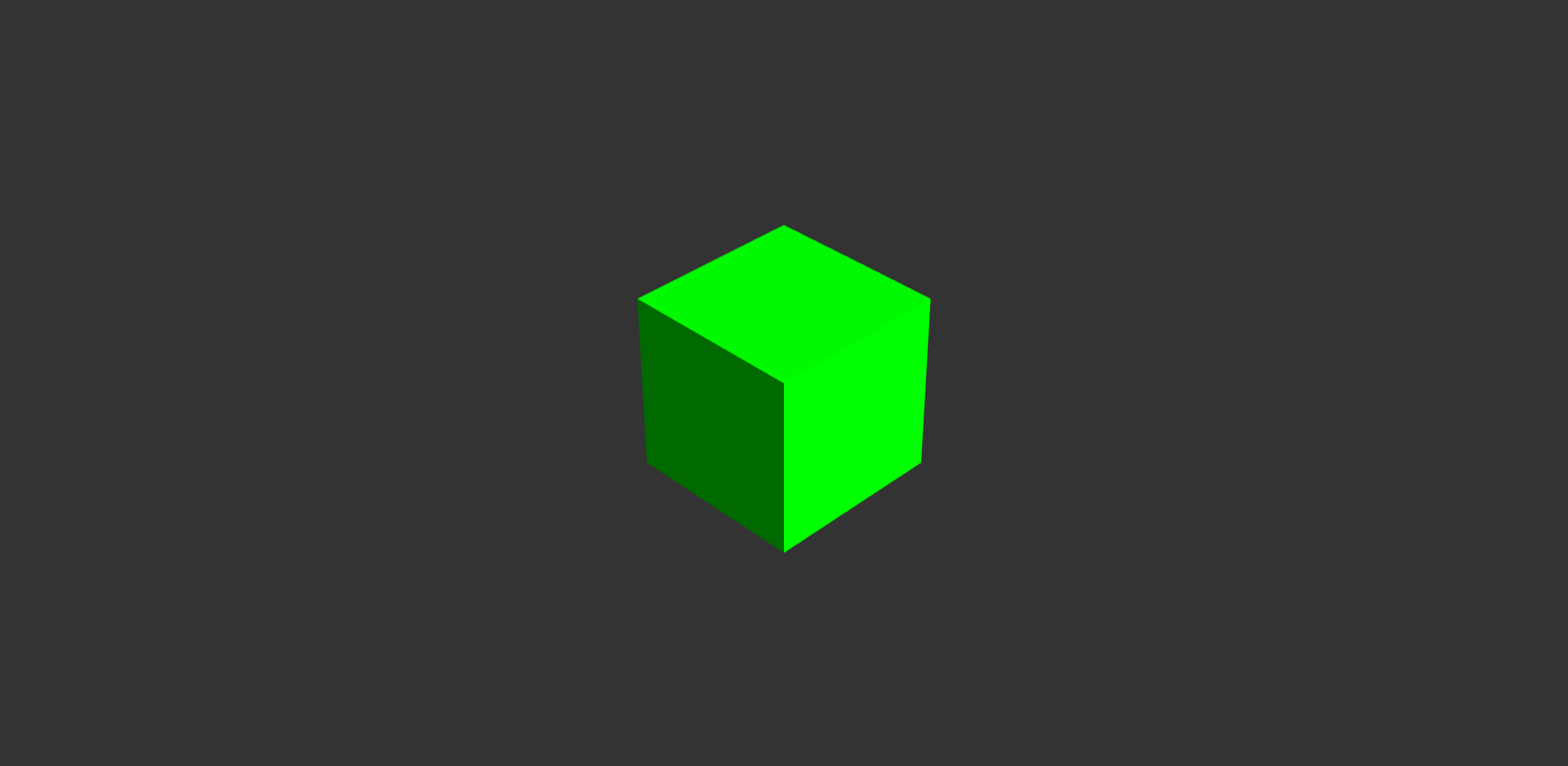
Run your project, you will see a green cube placed in the middle of your screen as the coordinate is equal to the center coordinate.
|
|
104
|
+
|
|
105
|
+
|
|
106
|
+
|
|
107
|
+

|
|
108
|
+
|
|
109
|
+
|
|
110
|
+
|
|
111
|
+
3. Now let's explore more. Add the following line **before Update()**
|
|
112
|
+
|
|
113
|
+
```javascript
|
|
114
|
+
// Add Geojson Map Layer
|
|
115
|
+
const china = 'https://gistcdn.githack.com/isjeffcom/787220f51465c8365b4ccc7247a919e7/raw/1afd3f92f64d8dd01534b6831d65de395f07b43e/china.geojson'
|
|
116
|
+
fetch(china).then(async (res)=>{
|
|
117
|
+
C.Add(new CUBE.GeoLayer("china", await res.json()).AdministrativeMap({border: true, height: .5}))
|
|
118
|
+
})
|
|
119
|
+
|
|
120
|
+
// Add an cylinder bar at Shanghai City Center
|
|
121
|
+
const shanghai = {latitude: 31.230689, longitude: 121.473723}
|
|
122
|
+
const bar = new CUBE.Data("shanghai").Cylinder(shanghai, 150, 40, .5, 0xff6600)
|
|
123
|
+
C.Add(bar)
|
|
124
|
+
```
|
|
125
|
+
|
|
126
|
+
*If the .geojson file fail to request, download it from [here](https://gist.github.com/isjeffcom/787220f51465c8365b4ccc7247a919e7) *
|
|
127
|
+
|
|
128
|
+
|
|
129
|
+
|
|
130
|
+
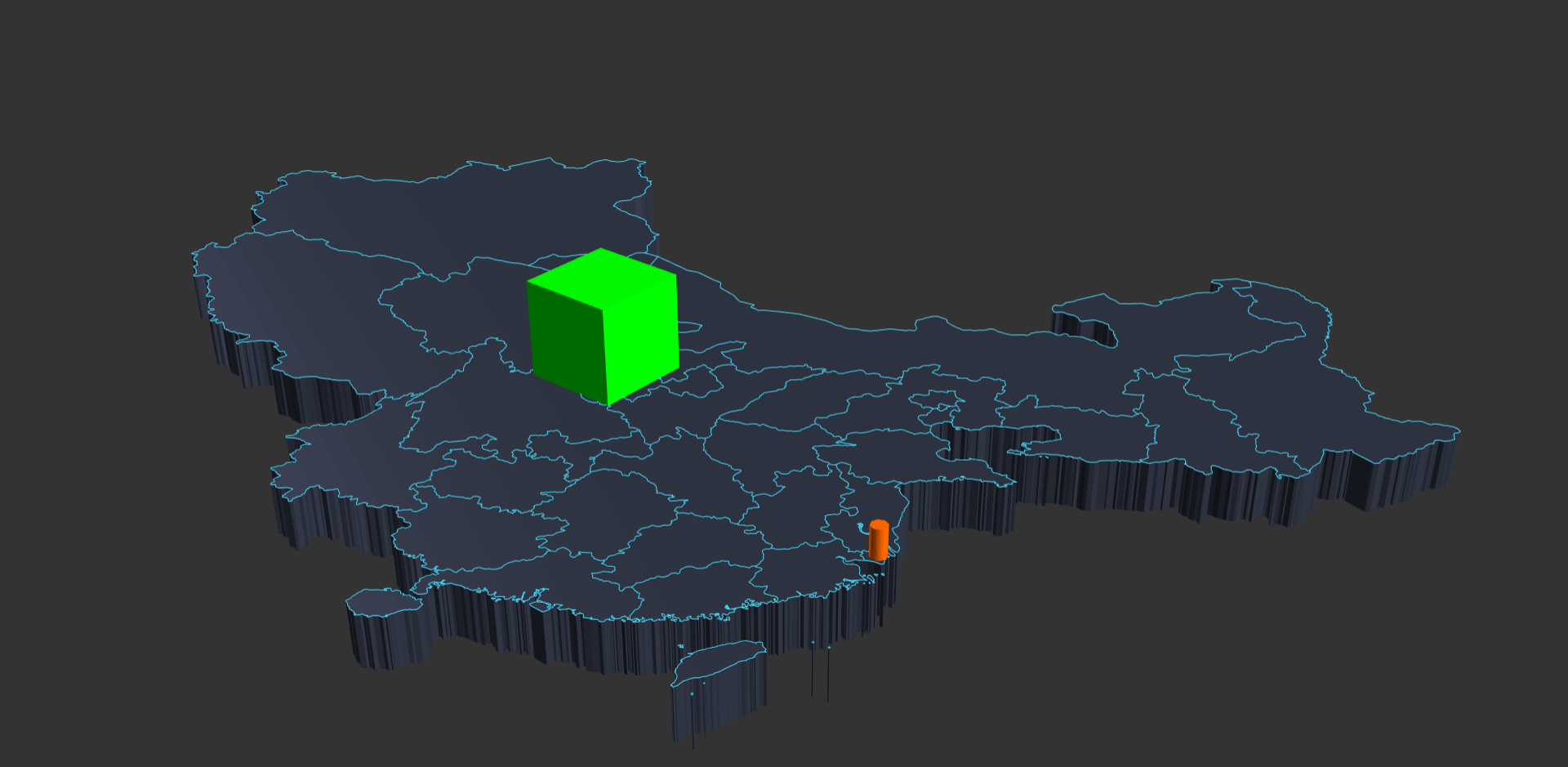
Run your project, you will see an administrative map of China display in the center, with a cylinder bar and... Great. You have finished your first project.
|
|
131
|
+
|
|
132
|
+
|
|
133
|
+
|
|
134
|
+

|
|
135
|
+
|
|
136
|
+
|
|
137
|
+
|
|
138
|
+
### Use High-Level API
|
|
139
|
+
|
|
140
|
+
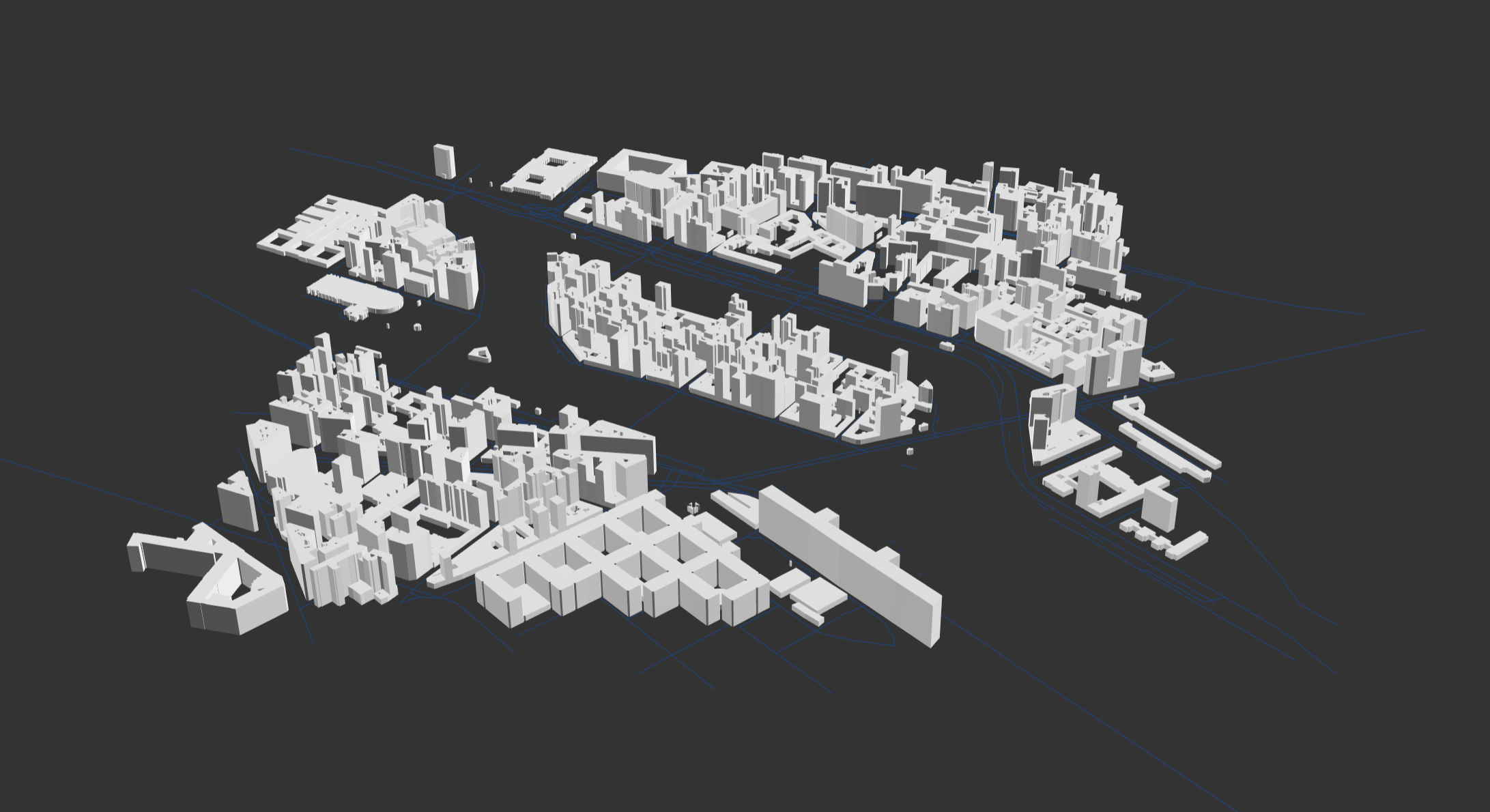
High-level API only contain City constructor for now. The City class enables the abilities to download data, and display any part of city (most of) in 3D around the world by CUBE.gl. You can create a Paris city center (Cathédrale Notre-Dame) in range 500 meters by
|
|
141
|
+
|
|
142
|
+
|
|
143
|
+
|
|
144
|
+
```javascript
|
|
145
|
+
Init()
|
|
146
|
+
Update()
|
|
147
|
+
|
|
148
|
+
// Get Container
|
|
149
|
+
const container = document.getElementById('cont')
|
|
150
|
+
|
|
151
|
+
// Ready for CUBE Instance
|
|
152
|
+
let C
|
|
153
|
+
|
|
154
|
+
async function Init(){
|
|
155
|
+
|
|
156
|
+
// Init CUBE Instance
|
|
157
|
+
C = new CUBE.Space(container, {
|
|
158
|
+
background: "333333",
|
|
159
|
+
center: {latitude: 48.851837, longitude: 2.356544},
|
|
160
|
+
scale: 10,
|
|
161
|
+
camera:{
|
|
162
|
+
position: {x: 6, y: 10, z: 6}
|
|
163
|
+
}
|
|
164
|
+
})
|
|
165
|
+
|
|
166
|
+
const cm = new CUBE.City(500) // range 500 meters
|
|
167
|
+
|
|
168
|
+
const building = await cm.buildings()
|
|
169
|
+
const roads = await cm.roads()
|
|
170
|
+
|
|
171
|
+
document.getElementById("loading").style.display = "none"
|
|
172
|
+
|
|
173
|
+
roads.position.y -= 1
|
|
174
|
+
C.Add(building)
|
|
175
|
+
C.Add(roads)
|
|
176
|
+
|
|
177
|
+
}
|
|
178
|
+
|
|
179
|
+
function Update(){
|
|
180
|
+
requestAnimationFrame(Update)
|
|
181
|
+
C.Runtime()
|
|
182
|
+
}
|
|
183
|
+
```
|
|
184
|
+
|
|
185
|
+
|
|
186
|
+
|
|
187
|
+

|
|
188
|
+
|
|
189
|
+
|
|
190
|
+
|
|
191
|
+
## Use with Threejs
|
|
192
|
+
|
|
193
|
+
The CUBE.gl is build upon three.js. You can access the built-in three.js by CUBE.Space.three or CUBE.Space.Three(). The current CUBE build is using three.js 0.119. You can also try to implement a different version.
|
|
194
|
+
|
|
195
|
+
|
|
196
|
+
|
|
197
|
+
More about three.js you can check [here](https://threejs.org)
|
|
198
|
+
|
|
199
|
+
|
|
200
|
+
|
|
201
|
+
## Use with MVVM Framework
|
|
202
|
+
|
|
203
|
+
The CUBE.gl has no limitation to use in any MVVM framework as long as you can access DOM element to rendering.
|
|
204
|
+
|
|
205
|
+
|
|
206
|
+
|
|
207
|
+
### Use with Vue.js
|
|
208
|
+
|
|
209
|
+
Here is an example how to use CUBE.gl in Vue.js with Vue-Cli.
|
|
210
|
+
|
|
211
|
+
|
|
212
|
+
|
|
213
|
+
```vue
|
|
214
|
+
<template>
|
|
215
|
+
<div id="app">
|
|
216
|
+
<div id="cont"></div>
|
|
217
|
+
</div>
|
|
218
|
+
</template>
|
|
219
|
+
|
|
220
|
+
<script>
|
|
221
|
+
|
|
222
|
+
import * as CUBE from 'cube.gl'
|
|
223
|
+
|
|
224
|
+
export default {
|
|
225
|
+
name: "app",
|
|
226
|
+
data(){
|
|
227
|
+
return{
|
|
228
|
+
C: null,
|
|
229
|
+
Center: {latitude: 41.157937, longitude: -8.629108}, // Porto
|
|
230
|
+
}
|
|
231
|
+
},
|
|
232
|
+
mounted(){
|
|
233
|
+
this.Init()
|
|
234
|
+
this.Update()
|
|
235
|
+
},
|
|
236
|
+
methods: {
|
|
237
|
+
Init(){
|
|
238
|
+
let container = document.getElementById('cont')
|
|
239
|
+
|
|
240
|
+
// Init CUBE Instance
|
|
241
|
+
this.C = new CUBE.Space(container, {
|
|
242
|
+
background: "333333",
|
|
243
|
+
center: this.Center,
|
|
244
|
+
scale: 10
|
|
245
|
+
})
|
|
246
|
+
|
|
247
|
+
//Add a basic box with wgs84 coordinate
|
|
248
|
+
let posi = new CUBE.Coordinate("GPS", {latitude: 41.157937, longitude: -8.629108}).ComputeWorldCoordinate()
|
|
249
|
+
this.C.Add(new CUBE.Shapes("Box", posi.world).Box(1))
|
|
250
|
+
|
|
251
|
+
// Add Sphere
|
|
252
|
+
this.C.Add(new CUBE.Shapes("Sphere", {x: 2, y: 0, z: 2}).Sphere(1, 0x00ffff))
|
|
253
|
+
this.C.Add(new CUBE.Shapes("Cylinder", {x: -2, y: 0, z: -2}).Cylinder(1, 0xff0000))
|
|
254
|
+
|
|
255
|
+
},
|
|
256
|
+
|
|
257
|
+
Update(){
|
|
258
|
+
requestAnimationFrame(this.Update)
|
|
259
|
+
this.C.Runtime()
|
|
260
|
+
}
|
|
261
|
+
}
|
|
262
|
+
}
|
|
263
|
+
</script>
|
|
264
|
+
```
|
|
265
|
+
|
|
266
|
+
|
|
267
|
+
|
|
268
|
+
|
|
269
|
+
|
|
270
|
+
|
|
271
|
+
|
|
272
272
|
[**Full Documentation**](https://cubegl.org)
|
|
@@ -0,0 +1,65 @@
|
|
|
1
|
+
function s(n, o) {
|
|
2
|
+
let t = n.length - o, a = 0;
|
|
3
|
+
do {
|
|
4
|
+
for (let r = o; r > 0; r--)
|
|
5
|
+
n[a + o] += n[a], a++;
|
|
6
|
+
t -= o;
|
|
7
|
+
} while (t > 0);
|
|
8
|
+
}
|
|
9
|
+
function h(n, o, t) {
|
|
10
|
+
let a = 0, r = n.length;
|
|
11
|
+
const l = r / t;
|
|
12
|
+
for (; r > o; ) {
|
|
13
|
+
for (let e = o; e > 0; --e)
|
|
14
|
+
n[a + o] += n[a], ++a;
|
|
15
|
+
r -= o;
|
|
16
|
+
}
|
|
17
|
+
const i = n.slice();
|
|
18
|
+
for (let e = 0; e < l; ++e)
|
|
19
|
+
for (let c = 0; c < t; ++c)
|
|
20
|
+
n[t * e + c] = i[(t - c - 1) * l + e];
|
|
21
|
+
}
|
|
22
|
+
function u(n, o, t, a, r, l) {
|
|
23
|
+
if (!o || o === 1)
|
|
24
|
+
return n;
|
|
25
|
+
for (let c = 0; c < r.length; ++c) {
|
|
26
|
+
if (r[c] % 8 !== 0)
|
|
27
|
+
throw new Error("When decoding with predictor, only multiple of 8 bits are supported.");
|
|
28
|
+
if (r[c] !== r[0])
|
|
29
|
+
throw new Error("When decoding with predictor, all samples must have the same size.");
|
|
30
|
+
}
|
|
31
|
+
const i = r[0] / 8, e = l === 2 ? 1 : r.length;
|
|
32
|
+
for (let c = 0; c < a && !(c * e * t * i >= n.byteLength); ++c) {
|
|
33
|
+
let f;
|
|
34
|
+
if (o === 2) {
|
|
35
|
+
switch (r[0]) {
|
|
36
|
+
case 8:
|
|
37
|
+
f = new Uint8Array(n, c * e * t * i, e * t * i);
|
|
38
|
+
break;
|
|
39
|
+
case 16:
|
|
40
|
+
f = new Uint16Array(n, c * e * t * i, e * t * i / 2);
|
|
41
|
+
break;
|
|
42
|
+
case 32:
|
|
43
|
+
f = new Uint32Array(n, c * e * t * i, e * t * i / 4);
|
|
44
|
+
break;
|
|
45
|
+
default:
|
|
46
|
+
throw new Error(`Predictor 2 not allowed with ${r[0]} bits per sample.`);
|
|
47
|
+
}
|
|
48
|
+
s(f, e);
|
|
49
|
+
} else o === 3 && (f = new Uint8Array(n, c * e * t * i, e * t * i), h(f, e, i));
|
|
50
|
+
}
|
|
51
|
+
return n;
|
|
52
|
+
}
|
|
53
|
+
class d {
|
|
54
|
+
constructor(o) {
|
|
55
|
+
this.parameters = o;
|
|
56
|
+
}
|
|
57
|
+
async decode(o) {
|
|
58
|
+
const t = await this.decodeBlock(o), { tileWidth: a, tileHeight: r, predictor: l, bitsPerSample: i, planarConfiguration: e } = this.parameters;
|
|
59
|
+
return l !== 1 ? u(t, l, a, r, i, e) : t;
|
|
60
|
+
}
|
|
61
|
+
}
|
|
62
|
+
export {
|
|
63
|
+
d as B
|
|
64
|
+
};
|
|
65
|
+
//# sourceMappingURL=basedecoder-B9XUu15s.js.map
|
|
@@ -0,0 +1 @@
|
|
|
1
|
+
{"version":3,"file":"basedecoder-B9XUu15s.js","sources":["../node_modules/geotiff/dist-module/predictor.js","../node_modules/geotiff/dist-module/compression/basedecoder.js"],"sourcesContent":["function decodeRowAcc(row, stride) {\n let length = row.length - stride;\n let offset = 0;\n do {\n for (let i = stride; i > 0; i--) {\n row[offset + stride] += row[offset];\n offset++;\n }\n length -= stride;\n } while (length > 0);\n}\nfunction decodeRowFloatingPoint(row, stride, bytesPerSample) {\n let index = 0;\n let count = row.length;\n const wc = count / bytesPerSample;\n while (count > stride) {\n for (let i = stride; i > 0; --i) {\n row[index + stride] += row[index];\n ++index;\n }\n count -= stride;\n }\n const copy = row.slice();\n for (let i = 0; i < wc; ++i) {\n for (let b = 0; b < bytesPerSample; ++b) {\n row[(bytesPerSample * i) + b] = copy[((bytesPerSample - b - 1) * wc) + i];\n }\n }\n}\nexport function applyPredictor(block, predictor, width, height, bitsPerSample, planarConfiguration) {\n if (!predictor || predictor === 1) {\n return block;\n }\n for (let i = 0; i < bitsPerSample.length; ++i) {\n if (bitsPerSample[i] % 8 !== 0) {\n throw new Error('When decoding with predictor, only multiple of 8 bits are supported.');\n }\n if (bitsPerSample[i] !== bitsPerSample[0]) {\n throw new Error('When decoding with predictor, all samples must have the same size.');\n }\n }\n const bytesPerSample = bitsPerSample[0] / 8;\n const stride = planarConfiguration === 2 ? 1 : bitsPerSample.length;\n for (let i = 0; i < height; ++i) {\n // Last strip will be truncated if height % stripHeight != 0\n if (i * stride * width * bytesPerSample >= block.byteLength) {\n break;\n }\n let row;\n if (predictor === 2) { // horizontal prediction\n switch (bitsPerSample[0]) {\n case 8:\n row = new Uint8Array(block, i * stride * width * bytesPerSample, stride * width * bytesPerSample);\n break;\n case 16:\n row = new Uint16Array(block, i * stride * width * bytesPerSample, stride * width * bytesPerSample / 2);\n break;\n case 32:\n row = new Uint32Array(block, i * stride * width * bytesPerSample, stride * width * bytesPerSample / 4);\n break;\n default:\n throw new Error(`Predictor 2 not allowed with ${bitsPerSample[0]} bits per sample.`);\n }\n decodeRowAcc(row, stride, bytesPerSample);\n }\n else if (predictor === 3) { // horizontal floating point\n row = new Uint8Array(block, i * stride * width * bytesPerSample, stride * width * bytesPerSample);\n decodeRowFloatingPoint(row, stride, bytesPerSample);\n }\n }\n return block;\n}\n","import { applyPredictor } from '../predictor.js';\nexport default class BaseDecoder {\n constructor(parameters) {\n this.parameters = parameters;\n }\n async decode(buffer) {\n const decoded = await this.decodeBlock(buffer);\n const { tileWidth, tileHeight, predictor, bitsPerSample, planarConfiguration, } = this.parameters;\n if (predictor !== 1) {\n return applyPredictor(decoded, predictor, tileWidth, tileHeight, bitsPerSample, planarConfiguration);\n }\n return decoded;\n }\n}\n"],"names":["decodeRowAcc","row","stride","length","offset","i","decodeRowFloatingPoint","bytesPerSample","index","count","wc","copy","b","applyPredictor","block","predictor","width","height","bitsPerSample","planarConfiguration","BaseDecoder","parameters","buffer","decoded","tileWidth","tileHeight"],"mappings":"AAAA,SAASA,EAAaC,GAAKC,GAAQ;AAC/B,MAAIC,IAASF,EAAI,SAASC,GACtBE,IAAS;AACb,KAAG;AACC,aAASC,IAAIH,GAAQG,IAAI,GAAGA;AACxB,MAAAJ,EAAIG,IAASF,CAAM,KAAKD,EAAIG,CAAM,GAClCA;AAEJ,IAAAD,KAAUD;AAAA,EACd,SAASC,IAAS;AACtB;AACA,SAASG,EAAuBL,GAAKC,GAAQK,GAAgB;AACzD,MAAIC,IAAQ,GACRC,IAAQR,EAAI;AAChB,QAAMS,IAAKD,IAAQF;AACnB,SAAOE,IAAQP,KAAQ;AACnB,aAASG,IAAIH,GAAQG,IAAI,GAAG,EAAEA;AAC1B,MAAAJ,EAAIO,IAAQN,CAAM,KAAKD,EAAIO,CAAK,GAChC,EAAEA;AAEN,IAAAC,KAASP;AAAA,EACb;AACA,QAAMS,IAAOV,EAAI,MAAK;AACtB,WAASI,IAAI,GAAGA,IAAIK,GAAI,EAAEL;AACtB,aAASO,IAAI,GAAGA,IAAIL,GAAgB,EAAEK;AAClC,MAAAX,EAAKM,IAAiBF,IAAKO,CAAC,IAAID,GAAOJ,IAAiBK,IAAI,KAAKF,IAAML,CAAC;AAGpF;AACO,SAASQ,EAAeC,GAAOC,GAAWC,GAAOC,GAAQC,GAAeC,GAAqB;AAChG,MAAI,CAACJ,KAAaA,MAAc;AAC5B,WAAOD;AAEX,WAAST,IAAI,GAAGA,IAAIa,EAAc,QAAQ,EAAEb,GAAG;AAC3C,QAAIa,EAAcb,CAAC,IAAI,MAAM;AACzB,YAAM,IAAI,MAAM,sEAAsE;AAE1F,QAAIa,EAAcb,CAAC,MAAMa,EAAc,CAAC;AACpC,YAAM,IAAI,MAAM,oEAAoE;AAAA,EAE5F;AACA,QAAMX,IAAiBW,EAAc,CAAC,IAAI,GACpChB,IAASiB,MAAwB,IAAI,IAAID,EAAc;AAC7D,WAASb,IAAI,GAAGA,IAAIY,KAEZ,EAAAZ,IAAIH,IAASc,IAAQT,KAAkBO,EAAM,aAFzB,EAAET,GAAG;AAK7B,QAAIJ;AACJ,QAAIc,MAAc,GAAG;AACjB,cAAQG,EAAc,CAAC,GAAC;AAAA,QACpB,KAAK;AACD,UAAAjB,IAAM,IAAI,WAAWa,GAAOT,IAAIH,IAASc,IAAQT,GAAgBL,IAASc,IAAQT,CAAc;AAChG;AAAA,QACJ,KAAK;AACD,UAAAN,IAAM,IAAI,YAAYa,GAAOT,IAAIH,IAASc,IAAQT,GAAgBL,IAASc,IAAQT,IAAiB,CAAC;AACrG;AAAA,QACJ,KAAK;AACD,UAAAN,IAAM,IAAI,YAAYa,GAAOT,IAAIH,IAASc,IAAQT,GAAgBL,IAASc,IAAQT,IAAiB,CAAC;AACrG;AAAA,QACJ;AACI,gBAAM,IAAI,MAAM,gCAAgCW,EAAc,CAAC,CAAC,mBAAmB;AAAA,MACvG;AACY,MAAAlB,EAAaC,GAAKC,CAAsB;AAAA,IAC5C,MACK,CAAIa,MAAc,MACnBd,IAAM,IAAI,WAAWa,GAAOT,IAAIH,IAASc,IAAQT,GAAgBL,IAASc,IAAQT,CAAc,GAChGD,EAAuBL,GAAKC,GAAQK,CAAc;AAAA,EAE1D;AACA,SAAOO;AACX;ACtEe,MAAMM,EAAY;AAAA,EAC7B,YAAYC,GAAY;AACpB,SAAK,aAAaA;AAAA,EACtB;AAAA,EACA,MAAM,OAAOC,GAAQ;AACjB,UAAMC,IAAU,MAAM,KAAK,YAAYD,CAAM,GACvC,EAAE,WAAAE,GAAW,YAAAC,GAAY,WAAAV,GAAW,eAAAG,GAAe,qBAAAC,EAAmB,IAAM,KAAK;AACvF,WAAIJ,MAAc,IACPF,EAAeU,GAASR,GAAWS,GAAWC,GAAYP,GAAeC,CAAmB,IAEhGI;AAAA,EACX;AACJ;","x_google_ignoreList":[0,1]}
|
|
@@ -0,0 +1 @@
|
|
|
1
|
+
{"version":3,"file":"cubegl.es.js","sources":[],"sourcesContent":[],"names":[],"mappings":";"}
|