csvms 0.9.6 → 0.9.7
This diff represents the content of publicly available package versions that have been released to one of the supported registries. The information contained in this diff is provided for informational purposes only and reflects changes between package versions as they appear in their respective public registries.
- package/README.md +140 -0
- package/package.json +3 -2
package/README.md
ADDED
|
@@ -0,0 +1,140 @@
|
|
|
1
|
+
# CSVMS
|
|
2
|
+
|
|
3
|
+
Edit local CSV files with a **CMS-like UI** (list view + detail form).
|
|
4
|
+
|
|
5
|
+
CSV files are normalized on save (column order, newlines, quoting, sorting) to ensure clean and stable Git diffs.
|
|
6
|
+
|
|
7
|
+
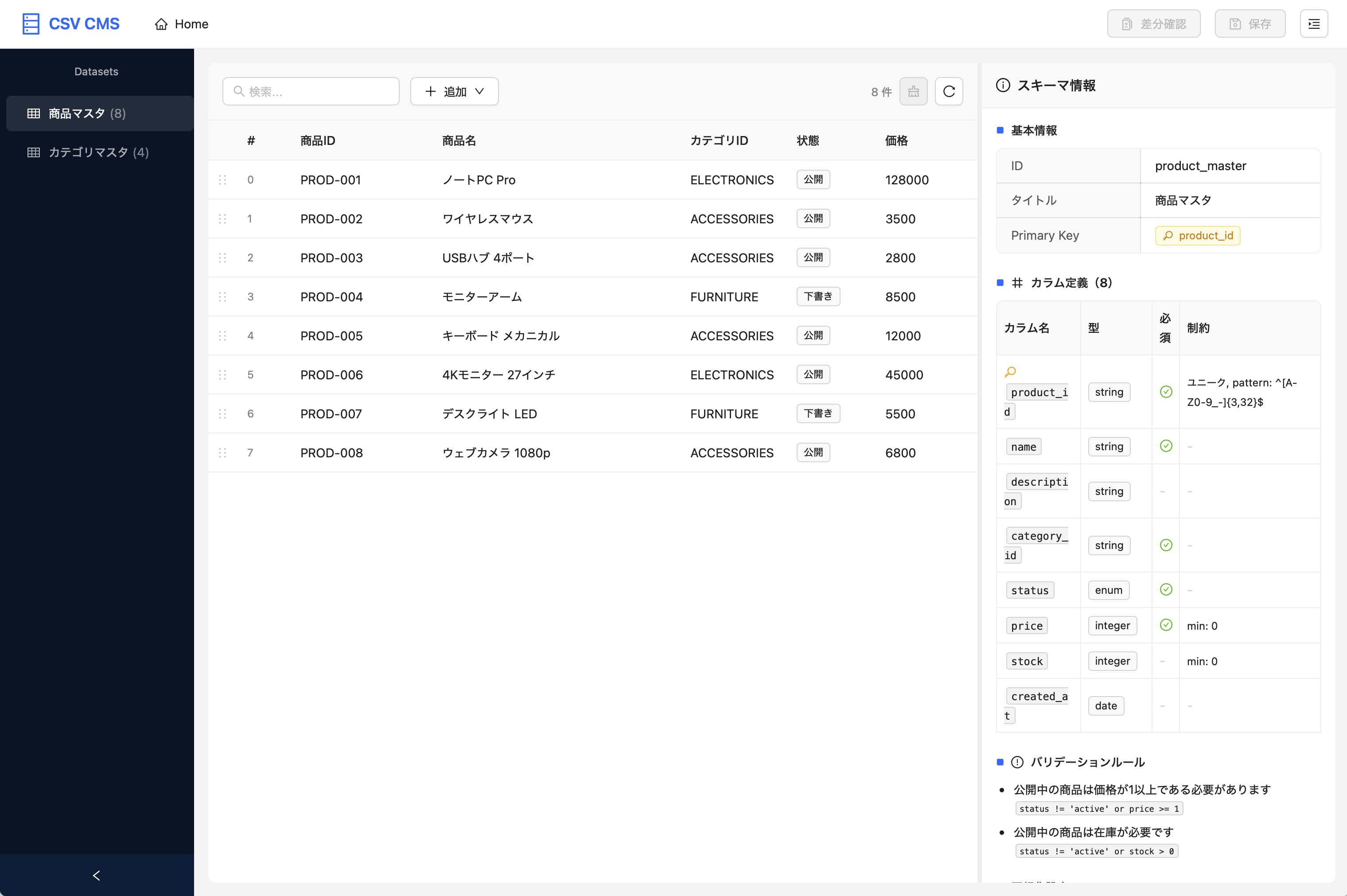
|
|
8
|
+
|
|
9
|
+
## Features
|
|
10
|
+
|
|
11
|
+
- 🖥️ **CMS-like UI** - Edit CSV files with intuitive list and detail form views
|
|
12
|
+
- 📋 **Schema Definition** - Define forms, validation, and normalization rules in YAML/JSON
|
|
13
|
+
- 🔄 **Stable Git Diffs** - CSV normalization minimizes unnecessary changes
|
|
14
|
+
- 🔒 **Security** - Workspace boundary enforcement, path traversal protection
|
|
15
|
+
- ⚡ **Easy Start** - Single `npx` command (no clone required)
|
|
16
|
+
|
|
17
|
+
## Quick Start
|
|
18
|
+
|
|
19
|
+
```bash
|
|
20
|
+
# Run in the directory containing your CSV files
|
|
21
|
+
npx csvms
|
|
22
|
+
```
|
|
23
|
+
|
|
24
|
+
That's it! A browser will open with the CMS-like UI.
|
|
25
|
+
|
|
26
|
+
## Screenshots
|
|
27
|
+
|
|
28
|
+
### Home Screen
|
|
29
|
+
|
|
30
|
+
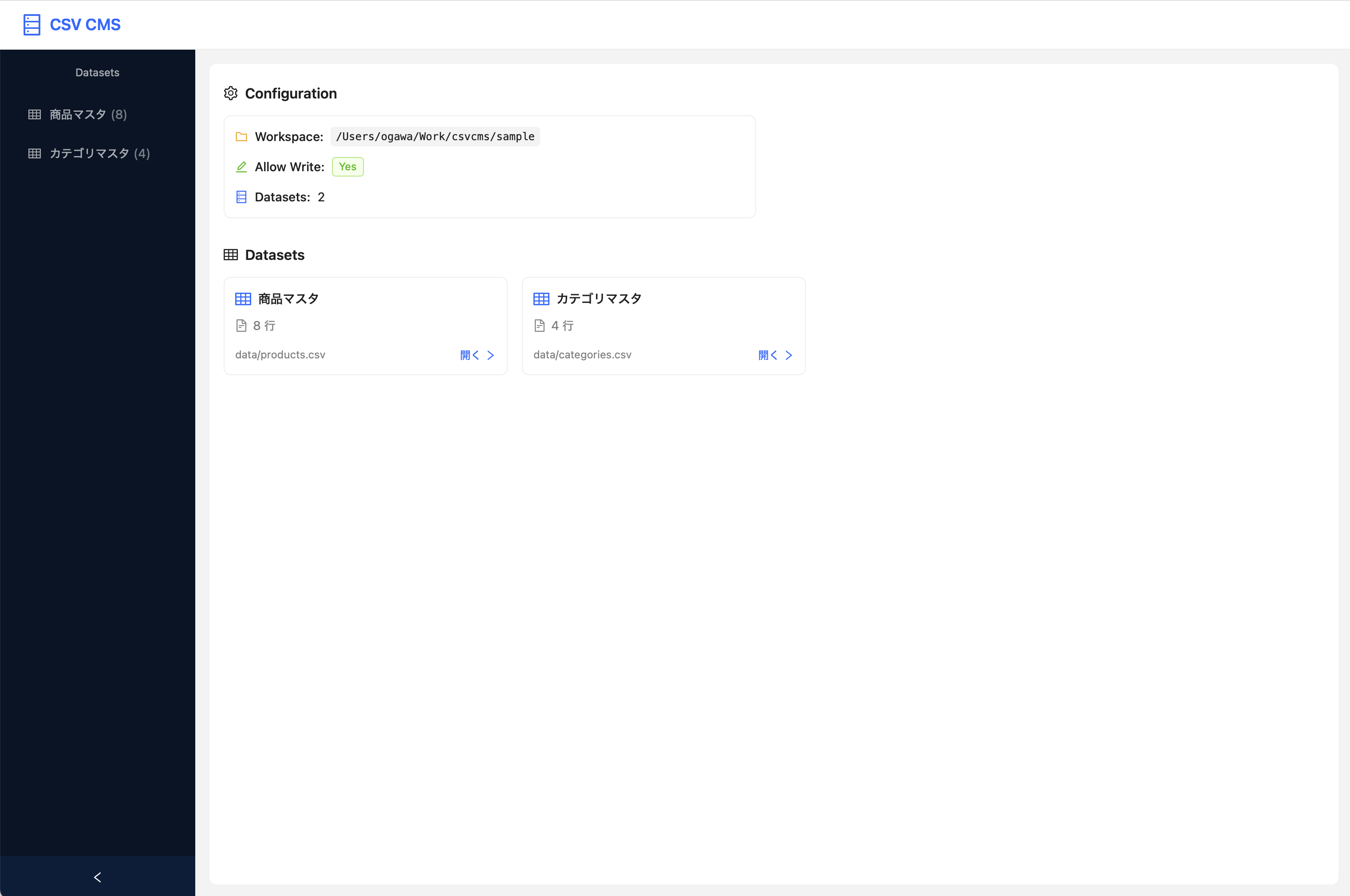
|
|
31
|
+
|
|
32
|
+
### Dataset Editor
|
|
33
|
+
|
|
34
|
+
Table/tile view with detail form. Supports drag-and-drop reordering and keyboard navigation.
|
|
35
|
+
|
|
36
|
+

|
|
37
|
+
|
|
38
|
+
### Single Dataset Mode
|
|
39
|
+
|
|
40
|
+
Use `--schema` option for editing a single dataset without a config file.
|
|
41
|
+
|
|
42
|
+
```bash
|
|
43
|
+
npx csvms --schema schemas/product.schema.yaml --allow-write
|
|
44
|
+
```
|
|
45
|
+
|
|
46
|
+
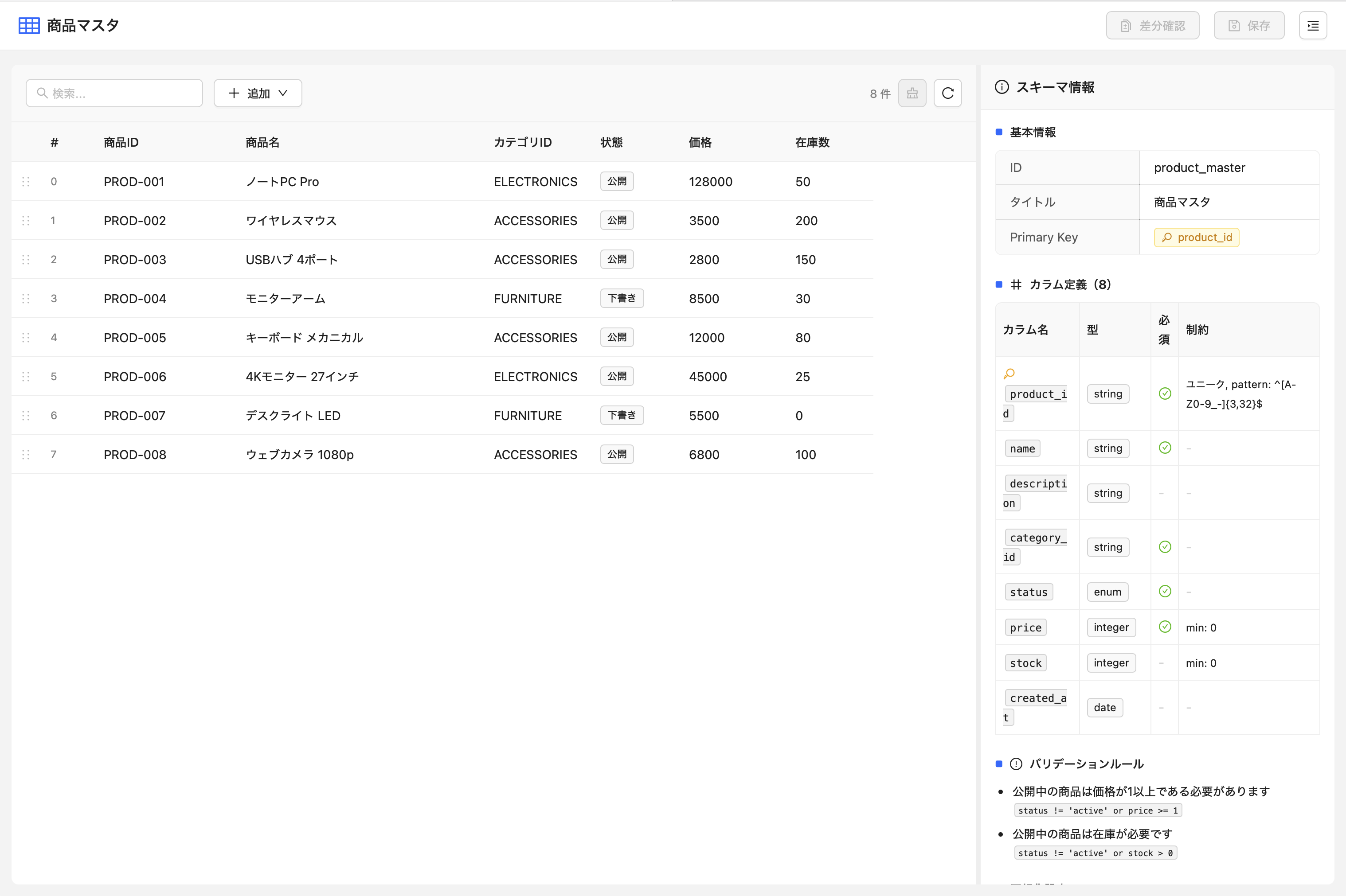
|
|
47
|
+
|
|
48
|
+
## CLI Options
|
|
49
|
+
|
|
50
|
+
```bash
|
|
51
|
+
csvms [options]
|
|
52
|
+
|
|
53
|
+
Options:
|
|
54
|
+
--config <path> Config file path (default: search in CWD)
|
|
55
|
+
--port <number> Port number (default: auto)
|
|
56
|
+
--host <host> Bind host (default: 127.0.0.1)
|
|
57
|
+
--no-open Don't open browser automatically
|
|
58
|
+
--read-only Read-only mode
|
|
59
|
+
--allow-write Allow write operations
|
|
60
|
+
--workspace <path> Workspace root path (default: CWD)
|
|
61
|
+
--log-level <level> Log level (debug|info|warn|error)
|
|
62
|
+
--schema <path> Single dataset mode with schema file
|
|
63
|
+
```
|
|
64
|
+
|
|
65
|
+
## Configuration
|
|
66
|
+
|
|
67
|
+
Create `csvms.config.yaml` in your project root:
|
|
68
|
+
|
|
69
|
+
```yaml
|
|
70
|
+
version: 1
|
|
71
|
+
workspace:
|
|
72
|
+
root: "."
|
|
73
|
+
allowWrite: true
|
|
74
|
+
|
|
75
|
+
datasets:
|
|
76
|
+
- id: "product_master"
|
|
77
|
+
title: "Product Master"
|
|
78
|
+
csvPath: "data/products.csv"
|
|
79
|
+
schemaPath: "schemas/product.schema.yaml"
|
|
80
|
+
```
|
|
81
|
+
|
|
82
|
+
## Schema Definition
|
|
83
|
+
|
|
84
|
+
Example `schemas/product.schema.yaml`:
|
|
85
|
+
|
|
86
|
+
```yaml
|
|
87
|
+
schemaVersion: 1
|
|
88
|
+
id: product_master
|
|
89
|
+
title: Product Master
|
|
90
|
+
|
|
91
|
+
csv:
|
|
92
|
+
delimiter: ","
|
|
93
|
+
header: true
|
|
94
|
+
primaryKey: "product_id"
|
|
95
|
+
normalize:
|
|
96
|
+
quotePolicy: "minimal"
|
|
97
|
+
newline: "lf"
|
|
98
|
+
|
|
99
|
+
columns:
|
|
100
|
+
- key: product_id
|
|
101
|
+
label: Product ID
|
|
102
|
+
type: string
|
|
103
|
+
required: true
|
|
104
|
+
unique: true
|
|
105
|
+
ui: { widget: text, readonlyOnEdit: true }
|
|
106
|
+
|
|
107
|
+
- key: name
|
|
108
|
+
label: Product Name
|
|
109
|
+
type: string
|
|
110
|
+
required: true
|
|
111
|
+
ui: { widget: text }
|
|
112
|
+
|
|
113
|
+
- key: price
|
|
114
|
+
label: Price
|
|
115
|
+
type: integer
|
|
116
|
+
required: true
|
|
117
|
+
min: 0
|
|
118
|
+
ui: { widget: number }
|
|
119
|
+
|
|
120
|
+
ui:
|
|
121
|
+
list:
|
|
122
|
+
columns:
|
|
123
|
+
- { key: product_id, width: 160 }
|
|
124
|
+
- { key: name, width: 280 }
|
|
125
|
+
- { key: price, width: 120, align: right }
|
|
126
|
+
```
|
|
127
|
+
|
|
128
|
+
## Documentation
|
|
129
|
+
|
|
130
|
+
- [Configuration Guide](https://github.com/foo-ogawa/csvms/blob/main/docs/CONFIGURATION.md) - Full schema and config reference
|
|
131
|
+
- [API Reference](https://github.com/foo-ogawa/csvms/blob/main/docs/API.md) - REST API documentation
|
|
132
|
+
|
|
133
|
+
## Requirements
|
|
134
|
+
|
|
135
|
+
- Node.js >= 20.0.0
|
|
136
|
+
|
|
137
|
+
## License
|
|
138
|
+
|
|
139
|
+
MIT
|
|
140
|
+
|
package/package.json
CHANGED
|
@@ -1,6 +1,6 @@
|
|
|
1
1
|
{
|
|
2
2
|
"name": "csvms",
|
|
3
|
-
"version": "0.9.
|
|
3
|
+
"version": "0.9.7",
|
|
4
4
|
"description": "CSVMS - Edit CSV files with a CMS-like UI",
|
|
5
5
|
"main": "dist/index.js",
|
|
6
6
|
"types": "dist/index.d.ts",
|
|
@@ -8,7 +8,8 @@
|
|
|
8
8
|
"csvms": "./dist/cli.js"
|
|
9
9
|
},
|
|
10
10
|
"files": [
|
|
11
|
-
"dist"
|
|
11
|
+
"dist",
|
|
12
|
+
"README.md"
|
|
12
13
|
],
|
|
13
14
|
"scripts": {
|
|
14
15
|
"dev": "tsx watch src/cli.ts",
|