create-playwright-pom-start 1.0.7 → 1.0.9
This diff represents the content of publicly available package versions that have been released to one of the supported registries. The information contained in this diff is provided for informational purposes only and reflects changes between package versions as they appear in their respective public registries.
- package/README.md +70 -27
- package/package.json +1 -1
package/README.md
CHANGED
|
@@ -1,53 +1,76 @@
|
|
|
1
|
-
|
|
2
|
-
|
|
3
|
-
|
|
4
|
-
|
|
5
|
-
|
|
6
|
-
|
|
7
|
-
|
|
1
|
+
<div align="center">
|
|
2
|
+
<h1>Playwright POM framework</h1>
|
|
3
|
+
<hr />
|
|
4
|
+
<p><small>An open source CLI-tool for quick start with Page Object Model project and Playwright framework</small></p>
|
|
5
|
+
<p>
|
|
6
|
+
<a href="https://www.npmjs.com/package/create-playwright-pom-start"><img src="https://img.shields.io/npm/v/create-playwright-pom-start?color=0062cc" alt="npm version" /></a>
|
|
7
|
+
<a href="https://github.com/GabrielDali/pom-pw-js/actions"><img src="https://img.shields.io/github/actions/workflow/status/GabrielDali/pom-pw-js/publish.yml?branch=main&label=CI&logo=github" alt="CI" /></a>
|
|
8
|
+
<a href="https://www.npmjs.com/package/create-playwright-pom-start"><img src="https://img.shields.io/npm/l/create-playwright-pom-start?color=006e75" alt="MIT License" /></a>
|
|
9
|
+
</p>
|
|
10
|
+
</div>
|
|
8
11
|
|
|
9
12
|
```bash
|
|
10
13
|
npm init playwright-pom-start
|
|
11
14
|
```
|
|
12
15
|
|
|
13
|
-
|
|
16
|
+
## Table of Contents
|
|
14
17
|
|
|
15
|
-
|
|
16
|
-
|
|
17
|
-
|
|
18
|
+
1. 💡 [Why use this](#why-use-this)
|
|
19
|
+
2. 🚀 [Getting started](#getting-started)
|
|
20
|
+
- 2.1 [New project](#new-project)
|
|
21
|
+
- 2.2 [Add pages to an existing project](#add-pages-to-an-existing-project)
|
|
22
|
+
3. ⚙️ [How it works](#how-it-works)
|
|
23
|
+
4. 🗂️ [Generated structure](#generated-structure)
|
|
24
|
+
5. 🏷️ [Page naming](#page-naming)
|
|
25
|
+
6. 🖼️ [Examples](#examples)
|
|
26
|
+
7. 🔗 [Repository & docs](#repository--docs)
|
|
27
|
+
8. 👤 [Author & license](#author--license)
|
|
18
28
|
|
|
29
|
+
## 💡 Why Playwright POM?
|
|
19
30
|
|
|
31
|
+
- **Zero setup time:** One command creates your entire framework structure, folders, base classes, config files. No more copy-pasting from old projects.
|
|
32
|
+
- **Smart and flexible:** Installs Playwright if needed, lets you pick JavaScript or TypeScript, and scaffolds page classes on the spot or later. Yes, batteries included.
|
|
33
|
+
- **Works with existing projects:** Already have a Playwright repo? Add new page objects anytime without touching your current setup.
|
|
20
34
|
|
|
21
|
-
|
|
35
|
+
> **Note:** All generated code uses ES module syntax (import/export). No require(), no CommonJS.
|
|
22
36
|
|
|
23
|
-
|
|
24
|
-
2. **Page names** — optional; space-separated, or Enter to skip. Names are normalized to PascalCase + `Page` (e.g. `dashboard` → `DashboardPage`).
|
|
25
|
-
3. **Playwright** — installed automatically if missing.
|
|
37
|
+
## 🚀 Getting started
|
|
26
38
|
|
|
27
39
|
**Requirements:** Node.js **v18** or later.
|
|
28
40
|
|
|
29
|
-
|
|
41
|
+
### New project
|
|
42
|
+
|
|
43
|
+
Run in an empty folder or from any directory to scaffold into a named subfolder:
|
|
30
44
|
|
|
31
45
|
```bash
|
|
32
|
-
npm
|
|
33
|
-
npx playwright-pom
|
|
46
|
+
npm init playwright-pom-start
|
|
34
47
|
```
|
|
35
48
|
|
|
36
|
-
Or scaffold in a subfolder: `npx playwright-pom my-project`
|
|
37
49
|
|
|
38
|
-
|
|
50
|
+
You'll be asked for:
|
|
51
|
+
|
|
52
|
+
1. **Language** — JavaScript or TypeScript (arrow keys + Enter). Default is JS. Skipped if Playwright and language are already detected in the project.
|
|
53
|
+
2. **Page names** — optional; type names separated by spaces, or press Enter to skip. Names are normalized to PascalCase + `Page` (e.g. `dashboard` → `DashboardPage`).
|
|
54
|
+
3. **Playwright** — installed automatically if missing.
|
|
55
|
+
|
|
56
|
+
### Add pages to an existing project
|
|
57
|
+
|
|
58
|
+
Run from the root of your project, where the `pages` folder lives:
|
|
59
|
+
|
|
39
60
|
```bash
|
|
40
61
|
npx playwright-pom add pages
|
|
41
62
|
```
|
|
42
63
|
|
|
43
|
-
|
|
64
|
+
The CLI detects your project language from existing config files or the `pages` folder contents. If it can't detect a language, it asks. If no `pages` folder exists yet, it creates one and copies `BasePage` before prompting for page names.
|
|
65
|
+
|
|
66
|
+
## ⚙️ How it works
|
|
44
67
|
|
|
45
68
|
- If Playwright is **already installed** in the folder, the CLI detects JS or TS and skips the language question.
|
|
46
69
|
- Templates are copied, folders and placeholder files are created.
|
|
47
|
-
- If Playwright isn
|
|
70
|
+
- If Playwright isn't installed yet, the CLI runs `npm init playwright@latest -- --quiet --lang=js` or `--lang=ts` to match the chosen language.
|
|
48
71
|
- If the folder already has a scaffold (e.g. `pages/BasePage.js` or `pages/BasePage.ts`), the CLI prints **"Project already set up. Skipping."** and may run `npm install`.
|
|
49
72
|
|
|
50
|
-
## Generated structure
|
|
73
|
+
## 🗂️ Generated structure
|
|
51
74
|
|
|
52
75
|
```
|
|
53
76
|
<project>/
|
|
@@ -65,17 +88,37 @@ npx playwright-pom add pages
|
|
|
65
88
|
└── .gitignore # includes states
|
|
66
89
|
```
|
|
67
90
|
|
|
91
|
+
All page classes extend **BasePage** and pass the Playwright `page` to the constructor. Example (JavaScript):
|
|
92
|
+
|
|
93
|
+
```js
|
|
94
|
+
import BasePage from "./BasePage.js";
|
|
95
|
+
|
|
96
|
+
class DashboardPage extends BasePage {
|
|
97
|
+
constructor(page) {
|
|
98
|
+
super(page);
|
|
99
|
+
}
|
|
100
|
+
}
|
|
101
|
+
|
|
102
|
+
export default DashboardPage;
|
|
103
|
+
```
|
|
104
|
+
|
|
105
|
+
For TypeScript, the same pattern is used with `import type { Page } from "@playwright/test"` and `constructor(page: Page)`.
|
|
106
|
+
|
|
68
107
|
- **BasePage** — Shared class with the Playwright `page`; other pages extend it.
|
|
69
108
|
- **utils/logger** — Placeholder for your logger.
|
|
70
109
|
- **utils/auth** — For auth-related helpers.
|
|
110
|
+
- **fixtures/** — Add your fixtures in this folder.
|
|
111
|
+
- **constants/** — Add your constants files here.
|
|
112
|
+
- **states/** — For storage state files, already added into .gitignore file
|
|
71
113
|
- **global-setup** / **global-teardown** — Default async functions; wire them in `playwright.config.*` if you use them.
|
|
72
114
|
|
|
73
|
-
## Page naming
|
|
115
|
+
## 🏷️ Page naming
|
|
74
116
|
|
|
75
117
|
- Letters only (no numbers, `.js`/`.ts`, or symbols).
|
|
76
118
|
- Converted to PascalCase + `Page` (e.g. `checkout` → `CheckoutPage`, `userProfile` → `UserProfilePage`).
|
|
77
119
|
- Invalid tokens and existing files are skipped (reported in the console).
|
|
78
120
|
|
|
121
|
+
## 🖼️ Examples
|
|
79
122
|
|
|
80
123
|
**JavaScript based output project structure**
|
|
81
124
|
|
|
@@ -93,12 +136,12 @@ npx playwright-pom add pages
|
|
|
93
136
|
|
|
94
137
|
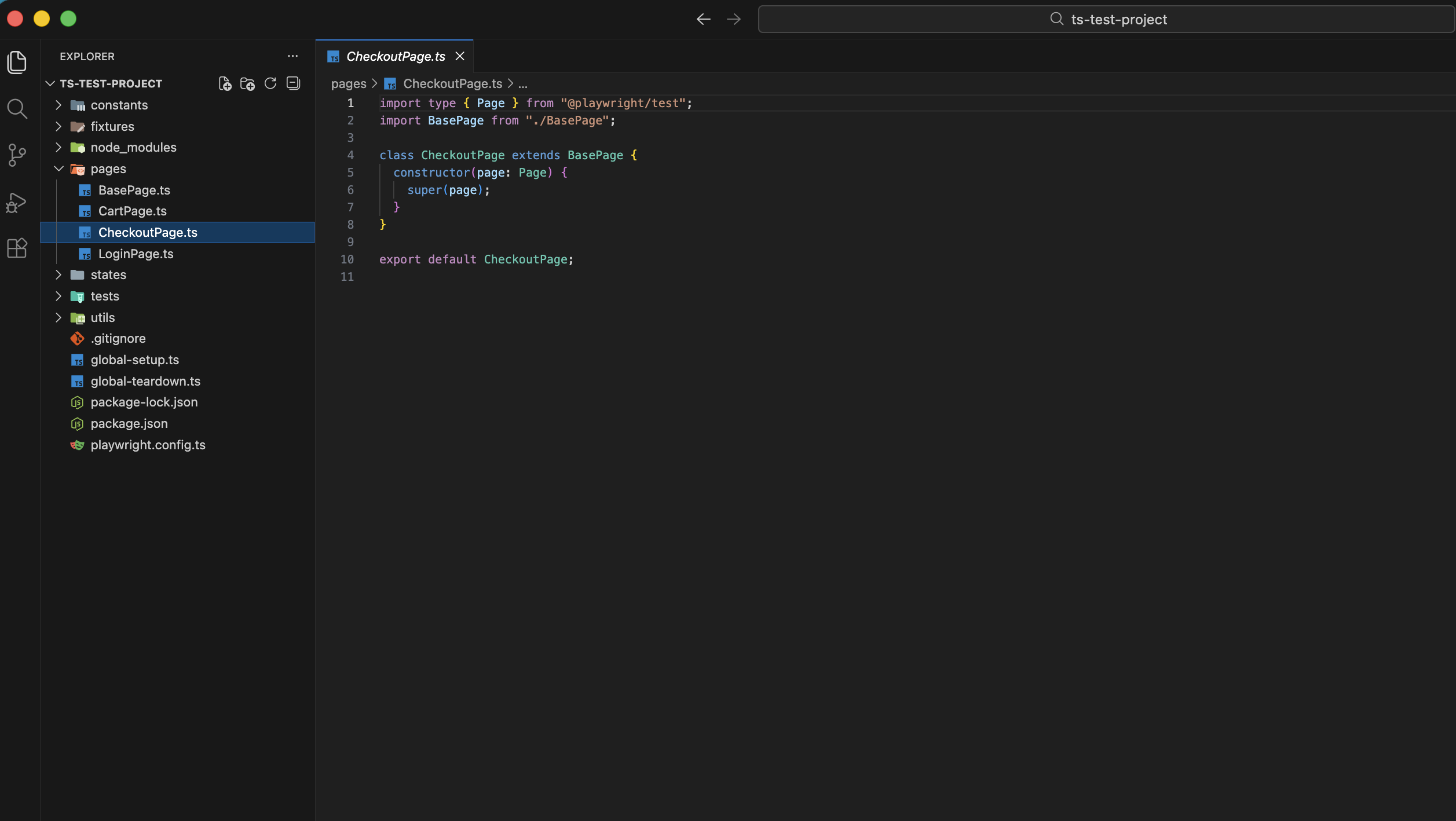
|
|
95
138
|
|
|
96
|
-
## Repository & docs
|
|
139
|
+
## 🔗 Repository & docs
|
|
97
140
|
|
|
98
141
|
- **GitHub:** [github.com/GabrielDali/pom-pw-js](https://github.com/GabrielDali/pom-pw-js)
|
|
99
142
|
- **Main package (playwright-pom):** [npmjs.com/package/playwright-pom](https://www.npmjs.com/package/playwright-pom)
|
|
100
143
|
|
|
101
|
-
## Author & license
|
|
144
|
+
## 👤 Author & license
|
|
102
145
|
|
|
103
|
-
**Author:** [Gabriel Dali](https://www.linkedin.com/in/gabriel-dali-qa/)
|
|
146
|
+
**Author:** [Gabriel Dali](https://www.linkedin.com/in/gabriel-dali-qa/)
|
|
104
147
|
**License:** MIT
|