create-openclaw-bot 5.8.24 → 5.9.0
This diff represents the content of publicly available package versions that have been released to one of the supported registries. The information contained in this diff is provided for informational purposes only and reflects changes between package versions as they appear in their respective public registries.
- package/README.md +294 -183
- package/README.vi.md +294 -183
- package/dist/cli.js +172 -162
- package/dist/server/local-server.js +4079 -3503
- package/dist/setup/data/channels.js +1 -1
- package/dist/setup/data/header.js +80 -80
- package/dist/setup/data/plugins.js +1 -1
- package/dist/setup/data/providers.js +1 -1
- package/dist/setup/shared/bot-config-gen.js +528 -511
- package/dist/setup/shared/common-gen.js +314 -314
- package/dist/setup/shared/docker-gen.js +606 -586
- package/dist/setup/shared/install-gen.js +566 -566
- package/dist/setup/shared/workspace-gen.js +679 -648
- package/dist/web/app.js +1592 -1414
- package/dist/web/index.html +14 -14
- package/dist/web/lark.svg +1 -0
- package/dist/web/styles.css +1448 -1376
- package/node_modules/wrap-ansi/index.js +0 -0
- package/package.json +3 -2
package/README.md
CHANGED
|
@@ -1,183 +1,294 @@
|
|
|
1
|
-
<div align="center">
|
|
2
|
-
|
|
3
|
-
# 🦞 OpenClaw Setup
|
|
4
|
-
|
|
5
|
-
|
|
6
|
-
|
|
7
|
-
|
|
8
|
-
|
|
9
|
-
|
|
10
|
-
|
|
11
|
-
|
|
12
|
-
|
|
13
|
-
|
|
14
|
-
|
|
15
|
-
|
|
16
|
-
|
|
17
|
-
|
|
18
|
-
|
|
19
|
-
|
|
20
|
-
|
|
21
|
-
|
|
22
|
-
|
|
23
|
-
|
|
24
|
-
|
|
25
|
-
|
|
26
|
-
|
|
27
|
-
|
|
28
|
-
|
|
29
|
-
|
|
30
|
-
|
|
31
|
-
|
|
32
|
-
|
|
33
|
-
|
|
34
|
-
|
|
35
|
-
- **
|
|
36
|
-
|
|
37
|
-
|
|
38
|
-
|
|
39
|
-
|
|
40
|
-
|
|
41
|
-
|
|
42
|
-
|
|
43
|
-
|
|
44
|
-
|
|
45
|
-
|
|
46
|
-
|
|
47
|
-
|
|
48
|
-
|
|
49
|
-
|
|
50
|
-
- Automatically
|
|
51
|
-
-
|
|
52
|
-
-
|
|
53
|
-
- **
|
|
54
|
-
|
|
55
|
-
</details>
|
|
56
|
-
|
|
57
|
-
|
|
58
|
-
|
|
59
|
-
|
|
60
|
-
|
|
61
|
-
-
|
|
62
|
-
-
|
|
63
|
-
-
|
|
64
|
-
-
|
|
65
|
-
-
|
|
66
|
-
-
|
|
67
|
-
-
|
|
68
|
-
|
|
69
|
-
|
|
70
|
-
|
|
71
|
-
|
|
72
|
-
|
|
73
|
-
|
|
74
|
-
|
|
75
|
-
|
|
76
|
-
|
|
77
|
-
|
|
78
|
-
|
|
79
|
-
|
|
80
|
-
|
|
81
|
-
|
|
82
|
-
|
|
83
|
-
|
|
84
|
-
|
|
85
|
-
|
|
86
|
-
|
|
87
|
-
|
|
88
|
-
|
|
89
|
-
|
|
90
|
-
|
|
91
|
-
|
|
92
|
-
|
|
93
|
-
|
|
94
|
-
|
|
95
|
-
|
|
96
|
-
|
|
97
|
-
|
|
98
|
-
|
|
99
|
-
|
|
100
|
-
|
|
101
|
-
|
|
102
|
-
|
|
103
|
-
|
|
104
|
-
|
|
105
|
-
|
|
106
|
-
|
|
107
|
-
|
|
108
|
-
|
|
109
|
-
|
|
110
|
-
- **
|
|
111
|
-
|
|
112
|
-
|
|
113
|
-
|
|
114
|
-
|
|
115
|
-
|
|
116
|
-
|
|
117
|
-
|
|
118
|
-
```
|
|
119
|
-
|
|
120
|
-
|
|
121
|
-
|
|
122
|
-
|
|
123
|
-
|
|
124
|
-
|
|
125
|
-
|
|
126
|
-
|
|
127
|
-
|
|
128
|
-
|
|
129
|
-
|
|
130
|
-
|
|
131
|
-
|
|
132
|
-
|
|
133
|
-
|
|
134
|
-
|
|
135
|
-
|
|
136
|
-
|
|
137
|
-
|
|
138
|
-
|
|
139
|
-
|
|
140
|
-
|
|
141
|
-
|
|
142
|
-
|
|
143
|
-
|
|
144
|
-
|
|
145
|
-
|
|
146
|
-
|
|
147
|
-
|
|
148
|
-
|
|
149
|
-
|
|
150
|
-
|
|
151
|
-
|
|
152
|
-
|
|
153
|
-
-
|
|
154
|
-
|
|
155
|
-
|
|
156
|
-
|
|
157
|
-
|
|
158
|
-
|
|
159
|
-
|
|
160
|
-
|
|
161
|
-
|
|
162
|
-
|
|
163
|
-
|
|
164
|
-
|
|
165
|
-
|
|
166
|
-
|
|
167
|
-
|
|
168
|
-
|
|
169
|
-
|
|
170
|
-
|
|
171
|
-
|
|
172
|
-
|
|
173
|
-
|
|
174
|
-
|
|
175
|
-
|
|
176
|
-
|
|
177
|
-
|
|
178
|
-
|
|
179
|
-
|
|
180
|
-
|
|
181
|
-
|
|
182
|
-
|
|
183
|
-
|
|
1
|
+
<div align="center">
|
|
2
|
+
|
|
3
|
+
# 🦞 OpenClaw Setup
|
|
4
|
+
|
|
5
|
+
### One **Web UI** to scaffold, deploy & run free multi-bot AI assistants — zero terminal required
|
|
6
|
+
|
|
7
|
+
*Run one command → open the dashboard → your bot is live. Windows · macOS · Linux · VPS, on Docker or native.*
|
|
8
|
+
|
|
9
|
+
<p align="center">
|
|
10
|
+
<a href="https://github.com/tuanminhhole/openclaw-setup/releases"><img src="https://img.shields.io/badge/RELEASE-v5.9.0-0EA5E9?style=for-the-badge" alt="Version 5.9.0" /></a>
|
|
11
|
+
<a href="https://github.com/tuanminhhole/openclaw-setup?tab=MIT-1-ov-file"><img src="https://img.shields.io/badge/LICENSE-MIT-success?style=for-the-badge" alt="MIT License" /></a>
|
|
12
|
+
<a href="https://www.npmjs.com/package/create-openclaw-bot"><img src="https://img.shields.io/npm/v/create-openclaw-bot?style=for-the-badge&label=CLI&color=2563EB&logo=npm&logoColor=white" alt="NPM Version" /></a>
|
|
13
|
+
<a href="https://github.com/tuanminhhole/openclaw-setup/stargazers"><img src="https://img.shields.io/github/stars/tuanminhhole/openclaw-setup?style=for-the-badge&color=eab308&logo=github&logoColor=white" alt="GitHub Stars" /></a>
|
|
14
|
+
</p>
|
|
15
|
+
|
|
16
|
+
[ Tiếng Việt](README.vi.md) ·  **English**
|
|
17
|
+
|
|
18
|
+
> 💡 Open-source & free. A management dashboard that automates 100% of project scaffolding, deployment, and control for AI bots on **Telegram · Zalo · Facebook Messenger** (Discord & Lark soon) — set up in minutes, no coding needed.
|
|
19
|
+
|
|
20
|
+
<p align="center" style="margin: 24px 0;">
|
|
21
|
+
<img src="https://raw.githubusercontent.com/tuanminhhole/openclaw-setup/main/docs/openclaw-setup.png" alt="OpenClaw Setup" width="90%" style="border-radius: 8px; border: 1px solid #333; margin-bottom: 16px;" />
|
|
22
|
+
<img src="https://raw.githubusercontent.com/tuanminhhole/openclaw-setup/main/docs/dashboard.png" alt="OpenClaw Dashboard" width="90%" style="border-radius: 8px; border: 1px solid #333; margin-bottom: 16px;" />
|
|
23
|
+
<img src="https://raw.githubusercontent.com/tuanminhhole/openclaw-setup/main/docs/bot.png" alt="OpenClaw Bot in Action" width="90%" style="border-radius: 8px; border: 1px solid #333;" />
|
|
24
|
+
</p>
|
|
25
|
+
|
|
26
|
+
</div>
|
|
27
|
+
|
|
28
|
+
---
|
|
29
|
+
|
|
30
|
+
## 🆕 What's New in v5.9.0
|
|
31
|
+
|
|
32
|
+
- 🧠 **TencentDB Agent Memory — 1-click install**: New memory plugin in the UI. A 4-tier (L0–L3) layered-memory + context-compression engine that keeps long sessions coherent and **cuts token usage by up to ~61%**. Fully local (SQLite), no API key, Docker-ready.
|
|
33
|
+
- ⚡ **Token-lean defaults for every new bot**: Ships with context pruning (cache-TTL) + `safeguard` compaction — **cheaper & sharper long conversations** with zero tuning.
|
|
34
|
+
- 🎯 **Per-bot & per-channel Skills/Plugins**: Install/enable/disable a skill for **one bot only** (no more leaking across bots); the panel shows only what fits each channel (Zalo / Telegram / Messenger).
|
|
35
|
+
- 📤 **Reliable file sending on Zalo & Telegram**: Bots now know the correct outbound ritual (`media/outbound` + `message` tool) and to use modern formats like `.xlsx` — no more "the file won't send".
|
|
36
|
+
- 🐳 **One-click Docker controls**: Restart / Rebuild the bot container and grant it disk access (mount any host folder at `/mnt/<name>`, cross-OS) right from the dashboard — restart your bot without touching the command line.
|
|
37
|
+
- ⚡ **Faster Dashboard & Bot pages**: Runtime/version detection now probes **once** and is cached instead of re-running on every page load — bot status dropped from ~4s to ~3ms on repeat loads. Cache auto-invalidates on update/rebuild/restart/install.
|
|
38
|
+
|
|
39
|
+
<details>
|
|
40
|
+
<summary><b>Previous: What's new in v5.8.24 (Launcher Auto-Update)</b></summary>
|
|
41
|
+
|
|
42
|
+
- **Fix: Cached Launcher Out-of-Sync**: Automatically detects if the running launcher (e.g. downloaded via `npx`) has a newer/different version than the cached installation inside `~/.openclaw-setup`, and automatically triggers an upgrade to match.
|
|
43
|
+
|
|
44
|
+
</details>
|
|
45
|
+
|
|
46
|
+
<details>
|
|
47
|
+
<summary><b>Previous: What's new in v5.8.23 (Memory Skill Integration)</b></summary>
|
|
48
|
+
|
|
49
|
+
- **New: Long-Term Memory & Skill Auto-Evolution (learning-memory)**: Pre-integrates the autonomous memory and learning skill from ClawHub.
|
|
50
|
+
- Automatically records newly learned facts, instructions, and user preferences into `MEMORY.md` in real-time.
|
|
51
|
+
- Enables agents to self-package and compile newly acquired behaviors and workflows into reusable `.js` and `SKILL.md` files directly within the `./skills/` folder, allowing the bot to organically evolve its capabilities.
|
|
52
|
+
- Implements OS-agnostic post-install triggers on all platforms (Docker, Windows, macOS, Linux) without requiring manual setup.
|
|
53
|
+
- **New: UI Skill Toggle**: Added the "Siêu Trí Nhớ Dài Hạn" (learning-memory) toggle option directly to the Setup Wizard interface with full installation logic support.
|
|
54
|
+
|
|
55
|
+
</details>
|
|
56
|
+
|
|
57
|
+
<details>
|
|
58
|
+
<summary><b>Previous: What's new in v5.8.22</b></summary>
|
|
59
|
+
|
|
60
|
+
- **Infographic Poster Generator Skill**: Integrates automatic infographic and poster generation via 9Router API. Automatically generates the helper script `image-generator.js` (synchronizing API credentials from `openclaw.json`) and a comprehensive `SKILL.md` guiding agents on styling rules, Vietnamese font support, layouts, and image generation syntax.
|
|
61
|
+
- **Zalo Sticker & Auto-Tag Skill**:
|
|
62
|
+
- Automatically mentions the active sender in group chats (Agent doesn't need to manually prefix with `@Name` anymore, the system handles it).
|
|
63
|
+
- Enables agents to dynamically send Zalo stickers by appending `[Sticker: <keyword>]` at the end of their text responses.
|
|
64
|
+
- Automatically maps emotional keywords (such as `love`, `haha`, `ca khia`, `angry`, `thank you`, etc.) to Zalo sticker IDs.
|
|
65
|
+
- Generates the patch script `mentions.js` and a dedicated `SKILL.md` inside the agent's workspace.
|
|
66
|
+
- **Polish: Simplified TOOLS.md generation**: Streamlined the `TOOLS.md` generator to output a concise, static guide focusing on general principles and referencing the `./skills/` directory.
|
|
67
|
+
- **Polish: Standardized Reference Docs list in AGENTS.md**: Updated the reference docs list in the generated `AGENTS.md` (for both single and relay variants in Vietnamese and English) to match the new structure, removing obsolete files (`TEAMS.md` for single-bot, `BROWSER.md`) and standardizing descriptions to keep exactly 9 core documents.
|
|
68
|
+
|
|
69
|
+
</details>
|
|
70
|
+
|
|
71
|
+
---
|
|
72
|
+
|
|
73
|
+
## ✨ Features
|
|
74
|
+
|
|
75
|
+
- 🤖 **Multi-Channel** — Telegram (single or multi-bot relay), Zalo Bot API, Zalo Personal, and Facebook Messenger (Discord & Lark coming soon).
|
|
76
|
+
- 🧑🤝🧑 **Multi-Bot Team** — Run multiple Telegram/Zalo bots simultaneously with synchronized workspaces and teamwork.
|
|
77
|
+
- 🧠 **Unified AI Routing via 9Router** — Easily route messages to Google Gemini, Claude, GPT-4o, OpenRouter, and Ollama (local offline models).
|
|
78
|
+
- 🧩 **Built-in Skills** — Web Search, Browser Automation (Chrome CDP), and Cron/Scheduler tasks.
|
|
79
|
+
- 🔌 **Integrated Marketplace** — Install advanced plugins (like `openclaw-zalo-mod`, Facebook Crawler...) with a single click.
|
|
80
|
+
- 🔀 **9Router Integration** — Open-source OAuth-based AI proxy that gets you up and running for free without individual API keys.
|
|
81
|
+
- 🔒 **Safe & Private** — All configurations and API keys are stored locally on your own machine.
|
|
82
|
+
|
|
83
|
+
---
|
|
84
|
+
|
|
85
|
+
## 🗺️ Quick Start
|
|
86
|
+
|
|
87
|
+
### 1️⃣ Method 1 — Quick install (Recommended)
|
|
88
|
+
|
|
89
|
+
Open your terminal and run this single command (works on macOS, Linux & Windows — needs Node.js ≥ 22):
|
|
90
|
+
|
|
91
|
+
```bash
|
|
92
|
+
npx github:tuanminhhole/openclaw-setup
|
|
93
|
+
```
|
|
94
|
+
|
|
95
|
+
It downloads the wizard, starts the local server, and opens the Setup UI in your browser at **http://127.0.0.1:51789**.
|
|
96
|
+
|
|
97
|
+
### 2️⃣ Method 2 — Manual clone (for developers)
|
|
98
|
+
|
|
99
|
+
For contributors who want the full source. Run each line in order:
|
|
100
|
+
|
|
101
|
+
```bash
|
|
102
|
+
git clone https://github.com/tuanminhhole/openclaw-setup.git
|
|
103
|
+
cd openclaw-setup
|
|
104
|
+
npm install
|
|
105
|
+
npm start
|
|
106
|
+
```
|
|
107
|
+
|
|
108
|
+
Then open **http://127.0.0.1:51789** if the browser doesn't open by itself.
|
|
109
|
+
|
|
110
|
+
> ⚠️ `npm install` / `npm start` only work **inside the cloned `openclaw-setup` folder**. If you used Method 1 (npx), you did **not** clone the repo — use the reopen command below instead.
|
|
111
|
+
|
|
112
|
+
### 🔁 Reopen the UI later
|
|
113
|
+
|
|
114
|
+
The **first launch automatically creates a short `openclaw-ui` command** for your OS (zsh/bash on macOS & Linux, PowerShell on Windows). Next time, just open a **new** terminal and run:
|
|
115
|
+
|
|
116
|
+
```bash
|
|
117
|
+
openclaw-ui
|
|
118
|
+
```
|
|
119
|
+
|
|
120
|
+
<details>
|
|
121
|
+
<summary>Manual command (fallback — also no re-download)</summary>
|
|
122
|
+
|
|
123
|
+
```bash
|
|
124
|
+
# macOS / Linux
|
|
125
|
+
OPENCLAW_SETUP_WIZARD=true node ~/.openclaw-setup/node_modules/create-openclaw-bot/dist/cli.js
|
|
126
|
+
```
|
|
127
|
+
|
|
128
|
+
```powershell
|
|
129
|
+
# Windows (PowerShell)
|
|
130
|
+
$env:OPENCLAW_SETUP_WIZARD="true"; node "$env:USERPROFILE\.openclaw-setup\node_modules\create-openclaw-bot\dist\cli.js"
|
|
131
|
+
```
|
|
132
|
+
|
|
133
|
+
</details>
|
|
134
|
+
|
|
135
|
+
### ⬆️ Update to the newest version
|
|
136
|
+
|
|
137
|
+
Click **Update** in the dashboard — it pulls the latest and **auto-restarts the UI** for you (the tab reconnects on its own). Or from the terminal, just re-run the command — it always fetches the latest from GitHub:
|
|
138
|
+
|
|
139
|
+
```bash
|
|
140
|
+
npx github:tuanminhhole/openclaw-setup
|
|
141
|
+
```
|
|
142
|
+
|
|
143
|
+
---
|
|
144
|
+
|
|
145
|
+
## 📋 System Prerequisites
|
|
146
|
+
|
|
147
|
+
- **Node.js 24 LTS** (required) — the Setup wizard itself runs on Node, so it's needed for **both** Docker and Native modes. [Download Node.js](https://nodejs.org/).
|
|
148
|
+
- **Git**: Installed and available in your environment PATH.
|
|
149
|
+
- **Docker Desktop** (recommended, for the bot runtime): Docker Compose V2. [Download Docker](https://www.docker.com/products/docker-desktop/).
|
|
150
|
+
|
|
151
|
+
---
|
|
152
|
+
|
|
153
|
+
## 🚀 Step-by-step Setup Guide
|
|
154
|
+
|
|
155
|
+
> First time? Follow these in order — no terminal needed beyond opening the UI.
|
|
156
|
+
|
|
157
|
+
**1. Open the Setup UI** — run the install command above; the dashboard opens in your browser.
|
|
158
|
+
|
|
159
|
+
**2. Pick OS & run mode** — first make sure [Node.js 24 LTS](https://nodejs.org/) is installed (the wizard runs on Node — needed for **both** modes). Then open the **Setup** tab, choose your OS and the run mode:
|
|
160
|
+
- **Docker** (recommended) — isolated, and lets you create **multiple projects/bots**. Also install [Docker Desktop](https://www.docker.com/products/docker-desktop/).
|
|
161
|
+
- **Native** — lighter, runs the bot directly on the host (no Docker needed).
|
|
162
|
+
|
|
163
|
+
**3. Project path & name** — enter a folder path and a project name (example name: `bot`), then click **Install**. Example paths:
|
|
164
|
+
- Windows: `D:\bot`
|
|
165
|
+
- macOS: `/Users/<you>/bot`
|
|
166
|
+
- Linux: `/home/<you>/bot`
|
|
167
|
+
|
|
168
|
+
**4. Log in to 9Router** — click **Open 9Router website**, then log in with the default password **`123456`**.
|
|
169
|
+
|
|
170
|
+
**5. Create an API key (9Router)** — in **Endpoints**, create a new API key. Then open your project folder → `openclaw.json` → scroll to the **`models`** section → paste the key into the empty `apiKey` field and save.
|
|
171
|
+
|
|
172
|
+
**6. Connect a provider (9Router)** — go to **Providers**, pick the provider you want; it connects automatically.
|
|
173
|
+
|
|
174
|
+
**7. Create the routing combo (9Router)** — go to **Combos**, create a combo named exactly **`smart-route`** and add the models it should route to.
|
|
175
|
+
|
|
176
|
+
**8. Create your bot** — back in the Setup UI, choose a channel, fill in the bot info + your personal info, then click **Create bot**.
|
|
177
|
+
|
|
178
|
+
**9. Restart & test** — restart the bot container, then message your bot to test it. 🎉
|
|
179
|
+
|
|
180
|
+
---
|
|
181
|
+
|
|
182
|
+
## 🧠 Supported AI Providers (via 9Router)
|
|
183
|
+
|
|
184
|
+
- [9Router GitHub](https://github.com/decolua/9router)
|
|
185
|
+
|
|
186
|
+
---
|
|
187
|
+
|
|
188
|
+
## 🔌 Supported Channels
|
|
189
|
+
|
|
190
|
+
- **Telegram**: Acquire your official Bot Token from `@BotFather`.
|
|
191
|
+
- **Zalo Bot API**: Obtain credentials from [developers.zalo.me](https://developers.zalo.me).
|
|
192
|
+
- **Zalo Personal**: Scan the QR authorization image displayed on the OpenClaw Dashboard.
|
|
193
|
+
- **Facebook Messenger**: Via the private `fb-messenger` plugin (contact **tuanminhhole** to receive it) — just provide a Page token.
|
|
194
|
+
- **Discord**: _Coming soon._
|
|
195
|
+
- **Lark**: _Coming soon._
|
|
196
|
+
|
|
197
|
+
---
|
|
198
|
+
|
|
199
|
+
## 📁 Repository Structure
|
|
200
|
+
|
|
201
|
+
```text
|
|
202
|
+
openclaw-setup/
|
|
203
|
+
|-- README.md ← English documentation (You are here)
|
|
204
|
+
|-- README.vi.md ← Vietnamese documentation
|
|
205
|
+
|-- package.json ← NPM entry and runner scripts
|
|
206
|
+
|-- dist/ ← Compiled Web UI and CLI bundles
|
|
207
|
+
`-- src/ ← Source code (UI, local API backend, build tools)
|
|
208
|
+
```
|
|
209
|
+
|
|
210
|
+
---
|
|
211
|
+
|
|
212
|
+
## ❓ FAQ
|
|
213
|
+
|
|
214
|
+
<details>
|
|
215
|
+
<summary><b>How do I start or stop the bot?</b></summary>
|
|
216
|
+
You no longer need to type terminal commands! Simply access the Setup Web UI, navigate to the <b>Bot</b> tab, and use the interactive <b>Start / Stop / Recreate</b> buttons to manage your bot lifecycle.
|
|
217
|
+
</details>
|
|
218
|
+
|
|
219
|
+
<details>
|
|
220
|
+
<summary><b>Where do I edit the bot's persona and instructions?</b></summary>
|
|
221
|
+
You can edit them directly in your browser. Go to the <b>Bot</b> tab, scroll down to the <b>Bot file tree</b> section, and select the file you want to edit (e.g., `SOUL.md` or `AGENTS.md`). Click <b>Save</b> to apply changes instantly.
|
|
222
|
+
</details>
|
|
223
|
+
|
|
224
|
+
<details>
|
|
225
|
+
<summary><b>Can I change the AI model configuration later?</b></summary>
|
|
226
|
+
Yes. You can edit the config JSON directly via the integrated File Editor in the Web UI, or re-run the setup script pointing to your existing project folder.
|
|
227
|
+
</details>
|
|
228
|
+
|
|
229
|
+
---
|
|
230
|
+
|
|
231
|
+
## 🔗 Useful Links
|
|
232
|
+
|
|
233
|
+
- [OpenClaw Docs](https://openclaw.ai/docs)
|
|
234
|
+
- [9Router GitHub](https://github.com/decolua/9router)
|
|
235
|
+
- [Google AI Studio](https://aistudio.google.com/)
|
|
236
|
+
- [Telegram BotFather](https://t.me/BotFather)
|
|
237
|
+
- [Zalo Developer Platform](https://developers.zalo.me)
|
|
238
|
+
- [Docker Desktop](https://www.docker.com/products/docker-desktop/)
|
|
239
|
+
- [ClawHub (Skills)](https://clawhub.com)
|
|
240
|
+
|
|
241
|
+
---
|
|
242
|
+
|
|
243
|
+
## 📈 Star History
|
|
244
|
+
|
|
245
|
+
<div align="center">
|
|
246
|
+
|
|
247
|
+
[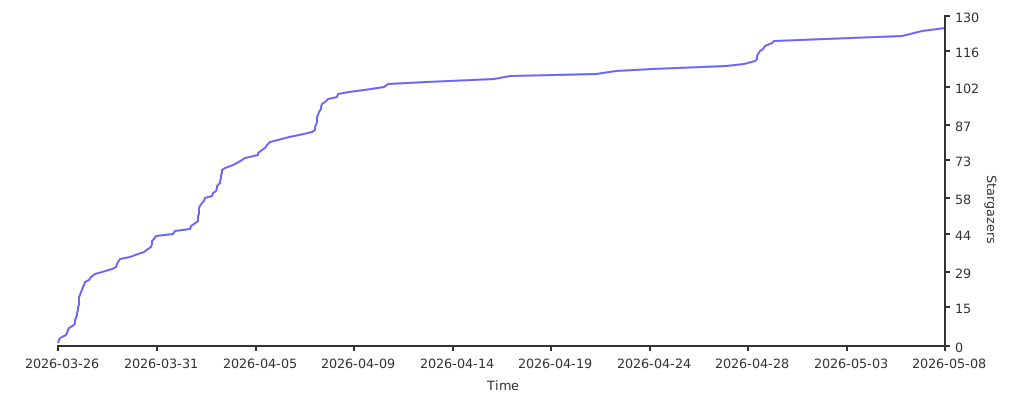](https://starchart.cc/tuanminhhole/openclaw-setup)
|
|
248
|
+
|
|
249
|
+
</div>
|
|
250
|
+
|
|
251
|
+
---
|
|
252
|
+
|
|
253
|
+
## 🙏 Acknowledgments
|
|
254
|
+
|
|
255
|
+
- [OpenClaw](https://openclaw.ai) — Core AI Gateway framework
|
|
256
|
+
- [9Router](https://github.com/decolua/9router) — Open-source AI proxy (OAuth-based, no API keys)
|
|
257
|
+
- [ClawHub](https://clawhub.com) — Bot skills registry
|
|
258
|
+
- [TheSVG](https://thesvg.org) — High-quality SVG brand icons
|
|
259
|
+
|
|
260
|
+
---
|
|
261
|
+
|
|
262
|
+
## 🙌 Author & Contributing
|
|
263
|
+
|
|
264
|
+
Built by **[tuanminhhole (Kent)](https://github.com/tuanminhhole)** as an open gift for the community.
|
|
265
|
+
Suggestions and PRs are always welcome. If this saved you time, please ⭐ the repo so more people can find it!
|
|
266
|
+
|
|
267
|
+
---
|
|
268
|
+
|
|
269
|
+
## 🦞 OpenClaw Ecosystem (same author)
|
|
270
|
+
|
|
271
|
+
Companion repos to build a complete, self-running AI assistant:
|
|
272
|
+
|
|
273
|
+
**🚀 Setup & framework**
|
|
274
|
+
- [openclaw-setup](https://github.com/tuanminhhole/openclaw-setup) — *(this repo)* Set up free AI bots with OpenClaw + 9Router (Telegram/Zalo/Messenger, Docker)
|
|
275
|
+
- [vietbrain](https://github.com/tuanminhhole/vietbrain) — Vietnamese "Second Brain" framework for Obsidian (AI-ready)
|
|
276
|
+
|
|
277
|
+
**🔌 Plugins (runtime)**
|
|
278
|
+
- `openclaw-fb-messenger` — Facebook Messenger channel *(private — contact to receive)*
|
|
279
|
+
- [openclaw-telegram-multibot-relay](https://github.com/tuanminhhole/openclaw-telegram-multibot-relay) — Multibot Telegram relay, delegation & native cron reminders
|
|
280
|
+
- [openclaw-zalo-mod](https://github.com/tuanminhhole/openclaw-zalo-mod) — Zero-token Zalo group management (slash commands, anti-spam, warn, memory)
|
|
281
|
+
- [openclaw-browser-automation](https://github.com/tuanminhhole/openclaw-browser-automation) — Smart Search & Browser Automation
|
|
282
|
+
- [openclaw-facebook-crawler](https://github.com/tuanminhhole/openclaw-facebook-crawler) — Facebook data crawler
|
|
283
|
+
- [openclaw-n8n-facebook-poster](https://github.com/tuanminhhole/openclaw-n8n-facebook-poster) — Auto-post to Facebook via n8n
|
|
284
|
+
|
|
285
|
+
**🧩 Skills**
|
|
286
|
+
- [openclaw-skill-super-memory](https://github.com/tuanminhhole/openclaw-skill-super-memory) — Advanced long-term memory for agents
|
|
287
|
+
- [openclaw-skill-infographic](https://github.com/tuanminhhole/openclaw-skill-infographic) — Infographic generation
|
|
288
|
+
- [openclaw-skill-zalo-sticker-mention](https://github.com/tuanminhhole/openclaw-skill-zalo-sticker-mention) — Stickers & mentions on Zalo
|
|
289
|
+
|
|
290
|
+
---
|
|
291
|
+
|
|
292
|
+
<div align="center">
|
|
293
|
+
<sub>🦞 <b>openclaw-setup</b> · part of the <a href="https://github.com/tuanminhhole">tuanminhhole (Kent)</a> ecosystem · MIT License</sub>
|
|
294
|
+
</div>
|