create-openclaw-bot 5.4.1 → 5.5.0
This diff represents the content of publicly available package versions that have been released to one of the supported registries. The information contained in this diff is provided for informational purposes only and reflects changes between package versions as they appear in their respective public registries.
- package/CHANGELOG.md +188 -170
- package/CHANGELOG.vi.md +186 -168
- package/README.md +323 -321
- package/README.vi.md +323 -321
- package/old_v510.js +0 -0
- package/package.json +1 -1
- package/setup/data/channels.js +164 -0
- package/setup/data/header.js +80 -0
- package/setup/data/index.js +73 -0
- package/setup/data/plugins.js +60 -0
- package/setup/data/providers.js +121 -0
- package/setup/data/skills.js +169 -0
- package/setup/shared/common-gen.js +223 -0
- package/setup/shared/docker-gen.js +359 -0
- package/setup/shared/runtime-gen.js +710 -0
- package/setup/shared/scaffold-gen.js +212 -0
- package/setup.js +82 -14
- package/patch-tray.js +0 -7
package/README.md
CHANGED
|
@@ -1,321 +1,323 @@
|
|
|
1
|
-
<div align="center">
|
|
2
|
-
|
|
3
|
-
# 🦞 OpenClaw Setup
|
|
4
|
-
|
|
5
|
-
<p align="center">
|
|
6
|
-
<a href="https://github.com/tuanminhhole/openclaw-setup/releases"><img src="https://img.shields.io/badge/RELEASE-v5.
|
|
7
|
-
<a href="https://github.com/tuanminhhole/openclaw-setup?tab=MIT-1-ov-file"><img src="https://img.shields.io/badge/LICENSE-MIT-success?style=for-the-badge" alt="MIT License" /></a>
|
|
8
|
-
<a href="https://www.npmjs.com/package/create-openclaw-bot"><img src="https://img.shields.io/npm/v/create-openclaw-bot?style=for-the-badge&label=CLI&color=2563EB&logo=npm&logoColor=white" alt="NPM Version" /></a>
|
|
9
|
-
<a href="https://github.com/tuanminhhole/openclaw-setup/stargazers"><img src="https://img.shields.io/github/stars/tuanminhhole/openclaw-setup?style=for-the-badge&color=eab308&logo=github&logoColor=white" alt="GitHub Stars" /></a>
|
|
10
|
-
</p>
|
|
11
|
-
|
|
12
|
-
<p style="margin-top: 16px;">
|
|
13
|
-
<img src="https://flagcdn.com/24x18/gb.png" alt="English" width="24" height="18" style="vertical-align: sub;"> <strong>English</strong> ·
|
|
14
|
-
<img src="https://flagcdn.com/24x18/vn.png" alt="Tiếng Việt" width="24" height="18" style="vertical-align: sub;"> <a href="README.vi.md">Tiếng Việt</a>
|
|
15
|
-
</p>
|
|
16
|
-
|
|
17
|
-
An interactive **CLI tool** and **Setup Wizard** to deploy your own free AI Bot on Telegram or Zalo in minutes — supports **Windows, macOS, Ubuntu, and VPS**.
|
|
18
|
-
|
|
19
|
-
<a href="https://github.com/tuanminhhole/openclaw-setup">
|
|
20
|
-
<img src="https://raw.githubusercontent.com/tuanminhhole/openclaw-setup/main/docs/preview.png" alt="OpenClaw Setup Hero Image" width="100%" style="border-radius: 8px; margin: 16px 0; border: 1px solid #333;" />
|
|
21
|
-
</a>
|
|
22
|
-
|
|
23
|
-
</div>
|
|
24
|
-
|
|
25
|
-
---
|
|
26
|
-
|
|
27
|
-
## 🆕 What's new in v5.
|
|
28
|
-
|
|
29
|
-
-
|
|
30
|
-
-
|
|
31
|
-
-
|
|
32
|
-
-
|
|
33
|
-
|
|
34
|
-
|
|
35
|
-
|
|
36
|
-
|
|
37
|
-
|
|
38
|
-
|
|
39
|
-
-
|
|
40
|
-
-
|
|
41
|
-
|
|
42
|
-
|
|
43
|
-
|
|
44
|
-
|
|
45
|
-
|
|
46
|
-
|
|
47
|
-
|
|
48
|
-
|
|
49
|
-
|
|
50
|
-
-
|
|
51
|
-
-
|
|
52
|
-
-
|
|
53
|
-
-
|
|
54
|
-
-
|
|
55
|
-
-
|
|
56
|
-
-
|
|
57
|
-
-
|
|
58
|
-
-
|
|
59
|
-
|
|
60
|
-
|
|
61
|
-
|
|
62
|
-
|
|
63
|
-
|
|
64
|
-
|
|
65
|
-
|
|
66
|
-
|
|
67
|
-
|
|
68
|
-
|
|
|
69
|
-
|
|
|
70
|
-
|
|
|
71
|
-
|
|
|
72
|
-
|
|
73
|
-
|
|
74
|
-
|
|
75
|
-
|
|
76
|
-
|
|
77
|
-
|
|
78
|
-
|
|
79
|
-
|
|
80
|
-
|
|
81
|
-
|
|
82
|
-
- **Step
|
|
83
|
-
- **Step
|
|
84
|
-
- **Step
|
|
85
|
-
|
|
86
|
-
|
|
87
|
-
|
|
88
|
-
|
|
89
|
-
>
|
|
90
|
-
>
|
|
91
|
-
|
|
92
|
-
|
|
93
|
-
|
|
94
|
-
|
|
95
|
-
|
|
96
|
-
|
|
97
|
-
|
|
98
|
-
```
|
|
99
|
-
|
|
100
|
-
|
|
101
|
-
|
|
102
|
-
|
|
103
|
-
|
|
104
|
-
>
|
|
105
|
-
|
|
106
|
-
|
|
107
|
-
|
|
108
|
-
<
|
|
109
|
-
|
|
110
|
-
|
|
111
|
-
|
|
112
|
-
|
|
113
|
-
|
|
114
|
-
|
|
115
|
-
|
|
116
|
-
|
|
117
|
-
|
|
118
|
-
|
|
119
|
-
|
|
120
|
-
|
|
121
|
-
|
|
122
|
-
|
|
123
|
-
|
|
124
|
-
|
|
125
|
-
|
|
126
|
-
|
|
127
|
-
|
|
128
|
-
|
|
129
|
-
|
|
|
130
|
-
|
|
|
131
|
-
| **
|
|
132
|
-
| **
|
|
133
|
-
|
|
134
|
-
|
|
135
|
-
|
|
136
|
-
|
|
137
|
-
|
|
138
|
-
|
|
|
139
|
-
|
|
|
140
|
-
| **
|
|
141
|
-
| **
|
|
142
|
-
|
|
143
|
-
|
|
144
|
-
|
|
145
|
-
|
|
146
|
-
|
|
147
|
-
|
|
148
|
-
|
|
149
|
-
|
|
|
150
|
-
|
|
|
151
|
-
| **
|
|
152
|
-
| **
|
|
153
|
-
| **
|
|
154
|
-
| **
|
|
155
|
-
|
|
156
|
-
|
|
157
|
-
|
|
158
|
-
|
|
159
|
-
|
|
160
|
-
|
|
161
|
-
|
|
162
|
-
|
|
163
|
-
|
|
164
|
-
- **
|
|
165
|
-
|
|
166
|
-
|
|
167
|
-
|
|
168
|
-
|
|
169
|
-
|
|
170
|
-
|
|
171
|
-
|
|
172
|
-
|
|
173
|
-
|
|
174
|
-
|
|
175
|
-
|
|
176
|
-
|
|
177
|
-
|
|
178
|
-
|
|
179
|
-
|
|
180
|
-
|
|
181
|
-
|
|
182
|
-
|
|
183
|
-
|
|
184
|
-
|
|
185
|
-
|
|
186
|
-
|
|
187
|
-
|
|
188
|
-
|
|
189
|
-
|
|
190
|
-
|
|
191
|
-
|
|
192
|
-
|
|
193
|
-
|
|
194
|
-
|
|
195
|
-
|
|
196
|
-
|
|
197
|
-
|
|
198
|
-
|
|
199
|
-
|
|
200
|
-
|
|
201
|
-
|
|
202
|
-
|
|
203
|
-
|
|
204
|
-
|
|
205
|
-
|
|
206
|
-
|
|
207
|
-
|
|
208
|
-
|
|
209
|
-
|
|
210
|
-
|
|
211
|
-
|
|
212
|
-
|
|
213
|
-
|
|
214
|
-
|
|
215
|
-
|
|
216
|
-
|
|
217
|
-
|
|
218
|
-
|
|
219
|
-
|
|
220
|
-
|
|
221
|
-
|
|
222
|
-
|
|
223
|
-
|
|
224
|
-
docker compose
|
|
225
|
-
|
|
226
|
-
|
|
227
|
-
|
|
228
|
-
|
|
229
|
-
|
|
230
|
-
|
|
231
|
-
|
|
232
|
-
pm2
|
|
233
|
-
|
|
234
|
-
|
|
235
|
-
|
|
236
|
-
|
|
237
|
-
|
|
238
|
-
|
|
239
|
-
|
|
240
|
-
|
|
241
|
-
|
|
242
|
-
|
|
243
|
-
|
|
244
|
-
|
|
245
|
-
|
|
246
|
-
|
|
247
|
-
|
|
248
|
-
|
|
249
|
-
|
|
250
|
-
|
|
251
|
-
|
|
252
|
-
|
|
253
|
-
|
|
254
|
-
|
|
255
|
-
|
|
256
|
-
|
|
257
|
-
|
|
258
|
-
|
|
259
|
-
|
|
260
|
-
|
|
261
|
-
|
|
262
|
-
|
|
263
|
-
**
|
|
264
|
-
|
|
265
|
-
|
|
266
|
-
|
|
267
|
-
|
|
268
|
-
|
|
269
|
-
|
|
270
|
-
|
|
271
|
-
|
|
272
|
-
|
|
|
273
|
-
|
|
|
274
|
-
| `gemma4:
|
|
275
|
-
| `gemma4:
|
|
276
|
-
|
|
277
|
-
|
|
278
|
-
|
|
279
|
-
|
|
280
|
-
|
|
281
|
-
|
|
282
|
-
|
|
283
|
-
|
|
284
|
-
|
|
285
|
-
|
|
286
|
-
|
|
287
|
-
- [
|
|
288
|
-
- [
|
|
289
|
-
- [
|
|
290
|
-
- [
|
|
291
|
-
- [
|
|
292
|
-
- [
|
|
293
|
-
- [
|
|
294
|
-
|
|
295
|
-
|
|
296
|
-
|
|
297
|
-
|
|
298
|
-
|
|
299
|
-
|
|
300
|
-
|
|
301
|
-
|
|
302
|
-
|
|
303
|
-
|
|
304
|
-
|
|
305
|
-
|
|
306
|
-
|
|
307
|
-
|
|
308
|
-
|
|
309
|
-
|
|
310
|
-
|
|
311
|
-
- [
|
|
312
|
-
- [
|
|
313
|
-
- [
|
|
314
|
-
|
|
315
|
-
|
|
316
|
-
|
|
317
|
-
|
|
318
|
-
|
|
319
|
-
|
|
320
|
-
|
|
321
|
-
|
|
1
|
+
<div align="center">
|
|
2
|
+
|
|
3
|
+
# 🦞 OpenClaw Setup
|
|
4
|
+
|
|
5
|
+
<p align="center">
|
|
6
|
+
<a href="https://github.com/tuanminhhole/openclaw-setup/releases"><img src="https://img.shields.io/badge/RELEASE-v5.5.0-0EA5E9?style=for-the-badge" alt="Version 5.5.0" /></a>
|
|
7
|
+
<a href="https://github.com/tuanminhhole/openclaw-setup?tab=MIT-1-ov-file"><img src="https://img.shields.io/badge/LICENSE-MIT-success?style=for-the-badge" alt="MIT License" /></a>
|
|
8
|
+
<a href="https://www.npmjs.com/package/create-openclaw-bot"><img src="https://img.shields.io/npm/v/create-openclaw-bot?style=for-the-badge&label=CLI&color=2563EB&logo=npm&logoColor=white" alt="NPM Version" /></a>
|
|
9
|
+
<a href="https://github.com/tuanminhhole/openclaw-setup/stargazers"><img src="https://img.shields.io/github/stars/tuanminhhole/openclaw-setup?style=for-the-badge&color=eab308&logo=github&logoColor=white" alt="GitHub Stars" /></a>
|
|
10
|
+
</p>
|
|
11
|
+
|
|
12
|
+
<p style="margin-top: 16px;">
|
|
13
|
+
<img src="https://flagcdn.com/24x18/gb.png" alt="English" width="24" height="18" style="vertical-align: sub;"> <strong>English</strong> ·
|
|
14
|
+
<img src="https://flagcdn.com/24x18/vn.png" alt="Tiếng Việt" width="24" height="18" style="vertical-align: sub;"> <a href="README.vi.md">Tiếng Việt</a>
|
|
15
|
+
</p>
|
|
16
|
+
|
|
17
|
+
An interactive **CLI tool** and **Setup Wizard** to deploy your own free AI Bot on Telegram or Zalo in minutes — supports **Windows, macOS, Ubuntu, and VPS**.
|
|
18
|
+
|
|
19
|
+
<a href="https://github.com/tuanminhhole/openclaw-setup">
|
|
20
|
+
<img src="https://raw.githubusercontent.com/tuanminhhole/openclaw-setup/main/docs/preview.png" alt="OpenClaw Setup Hero Image" width="100%" style="border-radius: 8px; margin: 16px 0; border: 1px solid #333;" />
|
|
21
|
+
</a>
|
|
22
|
+
|
|
23
|
+
</div>
|
|
24
|
+
|
|
25
|
+
---
|
|
26
|
+
|
|
27
|
+
## 🆕 What's new in v5.5.0
|
|
28
|
+
|
|
29
|
+
- 📦 **OpenClaw 2026.4.14** — Bumped from 2026.4.5. Includes the new experimental Dreaming memory system, active-memory improvements, Telegram approval button deadlock fix, and WebSocket keepalive stability.
|
|
30
|
+
- 📄 **Modular workspace docs** — Multi-bot deployments now generate `TEAM.md` (team roster & coordination) and `RELAY.md` (relay playbook) as separate files, giving clearer separation of concerns.
|
|
31
|
+
- 🔐 **Full security rules everywhere** — All `AGENTS.md` files now include the complete 4-section security ruleset (File System, API Key, Crypto Wallet, Docker) regardless of OS, mode, or channel.
|
|
32
|
+
- 🗑️ **Removed `.yaml` agent files** — OpenClaw Core reads config exclusively from `openclaw.json`. Orphaned `.yaml` files are no longer generated.
|
|
33
|
+
- 🤖 **Anti-hallucination handoff** — Relay-variant `AGENTS.md` now mandates tool-first `react` actions and forbids LLM refusal of cross-agent handoffs.
|
|
34
|
+
- 🏗️ **Scaffold-based generation** — Both Wizard and CLI now call shared scaffold builders from `scaffold-gen.js`, ensuring consistent doc generation across all platforms.
|
|
35
|
+
|
|
36
|
+
<details>
|
|
37
|
+
<summary><b>Previous: What's new in v5.5.0</b></summary>
|
|
38
|
+
|
|
39
|
+
- 🏗️ **Multi-bot architecture refactored** — All duplicate flags (`isTelegramMultiBot`, `isSharedMultiBot`, `isMultiBotWizard`) merged into a single `isMultiBot`. Generated `agentDir` paths now correctly point to `.openclaw/agents/{slug}/agent` relative to `OPENCLAW_HOME`.
|
|
40
|
+
- 🗑️ **Telegram + Zalo combo channel removed** — Combo mode has been deprecated and removed from both the Web Wizard and CLI. It will be redesigned in a future release.
|
|
41
|
+
- 🤝 **Cross-workspace rules in `AGENTS.md`** — In multi-bot mode, each bot's `AGENTS.md` now includes a dedicated section describing which sibling workspace paths may be read and what write restrictions apply.
|
|
42
|
+
- 🧹 **Cleaner config generation** — Per-agent `auth-profiles.json` is no longer created for 9Router/proxy setups. Native scripts no longer generate `.env` files; credentials are managed via `openclaw channels login`.
|
|
43
|
+
|
|
44
|
+
</details>
|
|
45
|
+
|
|
46
|
+
---
|
|
47
|
+
|
|
48
|
+
## ✨ Features
|
|
49
|
+
|
|
50
|
+
- 🤖 **Multi-channel** — Telegram (single or multi-bot), Zalo Bot API, or Zalo Personal
|
|
51
|
+
- 🧑🤝🧑 **Multi-bot team** — Run up to 5 Telegram bots simultaneously. Bots share a workspace, collaborate on tasks, and coordinate in a group chat using the Department Room Model
|
|
52
|
+
- 🧠 **Multi-provider AI** — Google Gemini, Claude, GPT-4o, OpenRouter, Ollama (local), 9Router
|
|
53
|
+
- 🧩 **Skills** — Web Search, Browser Automation, Memory, RAG, Code Interpreter, Image Gen
|
|
54
|
+
- 🔌 **Plugins** — Voice Call, Matrix, MS Teams, Nostr
|
|
55
|
+
- 🔀 **9Router** — Free AI proxy. OAuth login, no API keys. Supports Claude Code, Codex, Gemini CLI.
|
|
56
|
+
- 🧙 **Setup Wizard** — 5-step visual web UI (`index.html`). No terminal required.
|
|
57
|
+
- 💻 **Interactive CLI** — `npx create-openclaw-bot` — best for Ubuntu, VPS, engineers.
|
|
58
|
+
- 🆓 **100% Free to start** — 9Router + Gemini free tier requires zero spending
|
|
59
|
+
- 🔒 **Private** — API keys stay on your machine, never sent anywhere
|
|
60
|
+
- ⚡ **Fast** — From zero to working bot in under 5 minutes
|
|
61
|
+
|
|
62
|
+
---
|
|
63
|
+
|
|
64
|
+
## 🗺️ Choose your path
|
|
65
|
+
|
|
66
|
+
> **Not sure which method to use?** The table below has you covered:
|
|
67
|
+
|
|
68
|
+
| Who you are | Environment | Recommended path |
|
|
69
|
+
| -------------------------- | --------------- | ------------------------------------- |
|
|
70
|
+
| Not familiar with terminal | Windows / macOS | **Web Wizard** (`index.html`) |
|
|
71
|
+
| Not familiar with terminal | Ubuntu Desktop | **Web Wizard** → choose Native |
|
|
72
|
+
| Comfortable with terminal | Ubuntu / VPS | **CLI** (`npx create-openclaw-bot`) |
|
|
73
|
+
| Want full automation | Anywhere | **AI Agent** (Antigravity + SETUP.md) |
|
|
74
|
+
|
|
75
|
+
### 1️⃣ Option A — Web Wizard (No terminal required)
|
|
76
|
+
|
|
77
|
+
Best for **Windows and macOS**. No command line at all.
|
|
78
|
+
|
|
79
|
+
1. [Download ZIP](https://github.com/tuanminhhole/openclaw-setup/archive/refs/heads/main.zip) or clone this repo.
|
|
80
|
+
2. Open `index.html` in your browser.
|
|
81
|
+
3. Follow the **5-step wizard**:
|
|
82
|
+
- **Step 1:** Choose your OS (Windows / macOS / Ubuntu / VPS)
|
|
83
|
+
- **Step 2:** Choose your bot channel (Telegram / Zalo)
|
|
84
|
+
- **Step 3:** Choose your AI provider and model
|
|
85
|
+
- **Step 4:** Enter bot token and configure settings
|
|
86
|
+
- **Step 5:** Download your script and run it — done!
|
|
87
|
+
4. The downloaded script automatically installs everything needed (9Router, Ollama, Docker, etc.) based on your choices.
|
|
88
|
+
|
|
89
|
+
> **Docker or no Docker?**
|
|
90
|
+
>
|
|
91
|
+
> - **Windows / macOS** → Use **Docker** (fully isolated, easy to manage)
|
|
92
|
+
> - **Ubuntu / VPS** → Use **Native (no Docker)** (less RAM, more stable)
|
|
93
|
+
|
|
94
|
+
### 2️⃣ Option B — Interactive CLI (`npx`)
|
|
95
|
+
|
|
96
|
+
Best for **engineers, Ubuntu Desktop, VPS**. Fastest and most powerful.
|
|
97
|
+
|
|
98
|
+
```bash
|
|
99
|
+
npx create-openclaw-bot
|
|
100
|
+
```
|
|
101
|
+
|
|
102
|
+
Run in your terminal → follow the interactive prompts → startup script is generated automatically.
|
|
103
|
+
|
|
104
|
+
> Requires: **Node.js 20/22/24**. Check: `node -v`
|
|
105
|
+
>
|
|
106
|
+
> Note: **avoid Node.js 25 for now**. There are reports of OpenClaw failing on Node 25.
|
|
107
|
+
|
|
108
|
+
<details>
|
|
109
|
+
<summary><b>3️⃣ Option C — AI Agent (Antigravity)</b></summary>
|
|
110
|
+
<br>
|
|
111
|
+
|
|
112
|
+
1. Open [Antigravity IDE](https://antigravity.dev/)
|
|
113
|
+
2. Open this repo as your workspace
|
|
114
|
+
3. Paste into chat:
|
|
115
|
+
```
|
|
116
|
+
Read SETUP.md and set up OpenClaw v5.3.1 for me.
|
|
117
|
+
My bot token is X. Use 9Router (no API key).
|
|
118
|
+
My project folder: <YOUR_PATH>
|
|
119
|
+
```
|
|
120
|
+
|
|
121
|
+
</details>
|
|
122
|
+
|
|
123
|
+
---
|
|
124
|
+
|
|
125
|
+
## 📋 Prerequisites
|
|
126
|
+
|
|
127
|
+
### Without Docker (Native — recommended for Ubuntu/VPS)
|
|
128
|
+
|
|
129
|
+
| Requirement | Notes |
|
|
130
|
+
| ----------------------- | -------------------------------------------------------------------------- |
|
|
131
|
+
| **Node.js 20/22/24** | [Download](https://nodejs.org/) · Check: `node -v` · Avoid Node 25 for now |
|
|
132
|
+
| **An AI provider** | 9Router (free) or Gemini/Claude/GPT-4o |
|
|
133
|
+
| **Bot Token** | From Telegram BotFather or Zalo Developer |
|
|
134
|
+
| **Ollama** _(optional)_ | Only if you want to run Gemma 4 locally · [Download](https://ollama.com/) |
|
|
135
|
+
|
|
136
|
+
### With Docker (recommended for Windows/macOS)
|
|
137
|
+
|
|
138
|
+
| Requirement | Notes |
|
|
139
|
+
| ------------------------------- | --------------------------------------------------------------------------------------------- |
|
|
140
|
+
| **Node.js 20/22/24** | [Download](https://nodejs.org/) · Check: `node -v` · Avoid Node 25 for now |
|
|
141
|
+
| **Docker Desktop + Compose V2** | [Download](https://www.docker.com/products/docker-desktop/) · Check: `docker compose version` |
|
|
142
|
+
| **An AI provider** | 9Router runs as a sidecar container — no separate install needed |
|
|
143
|
+
| **Bot Token** | From Telegram BotFather or Zalo Developer |
|
|
144
|
+
|
|
145
|
+
---
|
|
146
|
+
|
|
147
|
+
## 🧠 Supported Providers
|
|
148
|
+
|
|
149
|
+
| Provider | Cost | API Key | Notes |
|
|
150
|
+
| -------------------- | ------------ | -------- | ----------------------------------------------------------------------------------------- |
|
|
151
|
+
| **9Router** | 🆓 Free | ❌ OAuth | Recommended for beginners. Auto-routes to best model. Supports Claude CLI, Codex, Gemini. |
|
|
152
|
+
| **Google Gemini** | 🆓 Free tier | ✅ Yes | High quality. Very generous free tier. |
|
|
153
|
+
| **Ollama / Gemma 4** | 🏠 Free | ❌ No | Runs 100% offline. Auto-pulls model on first start. |
|
|
154
|
+
| **Anthropic Claude** | 💰 Paid | ✅ Yes | Best reasoning and writing quality. |
|
|
155
|
+
| **OpenAI / Codex** | 💰 Paid | ✅ Yes | GPT-4o, Codex Mini. |
|
|
156
|
+
| **OpenRouter** | 🆓/💰 Mixed | ✅ Yes | Many models under one key. Some are free. |
|
|
157
|
+
|
|
158
|
+
> 🔀 **9Router v0.3.75+** adds lossless passthrough for Claude Code, Codex, Gemini CLI, and Antigravity — meaning these AI tools can use 9Router as their endpoint without any data loss. See [docs/ai-providers.md](docs/ai-providers.md) for setup details.
|
|
159
|
+
|
|
160
|
+
---
|
|
161
|
+
|
|
162
|
+
## 🔌 Supported Channels
|
|
163
|
+
|
|
164
|
+
- **Telegram** (✅ Official) — Search **@BotFather** → `/newbot` → Copy token.
|
|
165
|
+
- **Zalo Bot API** (✅ Official) — Go to [developers.zalo.me](https://developers.zalo.me) → Create bot → Copy token.
|
|
166
|
+
- **Zalo Personal** (⚠️ Unofficial) — Scan QR after setup (no token needed). Use a secondary account.
|
|
167
|
+
|
|
168
|
+
> ⚠️ **Zalo Personal** uses an unofficial API. Your account may be restricted. Use a secondary account only.
|
|
169
|
+
|
|
170
|
+
---
|
|
171
|
+
|
|
172
|
+
## 📁 Repo Structure
|
|
173
|
+
|
|
174
|
+
```
|
|
175
|
+
index.html ← Setup Wizard UI (open in browser)
|
|
176
|
+
style.css ← Wizard styles
|
|
177
|
+
setup.js ← Wizard logic
|
|
178
|
+
cli.js ← Interactive CLI (npx create-openclaw-bot)
|
|
179
|
+
CHANGELOG.md/.vi.md ← Version history
|
|
180
|
+
README.md ← You're here (English)
|
|
181
|
+
README.vi.md ← Hướng dẫn tiếng Việt
|
|
182
|
+
SETUP.md/.vi.md ← Technical guide for AI Agent
|
|
183
|
+
docs/
|
|
184
|
+
install-docker.md/.vi.md ← Docker setup per OS
|
|
185
|
+
install-native.md/.vi.md ← Native/PM2 install per OS
|
|
186
|
+
ai-providers.md/.vi.md ← AI provider configuration
|
|
187
|
+
hardware-guide.md/.vi.md ← RAM planning for Ollama/Gemma 4
|
|
188
|
+
faq.md/.vi.md ← Frequently asked questions
|
|
189
|
+
```
|
|
190
|
+
|
|
191
|
+
> **Note:** Startup scripts (`.bat`, `.sh`) are **not included** in the repo — they are generated by the Web Wizard or CLI based on your specific configuration.
|
|
192
|
+
|
|
193
|
+
---
|
|
194
|
+
|
|
195
|
+
## ❓ FAQ
|
|
196
|
+
|
|
197
|
+
<details>
|
|
198
|
+
<summary><b>Is it really free?</b></summary>
|
|
199
|
+
|
|
200
|
+
Yes. Docker, Google Gemini API (free tier), and Telegram/Zalo bot tokens are all free. You only pay if you choose a paid AI provider like Claude or GPT-4o.
|
|
201
|
+
|
|
202
|
+
</details>
|
|
203
|
+
|
|
204
|
+
<details>
|
|
205
|
+
<summary><b>Where does the bot run?</b></summary>
|
|
206
|
+
|
|
207
|
+
On your computer or server. With Docker it runs in a container; with Native mode it runs as a PM2-managed process. If the machine is off, the bot is off. Use a VPS for 24/7 uptime.
|
|
208
|
+
|
|
209
|
+
</details>
|
|
210
|
+
|
|
211
|
+
<details>
|
|
212
|
+
<summary><b>Do I need Docker?</b></summary>
|
|
213
|
+
|
|
214
|
+
No. Docker is optional. Windows/macOS users should use Docker for clean isolation. Ubuntu/VPS users should install natively with PM2 — less overhead and OpenClaw is already secure by design.
|
|
215
|
+
|
|
216
|
+
</details>
|
|
217
|
+
|
|
218
|
+
<details>
|
|
219
|
+
<summary><b>How do I stop/restart the bot?</b></summary>
|
|
220
|
+
|
|
221
|
+
**Docker:**
|
|
222
|
+
|
|
223
|
+
```bash
|
|
224
|
+
docker compose down # Stop
|
|
225
|
+
docker compose up -d # Start
|
|
226
|
+
docker compose restart # Restart
|
|
227
|
+
```
|
|
228
|
+
|
|
229
|
+
**PM2 (native):**
|
|
230
|
+
|
|
231
|
+
```bash
|
|
232
|
+
pm2 stop openclaw-bot
|
|
233
|
+
pm2 start openclaw-bot
|
|
234
|
+
pm2 restart openclaw-bot
|
|
235
|
+
```
|
|
236
|
+
|
|
237
|
+
</details>
|
|
238
|
+
|
|
239
|
+
<details>
|
|
240
|
+
<summary><b>Can I switch AI models later?</b></summary>
|
|
241
|
+
|
|
242
|
+
Yes. Re-run `npx create-openclaw-bot` in your bot folder, or edit `.openclaw/openclaw.json` directly and restart the bot.
|
|
243
|
+
|
|
244
|
+
</details>
|
|
245
|
+
|
|
246
|
+
<details>
|
|
247
|
+
<summary><b>Is it safe?</b></summary>
|
|
248
|
+
|
|
249
|
+
Your API keys are stored only on your machine in a local `.env` file. OpenClaw never transmits them anywhere. When using Ollama, all AI inference runs completely offline.
|
|
250
|
+
|
|
251
|
+
</details>
|
|
252
|
+
|
|
253
|
+
<details>
|
|
254
|
+
<summary><b>What is 9Router?</b></summary>
|
|
255
|
+
|
|
256
|
+
9Router is an open-source AI proxy. Instead of managing API keys from multiple providers, you log in once via OAuth at `localhost:20128/dashboard`. It auto-routes requests to the best available AI model. Starting v0.3.75, it also supports lossless passthrough for Claude Code, Codex, Gemini CLI, and Antigravity.
|
|
257
|
+
|
|
258
|
+
</details>
|
|
259
|
+
|
|
260
|
+
<details>
|
|
261
|
+
<summary><b>What's the difference between Skills and Plugins?</b></summary>
|
|
262
|
+
|
|
263
|
+
**Skills** add agent capabilities (Web Search, Browser Automation, Memory, RAG, Code Interpreter...) — install via `openclaw skills install` from ClawHub.
|
|
264
|
+
|
|
265
|
+
**Plugins** add channels or runtime extensions (Voice Call, Matrix, MS Teams...) — install via `openclaw plugins install` from npm.
|
|
266
|
+
|
|
267
|
+
</details>
|
|
268
|
+
|
|
269
|
+
<details>
|
|
270
|
+
<summary><b>How much RAM do I need for Gemma 4?</b></summary>
|
|
271
|
+
|
|
272
|
+
| Model | Min RAM (Native) | Min RAM (Docker) |
|
|
273
|
+
| ------------ | ---------------- | ---------------- |
|
|
274
|
+
| `gemma4:e2b` | ~4 GB | ~5 GB |
|
|
275
|
+
| `gemma4:e4b` | ~8 GB | ~9 GB |
|
|
276
|
+
| `gemma4:26b` | ~18 GB | ~20 GB |
|
|
277
|
+
| `gemma4:31b` | ~24 GB | ~26 GB |
|
|
278
|
+
|
|
279
|
+
See [docs/hardware-guide.md](docs/hardware-guide.md) for full details including VPS swap setup.
|
|
280
|
+
|
|
281
|
+
</details>
|
|
282
|
+
|
|
283
|
+
---
|
|
284
|
+
|
|
285
|
+
## 🔗 Links
|
|
286
|
+
|
|
287
|
+
- [OpenClaw Docs](https://openclaw.ai/docs)
|
|
288
|
+
- [9Router](https://github.com/decolua/9router)
|
|
289
|
+
- [Google AI Studio](https://aistudio.google.com/)
|
|
290
|
+
- [Telegram BotFather](https://t.me/BotFather)
|
|
291
|
+
- [Zalo Developer Platform](https://developers.zalo.me)
|
|
292
|
+
- [Docker Desktop](https://www.docker.com/products/docker-desktop/)
|
|
293
|
+
- [Ollama](https://ollama.com)
|
|
294
|
+
- [OpenRouter](https://openrouter.ai)
|
|
295
|
+
- [ClawHub (Skills)](https://clawhub.com)
|
|
296
|
+
|
|
297
|
+
---
|
|
298
|
+
|
|
299
|
+
## 📈 Star History
|
|
300
|
+
|
|
301
|
+
<div align="center">
|
|
302
|
+
|
|
303
|
+
[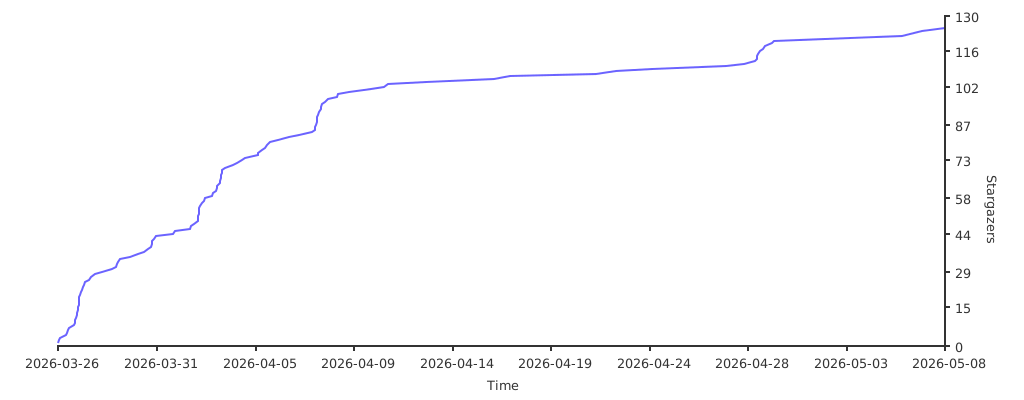](https://starchart.cc/tuanminhhole/openclaw-setup)
|
|
304
|
+
|
|
305
|
+
</div>
|
|
306
|
+
|
|
307
|
+
---
|
|
308
|
+
|
|
309
|
+
## 🙏 Acknowledgments
|
|
310
|
+
|
|
311
|
+
- [OpenClaw](https://openclaw.ai) — AI Gateway framework
|
|
312
|
+
- [9Router](https://github.com/decolua/9router) — Open-source AI proxy (OAuth-based, no API keys)
|
|
313
|
+
- [Playwright](https://playwright.dev) — Browser automation engine
|
|
314
|
+
- [ClawHub](https://clawhub.com) — Skills registry
|
|
315
|
+
- [TheSVG](https://thesvg.org) — High-quality SVG brand icons
|
|
316
|
+
|
|
317
|
+
---
|
|
318
|
+
|
|
319
|
+
<div align="center">
|
|
320
|
+
|
|
321
|
+
Made with 🦞 by [Kent](https://github.com/tuanminhhole)
|
|
322
|
+
|
|
323
|
+
</div>
|