crann 1.0.49 → 2.0.2
This diff represents the content of publicly available package versions that have been released to one of the supported registries. The information contained in this diff is provided for informational purposes only and reflects changes between package versions as they appear in their respective public registries.
- package/README.md +353 -594
- package/dist/cjs/index.js +2 -2
- package/dist/cjs/index.js.map +4 -4
- package/dist/cjs/react.js +2 -0
- package/dist/cjs/react.js.map +7 -0
- package/dist/esm/index.js +2 -2
- package/dist/esm/index.js.map +4 -4
- package/dist/esm/react.js +2 -0
- package/dist/esm/react.js.map +7 -0
- package/dist/types/__mocks__/uuid.d.ts +10 -0
- package/dist/types/__tests__/integration.test.d.ts +7 -0
- package/dist/types/agent/Agent.d.ts +77 -0
- package/dist/types/agent/__tests__/Agent.test.d.ts +1 -0
- package/dist/types/agent/__tests__/setup.d.ts +4 -0
- package/dist/types/agent/index.d.ts +7 -0
- package/dist/types/agent/types.d.ts +73 -0
- package/dist/types/crann.d.ts +1 -2
- package/dist/types/errors.d.ts +59 -0
- package/dist/types/model/crann.model.d.ts +1 -1
- package/dist/types/react/__tests__/hooks.test.d.ts +6 -0
- package/dist/types/react/hooks.d.ts +44 -0
- package/dist/types/react/index.d.ts +13 -0
- package/dist/types/react/types.d.ts +74 -0
- package/dist/types/rpc/adapter.d.ts +1 -1
- package/dist/types/rpc/types.d.ts +1 -1
- package/dist/types/store/ActionExecutor.d.ts +35 -0
- package/dist/types/store/AgentRegistry.d.ts +49 -0
- package/dist/types/store/Persistence.d.ts +59 -0
- package/dist/types/store/StateManager.d.ts +65 -0
- package/dist/types/store/Store.d.ts +188 -0
- package/dist/types/store/__tests__/ActionExecutor.test.d.ts +1 -0
- package/dist/types/store/__tests__/AgentRegistry.test.d.ts +1 -0
- package/dist/types/store/__tests__/Persistence.test.d.ts +6 -0
- package/dist/types/store/__tests__/StateManager.test.d.ts +1 -0
- package/dist/types/store/__tests__/setup.d.ts +4 -0
- package/dist/types/store/__tests__/types.test.d.ts +1 -0
- package/dist/types/store/index.d.ts +10 -0
- package/dist/types/store/types.d.ts +169 -0
- package/dist/types/transport/core/PorterAgent.d.ts +46 -0
- package/dist/types/transport/core/PorterSource.d.ts +40 -0
- package/dist/types/transport/index.d.ts +6 -0
- package/dist/types/transport/managers/AgentConnectionManager.d.ts +42 -0
- package/dist/types/transport/managers/AgentManager.d.ts +40 -0
- package/dist/types/transport/managers/AgentMessageHandler.d.ts +17 -0
- package/dist/types/transport/managers/ConnectionManager.d.ts +14 -0
- package/dist/types/transport/managers/MessageHandler.d.ts +29 -0
- package/dist/types/transport/managers/MessageQueue.d.ts +19 -0
- package/dist/types/transport/porter.model.d.ts +71 -0
- package/dist/types/transport/porter.utils.d.ts +44 -0
- package/dist/types/transport/react/index.d.ts +1 -0
- package/dist/types/transport/react/usePorter.d.ts +17 -0
- package/dist/types/utils/agent.d.ts +1 -1
- package/package.json +28 -2
package/README.md
CHANGED
|
@@ -1,4 +1,4 @@
|
|
|
1
|
-
Crann: Effortless State Synchronization for Web Extensions
|
|
1
|
+
# Crann: Effortless State Synchronization for Web Extensions
|
|
2
2
|
|
|
3
3
|

|
|
4
4
|
|
|
@@ -7,743 +7,502 @@ Crann: Effortless State Synchronization for Web Extensions
|
|
|
7
7
|
## Table of Contents
|
|
8
8
|
|
|
9
9
|
- [Core Features](#core-features)
|
|
10
|
-
- [Quick Start](#quick-start
|
|
11
|
-
- [
|
|
12
|
-
- [
|
|
13
|
-
|
|
14
|
-
|
|
15
|
-
|
|
16
|
-
|
|
17
|
-
|
|
18
|
-
|
|
19
|
-
|
|
20
|
-
|
|
10
|
+
- [Quick Start](#quick-start)
|
|
11
|
+
- [Configuration](#configuration)
|
|
12
|
+
- [Store API (Service Worker)](#store-api-service-worker)
|
|
13
|
+
- [Agent API (Content Scripts, Popup, etc.)](#agent-api)
|
|
14
|
+
- [React Integration](#react-integration)
|
|
15
|
+
- [RPC Actions](#rpc-actions)
|
|
16
|
+
- [State Persistence](#state-persistence)
|
|
17
|
+
- [Migration from v1](#migration-from-v1)
|
|
18
|
+
|
|
19
|
+
## Core Features
|
|
20
|
+
|
|
21
|
+
- **Minimal size** (< 5kb gzipped)
|
|
22
|
+
- **Multi-context sync** - Content Scripts, Service Worker, Devtools, Sidepanels, Popup
|
|
23
|
+
- **No message boilerplate** - Eliminates `chrome.runtime.sendMessage` / `onMessage`
|
|
24
|
+
- **Reactive updates** - Subscribe to state changes
|
|
25
|
+
- **Persistence** - Optional local or session storage
|
|
26
|
+
- **Full TypeScript** - Complete type inference from config
|
|
27
|
+
- **React hooks** - First-class React integration via `crann/react`
|
|
28
|
+
- **RPC Actions** - Execute logic in the service worker from any context
|
|
29
|
+
|
|
30
|
+
## Quick Start
|
|
31
|
+
|
|
32
|
+
### 1. Define Your Config
|
|
21
33
|
|
|
22
|
-
|
|
23
|
-
|
|
24
|
-
|
|
25
|
-
|
|
26
|
-
|
|
27
|
-
|
|
28
|
-
|
|
29
|
-
|
|
30
|
-
|
|
31
|
-
|
|
32
|
-
|
|
33
|
-
|
|
34
|
-
|
|
35
|
-
|
|
36
|
-
|
|
37
|
-
|
|
34
|
+
```typescript
|
|
35
|
+
// config.ts
|
|
36
|
+
import { createConfig, Persist } from "crann";
|
|
37
|
+
|
|
38
|
+
export const config = createConfig({
|
|
39
|
+
name: "myExtension", // Required: unique store name
|
|
40
|
+
version: 1, // Optional: for migrations
|
|
41
|
+
|
|
42
|
+
// Define your state
|
|
43
|
+
isEnabled: { default: false },
|
|
44
|
+
count: { default: 0, persist: Persist.Local },
|
|
45
|
+
|
|
46
|
+
// Define actions (RPC)
|
|
47
|
+
actions: {
|
|
48
|
+
increment: {
|
|
49
|
+
handler: async (ctx, amount: number = 1) => {
|
|
50
|
+
return { count: ctx.state.count + amount };
|
|
51
|
+
},
|
|
52
|
+
},
|
|
53
|
+
},
|
|
54
|
+
});
|
|
55
|
+
```
|
|
38
56
|
|
|
39
|
-
|
|
57
|
+
### 2. Initialize the Store (Service Worker)
|
|
40
58
|
|
|
41
59
|
```typescript
|
|
42
60
|
// service-worker.ts
|
|
43
|
-
import {
|
|
61
|
+
import { createStore } from "crann";
|
|
62
|
+
import { config } from "./config";
|
|
44
63
|
|
|
45
|
-
const
|
|
46
|
-
isBorderEnabled: { default: false }, // Single shared state item
|
|
47
|
-
});
|
|
64
|
+
const store = createStore(config);
|
|
48
65
|
|
|
49
|
-
|
|
50
|
-
|
|
51
|
-
|
|
66
|
+
store.subscribe((state, changes) => {
|
|
67
|
+
console.log("State changed:", changes);
|
|
68
|
+
});
|
|
52
69
|
```
|
|
53
70
|
|
|
54
|
-
|
|
71
|
+
### 3. Connect from Any Context
|
|
55
72
|
|
|
56
73
|
```typescript
|
|
57
|
-
// popup.ts
|
|
58
|
-
import {
|
|
74
|
+
// popup.ts or content-script.ts
|
|
75
|
+
import { connectStore } from "crann";
|
|
76
|
+
import { config } from "./config";
|
|
59
77
|
|
|
60
|
-
const
|
|
78
|
+
const agent = connectStore(config);
|
|
61
79
|
|
|
62
|
-
|
|
80
|
+
agent.onReady(() => {
|
|
81
|
+
console.log("Connected! Current state:", agent.getState());
|
|
63
82
|
|
|
64
|
-
//
|
|
65
|
-
|
|
66
|
-
toggleButton.textContent = currentState.isBorderEnabled
|
|
67
|
-
? "Disable Border"
|
|
68
|
-
: "Enable Border";
|
|
83
|
+
// Update state
|
|
84
|
+
agent.setState({ isEnabled: true });
|
|
69
85
|
|
|
70
|
-
//
|
|
71
|
-
|
|
72
|
-
const newState = !get().isBorderEnabled; // Get current state before setting
|
|
73
|
-
set({ isBorderEnabled: newState });
|
|
74
|
-
// Update button text immediately (or subscribe to changes)
|
|
75
|
-
toggleButton.textContent = newState ? "Disable Border" : "Enable Border";
|
|
86
|
+
// Call actions
|
|
87
|
+
agent.actions.increment(5);
|
|
76
88
|
});
|
|
77
89
|
```
|
|
78
90
|
|
|
79
|
-
|
|
91
|
+
### 4. Use with React
|
|
80
92
|
|
|
81
93
|
```typescript
|
|
82
|
-
//
|
|
83
|
-
import {
|
|
94
|
+
// hooks.ts
|
|
95
|
+
import { createCrannHooks } from "crann/react";
|
|
96
|
+
import { config } from "./config";
|
|
84
97
|
|
|
85
|
-
const {
|
|
98
|
+
export const { useCrannState, useCrannActions, useCrannReady } =
|
|
99
|
+
createCrannHooks(config);
|
|
86
100
|
|
|
87
|
-
|
|
101
|
+
// Counter.tsx
|
|
102
|
+
function Counter() {
|
|
103
|
+
const count = useCrannState((s) => s.count);
|
|
104
|
+
const { increment } = useCrannActions();
|
|
105
|
+
const isReady = useCrannReady();
|
|
88
106
|
|
|
89
|
-
|
|
90
|
-
|
|
91
|
-
(
|
|
92
|
-
|
|
93
|
-
document.body.style.border = state.isBorderEnabled ? "5px solid green" : "";
|
|
94
|
-
},
|
|
95
|
-
["isBorderEnabled"]
|
|
96
|
-
); // Optional: Only trigger for specific key changes
|
|
97
|
-
|
|
98
|
-
// Apply initial state
|
|
99
|
-
const initialState = connect().get(); // Can call connect() again or store result
|
|
100
|
-
document.body.style.border = initialState.isBorderEnabled
|
|
101
|
-
? "5px solid green"
|
|
102
|
-
: "";
|
|
107
|
+
if (!isReady) return <div>Loading...</div>;
|
|
108
|
+
|
|
109
|
+
return <button onClick={() => increment(1)}>Count: {count}</button>;
|
|
110
|
+
}
|
|
103
111
|
```
|
|
104
112
|
|
|
105
|
-
|
|
113
|
+
## Configuration
|
|
106
114
|
|
|
107
|
-
|
|
115
|
+
The `createConfig` function defines your store schema:
|
|
108
116
|
|
|
109
|
-
|
|
117
|
+
```typescript
|
|
118
|
+
import { createConfig, Scope, Persist } from "crann";
|
|
110
119
|
|
|
111
|
-
|
|
120
|
+
const config = createConfig({
|
|
121
|
+
// Required: unique identifier for this store
|
|
122
|
+
name: "myStore",
|
|
112
123
|
|
|
113
|
-
|
|
114
|
-
|
|
115
|
-
import { create, Partition, Persistence } from "crann";
|
|
124
|
+
// Optional: version number for migrations (default: 1)
|
|
125
|
+
version: 1,
|
|
116
126
|
|
|
117
|
-
|
|
118
|
-
|
|
119
|
-
active: { default: false },
|
|
127
|
+
// State definitions
|
|
128
|
+
count: { default: 0 },
|
|
120
129
|
|
|
121
|
-
//
|
|
122
|
-
|
|
123
|
-
default: "",
|
|
124
|
-
|
|
130
|
+
// With persistence
|
|
131
|
+
theme: {
|
|
132
|
+
default: "light" as "light" | "dark",
|
|
133
|
+
persist: Persist.Local, // Persist.Local | Persist.Session | Persist.None
|
|
125
134
|
},
|
|
126
135
|
|
|
127
|
-
//
|
|
128
|
-
|
|
129
|
-
default:
|
|
130
|
-
|
|
136
|
+
// Agent-scoped state (each tab/frame gets its own copy)
|
|
137
|
+
selectedElement: {
|
|
138
|
+
default: null as HTMLElement | null,
|
|
139
|
+
scope: Scope.Agent, // Scope.Shared (default) | Scope.Agent
|
|
131
140
|
},
|
|
132
141
|
|
|
133
|
-
//
|
|
134
|
-
|
|
135
|
-
|
|
136
|
-
|
|
142
|
+
// Actions (RPC handlers)
|
|
143
|
+
actions: {
|
|
144
|
+
doSomething: {
|
|
145
|
+
handler: async (ctx, arg1: string, arg2: number) => {
|
|
146
|
+
// ctx.state - current state
|
|
147
|
+
// ctx.setState - update state
|
|
148
|
+
// ctx.agentId - calling agent's ID
|
|
149
|
+
return { result: "value" };
|
|
150
|
+
},
|
|
151
|
+
validate: (arg1, arg2) => {
|
|
152
|
+
if (!arg1) throw new Error("arg1 required");
|
|
153
|
+
},
|
|
154
|
+
},
|
|
137
155
|
},
|
|
138
156
|
});
|
|
157
|
+
```
|
|
139
158
|
|
|
140
|
-
|
|
141
|
-
const { active, timesUsed } = crann.get();
|
|
159
|
+
## Store API (Service Worker)
|
|
142
160
|
|
|
143
|
-
|
|
144
|
-
const { active, timesUsed, name } = crann.get("instanceKey");
|
|
161
|
+
The Store runs in the service worker and manages all state:
|
|
145
162
|
|
|
146
|
-
|
|
147
|
-
|
|
148
|
-
|
|
149
|
-
|
|
150
|
-
|
|
151
|
-
console.log("State changed:", changes);
|
|
163
|
+
```typescript
|
|
164
|
+
import { createStore } from "crann";
|
|
165
|
+
|
|
166
|
+
const store = createStore(config, {
|
|
167
|
+
debug: true, // Enable debug logging
|
|
152
168
|
});
|
|
153
|
-
```
|
|
154
169
|
|
|
155
|
-
|
|
170
|
+
// Get current state
|
|
171
|
+
const state = store.getState();
|
|
156
172
|
|
|
157
|
-
|
|
173
|
+
// Update state
|
|
174
|
+
await store.setState({ count: 5 });
|
|
158
175
|
|
|
159
|
-
|
|
160
|
-
|
|
161
|
-
import { connect } from "crann";
|
|
176
|
+
// Get agent-scoped state for a specific agent
|
|
177
|
+
const agentState = store.getAgentState(agentId);
|
|
162
178
|
|
|
163
|
-
|
|
179
|
+
// Subscribe to all state changes
|
|
180
|
+
const unsubscribe = store.subscribe((state, changes, agentInfo) => {
|
|
181
|
+
console.log("Changed:", changes);
|
|
182
|
+
});
|
|
164
183
|
|
|
165
|
-
//
|
|
166
|
-
|
|
184
|
+
// Listen for agent connections
|
|
185
|
+
store.onAgentConnect((agent) => {
|
|
186
|
+
console.log(`Agent ${agent.id} connected from tab ${agent.tabId}`);
|
|
187
|
+
});
|
|
167
188
|
|
|
168
|
-
|
|
169
|
-
|
|
189
|
+
store.onAgentDisconnect((agent) => {
|
|
190
|
+
console.log(`Agent ${agent.id} disconnected`);
|
|
191
|
+
});
|
|
170
192
|
|
|
171
|
-
//
|
|
172
|
-
|
|
173
|
-
|
|
174
|
-
console.log("Times used changed:", changes.timesUsed);
|
|
175
|
-
},
|
|
176
|
-
["timesUsed"]
|
|
177
|
-
);
|
|
178
|
-
```
|
|
193
|
+
// Get all connected agents
|
|
194
|
+
const agents = store.getAgents();
|
|
195
|
+
const contentScripts = store.getAgents({ context: "contentscript" });
|
|
179
196
|
|
|
180
|
-
|
|
197
|
+
// Clear all state to defaults
|
|
198
|
+
await store.clear();
|
|
181
199
|
|
|
182
|
-
|
|
200
|
+
// Destroy the store (cleanup)
|
|
201
|
+
store.destroy();
|
|
202
|
+
// Or clear persisted data on destroy:
|
|
203
|
+
store.destroy({ clearPersisted: true });
|
|
204
|
+
```
|
|
183
205
|
|
|
184
|
-
|
|
206
|
+
## Agent API
|
|
185
207
|
|
|
186
|
-
|
|
187
|
-
import { create } from "crann";
|
|
208
|
+
Agents connect to the store from content scripts, popups, and other contexts:
|
|
188
209
|
|
|
189
|
-
|
|
190
|
-
|
|
210
|
+
```typescript
|
|
211
|
+
import { connectStore } from "crann";
|
|
191
212
|
|
|
192
|
-
|
|
193
|
-
|
|
213
|
+
const agent = connectStore(config, {
|
|
214
|
+
debug: true,
|
|
215
|
+
});
|
|
194
216
|
|
|
195
|
-
|
|
196
|
-
|
|
197
|
-
|
|
198
|
-
},
|
|
199
|
-
connectionStatus: {
|
|
200
|
-
default: "idle" as ConnectionStatus,
|
|
201
|
-
},
|
|
202
|
-
userStatus: {
|
|
203
|
-
default: "active" as "active" | "inactive",
|
|
204
|
-
persistence: Persistence.Local,
|
|
205
|
-
},
|
|
217
|
+
// Wait for connection to be ready
|
|
218
|
+
agent.onReady(() => {
|
|
219
|
+
console.log("Connected!");
|
|
206
220
|
});
|
|
207
221
|
|
|
208
|
-
//
|
|
209
|
-
|
|
210
|
-
// state.person could be null or { name: string; age: number }
|
|
211
|
-
// state.connectionStatus could be 'idle', 'connecting', 'connected', or 'error'
|
|
212
|
-
```
|
|
222
|
+
// Or use the promise
|
|
223
|
+
await agent.ready();
|
|
213
224
|
|
|
214
|
-
|
|
225
|
+
// Get current state
|
|
226
|
+
const state = agent.getState();
|
|
215
227
|
|
|
216
|
-
|
|
228
|
+
// Update state
|
|
229
|
+
await agent.setState({ count: 10 });
|
|
217
230
|
|
|
218
|
-
|
|
219
|
-
|
|
220
|
-
|
|
231
|
+
// Subscribe to changes
|
|
232
|
+
const unsubscribe = agent.subscribe((changes, state) => {
|
|
233
|
+
console.log("State changed:", changes);
|
|
234
|
+
});
|
|
235
|
+
|
|
236
|
+
// Call actions (RPC)
|
|
237
|
+
const result = await agent.actions.doSomething("arg1", 42);
|
|
221
238
|
|
|
222
|
-
|
|
239
|
+
// Get agent info
|
|
240
|
+
const info = agent.getInfo();
|
|
241
|
+
// { id, tabId, frameId, context }
|
|
223
242
|
|
|
224
|
-
|
|
243
|
+
// Handle disconnect/reconnect
|
|
244
|
+
agent.onDisconnect(() => console.log("Disconnected"));
|
|
245
|
+
agent.onReconnect(() => console.log("Reconnected"));
|
|
246
|
+
|
|
247
|
+
// Clean up
|
|
248
|
+
agent.disconnect();
|
|
249
|
+
```
|
|
225
250
|
|
|
226
|
-
|
|
251
|
+
## React Integration
|
|
227
252
|
|
|
228
|
-
|
|
229
|
-
- **Local Storage** (`Persistence.Local`): State persists long-term until explicitly cleared
|
|
253
|
+
Import from `crann/react` for React hooks:
|
|
230
254
|
|
|
231
255
|
```typescript
|
|
232
|
-
|
|
233
|
-
|
|
234
|
-
userPreferences: {
|
|
235
|
-
default: { theme: "light" },
|
|
236
|
-
persistence: Persistence.Local,
|
|
237
|
-
},
|
|
256
|
+
import { createCrannHooks } from "crann/react";
|
|
257
|
+
import { config } from "./config";
|
|
238
258
|
|
|
239
|
-
|
|
240
|
-
|
|
241
|
-
|
|
242
|
-
|
|
243
|
-
|
|
244
|
-
|
|
259
|
+
// Create hooks bound to your config
|
|
260
|
+
export const {
|
|
261
|
+
useCrannState,
|
|
262
|
+
useCrannActions,
|
|
263
|
+
useCrannReady,
|
|
264
|
+
useAgent,
|
|
265
|
+
CrannProvider,
|
|
266
|
+
} = createCrannHooks(config);
|
|
245
267
|
```
|
|
246
268
|
|
|
247
|
-
|
|
269
|
+
### useCrannState
|
|
248
270
|
|
|
249
|
-
|
|
250
|
-
|
|
251
|
-
The `create` function returns an object with the following methods:
|
|
271
|
+
Two patterns for reading state:
|
|
252
272
|
|
|
253
273
|
```typescript
|
|
254
|
-
|
|
255
|
-
|
|
256
|
-
|
|
274
|
+
// Selector pattern - returns selected value
|
|
275
|
+
const count = useCrannState((s) => s.count);
|
|
276
|
+
const theme = useCrannState((s) => s.settings.theme);
|
|
257
277
|
|
|
258
|
-
//
|
|
259
|
-
const
|
|
260
|
-
|
|
278
|
+
// Key pattern - returns [value, setValue] tuple
|
|
279
|
+
const [count, setCount] = useCrannState("count");
|
|
280
|
+
setCount(10); // Updates state
|
|
281
|
+
```
|
|
261
282
|
|
|
262
|
-
|
|
263
|
-
await crann.set({ key: "value" }); // Set service state
|
|
264
|
-
await crann.set({ key: "value" }, "instanceKey"); // Set instance state
|
|
283
|
+
### useCrannActions
|
|
265
284
|
|
|
266
|
-
|
|
267
|
-
crann.subscribe((state, changes, agent) => {
|
|
268
|
-
// state: The complete state
|
|
269
|
-
// changes: Only the changed values
|
|
270
|
-
// agent: Info about which context made the change
|
|
271
|
-
});
|
|
285
|
+
Returns typed actions with stable references (won't cause re-renders):
|
|
272
286
|
|
|
273
|
-
|
|
274
|
-
const
|
|
275
|
-
// Called when a new instance connects
|
|
276
|
-
// Returned function can be called to unsubscribe
|
|
277
|
-
});
|
|
287
|
+
```typescript
|
|
288
|
+
const { increment, fetchData } = useCrannActions();
|
|
278
289
|
|
|
279
|
-
//
|
|
280
|
-
|
|
281
|
-
|
|
282
|
-
|
|
283
|
-
frameId: 0,
|
|
284
|
-
});
|
|
290
|
+
// Actions are async
|
|
291
|
+
await increment(5);
|
|
292
|
+
const result = await fetchData("https://api.example.com");
|
|
293
|
+
```
|
|
285
294
|
|
|
286
|
-
|
|
287
|
-
const agents = crann.queryAgents({
|
|
288
|
-
context: "content-script",
|
|
289
|
-
});
|
|
295
|
+
### useCrannReady
|
|
290
296
|
|
|
291
|
-
|
|
292
|
-
await crann.clear();
|
|
293
|
-
```
|
|
297
|
+
Check connection status:
|
|
294
298
|
|
|
295
|
-
|
|
299
|
+
```typescript
|
|
300
|
+
const isReady = useCrannReady();
|
|
296
301
|
|
|
297
|
-
|
|
302
|
+
if (!isReady) {
|
|
303
|
+
return <LoadingSpinner />;
|
|
304
|
+
}
|
|
305
|
+
```
|
|
298
306
|
|
|
299
|
-
|
|
307
|
+
### CrannProvider (Optional)
|
|
300
308
|
|
|
301
|
-
|
|
309
|
+
For testing or dependency injection:
|
|
302
310
|
|
|
303
311
|
```typescript
|
|
304
|
-
//
|
|
305
|
-
|
|
306
|
-
import { BrowserLocation } from "porter-source";
|
|
312
|
+
// In tests
|
|
313
|
+
const mockAgent = createMockAgent();
|
|
307
314
|
|
|
308
|
-
|
|
309
|
-
|
|
310
|
-
|
|
311
|
-
|
|
312
|
-
|
|
313
|
-
|
|
315
|
+
render(
|
|
316
|
+
<CrannProvider agent={mockAgent}>
|
|
317
|
+
<MyComponent />
|
|
318
|
+
</CrannProvider>
|
|
319
|
+
);
|
|
320
|
+
```
|
|
314
321
|
|
|
315
|
-
|
|
316
|
-
increment: {
|
|
317
|
-
handler: async (
|
|
318
|
-
state: any,
|
|
319
|
-
setState: (newState: Partial<any>) => Promise<void>,
|
|
320
|
-
target: BrowserLocation,
|
|
321
|
-
amount: number
|
|
322
|
-
) => {
|
|
323
|
-
// This runs in the service worker
|
|
324
|
-
const newCounter = state.counter + amount;
|
|
325
|
-
await setState({ counter: newCounter });
|
|
326
|
-
return { counter: newCounter };
|
|
327
|
-
},
|
|
328
|
-
validate: (amount: number) => {
|
|
329
|
-
if (amount < 0) throw new Error("Amount must be positive");
|
|
330
|
-
},
|
|
331
|
-
},
|
|
322
|
+
## RPC Actions
|
|
332
323
|
|
|
333
|
-
|
|
334
|
-
|
|
335
|
-
|
|
336
|
-
|
|
337
|
-
|
|
338
|
-
|
|
339
|
-
|
|
340
|
-
|
|
341
|
-
|
|
342
|
-
|
|
343
|
-
|
|
344
|
-
|
|
345
|
-
|
|
346
|
-
|
|
347
|
-
|
|
348
|
-
|
|
349
|
-
|
|
324
|
+
Actions execute in the service worker but can be called from any context:
|
|
325
|
+
|
|
326
|
+
```typescript
|
|
327
|
+
// In config
|
|
328
|
+
const config = createConfig({
|
|
329
|
+
name: "myStore",
|
|
330
|
+
count: { default: 0 },
|
|
331
|
+
|
|
332
|
+
actions: {
|
|
333
|
+
increment: {
|
|
334
|
+
handler: async (ctx, amount: number = 1) => {
|
|
335
|
+
const newCount = ctx.state.count + amount;
|
|
336
|
+
// Option 1: Return state updates
|
|
337
|
+
return { count: newCount };
|
|
338
|
+
|
|
339
|
+
// Option 2: Use ctx.setState
|
|
340
|
+
// await ctx.setState({ count: newCount });
|
|
341
|
+
// return { success: true };
|
|
342
|
+
},
|
|
350
343
|
},
|
|
351
|
-
},
|
|
352
344
|
|
|
353
|
-
|
|
354
|
-
|
|
355
|
-
|
|
356
|
-
|
|
357
|
-
|
|
358
|
-
|
|
359
|
-
|
|
360
|
-
|
|
345
|
+
fetchUser: {
|
|
346
|
+
handler: async (ctx, userId: string) => {
|
|
347
|
+
// Runs in service worker - can make network requests
|
|
348
|
+
const response = await fetch(`/api/users/${userId}`);
|
|
349
|
+
const user = await response.json();
|
|
350
|
+
return { user };
|
|
351
|
+
},
|
|
352
|
+
validate: (userId) => {
|
|
353
|
+
if (!userId) throw new Error("userId required");
|
|
354
|
+
},
|
|
361
355
|
},
|
|
362
356
|
},
|
|
363
357
|
});
|
|
364
|
-
```
|
|
365
358
|
|
|
366
|
-
|
|
359
|
+
// From any context (popup, content script, etc.)
|
|
360
|
+
const agent = connectStore(config);
|
|
361
|
+
await agent.ready();
|
|
362
|
+
|
|
363
|
+
const result = await agent.actions.increment(5);
|
|
364
|
+
console.log(result.count); // 5
|
|
365
|
+
|
|
366
|
+
const { user } = await agent.actions.fetchUser("123");
|
|
367
|
+
console.log(user.name);
|
|
368
|
+
```
|
|
367
369
|
|
|
368
|
-
|
|
370
|
+
### ActionContext
|
|
369
371
|
|
|
370
|
-
|
|
371
|
-
2. **`setState`**: A function to update the state from within the action. Use this to persist changes made by your action
|
|
372
|
-
3. **`target`**: A `BrowserLocation` object that identifies which context called the action
|
|
373
|
-
4. **`...args`**: The arguments passed to the action when called via `callAction()`
|
|
372
|
+
Action handlers receive a context object:
|
|
374
373
|
|
|
375
374
|
```typescript
|
|
376
|
-
|
|
377
|
-
|
|
378
|
-
|
|
379
|
-
|
|
380
|
-
|
|
381
|
-
target: BrowserLocation,
|
|
382
|
-
amount: number
|
|
383
|
-
) => {
|
|
384
|
-
// Read from state
|
|
385
|
-
const currentCount = state.counter;
|
|
386
|
-
|
|
387
|
-
// Log which context called this action
|
|
388
|
-
console.log(`Increment called from ${target.context} with amount ${amount}`);
|
|
389
|
-
|
|
390
|
-
// Update state
|
|
391
|
-
const newCount = currentCount + amount;
|
|
392
|
-
await setState({ counter: newCount });
|
|
393
|
-
|
|
394
|
-
// Return result (optional)
|
|
395
|
-
return { counter: newCount, previousValue: currentCount };
|
|
396
|
-
},
|
|
375
|
+
interface ActionContext<TState> {
|
|
376
|
+
state: TState; // Current state snapshot
|
|
377
|
+
setState: (partial: Partial<TState>) => Promise<void>; // Update state
|
|
378
|
+
agentId: string; // Calling agent's ID
|
|
379
|
+
agentLocation: BrowserLocation; // Tab/frame info
|
|
397
380
|
}
|
|
398
381
|
```
|
|
399
382
|
|
|
400
|
-
|
|
383
|
+
## State Persistence
|
|
401
384
|
|
|
402
|
-
|
|
385
|
+
Control how state is persisted:
|
|
403
386
|
|
|
404
387
|
```typescript
|
|
405
|
-
|
|
406
|
-
import { connect } from "crann";
|
|
407
|
-
import { config } from "./config";
|
|
408
|
-
|
|
409
|
-
const { get, subscribe, onReady, callAction } = connect(config);
|
|
410
|
-
|
|
411
|
-
// Wait for connection
|
|
412
|
-
onReady((status) => {
|
|
413
|
-
if (status.connected) {
|
|
414
|
-
console.log("Connected to Crann");
|
|
415
|
-
|
|
416
|
-
// Use the increment action
|
|
417
|
-
document
|
|
418
|
-
.getElementById("incrementButton")
|
|
419
|
-
.addEventListener("click", async () => {
|
|
420
|
-
try {
|
|
421
|
-
const result = await callAction("increment", 1);
|
|
422
|
-
console.log("Counter incremented to:", result);
|
|
423
|
-
// Counter is updated in state automatically
|
|
424
|
-
} catch (error) {
|
|
425
|
-
console.error("Failed to increment:", error.message);
|
|
426
|
-
}
|
|
427
|
-
});
|
|
428
|
-
|
|
429
|
-
// Use the fetchData action
|
|
430
|
-
document
|
|
431
|
-
.getElementById("fetchButton")
|
|
432
|
-
.addEventListener("click", async () => {
|
|
433
|
-
try {
|
|
434
|
-
const result = await callAction(
|
|
435
|
-
"fetchData",
|
|
436
|
-
"https://api.example.com/data"
|
|
437
|
-
);
|
|
438
|
-
console.log("Fetched data:", result.data);
|
|
439
|
-
} catch (error) {
|
|
440
|
-
console.error("Failed to fetch data:", error.message);
|
|
441
|
-
}
|
|
442
|
-
});
|
|
443
|
-
}
|
|
444
|
-
});
|
|
445
|
-
```
|
|
388
|
+
import { createConfig, Persist } from "crann";
|
|
446
389
|
|
|
447
|
-
|
|
390
|
+
const config = createConfig({
|
|
391
|
+
name: "myStore",
|
|
448
392
|
|
|
449
|
-
|
|
393
|
+
// No persistence (default) - resets on service worker restart
|
|
394
|
+
volatile: { default: null },
|
|
450
395
|
|
|
451
|
-
|
|
452
|
-
|
|
453
|
-
|
|
454
|
-
|
|
396
|
+
// Local storage - persists across browser sessions
|
|
397
|
+
preferences: {
|
|
398
|
+
default: { theme: "light" },
|
|
399
|
+
persist: Persist.Local,
|
|
400
|
+
},
|
|
455
401
|
|
|
456
|
-
|
|
457
|
-
|
|
458
|
-
|
|
459
|
-
|
|
460
|
-
|
|
461
|
-
counterElement.textContent = get().counter.toString();
|
|
462
|
-
|
|
463
|
-
// Add click handler for the increment button
|
|
464
|
-
document
|
|
465
|
-
.getElementById("incrementButton")
|
|
466
|
-
.addEventListener("click", async () => {
|
|
467
|
-
try {
|
|
468
|
-
const result = await callAction("increment", 1);
|
|
469
|
-
counterElement.textContent = result.counter.toString();
|
|
470
|
-
} catch (error) {
|
|
471
|
-
console.error("Failed to increment:", error.message);
|
|
472
|
-
}
|
|
473
|
-
});
|
|
474
|
-
|
|
475
|
-
// Get and display the current time
|
|
476
|
-
document.getElementById("timeButton").addEventListener("click", async () => {
|
|
477
|
-
try {
|
|
478
|
-
const result = await callAction("getCurrentTime");
|
|
479
|
-
document.getElementById("currentTime").textContent = result.time;
|
|
480
|
-
} catch (error) {
|
|
481
|
-
console.error("Failed to get time:", error.message);
|
|
482
|
-
}
|
|
483
|
-
});
|
|
402
|
+
// Session storage - persists until browser closes
|
|
403
|
+
sessionData: {
|
|
404
|
+
default: {},
|
|
405
|
+
persist: Persist.Session,
|
|
406
|
+
},
|
|
484
407
|
});
|
|
485
408
|
```
|
|
486
409
|
|
|
487
|
-
|
|
410
|
+
### Storage Keys
|
|
488
411
|
|
|
489
|
-
Crann
|
|
412
|
+
Crann uses structured storage keys: `crann:{name}:v{version}:{key}`
|
|
490
413
|
|
|
491
|
-
|
|
492
|
-
// MyReactComponent.tsx
|
|
493
|
-
import React, { useState } from "react";
|
|
494
|
-
import { createCrannStateHook } from "crann";
|
|
495
|
-
import { config } from "./config";
|
|
414
|
+
This prevents collisions and enables clean migrations.
|
|
496
415
|
|
|
497
|
-
|
|
498
|
-
const useCrannState = createCrannStateHook(config);
|
|
499
|
-
|
|
500
|
-
function CounterComponent() {
|
|
501
|
-
const { useStateItem, callAction } = useCrannState();
|
|
502
|
-
const [counter, setCounter] = useStateItem("counter");
|
|
503
|
-
const [isLoading, setIsLoading] = useState(false);
|
|
504
|
-
const [error, setError] = useState<string | null>(null);
|
|
505
|
-
const [currentTime, setCurrentTime] = useState<string | null>(null);
|
|
506
|
-
|
|
507
|
-
const handleIncrement = async () => {
|
|
508
|
-
setIsLoading(true);
|
|
509
|
-
setError(null);
|
|
510
|
-
|
|
511
|
-
try {
|
|
512
|
-
// Call the increment action defined in the service worker
|
|
513
|
-
const result = await callAction("increment", 1);
|
|
514
|
-
// Note: The state will be automatically updated through the subscription,
|
|
515
|
-
// but you can also use the result directly if needed
|
|
516
|
-
console.log("Counter incremented to:", result.counter);
|
|
517
|
-
} catch (err) {
|
|
518
|
-
setError(err.message);
|
|
519
|
-
} finally {
|
|
520
|
-
setIsLoading(false);
|
|
521
|
-
}
|
|
522
|
-
};
|
|
523
|
-
|
|
524
|
-
const fetchCurrentTime = async () => {
|
|
525
|
-
setIsLoading(true);
|
|
526
|
-
setError(null);
|
|
527
|
-
|
|
528
|
-
try {
|
|
529
|
-
const result = await callAction("getCurrentTime");
|
|
530
|
-
setCurrentTime(result.time);
|
|
531
|
-
} catch (err) {
|
|
532
|
-
setError(err.message);
|
|
533
|
-
} finally {
|
|
534
|
-
setIsLoading(false);
|
|
535
|
-
}
|
|
536
|
-
};
|
|
537
|
-
|
|
538
|
-
return (
|
|
539
|
-
<div>
|
|
540
|
-
<h2>Counter: {counter}</h2>
|
|
541
|
-
|
|
542
|
-
<button onClick={handleIncrement} disabled={isLoading}>
|
|
543
|
-
{isLoading ? "Incrementing..." : "Increment Counter"}
|
|
544
|
-
</button>
|
|
545
|
-
|
|
546
|
-
<button onClick={fetchCurrentTime} disabled={isLoading}>
|
|
547
|
-
{isLoading ? "Fetching..." : "Get Current Time"}
|
|
548
|
-
</button>
|
|
549
|
-
|
|
550
|
-
{currentTime && <p>Current time: {currentTime}</p>}
|
|
551
|
-
{error && <p className="error">Error: {error}</p>}
|
|
552
|
-
</div>
|
|
553
|
-
);
|
|
554
|
-
}
|
|
416
|
+
## Migration from v1
|
|
555
417
|
|
|
556
|
-
|
|
557
|
-
```
|
|
418
|
+
### Key Changes
|
|
558
419
|
|
|
559
|
-
|
|
420
|
+
| v1 | v2 |
|
|
421
|
+
| ------------------------- | ------------------------- |
|
|
422
|
+
| `create()` | `createStore()` |
|
|
423
|
+
| `connect()` | `connectStore()` |
|
|
424
|
+
| `Partition.Instance` | `Scope.Agent` |
|
|
425
|
+
| `Partition.Service` | `Scope.Shared` |
|
|
426
|
+
| `crann.set()` | `store.setState()` |
|
|
427
|
+
| `crann.get()` | `store.getState()` |
|
|
428
|
+
| `callAction("name", arg)` | `agent.actions.name(arg)` |
|
|
429
|
+
| Config object literal | `createConfig()` |
|
|
560
430
|
|
|
561
|
-
|
|
562
|
-
2. **Validation**: Optional validation of action parameters before execution
|
|
563
|
-
3. **Service Worker Context**: Actions run in the service worker where they have access to all extension APIs
|
|
564
|
-
4. **Automatic State Updates**: Actions can return state updates that are automatically synchronized
|
|
565
|
-
5. **Error Handling**: Proper error propagation from service worker to calling context
|
|
566
|
-
6. **Unified API**: Same pattern works across all contexts (content scripts, popups, React components)
|
|
567
|
-
7. **Simplified Architecture**: Centralize complex operations in the service worker
|
|
431
|
+
### Migration Steps
|
|
568
432
|
|
|
569
|
-
|
|
570
|
-
|
|
571
|
-
Crann provides a custom React hook for easy integration with React applications. This is particularly useful when you have a React app running in an iframe injected by your content script.
|
|
433
|
+
1. **Update config to use `createConfig()`:**
|
|
572
434
|
|
|
573
435
|
```typescript
|
|
574
|
-
//
|
|
575
|
-
|
|
576
|
-
|
|
577
|
-
|
|
578
|
-
// The hook returns the same interface as connect()
|
|
579
|
-
const { get, set, subscribe } = useCrann();
|
|
580
|
-
|
|
581
|
-
// Get the current state
|
|
582
|
-
const { isEnabled, count } = get();
|
|
436
|
+
// Before (v1)
|
|
437
|
+
const crann = create({
|
|
438
|
+
count: { default: 0 },
|
|
439
|
+
});
|
|
583
440
|
|
|
584
|
-
|
|
585
|
-
|
|
586
|
-
|
|
587
|
-
}
|
|
441
|
+
// After (v2)
|
|
442
|
+
const config = createConfig({
|
|
443
|
+
name: "myStore", // Required in v2
|
|
444
|
+
count: { default: 0 },
|
|
445
|
+
});
|
|
588
446
|
|
|
589
|
-
|
|
590
|
-
subscribe(
|
|
591
|
-
(changes) => {
|
|
592
|
-
console.log("Count changed:", changes.count);
|
|
593
|
-
},
|
|
594
|
-
["count"]
|
|
595
|
-
);
|
|
596
|
-
|
|
597
|
-
return (
|
|
598
|
-
<div>
|
|
599
|
-
<button onClick={toggleEnabled}>
|
|
600
|
-
{isEnabled ? "Disable" : "Enable"}
|
|
601
|
-
</button>
|
|
602
|
-
<p>Count: {count}</p>
|
|
603
|
-
</div>
|
|
604
|
-
);
|
|
605
|
-
}
|
|
447
|
+
const store = createStore(config);
|
|
606
448
|
```
|
|
607
449
|
|
|
608
|
-
|
|
450
|
+
2. **Update terminology:**
|
|
609
451
|
|
|
610
|
-
|
|
611
|
-
|
|
612
|
-
|
|
452
|
+
```typescript
|
|
453
|
+
// Before (v1)
|
|
454
|
+
partition: Partition.Instance;
|
|
613
455
|
|
|
614
|
-
|
|
456
|
+
// After (v2)
|
|
457
|
+
scope: Scope.Agent;
|
|
458
|
+
```
|
|
615
459
|
|
|
616
|
-
|
|
460
|
+
3. **Update React hooks:**
|
|
617
461
|
|
|
618
462
|
```typescript
|
|
619
|
-
//
|
|
620
|
-
interface MyState {
|
|
621
|
-
isEnabled: boolean;
|
|
622
|
-
count: number;
|
|
623
|
-
user: {
|
|
624
|
-
name: string;
|
|
625
|
-
age: number;
|
|
626
|
-
} | null;
|
|
627
|
-
}
|
|
628
|
-
|
|
629
|
-
// hooks.ts
|
|
463
|
+
// Before (v1)
|
|
630
464
|
import { useCrann } from "crann";
|
|
631
|
-
|
|
632
|
-
|
|
633
|
-
export function useMyCrann() {
|
|
634
|
-
return useCrann<MyState>();
|
|
635
|
-
}
|
|
636
|
-
|
|
637
|
-
// MyComponent.tsx
|
|
638
|
-
import { useMyCrann } from "./hooks";
|
|
465
|
+
const { get, set, callAction } = useCrann();
|
|
639
466
|
|
|
640
|
-
|
|
641
|
-
|
|
642
|
-
|
|
643
|
-
// TypeScript now knows the shape of your state
|
|
644
|
-
const { user } = get();
|
|
645
|
-
|
|
646
|
-
const updateUser = () => {
|
|
647
|
-
set({
|
|
648
|
-
user: {
|
|
649
|
-
name: "Alice",
|
|
650
|
-
age: 30,
|
|
651
|
-
},
|
|
652
|
-
});
|
|
653
|
-
};
|
|
654
|
-
|
|
655
|
-
return (
|
|
656
|
-
<div>
|
|
657
|
-
{user && <p>Hello, {user.name}!</p>}
|
|
658
|
-
<button onClick={updateUser}>Update User</button>
|
|
659
|
-
</div>
|
|
660
|
-
);
|
|
661
|
-
}
|
|
467
|
+
// After (v2)
|
|
468
|
+
import { createCrannHooks } from "crann/react";
|
|
469
|
+
const { useCrannState, useCrannActions } = createCrannHooks(config);
|
|
662
470
|
```
|
|
663
471
|
|
|
664
|
-
|
|
665
|
-
|
|
666
|
-
The `useCrann` hook is optimized for React usage:
|
|
667
|
-
|
|
668
|
-
- Only re-renders when subscribed state actually changes
|
|
669
|
-
- Batches multiple state updates to minimize re-renders
|
|
670
|
-
- Automatically cleans up subscriptions on unmount
|
|
671
|
-
- Supports selective subscription to specific state keys
|
|
672
|
-
|
|
673
|
-
For best performance:
|
|
674
|
-
|
|
675
|
-
1. Subscribe only to the state keys your component needs
|
|
676
|
-
2. Use the second parameter of `subscribe` to specify which keys to listen for
|
|
677
|
-
3. Consider using `useMemo` for derived state
|
|
678
|
-
4. Use `useCallback` for event handlers that update state
|
|
472
|
+
4. **Update action calls:**
|
|
679
473
|
|
|
680
474
|
```typescript
|
|
681
|
-
|
|
682
|
-
|
|
683
|
-
const { items, filter } = get();
|
|
684
|
-
|
|
685
|
-
// Only re-render when items or filter changes
|
|
686
|
-
const filteredItems = useMemo(() => {
|
|
687
|
-
return items.filter((item) => item.includes(filter));
|
|
688
|
-
}, [items, filter]);
|
|
689
|
-
|
|
690
|
-
// Memoize the handler
|
|
691
|
-
const handleFilterChange = useCallback(
|
|
692
|
-
(newFilter: string) => {
|
|
693
|
-
set({ filter: newFilter });
|
|
694
|
-
},
|
|
695
|
-
[set]
|
|
696
|
-
);
|
|
475
|
+
// Before (v1)
|
|
476
|
+
await callAction("increment", 5);
|
|
697
477
|
|
|
698
|
-
|
|
699
|
-
|
|
700
|
-
(changes) => {
|
|
701
|
-
console.log("Filter changed:", changes.filter);
|
|
702
|
-
},
|
|
703
|
-
["filter"]
|
|
704
|
-
);
|
|
705
|
-
|
|
706
|
-
return (
|
|
707
|
-
<div>
|
|
708
|
-
<input
|
|
709
|
-
value={filter}
|
|
710
|
-
onChange={(e) => handleFilterChange(e.target.value)}
|
|
711
|
-
/>
|
|
712
|
-
<ul>
|
|
713
|
-
{filteredItems.map((item) => (
|
|
714
|
-
<li key={item}>{item}</li>
|
|
715
|
-
))}
|
|
716
|
-
</ul>
|
|
717
|
-
</div>
|
|
718
|
-
);
|
|
719
|
-
}
|
|
478
|
+
// After (v2)
|
|
479
|
+
await agent.actions.increment(5);
|
|
720
480
|
```
|
|
721
481
|
|
|
722
|
-
##
|
|
723
|
-
|
|
724
|
-
Browser extensions often have multiple components:
|
|
482
|
+
## Why Crann?
|
|
725
483
|
|
|
726
|
-
|
|
727
|
-
- **Content Scripts:** JavaScript injected directly into web pages.
|
|
728
|
-
- **Popup:** A small window shown when clicking the extension icon.
|
|
729
|
-
- **Side Panels, DevTools Pages:** Other specialized UI or inspection contexts.
|
|
484
|
+
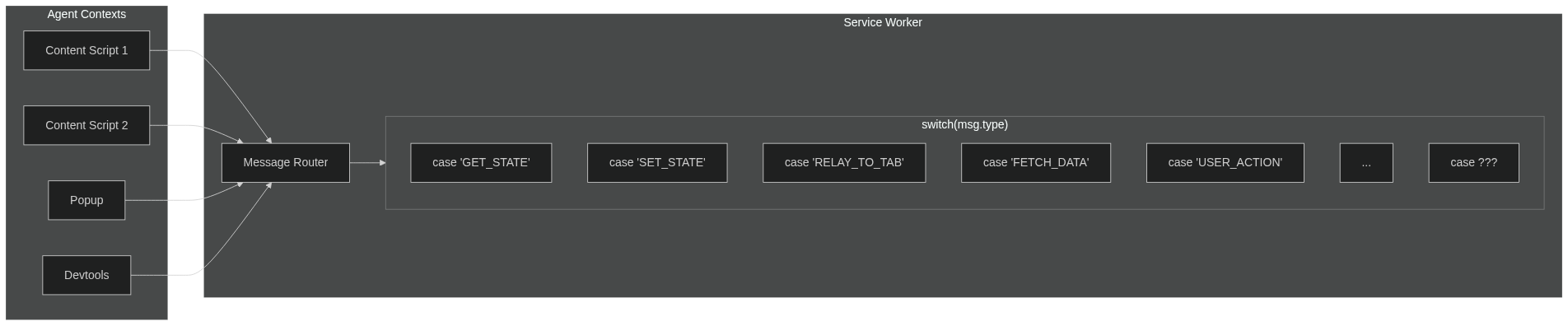
Browser extensions have multiple isolated contexts (content scripts, popup, devtools, sidepanel) that need to share state. The traditional approach using `sendMessage`/`onMessage` forces a painful pattern:
|
|
730
485
|
|
|
731
|
-
|
|
486
|
+
[](https://mermaid.live/edit#pako:eNp9k2tvmzAUhv-KZSlikyjCEBLgwyJK2FapbSJwVbVhihi4BDXYyJi2WZT_PodcmtvmT4f3PK998DlewpRlBLqw01kWtBAuWCpiRkqiuEDJEv6qrFadTkxf5uw9nSVcgNswpkCuuvmd86SaAS8nVNSTGLYB8BkV5EPUMfy1AdfLj9CkTUggSnlRCYCO0sZp2jhIj0eTMaua6kAa4smQvAnG5vVWJTSL6Ulp0aMsKyL8rUgJeGT8lfCjsrKCk1QUjAJ8_amGowcchNJ5R-o6yQkIWSNOnJ_RwWE32P8pbfV7IdLZl7LONbGoyNcj47-PbS8CSX-a1AQoPwI8jbCHA-XM7xt7KvoPZe6pMLj1nqZ4NMXe9QWwuwe_B_IXpkMPexcwa489REE49Xx8M7q_wPUkp2naeeJ-t8FgMDjKtr07aaIcGXB19W3bjZ1mnGnj0Zk0xGfSJm7lTZ-gCkvCy6TI5PAv11AM28GPoSvD9ejHMKYrySWNYNGCptAVvCEq5KzJZ9B9Sea1_GqqLBFkWCRyCsq9WiX0mbFyZ5Gf0F3CD-gamqMjByHLNsyurfdtU4UL6CK9r3Wdfh_pes80bKuPVir80-6ga47joC6ykWEaXcswbRXmfF339iwub41wnzVUQLdnWSokWSEYv9u87PaBr_4CI3YYvA)
|
|
732
487
|
|
|
733
|
-
|
|
488
|
+
**The problem with `sendMessage` / `onMessage`:**
|
|
734
489
|
|
|
735
|
-
|
|
490
|
+
- Agents can't message each other directly—everything routes through the service worker
|
|
491
|
+
- Your service worker becomes a message router with growing `switch/case` statements
|
|
492
|
+
- Every new feature means more message types, more handlers, more coupling
|
|
493
|
+
- Manual async handling (`return true` in Chrome, different in Firefox)
|
|
494
|
+
- Hand-rolled TypeScript types that may or may not stay in sync
|
|
736
495
|
|
|
737
|
-
**
|
|
496
|
+
**With Crann:**
|
|
738
497
|
|
|
739
|
-
|
|
740
|
-
|
|
498
|
+
- Define your state and actions in one place
|
|
499
|
+
- Agents sync automatically through the central store
|
|
500
|
+
- Full TypeScript inference—no manual type definitions
|
|
501
|
+
- No message routing, no relay logic, no `return true`
|
|
502
|
+
- Focus on your features, not the plumbing
|
|
741
503
|
|
|
742
|
-
|
|
743
|
-
_Crann's centralized state management simplifies the architecture by eliminating the need for manual message passing._
|
|
504
|
+
---
|
|
744
505
|
|
|
745
|
-
|
|
506
|
+
**License:** ISC
|
|
746
507
|
|
|
747
|
-
|
|
748
|
-
- **Single source of truth:** State is managed centrally.
|
|
749
|
-
- **Reactivity:** Components automatically react to state changes they care about.
|
|
508
|
+
**Repository:** [github.com/moclei/crann](https://github.com/moclei/crann)
|