cordova.plugins.diagnostic 6.0.4
This diff represents the content of publicly available package versions that have been released to one of the supported registries. The information contained in this diff is provided for informational purposes only and reflects changes between package versions as they appear in their respective public registries.
- package/.github/FUNDING.yml +6 -0
- package/.github/ISSUE_TEMPLATE/bug_report.md +123 -0
- package/.github/ISSUE_TEMPLATE/documentation-issue.md +36 -0
- package/.github/ISSUE_TEMPLATE/feature_request.md +41 -0
- package/.github/PULL_REQUEST_TEMPLATE.md +37 -0
- package/.github/stale.yml +17 -0
- package/CHANGELOG.md +390 -0
- package/README.md +3709 -0
- package/cordova.plugins.diagnostic.d.ts +1113 -0
- package/package.json +54 -0
- package/plugin.xml +496 -0
- package/scripts/apply-modules.js +165 -0
- package/scripts/logger.js +94 -0
- package/src/android/Diagnostic.java +856 -0
- package/src/android/Diagnostic_Bluetooth.java +297 -0
- package/src/android/Diagnostic_Camera.java +134 -0
- package/src/android/Diagnostic_External_Storage.java +273 -0
- package/src/android/Diagnostic_Location.java +319 -0
- package/src/android/Diagnostic_NFC.java +270 -0
- package/src/android/Diagnostic_Notifications.java +157 -0
- package/src/android/Diagnostic_Wifi.java +155 -0
- package/src/ios/Diagnostic.h +56 -0
- package/src/ios/Diagnostic.m +282 -0
- package/src/ios/Diagnostic_Bluetooth.h +24 -0
- package/src/ios/Diagnostic_Bluetooth.m +170 -0
- package/src/ios/Diagnostic_Calendar.h +24 -0
- package/src/ios/Diagnostic_Calendar.m +94 -0
- package/src/ios/Diagnostic_Camera.h +27 -0
- package/src/ios/Diagnostic_Camera.m +194 -0
- package/src/ios/Diagnostic_Contacts.h +24 -0
- package/src/ios/Diagnostic_Contacts.m +93 -0
- package/src/ios/Diagnostic_Location.h +31 -0
- package/src/ios/Diagnostic_Location.m +284 -0
- package/src/ios/Diagnostic_Microphone.h +21 -0
- package/src/ios/Diagnostic_Microphone.m +97 -0
- package/src/ios/Diagnostic_Motion.h +27 -0
- package/src/ios/Diagnostic_Motion.m +143 -0
- package/src/ios/Diagnostic_Notifications.h +22 -0
- package/src/ios/Diagnostic_Notifications.m +235 -0
- package/src/ios/Diagnostic_Reminders.h +24 -0
- package/src/ios/Diagnostic_Reminders.m +93 -0
- package/src/ios/Diagnostic_Wifi.h +19 -0
- package/src/ios/Diagnostic_Wifi.m +108 -0
- package/src/windows/diagnosticProxy.bluetooth.js +23 -0
- package/src/windows/diagnosticProxy.camera.js +35 -0
- package/src/windows/diagnosticProxy.js +137 -0
- package/src/windows/diagnosticProxy.location.js +54 -0
- package/src/windows/diagnosticProxy.wifi.js +18 -0
- package/www/android/diagnostic.bluetooth.js +211 -0
- package/www/android/diagnostic.calendar.js +90 -0
- package/www/android/diagnostic.camera.js +203 -0
- package/www/android/diagnostic.contacts.js +91 -0
- package/www/android/diagnostic.external_storage.js +102 -0
- package/www/android/diagnostic.js +1309 -0
- package/www/android/diagnostic.location.js +282 -0
- package/www/android/diagnostic.microphone.js +89 -0
- package/www/android/diagnostic.nfc.js +127 -0
- package/www/android/diagnostic.notifications.js +74 -0
- package/www/android/diagnostic.wifi.js +90 -0
- package/www/ios/diagnostic.bluetooth.js +127 -0
- package/www/ios/diagnostic.calendar.js +97 -0
- package/www/ios/diagnostic.camera.js +212 -0
- package/www/ios/diagnostic.contacts.js +98 -0
- package/www/ios/diagnostic.js +990 -0
- package/www/ios/diagnostic.location.js +236 -0
- package/www/ios/diagnostic.microphone.js +99 -0
- package/www/ios/diagnostic.motion.js +160 -0
- package/www/ios/diagnostic.notifications.js +189 -0
- package/www/ios/diagnostic.reminders.js +97 -0
- package/www/ios/diagnostic.wifi.js +80 -0
- package/www/windows/diagnostic.bluetooth.js +51 -0
- package/www/windows/diagnostic.camera.js +41 -0
- package/www/windows/diagnostic.js +169 -0
- package/www/windows/diagnostic.location.js +35 -0
- package/www/windows/diagnostic.wifi.js +51 -0
package/README.md
ADDED
|
@@ -0,0 +1,3709 @@
|
|
|
1
|
+
Cordova diagnostic plugin [](https://www.npmjs.com/package/cordova.plugins.diagnostic) [](https://npm-stat.com/charts.html?package=cordova.plugins.diagnostic)
|
|
2
|
+
=========================
|
|
3
|
+
|
|
4
|
+
<!-- doctoc README.md --maxlevel=3 -->
|
|
5
|
+
<!-- START doctoc generated TOC please keep comment here to allow auto update -->
|
|
6
|
+
<!-- DON'T EDIT THIS SECTION, INSTEAD RE-RUN doctoc TO UPDATE -->
|
|
7
|
+
|
|
8
|
+
|
|
9
|
+
- [Cordova diagnostic plugin  [](https://npm-stat.com/charts.html?package=cordova.plugins.diagnostic)](#cordova-diagnostic-plugin--)
|
|
10
|
+
- [Overview](#overview)
|
|
11
|
+
- [Important notes](#important-notes)
|
|
12
|
+
- [Minimum supported versions](#minimum-supported-versions)
|
|
13
|
+
- [Native environment required](#native-environment-required)
|
|
14
|
+
- [Building for Android](#building-for-android)
|
|
15
|
+
- [Installation](#installation)
|
|
16
|
+
- [Using the Cordova/Phonegap/Ionic CLI](#using-the-cordovaphonegapionic-cli)
|
|
17
|
+
- [AndroidX Library](#androidx-library)
|
|
18
|
+
- [Specifying modules](#specifying-modules)
|
|
19
|
+
- [Available modules](#available-modules)
|
|
20
|
+
- [Reporting issues](#reporting-issues)
|
|
21
|
+
- [Reporting a bug or problem](#reporting-a-bug-or-problem)
|
|
22
|
+
- [Requesting a new feature](#requesting-a-new-feature)
|
|
23
|
+
- [Usage](#usage)
|
|
24
|
+
- [Core module](#core-module)
|
|
25
|
+
- [switchToSettings()](#switchtosettings)
|
|
26
|
+
- [Parameters](#parameters)
|
|
27
|
+
- [Example usage](#example-usage)
|
|
28
|
+
- [switchToWirelessSettings()](#switchtowirelesssettings)
|
|
29
|
+
- [switchToMobileDataSettings()](#switchtomobiledatasettings)
|
|
30
|
+
- [permissionStatus constants](#permissionstatus-constants)
|
|
31
|
+
- [Android](#android)
|
|
32
|
+
- [iOS](#ios)
|
|
33
|
+
- [Example](#example)
|
|
34
|
+
- [getPermissionAuthorizationStatus()](#getpermissionauthorizationstatus)
|
|
35
|
+
- [Parameters](#parameters-1)
|
|
36
|
+
- [Example usage](#example-usage-1)
|
|
37
|
+
- [getPermissionsAuthorizationStatus()](#getpermissionsauthorizationstatus)
|
|
38
|
+
- [Parameters](#parameters-2)
|
|
39
|
+
- [Example usage](#example-usage-2)
|
|
40
|
+
- [requestRuntimePermission()](#requestruntimepermission)
|
|
41
|
+
- [Parameters](#parameters-3)
|
|
42
|
+
- [Example usage](#example-usage-3)
|
|
43
|
+
- [requestRuntimePermissions()](#requestruntimepermissions)
|
|
44
|
+
- [Parameters](#parameters-4)
|
|
45
|
+
- [Example usage](#example-usage-4)
|
|
46
|
+
- [isRequestingPermission()](#isrequestingpermission)
|
|
47
|
+
- [Example usage](#example-usage-5)
|
|
48
|
+
- [registerPermissionRequestCompleteHandler()](#registerpermissionrequestcompletehandler)
|
|
49
|
+
- [Parameters](#parameters-5)
|
|
50
|
+
- [Example usage](#example-usage-6)
|
|
51
|
+
- [isDataRoamingEnabled()](#isdataroamingenabled)
|
|
52
|
+
- [Parameters](#parameters-6)
|
|
53
|
+
- [Example usage](#example-usage-7)
|
|
54
|
+
- [isADBModeEnabled()](#isadbmodeenabled)
|
|
55
|
+
- [Parameters](#parameters-7)
|
|
56
|
+
- [Example usage](#example-usage-8)
|
|
57
|
+
- [isDeviceRooted()](#isdevicerooted)
|
|
58
|
+
- [Parameters](#parameters-8)
|
|
59
|
+
- [Example usage](#example-usage-9)
|
|
60
|
+
- [isBackgroundRefreshAuthorized()](#isbackgroundrefreshauthorized)
|
|
61
|
+
- [Parameters](#parameters-9)
|
|
62
|
+
- [Example usage](#example-usage-10)
|
|
63
|
+
- [getBackgroundRefreshStatus()](#getbackgroundrefreshstatus)
|
|
64
|
+
- [Parameters](#parameters-10)
|
|
65
|
+
- [Example usage](#example-usage-11)
|
|
66
|
+
- [cpuArchitecture constants](#cpuarchitecture-constants)
|
|
67
|
+
- [Android](#android-1)
|
|
68
|
+
- [iOS](#ios-1)
|
|
69
|
+
- [Example usage](#example-usage-12)
|
|
70
|
+
- [getArchitecture()](#getarchitecture)
|
|
71
|
+
- [Parameters](#parameters-11)
|
|
72
|
+
- [Example usage](#example-usage-13)
|
|
73
|
+
- [restart()](#restart)
|
|
74
|
+
- [Parameters](#parameters-12)
|
|
75
|
+
- [Example usage](#example-usage-14)
|
|
76
|
+
- [enableDebug()](#enabledebug)
|
|
77
|
+
- [Parameters](#parameters-13)
|
|
78
|
+
- [Example usage](#example-usage-15)
|
|
79
|
+
- [Location module](#location-module)
|
|
80
|
+
- [locationMode constants](#locationmode-constants)
|
|
81
|
+
- [Values](#values)
|
|
82
|
+
- [Example](#example-1)
|
|
83
|
+
- [locationAuthorizationMode constants](#locationauthorizationmode-constants)
|
|
84
|
+
- [Values](#values-1)
|
|
85
|
+
- [Example](#example-2)
|
|
86
|
+
- [locationAccuracyAuthorization constants](#locationaccuracyauthorization-constants)
|
|
87
|
+
- [Values](#values-2)
|
|
88
|
+
- [Example](#example-3)
|
|
89
|
+
- [isLocationAvailable()](#islocationavailable)
|
|
90
|
+
- [Parameters](#parameters-14)
|
|
91
|
+
- [Example usage](#example-usage-16)
|
|
92
|
+
- [isLocationEnabled()](#islocationenabled)
|
|
93
|
+
- [Parameters](#parameters-15)
|
|
94
|
+
- [Example usage](#example-usage-17)
|
|
95
|
+
- [isGpsLocationAvailable()](#isgpslocationavailable)
|
|
96
|
+
- [Parameters](#parameters-16)
|
|
97
|
+
- [Example usage](#example-usage-18)
|
|
98
|
+
- [isGpsLocationEnabled()](#isgpslocationenabled)
|
|
99
|
+
- [Parameters](#parameters-17)
|
|
100
|
+
- [Example usage](#example-usage-19)
|
|
101
|
+
- [isNetworkLocationAvailable()](#isnetworklocationavailable)
|
|
102
|
+
- [Parameters](#parameters-18)
|
|
103
|
+
- [Example usage](#example-usage-20)
|
|
104
|
+
- [isNetworkLocationEnabled()](#isnetworklocationenabled)
|
|
105
|
+
- [Parameters](#parameters-19)
|
|
106
|
+
- [Example usage](#example-usage-21)
|
|
107
|
+
- [getLocationMode()](#getlocationmode)
|
|
108
|
+
- [Parameters](#parameters-20)
|
|
109
|
+
- [Example usage](#example-usage-22)
|
|
110
|
+
- [isLocationAuthorized()](#islocationauthorized)
|
|
111
|
+
- [Parameters](#parameters-21)
|
|
112
|
+
- [Example usage](#example-usage-23)
|
|
113
|
+
- [getLocationAuthorizationStatus()](#getlocationauthorizationstatus)
|
|
114
|
+
- [Parameters](#parameters-22)
|
|
115
|
+
- [Example iOS usage](#example-ios-usage)
|
|
116
|
+
- [Example Android usage](#example-android-usage)
|
|
117
|
+
- [requestLocationAuthorization()](#requestlocationauthorization)
|
|
118
|
+
- [Parameters](#parameters-23)
|
|
119
|
+
- [Example usage](#example-usage-24)
|
|
120
|
+
- [registerLocationStateChangeHandler()](#registerlocationstatechangehandler)
|
|
121
|
+
- [Parameters](#parameters-24)
|
|
122
|
+
- [Example usage](#example-usage-25)
|
|
123
|
+
- [getLocationAccuracyAuthorization()](#getlocationaccuracyauthorization)
|
|
124
|
+
- [Parameters](#parameters-25)
|
|
125
|
+
- [Example usage](#example-usage-26)
|
|
126
|
+
- [requestTemporaryFullAccuracyAuthorization()](#requesttemporaryfullaccuracyauthorization)
|
|
127
|
+
- [Parameters](#parameters-26)
|
|
128
|
+
- [Example usage](#example-usage-27)
|
|
129
|
+
- [registerLocationStateChangeHandler()](#registerlocationstatechangehandler-1)
|
|
130
|
+
- [Parameters](#parameters-27)
|
|
131
|
+
- [Example usage](#example-usage-28)
|
|
132
|
+
- [switchToLocationSettings()](#switchtolocationsettings)
|
|
133
|
+
- [Bluetooth module](#bluetooth-module)
|
|
134
|
+
- [bluetoothState constants](#bluetoothstate-constants)
|
|
135
|
+
- [Android](#android-2)
|
|
136
|
+
- [iOS](#ios-2)
|
|
137
|
+
- [Example](#example-4)
|
|
138
|
+
- [isBluetoothAvailable()](#isbluetoothavailable)
|
|
139
|
+
- [Parameters](#parameters-28)
|
|
140
|
+
- [Example usage](#example-usage-29)
|
|
141
|
+
- [isBluetoothEnabled()](#isbluetoothenabled)
|
|
142
|
+
- [Parameters](#parameters-29)
|
|
143
|
+
- [Example usage](#example-usage-30)
|
|
144
|
+
- [hasBluetoothSupport()](#hasbluetoothsupport)
|
|
145
|
+
- [Parameters](#parameters-30)
|
|
146
|
+
- [Example usage](#example-usage-31)
|
|
147
|
+
- [hasBluetoothLESupport()](#hasbluetoothlesupport)
|
|
148
|
+
- [Parameters](#parameters-31)
|
|
149
|
+
- [Example usage](#example-usage-32)
|
|
150
|
+
- [hasBluetoothLEPeripheralSupport()](#hasbluetoothleperipheralsupport)
|
|
151
|
+
- [Parameters](#parameters-32)
|
|
152
|
+
- [Example usage](#example-usage-33)
|
|
153
|
+
- [getBluetoothState()](#getbluetoothstate)
|
|
154
|
+
- [Parameters](#parameters-33)
|
|
155
|
+
- [Example usage](#example-usage-34)
|
|
156
|
+
- [setBluetoothState()](#setbluetoothstate)
|
|
157
|
+
- [Parameters](#parameters-34)
|
|
158
|
+
- [Example usage](#example-usage-35)
|
|
159
|
+
- [requestBluetoothAuthorization()](#requestbluetoothauthorization)
|
|
160
|
+
- [Parameters](#parameters-35)
|
|
161
|
+
- [Example usage](#example-usage-36)
|
|
162
|
+
- [registerBluetoothStateChangeHandler()](#registerbluetoothstatechangehandler)
|
|
163
|
+
- [Parameters](#parameters-36)
|
|
164
|
+
- [Example usage](#example-usage-37)
|
|
165
|
+
- [switchToBluetoothSettings()](#switchtobluetoothsettings)
|
|
166
|
+
- [WiFi module](#wifi-module)
|
|
167
|
+
- [isWifiAvailable()](#iswifiavailable)
|
|
168
|
+
- [Parameters](#parameters-37)
|
|
169
|
+
- [Example usage](#example-usage-38)
|
|
170
|
+
- [isWifiEnabled()](#iswifienabled)
|
|
171
|
+
- [Parameters](#parameters-38)
|
|
172
|
+
- [Example usage](#example-usage-39)
|
|
173
|
+
- [setWifiState()](#setwifistate)
|
|
174
|
+
- [Parameters](#parameters-39)
|
|
175
|
+
- [Example usage](#example-usage-40)
|
|
176
|
+
- [switchToWifiSettings()](#switchtowifisettings)
|
|
177
|
+
- [Camera module](#camera-module)
|
|
178
|
+
- [isCameraPresent()](#iscamerapresent)
|
|
179
|
+
- [Parameters](#parameters-40)
|
|
180
|
+
- [Example usage](#example-usage-41)
|
|
181
|
+
- [isCameraAvailable()](#iscameraavailable)
|
|
182
|
+
- [Parameters](#parameters-41)
|
|
183
|
+
- [Example usage](#example-usage-42)
|
|
184
|
+
- [isCameraAuthorized()](#iscameraauthorized)
|
|
185
|
+
- [Parameters](#parameters-42)
|
|
186
|
+
- [Example usage](#example-usage-43)
|
|
187
|
+
- [getCameraAuthorizationStatus()](#getcameraauthorizationstatus)
|
|
188
|
+
- [Parameters](#parameters-43)
|
|
189
|
+
- [Example usage](#example-usage-44)
|
|
190
|
+
- [requestCameraAuthorization()](#requestcameraauthorization)
|
|
191
|
+
- [Parameters](#parameters-44)
|
|
192
|
+
- [Example usage](#example-usage-45)
|
|
193
|
+
- [isCameraRollAuthorized()](#iscamerarollauthorized)
|
|
194
|
+
- [Parameters](#parameters-45)
|
|
195
|
+
- [Example usage](#example-usage-46)
|
|
196
|
+
- [getCameraRollAuthorizationStatus()](#getcamerarollauthorizationstatus)
|
|
197
|
+
- [Parameters](#parameters-46)
|
|
198
|
+
- [Example usage](#example-usage-47)
|
|
199
|
+
- [requestCameraRollAuthorization()](#requestcamerarollauthorization)
|
|
200
|
+
- [Parameters](#parameters-47)
|
|
201
|
+
- [Example usage](#example-usage-48)
|
|
202
|
+
- [Notifications module](#notifications-module)
|
|
203
|
+
- [remoteNotificationType constants](#remotenotificationtype-constants)
|
|
204
|
+
- [Example](#example-5)
|
|
205
|
+
- [isRemoteNotificationsEnabled()](#isremotenotificationsenabled)
|
|
206
|
+
- [Parameters](#parameters-48)
|
|
207
|
+
- [Example usage](#example-usage-49)
|
|
208
|
+
- [isRegisteredForRemoteNotifications()](#isregisteredforremotenotifications)
|
|
209
|
+
- [Parameters](#parameters-49)
|
|
210
|
+
- [Example usage](#example-usage-50)
|
|
211
|
+
- [getRemoteNotificationTypes()](#getremotenotificationtypes)
|
|
212
|
+
- [Parameters](#parameters-50)
|
|
213
|
+
- [Example usage](#example-usage-51)
|
|
214
|
+
- [getRemoteNotificationsAuthorizationStatus()](#getremotenotificationsauthorizationstatus)
|
|
215
|
+
- [Parameters](#parameters-51)
|
|
216
|
+
- [Example usage](#example-usage-52)
|
|
217
|
+
- [requestRemoteNotificationsAuthorization()](#requestremotenotificationsauthorization)
|
|
218
|
+
- [Parameters](#parameters-52)
|
|
219
|
+
- [Example usage](#example-usage-53)
|
|
220
|
+
- [switchToNotificationSettings()](#switchToNotificationSettings)
|
|
221
|
+
- [Microphone module](#microphone-module)
|
|
222
|
+
- [isMicrophoneAuthorized()](#ismicrophoneauthorized)
|
|
223
|
+
- [Parameters](#parameters-53)
|
|
224
|
+
- [Example usage](#example-usage-54)
|
|
225
|
+
- [getMicrophoneAuthorizationStatus()](#getmicrophoneauthorizationstatus)
|
|
226
|
+
- [Parameters](#parameters-54)
|
|
227
|
+
- [Example usage](#example-usage-55)
|
|
228
|
+
- [requestMicrophoneAuthorization()](#requestmicrophoneauthorization)
|
|
229
|
+
- [Parameters](#parameters-55)
|
|
230
|
+
- [Example usage](#example-usage-56)
|
|
231
|
+
- [Contacts module](#contacts-module)
|
|
232
|
+
- [isContactsAuthorized()](#iscontactsauthorized)
|
|
233
|
+
- [Parameters](#parameters-56)
|
|
234
|
+
- [Example usage](#example-usage-57)
|
|
235
|
+
- [getContactsAuthorizationStatus()](#getcontactsauthorizationstatus)
|
|
236
|
+
- [Parameters](#parameters-57)
|
|
237
|
+
- [Example usage](#example-usage-58)
|
|
238
|
+
- [requestContactsAuthorization()](#requestcontactsauthorization)
|
|
239
|
+
- [Parameters](#parameters-58)
|
|
240
|
+
- [Example usage](#example-usage-59)
|
|
241
|
+
- [Calendar module](#calendar-module)
|
|
242
|
+
- [isCalendarAuthorized()](#iscalendarauthorized)
|
|
243
|
+
- [Parameters](#parameters-59)
|
|
244
|
+
- [Example usage](#example-usage-60)
|
|
245
|
+
- [getCalendarAuthorizationStatus()](#getcalendarauthorizationstatus)
|
|
246
|
+
- [Parameters](#parameters-60)
|
|
247
|
+
- [Example usage](#example-usage-61)
|
|
248
|
+
- [requestCalendarAuthorization()](#requestcalendarauthorization)
|
|
249
|
+
- [Parameters](#parameters-61)
|
|
250
|
+
- [Example usage](#example-usage-62)
|
|
251
|
+
- [Reminders module](#reminders-module)
|
|
252
|
+
- [isRemindersAuthorized()](#isremindersauthorized)
|
|
253
|
+
- [Parameters](#parameters-62)
|
|
254
|
+
- [Example usage](#example-usage-63)
|
|
255
|
+
- [getRemindersAuthorizationStatus()](#getremindersauthorizationstatus)
|
|
256
|
+
- [Parameters](#parameters-63)
|
|
257
|
+
- [Example usage](#example-usage-64)
|
|
258
|
+
- [requestRemindersAuthorization()](#requestremindersauthorization)
|
|
259
|
+
- [Parameters](#parameters-64)
|
|
260
|
+
- [Example usage](#example-usage-65)
|
|
261
|
+
- [Motion module](#motion-module)
|
|
262
|
+
- [motionStatus constants](#motionstatus-constants)
|
|
263
|
+
- [Example](#example-6)
|
|
264
|
+
- [isMotionAvailable()](#ismotionavailable)
|
|
265
|
+
- [Parameters](#parameters-65)
|
|
266
|
+
- [Example usage](#example-usage-66)
|
|
267
|
+
- [isMotionRequestOutcomeAvailable()](#ismotionrequestoutcomeavailable)
|
|
268
|
+
- [Parameters](#parameters-66)
|
|
269
|
+
- [Example usage](#example-usage-67)
|
|
270
|
+
- [requestMotionAuthorization()](#requestmotionauthorization)
|
|
271
|
+
- [Parameters](#parameters-67)
|
|
272
|
+
- [Example usage](#example-usage-68)
|
|
273
|
+
- [getMotionAuthorizationStatus()](#getmotionauthorizationstatus)
|
|
274
|
+
- [Parameters](#parameters-68)
|
|
275
|
+
- [Example usage](#example-usage-69)
|
|
276
|
+
- [NFC module](#nfc-module)
|
|
277
|
+
- [NFCState constants](#nfcstate-constants)
|
|
278
|
+
- [Values](#values-3)
|
|
279
|
+
- [Example](#example-7)
|
|
280
|
+
- [isNFCPresent()](#isnfcpresent)
|
|
281
|
+
- [Parameters](#parameters-69)
|
|
282
|
+
- [Example usage](#example-usage-70)
|
|
283
|
+
- [isNFCEnabled()](#isnfcenabled)
|
|
284
|
+
- [Parameters](#parameters-70)
|
|
285
|
+
- [Example usage](#example-usage-71)
|
|
286
|
+
- [isNFCAvailable()](#isnfcavailable)
|
|
287
|
+
- [Parameters](#parameters-71)
|
|
288
|
+
- [Example usage](#example-usage-72)
|
|
289
|
+
- [registerNFCStateChangeHandler()](#registernfcstatechangehandler)
|
|
290
|
+
- [Parameters](#parameters-72)
|
|
291
|
+
- [Example usage](#example-usage-73)
|
|
292
|
+
- [switchToNFCSettings()](#switchtonfcsettings)
|
|
293
|
+
- [External storage module](#external-storage-module)
|
|
294
|
+
- [isExternalStorageAuthorized()](#isexternalstorageauthorized)
|
|
295
|
+
- [Parameters](#parameters-73)
|
|
296
|
+
- [Example usage](#example-usage-74)
|
|
297
|
+
- [getExternalStorageAuthorizationStatus()](#getexternalstorageauthorizationstatus)
|
|
298
|
+
- [Parameters](#parameters-74)
|
|
299
|
+
- [Example usage](#example-usage-75)
|
|
300
|
+
- [requestExternalStorageAuthorization()](#requestexternalstorageauthorization)
|
|
301
|
+
- [Parameters](#parameters-75)
|
|
302
|
+
- [Example usage](#example-usage-76)
|
|
303
|
+
- [getExternalSdCardDetails()](#getexternalsdcarddetails)
|
|
304
|
+
- [Parameters](#parameters-76)
|
|
305
|
+
- [Example usage](#example-usage-77)
|
|
306
|
+
- [Platform Notes](#platform-notes)
|
|
307
|
+
- [Android](#android-3)
|
|
308
|
+
- [Android permissions](#android-permissions)
|
|
309
|
+
- [Android runtime permissions](#android-runtime-permissions)
|
|
310
|
+
- ["Dangerous" runtime permissions](#dangerous-runtime-permissions)
|
|
311
|
+
- [API 29 runtime permissions](#api-29-runtime-permissions)
|
|
312
|
+
- [Runtime permission groups](#runtime-permission-groups)
|
|
313
|
+
- [Runtime permissions example project](#runtime-permissions-example-project)
|
|
314
|
+
- [Android Camera permissions](#android-camera-permissions)
|
|
315
|
+
- [Android Auto Backup](#android-auto-backup)
|
|
316
|
+
- [Windows](#windows)
|
|
317
|
+
- [Supported Windows versions](#supported-windows-versions)
|
|
318
|
+
- [Windows 10 UWP permissions](#windows-10-uwp-permissions)
|
|
319
|
+
- [iOS](#ios-3)
|
|
320
|
+
- [iOS usage description messages](#ios-usage-description-messages)
|
|
321
|
+
- [Example project](#example-project)
|
|
322
|
+
- [Screenshots](#screenshots)
|
|
323
|
+
- [Android](#android-4)
|
|
324
|
+
- [iOS](#ios-4)
|
|
325
|
+
- [Release notes](#release-notes)
|
|
326
|
+
- [Credits](#credits)
|
|
327
|
+
- [# License](#-license)
|
|
328
|
+
|
|
329
|
+
<!-- END doctoc generated TOC please keep comment here to allow auto update -->
|
|
330
|
+
|
|
331
|
+
|
|
332
|
+
# Overview
|
|
333
|
+
|
|
334
|
+
This Cordova/Phonegap plugin for iOS, Android and Windows 10 UWP is used to manage device settings such as Location, Bluetooth and WiFi. It enables management of run-time permissions, device hardware and core OS features.
|
|
335
|
+
|
|
336
|
+
The plugin is registered in on [npm](https://www.npmjs.com/package/cordova.plugins.diagnostic) as `cordova.plugins.diagnostic`
|
|
337
|
+
|
|
338
|
+
<!-- DONATE -->
|
|
339
|
+
[](https://www.paypal.com/cgi-bin/webscr?cmd=_s-xclick&hosted_button_id=ZRD3W47HQ3EMJ)
|
|
340
|
+
|
|
341
|
+
I dedicate a considerable amount of my free time to developing and maintaining this Cordova plugin, along with my other Open Source software.
|
|
342
|
+
To help ensure this plugin is kept updated, new features are added and bugfixes are implemented quickly, please donate a couple of dollars (or a little more if you can stretch) as this will help me to afford to dedicate time to its maintenance. Please consider donating if you're using this plugin in an app that makes you money, if you're being paid to make the app, if you're asking for new features or priority bug fixes.
|
|
343
|
+
<!-- END DONATE -->
|
|
344
|
+
|
|
345
|
+
|
|
346
|
+
## Important notes
|
|
347
|
+
|
|
348
|
+
### Minimum supported versions
|
|
349
|
+
- Cordova CLI: `cordova@9.0.0`
|
|
350
|
+
- Android platform: `cordova-android@8.0.0` (recommended version `cordova-android@9.0.0`)
|
|
351
|
+
- Android version: Android 5.0 (API 21)
|
|
352
|
+
- iOS platform: `cordova-ios@5.0.0`
|
|
353
|
+
- iOS 10.0
|
|
354
|
+
|
|
355
|
+
Note: If you need to support older OS versions, please use an older version of this plugin.
|
|
356
|
+
|
|
357
|
+
### Native environment required
|
|
358
|
+
Note that this plugin is intended for use in a **native** mobile environment.
|
|
359
|
+
It will **NOT** work in a browser-emulated Cordova environment, for example by running `cordova serve` or using the [Ripple emulator](https://github.com/ripple-emulator/ripple).
|
|
360
|
+
### Building for Android
|
|
361
|
+
|
|
362
|
+
In order to avoid build problems with Android, please make sure you have the latest versions of the following Android SDK components installed:
|
|
363
|
+
|
|
364
|
+
- Android SDK Tools
|
|
365
|
+
- Android SDK Platform-tools
|
|
366
|
+
- Android SDK Build-tools
|
|
367
|
+
- Target SDK Platform - e.g. Android 10.0 (API 29)
|
|
368
|
+
- Google Repository
|
|
369
|
+
|
|
370
|
+
* Make sure you have a [supported version](#minimum-supported-versions) of the `cordova-android` platform installed.
|
|
371
|
+
* You can check if the Android platform in your Cordova project is up-to-date using `cordova platform check android` and if it's not, update it using `cordova platform rm android && cordova platform add android@latest`.
|
|
372
|
+
* Since `cordova.plugins.diagnostic@6` the recommended Cordova Android platform version is `cordova-android@9.0.0` (which includes AndroidX support).
|
|
373
|
+
* To use this plugin with `cordova-android@8`, install [cordova-plugin-androidx](https://github.com/dpa99c/cordova-plugin-androidx) and [cordova-plugin-androidx-adapter](https://github.com/dpa99c/cordova-plugin-androidx-adapter).
|
|
374
|
+
* Phonegap Build uses should use the latest available CLI version ([listed here](https://build.phonegap.com/current-support)) by specifying using the `phonegap-version` tag in your `config.xml`.
|
|
375
|
+
|
|
376
|
+
# Installation
|
|
377
|
+
|
|
378
|
+
## Using the Cordova/Phonegap/Ionic CLI
|
|
379
|
+
|
|
380
|
+
$ cordova plugin add cordova.plugins.diagnostic
|
|
381
|
+
$ cordova plugin add cordova.plugins.diagnostic --variable ANDROIDX_VERSION=1.0.0
|
|
382
|
+
$ phonegap plugin add cordova.plugins.diagnostic
|
|
383
|
+
$ ionic cordova plugin add cordova.plugins.diagnostic
|
|
384
|
+
|
|
385
|
+
## AndroidX Library
|
|
386
|
+
This plugin uses/depends on the [AndroidX (Jetpack) libraries](https://developer.android.com/jetpack/androidx) (these supersede the [Android Support Library](https://developer.android.com/topic/libraries/support-library/index.html) which is no longer used by this plugin since `cordova.plugins.diagnostic@6`).
|
|
387
|
+
|
|
388
|
+
This plugin pins default versions of the legacy and appcompat versions of the library in [its `plugin.xml`](https://github.com/dpa99c/cordova-diagnostic-plugin/blob/master/plugin.xml) however you can override these to specify different versions using the `ANDROIDX_VERSION` (legacy) and `ANDROIDX_APPCOMPAT_VERSION` variables at plugin installation time, for example:
|
|
389
|
+
|
|
390
|
+
$ cordova plugin add cordova.plugins.diagnostic --variable ANDROIDX_VERSION=1.0.0 --variable ANDROIDX_APPCOMPAT_VERSION=1.3.1
|
|
391
|
+
|
|
392
|
+
|
|
393
|
+
## Specifying modules
|
|
394
|
+
Since `cordova.plugins.diagnostic@4` the plugin is split into optional functional modules.
|
|
395
|
+
The reason for this is so you can choose to install only those parts of the plugin you'll use and therefore not install redundant code/components/frameworks.
|
|
396
|
+
|
|
397
|
+
By default, all the modules will be added to your project when you install the plugin.
|
|
398
|
+
|
|
399
|
+
You can specify which modules are installed by adding a `<preference>` to your `config.xml` which specifies the modules you wish to add as a space-separated list.
|
|
400
|
+
Module names should be capitalised.
|
|
401
|
+
|
|
402
|
+
The preference takes the form:
|
|
403
|
+
|
|
404
|
+
<preference name="cordova.plugins.diagnostic.modules" value="[list of modules]" />
|
|
405
|
+
|
|
406
|
+
For example, to explicitly include all optional modules:
|
|
407
|
+
|
|
408
|
+
<preference name="cordova.plugins.diagnostic.modules" value="LOCATION BLUETOOTH WIFI CAMERA NOTIFICATIONS MICROPHONE CONTACTS CALENDAR REMINDERS MOTION NFC EXTERNAL_STORAGE" />
|
|
409
|
+
|
|
410
|
+
To install only the core module and no optional modules, leave the preference value blank:
|
|
411
|
+
|
|
412
|
+
<preference name="cordova.plugins.diagnostic.modules" value="" />
|
|
413
|
+
|
|
414
|
+
### Available modules
|
|
415
|
+
|
|
416
|
+
The following optional modules are currently supported by the plugin:
|
|
417
|
+
|
|
418
|
+
- [LOCATION](#location-module) - Android, iOS, Windows 10 UWP
|
|
419
|
+
- [BLUETOOTH](#bluetooth-module) - Android, iOS, Windows 10 UWP
|
|
420
|
+
- [WIFI](#wifi-module) - Android, iOS, Windows 10 UWP
|
|
421
|
+
- [CAMERA](#camera-module) - Android, iOS, Windows 10 UWP
|
|
422
|
+
- [NOTIFICATIONS](#notifications-module) - Android, iOS
|
|
423
|
+
- [MICROPHONE](#microphone-module) - Android, iOS
|
|
424
|
+
- [CONTACTS](#contacts-module) - Android, iOS
|
|
425
|
+
- [CALENDAR](#calendar-module) - Android, iOS
|
|
426
|
+
- [REMINDERS](#reminders-module) - iOS
|
|
427
|
+
- [MOTION](#motion-module) - iOS
|
|
428
|
+
- [NFC](#nfc-module) - Android
|
|
429
|
+
- [EXTERNAL_STORAGE](#external-storage-module) - Android
|
|
430
|
+
|
|
431
|
+
**IMPORTANT:** It's vital that the preference be added to your `config.xml` **before** you install the plugin, otherwise the preference will not be applied and all modules will be added.
|
|
432
|
+
This is because, due to limitations of the Cordova CLI hooks, this plugin must use the `npm install` process to apply the module preferences and this runs before the Cordova CLI when installing a plugin.
|
|
433
|
+
If you change the modules specified in the preference, you'll need to uninstall then re-install the plugin to your project to apply the changes.
|
|
434
|
+
|
|
435
|
+
# Reporting issues
|
|
436
|
+
**IMPORTANT:** Please read the following carefully.
|
|
437
|
+
Failure to follow the issue template guidelines below will result in the issue being immediately closed.
|
|
438
|
+
|
|
439
|
+
## Reporting a bug or problem
|
|
440
|
+
Before [opening a bug issue](https://github.com/dpa99c/cordova-diagnostic-plugin/issues/new?assignees=&labels=&template=bug_report.md&title=), please do the following:
|
|
441
|
+
- *DO NOT* open issues asking for support in using/integrating the plugin into your project
|
|
442
|
+
- Only open issues for suspected bugs/issues with the plugin that are generic and will affect other users
|
|
443
|
+
- I don't have time to offer free technical support: this is free open-source software
|
|
444
|
+
- Ask for help on StackOverflow, Ionic Forums, etc.
|
|
445
|
+
- Use the [example project](https://github.com/dpa99c/cordova-diagnostic-plugin-example) as a known working reference
|
|
446
|
+
- Any issues requesting support will be closed immediately.
|
|
447
|
+
- *DO NOT* open issues related to the [Ionic Typescript wrapper for this plugin](https://github.com/ionic-team/ionic-native/blob/master/src/%40ionic-native/plugins/diagnostic/index.ts)
|
|
448
|
+
- This is owned/maintained by [Ionic](https://github.com/ionic-team) and is not part of this plugin
|
|
449
|
+
- Please raise such issues/PRs against [Ionic Native](https://github.com/ionic-team/ionic-native/) instead.
|
|
450
|
+
- To verify an if an issue is caused by this plugin or its Typescript wrapper, please re-test using the vanilla Javascript plugin interface (without the Ionic Native wrapper).
|
|
451
|
+
- Any issue opened here which is obviously an Ionic Typescript wrapper issue will be closed immediately.
|
|
452
|
+
- Read the above documentation thoroughly
|
|
453
|
+
- Check the [CHANGELOG](https://github.com/dpa99c/cordova-diagnostic-plugin/blob/master/CHANGELOG.md) for any breaking changes that may be causing your issue.
|
|
454
|
+
- Check a similar issue (open or closed) does not already exist against this plugin.
|
|
455
|
+
- Duplicates or near-duplicates will be closed immediately.
|
|
456
|
+
- When [creating a new issue](https://github.com/dpa99c/cordova-diagnostic-plugin/issues/new/choose)
|
|
457
|
+
- Choose the "Bug report" template
|
|
458
|
+
- Fill out the relevant sections of the template and delete irrelevant sections
|
|
459
|
+
- *WARNING:* Failure to complete the issue template will result in the issue being closed immediately.
|
|
460
|
+
- Reproduce the issue using the [example project](https://github.com/dpa99c/cordova-diagnostic-plugin-example)
|
|
461
|
+
- This will eliminate bugs in your code or conflicts with other code as possible causes of the issue
|
|
462
|
+
- This will also validate your development environment using a known working codebase
|
|
463
|
+
- If reproducing the issue using the example project is not possible, create an isolated test project that you are able to share
|
|
464
|
+
- Include full verbose console output when reporting build issues
|
|
465
|
+
- If the full console output is too large to insert directly into the Github issue, then post it on an external site such as [Pastebin](https://pastebin.com/) and link to it from the issue
|
|
466
|
+
- Often the details of an error causing a build failure is hidden away when building with the CLI
|
|
467
|
+
- To get the full detailed console output, append the `--verbose` flag to CLI build commands
|
|
468
|
+
- e.g. `cordova build ios --verbose`
|
|
469
|
+
- Failure to include the full console output will result in the issue being closed immediately
|
|
470
|
+
- If the issue relates to the plugin documentation (and not the code), please of a [documentation issue](https://github.com/dpa99c/cordova-diagnostic-plugin/issues/new?assignees=&labels=&template=documentation-issue.md&title=)
|
|
471
|
+
|
|
472
|
+
## Requesting a new feature
|
|
473
|
+
Before [opening a feature request issue](https://github.com/dpa99c/cordova-diagnostic-plugin/issues/new?assignees=&labels=&template=feature_request.md&title=), please do the following:
|
|
474
|
+
- Check the above documentation to ensure the feature you are requesting doesn't already exist
|
|
475
|
+
- Check the list if open/closed issues to check if there's a reason that feature hasn't been included already
|
|
476
|
+
- Ensure the feature you are requesting is actually possible to implement and generically useful to other users than yourself
|
|
477
|
+
- Where possible, post a link to the documentation related to the feature you are requesting
|
|
478
|
+
- Include other relevant links, e.g.
|
|
479
|
+
- Stack Overflow post illustrating a solution
|
|
480
|
+
- Code within another Github repo that illustrates a solution
|
|
481
|
+
|
|
482
|
+
|
|
483
|
+
# Usage
|
|
484
|
+
|
|
485
|
+
The core plugin module is exposed via the global `cordova.plugins.diagnostic` object and it aliases all functions and properties of the other optional modules.
|
|
486
|
+
If a function is called on the core module for an optional module which is not installed, a JS error will be raised by the core module.
|
|
487
|
+
|
|
488
|
+
## Core module
|
|
489
|
+
|
|
490
|
+
Purpose: Generic and miscellaneous functionality.
|
|
491
|
+
|
|
492
|
+
Platforms: Android, iOS and Windows 10 UWP
|
|
493
|
+
|
|
494
|
+
Configuration name: N/A - always installed, regardless of whether the module preference key is present in `config.xml`.
|
|
495
|
+
|
|
496
|
+
### switchToSettings()
|
|
497
|
+
|
|
498
|
+
Platforms: Android and iOS
|
|
499
|
+
|
|
500
|
+
Opens settings page for this app.
|
|
501
|
+
|
|
502
|
+
On Android, this opens the "App Info" page in the Settings app.
|
|
503
|
+
|
|
504
|
+
On iOS, this opens the app settings page in the Settings app.
|
|
505
|
+
|
|
506
|
+
cordova.plugins.diagnostic.switchToSettings(successCallback, errorCallback);
|
|
507
|
+
|
|
508
|
+
#### Parameters
|
|
509
|
+
|
|
510
|
+
- {Function} successCallback - The callback which will be called when switch to settings is successful.
|
|
511
|
+
- {Function} errorCallback - The callback which will be called when switch to settings encounters an error. The function is passed a single string parameter containing the error message.
|
|
512
|
+
|
|
513
|
+
|
|
514
|
+
#### Example usage
|
|
515
|
+
|
|
516
|
+
cordova.plugins.diagnostic.switchToSettings(function(){
|
|
517
|
+
console.log("Successfully switched to Settings app");
|
|
518
|
+
}, function(error){
|
|
519
|
+
console.error("The following error occurred: "+error);
|
|
520
|
+
});
|
|
521
|
+
|
|
522
|
+
### switchToWirelessSettings()
|
|
523
|
+
|
|
524
|
+
Platforms: Android
|
|
525
|
+
|
|
526
|
+
Switches to the wireless settings page in the Settings app.
|
|
527
|
+
Allows configuration of wireless controls such as Wi-Fi, Bluetooth and Mobile networks.
|
|
528
|
+
|
|
529
|
+
cordova.plugins.diagnostic.switchToWirelessSettings();
|
|
530
|
+
|
|
531
|
+
### switchToMobileDataSettings()
|
|
532
|
+
|
|
533
|
+
Platforms: Android and Windows 10 UWP
|
|
534
|
+
|
|
535
|
+
Displays mobile settings to allow user to enable mobile data.
|
|
536
|
+
|
|
537
|
+
cordova.plugins.diagnostic.switchToMobileDataSettings();
|
|
538
|
+
|
|
539
|
+
|
|
540
|
+
### permissionStatus constants
|
|
541
|
+
|
|
542
|
+
Platforms: Android and iOS
|
|
543
|
+
|
|
544
|
+
Both Android and iOS define constants for requesting and reporting the various permission states.
|
|
545
|
+
|
|
546
|
+
cordova.plugins.diagnostic.permissionStatus
|
|
547
|
+
|
|
548
|
+
#### Android
|
|
549
|
+
|
|
550
|
+
The following permission states are defined for Android:
|
|
551
|
+
|
|
552
|
+
- `NOT_REQUESTED` - App has not yet requested access to this permission.
|
|
553
|
+
App can request permission and user will be prompted to allow/deny.
|
|
554
|
+
- `DENIED_ONCE` - User denied access to this permission (without checking "Never Ask Again" box).
|
|
555
|
+
App can request permission again and user will be prompted again to allow/deny again.
|
|
556
|
+
- `DENIED_ALWAYS` - User denied access to this permission and checked "Never Ask Again" box.
|
|
557
|
+
App can never ask for permission again.
|
|
558
|
+
The only way around this is to instruct the user to manually change the permission on the app permissions page in Settings.
|
|
559
|
+
- `GRANTED` - User granted access to this permission or the device is running Android 5.x or below.
|
|
560
|
+
|
|
561
|
+
⚠ Since it's impossible to distinguish between NOT_REQUESTED and DENIED_ALWAYS using the native Android runtime permissions API (they both return the same constant value), this plugin attempts to distinguish the difference by using HTML5 local storage to keep track of which permissions have been requested since the app was first installed. On requesting a permission for the first time, an entry is put into local storage against the permission name. If the user then selects DENY_ALWAYS, the plugin uses the flag in local storage to distinguish this from NOT_REQUESTED.
|
|
562
|
+
|
|
563
|
+
Some things to watch out for:
|
|
564
|
+
|
|
565
|
+
- Clearing local storage will result in this data being lost and will result in NOT_REQUESTED being returned even if the user previously chose to always deny permission.
|
|
566
|
+
- If the relevant `<uses-permission>` tag is missing from the Android manifest, then the native API will return the NOT_REQUESTED/DENIED_ALWAYS constant value. Since the plugin is unable to make the native permissions request in order to show the native dialog, the plugin will always return NOT_REQUESTED.
|
|
567
|
+
|
|
568
|
+
If [Android Autobackup](https://developer.android.com/guide/topics/data/backup.html#Choosing) is enabled (which it is by default ), Android does not backup app permissions after uninstall but does backup HTML5 local storage. This may lead to a permission being reported by the plugin as DENIED_ALWAYS when the actual status is NOT_REQUESTED.
|
|
569
|
+
To avoid this you may want to disable Android Autobackup. You can do this using the [cordova-custom-config plugin](https://github.com/dpa99c/cordova-custom-config), for example:
|
|
570
|
+
|
|
571
|
+
```
|
|
572
|
+
<platform name="android">
|
|
573
|
+
<plugin name="cordova-custom-config" version="*"/>
|
|
574
|
+
<custom-preference name="android-manifest/application/@android:allowBackup" value="false" />
|
|
575
|
+
<custom-preference name="android-manifest/application/@android:fullBackupContent" value="false" />
|
|
576
|
+
</platform>
|
|
577
|
+
```
|
|
578
|
+
|
|
579
|
+
#### iOS
|
|
580
|
+
|
|
581
|
+
The following permission states are defined for iOS:
|
|
582
|
+
|
|
583
|
+
- `NOT_REQUESTED` - App has not yet requested access to this permission.
|
|
584
|
+
App can request permission and user will be prompted to allow/deny.
|
|
585
|
+
- `DENIED_ALWAYS` - User denied access to this permission.
|
|
586
|
+
App can never ask for permission again.
|
|
587
|
+
The only way around this is to instruct the user to manually change the permission in Settings.
|
|
588
|
+
- `RESTRICTED` - Permission is unavailable and user cannot enable it.
|
|
589
|
+
For example, when parental controls are in effect for the current user.
|
|
590
|
+
- `GRANTED` - User granted access to this permission.
|
|
591
|
+
For location permission, this indicates the user has granted access to the permission "always" (when app is both in foreground and background).
|
|
592
|
+
- `GRANTED_WHEN_IN_USE` - Used only for location permission.
|
|
593
|
+
Indicates the user has granted access to the permission "when in use" (only when the app is in the foreground).
|
|
594
|
+
|
|
595
|
+
#### Example
|
|
596
|
+
|
|
597
|
+
if(somePermissionStatus === cordova.plugins.diagnostic.permissionStatus.GRANTED){
|
|
598
|
+
// Do something
|
|
599
|
+
}
|
|
600
|
+
|
|
601
|
+
### getPermissionAuthorizationStatus()
|
|
602
|
+
|
|
603
|
+
Platforms: Android
|
|
604
|
+
|
|
605
|
+
Returns the current authorisation status for a given permission.
|
|
606
|
+
|
|
607
|
+
Note: this is intended for Android 6 / API 23 and above. Calling on Android 5.1 / API 22 and below will always return GRANTED status as permissions are already granted at installation time.
|
|
608
|
+
|
|
609
|
+
#### Parameters
|
|
610
|
+
|
|
611
|
+
- {Function} successCallback - function to call on successful retrieval of status.
|
|
612
|
+
The function is passed a single string parameter which defines the current [permission status](#permissionstatus-constants)
|
|
613
|
+
- {Function} errorCallback - function to call on failure to retrieve authorisation status.
|
|
614
|
+
The function is passed a single string parameter containing the error message.
|
|
615
|
+
- {String} permission - permission to request authorisation status for, defined as a [runtime permission constant](#dangerous-runtime-permissions).
|
|
616
|
+
|
|
617
|
+
#### Example usage
|
|
618
|
+
|
|
619
|
+
cordova.plugins.diagnostic.getPermissionAuthorizationStatus(function(status){
|
|
620
|
+
switch(status){
|
|
621
|
+
case cordova.plugins.diagnostic.permissionStatus.GRANTED:
|
|
622
|
+
console.log("Permission granted to use the camera");
|
|
623
|
+
break;
|
|
624
|
+
case cordova.plugins.diagnostic.permissionStatus.NOT_REQUESTED:
|
|
625
|
+
console.log("Permission to use the camera has not been requested yet");
|
|
626
|
+
break;
|
|
627
|
+
case cordova.plugins.diagnostic.permissionStatus.DENIED_ONCE:
|
|
628
|
+
console.log("Permission denied to use the camera - ask again?");
|
|
629
|
+
break;
|
|
630
|
+
case cordova.plugins.diagnostic.permissionStatus.DENIED_ALWAYS:
|
|
631
|
+
console.log("Permission permanently denied to use the camera - guess we won't be using it then!");
|
|
632
|
+
break;
|
|
633
|
+
}
|
|
634
|
+
}, function(error){
|
|
635
|
+
console.error("The following error occurred: "+error);
|
|
636
|
+
}, cordova.plugins.diagnostic.permission.CAMERA);
|
|
637
|
+
|
|
638
|
+
### getPermissionsAuthorizationStatus()
|
|
639
|
+
|
|
640
|
+
Platforms: Android
|
|
641
|
+
|
|
642
|
+
Returns the current authorisation status for multiple permissions.
|
|
643
|
+
|
|
644
|
+
Note: this is intended for Android 6 / API 23 and above. Calling on Android 5.1 / API 22 and below will always return GRANTED status as permissions are already granted at installation time.
|
|
645
|
+
|
|
646
|
+
#### Parameters
|
|
647
|
+
|
|
648
|
+
- {Function} successCallback - function to call on successful retrieval of status.
|
|
649
|
+
The function is passed a single object parameter which defines a key/value map, where the key is the requested [runtime permission](#dangerous-runtime-permissions), and the value is the current [permission status](#permissionstatus-constants).
|
|
650
|
+
- {Function} errorCallback - function to call on failure to retrieve authorisation status.
|
|
651
|
+
The function is passed a single string parameter containing the error message.
|
|
652
|
+
- {Array} permissions - list of permissions to request authorisation statuses for, defined as [runtime permission constants](#dangerous-runtime-permissions).
|
|
653
|
+
|
|
654
|
+
#### Example usage
|
|
655
|
+
|
|
656
|
+
cordova.plugins.diagnostic.getPermissionsAuthorizationStatus(function(statuses){
|
|
657
|
+
for (var permission in statuses){
|
|
658
|
+
switch(statuses[permission]){
|
|
659
|
+
case cordova.plugins.diagnostic.permissionStatus.GRANTED:
|
|
660
|
+
console.log("Permission granted to use "+permission);
|
|
661
|
+
break;
|
|
662
|
+
case cordova.plugins.diagnostic.permissionStatus.NOT_REQUESTED:
|
|
663
|
+
console.log("Permission to use "+permission+" has not been requested yet");
|
|
664
|
+
break;
|
|
665
|
+
case cordova.plugins.diagnostic.permissionStatus.DENIED_ONCE:
|
|
666
|
+
console.log("Permission denied to use "+permission+" - ask again?");
|
|
667
|
+
break;
|
|
668
|
+
case cordova.plugins.diagnostic.permissionStatus.DENIED_ALWAYS:
|
|
669
|
+
console.log("Permission permanently denied to use "+permission+" - guess we won't be using it then!");
|
|
670
|
+
break;
|
|
671
|
+
}
|
|
672
|
+
}
|
|
673
|
+
}, function(error){
|
|
674
|
+
console.error("The following error occurred: "+error);
|
|
675
|
+
},[
|
|
676
|
+
cordova.plugins.diagnostic.permission.ACCESS_FINE_LOCATION,
|
|
677
|
+
cordova.plugins.diagnostic.permission.ACCESS_COARSE_LOCATION
|
|
678
|
+
]);
|
|
679
|
+
|
|
680
|
+
### requestRuntimePermission()
|
|
681
|
+
|
|
682
|
+
Platforms: Android
|
|
683
|
+
|
|
684
|
+
Requests app to be granted authorisation for a runtime permission.
|
|
685
|
+
|
|
686
|
+
Note: this is intended for Android 6 / API 23 and above. Calling on Android 5.1 / API 22 and below will have no effect as the permissions are already granted at installation time.
|
|
687
|
+
|
|
688
|
+
#### Parameters
|
|
689
|
+
|
|
690
|
+
- {Function} successCallback - function to call on successful request for runtime permission.
|
|
691
|
+
The function is passed a single string parameter which defines the resulting [permission status](#permissionstatus-constants)
|
|
692
|
+
- {Function} errorCallback - function to call on failure to request authorisation.
|
|
693
|
+
The function is passed a single string parameter containing the error message.
|
|
694
|
+
- {String} permission - permission to request authorisation for, defined as a [runtime permission constant](#dangerous-runtime-permissions).
|
|
695
|
+
|
|
696
|
+
#### Example usage
|
|
697
|
+
|
|
698
|
+
cordova.plugins.diagnostic.requestRuntimePermission(function(status){
|
|
699
|
+
switch(status){
|
|
700
|
+
case cordova.plugins.diagnostic.permissionStatus.GRANTED:
|
|
701
|
+
console.log("Permission granted to use the camera");
|
|
702
|
+
break;
|
|
703
|
+
case cordova.plugins.diagnostic.permissionStatus.NOT_REQUESTED:
|
|
704
|
+
console.log("Permission to use the camera has not been requested yet");
|
|
705
|
+
break;
|
|
706
|
+
case cordova.plugins.diagnostic.permissionStatus.DENIED_ONCe:
|
|
707
|
+
console.log("Permission denied to use the camera - ask again?");
|
|
708
|
+
break;
|
|
709
|
+
case cordova.plugins.diagnostic.permissionStatus.DENIED_ALWAYS:
|
|
710
|
+
console.log("Permission permanently denied to use the camera - guess we won't be using it then!");
|
|
711
|
+
break;
|
|
712
|
+
}
|
|
713
|
+
}, function(error){
|
|
714
|
+
console.error("The following error occurred: "+error);
|
|
715
|
+
}, cordova.plugins.diagnostic.permission.CAMERA);
|
|
716
|
+
|
|
717
|
+
### requestRuntimePermissions()
|
|
718
|
+
|
|
719
|
+
Platforms: Android
|
|
720
|
+
|
|
721
|
+
Requests app to be granted authorisation for multiple runtime permissions.
|
|
722
|
+
|
|
723
|
+
Note: this is intended for Android 6 / API 23 and above. Calling on Android 5.1 / API 22 and below will always return GRANTED status as permissions are already granted at installation time.
|
|
724
|
+
|
|
725
|
+
#### Parameters
|
|
726
|
+
|
|
727
|
+
- {Function} successCallback - function to call on successful request for runtime permissions.
|
|
728
|
+
The function is passed a single object parameter which defines a key/value map, where the key is the [runtime permission](#dangerous-runtime-permissions) to request, and the value is the current [permission status](#permissionstatus-constants).
|
|
729
|
+
- {Function} errorCallback - function to call on failure to request authorisation.
|
|
730
|
+
The function is passed a single string parameter containing the error message.
|
|
731
|
+
- {Array} permissions - list of permissions to request authorisation for, defined as [runtime permission constants](#dangerous-runtime-permissions).
|
|
732
|
+
|
|
733
|
+
#### Example usage
|
|
734
|
+
|
|
735
|
+
cordova.plugins.diagnostic.requestRuntimePermissions(function(statuses){
|
|
736
|
+
for (var permission in statuses){
|
|
737
|
+
switch(statuses[permission]){
|
|
738
|
+
case cordova.plugins.diagnostic.permissionStatus.GRANTED:
|
|
739
|
+
console.log("Permission granted to use "+permission);
|
|
740
|
+
break;
|
|
741
|
+
case cordova.plugins.diagnostic.permissionStatus.NOT_REQUESTED:
|
|
742
|
+
console.log("Permission to use "+permission+" has not been requested yet");
|
|
743
|
+
break;
|
|
744
|
+
case cordova.plugins.diagnostic.permissionStatus.DENIED_ONCE:
|
|
745
|
+
console.log("Permission denied to use "+permission+" - ask again?");
|
|
746
|
+
break;
|
|
747
|
+
case cordova.plugins.diagnostic.permissionStatus.DENIED_ALWAYS:
|
|
748
|
+
console.log("Permission permanently denied to use "+permission+" - guess we won't be using it then!");
|
|
749
|
+
break;
|
|
750
|
+
}
|
|
751
|
+
}
|
|
752
|
+
}, function(error){
|
|
753
|
+
console.error("The following error occurred: "+error);
|
|
754
|
+
},[
|
|
755
|
+
cordova.plugins.diagnostic.permission.ACCESS_FINE_LOCATION,
|
|
756
|
+
cordova.plugins.diagnostic.permission.ACCESS_COARSE_LOCATION
|
|
757
|
+
]);
|
|
758
|
+
|
|
759
|
+
### isRequestingPermission()
|
|
760
|
+
|
|
761
|
+
Platforms: Android
|
|
762
|
+
|
|
763
|
+
Indicates if the plugin is currently requesting a runtime permission via the native API.
|
|
764
|
+
Note that only one request can be made concurrently because the native API cannot handle concurrent requests,
|
|
765
|
+
so the plugin will invoke the error callback if attempting to make more than one simultaneous request.
|
|
766
|
+
Multiple permission requests should be grouped into a single call since the native API is setup to handle batch requests of multiple permission groups.
|
|
767
|
+
|
|
768
|
+
var isRequesting = cordova.plugins.diagnostic.isRequestingPermission();
|
|
769
|
+
|
|
770
|
+
#### Example usage
|
|
771
|
+
|
|
772
|
+
var isRequesting = cordova.plugins.diagnostic.isRequestingPermission();
|
|
773
|
+
if(!isRequesting){
|
|
774
|
+
requestSomePermissions();
|
|
775
|
+
}else{
|
|
776
|
+
cordova.plugins.diagnostic.registerPermissionRequestCompleteHandler(function(statuses){
|
|
777
|
+
cordova.plugins.diagnostic.registerPermissionRequestCompleteHandler(null); // de-register handler after single call
|
|
778
|
+
requestSomePermissions();
|
|
779
|
+
});
|
|
780
|
+
}
|
|
781
|
+
|
|
782
|
+
### registerPermissionRequestCompleteHandler()
|
|
783
|
+
|
|
784
|
+
Platforms: Android
|
|
785
|
+
|
|
786
|
+
Registers a function to be called when a runtime permission request has completed.
|
|
787
|
+
Pass in a falsey value to de-register the currently registered function.
|
|
788
|
+
|
|
789
|
+
cordova.plugins.diagnostic.registerPermissionRequestCompleteHandler(successCallback);
|
|
790
|
+
|
|
791
|
+
#### Parameters
|
|
792
|
+
|
|
793
|
+
- {Function} successCallback - The callback which will be called when a runtime permission request has completed.
|
|
794
|
+
The function is passed a single object parameter which defines a key/value map, where the key is the permission requested (defined as a value in cordova.plugins.diagnostic.permission) and the value is the resulting authorisation status of that permission as a value in cordova.plugins.diagnostic.permissionStatus.
|
|
795
|
+
|
|
796
|
+
#### Example usage
|
|
797
|
+
|
|
798
|
+
function onPermissionRequestComplete(statuses){
|
|
799
|
+
console.info("Permission request complete");
|
|
800
|
+
for (var permission in statuses){
|
|
801
|
+
switch(statuses[permission]){
|
|
802
|
+
case cordova.plugins.diagnostic.permissionStatus.GRANTED:
|
|
803
|
+
console.log("Permission granted to use "+permission);
|
|
804
|
+
break;
|
|
805
|
+
case cordova.plugins.diagnostic.permissionStatus.NOT_REQUESTED:
|
|
806
|
+
console.log("Permission to use "+permission+" has not been requested yet");
|
|
807
|
+
break;
|
|
808
|
+
case cordova.plugins.diagnostic.permissionStatus.DENIED_ONCE:
|
|
809
|
+
console.log("Permission denied to use "+permission);
|
|
810
|
+
break;
|
|
811
|
+
case cordova.plugins.diagnostic.permissionStatus.DENIED_ALWAYS:
|
|
812
|
+
console.log("Permission permanently denied to use "+permission);
|
|
813
|
+
break;
|
|
814
|
+
}
|
|
815
|
+
}
|
|
816
|
+
cordova.plugins.diagnostic.registerPermissionRequestCompleteHandler(null); // de-register handler
|
|
817
|
+
}
|
|
818
|
+
cordova.plugins.diagnostic.registerPermissionRequestCompleteHandler(onPermissionRequestComplete);
|
|
819
|
+
|
|
820
|
+
### isDataRoamingEnabled()
|
|
821
|
+
|
|
822
|
+
Platforms: Android
|
|
823
|
+
|
|
824
|
+
Checks if the device data roaming setting is enabled.
|
|
825
|
+
Returns true if data roaming is enabled.
|
|
826
|
+
|
|
827
|
+
cordova.plugins.diagnostic.isDataRoamingEnabled(successCallback, errorCallback);
|
|
828
|
+
|
|
829
|
+
#### Parameters
|
|
830
|
+
|
|
831
|
+
- {Function} successCallback - The callback which will be called when the operation is successful.
|
|
832
|
+
The function is passed a single boolean parameter which is TRUE if data roaming is enabled.
|
|
833
|
+
- {Function} errorCallback - The callback which will be called when operation encounters an error.
|
|
834
|
+
The function is passed a single string parameter containing the error message.
|
|
835
|
+
|
|
836
|
+
|
|
837
|
+
#### Example usage
|
|
838
|
+
|
|
839
|
+
cordova.plugins.diagnostic.isDataRoamingEnabled(function(enabled){
|
|
840
|
+
console.log("Data roaming is " + (enabled ? "enabled" : "disabled"));
|
|
841
|
+
}, function(error){
|
|
842
|
+
console.error("The following error occurred: "+error);
|
|
843
|
+
});
|
|
844
|
+
|
|
845
|
+
|
|
846
|
+
### isADBModeEnabled()
|
|
847
|
+
|
|
848
|
+
Platforms: Android
|
|
849
|
+
|
|
850
|
+
Checks if the device setting for ADB(debug) is switched on.
|
|
851
|
+
Returns true if ADB(debug) setting is switched on.
|
|
852
|
+
|
|
853
|
+
cordova.plugins.diagnostic.isADBModeEnabled(successCallback, errorCallback);
|
|
854
|
+
|
|
855
|
+
#### Parameters
|
|
856
|
+
|
|
857
|
+
- {Function} successCallback - The callback which will be called when operation is successful.
|
|
858
|
+
The function is passed a single boolean parameter which is TRUE if ADB mode(debug mode) is switched on.
|
|
859
|
+
- {Function} errorCallback - The callback which will be called when operation encounters an error.
|
|
860
|
+
The function is passed a single string parameter containing the error message.
|
|
861
|
+
|
|
862
|
+
|
|
863
|
+
#### Example usage
|
|
864
|
+
|
|
865
|
+
cordova.plugins.diagnostic.isADBModeEnabled(function(enabled){
|
|
866
|
+
console.log("ADB mode(debug mode) is " + (enabled ? "enabled" : "disabled"));
|
|
867
|
+
}, function(error){
|
|
868
|
+
console.error("The following error occurred: "+error);
|
|
869
|
+
});
|
|
870
|
+
|
|
871
|
+
### isDeviceRooted()
|
|
872
|
+
|
|
873
|
+
Platforms: Android
|
|
874
|
+
|
|
875
|
+
Checks if the device is rooted.
|
|
876
|
+
Returns true if the device is rooted.
|
|
877
|
+
|
|
878
|
+
cordova.plugins.diagnostic.isDeviceRooted(successCallback, errorCallback);
|
|
879
|
+
|
|
880
|
+
#### Parameters
|
|
881
|
+
|
|
882
|
+
- {Function} successCallback - The callback which will be called when operation is successful.
|
|
883
|
+
The function is passed a single boolean parameter which is TRUE if the device is rooted.
|
|
884
|
+
- {Function} errorCallback - The callback which will be called when operation encounters an error.
|
|
885
|
+
The function is passed a single string parameter containing the error message.
|
|
886
|
+
|
|
887
|
+
|
|
888
|
+
#### Example usage
|
|
889
|
+
|
|
890
|
+
cordova.plugins.diagnostic.isDeviceRooted(function(rooted){
|
|
891
|
+
console.log("device is " + (rooted ? "rooted" : "not rooted"));
|
|
892
|
+
}, function(error){
|
|
893
|
+
console.error("The following error occurred: "+error);
|
|
894
|
+
});
|
|
895
|
+
|
|
896
|
+
|
|
897
|
+
### isBackgroundRefreshAuthorized()
|
|
898
|
+
|
|
899
|
+
Platforms: iOS
|
|
900
|
+
|
|
901
|
+
Checks if the application is authorized for background refresh.
|
|
902
|
+
|
|
903
|
+
cordova.plugins.diagnostic.isBackgroundRefreshAuthorized(successCallback, errorCallback);
|
|
904
|
+
|
|
905
|
+
#### Parameters
|
|
906
|
+
|
|
907
|
+
- {Function} successCallback - The callback which will be called when operation is successful.
|
|
908
|
+
The function is passed a single boolean parameter which is TRUE if background refresh access is authorized for use.
|
|
909
|
+
- {Function} errorCallback - The callback which will be called when operation encounters an error.
|
|
910
|
+
The function is passed a single string parameter containing the error message.
|
|
911
|
+
|
|
912
|
+
|
|
913
|
+
#### Example usage
|
|
914
|
+
|
|
915
|
+
cordova.plugins.diagnostic.isBackgroundRefreshAuthorized(function(authorized){
|
|
916
|
+
console.log("App is " + (authorized ? "authorized" : "not authorized") + " to perform background refresh");
|
|
917
|
+
}, function(error){
|
|
918
|
+
console.error("The following error occurred: "+error);
|
|
919
|
+
});
|
|
920
|
+
|
|
921
|
+
### getBackgroundRefreshStatus()
|
|
922
|
+
|
|
923
|
+
Platforms: iOS
|
|
924
|
+
|
|
925
|
+
Returns the background refresh authorization status for the application.
|
|
926
|
+
|
|
927
|
+
cordova.plugins.diagnostic.getBackgroundRefreshStatus(successCallback, errorCallback);
|
|
928
|
+
|
|
929
|
+
#### Parameters
|
|
930
|
+
|
|
931
|
+
- {Function} successCallback - The callback which will be called when operation is successful.
|
|
932
|
+
The function is passed a single string parameter which indicates the authorization status as a [permissionStatus constant](#permissionstatus-constants).
|
|
933
|
+
- {Function} errorCallback - The callback which will be called when operation encounters an error.
|
|
934
|
+
The function is passed a single string parameter containing the error message.
|
|
935
|
+
|
|
936
|
+
#### Example usage
|
|
937
|
+
|
|
938
|
+
cordova.plugins.diagnostic.getBackgroundRefreshStatus(function(status){
|
|
939
|
+
if(status === cordova.plugins.diagnostic.permissionStatus.GRANTED){
|
|
940
|
+
console.log("Background refresh is allowed");
|
|
941
|
+
}
|
|
942
|
+
}, function(error){
|
|
943
|
+
console.error("The following error occurred: "+error);
|
|
944
|
+
});
|
|
945
|
+
|
|
946
|
+
### cpuArchitecture constants
|
|
947
|
+
|
|
948
|
+
Platforms: Android and iOS
|
|
949
|
+
|
|
950
|
+
Defines constants for the various CPU architectures of the current hardware returned by [getArchitecture()](#getarchitecture).
|
|
951
|
+
|
|
952
|
+
cordova.plugins.diagnostic.cpuArchitecture
|
|
953
|
+
|
|
954
|
+
#### Android
|
|
955
|
+
|
|
956
|
+
- `UNKNOWN` - Unknown CPU architecture
|
|
957
|
+
- `ARMv6` - ARM v6 or below (32 bit)
|
|
958
|
+
- `ARMv7` - ARM v7 (32 bit)
|
|
959
|
+
- `ARMv8` - ARM v8 (64 bit)
|
|
960
|
+
- `X86` - Intel x86 (32 bit)
|
|
961
|
+
- `X86_64` - Intel x86 (64 bit)
|
|
962
|
+
- `MIPS` - MIPS (32 bit)
|
|
963
|
+
- `MIPS_64` - MIPS (64 bit)
|
|
964
|
+
|
|
965
|
+
#### iOS
|
|
966
|
+
|
|
967
|
+
- `UNKNOWN` - Unknown CPU architecture
|
|
968
|
+
- `ARMv6` - ARM v6 or below (32 bit)
|
|
969
|
+
- `ARMv7` - ARM v7 (32 bit)
|
|
970
|
+
- `ARMv8` - ARM v8 (64 bit)
|
|
971
|
+
- `X86` - Intel x86 (32 bit)
|
|
972
|
+
- `X86_64` - Intel x86 (64 bit)
|
|
973
|
+
|
|
974
|
+
#### Example usage
|
|
975
|
+
|
|
976
|
+
See [getArchitecture()](#getarchitecture).
|
|
977
|
+
|
|
978
|
+
|
|
979
|
+
### getArchitecture()
|
|
980
|
+
|
|
981
|
+
Platforms: Android and iOS
|
|
982
|
+
|
|
983
|
+
Returns the CPU architecture of the current device.
|
|
984
|
+
|
|
985
|
+
cordova.plugins.diagnostic.getArchitecture(successCallback, errorCallback);
|
|
986
|
+
|
|
987
|
+
#### Parameters
|
|
988
|
+
|
|
989
|
+
- {Function} successCallback - The callback which will be called when operation is successful.
|
|
990
|
+
The function is passed a single boolean parameter which indicates the location authorization status as a [cpuArchitecture constant](#cpuarchitecture-constants).
|
|
991
|
+
- {Function} errorCallback - The callback which will be called when operation encounters an error.
|
|
992
|
+
The function is passed a single string parameter containing the error message.
|
|
993
|
+
|
|
994
|
+
#### Example usage
|
|
995
|
+
|
|
996
|
+
cordova.plugins.diagnostic.getArchitecture(function(arch){
|
|
997
|
+
if(arch === cordova.plugins.diagnostic.cpuArchitecture.X86
|
|
998
|
+
|| arch === cordova.plugins.diagnostic.cpuArchitecture.X86_64){
|
|
999
|
+
console.log("Intel inside");
|
|
1000
|
+
}
|
|
1001
|
+
}, function(error){
|
|
1002
|
+
console.error(error);
|
|
1003
|
+
});
|
|
1004
|
+
|
|
1005
|
+
|
|
1006
|
+
### restart()
|
|
1007
|
+
|
|
1008
|
+
Platforms: Android
|
|
1009
|
+
|
|
1010
|
+
Restarts the application.
|
|
1011
|
+
By default, a "warm" restart will be performed in which the main Cordova activity is immediately restarted, causing the Webview instance to be recreated.
|
|
1012
|
+
|
|
1013
|
+
However, if the `cold` parameter is set to true, then the application will be "cold" restarted, meaning a system exit will be performed, causing the entire application to be restarted.
|
|
1014
|
+
This is useful if you want to fully reset the native application state but will cause the application to briefly disappear and re-appear.
|
|
1015
|
+
|
|
1016
|
+
Note: There is no `successCallback()` since if the operation is successful, the application will restart immediately before any success callback can be applied.
|
|
1017
|
+
|
|
1018
|
+
cordova.plugins.diagnostic.restart(errorCallback, cold);
|
|
1019
|
+
|
|
1020
|
+
#### Parameters
|
|
1021
|
+
|
|
1022
|
+
- {Function} errorCallback - The callback which will be called when operation encounters an error.
|
|
1023
|
+
The function is passed a single string parameter containing the error message.
|
|
1024
|
+
- {Boolean} cold - if true the application will be cold restarted. Defaults to false.
|
|
1025
|
+
|
|
1026
|
+
|
|
1027
|
+
#### Example usage
|
|
1028
|
+
|
|
1029
|
+
var onError = function(error){
|
|
1030
|
+
console.error("The following error occurred: "+error);
|
|
1031
|
+
}
|
|
1032
|
+
|
|
1033
|
+
// Warm restart
|
|
1034
|
+
cordova.plugins.diagnostic.restart(onError, false);
|
|
1035
|
+
|
|
1036
|
+
// Cold restart
|
|
1037
|
+
cordova.plugins.diagnostic.restart(onError, true);
|
|
1038
|
+
|
|
1039
|
+
|
|
1040
|
+
### enableDebug()
|
|
1041
|
+
|
|
1042
|
+
Platforms: Android and iOS
|
|
1043
|
+
|
|
1044
|
+
Enables debug mode, which logs native debug messages to the native and JS consoles.
|
|
1045
|
+
- For Android, log messages will appear in the native logcat output and in the JS console if Chrome Developer Tools is connected to the app Webview.
|
|
1046
|
+
- For iOS, log messages will appear in the native Xcode console output and in the JS console if Safari Web Inspector is connected to the app Webview.
|
|
1047
|
+
- Debug mode is initially disabled on plugin initialisation.
|
|
1048
|
+
|
|
1049
|
+
|
|
1050
|
+
cordova.plugins.diagnostic.enableDebug(successCallback);
|
|
1051
|
+
|
|
1052
|
+
#### Parameters
|
|
1053
|
+
|
|
1054
|
+
- {Function} successCallback - The callback which will be called when debug has been enabled.
|
|
1055
|
+
|
|
1056
|
+
#### Example usage
|
|
1057
|
+
|
|
1058
|
+
cordova.plugins.diagnostic.enableDebug(function(){
|
|
1059
|
+
console.log("Debug is enabled"));
|
|
1060
|
+
});
|
|
1061
|
+
|
|
1062
|
+
|
|
1063
|
+
|
|
1064
|
+
## Location module
|
|
1065
|
+
|
|
1066
|
+
Purpose: Location/GPS functionality
|
|
1067
|
+
|
|
1068
|
+
Platforms: Android, iOS and Windows 10 UWP
|
|
1069
|
+
|
|
1070
|
+
Configuration name: `LOCATION`
|
|
1071
|
+
|
|
1072
|
+
### locationMode constants
|
|
1073
|
+
|
|
1074
|
+
Platforms: Android
|
|
1075
|
+
|
|
1076
|
+
Defines constants for the various location modes on Android.
|
|
1077
|
+
|
|
1078
|
+
cordova.plugins.diagnostic.locationMode
|
|
1079
|
+
|
|
1080
|
+
#### Values
|
|
1081
|
+
|
|
1082
|
+
- `HIGH_ACCURACY` - GPS hardware, network triangulation and Wifi network IDs (high and low accuracy)
|
|
1083
|
+
- `BATTERY_SAVING` - Network triangulation and Wifi network IDs (low accuracy)
|
|
1084
|
+
- `DEVICE_ONLY` - GPS hardware (high accuracy)
|
|
1085
|
+
- `LOCATION_OFF` - Location services disabled (no accuracy)
|
|
1086
|
+
|
|
1087
|
+
#### Example
|
|
1088
|
+
|
|
1089
|
+
cordova.plugins.diagnostic.getLocationMode(function(locationMode){
|
|
1090
|
+
switch(locationMode){
|
|
1091
|
+
case cordova.plugins.diagnostic.locationMode.HIGH_ACCURACY:
|
|
1092
|
+
console.log("High accuracy");
|
|
1093
|
+
break;
|
|
1094
|
+
case cordova.plugins.diagnostic.locationMode.BATTERY_SAVING:
|
|
1095
|
+
console.log("Battery saving");
|
|
1096
|
+
break;
|
|
1097
|
+
case cordova.plugins.diagnostic.locationMode.DEVICE_ONLY:
|
|
1098
|
+
console.log("Device only");
|
|
1099
|
+
break;
|
|
1100
|
+
case cordova.plugins.diagnostic.locationMode.LOCATION_OFF:
|
|
1101
|
+
console.log("Location off");
|
|
1102
|
+
break;
|
|
1103
|
+
}
|
|
1104
|
+
},function(error){
|
|
1105
|
+
console.error("The following error occurred: "+error);
|
|
1106
|
+
});
|
|
1107
|
+
|
|
1108
|
+
### locationAuthorizationMode constants
|
|
1109
|
+
|
|
1110
|
+
Platforms: Android & iOS
|
|
1111
|
+
|
|
1112
|
+
Defines constants for the various location authorization modes on iOS and Android >= 10.
|
|
1113
|
+
|
|
1114
|
+
cordova.plugins.diagnostic.locationAuthorizationMode
|
|
1115
|
+
|
|
1116
|
+
#### Values
|
|
1117
|
+
|
|
1118
|
+
- `ALWAYS` - Requires constant access to location in order to track position, even when the screen is off or the app is in the background.
|
|
1119
|
+
- `WHEN_IN_USE` - Requires access to location when the screen is on and the app is displayed.
|
|
1120
|
+
|
|
1121
|
+
#### Example
|
|
1122
|
+
|
|
1123
|
+
cordova.plugins.diagnostic.requestLocationAuthorization(function(status){
|
|
1124
|
+
console.log(status);
|
|
1125
|
+
}, function(error){
|
|
1126
|
+
console.error(error);
|
|
1127
|
+
}, cordova.plugins.diagnostic.locationAuthorizationMode.ALWAYS);
|
|
1128
|
+
|
|
1129
|
+
### locationAccuracyAuthorization constants
|
|
1130
|
+
|
|
1131
|
+
Platforms: iOS
|
|
1132
|
+
|
|
1133
|
+
- Defines constants for the various location accuracy authorization states on iOS 14+.
|
|
1134
|
+
- See [CLAccuracyAuthorization](https://developer.apple.com/documentation/corelocation/claccuracyauthorization).
|
|
1135
|
+
|
|
1136
|
+
|
|
1137
|
+
cordova.plugins.diagnostic.locationAccuracyAuthorization
|
|
1138
|
+
|
|
1139
|
+
#### Values
|
|
1140
|
+
|
|
1141
|
+
- `FULL` - The user authorized the app to access location data with full accuracy.
|
|
1142
|
+
- `REDUCED` - The user authorized the app to access location data with [reduced accuracy](https://developer.apple.com/documentation/corelocation/kcllocationaccuracyreduced) (~1-20 km).
|
|
1143
|
+
|
|
1144
|
+
#### Example
|
|
1145
|
+
|
|
1146
|
+
cordova.plugins.diagnostic.locationAccuracyAuthorization(function(accuracy){
|
|
1147
|
+
console.log(accuracy);
|
|
1148
|
+
}, function(error){
|
|
1149
|
+
console.error(error);
|
|
1150
|
+
});
|
|
1151
|
+
|
|
1152
|
+
|
|
1153
|
+
### isLocationAvailable()
|
|
1154
|
+
|
|
1155
|
+
Platforms: Android, iOS and Windows 10 UWP
|
|
1156
|
+
|
|
1157
|
+
Checks if app is able to access device location.
|
|
1158
|
+
|
|
1159
|
+
cordova.plugins.diagnostic.isLocationAvailable(successCallback, errorCallback);
|
|
1160
|
+
|
|
1161
|
+
On iOS and Windows 10 UWP this returns true if both the device setting is enabled AND the application is authorized to use location.
|
|
1162
|
+
When location is enabled, the locations returned are by a mixture GPS hardware, network triangulation and Wifi network IDs.
|
|
1163
|
+
|
|
1164
|
+
On Android, this returns true if Location mode is enabled and any mode is selected (e.g. Battery saving, Device only, High accuracy)
|
|
1165
|
+
AND if the app is authorised to use location.
|
|
1166
|
+
When location is enabled, the locations returned are dependent on the location mode:
|
|
1167
|
+
|
|
1168
|
+
* Battery saving = network triangulation and Wifi network IDs (low accuracy)
|
|
1169
|
+
* Device only = GPS hardware only (high accuracy)
|
|
1170
|
+
* High accuracy = GPS hardware, network triangulation and Wifi network IDs (high and low accuracy)
|
|
1171
|
+
|
|
1172
|
+
#### Parameters
|
|
1173
|
+
|
|
1174
|
+
- {Function} successCallback - The callback which will be called when operation is successful.
|
|
1175
|
+
The function is passed a single boolean parameter which is TRUE if location is available for use.
|
|
1176
|
+
- {Function} errorCallback - The callback which will be called when operation encounters an error.
|
|
1177
|
+
The function is passed a single string parameter containing the error message.
|
|
1178
|
+
|
|
1179
|
+
|
|
1180
|
+
#### Example usage
|
|
1181
|
+
|
|
1182
|
+
cordova.plugins.diagnostic.isLocationAvailable(function(available){
|
|
1183
|
+
console.log("Location is " + (available ? "available" : "not available"));
|
|
1184
|
+
}, function(error){
|
|
1185
|
+
console.error("The following error occurred: "+error);
|
|
1186
|
+
});
|
|
1187
|
+
|
|
1188
|
+
### isLocationEnabled()
|
|
1189
|
+
|
|
1190
|
+
Platforms: Android and iOS
|
|
1191
|
+
|
|
1192
|
+
Returns true if the device setting for location is on.
|
|
1193
|
+
On Android this returns true if Location Mode is switched on.
|
|
1194
|
+
On iOS this returns true if Location Services is switched on.
|
|
1195
|
+
|
|
1196
|
+
cordova.plugins.diagnostic.isLocationEnabled(successCallback, errorCallback);
|
|
1197
|
+
|
|
1198
|
+
#### Parameters
|
|
1199
|
+
|
|
1200
|
+
- {Function} successCallback - The callback which will be called when operation is successful.
|
|
1201
|
+
The function is passed a single boolean parameter which is TRUE if location setting is enabled.
|
|
1202
|
+
- {Function} errorCallback - The callback which will be called when operation encounters an error.
|
|
1203
|
+
The function is passed a single string parameter containing the error message.
|
|
1204
|
+
|
|
1205
|
+
|
|
1206
|
+
#### Example usage
|
|
1207
|
+
|
|
1208
|
+
cordova.plugins.diagnostic.isLocationEnabled(function(enabled){
|
|
1209
|
+
console.log("Location setting is " + (enabled ? "enabled" : "disabled"));
|
|
1210
|
+
}, function(error){
|
|
1211
|
+
console.error("The following error occurred: "+error);
|
|
1212
|
+
});
|
|
1213
|
+
|
|
1214
|
+
### isGpsLocationAvailable()
|
|
1215
|
+
|
|
1216
|
+
Platforms: Android
|
|
1217
|
+
|
|
1218
|
+
Checks if high-accuracy locations are available to the app from GPS hardware.
|
|
1219
|
+
Returns true if Location mode is enabled and is set to "Device only" or "High accuracy" AND if the app is authorised to use location.
|
|
1220
|
+
|
|
1221
|
+
cordova.plugins.diagnostic.isGpsLocationAvailable(successCallback, errorCallback);
|
|
1222
|
+
|
|
1223
|
+
#### Parameters
|
|
1224
|
+
|
|
1225
|
+
- {Function} successCallback - The callback which will be called when operation is successful.
|
|
1226
|
+
The function is passed a single boolean parameter which is TRUE if high-accuracy GPS-based location is available.
|
|
1227
|
+
- {Function} errorCallback - The callback which will be called when operation encounters an error.
|
|
1228
|
+
The function is passed a single string parameter containing the error message.
|
|
1229
|
+
|
|
1230
|
+
|
|
1231
|
+
#### Example usage
|
|
1232
|
+
|
|
1233
|
+
cordova.plugins.diagnostic.isGpsLocationAvailable(function(available){
|
|
1234
|
+
console.log("GPS location is " + (available ? "available" : "not available"));
|
|
1235
|
+
}, function(error){
|
|
1236
|
+
console.error("The following error occurred: "+error);
|
|
1237
|
+
});
|
|
1238
|
+
|
|
1239
|
+
### isGpsLocationEnabled()
|
|
1240
|
+
|
|
1241
|
+
Platforms: Android
|
|
1242
|
+
|
|
1243
|
+
Checks if the device location setting is set to return high-accuracy locations from GPS hardware.
|
|
1244
|
+
Returns true if Location mode is enabled and is set to either:
|
|
1245
|
+
|
|
1246
|
+
- Device only = GPS hardware only (high accuracy)
|
|
1247
|
+
- High accuracy = GPS hardware, network triangulation and Wifi network IDs (high and low accuracy)
|
|
1248
|
+
|
|
1249
|
+
|
|
1250
|
+
cordova.plugins.diagnostic.isGpsLocationEnabled(successCallback, errorCallback);
|
|
1251
|
+
|
|
1252
|
+
#### Parameters
|
|
1253
|
+
|
|
1254
|
+
- {Function} successCallback - The callback which will be called when operation is successful.
|
|
1255
|
+
The function is passed a single boolean parameter which is TRUE if device setting is set to return high-accuracy GPS-based location.
|
|
1256
|
+
- {Function} errorCallback - The callback which will be called when operation encounters an error.
|
|
1257
|
+
The function is passed a single string parameter containing the error message.
|
|
1258
|
+
|
|
1259
|
+
|
|
1260
|
+
#### Example usage
|
|
1261
|
+
|
|
1262
|
+
cordova.plugins.diagnostic.isGpsLocationEnabled(function(enabled){
|
|
1263
|
+
console.log("GPS location is " + (enabled ? "enabled" : "disabled"));
|
|
1264
|
+
}, function(error){
|
|
1265
|
+
console.error("The following error occurred: "+error);
|
|
1266
|
+
});
|
|
1267
|
+
|
|
1268
|
+
### isNetworkLocationAvailable()
|
|
1269
|
+
|
|
1270
|
+
Platforms: Android
|
|
1271
|
+
|
|
1272
|
+
Checks if low-accuracy locations are available to the app from network triangulation/WiFi access points.
|
|
1273
|
+
Returns true if Location mode is enabled and is set to "Battery saving" or "High accuracy"
|
|
1274
|
+
AND if the app is authorised to use location.
|
|
1275
|
+
|
|
1276
|
+
cordova.plugins.diagnostic.isNetworkLocationAvailable(successCallback, errorCallback);
|
|
1277
|
+
|
|
1278
|
+
#### Parameters
|
|
1279
|
+
|
|
1280
|
+
- {Function} successCallback - The callback which will be called when operation is successful.
|
|
1281
|
+
The function is passed a single boolean parameter which is TRUE if low-accuracy network-based location is available.
|
|
1282
|
+
- {Function} errorCallback - The callback which will be called when operation encounters an error.
|
|
1283
|
+
The function is passed a single string parameter containing the error message.
|
|
1284
|
+
|
|
1285
|
+
|
|
1286
|
+
#### Example usage
|
|
1287
|
+
|
|
1288
|
+
cordova.plugins.diagnostic.isNetworkLocationAvailable(function(available){
|
|
1289
|
+
console.log("Network location is " + (available ? "available" : "not available"));
|
|
1290
|
+
}, function(error){
|
|
1291
|
+
console.error("The following error occurred: "+error);
|
|
1292
|
+
});
|
|
1293
|
+
|
|
1294
|
+
### isNetworkLocationEnabled()
|
|
1295
|
+
|
|
1296
|
+
Platforms: Android
|
|
1297
|
+
|
|
1298
|
+
Checks if location mode is set to return low-accuracy locations from network triangulation/WiFi access points
|
|
1299
|
+
Returns true if Location mode is enabled and is set to either:
|
|
1300
|
+
|
|
1301
|
+
- Battery saving = network triangulation and Wifi network IDs (low accuracy)
|
|
1302
|
+
- High accuracy = GPS hardware, network triangulation and Wifi network IDs (high and low accuracy)
|
|
1303
|
+
|
|
1304
|
+
|
|
1305
|
+
cordova.plugins.diagnostic.isNetworkLocationEnabled(successCallback, errorCallback);
|
|
1306
|
+
|
|
1307
|
+
#### Parameters
|
|
1308
|
+
|
|
1309
|
+
- {Function} successCallback - The callback which will be called when operation is successful.
|
|
1310
|
+
The function is passed a single boolean parameter which is TRUE if device setting is set to return low-accuracy network-based location.
|
|
1311
|
+
- {Function} errorCallback - The callback which will be called when operation encounters an error.
|
|
1312
|
+
The function is passed a single string parameter containing the error message.
|
|
1313
|
+
|
|
1314
|
+
|
|
1315
|
+
#### Example usage
|
|
1316
|
+
|
|
1317
|
+
cordova.plugins.diagnostic.isNetworkLocationEnabled(function(enabled){
|
|
1318
|
+
console.log("Network location is " + (enabled ? "enabled" : "disabled"));
|
|
1319
|
+
}, function(error){
|
|
1320
|
+
console.error("The following error occurred: "+error);
|
|
1321
|
+
});
|
|
1322
|
+
|
|
1323
|
+
|
|
1324
|
+
### getLocationMode()
|
|
1325
|
+
|
|
1326
|
+
Platforms: Android
|
|
1327
|
+
|
|
1328
|
+
Returns the current location mode setting for the device.
|
|
1329
|
+
|
|
1330
|
+
cordova.plugins.diagnostic.getLocationMode(successCallback, errorCallback);
|
|
1331
|
+
|
|
1332
|
+
#### Parameters
|
|
1333
|
+
|
|
1334
|
+
- {Function} successCallback - The callback which will be called when operation is successful.
|
|
1335
|
+
The function is passed a single string parameter indicating the current location mode
|
|
1336
|
+
as a constant in `cordova.plugins.diagnostic.locationMode`.
|
|
1337
|
+
- {Function} errorCallback - The callback which will be called when operation encounters an error.
|
|
1338
|
+
The function is passed a single string parameter containing the error message.
|
|
1339
|
+
|
|
1340
|
+
|
|
1341
|
+
#### Example usage
|
|
1342
|
+
|
|
1343
|
+
cordova.plugins.diagnostic.getLocationMode(function(locationMode){
|
|
1344
|
+
switch(locationMode){
|
|
1345
|
+
case cordova.plugins.diagnostic.locationMode.HIGH_ACCURACY:
|
|
1346
|
+
console.log("High accuracy");
|
|
1347
|
+
break;
|
|
1348
|
+
case cordova.plugins.diagnostic.locationMode.BATTERY_SAVING:
|
|
1349
|
+
console.log("Battery saving");
|
|
1350
|
+
break;
|
|
1351
|
+
case cordova.plugins.diagnostic.locationMode.DEVICE_ONLY:
|
|
1352
|
+
console.log("Device only");
|
|
1353
|
+
break;
|
|
1354
|
+
case cordova.plugins.diagnostic.locationMode.LOCATION_OFF:
|
|
1355
|
+
console.log("Location off");
|
|
1356
|
+
break;
|
|
1357
|
+
}
|
|
1358
|
+
},function(error){
|
|
1359
|
+
console.error("The following error occurred: "+error);
|
|
1360
|
+
});
|
|
1361
|
+
|
|
1362
|
+
### isLocationAuthorized()
|
|
1363
|
+
|
|
1364
|
+
Platforms: Android and iOS
|
|
1365
|
+
|
|
1366
|
+
Checks if the application is authorized to use location.
|
|
1367
|
+
|
|
1368
|
+
Notes for Android:
|
|
1369
|
+
|
|
1370
|
+
- This is intended for Android 6 / API 23 and above.
|
|
1371
|
+
Calling on Android 5.1 / API 22 and below will always return GRANTED status as permissions are already granted at installation time.
|
|
1372
|
+
|
|
1373
|
+
`cordova.plugins.diagnostic.isLocationAuthorized(successCallback, errorCallback);`
|
|
1374
|
+
|
|
1375
|
+
#### Parameters
|
|
1376
|
+
|
|
1377
|
+
- {Function} successCallback - The callback which will be called when operation is successful.
|
|
1378
|
+
The function is passed a single boolean parameter.
|
|
1379
|
+
On iOS this will return TRUE if application is authorized to use location either "when in use" (only in foreground) OR "always" (foreground and background).
|
|
1380
|
+
On Android this will return TRUE if the app currently has runtime authorisation to use location.
|
|
1381
|
+
- {Function} errorCallback - The callback which will be called when operation encounters an error.
|
|
1382
|
+
The function is passed a single string parameter containing the error message.
|
|
1383
|
+
|
|
1384
|
+
|
|
1385
|
+
#### Example usage
|
|
1386
|
+
|
|
1387
|
+
cordova.plugins.diagnostic.isLocationAuthorized(function(authorized){
|
|
1388
|
+
console.log("Location is " + (authorized ? "authorized" : "unauthorized"));
|
|
1389
|
+
}, function(error){
|
|
1390
|
+
console.error("The following error occurred: "+error);
|
|
1391
|
+
});
|
|
1392
|
+
|
|
1393
|
+
### getLocationAuthorizationStatus()
|
|
1394
|
+
|
|
1395
|
+
Platforms: Android and iOS
|
|
1396
|
+
|
|
1397
|
+
Returns the location authorization status for the application.
|
|
1398
|
+
|
|
1399
|
+
Note for Android: this is intended for Android 6 / API 23 and above. Calling on Android 5.1 / API 22 and below will always return GRANTED status as permissions are already granted at installation time.
|
|
1400
|
+
|
|
1401
|
+
cordova.plugins.diagnostic.getLocationAuthorizationStatus(successCallback, errorCallback);
|
|
1402
|
+
|
|
1403
|
+
#### Parameters
|
|
1404
|
+
|
|
1405
|
+
- {Function} successCallback - The callback which will be called when operation is successful.
|
|
1406
|
+
The function is passed a single string parameter which indicates the location authorization status as a [permissionStatus constant](#permissionstatus-constants).
|
|
1407
|
+
- {Function} errorCallback - The callback which will be called when operation encounters an error.
|
|
1408
|
+
The function is passed a single string parameter containing the error message.
|
|
1409
|
+
|
|
1410
|
+
#### Example iOS usage
|
|
1411
|
+
|
|
1412
|
+
cordova.plugins.diagnostic.getLocationAuthorizationStatus(function(status){
|
|
1413
|
+
switch(status){
|
|
1414
|
+
case cordova.plugins.diagnostic.permissionStatus.NOT_REQUESTED:
|
|
1415
|
+
console.log("Permission not requested");
|
|
1416
|
+
break;
|
|
1417
|
+
case cordova.plugins.diagnostic.permissionStatus.DENIED_ALWAYS:
|
|
1418
|
+
console.log("Permission denied");
|
|
1419
|
+
break;
|
|
1420
|
+
case cordova.plugins.diagnostic.permissionStatus.GRANTED:
|
|
1421
|
+
console.log("Permission granted always");
|
|
1422
|
+
break;
|
|
1423
|
+
case cordova.plugins.diagnostic.permissionStatus.GRANTED_WHEN_IN_USE:
|
|
1424
|
+
console.log("Permission granted only when in use");
|
|
1425
|
+
break;
|
|
1426
|
+
}
|
|
1427
|
+
}, function(error){
|
|
1428
|
+
console.error("The following error occurred: "+error);
|
|
1429
|
+
});
|
|
1430
|
+
|
|
1431
|
+
#### Example Android usage
|
|
1432
|
+
|
|
1433
|
+
cordova.plugins.diagnostic.getLocationAuthorizationStatus(function(status){
|
|
1434
|
+
switch(status){
|
|
1435
|
+
case cordova.plugins.diagnostic.permissionStatus.NOT_REQUESTED:
|
|
1436
|
+
console.log("Permission not requested");
|
|
1437
|
+
break;
|
|
1438
|
+
case cordova.plugins.diagnostic.permissionStatus.DENIED_ONCE:
|
|
1439
|
+
console.log("Permission denied");
|
|
1440
|
+
break;
|
|
1441
|
+
case cordova.plugins.diagnostic.permissionStatus.DENIED_ALWAYS:
|
|
1442
|
+
console.log("Permission permanently denied");
|
|
1443
|
+
break;
|
|
1444
|
+
case cordova.plugins.diagnostic.permissionStatus.GRANTED:
|
|
1445
|
+
console.log("Permission granted always");
|
|
1446
|
+
break;
|
|
1447
|
+
case cordova.plugins.diagnostic.permissionStatus.GRANTED_WHEN_IN_USE:
|
|
1448
|
+
console.log("Permission granted only when in use (Android >= 10)");
|
|
1449
|
+
break;
|
|
1450
|
+
|
|
1451
|
+
}
|
|
1452
|
+
}, function(error){
|
|
1453
|
+
console.error(error);
|
|
1454
|
+
});
|
|
1455
|
+
|
|
1456
|
+
### requestLocationAuthorization()
|
|
1457
|
+
|
|
1458
|
+
Platforms: Android and iOS
|
|
1459
|
+
|
|
1460
|
+
Requests location authorization for the application.
|
|
1461
|
+
|
|
1462
|
+
Notes for iOS:
|
|
1463
|
+
|
|
1464
|
+
- Authorization can be requested to use location either "when in use" (only in foreground) or "always" (foreground and background).
|
|
1465
|
+
- This should only be called if authorization status is `NOT_REQUESTED` - calling it when in any other state will have no effect.
|
|
1466
|
+
- When calling this function, the messages contained in the `NSLocationWhenInUseUsageDescription` and `NSLocationAlwaysAndWhenInUseUsageDescription` (iOS 11+) / `NSLocationAlwaysUsageDescription` (iOS 10) .plist keys are displayed to the user when requesting to use location **always** or **when in use**, respectively;
|
|
1467
|
+
this plugin provides default messages, but you should override them with your specific reason for requesting access - see the [iOS usage description messages](#ios-usage-description-messages) section for how to customise them.
|
|
1468
|
+
|
|
1469
|
+
Notes for Android:
|
|
1470
|
+
|
|
1471
|
+
- This is intended for Android 6 / API 23 and above. Calling on Android 5.1 / API 22 and below will have no effect as the permissions are already granted at installation time.
|
|
1472
|
+
- The successCallback is invoked in response to the user's choice in the permission dialog and is passed the resulting authorization status.
|
|
1473
|
+
- When the plugin is running in an app built with the Android 10 / API 29 or above (and running on similar device) you can request background location permission by specifying the `mode` argument as `cordova.plugins.diagnostic.locationAuthorizationMode.ALWAYS`.
|
|
1474
|
+
- If the build SDK/device version is <= Android 9 / API 28, granting location permission implicitly grants background location permission.
|
|
1475
|
+
|
|
1476
|
+
`cordova.plugins.diagnostic.requestLocationAuthorization(successCallback, errorCallback, mode);`
|
|
1477
|
+
|
|
1478
|
+
#### Parameters
|
|
1479
|
+
|
|
1480
|
+
- {Function} successCallback - Invoked in response to the user's choice in the permission dialog.
|
|
1481
|
+
It is passed a single string parameter which defines the [resulting authorisation status](#runtime-permission-statuses).
|
|
1482
|
+
- {Function} errorCallback - The callback which will be called when operation encounters an error.
|
|
1483
|
+
The function is passed a single string parameter containing the error message.
|
|
1484
|
+
- {String} mode - (optional / iOS & Android >= 10) location authorization mode specified as a [locationAuthorizationMode constant](#locationauthorizationmode-constants).
|
|
1485
|
+
If not specified, defaults to `WHEN_IN_USE`.
|
|
1486
|
+
|
|
1487
|
+
#### Example usage
|
|
1488
|
+
|
|
1489
|
+
cordova.plugins.diagnostic.requestLocationAuthorization(function(status){
|
|
1490
|
+
switch(status){
|
|
1491
|
+
case cordova.plugins.diagnostic.permissionStatus.NOT_REQUESTED:
|
|
1492
|
+
console.log("Permission not requested");
|
|
1493
|
+
break;
|
|
1494
|
+
case cordova.plugins.diagnostic.permissionStatus.DENIED_ALWAYS:
|
|
1495
|
+
console.log("Permission denied");
|
|
1496
|
+
break;
|
|
1497
|
+
case cordova.plugins.diagnostic.permissionStatus.GRANTED:
|
|
1498
|
+
console.log("Permission granted always");
|
|
1499
|
+
break;
|
|
1500
|
+
case cordova.plugins.diagnostic.permissionStatus.GRANTED_WHEN_IN_USE:
|
|
1501
|
+
console.log("Permission granted only when in use");
|
|
1502
|
+
break;
|
|
1503
|
+
}
|
|
1504
|
+
}, function(error){
|
|
1505
|
+
console.error(error);
|
|
1506
|
+
}, cordova.plugins.diagnostic.locationAuthorizationMode.ALWAYS);
|
|
1507
|
+
|
|
1508
|
+
### registerLocationStateChangeHandler()
|
|
1509
|
+
|
|
1510
|
+
Platforms: Android and iOS
|
|
1511
|
+
|
|
1512
|
+
Registers a function to be called when a change in Location state occurs.
|
|
1513
|
+
Pass in a falsey value to de-register the currently registered function.
|
|
1514
|
+
|
|
1515
|
+
This is triggered when Location state changes so is useful for detecting changes made in quick settings which would not result in pause/resume events being fired.
|
|
1516
|
+
|
|
1517
|
+
On Android, this occurs when the Location Mode is changed.
|
|
1518
|
+
|
|
1519
|
+
On iOS, this occurs when location authorization status is changed.
|
|
1520
|
+
This can be triggered either by the user's response to a location permission authorization dialog,
|
|
1521
|
+
by the user turning on/off Location Services,
|
|
1522
|
+
or by the user changing the Location authorization state specifically for your app.
|
|
1523
|
+
|
|
1524
|
+
cordova.plugins.diagnostic.registerLocationStateChangeHandler(successCallback);
|
|
1525
|
+
|
|
1526
|
+
#### Parameters
|
|
1527
|
+
|
|
1528
|
+
- {Function} successCallback - function call when a change in location state occurs.
|
|
1529
|
+
On Android, the function is passed a single string parameter defined as a constant in `cordova.plugins.diagnostic.locationMode`.
|
|
1530
|
+
On iOS, the function is passed a single string parameter indicating the new location authorisation status as a constant in `cordova.plugins.diagnostic.permissionStatus`.
|
|
1531
|
+
|
|
1532
|
+
#### Example usage
|
|
1533
|
+
|
|
1534
|
+
cordova.plugins.diagnostic.registerLocationStateChangeHandler(function(state){
|
|
1535
|
+
if((device.platform === "Android" && state !== cordova.plugins.diagnostic.locationMode.LOCATION_OFF)
|
|
1536
|
+
|| (device.platform === "iOS") && ( state === cordova.plugins.diagnostic.permissionStatus.GRANTED
|
|
1537
|
+
|| state === cordova.plugins.diagnostic.permissionStatus.GRANTED_WHEN_IN_USE
|
|
1538
|
+
)){
|
|
1539
|
+
console.log("Location is available");
|
|
1540
|
+
}
|
|
1541
|
+
});
|
|
1542
|
+
|
|
1543
|
+
### getLocationAccuracyAuthorization()
|
|
1544
|
+
|
|
1545
|
+
Platforms: iOS
|
|
1546
|
+
|
|
1547
|
+
Returns the location accuracy authorization for the application on iOS 14+.
|
|
1548
|
+
Note: calling on iOS <14 will result in the `errorCallback` being invoked.
|
|
1549
|
+
|
|
1550
|
+
cordova.plugins.diagnostic.getLocationAccuracyAuthorization(successCallback, errorCallback);
|
|
1551
|
+
|
|
1552
|
+
#### Parameters
|
|
1553
|
+
|
|
1554
|
+
- {Function} successCallback - The callback which will be called when operation is successful.
|
|
1555
|
+
The function is passed a single string parameter which indicates the location accuracy authorization as a [locationAccuracyAuthorization constant](#locationaccuracyauthorization-constants).
|
|
1556
|
+
- {Function} errorCallback - The callback which will be called when operation encounters an error.
|
|
1557
|
+
The function is passed a single string parameter containing the error message.
|
|
1558
|
+
|
|
1559
|
+
#### Example usage
|
|
1560
|
+
|
|
1561
|
+
cordova.plugins.diagnostic.getLocationAccuracyAuthorization(function(accuracy){
|
|
1562
|
+
switch(status){
|
|
1563
|
+
case cordova.plugins.diagnostic.locationAccuracyAuthorization.FULL:
|
|
1564
|
+
console.log("Full location accuracy is authorized");
|
|
1565
|
+
break;
|
|
1566
|
+
case cordova.plugins.diagnostic.locationAccuracyAuthorization.FULL:
|
|
1567
|
+
console.log("Reduced location accuracy is authorized");
|
|
1568
|
+
break;
|
|
1569
|
+
}
|
|
1570
|
+
}, function(error){
|
|
1571
|
+
console.error("The following error occurred: "+error);
|
|
1572
|
+
});
|
|
1573
|
+
|
|
1574
|
+
### requestTemporaryFullAccuracyAuthorization()
|
|
1575
|
+
|
|
1576
|
+
Platforms: iOS
|
|
1577
|
+
|
|
1578
|
+
Requests temporary access to full location accuracy for the application on iOS 14+.
|
|
1579
|
+
- By default on iOS 14+, when a user grants location permission, the app can only receive reduced accuracy locations.
|
|
1580
|
+
- If your app requires full (high-accuracy GPS) locations (e.g. a SatNav app), you need to call this method.
|
|
1581
|
+
- You must specify a purpose corresponds to a key in the `NSLocationTemporaryUsageDescriptionDictionary` entry in your app's `*-Info.plist` containing a message explaining the user why your app needs their exact location.
|
|
1582
|
+
You'll need to add this entry using a `<config-file>` block in your `config.xml`, e.g.:
|
|
1583
|
+
|
|
1584
|
+
|
|
1585
|
+
<platform name="ios">
|
|
1586
|
+
<config-file platform="ios" target="*-Info.plist" parent="NSLocationTemporaryUsageDescriptionDictionary">
|
|
1587
|
+
<dict>
|
|
1588
|
+
<key>navigation</key>
|
|
1589
|
+
<string>This app requires access to your exact location in order to provide SatNav route navigation.</string>
|
|
1590
|
+
<key>emergency</key>
|
|
1591
|
+
<string>This app requires access to your exact location in order to report your location to emergency services.</string>
|
|
1592
|
+
</dict>
|
|
1593
|
+
</config-file>
|
|
1594
|
+
</platform>
|
|
1595
|
+
|
|
1596
|
+
|
|
1597
|
+
- Should only be called on iOS 14+ - calling on iOS <14 will invoke the `errorCallback`.
|
|
1598
|
+
- Should only be called if location authorization has been granted, otherwise `errorCallback` will be invoked.
|
|
1599
|
+
- See [requestTemporaryFullAccuracyAuthorizationWithPurposeKey](https://developer.apple.com/documentation/corelocation/cllocationmanager/3600217-requesttemporaryfullaccuracyauth?language=objc).
|
|
1600
|
+
|
|
1601
|
+
|
|
1602
|
+
`cordova.plugins.diagnostic.requestTemporaryFullAccuracyAuthorization(purpose, successCallback, errorCallback);`
|
|
1603
|
+
|
|
1604
|
+
#### Parameters
|
|
1605
|
+
|
|
1606
|
+
- {String} purpose - (required) corresponds to a key in the `NSLocationTemporaryUsageDescriptionDictionary` entry in your app's `*-Info.plist`
|
|
1607
|
+
which contains a message explaining the user why your app needs their exact location.
|
|
1608
|
+
This will be presented to the user via permission dialog in which they can either accept or reject the request.
|
|
1609
|
+
- {Function} successCallback - (optional) Invoked in response to the user's choice in the permission dialog.
|
|
1610
|
+
It is passed a single string parameter which defines the resulting accuracy authorization as a [locationAccuracyAuthorization constant](#locationaccuracyauthorization-constants).
|
|
1611
|
+
- errorCallback - (optional) The callback which will be called when operation encounters an error.
|
|
1612
|
+
This callback function is passed a single string parameter containing the error message.
|
|
1613
|
+
|
|
1614
|
+
#### Example usage
|
|
1615
|
+
|
|
1616
|
+
cordova.plugins.diagnostic.requestTemporaryFullAccuracyAuthorization("navigation", function(accuracyAuthorization){
|
|
1617
|
+
switch(accuracyAuthorization){
|
|
1618
|
+
case cordova.plugins.diagnostic.locationAccuracyAuthorization.FULL:
|
|
1619
|
+
console.log("Full accuracy authorized");
|
|
1620
|
+
break;
|
|
1621
|
+
case cordova.plugins.diagnostic.locationAccuracyAuthorization.REDUCED:
|
|
1622
|
+
console.log("Full accuracy denied");
|
|
1623
|
+
break;
|
|
1624
|
+
}
|
|
1625
|
+
}, function(error){
|
|
1626
|
+
console.error(error);
|
|
1627
|
+
});
|
|
1628
|
+
|
|
1629
|
+
|
|
1630
|
+
### registerLocationStateChangeHandler()
|
|
1631
|
+
|
|
1632
|
+
Platforms: iOS
|
|
1633
|
+
|
|
1634
|
+
Registers a function to be called when a change in location accuracy authorization occurs on iOS 14+.
|
|
1635
|
+
* On iOS <14 this will not be called.
|
|
1636
|
+
* This occurs when location accuracy authorization is changed.
|
|
1637
|
+
* This can be triggered either by the user's response to a location accuracy authorization dialog,
|
|
1638
|
+
* or by the user changing the location accuracy authorization specifically for your app in Settings.
|
|
1639
|
+
* Pass in a falsey value to de-register the currently registered function.
|
|
1640
|
+
|
|
1641
|
+
|
|
1642
|
+
cordova.plugins.diagnostic.registerLocationAccuracyAuthorizationChangeHandler(successCallback);
|
|
1643
|
+
|
|
1644
|
+
#### Parameters
|
|
1645
|
+
|
|
1646
|
+
- {Function} successCallback - function call when a change in location accuracy authorization occurs.
|
|
1647
|
+
The function is passed a single string parameter indicating the new location accuracy authorization as a [locationAccuracyAuthorization constant](#locationaccuracyauthorization-constants).
|
|
1648
|
+
|
|
1649
|
+
#### Example usage
|
|
1650
|
+
|
|
1651
|
+
cordova.plugins.diagnostic.registerLocationAccuracyAuthorizationChangeHandler(function(accuracyAuthorization){
|
|
1652
|
+
switch(accuracyAuthorization){
|
|
1653
|
+
case cordova.plugins.diagnostic.locationAccuracyAuthorization.FULL:
|
|
1654
|
+
console.log("Accuracy authorization changed to full");
|
|
1655
|
+
break;
|
|
1656
|
+
case cordova.plugins.diagnostic.locationAccuracyAuthorization.REDUCED:
|
|
1657
|
+
console.log("Accuracy authorization changed to reduced");
|
|
1658
|
+
break;
|
|
1659
|
+
}
|
|
1660
|
+
});
|
|
1661
|
+
|
|
1662
|
+
### switchToLocationSettings()
|
|
1663
|
+
|
|
1664
|
+
Platforms: Android and Windows 10 UWP
|
|
1665
|
+
|
|
1666
|
+
Displays the device location settings to allow user to enable location services/change location mode.
|
|
1667
|
+
|
|
1668
|
+
cordova.plugins.diagnostic.switchToLocationSettings();
|
|
1669
|
+
|
|
1670
|
+
Note: On Android, you may want to consider using the [Request Location Accuracy Plugin for Android](https://github.com/dpa99c/cordova-plugin-request-location-accuracy) to request the desired location accuracy without needing the user to manually do this on the Location Settings page.
|
|
1671
|
+
|
|
1672
|
+
## Bluetooth module
|
|
1673
|
+
|
|
1674
|
+
Purpose: Bluetooth functionality to get/set Bluetooth Radio state.
|
|
1675
|
+
|
|
1676
|
+
Platforms: Android, iOS and Windows 10 UWP
|
|
1677
|
+
|
|
1678
|
+
Configuration name: `BLUETOOTH`
|
|
1679
|
+
|
|
1680
|
+
### bluetoothState constants
|
|
1681
|
+
|
|
1682
|
+
Platforms: Android and iOS
|
|
1683
|
+
|
|
1684
|
+
Defines constants for the various Bluetooth hardware states
|
|
1685
|
+
|
|
1686
|
+
cordova.plugins.diagnostic.bluetoothState
|
|
1687
|
+
|
|
1688
|
+
#### Android
|
|
1689
|
+
|
|
1690
|
+
- `UNKNOWN` - Bluetooth hardware state is unknown or unavailable
|
|
1691
|
+
- `POWERED_OFF` - Bluetooth hardware is switched off
|
|
1692
|
+
- `POWERED_ON` - Bluetooth hardware is switched on and available for use
|
|
1693
|
+
- `POWERING_OFF`- Bluetooth hardware is currently switching off
|
|
1694
|
+
- `POWERING_ON`- Bluetooth hardware is currently switching on
|
|
1695
|
+
|
|
1696
|
+
#### iOS
|
|
1697
|
+
|
|
1698
|
+
- `UNKNOWN` - Bluetooth hardware state is unknown
|
|
1699
|
+
- `RESETTING` - Bluetooth hardware state is currently resetting
|
|
1700
|
+
- `POWERED_OFF` - Bluetooth hardware is switched off
|
|
1701
|
+
- `POWERED_ON` - Bluetooth hardware is switched on and available for use
|
|
1702
|
+
- `UNAUTHORIZED`- Bluetooth hardware use is not authorized for the current application
|
|
1703
|
+
|
|
1704
|
+
#### Example
|
|
1705
|
+
|
|
1706
|
+
cordova.plugins.diagnostic.getBluetoothState(function(state){
|
|
1707
|
+
if(state === cordova.plugins.diagnostic.bluetoothState.POWERED_ON){
|
|
1708
|
+
// Do something with Bluetooth
|
|
1709
|
+
}
|
|
1710
|
+
}, function(error){
|
|
1711
|
+
console.error(error);
|
|
1712
|
+
});
|
|
1713
|
+
|
|
1714
|
+
|
|
1715
|
+
|
|
1716
|
+
### isBluetoothAvailable()
|
|
1717
|
+
|
|
1718
|
+
Platforms: Android, iOS and Windows 10 UWP
|
|
1719
|
+
|
|
1720
|
+
Checks if Bluetooth is available to the app.
|
|
1721
|
+
Returns true if the device has Bluetooth capabilities AND if Bluetooth setting is switched on (same on Android, iOS and Windows 10 UWP)
|
|
1722
|
+
|
|
1723
|
+
On Android this requires permission `<uses-permission android:name="android.permission.BLUETOOTH" />`
|
|
1724
|
+
Calling on iOS 13+ will request runtime permission to access Bluetooth (if not already requested).
|
|
1725
|
+
|
|
1726
|
+
cordova.plugins.diagnostic.isBluetoothAvailable(successCallback, errorCallback);
|
|
1727
|
+
|
|
1728
|
+
#### Parameters
|
|
1729
|
+
|
|
1730
|
+
- {Function} successCallback - The callback which will be called when operation is successful.
|
|
1731
|
+
The function is passed a single boolean parameter which is TRUE if Bluetooth is available.
|
|
1732
|
+
- {Function} errorCallback - The callback which will be called when operation encounters an error.
|
|
1733
|
+
The function is passed a single string parameter containing the error message.
|
|
1734
|
+
|
|
1735
|
+
|
|
1736
|
+
#### Example usage
|
|
1737
|
+
|
|
1738
|
+
cordova.plugins.diagnostic.isBluetoothAvailable(function(available){
|
|
1739
|
+
console.log("Bluetooth is " + (available ? "available" : "not available"));
|
|
1740
|
+
}, function(error){
|
|
1741
|
+
console.error("The following error occurred: "+error);
|
|
1742
|
+
});
|
|
1743
|
+
|
|
1744
|
+
Purpose: Bluetooth functionality
|
|
1745
|
+
Platforms: Android, iOS and Windows 10 UWP
|
|
1746
|
+
Configuration name: `BLUETOOTH`
|
|
1747
|
+
|
|
1748
|
+
### isBluetoothEnabled()
|
|
1749
|
+
|
|
1750
|
+
Platforms: Android
|
|
1751
|
+
|
|
1752
|
+
Checks if the device setting for Bluetooth is switched on.
|
|
1753
|
+
|
|
1754
|
+
On Android this requires permission `<uses-permission android:name="android.permission.BLUETOOTH" />`
|
|
1755
|
+
Calling on iOS 13+ will request runtime permission to access Bluetooth (if not already requested).
|
|
1756
|
+
|
|
1757
|
+
cordova.plugins.diagnostic.isBluetoothAvailable(successCallback, errorCallback);
|
|
1758
|
+
|
|
1759
|
+
#### Parameters
|
|
1760
|
+
|
|
1761
|
+
- {Function} successCallback - The callback which will be called when operation is successful.
|
|
1762
|
+
The function is passed a single boolean parameter which is TRUE if Bluetooth is switched on.
|
|
1763
|
+
- {Function} errorCallback - The callback which will be called when operation encounters an error.
|
|
1764
|
+
The function is passed a single string parameter containing the error message.
|
|
1765
|
+
|
|
1766
|
+
|
|
1767
|
+
#### Example usage
|
|
1768
|
+
|
|
1769
|
+
cordova.plugins.diagnostic.isBluetoothEnabled(function(enabled){
|
|
1770
|
+
console.log("Bluetooth is " + (enabled ? "enabled" : "disabled"));
|
|
1771
|
+
}, function(error){
|
|
1772
|
+
console.error("The following error occurred: "+error);
|
|
1773
|
+
});
|
|
1774
|
+
|
|
1775
|
+
### hasBluetoothSupport()
|
|
1776
|
+
|
|
1777
|
+
Platforms: Android
|
|
1778
|
+
|
|
1779
|
+
Checks if the device has Bluetooth capabilities.
|
|
1780
|
+
See http://developer.android.com/guide/topics/connectivity/bluetooth.html.
|
|
1781
|
+
|
|
1782
|
+
cordova.plugins.diagnostic.hasBluetoothSupport(successCallback, errorCallback);
|
|
1783
|
+
|
|
1784
|
+
#### Parameters
|
|
1785
|
+
|
|
1786
|
+
- {Function} successCallback - The callback which will be called when the operation is successful.
|
|
1787
|
+
The function is passed a single boolean parameter which is TRUE if device has Bluetooth capabilities.
|
|
1788
|
+
- {Function} errorCallback - The callback which will be called when the operation encounters an error.
|
|
1789
|
+
The function is passed a single string parameter containing the error message.
|
|
1790
|
+
|
|
1791
|
+
#### Example usage
|
|
1792
|
+
|
|
1793
|
+
cordova.plugins.diagnostic.hasBluetoothSupport(function(supported){
|
|
1794
|
+
console.log("Bluetooth is " + (supported ? "supported" : "unsupported"));
|
|
1795
|
+
}, function(error){
|
|
1796
|
+
console.error("The following error occurred: "+error);
|
|
1797
|
+
});
|
|
1798
|
+
|
|
1799
|
+
### hasBluetoothLESupport()
|
|
1800
|
+
|
|
1801
|
+
Platforms: Android
|
|
1802
|
+
|
|
1803
|
+
Checks if the device has Bluetooth Low Energy (LE) capabilities.
|
|
1804
|
+
See http://developer.android.com/guide/topics/connectivity/bluetooth-le.html.
|
|
1805
|
+
|
|
1806
|
+
cordova.plugins.diagnostic.hasBluetoothLESupport(successCallback, errorCallback);
|
|
1807
|
+
|
|
1808
|
+
#### Parameters
|
|
1809
|
+
|
|
1810
|
+
- {Function} successCallback - The callback which will be called when the operation is successful.
|
|
1811
|
+
The function is passed a single boolean parameter which is TRUE if device has Bluetooth LE capabilities.
|
|
1812
|
+
- {Function} errorCallback - The callback which will be called when the operation encounters an error.
|
|
1813
|
+
The function is passed a single string parameter containing the error message.
|
|
1814
|
+
|
|
1815
|
+
#### Example usage
|
|
1816
|
+
|
|
1817
|
+
cordova.plugins.diagnostic.hasBluetoothLESupport(function(supported){
|
|
1818
|
+
console.log("Bluetooth LE is " + (supported ? "supported" : "unsupported"));
|
|
1819
|
+
}, function(error){
|
|
1820
|
+
console.error("The following error occurred: "+error);
|
|
1821
|
+
});
|
|
1822
|
+
|
|
1823
|
+
### hasBluetoothLEPeripheralSupport()
|
|
1824
|
+
|
|
1825
|
+
Platforms: Android
|
|
1826
|
+
|
|
1827
|
+
Checks if the device supports Bluetooth Low Energy (LE) Peripheral mode.
|
|
1828
|
+
See http://developer.android.com/guide/topics/connectivity/bluetooth-le.html#roles.
|
|
1829
|
+
|
|
1830
|
+
#### Parameters
|
|
1831
|
+
|
|
1832
|
+
- {Function} successCallback - The callback which will be called when the operation is successful.
|
|
1833
|
+
The function is passed a single boolean parameter which is TRUE if device supports Bluetooth LE Peripheral mode.
|
|
1834
|
+
- {Function} errorCallback - The callback which will be called when the operation encounters an error.
|
|
1835
|
+
The function is passed a single string parameter containing the error message.
|
|
1836
|
+
|
|
1837
|
+
#### Example usage
|
|
1838
|
+
|
|
1839
|
+
cordova.plugins.diagnostic.hasBluetoothLEPeripheralSupport(function(supported){
|
|
1840
|
+
console.log("Bluetooth LE Peripheral Mode is " + (supported ? "supported" : "unsupported"));
|
|
1841
|
+
}, function(error){
|
|
1842
|
+
console.error("The following error occurred: "+error);
|
|
1843
|
+
});
|
|
1844
|
+
|
|
1845
|
+
|
|
1846
|
+
### getBluetoothState()
|
|
1847
|
+
|
|
1848
|
+
Platforms: Android and iOS
|
|
1849
|
+
|
|
1850
|
+
Returns the state of Bluetooth on the device.
|
|
1851
|
+
Calling on iOS 13+ will request runtime permission to access Bluetooth (if not already requested).
|
|
1852
|
+
|
|
1853
|
+
cordova.plugins.diagnostic.getBluetoothState(successCallback, errorCallback);
|
|
1854
|
+
|
|
1855
|
+
#### Parameters
|
|
1856
|
+
|
|
1857
|
+
- {Function} successCallback - The callback which will be called when operation is successful.
|
|
1858
|
+
The function is passed a single string parameter which indicates the Bluetooth state as a constant in [`cordova.plugins.diagnostic.bluetoothState`](#bluetoothstate-constants).
|
|
1859
|
+
- {Function} errorCallback - The callback which will be called when operation encounters an error.
|
|
1860
|
+
The function is passed a single string parameter containing the error message.
|
|
1861
|
+
|
|
1862
|
+
#### Example usage
|
|
1863
|
+
|
|
1864
|
+
cordova.plugins.diagnostic.getBluetoothState(function(state){
|
|
1865
|
+
if(state === cordova.plugins.diagnostic.bluetoothState.POWERED_ON){
|
|
1866
|
+
console.log("Bluetooth is able to connect");
|
|
1867
|
+
}
|
|
1868
|
+
}, function(error){
|
|
1869
|
+
console.error(error);
|
|
1870
|
+
});
|
|
1871
|
+
|
|
1872
|
+
### setBluetoothState()
|
|
1873
|
+
|
|
1874
|
+
Platforms: Android and Windows 10 UWP
|
|
1875
|
+
|
|
1876
|
+
Enables/disables Bluetooth on the device.
|
|
1877
|
+
|
|
1878
|
+
cordova.plugins.diagnostic.setBluetoothState(successCallback, errorCallback, state);
|
|
1879
|
+
|
|
1880
|
+
Requires the following permissions on Android:
|
|
1881
|
+
|
|
1882
|
+
<uses-permission android:name="android.permission.BLUETOOTH"/>
|
|
1883
|
+
<uses-permission android:name="android.permission.BLUETOOTH_ADMIN"/>
|
|
1884
|
+
|
|
1885
|
+
Requires the following capabilities for Windows 10 UWP:
|
|
1886
|
+
|
|
1887
|
+
<DeviceCapability Name="radios" />
|
|
1888
|
+
|
|
1889
|
+
#### Parameters
|
|
1890
|
+
|
|
1891
|
+
- {Function} successCallback - function to call on successful setting of Bluetooth state
|
|
1892
|
+
- {Function} errorCallback - function to call on failure to set Bluetooth state.
|
|
1893
|
+
- {Boolean} state - Bluetooth state to set: TRUE for enabled, FALSE for disabled.
|
|
1894
|
+
|
|
1895
|
+
|
|
1896
|
+
#### Example usage
|
|
1897
|
+
|
|
1898
|
+
cordova.plugins.diagnostic.setBluetoothState(function(){
|
|
1899
|
+
console.log("Bluetooth was enabled");
|
|
1900
|
+
}, function(error){
|
|
1901
|
+
console.error("The following error occurred: "+error);
|
|
1902
|
+
},
|
|
1903
|
+
true);
|
|
1904
|
+
|
|
1905
|
+
|
|
1906
|
+
### requestBluetoothAuthorization()
|
|
1907
|
+
|
|
1908
|
+
Platforms: iOS
|
|
1909
|
+
|
|
1910
|
+
Requests Bluetooth authorization for the application.
|
|
1911
|
+
- The outcome of the authorization request can be determined by registering a handler using [`registerBluetoothStateChangeHandler()`](#registerbluetoothstatechangehandler).
|
|
1912
|
+
- When calling this function, the message contained in the `NSBluetoothPeripheralUsageDescription` .plist key is displayed to the user;
|
|
1913
|
+
this plugin provides a default message, but you should override this with your specific reason for requesting access - see the [iOS usage description messages](#ios-usage-description-messages) section for how to customise it.
|
|
1914
|
+
|
|
1915
|
+
cordova.plugins.diagnostic.requestBluetoothAuthorization(successCallback, errorCallback);
|
|
1916
|
+
|
|
1917
|
+
#### Parameters
|
|
1918
|
+
|
|
1919
|
+
- {Function} successCallback - The callback which will be called when operation is successful.
|
|
1920
|
+
The function is not passed any parameters.
|
|
1921
|
+
- {Function} errorCallback - The callback which will be called when operation encounters an error.
|
|
1922
|
+
The function is passed a single string parameter containing the error message.
|
|
1923
|
+
|
|
1924
|
+
#### Example usage
|
|
1925
|
+
|
|
1926
|
+
cordova.plugins.diagnostic.requestBluetoothAuthorization(function(){
|
|
1927
|
+
console.log("Bluetooth authorization was requested."));
|
|
1928
|
+
}, function(error){
|
|
1929
|
+
console.error(error);
|
|
1930
|
+
});
|
|
1931
|
+
|
|
1932
|
+
|
|
1933
|
+
### registerBluetoothStateChangeHandler()
|
|
1934
|
+
|
|
1935
|
+
Platforms: Android and iOS
|
|
1936
|
+
|
|
1937
|
+
Registers a function to be called when a change in Bluetooth state occurs.
|
|
1938
|
+
Pass in a falsey value to de-register the currently registered function.
|
|
1939
|
+
This is triggered when Bluetooth state changes so is useful for detecting changes made in quick settings which would not result in pause/resume events being fired.
|
|
1940
|
+
|
|
1941
|
+
Calling on iOS 13+ will request runtime permission to access Bluetooth (if not already requested).
|
|
1942
|
+
|
|
1943
|
+
cordova.plugins.diagnostic.registerBluetoothStateChangeHandler(successCallback);
|
|
1944
|
+
|
|
1945
|
+
#### Parameters
|
|
1946
|
+
|
|
1947
|
+
- {Function} successCallback - function call when a change in Bluetooth state occurs.
|
|
1948
|
+
The function is passed a single string parameter which indicates the Bluetooth state as a constant in [`cordova.plugins.diagnostic.bluetoothState`](#bluetoothstate-constants).
|
|
1949
|
+
|
|
1950
|
+
#### Example usage
|
|
1951
|
+
|
|
1952
|
+
cordova.plugins.diagnostic.registerBluetoothStateChangeHandler(function(state){
|
|
1953
|
+
if(state === cordova.plugins.diagnostic.bluetoothState.POWERED_ON){
|
|
1954
|
+
console.log("Bluetooth is able to connect");
|
|
1955
|
+
}
|
|
1956
|
+
});
|
|
1957
|
+
|
|
1958
|
+
|
|
1959
|
+
### switchToBluetoothSettings()
|
|
1960
|
+
|
|
1961
|
+
Platforms: Android and Windows 10 UWP
|
|
1962
|
+
|
|
1963
|
+
Displays Bluetooth settings to allow user to enable Bluetooth.
|
|
1964
|
+
|
|
1965
|
+
cordova.plugins.diagnostic.switchToBluetoothSettings();
|
|
1966
|
+
|
|
1967
|
+
## WiFi module
|
|
1968
|
+
|
|
1969
|
+
Purpose: WiFi functionality to get/set Wifi state
|
|
1970
|
+
|
|
1971
|
+
Platforms: Android, iOS and Windows 10 UWP
|
|
1972
|
+
|
|
1973
|
+
Configuration name: `WIFI`
|
|
1974
|
+
|
|
1975
|
+
### isWifiAvailable()
|
|
1976
|
+
|
|
1977
|
+
Platforms: Android, iOS and Windows 10 UWP
|
|
1978
|
+
|
|
1979
|
+
Checks if Wifi is available.
|
|
1980
|
+
On iOS this returns true if the device is connected to a network by WiFi.
|
|
1981
|
+
On Android and Windows 10 UWP this returns true if the WiFi setting is set to enabled, and is the same as [`isWifiEnabled()`](#iswifienabled)
|
|
1982
|
+
|
|
1983
|
+
On Android this requires permission `<uses-permission android:name="android.permission.ACCESS_WIFI_STATE" />`
|
|
1984
|
+
|
|
1985
|
+
cordova.plugins.diagnostic.isWifiAvailable(successCallback, errorCallback);
|
|
1986
|
+
|
|
1987
|
+
#### Parameters
|
|
1988
|
+
|
|
1989
|
+
- {Function} successCallback - The callback which will be called when operation is successful.
|
|
1990
|
+
The function is passed a single boolean parameter which is TRUE if WiFi is available.
|
|
1991
|
+
- {Function} errorCallback - The callback which will be called when operation encounters an error.
|
|
1992
|
+
The function is passed a single string parameter containing the error message.
|
|
1993
|
+
|
|
1994
|
+
|
|
1995
|
+
#### Example usage
|
|
1996
|
+
|
|
1997
|
+
cordova.plugins.diagnostic.isWifiAvailable(function(available){
|
|
1998
|
+
console.log("WiFi is " + (available ? "available" : "not available"));
|
|
1999
|
+
}, function(error){
|
|
2000
|
+
console.error("The following error occurred: "+error);
|
|
2001
|
+
});
|
|
2002
|
+
|
|
2003
|
+
### isWifiEnabled()
|
|
2004
|
+
|
|
2005
|
+
Platforms: Android, iOS and Windows 10 UWP
|
|
2006
|
+
|
|
2007
|
+
On iOS this returns true if the WiFi setting is set to enabled (regardless of whether it's connected to a network).
|
|
2008
|
+
On Android and Windows 10 UWP this returns true if the WiFi setting is set to enabled, and is the same as [`isWifiAvailable()`](#iswifiavailable)
|
|
2009
|
+
On Android this requires permission `<uses-permission android:name="android.permission.ACCESS_WIFI_STATE" />`
|
|
2010
|
+
|
|
2011
|
+
cordova.plugins.diagnostic.isWifiEnabled(successCallback, errorCallback);
|
|
2012
|
+
|
|
2013
|
+
#### Parameters
|
|
2014
|
+
|
|
2015
|
+
- {Function} successCallback - The callback which will be called when operation is successful.
|
|
2016
|
+
The function is passed a single boolean parameter which is true if the device setting is enabled.
|
|
2017
|
+
- {Function} errorCallback - The callback which will be called when operation encounters an error.
|
|
2018
|
+
The function is passed a single string parameter containing the error message.
|
|
2019
|
+
|
|
2020
|
+
|
|
2021
|
+
#### Example usage
|
|
2022
|
+
|
|
2023
|
+
cordova.plugins.diagnostic.isWifiEnabled(function(enabled){
|
|
2024
|
+
console.log("WiFi is " + (enabled ? "enabled" : "disabled"));
|
|
2025
|
+
}, function(error){
|
|
2026
|
+
console.error("The following error occurred: "+error);
|
|
2027
|
+
});
|
|
2028
|
+
|
|
2029
|
+
### setWifiState()
|
|
2030
|
+
|
|
2031
|
+
Platforms: Android and Windows 10 UWP
|
|
2032
|
+
|
|
2033
|
+
Enables/disables WiFi on the device.
|
|
2034
|
+
|
|
2035
|
+
cordova.plugins.diagnostic.setWifiState(successCallback, errorCallback, state);
|
|
2036
|
+
|
|
2037
|
+
Requires the following permissions for Android:
|
|
2038
|
+
|
|
2039
|
+
<uses-permission android:name="android.permission.ACCESS_WIFI_STATE"/>
|
|
2040
|
+
<uses-permission android:name="android.permission.CHANGE_WIFI_STATE"/>
|
|
2041
|
+
|
|
2042
|
+
Requires the following capabilities for Windows 10 UWP:
|
|
2043
|
+
|
|
2044
|
+
<DeviceCapability Name="radios" />
|
|
2045
|
+
|
|
2046
|
+
#### Parameters
|
|
2047
|
+
|
|
2048
|
+
- {Function} successCallback - function to call on successful setting of WiFi state
|
|
2049
|
+
- {Function} errorCallback - function to call on failure to set WiFi state.
|
|
2050
|
+
- {Boolean} state - WiFi state to set: TRUE for enabled, FALSE for disabled.
|
|
2051
|
+
|
|
2052
|
+
|
|
2053
|
+
#### Example usage
|
|
2054
|
+
|
|
2055
|
+
cordova.plugins.diagnostic.setWifiState(function(){
|
|
2056
|
+
console.log("Wifi was enabled");
|
|
2057
|
+
}, function(error){
|
|
2058
|
+
console.error("The following error occurred: "+error);
|
|
2059
|
+
},
|
|
2060
|
+
true);
|
|
2061
|
+
|
|
2062
|
+
### switchToWifiSettings()
|
|
2063
|
+
|
|
2064
|
+
Platforms: Android and Windows 10 UWP
|
|
2065
|
+
|
|
2066
|
+
Displays WiFi settings to allow user to enable WiFi.
|
|
2067
|
+
|
|
2068
|
+
cordova.plugins.diagnostic.switchToWifiSettings();
|
|
2069
|
+
|
|
2070
|
+
## Camera module
|
|
2071
|
+
|
|
2072
|
+
Purpose: Camera functionality to capture images / record video
|
|
2073
|
+
|
|
2074
|
+
Platforms: Android, iOS and Windows 10 UWP
|
|
2075
|
+
|
|
2076
|
+
Configuration name: `CAMERA`
|
|
2077
|
+
|
|
2078
|
+
### isCameraPresent()
|
|
2079
|
+
|
|
2080
|
+
Platforms: Android and iOS
|
|
2081
|
+
|
|
2082
|
+
Checks if camera hardware is present on device.
|
|
2083
|
+
|
|
2084
|
+
cordova.plugins.diagnostic.isCameraPresent(successCallback, errorCallback);
|
|
2085
|
+
|
|
2086
|
+
#### Parameters
|
|
2087
|
+
|
|
2088
|
+
- {Function} successCallback - The callback which will be called when operation is successful.
|
|
2089
|
+
The function is passed a single boolean parameter which is TRUE if camera is present
|
|
2090
|
+
- {Function} errorCallback - The callback which will be called when operation encounters an error.
|
|
2091
|
+
The function is passed a single string parameter containing the error message.
|
|
2092
|
+
|
|
2093
|
+
|
|
2094
|
+
#### Example usage
|
|
2095
|
+
|
|
2096
|
+
cordova.plugins.diagnostic.isCameraPresent(function(present){
|
|
2097
|
+
console.log("Camera is " + (present ? "present" : "absent"));
|
|
2098
|
+
}, function(error){
|
|
2099
|
+
console.error("The following error occurred: "+error);
|
|
2100
|
+
});
|
|
2101
|
+
|
|
2102
|
+
### isCameraAvailable()
|
|
2103
|
+
|
|
2104
|
+
Platforms: Android, iOS and Windows 10 UWP
|
|
2105
|
+
|
|
2106
|
+
Checks if camera is available.
|
|
2107
|
+
|
|
2108
|
+
Notes:
|
|
2109
|
+
- On Android & iOS this returns true if the device has a camera AND the application is authorized to use it.
|
|
2110
|
+
- On Windows 10 UWP this returns true if the device has a **rear-facing** camera.
|
|
2111
|
+
|
|
2112
|
+
Notes for Android:
|
|
2113
|
+
- On Android by default this checks run-time permission for both `READ_EXTERNAL_STORAGE` and `CAMERA` because [cordova-plugin-camera@2.2+](https://github.com/apache/cordova-plugin-camera) requires both of these permissions.
|
|
2114
|
+
- The call signature `cordova.plugins.diagnostic.isCameraAvailable(successCallback, errorCallback, externalStorage)` is also supported for benefit of the [ionic-native Promise API wrapper](https://github.com/driftyco/ionic-native/blob/master/src/%40ionic-native/plugins/diagnostic/index.ts).
|
|
2115
|
+
|
|
2116
|
+
|
|
2117
|
+
cordova.plugins.diagnostic.isCameraAvailable(params);
|
|
2118
|
+
cordova.plugins.diagnostic.isCameraAvailable(successCallback, errorCallback, params)
|
|
2119
|
+
cordova.plugins.diagnostic.isCameraAvailable(successCallback, errorCallback, externalStorage)
|
|
2120
|
+
|
|
2121
|
+
#### Parameters
|
|
2122
|
+
- {Object} params - (optional) parameters:
|
|
2123
|
+
- {Function} successCallback - The callback which will be called when operation is successful.
|
|
2124
|
+
The function is passed a single boolean parameter which is TRUE if camera is present and authorized for use.
|
|
2125
|
+
- {Function} errorCallback - The callback which will be called when operation encounters an error.
|
|
2126
|
+
The function is passed a single string parameter containing the error message.
|
|
2127
|
+
- {Boolean} externalStorage - (Android only) If true, checks permission for `READ_EXTERNAL_STORAGE` in addition to `CAMERA` run-time permission.
|
|
2128
|
+
Defaults to true.
|
|
2129
|
+
|
|
2130
|
+
|
|
2131
|
+
#### Example usage
|
|
2132
|
+
|
|
2133
|
+
cordova.plugins.diagnostic.isCameraAvailable({
|
|
2134
|
+
successCallback: function(available){
|
|
2135
|
+
console.log("Camera is " + (available ? "available" : "not available"));
|
|
2136
|
+
},
|
|
2137
|
+
errorCallback: function(error){
|
|
2138
|
+
console.error("The following error occurred: "+error);
|
|
2139
|
+
},
|
|
2140
|
+
externalStorage: false
|
|
2141
|
+
});
|
|
2142
|
+
|
|
2143
|
+
cordova.plugins.diagnostic.isCameraAvailable(
|
|
2144
|
+
function(available){
|
|
2145
|
+
console.log("Camera is " + (available ? "available" : "not available"));
|
|
2146
|
+
}, function(error){
|
|
2147
|
+
console.error("The following error occurred: "+error);
|
|
2148
|
+
}, {
|
|
2149
|
+
externalStorage: false
|
|
2150
|
+
}
|
|
2151
|
+
);
|
|
2152
|
+
|
|
2153
|
+
cordova.plugins.diagnostic.isCameraAvailable(
|
|
2154
|
+
function(available){
|
|
2155
|
+
console.log("Camera is " + (available ? "available" : "not available"));
|
|
2156
|
+
}, function(error){
|
|
2157
|
+
console.error("The following error occurred: "+error);
|
|
2158
|
+
}, false
|
|
2159
|
+
);
|
|
2160
|
+
|
|
2161
|
+
### isCameraAuthorized()
|
|
2162
|
+
|
|
2163
|
+
Platforms: Android and iOS
|
|
2164
|
+
|
|
2165
|
+
Checks if the application is authorized to use the camera.
|
|
2166
|
+
|
|
2167
|
+
Notes for Android:
|
|
2168
|
+
- This is intended for Android 6 / API 23 and above. Calling on Android 5.1 / API 22 and below will always return TRUE as permissions are already granted at installation time.
|
|
2169
|
+
- By default this checks run-time permission for both `READ_EXTERNAL_STORAGE` and `CAMERA` because [cordova-plugin-camera@2.2+](https://github.com/apache/cordova-plugin-camera) requires both of these permissions.
|
|
2170
|
+
- The call signature `cordova.plugins.diagnostic.isCameraAuthorized(successCallback, errorCallback, externalStorage)` is also supported for benefit of the [ionic-native Promise API wrapper](https://github.com/driftyco/ionic-native/blob/master/src/%40ionic-native/plugins/diagnostic/index.ts).
|
|
2171
|
+
|
|
2172
|
+
|
|
2173
|
+
cordova.plugins.diagnostic.isCameraAuthorized(params);
|
|
2174
|
+
cordova.plugins.diagnostic.isCameraAuthorized(successCallback, errorCallback, params)
|
|
2175
|
+
cordova.plugins.diagnostic.isCameraAuthorized(successCallback, errorCallback, externalStorage)
|
|
2176
|
+
|
|
2177
|
+
#### Parameters
|
|
2178
|
+
- {Object} params - (optional) parameters:
|
|
2179
|
+
- {Function} successCallback - The callback which will be called when operation is successful.
|
|
2180
|
+
The function is passed a single boolean parameter which is TRUE if camera is authorized for use.
|
|
2181
|
+
- {Function} errorCallback - The callback which will be called when operation encounters an error.
|
|
2182
|
+
The function is passed a single string parameter containing the error message.
|
|
2183
|
+
- {Boolean} externalStorage - (Android only) If true, checks permission for `READ_EXTERNAL_STORAGE` in addition to `CAMERA` run-time permission.
|
|
2184
|
+
Defaults to true.
|
|
2185
|
+
|
|
2186
|
+
#### Example usage
|
|
2187
|
+
|
|
2188
|
+
cordova.plugins.diagnostic.isCameraAuthorized({
|
|
2189
|
+
successCallback: function(authorized){
|
|
2190
|
+
console.log("App is " + (authorized ? "authorized" : "denied") + " access to the camera");
|
|
2191
|
+
},
|
|
2192
|
+
errorCallback: function(error){
|
|
2193
|
+
console.error("The following error occurred: "+error);
|
|
2194
|
+
},
|
|
2195
|
+
externalStorage: false
|
|
2196
|
+
});
|
|
2197
|
+
|
|
2198
|
+
cordova.plugins.diagnostic.isCameraAuthorized(
|
|
2199
|
+
function(authorized){
|
|
2200
|
+
console.log("App is " + (authorized ? "authorized" : "denied") + " access to the camera");
|
|
2201
|
+
}, function(error){
|
|
2202
|
+
console.error("The following error occurred: "+error);
|
|
2203
|
+
}, {
|
|
2204
|
+
externalStorage: false
|
|
2205
|
+
}
|
|
2206
|
+
);
|
|
2207
|
+
|
|
2208
|
+
cordova.plugins.diagnostic.isCameraAuthorized(
|
|
2209
|
+
function(authorized){
|
|
2210
|
+
console.log("App is " + (authorized ? "authorized" : "denied") + " access to the camera");
|
|
2211
|
+
}, function(error){
|
|
2212
|
+
console.error("The following error occurred: "+error);
|
|
2213
|
+
}, false
|
|
2214
|
+
);
|
|
2215
|
+
|
|
2216
|
+
### getCameraAuthorizationStatus()
|
|
2217
|
+
|
|
2218
|
+
Platforms: Android and iOS
|
|
2219
|
+
|
|
2220
|
+
Returns the camera authorization status for the application.
|
|
2221
|
+
|
|
2222
|
+
Notes for Android:
|
|
2223
|
+
- This is intended for Android 6 / API 23 and above. Calling on Android 5.1 / API 22 and below will always return GRANTED status as permissions are already granted at installation time.
|
|
2224
|
+
- By default this checks run-time permission for both `READ_EXTERNAL_STORAGE` and `CAMERA` because [cordova-plugin-camera@2.2+](https://github.com/apache/cordova-plugin-camera) requires both of these permissions.
|
|
2225
|
+
- The call signature `cordova.plugins.diagnostic.getCameraAuthorizationStatus(successCallback, errorCallback, externalStorage)` is also supported for benefit of the [ionic-native Promise API wrapper](https://github.com/driftyco/ionic-native/blob/master/src/%40ionic-native/plugins/diagnostic/index.ts).
|
|
2226
|
+
|
|
2227
|
+
|
|
2228
|
+
cordova.plugins.diagnostic.getCameraAuthorizationStatus(params);
|
|
2229
|
+
cordova.plugins.diagnostic.getCameraAuthorizationStatus(successCallback, errorCallback, params)
|
|
2230
|
+
cordova.plugins.diagnostic.getCameraAuthorizationStatus(successCallback, errorCallback, externalStorage)
|
|
2231
|
+
|
|
2232
|
+
#### Parameters
|
|
2233
|
+
- {Object} params - (optional) parameters:
|
|
2234
|
+
- {Function} successCallback - The callback which will be called when operation is successful.
|
|
2235
|
+
The function is passed a single string parameter which indicates the authorization status as a [permissionStatus constant](#permissionstatus-constants).
|
|
2236
|
+
- {Function} errorCallback - The callback which will be called when operation encounters an error.
|
|
2237
|
+
The function is passed a single string parameter containing the error message.
|
|
2238
|
+
- {Boolean} externalStorage - (Android only) If true, checks permission for `READ_EXTERNAL_STORAGE` in addition to `CAMERA` run-time permission.
|
|
2239
|
+
Defaults to true.
|
|
2240
|
+
|
|
2241
|
+
|
|
2242
|
+
#### Example usage
|
|
2243
|
+
|
|
2244
|
+
cordova.plugins.diagnostic.getCameraAuthorizationStatus({
|
|
2245
|
+
successCallback: function(status){
|
|
2246
|
+
if(status === cordova.plugins.diagnostic.permissionStatus.GRANTED){
|
|
2247
|
+
console.log("Camera use is authorized");
|
|
2248
|
+
}
|
|
2249
|
+
},
|
|
2250
|
+
errorCallback: function(error){
|
|
2251
|
+
console.error("The following error occurred: "+error);
|
|
2252
|
+
},
|
|
2253
|
+
externalStorage: false
|
|
2254
|
+
});
|
|
2255
|
+
|
|
2256
|
+
cordova.plugins.diagnostic.getCameraAuthorizationStatus(
|
|
2257
|
+
function(status){
|
|
2258
|
+
if(status === cordova.plugins.diagnostic.permissionStatus.GRANTED){
|
|
2259
|
+
console.log("Camera use is authorized");
|
|
2260
|
+
}
|
|
2261
|
+
}, function(error){
|
|
2262
|
+
console.error("The following error occurred: "+error);
|
|
2263
|
+
}, {
|
|
2264
|
+
externalStorage: false
|
|
2265
|
+
}
|
|
2266
|
+
);
|
|
2267
|
+
|
|
2268
|
+
cordova.plugins.diagnostic.getCameraAuthorizationStatus(
|
|
2269
|
+
function(status){
|
|
2270
|
+
if(status === cordova.plugins.diagnostic.permissionStatus.GRANTED){
|
|
2271
|
+
console.log("Camera use is authorized");
|
|
2272
|
+
}
|
|
2273
|
+
}, function(error){
|
|
2274
|
+
console.error("The following error occurred: "+error);
|
|
2275
|
+
}, false
|
|
2276
|
+
);
|
|
2277
|
+
|
|
2278
|
+
### requestCameraAuthorization()
|
|
2279
|
+
|
|
2280
|
+
Platforms: Android and iOS
|
|
2281
|
+
|
|
2282
|
+
Requests camera authorization for the application.
|
|
2283
|
+
|
|
2284
|
+
|
|
2285
|
+
Notes for iOS:
|
|
2286
|
+
- Should only be called if authorization status is `NOT_REQUESTED`. Calling it when in any other state will have no effect.
|
|
2287
|
+
- When calling this function, the message contained in the `NSCameraUsageDescription` .plist key is displayed to the user;
|
|
2288
|
+
this plugin provides a default message, but you should override this with your specific reason for requesting access - see the [iOS usage description messages](#ios-usage-description-messages) section for how to customise it.
|
|
2289
|
+
|
|
2290
|
+
Notes for Android:
|
|
2291
|
+
- This is intended for Android 6 / API 23 and above. Calling on Android 5.1 / API 22 and below will have no effect as the permissions are already granted at installation time.
|
|
2292
|
+
- By default this requests run-time permission for both `READ_EXTERNAL_STORAGE` and `CAMERA` because [cordova-plugin-camera@2.2+](https://github.com/apache/cordova-plugin-camera) requires both of these permissions.
|
|
2293
|
+
- Requested run-time permissions which must be added to `AndroidManifest.xml` - see [Android camera permissions](#android-camera-permissions).
|
|
2294
|
+
- The call signature `cordova.plugins.diagnostic.requestCameraAuthorization(successCallback, errorCallback, externalStorage)` is also supported for benefit of the [ionic-native Promise API wrapper](https://github.com/driftyco/ionic-native/blob/master/src/%40ionic-native/plugins/diagnostic/index.ts).
|
|
2295
|
+
|
|
2296
|
+
|
|
2297
|
+
cordova.plugins.diagnostic.requestCameraAuthorization(params);
|
|
2298
|
+
cordova.plugins.diagnostic.requestCameraAuthorization(successCallback, errorCallback, params)
|
|
2299
|
+
cordova.plugins.diagnostic.requestCameraAuthorization(successCallback, errorCallback, externalStorage)
|
|
2300
|
+
|
|
2301
|
+
#### Parameters
|
|
2302
|
+
|
|
2303
|
+
- {Object} params - (optional) parameters:
|
|
2304
|
+
- {Function} successCallback - The callback which will be called when operation is successful.
|
|
2305
|
+
The function is passed a single string parameter indicating whether access to the camera was granted or denied:
|
|
2306
|
+
`cordova.plugins.diagnostic.permissionStatus.GRANTED` or `cordova.plugins.diagnostic.permissionStatus.DENIED_ALWAYS`
|
|
2307
|
+
- {Function} errorCallback - The callback which will be called when operation encounters an error.
|
|
2308
|
+
The function is passed a single string parameter containing the error message.
|
|
2309
|
+
- {Boolean} externalStorage - (Android only) If true, requests permission for `READ_EXTERNAL_STORAGE` in addition to `CAMERA` run-time permission.
|
|
2310
|
+
Defaults to true.
|
|
2311
|
+
|
|
2312
|
+
#### Example usage
|
|
2313
|
+
|
|
2314
|
+
cordova.plugins.diagnostic.requestCameraAuthorization({
|
|
2315
|
+
successCallback: function(status){
|
|
2316
|
+
console.log("Authorization request for camera use was " + (status == cordova.plugins.diagnostic.permissionStatus.GRANTED ? "granted" : "denied"));
|
|
2317
|
+
},
|
|
2318
|
+
errorCallback: function(error){
|
|
2319
|
+
console.error(error);
|
|
2320
|
+
},
|
|
2321
|
+
externalStorage: false
|
|
2322
|
+
});
|
|
2323
|
+
|
|
2324
|
+
cordova.plugins.diagnostic.requestCameraAuthorization(
|
|
2325
|
+
function(status){
|
|
2326
|
+
console.log("Authorization request for camera use was " + (status == cordova.plugins.diagnostic.permissionStatus.GRANTED ? "granted" : "denied"));
|
|
2327
|
+
}, function(error){
|
|
2328
|
+
console.error("The following error occurred: "+error);
|
|
2329
|
+
}, {
|
|
2330
|
+
externalStorage: false
|
|
2331
|
+
}
|
|
2332
|
+
);
|
|
2333
|
+
|
|
2334
|
+
cordova.plugins.diagnostic.requestCameraAuthorization(
|
|
2335
|
+
function(status){
|
|
2336
|
+
console.log("Authorization request for camera use was " + (status == cordova.plugins.diagnostic.permissionStatus.GRANTED ? "granted" : "denied"));
|
|
2337
|
+
}, function(error){
|
|
2338
|
+
console.error("The following error occurred: "+error);
|
|
2339
|
+
}, false
|
|
2340
|
+
);
|
|
2341
|
+
|
|
2342
|
+
### isCameraRollAuthorized()
|
|
2343
|
+
|
|
2344
|
+
Platforms: iOS
|
|
2345
|
+
|
|
2346
|
+
Checks if the application is authorized to use the Camera Roll in Photos app.
|
|
2347
|
+
|
|
2348
|
+
cordova.plugins.diagnostic.isCameraRollAuthorized(successCallback, errorCallback);
|
|
2349
|
+
|
|
2350
|
+
#### Parameters
|
|
2351
|
+
|
|
2352
|
+
- {Function} successCallback - The callback which will be called when operation is successful.
|
|
2353
|
+
The function is passed a single boolean parameter which is TRUE if access to Camera Roll is authorized.
|
|
2354
|
+
- {Function} errorCallback - The callback which will be called when operation encounters an error.
|
|
2355
|
+
The function is passed a single string parameter containing the error message.
|
|
2356
|
+
|
|
2357
|
+
|
|
2358
|
+
#### Example usage
|
|
2359
|
+
|
|
2360
|
+
cordova.plugins.diagnostic.isCameraRollAuthorized(function(authorized){
|
|
2361
|
+
console.log("App is " + (authorized ? "authorized" : "denied") + " access to the camera roll");
|
|
2362
|
+
}, function(error){
|
|
2363
|
+
console.error("The following error occurred: "+error);
|
|
2364
|
+
});
|
|
2365
|
+
|
|
2366
|
+
### getCameraRollAuthorizationStatus()
|
|
2367
|
+
|
|
2368
|
+
Platforms: iOS
|
|
2369
|
+
|
|
2370
|
+
Returns the authorization status for the application to use the Camera Roll in Photos app.
|
|
2371
|
+
|
|
2372
|
+
cordova.plugins.diagnostic.getCameraRollAuthorizationStatus(successCallback, errorCallback);
|
|
2373
|
+
|
|
2374
|
+
#### Parameters
|
|
2375
|
+
|
|
2376
|
+
- {Function} successCallback - The callback which will be called when operation is successful.
|
|
2377
|
+
The function is passed a single string parameter which indicates the authorization status as a constant in `cordova.plugins.diagnostic.permissionStatus`.
|
|
2378
|
+
- {Function} errorCallback - The callback which will be called when operation encounters an error.
|
|
2379
|
+
The function is passed a single string parameter containing the error message.
|
|
2380
|
+
|
|
2381
|
+
#### Example usage
|
|
2382
|
+
|
|
2383
|
+
cordova.plugins.diagnostic.getCameraRollAuthorizationStatus(function(status){
|
|
2384
|
+
switch(status){
|
|
2385
|
+
case cordova.plugins.diagnostic.permissionStatus.NOT_REQUESTED:
|
|
2386
|
+
console.log("Permission not requested");
|
|
2387
|
+
break;
|
|
2388
|
+
case cordova.plugins.diagnostic.permissionStatus.DENIED_ALWAYS:
|
|
2389
|
+
console.log("Permission denied");
|
|
2390
|
+
break;
|
|
2391
|
+
case cordova.plugins.diagnostic.permissionStatus.GRANTED:
|
|
2392
|
+
console.log("Permission granted");
|
|
2393
|
+
break;
|
|
2394
|
+
}
|
|
2395
|
+
}, function(error){
|
|
2396
|
+
console.error("The following error occurred: "+error);
|
|
2397
|
+
});
|
|
2398
|
+
|
|
2399
|
+
### requestCameraRollAuthorization()
|
|
2400
|
+
|
|
2401
|
+
Platforms: iOS
|
|
2402
|
+
|
|
2403
|
+
Requests camera roll authorization for the application.
|
|
2404
|
+
Should only be called if authorization status is NOT_REQUESTED. Calling it when in any other state will have no effect.
|
|
2405
|
+
When calling this function, the message contained in the `NSPhotoLibraryUsageDescription` .plist key is displayed to the user;
|
|
2406
|
+
this plugin provides a default message, but you should override this with your specific reason for requesting access - see the [iOS usage description messages](#ios-usage-description-messages) section for how to customise it.
|
|
2407
|
+
|
|
2408
|
+
cordova.plugins.diagnostic.requestCameraRollAuthorization(successCallback, errorCallback);
|
|
2409
|
+
|
|
2410
|
+
#### Parameters
|
|
2411
|
+
|
|
2412
|
+
- {Function} successCallback - The callback which will be called when operation is successful.
|
|
2413
|
+
The function is passed a single string parameter indicating the new authorization status:
|
|
2414
|
+
`cordova.plugins.diagnostic.permissionStatus.GRANTED` or `cordova.plugins.diagnostic.permissionStatus.DENIED_ALWAYS`
|
|
2415
|
+
- {Function} errorCallback - The callback which will be called when operation encounters an error.
|
|
2416
|
+
The function is passed a single string parameter containing the error message.
|
|
2417
|
+
|
|
2418
|
+
#### Example usage
|
|
2419
|
+
|
|
2420
|
+
cordova.plugins.diagnostic.requestCameraRollAuthorization(function(status){
|
|
2421
|
+
console.log("Authorization request for camera roll was " + (status == cordova.plugins.diagnostic.permissionStatus.GRANTED ? "granted" : "denied"));
|
|
2422
|
+
}, function(error){
|
|
2423
|
+
console.error(error);
|
|
2424
|
+
});
|
|
2425
|
+
|
|
2426
|
+
## Notifications module
|
|
2427
|
+
|
|
2428
|
+
Purpose: Remote notifications functionality
|
|
2429
|
+
|
|
2430
|
+
Platforms: Android, iOS
|
|
2431
|
+
|
|
2432
|
+
Configuration name: `NOTIFICATIONS`
|
|
2433
|
+
|
|
2434
|
+
### remoteNotificationType constants
|
|
2435
|
+
|
|
2436
|
+
Platforms: iOS
|
|
2437
|
+
|
|
2438
|
+
Constants for requesting/reporting the various types of remote notification permission types on iOS devices.
|
|
2439
|
+
|
|
2440
|
+
cordova.plugins.diagnostic.remoteNotificationType
|
|
2441
|
+
|
|
2442
|
+
The following notification types are defined:
|
|
2443
|
+
|
|
2444
|
+
- `ALERT` - Permission to display Alerts or Banners
|
|
2445
|
+
- `SOUND` - Permission to play sounds.
|
|
2446
|
+
- `BADGE` - Permission to change app icon badge.
|
|
2447
|
+
|
|
2448
|
+
#### Example
|
|
2449
|
+
|
|
2450
|
+
cordova.plugins.diagnostic.getRemoteNotificationTypes(function(types){
|
|
2451
|
+
if(types[cordova.plugins.diagnostic.remoteNotificationType.ALERT]){
|
|
2452
|
+
console.log("Has permission to display alerts");
|
|
2453
|
+
}
|
|
2454
|
+
if(types[cordova.plugins.diagnostic.remoteNotificationType.SOUND]){
|
|
2455
|
+
console.log("Has permission to play sounds");
|
|
2456
|
+
}
|
|
2457
|
+
if(types[cordova.plugins.diagnostic.remoteNotificationType.BADGE]){
|
|
2458
|
+
console.log("Has permission to modify icon badge");
|
|
2459
|
+
}
|
|
2460
|
+
}, function(error){
|
|
2461
|
+
console.error("The following error occurred: "+error);
|
|
2462
|
+
});
|
|
2463
|
+
|
|
2464
|
+
### isRemoteNotificationsEnabled()
|
|
2465
|
+
|
|
2466
|
+
Platforms: Android and iOS
|
|
2467
|
+
|
|
2468
|
+
Checks if remote (push) notifications are enabled.
|
|
2469
|
+
|
|
2470
|
+
On Android, returns whether notifications for the app are not blocked.
|
|
2471
|
+
|
|
2472
|
+
Returns true if app is registered for remote notifications **AND** "Allow Notifications" switch is ON **AND** alert style is not set to "None" (i.e. "Banners" or "Alerts").
|
|
2473
|
+
|
|
2474
|
+
cordova.plugins.diagnostic.isRemoteNotificationsEnabled(successCallback, errorCallback);
|
|
2475
|
+
|
|
2476
|
+
#### Parameters
|
|
2477
|
+
- {Function} successCallback - The callback which will be called when operation is successful.
|
|
2478
|
+
The function is passed a single boolean parameter which is TRUE if remote (push) notifications are enabled.
|
|
2479
|
+
- {Function} errorCallback - The callback which will be called when an error occurs. The function is passed a single string parameter containing the error message.
|
|
2480
|
+
|
|
2481
|
+
#### Example usage
|
|
2482
|
+
|
|
2483
|
+
cordova.plugins.diagnostic.isRemoteNotificationsEnabled(function(enabled){
|
|
2484
|
+
console.log("Remote notifications are " + (enabled ? "enabled" : "disabled"));
|
|
2485
|
+
}, function(error){
|
|
2486
|
+
console.error("The following error occurred: "+error);
|
|
2487
|
+
});
|
|
2488
|
+
|
|
2489
|
+
### isRegisteredForRemoteNotifications()
|
|
2490
|
+
|
|
2491
|
+
Platforms: iOS
|
|
2492
|
+
|
|
2493
|
+
Indicates if the app is registered for remote (push) notifications on the device.
|
|
2494
|
+
|
|
2495
|
+
Returns true if the app is registered for remote notifications and received its device token, or false if registration has not occurred, has failed, or has been denied by the user.
|
|
2496
|
+
Note that user preferences for notifications in the Settings app will not affect this.
|
|
2497
|
+
|
|
2498
|
+
cordova.plugins.diagnostic.isRegisteredForRemoteNotifications(successCallback, errorCallback);
|
|
2499
|
+
|
|
2500
|
+
#### Parameters
|
|
2501
|
+
- {Function} successCallback - The callback which will be called when operation is successful.
|
|
2502
|
+
The function is passed a single boolean parameter which is TRUE if the device is registered for remote (push) notifications.
|
|
2503
|
+
- {Function} errorCallback - The callback which will be called when an error occurs. The function is passed a single string parameter containing the error message.
|
|
2504
|
+
|
|
2505
|
+
#### Example usage
|
|
2506
|
+
|
|
2507
|
+
cordova.plugins.diagnostic.isRegisteredForRemoteNotifications(function(registered){
|
|
2508
|
+
console.log("Device " + (registered ? "is" : "isn't") + " registered for remote notifications");
|
|
2509
|
+
}, function(error){
|
|
2510
|
+
console.error("The following error occurred: "+error);
|
|
2511
|
+
});
|
|
2512
|
+
|
|
2513
|
+
### getRemoteNotificationTypes()
|
|
2514
|
+
|
|
2515
|
+
Platforms: iOS
|
|
2516
|
+
|
|
2517
|
+
Indicates the current setting of notification types for the app in the Settings app.
|
|
2518
|
+
|
|
2519
|
+
Note: if "Allow Notifications" switch is OFF, all types will be returned as disabled.
|
|
2520
|
+
|
|
2521
|
+
cordova.plugins.diagnostic.getRemoteNotificationTypes(successCallback, errorCallback);
|
|
2522
|
+
|
|
2523
|
+
#### Parameters
|
|
2524
|
+
- {Function} successCallback - The callback which will be called when operation is successful.
|
|
2525
|
+
The function is passed a single object parameter where the key is the notification type as a constant in [`cordova.plugins.diagnostic.remoteNotificationType`](#remotenotificationtype-constants) and the value is a boolean indicating whether it's enabled:
|
|
2526
|
+
* `cordova.plugins.diagnostic.remoteNotificationType.ALERT` => alert style is not set to "None" (i.e. "Banners" or "Alerts").
|
|
2527
|
+
* `cordova.plugins.diagnostic.remoteNotificationType.BADGE` => "Badge App Icon" switch is ON.
|
|
2528
|
+
* `cordova.plugins.diagnostic.remoteNotificationType.SOUND` => "Sounds"/"Alert Sound" switch is ON.
|
|
2529
|
+
- {Function} errorCallback - The callback which will be called when an error occurs. The function is passed a single string parameter containing the error message.
|
|
2530
|
+
|
|
2531
|
+
#### Example usage
|
|
2532
|
+
|
|
2533
|
+
cordova.plugins.diagnostic.getRemoteNotificationTypes(function(types){
|
|
2534
|
+
for(var type in types){
|
|
2535
|
+
console.log(type + " is " + (types[type] ? "enabled" : "disabled"));
|
|
2536
|
+
}
|
|
2537
|
+
}, function(error){
|
|
2538
|
+
console.error("The following error occurred: "+error);
|
|
2539
|
+
});
|
|
2540
|
+
|
|
2541
|
+
|
|
2542
|
+
### getRemoteNotificationsAuthorizationStatus()
|
|
2543
|
+
|
|
2544
|
+
Platforms: iOS
|
|
2545
|
+
|
|
2546
|
+
Returns the authorization status for the application to use Remote Notifications.
|
|
2547
|
+
|
|
2548
|
+
cordova.plugins.diagnostic.getRemoteNotificationsAuthorizationStatus(successCallback, errorCallback);
|
|
2549
|
+
|
|
2550
|
+
#### Parameters
|
|
2551
|
+
|
|
2552
|
+
- {Function} successCallback - The callback which will be called when operation is successful.
|
|
2553
|
+
The function is passed a single string parameter which indicates the authorization status as a constant in `cordova.plugins.diagnostic.permissionStatus`.
|
|
2554
|
+
- {Function} errorCallback - The callback which will be called when operation encounters an error.
|
|
2555
|
+
The function is passed a single string parameter containing the error message.
|
|
2556
|
+
|
|
2557
|
+
#### Example usage
|
|
2558
|
+
|
|
2559
|
+
cordova.plugins.diagnostic.getRemoteNotificationsAuthorizationStatus(function(status){
|
|
2560
|
+
switch(status){
|
|
2561
|
+
case cordova.plugins.diagnostic.permissionStatus.NOT_REQUESTED:
|
|
2562
|
+
console.log("Permission not yet requested");
|
|
2563
|
+
break;
|
|
2564
|
+
case cordova.plugins.diagnostic.permissionStatus.DENIED_ALWAYS:
|
|
2565
|
+
console.log("Permission denied");
|
|
2566
|
+
break;
|
|
2567
|
+
case cordova.plugins.diagnostic.permissionStatus.GRANTED:
|
|
2568
|
+
console.log("Permission granted");
|
|
2569
|
+
break;
|
|
2570
|
+
}
|
|
2571
|
+
}, function(error){
|
|
2572
|
+
console.error("The following error occurred: "+error);
|
|
2573
|
+
});
|
|
2574
|
+
|
|
2575
|
+
|
|
2576
|
+
### requestRemoteNotificationsAuthorization()
|
|
2577
|
+
|
|
2578
|
+
Platforms: iOS
|
|
2579
|
+
|
|
2580
|
+
Requests remote notifications authorization for the application.
|
|
2581
|
+
|
|
2582
|
+
cordova.plugins.diagnostic.requestRemoteNotificationsAuthorization(params);
|
|
2583
|
+
|
|
2584
|
+
#### Parameters
|
|
2585
|
+
|
|
2586
|
+
- {Object} params - (optional) parameters:
|
|
2587
|
+
- {Function} successCallback - The callback which will be called when operation is successful.
|
|
2588
|
+
- {Function} errorCallback - The callback which will be called when operation encounters an error.
|
|
2589
|
+
* The function is passed a single string parameter containing the error message.
|
|
2590
|
+
- {Array} types - list of notifications to register for as constants in [`cordova.plugins.diagnostic.remoteNotificationType`](#remotenotificationtype-constants).
|
|
2591
|
+
* On iOS 13+ at least one type must be specified or the result will be permission denied and authorization will not be granted.
|
|
2592
|
+
* On iOS 12 and below if no type is specified, all notification types will be authorized.
|
|
2593
|
+
- {Boolean} omitRegistration - If true, registration for remote notifications will not be carried out once remote notifications authorization is granted.
|
|
2594
|
+
* Defaults to false (registration will automatically take place once authorization is granted).
|
|
2595
|
+
|
|
2596
|
+
#### Example usage
|
|
2597
|
+
|
|
2598
|
+
cordova.plugins.diagnostic.requestRemoteNotificationsAuthorization({
|
|
2599
|
+
successCallback: function(){
|
|
2600
|
+
console.log("Successfully requested remote notifications authorization");
|
|
2601
|
+
},
|
|
2602
|
+
errorCallback: function(err){
|
|
2603
|
+
console.error("Error requesting remote notifications authorization: " + err);
|
|
2604
|
+
},
|
|
2605
|
+
types: [
|
|
2606
|
+
cordova.plugins.diagnostic.remoteNotificationType.ALERT,
|
|
2607
|
+
cordova.plugins.diagnostic.remoteNotificationType.SOUND,
|
|
2608
|
+
cordova.plugins.diagnostic.remoteNotificationType.BADGE
|
|
2609
|
+
],
|
|
2610
|
+
omitRegistration: false
|
|
2611
|
+
});
|
|
2612
|
+
|
|
2613
|
+
|
|
2614
|
+
### switchToNotificationSettings()
|
|
2615
|
+
|
|
2616
|
+
Platforms: Android
|
|
2617
|
+
|
|
2618
|
+
Open notification settings for your app
|
|
2619
|
+
|
|
2620
|
+
On Android versions lower than O, this will open the same page as `switchToSettings()`.
|
|
2621
|
+
|
|
2622
|
+
cordova.plugins.diagnostic.switchToNotificationSettings();
|
|
2623
|
+
|
|
2624
|
+
## Microphone module
|
|
2625
|
+
|
|
2626
|
+
Purpose: Microphone permission to record audio.
|
|
2627
|
+
|
|
2628
|
+
Platforms: Android, iOS
|
|
2629
|
+
|
|
2630
|
+
Configuration name: `MICROPHONE`
|
|
2631
|
+
|
|
2632
|
+
### isMicrophoneAuthorized()
|
|
2633
|
+
|
|
2634
|
+
Platforms: Android and iOS
|
|
2635
|
+
|
|
2636
|
+
Checks if the application is authorized to use the microphone.
|
|
2637
|
+
|
|
2638
|
+
Notes for Android:
|
|
2639
|
+
- This is intended for Android 6 / API 23 and above. Calling on Android 5.1 / API 22 and below will always return TRUE as permissions are already granted at installation time.
|
|
2640
|
+
|
|
2641
|
+
`cordova.plugins.diagnostic.isMicrophoneAuthorized(successCallback, errorCallback);`
|
|
2642
|
+
|
|
2643
|
+
#### Parameters
|
|
2644
|
+
|
|
2645
|
+
- {Function} successCallback - The callback which will be called when operation is successful.
|
|
2646
|
+
The function is passed a single boolean parameter which is TRUE if microphone is authorized for use.
|
|
2647
|
+
- {Function} errorCallback - The callback which will be called when operation encounters an error.
|
|
2648
|
+
The function is passed a single string parameter containing the error message.
|
|
2649
|
+
|
|
2650
|
+
|
|
2651
|
+
#### Example usage
|
|
2652
|
+
|
|
2653
|
+
cordova.plugins.diagnostic.isMicrophoneAuthorized(function(authorized){
|
|
2654
|
+
console.log("App is " + (authorized ? "authorized" : "denied") + " access to the microphone");
|
|
2655
|
+
}, function(error){
|
|
2656
|
+
console.error("The following error occurred: "+error);
|
|
2657
|
+
});
|
|
2658
|
+
|
|
2659
|
+
### getMicrophoneAuthorizationStatus()
|
|
2660
|
+
|
|
2661
|
+
Platforms: Android and iOS
|
|
2662
|
+
|
|
2663
|
+
Returns the microphone authorization status for the application.
|
|
2664
|
+
|
|
2665
|
+
Notes for Android:
|
|
2666
|
+
- This is intended for Android 6 / API 23 and above. Calling on Android 5.1 / API 22 and below will always return GRANTED status as permissions are already granted at installation time.
|
|
2667
|
+
|
|
2668
|
+
|
|
2669
|
+
`cordova.plugins.diagnostic.getMicrophoneAuthorizationStatus(successCallback, errorCallback);`
|
|
2670
|
+
|
|
2671
|
+
#### Parameters
|
|
2672
|
+
|
|
2673
|
+
- {Function} successCallback - The callback which will be called when operation is successful.
|
|
2674
|
+
The function is passed a single string parameter which indicates the authorization status as a [permissionStatus constant](#permissionstatus-constants).
|
|
2675
|
+
- {Function} errorCallback - The callback which will be called when operation encounters an error.
|
|
2676
|
+
The function is passed a single string parameter containing the error message.
|
|
2677
|
+
|
|
2678
|
+
#### Example usage
|
|
2679
|
+
|
|
2680
|
+
cordova.plugins.diagnostic.getMicrophoneAuthorizationStatus(function(status){
|
|
2681
|
+
if(status === cordova.plugins.diagnostic.permissionStatus.GRANTED){
|
|
2682
|
+
console.log("Microphone use is authorized");
|
|
2683
|
+
}
|
|
2684
|
+
}, function(error){
|
|
2685
|
+
console.error("The following error occurred: "+error);
|
|
2686
|
+
});
|
|
2687
|
+
|
|
2688
|
+
### requestMicrophoneAuthorization()
|
|
2689
|
+
|
|
2690
|
+
Platforms: Android and iOS
|
|
2691
|
+
|
|
2692
|
+
Requests microphone authorization for the application.
|
|
2693
|
+
|
|
2694
|
+
Notes for iOS:
|
|
2695
|
+
- Should only be called if authorization status is `NOT_REQUESTED`. Calling it when in any other state will have no effect and just return the current authorization status.
|
|
2696
|
+
- When calling this function, the message contained in the `NSMicrophoneUsageDescription` .plist key is displayed to the user;
|
|
2697
|
+
this plugin provides a default message, but you should override this with your specific reason for requesting access - see the [iOS usage description messages](#ios-usage-description-messages) section for how to customise it.
|
|
2698
|
+
|
|
2699
|
+
Notes for Android:
|
|
2700
|
+
- This is intended for Android 6 / API 23 and above. Calling on Android 5.1 / API 22 and below will have no effect as the permissions are already granted at installation time.
|
|
2701
|
+
- This requests permission for `RECORD_AUDIO` which must be added to `AndroidManifest.xml` - see [Android permissions](#android-permissions).
|
|
2702
|
+
|
|
2703
|
+
cordova.plugins.diagnostic.requestMicrophoneAuthorization(successCallback, errorCallback);
|
|
2704
|
+
|
|
2705
|
+
#### Parameters
|
|
2706
|
+
- {Function} successCallback - The callback which will be called when operation is successful.
|
|
2707
|
+
The function is passed a single string parameter indicating whether access to the microphone was granted or denied:
|
|
2708
|
+
`cordova.plugins.diagnostic.permissionStatus.GRANTED` or `cordova.plugins.diagnostic.permissionStatus.DENIED_ALWAYS`
|
|
2709
|
+
- {Function} errorCallback - The callback which will be called when an error occurs. The function is passed a single string parameter containing the error message.
|
|
2710
|
+
|
|
2711
|
+
#### Example usage
|
|
2712
|
+
|
|
2713
|
+
cordova.plugins.diagnostic.requestMicrophoneAuthorization(function(status){
|
|
2714
|
+
if(status === cordova.plugins.diagnostic.permissionStatus.GRANTED){
|
|
2715
|
+
console.log("Microphone use is authorized");
|
|
2716
|
+
}
|
|
2717
|
+
}, function(error){
|
|
2718
|
+
console.error(error);
|
|
2719
|
+
});
|
|
2720
|
+
|
|
2721
|
+
## Contacts module
|
|
2722
|
+
|
|
2723
|
+
Purpose: Contacts permission to read/write address book.
|
|
2724
|
+
|
|
2725
|
+
Platforms: Android, iOS
|
|
2726
|
+
|
|
2727
|
+
Configuration name: `CONTACTS`
|
|
2728
|
+
|
|
2729
|
+
### isContactsAuthorized()
|
|
2730
|
+
|
|
2731
|
+
Platforms: Android and iOS
|
|
2732
|
+
|
|
2733
|
+
Checks if the application is authorized to use contacts (address book).
|
|
2734
|
+
|
|
2735
|
+
Notes for Android:
|
|
2736
|
+
- This is intended for Android 6 / API 23 and above. Calling on Android 5.1 / API 22 and below will always return TRUE as permissions are already granted at installation time.
|
|
2737
|
+
|
|
2738
|
+
`cordova.plugins.diagnostic.isContactsAuthorized(successCallback, errorCallback);`
|
|
2739
|
+
|
|
2740
|
+
#### Parameters
|
|
2741
|
+
|
|
2742
|
+
- {Function} successCallback - The callback which will be called when operation is successful.
|
|
2743
|
+
The function is passed a single boolean parameter which is TRUE if contacts is authorized for use.
|
|
2744
|
+
- {Function} errorCallback - The callback which will be called when operation encounters an error.
|
|
2745
|
+
The function is passed a single string parameter containing the error message.
|
|
2746
|
+
|
|
2747
|
+
|
|
2748
|
+
#### Example usage
|
|
2749
|
+
|
|
2750
|
+
cordova.plugins.diagnostic.isContactsAuthorized(function(authorized){
|
|
2751
|
+
console.log("App is " + (authorized ? "authorized" : "denied") + " access to contacts");
|
|
2752
|
+
}, function(error){
|
|
2753
|
+
console.error("The following error occurred: "+error);
|
|
2754
|
+
});
|
|
2755
|
+
|
|
2756
|
+
### getContactsAuthorizationStatus()
|
|
2757
|
+
|
|
2758
|
+
Platforms: Android and iOS
|
|
2759
|
+
|
|
2760
|
+
Returns the contacts authorization status for the application.
|
|
2761
|
+
|
|
2762
|
+
Notes for Android:
|
|
2763
|
+
- This is intended for Android 6 / API 23 and above. Calling on Android 5.1 / API 22 and below will always return GRANTED status as permissions are already granted at installation time.
|
|
2764
|
+
|
|
2765
|
+
`cordova.plugins.diagnostic.getContactsAuthorizationStatus(successCallback, errorCallback);`
|
|
2766
|
+
|
|
2767
|
+
#### Parameters
|
|
2768
|
+
|
|
2769
|
+
- {Function} successCallback - The callback which will be called when operation is successful.
|
|
2770
|
+
The function is passed a single string parameter which indicates the authorization status as a [permissionStatus constant](#permissionstatus-constants).
|
|
2771
|
+
- {Function} errorCallback - The callback which will be called when operation encounters an error.
|
|
2772
|
+
The function is passed a single string parameter containing the error message.
|
|
2773
|
+
|
|
2774
|
+
#### Example usage
|
|
2775
|
+
|
|
2776
|
+
cordova.plugins.diagnostic.getContactsAuthorizationStatus(function(status){
|
|
2777
|
+
if(status === cordova.plugins.diagnostic.permissionStatus.GRANTED){
|
|
2778
|
+
console.log("Contacts use is authorized");
|
|
2779
|
+
}
|
|
2780
|
+
}, function(error){
|
|
2781
|
+
console.error("The following error occurred: "+error);
|
|
2782
|
+
});
|
|
2783
|
+
|
|
2784
|
+
### requestContactsAuthorization()
|
|
2785
|
+
|
|
2786
|
+
Platforms: Android and iOS
|
|
2787
|
+
|
|
2788
|
+
Requests contacts authorization for the application.
|
|
2789
|
+
|
|
2790
|
+
Notes for iOS:
|
|
2791
|
+
- Should only be called if authorization status is `NOT_REQUESTED`. Calling it when in any other state will have no effect and just return the current authorization status.
|
|
2792
|
+
- When calling this function, the message contained in the `NSContactsUsageDescription` .plist key is displayed to the user;
|
|
2793
|
+
this plugin provides a default message, but you should override this with your specific reason for requesting access - see the [iOS usage description messages](#ios-usage-description-messages) section for how to customise it.
|
|
2794
|
+
|
|
2795
|
+
Notes for Android:
|
|
2796
|
+
- This is intended for Android 6 / API 23 and above. Calling on Android 5.1 / API 22 and below will have no effect as the permissions are already granted at installation time.
|
|
2797
|
+
- This requests permission for `READ_CONTACTS` run-time permission
|
|
2798
|
+
- Required permissions must be added to `AndroidManifest.xml` as appropriate - see [Android permissions](#android-permissions): `READ_CONTACTS, WRITE_CONTACTS, GET_ACCOUNTS`
|
|
2799
|
+
|
|
2800
|
+
cordova.plugins.diagnostic.requestContactsAuthorization(successCallback, errorCallback);
|
|
2801
|
+
|
|
2802
|
+
#### Parameters
|
|
2803
|
+
- {Function} successCallback - The callback which will be called when operation is successful.
|
|
2804
|
+
The function is passed a single string parameter indicating whether access to contacts was granted or denied:
|
|
2805
|
+
`cordova.plugins.diagnostic.permissionStatus.GRANTED` or `cordova.plugins.diagnostic.permissionStatus.DENIED_ALWAYS`
|
|
2806
|
+
- {Function} errorCallback - The callback which will be called when an error occurs. The function is passed a single string parameter containing the error message.
|
|
2807
|
+
|
|
2808
|
+
#### Example usage
|
|
2809
|
+
|
|
2810
|
+
cordova.plugins.diagnostic.requestContactsAuthorization(function(status){
|
|
2811
|
+
if(status === cordova.plugins.diagnostic.permissionStatus.GRANTED){
|
|
2812
|
+
console.log("Contacts use is authorized");
|
|
2813
|
+
}
|
|
2814
|
+
}, function(error){
|
|
2815
|
+
console.error(error);
|
|
2816
|
+
});
|
|
2817
|
+
|
|
2818
|
+
|
|
2819
|
+
## Calendar module
|
|
2820
|
+
|
|
2821
|
+
Purpose: Calendar events permission.
|
|
2822
|
+
|
|
2823
|
+
Platforms: Android, iOS
|
|
2824
|
+
|
|
2825
|
+
Configuration name: `CALENDAR`
|
|
2826
|
+
|
|
2827
|
+
### isCalendarAuthorized()
|
|
2828
|
+
|
|
2829
|
+
Platforms: Android and iOS
|
|
2830
|
+
|
|
2831
|
+
Checks if the application is authorized to use the calendar.
|
|
2832
|
+
|
|
2833
|
+
Notes for Android:
|
|
2834
|
+
- This is intended for Android 6 / API 23 and above. Calling on Android 5.1 / API 22 and below will always return TRUE as permissions are already granted at installation time.
|
|
2835
|
+
|
|
2836
|
+
Notes for iOS:
|
|
2837
|
+
- This relates to Calendar Events (not Calendar Reminders)
|
|
2838
|
+
|
|
2839
|
+
`cordova.plugins.diagnostic.isCalendarAuthorized(successCallback, errorCallback);`
|
|
2840
|
+
|
|
2841
|
+
#### Parameters
|
|
2842
|
+
|
|
2843
|
+
- {Function} successCallback - The callback which will be called when operation is successful.
|
|
2844
|
+
The function is passed a single boolean parameter which is TRUE if calendar is authorized for use.
|
|
2845
|
+
- {Function} errorCallback - The callback which will be called when operation encounters an error.
|
|
2846
|
+
The function is passed a single string parameter containing the error message.
|
|
2847
|
+
|
|
2848
|
+
|
|
2849
|
+
#### Example usage
|
|
2850
|
+
|
|
2851
|
+
cordova.plugins.diagnostic.isCalendarAuthorized(function(authorized){
|
|
2852
|
+
console.log("App is " + (authorized ? "authorized" : "denied") + " access to calendar");
|
|
2853
|
+
}, function(error){
|
|
2854
|
+
console.error("The following error occurred: "+error);
|
|
2855
|
+
});
|
|
2856
|
+
|
|
2857
|
+
### getCalendarAuthorizationStatus()
|
|
2858
|
+
|
|
2859
|
+
Platforms: Android and iOS
|
|
2860
|
+
|
|
2861
|
+
Returns the calendar authorization status for the application.
|
|
2862
|
+
|
|
2863
|
+
Notes for Android:
|
|
2864
|
+
- This is intended for Android 6 / API 23 and above. Calling on Android 5.1 / API 22 and below will always return GRANTED status as permissions are already granted at installation time.
|
|
2865
|
+
|
|
2866
|
+
Notes for iOS:
|
|
2867
|
+
- This relates to Calendar Events (not Calendar Reminders)
|
|
2868
|
+
|
|
2869
|
+
`cordova.plugins.diagnostic.getCalendarAuthorizationStatus(successCallback, errorCallback);`
|
|
2870
|
+
|
|
2871
|
+
#### Parameters
|
|
2872
|
+
|
|
2873
|
+
- {Function} successCallback - The callback which will be called when operation is successful.
|
|
2874
|
+
The function is passed a single string parameter which indicates the authorization status as a [permissionStatus constant](#permissionstatus-constants).
|
|
2875
|
+
- {Function} errorCallback - The callback which will be called when operation encounters an error.
|
|
2876
|
+
The function is passed a single string parameter containing the error message.
|
|
2877
|
+
|
|
2878
|
+
#### Example usage
|
|
2879
|
+
|
|
2880
|
+
cordova.plugins.diagnostic.getCalendarAuthorizationStatus(function(status){
|
|
2881
|
+
if(status === cordova.plugins.diagnostic.permissionStatus.GRANTED){
|
|
2882
|
+
console.log("Calendar use is authorized");
|
|
2883
|
+
}
|
|
2884
|
+
}, function(error){
|
|
2885
|
+
console.error("The following error occurred: "+error);
|
|
2886
|
+
});
|
|
2887
|
+
|
|
2888
|
+
### requestCalendarAuthorization()
|
|
2889
|
+
|
|
2890
|
+
Platforms: Android and iOS
|
|
2891
|
+
|
|
2892
|
+
Requests calendar authorization for the application.
|
|
2893
|
+
|
|
2894
|
+
Notes for iOS:
|
|
2895
|
+
- Should only be called if authorization status is `NOT_REQUESTED`. Calling it when in any other state will have no effect and just return the current authorization status.
|
|
2896
|
+
- When calling this function, the message contained in the `NSCalendarsUsageDescription` .plist key is displayed to the user;
|
|
2897
|
+
this plugin provides a default message, but you should override this with your specific reason for requesting access - see the [iOS usage description messages](#ios-usage-description-messages) section for how to customise it.
|
|
2898
|
+
- This relates to Calendar Events (not Calendar Reminders)
|
|
2899
|
+
|
|
2900
|
+
Notes for Android:
|
|
2901
|
+
- This is intended for Android 6 / API 23 and above. Calling on Android 5.1 / API 22 and below will have no effect as the permissions are already granted at installation time.
|
|
2902
|
+
- This requests permission for `READ_CALENDAR` run-time permission
|
|
2903
|
+
- Required permissions must be added to `AndroidManifest.xml` as appropriate - see [Android permissions](#android-permissions): `READ_CALENDAR, WRITE_CALENDAR`
|
|
2904
|
+
|
|
2905
|
+
cordova.plugins.diagnostic.requestCalendarAuthorization(successCallback, errorCallback);
|
|
2906
|
+
|
|
2907
|
+
#### Parameters
|
|
2908
|
+
- {Function} successCallback - The callback which will be called when operation is successful.
|
|
2909
|
+
The function is passed a single string parameter indicating whether access to calendar was granted or denied:
|
|
2910
|
+
`cordova.plugins.diagnostic.permissionStatus.GRANTED` or `cordova.plugins.diagnostic.permissionStatus.DENIED_ALWAYS`
|
|
2911
|
+
- {Function} errorCallback - The callback which will be called when an error occurs. The function is passed a single string parameter containing the error message.
|
|
2912
|
+
|
|
2913
|
+
#### Example usage
|
|
2914
|
+
|
|
2915
|
+
cordova.plugins.diagnostic.requestCalendarAuthorization(function(status){
|
|
2916
|
+
if(status === cordova.plugins.diagnostic.permissionStatus.GRANTED){
|
|
2917
|
+
console.log("Calendar use is authorized");
|
|
2918
|
+
}
|
|
2919
|
+
}, function(error){
|
|
2920
|
+
console.error(error);
|
|
2921
|
+
});
|
|
2922
|
+
|
|
2923
|
+
|
|
2924
|
+
## Reminders module
|
|
2925
|
+
|
|
2926
|
+
Purpose: Calendar reminders permission.
|
|
2927
|
+
|
|
2928
|
+
Platforms: iOS
|
|
2929
|
+
|
|
2930
|
+
Configuration name: `REMINDERS`
|
|
2931
|
+
|
|
2932
|
+
### isRemindersAuthorized()
|
|
2933
|
+
|
|
2934
|
+
Platforms: iOS
|
|
2935
|
+
|
|
2936
|
+
Checks if the application is authorized to use reminders.
|
|
2937
|
+
|
|
2938
|
+
cordova.plugins.diagnostic.isRemindersAuthorized(successCallback, errorCallback);
|
|
2939
|
+
|
|
2940
|
+
#### Parameters
|
|
2941
|
+
|
|
2942
|
+
- {Function} successCallback - The callback which will be called when operation is successful.
|
|
2943
|
+
The function is passed a single boolean parameter which is TRUE if reminders access is authorized for use.
|
|
2944
|
+
- {Function} errorCallback - The callback which will be called when operation encounters an error.
|
|
2945
|
+
The function is passed a single string parameter containing the error message.
|
|
2946
|
+
|
|
2947
|
+
|
|
2948
|
+
#### Example usage
|
|
2949
|
+
|
|
2950
|
+
cordova.plugins.diagnostic.isRemindersAuthorized(function(authorized){
|
|
2951
|
+
console.log("App is " + (authorized ? "authorized" : "denied") + " access to reminders");
|
|
2952
|
+
}, function(error){
|
|
2953
|
+
console.error("The following error occurred: "+error);
|
|
2954
|
+
});
|
|
2955
|
+
|
|
2956
|
+
### getRemindersAuthorizationStatus()
|
|
2957
|
+
|
|
2958
|
+
Platforms: iOS
|
|
2959
|
+
|
|
2960
|
+
Returns the reminders authorization status for the application.
|
|
2961
|
+
|
|
2962
|
+
cordova.plugins.diagnostic.getRemindersAuthorizationStatus(successCallback, errorCallback);
|
|
2963
|
+
|
|
2964
|
+
#### Parameters
|
|
2965
|
+
|
|
2966
|
+
- {Function} successCallback - The callback which will be called when operation is successful.
|
|
2967
|
+
The function is passed a single string parameter which indicates the authorization status as a [permissionStatus constant](#permissionstatus-constants).
|
|
2968
|
+
- {Function} errorCallback - The callback which will be called when operation encounters an error.
|
|
2969
|
+
The function is passed a single string parameter containing the error message.
|
|
2970
|
+
|
|
2971
|
+
#### Example usage
|
|
2972
|
+
|
|
2973
|
+
cordova.plugins.diagnostic.getRemindersAuthorizationStatus(function(status){
|
|
2974
|
+
if(status === cordova.plugins.diagnostic.permissionStatus.GRANTED){
|
|
2975
|
+
console.log("Reminders authorization allowed");
|
|
2976
|
+
}
|
|
2977
|
+
}, function(error){
|
|
2978
|
+
console.error("The following error occurred: "+error);
|
|
2979
|
+
});
|
|
2980
|
+
|
|
2981
|
+
### requestRemindersAuthorization()
|
|
2982
|
+
|
|
2983
|
+
Platforms: iOS
|
|
2984
|
+
|
|
2985
|
+
Requests reminders authorization for the application.
|
|
2986
|
+
Should only be called if authorization status is `NOT_REQUESTED`. Calling it when in any other state will have no effect and just return the current authorization status.
|
|
2987
|
+
When calling this function, the message contained in the `NSRemindersUsageDescription` .plist key is displayed to the user;
|
|
2988
|
+
this plugin provides a default message, but you should override this with your specific reason for requesting access - see the [iOS usage description messages](#ios-usage-description-messages) section for how to customise it.
|
|
2989
|
+
|
|
2990
|
+
cordova.plugins.diagnostic.requestRemindersAuthorization(successCallback, errorCallback);
|
|
2991
|
+
|
|
2992
|
+
#### Parameters
|
|
2993
|
+
- {Function} successCallback - The callback which will be called when operation is successful.
|
|
2994
|
+
The function is passed a single string parameter indicating whether access to calendar was granted or denied:
|
|
2995
|
+
`cordova.plugins.diagnostic.permissionStatus.GRANTED` or `cordova.plugins.diagnostic.permissionStatus.DENIED_ALWAYS`
|
|
2996
|
+
- {Function} errorCallback - The callback which will be called when an error occurs. The function is passed a single string parameter containing the error message.
|
|
2997
|
+
|
|
2998
|
+
#### Example usage
|
|
2999
|
+
|
|
3000
|
+
cordova.plugins.diagnostic.requestRemindersAuthorization(function(status){
|
|
3001
|
+
if(status === cordova.plugins.diagnostic.permissionStatus.GRANTED){
|
|
3002
|
+
console.log("Reminders authorization allowed");
|
|
3003
|
+
}
|
|
3004
|
+
}, function(error){
|
|
3005
|
+
console.error(error);
|
|
3006
|
+
});
|
|
3007
|
+
|
|
3008
|
+
|
|
3009
|
+
|
|
3010
|
+
## Motion module
|
|
3011
|
+
|
|
3012
|
+
Purpose: Motion/fitness tracking permission.
|
|
3013
|
+
|
|
3014
|
+
Platforms: iOS
|
|
3015
|
+
|
|
3016
|
+
Configuration name: `MOTION`
|
|
3017
|
+
|
|
3018
|
+
### motionStatus constants
|
|
3019
|
+
|
|
3020
|
+
Platforms: iOS
|
|
3021
|
+
|
|
3022
|
+
Constants for reporting the various states of Motion Tracking on iOS devices.
|
|
3023
|
+
|
|
3024
|
+
cordova.plugins.diagnostic.motionStatus
|
|
3025
|
+
|
|
3026
|
+
The following permission states are defined:
|
|
3027
|
+
|
|
3028
|
+
- `NOT_REQUESTED` - App has not yet requested this permission.
|
|
3029
|
+
App can request permission and user will be prompted to allow/deny.
|
|
3030
|
+
- `GRANTED` - User granted access to this permission.
|
|
3031
|
+
- `DENIED_ALWAYS` - User denied access to this permission.
|
|
3032
|
+
App can never ask for permission again.
|
|
3033
|
+
The only way around this is to instruct the user to manually change the permission in the Settings app.
|
|
3034
|
+
- `RESTRICTED` - Permission is unavailable and user cannot enable it.
|
|
3035
|
+
For example, when parental controls are in effect for the current user.
|
|
3036
|
+
- `NOT_AVAILABLE` - device does not support Motion Tracking.
|
|
3037
|
+
Motion tracking is supported by iOS devices with an M7 co-processor (or above): that is iPhone 5s (or above), iPad Air (or above), iPad Mini 2 (or above).
|
|
3038
|
+
- `NOT_DETERMINED` - authorization outcome cannot be determined because device does not support Pedometer Event Tracking.
|
|
3039
|
+
Pedometer Event Tracking is only available on iPhones with an M7 co-processor (or above): that is iPhone 5s (or above). No iPads yet support it.
|
|
3040
|
+
- `UNKNOWN` - motion tracking authorization is in an unknown state.
|
|
3041
|
+
|
|
3042
|
+
|
|
3043
|
+
#### Example
|
|
3044
|
+
|
|
3045
|
+
if(status === cordova.plugins.diagnostic.motionStatus.NOT_REQUESTED){
|
|
3046
|
+
cordova.plugins.diagnostic.requestMotionAuthorization(successCallback, errorCallback);
|
|
3047
|
+
}
|
|
3048
|
+
|
|
3049
|
+
### isMotionAvailable()
|
|
3050
|
+
|
|
3051
|
+
Platforms: iOS
|
|
3052
|
+
|
|
3053
|
+
Checks if motion tracking is available on the current device.
|
|
3054
|
+
Motion tracking is supported by iOS devices with an M7 co-processor (or above): that is iPhone 5s (or above), iPad Air (or above), iPad Mini 2 (or above).
|
|
3055
|
+
|
|
3056
|
+
cordova.plugins.diagnostic.isMotionAvailable(successCallback, errorCallback);
|
|
3057
|
+
|
|
3058
|
+
#### Parameters
|
|
3059
|
+
|
|
3060
|
+
- {Function} successCallback - The callback which will be called when operation is successful.
|
|
3061
|
+
The function is passed a single boolean parameter which is TRUE if motion tracking is available on the current device.
|
|
3062
|
+
- {Function} errorCallback - The callback which will be called when operation encounters an error.
|
|
3063
|
+
The function is passed a single string parameter containing the error message.
|
|
3064
|
+
|
|
3065
|
+
|
|
3066
|
+
#### Example usage
|
|
3067
|
+
|
|
3068
|
+
cordova.plugins.diagnostic.isMotionAvailable(function(available){
|
|
3069
|
+
console.log("Motion tracking is " + (available ? "available" : "not available") + " on this device");
|
|
3070
|
+
}, function(error){
|
|
3071
|
+
console.error("The following error occurred: "+error);
|
|
3072
|
+
});
|
|
3073
|
+
|
|
3074
|
+
### isMotionRequestOutcomeAvailable()
|
|
3075
|
+
|
|
3076
|
+
Platforms: iOS
|
|
3077
|
+
|
|
3078
|
+
Checks if it's possible to determine the outcome of a motion authorization request on the current device.
|
|
3079
|
+
There's no direct way to determine if authorization was granted or denied, so the Pedometer API must be used to indirectly determine this:
|
|
3080
|
+
therefore, if the device supports motion tracking but not Pedometer Event Tracking, the outcome of requesting motion detection cannot be determined.
|
|
3081
|
+
Pedometer Event Tracking is only available on iPhones with an M7 co-processor (or above): that is iPhone 5s (or above). No iPads yet support it.
|
|
3082
|
+
|
|
3083
|
+
cordova.plugins.diagnostic.isMotionRequestOutcomeAvailable(successCallback, errorCallback);
|
|
3084
|
+
|
|
3085
|
+
#### Parameters
|
|
3086
|
+
|
|
3087
|
+
- {Function} successCallback - The callback which will be called when operation is successful.
|
|
3088
|
+
The function is passed a single boolean parameter which is TRUE if it's possible to determine the outcome of a motion authorization request on the current device.
|
|
3089
|
+
- {Function} errorCallback - The callback which will be called when operation encounters an error.
|
|
3090
|
+
The function is passed a single string parameter containing the error message.
|
|
3091
|
+
|
|
3092
|
+
|
|
3093
|
+
#### Example usage
|
|
3094
|
+
|
|
3095
|
+
cordova.plugins.diagnostic.isMotionRequestOutcomeAvailable(function(available){
|
|
3096
|
+
console.log("Motion tracking authorization request outcome is " + (available ? "available" : "not available") + " on this device");
|
|
3097
|
+
}, function(error){
|
|
3098
|
+
console.error("The following error occurred: "+error);
|
|
3099
|
+
});
|
|
3100
|
+
|
|
3101
|
+
### requestMotionAuthorization()
|
|
3102
|
+
|
|
3103
|
+
Platforms: iOS
|
|
3104
|
+
|
|
3105
|
+
Requests motion tracking authorization for the application.
|
|
3106
|
+
|
|
3107
|
+
The native dialog asking user's consent can only be invoked once after the app is installed by calling this function.
|
|
3108
|
+
Once the user has either allowed or denied access, calling this function again will result in an error.
|
|
3109
|
+
It is not possible to re-invoke the dialog if the user denied permission in the native dialog,
|
|
3110
|
+
so in this case you will have to instruct the user how to change motion authorization manually via the Settings app.
|
|
3111
|
+
|
|
3112
|
+
When calling this function, the message contained in the `NSMotionUsageDescription` .plist key is displayed to the user;
|
|
3113
|
+
this plugin provides a default message, but you should override this with your specific reason for requesting access - see the [iOS usage description messages](#ios-usage-description-messages) section for how to customise it.
|
|
3114
|
+
|
|
3115
|
+
There's no direct way to determine if authorization was granted or denied, so the Pedometer API must be used to indirectly determine this:
|
|
3116
|
+
therefore, if the device supports motion tracking but not Pedometer Event Tracking, the outcome of requesting motion detection cannot be determined.
|
|
3117
|
+
|
|
3118
|
+
cordova.plugins.diagnostic.requestMotionAuthorization(successCallback, errorCallback);
|
|
3119
|
+
|
|
3120
|
+
#### Parameters
|
|
3121
|
+
- {Function} successCallback - The callback which will be called when operation is successful.
|
|
3122
|
+
The function is passed a single string parameter indicating the result:
|
|
3123
|
+
- `cordova.plugins.diagnostic.motionStatus.GRANTED` - user granted motion authorization.
|
|
3124
|
+
- `cordova.plugins.diagnostic.motionStatus.DENIED_ALWAYS` - user denied authorization.
|
|
3125
|
+
- `cordova.plugins.diagnostic.motionStatus.RESTRICTED` - user cannot grant motion authorization.
|
|
3126
|
+
- `cordova.plugins.diagnostic.motionStatus.NOT_AVAILABLE` - device does not support Motion Tracking.
|
|
3127
|
+
Motion tracking is supported by iOS devices with an M7 co-processor (or above): that is iPhone 5s (or above), iPad Air (or above), iPad Mini 2 (or above).
|
|
3128
|
+
- `cordova.plugins.diagnostic.motionStatus.NOT_DETERMINED` - authorization outcome cannot be determined because device does not support Pedometer Event Tracking.
|
|
3129
|
+
Pedometer Event Tracking is only available on iPhones with an M7 co-processor (or above): that is iPhone 5s (or above). No iPads yet support it.
|
|
3130
|
+
- `cordova.plugins.diagnostic.motionStatus.UNKNOWN` - motion tracking authorization is in an unknown state.
|
|
3131
|
+
- {Function} errorCallback - The callback which will be called when an error occurs. The function is passed a single string parameter containing the error message.
|
|
3132
|
+
|
|
3133
|
+
#### Example usage
|
|
3134
|
+
|
|
3135
|
+
cordova.plugins.diagnostic.requestMotionAuthorization(function(status){
|
|
3136
|
+
if(status === cordova.plugins.motionStatus.permissionStatus.GRANTED){
|
|
3137
|
+
console.log("Motion tracking authorized");
|
|
3138
|
+
}
|
|
3139
|
+
}, function(error){
|
|
3140
|
+
console.error(error);
|
|
3141
|
+
});
|
|
3142
|
+
|
|
3143
|
+
### getMotionAuthorizationStatus()
|
|
3144
|
+
|
|
3145
|
+
Platforms: iOS
|
|
3146
|
+
|
|
3147
|
+
Checks motion authorization status for the application.
|
|
3148
|
+
There's no direct way to determine if authorization was granted or denied, so the Pedometer API is used to indirectly determine this.
|
|
3149
|
+
|
|
3150
|
+
|
|
3151
|
+
cordova.plugins.diagnostic.getMotionAuthorizationStatus(successCallback, errorCallback);
|
|
3152
|
+
|
|
3153
|
+
#### Parameters
|
|
3154
|
+
- {Function} successCallback - The callback which will be called when operation is successful.
|
|
3155
|
+
The function is passed a single string parameter indicating the result:
|
|
3156
|
+
- `cordova.plugins.diagnostic.motionStatus.NOT_REQUESTED` - App has not yet requested this permission.
|
|
3157
|
+
- `cordova.plugins.diagnostic.motionStatus.GRANTED` - user granted motion authorization.
|
|
3158
|
+
- `cordova.plugins.diagnostic.motionStatus.DENIED_ALWAYS` - user denied authorization.
|
|
3159
|
+
- `cordova.plugins.diagnostic.motionStatus.RESTRICTED` - user cannot grant motion authorization.
|
|
3160
|
+
- `cordova.plugins.diagnostic.motionStatus.NOT_AVAILABLE` - device does not support Motion Tracking.
|
|
3161
|
+
Motion tracking is supported by iOS devices with an M7 co-processor (or above): that is iPhone 5s (or above), iPad Air (or above), iPad Mini 2 (or above).
|
|
3162
|
+
- `cordova.plugins.diagnostic.motionStatus.NOT_DETERMINED` - authorization outcome cannot be determined because device does not support Pedometer Event Tracking.
|
|
3163
|
+
Pedometer Event Tracking is only available on iPhones with an M7 co-processor (or above): that is iPhone 5s (or above). No iPads yet support it.
|
|
3164
|
+
- `cordova.plugins.diagnostic.motionStatus.UNKNOWN` - motion tracking authorization is in an unknown state.
|
|
3165
|
+
- {Function} errorCallback - The callback which will be called when an error occurs. The function is passed a single string parameter containing the error message.
|
|
3166
|
+
|
|
3167
|
+
#### Example usage
|
|
3168
|
+
|
|
3169
|
+
cordova.plugins.diagnostic.getMotionAuthorizationStatus(function(status){
|
|
3170
|
+
if(status === cordova.plugins.diagnostic.permissionStatus.GRANTED){
|
|
3171
|
+
console.log("Motion authorization allowed");
|
|
3172
|
+
}
|
|
3173
|
+
}, function(error){
|
|
3174
|
+
console.error(error);
|
|
3175
|
+
});
|
|
3176
|
+
|
|
3177
|
+
## NFC module
|
|
3178
|
+
|
|
3179
|
+
Purpose: Near Field Communication functionality.
|
|
3180
|
+
|
|
3181
|
+
Platforms: Android
|
|
3182
|
+
|
|
3183
|
+
Configuration name: `NFC`
|
|
3184
|
+
|
|
3185
|
+
### NFCState constants
|
|
3186
|
+
|
|
3187
|
+
Platforms: Android
|
|
3188
|
+
|
|
3189
|
+
Defines constants for the various NFC power states.
|
|
3190
|
+
|
|
3191
|
+
cordova.plugins.diagnostic.NFCState
|
|
3192
|
+
|
|
3193
|
+
#### Values
|
|
3194
|
+
|
|
3195
|
+
- `UNKNOWN` - Bluetooth hardware state is unknown or unavailable
|
|
3196
|
+
- `POWERED_OFF` - Bluetooth hardware is switched off
|
|
3197
|
+
- `POWERED_ON` - Bluetooth hardware is switched on and available for use
|
|
3198
|
+
- `POWERING_OFF`- Bluetooth hardware is currently switching off
|
|
3199
|
+
- `POWERING_ON`- Bluetooth hardware is currently switching on
|
|
3200
|
+
|
|
3201
|
+
#### Example
|
|
3202
|
+
|
|
3203
|
+
cordova.plugins.diagnostic.registerNFCStateChangeHandler(function(state){
|
|
3204
|
+
switch(state){
|
|
3205
|
+
case cordova.plugins.diagnostic.NFCState.UNKNOWN:
|
|
3206
|
+
console.log("NFC state is unknown");
|
|
3207
|
+
break;
|
|
3208
|
+
case cordova.plugins.diagnostic.NFCState.POWERED_OFF:
|
|
3209
|
+
console.log("NFC is powered off");
|
|
3210
|
+
break;
|
|
3211
|
+
case cordova.plugins.diagnostic.NFCState.POWERED_ON:
|
|
3212
|
+
console.log("NFC is powered on");
|
|
3213
|
+
break;
|
|
3214
|
+
case cordova.plugins.diagnostic.NFCState.POWERING_OFF:
|
|
3215
|
+
console.log("NFC is powering off");
|
|
3216
|
+
break;
|
|
3217
|
+
case cordova.plugins.diagnostic.NFCState.POWERING_ON:
|
|
3218
|
+
console.log("NFC is powering on);
|
|
3219
|
+
break;
|
|
3220
|
+
}
|
|
3221
|
+
},function(error){
|
|
3222
|
+
console.error("The following error occurred: "+error);
|
|
3223
|
+
});
|
|
3224
|
+
|
|
3225
|
+
|
|
3226
|
+
|
|
3227
|
+
### isNFCPresent()
|
|
3228
|
+
|
|
3229
|
+
Platforms: Android
|
|
3230
|
+
|
|
3231
|
+
Checks if NFC hardware is present on device.
|
|
3232
|
+
|
|
3233
|
+
cordova.plugins.diagnostic.isNFCPresent(successCallback, errorCallback);
|
|
3234
|
+
|
|
3235
|
+
#### Parameters
|
|
3236
|
+
|
|
3237
|
+
- {Function} successCallback - The callback which will be called when operation is successful.
|
|
3238
|
+
The function is passed a single boolean parameter which is TRUE if NFC is present
|
|
3239
|
+
- {Function} errorCallback - The callback which will be called when operation encounters an error.
|
|
3240
|
+
The function is passed a single string parameter containing the error message.
|
|
3241
|
+
|
|
3242
|
+
|
|
3243
|
+
#### Example usage
|
|
3244
|
+
|
|
3245
|
+
cordova.plugins.diagnostic.isNFCPresent(function(present){
|
|
3246
|
+
console.log("NFC hardware is " + (present ? "present" : "absent"));
|
|
3247
|
+
}, function(error){
|
|
3248
|
+
console.error("The following error occurred: "+error);
|
|
3249
|
+
});
|
|
3250
|
+
|
|
3251
|
+
|
|
3252
|
+
### isNFCEnabled()
|
|
3253
|
+
|
|
3254
|
+
Platforms: Android
|
|
3255
|
+
|
|
3256
|
+
Checks if the device setting for NFC is switched on.
|
|
3257
|
+
|
|
3258
|
+
Note: this operation **does not** require NFC permission in the manifest.
|
|
3259
|
+
|
|
3260
|
+
cordova.plugins.diagnostic.isNFCAvailable(successCallback, errorCallback);
|
|
3261
|
+
|
|
3262
|
+
#### Parameters
|
|
3263
|
+
|
|
3264
|
+
- {Function} successCallback - The callback which will be called when operation is successful.
|
|
3265
|
+
The function is passed a single boolean parameter which is TRUE if NFC is switched on.
|
|
3266
|
+
- {Function} errorCallback - The callback which will be called when operation encounters an error.
|
|
3267
|
+
The function is passed a single string parameter containing the error message.
|
|
3268
|
+
|
|
3269
|
+
|
|
3270
|
+
#### Example usage
|
|
3271
|
+
|
|
3272
|
+
cordova.plugins.diagnostic.isNFCEnabled(function(enabled){
|
|
3273
|
+
console.log("NFC is " + (enabled ? "enabled" : "disabled"));
|
|
3274
|
+
}, function(error){
|
|
3275
|
+
console.error("The following error occurred: "+error);
|
|
3276
|
+
});
|
|
3277
|
+
|
|
3278
|
+
### isNFCAvailable()
|
|
3279
|
+
|
|
3280
|
+
Platforms: Android
|
|
3281
|
+
|
|
3282
|
+
Checks if NFC is available to the app.
|
|
3283
|
+
Returns true if the device has NFC capabilities AND if NFC setting is switched on.
|
|
3284
|
+
|
|
3285
|
+
Note: this operation **does not** require NFC permission in the manifest.
|
|
3286
|
+
|
|
3287
|
+
cordova.plugins.diagnostic.isNFCAvailable(successCallback, errorCallback);
|
|
3288
|
+
|
|
3289
|
+
#### Parameters
|
|
3290
|
+
|
|
3291
|
+
- {Function} successCallback - The callback which will be called when operation is successful.
|
|
3292
|
+
The function is passed a single boolean parameter which is TRUE if NFC is available.
|
|
3293
|
+
- {Function} errorCallback - The callback which will be called when operation encounters an error.
|
|
3294
|
+
The function is passed a single string parameter containing the error message.
|
|
3295
|
+
|
|
3296
|
+
|
|
3297
|
+
#### Example usage
|
|
3298
|
+
|
|
3299
|
+
cordova.plugins.diagnostic.isNFCAvailable(function(available){
|
|
3300
|
+
console.log("NFC is " + (available ? "available" : "not available"));
|
|
3301
|
+
}, function(error){
|
|
3302
|
+
console.error("The following error occurred: "+error);
|
|
3303
|
+
});
|
|
3304
|
+
|
|
3305
|
+
### registerNFCStateChangeHandler()
|
|
3306
|
+
|
|
3307
|
+
Platforms: Android
|
|
3308
|
+
|
|
3309
|
+
Registers a function to be called when a change in NFC state occurs.
|
|
3310
|
+
Pass in a falsey value to de-register the currently registered function.
|
|
3311
|
+
|
|
3312
|
+
This is triggered when NFC state changes so is useful for detecting changes made in quick settings which would not result in pause/resume events being fired.
|
|
3313
|
+
|
|
3314
|
+
cordova.plugins.diagnostic.registerNFCStateChangeHandler(successCallback);
|
|
3315
|
+
|
|
3316
|
+
#### Parameters
|
|
3317
|
+
|
|
3318
|
+
- {Function} successCallback - function call when a change in NFC state occurs.
|
|
3319
|
+
The function is passed a single string parameter defined as a constant in `cordova.plugins.diagnostic.NFCState`.
|
|
3320
|
+
|
|
3321
|
+
#### Example usage
|
|
3322
|
+
|
|
3323
|
+
cordova.plugins.diagnostic.registerNFCStateChangeHandler(function(state){
|
|
3324
|
+
console.log("NFC state changed to: " + state);
|
|
3325
|
+
});
|
|
3326
|
+
|
|
3327
|
+
### switchToNFCSettings()
|
|
3328
|
+
|
|
3329
|
+
Platforms: Android
|
|
3330
|
+
|
|
3331
|
+
Displays NFC settings to allow user to enable NFC.
|
|
3332
|
+
|
|
3333
|
+
On some versions of Android, this may open the same page as `switchToWirelessSettings()` if the NFC switch is on the Wireless settings page.
|
|
3334
|
+
|
|
3335
|
+
cordova.plugins.diagnostic.switchToNFCSettings();
|
|
3336
|
+
|
|
3337
|
+
## External storage module
|
|
3338
|
+
|
|
3339
|
+
Purpose: External storage functionality.
|
|
3340
|
+
|
|
3341
|
+
Platforms: Android
|
|
3342
|
+
|
|
3343
|
+
Configuration name: `EXTERNAL_STORAGE`
|
|
3344
|
+
|
|
3345
|
+
### isExternalStorageAuthorized()
|
|
3346
|
+
|
|
3347
|
+
Platforms: Android
|
|
3348
|
+
|
|
3349
|
+
Checks if the application is authorized to use external storage.
|
|
3350
|
+
|
|
3351
|
+
Notes for Android:
|
|
3352
|
+
- This is intended for Android 6 / API 23 and above. Calling on Android 5.1 / API 22 and below will always return TRUE as permissions are already granted at installation time.
|
|
3353
|
+
- This checks for `READ_EXTERNAL_STORAGE` `CAMERA` run-time permission.
|
|
3354
|
+
|
|
3355
|
+
`cordova.plugins.diagnostic.isExternalStorageAuthorized(successCallback, errorCallback);`
|
|
3356
|
+
|
|
3357
|
+
#### Parameters
|
|
3358
|
+
|
|
3359
|
+
- {Function} successCallback - The callback which will be called when operation is successful.
|
|
3360
|
+
The function is passed a single boolean parameter which is TRUE if external storage is authorized for use.
|
|
3361
|
+
- {Function} errorCallback - The callback which will be called when operation encounters an error.
|
|
3362
|
+
The function is passed a single string parameter containing the error message.
|
|
3363
|
+
|
|
3364
|
+
|
|
3365
|
+
#### Example usage
|
|
3366
|
+
|
|
3367
|
+
cordova.plugins.diagnostic.isExternalStorageAuthorized(function(authorized){
|
|
3368
|
+
console.log("App is " + (authorized ? "authorized" : "denied") + " access to the external storage");
|
|
3369
|
+
}, function(error){
|
|
3370
|
+
console.error("The following error occurred: "+error);
|
|
3371
|
+
});
|
|
3372
|
+
|
|
3373
|
+
### getExternalStorageAuthorizationStatus()
|
|
3374
|
+
|
|
3375
|
+
Platforms: Android
|
|
3376
|
+
|
|
3377
|
+
Returns the external storage authorization status for the application.
|
|
3378
|
+
|
|
3379
|
+
Notes for Android:
|
|
3380
|
+
- This is intended for Android 6 / API 23 and above. Calling on Android 5.1 / API 22 and below will always return GRANTED status as permissions are already granted at installation time.
|
|
3381
|
+
- This checks for `READ_EXTERNAL_STORAGE` run-time permission.
|
|
3382
|
+
|
|
3383
|
+
`cordova.plugins.diagnostic.getExternalStorageAuthorizationStatus(successCallback, errorCallback);`
|
|
3384
|
+
|
|
3385
|
+
#### Parameters
|
|
3386
|
+
|
|
3387
|
+
- {Function} successCallback - The callback which will be called when operation is successful.
|
|
3388
|
+
The function is passed a single string parameter which indicates the authorization status as a [permissionStatus constant](#permissionstatus-constants).
|
|
3389
|
+
- {Function} errorCallback - The callback which will be called when operation encounters an error.
|
|
3390
|
+
The function is passed a single string parameter containing the error message.
|
|
3391
|
+
|
|
3392
|
+
#### Example usage
|
|
3393
|
+
|
|
3394
|
+
cordova.plugins.diagnostic.getExternalStorageAuthorizationStatus(function(status){
|
|
3395
|
+
if(status === cordova.plugins.diagnostic.permissionStatus.GRANTED){
|
|
3396
|
+
console.log("External storage use is authorized");
|
|
3397
|
+
}
|
|
3398
|
+
}, function(error){
|
|
3399
|
+
console.error("The following error occurred: "+error);
|
|
3400
|
+
});
|
|
3401
|
+
|
|
3402
|
+
### requestExternalStorageAuthorization()
|
|
3403
|
+
|
|
3404
|
+
Platforms: Android
|
|
3405
|
+
|
|
3406
|
+
Requests external storage authorization for the application.
|
|
3407
|
+
|
|
3408
|
+
- This is intended for Android 6 / API 23 and above. Calling on Android 5.1 / API 22 and below will have no effect as the permissions are already granted at installation time.
|
|
3409
|
+
- This requests permission for `READ_EXTERNAL_STORAGE` run-time permission which must be added to `AndroidManifest.xml`.
|
|
3410
|
+
|
|
3411
|
+
`cordova.plugins.diagnostic.requestExternalStorageAuthorization(successCallback, errorCallback);`
|
|
3412
|
+
|
|
3413
|
+
#### Parameters
|
|
3414
|
+
|
|
3415
|
+
- {Function} successCallback - The callback which will be called when operation is successful.
|
|
3416
|
+
The function is passed a single string parameter indicating whether access to the external storage was granted or denied:
|
|
3417
|
+
`cordova.plugins.diagnostic.permissionStatus.GRANTED` or `cordova.plugins.diagnostic.permissionStatus.DENIED_ALWAYS`
|
|
3418
|
+
- {Function} errorCallback - The callback which will be called when operation encounters an error.
|
|
3419
|
+
The function is passed a single string parameter containing the error message.
|
|
3420
|
+
|
|
3421
|
+
#### Example usage
|
|
3422
|
+
|
|
3423
|
+
cordova.plugins.diagnostic.requestExternalStorageAuthorization(function(status){
|
|
3424
|
+
console.log("Authorization request for external storage use was " + (status == cordova.plugins.diagnostic.permissionStatus.GRANTED ? "granted" : "denied"));
|
|
3425
|
+
}, function(error){
|
|
3426
|
+
console.error(error);
|
|
3427
|
+
});
|
|
3428
|
+
|
|
3429
|
+
### getExternalSdCardDetails()
|
|
3430
|
+
|
|
3431
|
+
Platforms: Android
|
|
3432
|
+
|
|
3433
|
+
Returns details of external SD card(s): absolute path, is writable, free space.
|
|
3434
|
+
|
|
3435
|
+
The intention of this method is to return the location and details of *removable* _external_ SD cards.
|
|
3436
|
+
This differs from the "external directories" returned by [cordova-plugin-file](https://github.com/apache/cordova-plugin-file) which return mount points relating to non-removable (internal) storage.
|
|
3437
|
+
|
|
3438
|
+
For example, on a Samsung Galaxy S4 running Android 7.1.1:
|
|
3439
|
+
|
|
3440
|
+
- `cordova.file.externalRootDirectory` returns `file:///storage/emulated/0/`
|
|
3441
|
+
- `cordova.file.externalApplicationStorageDirectory` returns `file:///storage/emulated/0/Android/data/cordova.plugins.diagnostic.example/`
|
|
3442
|
+
|
|
3443
|
+
which are on non-removable internal storage.
|
|
3444
|
+
|
|
3445
|
+
Whereas this method returns:
|
|
3446
|
+
|
|
3447
|
+
```
|
|
3448
|
+
[{
|
|
3449
|
+
"path": "/storage/4975-1401/Android/data/cordova.plugins.diagnostic.example/files",
|
|
3450
|
+
"filePath": "file:///storage/4975-1401/Android/data/cordova.plugins.diagnostic.example/files",
|
|
3451
|
+
"canWrite": true,
|
|
3452
|
+
"freeSpace": 16254009344,
|
|
3453
|
+
"type": "application"
|
|
3454
|
+
}, {
|
|
3455
|
+
"path": "/storage/4975-1401",
|
|
3456
|
+
"filePath": "file:///storage/4975-1401",
|
|
3457
|
+
"canWrite": false,
|
|
3458
|
+
"freeSpace": 16254009344,
|
|
3459
|
+
"type": "root"
|
|
3460
|
+
}]
|
|
3461
|
+
```
|
|
3462
|
+
|
|
3463
|
+
which are on external removable storage.
|
|
3464
|
+
|
|
3465
|
+
- Requires permission for `READ_EXTERNAL_STORAGE` run-time permission which must be added to `AndroidManifest.xml`.
|
|
3466
|
+
|
|
3467
|
+
`cordova.plugins.diagnostic.getExternalSdCardDetails(successCallback, errorCallback);`
|
|
3468
|
+
|
|
3469
|
+
- Note: this function is intended to find paths of external removable SD cards on which the SD card adapter is directly mounted on the device, such as those in the Samsung Galaxy S range of devices. It explicitly attempts to filter out non-SD card storage paths such as OTG devices since access to these devices on Android 6.+ via the File API requires root access and normal access requires use of the Storage Access Framework.
|
|
3470
|
+
|
|
3471
|
+
#### Parameters
|
|
3472
|
+
|
|
3473
|
+
- {Function} successCallback - function to call on successful request for external SD card details.
|
|
3474
|
+
The function is passed a single argument which is an array consisting of an entry for each external storage location found.
|
|
3475
|
+
Each array entry is an object with the following keys:
|
|
3476
|
+
- {String} path - absolute path to the storage location
|
|
3477
|
+
- {String} filePath - absolute path prefixed with file protocol for use with cordova-plugin-file
|
|
3478
|
+
- {Boolean} canWrite - true if the location is writable
|
|
3479
|
+
- {Integer} freeSpace - number of bytes of free space on the device on which the storage locaiton is mounted.
|
|
3480
|
+
- {String} type - indicates the type of storage location: either "application" if the path is an Android application sandbox path or "root" if the path is the device root.
|
|
3481
|
+
- {Function} errorCallback - The callback which will be called when operation encounters an error.
|
|
3482
|
+
The function is passed a single string parameter containing the error message.
|
|
3483
|
+
|
|
3484
|
+
#### Example usage
|
|
3485
|
+
|
|
3486
|
+
cordova.plugins.diagnostic.getExternalSdCardDetails(function(details){
|
|
3487
|
+
details.forEach(function(detail){
|
|
3488
|
+
if(detail.canWrite && details.freeSpace > 100000){
|
|
3489
|
+
cordova.file.externalSdCardDirectory = detail.filePath;
|
|
3490
|
+
// Then: write file to external SD card
|
|
3491
|
+
}
|
|
3492
|
+
});
|
|
3493
|
+
}, function(error){
|
|
3494
|
+
console.error(error);
|
|
3495
|
+
});
|
|
3496
|
+
|
|
3497
|
+
# Platform Notes
|
|
3498
|
+
|
|
3499
|
+
## Android
|
|
3500
|
+
|
|
3501
|
+
### Android permissions
|
|
3502
|
+
|
|
3503
|
+
Some of functions offered by this plugin require specific permissions to be set in the AndroidManifest.xml. Where additional permissions are needed, they are listed alongside the function that requires them.
|
|
3504
|
+
|
|
3505
|
+
These permissions will not be set by this plugin, to avoid asking for unnecessary permissions in your app, in the case that you do not use a particular part of the plugin.
|
|
3506
|
+
Instead, you can add these permissions as necessary, depending what functions in the plugin you decide to use.
|
|
3507
|
+
|
|
3508
|
+
You can add these permissions either by manually editing the AndroidManifest.xml in `/platforms/android/`, or define them in the config.xml and apply them using the [cordova-custom-config](https://github.com/dpa99c/cordova-custom-config) plugin, for example:
|
|
3509
|
+
|
|
3510
|
+
<platform name="android">
|
|
3511
|
+
<plugin name="cordova-custom-config" version="*"/>
|
|
3512
|
+
<custom-config-file target="AndroidManifest.xml" parent="/*">
|
|
3513
|
+
<uses-permission android:name="android.permission.ACCESS_FINE_LOCATION" />
|
|
3514
|
+
<uses-permission android:name="android.permission.ACCESS_COARSE_LOCATION" />
|
|
3515
|
+
</custom-config-file>
|
|
3516
|
+
</platform>
|
|
3517
|
+
|
|
3518
|
+
Note: If you're using Phonegap Build (or some other Cloud build system), `cordova-custom-config` won't work because it relies on hook scripts.
|
|
3519
|
+
For Phonegap Build you can use [`<config-file>` blocks](http://docs.phonegap.com/phonegap-build/configuring/config-file-element/) so long as you use `cli-6.5.0` or below (support for `<config-file>` blocks was dropped in `cli-7.0.1`).
|
|
3520
|
+
|
|
3521
|
+
#### Android runtime permissions
|
|
3522
|
+
|
|
3523
|
+
Android 6 / API 23 introduces the concept of [runtime permissions](http://developer.android.com/training/permissions/requesting.html). Similar to iOS, certain "dangerous" permissions must be requested at runtime __in addition__ to being listed in the Android manifest.
|
|
3524
|
+
|
|
3525
|
+
Runtime permissions only apply if the device/emulator the app is running on has Android 6.0 or above. If the app is running on Android 5.x or below, runtime permissions do not apply - all permissions are granted at installation time.
|
|
3526
|
+
|
|
3527
|
+
This plugin supports [checking](#getpermissionauthorizationstatus) and [requesting](#requestruntimepermission) of Android runtime permissions.
|
|
3528
|
+
|
|
3529
|
+
##### "Dangerous" runtime permissions
|
|
3530
|
+
|
|
3531
|
+
The plugin defines the [full list of dangersous permissions available in API 23](http://developer.android.com/guide/topics/security/permissions.html#perm-groups) as a list of constants available via the `cordova.plugins.diagnostic.runtimePermission` object. The following permissions are available:
|
|
3532
|
+
|
|
3533
|
+
- `cordova.plugins.diagnostic.permission.READ_CALENDAR`
|
|
3534
|
+
- `cordova.plugins.diagnostic.permission.WRITE_CALENDAR`
|
|
3535
|
+
- `cordova.plugins.diagnostic.permission.CAMERA`
|
|
3536
|
+
- `cordova.plugins.diagnostic.permission.READ_CONTACTS`
|
|
3537
|
+
- `cordova.plugins.diagnostic.permission.WRITE_CONTACTS`
|
|
3538
|
+
- `cordova.plugins.diagnostic.permission.GET_ACCOUNTS`
|
|
3539
|
+
- `cordova.plugins.diagnostic.permission.ACCESS_FINE_LOCATION`
|
|
3540
|
+
- `cordova.plugins.diagnostic.permission.ACCESS_COARSE_LOCATION`
|
|
3541
|
+
- `cordova.plugins.diagnostic.permission.RECORD_AUDIO`
|
|
3542
|
+
- `cordova.plugins.diagnostic.permission.READ_PHONE_STATE`
|
|
3543
|
+
- `cordova.plugins.diagnostic.permission.CALL_PHONE`
|
|
3544
|
+
- `cordova.plugins.diagnostic.permission.ADD_VOICEMAIL`
|
|
3545
|
+
- `cordova.plugins.diagnostic.permission.USE_SIP`
|
|
3546
|
+
- `cordova.plugins.diagnostic.permission.PROCESS_OUTGOING_CALLS`
|
|
3547
|
+
- `cordova.plugins.diagnostic.permission.READ_CALL_LOG`
|
|
3548
|
+
- `cordova.plugins.diagnostic.permission.WRITE_CALL_LOG`
|
|
3549
|
+
- `cordova.plugins.diagnostic.permission.SEND_SMS`
|
|
3550
|
+
- `cordova.plugins.diagnostic.permission.RECEIVE_SMS`
|
|
3551
|
+
- `cordova.plugins.diagnostic.permission.READ_SMS`
|
|
3552
|
+
- `cordova.plugins.diagnostic.permission.RECEIVE_WAP_PUSH`
|
|
3553
|
+
- `cordova.plugins.diagnostic.permission.RECEIVE_MMS`
|
|
3554
|
+
- `cordova.plugins.diagnostic.permission.WRITE_EXTERNAL_STORAGE`
|
|
3555
|
+
- `cordova.plugins.diagnostic.permission.READ_EXTERNAL_STORAGE`
|
|
3556
|
+
- `cordova.plugins.diagnostic.permission.BODY_SENSORS`
|
|
3557
|
+
|
|
3558
|
+
##### API 29 runtime permissions
|
|
3559
|
+
With the introduction of Android 10, came Physical Activity permissions: https://developer.android.com/about/versions/10/privacy/changes#physical-activity-recognition.
|
|
3560
|
+
- `cordova.plugins.diagnostic.permission.ACTIVITY_RECOGNITION`
|
|
3561
|
+
|
|
3562
|
+
|
|
3563
|
+
##### Runtime permission groups
|
|
3564
|
+
|
|
3565
|
+
- Each runtime permission belongs to a permission group.
|
|
3566
|
+
- In Android 6 & 7:
|
|
3567
|
+
- Requesting a permission also requests authorisation for all other permissions in that group.
|
|
3568
|
+
- If other permissions in the group are not defined in the manifest, they will default to DENIED_ALWAYS status.
|
|
3569
|
+
- Otherwise, if user grants permission, all other permissions in the group will be granted
|
|
3570
|
+
- if user denies permission, all other permissions in the group will be denied.
|
|
3571
|
+
- In Android 8+:
|
|
3572
|
+
- Requesting a permission only grants that permission, not (as previously) all other permissions in that group.
|
|
3573
|
+
- However, once the user grants a permission to the app, all subsequent requests for permissions in that permission group are automatically granted.
|
|
3574
|
+
- See [Android 8.0 developer notes](https://developer.android.com/about/versions/oreo/android-8.0-changes.html#rmp) for more.
|
|
3575
|
+
|
|
3576
|
+
Permissions are grouped as follows:
|
|
3577
|
+
|
|
3578
|
+
CALENDAR: [READ_CALENDAR, WRITE_CALENDAR],
|
|
3579
|
+
CAMERA: [CAMERA],
|
|
3580
|
+
CONTACTS: [READ_CONTACTS, WRITE_CONTACTS, GET_ACCOUNTS],
|
|
3581
|
+
LOCATION: [ACCESS_FINE_LOCATION, ACCESS_COARSE_LOCATION],
|
|
3582
|
+
MICROPHONE: [RECORD_AUDIO],
|
|
3583
|
+
PHONE: [READ_PHONE_STATE, CALL_PHONE, ADD_VOICEMAIL, USE_SIP, PROCESS_OUTGOING_CALLS, READ_CALL_LOG, WRITE_CALL_LOG],
|
|
3584
|
+
SENSORS: [BODY_SENSORS],
|
|
3585
|
+
SMS: [SEND_SMS, RECEIVE_SMS, READ_SMS, RECEIVE_WAP_PUSH, RECEIVE_MMS],
|
|
3586
|
+
STORAGE: [READ_EXTERNAL_STORAGE, WRITE_EXTERNAL_STORAGE]
|
|
3587
|
+
PHYSICAL_ACTIVITY: [ACTIVITY_RECOGNITION]
|
|
3588
|
+
|
|
3589
|
+
##### Runtime permissions example project
|
|
3590
|
+
|
|
3591
|
+
While the [cordova-diagnostic-plugin-example](https://github.com/dpa99c/cordova-diagnostic-plugin-example) illustrates use of runtime permissions in the context of requesting location and camera access, the [cordova-diagnostic-plugin-android-runtime-example](https://github.com/dpa99c/cordova-diagnostic-plugin-android-runtime-example) project explicitly illustrates use of Android runtime permissions with this plugin:
|
|
3592
|
+
|
|
3593
|
+
[https://github.com/dpa99c/cordova-diagnostic-plugin-android-runtime-example](https://github.com/dpa99c/cordova-diagnostic-plugin-android-runtime-example)
|
|
3594
|
+
|
|
3595
|
+
##### Android Camera permissions
|
|
3596
|
+
|
|
3597
|
+
Note that the Android variant of [`requestCameraAuthorization()`](#requestcameraauthorization) requests the `READ_EXTERNAL_STORAGE` permission, in addition to the `CAMERA` permission.
|
|
3598
|
+
This is because the [cordova-plugin-camera@2.2+](https://github.com/apache/cordova-plugin-camera) requires both of these permissions.
|
|
3599
|
+
|
|
3600
|
+
So to use this method in conjunction with the Cordova camera plugin, make sure you are using the most recent `cordova-plugin-camera` release: v2.2.0 or above.
|
|
3601
|
+
|
|
3602
|
+
### Android Auto Backup
|
|
3603
|
+
|
|
3604
|
+
* Android 6 and above introduces an [Auto Backup](http://androiddoc.qiniudn.com/training/backup/autosyncapi.html) mechanism whereby app data is backed up to the Cloud and restored when the app is re-installed or installed on a different device signed in with the same Google account.
|
|
3605
|
+
* By default, Auto Backup will sync **all local app data** including file storage, databases, shared preferences (k/v storage), etc.
|
|
3606
|
+
* This plugin uses Android's [SharedPreferences API](https://developer.android.com/reference/android/content/SharedPreferences) in order to track whether a runtime permission has been requested during the current installation.
|
|
3607
|
+
* This enables the plugin to determine if a permission's status is `NOT_REQUESTED` vs `DENIED_ALWAYS` since the Android runtime permissions API does not distinguish between these states.
|
|
3608
|
+
* So if Auto Backup is enabled for your app, you'll need to exclude the shared preferences used by this plugin, otherwise preferences that were requested during a previous installation will be wrongly determined as `DENIED_ALWAYS` if the shared preferences data is restored from Cloud storage
|
|
3609
|
+
* To exclude this plugin's data, add the following rule to your XML backup rules: `<exclude domain="sharedpref" path="Diagnostic.xml"/>`
|
|
3610
|
+
|
|
3611
|
+
## Windows
|
|
3612
|
+
|
|
3613
|
+
### Supported Windows versions
|
|
3614
|
+
|
|
3615
|
+
Currently the plugin only supports Windows 10 and Windows 10 UWP, not Windows Phone 8.0 or 8.1.
|
|
3616
|
+
|
|
3617
|
+
The reason being that the native functionality required by the plugin's current Windows implementation is only available since Windows 10.
|
|
3618
|
+
|
|
3619
|
+
For example, `isLocationAvailable()` [invokes](https://github.com/dpa99c/cordova-diagnostic-plugin/blob/master/src/windows/diagnosticProxy.js#L19) `Windows.Devices.Geolocation.Geolocator.requestAccessAsync()`. And this was only [introduced in Windows 10](https://msdn.microsoft.com/library/windows/apps/windows.devices.geolocation.geolocator.requestaccessasync.aspx).
|
|
3620
|
+
|
|
3621
|
+
Windows Phone 8.x would require a different implementation (even if possible), and I don't plan to add that since the Windows 8.x global marketshare is below 5% and falling, and is also rendered obsolete by Windows 10 UWP.
|
|
3622
|
+
|
|
3623
|
+
### Windows 10 UWP permissions
|
|
3624
|
+
|
|
3625
|
+
Some of functions offered by this plugin require specific permissions to be set in the package.windows10.appxmanifest. Where additional permissions are needed, they are listed alongside the function that requires them.
|
|
3626
|
+
|
|
3627
|
+
These permissions will not be set by this plugin, to avoid asking for unnecessary permissions in your app, in the case that you do not use a particular part of the plugin.
|
|
3628
|
+
Instead, you can add these permissions as necessary, depending what functions in the plugin you decide to use.
|
|
3629
|
+
|
|
3630
|
+
You can add these permissions by manually editing the package.windows10.appxmanifest in `/platforms/windows/`.
|
|
3631
|
+
|
|
3632
|
+
## iOS
|
|
3633
|
+
|
|
3634
|
+
### iOS usage description messages
|
|
3635
|
+
|
|
3636
|
+
When requesting permission to use device functionality, a message is displayed to the user indicating the reason for the request.
|
|
3637
|
+
These messages are stored in the `{project}-Info.plist` file under `NS*UsageDescription` keys.
|
|
3638
|
+
|
|
3639
|
+
Upon installing this plugin into your project, it will add the following default messages to your plist.
|
|
3640
|
+
To override these defaults, you can use `<config-file>` blocks in your `config.xml`:
|
|
3641
|
+
|
|
3642
|
+
`config.xml`
|
|
3643
|
+
|
|
3644
|
+
<platform name="ios">
|
|
3645
|
+
<config-file platform="ios" target="*-Info.plist" parent="NSLocationAlwaysUsageDescription">
|
|
3646
|
+
<string>My custom message for always using location.</string>
|
|
3647
|
+
</config-file>
|
|
3648
|
+
<config-file platform="ios" target="*-Info.plist" parent="NSLocationWhenInUseUsageDescription">
|
|
3649
|
+
<string>My custom message for using location when in use.</string>
|
|
3650
|
+
</config-file>
|
|
3651
|
+
</platform>
|
|
3652
|
+
|
|
3653
|
+
# Example project
|
|
3654
|
+
|
|
3655
|
+
Example project using simple HTML/CSS/JS (no frameworks): [cordova-diagnostic-plugin-example](https://github.com/dpa99c/cordova-diagnostic-plugin-example)
|
|
3656
|
+
|
|
3657
|
+
Example project using Ionic Framework: [cordova-diagnostic-plugin-ionic-example](https://github.com/dpa99c/cordova-diagnostic-plugin-ionic-example)
|
|
3658
|
+
|
|
3659
|
+
Phonegap Build users who want to validate the plugin in that environment can try building: [https://github.com/dpa99c/cordova-diagnostic-plugin-phonegap-build-example](https://github.com/dpa99c/cordova-diagnostic-plugin-phonegap-build-example)
|
|
3660
|
+
|
|
3661
|
+
## Screenshots
|
|
3662
|
+
|
|
3663
|
+
### Android
|
|
3664
|
+
|
|
3665
|
+
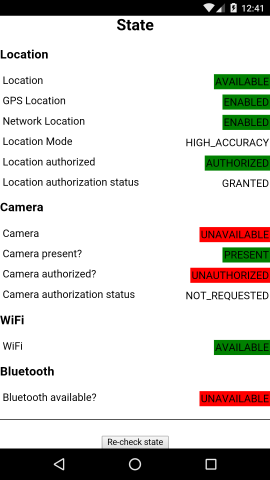
|
|
3666
|
+
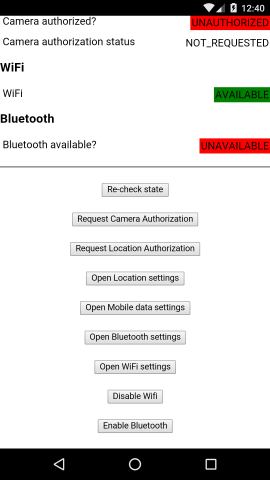
|
|
3667
|
+
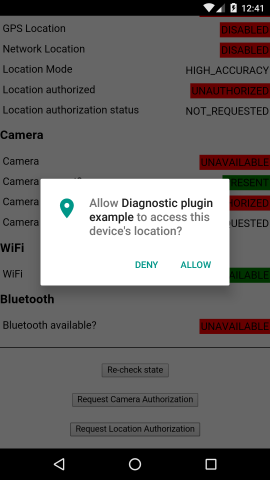
|
|
3668
|
+
|
|
3669
|
+
### iOS
|
|
3670
|
+
|
|
3671
|
+
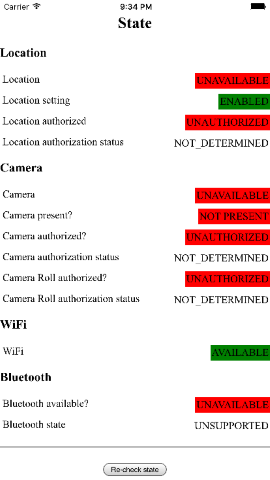
|
|
3672
|
+
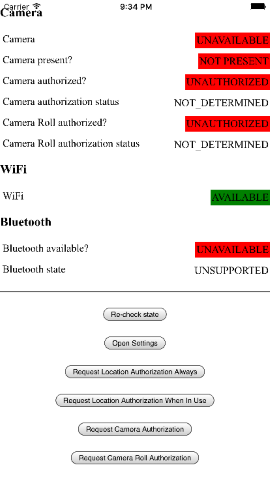
|
|
3673
|
+
|
|
3674
|
+
# Release notes
|
|
3675
|
+
|
|
3676
|
+
See the [CHANGELOG.md](https://github.com/dpa99c/cordova-diagnostic-plugin/blob/master/CHANGELOG.md)
|
|
3677
|
+
|
|
3678
|
+
# Credits
|
|
3679
|
+
|
|
3680
|
+
Forked from: [https://github.com/mablack/cordova-diagnostic-plugin](https://github.com/mablack/cordova-diagnostic-plugin)
|
|
3681
|
+
|
|
3682
|
+
Original Cordova 2 implementation by: AVANTIC ESTUDIO DE INGENIEROS ([www.avantic.net](http://www.avantic.net/))
|
|
3683
|
+
|
|
3684
|
+
Windows 10 implementation by [Mike Dailor](https://github.com/mdailor) / [Next Wave Software, Inc.](http://nextwavesoftware.com/)
|
|
3685
|
+
|
|
3686
|
+
# License
|
|
3687
|
+
================
|
|
3688
|
+
|
|
3689
|
+
The MIT License
|
|
3690
|
+
|
|
3691
|
+
Copyright (c) 2016 Dave Alden / Working Edge Ltd.
|
|
3692
|
+
|
|
3693
|
+
Permission is hereby granted, free of charge, to any person obtaining a copy
|
|
3694
|
+
of this software and associated documentation files (the "Software"), to deal
|
|
3695
|
+
in the Software without restriction, including without limitation the rights
|
|
3696
|
+
to use, copy, modify, merge, publish, distribute, sublicense, and/or sell
|
|
3697
|
+
copies of the Software, and to permit persons to whom the Software is
|
|
3698
|
+
furnished to do so, subject to the following conditions:
|
|
3699
|
+
|
|
3700
|
+
The above copyright notice and this permission notice shall be included in
|
|
3701
|
+
all copies or substantial portions of the Software.
|
|
3702
|
+
|
|
3703
|
+
THE SOFTWARE IS PROVIDED "AS IS", WITHOUT WARRANTY OF ANY KIND, EXPRESS OR
|
|
3704
|
+
IMPLIED, INCLUDING BUT NOT LIMITED TO THE WARRANTIES OF MERCHANTABILITY,
|
|
3705
|
+
FITNESS FOR A PARTICULAR PURPOSE AND NONINFRINGEMENT. IN NO EVENT SHALL THE
|
|
3706
|
+
AUTHORS OR COPYRIGHT HOLDERS BE LIABLE FOR ANY CLAIM, DAMAGES OR OTHER
|
|
3707
|
+
LIABILITY, WHETHER IN AN ACTION OF CONTRACT, TORT OR OTHERWISE, ARISING FROM,
|
|
3708
|
+
OUT OF OR IN CONNECTION WITH THE SOFTWARE OR THE USE OR OTHER DEALINGS IN
|
|
3709
|
+
THE SOFTWARE.
|