copilotoffice 2.0.0 → 2.2.0
This diff represents the content of publicly available package versions that have been released to one of the supported registries. The information contained in this diff is provided for informational purposes only and reflects changes between package versions as they appear in their respective public registries.
- package/README.md +108 -75
- package/dist/electron/main.js +2307 -138
- package/dist/electron/terminal/ipc-relay.js +210 -7
- package/dist/electron/terminal/preload.js +83 -13
- package/dist/electron/terminal/server.js +5961 -940
- package/dist/game.bundle.js +12559 -8482
- package/package.json +13 -7
package/README.md
CHANGED
|
@@ -1,44 +1,58 @@
|
|
|
1
|
-
#
|
|
1
|
+
# Copilot Office 🏢
|
|
2
2
|
|
|
3
|
-
A 2D pixel-art RPG-style game where you walk around a virtual office and interact with AI agents. Each NPC runs a real Copilot CLI session with full coding capabilities — plan tasks, debug code, and orchestrate multi-agent workflows from inside a game.
|
|
3
|
+
A 2D pixel-art RPG-style desktop game where you walk around a virtual office and interact with AI agents. Each NPC runs a **real GitHub Copilot CLI session** with full coding capabilities — plan tasks, debug code, and orchestrate multi-agent workflows from inside a game. You can even bring an agent **online in a Microsoft Teams channel** and drive it from your phone.
|
|
4
4
|
|
|
5
|
-
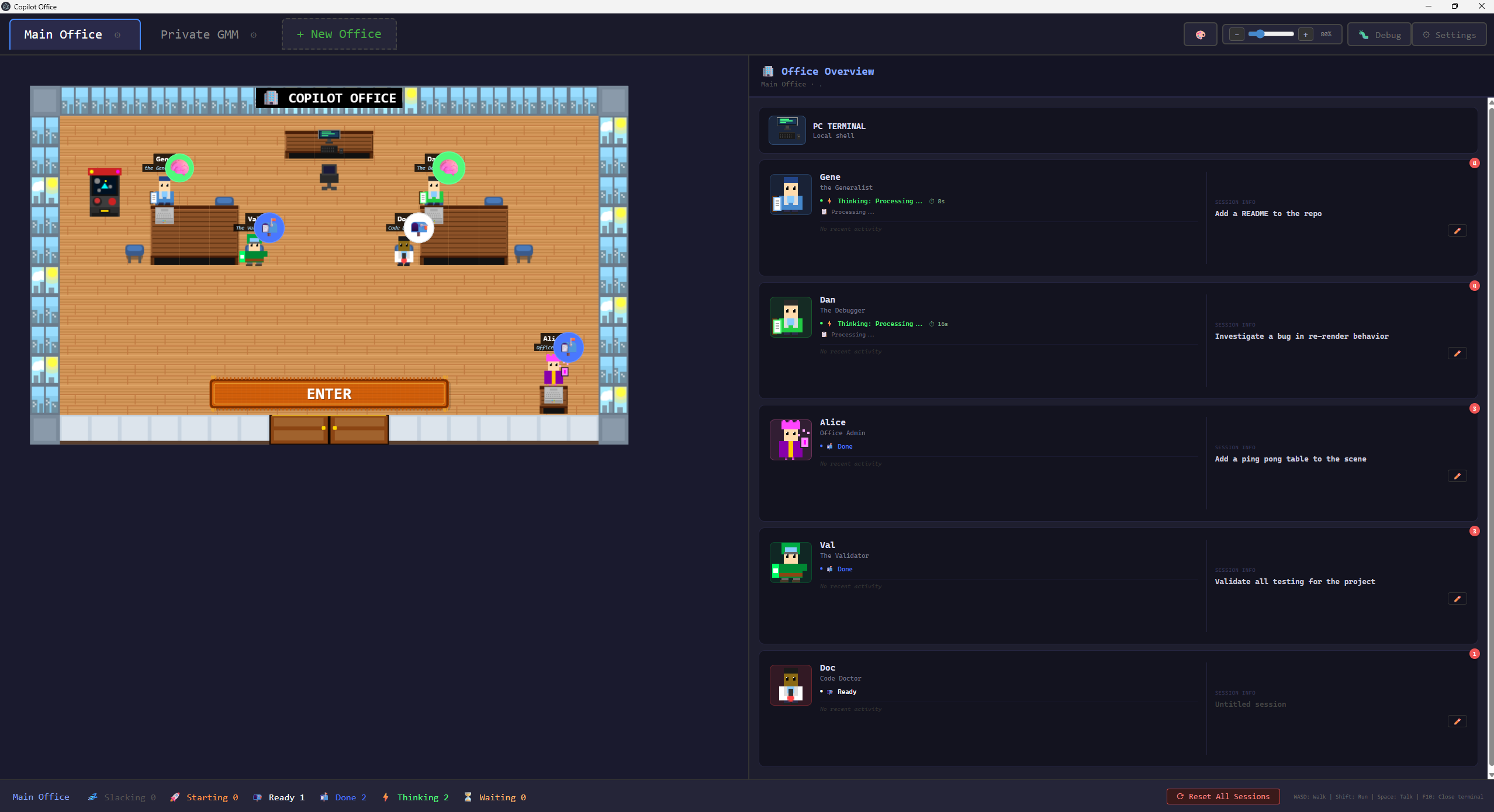
|
|
6
6
|
|
|
7
7
|
## Features
|
|
8
8
|
|
|
9
|
-
- **Pixel-art office environment** —
|
|
10
|
-
- **
|
|
9
|
+
- **Pixel-art office environment** — every sprite is procedurally generated in code; there are no external image assets
|
|
10
|
+
- **Real Copilot agents** — each NPC runs an actual Copilot CLI session, rendered live in an xterm.js terminal
|
|
11
|
+
- **3 active NPC agents by default**, each with a distinct personality:
|
|
11
12
|
- **Gene** (Generalist) — general-purpose coding, debugging, and research
|
|
12
|
-
- **Dan** (Debugger) — bug investigation and root
|
|
13
|
-
- **Alice** (Admin) — has direct access to edit this game's
|
|
14
|
-
- **6 reserve
|
|
15
|
-
- **Arthur (Architect)** appears in fleet v-team offices (
|
|
16
|
-
- **
|
|
17
|
-
- **Multi-office management** — switch between projects with independent agent state per office
|
|
18
|
-
- **Meeting Mode** — private meeting room
|
|
19
|
-
- **Fleet execution** — parallel agent
|
|
20
|
-
- **Real-time status badges** — agent states (
|
|
13
|
+
- **Dan** (Debugger) — bug investigation and root-cause analysis
|
|
14
|
+
- **Alice** (Admin) — has direct access to edit this game's own source code (`workingDir: '.'`)
|
|
15
|
+
- **6 reserve agents** — Azure (Cloud Wizard), Val (Validator), Rex (Deployer), Doc (Code Doctor), Scout (Ranger), and Penny (Accountant) have pre-generated sprites ready to seat at an empty desk
|
|
16
|
+
- **Arthur (the Architect)** — hosts Meeting Mode and appears in fleet v-team offices (can be toggled into the default office in config)
|
|
17
|
+
- **Teams remote agents** — bring any agent online in a Microsoft Teams channel thread; anyone can reply in-thread to drive the agent's terminal session and get answers posted back (feature-flagged)
|
|
18
|
+
- **Multi-office management** — switch between projects with independent agent state and working directories per office
|
|
19
|
+
- **Meeting Mode** — a private meeting room where Arthur decomposes a complex request into a structured, reviewable plan
|
|
20
|
+
- **Fleet execution** — approved plans spin up parallel agent sessions in a dedicated v-team office
|
|
21
|
+
- **Real-time status badges** — agent states (slacking → starting → ready ↔ waiting/thinking) with animated indicators
|
|
21
22
|
- **Toast & OS notifications** — configurable per-event notifications for agent activity
|
|
22
|
-
- **Session persistence** —
|
|
23
|
-
- **Player customization** —
|
|
24
|
-
- **Mini-games** — Pong and Basketball
|
|
23
|
+
- **Session persistence** — offices, seated agents, and terminal sessions survive restarts
|
|
24
|
+
- **Player & sprite customization** — customize your character's appearance and colors
|
|
25
|
+
- **Mini-games** — a built-in Galaxian arcade game (Pong and Basketball are also included behind feature flags)
|
|
25
26
|
- **Hot reload** development mode with file watching
|
|
26
27
|
|
|
27
28
|
## Tech Stack
|
|
28
29
|
|
|
29
|
-
- **Phaser 3** — 2D game framework (sole renderer)
|
|
30
|
-
- **Electron 40+** — desktop
|
|
30
|
+
- **Phaser 3** — 2D game framework (the sole renderer)
|
|
31
|
+
- **Electron 40+** — desktop shell with a Node.js main process
|
|
31
32
|
- **TypeScript** — strict mode throughout
|
|
32
|
-
- **esbuild** — fast bundling for game and Electron code
|
|
33
|
+
- **esbuild** — fast bundling for both the game and Electron code
|
|
33
34
|
- **xterm.js** — terminal emulator for agent conversations
|
|
34
|
-
- **node-pty** — pseudo-terminal
|
|
35
|
+
- **node-pty** — pseudo-terminal that hosts the Copilot CLI
|
|
36
|
+
- **@github/copilot-sdk** — SDK control plane for the `ui-server` terminal backend
|
|
37
|
+
- **ws** — WebSocket transport (SDK runtime + Teams real-time receive)
|
|
38
|
+
|
|
39
|
+
### Terminal backends
|
|
40
|
+
|
|
41
|
+
The terminal server (`electron/terminal/server.ts`) selects a backend via the `COPILOT_TERMINAL_BACKEND` environment variable:
|
|
42
|
+
|
|
43
|
+
- **`node-pty`** (fallback, always available) — spawns the real Copilot TUI directly, one PTY per agent
|
|
44
|
+
- **`ui-server`** (default) — node-pty hosts one `copilot --ui-server` runtime per office and the Copilot SDK attaches over a local port; automatically falls back to `node-pty` when the CLI can't host `--ui-server`
|
|
45
|
+
- **`sdk`** (legacy) — the SDK spawns its own headless runtime over stdio
|
|
35
46
|
|
|
36
47
|
## Getting Started
|
|
37
48
|
|
|
38
49
|
### Prerequisites
|
|
39
50
|
|
|
40
|
-
|
|
41
|
-
|
|
51
|
+
To use the app **in full** you'll need:
|
|
52
|
+
|
|
53
|
+
- **Node.js 18+** and **npm**
|
|
54
|
+
- **GitHub Copilot access** — the agents run the real Copilot CLI, so you must be signed in to a GitHub account with an active Copilot subscription. The CLI runtime ships with the app via the `@github/copilot-sdk` platform package; on first run, authenticate through the CLI as prompted.
|
|
55
|
+
- **(Teams remote agents only) Azure CLI** — the Teams feature acquires Microsoft Graph and IC3 tokens via `az account get-access-token`, so you must have the [Azure CLI](https://learn.microsoft.com/cli/azure/install-azure-cli) installed and be logged in (`az login`) with an account that has access to the target Teams channel. This feature is off by default and enabled in Settings.
|
|
42
56
|
|
|
43
57
|
### Install from npm (global command)
|
|
44
58
|
|
|
@@ -50,7 +64,8 @@ copilotoffice
|
|
|
50
64
|
### Install from source (development)
|
|
51
65
|
|
|
52
66
|
```bash
|
|
53
|
-
|
|
67
|
+
git clone https://github.com/dan1510123/CopilotOffice.git
|
|
68
|
+
cd CopilotOffice
|
|
54
69
|
npm install
|
|
55
70
|
|
|
56
71
|
# Build and run
|
|
@@ -69,21 +84,40 @@ npm run dev
|
|
|
69
84
|
| `E` | Interact with nearby agent or object |
|
|
70
85
|
| `F10` | Close terminal |
|
|
71
86
|
| `Escape` | Close terminal or mini-game |
|
|
72
|
-
| `Ctrl+Shift+N` | New terminal session |
|
|
87
|
+
| `Ctrl+Shift+N` | New terminal session (terminal focused) |
|
|
73
88
|
|
|
74
89
|
## Project Structure
|
|
75
90
|
|
|
76
91
|
```
|
|
77
|
-
|
|
92
|
+
CopilotOffice/
|
|
78
93
|
├── electron/ # Electron main process
|
|
79
94
|
│ ├── main.ts # Window, IPC handlers, hot reload
|
|
80
|
-
│ ├──
|
|
81
|
-
│
|
|
82
|
-
│
|
|
83
|
-
│
|
|
84
|
-
│
|
|
85
|
-
│
|
|
86
|
-
│
|
|
95
|
+
│ ├── nonTerminalIpc.ts # Non-terminal IPC handlers
|
|
96
|
+
│ ├── officeFileStore.ts # Office persistence on disk
|
|
97
|
+
│ ├── cli-bridge.ts # Legacy placeholder (not used at runtime)
|
|
98
|
+
│ ├── terminal/ # Terminal server subsystem
|
|
99
|
+
│ │ ├── server.ts # PTY/SDK owner (forked child process)
|
|
100
|
+
│ │ ├── terminal-backend.ts # Backend selection (node-pty / ui-server / sdk)
|
|
101
|
+
│ │ ├── pty-registry.ts # Live PTY/session bookkeeping
|
|
102
|
+
│ │ ├── agent-viewers.ts # Active-viewer dual-key invariant helpers
|
|
103
|
+
│ │ ├── office-foreground.ts # Foreground session selection (ui-server)
|
|
104
|
+
│ │ ├── session-repair.ts # Session recovery
|
|
105
|
+
│ │ ├── ipc-relay.ts # IPC bridge (renderer ↔ main ↔ server)
|
|
106
|
+
│ │ ├── preload.ts # Context bridge (window.copilotBridge)
|
|
107
|
+
│ │ ├── protocol.ts # IPC message type definitions
|
|
108
|
+
│ │ ├── event-source.ts # Backend-agnostic event source
|
|
109
|
+
│ │ └── events-watcher.ts # Copilot CLI event file parser
|
|
110
|
+
│ └── teams/ # Teams remote agents (main-process service)
|
|
111
|
+
│ ├── teamsService.ts # Orchestrator (register/route/reply lifecycle)
|
|
112
|
+
│ ├── auth.ts # Graph + IC3 tokens via `az`
|
|
113
|
+
│ ├── graphClient.ts # Send channel messages
|
|
114
|
+
│ ├── trouterClient.ts # Real-time receive (WebSocket)
|
|
115
|
+
│ ├── chatsvcClient.ts # Poll fallback receive
|
|
116
|
+
│ ├── messageFilter.ts # Dedup / marker / classify pipeline
|
|
117
|
+
│ ├── dispatchQueue.ts # Per-agent FIFO dispatch
|
|
118
|
+
│ ├── sessionGateway.ts # Adapter over the terminal server
|
|
119
|
+
│ ├── onlineAgentsStore.ts # Online-agent persistence + GC
|
|
120
|
+
│ └── ... # channelLink, marker, chunk, resolvers, IPC
|
|
87
121
|
├── src/ # Renderer process (Phaser + DOM)
|
|
88
122
|
│ ├── main.ts # Entry point — DOM layout, Phaser init, IPC wiring
|
|
89
123
|
│ ├── index.html # HTML host page
|
|
@@ -91,44 +125,31 @@ AgencyOffice/
|
|
|
91
125
|
│ │ ├── BootScene.ts # Procedural sprite generation
|
|
92
126
|
│ │ ├── OfficeScene.ts # Main game scene (layout, NPCs, interactions)
|
|
93
127
|
│ │ └── MeetingScene.ts # Meeting room with Arthur for planning
|
|
94
|
-
│ ├── entities/ # Game entities
|
|
95
|
-
│
|
|
96
|
-
│
|
|
97
|
-
│ ├── sprites/ # Procedural sprite generation
|
|
98
|
-
│ │ ├── SpriteGenerator.ts # Sprite sheet generation
|
|
99
|
-
│ │ └── DirectionalSprite.ts # 4-direction animation utilities
|
|
100
|
-
│ ├── ui/ # UI overlays
|
|
128
|
+
│ ├── entities/ # Game entities (Player, NPC)
|
|
129
|
+
│ ├── sprites/ # Procedural sprite generation + animation
|
|
130
|
+
│ ├── ui/ # DOM overlays
|
|
101
131
|
│ │ ├── TerminalOverlay.ts # xterm.js terminal for agent sessions
|
|
132
|
+
│ │ ├── SeriousTerminalController.ts # Split-pane terminal controller
|
|
102
133
|
│ │ ├── FleetDashboard.ts # Fleet execution dashboard
|
|
103
|
-
│ │ ├──
|
|
104
|
-
│ │ ├──
|
|
105
|
-
│ │ ├──
|
|
106
|
-
│ │ ├──
|
|
107
|
-
│ │ ├──
|
|
108
|
-
│ │ ├──
|
|
109
|
-
│ │ └──
|
|
110
|
-
│ ├── input/ # Keyboard focus management
|
|
111
|
-
│
|
|
112
|
-
│ │ ├── GameInputListener.ts
|
|
113
|
-
│ │ ├── GlobalInputListener.ts
|
|
114
|
-
│ │ └── TerminalInputListener.ts
|
|
115
|
-
│ ├── office/ # Multi-office state management
|
|
116
|
-
│ │ └── officeManager.ts # Office CRUD, agent status tracking
|
|
134
|
+
│ │ ├── SettingsPanel.ts # Settings overlay
|
|
135
|
+
│ │ ├── TeamsSettingsOverlay.ts # Teams feature settings
|
|
136
|
+
│ │ ├── SpriteCustomizerPanel.ts # Player appearance customization
|
|
137
|
+
│ │ ├── GalaxianGame.ts # Galaxian mini-game
|
|
138
|
+
│ │ ├── PongGame.ts / BasketballGame.ts # Mini-games (feature-flagged)
|
|
139
|
+
│ │ ├── NotificationService.ts / NotificationSettingsPanel.ts / ToastNotification.ts
|
|
140
|
+
│ │ └── CameraDragController.ts / DialogBox.ts
|
|
141
|
+
│ ├── input/ # Keyboard focus management (InputManager + listeners)
|
|
142
|
+
│ ├── office/ # Multi-office state management (officeManager.ts)
|
|
117
143
|
│ ├── meeting/ # Meeting mode & fleet orchestration
|
|
118
|
-
│ │ ├── types.ts
|
|
119
|
-
│ │
|
|
120
|
-
│ │ ├── planApproval.ts # Plan review overlay
|
|
121
|
-
│ │ ├── fleetOrchestrator.ts # Parallel agent spawning
|
|
122
|
-
│ │ ├── fleetTracker.ts # Fleet state machine
|
|
123
|
-
│ │ └── fleetVisualizer.ts # Fleet NPC visualization
|
|
144
|
+
│ │ ├── types.ts / planParser.ts / planApproval.ts
|
|
145
|
+
│ │ └── fleetOrchestrator.ts / fleetTracker.ts / fleetVisualizer.ts
|
|
124
146
|
│ ├── layouts/ # Layout system
|
|
125
|
-
│ │ ├── types.ts
|
|
126
|
-
│ │ ├── index.ts # Layout registry
|
|
147
|
+
│ │ ├── types.ts / index.ts # Layout registry + behaviors
|
|
127
148
|
│ │ ├── default/ # Default office layout
|
|
128
149
|
│ │ └── fleet/ # Fleet v-team layout
|
|
129
150
|
│ └── config/ # Static configuration
|
|
130
|
-
│ ├── agents.ts # Agent definitions
|
|
131
|
-
│ ├── depths.ts
|
|
151
|
+
│ ├── agents.ts # Agent definitions, reserve + fleet config
|
|
152
|
+
│ ├── depths.ts / zIndex.ts # Phaser depth + DOM z-index constants
|
|
132
153
|
│ ├── notifications.ts # Notification event settings
|
|
133
154
|
│ ├── meetingPrompt.ts # Meeting coordinator prompt
|
|
134
155
|
│ └── playerCustomization.ts # Player color customization
|
|
@@ -137,23 +158,27 @@ AgencyOffice/
|
|
|
137
158
|
|
|
138
159
|
## Adding New Agents
|
|
139
160
|
|
|
140
|
-
Edit `src/config/agents.ts` to add new NPCs. Six reserve agent slots (Azure, Val, Rex, Doc, Scout, Penny) already have pre-generated sprites — activate one by adding its config to the `AGENTS` array:
|
|
161
|
+
Edit `src/config/agents.ts` to add new NPCs. Six reserve agent slots (Azure, Val, Rex, Doc, Scout, Penny) already have pre-generated sprites — activate one by adding its config, or add a brand-new entry to the `AGENTS` array:
|
|
141
162
|
|
|
142
163
|
```typescript
|
|
143
164
|
{
|
|
144
165
|
id: 'unique-id',
|
|
145
166
|
name: 'Display Name',
|
|
146
|
-
skill: '
|
|
167
|
+
skill: 'general',
|
|
147
168
|
sprite: 'sprite_key',
|
|
148
|
-
color: 0xff0000,
|
|
149
|
-
position: { x: 5, y: 7 },
|
|
150
|
-
greeting: "Hello message when player approaches",
|
|
169
|
+
color: 0xff0000, // Hex color for the procedural sprite
|
|
170
|
+
position: { x: 5, y: 7 }, // Grid position in the office (20×12 tile grid)
|
|
171
|
+
greeting: "Hello message shown when the player approaches",
|
|
151
172
|
description: 'Short description',
|
|
152
|
-
workingDir: 'optional/path',
|
|
173
|
+
workingDir: 'optional/path', // Optional custom working directory
|
|
153
174
|
}
|
|
154
175
|
```
|
|
155
176
|
|
|
156
|
-
Sprites are auto-generated
|
|
177
|
+
Sprites are auto-generated from the color — no image assets needed.
|
|
178
|
+
|
|
179
|
+
> **Tip:** Don't hardcode agent IDs in scene/layout/dashboard logic. Use the named
|
|
180
|
+
> constants exported from `src/config/agents.ts` (`GENERALIST_AGENT_ID`,
|
|
181
|
+
> `DEBUGGER_AGENT_ID`, `ADMIN_AGENT_ID`, `ARCHITECT_AGENT_ID`, `DEFAULT_PLAN_AGENT_IDS`).
|
|
157
182
|
|
|
158
183
|
## Development
|
|
159
184
|
|
|
@@ -168,13 +193,21 @@ npm run build
|
|
|
168
193
|
npm run electron
|
|
169
194
|
```
|
|
170
195
|
|
|
196
|
+
## Testing
|
|
197
|
+
|
|
198
|
+
```bash
|
|
199
|
+
npm run test # Vitest unit/integration suite
|
|
200
|
+
npm run test:coverage # Vitest with coverage output
|
|
201
|
+
npm run test:e2e # Playwright end-to-end tests (runs a build first)
|
|
202
|
+
```
|
|
203
|
+
|
|
171
204
|
## Release channels
|
|
172
205
|
|
|
173
|
-
- **Stable**: `npm i -g copilotoffice` (uses npm `latest` dist-tag)
|
|
174
|
-
- **Beta**: `npm i -g copilotoffice@beta` (uses npm `beta` dist-tag)
|
|
206
|
+
- **Stable**: `npm i -g copilotoffice` (uses the npm `latest` dist-tag)
|
|
207
|
+
- **Beta**: `npm i -g copilotoffice@beta` (uses the npm `beta` dist-tag)
|
|
175
208
|
|
|
176
|
-
For maintainers: pushing to GitHub is not enough for `npm i -g copilotoffice` by name
|
|
177
|
-
|
|
209
|
+
For maintainers: pushing to GitHub is not enough for `npm i -g copilotoffice` by name —
|
|
210
|
+
you must publish to npm. Typical flow:
|
|
178
211
|
|
|
179
212
|
```bash
|
|
180
213
|
npm run build
|